


 Extension
TL;DR: A skill agent approach to better meetings
Use a meeting-centered AI workspace to make meeting management repeatable: decide whether to meet, design the outcome, guide the discussion, capture decisions, and turn the record into project knowledge.
The problem is drift: notes live in one place, actions in another, and context gets re-explained next week. That friction compounds, so keeping transcripts, notes, and project memory together helps teams leave with owners, deadlines, and searchable history.
This guide gives you practical tools for better meetings:
- Agenda prompts
- Decision-log templates
- Action-item tracking
- Facilitation moves for in-room, remote, and hybrid teams
What meeting management skills should every professional master first?
Strong meeting management starts before anyone joins the call. The first skills are simple: name the output, choose the right format, assign clear roles, and set norms that protect focus.
Define the outcome before the invite
A meeting outcome is an observable result, not a topic. "Project update" invites drift. "Approve launch plan and assign two risk owners" creates direction.
Before sending the invite, answer three questions:
- What must be true when we end?
- What decision or commitment is needed?
- What's the smallest group who can produce it?
Put the answer in the calendar description: "Outcome: choose Option A or B and confirm owner, budget, and next milestone." That one line cuts scope creep fast.
Match the format to the goal
Status updates are async. Use live time for judgment, trade-offs, and commitments.
| Meeting type | Best use | Typical duration | Required pre-work | Avoid when |
| Decision | Choose a path | 30 min | Options, criteria | No decision-maker |
| Alignment | Create shared direction | 25 min | Context memo | It's just reporting |
| Problem-solving | Unblock a complex issue | 45 min | Problem statement | Root cause is unknown |
| Design critique | Improve a draft | 45 min | Artifact, feedback lens | Feedback is subjective |
| Interview | Gather insight | 30–60 min | Guide, consent | You need a survey |
| Retro | Improve team process | 45 min | Data, prompts | No changes will follow |
Recurring meetings need one extra test: "What changes each week?" If the answer is "nothing," move it to async notes. For research-heavy sessions, a repeatable scorecard workflow can turn discussion into clearer actions.
Assign roles before the call
The meeting facilitator runs the process. The decision-maker owns the final call. The note-taker captures decisions, action items, and open questions. Contributors bring facts, risks, and options.
Use RACI when work ownership matters: Responsible, Accountable, Consulted, Informed. Use DACI when decisions matter: Driver, Approver, Contributors, Informed. Good meeting facilitation training builds agenda design, group dynamics, and decision hygiene. It's not about charisma.
Set norms people can follow
Default norms should be visible:
- Start and end on time.
- One conversation at a time.
- Devices support the meeting, not side work.
- Pre-reads must be reviewed before joining.
- Blockers are raised early.
- Decisions use the stated method: owner decides, vote, or consent.
Hybrid norms matter too: speak to remote participants first, use chat for links and clarifying questions, and repeat room questions for audio clarity.
Paste this into invites: "Please read the pre-work, join ready to decide, use chat for clarifying questions, and flag blockers before we close."
When should you skip the meeting and work asynchronously?
Good meeting management starts before anyone opens a calendar invite. Use this filter: if there's no real-time disagreement, no decision owner, or no need to build shared context together, don't meet. Work asynchronously instead.
Use a meet-or-not filter
A meeting is justified when the work needs live judgment, commitment, or trust-building. Keep the meeting if you need to handle:
- Trade-offs between cost, time, quality, or risk
- Conflict resolution or sensitive feedback
- A clear decision with the owner present
- Group commitment to a plan
- Rapid iteration where comments would take too long
If the topic is a read-out, update, or FYI, use a written update.
Replace status meetings with async templates
Use this weekly status format:
- Wins: What shipped or moved forward?
- Risks: What could block progress?
- Asks: What help, decision, or resource is needed?
Use this decision memo format:
- Context: What changed?
- Options: What are the realistic choices?
- Recommendation: What should we do?
- Deadline: When must feedback arrive?
Add a default action: "If no objections by Thursday 3 p.m., we proceed." For high-risk silence, name an escalation path: "If Legal or Finance objects, comment and tag the owner."
Audit recurring meetings every month
Review the last four sessions. Ask: What decisions were made? Which action items closed? Who added value?
Then trim attendance by role:
- Deciders: attend live
- Contributors: join only for their topic
- Informed people: read the notes afterward
Keep planning, retros, design reviews, and decision reviews. Remove read-out meetings. Convert them to a doc with comments, a short Loom or audio update, or a 10-minute office-hours slot.
For non-attendees, AI transcription and summaries can capture the key points, decisions, and action items so catching up doesn't create another meeting.
Plan before the meeting so decisions get easier
Good meeting management starts before the invite goes out. A clear plan turns a calendar slot into a decision path: what must be decided, who owns it, what evidence matters, and how follow-up will happen.
Build the agenda from the outcome backward
Use this sequence:
- Write the outcome in one sentence.
- List the decisions needed to reach it.
- Turn each decision into 1–2 discussion questions.
- Add a timebox for each topic.
- Assign prep so people arrive with context.
Put the most important decision first. Energy drops as meetings run long, so don't save the core choice for minute 55. For meetings over 30 minutes, add a 2-minute recap checkpoint every 15–20 minutes: what we decided, what remains open, and who owns the next step. For risk-heavy approvals, borrow the same logic from a risk-first approval workflow: resolve the highest-impact issue before polishing details.
Choose attendees by role, not habit
Invite people because they serve the outcome, not because they were on last week's call.
- Decision-maker(s): the people with authority to approve or reject.
- Subject-matter experts: the people with facts the group needs.
- Operators who will execute: the people who will do the work.
- Affected stakeholders: the people whose teams, customers, or timelines change.
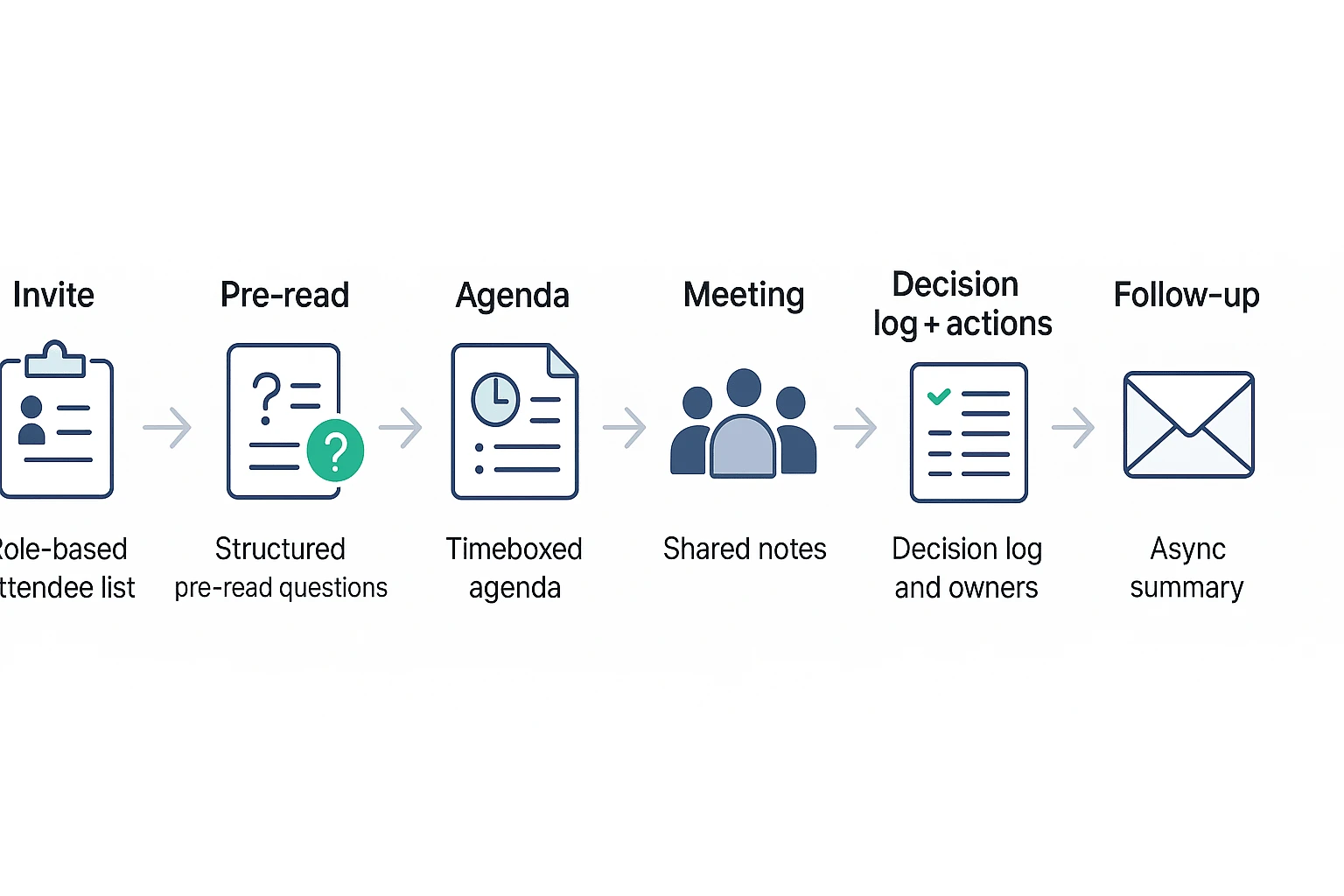
Keep the group as small as the decision allows. Every extra attendee adds coordination cost: more context-setting, more speaking turns, and more follow-up paths. Non-attendees should get shared notes, decisions, and action items after the meeting. A TicNote Cloud Project can store the agenda, transcript, decision log, and follow-up in one searchable workspace.
Send pre-reads with a contract
A good pre-read is short, structured, and built around explicit questions. The contract is simple:
- Read: the linked brief, data, or customer notes.
- Decide: the exact choice expected in the meeting.
- Comment by: a deadline before the meeting starts.
If someone arrives unprepared, don't restart the meeting. Give 3 minutes for silent review or move their input to async comments. Protect the decision window.
Prepare hybrid access and time-zone fairness
Use this checklist before hybrid meetings:
- Test room audio, not just the laptop mic.
- Use one shared doc for agenda, notes, and decisions.
- Set camera and mic norms.
- Enable captions; Web Content Accessibility Guidelines (WCAG) 2.1 — Success Criterion 1.2.2 Captions (Prerecorded) (2018) requires captions for prerecorded audio content.
- Keep a dial-in backup.
- Use inclusive turn-taking, especially for remote voices.
For global teams, rotate inconvenient times. Mark each invite as "must attend" or "can async review," and record when appropriate.
Use this paste-ready agenda template
Outcome: Decision method: owner decides / vote / consensus / recommendation Roles: decision-maker, facilitator, note owner, SMEs, operators Agenda items:
- 0–5 min: context and goal
- 5–20 min: key decision
- 20–35 min: risks and trade-offs
- 35–45 min: actions and owners Pre-work links: Risks/assumptions: Parking lot:
Micro-example: for a sprint planning debrief, the outcome could be "choose the top 3 scope changes for the next sprint." The decision method is "PM decides after engineering risk check." Prep is "review backlog notes and comment by Tuesday 3 p.m." The parking lot holds non-urgent platform ideas.
Facilitate better meetings in the room or online
Good meeting management shows up most during the live conversation. Your job as the meeting facilitator is to make the goal visible, keep people moving, and turn talk into a clear decision or next step.
Start with the outcome and decision rule
Use a 60-second opening script before discussion begins:
"Today we need to decide whether to launch the beta on May 15. We'll spend 10 minutes on customer risk, 10 on engineering readiness, and 10 on launch options. Maya owns the decision, Jordan will capture actions, and we'll use consent: if there's no serious objection, we move forward. We end at 2:30."
Name the decision process early. Common options include:
- Leader decides: one accountable person makes the call after input.
- Consensus: everyone actively agrees. Use it rarely; it takes time.
- Consent: proceed unless someone has a strong, reasoned objection.
- Vote: useful for low-risk choices or prioritization.
- DACI escalation: Driver, Approver, Contributors, and Informed roles clarify who moves the decision forward.
Keep the meeting on track without shutting people down
Timeboxing is a facilitation tool, not a stopwatch trick. Show a visible timer, give a 2-minute warning, and use recap checkpoints: "What did we just decide?" or "What is still open?"
Use a parking lot for useful but off-topic issues. Defer when impact is low, urgency is low, or effort is high. Resolve now when the issue blocks the decision, affects customers, or changes ownership.
To draw out quiet people, try round-robins, 1–2 minutes of silent writing, or "write, then share." Ask directed questions such as, "Priya, what risk do you see from support?" To limit dominant voices, use a stack or queue, say "one more point, then we rotate," or summarize their view and redirect: "I hear the timeline concern. Let's get design's view next."
Use interventions for difficult dynamics
| Meeting dynamic | What to say | Tool to use |
| Scope creep | "Is this required for today's outcome?" | Parking lot |
| Circular debate | "What new evidence would change our view?" | Data check |
| Politeness bias | "Write your real concern before we discuss." | Silent ideation |
| Conflict | "Name the trade-off, not the person." | RACI or DACI |
| Decision avoidance | "Who owns the call, and by when?" | Escalation |
Use a simple escalation ladder: data check → small group review → decision owner call → follow-up meeting. Don't schedule another meeting unless the missing input is specific and owned.
Make hybrid participation equal
Hybrid meetings fail when the room becomes the real meeting. Use remote-first check-ins, treat chat as an equal channel, repeat and label speakers, pause for 5 seconds after questions, and make cameras optional but presence expected.
For standups, ask each person for progress, blocker, and next action. For retros, use silent writing before themes. For client calls, recap decisions live and confirm owners before ending. Meeting facilitation training is worth it when you handle high-stakes decisions, cross-functional conflict, or frequent stakeholder meetings.
Use a meeting workspace to capture transcripts, decisions, and reusable knowledge
For this workflow, we'll use TicNote Cloud as an example meeting workspace. You can adapt the same pattern to your own stack: capture the conversation, keep it inside the right Project, review the behavior signals, and turn the output into better meeting management habits.
Build a project-based record of how meetings actually happen
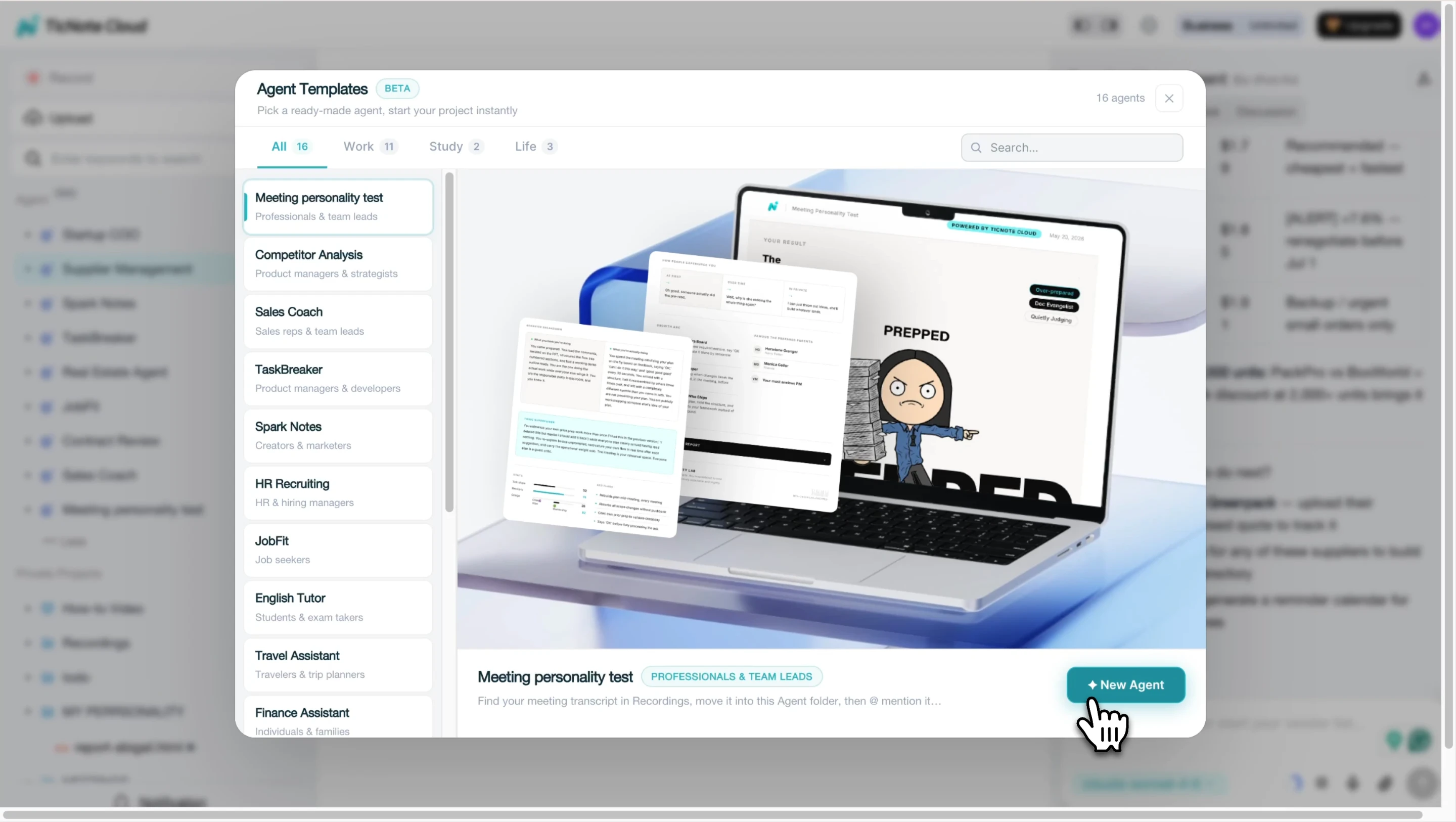
- Add the Meeting Personality Test skill agent. In TicNote Cloud, open the Skill Agent library from Add Agent. Select Meeting Personality Test and add it to your workspace. It's designed to analyze real meeting behavior over time, not self-reported habits.
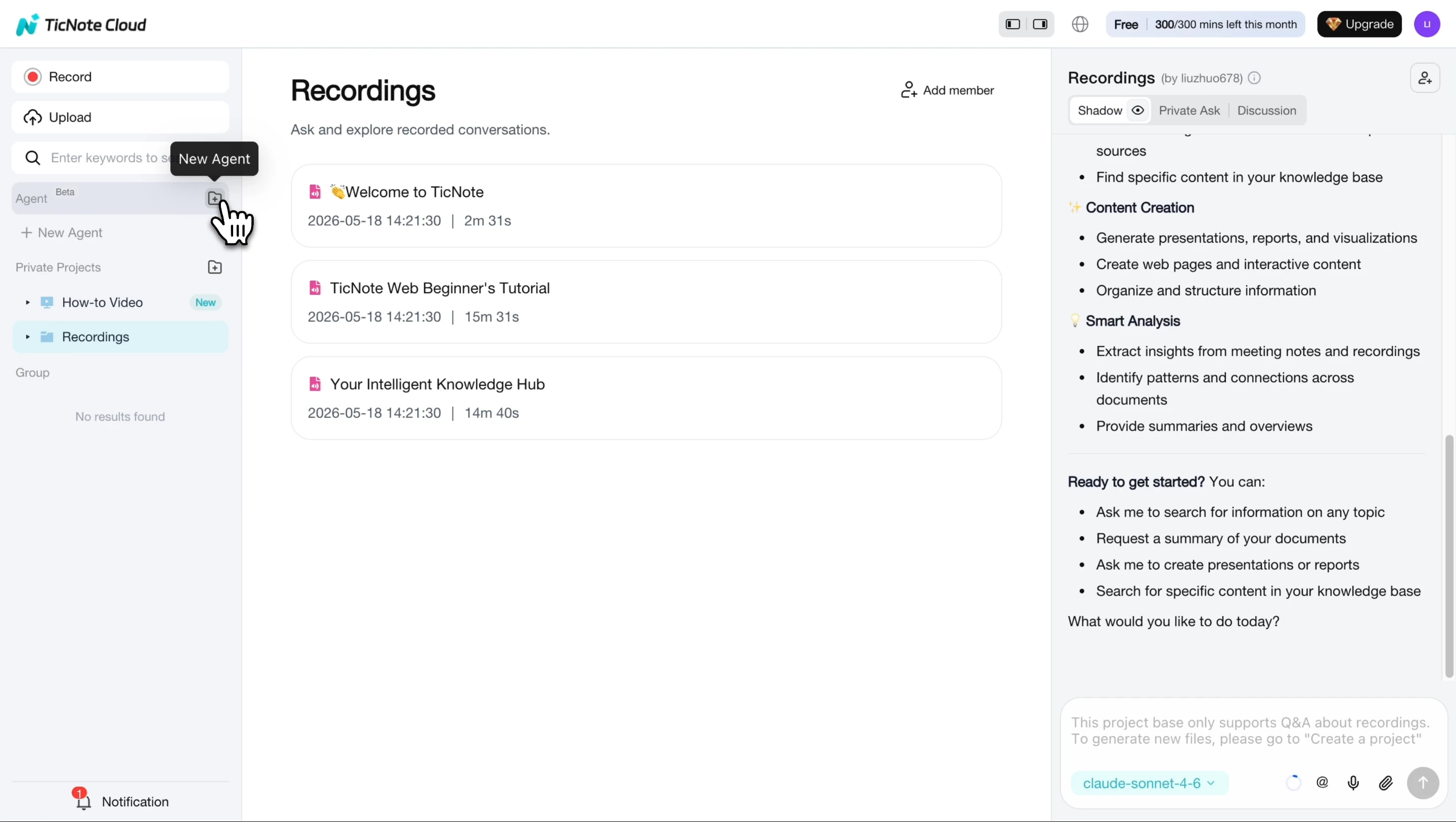
Once it's added, the agent appears in your list and is ready to use.
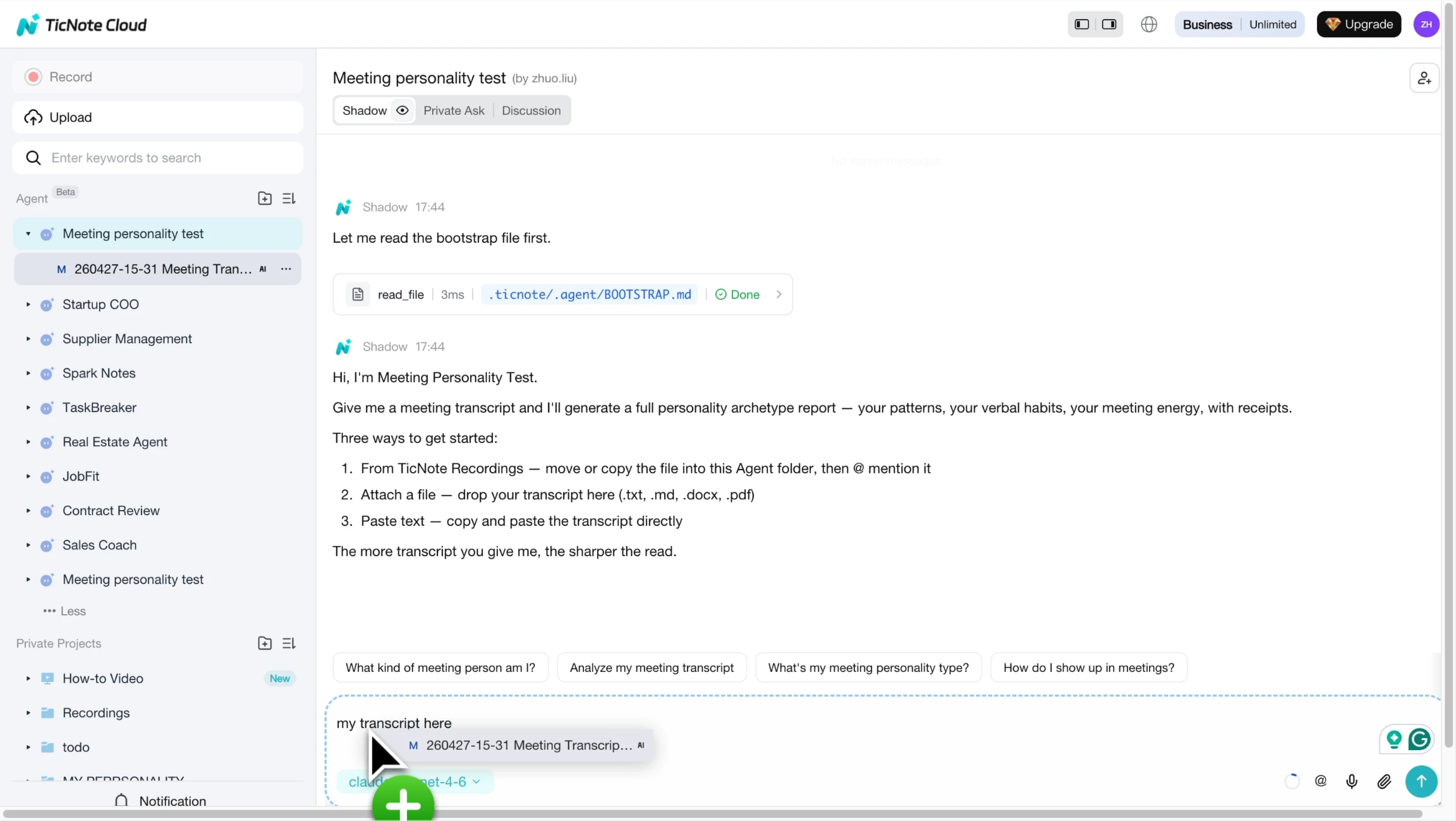
- Upload a meeting recording, audio file, or transcript. Place the file inside the relevant Project, such as "Q2 Product Planning" or "Client Discovery Calls." That keeps the transcript connected to related meetings, documents, research, and follow-up work. Add participant names and genders so the agent can attribute speaking patterns more accurately.
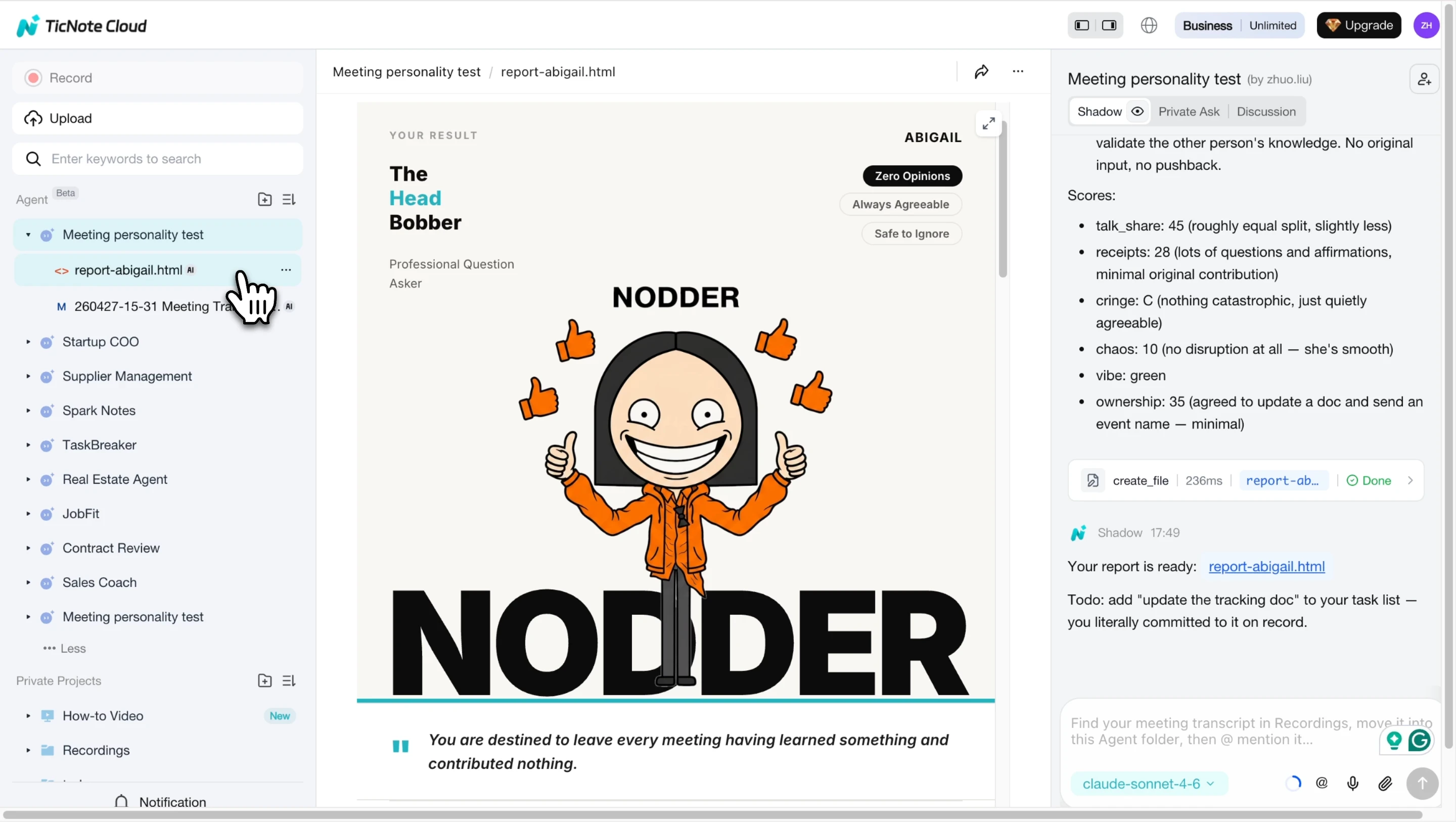
- Review the personality category result. The agent generates an HTML report with a named archetype, mascot-style profile, and quick tags. For meeting leaders, this is useful because it turns vague feedback into visible patterns: over-talking, low ownership, unclear decisions, poor turn-taking, or weak facilitation control.
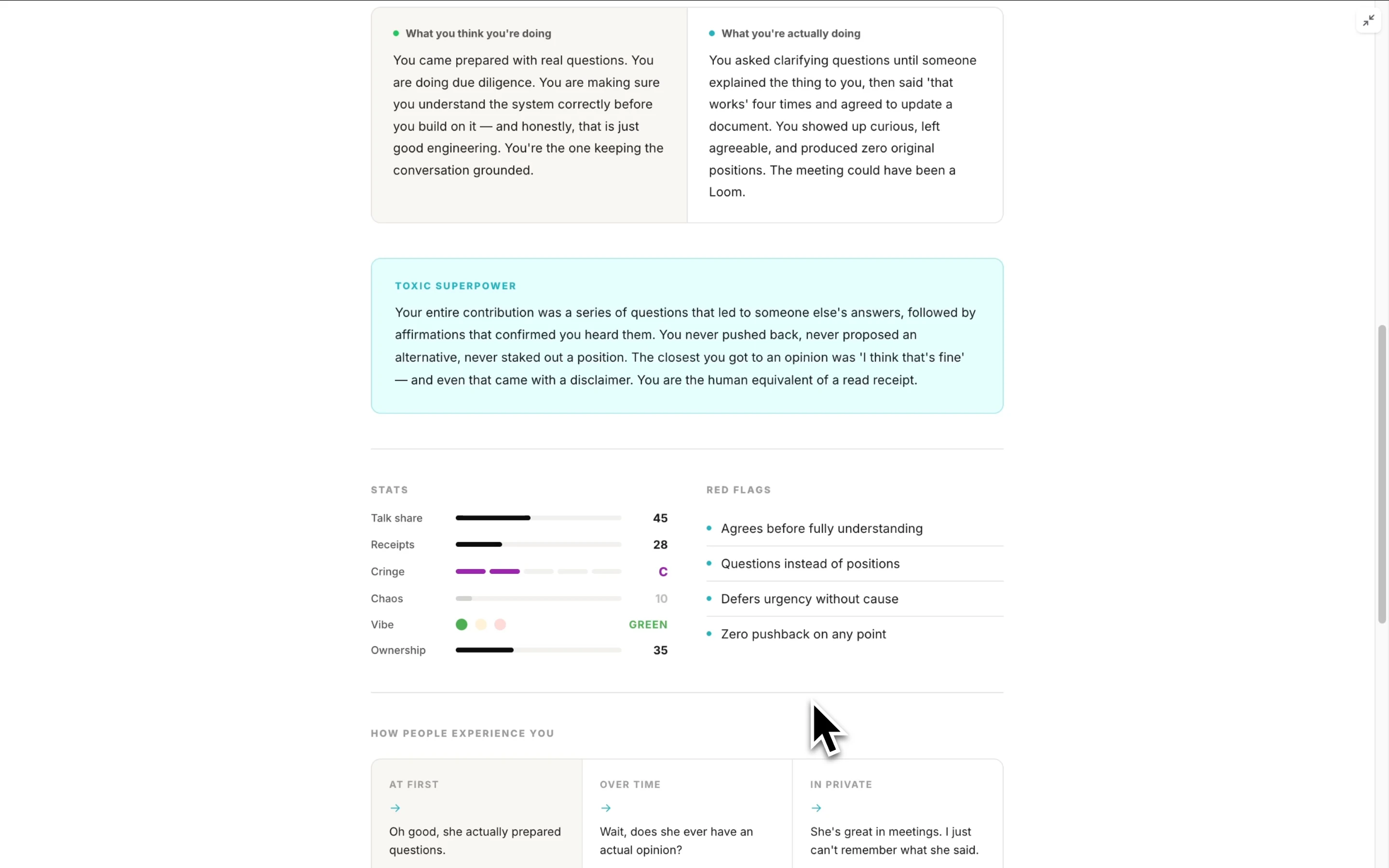
- Read the full personality analysis. Go past the title and review the scored dimensions, red flags, and transcript-based observations. Then choose one or two adjustments for the next meeting. For example: add a 5-minute decision window, rotate who speaks first, timebox updates to 60 seconds, or ask each owner to repeat their commitment before the call ends.
TicNote Cloud also helps beyond one transcript. Its bot-free recording can capture Google Meet, Teams, Zoom, and Lark without adding a meeting bot. Transcripts are editable, so teams can correct names, decisions, and commitments instead of treating AI notes as final truth.
Projects make the bigger difference. You can group meetings, documents, videos, and research in one workspace so context compounds across weeks. Shadow AI can then answer questions across Project files with citations and generate summaries, reports, web presentations, podcasts, and mind maps. Permissions and traceable Shadow operations keep collaboration accountable.
To make the workflow concrete, try TicNote Cloud for free, generate your first meeting summary, then ask Shadow AI to turn the transcript into a report you can share with the team.
Turn every meeting into accountable follow-up
Meeting management fails when the call ends and the memory scatters. Strong follow-up turns raw discussion into decisions, tasks, and reusable knowledge that non-attendees can trust.
Capture decisions with rationale
A decision record is a short log of what was decided, why it was chosen, who made the call, the date, and what would trigger a revisit.
| Field | Template | Example |
| Decision | We decided to... | Prioritize onboarding fixes over dashboard filters |
| Rationale | Because... | Trial users drop before activation, while filter requests affect paid users later |
| Decider | Name or group | Product lead + support lead |
| Date | YYYY-MM-DD | 2026-02-12 |
| Revisit trigger | Reopen if... | Activation does not improve after 30 days |
This format protects the "why," not just the "what." That matters when the same trade-off returns three meetings later.
Write action items that can't hide
Use this formula: Verb + deliverable + owner + due date + dependency + definition of done.
Example: "Draft the onboarding error-message list, Maya, by Friday, dependent on support ticket export, done when the top 10 messages are ranked by frequency."
Run each task through this smell test:
- Does it start with a clear verb?
- Is there one owner, not a group?
- Is the deadline specific?
- Are dependencies named?
- Would two people agree on what "done" means?
Send the follow-up within 2–24 hours
Keep it short enough to fit on one screen:
Subject: Follow-up: Sprint planning, Feb 12 Decisions: Prioritized onboarding fixes for the next sprint. Actions: Maya drafts error-message list by Friday. Leo scopes fix options by Tuesday. Open questions: Do we need design support for empty states? Next meeting: Review scope, Feb 19.
Tag owners directly in Slack or email. If your team handles customer handoffs, connect this follow-up habit to your broader sales enablement stack so decisions move into the tools sellers and account teams already use.
Store notes where people can find them
Meeting memory breaks in personal docs, private folders, and long email threads. Use one shared location instead: Project > Meeting series > Date. Example: Customer interviews > Pricing research > 2026-02-12.
A Project workspace in TicNote Cloud helps connect recurring meetings into themes like "Customer interviews," "Sprint planning," or "Steering committee." AI summaries make the conversation scannable. Editable transcripts let the team fix names, decisions, and context. Shadow AI can then answer, "What did we decide last time and why?" across the full Project, with source context preserved.
Measure whether your meetings are actually improving
Meeting management gets stronger when you measure behavior, not opinions. A short monthly review can show whether your team is making faster decisions, sharing airtime, and finishing the work promised in the room.
Track follow-through with one metric
Action-item completion rate is the share of assigned tasks finished by the due date.
Formula: completed by due date ÷ total action items × 100.
Track it the same way every time. If the rate stays below 80%, the problem is usually one of three things: unclear owners, unrealistic deadlines, or meetings that replace real work instead of enabling it.
Measure decision turnaround time
Time-to-decision is the number of days from first discussion to committed outcome. Log the first meeting where the issue appears, the decision owner, the options considered, and the final call.
Slow decisions point to specific blockers: no decision owner, unclear options, missing pre-read, or too many people trying to approve the same thing.
Review participation and attendance value
Use lightweight signals, not surveillance. Look at talk-time distribution, number of voices heard, and who truly needed to attend versus who only needed the summary.
If one person takes more than 50% of airtime in a collaborative meeting, the meeting facilitator should intervene. Rotate facilitators and note-takers so the team builds shared facilitation skill.
Run a quarterly recurring-meeting audit
Every quarter, score recurring meetings and decide: kill, keep, or change.
| Criterion | Score signal |
| Outcome clarity | The goal is clear before the meeting |
| Agenda quality | Topics match the desired output |
| Decision capture | Decisions include owner and date |
| Follow-up quality | Actions have owners and deadlines |
| Inclusion | Key voices are heard |
| Necessity | The meeting could not be async |
| Attendance value | Each attendee has a role |
When you change a meeting, explain the reason, the new format, and the review date. For a deeper scoring model, adapt ideas from this actionable scoring blueprint.
Ask three pulse questions
Use a 10-second chat poll after important meetings:
- Was the goal achieved?
- Was your time well used?
- What should we change next time?
Pick one improvement for the next meeting. Don't fix everything at once.
AI notes and project workspaces make this easier. In TicNote Cloud, teams can centralize action items, editable transcripts, and decision logs across a meeting series, so improvement data doesn't live in scattered notes.
Final thoughts: build a meeting skill agent habit
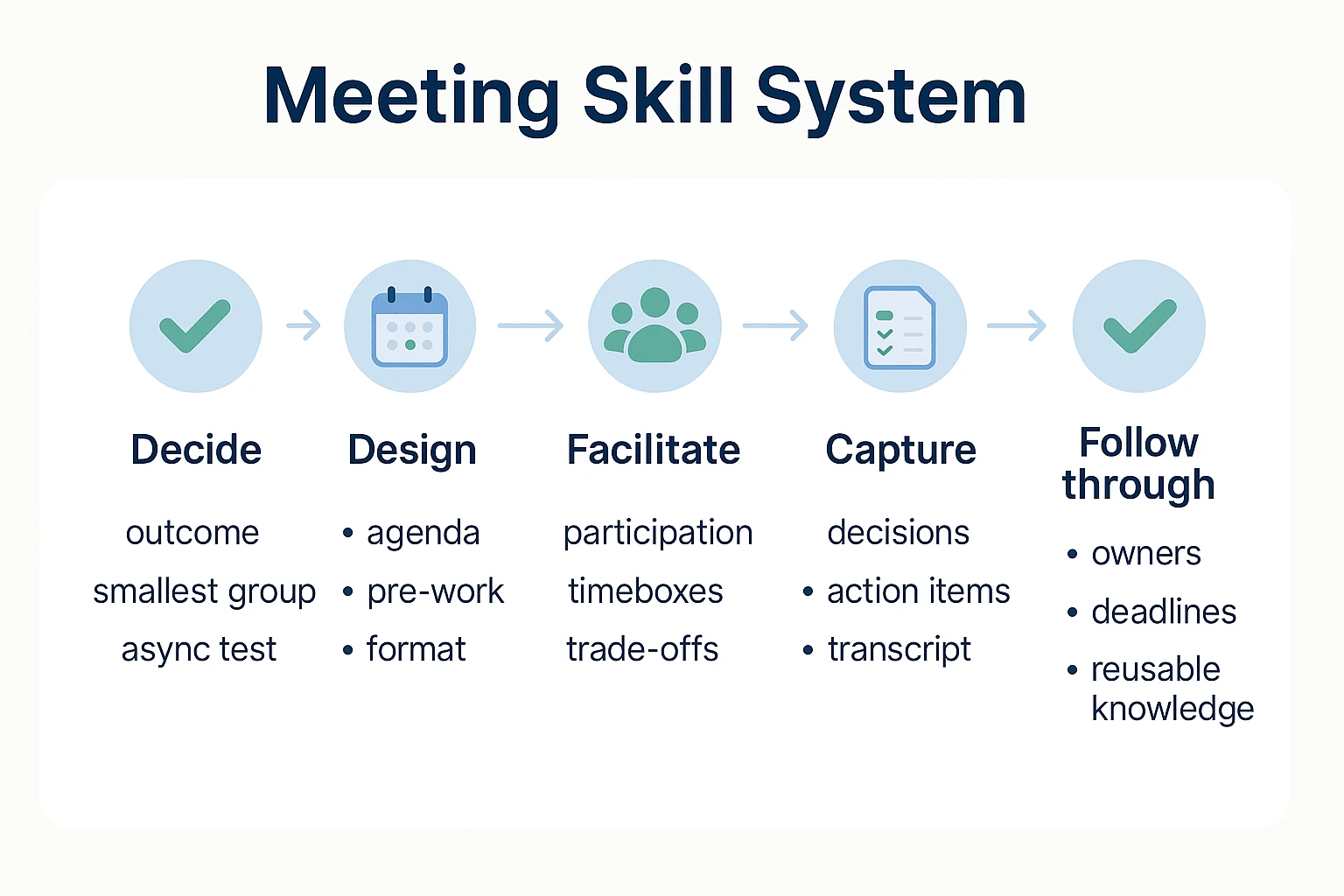
Meeting management improves when it becomes a weekly habit, not a one-time cleanup. Use the same skill agent loop every cycle: decide if the meeting is needed, design the outcome, facilitate the room, capture the record, and follow through.
Start with one lever for two meeting cycles:
- Outcome-first invites
- A visible decision log
- Named owners and due dates
- A 5-minute closeout
Then add the next lever. The compound effect is fewer repeats, clearer decisions, and better meetings with less manual cleanup. The same habit helps beyond meetings too; teams that turn conversations into structured work can also reuse notes for market and competitor research workflows.


