


 Extension
TL;DR: A skill agent approach to better meeting facilitation
To learn how to be a good meeting facilitator, use a before–during–after system and capture outcomes in TicNote Cloud so decisions become usable follow-up.
Meetings fail when decisions, owners, and deadlines disappear after the call. That creates repeat debates and manual note cleanup. TicNote Cloud keeps the record in Projects, so facilitators can turn messy talk into recaps, action items, and reusable knowledge.
Use four rules: set one outcome, protect airtime, confirm decisions out loud, and send a tight follow-up.
How to be a good meeting facilitator in practice
Learning how to be a good meeting facilitator starts with one shift: design for the output, not the conversation. An agenda says what you'll discuss. A facilitation plan says what the group will produce.
Start with the outcome, not the agenda
Define the outcome type first: decision, alignment, ideas, plan, or status. Then turn each agenda item into a concrete output.
For example:
- "Review vendor options" becomes "Choose option A or B."
- "Discuss sprint risks" becomes "Agree the top 3 risks."
- "Plan next steps" becomes "Assign owners and due dates."
Use this success test: "At the end, we will have ___ documented." This works especially well in decision-heavy workflows, like a risk-first review process, where unclear ownership creates delays.
Before you send the invite, check five items: purpose, outputs, roles, pre-work, and follow-up owner.
Stay neutral while guiding the room
The facilitator owns the process, not the content. That means you guide how the group decides without pushing what it should decide.
Use neutral but firm language:
- "Let's hear two more perspectives before we decide."
- "What would change your mind?"
- "I'm hearing X and Y. Is that accurate?"
If you have a stake, name the switch: "I'm stepping out of facilitator mode for 2 minutes to share my view." Then return to process mode.
Make participation balanced and visible
Design airtime before the meeting gets noisy. Use round robins, 1–2 sentence turns, silent writing, or small groups before report-outs.
For hybrid meetings, call on remote people first, use chat-first prompts, and track hand-raise order. If one voice dominates, say: "I'm going to pause here so we can hear from people who haven't spoken." For quiet participants: "Maya, what's one risk or question you see?"
Protect time without shutting people down
Timeboxes are guardrails. Announce them, revisit them, and close each segment with a 20-second checkpoint: decision, next step, or open question.
For off-topic but useful ideas, use a parking lot with an owner and review time. Try: "I'm going to pause you to protect time. Let's capture that and assign when we'll handle it."
What is a meeting facilitator, and what is meeting facilitation?
A meeting facilitator is the person responsible for the process that helps a group think, decide, and act. If you're learning how to be a good meeting facilitator, this role is not about having the loudest opinion. It's about creating conditions where the right people can do the work well.
Make the roles explicit
| Role | Primary responsibility |
| Facilitator | Flow, inclusion, questions, decision process |
| Meeting owner or chair | Topic, business outcome, final decision path |
| Note-taker | Record decisions, risks, and action items |
| Timekeeper | Pace the agenda and flag overruns |
One person can hold two roles, but the group should know that upfront. Meeting facilitation is collaborative; "running the meeting" is often directive. Neither is bad. The key is choosing the right mode.
Use facilitation before, during, and after
- Before: define purpose, outputs, attendees, pre-work, agenda items, and norms.
- During: open clearly, guide discussion, surface options, test consent, and capture decisions.
- After: send the recap, assign owners, update the decision log, set deadlines, and reuse the knowledge later.
Toggle between facilitator and participant
Contribute when you need to clarify facts, explain the process, or name a risk. Step back during ideation and final choice, where your opinion can steer the room.
Use a plain script: "Facilitator hat off for 30 seconds: I have product context to add. Then I'll return to process." In a roadmap prioritization meeting, for example, a product lead may know the customer data best. They can share the data, then ask another decision owner to lead the vote or consent check so expertise doesn't become pressure.
Before the meeting: design outcomes, roles, and a facilitation run-of-show
If you want to know how to be a good meeting facilitator, start before anyone joins the call. A strong facilitator designs the meeting like a small operating system: purpose, people, decision rules, capture spaces, and follow-up paths.
Decide if the meeting should exist
Use this quick test before you send the invite:
- Is this only a status update? Send it async.
- Is one person blocking progress? Hold a 1:1.
- Do 2–4 people need to build something? Run a small working session.
- Do you need real-time sensemaking, trade-offs, or a decision? Meet.
Then run the cost test: list who must attend and what you need from each person. If you can't name their contribution, don't invite them.
Common meeting smells include unclear output, no decision authority, too many observers, missing pre-read, and agenda items that start with "discuss" but don't say what should change.
Assign roles and decision authority
Right-size the room. Name the decision model up front: owner decides after input, consent-based decision, or group vote. Assign four roles: facilitator, decision owner, note-taker or decision logger, and timekeeper. For high-stakes topics, add a co-facilitator to watch tone, chat, and participation.
For remote or hybrid meetings, define access needs early: time zones, captions, camera norms, screen-reader-friendly docs, and a remote-first speaking stack.
Build a timeboxed agenda
Turn every topic into an output. For example, "pricing discussion" becomes "choose pricing test and owner." For strategy meetings, link pre-work such as competitor research workflows so people arrive with data, not opinions.
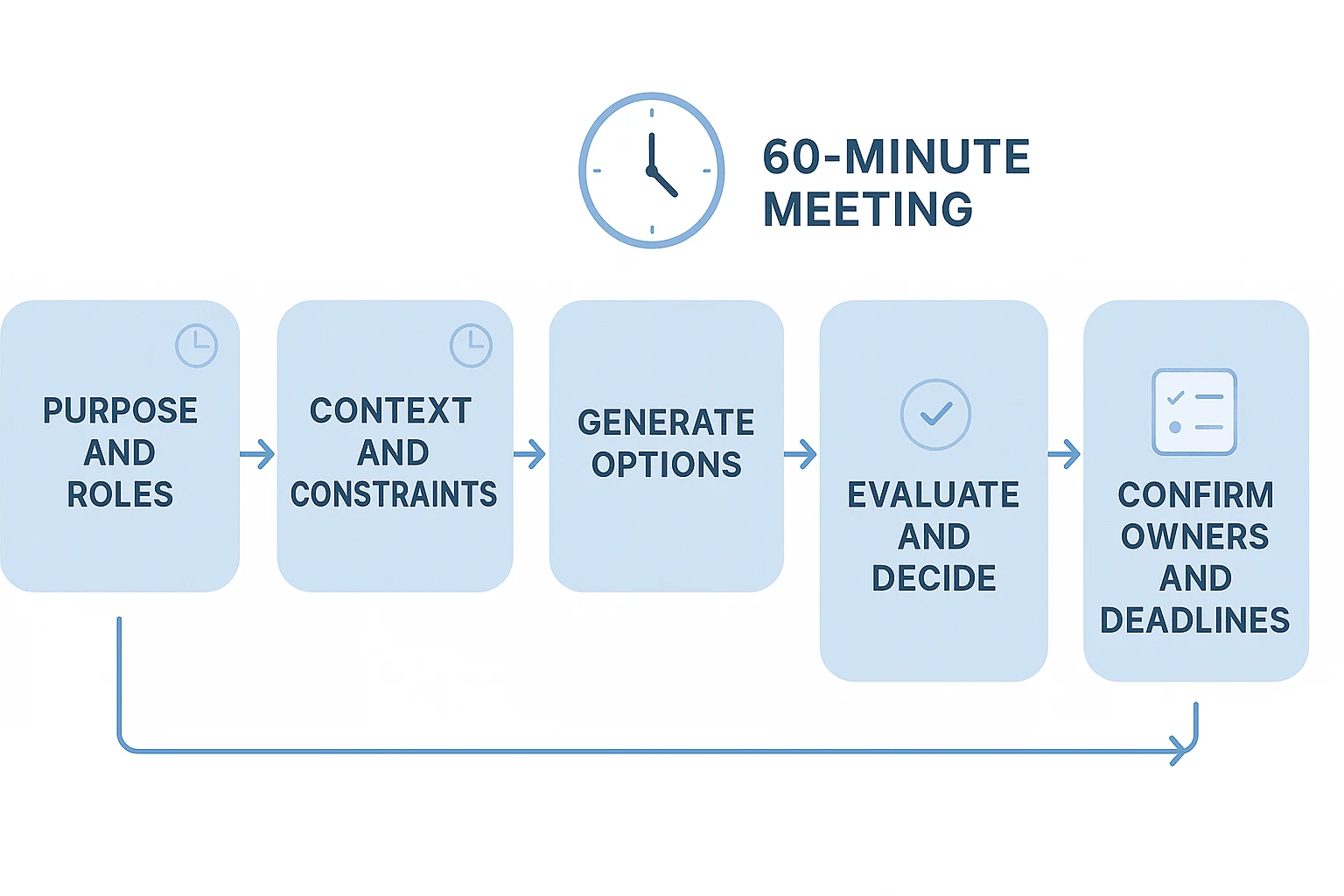
| Item | Outcome | Method | Time | Owner |
| Purpose | Shared goal | Agenda contract | 5 min | Facilitator |
| Context | Constraints named | Brief walkthrough | 10 min | Owner |
| Options | 3–5 choices | Silent brainstorm | 20 min | Group |
| Decision | One path selected | Dot vote + consent check | 15 min | Owner |
| Actions | Owners and dates | Decision log | 10 min | Note-taker |
Prepare the room or link: permissions, screen share, whiteboard, backup plan, and a visible capture space. In TicNote Cloud, you can set up a Project for the meeting series, then use editable transcripts, a decision log, parking lot, and action list as the shared source of truth.
Sample transition lines:
- "We have 20 minutes to generate options. Write first, then talk."
- "I'm parking that so we protect the decision."
- "We have five minutes left. What decision can we safely make now?"
- "Before we close: owner, deadline, and next visible step."
During the meeting: guide discussion without taking over
Learning how to be a good meeting facilitator means leading the process, not owning every answer. Your job is to make the purpose clear, draw out useful input, protect the group's time, and convert discussion into decisions people trust.
Open with a 30-second agenda contract
Start with a short script: "Today we're here to decide ___. By the end, we need ___. We'll use ___ as the decision method, spend ___ minutes per topic, and make space for all voices." Then ask: "Can everyone work with this plan?" That explicit yes creates an agenda contract.
Set the tone early. Amy C. Edmondson — Psychological Safety and Learning Behavior in Work Teams (Administrative Science Quarterly, 1999): Psychological safety is defined as "a shared belief that the team is safe for interpersonal risk taking." Use simple norms: assume positive intent, disagree with ideas, not people, and name concerns early.
Ask questions that move the room forward
Use the right question for the moment:
- Clarify: "What problem are we solving?"
- Expand: "What else could be true?"
- Evaluate: "What tradeoff are we accepting?"
- Commit: "Who owns the next step, by when?"
Avoid anti-questions like "Why didn't you think of that?" Reframe them as "What constraint led to that choice?" Replace "Who's right?" with "What evidence would change our mind?"
Balance voices without embarrassing anyone
For dominant speakers, interrupt the pattern, not the person: "I'm going to stack speakers so we hear from three people before returning." Try a two-turn rule: nobody speaks twice until others have had one chance. You can also assign roles, such as decision owner, timekeeper, and note lead.
For quiet participants, lower the pressure. Use chat-first input, a 60-second silent note, or: "Maya, you're closest to the customer data. What would you add or challenge?"
When the group drifts, label it: "This is useful, and it's outside today's decision." Park it with item, owner, and next touchpoint. For conflict, slow down: name the tension, restate the shared goal, split facts from feelings, then give each side 2 minutes for facts, needs, and proposed next step.
Pick the right facilitation technique
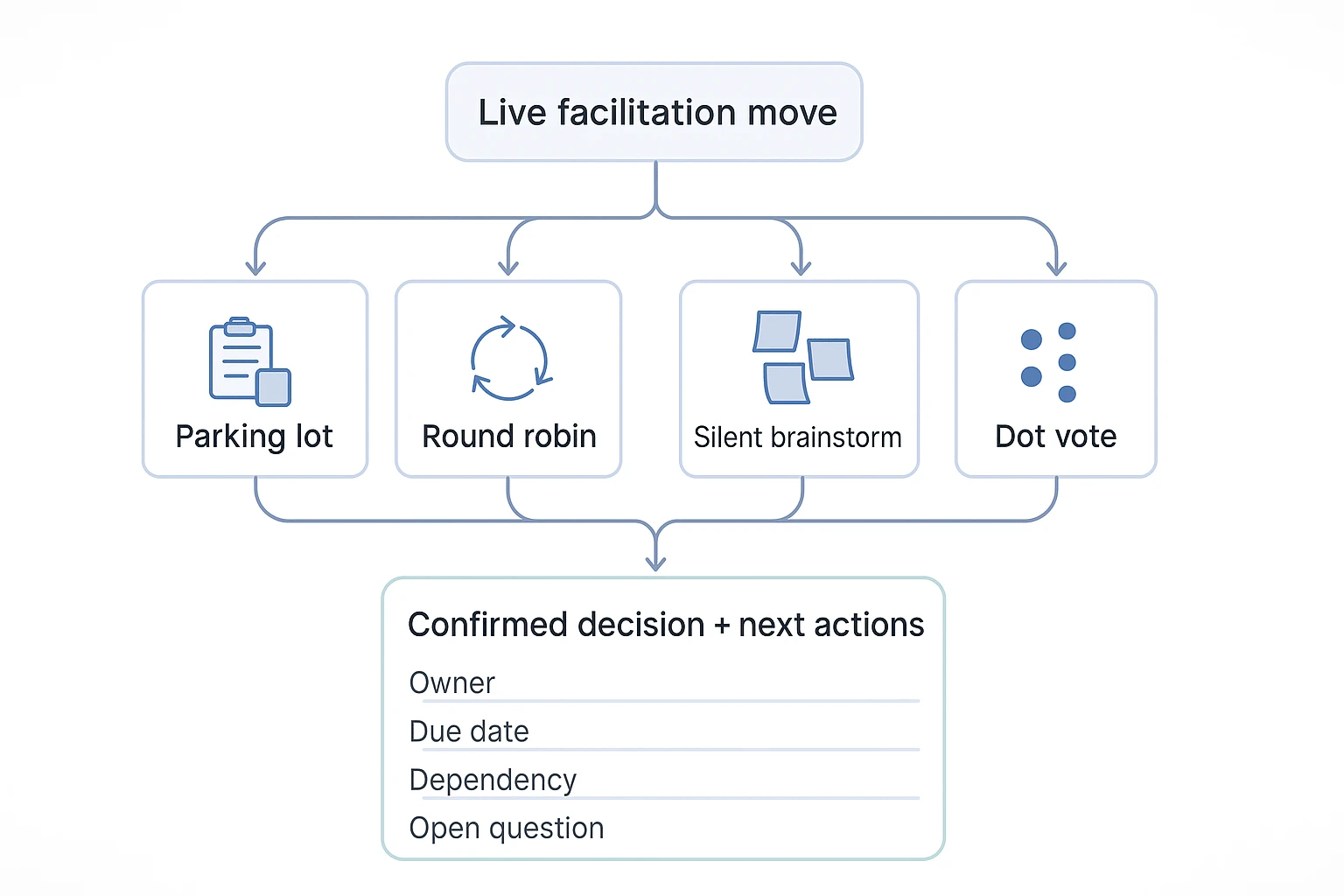
- Parking lot: "Let's capture this without losing the main thread."
- Round robin: "One minute each, pass allowed."
- Silent brainstorm: "Write first, then we'll cluster ideas." This reduces anchoring.
- Dot voting: "Vote against these criteria. This is a signal, not the final decision."
Confirm the decision before moving on
Use this closeout script: "Decision is ___, because ___, with constraints ___." Capture the owner, due date, dependencies, and open questions. Then run a consent check: "Can you live with this? Any blocking concerns?" End with a 2-minute micro-evaluation: plus, minus, change. That feedback improves the next meeting without turning it into another meeting.
After the meeting: turn decisions into action
The fastest way to learn how to be a good meeting facilitator is to compare your intent with what actually happened. The workflow below uses TicNote Cloud as the example, but the same follow-up logic works with any tool that keeps transcripts, decisions, and actions together.
1. Add the Meeting Personality Test skill agent
Inside your TicNote Cloud Project workspace, click Add Agent, open the Skill Agent library, and choose Meeting Personality Test.
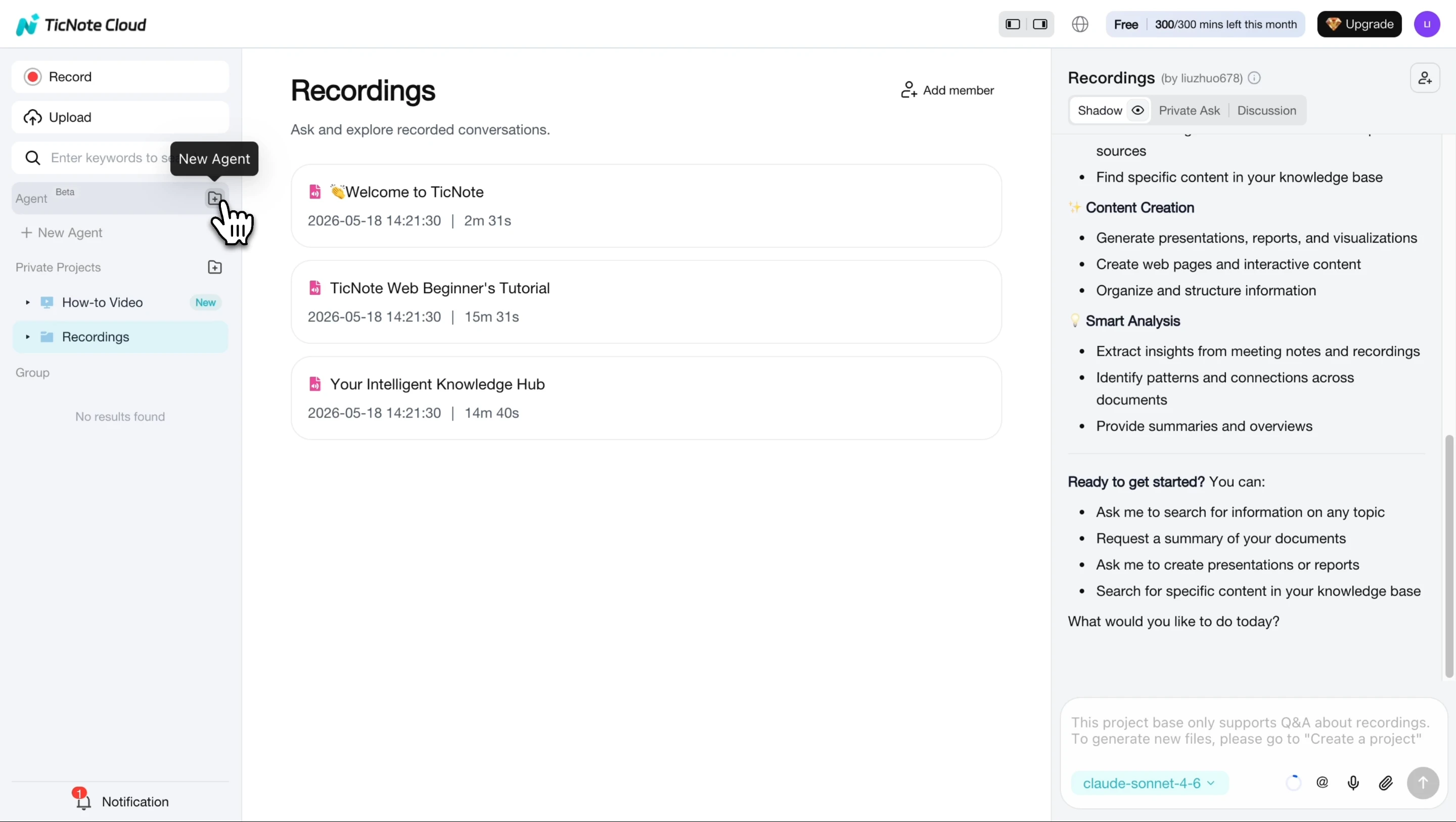
After you add it, the agent appears in your workspace and is ready to use.
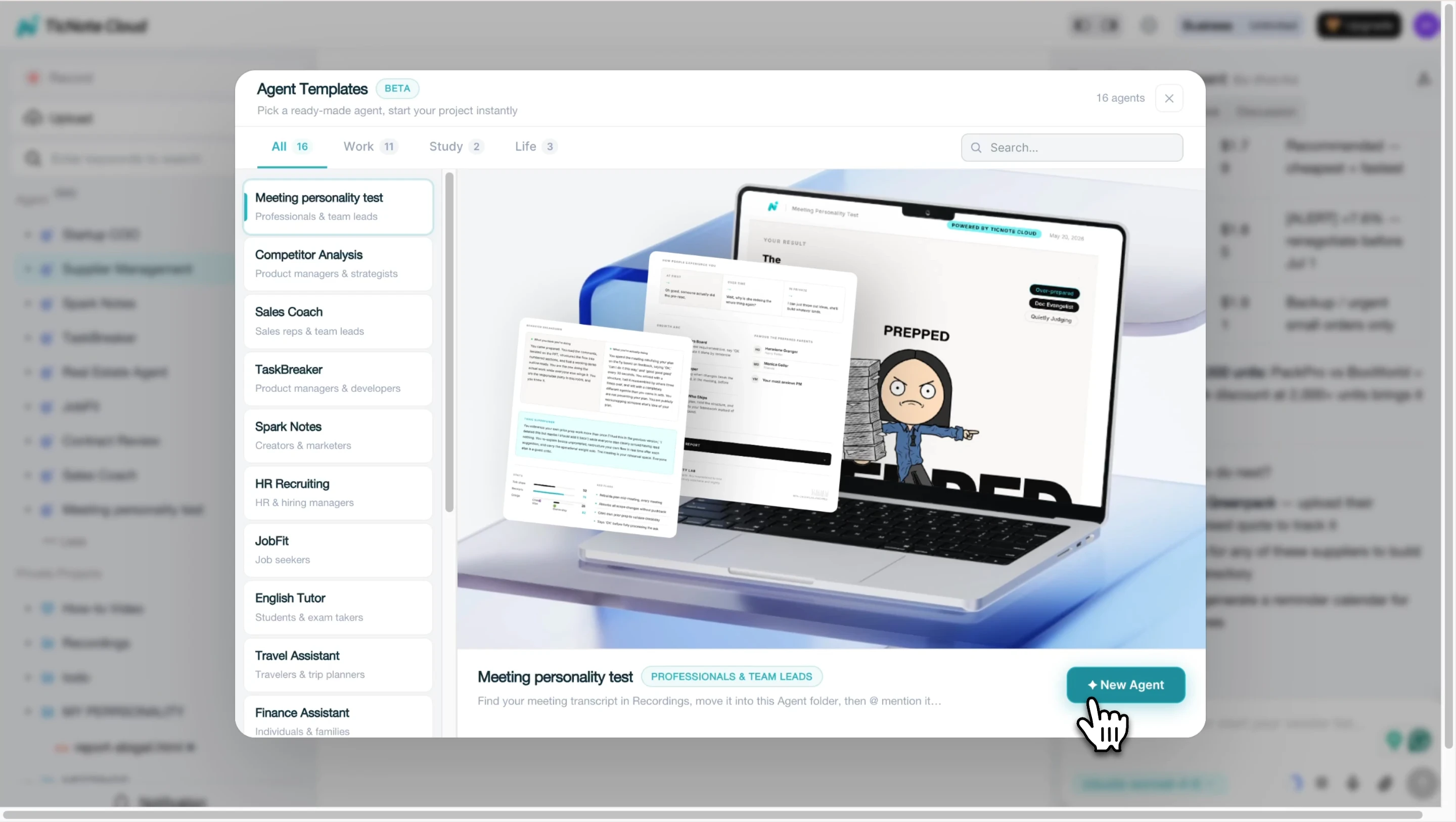
In facilitator terms, it reads what was said, shows patterns like talk share and ownership cues, then creates a shareable report for self-improvement.
2. Upload your meeting recording, audio, or transcript
On web, create or select the Project for that recurring meeting. Attach the audio, video, or transcript, add participant names and genders if needed, confirm language or speakers if prompted, then start the analysis.
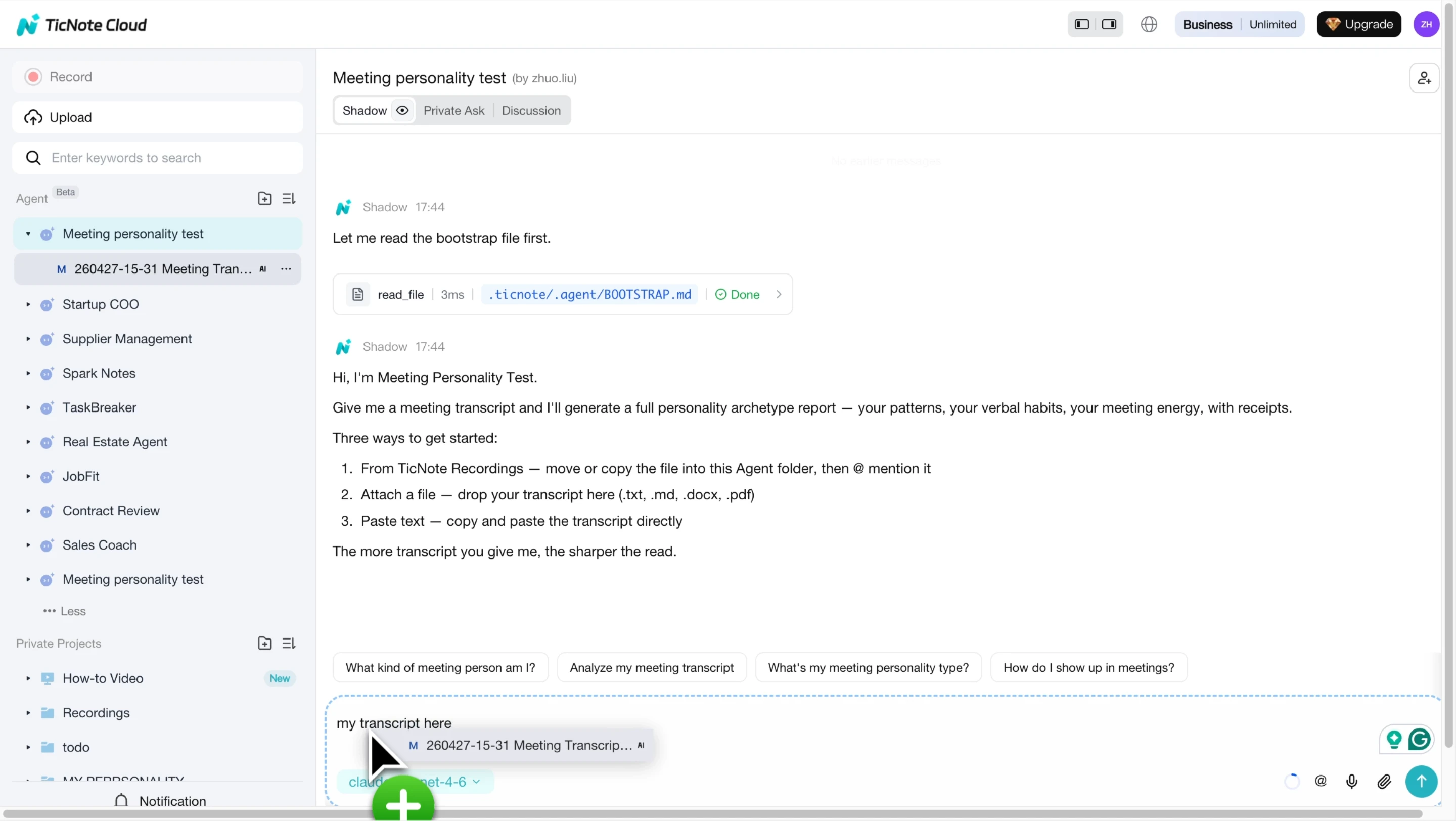
On mobile, upload from phone storage or recordings and send it to the same Project so the report, transcript, and decisions stay connected.
3. Review the personality category result
Open the HTML report and check your archetype, scores, and summary tags.
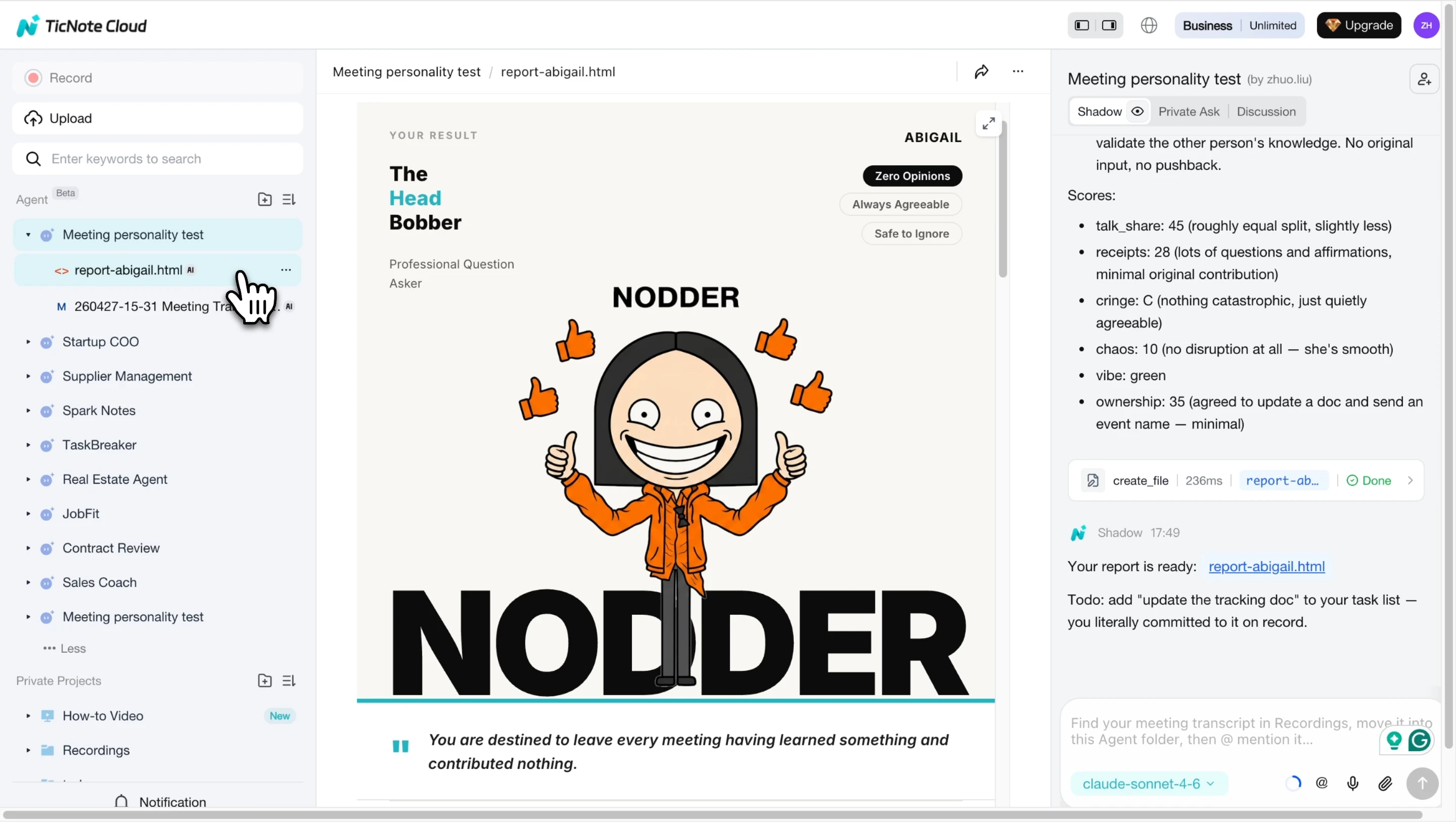
Look for your default meeting mode, clear strengths, and likely failure modes. Then choose one experiment for the next meeting: use stack plus round robin, pause after each topic, or confirm decisions out loud.
4. Read the full personality analysis
Scroll through the full report for behavior stats, red flags, and transcript-based observations.
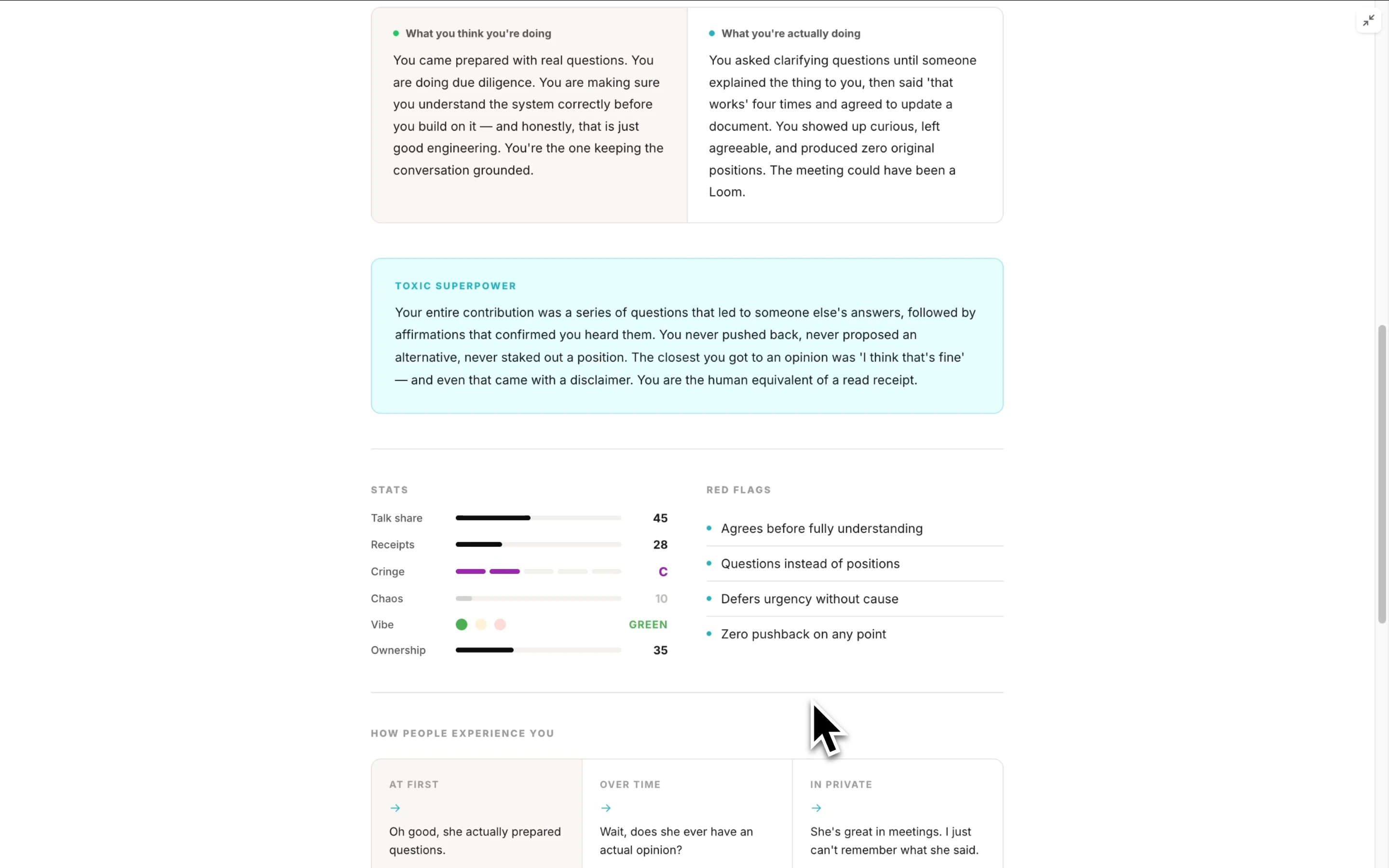
Treat the "toxic superpower" as a cue, not a label. Convert it into a personal checklist: invite quieter voices, name owners, close loops, and separate decisions from discussion.
Facilitation follow-through system
Use this decision log after every meeting:
| Decision | Rationale | Owner | Due date | Risks | Open questions |
| What changed | Why it changed | One person | Date | Key concern | What remains |
Send the recap in this order: outcomes first, actions second, parking lot third, links and context last. Follow a simple cadence: 15 minutes after, send the quick recap; 24 hours after, confirm owners; next meeting, roll open items forward.
TicNote Cloud supports this with editable transcripts, Project workspaces for recurring meeting memory, and Shadow AI for multi-level summaries and one-click deliverables. The same evidence-first habit also helps when you turn source material into tailored documents.
Want to test the workflow? Try TicNote Cloud for Free, or visit the TicNote Cloud homepage for the full workspace overview.
What can TicNote Cloud do that generic meeting notes cannot?
Generic notes capture what someone typed. TicNote Cloud captures the meeting system around it: transcript, decisions, owners, open questions, and reusable project knowledge. For anyone learning how to be a good meeting facilitator, that difference matters most after the call ends.
Capture meetings without adding friction
TicNote Cloud supports bot-free recording, so a visible meeting bot doesn't interrupt the start of a recurring team meeting, client workshop, or research interview. Good facilitation still requires consent, a clear reason for recording, and judgment about sensitive topics. The tool lowers friction; the facilitator sets the norms.
Build memory across a series
One-off notes age fast. A Project workspace can hold transcripts, documents, decisions, and outputs together, which helps facilitators run sprints, steering committees, discovery calls, and research rounds without rebuilding context each week.
A simple Project structure works well:
- Decisions
- Open questions
- Risks
- Artifacts
Teams that run revenue workshops can also connect this style of meeting knowledge to a broader sales enablement stack.
Turn discussion into cited outputs
Shadow AI can answer questions across Project files with citations back to exact meeting moments. That makes recaps, decision briefs, stakeholder updates, retro themes, client-ready synthesis, presentations, podcasts, and mind maps easier to trust because people can verify the source.
Edit the record while memory is fresh
Editable transcripts help teams fix names, numbers, and commitments before details fade. Co-editing, comments, and owner assignment turn the transcript into a working surface, not a read-only archive.
| Scenario | Generic notes | TicNote Cloud workspace |
| Decision-heavy planning | Static summary | Decisions, owners, deadlines |
| Client workshop | Manual cleanup | Cited synthesis and deliverables |
| Research synthesis | Scattered files | Cross-meeting themes |
| Cross-functional alignment | Repeated context | Shared project memory |
Final thoughts: facilitation is a repeatable skill
Learning how to be a good meeting facilitator isn't about charisma. It's a repeatable system: prepare the work, lead the process neutrally, design participation, confirm decisions, and follow through. Think like a skill agent. Your job is to improve one meeting behavior at a time, then reuse what works.
Pick one practice this week:
- Write an agenda with outputs, not topics.
- Use a round robin so quieter voices enter early.
- Close with a decision confirmation script: "We decided X, owner is Y, deadline is Z."
TicNote Cloud supports that habit by capturing decisions, organizing outcomes in Projects, and making meeting knowledge reusable. You can also explore the TicNote Cloud homepage.
Try TicNote Cloud for Free to capture decisions and reuse meeting knowledge without extra busywork.


