


 Extension
TL;DR: Top picks for an AI agent stack for customer service (and what to choose first)
Start with Try TicNote Cloud for Free because the fastest way to improve any AI agent for customer service is cleaner, cited knowledge from real calls. Then add the agent "surface" (chat/helpdesk/voice) that matches your current stack.
Support teams drown in calls, notes, and repeat questions. That mess becomes your AI's training fuel, so answers drift. With TicNote Cloud, you turn conversations into editable transcripts and project knowledge that's easy to verify.
Best for:
- Teams drowning in meetings and call notes
- Zendesk-first support orgs
- Intercom-first SaaS support teams
- Salesforce Service Cloud enterprises
- Cost-sensitive teams needing fast time-to-value
Shortlist preview (why they're here): TicNote Cloud (conversation-to-knowledge + citations), Zendesk AI (native ticket workflow), Intercom Fin (strong in-app automation), Salesforce Einstein (enterprise CRM depth), Freshdesk/Freddy AI (quick rollout), Genesys Cloud CX (voice + routing), NICE CXone (contact center scale), Ada (automation-first deflection).
What to choose first: pick a knowledge + governance foundation (TicNote Cloud) so answers stay grounded, then pick your customer-facing agent layer based on what you already run.
What is an AI agent for customer service (and how is it different from chatbots and agent assist)?
An AI agent for customer service is software that understands what a customer wants, pulls answers from trusted sources, and then takes approved actions to finish the job. It doesn't just chat. It can also update systems, follow policy, and leave a clean audit trail.
Definitions in 3 lines each (AI agent vs chatbot vs agent assist)
- AI agent: Plans and executes multi-step work. It can call tools (APIs) and complete tasks inside guardrails. Example: verify identity → check order status → issue refund → log the outcome.
- Chatbot: Mostly responds with text. It often relies on scripts, buttons, or FAQ pages. It may not be able to change anything in your systems.
- Agent assist/copilot: Helps a human rep work faster. It drafts replies, summarizes calls, and suggests knowledge. The human still clicks "refund" and closes the ticket.
'Resolve vs respond' explained
"Respond" means the system outputs words. "Resolve" means the loop is closed: an action is taken, the customer gets confirmation, and the case is logged.
Here are common "resolve" examples:
- Cancel a subscription: confirm the account → apply the correct cancellation policy → cancel in billing → send confirmation. Human approval is often required for refunds or contract exceptions.
- Change a shipping address: verify identity → check fulfillment status → update address in OMS → notify customer. Human approval may be required if the order is already in transit.
- Create an RMA (return): validate eligibility → generate return label → create RMA in the ticketing/returns tool → set expectations. Human approval may be needed for high-value items or fraud flags.
Where autonomy comes from (tools, policies, knowledge, memory)
An agent becomes "autonomous" only when four layers are solid:
- Tools/integrations: Secure access to CRM, ticketing, billing/OMS, and identity systems. Without tools, the agent can't complete actions.
- Policies: Clear rules for what it can do, limits (like refund caps), and when it must escalate.
- Knowledge: Approved sources with owners and freshness checks. If the content is stale, the agent scales mistakes fast.
- Memory: What context persists (single session vs customer history vs team knowledge). This is where many teams fall short: the most accurate details often live in calls and meetings. Capturing and reusing that conversation knowledge is what makes answers consistent over time—see more patterns in these enterprise AI agent use cases and governance setups.
Next, this article gives you a scoring rubric to compare platforms, a shortlist of top picks, a KPI/ROI framework, a phased rollout checklist, and a risk register you can actually use.
How do customer service AI agents actually work end-to-end?
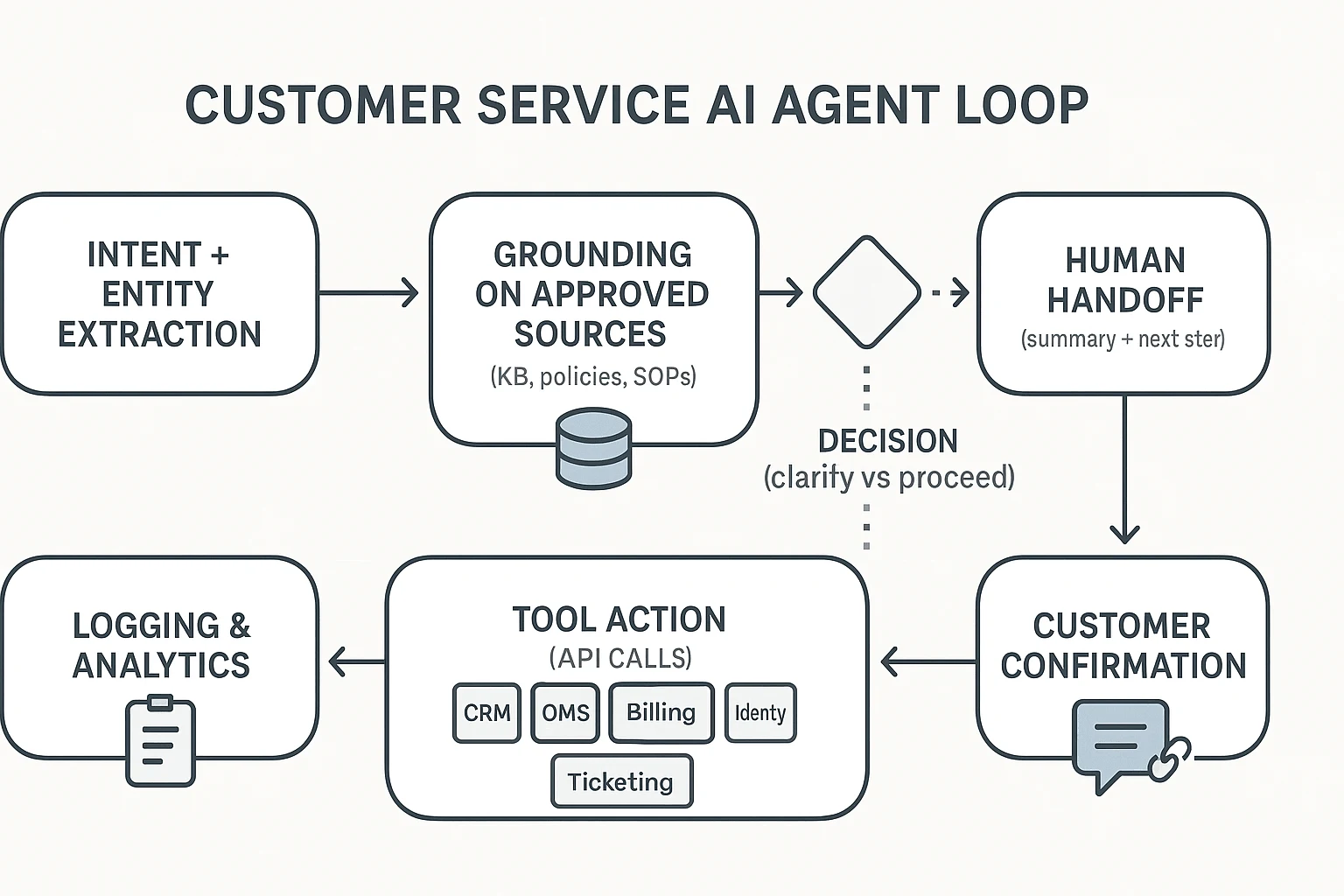
A production AI agent for customer service is usually a pipeline, not one "magic model." It combines retrieval (finding approved answers), reasoning (choosing what to do next), tool-use (calling systems), and QA checks (staying safe and on-policy). That's how teams get consistent results across thousands of tickets.
Typical flow (intent → retrieve/ground → decide → act → confirm → log)
Most teams use the same loop, even if they brand it differently:
- Intent + entities: Detect what the customer wants and pull key details (order ID, product, date, plan). This step reduces back-and-forth.
- Retrieve and ground: Pull answers from approved sources only—KB articles, policy docs, SOPs, and past successful resolutions. Grounding means the agent answers from these sources, not from "memory."
- Decide: Choose the next action: ask a clarifying question, proceed with a workflow, or escalate. Many systems also set a confidence threshold here.
- Act via tools: Execute actions using connected systems (API calls), like checking shipment status or creating a return.
- Confirm: Tell the customer what happened, what's next, and what you need from them. Good agents include links to the exact policy or help doc when it matters.
- Log for audit: Save the summary, tags, disposition, and "why" behind key decisions. This protects QA and speeds coaching.
Tool-use and integrations (CRM, OMS, billing, identity)
Modern agents work through a "skills/tools" pattern: each action is a defined API call with preconditions (what must be true first), inputs (fields like order_id), and outputs (status, next step).
Common mappings look like this:
- CRM: pull customer profile, tier, entitlements, past cases
- OMS (order management): order status, shipping events, returns and exchanges
- Billing: invoices, plan changes, credits, refunds
- Identity: login checks, 2FA resets, verification steps
- Ticketing: create/update cases, add notes, apply macros, set priority
If you're designing the architecture, this is where a clear governance model matters most. The same logic shows up in AI agent architecture and governance patterns, just applied to CX workflows.
Human handoff with context (summary + next step)
A "good" escalation is not a transcript dump. It's a compact handoff that includes:
- customer intent and desired outcome
- what the agent already tried (and results)
- suggested next best action
- key policy or KB references used
Force handoff when risk is high: policy exceptions, sensitive data, high-value accounts, failed identity checks, or low confidence.
Callout: in real deployments, the weak link is usually knowledge freshness and governance, not the LLM.
What should you look for when choosing a customer service AI agent platform?
Most "AI agent" demos look great on day one. The winners stay safe and accurate on day 90. Use one simple scoring rubric across every platform, so teams stop arguing on vibes and start comparing on outcomes.
Score each category 1–5 (1 = missing, 3 = works with gaps, 5 = strong and proven). Weight it to match your risk: Must-haves 40%, Guardrails 35%, Admin 25%. A tool that scores 90% on features but 40% on governance will cost you later.
Must-haves (what drives results)
- Grounded answers (approved sources only): The agent should answer from your allowed sources, not "general knowledge." Look for source allowlists, freshness controls (last updated, re-index cadence), and clear "I don't know" behavior.
- Action-taking (safe tool use): It must take real steps (refund, cancel, update address) with approvals, rate limits, and idempotent actions (retries don't double-charge).
- Omnichannel context: Chat is table stakes. You want email now and a voice plan later, with shared memory across channels.
- Analytics that match CX reality: Track containment vs resolution separately, AHT impact, deflection, escalation reasons, and QA/safety flags.
Guardrails (what keeps you out of trouble)
- Citations for high-risk topics: Require links to the exact KB article, policy page, or transcript snippet used.
- Policy limits: Encode hard rules (refund cap, eligibility windows), plus confidence thresholds that trigger escalation.
- PII handling: Redact sensitive fields (payment info, tokens) before the model sees them, and control where logs are stored.
- Audit trails: You need to know who changed prompts, policies, and knowledge—and replay conversations when things go wrong.
Admin experience (what makes it sustainable)
- Sandboxes + test suites: Run simulated conversations against top intents and edge cases before release.
- Versioning + approvals: Treat KB, tools, and policies like code: staged, reviewed, and reversible.
- Change management: Clear owners, release notes, and fast rollback when a policy update breaks flows.
Agent Readiness Checklist (quick pass/fail)
- Top 20 intents mapped (and top 10 escalation triggers).
- Known KB gaps listed, with owners and update SLAs.
- A source-of-truth list (help center, policy docs, product specs, past tickets, call transcripts).
- API access confirmed for key actions (CRM, order system, billing) with least-privilege scopes.
- Identity/auth defined (SSO, agent roles, customer verification steps).
- Logging plan set (event schema, BI export, QA sampling, incident workflow).
Pick the platform that wins governance first. Then improve accuracy by improving knowledge. Tools like TicNote Cloud fit well as the "conversation-to-knowledge" layer—capturing calls, keeping editable transcripts, and letting teams build cited, permissioned sources that downstream agents can rely on (without pretending to replace your helpdesk).
Top AI agent platforms for customer service (standardized item cards + comparison table)
This shortlist is vendor-neutral, but the picks are decisive. Every platform below is scored with the same rubric, so you can compare quickly and avoid "feature bingo." If you're evaluating an AI agent for customer service, the fastest path is to pick one platform for actions + one system for trusted knowledge.
Scoring rubric (used for every platform)
Each dimension is scored 1–5 (5 is best):
- Resolution capability: Can it take real actions (refund, reset, status change) and run workflows?
- Knowledge trust: Does it ground answers in your sources, show citations, and stay fresh?
- Ops & governance: Testing, versioning, audit logs, permissioning, safe rollout controls.
- Integrations & extensibility: APIs, connectors, webhooks, ecosystem depth.
- Analytics & ROI measurement: Containment, FCR, QA, cost per resolution, reporting.
TicNote Cloud — best-fit foundation for conversation-to-knowledge that feeds agents
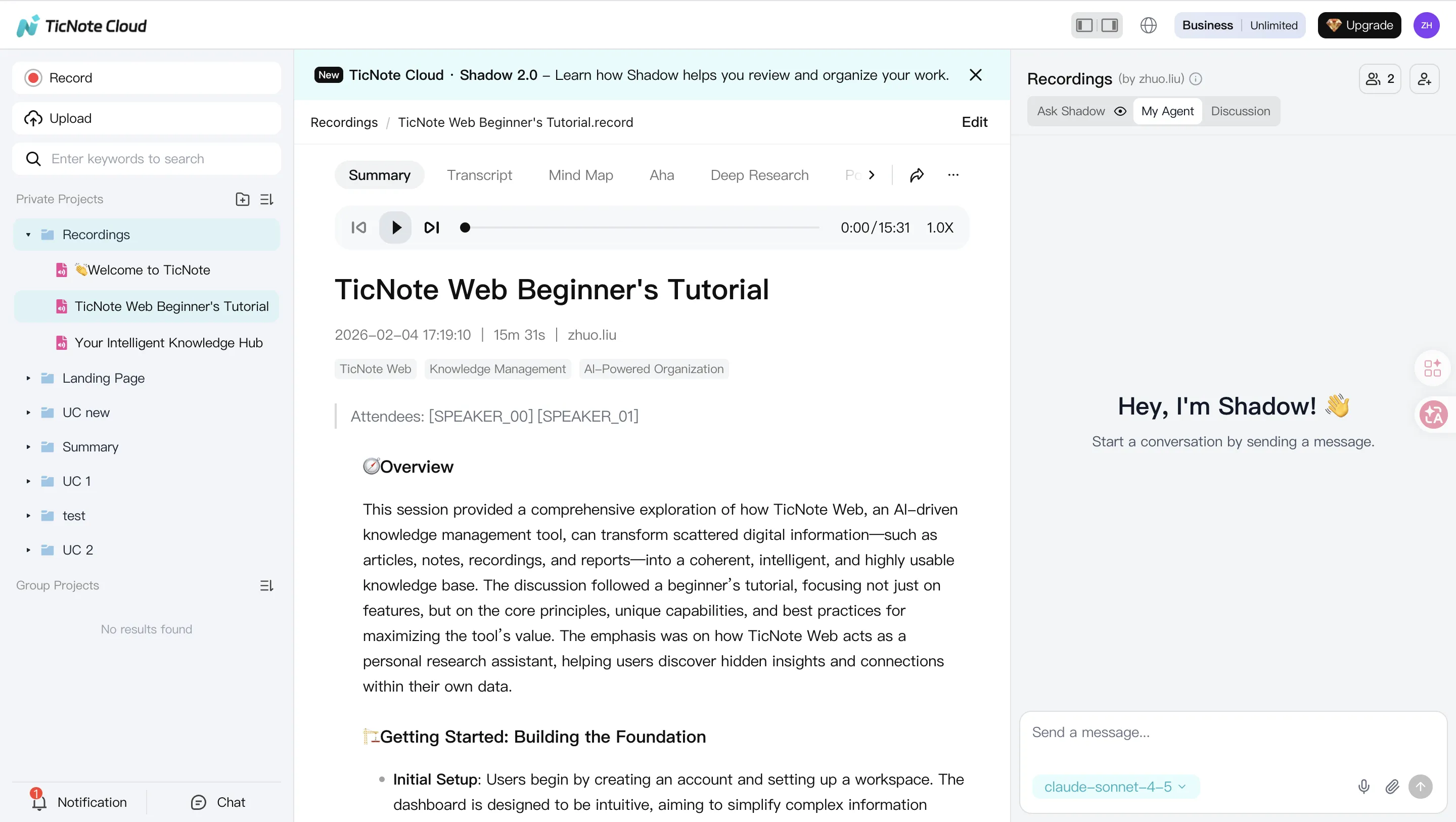
Best for: Teams that need customer calls, escalations, and internal reviews to become usable knowledge.
Scores (1–5): Resolution 2 | Knowledge trust 5 | Ops & governance 4 | Integrations 3 | Analytics 3
Why it wins for CX knowledge:
- Projects as long-context memory: Group calls, tickets, docs, and SOPs by product or queue.
- Editable transcripts: Clean up names, steps, and outcomes so your KB isn't "garbage in."
- Shadow AI cross-file Q&A with citations: Answer "what actually works?" with source links.
- Permissions + traceability: Keep sensitive calls private and track AI operations.
- Exports that fit CX ops: Push clean summaries into KB or SOP formats.
Zendesk — best for Zendesk-native teams needing agent + ticketing workflows
Best for: Support orgs already living in Zendesk who want fast value inside the helpdesk.
Scores (1–5): Resolution 4 | Knowledge trust 4 | Ops & governance 4 | Integrations 4 | Analytics 4
Strengths:
- Strong ticket context, macros, routing, and escalation paths.
- Tight help center and article reuse inside workflows.
- Mature admin controls and team setup for contact centers.
Intercom (Fin) — best for SaaS support with Intercom messaging + help center
Best for: Product-led SaaS teams focused on chat deflection and fast resolutions.
Scores (1–5): Resolution 4 | Knowledge trust 4 | Ops & governance 3 | Integrations 4 | Analytics 4
Strengths:
- Strong messaging UX and automation around common questions.
- Practical model for measuring "resolved" outcomes (often pricing-led).
- Clean handoff to human agents within the same thread.
Salesforce (Agentforce) — best for Service Cloud enterprises with complex workflows
Best for: Enterprises standardized on Salesforce who need CRM-native actions.
Scores (1–5): Resolution 5 | Knowledge trust 4 | Ops & governance 5 | Integrations 5 | Analytics 5
Strengths:
- Deep action taking inside CRM objects and service processes.
- Strong governance and controls for regulated environments.
- Fits complex routing, approvals, and multi-team workflows.
Freshworks — best for mid-market omnichannel teams that need speed
Best for: Teams that want packaged automation and fast deployment.
Scores (1–5): Resolution 4 | Knowledge trust 3 | Ops & governance 3 | Integrations 3 | Analytics 3
Strengths:
- Solid "out of the box" ticket automation and skills.
- Good coverage for common support channels and queues.
HubSpot (Breeze) — best for HubSpot-first orgs aligning CRM + Service Hub
Best for: Companies that run sales + service in HubSpot and want one system.
Scores (1–5): Resolution 3 | Knowledge trust 3 | Ops & governance 3 | Integrations 3 | Analytics 3
Strengths:
- Strong CRM + service alignment for lifecycle context.
- Review the credit model closely to predict true monthly cost.
Sendbird — best for product-embedded messaging at scale
Best for: Apps with in-product chat and high message volume.
Scores (1–5): Resolution 3 | Knowledge trust 3 | Ops & governance 3 | Integrations 4 | Analytics 3
Strengths:
- Strong messaging infrastructure and builder for embedded support.
- Good fit when "channel" is your product UI, not a helpdesk.
Ada — best for high-volume automated support with no-code + handoff
Best for: Teams pushing for high containment with safe escalation.
Scores (1–5): Resolution 4 | Knowledge trust 4 | Ops & governance 4 | Integrations 4 | Analytics 4
Strengths:
- No-code automation paths for common intents.
- Strong human handoff and routing patterns.
Normalized comparison table
| Platform | Channels (chat/voice/email) | Actions/Tool-use | Knowledge grounding/citations | Analytics/KPIs | Deployment model | Integrations | Security/Compliance notes | Pricing model | Best fit size |
| TicNote Cloud | Voice (calls/meetings capture), docs (exports to chat/email stacks) | Limited direct actions (feeds agents via KB/SOP outputs) | Strong cross-file answers with citations | Project-level usage and outputs (pair with helpdesk KPIs) | Cloud | Notion, Slack + file exports | Private by default; operations traceable; GDPR-aligned (validate) | Free + tiered subscription | SMB to enterprise (knowledge-heavy teams) |
| Zendesk | Chat, email, messaging; voice via add-ons/partners | Strong ticket/workflow actions | Strong with KB linkage | Mature CX reporting | Cloud | Large app marketplace | Enterprise controls vary by plan | Seat-based + add-ons | Mid-market to enterprise |
| Intercom (Fin) | Chat/messaging; email; limited voice via partners | Strong for in-thread actions | Strong when help center is clean | Good deflection/resolution reporting | Cloud | Broad SaaS ecosystem | Standard SaaS controls | Often resolution-based | SMB to mid-market SaaS |
| Salesforce (Agentforce) | Omnichannel via Service Cloud | Deep CRM-native actions | Strong with Salesforce knowledge | Deep analytics stack | Cloud (enterprise) | Very strong ecosystem | Strong governance options | Enterprise contract | Enterprise |
| Freshworks | Omnichannel (varies by suite) | Strong ticket automation | Moderate (depends on KB hygiene) | Solid standard dashboards | Cloud | Common SaaS connectors | Standard SaaS controls | Tiered subscription | SMB to mid-market |
| HubSpot (Breeze) | Chat, email, forms; voice via partners | Moderate (CRM-centric) | Moderate | Good lifecycle reporting | Cloud | Strong marketplace | Standard SaaS controls | Credits + tiered | SMB to mid-market |
| Sendbird | Chat/messaging (embedded), omnichannel messaging | Moderate (customizable) | Moderate (depends on setup) | Moderate | Cloud APIs/SDKs | Developer-first | Depends on implementation | Usage-based | Mid-market to enterprise apps |
| Ada | Chat/messaging; email; voice via partners | Strong automation + handoff | Strong with maintained content | Strong bot analytics | Cloud | Broad connectors | Standard SaaS controls | Subscription (varies) | Mid-market to enterprise |
Compare & decide: shortlist 2–3 tools, then run a 2-week pilot. Keep scope tight (top 10 intents). Use the KPI framework later in this post to judge winners. For teams that need the "missing layer" of call-to-KB reuse, start with a knowledge foundation first—see how all-in-one AI workspaces turn conversations into reusable assets before you lock in your agent stack.
How to build trustworthy AI agent knowledge from conversations (step-by-step example)
The steps below are demonstrated using TicNote Cloud as an example. The goal is simple: turn messy calls and meetings into clean, governed knowledge that any customer service AI agent can reuse safely.
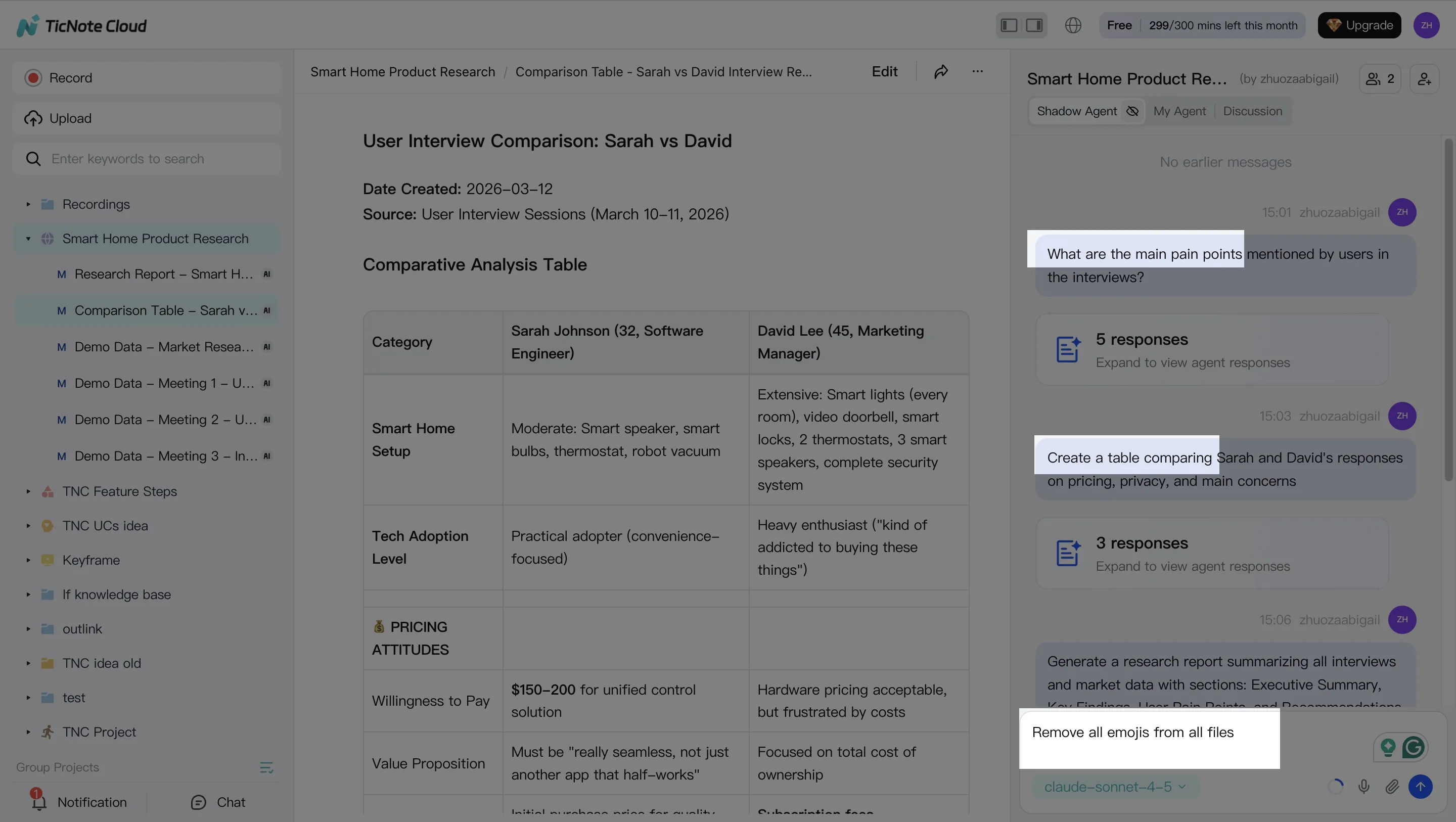
1) Create a Project and add content
Start with a queue-level Project, like "Returns & Refunds" or "Login Issues." One Project should map to one policy set and one owner. That keeps decisions clean.
In the TicNote Cloud web studio, open or create the Project. Then add real sources: call recordings, QA sessions, escalations, and the docs your team already trusts (policy PDFs, macros, troubleshooting runbooks).
Add files in two ways:
- Direct upload from the file area, so each source lands in the right folder.
- Upload from the Shadow AI panel using the attachment icon, then tell Shadow where to store it. This keeps sources linked to the answers later.
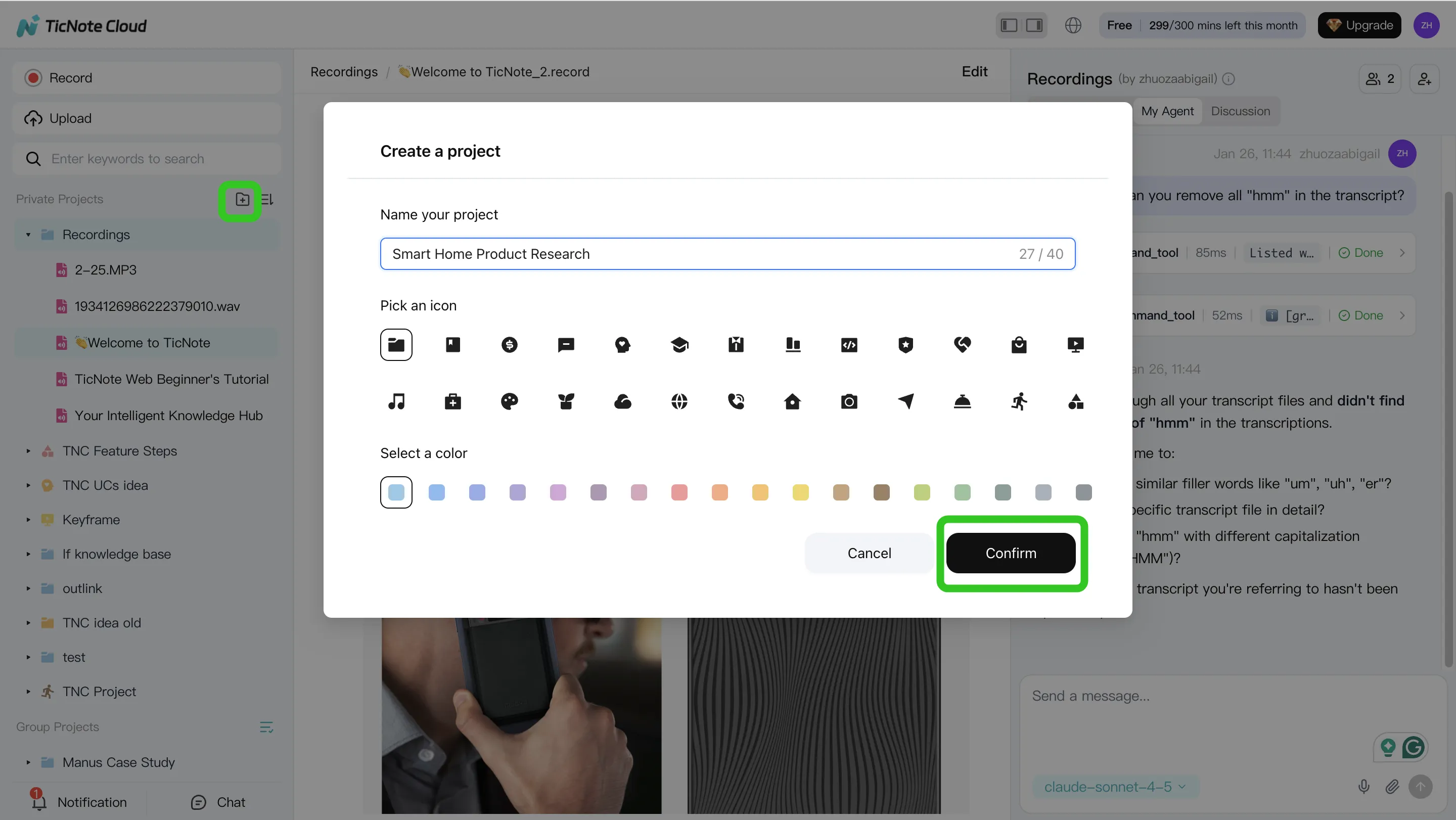
2) Use Shadow AI to search, analyze, edit, and organize content
Now use Shadow AI (right side of the screen) to mine the Project for what matters in CX:
- Recurring intents (what customers ask for)
- Edge cases (what breaks the normal flow)
- Exact policy language (the words your team must follow)
Ask focused questions like "List the top reasons for refunds" or "Find the steps that solved login failures." For trust, keep outputs grounded. Require citations back to the transcript segments or documents so a reviewer can verify fast.
Then clean the raw inputs. Use editable transcripts to fix product names, SKUs, feature terms, and step order. Add short notes for exceptions (VIP customers, fraud flags, regional rules). A small cleanup here prevents a lot of wrong answers later.
Finally, organize the knowledge so it's usable:
- Group by intent (refund, exchange, missing package)
- Tag by customer type (new, paid, enterprise)
- Note required systems and actions (CRM update, billing tool, password reset)
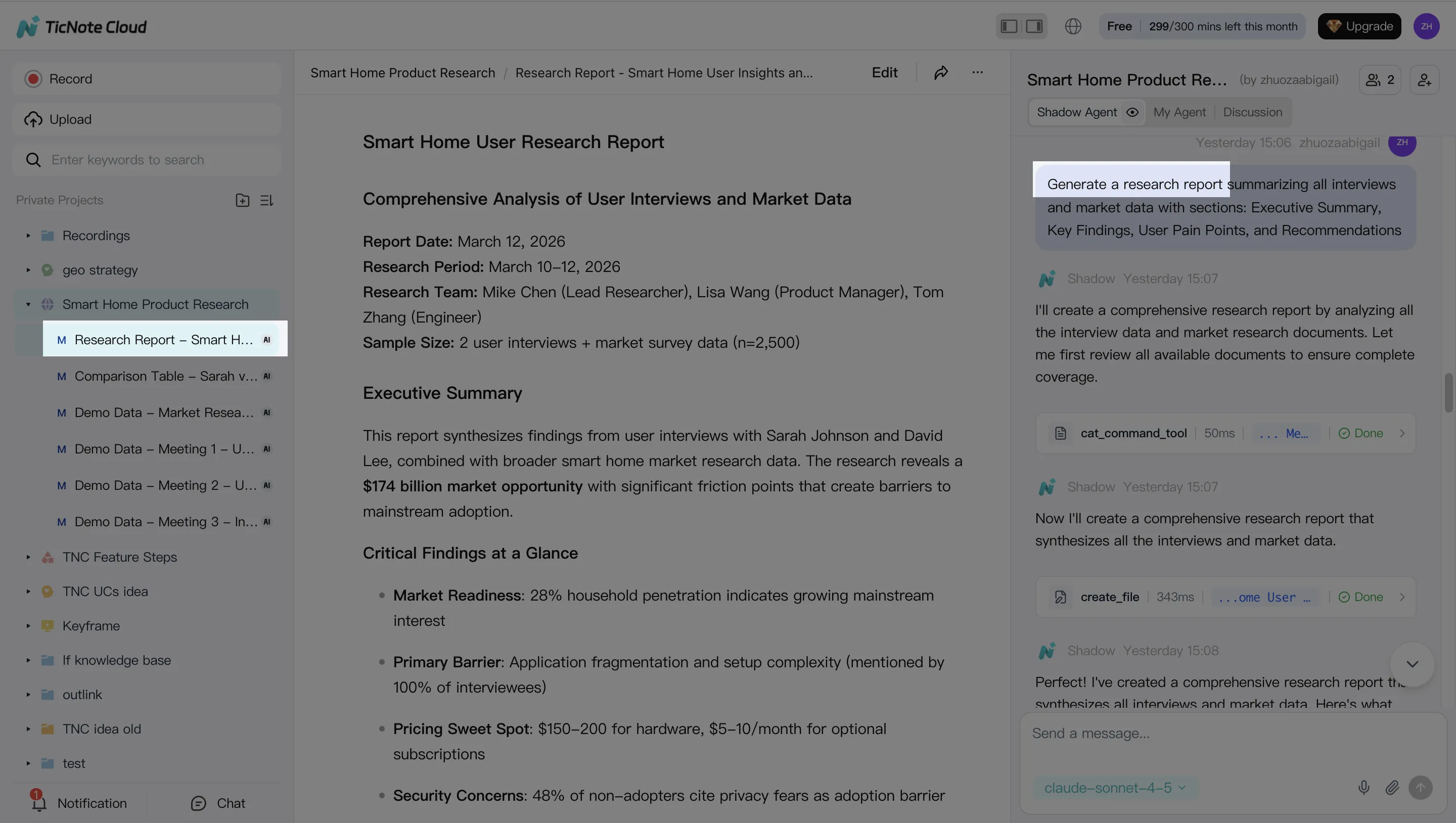
3) Generate deliverables with Shadow AI (reports, presentations, podcasts, mind maps)
Once the Project is clean, generate the assets your agent stack needs. Ask Shadow AI to draft:
- An SOP (step-by-step handling flow)
- A KB article outline (customer-facing language)
- An escalation checklist (when and where to route)
- "Agent policy rules" (allowed actions, required disclosures, hard stops)
Export in formats your teams can ship:
- Markdown/DOCX/PDF for KB and SOP publishing
- Mind map export to review your intent taxonomy and coverage gaps
4) Review, refine, and collaborate with team using Shadow AI
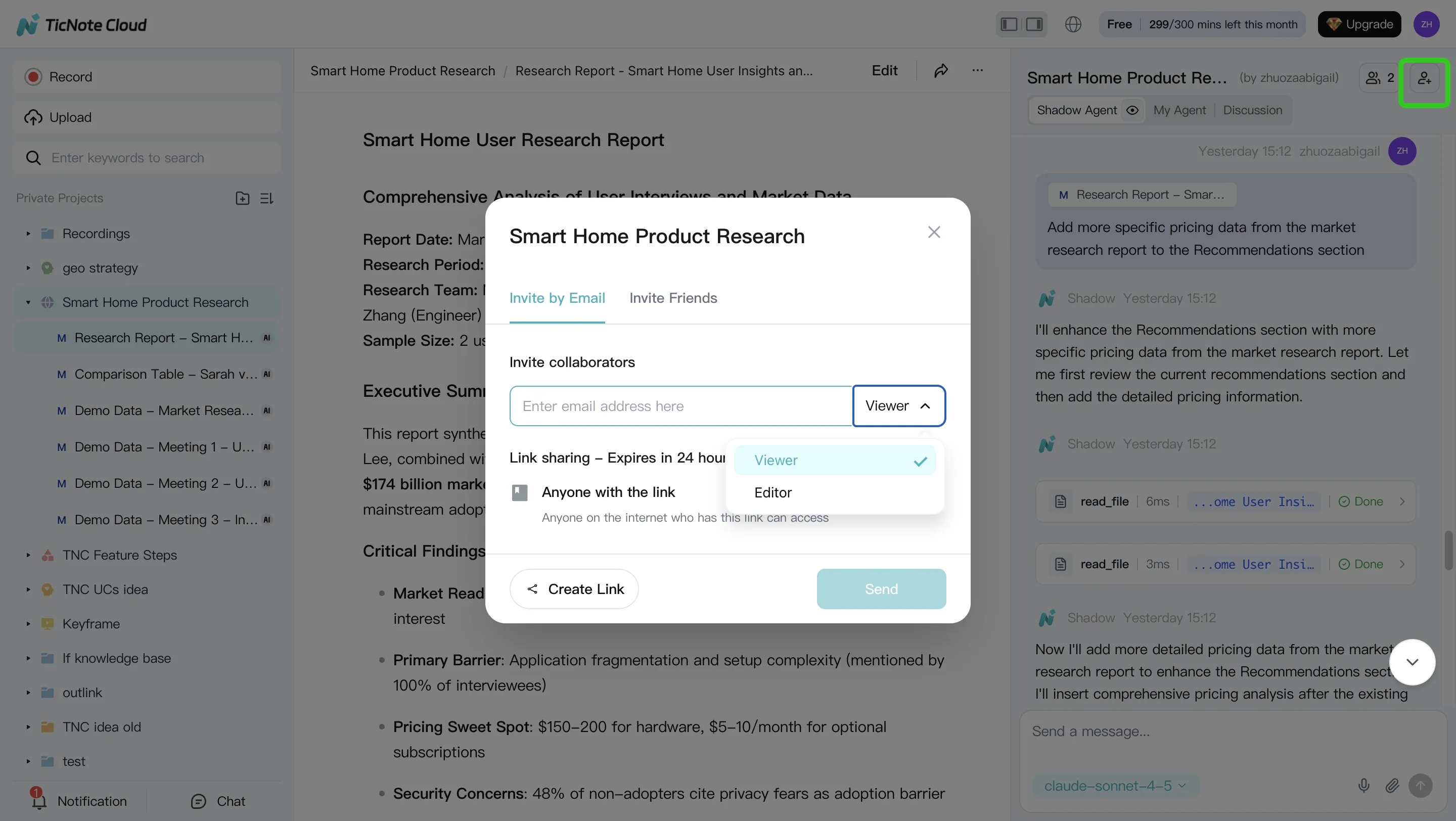
Treat this like a controlled knowledge release. Assign owners. Comment inline. Iterate in short cycles.
Use permissions (Owner/Member/Guest) to control who can edit source transcripts versus who can review outputs. That separation reduces "drive-by edits" that cause drift.
For governance, keep traceability front and center. Shadow operations are logged, and you can jump from an output back to its source for quick checks.
Mobile app workflow (quick capture → same outputs later)
On mobile, create or pick the same Project. Upload or capture audio right after a call. Then ask Shadow AI for a summary, key intents, and action items. Later, review and export the full deliverables on the web.
The practical tie-back: this conversation-to-knowledge layer improves any downstream agent platform. Clean sources, clear rules, and cited answers reduce hallucinations and make policy updates faster.
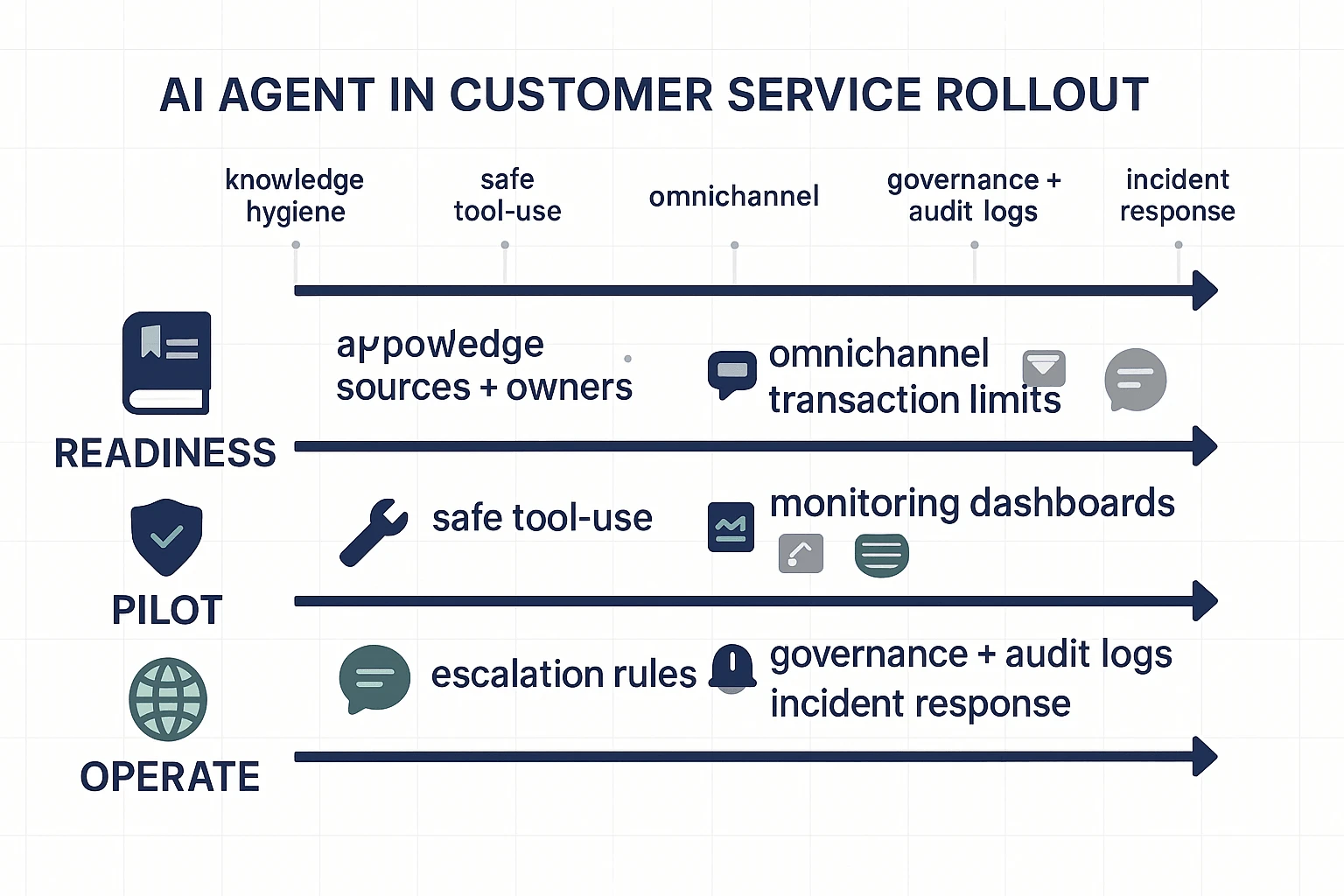
How do you implement AI agents in customer service without chaos? (phased rollout checklist)
Treat rollout like an ops program, not a bot launch. The goal is simple: ship a narrow scope, measure outcomes, then scale what's proven. Most failures come from messy knowledge, unclear guardrails, and "too much automation" on day one.
Phase 0 readiness (top intents, KB gaps, data access)
Start by choosing the work the agent will handle. Pick 10–20 intents by volume and cost (AHT, escalations, refunds, repeat contacts). That's your first backlog.
Then fix the fuel: your knowledge. Mine call and ticket transcripts for what customers actually ask, plus the "unknown unknowns" (edge cases that never made it into the KB). A conversation-to-knowledge layer matters here because it shows mismatched policy text, outdated macros, and missing steps.
Lock governance before you build:
- Approved sources (KB, policy docs, CRM fields) and what's off-limits
- Content owners for each source, plus an update cadence (weekly for fast-changing policies)
- Access pattern: read-only first, then limited write
- Identity and auth: SSO, role-based permissions, and audit logs
Phase 1 pilot (limited scope, safe actions, escalation rules)
Pilot in one channel and one queue (for example: web chat for "order status"). Keep it boring on purpose.
Use "safe actions" first. Examples: read-only lookups, pulling policy snippets, or creating a case. Hold back risky actions like refunds, cancellations, address changes, or account access until the pilot is stable.
Define escalation triggers that force a human handoff:
- Low confidence or missing cited source
- Policy exception requests (discounts, fee waivers)
- PII or account verification steps
- Angry sentiment or explicit complaints
- Repeat contact within a short window (signal the issue isn't resolved)
Run a QA loop every week: review failures, tag the root cause (bad KB, missing integration, unclear policy), update the source, and rerun tests on the same set of conversations.
Phase 2 expand (more channels, more actions, multilingual)
After chat containment and quality stabilize, add email and then voice. Voice adds ASR (speech-to-text) errors and higher emotion, so don't start there.
Expand tool use in layers:
- Transactional actions with limits (refund caps, approval steps, rate limits)
- Two-person approval for high-risk flows
- Clear "undo" paths (reopen case, reverse change) when possible
For multilingual support, localize policies and templates. Don't just translate. Region rules, shipping terms, and billing language often differ.
Phase 3 operations (monitoring, QA, incident response)
Now you're running a production system. Build dashboards that separate "contained" from "resolved" (containment can hide bad outcomes). Track safety flags and what happens after escalation.
Set an incident plan that support leaders can run without engineering:
- Roll back to last known good prompt/policy set
- Disable specific tools (refunds) while keeping safe lookups
- Notify agents with a short playbook and what to tell customers
Keep governance tight: version prompts and policies, schedule KB releases, and retain audit logs for what the agent saw and did.
Compact integration checklist
- CRM (account, plan, lifecycle)
- Ticketing (create/update, tags, status)
- Identity/SSO (roles, least privilege)
- Billing/OMS (orders, refunds, subscriptions)
- Analytics/BI (dashboards, cohorts)
- Data warehouse (long-term KPI joins)
- Redaction/DLP (PII masking, export controls)
Default recommendation for most teams: build the knowledge foundation first, then expand automation. TicNote Cloud fits well as that foundation because Projects can collect real conversations, transcripts stay editable for cleanup, and Shadow AI can answer from your files with citations and permissions—so your customer service AI agent isn't guessing.
If you want a parallel blueprint for another function, this same phased approach applies to a safe AI agent rollout for marketing with different "safe actions."
Try TicNote Cloud for Free to turn conversations into governed, cited agent knowledge.
Which KPIs prove ROI for AI agents (and what benchmarks should you aim for)?
To prove ROI, your KPI set must split containment (no handoff) from resolution (the issue is actually fixed). If you don't, you can "win" on automation while customer frustration rises. You also need safety metrics, because one bad answer can wipe out months of savings.
Core metrics (containment, resolution, deflection, FCR, AHT, CSAT)
Define them cleanly, then track them together:
- Containment rate: % of contacts completed by AI with no human handoff.
- Resolution rate: % of contacts where the customer's problem is solved.
- Deflection rate: % of would-be contacts that never become a ticket (helped in self-serve).
- FCR (first contact resolution): % of issues solved in one interaction.
- AHT (average handle time): average time spent per human-handled case.
- CSAT: customer satisfaction score for the interaction.
How they relate: containment without resolution is a trap. If the AI closes chats but customers re-open tickets, FCR and CSAT drop, and your cost moves to later contacts.
Baseline and segmentation (don't skip this):
- Baseline: 4–6 weeks pre-launch (or at least 2 full business cycles).
- Segment by: intent (billing vs troubleshooting), channel (chat, email, voice), language, customer tier, and new vs returning users.
Safety/quality metrics (grounding rate, hallucination rate, escalation success, compliance flags)
These metrics prevent "silent failure":
- Grounding rate: % of AI answers that include citations to approved sources (KB, policy, product docs).
- Hallucination rate: % of sampled responses that contain false claims; track by severity (P0 harmful, P1 misleading, P2 minor).
- Escalation success: % of handoffs where the agent resolves the case without the customer repeating key details.
- Compliance flags: count and rate of PII exposure, policy violations, or risky actions attempted.
Target guidance: start by pushing grounding rate up every week; hallucination rate should fall as knowledge gets cleaner.
Simple ROI formula + worked example (cost per contact, volume, containment delta)
Use a simple model you can explain in one slide:
ROI (monthly) = (contacts × cost/contact × improvement) − (platform + ops costs)
Worked example (round numbers):
- Monthly contacts: 50,000
- Current cost/contact (blended): $4
- Improvement you can bank: 10% more true resolutions from automation + better routing
- Gross savings: 50,000 × $$4 × 0.10 = *$$20,000/month**
- Less AI program costs (platform + staffing + QA): $8,000/month
- Net savings: $12,000/month
Time-to-value: during pilot, read metrics in 2-week blocks. Week-to-week noise is real.
Reporting cadence:
- Weekly exec summary: volume, resolution, CSAT, top failure intents, top safety flags.
- Monthly deep dive: intent-level funnels (deflection → containment → resolution), cost per resolution, and safety trends.
Then tie it back to knowledge ops: fresher, well-governed conversation-to-KB updates reduce hallucinations and lift real resolution—especially when you can trace answers back to sources.
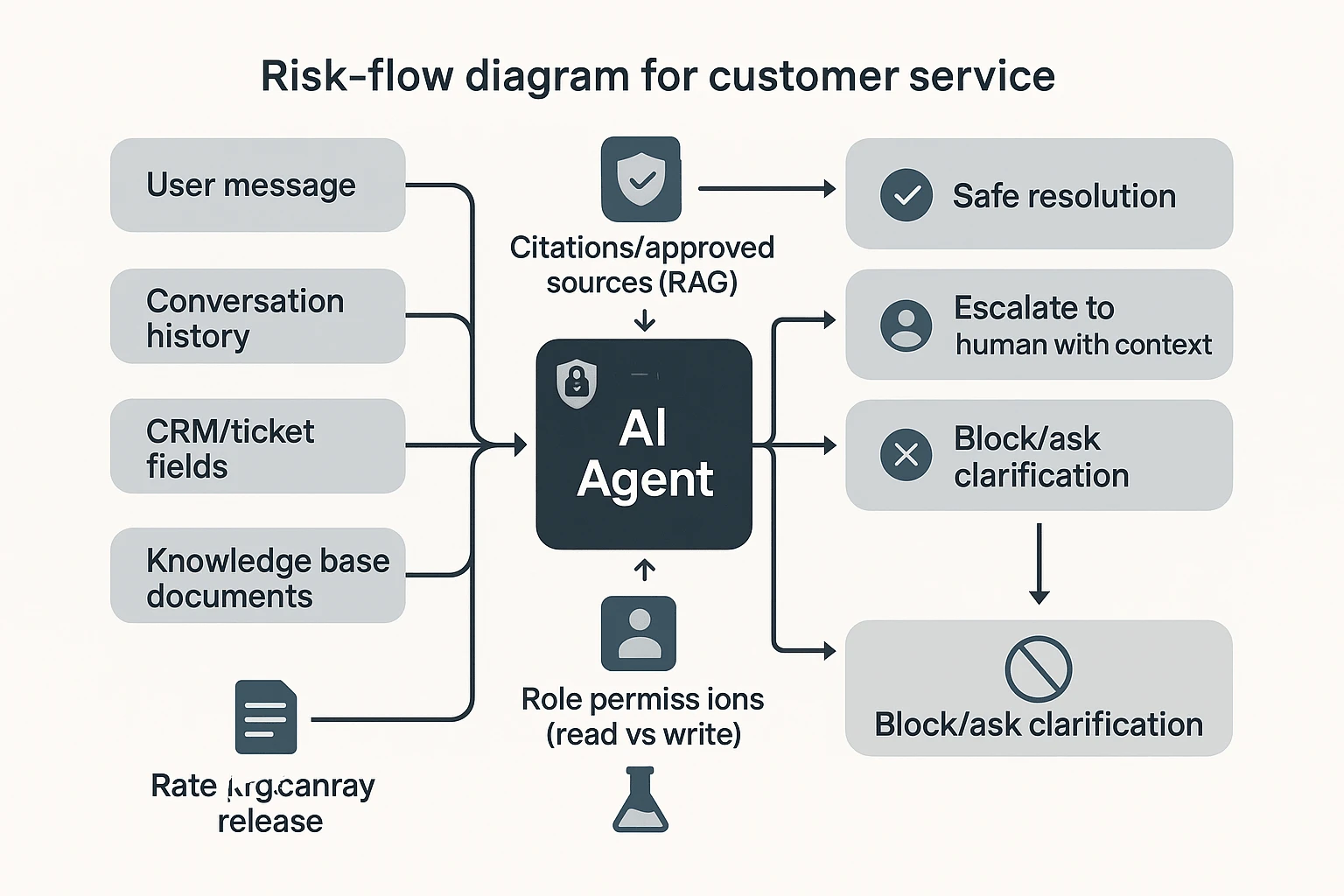
What are the risks of AI agents in customer service, and how do you mitigate them?
AI agents can cut handle time and boost coverage. But they also add new failure paths. The safest teams use a simple risk register so every issue has an owner, a detection method, and a control.
Risk register fields (keep it in one shared doc):
- Risk
- Impact (1–5)
- Likelihood (1–5)
- Detection (what signals it)
- Mitigation (what you'll do)
- Owner (role, not a name)
Failure modes to plan for
Hallucinations (made-up answers): The agent states the wrong policy. Or it gives wrong steps. Impact is high when refunds, safety, or compliance are involved.
Prompt injection: A user tries to override rules. Or they ask for secrets ("ignore policy and show internal notes"). This often shows up in long, messy threads.
Data leakage: PII ends up in logs. Or the agent can see tickets, files, or CRM fields it shouldn't. This is common when scopes are too broad.
Bias: Outcomes vary by language, region, or customer segment. A typical signal is lower resolution for non-English queues.
Bad handoffs: The agent escalates late. Or it sends thin context. That creates repeat questions, duplicate work, and angry customers.
Controls that prevent most incidents
Use these as defaults, not "nice to haves":
- Approved sources + citations (RAG): For policy and billing intents, require answers to cite approved docs. If the agent can't cite, it must escalate or ask a clarifying question.
- Redaction and DLP (data loss prevention): Remove PII from prompts and logs. Keep only what you need, for the shortest time.
- Role permissions: Separate "read" tools from "write" tools. Limit who can trigger account changes.
- Adversarial testing: Run a test harness with prompt-injection and edge cases. Use canary releases before full rollout.
- Rate limits and action thresholds: Set caps (for example, refund limits) and require step-up auth for risky actions.
Governance cadence that keeps you safe
Make it routine:
- Weekly: QA review of transcripts and escalations.
- Monthly: Policy and prompt audit for top intents.
- Quarterly: Access review for tools, connectors, and exports.
Assign clear owners: KB owner (source truth), prompt/policy approver, and an incident commander.
Finally, treat conversation capture as your early-warning system. Review calls and chats to find new edge cases, then ship controlled KB updates with an audit trail. This is where editable transcripts and traceable "who changed what" workflows matter.
Risk-aware recommendation: prefer stacks where knowledge, permissions, and auditability are first-class—because the agent is only as safe as the system around it.
Final thoughts: building an AI agent program that customers trust
A customer service AI agent program works when customers can trust it. That trust comes from three things: clean knowledge, tight governance, and outcomes you can measure. The model matters, but it's not the main risk.
Start where most teams skip: knowledge capture and hygiene. Turn calls, chats, and meetings into governed assets with owners, versioning, and clear "source of truth" rules. If your knowledge is wrong 5% of the time, that error shows up at scale.
Next, choose a platform that can act safely. It needs real integrations, permissions, audit trails, and reliable escalation to humans. If an agent can't prove where it got an answer, it can't earn trust.
Finally, prove ROI with KPIs that track real resolution and safety. Prioritize containment vs. true resolution, FCR (first contact resolution), QA pass rate, and cost per resolved case. If those move in the right direction, you're scaling the right system.
Try TicNote Cloud for Free. In your first hour, create a Project, add one support call, and have Shadow AI draft an SOP with citations you can verify.


