


 Extension
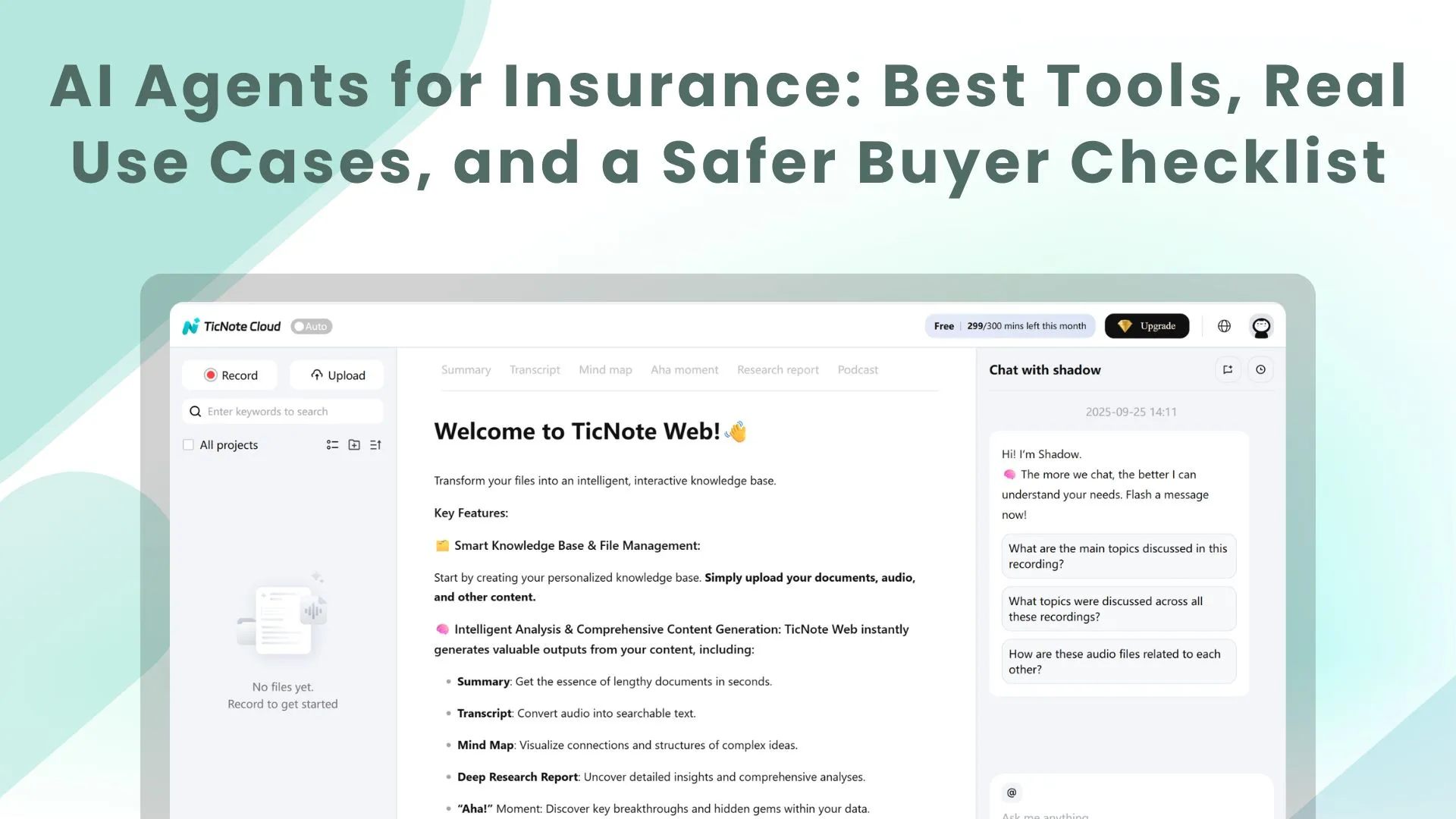
TL;DR: Best AI agent picks for insurance teams (and what to choose first)
Start with Try TicNote Cloud for Free if your fastest win is turning calls and meetings into tracked follow-ups—this is the most reliable "ai agent for insurance" starting point because it cuts rework in days, not quarters.
Notes get lost. Then tasks slip, renewals stall, and claims updates go dark. Use TicNote Cloud to capture decisions, turn them into action items, and build a searchable Project memory your team can reuse.
What "AI agent" means in insurance: it takes a goal (like "finish FNOL intake") and completes multi-step work with guardrails and approvals; a chatbot mostly answers questions, RPA (robotic process automation) mostly clicks through systems, and ML (machine learning) mostly predicts outcomes.
3 fastest wins most teams can ship in 30 days:
- Meeting/call notes → action items + QA checks
- Service Q&A for coverage/billing using approved knowledge only
- Claims/FNOL intake triage + document-chase templates
What is an AI agent for insurance, and where does it fit in the policy lifecycle?
An AI agent for insurance is software that can take a goal (like "process this FNOL" or "prepare a renewal outreach") and run a small loop of tasks to move work forward. It gathers inputs, checks what's missing, applies rules, drafts outputs, and routes items to the right person. It's most useful where work is high-volume, document-heavy, and full of handoffs.
Where an insurance AI agent fits in the lifecycle
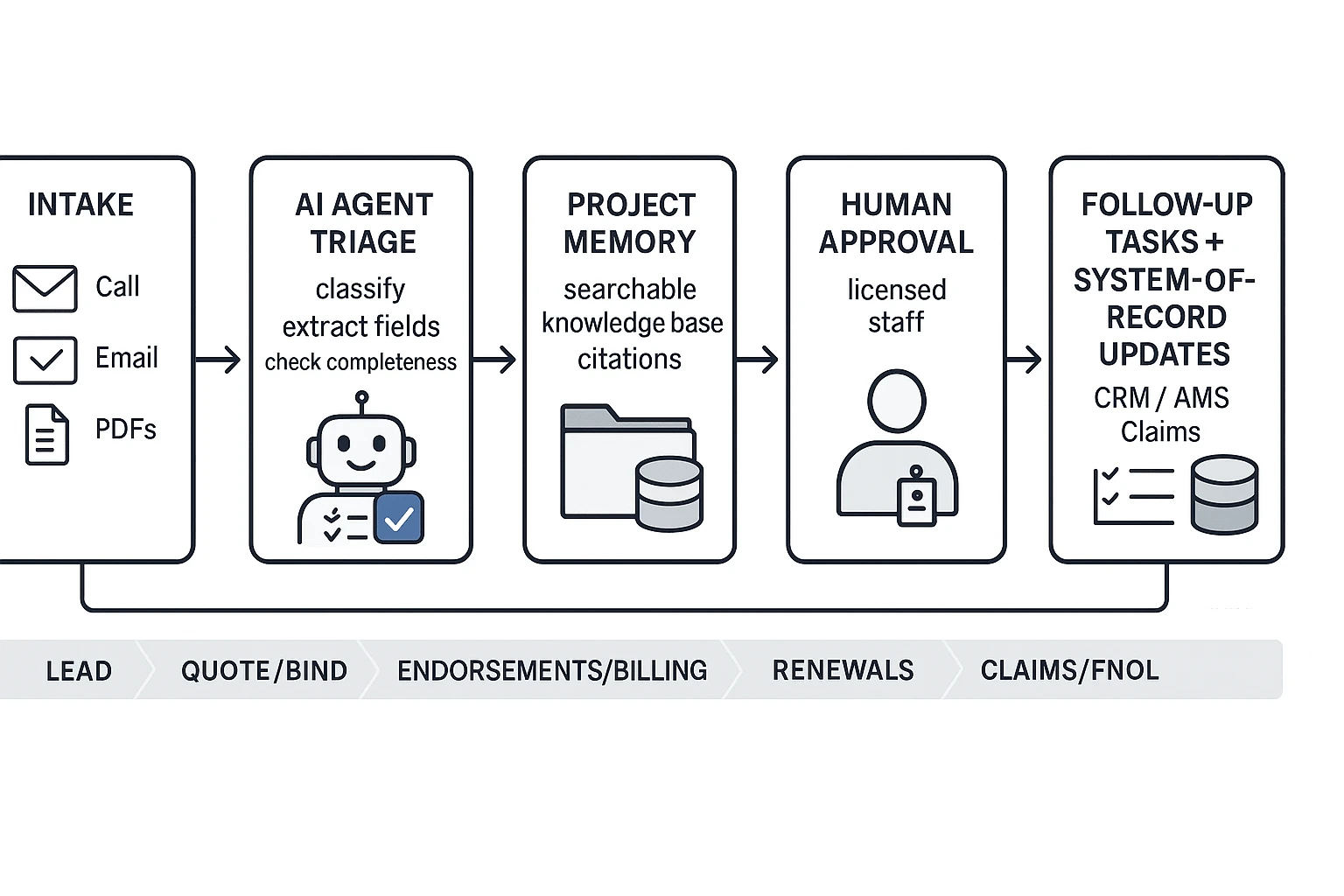
Most insurance workflows follow the same path: lead → quote/bind → endorsements/billing → renewals → claims/FNOL → recovery/subrogation. The highest impact tends to show up in the "middle miles," where teams drown in messy inputs and repeat steps.
- Lead to quote/bind: capture call notes, extract exposures, pre-fill ACORD-style fields, draft quote emails, and flag missing info.
- Endorsements and billing: triage requests, draft endorsements, summarize changes, and route to servicing.
- Renewals: pull last-term issues, draft renewal checklists, and suggest next-best outreach actions.
- Claims/FNOL: classify loss type, check completeness, draft reserve or coverage question lists, and route to the right adjuster queue.
- Recovery/subrogation: collect documents, summarize liability signals, and draft demand or follow-up letters.
Across these stages, agents shine on unstructured content: emails, adjuster notes, photos, PDFs, and call transcripts.
The "agent loop" in plain language
Think of an agent as a disciplined worker that follows the same loop every time:
- Intake: pull details from calls, emails, and documents.
- Triage: tag the request (renewal, endorsement, FNOL), set priority, and assign an owner.
- Verify: check completeness against your checklist and rules.
- Draft: write the email, summary, task list, or file note.
- Route + log: send to the right queue and record what happened in the system of record (CRM/AMS/claims platform).
The win isn't "more AI." It's fewer re-asks, fewer dropped handoffs, and faster cycle time.
Human-in-the-loop: what must stay with licensed staff
AI can prepare work, but licensed people must make the final calls. Keep these with agents, adjusters, or underwriters:
- Final coverage advice and coverage position
- Binding authority decisions
- Claim denial decisions and settlement authority
- Any adverse action that requires clear rationale
- High-judgment exceptions that need explainability
A safer setup is simple: AI drafts and recommends, a human approves, and every change leaves an audit trail.
Here's the workflow that prevents "lost decisions": conversations plus documents roll into a shared Project memory. That way, the same facts, decisions, and follow-ups carry from submission to renewal to claim—without relying on someone's inbox or personal notes. If you want more concrete scenarios and KPI ideas, start with this guide on enterprise AI agent use cases, KPIs, ROI, and governance.
Top insurance AI agent use cases (with KPIs to track)
An AI agent for insurance works best when it runs a repeatable workflow, not a "chat." Think: collect info, check rules, draft the next step, and log what happened. Start with use cases that have clear inputs (calls, emails, submissions) and clear outputs (answers, tasks, updates). Then track a small set of KPIs so you can prove value and spot risk fast.
Customer service: answer faster without guessing
Safe automations here are "bounded." The agent should pull from approved FAQs and policy language, show citations, and stick to scripts for billing and payment steps. For status updates, it should read from your ticketing or claims system and reply with a standard template.
Track:
- Average handle time (AHT)
- First-contact resolution (FCR)
- Deflection rate (how many contacts handled without an agent)
- QA score (call-note quality and accuracy)
- CSAT
If you want a deeper scoring rubric, use this guide to evaluate AI agents for customer service workflows while keeping audit trails and approval controls.
Distribution: win speed-to-quote and protect renewals
For new business, an agent can triage inbound leads, run an appetite check (what you do or don't write), and generate the next-best questions before you quote. It can also draft a follow-up email/SMS and create reminder tasks so leads don't go cold.
For renewals, the agent can turn a renewal call recap into a change log (drivers, vehicles, payroll, locations), then draft renewal emails and call scripts.
Track:
- Speed-to-quote (hours)
- Quote-to-bind rate
- Renewal retention rate
- Cross-sell attach rate
Claims: FNOL intake and document chase that stays consistent
First notice of loss (FNOL) is a perfect "guided" flow. The agent asks the right questions, flags missing items, routes severity (simple triage), and drafts a consistent first update to the customer. It can also build a document request list and follow up until it's complete.
Track:
- Claim cycle time (days)
- Reopened claims rate
- Leakage proxies (e.g., late documentation, missed subro triggers)
- Complaint rate
Underwriting: reduce touch time on messy submissions
Here, the agent should summarize the submission, extract exposures, run a completeness checklist, draft broker questions, and route to a specialist when rules trigger.
Track:
- Underwriter touch time (minutes)
- Hit ratio (quotes issued vs submissions)
- Referral rate
- Quote turnaround time
Compliance ops: improve call notes, disclosures, and retention
Use the agent as a "control layer." It can apply disclosure checklists, standardize call notes, tag dispositions, and flag coaching moments. It can also enforce retention and legal hold rules by routing records to the right place.
Track:
- QA score
- Exception rate (missing disclosures, incomplete notes)
- Time-to-close compliance findings
Mini before/after examples (measure baseline first)
Don't set targets blind. Measure 2–4 weeks of baseline, then run a limited pilot.
- Renewal outreach (mid-market agency)
- Before: renewal emails drafted from scratch; tasks inconsistent
- After: call recap → change detection → draft renewal email + call script + tasks
- Realistic targets: 15–30% faster outreach prep time; 5–15% fewer "missed follow-ups"; small lift in renewal rate over 1–2 cycles
- FNOL intake (personal lines)
- Before: repeated questions; missing info triggers rework
- After: guided intake + missing-info prompts + first customer update template
- Realistic targets: 10–25% fewer recontacts for missing details; 5–15% faster cycle time on simple claims; fewer complaints tied to "no updates"
Top AI agent tools for insurance (ranked item cards + who they're best for)
Insurance teams don't need "more AI." They need an agent stack that fits real work: submissions, renewals, FNOL, claims docs, service tickets, and compliance review. The ranking below weights eight factors: workflow fit (sales/service/claims/underwriting), integrations, audit trails, PII controls, citations/grounding, meeting capture, deliverables, and admin governance.
1) TicNote Cloud — Best overall for meeting-to-deliverable + knowledge workflows
- Best for: Agencies and carrier ops teams; 5–500 users
- Best workflows: Sales handoffs, renewal outreach, claims coordination, underwriting intake calls
- Strengths:
- Turns meetings into editable transcripts, structured action lists, and reusable Project memory
- Project-based "Shadow AI" answers from your files with citations for fast QA
- Traceable operations support review and coaching (who asked what, what changed)
- Exports support downstream ops (DOCX/PDF/Markdown/HTML, mind maps)
- Bot-free capture reduces meeting friction in many orgs
- Watch-outs:
- Not a full claims core or CRM; you still need system-of-record tools
- Governance setup still matters (permissions, retention, what can be uploaded)
- Governance fit: Strong for auditability and verification (cited answers), role-based access (Owner/Member/Guest), and traceable actions; retention should be defined in your policy
- Time-to-value: In 30 days, standardize meeting notes and follow-ups; in 60–90 days, build Project libraries for renewals/claims/underwriting playbooks that reduce repeat work
Pricing (high level): Free, Professional, Business, and Enterprise tiers.
2) Salesforce (Financial Services Cloud / Agentforce) — Best for CRM-native routing and automation
- Best for: Agencies or carriers already standardized on Salesforce; mid-to-large teams
- Best workflows: Lead-to-bind, service case routing, renewal tasking, producer/service handoffs
- Strengths:
- Strong workflow automation in the CRM where work already lives
- Assignment, queues, and reporting are mature and scalable
- Good fit for standard operating procedures across branches
- Works well when data is structured (accounts, policies, tasks)
- Watch-outs:
- Usually needs admin capacity and change management
- Meeting-to-knowledge workflows can remain scattered without a dedicated workspace
- Costs and complexity rise fast with customization
- Governance fit: Strong when configured well (profiles, permissions, logs); governance is only as good as your admin design
- Time-to-value: 60–90 days for a focused workflow (like renewal task routing) if you already run Salesforce well
3) Microsoft Copilot (M365) — Best for document-heavy insurance teams
- Best for: Microsoft-first orgs; 50–5,000 users
- Best workflows: Email drafting, Word/Excel summaries, policy/endorsement review, internal knowledge search
- Strengths:
- Strong for daily content work (Outlook, Word, Teams, SharePoint)
- Good fit for staff who live in email and documents
- Can reduce time on summaries, first drafts, and status updates
- Watch-outs:
- Tenant and data boundary settings must be correct to avoid oversharing
- Quality depends on document hygiene and permissions
- "Answer" tools can be hard to audit without clear citations in your workflow
- Governance fit: Strong when paired with M365 security, DLP (data loss prevention), and access controls; requires careful admin configuration
- Time-to-value: 30 days for writing/summarizing gains; 60–90 days once libraries and permissions are cleaned up
4) Google Gemini for Workspace — Best for Google-native drafting and summarizing
- Best for: Google Workspace agencies and teams; small-to-mid size
- Best workflows: Email responses, call recap write-ups, form and doc summarization, internal Q&A
- Strengths:
- Fast drafting and summarization across Gmail and Docs
- Helpful for consistent client communication and templates
- Good adoption path for lean teams
- Watch-outs:
- Governance depth depends on edition and admin settings
- Data handling rules must be documented for PII and claim details
- Less "end-to-end" workflow control than service platforms
- Governance fit: Medium to strong with the right Workspace controls; verify retention, access, and logging needs
- Time-to-value: 30 days for better writing speed; 60–90 days for standardized templates and review steps
5) ServiceNow (CSM + AI) — Best for high-volume service ops and ticket discipline
- Best for: Carrier service ops and shared services; large teams
- Best workflows: Customer service management, intake triage, escalations, knowledge articles
- Strengths:
- Strong case/ticket workflows with clear handoffs
- Mature auditability for operational work
- Built for scale and queue management
- Good place to standardize "what happens next"
- Watch-outs:
- Implementation is a program, not a quick toggle
- Needs strong process ownership to avoid messy queues
- Meeting and document knowledge may still live elsewhere
- Governance fit: Strong (workflow logs, roles, operational controls)
- Time-to-value: 60–90 days for one service line if the platform is already in place
6) Guidewire (Claims/Policy ecosystems) — Best for carriers close to core systems
- Best for: Carriers on Guidewire; IT-led transformation teams
- Best workflows: Claims and policy operations connected to core systems
- Strengths:
- Strong adjacency to systems of record
- Works well when paired with partner tooling for intake, docs, and analytics
- Good path for standardization across lines
- Watch-outs:
- "Agent" capabilities vary by implementation and partners
- Time-to-value depends on your ecosystem maturity
- Change cycles can be long
- Governance fit: Strong at the platform level; agent governance depends on what you bolt on
- Time-to-value: 90+ days in many orgs unless the needed components already exist
7) Snapsheet (claims automation) — Best for intake and claims document workflows
- Best for: Claims teams modernizing intake and estimate/document flows
- Best workflows: FNOL intake, document processing, exception routing
- Strengths:
- Focused on claims process automation
- Can reduce manual rekeying and cycle time in intake-heavy flows
- Works well when exceptions are clearly defined
- Watch-outs:
- You must test explainability (why a document was classified)
- Exception handling needs clear human review steps
- Integration depth varies by environment
- Governance fit: Medium to strong if you enforce human-in-the-loop and retain decision logs
- Time-to-value: 60–90 days for a scoped intake workflow with clear rules
8) DocuSign Iris (agreement intelligence) — Best for forms, endorsements, and data extraction
- Best for: Ops teams working with high volumes of agreements and forms
- Best workflows: Policy docs, endorsements, application packages, data validation
- Strengths:
- Extracts and validates data from documents
- Helpful for reducing manual checks in document-heavy pipelines
- Strong fit for standard templates and repeatable forms
- Watch-outs:
- Works best when documents are consistent
- Not a full "agent" for end-to-end ops; it's a specialized layer
- You still need controls for PII and retention
- Governance fit: Stronger for document audit trails; define retention and review roles
- Time-to-value: 30–60 days for a narrow document type (one form family)
9) ChatGPT (general drafting) — Best for non-sensitive first drafts only
- Best for: Individuals and small teams doing quick writing support
- Best workflows: Email drafts, training outlines, scripts, non-client-specific content
- Strengths:
- Very fast for ideation and rewriting
- Helpful for plain-language explanations and templates
- Low setup effort
- Watch-outs:
- Highest risk for data leakage and untracked use
- Weak auditability if used informally
- Easy to accidentally include claim details or PII
- Governance fit: Low unless tightly controlled with strict policies and no sensitive data
- Time-to-value: Immediate for generic writing; limited value for regulated workflows
Which tool should you choose first?
- Small agency (1–20 people): Start with TicNote Cloud to stop missed decisions. It turns sales, renewals, and carrier calls into tracked follow-ups and a searchable memory.
- Multi-branch agency (20–200): Use Salesforce for routing and reporting if it's your standard, but add TicNote Cloud for meeting-to-knowledge so handoffs don't die in inboxes.
- Carrier claims ops (high volume): Use ServiceNow (case control) plus a claims specialist like Snapsheet for intake. Add TicNote Cloud for adjuster-manager syncs, vendor calls, and exception reviews so the "why" is documented, searchable, and reusable.
If you're also evaluating broader platforms, this guide to all-in-one AI workspaces and what they replace can help you narrow the category before you shortlist vendors.
Comparison table: Which AI agent platform matches your insurance workflow?
Use the table below to match an AI agent category to your "system of record" first (where work already lives). Then add a meeting-to-knowledge layer to stop decision loss across renewals, claims, and underwriting handoffs. That combo is usually what makes follow-ups consistent and auditable.
Normalized comparison table (insurance-ready criteria)
| Tool category (examples) | Primary workflow fit | Integrations (typical) | Auditability | PII/PHI controls | Grounding (internal citations) | Meeting capture + transcription | Deliverables produced |
| CRM-native agents (Salesforce, HubSpot) | Sales, service, renewals | CRM, email/calendar, dialer, sometimes AMS via iPaaS | Strong CRM activity logs; approvals vary | CRM role-based access; retention depends on CRM settings | Usually grounded to CRM objects; citations limited | No (often relies on separate meeting tool) | Follow-up emails, tasks, call notes, pipeline updates |
| ITSM/workflow agents (ServiceNow, Jira) | Service ops, claims ops, IT workflows | Ticketing, identity, email, sometimes claims/CRM via APIs | Strong workflow history; approval steps are native | Strong enterprise controls; policy-driven retention | Can restrict to KBs; citations vary by setup | No | Tickets, routing, SOP checklists, status updates |
| Meeting-to-knowledge workspaces (TicNote Cloud, similar) | Cross-team handoffs: renewals, claims, underwriting, service | Email/calendar (varies), docs, Slack/Notion exports | Traceable actions; source-back links enable review | Project permissions; encryption; retention set by policy | Strong: answers can cite the exact meeting/doc segments | Yes: captures meetings, creates searchable project memory | Summaries, action lists, handoff packets, reports, knowledge pages |
| Claims automation agents (Guidewire add-ons, CCC, Snapsheet) | FNOL, triage, adjuster workflows | Claims core, photo/estimate, vendor networks | Strong claim file trail; model decisions may need extra logging | Claims-grade access controls; retention tied to claim file | Grounding to claim file data; citations not always exposed | No | Claim summaries, next-best actions, vendor assignments |
| Document/agreement intelligence (DocuSign CLM, Icertis) | Underwriting, policy servicing, compliance | DMS, CLM, e-sign, email | Strong versioning; approval chains | Strong access and retention controls | Grounding to docs; clause-level references common | No | Clause extracts, requirements checklists, exception memos |
| General LLM assistants (ChatGPT, Gemini, Copilot Chat) | Ad hoc help across teams | Limited unless connected to your stack | Weak unless wrapped with governance tools | Depends on tenant and settings; easy to leak data | Often weak without RAG (retrieval) + citations | No | Draft emails, rewrites, simple summaries (needs review) |
How to read this table (the fast way)
- Pick the category that matches where your team works daily: CRM for producers, claims platforms for adjusters, workflow tools for ops. 2) Next, layer a meeting-to-knowledge agent so verbal decisions don't vanish after a call. If you're comparing tools in that category, this AI agent knowledge management guide helps you pressure-test citations, permissions, and governance.
How do you choose an insurance AI agent without creating compliance risk?
Choosing an AI agent for insurance is mostly a controls problem, not a features problem. If it can touch customer PII (personally identifiable information) or PHI (protected health information), you need privacy, auditability, and clear "stop" behavior before you scale it.
Lock down privacy and security for PII/PHI
Start with a short buyer checklist. If a vendor can't answer these fast, pause.
- Data classification: what fields are in scope (PII/PHI, claim notes, payment data)?
- Access control: least-privilege roles, SSO, and separate admin vs user rights.
- Encryption: in transit and at rest (ask for what standards they use).
- Retention and deletion: default retention period, legal hold support, and verified deletion.
- Data residency: where data is stored and processed, by region.
- Vendor terms: written "no training on your data" and limits on subcontractors.
- Incident reporting: notification timelines, who is contacted, and what evidence you'll get.
Require governance artifacts (so it's auditable)
Use simple artifacts that stand up in a risk review.
- Model card: plain-language summary of what the agent does and won't do.
- Audit trails: who accessed what, what changed, and when.
- Prompt/output logs (where appropriate): enough to investigate issues without over-collecting sensitive text.
- Approval workflows: human sign-off for high-impact actions (denials, coverage changes).
- Documented evaluation: test set, pass/fail rules, and re-test cadence.
- Escalation path: what happens when the agent is unsure.
For a baseline framework, align controls to NIST AI Risk Management Framework (AI RMF 1.0) (2023), which states that "The AI RMF is intended to be voluntary, rights-preserving, non-sector specific, and use-case agnostic."
Add fairness, bias, and hallucination guardrails
Bias risk shows up when inputs act as proxies (like ZIP code) and cause disparate impact. Treat the agent as decision support: restrict it to summaries and checklists, sample reviews (for example, 5–10% of cases weekly), and require documented exceptions.
For hallucinations, force grounded answers:
- Citations to internal policies and the claim file
- Restricted knowledge bases and limited tool access
- "I can't confirm—route to adjuster" behavior on missing evidence
Insurance AI governance control tower (compact)
- Named owner + backup owner
- Access reviews monthly; role changes within 24 hours
- Drift checks and re-evaluation quarterly
- Vendor security review annually and after major releases
- Incident playbook with severity levels and timelines
- Human-in-the-loop rules for underwriting and claims decisions
Implementation checklist: data, integrations, rollout, and a simple ROI model
Most AI agent projects in insurance fail for one reason: messy inputs. If you want a safe rollout, treat this like a systems project. Lock down data, connect to systems of record, test with real scenarios, then scale.
Data readiness: what to prepare before you automate
Start with an approved knowledge set. Keep it tight and owned.
- Approved knowledge base: coverage FAQs, billing rules, underwriting appetite, claims playbooks, state-specific notes, and escalation paths.
- Document taxonomy: name folders the way the team works (e.g., Submissions, Endorsements, Renewals, FNOL, Litigation, Vendor).
- Redaction rules: define what must never appear in prompts or outputs (SSN, bank info, medical details). Add rules for masking fields.
- "Gold set" test pack: 50–100 past cases with known outcomes. Include easy, medium, and edge cases.
Tip: write a one-page "source of truth" policy. It states which docs are allowed.
Integration patterns: connect once, write back cleanly
Don't build a new inbox. Make the agent work where people already live.
Common patterns:
- API + webhooks: trigger actions when a claim or ticket changes status.
- Secure connectors: pull policy and claim fields on demand.
- Inbox or ticket ingestion: read new emails and attachments, then classify.
- Write-back to the system of record: post a note, task, or summary into the CRM/AMS or claims platform, so reps don't copy and paste.
Rule: the agent can draft, but the system of record should store the final.
Testing: scripted scenarios, red-team prompts, acceptance KPIs
Keep the plan small, but strict. Run 20–30 scripted scenarios per workflow.
- Renewals: missing loss runs, carrier appetite mismatch, late responses.
- Billing: payment plan change, cancellation notice, reinstatement request.
- FNOL (first notice of loss): coverage questions, vendor dispatch, injury claims.
Add adversarial "red-team" prompts:
- Ask for PII it shouldn't share.
- Try policy edge cases and exclusions.
- Try to override escalation rules ("don't tell the adjuster").
Acceptance KPIs to track:
- Accuracy (field-level and decision-level)
- Containment rate (% solved without human)
- Escalation quality (% escalations with complete context)
- Time saved (minutes per interaction)
- Hallucination rate (unsupported claims per 100 cases)
Simple ROI model (baseline first)
Baseline current AHT (average handle time) or touch time for each workflow. Then plug in:
- Weekly time saved (hours) = (minutes saved per interaction × interactions/week) ÷ 60
- Weekly value ($) = time saved × loaded hourly cost + avoided rework/errors
- ROI = (value − tool cost) ÷ tool cost
Example with placeholders:
- Minutes saved per renewal call: 6
- Renewal interactions per week: 200
- Loaded hourly cost: $45
- Avoided rework: $300/week
- Tool cost: $250/week
Time saved = (6 × 200) ÷ 60 = 20 hours/week Value = 20 × 45 + 300 = **$1,200/week**
30/60/90-day rollout plan (beginner-friendly)
- 30 days: pick 1 workflow, define redaction, build the gold set, ship read-only drafts.
- 60 days: add write-back, add human approval steps, train on "when to escalate."
- 90 days: expand to 2–3 workflows, add audit reviews, monthly KPI reporting, and incident drills.
Training note: teach prompts as checklists. "Goal, data allowed, output format, escalation rule." That's enough for most teams adopting an AI agent for insurance safely.
Step-by-step: Turn insurance meetings and documents into tracked follow-ups
Insurance ops break down in the gaps between calls, emails, and handoffs. This workflow shows how an AI agent for insurance teams can turn meetings and documents into one Project record, with clear owners, open items, and a clean audit trail—using TicNote Cloud as the example.
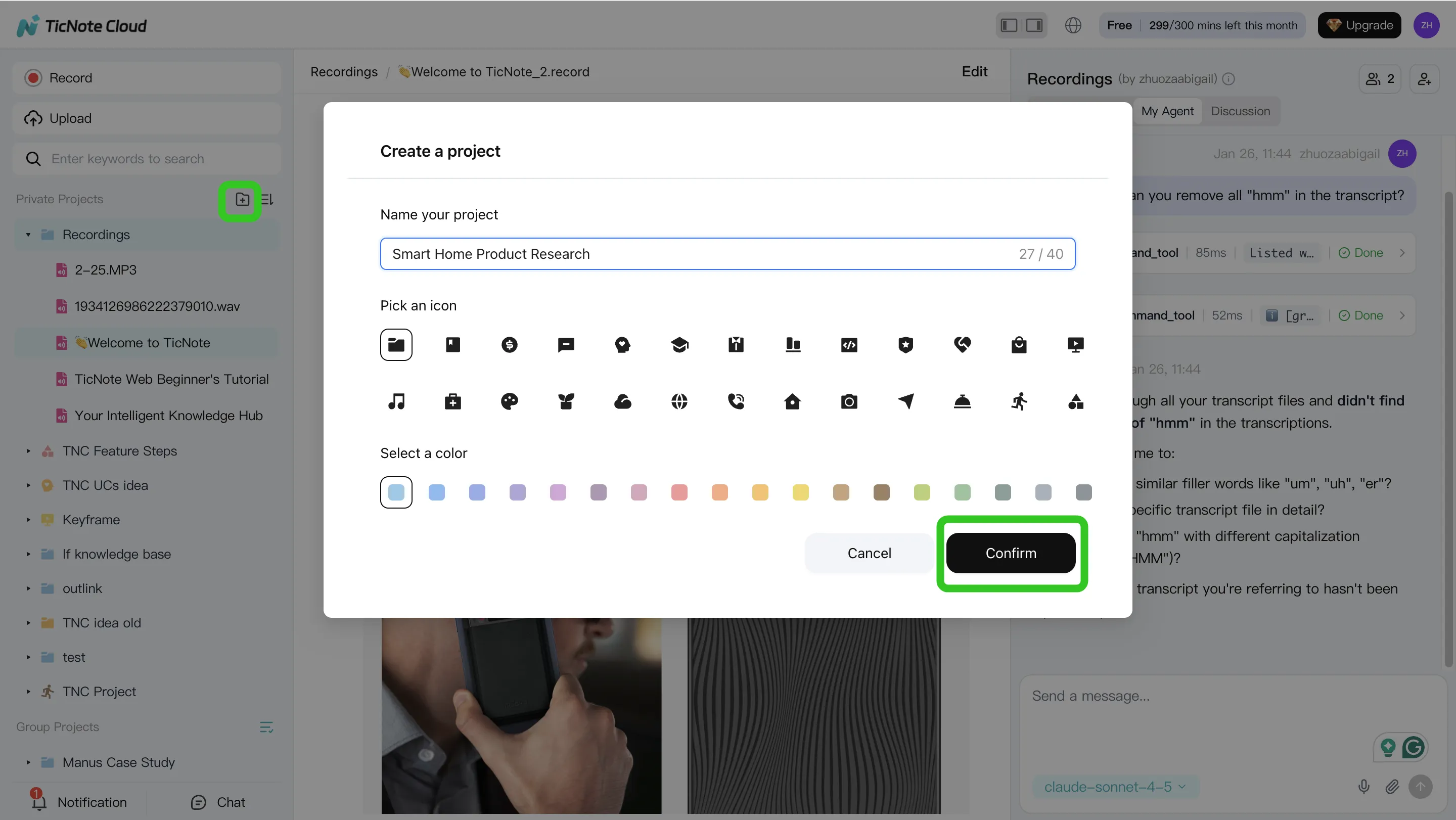
Step 1: Create a Project and add meetings + docs
Start by creating a Project that matches a real workflow, like "Renewals – Q3" or "Claims – FNOL Intake." Keep it one Project per process so your notes, files, and outputs stay together.
Then add your source material:
- Meeting recordings (renewal calls, claim intake calls, internal huddles)
- Supporting documents (policy forms, claim notes, submission PDFs, email threads exported to a file)
- Any reference files your team uses for QA
Keep sensitive items scoped by Project. That way, access can match the team (service, claims, underwriting ops) instead of living in a shared folder.
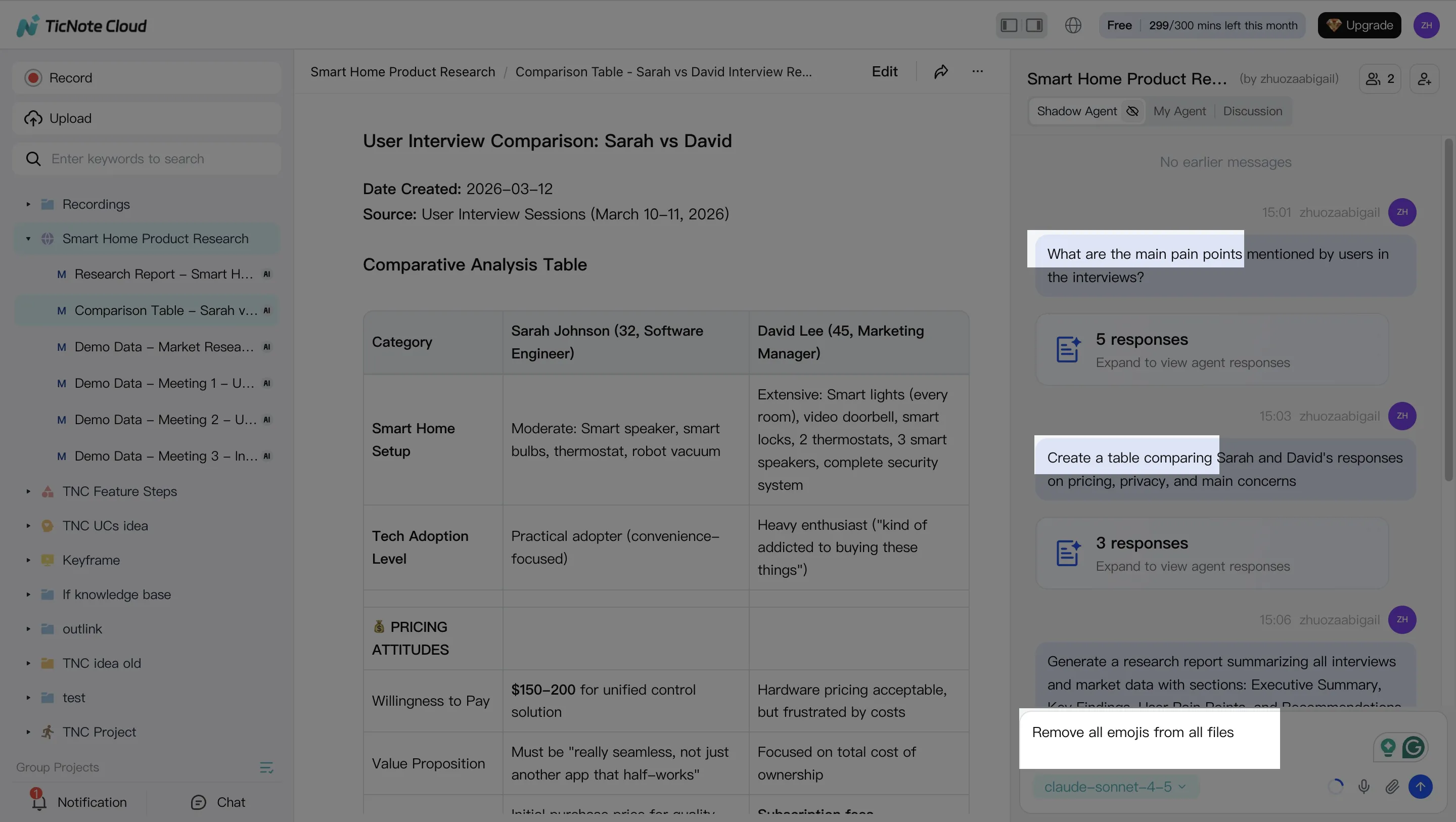
Step 2: Use Shadow AI to search, analyze, edit, and organize
With the Project in place, use Shadow AI on the right side to pull out what matters fast. Ask it to extract key facts (insured name, policy number, loss date), list open items, and surface the next questions your team must answer.
Two practical habits reduce errors:
- Validate with citations. Jump back to the exact passage when you need to confirm a detail.
- Clean the transcript. Fix names, add short notes, and mark decisions. A clearer record cuts rework later.
Step 3: Generate insurance-ready deliverables (in consistent formats)
Once the source is organized, generate outputs your team can act on. In insurance, consistency beats "pretty." Use the same format each time so steps aren't missed.
Common deliverables to generate:
- Meeting summary + action list (owners + due dates)
- FNOL intake packet draft (what happened, who's involved, what's missing)
- Renewal change summary (what changed since last term)
- Internal QA checklist (what to verify before sending or binding)
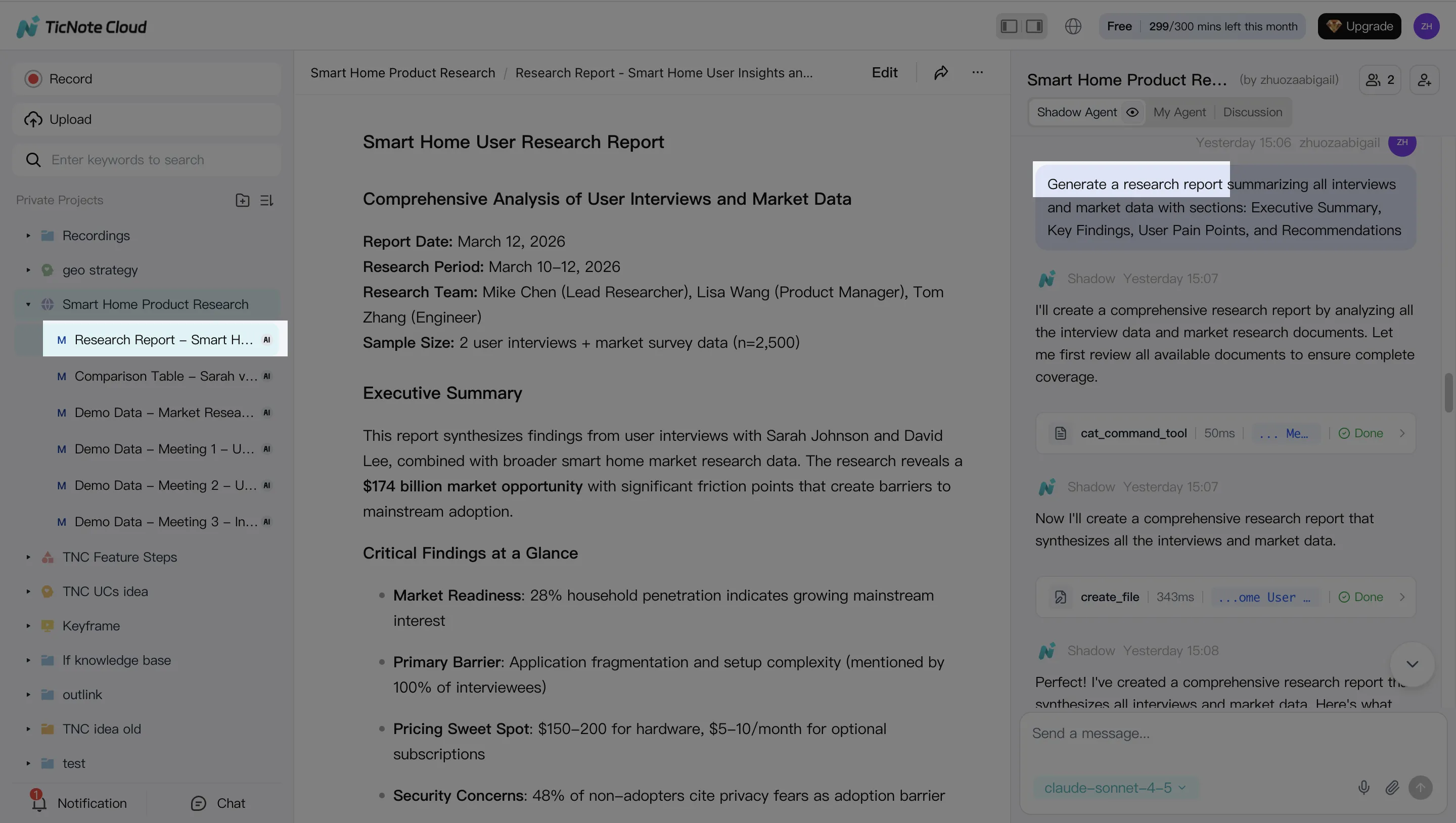
Step 4: Review, refine, and collaborate (keep the Project as memory)
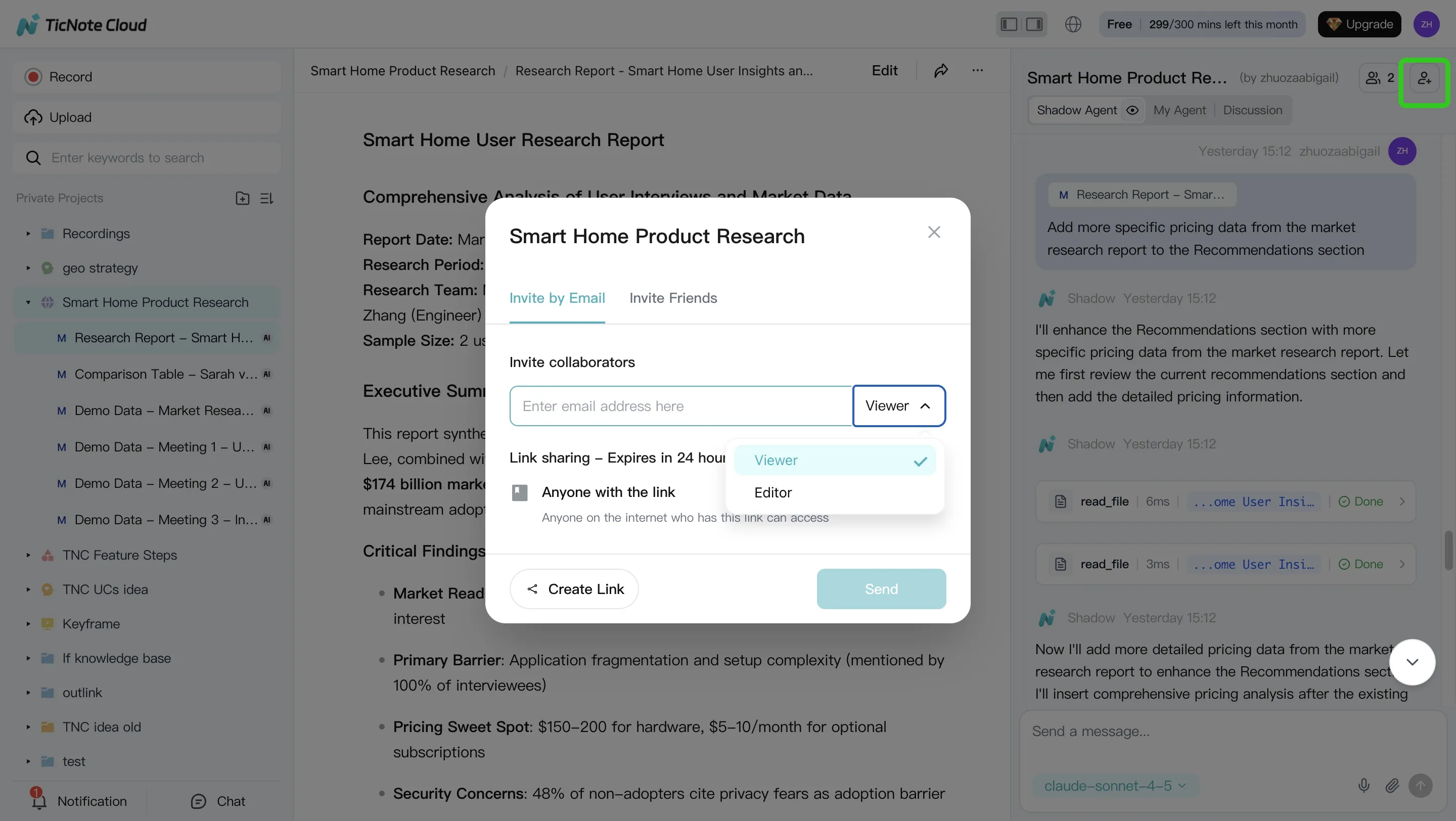
After Shadow AI generates an output, review it like you would any ops document: confirm facts, tighten wording, and assign follow-ups. Keep discussions and revisions inside the same Project so the "why" behind decisions doesn't get lost.
Share the Project with role-based permissions (Owner/Editor/Viewer). Teammates can comment, ask Shadow questions, and request updates—while work stays within access boundaries.
App workflow (quick summary)
When you're away from your desk, the mobile app can capture or import recordings and add them to the same Projects. Shadow AI can then generate the same summaries and deliverables, so field updates don't wait for someone to "write it up later."
Used weekly, this pattern delivers three measurable wins: fewer lost decisions, faster handoffs, and cleaner audit trails from intake to close.
Conclusion: A practical path to AI agents in insurance (start small, govern early)
A practical path is simple: start with one high-volume workflow, measure it, then scale. Pick a lane like service requests, renewal outreach, or FNOL triage. Tie it to 2–3 KPIs you can track weekly, such as handle time, first-contact resolution, and backlog age. That's how an AI agent for insurance earns trust fast.
Start with one workflow, not "AI everywhere"
Choose the workflow that has steady volume and clear owners. Then set acceptance gates before you expand:
- Volume: at least 50–100 items per week
- KPIs: 20% faster cycle time or 10% fewer reopenings
- Quality: 95%+ "no rework needed" rate on outputs
- Adoption: 60%+ of the team uses it weekly
If you miss the gates, fix the workflow first. Don't add more use cases.
Govern early with a control tower mindset
Guardrails reduce risk more than model choice does. Put these in place on day one:
- Data rules: what counts as PII/PHI, what can't be stored
- Human approval: which actions must be reviewed (denials, coverage language, payments)
- Audit trail: who asked what, what sources were used, what changed
- Incident plan: how you pause, investigate, and notify
- Bias checks: test outputs across protected classes and edge cases
Win where decisions actually happen: in calls
In insurance ops, the "truth" often lives in conversations: adjuster calls, agent-client renewals, underwriter clarifications. When those decisions stay in notes and inboxes, you get repeat work and missed follow-ups. Turning meetings and documents into Project memory creates a searchable record of what was decided, why, and what happens next—across underwriting, claims, and renewals.
Try TicNote Cloud for Free and generate your first follow-up packet from a meeting.


