


 Extension
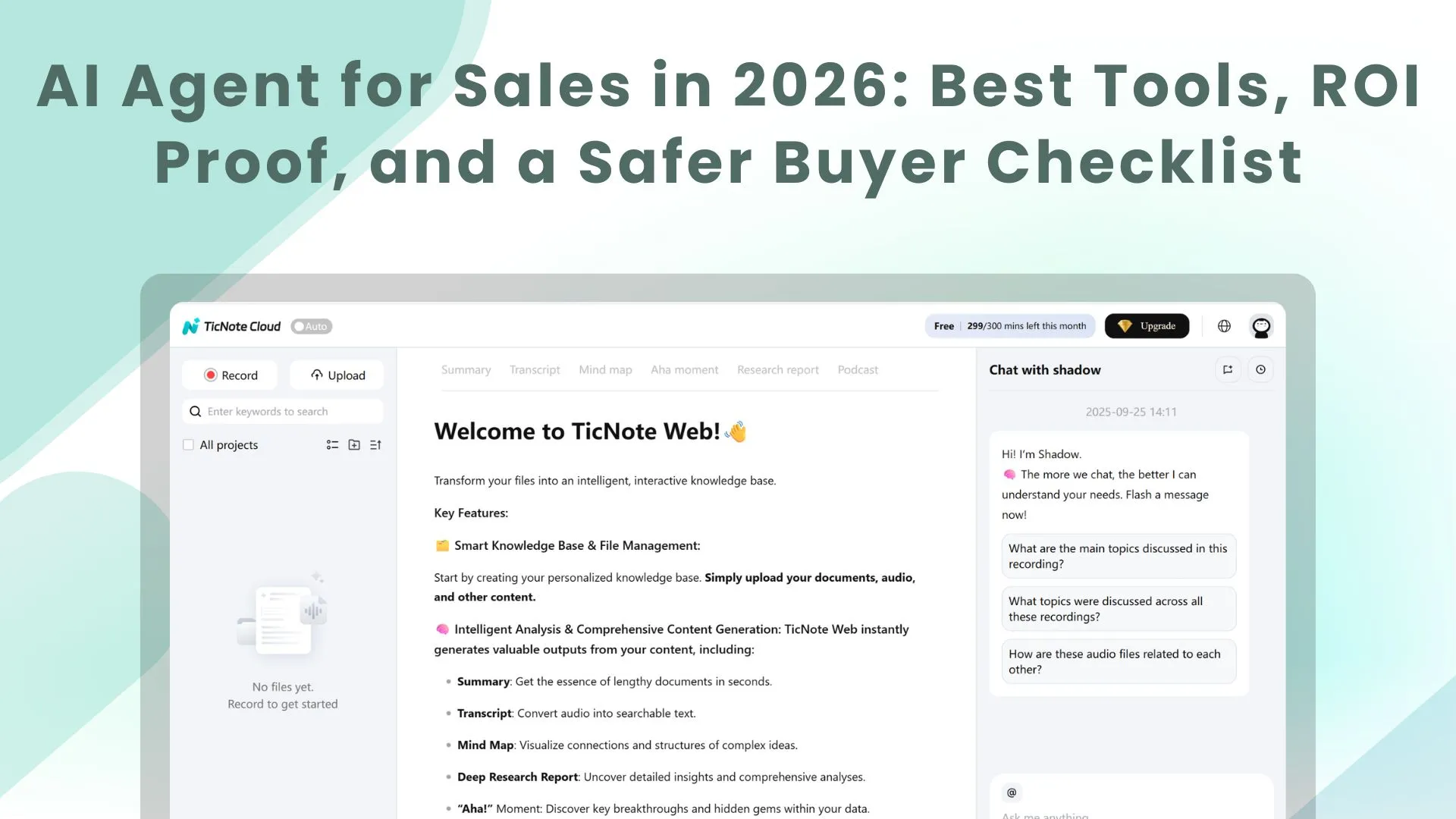
TL;DR: Best AI agent options for sales teams (and where each fits)
Try TicNote Cloud for free if your biggest gap is post-call work (recap, follow-up, and reuse). It's the fastest way to turn meetings into a repeatable system, which is what most "ai agent for sales" buyers want.
Problem: follow-ups slip and notes don't get reused. That creates missed next steps and messy CRM data. A practical fix is to use TicNote Cloud as an after-call agent that turns conversations into Project assets you can search later.
- Meeting → follow-up execution & knowledge reuse: TicNote Cloud (after-call outputs + Project-based reuse)
- CRM-native agenting (pipeline, tasks, records): Salesforce Agentforce; HubSpot Breeze; Dynamics 365 + Copilot
- Conversation intelligence (coaching + deal risk): Gong
- Outbound/prospecting automation: Clay (research/enrichment); Apollo (data + engagement); n8n (if you can build workflows)
- Follow-up automation: pick a tool that drafts, routes for approval, and logs back to CRM
If you only do one thing this week: pick one broken handoff (recap → CRM update → follow-up), set a "human approve" rule by deal stage, and run a 2-week baseline on minutes spent and error rate before you compare results.
What is an AI agent for sales (and how is it different from copilots, chatbots, and automation)?
An AI agent for sales is software that can take a sales goal, use your team's context, plan the work, and then do actions in your tools—then show what it did. That's why buyers get confused: many "agents" are really just drafting helpers or chat UIs. The clean way to judge a product is to ask what it can do without you watching every click.
A plain 4-part definition of a sales agent
A true sales agent has four parts working together:
- Goal: A clear target like "send an accurate follow-up within 15 minutes" or "book the next meeting this week."
- Context: The facts it can pull from, such as CRM fields, call transcripts, emails, playbooks, pricing notes, and product docs.
- Plan: A short step-by-step path, like draft → check constraints (tone, permissions, opt-out) → route for approval → log the result.
- Action + reporting: It can act inside tools (email, calendar, CRM) and then report what happened (sent, scheduled, updated, or blocked).
If one of these is missing, you're usually looking at a helper, not an agent.
Assistant (copilot) vs agent vs chatbot vs workflow automation
These labels get used loosely on vendor pages. Here's the practical difference:
- Assistant / copilot: Helps a human do work faster. Think summaries, email drafts, talk tracks, and Q&A. It usually waits for a prompt and doesn't "run" a process.
- Agent: Takes initiative within rules. It can kick off multi-step work and manage handoffs (drafts, approvals, logging, and follow-through).
- Chatbot: A conversational interface. It may be just a Q&A box, or it may be the front door to an agent. The key test: can it take actions, or only talk?
- Workflow automation: Rules-based "if this, then that." It's predictable and easy to audit, but brittle. It won't reason through messy inputs like unclear next steps.
A simple buyer check: if the tool can't reliably use your CRM data and still needs constant prompting, it's not agentic.
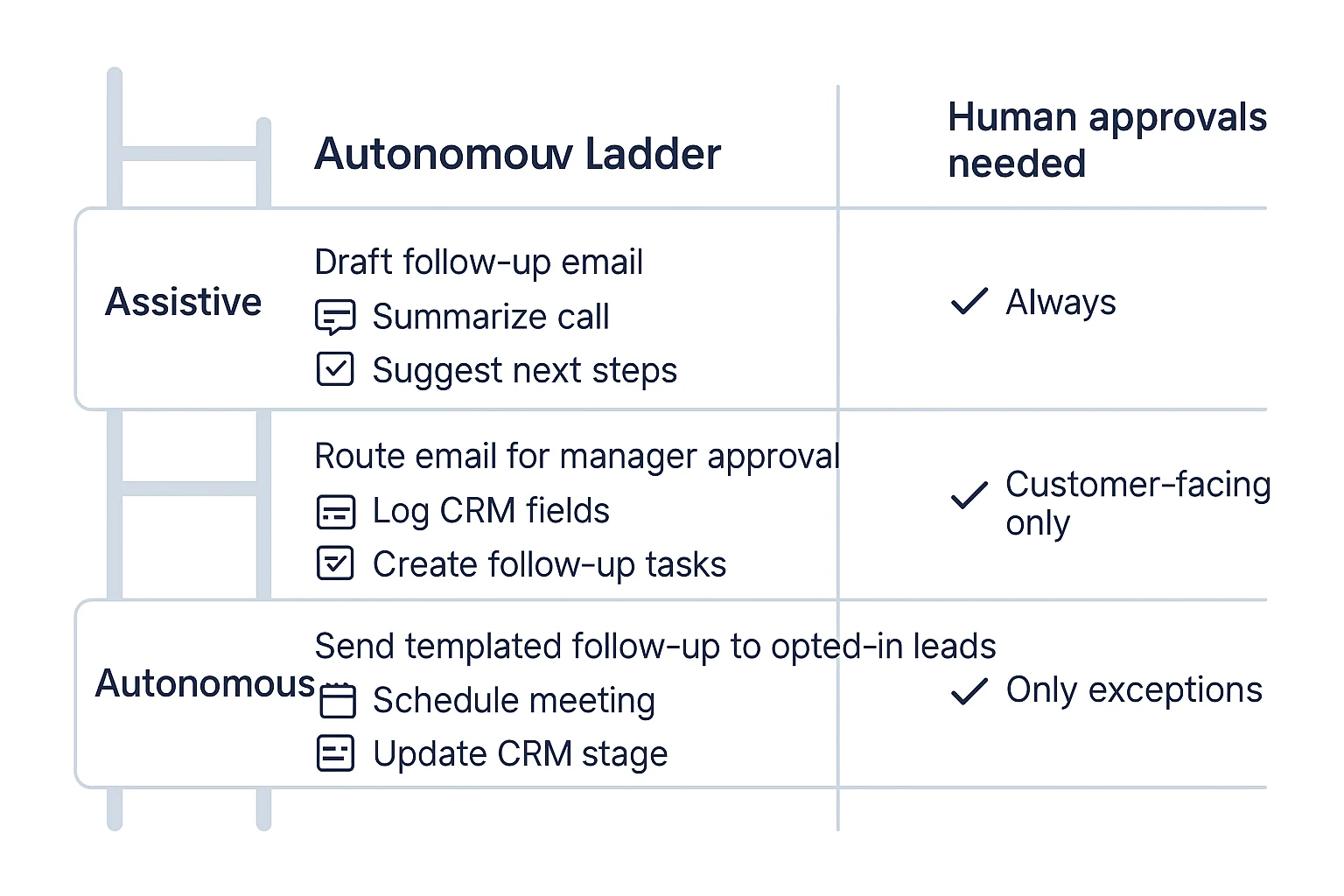
Autonomy levels: assistive → semi-autonomous → autonomous
Most teams succeed by picking the lowest autonomy that still removes real work:
- Assistive (lowest risk): Suggests next steps, drafts follow-ups, and proposes CRM updates. A human approves and sends.
- Semi-autonomous (best default): Drafts + routes for approval + logs outcomes automatically. Humans approve customer-facing actions.
- Autonomous (narrow scope only): Sends, schedules, and updates records without approval, but only for low-risk tasks (like internal notes, or known templates).
This is the "sales agentic AI" reality: performance tracks your data quality, permissions, and guardrails. Clean CRM fields, clear playbooks, and tight approval rules often beat "more autonomy" every time. If you want more examples mapped to enterprise workflows, start with this guide on real agent use cases and governance.
What can go wrong with sales AI agents, and how do you set guardrails?
An AI agent in sales can save hours. It can also create new risk fast. The "reality check" is simple: the more an agent can act (send, book, edit CRM), the more you need tight rules, review gates, and logs.
Watch for these common failure modes (what they look like day to day)
Hallucinated facts in customer-facing messages. This shows up as invented pricing, wrong contract terms, fake security claims, or features you don't ship. In practice, it's a follow-up email that sounds confident but is wrong.
Wrong next-step assumptions. The buyer asks for a SOC 2 report or DPA, and the agent pushes a calendar link. Or it "helpfully" proposes a trial when procurement has started. These misses hurt trust more than a slow reply.
Tone drift and risky phrasing. Agents can get pushy, casual, or off-brand. They can also write promises like "guaranteed ROI" or "we're compliant with X" without proof. That's a legal and brand problem.
Wrong routing and ownership. Territory rules, named accounts, partner-led deals, and channel conflict are easy to break. One bad reassignment can create internal conflict and a bad buyer experience.
Bad CRM writes (classic crm data hygiene ai failure). The agent creates duplicates, overwrites fields, bumps stages, or logs the wrong contact. Small errors stack up. After a month, your pipeline reports are fiction.
Set human-in-the-loop approvals by deal stage (not by vendor promises)
Use a risk ladder based on the action.
- Low risk (can auto): Draft internal notes, suggested talk tracks, call summaries, and FAQ snippets for reps to paste.
- Medium risk (review required): Outbound emails, meeting follow-ups, pricing language, and anything that mentions security or legal topics.
- High risk (locked down): Booking meetings, changing opportunity stage, editing key CRM fields, sending docs, or creating commitments.
Two rules prevent most damage:
- Start in draft-only mode for at least 2–4 weeks. Track error rate before you allow sending or writing.
- Require "why + proof" on actions. If the agent changes a record or suggests a next step, it should show its reasoning and point to the source (call snippet, email thread, CRM field) that supports it.
Use a security and compliance checklist before you roll out
Treat the agent like a new system-of-record dependency.
- Data processing: Signed DPA, subprocessors list, data residency options, and a clear answer on whether your data trains models.
- Access control: SSO/SAML, SCIM, role-based permissions, and least privilege (only the objects it must touch).
- Auditability: Event logs for prompts, actions taken, and edits made. You need to replay "who did what, when, and why."
- Retention: Configurable deletion windows, export, and legal hold support.
- Consent: Clear call recording and transcription disclosure, with region-based rules.
- Red teaming: Test prompt injection (malicious text that tricks the model) and sensitive-data leakage before real deals.
Here's a fast governance checklist you can copy into your rollout doc:
- Define allowed actions per stage (SDR, AE, CSM)
- Define forbidden phrases (guarantees, compliance claims, pricing without approval)
- Require approval for enterprise and regulated industries
- Turn on logging for every external send and CRM write
- Set a weekly QA sample (for example, 20 agent outputs per team)
- Add a "kill switch" (one setting to pause sending and writes)
How do you measure ROI from an AI sales agent? (KPIs + a simple calculator)
ROI is simple when you measure the workflow, not the hype. Start by picking one repeatable motion (like meeting-to-follow-up) and track three buckets: time saved, funnel lift, and data quality. Then run a small test that Finance and RevOps can trust.
Set baseline → target KPIs (pick 6–10, not 30)
Use one "before" week to set a baseline. Then set targets for 30 days. Keep targets tight and numeric.
- Time KPIs (execution speed)
- Admin time per meeting (minutes)
- Time-to-follow-up (minutes from meeting end)
- Time-to-CRM-update (hours to logged notes, fields, next step)
- Funnel KPIs (flow and conversion)
- Speed-to-lead (minutes to first touch)
- Meeting set rate (%)
- Show rate (%)
- Qualified meeting rate (%)
- Revenue KPIs (money outcomes)
- Pipeline created per rep ($/month)
- Stage-to-stage conversion (%)
- Sales cycle length (days)
- Win rate (%)
- Quality KPIs (trust and governance)
- CRM field completeness (% of required fields filled)
- Duplicate rate (duplicate contacts/opps per 100 records)
- Forecast variance (% gap between forecast and actual)
- Coaching adherence (% calls with required talk tracks / MEDDICC fields)
A clean way to tie this to an agent: treat "after-call execution" as the controllable input. If follow-ups go out faster, CRM gets cleaner, and stage movement improves, you can attribute lift with less debate.
Design an A/B test that survives scrutiny
Don't test across everything at once. Test one workflow and one role.
- Choose one workflow (example: after-call recap + follow-up email + CRM update).
- Choose one persona (SDR or AE). Keep it to 8–20 reps if possible.
- Randomize cleanly
- By rep (half use the agent, half don't), or
- By account segment (SMB vs mid-market), but don't mix within the same rep.
- Hold rules constant
- Same templates, tone rules, and send windows.
- Same fields required in CRM.
- Weekly "ground truth" QA sample
- Review a fixed sample (for example, 10 outputs per rep per week).
- Score with one page: accuracy, tone, compliance, and "would you send it?"
If quality drops, pause expansion. A small rollback is cheaper than a brand problem.
Use a simple ROI calculator (time saved + lift − cost)
Use three scenarios to stay credible.
| Input | Conservative | Base | Aggressive |
| Hours saved per rep per week | 0.5 | 1.5 | 3.0 |
| Adoption (active weekly use) | 50% | 70% | 85% |
| Incremental meetings per rep per month | 0 | 1 | 2 |
| Opp conversion from meeting | 15% | 20% | 25% |
| Avg deal value ($) | 8,000 | 12,000 | 20,000 |
| Win rate | 15% | 20% | 25% |
Time saved value = (hours/week saved × fully loaded hourly rate × 52) × adoption
Lift value = (incremental meetings/month × 12) × opp conversion × avg deal value × win rate
Total ROI ($) = time saved value + lift value − (subscription + usage + implementation + oversight time)
Keep oversight time explicit (for example, 1–2 hours per week for QA and template control). That's the difference between "works in a demo" and "works at scale."
Top AI agent for sales tools in 2026 (comparison table + best picks)
Most "AI agent for sales" tools fall into five buckets: meeting-to-follow-up execution, CRM-native agents, engagement/prospecting, conversation intelligence, and automation builders. The fastest way to shortlist is to normalize them on the same factors: channels, autonomy (how much it can do without you), CRM fit, and governance. Use the table below to pick a starting point, then sanity-check with the "what it doesn't do well" notes.
Normalized comparison table (shortlist fast)
| Tool | Primary use case | Channels | Autonomy level | CRM fit | Governance (audit/perm/retention) | Data controls (training opt-out) | Implementation effort | Pricing model | Best for | Watch-outs |
| TicNote Cloud | Meeting-to-follow-up execution + knowledge reuse | Meetings | Semi-autonomous | Medium | Medium–High | Yes (as described) | Low | Seat + usage tiers | After-call assets: summaries, action items, internal alignment docs | Not a full outbound sequencer; CRM write-back may need process/integration |
| Salesforce Agentforce | CRM-native agenting + next best actions | Email, chat, CRM | Semi-autonomous → autonomous | High | High | Enterprise-dependent | Medium–High | Platform | Teams already standardized on Salesforce | Can get complex fast; admin work and governance setup required |
| HubSpot Breeze | CRM-native assistant + workflow help | Email, chat, CRM | Assistive → semi-autonomous | High | Medium–High | Vendor-dependent | Low–Medium | Platform add-on | SMB to mid-market on HubSpot who want speed | Less flexible outside HubSpot; advanced controls vary by tier |
| Dynamics 365 Sales + Copilot | CRM-native productivity + guidance | Email, chat, CRM | Assistive → semi-autonomous | High | High | Enterprise-dependent | Medium | Seat + platform | Microsoft-first orgs (M365 + Dynamics) | Works best inside the Microsoft stack; setup needs IT buy-in |
| Zoho CRM + Zia | CRM insights + guidance | Email, chat, CRM | Assistive → semi-autonomous | High | Medium | Vendor-dependent | Low–Medium | Seat | Cost-sensitive teams on Zoho | May lag on deep agent workflows vs larger ecosystems |
| Gong | Conversation intelligence AI (coaching + deal risk) | Voice, meetings | Assistive | Medium–High | Medium–High | Vendor-dependent | Medium | Seat | Coaching, call search, risk signals for leaders | Not an execution agent; follow-up still needs workflows/tools |
| Apollo | Prospecting database + sequencing | Semi-autonomous | Medium | Medium | Vendor-dependent | Low–Medium | Seat | SDR teams needing lists + sequences fast | Data quality varies by market; deliverability hygiene is on you | |
| Clay | Enrichment + research workflows | Email (via outputs) | Semi-autonomous | Medium | Medium | Vendor-dependent | Medium | Usage | RevOps teams doing research at scale | Can sprawl into "DIY tooling"; needs clear rules to avoid mess |
| n8n | Automation builder ("glue" between tools) | Any (via integrations) | Semi-autonomous | Medium | Medium–High (depends on hosting) | You control (if self-hosted) | High | Platform | Custom sales follow-up automation across stack | Requires technical ops; easy to build brittle workflows |
Best picks by category (item cards)
Meeting/workflow execution (after-call): TicNote Cloud
If your biggest gap is what happens after the call, start here. TicNote Cloud is a meeting-centered AI workspace that turns calls into editable transcripts, Project knowledge, and follow-up assets you can reuse.
- Ideal team size: 5–200 (SDR/AE + enablement + RevOps)
- Setup time: Same day for a pilot
- Data dependencies: Meeting recordings + any supporting docs you upload
- Governance depth: Project permissions; traceable operations; sources are clickable for verification (as described)
- Strong at: ai meeting notes for sales that become usable outputs (call recap, action list, internal brief, renewal risk summary); cross-meeting Q&A with citations; knowledge compounding inside Projects
- Doesn't do well: Full sales engagement sequencing; "system-of-record" CRM ownership
Why it wins for most teams: post-call execution breaks in real life. Notes live in one place, tasks in another, and the "why" gets lost. A meeting-to-deliverable agent closes that gap without waiting for a CRM rebuild.
CRM-native agents: Salesforce Agentforce, HubSpot Breeze, Dynamics 365 Sales + Copilot, Zoho + Zia
Choose CRM-native agenting when your CRM is the system of record and you want next-best actions, activity capture, and consistent fields.
- Ideal team size: 25–5,000 (best payoff when you have process discipline)
- Setup time: 2–8 weeks (depends on data hygiene and admin work)
- Data dependencies: Clean objects, fields, permissions, lifecycle stages
- Governance depth: Usually strongest here (role-based access, admin controls, retention)
- Strong at: guided selling, summaries inside CRM, suggested updates, workflow nudges that align to your pipeline
- Doesn't do well: Deep meeting knowledge reuse across many files; cross-functional deliverables that need cited context
Good combo: use a meeting execution layer first, then add CRM-native agenting once your fields and rules are stable.
Conversation intelligence AI: Gong
Conversation intelligence AI is best when the goal is coaching and deal inspection, not action execution.
- Ideal team size: 20–2,000
- Setup time: 2–4 weeks
- Data dependencies: Call recordings, rep participation, consistent call types
- Governance depth: Strong controls, but confirm retention and access rules in your security review
- Strong at: coaching queues, deal risk patterns, conversation search, talk track compliance
- Doesn't do well: sales follow-up automation end-to-end; drafting internal assets across many meetings
Prospecting/research: Clay and Apollo
Pick these when pipeline creation is the bottleneck.
- Clay (best enrichment/research):
- Ideal team size: 2–50 (RevOps-heavy teams)
- Setup time: 1–2 weeks
- Data dependencies: target accounts, enrichment sources, clear rules
- Governance depth: Medium (depends on connectors)
- Doesn't do well: meeting workflow, coaching, or CRM governance
- Apollo (database + sequencing):
- Ideal team size: 3–100 (SDRs)
- Setup time: days to 2 weeks
- Data dependencies: ICP filters, deliverability setup, basic CRM mapping
- Governance depth: Medium
- Doesn't do well: deep account research workflows; call coaching
Automation builders: n8n
Use n8n when you need custom "glue" between tools and you have technical ops support.
- Ideal team size: Any (value depends on ops maturity)
- Setup time: 2–6+ weeks for reliable workflows
- Data dependencies: API access, stable schemas, clear error handling
- Governance depth: Can be high if self-hosted and logged well
- Doesn't do well: out-of-the-box sales enablement AI; safe autonomous actions without careful guardrails
Quick buying rule (direct recommendation)
If your team loses hours on recaps, handoffs, and internal alignment, start with TicNote Cloud first. It fixes the highest-frequency failure: turning sales calls into usable follow-up assets and shared context. Then, if you need tighter field control and next-best actions, add a CRM-native agent layer inside your system of record.
How to run meeting-to-follow-up execution with an after-call AI agent (step-by-step)
After a sales call, most teams lose time in the same places: finding key moments, cleaning up notes, writing follow-ups, and aligning the team. A strong after-call workflow fixes that by turning one recorded conversation into reusable deal assets. Below is a step-by-step flow using TicNote Cloud as the example, built for meeting-to-follow-up execution and knowledge reuse.
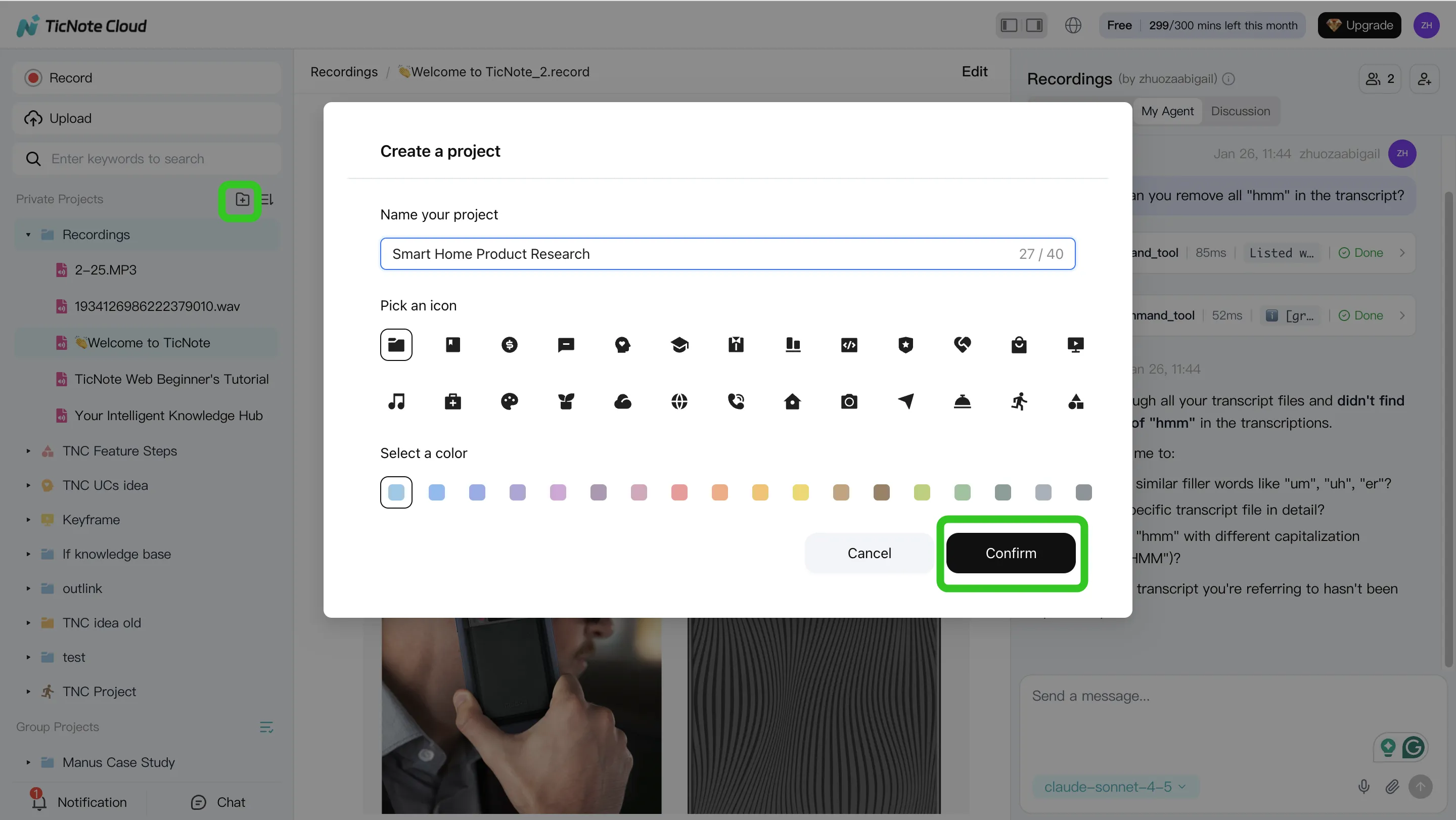
Step 1: Create (or open) a Project and add content
Start by scoping the work. Create one Project per deal, account, or buying committee thread (example: "Acme – Discovery"). This keeps all meeting context in one place, so your outputs don't drift.
Add the assets your team already has:
- The call recording (audio or video)
- The agenda and pre-call notes
- Security Q&A, pricing notes, or a proposal draft
- Any email thread snippets you want referenced
You can bring files in two clean ways:
- Direct upload from the file area (fast when you already have the recording)
- Attach files from the Shadow AI panel, then ask Shadow to save them into the right folder (useful when you're already working in chat)
Step 2: Use Shadow AI to search, analyze, edit, and organize
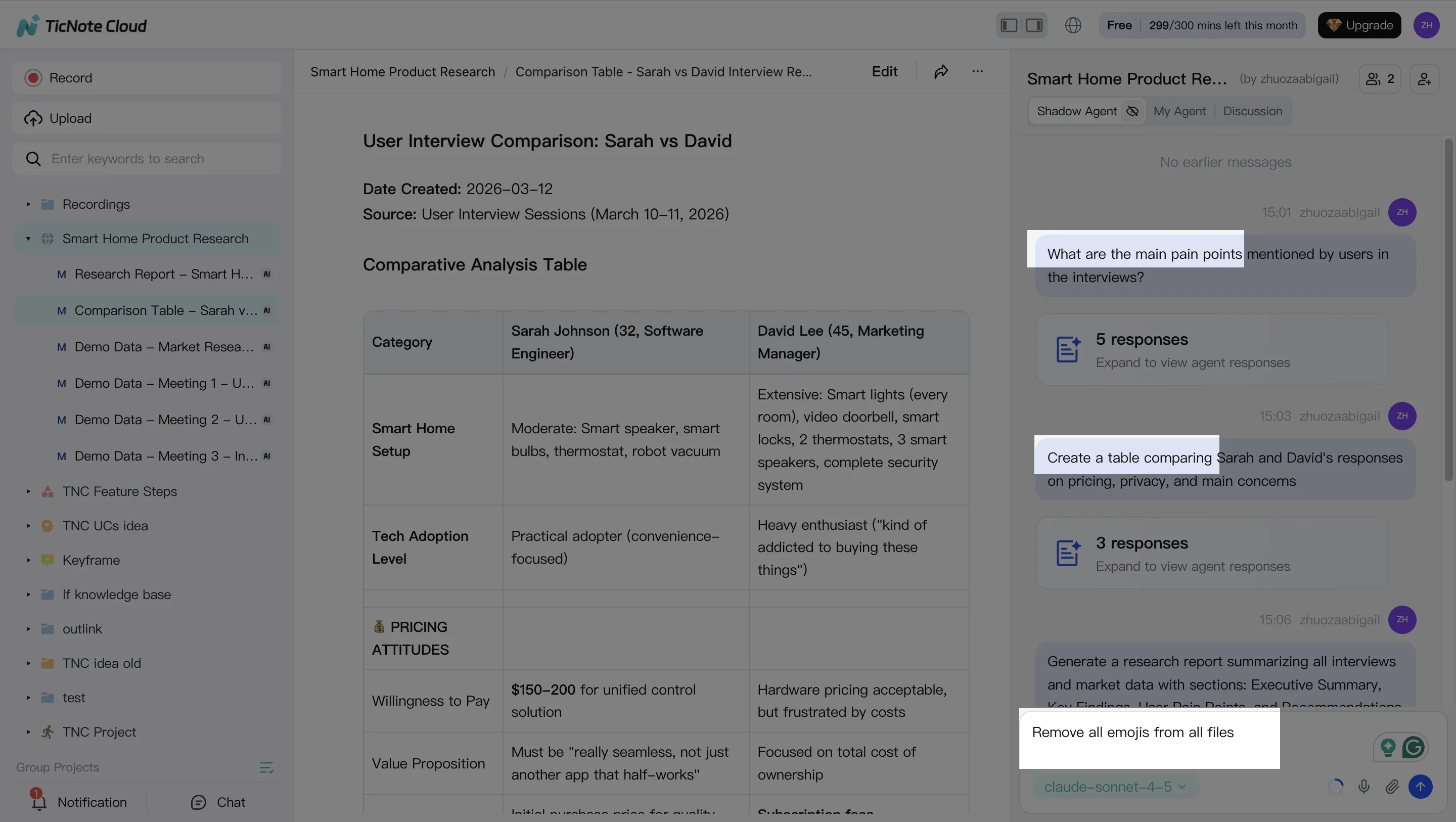
Once everything is in the Project, treat Shadow AI like your "call analyst." Your goal here is simple: pull the signal out of messy conversation.
Ask for the moments your team always hunts for:
- Pricing questions and what was promised
- Objections and the exact phrasing used
- Next steps, owners, dates, and dependencies
Then shape the raw transcript into sections your CRM and handoffs can use:
- Recap (what changed after the call)
- Stakeholders and roles
- Pain points and success criteria
- Requirements and risks
If the transcript has errors (names, acronyms, product terms), fix them now. One small correction here prevents wrong follow-ups later.
Step 3: Generate follow-up deliverables (and keep them grounded)
Now you turn analysis into output. In a sales workflow, the highest-ROI deliverables are usually:
- Customer follow-up email draft (clear recap + next steps)
- Internal handoff summary for AE/CS/SE (what to do next, and why)
- Account plan notes (needs, timeline, risks)
Create these by asking Shadow AI directly or using the Generate flow for more formal assets.
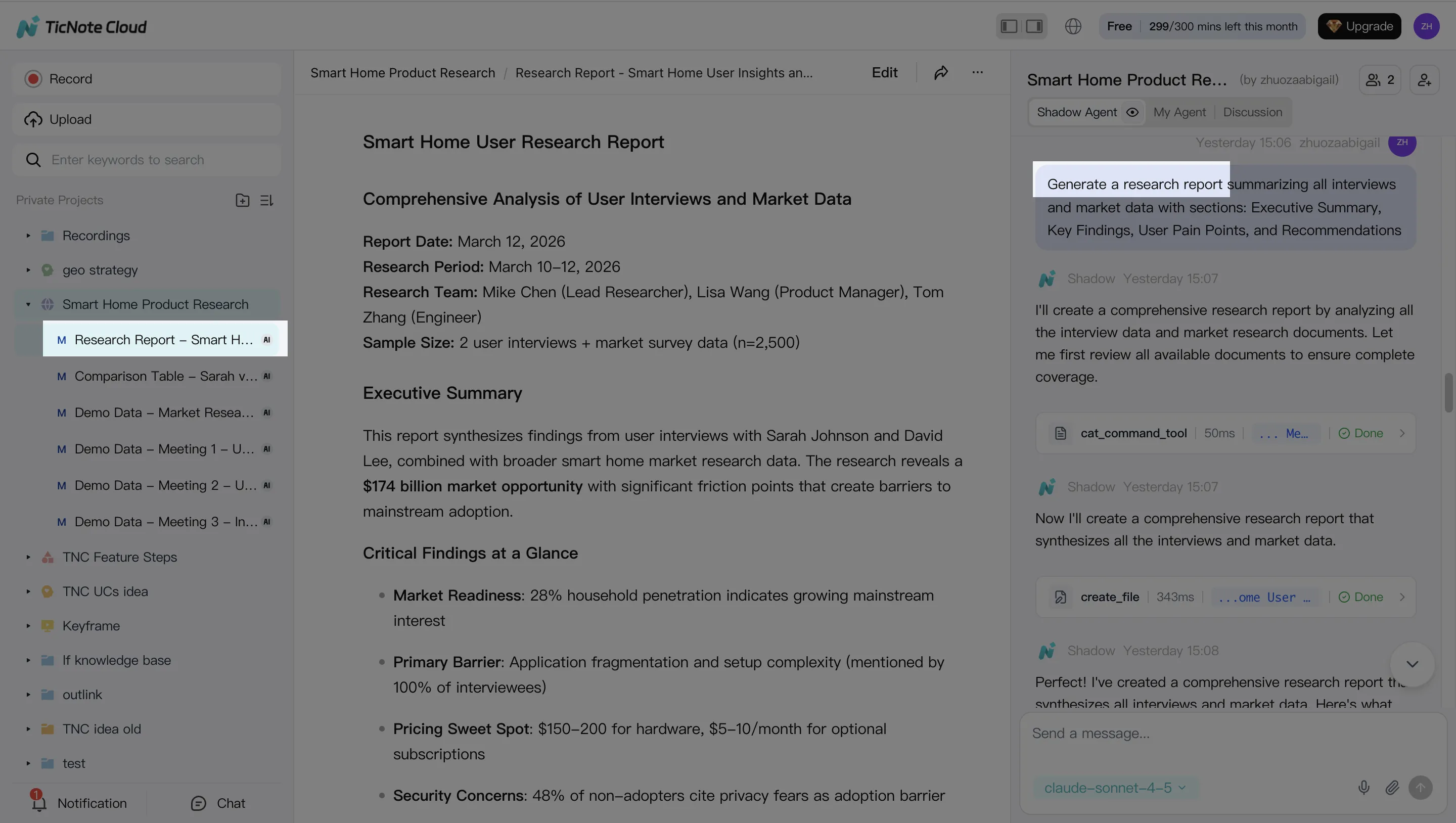
Two guardrails keep quality high:
- Require cited snippets from the transcript or Project files for any claim ("include the quote and where it came from").
- Reuse the same Project over multiple meetings so context compounds instead of resetting every call.
Step 4: Review, refine, and collaborate (human-in-the-loop)
Treat the agent's output as a strong draft, not the final send. A quick team review catches tone issues, risky promises, and missing stakeholders.
Make the workflow explicit:
- One person owns final customer-facing text
- One person owns CRM updates and tagging
- Enablement owns template improvements over time
As you refine, jump from any paragraph back to the source to verify it, and keep changes visible so the team learns what "good" looks like.
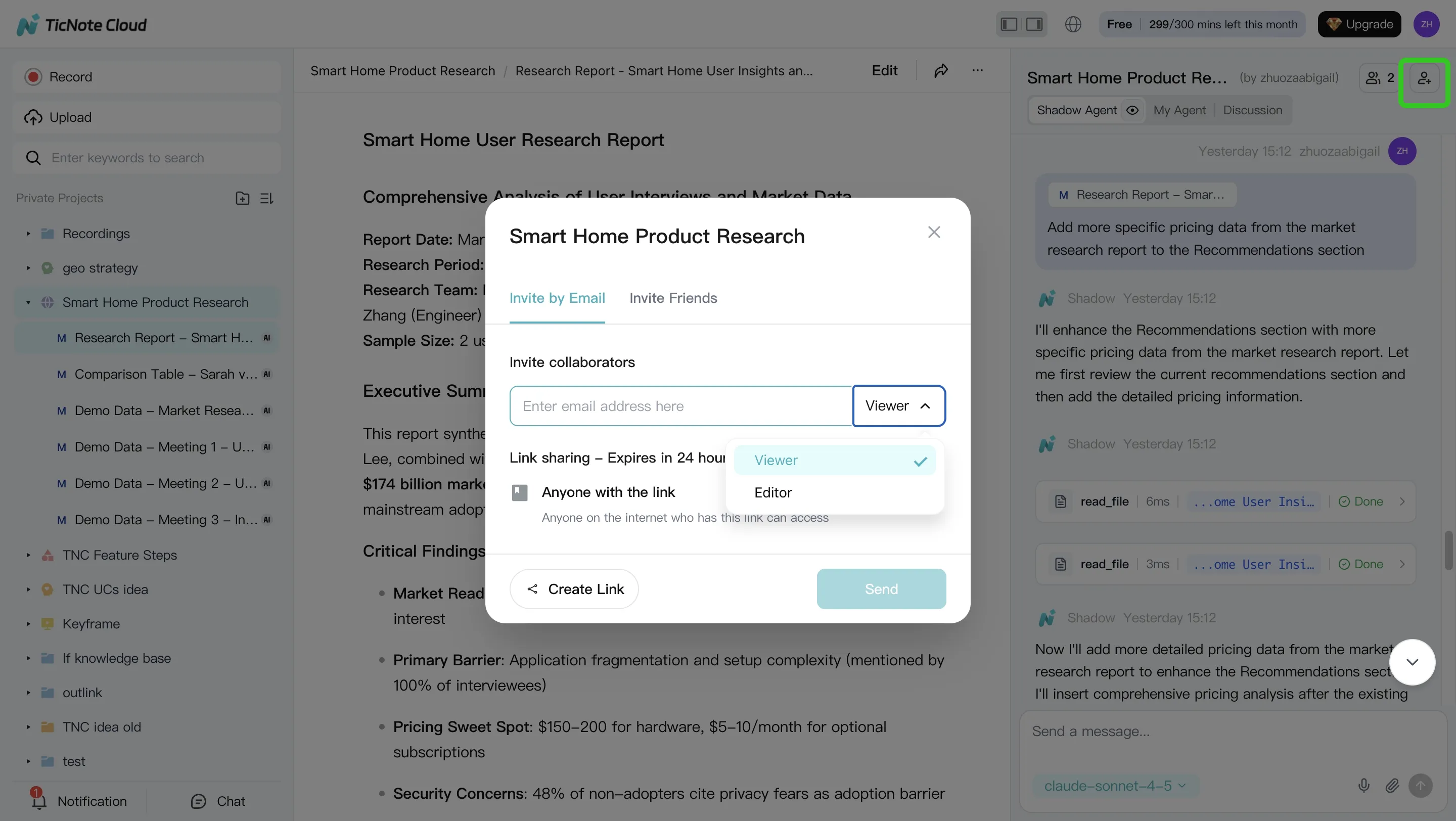
App workflow (quick version)
If you're moving between calls, you can keep the loop tight on mobile: open the Project, add the recording, ask Shadow AI for "key moments + next steps," then generate a recap or follow-up draft to share for review.
How do you choose the right tool for your team size and stack?
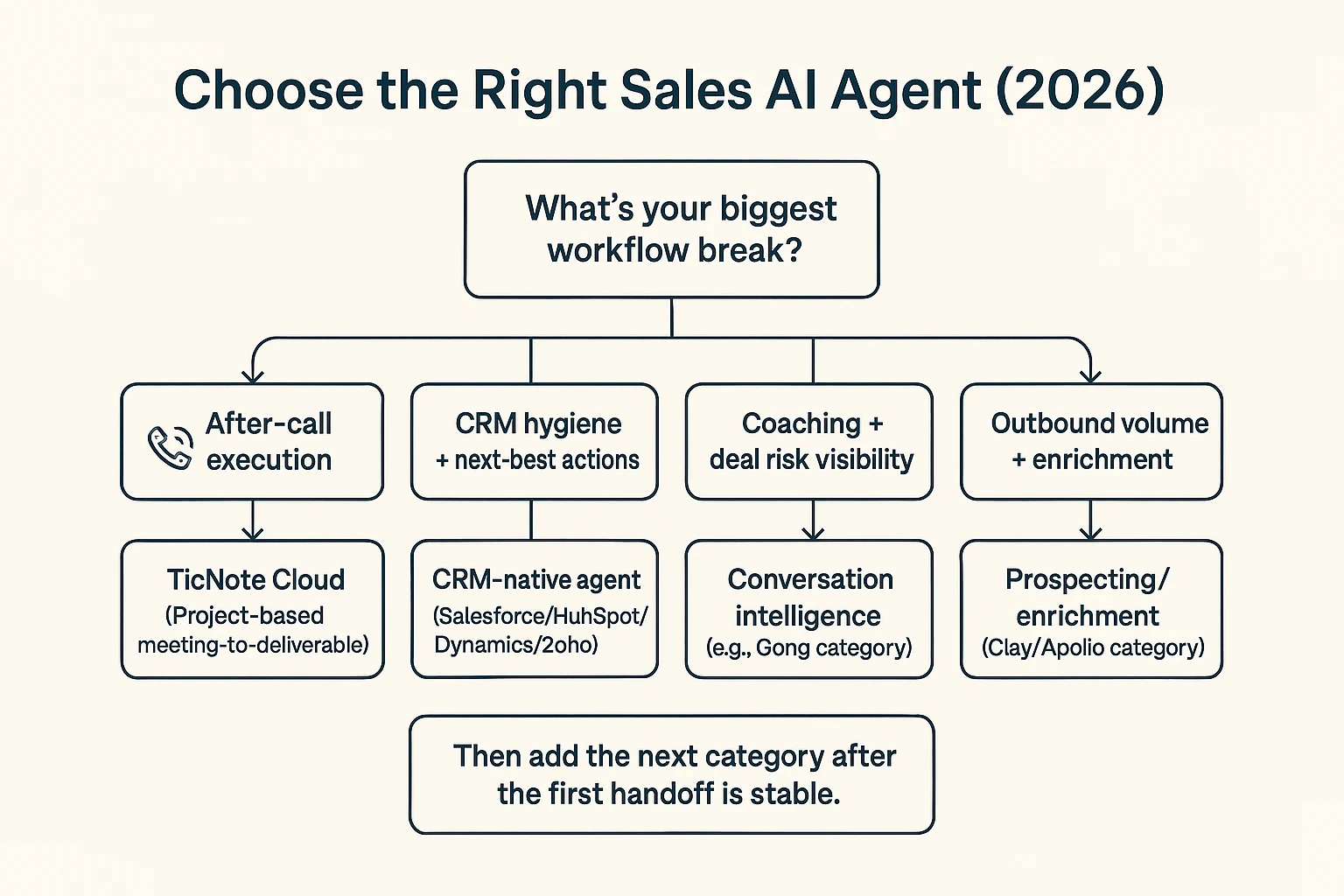
Pick the tool that fixes your biggest workflow leak first, then add the next category only when the handoff is stable. Most sales teams lose the most hours after the call—recaps, follow-ups, handoffs, and "what did we decide?"—so the best default starting point is an AI agent for sales execution like TicNote Cloud, which turns meeting content into reusable deliverables inside Projects.
Start with the break: a practical selection path
Use this quick routing logic:
- After-call execution is the bottleneck (recaps, follow-ups, internal alignment): choose TicNote Cloud first. It captures meetings, stores them in Project workspaces, and lets Shadow AI turn what was said into usable assets (action lists, emails, briefs, reports) with citations back to the source.
- CRM hygiene and next-best actions are the bottleneck: add a CRM-native agent (Salesforce/HubSpot/Dynamics/Zoho) after your meeting workflow is consistent. Otherwise you automate messy inputs and end up with messy records.
- Coaching and deal risk are the bottleneck: pair a conversation intelligence tool (for talk ratios, topics, enablement, risk flags) with your execution workflow. Coaching insights matter most when they flow into follow-ups and deal plans.
- Outbound volume and enrichment are the bottleneck: add Clay/Apollo for data + sequencing, but keep messaging behind approvals at first (draft → review → send). That reduces brand risk while you tune prompts and targeting.
Team size shortcut:
- 1–20 reps: start with post-call execution; you'll feel time savings fastest.
- 20–100 reps: add CRM write-back once fields and owners are standardized.
- 100+ reps: prioritize governance (permissions, retention, audit trails) before expanding autonomy.
Integration reality (where the agent must "write back")
Before you buy, list the exact surfaces the agent must update:
- CRM: account/contact/opportunity fields, activities, tasks, notes
- Email: drafts, sequences, templates, send rules
- Calendar: attendee mapping, meeting types, auto-tagging
- Slack/Notion: deal-room updates, decision logs, handoff pages
Common integration gotchas to test in week one:
- Field mapping: pick 10 required CRM fields and prove they map cleanly.
- Duplicate prevention: define match rules (email domain, CRM ID) before automation.
- Activity logging: confirm what logs as an activity, and who it's attributed to.
- Permission scopes: restrict who can see transcripts, projects, and exports.
If you're also building a broader knowledge layer, connect post-call outputs to a shared system; this is where a knowledge-management agent governance checklist helps keep access and reuse clean.
Total cost of ownership (seats + usage + setup)
Compare tools using TCO, not just the sticker price:
- Subscription: seat costs for reps, managers, enablement
- Usage fees: transcription minutes, LLM calls, enrichment credits
- Internal costs: 3–10 hours of enablement per rep in month one, ongoing ops maintenance, QA spot-checks, and a formal security review
Rule of thumb: start with the workflow that saves the most human hours per week with the least external risk. For most teams, that's post-call execution—because it reduces rework, improves handoffs, and creates reusable deal knowledge instead of one-off notes.
Implementation plan: a safe 30-day pilot for an AI agent in sales
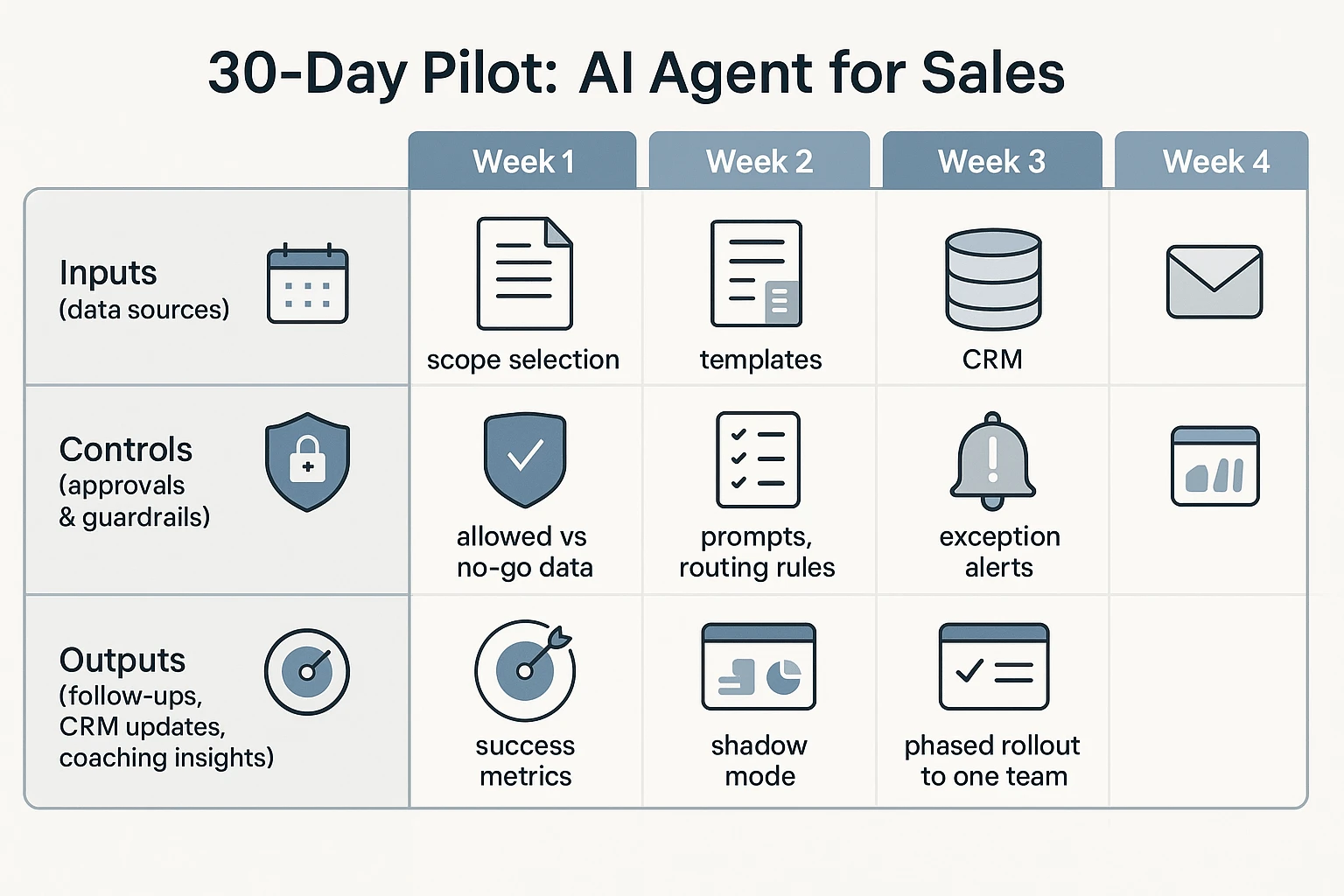
A 30-day pilot only works if sales, RevOps, and security agree up front on scope, metrics, and controls. The goal isn't "more AI." It's fewer missed follow-ups, cleaner CRM fields, and faster handoffs—without risky data use. This plan treats the ai agent for sales like a junior teammate: it drafts first, earns trust, then gets limited write access.
Week 1: Lock scope, data, and success criteria
Start small: pick one workflow that breaks most often. For most teams, that's meeting-to-follow-up execution (recap → next steps → tasks → CRM notes).
Define inputs and "no-go" data types:
- Allowed sources: calendar invite title, meeting transcript, call notes, CRM deal basics (stage, owner), enablement snippets.
- No-go data: payment data, health data, passwords/API keys, customer secrets not needed for the deal, and anything your policy labels as "restricted."
- Consent rule: decide what happens when consent is missing (block, or draft-only with a warning).
Set success metrics and a QA rubric you can score weekly:
- Accuracy: % of action items that match the call (target 90%+ by week 4).
- Compliance: % outputs that follow consent + retention rules (target 100%).
- Adoption: drafts accepted by reps (target 60–80%+).
- Time saved: minutes saved per rep per week (baseline first).
Week 2: Build templates, prompts, and routing rules
Create three standard outputs with fixed structure (so reviewers know what "good" looks like):
- Customer follow-up email (brief recap + agreed next step + date)
- Internal recap (what changed, risks, stakeholders, objections)
- Next-steps task list (owner + due date + dependency)
Then add routing rules (who must approve what):
- Early stage: rep can send after quick review.
- Late stage / procurement: manager approval required.
- Regulated accounts: compliance or security approval required.
Set exception alerts so problems surface fast:
- Missing consent or restricted account flag
- Low-confidence summary (your tool's confidence score, or "insufficient evidence" checks)
- Conflicts like "next meeting date" not matching the calendar, or stage mismatching CRM
Weeks 3–4: Run shadow mode, calibrate weekly, then roll out
Run "shadow mode" first: the agent drafts, but it can't send emails or write to CRM. Have reps edit, then submit a quick score (1–5) and tag issues (wrong stakeholder, wrong next step, too long, risky wording).
Each week, do a 30-minute calibration:
- Sample 10–20 outputs across reps and stages.
- Score against the rubric (accuracy, compliance, usefulness).
- Fix the root cause: tighten prompts, lock required fields, shorten templates, or block risky phrases.
- Update guardrails: add banned terms, add required disclaimers, or require approval for certain stages.
By the end of week 4, roll to one team (not the whole org). Publish a one-page "how to use it" with an escalation path: what to do when the draft is wrong, when consent is unclear, and when the agent should be turned off for a deal.
Copy-paste pilot ticket checklist (for leaders)
- Owners: Sales lead ___ / RevOps ___ / Security ___ / Enablement ___
- Timeline: Week 1–4 dates ___
- Workflow in scope: meeting-to-follow-up (yes/no) ___
- Systems in scope: Calendar ___, Transcript tool ___, CRM ___, Email ___, Storage ___
- No-go data types: ___
- Approval routing by stage: ___
- Shadow mode: start date ___, end date ___
- Metrics: accuracy ___, compliance ___, adoption ___, time saved ___
- Monitoring: weekly sample size ___, reviewer ___, issue log location ___
- Risk controls: consent rule ___, retention rule ___, audit log owner ___
For a similar governance-first rollout approach, use this safe AI agent implementation playbook for go-to-market teams as a template and adapt the controls to sales workflows.
Conclusion: What "good" looks like for an AI sales agent program
A good AI agent for sales program is earned, not switched on. Strong teams start with assistive help (drafts and summaries). Then they move to semi-autonomous work (suggest + prepare actions). Full autonomy comes last, after QA proves it's safe.
The teams that win do five things
They keep the work tight and measurable:
- Scope the workflow: pick 1–2 handoffs that break often (follow-up, CRM hygiene).
- Clean the inputs: clear fields, owners, and definitions.
- Set approvals: who can send, write to CRM, or trigger sequences.
- Demand audit trails: every action is logged and reviewable.
- Track KPIs: follow-up speed, task completion, field accuracy, and pipeline impact.
Start where value shows up fastest: post-call execution
Most teams get ROI quickest after meetings. That's where deals slip: late follow-ups, missing next steps, and messy handoffs to CS or leadership. Fixing that reduces dropped balls and improves internal alignment.
A practical default is to start with a meeting-to-deliverable agent like TicNote Cloud, so reps stay in one place and your knowledge becomes reusable. Then expand into CRM-native and outbound agents once your guardrails and data are solid.
Try TicNote Cloud for Free and turn every call into usable follow-ups and assets.


