


 Extension
TL;DR: Top picks for an AI agent stack in trading (with a research-first option)
You've got calls, notes, and theses spread across tools. That creates missed context and weak decision trails (especially after a bad trade). A research-first workspace like TicNote Cloud keeps meetings and docs in Projects and returns answers with citations, so your agent workflow stays checkable.
Two rules keep most teams safe: test like you don't trust your data (overfitting and leakage beat "bigger models"), and execute like you don't control fills (slippage, liquidity, and latency change outcomes). Also: keep a clear "not investment advice" posture and build audit logs from day one.
If your edge is research synthesis—earnings calls, IC (investment committee) notes, post-mortems—start with TicNote Cloud before you automate execution.
What is an AI agent for trading (and how is it different from a trading bot)?
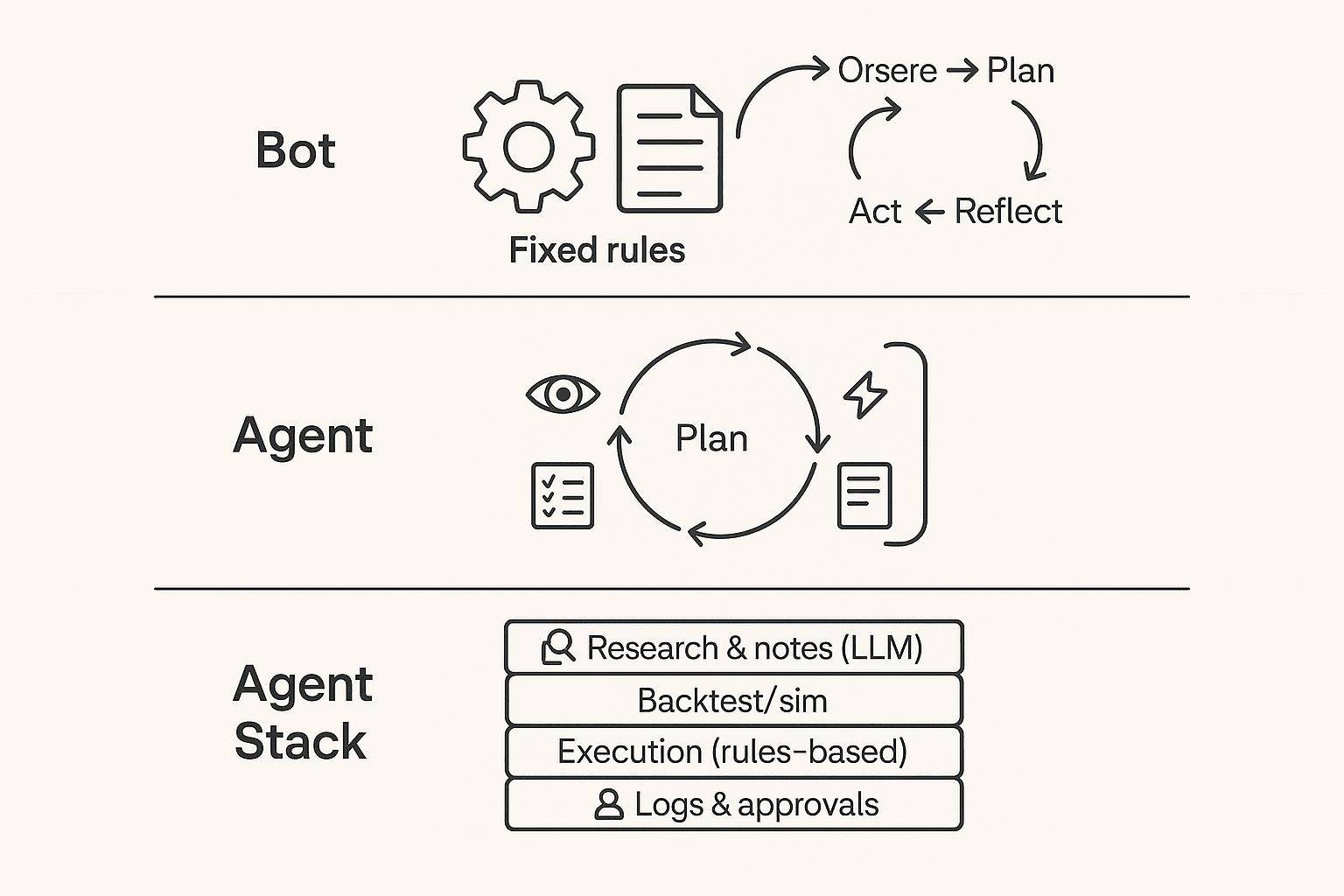
An AI agent for trading is a system that runs an ongoing loop: it observes new inputs, plans what to do, takes a bounded action (or drafts one for you), then reflects by logging outcomes and updating its next steps. Think less "one script places orders" and more "a workflow manager" that can pull in research, apply checklists, and keep a decision trail.
Understand the agent loop (observe → plan → act → reflect)
Most trading agents follow a simple loop:
- Observe: price/volume, news, filings, earnings-call notes, your current positions, and constraints like max risk.
- Plan: form a thesis ("what's the setup?"), propose scenarios, and pick a trade idea that fits your rules.
- Act: do something limited—send an alert, draft an order ticket, or place a small order.
- Reflect: record what happened (fills, slippage, P&L, rule breaks), then adjust prompts, rules, or escalation.
That "reflect" step is the big difference. It's how the system gets safer over time.
Where LLMs fit (and where they shouldn't)
LLMs are best at text reasoning, not deterministic execution. Use them for the research layer: summarize transcripts, extract catalysts, compare arguments, fill out a risk checklist, and draft a trade rationale you can review.
Don't use an LLM as your broker. Execution should live in rules-based code with hard limits: max position size, allowed symbols, time windows, and a kill switch. That split reduces surprises when the model hallucinates, gets confused by formatting, or changes its wording.
If you want a deeper framework, see this agent vs chatbot decision matrix to map "tool-use" and accountability to real KPIs.
Choose your human-in-the-loop level
Pick one mode and stick to it:
- Advisory: the agent drafts the thesis + risks; you decide and trade.
- Approval-based: the agent proposes orders; you approve; then it executes via a broker API.
- Fully automated (highest risk): the agent can trade, but only inside guardrails (caps, whitelists, kill switch) and it logs every step.
AI trading bot vs agent (quick contrast)
An AI trading bot vs agent comes down to scope: bots mostly follow fixed rules to trade; agents manage a wider workflow—research, tool use, feedback loops, and human approvals plus logs.
How do trading AI agents actually work end-to-end?
An AI agent for trading is less like a "magic trader" and more like a pipeline. It turns messy inputs into a clear decision, then checks risk, places orders, and records what happened. The safest setups treat each step as a gate, not a guess.
Start with inputs (and label them by reliability + latency)
Your agent is only as good as its inputs. In practice, teams mix fast signals with slow, higher-trust sources:
- Market data (milliseconds to seconds): prices, volume, order book snapshots. Fast, but noisy.
- Fundamentals (minutes to days): filings, earnings releases, guidance. Higher signal, slower.
- News and events (seconds to minutes): headlines, calendars, macro prints. Often ambiguous.
- "Soft" internal data (minutes to weeks): research memos, watchlists, investment committee notes.
One overlooked edge: trading research from earnings calls. The transcript and your meeting notes often contain the real assumptions (pricing power, demand tone, risks) that never show up in a single headline. If you don't capture and tag those assumptions, the agent can't test them.
Test in a ladder: backtest → walk-forward → paper
Most failures come from skipping rungs.
- Backtest: run rules on old data. It's fast, but fragile. Overfitting (rules that "learn" the past) is common.
- Walk-forward testing: tune on an early window, validate on a later window, then roll forward. This better matches changing regimes.
- Paper trading: trade live prices with fake money. This reveals slippage, delays, and edge decay.
Log these outputs every run:
- Strategy version (hash or ID), rule set, and parameters
- Data set name, time range, and any filters
- Key assumptions (universe, fees, borrow, trading hours)
- Performance distribution: win rate, drawdown, and month-by-month returns (not just an average)
Execute with checks, then monitor with brakes
After a signal, a typical agentic workflow looks like this:
- Pre-trade checks: position limits, max loss, liquidity (can I exit?), and time-of-day rules.
- Execution: choose order type (market vs limit), handle partial fills, estimate spread and fees, and watch slippage.
- Monitoring: drift detection (signals stop working), alerts, circuit breakers, and a rollback to "safe mode" (reduce size, switch to paper, or halt).
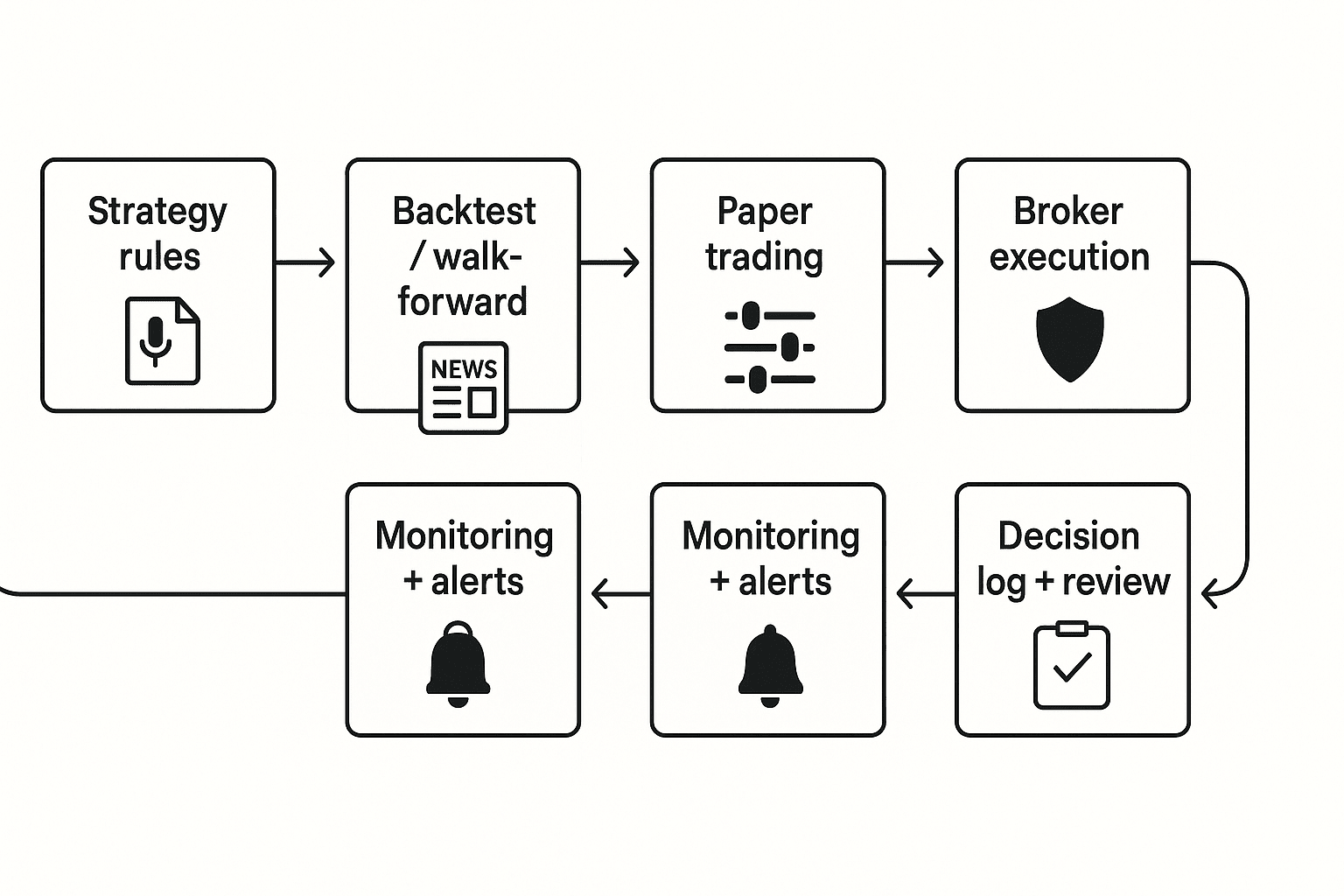
Text architecture diagram (end-to-end): Research/Notes → Strategy/Rules → Simulation → Paper → Execution → Monitoring/Logs → Review
Try TicNote Cloud for Free: capture earnings calls and internal research notes into Projects, then generate cited summaries and decision logs you can actually review later.
What risks and limits should you assume before you use an AI trading agent?
An AI agent for trading can speed up research and routine choices. But it can also fail in silent ways. Assume the model is wrong sometimes, and the market will punish small mistakes.
Expect model failures (even when backtests look great)
These are the big four failure modes:
- Overfitting: the strategy "learns" noise, not skill.
- Regime shift: patterns break when rates, volatility, or liquidity change.
- Leakage: training data sneaks in future info (even one column can do it).
- Prompt drift / tool errors: behavior changes after prompt edits, model swaps, or API updates.
Here's a simple risk → mitigation matrix you can actually use:
| Risk / failure mode | What it looks like in practice | Mitigation that works |
| Overfitting | Great backtest, weak live results | Walk-forward tests; strict out-of-sample checks; simpler models |
| Regime shift | Edge disappears after a macro change | Stress tests across 3–5 regimes; volatility filters; position caps |
| Leakage | "Too perfect" signals; unreal drawdowns | Data lineage; time-split validation; ban forward-filled features |
| Prompt drift / tool errors | Different trades from same inputs | Frozen prompts; versioning; approval gates before deploy |
Price realism beats "good predictions"
Most losses come from execution assumptions, not forecasts. Real markets have spreads, thin order books, partial fills, and fees.
If you trade fast, a 1–3 tick spread plus slippage can flip a small edge negative. In illiquid names, market impact (your own orders moving price) can be larger than your signal. Volatility feedback matters too: as volatility jumps, fills worsen and stops trigger more.
Put governance around the agent, not just the model
Treat the agent like production software. Add guardrails before it touches an order ticket:
- Role-based access: who can edit prompts, change models, deploy code, and send orders.
- Approval gates: human review for new symbols, size increases, and strategy changes.
- Required artifacts (per trade/day): signal, rationale, key risks, decision owner, and outcome.
- Trading disclaimers: clear "not investment advice," note your jurisdiction limits, and keep records of prompts, outputs, and communications.
If you can't explain why a trade happened in 60 seconds, don't automate it.
Top AI agent tools for trading in 2026 (ranked by real workflow fit)
Most "AI trading" tools only cover one slice of the job. A safer, more useful approach is a trading-agent stack: (1) research & decision support, (2) backtesting/simulation, (3) execution/automation, and (4) documentation/compliance. The ranking below reflects real workflow fit—not promises of returns—and highlights guardrails you should set before any automation touches an order.
1) TicNote Cloud (Projects + Shadow AI)
Best for: Research & decision support from earnings calls, internal reviews, and post-mortems.
Where it fits: Research + logging (decision journal).
Why it fits an agent workflow: TicNote Cloud turns meetings into a searchable Project. Put transcripts, PDFs, and notes in one place. Then Shadow AI answers questions across files with citations and creates artifacts like a report, presentation, or mind map. That makes it easier to review your thesis and spot weak assumptions.
Guardrails to use:
- Use it to document your thesis, not to auto-trade.
- Require human approval for any "action item."
- Log base-rate assumptions (growth, margins, rates) and what would invalidate them.
Integration surface: Exports (DOCX/PDF/Markdown, mind map formats) plus team sharing and Project permissions. Works well with a separate signal and execution layer.
What to avoid: Don't treat summaries as facts. Always click back to the cited source lines before you act.
Pricing (high level): Free plan available, plus paid tiers (Professional, Business, Enterprise) for higher usage and team needs.
2) TradingView (Pine Script + alerts)
Best for: Fast strategy prototyping, chart rules, and alert routing.
Where it fits: Signal generation (research/testing) and notifications.
Guardrails to use:
- Treat alerts as recommendations, not orders.
- Add simple "sanity checks" in your process (trend filter, volatility cap).
- Keep execution separate so one bad script can't place trades.
Integration surface: Alerts can route to webhooks and downstream tools. Pine Script supports rule-based logic, not full portfolio optimization.
What to avoid: Don't mistake clean chart fills for tradable results. Your backtest can ignore slippage and partial fills.
3) QuantConnect
Best for: Systematic research with a managed backtesting environment.
Where it fits: Testing/simulation (and some paper/live workflows depending on setup).
Guardrails to use:
- Make fees, borrow costs, and corporate actions explicit.
- Watch for survivorship bias (dead tickers missing) and lookahead bias.
- Split data into train/validation/test by time, not random.
Integration surface: Integrated datasets and an algorithm environment reduce setup time.
What to avoid: Don't ship a strategy just because it's "green" in-sample. Require out-of-sample and regime tests.
4) Backtrader (Python)
Best for: Flexible local backtesting and custom logic.
Where it fits: Testing/simulation.
Guardrails to use:
- Validate your data pipeline with unit tests.
- Use walk-forward testing and keep a strict research log.
- Model slippage with realistic assumptions (spread + impact).
Integration surface: Python ecosystem (pandas, numpy) and your own data store.
What to avoid: Don't ignore engineering risk. One timezone bug can flip results.
5) Alpaca (broker API)
Best for: Moving from paper trading to live trading with an API.
Where it fits: Execution/automation.
Guardrails to use:
- Hard position limits (max notional, max shares, max leverage).
- A kill switch (stop trading on drawdown or repeated rejects).
- Handle rate limits and retries to avoid duplicate orders.
Integration surface: API-first trading with paper/live environments.
What to avoid: Don't connect a model directly to market orders without order-type rules and risk caps.
6) Interactive Brokers API
Best for: Broad market access and more professional trading workflows.
Where it fits: Execution/automation.
Guardrails to use:
- Spend time on permissions, routing, and account safeguards.
- Add pre-trade checks (symbol, currency, size, session rules).
- Log every order intent and every broker response.
Integration surface: Deep but complex APIs; great if you can support the ops overhead.
What to avoid: Don't underestimate integration time. Complexity is a risk factor.
7) FinGPT / open-source finance LLM stacks (self-host)
Best for: Teams that need custom models, private data, and internal evaluation.
Where it fits: Research & decision support (and sometimes monitoring).
Guardrails to use:
- Model risk management: prompt controls, eval sets, and drift checks.
- Hallucination control: retrieval with sources, strict output schemas.
- Secure deployment and access controls for material nonpublic info.
Integration surface: Self-hosted pipelines, vector search, and internal tools.
What to avoid: Don't let a generic LLM "free-write" a trade thesis without sources. That's how bad assumptions slip in.
8) Zapier / Make (glue for alerts + logs)
Best for: Routing alerts to approvals, logging to docs, and notifications.
Where it fits: Logging + lightweight automation.
Guardrails to use:
- Use approval steps (manual "yes/no") before any execution call.
- Separate "signal received" from "trade approved."
- Keep secrets (API keys) locked down and rotated.
Integration surface: Connects alert sources to chat, email, docs, and databases.
What to avoid: Don't build a no-touch flow that can place trades while you sleep.
Best default stack (safer by design)
If you want a practical baseline that most traders can run:
- TicNote Cloud for research, cited notes, and decision logs
- TradingView for simple, inspectable signals
- A paper-trading broker API (then live) for execution testing
- Zapier/Make to route alerts into approvals and logging
That stack keeps the "agent" strong where it should be—research and process—while keeping orders behind explicit controls.
Learn more about building a research-first system with meeting-driven research and cited deliverables so your trade notes stay auditable.
Comparison table: which "ai agent for trading" tool fits research, testing, and execution?
Most "agent" tools are strong in one lane: research, testing, or execution. So this table normalizes common options by workflow fit (not returns). Use it to build a safer stack: a research layer (notes + sources), a testing layer (backtests), and an execution layer (paper/live) with logs.
| Tool | Research strength (transcripts/notes) | Simulation / backtesting | Paper trading | Live execution | Citations / traceability | Audit logs / versioning | Integrations / export | Starting price range |
| TicNote Cloud | Strong: meeting + earnings-call notes, Project workspace | Limited (research-focused) | No | No | Strong: cited, source-linked answers inside Projects | Medium: traceable operations, team permissions | Notion, Slack; export DOCX/PDF/MD/HTML/PNG | Free + paid + enterprise |
| ChatGPT / LLM chat | Medium: drafting and idea checks | Limited unless you code | No | No | Low–Medium: depends on your prompts and sources | Low: you must manage versions | Copy/paste; API for builders | Free + paid |
| TradingView (Pine) | Low: chart notes | Medium: strategy tester (tooling varies) | Yes (via supported brokers) | Yes (via supported brokers) | Low: signals usually not source-cited | Medium: scripts are versionable | Broker links; alerts; exports vary | Free + paid |
| QuantConnect | Low: research notes external | Strong: multi-asset backtests | Yes | Yes | Medium: code + data provenance you set | Medium–High: code repo workflows | Broker connections; data feeds | Free + paid |
| Backtrader (Python) | Low: research notes external | Strong: flexible backtesting | Yes (via adapters) | Yes (via adapters) | Medium: reproducible notebooks/code | Medium: git-based | Python ecosystem; custom | Free (open source) |
| Interactive Brokers API | None: execution only | None | Yes | Yes | Medium: order records, API logs | Medium–High: broker statements + IDs | Broad: FIX/API ecosystem | Paid (brokerage fees) |
Fast read: best fit by workflow
- Best for solo retail: TradingView + paper trading + a simple decision log (date, thesis, risk, exit rules).
- Best for a small team or fund: TicNote Cloud for research-first documentation, approvals, and cited notes, then a broker API for execution.
- Best for pro/quant: QuantConnect or Python (Backtrader) for strict testing, plus broker APIs, plus a separate governance and review process.
One important warning: comparison tables don't predict outcomes. Two traders can use the same "ai agent for trading" stack and get opposite results because data quality, slippage, regime shifts, and risk limits dominate tool choice.
Learn how an AI workspace can support research-heavy workflows in this guide to all-in-one AI workspaces before you pick execution tools.
How to choose the right product for your trading-agent workflow
The right stack depends on one question: where do you need the most control—research, testing, execution, or audit trail? Most "agent" failures happen in the handoffs between those stages. So pick one primary tool per stage, then connect them with simple approvals and logging.
Choose TicNote Cloud when research quality and auditability matter most
Pick TicNote Cloud if you want the safest, highest-ROI start: turn messy inputs into clean, reviewable artifacts. It's strongest for turning earnings calls, analyst meetings, and internal debates into a cited thesis, an investment-committee memo, and a decision log you can defend later.
Why it fits a trading workflow:
- Cited answers: outputs link back to the exact source text, so review is fast.
- Project workspace: one place for calls, docs, and ongoing notes as the thesis evolves.
- Human-in-the-loop by default: you approve what gets used and what gets shared.
If you're building a careful process, also read this guide to a human-in-the-loop agent workflow for research before you automate anything.
Choose TradingView when you need fast rule iteration and manual control
TradingView is the best fit when your edge is technical rules, alerts, and fast iteration. Use it when you're keeping execution manual, or you require a second step for approval.
Good use cases:
- Alerting on breakouts, moving-average crosses, or volatility regimes
- "Signal first, trade later" workflows (alerts → review → place orders)
Choose Alpaca when you want paper-first, API-driven execution
Alpaca fits when you want to move from paper trading to controlled live execution through an API, usually for a smaller universe. It's a clean way to test order logic, position sizing, and guardrails (like max daily loss) before going live.
Best fit:
- Small set of symbols
- Clear rules for entries, exits, and risk caps
- Tight control over when the agent can place orders
Choose Interactive Brokers API when you need broad market access and pro controls
Pick IBKR's API when you need deeper market coverage and more professional trading controls, and you can handle the integration work. It's the "power user" route: more flexibility, more moving parts.
Use it when:
- You trade across multiple asset classes or venues
- You need advanced order types and routing controls
- You can support monitoring, retries, and fail-safes
Choose QuantConnect when you want managed backtesting plus a repeatable pipeline
QuantConnect is a good match if you want hosted backtesting infrastructure, built-in data options, and a pipeline your team can repeat. You're trading some flexibility for speed and standardization.
Choose it for:
- Strategy R&D with stable datasets
- Team workflows that need consistency across projects
- Faster iteration without building all infra yourself
Choose Backtrader when you want full Python control (and you have data capacity)
Backtrader is best when you want full control in Python and you already have data engineering capacity. If you don't have reliable data, slippage models, and walk-forward testing habits, you'll hit false confidence fast.
Choose FinGPT or open-source stacks only with strong internal controls
Open-source is the right choice only when you have strict privacy needs and you can run evaluation, monitoring, and security in-house. If you can't measure model drift, detect data leakage, and lock down credentials, don't use an open stack for live decisions.
Choose Zapier or Make when you need "approval + logging" glue
Automation glue tools are ideal for wiring the boring—but critical—parts: alert → Slack/email → checklist completion → storage. This is where you add approvals, timestamps, and a paper trail without writing a full app.
Here's a simple rule: automate routing and logging first; automate trading last.
Quick decision guide (pick your stack by persona)
- Retail investor who wants guardrails: TicNote Cloud for research notes + TradingView alerts + paper trading before any live steps.
- Small team or micro-fund: TicNote Cloud Projects for shared research + an approval workflow (Slack/email + checklist) + broker API execution with tight limits.
- Quant team: QuantConnect or Backtrader for research and testing + strong logs and monitoring + TicNote Cloud for narrative memos and audit-ready artifacts.
Try TicNote Cloud for Free and turn your next call into a cited trading memo.
How to run a research-first trading workflow with cited notes and Projects (step-by-step)
A research-first workflow keeps humans in charge. It helps you turn messy inputs (calls, meetings, PDFs) into a clear thesis with sources you can check. This is where an ai agent for trading fits best: it speeds up research, not execution.
Step 1: Create or open a Project and add content
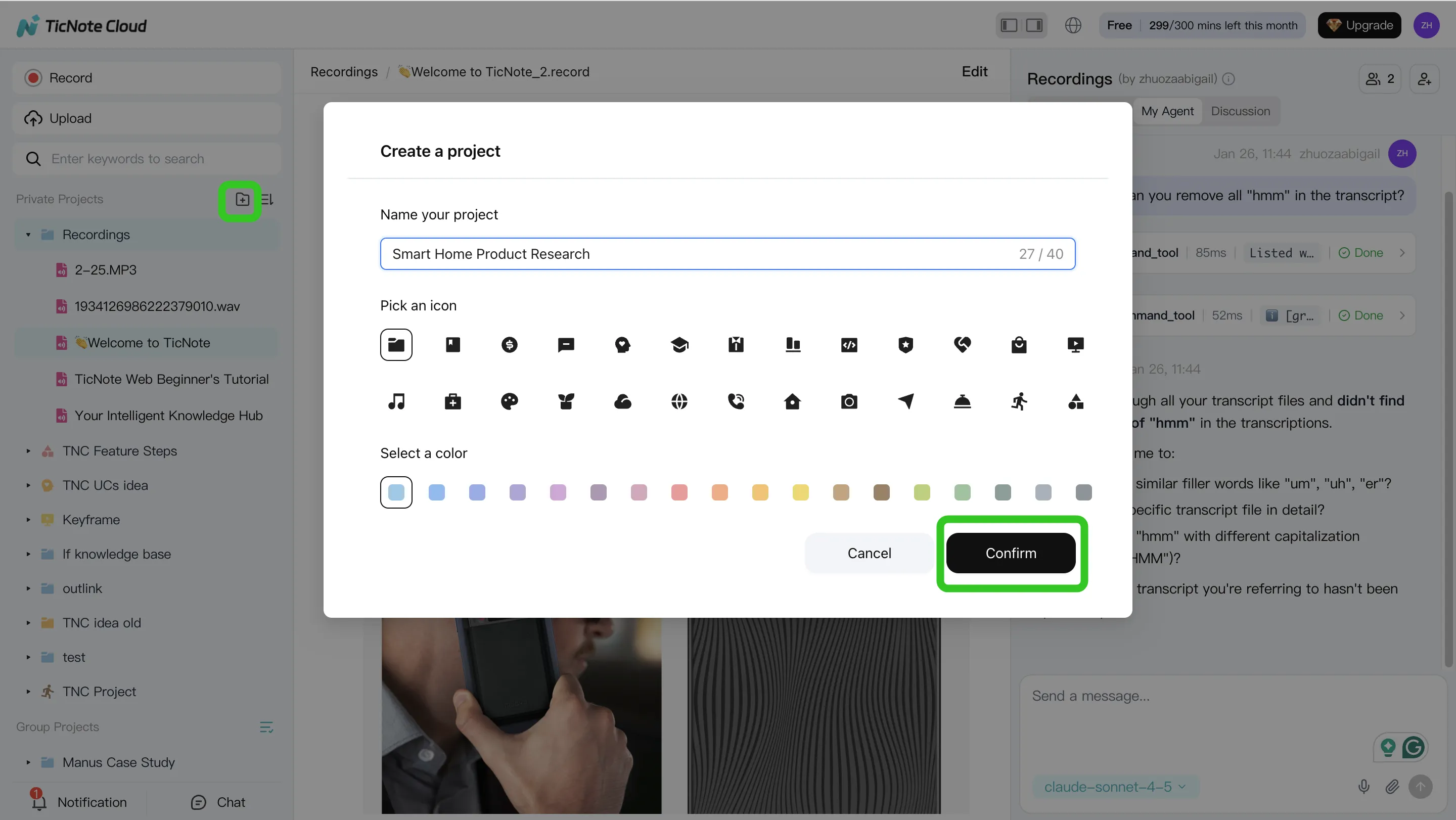
Start by making one Project per ticker, theme, or strategy. Then keep it simple: you're building a single "source of truth" you can revisit later.
Inside the Project, use a basic folder setup so the record stays clean:
- Calls (earnings calls, management updates, expert calls)
- Memos (your drafts and revisions)
- Decisions (what you did, when, and why)
- Post-mortems (what worked, what didn't, and what you'll change)
In TicNote Cloud's web studio, you can add content in two ways: direct upload, or adding files from the Shadow AI panel and asking it to file them in the right place.
Step 2: Use Shadow AI to search, analyze, edit, and organize content
Once the files are in, treat Shadow AI like your Project analyst. Keep your prompts scoped to the Project so answers come from your own materials, not generic web text.
Good "research operator" questions sound like this:
- "What changed vs last quarter's guidance?"
- "List the top 5 drivers of margin, with timestamps."
- "What did management say about pricing, in their exact words?"
Then force verification. Ask for cited answers so each claim points to a source file or timestamp. If the transcript has errors (wrong speaker, wrong number), fix it before you summarize. One corrected line can prevent an entire wrong thesis.
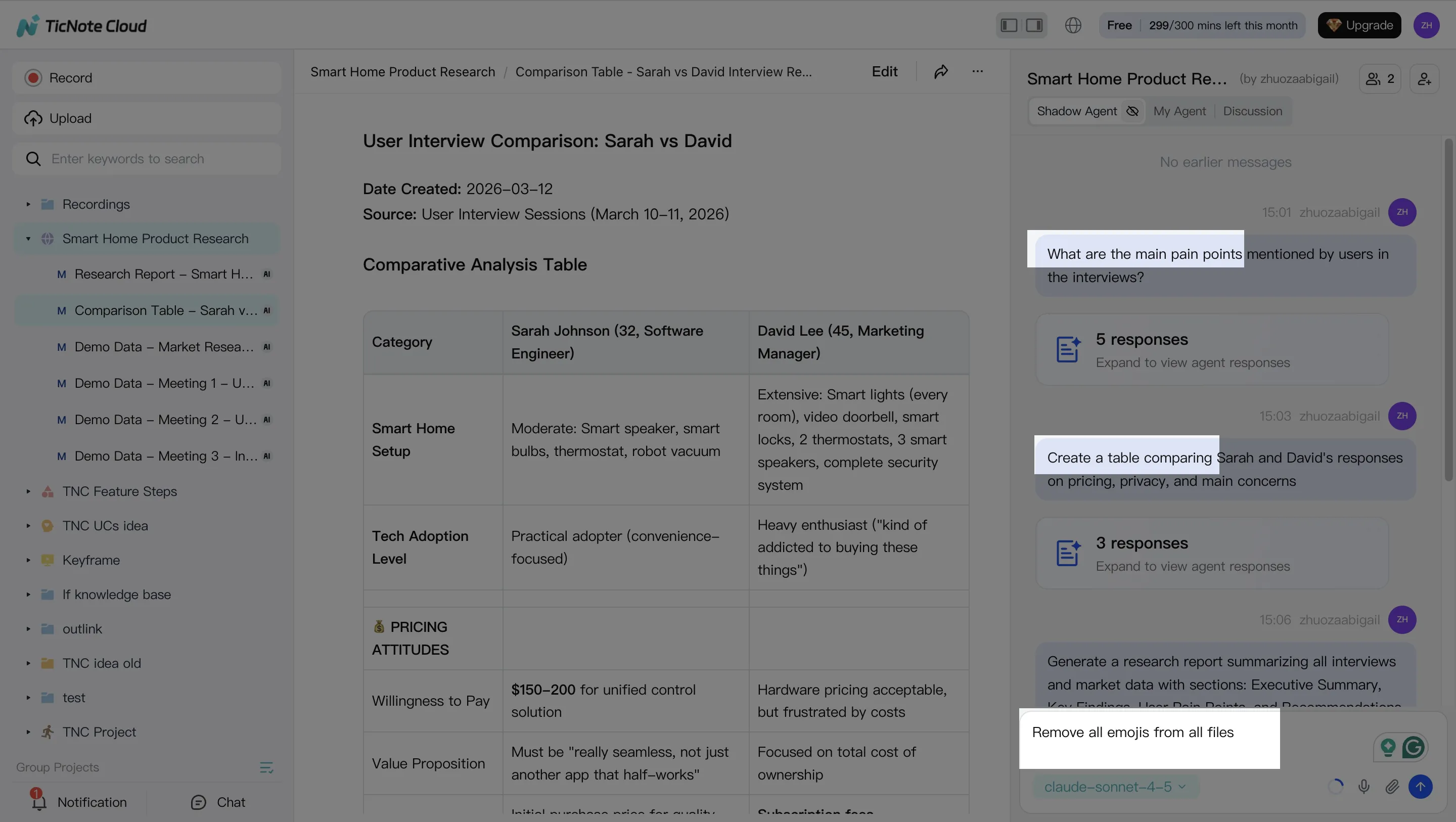
To turn notes into a decision-ready view, extract a structured thesis:
- Catalysts (what could move the stock, and by when)
- Bear case (what breaks the story)
- Key numbers to verify (revenue, GM, FCF, churn—whatever matters)
- Open questions (what you still need to know)
Step 3: Generate deliverables with Shadow AI
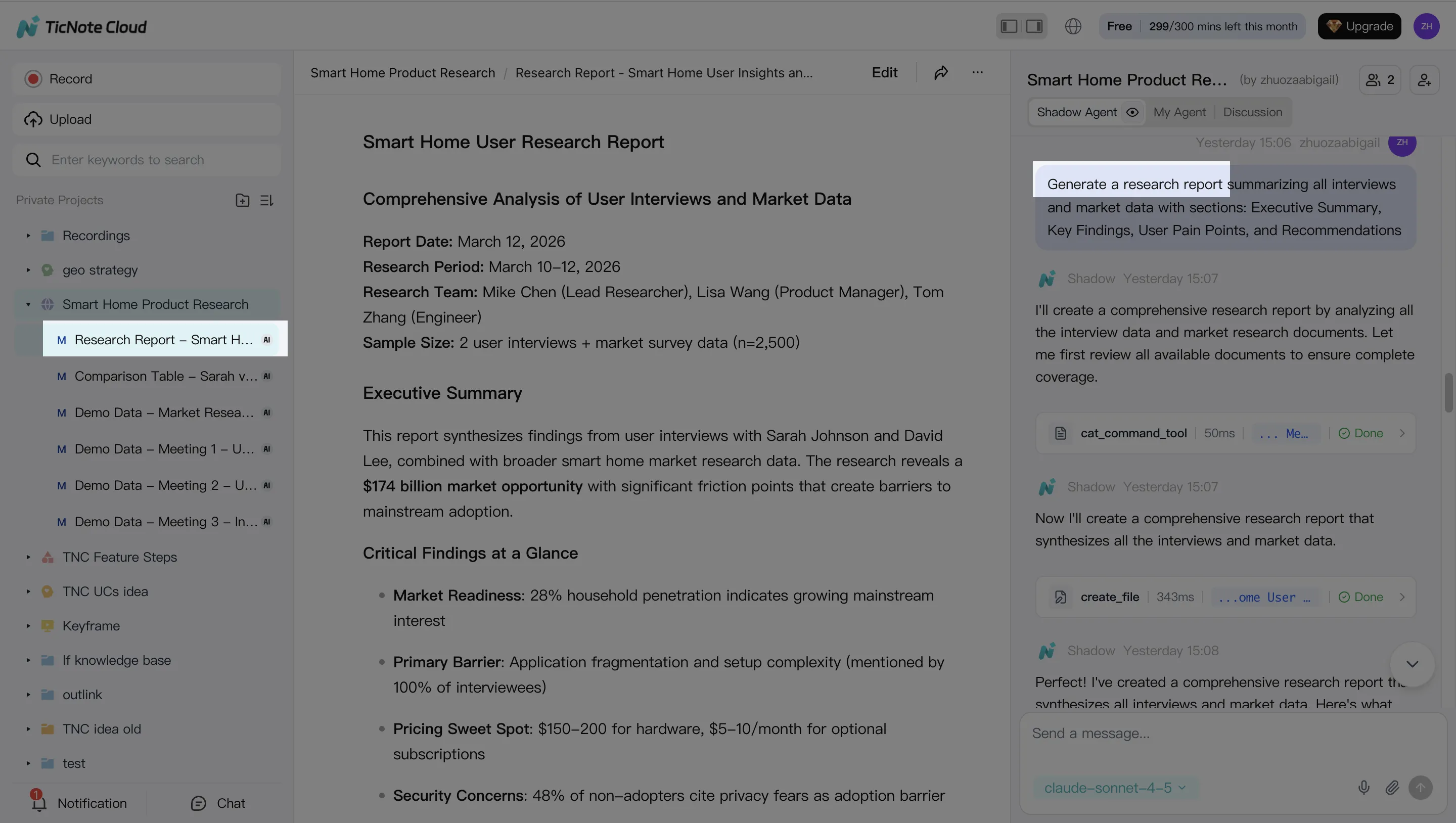
Now convert the thesis into artifacts you can share and audit. In TicNote Cloud, you can ask Shadow AI to generate outputs, or use the Generate button to pick a format.
Common deliverables that work well for trading research:
- Internal research note: bullets, risks, and a tight "what we know vs what we assume" split
- Investment committee brief: one page, decision-first, with clear uncertainties
- Mind map: scenarios, triggers, and "what would change our mind" rules
Step 4: Review, refine, and collaborate (and lock the decision log)
Treat the first output as a draft. Ask Shadow AI to tighten sections, add missing risks, or rewrite in a consistent house style. When you review, click back to sources to confirm the exact wording.
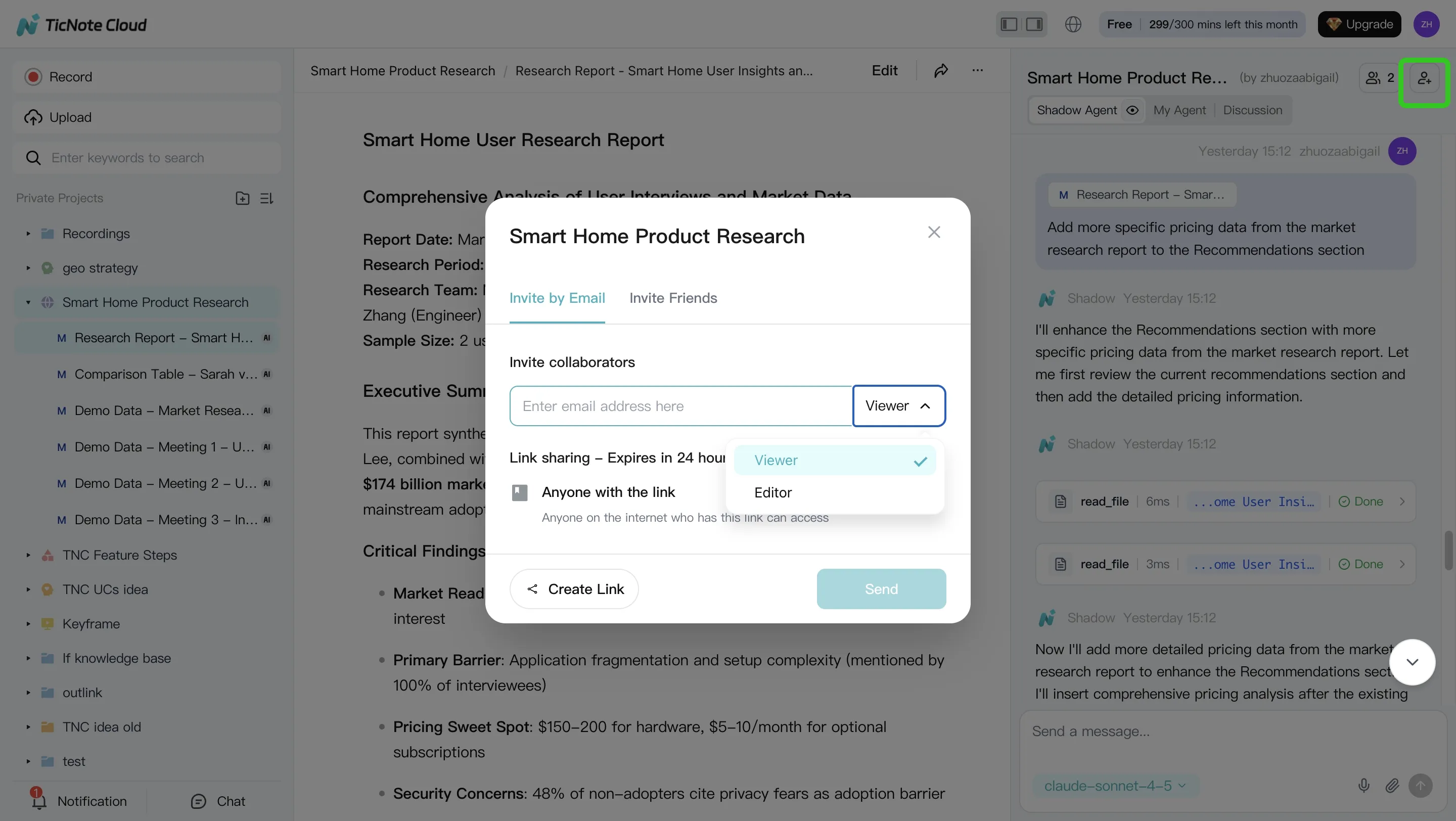
For team use, share the Project with role-based access (Owner/Editor/Viewer). Add comments and owners so open items don't vanish. Then finalize a decision log entry with four fields that keep you honest:
- Decision (what you did)
- Rationale (why)
- Invalidation (what would prove you wrong)
- Review date (when you'll revisit it)
Export artifacts in standard formats for retention, especially if you need a clean trail later.
App workflow (quick, on-the-go)
On the TicNote Cloud app, the loop stays the same: open or create a Project, add a recording or document, then use Shadow AI for Q&A and summaries while the context is fresh. When you're done, share or export the updated note so your "why" is captured before the market moves.
Final thoughts: use agents to improve process, not to outsource accountability
An ai agent for trading works best as a process upgrade, not a "hands-off" trader. Use it to tighten research, reduce missed details, and keep a clean decision trail. If you can't explain a trade in plain language, you shouldn't automate it.
Follow the safest progression
Move in stages, and only advance when the logs look solid:
- Research-first: capture sources, summarize, and write a clear thesis
- Walk-forward testing (retest on new time windows, not the same data)
- Paper trading: validate fills, slippage, and alerts without real risk
- Limited live deployment: small size, hard limits, and kill switches
Here's the key promise: better decisions come from better inputs and better logs, not black-box automation. Build habits that force accountability—what you believed, why you believed it, what changed, and what you did next.
Try TicNote Cloud for Free and keep cited research notes, theses, and decision logs in one Project.


