


 Extension
TL;DR: Best AI research agent picks for research (and when TicNote Cloud wins)
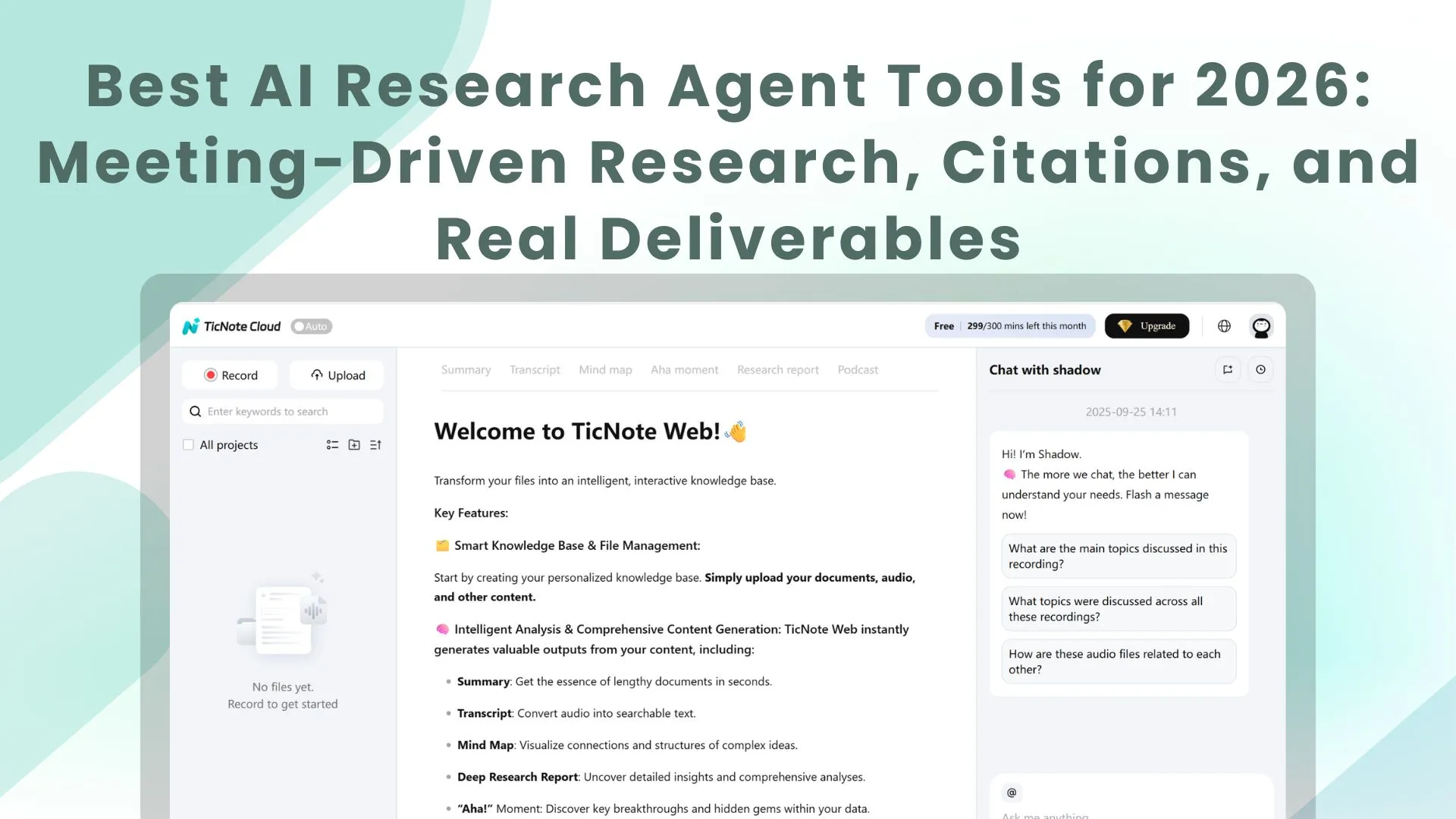
Use TicNote Cloud for Free when your best sources are meetings, interviews, and internal docs—and you need cited answers plus a report you can ship. It's the best overall pick for meeting-driven research and internal knowledge, because Projects + a project-scoped agent can search across your files, cite the exact moments, and export real deliverables.
You've got too many calls and too many scattered notes. That slows decisions and makes "final" reports feel risky. TicNote Cloud fixes this by turning meeting content into a searchable Project memory with citations and ready-to-export outputs.
Other top picks by job:
- Fast web research with citations: Perplexity (quick checks) or ChatGPT Deep Research (long, multi-step write-ups).
- Academic literature workflows: Elicit (find + extract papers), plus Consensus/Scite.ai for evidence strength and citation context.
- Your-docs-only synthesis: NotebookLM (strong bounded-corpus Q&A; no web search).
Next, you'll get a normalized comparison table, a job-based decision guide, and a short quality checklist.
What is an AI research agent (and what makes it different from a chatbot)?
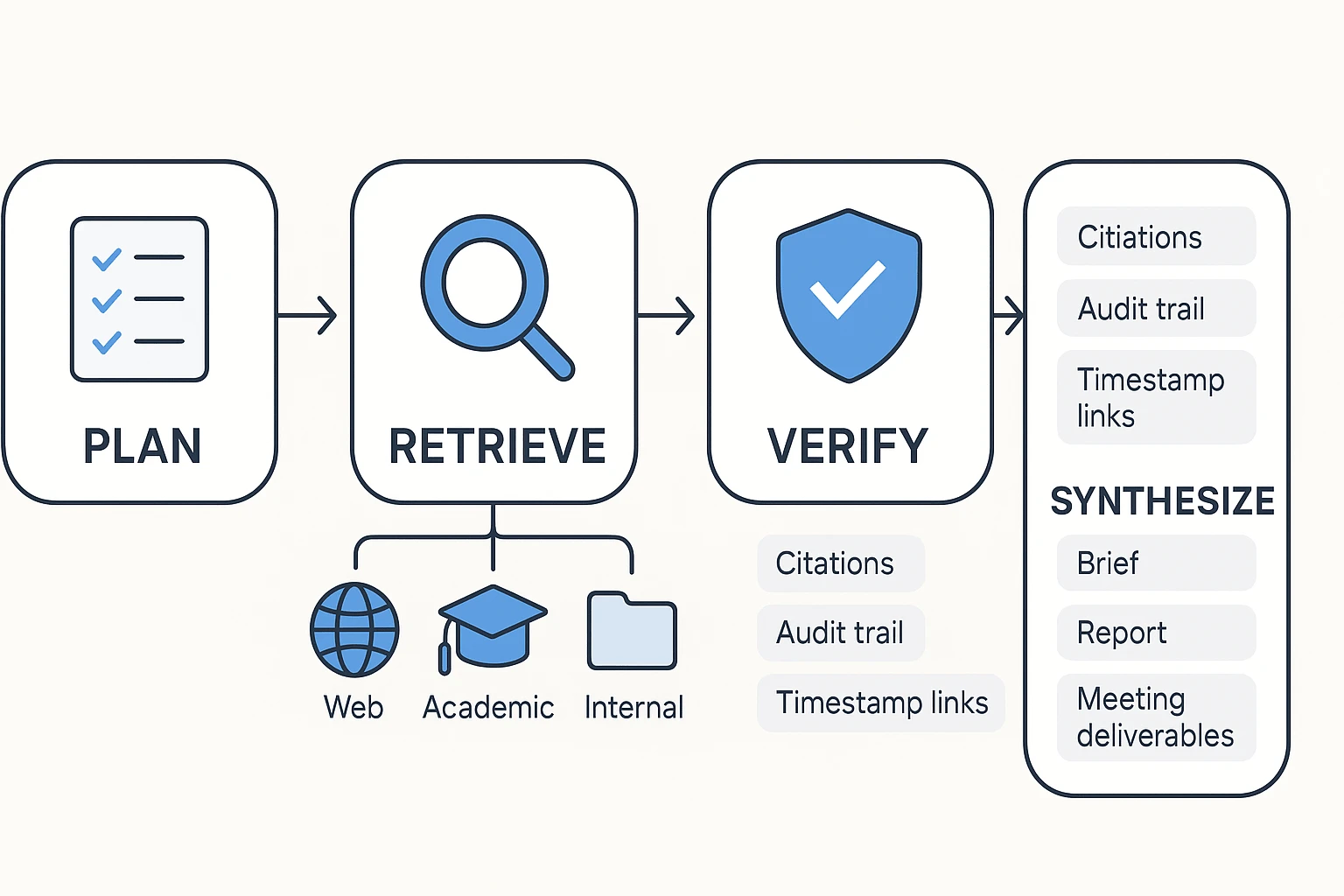
An AI research agent is a system that does research work for you, not just conversation. It plans the steps, pulls sources (web, academic, or your own files), checks what it finds, and then outputs something structured you can use—like a brief, a report, or meeting notes with evidence.
Core capabilities: plan → retrieve → verify → synthesize
A chatbot mainly reacts to one prompt at a time. A research agent runs a workflow.
Here's what that workflow usually includes:
- Plan: breaks a vague ask into smaller questions and a checklist
- Retrieve: runs multiple searches and pulls from more than one place (sites, papers, PDFs, transcripts)
- Extract: grabs the facts, quotes, tables, and decisions that matter
- Verify: checks claims against sources and flags gaps
- Synthesize: turns the mess into a clean output (summary, memo, report, or slide outline)
This is why agents shine with messy inputs. A long meeting transcript isn't "chat friendly." An agent can scan it, find decisions, pull supporting quotes, and turn it into action items plus a short brief your team can ship.
What "citations" should mean in practice
Good citations are claim-level traceability. That means each important claim can be checked fast.
In practice, expect citations to include:
- A clickable source link or file reference
- A quote or snippet near the cited claim (when possible)
- Basic context like title, author, and date so you can judge freshness
For AI meeting notes with citations, the bar is higher than web URLs. You should see links back to timestamped transcript segments and the exact attached docs used, so you can replay the reasoning without re-reading everything.
Where agents fail (and why verification must be built in)
Agents still fail in predictable ways:
- Hallucinations: confident claims with no real source
- Invented or mismatched citations: links that don't support the sentence
- PDF parsing errors: missing tables, footnotes, or key definitions
- Source mixing: blending two documents into one "fact"
- Stale info: relying on outdated pages and older versions of docs
- Missing internal context: ignoring what was actually decided in meetings
Set the expectation like this: agents cut retrieval and drafting time, often by hours per week, but humans still own the scope, final wording, and sensitive calls. Treat verification as a workflow step—scan the citations, spot-check key claims, and only then share the deliverable.
To go deeper on this process, use this human-in-the-loop research workflow to keep speed without losing rigor.
How did we rank the best AI research agents?
We ranked each tool on one thing: can it turn messy inputs into usable, checkable work. That means sources you can trust, citations you can click, and outputs you can share. We also scored how well each agent handles internal knowledge, because real research work often starts in meetings and project docs, not on the open web.
Evaluation criteria we used
We scored every tool across six criteria that map to day-to-day research tasks:
- Source coverage: How well it works across web pages, academic papers, and your own files (PDFs, notes, and transcripts). Extra credit if it supports meeting capture, not just uploads.
- Citations & auditability: Inline citations, clean links, and a clear path back to the exact passage. For meeting content, the best tools point to speaker turns or timestamps.
- Context depth: Two layers matter: (1) long context windows (how much it can read at once) and (2) project memory that persists over time.
- Outputs: Can it produce real deliverables like a deep research report, a brief, a comparison table, or a presentation outline without heavy editing.
- Collaboration: Shared workspaces, role-based permissions, comments, and basic version control.
- Privacy/security: Clear policy on model training, encryption, access controls, and enterprise options like SSO.
If you're buying for a team, our weighting favored auditability and deliverables over "fun" chat features. For a deeper buyer checklist, see this security-first AI agent evaluation guide.
A quick 1–5 scoring rubric you can reuse
Run this 30-minute trial with any tool:
- Bring two inputs: one real meeting transcript + one project doc (PRD, memo, or brief).
- Ask the same 3 questions:
- Facts: "What are the top 5 confirmed facts?"
- Decisions: "What decisions were made, and by whom?"
- Risks: "What's still open, and what could block progress?"
- Grade 1–5 (fast):
- Citation traceability: 1 = none, 3 = links but vague, 5 = exact passages (and timestamps for meetings).
- Missed context: 1 = obvious gaps, 3 = minor misses, 5 = catches cross-doc dependencies.
- Shareable output speed: 1 = copy-paste needed, 3 = usable notes, 5 = ready-to-send brief/report.
Decision rule: if your source-of-truth is web-first, prioritize citation quality to URLs. If it's academic-first, prioritize paper metadata and quoting accuracy. If it's meeting/docs-first, the winner is the tool that can search across Projects, keep memory, and cite back to the original transcript so your team can verify fast.
Comparison table: best AI research agent tools at a glance
Marketing pages love fuzzy words. This table uses plain definitions, so you can compare tools fast and fairly. It also highlights what many "AI research agent" lists miss: meeting and doc workflows that end in real deliverables.
Column definitions (so you don't get misled)
- Web search: finds and summarizes public web pages.
- Academic DBs: connects to scholarly indexes or helps manage papers.
- Your docs: searches files you upload or connect (PDFs, docs, notes).
- Meeting capture: records or ingests meetings and creates a transcript (bot-free recording or upload + transcript).
- Citations: shows where answers come from (web links, doc-grounded quotes, or transcript timestamps).
- Long context: handles large, multi-file projects without losing key details.
- Exports/deliverables: outputs like reports, slides, briefs, mind maps, podcasts, or structured files.
- Team permissions: roles, sharing, and access controls for business use.
- Starting price: lowest paid plan (or $0 if a free plan exists).
| Tool | Web search | Academic DBs | Your docs | Meeting capture | Citations | Long context | Exports/deliverables | Team permissions | Starting price |
| TicNote Cloud | Limited (project-first) | Limited (bring papers in) | Yes (Project workspace) | Yes (bot-free + uploads) | Doc-grounded + transcript timestamps | High (project memory across files) | Report (PDF/Word), web presentation (HTML), podcast, mind map, exports | Yes (Owner/Member/Guest) | $0 |
| ChatGPT (Deep Research-style workflows) | Yes | Partial (depends on sources) | Yes (uploads) | No (needs transcript/import) | Web citations; doc citations vary | Medium–High (plan/model dependent) | Drafts, briefs; exports depend on workflow | Basic (workspace controls vary) | Varies |
| Perplexity | Yes (strong) | Partial | Yes (some plans/features) | No | Web citations (core strength) | Medium | Answer pages, summaries; limited "deliverables" | Limited–Medium | Varies |
| Elicit | Limited | Yes (paper-focused) | Yes (papers/libraries) | No | Paper references (study-grounded) | Medium | Literature tables, evidence summaries | Limited–Medium | Varies |
| Consensus | Limited | Yes (research answers) | Limited | No | Paper citations | Medium | Evidence-backed summaries | Limited | Varies |
| Otter / Fireflies (meeting-first assistants) | Limited | No | Partial (notes/transcripts) | Yes (record + transcript) | Transcript timestamps (varies) | Low–Medium | Summaries, action items; limited deliverables | Yes (team plans vary) | Varies |
| Notion AI (workspace assistant) | Limited | No | Yes (workspace pages) | No | Doc-grounded (workspace context varies) | Medium | Docs, wikis, briefs; exports vary | Yes (workspace permissions) | Varies |
Notes: "Starting price" means the lowest entry tier you can begin with today (not annual totals, add-ons, or enterprise quotes). For security, privacy, and compliance, treat all enterprise claims as "verify during procurement" (SSO, data retention, audit logs, and whether your data is used to train models).
If your core sources are meetings, interviews, and internal docs, you'll usually want a project-based knowledge base with persistent memory and an agent that can cite across your whole corpus. For a deeper look at all-in-one workspaces, see this guide on AI workspaces that combine capture, memory, and deliverables.
Top AI research agent tools (item cards + best use cases)
If you're buying an AI research agent for real work, start with your "source of truth." Some tools shine on the live web. Others win on papers. And a few are built for the hardest source: meetings and messy internal docs.
TicNote Cloud — best for meeting-driven research and internal knowledge
Best for: consultants, PMs, researchers, analysts, and team leads who need cited answers and usable deliverables from calls, interviews, and project files.
Why it stands out: TicNote Cloud is a meeting-centered AI workspace. You capture conversations, group them into Projects, and use Shadow AI to search across everything with citations. Then you generate the output you actually ship.
Features
- Meeting-driven workflows: built around calls, interviews, and ongoing workstreams.
- Projects + project memory: a Project becomes a living knowledge base across meetings and files.
- Shadow AI with citations: asks and answers questions across your Project content, with clickable sources.
- Editable transcripts: fix wording, add notes, and clean up speaker turns.
- Deliverables on demand: research report (PDF/Word), HTML presentation, podcast + show notes, and mind map.
- Collaboration + permissions: share Projects with roles, keep work scoped, and track operations.
- Bot-free capture: records without a meeting bot joining the call.
- Limits to know: internal research is only as strong as what you record or upload; web research depends on what you add and what you ask it to cite.
ChatGPT Deep Research — best for broad web coverage and long reports
Best for: competitive scans, market landscapes, and fast first drafts when you need wide web coverage.
Strengths: it can produce long, structured reports quickly. It's also flexible for outlines, frameworks, and "what to compare" prompts.
Watch-outs: citation quality varies by source type and query. Outputs can get too long, so constrain scope (time window, geography, and 5–10 key questions). Always verify primary sources for numbers and quotes.
Claude (Deep Research/Projects) — best for concise synthesis from long inputs
Best for: policy-style writing, internal memos, and academic-like synthesis where clarity matters.
Strengths: strong long-context reading and clean summarization. Projects can help keep work organized across sessions.
Watch-outs: message limits can shape workflows. And "project memory" here isn't the same as a purpose-built Project knowledge base with cross-file citations and deliverables.
Gemini Deep Research — best for current web + multimodal work
Best for: teams already living in Google tools, and research that mixes docs, images, and web updates.
Strengths: good at pulling in recent web info and handling varied inputs.
Watch-outs: focus and verbosity can swing. Set strict questions, ask for a short brief first, then expand only the sections you'll use.
Perplexity — best for fast sourced answers and quick briefs
Best for: rapid fact checks, link-heavy briefs, and "get me oriented" research.
Strengths: speed and sourcing. It's great when you need the fastest answer with links.
Watch-outs: it's less ideal for deep, multi-meeting synthesis or building a persistent internal knowledge base.
Elicit — best for academic discovery and extraction
Best for: literature-heavy work like systematic reviews, evidence tables, and paper screening.
Strengths: finds papers and extracts structured fields into tables.
Watch-outs: less useful for non-academic business questions, internal meeting knowledge, or deliverable formats beyond literature workflows. For deeper science workflows, see this guide on scientific research agents, citations, and verification.
Consensus — best for "what studies say" summaries
Best for: questions with lots of published research where you want an evidence stance.
Strengths: helps summarize how studies lean on a claim.
Watch-outs: emerging topics may have thin coverage, so the "consensus" can be weak or outdated.
Scite.ai — best for checking citation context
Best for: stress-testing claims by seeing whether citations support or contradict them.
Strengths: adds signal about reliability and context.
Watch-outs: not a complete research agent on its own. Pair it with a discovery tool.
NotebookLM — best for private doc sets with grounded Q&A
Best for: internal handbooks, research packs, and doc bundles where you want answers grounded only in what you upload.
Strengths: strong source-grounded Q&A on your own materials.
Watch-outs: no web search. Also, it won't replace a meeting-to-deliverable workflow if your "source" is live conversations.
What to pick (based on your source of truth)
- If your source of truth is meetings + project docs: pick TicNote Cloud.
- If your source of truth is the live web: pick Perplexity (fast) or ChatGPT Deep Research (deep).
- If your source of truth is peer-reviewed literature: pick Elicit, then add Consensus or Scite.ai for evidence checks.
What can an AI research agent do for meetings and internal docs that most tools can't?
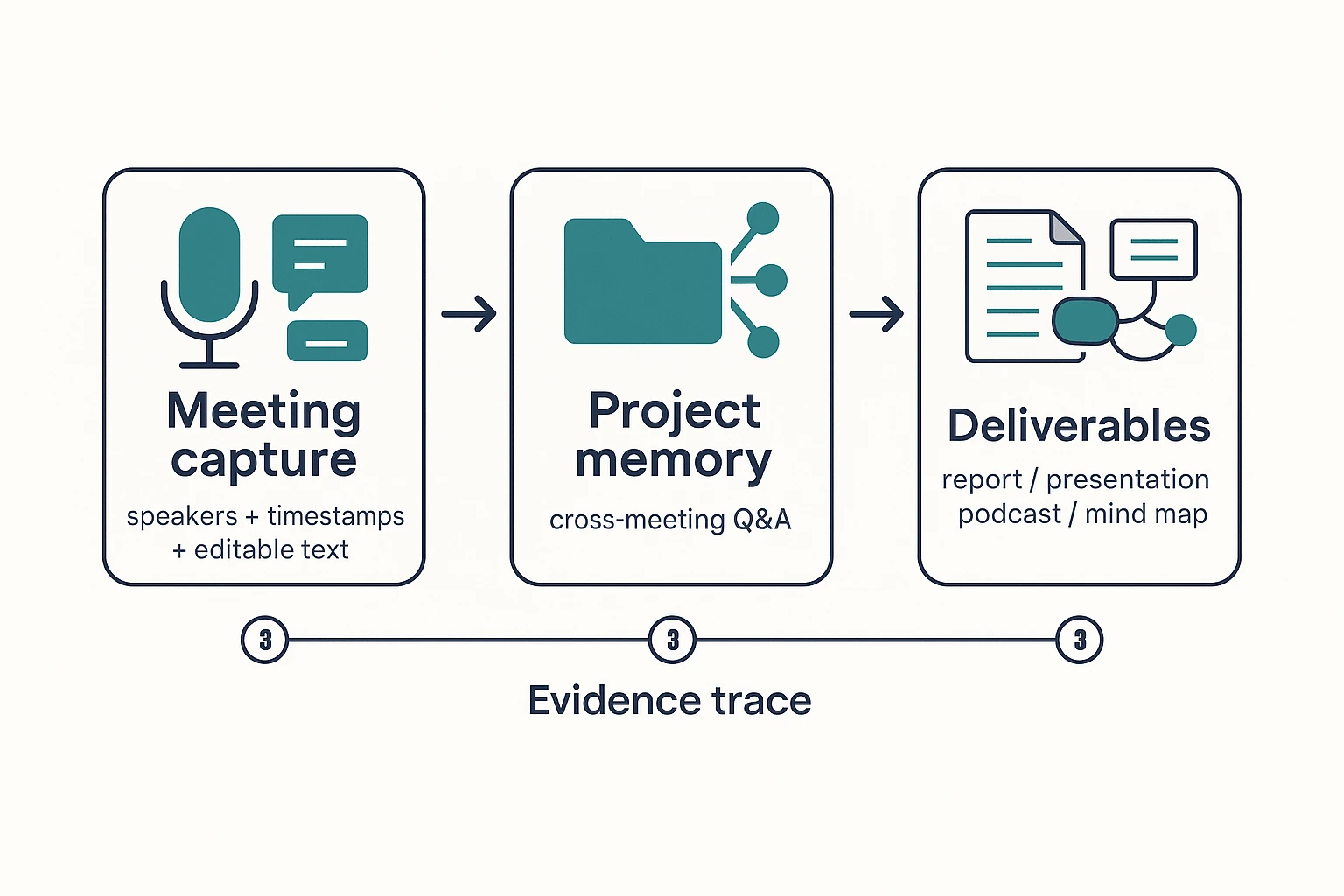
Most tools can "summarize a call." A true ai research agent can turn meetings and internal docs into a source of truth you can audit. That means better capture, memory that compounds, and deliverables that keep a clear evidence chain back to what was said.
Capture meetings without friction, then turn them into research-ready text
Meeting ingestion quality decides everything downstream. If speakers blur together or timestamps drift, your "findings" become guesses. The best meeting-first agents capture without a bot joining, then produce clean speaker labels, timestamps, and editable text.
Here's the practical requirement set for an AI research agent for meetings:
- Capture without disrupting the call or participants
- Produce editable transcripts (so you can fix names, terms, and numbers)
- Keep traceability (so each claim can point back to a time and speaker)
Build project-level memory across meetings and files
Chatbots forget. A research agent should remember—at the project level. When your calls, interviews, PRDs, and PDFs live in one workspace, the agent can answer questions across weeks of work without you rebuilding context.
That changes the questions you can ask:
- "What did we decide about scope last Tuesday?"
- "Which risks keep coming up across stakeholder calls?"
- "What evidence supports this recommendation?"
If you're setting this up for a team, start with a governance mindset: the same project memory that speeds research also needs clear permissions and review norms. This is where a short knowledge-management governance checklist helps prevent messy, untrusted outputs.
Generate deliverables that stay tied to evidence
Research doesn't end at an answer. It ends at a usable artifact. The gap in most tools is format and fidelity: they give you text, but not a client-ready report or a brief your team can ship.
Meeting-driven agents close that gap with one-click outputs like:
- PDF/Word reports for consultants and researchers
- HTML presentations for stakeholder updates
- Podcasts and show notes for internal sharing
- Mind maps for quick synthesis
The key is citations back to your meetings and docs. If a paragraph can't point to its source, it isn't a deliverable—it's a draft.
Make actions reviewable with an audit trail and clickable sources
An audit trail is a simple promise: you can see what the agent used. Teammates can review the same sources, spot errors fast, and approve changes with confidence. In practice, "Shadow-style" execution means the agent doesn't just chat—it performs tasks inside the project, and each output stays linked to its evidence.
Bottom line: for meeting-to-report workflows, the best ai research agent is the one that keeps the evidence chain intact from transcript → cited answer → deliverable.
Decision guide: which AI research agent should you use for your job?
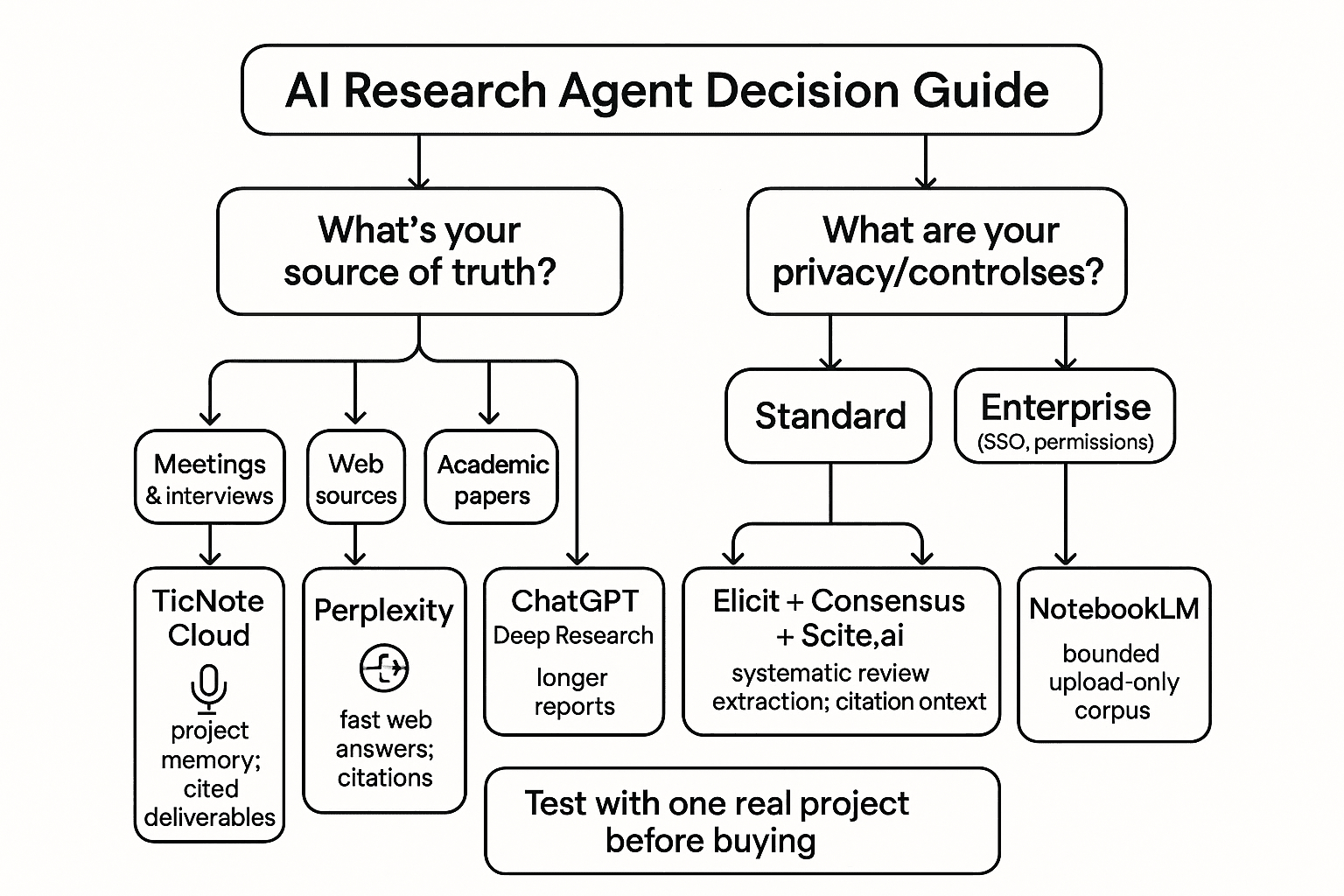
Pick your agent based on your source-of-truth (what you trust most) and your privacy needs. If the work lives in meetings and team docs, choose a tool that builds project memory and produces outputs you can ship. If the work lives on the open web or in papers, optimize for speed, extraction, and citation checks.
If your sources are meetings and interviews
Use TicNote Cloud. It's the best fit when the "truth" is inside calls, not on webpages.
It wins when you have:
- Recurring meetings (weekly client syncs, product reviews, standups) where context must carry forward
- Multi-stakeholder projects where decisions are scattered across people and sessions
- Client work where you need cited summaries and clean deliverables fast
The key advantage is compounding memory. Meetings and uploads roll into Projects, so you can ask questions across everything and get answers with citations, then generate real outputs (report, presentation, mind map, podcast) without copy-paste.
If you need fast web answers with citations
Use Perplexity for speed. It's best when you want a quick, sourced answer and links to verify.
Use ChatGPT Deep Research when you need depth. It's better when the ask is "write me a longer research report," compare options, and explain trade-offs in one coherent deliverable.
Rule of thumb:
- Speed + fresh web browsing → Perplexity
- Long-form synthesis + structured output → ChatGPT Deep Research
If you're doing systematic academic review
Use Elicit as your core tool for paper discovery and extraction. It's strongest when you need to screen studies and pull fields into a structured view.
Add these to reduce citation mistakes:
- Consensus to quickly see the direction of evidence (what papers tend to conclude)
- Scite.ai to sanity-check how a claim is cited (supporting vs contrasting)
This stack works best when you must defend your method, not just get an answer.
If you're synthesizing a private doc set
Choose based on whether the corpus keeps changing.
- Use TicNote Cloud when your doc set includes meetings plus ongoing updates (new calls, new notes, new versions). You want project memory that grows and keeps outputs grounded in what was actually said.
- Use NotebookLM when it's a bounded, upload-only set (a few PDFs, a policy pack) and you don't need meeting capture.
If you need custom workflows or strict enterprise controls
If the workflow is meeting-driven and you need permissions and SSO, pick TicNote Cloud Enterprise. It's built for team access control while keeping work tied to the original sources.
If you must query specialized databases or internal APIs, a custom agent may be the right path. That's usually a build decision, not a tool toggle.
Pick in one line (role → default tool)
- Consultant → TicNote Cloud
- Product manager / team lead → TicNote Cloud
- UX researcher (interviews-heavy) → TicNote Cloud
- Market/competitive analyst (web-first) → Perplexity
- Strategy/ops (deep memo needed) → ChatGPT Deep Research
- Academic reviewer → Elicit (+ Consensus, Scite.ai)
- Training/policy owner (fixed doc pack) → NotebookLM
Whatever you pick, test with one real project first: 3–5 sources, one hard question, and one deliverable you'd actually send.
How to evaluate research-agent output quality (without spending hours)
A fast way to judge any research agent is to test its evidence, not its writing. In 5 minutes, you can tell if the output is safe to share, or if it's just a smooth-sounding guess. Use the checklist below for web research, internal docs, and meeting-based answers.
Run a 5-minute citation audit
Check five things before you accept the result:
- Primary sources first: Do the top claims link to the original doc, dataset, paper, policy, or transcript (not a blog summary)?
- Claim-to-citation match: Does each link support the exact sentence it's attached to (not a "nearby topic")?
- Meeting jump accuracy: For meeting answers, do citations jump to the correct transcript segment or timestamp for that quote or decision?
- Uncertainty labels: Are unknowns marked clearly (e.g., "unclear," "not in sources," "needs confirmation") instead of stated as fact?
- Reproducibility: Can a teammate rerun the question and get the same answer from the same sources?
If the tool can't do at least 3 of 5, treat the output as draft-only.
Triangulate in two tools to find weak points
Ask the same question in two places:
- Internal-first tool for meetings and project docs (to ground what your team actually said).
- Web-first tool for public context (to check industry terms, benchmarks, and external facts).
Then compare:
- If the answers agree, you can usually accept with a quick spot-check.
- If they disagree, don't debate—verify. Pull the 1–2 disputed claims and check the underlying source links.
This turns "research" into a short exception review.
Set simple acceptance rules your team can follow
Use plain rules so work doesn't stall:
- Must be linked: numbers, dates, quotes, decisions, requirements, and any claim that changes what you ship or recommend.
- Must be flagged for human review: anything with missing sources, conflicting sources, or legal/security impact.
- OK as draft: brainstorming, outlines, naming, and first-pass summaries (as long as they're labeled "draft").
Light governance that pays off: store the final deliverable in the same project with its evidence links. That way, the next person starts from verified sources, not from zero.
What does an AI research agent cost, and what's the ROI?
Most teams buy an AI research agent to save time, not just "get answers." Costs vary by plan and seats, but ROI is usually driven by one thing: fewer hours spent turning messy inputs into clean outputs.
Use a simple ROI mini-model
Use this quick check:
Hours saved/week × blended hourly rate × weeks/month − tool cost
A practical way to estimate hours saved is to count the work you repeat every week:
- Meeting recap and action items
- A weekly research brief (themes, risks, next steps)
- A client or stakeholder update
Worked example: consultant/PM workflow
Assume a PM or consultant saves 3 hours/week by automating recaps, pulling cited Q&A from past calls, and generating a weekly brief.
- Hours saved/week: 3
- Blended rate: $120/hour
- Weeks/month: 4
- Tool cost: $30/month
ROI/month = 3 × 120 × 4 − 30 = $1,410/month net.
Even at 1 hour/week saved and 80/hour, you're at 290/month net (1 × 80 × 4 − 30). That's why meeting-driven automation often pays back fast: it removes follow-up work that otherwise never ends.
When one workspace beats multiple subscriptions
Subscription sprawl is common: one tool to capture meetings, one to store docs, and one to do web research. You pay more—and you lose time to copying, pasting, and re-checking what came from where.
If your work starts in meetings and ends in deliverables, a single project workspace like TicNote Cloud often wins. You keep transcripts, internal docs, and outputs in one place, with citations tied to the original source-of-truth.
When you compare tools, don't judge by per-seat cost alone. Compare by outputs (reports, slides, briefs), audit trail (what the agent did), and governance (permissions and data controls).
Final thoughts: pick the agent that matches your source-of-truth
The best ai research agent is the one that can reach your real evidence, cite it cleanly, and ship a usable output. If your truth lives on the open web, you need strong browsing and source filters. If it lives in papers, you need stable citations and PDF handling. But if your truth lives in meetings, interviews, and internal docs, you need capture, project memory, and an audit trail.
That's why TicNote Cloud is the most practical default for most teams. It turns meeting content into Project knowledge, then lets Shadow AI answer questions with citations and generate real deliverables (reports, presentations, podcasts, and mind maps) without copy-paste.
Use this simple path:
- Choose your source-of-truth (web, academic, or internal).
- Run a 30-minute test using the rubric: ask 3 questions, check citations, and verify the trail.
- Standardize acceptance criteria (what counts as "done," who can access sources, and how outputs are approved).


