


 Extension
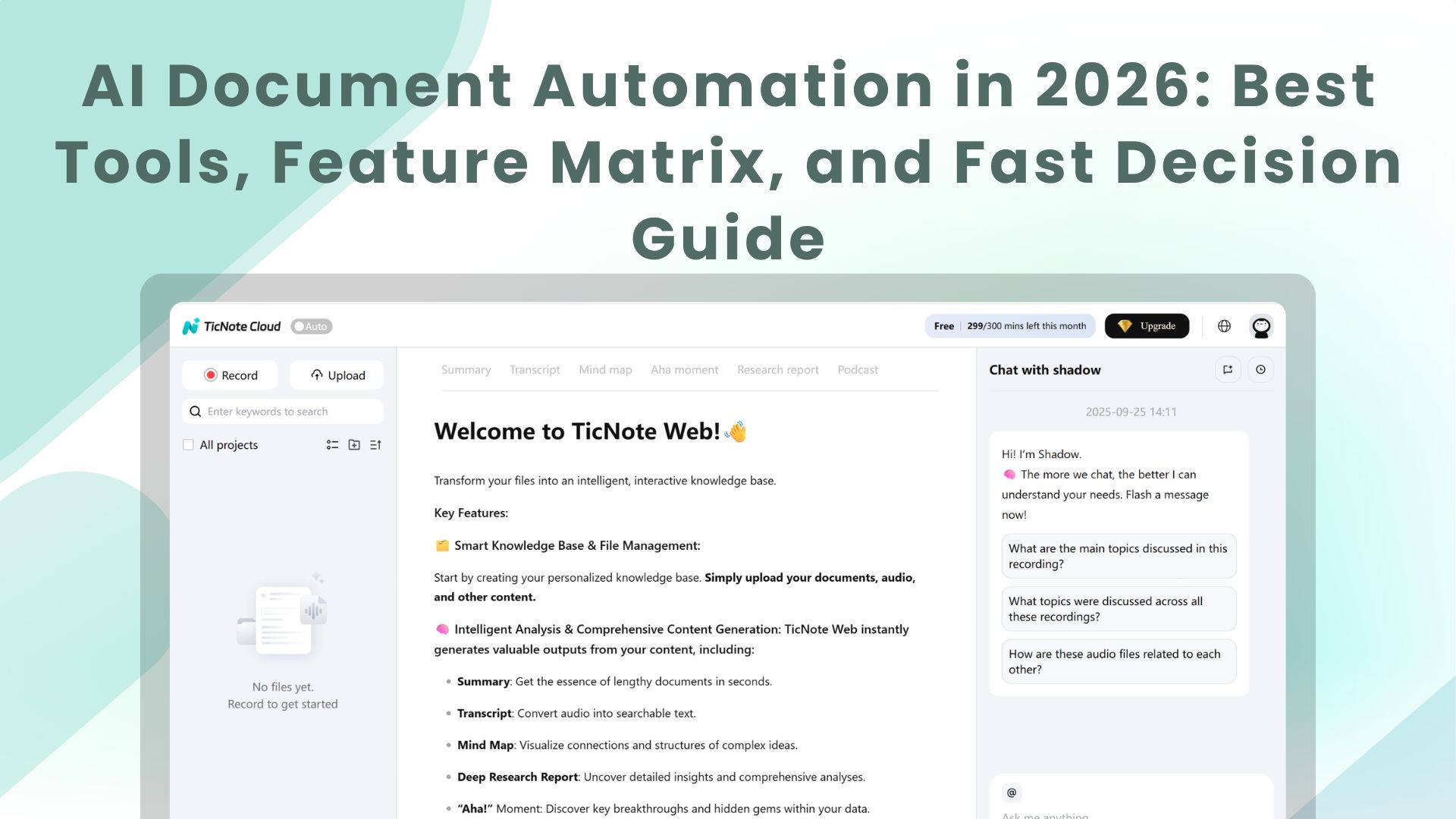
TL;DR: Best AI agent picks for AI document automation in 2026
For AI document automation in 2026, start with Try TicNote Cloud for Free if you need meetings + mixed files turned into client-ready outputs with control.
Problem: teams lose hours turning calls into docs. It gets worse when notes live in five tools. Solution: TicNote Cloud captures meetings into Projects, then Shadow AI builds cited drafts and one-click outputs.
- Best overall for meeting-to-deliverable automation: TicNote Cloud (Projects + Shadow AI with citations + one-click outputs)
- Best enterprise IDP for complex extraction + validation: ABBYY FlexiCapture
- Best cloud API for scalable extraction in AWS stacks: Amazon Textract
- Best GCP-first IDP with strong document understanding: Google Document AI
- Best Microsoft-centric extraction: Azure AI Document Intelligence
- Best when you need RPA orchestration around IDP: UiPath Document Understanding / Automation Anywhere
- Best low-code workflow hub with IDP embedded: Appian
Decision shortcut: If your bottleneck is creating client-ready docs from meetings, start with TicNote Cloud; if it's extracting fields into systems, start with IDP.
What is ai document automation (and how AI OCR, IDP, and AI agent workflows differ)?
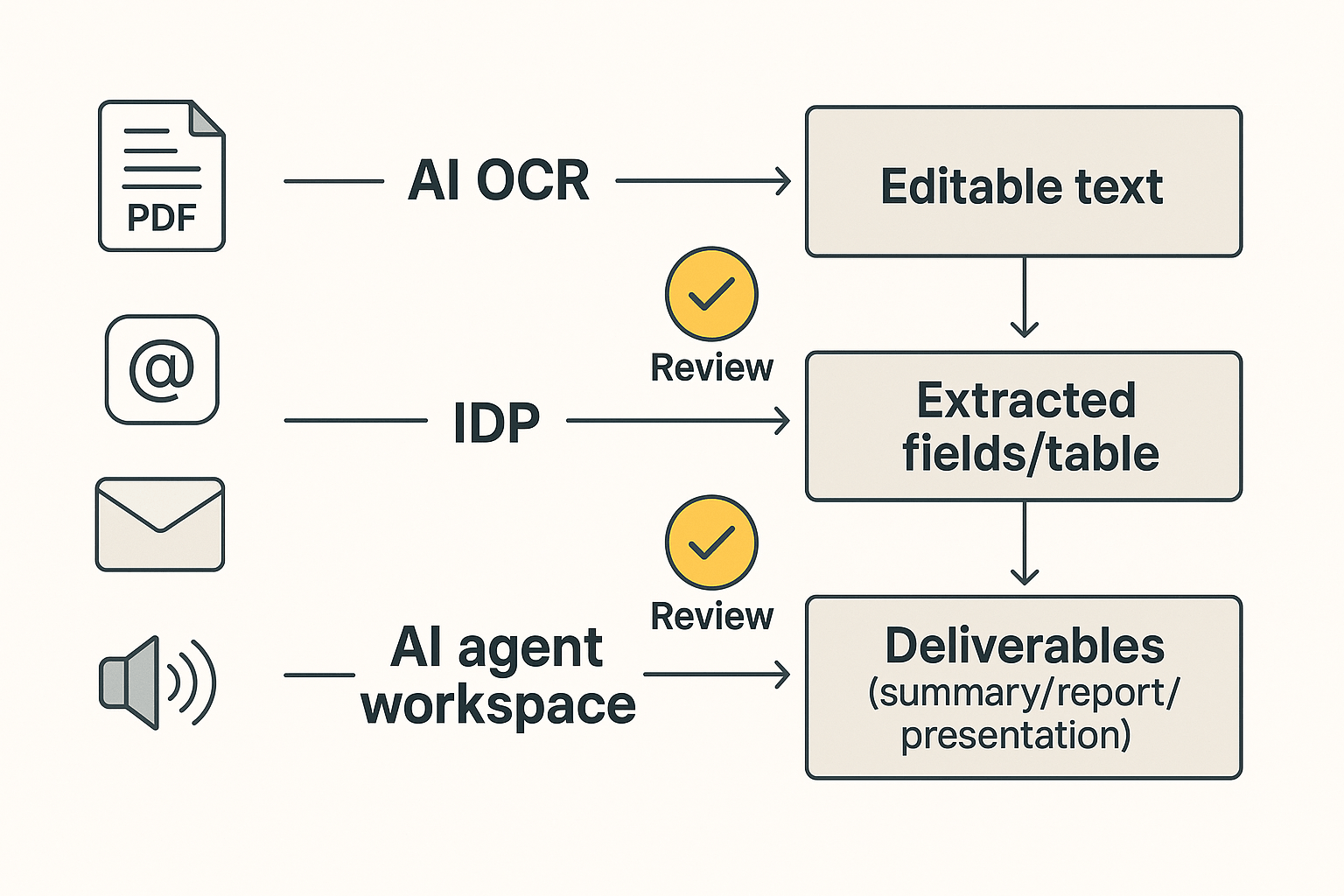
AI document automation is the use of software to turn raw files—scans, PDFs, emails, and even meeting audio—into usable business output with less manual work. In 2026, it usually falls into three layers: OCR for text, IDP for fields, and AI agents for finished deliverables.
Start with plain definitions
- AI OCR (optical character recognition) turns an image or scanned PDF into selectable text. It answers: "What does this page say?"
- Intelligent document processing (IDP) classifies documents, extracts key fields, then applies rules and validation. It answers: "What type of doc is this, and what are the values we need?"
- AI agent document workflow uses a workspace plus tools to transform source materials into deliverables—summaries, reports, presentations—and to answer questions across a project with traceable sources. It answers: "What does this mean, and what should we ship next?"
Extraction vs summarization: where tools usually stop
These categories split on the kind of output you need:
- Extraction is about fields: invoice number, PO, totals, dates, line items, tax, and vendor IDs. The output is structured data you can post to ERP, CRM, or a database.
- Summarization is about meaning: decisions, risks, rationale, next steps, and what changed. The output is a narrative or a client-ready artifact.
Most IDP platforms are built to end at "validated fields + exceptions." Most AI agent workflows are built to end at "draft deliverable + citations + review." Many teams need both, but they should buy them for different reasons.
Mini scenarios (what to use first)
- AP invoice packet (PDFs + scans) → Start with IDP. You need line-item accuracy, matching rules, and a review queue.
- Client discovery calls + research PDFs → Start with meeting-to-document automation. You need synthesis: themes, requirements, and a report or deck.
- Mixed intake (emails + scans + calls) → Go hybrid: IDP for the "system-of-record" fields, and an AI agent workspace for the narrative output.
What "touchless" really means (with exceptions)
"Touchless" doesn't mean zero humans. It means standard cases finish end-to-end without edits, while exceptions route to review. In practice, human time returns when:
- Scans are low quality, pages are missing, or handwriting appears.
- Entities are ambiguous (same vendor, multiple name variants).
- Policy calls are required (approval thresholds, fraud checks, compliance rules).
For 2026 evaluations, ignore "100% automation" talk. Instead, demand three controls: confidence scores, citation trails (for summaries and decisions), and review queues with clear audit logs.
How we scored tools: accuracy needs, document types, deployment, integrations, and governance
This scoring is a buyer guide, not a lab test. The goal is to compare AI document automation tools with the same checklist, so you can shortlist fast without fake precision.
Comparison criteria (simple checklist)
We normalize each tool on these criteria:
- Input coverage: scanned PDFs, native PDFs, images, email, plus audio/video meetings.
- Document types: structured forms (invoices, claims, IDs) vs narrative work (meeting notes, briefs, proposals).
- Outputs: extracted fields, JSON, workflow triggers, and finished deliverables (reports or presentations).
- Accuracy & QA: confidence scores, validation rules, sampling, and human-in-the-loop (HITL) review queues.
- Governance: audit logs, roles and permissions, retention, redaction/PII handling, and citations for generated text.
- Deployment: SaaS, VPC/private cloud, and on‑prem options.
- Integrations: RPA (UiPath/Automation Anywhere), cloud stacks (AWS/Azure/GCP), knowledge tools (Notion/Slack), and export formats.
- Total cost to operate: setup time, template/training effort, monitoring, and exception handling minutes.
Each tool card also includes Best fit and Not ideal if. That forces a clear use-case call.
If you're building agentic workflows, align this checklist with your controls for logging and access using an AI agent governance playbook.
What we did not score (to avoid fake precision)
We don't score these items because they depend on your docs, your reviewers, and your rollout:
- Vendor "accuracy %" claims on your dataset.
- "Fully autonomous" automation promises.
- Enterprise pricing at scale (it's usually quote-based).
Instead, run a 2‑week pilot with real inputs: at least 50–200 representative documents plus one meeting-to-deliverable test. Track two numbers: exception rate (% needing fixes) and review minutes per document. Those two metrics beat any marketing benchmark.
Top ai document automation tools (item cards + best-fit notes)
This list is built for fast, buyer-style comparison. Each tool card uses the same fields—Best for, Not ideal if, Key strengths, Governance notes, and Typical stack fit—so you can match the platform to your workflow and risk needs. Use these cards to narrow your shortlist, then confirm details on each vendor's official docs and security pages.
TicNote Cloud
- Best for: Meeting-to-document automation and project knowledge base automation (consulting, PM, RevOps enablement, research synthesis).
- Not ideal if: Your core need is high-volume form extraction into structured fields (classic IDP) with heavy exception routing.
- Key strengths:
- Projects that combine meetings plus docs, so context stays together.
- Shadow AI answers across sources with citations, so reviewers can verify fast.
- One-click deliverables: report, web presentation, podcast, and mind map.
- Editable transcripts, so you can fix the source before generating outputs.
- Governance notes: Role-based permissions, traceable AI operations, and a verify-by-citation workflow.
- Typical stack fit: Teams living in docs and chat tools (Notion/Slack) that need clean outputs for clients, stakeholders, or internal wikis—without building a workflow app.
In-card CTA: Try TicNote Cloud for Free. Test this first: generate one report from a single meeting plus two supporting docs.
ABBYY FlexiCapture
- Best for: Enterprise IDP (intelligent document processing) for high-volume classification, extraction, validation, and complex forms.
- Not ideal if: Your primary output is narrative deliverables from conversations (briefs, reports, enablement docs).
- Key strengths:
- Strong capture + validation patterns for structured business processes.
- Designed for scale, queues, and review stations.
- Handles complex layouts where rules, models, and QA matter.
- Governance notes: Mature controls. Expect real setup effort, change control, and ongoing tuning.
- Typical stack fit: Shared services, finance ops, insurance, and regulated back offices with standard document types and clear downstream systems.
Amazon Textract
- Best for: AWS-first teams that want scalable API-based extraction for forms, tables, and key-value pairs.
- Not ideal if: You need a full reviewer UI, case routing, and exception management without building more layers.
- Key strengths:
- Easy to embed in pipelines for ingestion at scale.
- Structured outputs that feed data lakes and downstream apps.
- Works well when you treat extraction as a service.
- Governance notes: Most governance is "your architecture." Plan for logging, access controls, and data handling in AWS.
- Typical stack fit: Serverless or microservice stacks, event-driven document intake, and teams with platform engineering support.
Google Document AI
- Best for: GCP-centered organizations building document understanding pipelines with multiple processors for different doc types.
- Not ideal if: Your workflow needs heavy RPA moves (copying data across legacy UIs) without adding more automation tools.
- Key strengths:
- Processor-based approach fits diverse document families.
- Good for teams that already run data + ML on Google Cloud.
- Strong choice when documents flow into analytics or search.
- Governance notes: Align processor use with your data region needs, retention, and review requirements.
- Typical stack fit: GCP data platforms, Vertex/BigQuery-centric analytics teams, and cloud-native ingestion workflows.
Microsoft Azure AI Document Intelligence
- Best for: Microsoft-centric teams (Azure + M365) that want extraction models and integration into existing apps.
- Not ideal if: You need meeting-to-deliverable creation out of the box (reports, decks, shareable summaries).
- Key strengths:
- Fits well with Microsoft identity, admin, and app ecosystems.
- Solid option when documents enter SharePoint-like storage patterns.
- Practical for common business docs where extraction is the goal.
- Governance notes: Map access, keys, and audit trails to your existing Azure governance model.
- Typical stack fit: Azure shops building internal apps, workflow tooling, or ingestion services around Microsoft identity and controls.
UiPath Document Understanding
- Best for: End-to-end automation where RPA must move extracted data into business systems.
- Not ideal if: You want quick time-to-value without automation engineering and ongoing bot/workflow maintenance.
- Key strengths:
- Strong "extraction + action" story when robots handle the next step.
- Good for exception loops where humans review and bots continue.
- Useful when processes span old systems with limited APIs.
- Governance notes: Treat it like a program, not a tool. You'll need bot governance, access design, and change management.
- Typical stack fit: Operations teams already running UiPath for finance ops, customer ops, or shared services.
Automation Anywhere
- Best for: RPA-first orgs that want IDP inside a broader automation program.
- Not ideal if: Your main pain is knowledge synthesis from meetings into polished artifacts.
- Key strengths:
- Works when you standardize intake, extraction, and handoff steps.
- Fits "document in → system update out" flows.
- Helps when the process definition is stable and repeatable.
- Governance notes: Similar to other RPA suites: permissions, audit trails, and bot control become first-class concerns.
- Typical stack fit: Large ops teams with established automation COE (center of excellence) and repeatable processes.
Appian AI Process Platform
- Best for: Low-code workflow orchestration where document ingestion is part of broader case management.
- Not ideal if: You need best-in-class extraction without committing to a platform for the full workflow layer.
- Key strengths:
- Strong for routing work, managing cases, and tracking outcomes.
- Helps when many teams touch the same "document + decision" process.
- Good for human-in-the-loop paths and SLA-driven operations.
- Governance notes: Governance is a platform decision. Plan for role design, audit needs, and lifecycle control.
- Typical stack fit: Enterprises that want one orchestration layer for requests, cases, approvals, and document-driven work.
If you're deciding between an IDP engine and an AI agent workspace, use the decision guide below.
Feature matrix: which platform fits your workflows?
Most teams compare "document automation" tools by OCR accuracy alone. That misses the bigger split: IDP tools extract fields and route work, while AI workspaces turn meetings and mixed files into finished outputs. Use the table below to pick the right core platform for your workflow, then layer the other path only when you need it.
Normalized feature matrix (✅ / Partial / ❌)
How to read this: ✅ = native and core; Partial = possible with add-ons, custom build, or partner tools; ❌ = not a core use case.
| Dimension | TicNote Cloud | ABBYY Vantage / FlexiCapture (IDP) | AWS Textract (IDP API) | Azure AI Document Intelligence | Google Document AI | UiPath / Automation Anywhere (RPA suites) |
| Inputs: scans/images | Partial | ✅ | ✅ | ✅ | ✅ | Partial |
| Inputs: native PDFs | ✅ | ✅ | ✅ | ✅ | ✅ | Partial |
| Inputs: email intake | Partial | Partial | Partial | Partial | Partial | ✅ |
| Inputs: audio/video meetings | ✅ | ❌ | ❌ | ❌ | ❌ | ❌ |
| Core: classification | Partial | ✅ | Partial | Partial | Partial | Partial |
| Core: field extraction | Partial | ✅ | ✅ | ✅ | ✅ | Partial |
| Core: validation rules | ❌ | ✅ | Partial | Partial | Partial | Partial |
| Core: reviewer queue (HITL) | Partial | ✅ | Partial | Partial | Partial | Partial |
| Gen outputs: summaries with citations | ✅ | ❌ | ❌ | ❌ | ❌ | ❌ |
| Gen outputs: report/presentation generation | ✅ | ❌ | ❌ | ❌ | ❌ | ❌ |
| Gen outputs: knowledge base / project memory | ✅ | ❌ | ❌ | ❌ | ❌ | ❌ |
| Deploy/security: cloud option | ✅ | ✅ | ✅ | ✅ | ✅ | ✅ |
| Deploy/security: on‑prem option | ❌ | ✅ | ❌ | ❌ | ❌ | Partial |
| Deploy/security: SSO | Partial | ✅ | ✅ | ✅ | ✅ | ✅ |
| Deploy/security: audit logs | Partial | ✅ | ✅ | ✅ | ✅ | ✅ |
| Deploy/security: retention controls | Partial | ✅ | ✅ | ✅ | ✅ | ✅ |
| Integrations/exports: RPA connectors | Partial | Partial | Partial | Partial | Partial | ✅ |
| Integrations/exports: API availability | Partial | ✅ | ✅ | ✅ | ✅ | ✅ |
| Integrations/exports: export formats | ✅ | ✅ | Partial | Partial | Partial | Partial |
Quick picks by scenario (no debate)
- Product research + client deliverables from interviews: TicNote Cloud. It handles meeting audio/video end to end and can draft reports or presentations from a Project, with sources you can check. If you also publish narratives, pair it with a focused guide on evidence-based AI report generators to tighten governance.
- AP / finance ops extraction into ERP: ABBYY or your cloud IDP (Textract, Azure, or Document AI), chosen to match your stack. These tools are built for invoices, POs, and validation steps.
- Claims intake with images + routing: IDP + an RPA suite (UiPath or Automation Anywhere) for triage, queues, and downstream actions. Add TicNote Cloud only when you need fast narrative decision memos from adjuster calls.
- HR onboarding packets: IDP for forms and IDs, then TicNote Cloud for policy summaries and onboarding playbooks that stay linked to the source conversations.
Many high-performing teams run a hybrid: IDP extracts and routes, and an AI agent workspace composes and packages the final deliverable.
How to automate meeting-to-document workflows (example steps)
Meeting-to-document automation is where most teams win back time fast: capture the call, ground it with files, then generate a client-ready output without copy-paste. Below is a simple, repeatable workflow using TicNote Cloud as an example because it combines meeting capture, Project memory, and multi-format deliverables in one place.
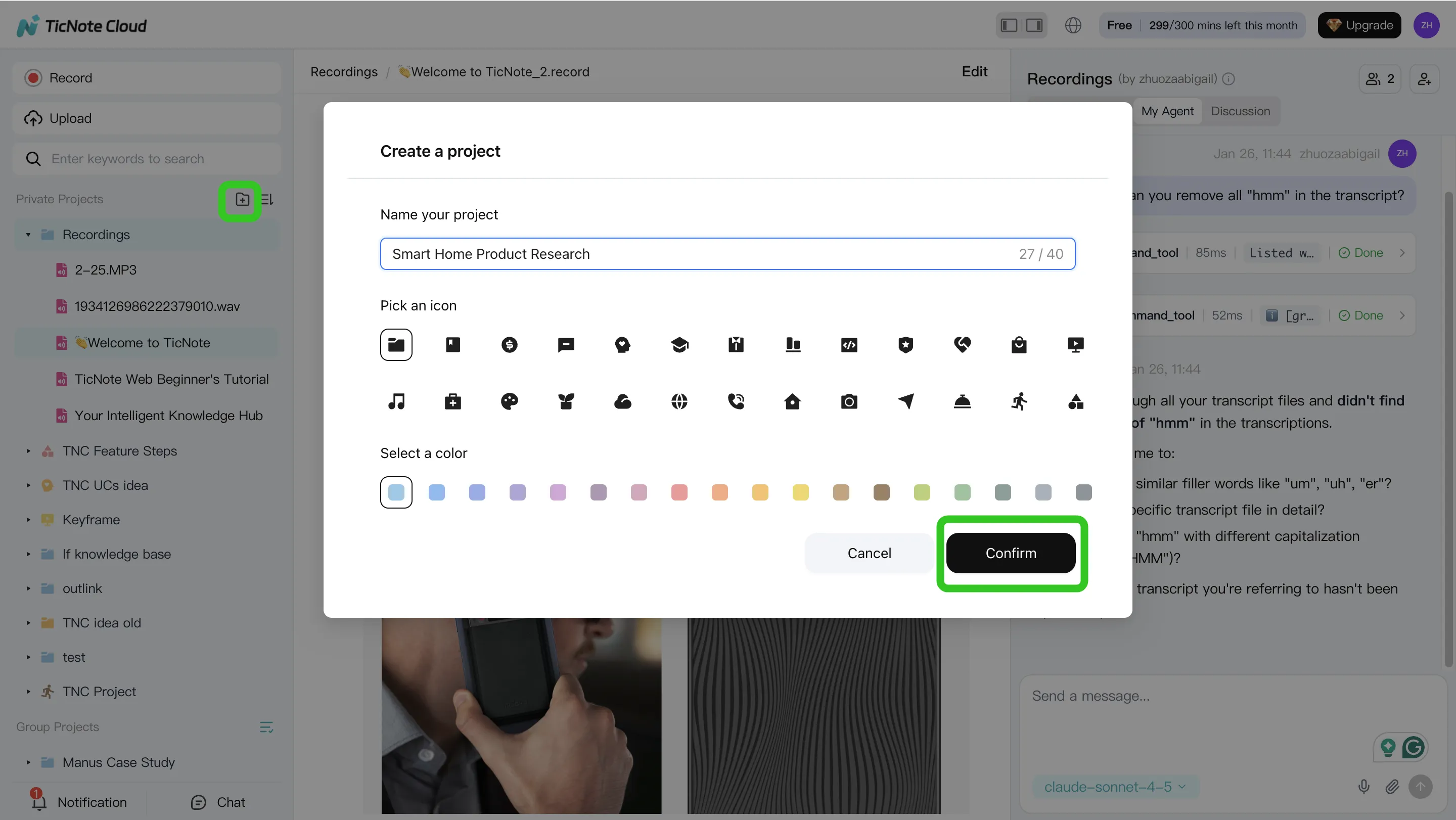
Step 1) Create or open a Project and add content (so every output stays grounded)
Start in the TicNote Cloud web studio by creating a new Project (or opening one you already use). Name it by client or workstream, then set who can view or edit. This single step prevents the "notes in one place, docs in another" problem that breaks most automation efforts.
Add your meeting content first (recordings or uploads). Then add supporting files like PDFs, Word docs, or Markdown notes. Keep them in the same Project so Shadow AI can search across everything and keep outputs tied to sources.
You can add files two ways:
- Direct upload from the file area in the Project
- Upload from the Shadow AI panel (right side) using the attachment icon, then ask Shadow to save it to the right folder
Step 2) Use Shadow AI to search, analyze, edit, and organize (before you generate anything)
With your Project filled, use Shadow AI on the right to pull the key points you'll need for a deliverable. Ask for decisions, risks, and action items, and require citations so reviewers can verify fast.
Good starter prompts to keep things structured:
- "List the key decisions made, with citations."
- "What are the open questions and owners?"
- "Compare the last 3 meetings and extract shared themes."
Then clean the sources so your outputs look professional. Fix speaker names, correct product terms, and add short labels or notes inside the transcript. This reduces downstream rewrites and prevents small errors from spreading into the final report.
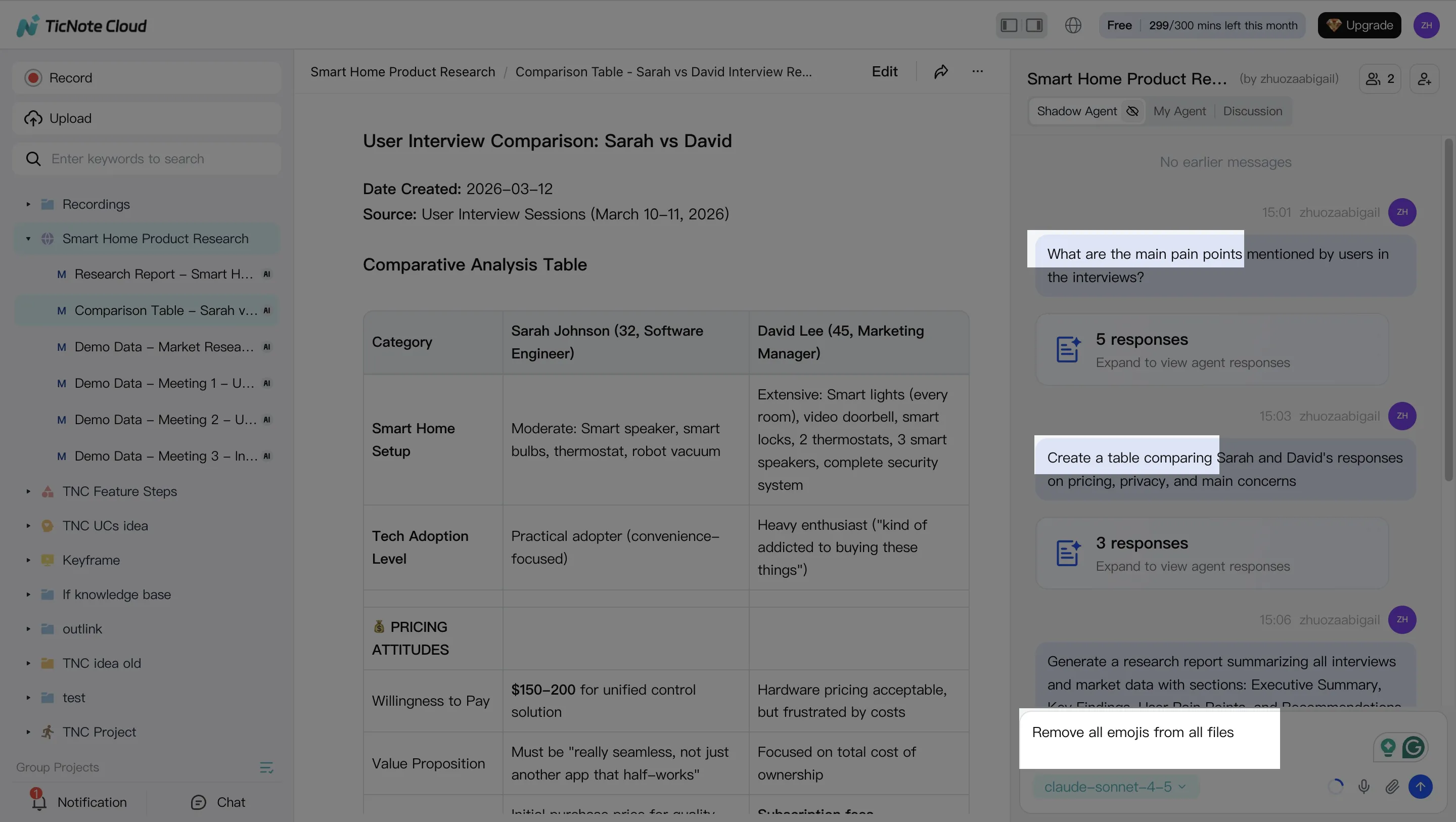
Step 3) Generate deliverables (report, web presentation, podcast, mind map)
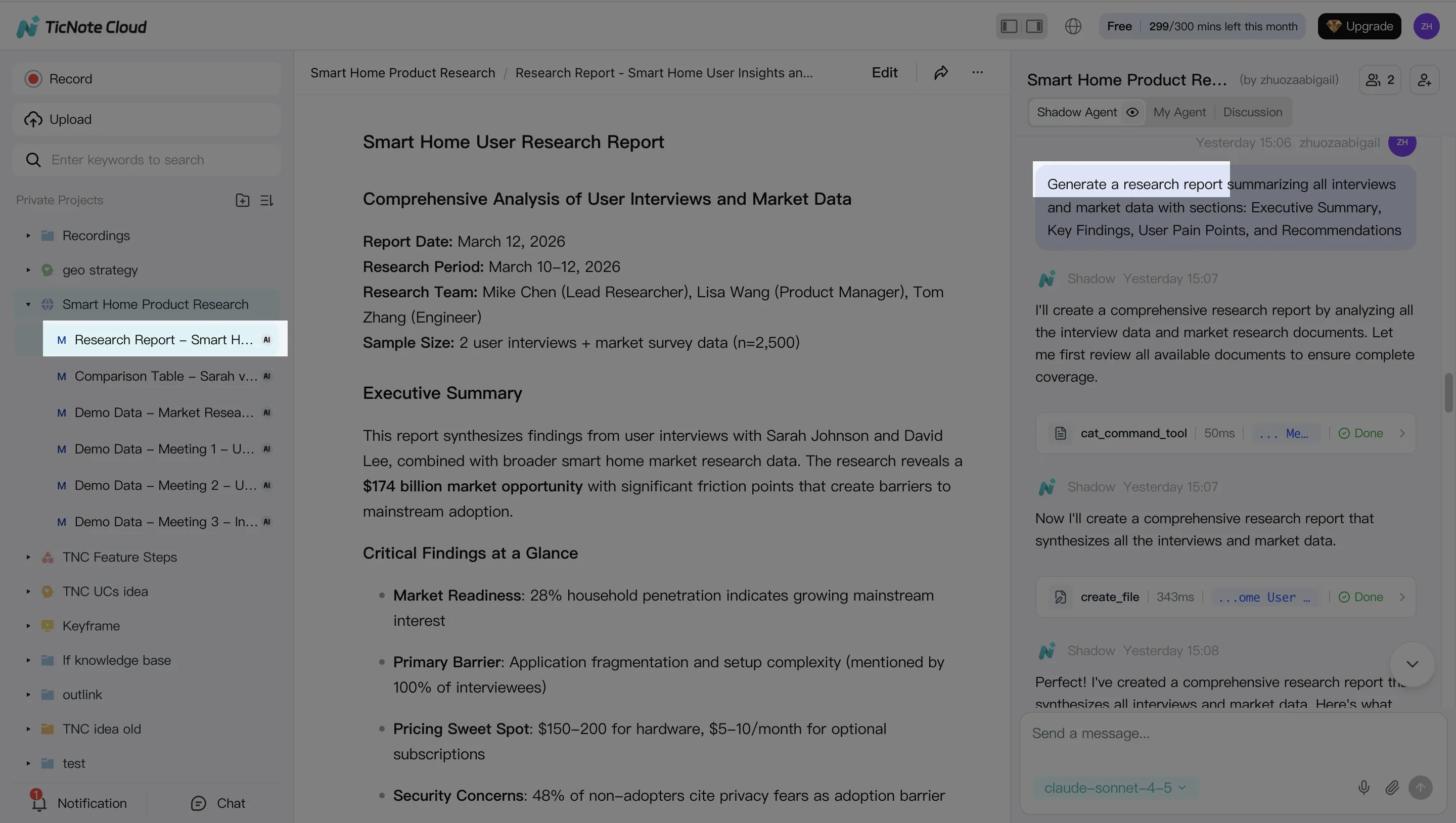
Now generate your first output from the Project. You can ask Shadow AI directly or use the Generate button. Start with one "primary" deliverable (often a client report) and one "sharing" deliverable (often a web presentation) so stakeholders can consume it in their preferred format.
A practical instruction that works well is:
- "Generate a client-ready report from this Project. Use headings, an action list, and include citations for key claims."
Then export to what your org actually uses: PDF/DOCX/Markdown for documents, or HTML for a shareable web deck.
 Step 4) Review, refine, and collaborate (keep citations, tighten tone)
Treat AI output like a strong first draft. Assign a review owner, scan for names and numbers, and click through citations when something matters (scope, dates, commitments). If the structure is right but the tone is off, ask Shadow to rewrite specific sections (more formal, shorter, or more direct) while keeping citations in place.
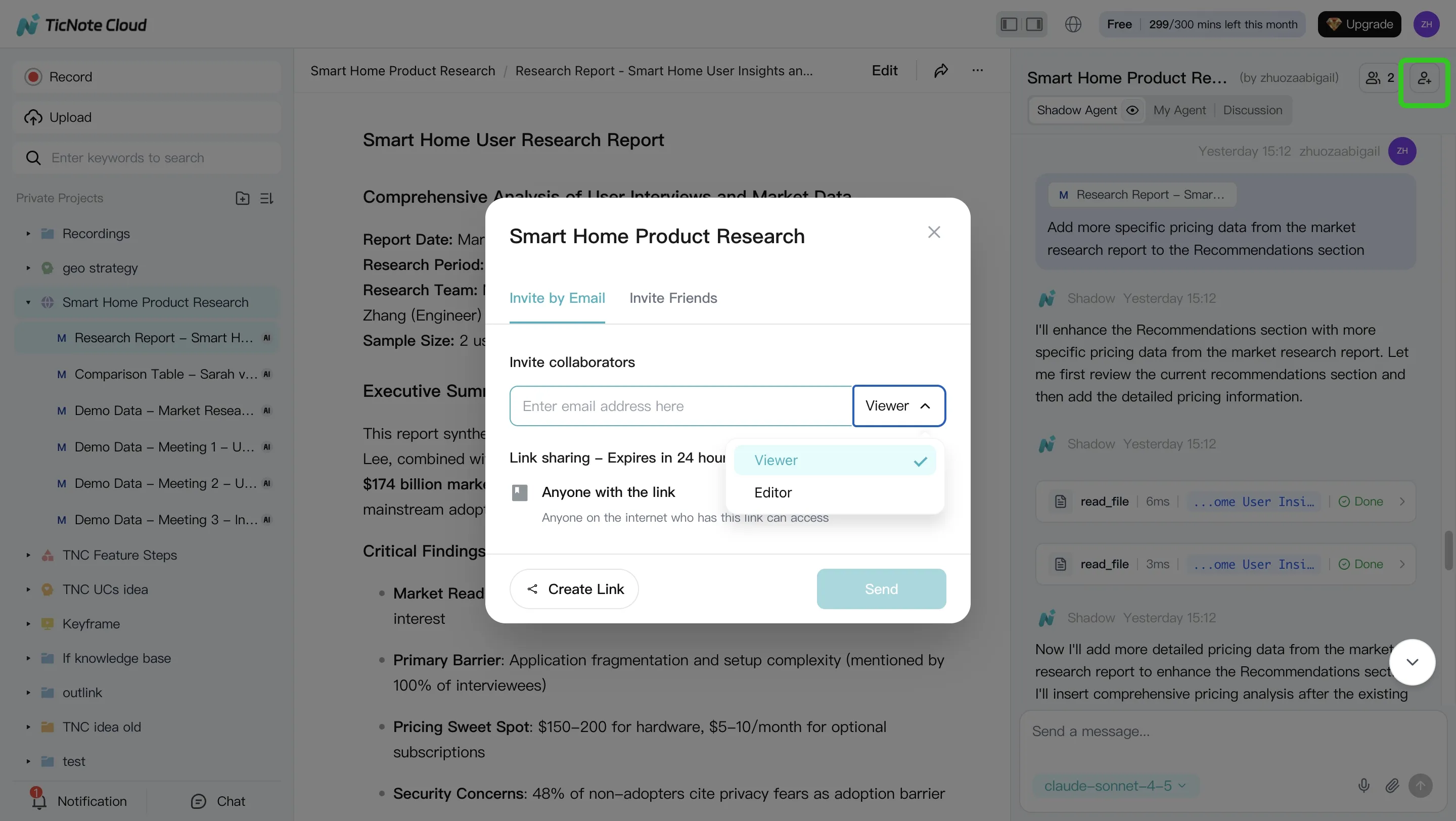
For team work, share the Project with the right permissions (Owner/Editor/Viewer). Teammates can comment, ask questions, and request revised drafts inside the same Project context. Keep a simple QA checklist before sending anything external: names, figures, action owners, and source links.
 App workflow (quick summary)
On mobile, the goal is speed: add a recording or upload to the correct Project right after a meeting, then run a short Shadow AI prompt to produce a summary and a draft. Do final packaging (templates, exports, and share-ready formatting) on web when you're back at your desk.
Your first test (do this in 30 minutes)
Run one controlled pilot:
- 1 meeting recording + 2 supporting docs in the same Project
- Generate 1 report and 1 web presentation
- Measure two numbers: reviewer time (minutes) and the count of fixes needed (names, numbers, missing points)
If reviewer time drops, you've found a workflow worth scaling.
Decision guide: IDP extraction vs meeting-to-document automation (choose fast)
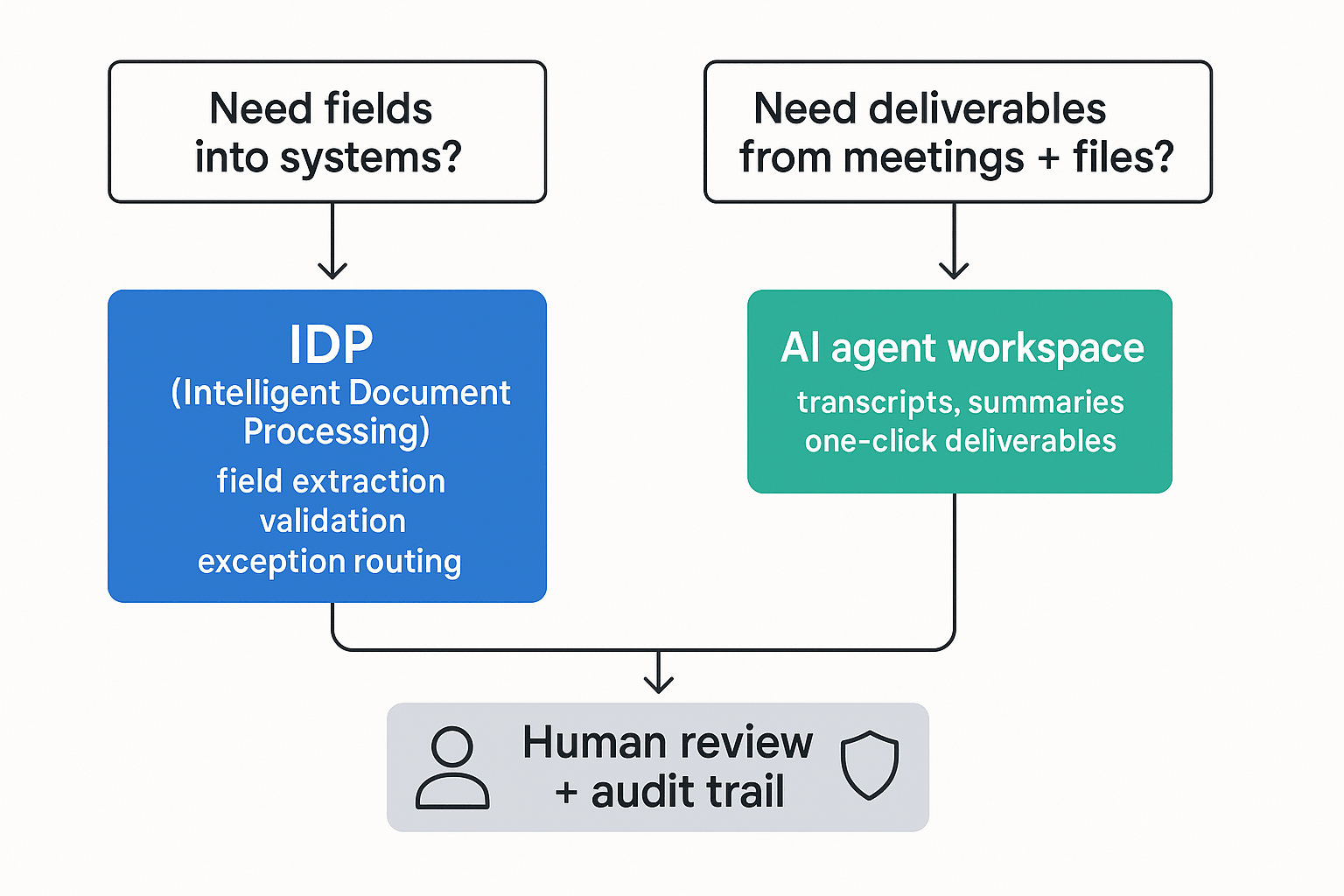
Most teams buy "document automation" for one of two jobs: push clean fields into a system, or turn messy inputs into a shareable doc. If you choose the wrong path, you'll pay for features you won't use. Use the rules below to pick fast.
Choose IDP when field accuracy is the product
Pick IDP (intelligent document processing) when success means correct, validated fields landing in a system of record.
- Your KPI is field-level extraction (like totals, dates, IDs) into ERP, CRM, claims, or HRIS.
- Inputs are mostly scans, forms, and templates with a stable schema.
- You need strict checks (required fields, format rules) plus exception routing to reviewers.
Choose TicNote Cloud when deliverables are the bottleneck
Pick TicNote Cloud when the work starts in meetings and ends as a usable artifact that people can read, share, and act on.
- Your bottleneck is turning meetings and mixed files into status updates, client memos, research summaries, or presentations.
- You need project-level memory that grows across calls, notes, and attachments.
- You want citation-backed answers and one-click outputs without copy-pasting between tools.
If you're mapping the "agent" shift, this aligns with a human-in-the-loop AI agent workflow where drafts are fast, and review is controlled.
Hybrid stack (IDP + TicNote Cloud): the two-engine pattern
Many teams run two engines on purpose:
- IDP extracts structured fields and writes them into systems.
- TicNote Cloud turns the same context into narrative outputs for humans.
Concrete examples:
- Claims: IDP pulls policy number, loss date, coverage limits; TicNote Cloud writes an adjuster case summary plus a customer-ready explanation grounded in meeting transcripts and the extracted fields.
- RevOps: IDP extracts contract terms and renewal dates; TicNote Cloud generates a renewal brief, risk flags, and a meeting follow-up pack the account team can send.
Rule of thumb: if meetings drive downstream work, start with TicNote Cloud first. Add IDP only when field extraction becomes your main bottleneck.
Risks, limits, and controls for AI document automation
AI document automation can move fast, but it can also fail fast. The safest teams treat it like a controlled production system: define what "correct" means, force evidence for key claims, and add review gates where the cost of being wrong is high.
Hallucinations and citation checks
Generated text can sound confident and still be wrong. That's common when a model fills gaps, mixes sources, or misreads a number.
Use controls that make "truth" observable:
- Require citations for any claim, number, or named entity. No citation = draft only.
- Use extract-then-summarize: pull the exact fields or quotes first, then write the narrative.
- Add counter-check prompts like "What might be wrong here?" and "List assumptions."
- Spot-check critical items (prices, dates, legal terms). Aim for a small sample every batch, like 5–10%.
Privacy/PII/PHI and retention
Before you automate, answer the buyer questions your auditors will ask:
- Where is data stored and processed?
- Is your data used for model training?
- What retention and deletion controls exist?
- How is access controlled (SSO, roles), and what's logged?
Practical mitigations that hold up in reviews:
- Data minimization: only send pages and fields you need.
- Redact PII/PHI when possible before sending to any model.
- Project-based permissions and least-privilege access.
- Retention policies by doc class (e.g., 30/90/365 days) plus tested deletion.
- A vendor security review checklist you can reuse each renewal.
Human-in-the-loop and audit trails
Human-in-the-loop (HITL) isn't "someone reads everything." It's exception handling plus sampled QA.
A lightweight operating model:
- Triage queue: route high-risk docs first (contracts, invoices, HR, clinical).
- Reviewer checklist: names, numbers, totals, dates, and must-not-change legal wording.
- Audit log review: check who ran what, on which files, and what changed.
Finally, plan for drift. Models change and workflows decay. Re-run the same benchmark set every quarter and track error rates on the fields that matter most.
Metrics and ROI: how to estimate time saved without guessing
ROI for document automation is simple when you measure minutes, not vibes. The goal is to track where work moves: from drafting and formatting to faster review and approvals.
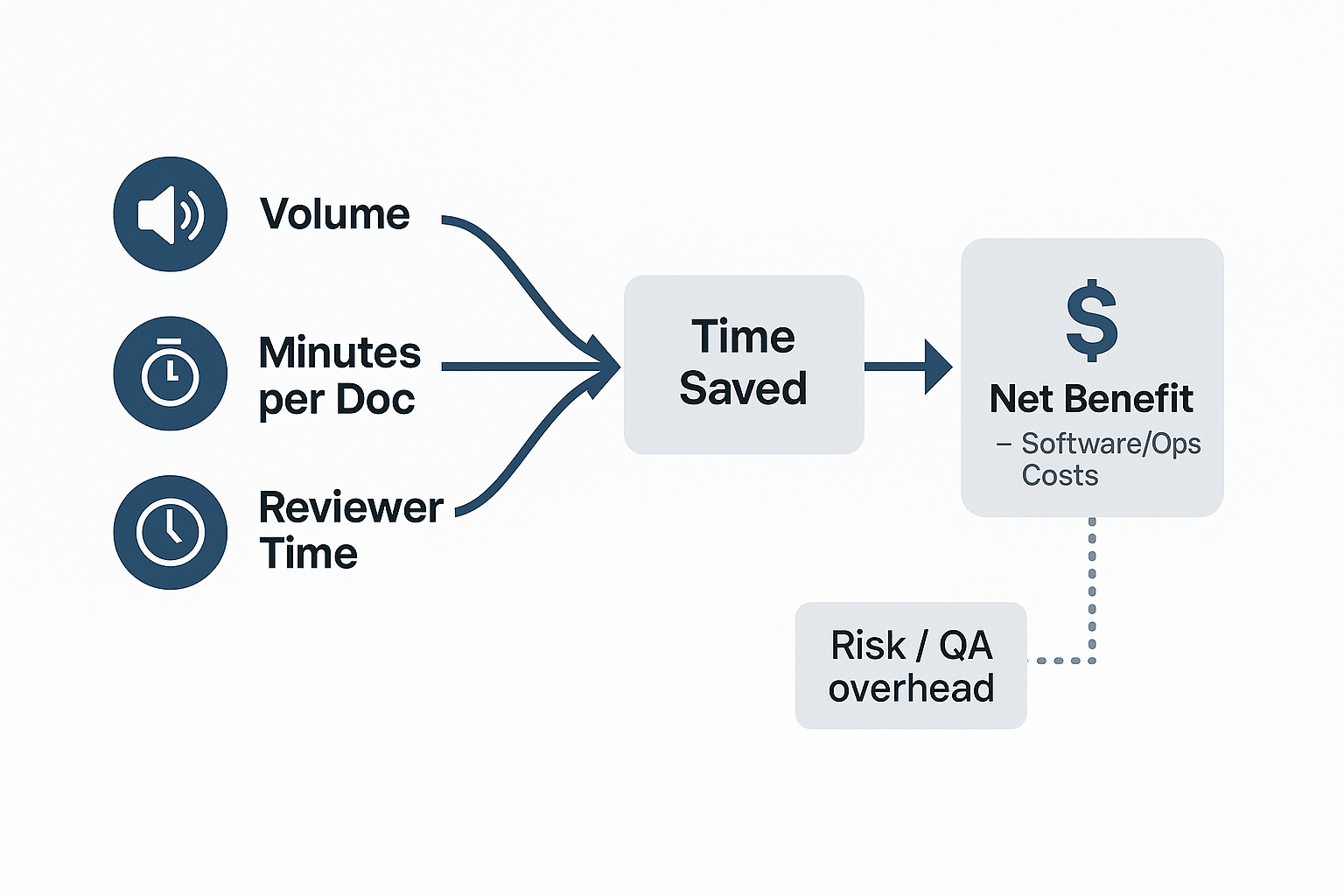
Use a simple ROI formula (then plug in your numbers)
Use these variables for any workflow, from IDP extraction to meeting-to-deliverable outputs:
- Weekly time saved (minutes) = (manual minutes per doc/meeting − automated minutes) × weekly volume
- Net benefit (per week) = (time saved ÷ 60 × loaded hourly rate) − (software cost + ops cost)
Example (consulting or PM report pack): You run recurring stakeholder meetings and publish a weekly report pack. Before automation, most time goes to cleaning notes, finding quotes, and formatting slides. After automation, that time shifts to two things: (1) a quick accuracy check (names, numbers, decisions) and (2) a tighter review cycle. If your tool supports citations, editable sources, and an audit trail, review becomes the main human step—and it's usually the step you actually want.
What to measure in week 1 (small plan, fast signal)
Track four metrics for one week and compare to your baseline:
- Baseline time per deliverable: start-to-send minutes per output.
- Exception rate: % of outputs that need human fixes (misheard terms, wrong fields, missing context).
- Review time per output: minutes spent verifying facts and polishing.
- Reuse rate: how often prior Project content answers new questions without re-reading files.
Buyer tip: prefer tools that reduce review time (clickable citations, editable transcripts/sources, traceable changes). Draft generation alone can look fast—until QA eats the savings.
Final thoughts
In 2026, "AI document automation" isn't just OCR. The best stack does one of two jobs well: (a) extract fields into your systems, or (b) turn meetings plus mixed files into finished work outputs—or both. If you're still only extracting text, you're stopping halfway. For a deeper view of workspace-style automation, see this guide to all-in-one AI workspaces and how they package outputs.
- If your bottleneck is deliverables from conversations, TicNote Cloud is the best first step. Projects plus Shadow AI with citations cut rework and context switching.
- If your bottleneck is structured data capture at scale, pick an IDP engine that matches your cloud, integrations, and governance needs.
- Plan for human review, a security review, and a repeatable benchmark. Re-test monthly, or after model changes.


