


 Extension
TL;DR: Which customer service AI agent should you pick?
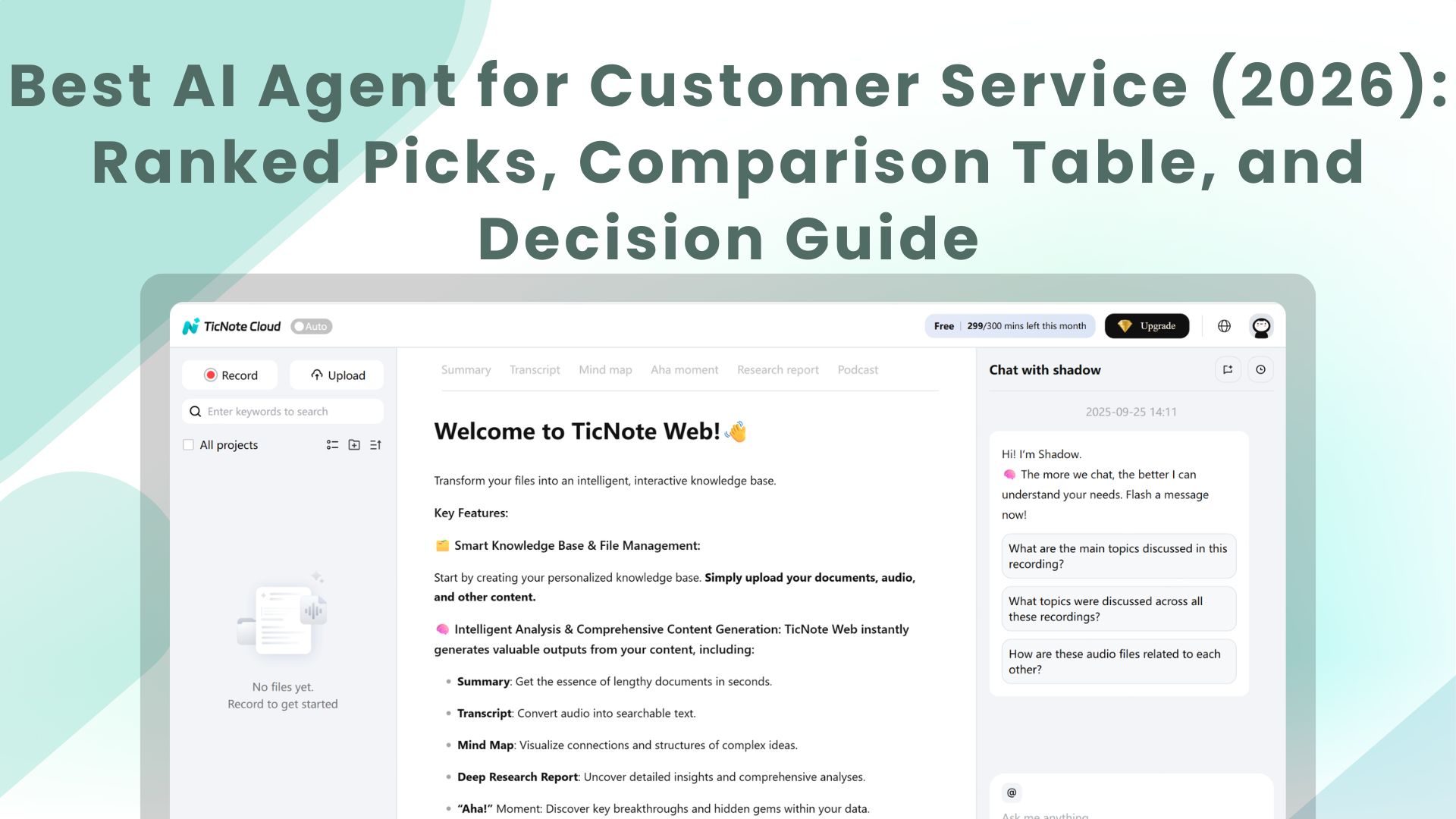
Pick TicNote Cloud if support knowledge starts in calls and screen shares—try TicNote Cloud for free to turn customer conversations into cited summaries, follow-ups, and reusable answers. It's the best AI agent for teams where the "why" lives in meetings, not tickets.
Your support calls hold the real details. But they vanish into scattered notes and slow handoffs. With TicNote Cloud, you capture what was said, then reuse it as a living knowledge base.
Fast picks:
- Best overall for meeting → follow-up → reusable knowledge: TicNote Cloud
- Best for building customer-facing chat/voice experiences: Voiceflow
- Best for no-code routing + enrichment across tools: Relay.app
- Best low-cost automation with many connectors: Make
- Best no-code AI app/agent layer for internal ops: Stack AI
- Best for engineering teams testing agent + API flows: Postman
- Best for flexible custom agent logic/prompting: Claude (Claude Code)
- Best for browser-based task completion without APIs: OpenAI Operator
If you're calls/meetings heavy, start with TicNote Cloud for transcription, call summaries, and a meeting-driven support knowledge base. If you're ticket heavy, start with Relay.app or Make for triage, then add TicNote Cloud to capture escalations and QA call learnings.
Team size fit: small teams = TicNote Cloud + Make; growing teams = TicNote Cloud + Relay.app + Voiceflow; enterprise = TicNote Cloud Enterprise (SSO/controls) + Stack AI + Postman.
The best AI agent for customer service: top picks for 2026
In 2026, the "best AI agent" for support isn't the one that chats the most. It's the one that reduces work across tickets, calls, and docs—with controls. That means it can read context, decide what to do next, and then take approved actions in your tools.
What we mean by "AI agent" in support (not just a chatbot)
An AI customer service agent is software that can take actions across systems. It can classify tickets, draft replies, update fields, route work, summarize calls, and escalate edge cases. It does this with rules, permissions, and (often) human approval.
A chatbot usually stays in one channel. It answers questions, but it doesn't reliably push updates into your helpdesk or CRM. If it can't change states, assign owners, or write back to records, it's not an agent.
In this roundup, you'll see three buckets:
- AI agent platforms (builders/orchestrators): You design multi-step workflows that run across apps.
- Customer support AI agent tools (ticket/CRM helpers): They live close to the helpdesk and speed up triage and drafting.
- AI meeting agents (meeting capture → follow-up → knowledge): They turn calls into searchable support memory and next-step output.
If you want the clean difference, use this AI agent vs chatbot decision matrix when you map KPIs.
The 3 outcomes that matter
Support leaders buy three results:
- Faster first response and resolution: auto-triage + draft replies + correct routing can cut handling time per ticket.
- Better QA and coaching: consistent call review themes, clear evidence, and fewer "it depends" scorecards.
- Reusable knowledge: call and ticket learnings turn into macros, internal docs, and policy updates that stick.
Quick note on pricing models (seats vs usage/credits)
Pricing varies a lot, so "pricing clarity" matters in the scoring.
- Per-seat: easy to budget, but can punish large QA or BPO teams.
- Usage/credits: tied to AI runs, messages, or outcomes; watch for hidden overages.
- Minutes-based: common for meeting agents and voice QA; forecast using monthly call minutes.
- Pass-through model costs vs bundled LLM: pass-through can be cheaper at scale, but needs tighter guardrails.
A simple forecast: start with monthly ticket volume + average touches per ticket + total call minutes. Then add a 20–30% buffer for pilot learning and iteration.
Comparison table: best AI agents for customer service (features, pricing, security)
This table is a normalized view to help you buy, not a feature dump. It's built for commercial evaluation of the best ai agent options for support teams, using the same yardstick across tools.
How to read this table (✅ / Partial / ❌)
- ✅ means the capability is native or strong enough for real support use (not a hack).
- Partial means you can get there with workarounds, custom steps, or extra tooling. Expect setup time.
- ❌ means it's not supported, or it's a poor fit for customer support workflows.
Think of ✅ as "ship this to production," Partial as "possible with guardrails," and ❌ as "don't bet your queue on it."
Rubric fields (what we score on every tool)
To keep it fair, every product card uses the same rubric:
- Autonomy level: does it only suggest, or can it act (with approvals)?
- Scheduling/recurrence: can it run on a timer or trigger reliably?
- Channel coverage: tickets vs calls/meetings vs chat.
- Integrations: helpdesk, CRM, docs/KB, and messaging.
- Human-in-the-loop: approvals, confidence gates, and escalation.
- Citations/traceability: can agents cite sources and show what they used?
- Analytics/QA views: trends, audits, and review workflows.
- Security controls: roles, permission boundaries, SSO, audit logs, retention controls, and BYOK (bring your own key) where offered.
- Pricing clarity: can you predict cost as volume grows?
- Learning curve: how fast a support team can ship value.
When a "platform" beats a "single-purpose" tool
Pick a platform when you need multi-step flows across tools with governance. Examples: "classify → route → draft → approve → log to CRM" with audit trails.
Pick a single-purpose tool when you have one bottleneck and need fast time-to-value. Example: meeting and call summaries that turn into follow-ups and reusable knowledge.
Many teams use both: a routing platform for orchestration, plus a meeting-centered agent for knowledge and follow-up.
Note: the full table in this article covers TicNote Cloud, Voiceflow, Relay.app, Make, Stack AI, Postman, Claude (Claude Code), and OpenAI Operator. It also includes "Best for" and "Security notes" columns to speed up vendor review.
Top tools (standardized cards)
To cut through AI-agent hype, every product below uses the same "card" format. That makes it faster to compare fit, risk, and effort in one pass. Use these as procurement notes: what it's best for, what you actually get, and what to watch out for.
TicNote Cloud
- Best for: Support teams where knowledge and follow-ups start in calls/meetings; QA leads building coaching themes from real conversations; PM/CX ops turning voice-of-customer into usable docs.
- Website | pricing: TicNote Cloud (home: https://ticnote.com/en/home). Plans include Free (0/month)** with 300 transcription minutes/month and basic templates; **Professional (12.99/month, 79 billed annually)** with 1,500 minutes/month and advanced templates; **Business (29.99/month, $239 billed annually) with 6,000 minutes/month; and Enterprise (contact sales) with customized usage and SSO.
- Key features:
- Bot-free meeting recording (no meeting bot joins)
- High-accuracy meeting transcription with speakers, timestamps, and real-time edits
- Editable transcripts (not read-only exports)
- Projects that group calls + docs into a single support "case file"
- Shadow AI that answers questions using your Project content with citations you can click
- Reusable support knowledge from meetings (turn recurring issues into KB-ready drafts)
- One-click outputs for support work: follow-up email drafts, internal KB drafts, VoC summaries
- Limitations: Not a helpdesk replacement; you'll still need Zendesk/Freshdesk/Intercom for ticketing. You'll get the best results with clean Project structure. Integrations are shorter than large automation hubs.
- Why it stands out: It's the most practical "customer support knowledge + follow-up" agent here because it turns messy calls into verifiable assets your team can reuse.
Voiceflow
- Best for: Building customer-facing conversational AI for support (chat/voice) with designed dialog flows.
- Website | pricing: Token-based tiers; Enterprise options for governance.
- Key features:
- Visual conversation builder (flow-first design)
- Multi-channel experiences (chat and voice)
- Testing and iteration tools
- Human handoff when the bot should stop
- Limitations: It's strongest for experience design. It's less focused on meeting-to-knowledge reuse and follow-up content.
- Why it stands out: Great when you need controlled dialog and predictable customer-facing behavior.
Relay.app
- Best for: Customer support agent automation that routes, enriches, and updates CRM/helpdesk records.
- Website | pricing: Credit-based; watch seat limits and per-run costs.
- Key features:
- No-code workflows for triage and enrichment
- Many integrations across support, CRM, and data tools
- Human approval steps (human-in-the-loop)
- Limitations: Output quality depends on your connected data. Governance gets complex if many teams can ship flows.
- Why it stands out: One of the fastest ways to operationalize "classify → enrich → route" without engineering.
Make
- Best for: Low-cost, high-connector automation for support operations.
- Website | pricing: Ops/credits-based pricing with a broad connector library.
- Key features:
- Scenarios for ticket triage, tagging, SLA workflows, and escalations
- Scheduling, retries, and error handling
- Easy to stitch LLM steps into existing automations
- Limitations: Scenarios can sprawl and become hard to maintain. You'll need careful logging, versioning, and ownership.
- Why it stands out: Strong connector coverage at a price point that works for automation-heavy teams.
Stack AI
- Best for: Internal agent apps for support ops (QA, analytics, and knowledge workflows).
- Website | pricing: Run-based plans; Enterprise controls available.
- Key features:
- No-code AI app building (agent "mini-apps")
- Connectors and templates for common patterns
- Governance hooks for larger teams
- Limitations: You still need to design the process and roles. It's not a turnkey support platform.
- Why it stands out: A practical middle layer for building "agent apps" with guardrails.
Postman
- Best for: Engineering teams building and testing agent + API workflows used by support tooling.
- Website | pricing: User-based plans; strong team collaboration for API work.
- Key features:
- API collections, environments, and monitoring
- Repeatable test harness for tool calls and LLM endpoints
- Collaboration that keeps integrations stable over time
- Limitations: Not ideal for non-technical teams. It won't capture meeting knowledge or manage support content.
- Why it stands out: Reliability and testing discipline for production-grade agent integrations.
Claude (Claude Code)
- Best for: Flexible custom agent logic, prompting, and developer workflows.
- Website | pricing: Plans vary by usage.
- Key features:
- Strong reasoning for complex support ops logic
- Code-centric agent building
- Connectors (e.g., MCP-style setups) depending on your environment
- Limitations: Governance and permissions depend on how you deploy it. You'll need policies for data access, retention, and audit trails.
- Why it stands out: Deep customization when you have advanced needs and want control.
OpenAI Operator
- Best for: Browser-based task completion when no API exists (ops-heavy tasks that still matter in support).
- Website | pricing: Premium pricing; availability can vary.
- Key features:
- Performs actions on websites
- Handles multi-step tasks across tabs and forms
- Limitations: Harder to govern at scale. It can be expensive. It's not specialized for support knowledge or QA workflows.
- Why it stands out: Useful when you must automate work that doesn't have clean integrations.
How to choose the right product for your support team
Picking the right support AI agent comes down to one thing: where your best support knowledge starts. Some teams learn most from tickets. Others learn most from calls. Start there, then choose a tool that can turn that input into drafts, answers, and clean handoffs—with human checks.
If support knowledge starts in calls and meetings, start with TicNote Cloud
Choose TicNote Cloud when calls are where the "real" context lives. It records and transcribes customer conversations, groups them into Projects, and lets Shadow AI answer questions with citations and draft follow-ups fast. That makes it a practical first pick for a support org because you can reuse what your customers already said.
It's a strong fit for these common support moments:
- Escalation calls: capture decisions, owners, and next steps
- Implementation calls: turn requirements into a shared internal brief
- Churn-risk calls: summarize objections and draft a retention follow-up
- QA sampling: review a set of calls and extract coaching themes
- Cross-team handoffs: create a single "source of truth" Project for Support + CS + Product
Why this matters: call notes are often the missing 20% that explains 80% of outcomes. A meeting-centered agent prevents "tribal knowledge" and shortens time-to-resolution.
If you need front-line customer chat or voice experiences, pick Voiceflow
Choose Voiceflow when your main goal is deflection and guided self-serve. It's built to design customer-facing chat/voice flows, with clear intent handling and structured paths.
Good fit when you:
- Need a scripted, reliable front door for common questions
- Want controlled escalation to a human (handoff) as a default safety net
- Care more about UX flow design than deep ticket operations
If you want no-code routing and helpdesk/CRM enrichment, pick Relay.app
Choose Relay.app when you already run a helpdesk and want clean automations around it. It's best for "move data, add context, request approvals" work.
Use it for:
- Ticket classification and tagging
- Enriching tickets with CRM fields (plan, ARR, owner)
- Routing to the right queue with approval gates
If you need broad automation with lots of connectors at low cost, pick Make
Choose Make when automation coverage is the priority. It shines when you need to connect many apps and you can keep scenarios maintained.
Make is a fit if you have:
- Clear owners for each workflow (so it doesn't sprawl)
- A stable process for edits and testing
- Many tools to connect (billing, product analytics, CRM, helpdesk)
If you need an internal AI app layer with governance, pick Stack AI
Choose Stack AI when you want internal "support ops apps" without heavy engineering. Think QA dashboards, KB drafting, and voice-of-customer (VOC) rollups—built with permissions and controls.
This is best for mid-market and enterprise teams that need:
- Standardized internal tools (not ad-hoc prompts)
- Review steps (human-in-the-loop)
- Central governance for what the AI can access and do
If you're engineering and testing agent + API flows, pick Postman
Choose Postman when reliability and testing are the bottleneck. It's not the support agent itself. It's the layer that helps you validate APIs, monitor failures, and keep agent-driven flows predictable.
If you need flexible custom logic and prompts, pick Claude (Claude Code)
Choose Claude when you want custom workflows and you can enforce safe design. It's best for advanced teams that can implement redaction, prompt rules, and logging.
Typical uses include:
- Custom ticket summarizers with strict formatting
- Internal runbooks that require careful prompt constraints
- Drafting responses with sensitive-data filters
If you need browser-based task completion without APIs, use OpenAI Operator (as an add-on)
Choose OpenAI Operator only when a task is stuck behind a website UI. It's useful for one-off web actions, but it shouldn't be your core support system.
Mini decision guide (channel + team size)
Use this quick mapping to decide fast:
- Calls-heavy support (escalations, implementations, churn): Start with TicNote Cloud, then add Make/Relay for cross-system updates.
- Ticket-heavy support (email/helpdesk queues): Start with Relay.app or Make for routing + enrichment; add Stack AI for internal QA and KB workflows.
- Chat-first support (deflection is the KPI): Start with Voiceflow; add TicNote Cloud to capture and reuse insights from escalations.
By team size:
- Startup (1–10 support): Start with TicNote Cloud to stop repeat questions; add Make only after your tags and macros are stable.
- Mid-market (10–50): TicNote Cloud + Relay.app is a strong combo for call knowledge + routing discipline; add Stack AI if you need internal QA apps.
- Enterprise (50+): Start with TicNote Cloud for governed call knowledge, then add Stack AI for standardized ops apps and Postman for reliability testing.
If you want more options to map tools to outcomes, use this list of enterprise AI agent use cases and governance KPIs to align your rollout with measurable results.
What workflows should a customer support AI agent run first?
Start with workflows that cut handle time without risking trust. The fastest wins come from (1) triage and drafting with human approval, (2) call-to-follow-up automation when calls drive outcomes, and (3) QA coaching that finds issues early. These give you speed, consistency, and a clear audit trail—without letting an agent "freestyle" with customers.
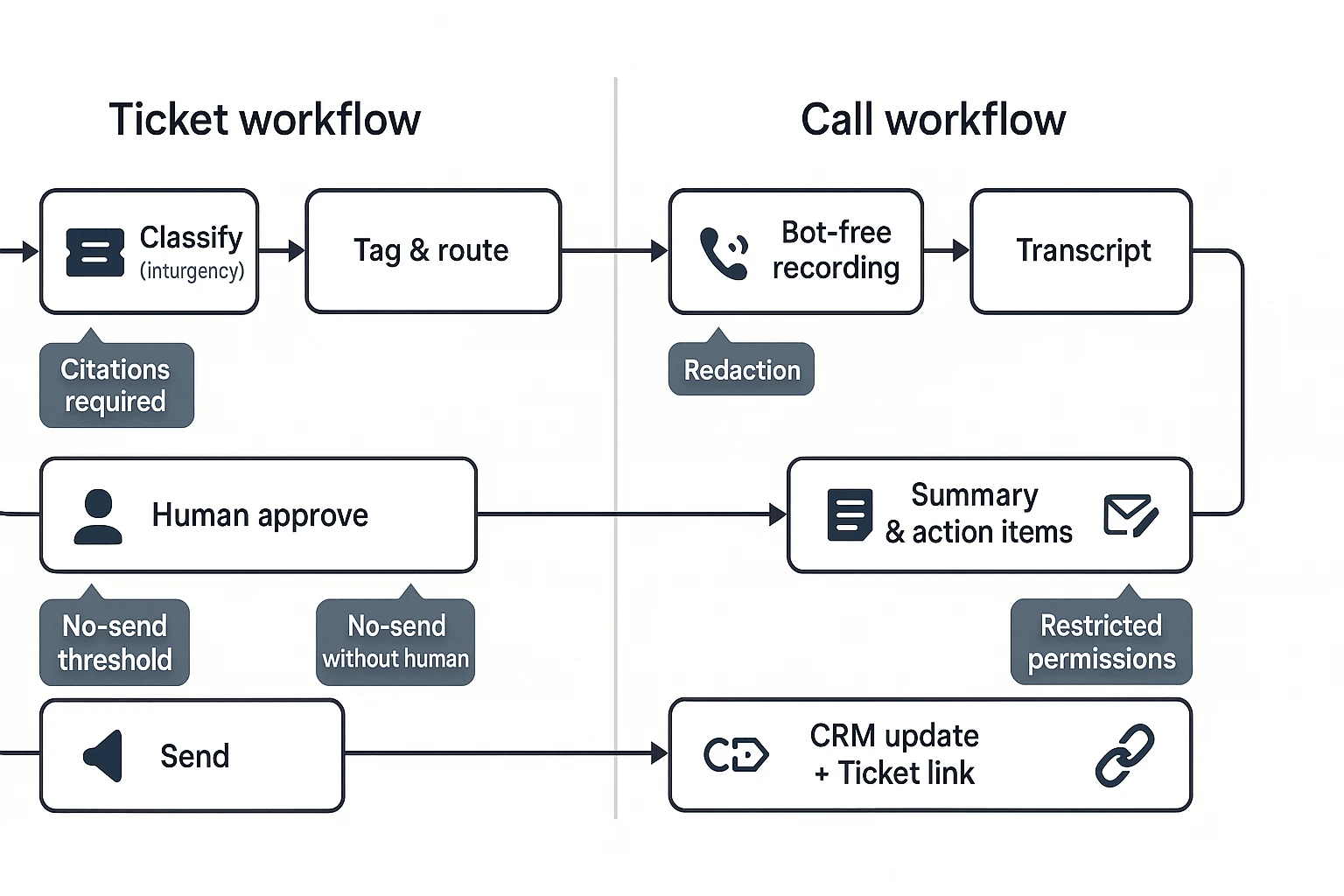
Workflow 1: Ticket triage + tagging + draft reply (with human approval)
A ticket triage agent is a system that reads new tickets and prepares the next best action. It should ingest tickets from your helpdesk, then classify intent (bug, billing, how-to) and urgency (P0–P3). Next, it checks customer tier and SLA (service-level agreement), then proposes tags, routing, and an assignee.
For replies, keep it strict: the agent drafts responses using only approved KB (knowledge base) snippets and past "gold" answers. It must also attach citations (links or IDs) to the exact KB sources it used, so an agent's draft is easy to verify.
Control points that keep this safe:
- Confidence thresholds: auto-tagging at ≥0.80 confidence; otherwise flag for review.
- "No-send" policy: never send customer-facing text without a human click.
- Citation requirement: if the draft can't cite an approved source, it must ask a clarifying question or route to a human.
- Escalation rules: force-route security, refunds, or legal terms to a senior queue.
Workflow 2: Support call summary → follow-up email → CRM update
This is the call-to-follow-up loop: a bot-free recorder captures the support call, transcription produces a clean transcript, then an AI tool generates a summary and action items. From there, it drafts a follow-up email, updates CRM fields (stage, next step, health score notes), and creates or links a ticket to the same account.
TicNote Cloud is the best fit when calls are your source of truth. It's meeting-centered: you capture the conversation, then organize it into a Project so your team can ask questions across calls and files and get cited answers. That matters in support, because "what was promised on the call" often decides the next ticket outcome.
A practical output checklist for each call:
- 6–10 line call summary (problem, environment, impact, status).
- Action items with owners and due dates.
- Follow-up email draft that restates next steps in plain language.
- CRM note + ticket link so work doesn't split across tools.
If you want a broader rollout plan, use this AI-ops pilot playbook for agent workflows to pick 2–3 flows and ship them in 60–90 days.
Workflow 3: QA agent for call coaching (themes, risks, and examples)
A QA agent should coach, not just score. Start by sampling calls (for example, 10–30 per rep per month, depending on volume). Then score them against a simple rubric: greeting, discovery, accuracy, policy compliance, empathy, and next steps.
The real value is in patterns. Your QA agent should:
- Surface themes: missed discovery questions, unclear commitments, weak summaries.
- Flag risks: compliance issues, refund promises, PII (personal data) leakage.
- Pull verbatim examples with timestamps for coaching and calibration.
Keep the rubric stable for at least 4 weeks. If you change it weekly, you won't see true lift.
Failure modes to plan for (hallucinations, policy violations, edge cases)
Support agents fail in predictable ways. Plan guardrails up front:
- Require citations for any factual claim (pricing, limits, policy). No citation, no send.
- Restrict tool permissions (read-only by default; no CRM writes without approval).
- Human-in-the-loop for all customer-facing outputs until you've measured quality.
- Redact sensitive fields (tokens, addresses, payment details) before AI processing.
- Maintain an exceptions process: a clear path for "weird" tickets (legal, PR, outages) that bypass automation.
Done right, these first workflows reduce time-to-first-response and cut rework, while keeping control where it matters: on customer promises.
How to set up a meeting-driven support knowledge agent (step-by-step)
A meeting-driven support knowledge agent turns calls into answers, drafts, and follow-ups your team can reuse. Instead of losing key details in chat logs, you capture the full context (what the customer said, what you promised, and why) and keep it searchable. This workflow uses TicNote Cloud as the example because it's built to turn support conversations into project-scoped knowledge with citations.
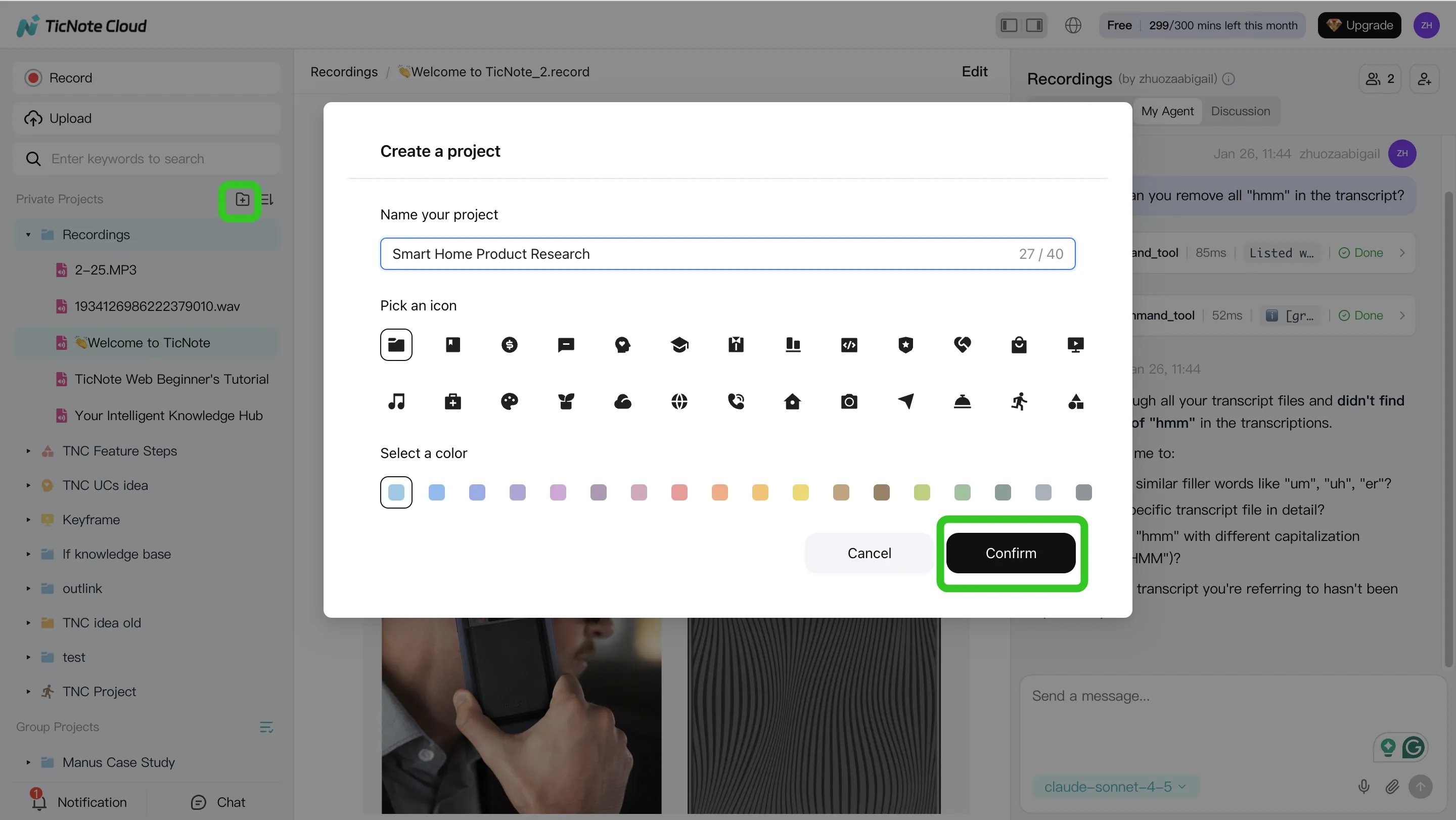
Step 1: Create (or open) a Project and add content
Start by creating a Project for one support domain. Pick a narrow scope, like "Billing Escalations" or "Onboarding Calls." That scope matters because it keeps the agent's memory clean and prevents cross-topic answers.
Next, add the sources you want the agent to learn from:
- Call and meeting recordings (customer calls, escalations, QBRs)
- Supporting docs (policies, macros, release notes, SLAs)
- Any internal notes you want referenced later
In TicNote Cloud's web studio, you can add files in two practical ways:
- Direct upload from the file area (fast when you're batching)
- Attach files inside the Shadow AI chat, then tell it where to save them (useful when you're already working in-chat)
Before moving on, do a quick sanity check: are billing calls and billing docs in the same Project? If yes, you've already reduced future search time.
Step 2: Use Shadow AI to search, analyze, edit, and organize content
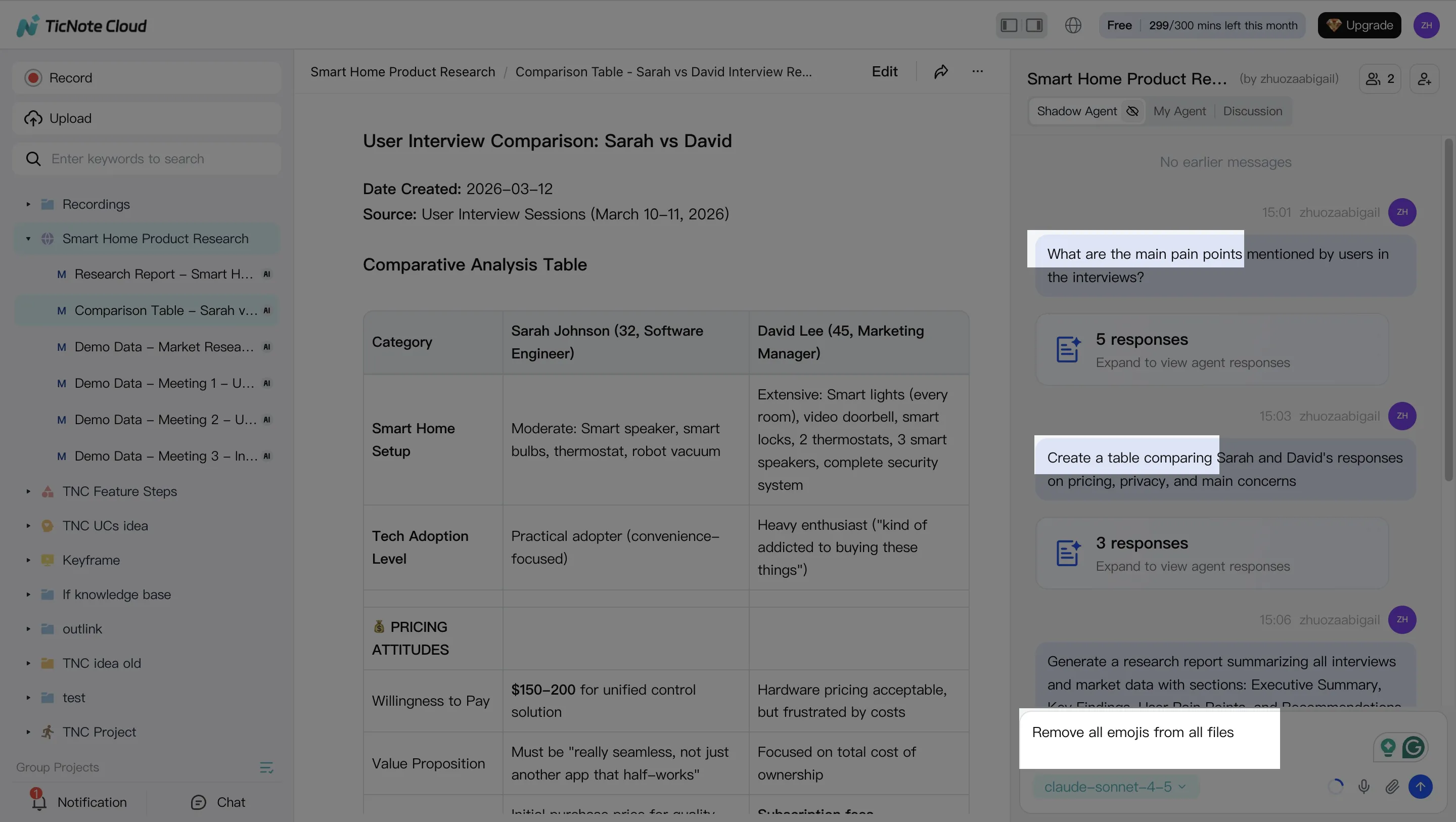
With your sources in place, Shadow AI becomes your "support brain" on the right side of the screen. Your goal here is to extract what support teams actually need: decisions, promises, risks, and next steps.
Ask Shadow AI questions that match real support work, such as:
- What are the top pain points customers mentioned?
- What did we commit to deliver, and by when?
- What patterns repeat across the last three escalations?
Then switch to structure. A simple, reusable format is:
- Issue → root cause → workaround → owner → next step
Also, clean the transcript. Fix names, product terms, and misheard jargon. Small edits upstream make downstream drafts more accurate.
Step 3: Generate deliverables (follow-ups, escalations, and KB drafts)
Now turn the same call into multiple outputs. This is where meeting-driven knowledge pays off: you reuse one source but produce different artifacts for different audiences.
Common "first week" deliverables to generate:
- Customer follow-up email draft (clear recap + next steps)
- Internal escalation summary (what happened, impact, owner, deadline)
- KB draft (problem, symptoms, steps to reproduce, fix/workaround)
In TicNote Cloud, you can ask Shadow AI directly or use the Generate button to output different formats like a report (PDF) or a web presentation (HTML). Keep sources linked so reviewers can verify details without rewatching the whole call.
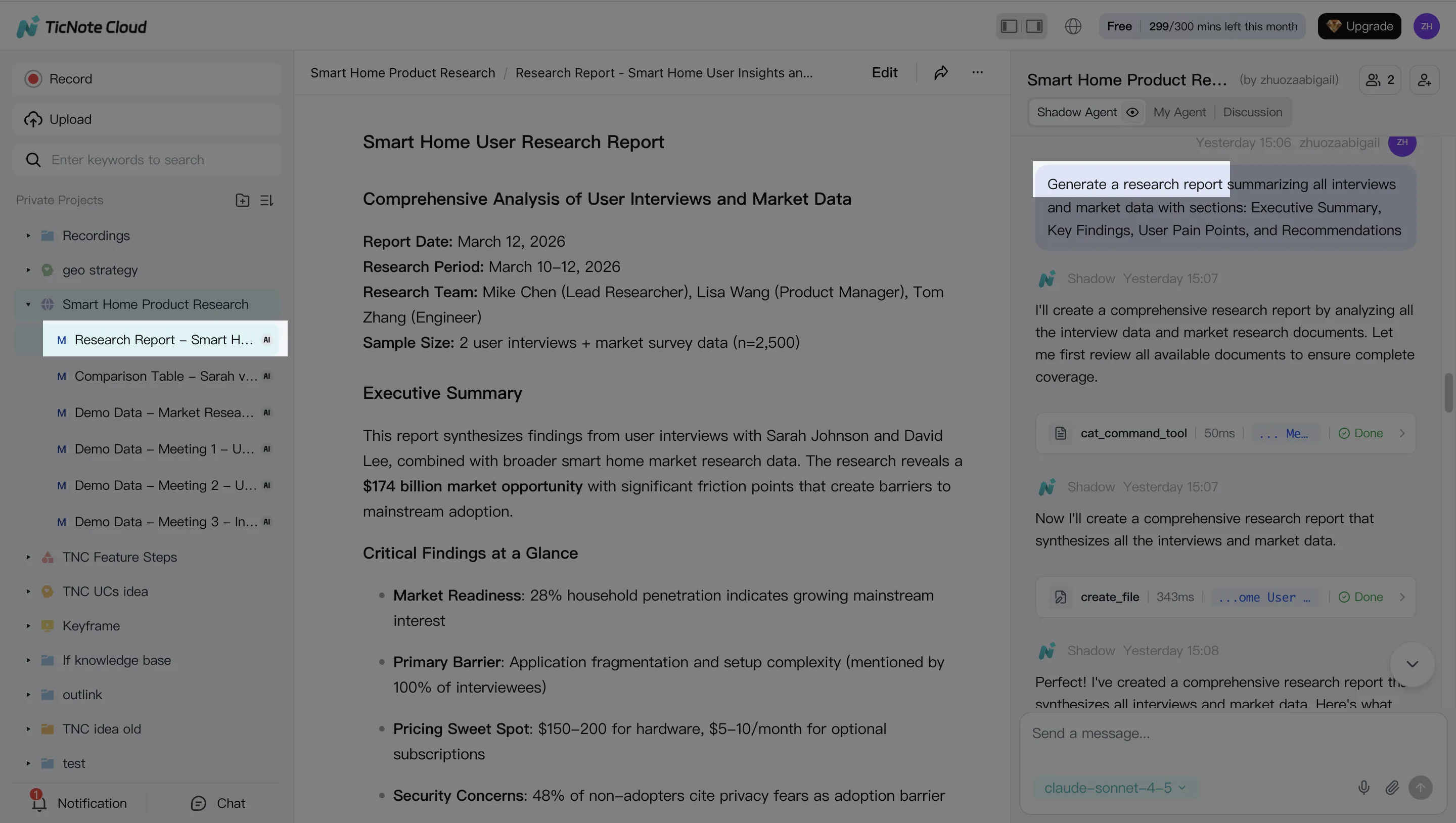
Step 4: Review, refine, and collaborate (so knowledge compounds)
Treat every draft as "almost done" until a human checks it. Review for policy wording, customer-safe language, and any commitments. If something looks off, ask Shadow AI to rewrite just that section instead of regenerating everything.
Two habits make this system improve over time:
- Verify key claims by jumping back to the source when needed
- Save the final, approved artifacts back into the same Project
That way, the next escalation gets faster because the Project already contains the last answers, the right phrasing, and the supporting evidence.
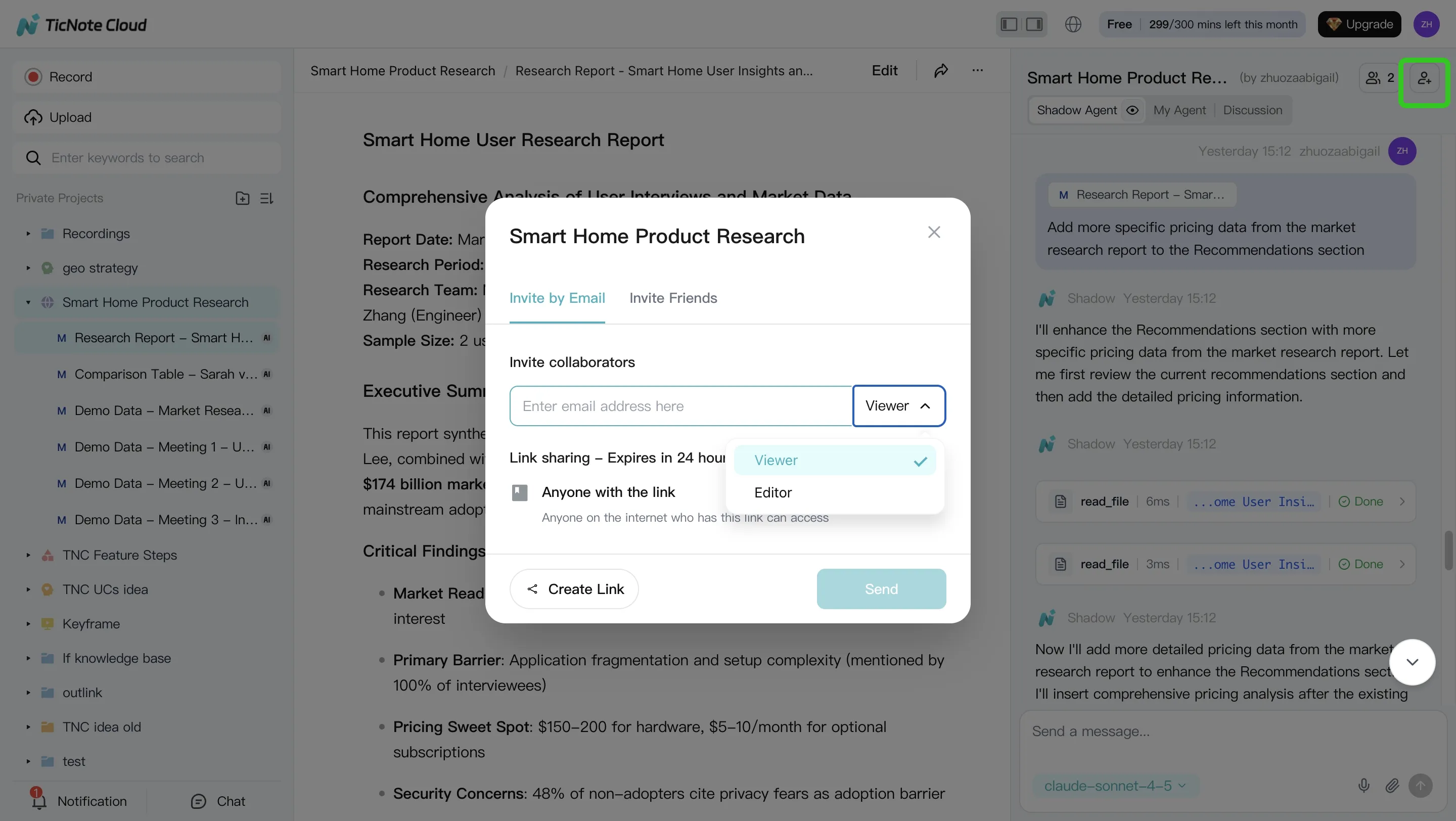
Mobile workflow: capture calls fast, then generate follow-ups
When you're away from your desk, open the same Project on mobile, upload audio/video you captured on your phone, and run Shadow AI to summarize and draft the same follow-ups. It's the same workflow, just optimized for speed.
Try TicNote Cloud for Free and generate your first support follow-up from a call.
Security and privacy checklist for AI agents in support
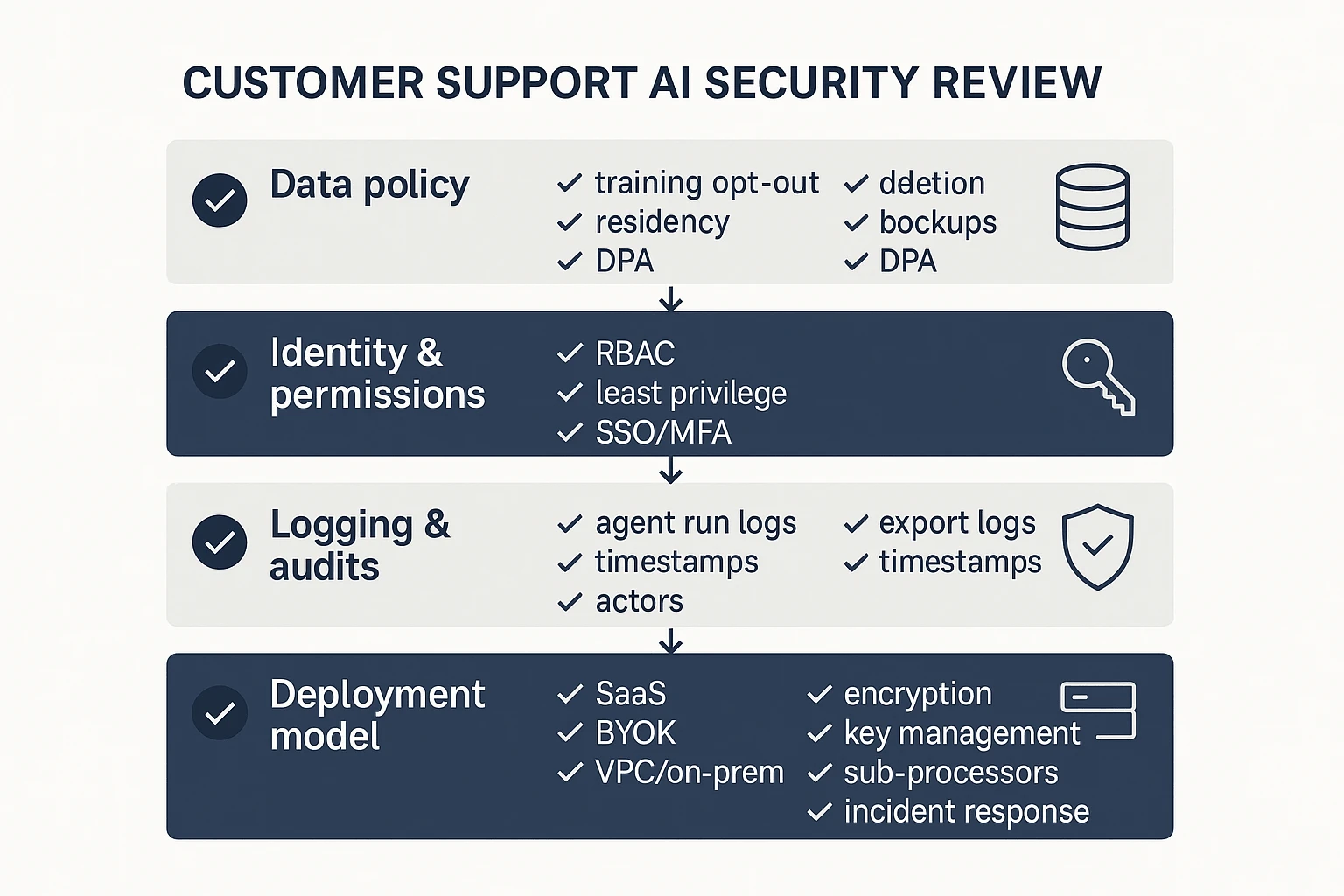
Support AI touches customer tickets, call notes, and account data. That makes security a buying feature, not a footnote. Use this checklist to score every "best ai agent" option the same way, before you roll it into chat, email, or your helpdesk.
Lock down data use: training, retention, deletion
Start with the three questions that decide your risk:
- Model training: Is your content used to train vendor models by default? If "no," confirm it's in the contract, not just a blog post.
- Retention window: Get a number (for example, 30/90/365 days) for raw inputs, transcripts, embeddings (search indexes), and generated outputs.
- Deletion workflow: Verify how you delete: single conversation, whole workspace, and user-level exports. Ask if deletion also clears caches and search indexes.
Also confirm:
- Data location: Where is data stored (region), and can you choose it?
- Backups: Are backups encrypted, how long are they kept, and can deleted data persist in backups?
- DPA terms: Require a signed DPA (data processing addendum) that explicitly covers customer conversations and support content.
Enforce access controls: roles, SSO, audit logs
An AI agent is another "user" in your system. Treat it that way.
Demand these controls before launch:
- Role-based access control (RBAC): Separate Admin, Manager, Agent, and Viewer roles.
- Least privilege: The agent should only access the channels and fields it needs (for example, read tickets but can't change billing).
- SSO: SAML or OIDC, plus enforced MFA.
- Audit logs: Logs for logins, knowledge changes, agent runs, and exports. You want timestamps, actor, inputs, and destination.
- Human approval for customer-facing output: Draft → review → send for high-risk flows (refunds, policy, security, legal).
Choose deployment: BYOK, VPC/on‑prem, and vendor review questions
BYOK (bring your own key) matters when you need control over encryption keys and fast key revocation. It's common in regulated teams and enterprise procurement.
VPC or on‑prem is usually required when you can't send support content to shared SaaS infrastructure, or when data residency rules are strict.
Use this short vendor security review list:
- Encryption: In transit (TLS) and at rest (AES-256 or equivalent).
- Key management: Who holds the keys, and can you rotate them on demand?
- Sub-processors: Full list, what they do, and how changes are notified.
- Incident response: Breach notification timelines, contacts, and playbooks.
- Prompt/output logging: Are prompts stored? For how long? Can you disable logging? Are logs searchable by admins?
Tie it back to your rubric: security should score just like autonomy or integrations—clear answers, clear defaults, and clear admin controls.
Final thoughts: choosing the best ai agent for customer service
If support quality depends on what customers said in calls, start with a meeting-centered agent. It should turn conversations into cited knowledge and fast follow-ups. Then add ticket automation or chat where you need more scale.
Keep your evaluation strict. Use one rubric across every tool. Run a short pilot with 1–2 real workflows: call follow-up and ticket triage. Track three numbers: time-to-first-response, QA consistency, and knowledge reuse.
Before you scale, pass a security checklist. Confirm data retention terms, "no training" policy, encryption, SSO, and audit logs. If you want a broader shortlist, review this guide to all-in-one AI workspaces and map each option to your channels.
Try TicNote Cloud for Free and turn call notes into cited answers.


