


 Extension
![[Free Credits] Best Claude Opus 4.7 Alternative in 2026: Top Picks, Comparison Table, and Workflow-Based Recommendations](https://cdn-digitalhuman-pb.weta365.com/voice-recorder-prd/static/backend/2026/05/09/2053019769153040385.webp)
TL;DR: fast answer for the Claude Opus 4.7 hot model cluster
For the Best Claude Opus 4.7 alternative in knowledge work, try TicNote Cloud for free when the goal is meeting → transcript → cited answers → report, not model swapping.
Teams lose context when notes, docs, and AI chats live in separate tools. That makes follow-ups slower and decisions harder to verify. TicNote Cloud helps by combining transcription, Project memory, cited answers, and deliverables in one workspace.
Quick picks: GPT 5.4 or 5.5 API for coding agents; Gemini 3 Pro for long-context multimodal files; GLM-5.1 or MiniMax M2.7 for budget coding; Mistral Medium 3.5 for open-weight or EU-sensitive setups.
Best Claude Opus 4.7 alternative: quick picks by workflow
The Best Claude Opus 4.7 alternative depends on what you're replacing: raw model access, coding agents, or the workflow around meetings, documents, and team knowledge. For most knowledge teams, the practical winner is the tool that turns inputs into cited outputs without forcing constant copy-paste.
TicNote Cloud — Best for meeting-centered AI workspaces
TicNote Cloud is the strongest first pick for Opus-class AI knowledge work because it solves the access layer and the workspace layer together. Users now can access Claude Opus 4.7 for free in TicNote Cloud. Moreover, it also supports Claude Sonnet 4.6, GPT 5.4, and more models for free. There are 30 free credits every month. If you want the access details, see this guide to free Claude Opus 4.7 access.
Key details:
- Website: ticnote.com
- Pricing: Free plan; Professional from $12.99/month
- Best for: meetings, research calls, document analysis, AI reports, presentations, podcasts, and mind maps
- Core features: bot-free recording, 120+ language transcription, editable transcripts, Shadow AI with citations, project-level memory, and one-click outputs
- Limitation: it's not a raw model-hosting platform; it fits meeting and document workflows best
Why it stands out: TicNote Cloud turns conversations and files into cited deliverables. Shadow AI works inside a Project, searches the source material, and helps generate team-ready reports or mind maps. That reduces context switching and keeps answers tied to verifiable meeting notes and documents.
GPT 5.4 or GPT 5.5 API — Best for high-end coding and tool workflows
Pick GPT 5.4 or GPT 5.5 API when you need strict control over agent routing, function calling, eval harnesses, and custom orchestration. It's a strong fit for engineering teams building their own AI layer. Caveat: costs can spike during long agent loops, and you'll still need a workspace layer for meeting-to-deliverable work.
Gemini 3 Pro — Best for long-context and multimodal analysis
Gemini 3 Pro fits teams that ingest large mixed inputs, such as documents plus images, and need fast exploration. Confirm context limits and pricing by access path. The output may still need packaging into shareable reports, briefs, or project artifacts.
GLM-5.1 — Best for lower-cost coding agents
GLM-5.1 is a value-first choice for coding and agent workflows where regression tests can catch errors. Use it for repos with clear test coverage. Benchmark claims vary by provider and settings, so validate it on your own toolchain.
MiniMax M2.7 — Best for budget continuous use
MiniMax M2.7 works well for cost-sensitive, always-on tasks: routine refactors, linting, documentation, and simple feature work. For complex reasoning or high-risk changes, escalate to a stronger model.
Mistral Medium 3.5 — Best for open-weight or European privacy-sensitive deployments
Mistral Medium 3.5 is best when deployment control, locality, and governance matter. It can support self-host or controlled environments. The trade-off is clear: infrastructure, monitoring, and maintenance become part of your real price.
What changed with Claude Opus 4.7 and why look beyond it?
Claude Opus 4.7 pushed the bar for coding help, deep reasoning, long-context document work, and agentic workflows. So the Best Claude Opus 4.7 alternative isn't always the model with the highest score. It's the option that gives your team the right output, cost, privacy, and workflow control.
Start with Opus-class strengths
"Opus-class" means a model is strong at multi-step work. It misses fewer constraints, keeps longer plans straight, and can synthesize messy source material into a usable answer. For buyers, that shows up as better code review, stronger research summaries, cleaner PRDs, and fewer re-prompts. If you're validating recent changes, compare your own prompts against a fast Opus 4.7 validation checklist before switching.
Look beyond model quality
The real issues usually appear after rollout:
- Cost at scale: Agent loops can call a model 10, 50, or 100+ times for one task. The "best" model can become the wrong operational choice.
- Privacy and governance: Some teams need stricter retention rules, clearer vendor controls, or self-hosted deployment.
- Workflow gaps: A good answer still isn't a shipped artifact like a sprint summary, client report, or research brief.
- Meetings as hidden input: Key decisions live in calls. Model-only tools don't capture, store, or cite those conversations by default.
Define what an alternative means
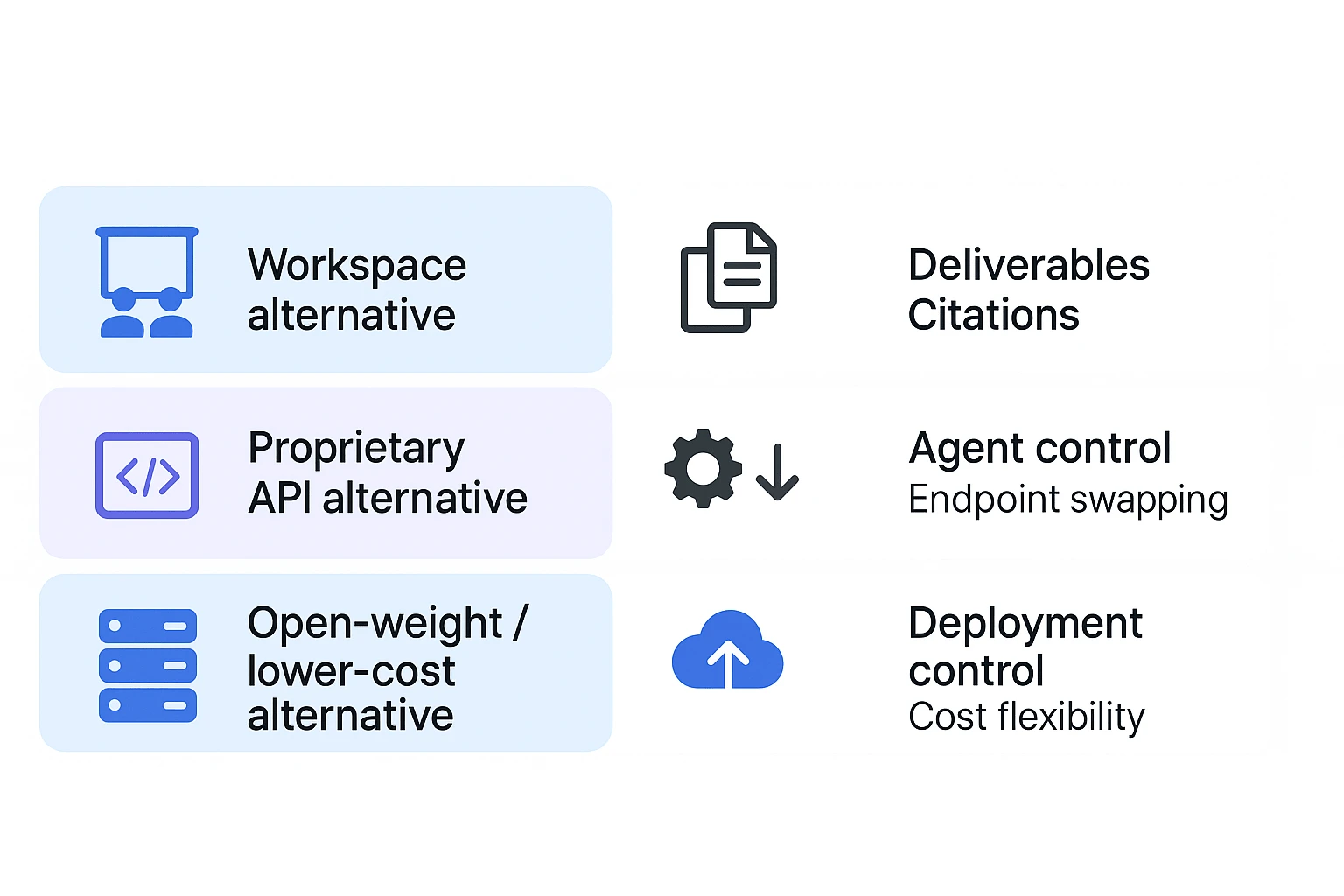
There are four practical categories: direct frontier model replacements, hosted API substitutes, open-weight or lower-cost models, and workspace alternatives. For knowledge work, the last group can be the most complete choice because it combines model access with transcription, storage, citations, project memory, and deliverable generation.
How should alternatives be compared for coding and knowledge work?
The Best Claude Opus 4.7 alternative is not always the model with the highest leaderboard score. Compare each option against the task you need to finish: code changes, research synthesis, meeting notes, cited answers, or a client-ready report.
Use task-level evaluation criteria
Score each tool on these factors:
- Model quality: reasoning, coding reliability, instruction-following, and error recovery.
- Context handling: long-context retrieval versus real understanding, plus document structuring.
- Cost model: token price, prompt caching, agent-loop overhead, and cost per successful task.
- Latency and throughput: fast chat for interactive work, or stable batch processing.
- Tool use: function calling, structured outputs, IDE actions, and agent frameworks.
- Privacy and governance: retention controls, training-use policy, audit logs, and permissions.
- Integrations: IDEs, docs, storage, meetings, and team workspaces.
- Output formats: reports, briefs, tickets, tables, mind maps, or source-linked summaries.
Read benchmarks with care
Benchmark note: separate vendor-reported results from independent results. SWE-bench, GPQA, LMArena, and Terminal-Bench can shift by model version, prompt design, tool harness, sampling temperature, and scoring rules. Treat scores as signals, not final proof.
A practical rule: avoid "best at everything" claims. Instead, run 5 to 10 real tasks from your backlog and measure pass rate, review time, rework, and total cost.
Check the workflow, not just model access
For TicNote-style knowledge work, ask a stricter question: can the system complete the workflow? It should record or ingest audio, transcribe meetings, keep sources attached, answer with citations, and generate deliverables without copy-paste.
Use this checklist for any Opus-class AI workspace:
- Can it combine meetings, PDFs, docs, and research in one project?
- Does it preserve citations back to the original source?
- Can teammates review, edit, and reuse the output?
- Does it create handoff-ready formats, not just chat text?
- Are privacy controls clear enough for client or enterprise work?
Comparison table: Claude Opus 4.7 alternatives at a glance
Use this table to separate a Best Claude Opus 4.7 alternative by outcome, not just model score. The key split is simple: workspace, API, or deployable model.
| Option | Best for | Model type or access path | Free access | Coding strength | Long-context/document strength | Meeting transcription | Cited knowledge answers | One-click deliverables | Self-host/on-prem option | Main limitation |
| TicNote Cloud | Meeting-to-report knowledge work | AI workspace with Shadow AI | ✅ | Medium | Strong | ✅ | ✅ | ✅ | ❌ | Not a raw coding API |
| GPT 5.4/5.5 API | Custom coding agents | Proprietary API | Partial | Strong | Strong | ❌ | Partial | ❌ | ❌ | Requires workflow buildout |
| Gemini 3 Pro | Multimodal research and coding | Proprietary model/API/app | Partial | Strong | Strong | ❌ | Partial | ❌ | ❌ | Ecosystem fit varies |
| GLM-5.1 | Lower-cost agent experiments | API or open-weight access | Partial | Variable | Medium | ❌ | Partial | ❌ | Partial | Tooling and quality vary |
| MiniMax M2.7 | Cost-sensitive long-context tasks | API/model platform | Partial | Medium | Strong | ❌ | Partial | ❌ | ❌ | Less proven for complex coding |
| Mistral Medium 3.5 | EU-aware app and API work | Proprietary model/API access | Partial | Medium | Medium | ❌ | Partial | ❌ | ❌ | Smaller ecosystem |
Reading the table
Workspaces win when the workflow is meeting → transcript → cited answer → report, deck, podcast, or mind map. TicNote Cloud is strongest here because it combines transcription, Project memory, Shadow AI, and one-click output artifacts.
APIs win when you need agent control, custom tools, and product integration. That includes coding copilots, internal assistants, or automated review systems. For more on benchmark trade-offs and the workflow layer, see this Claude versus Gemini workflow comparison.
Open-weight or self-host paths win on deployment control, but the bill moves to infrastructure, security, evaluation, and maintenance. The best Claude Opus 4.7 alternative depends on whether you prioritize finished output artifacts or flexible agent engineering.
AI workspace workflow advantages for Opus-class knowledge work
The Best Claude Opus 4.7 alternative isn't always another model endpoint. For meeting-heavy teams, the bigger gain often comes from an AI workspace that keeps source material, reasoning, and deliverables in one loop. TicNote Cloud shows how Opus-class knowledge work can move from raw inputs to cited outputs without constant copy-paste.
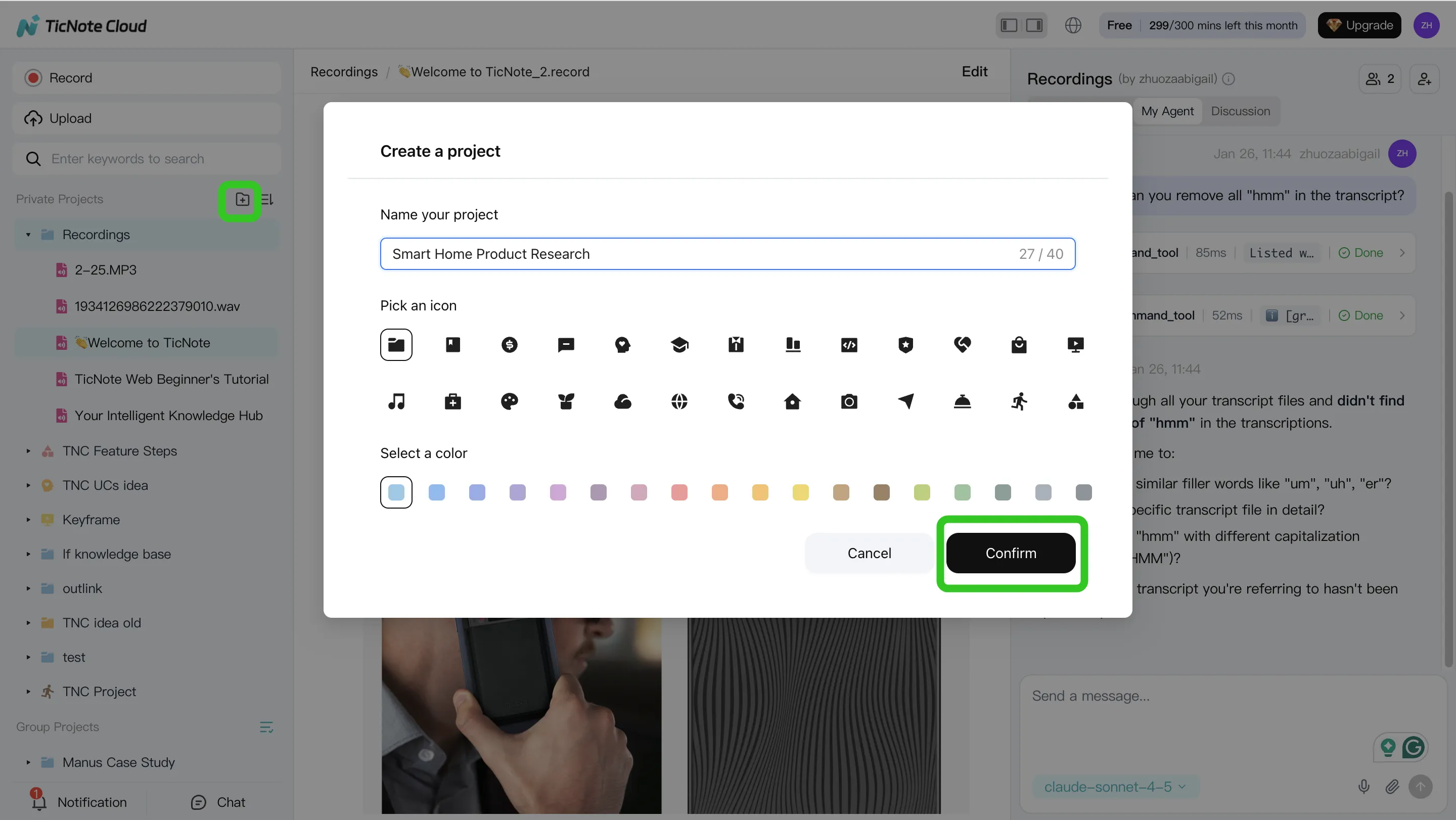
1. Create a Project and add content
Start by creating a Project for a client, sprint, research topic, or internal initiative. In TicNote Cloud web studio, add meeting audio, video, or documents directly to the Project. You can also attach files in the Shadow AI panel and ask Shadow to save them to the right folder, so the knowledge base stays organized from day one.
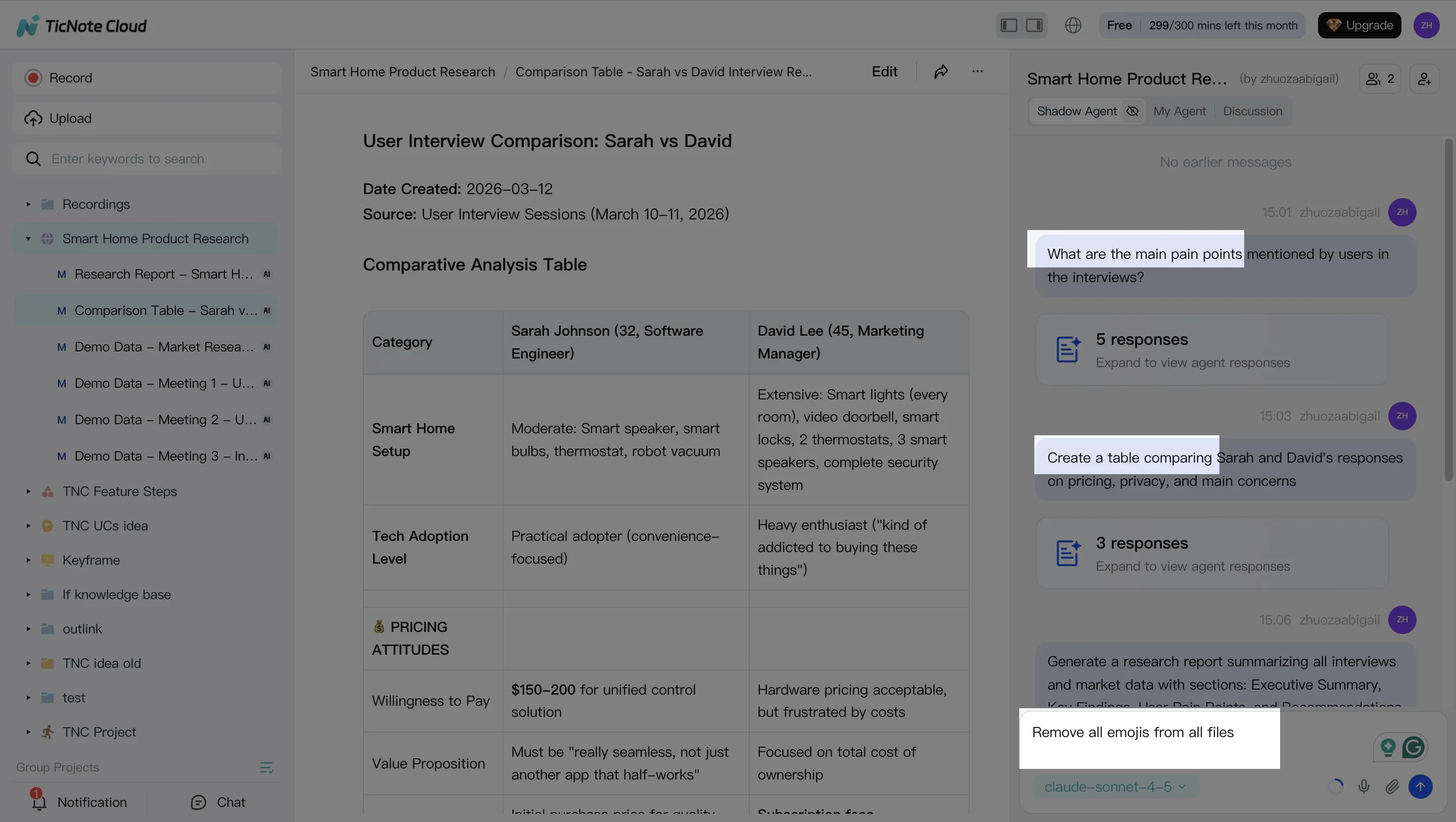
2. Use Shadow AI to search, analyze, edit, and organize
Shadow AI sits on the right side of the workspace and works inside the Project context. Ask practical questions like "What risks came up across these calls?" or "Which action items are still unassigned?" Shadow searches across files and returns traceable answers with sources. You can also clean transcripts, rewrite sections, build comparison tables, and group notes by themes, stakeholders, or requirements.
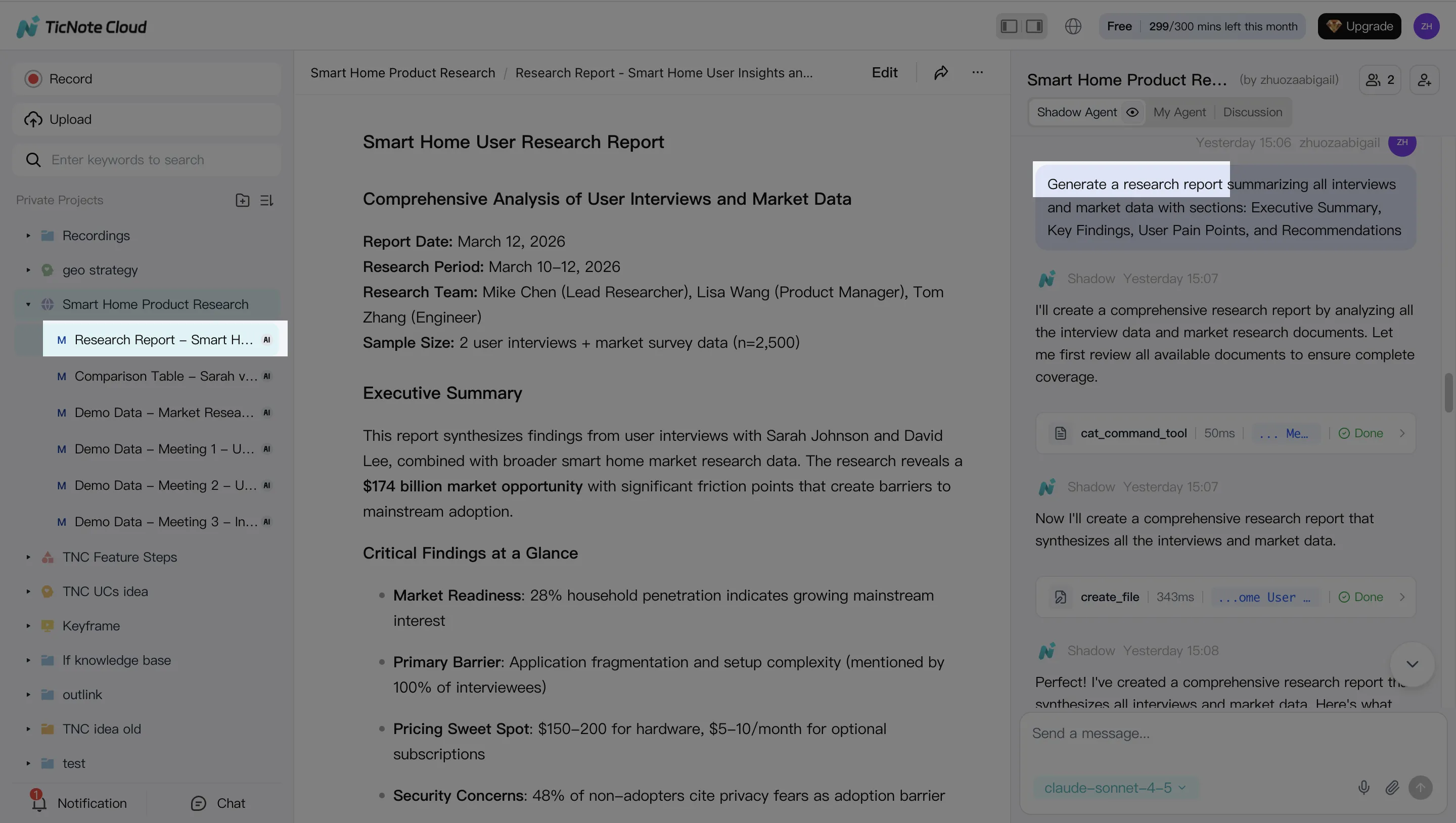
3. Generate deliverables from the same source set
Once the Project has enough context, ask Shadow AI to create a structured report, stakeholder presentation, podcast, mind map, or HTML page. For example, "Generate a strategic analysis report based on all interviews" turns scattered discussions into a polished working asset.
4. Review, refine, and collaborate
After generation, review the output and ask Shadow to improve specific sections. Click paragraphs to verify the original source before sharing. Teams can use Owner, Editor, and Viewer permissions, comment on work, and keep Shadow AI operations within access boundaries.
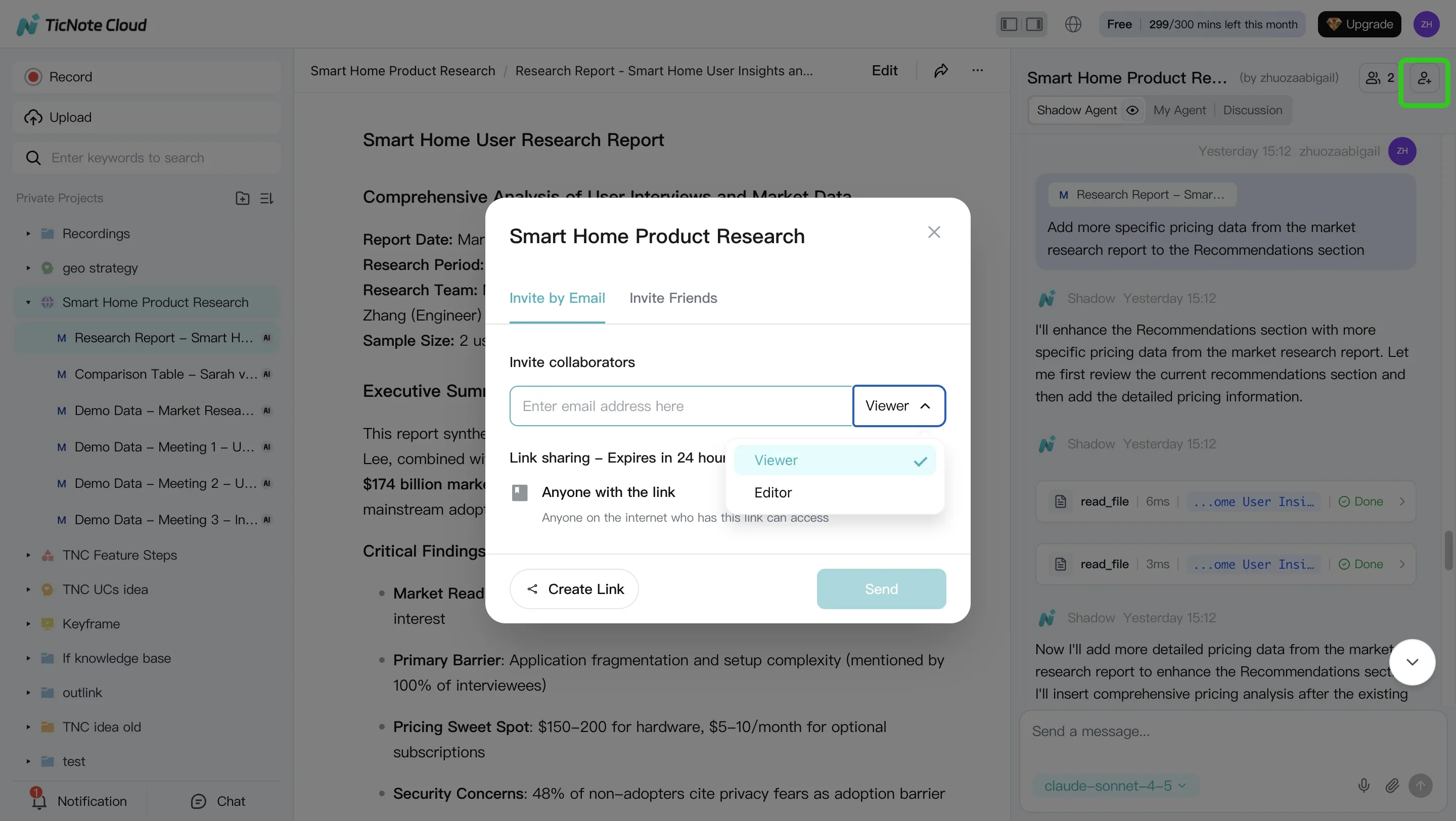
The mobile app follows the same pattern: open a Project, add recordings or uploads, run Shadow AI prompts for summaries and Q&A, then share the result back to the team.
How to choose the right product
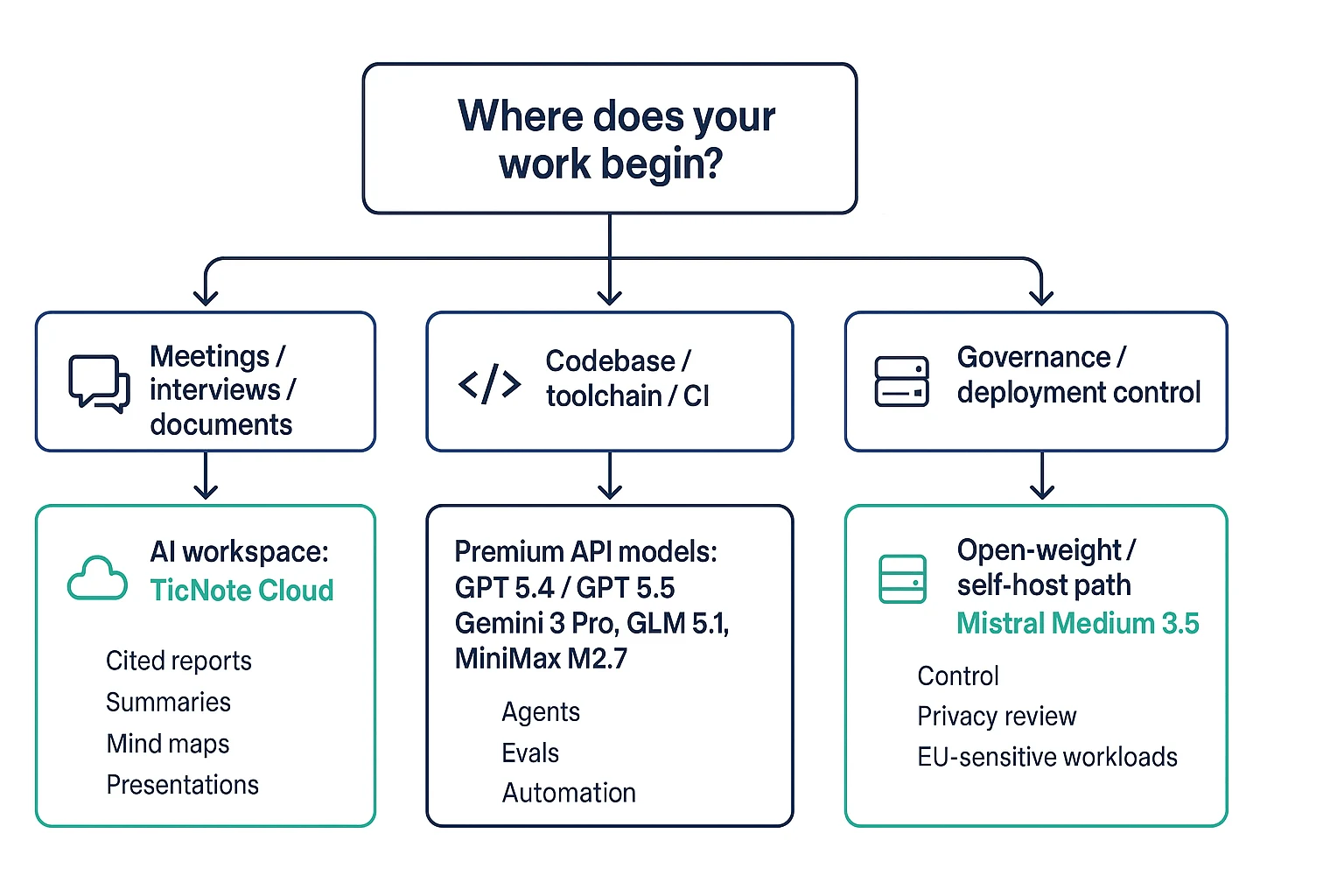
The Best Claude Opus 4.7 alternative depends less on leaderboard rank and more on where work starts. Use a simple split: meetings and documents need a workspace; codebases and agents need an API; regulated infrastructure may need self-hosting.
Match the tool to the starting point
- Choose TicNote Cloud when your work begins in meetings, interviews, calls, or shared documents. It is the best default for knowledge teams that need AI meeting transcription and reports with cited answers. Shadow AI searches across Project files, keeps context together, and turns raw discussion into reports, presentations, podcasts, and mind maps. You're buying time-to-deliverable, not just a smarter chat box.
- Choose GPT 5.4 or GPT 5.5 API when your team needs premium coding-agent control. Pick it for agent toolchains, CI-integrated evals, repository automation, and custom developer workflows. Budget first; API-heavy coding can scale costs quickly, so review model cost math before rolling it out broadly.
- Choose Gemini 3 Pro when very long context or multimodal inputs matter more than workspace deliverables. It fits large mixed-media sessions where text, images, video, and documents must be reasoned over together.
- Choose GLM-5.1 when you want a lower-cost coding model for agent workflows and can validate benchmark claims against your own tasks.
- Choose MiniMax M2.7 when token cost is the main constraint for routine edits, refactors, and volume coding work.
- Choose Mistral Medium 3.5 when open weights, deployment control, or EU-sensitive governance matter more than convenience.
Final thoughts: use the right Claude Opus 4.7 alternative for the job
The Best Claude Opus 4.7 alternative is not one winner for every team. Pick by the bottleneck:
- Raw model power: choose a frontier model/API.
- Budget agent throughput: choose lower-cost models.
- Deployment control: choose open-weight or private options.
- Knowledge outputs: choose an AI workspace.
For meetings, research, and documents, the workflow layer often matters more than the model label. If your team needs decisions, updates, reports, mind maps, and cited answers from shared context, TicNote Cloud gives you that end-to-end path with Shadow AI and project-level memory. That is why a practical alternative can be a workspace, not only another API endpoint.


