

 Extension
![[Free Credits] Claude Opus 4.7 Free in 2026: Legit Access Options, Credit Math, and a Practical Workflow](https://cdn-digitalhuman-pb.weta365.com/voice-recorder-prd/static/backend/2026/05/09/2053000031244955649.webp)
TL;DR: Claude Opus 4.7 free access is limited, but your AI workflow does not have to be
Get 30 credits to use Claude Opus 4.7 Premium for free every month to test quality beyond a quick demo. In 2026, Claude Opus 4.7 free usually means capped UI usage, trial credits, or expiring cloud credits, not unlimited work. Use the 30 monthly requests for hard reasoning, while your free workspace handles transcripts, searchable Projects, summaries, mind maps, and reports.
Scattered notes slow follow-up. When trials end, decisions and drafts can sit across tools with no source trail. A free meeting-centered AI workspace keeps work moving: capture content, ask cited questions, and turn knowledge into deliverables without extra subscription.
What Claude Opus 4.7 free means in 2026
Claude Opus 4.7 free usually means limited access for testing, not an open-ended production plan. Treat it as a way to evaluate reasoning quality, prompt style, and fit before you build a paid workflow around it.
No unlimited free access
Free does not mean unlimited. It also does not mean guaranteed uptime, a service-level agreement (SLA), unlimited context uploads, or a stable budget for large files. If you plan to process long recordings, research archives, or client document sets, free model access can run out fast.
UI limits vs API credits vs cloud credits
Most legitimate zero-cost routes fall into 3 buckets:
- Rate-limited chat UI: access through a web app with daily or monthly message caps.
- New-account trial credits: one-time credits for API use, often with expiry dates and payment verification.
- Program or platform credits: credits through cloud, startup, student, or enterprise programs. Eligibility varies by provider.
Why caps, expiry dates, and verification matter
These limits change quickly because providers control cost, abuse, and capacity. So the safest expectation is simple: use free Opus access for evaluation and small experiments.
For repeatable work, pair model tests with a stable workflow layer. TicNote Cloud can handle meeting recording, editable transcripts, Projects, cited Q&A, summaries, mind maps, and reports, while Opus availability stays subject to each provider's terms.
Legitimate zero-cost routes to the hot Claude Opus 4.7 model
Trying Claude Opus 4.7 free in 2026 usually means one of five routes: a capped chat UI, new-account API credits, cloud marketplace credits, short platform trials, or a third-party workspace that exposes the model. The key is simple: $0 upfront rarely means unlimited usage.
Claude.ai free or capped chat access
The easiest path is the official chat app. Expect an account, possible email or phone verification, and usage caps. In practice, capped access feels like this: you run a few prompts, test a small document, then wait for the limit to reset. It's enough for quick writing checks, summaries, and prompt quality tests.
Anthropic Console signup credits
API credits are better for developers. Look in the Anthropic Console billing or usage area after signup. New accounts may need verification before credits activate. Watch three limits: rate limits, expiration dates, and model availability. Before deeper testing, compare outputs against a known baseline; this fast Opus validation checklist can help.
Google Cloud Vertex AI credits
Vertex AI access depends on cloud trial credit, billing setup, region, and account permissions. A payment method is often used for verification. Credits are shared across services, so a database test or storage job can reduce your model budget.
AWS Bedrock and Azure AI Foundry credits
These routes can work, but trial windows are often short. You may also need to enable the service, request model access, and assign IAM or workspace permissions before the first prompt runs.
Third-party AI workspaces
Check three things before trusting any "free Opus" claim:
- The official provider and model name are visible.
- Billing or credits are clearly explained.
- "Opus 4.7" is selectable before you start work.
For most professionals, the practical free start is to use TicNote Cloud's 30 monthly Opus Premium requests for meeting notes and deliverables, then use cloud or API trials only for benchmark tests.
Quick comparison: free model trials vs TicNote Cloud Free
If you're searching for Claude Opus 4.7 free access, separate model testing from daily work. Free model routes are usually capped, temporary, or developer-focused. Setup friction means the extra work needed to create accounts, verify billing, manage API keys, and set permissions.
Free access options at a glance
| Option | Access type | Free allowance | Expiry | Setup friction | Best for | Hard limits | Official source |
| Claude UI capped access | Chat interface | Limited messages, if offered | Usage resets or plan changes | Low | Quick prompt checks | No stable volume guarantee | Anthropic Claude app |
| Anthropic API signup credits | Direct API | Promotional credits, when available | Credit window or balance end | Medium | Developers benchmarking prompts | Requires keys and rate limits | Anthropic Console |
| Vertex AI Claude credits | Cloud API | Google Cloud credits may apply | Credit terms | High | Teams already on Google Cloud | Billing, IAM, regional rules | Google Cloud Vertex AI |
| AWS Bedrock credits | Cloud API | AWS credits may apply | Credit terms | High | AWS-native app testing | Model access requests and quotas | AWS Bedrock |
| Azure AI Foundry credits | Cloud AI platform | Azure credits may apply | Credit terms | High | Enterprise Azure pilots | Tenant, billing, and model availability | Microsoft Azure AI Foundry |
| TicNote Cloud Free + Claude Opus 4.7 Premium | Single workspace | 30 requests/month plus 300 transcription minutes/month | Monthly allowance | Low | Meeting-heavy workflows and deliverables | Not a raw Opus API provider | TicNote Cloud pricing |
Allowances and availability change—use official sources in the rightmost column. For most consultants, product managers, and researchers, TicNote Cloud is the simplest free workflow because it combines transcripts, Project files, cited Q&A, summaries, mind maps, and reports in one place. For developers testing latency, tokens, or app integrations, cloud credits are the better path.
How far do free credits go before costs start?
Claude Opus 4.7 free access usually runs out when your prompts stop being small. Token math is the reason. A token is a small chunk of text, and providers typically bill input tokens and output tokens separately. Always check the official pricing and token accounting docs before estimating, because the exact Opus 4.7 rate may change.
Use simple token math first
Back-of-the-envelope formula:
Estimated cost = input tokens × input rate + output tokens × output rate
Outputs often drive spend because polished answers, reports, and rewrites can be long. A 500-token question may trigger a 2,000-token answer.
| Task | Likely input | Likely output | Credit risk |
| Short Q&A | 300–800 tokens | 300–1,000 tokens | Low |
| One-page rewrite | 1,000–2,000 tokens | 800–1,500 tokens | Medium |
| Transcript summary + action items | 12,000–40,000 tokens | 1,500–4,000 tokens | High |
Long files burn credits fast
Meeting transcripts, PDFs, and repeated follow-up turns add context every time. A one-hour meeting can become tens of thousands of tokens before the model writes a single bullet. Add three attachments and five follow-ups, and free credits disappear quickly.
Use this rule: draft prompts on cheaper models, keep instructions short, summarize long files first, then use Opus only for final reasoning, risk checks, or executive-quality output.
If your main job is ongoing meetings and deliverables, a meeting workspace is usually better value than raw model testing. TicNote Cloud gives a stable free workspace, transcripts, Projects, cited Q&A, summaries, and 30 Opus Premium requests per month for high-stakes runs.
A step-by-step free workflow for meeting notes, docs, and deliverables
If you're chasing Claude Opus 4.7 free access, spend it where premium reasoning matters most. The repeatable part is simpler: use TicNote Cloud to keep meetings, docs, and outputs in one Project, so context doesn't disappear between tools.
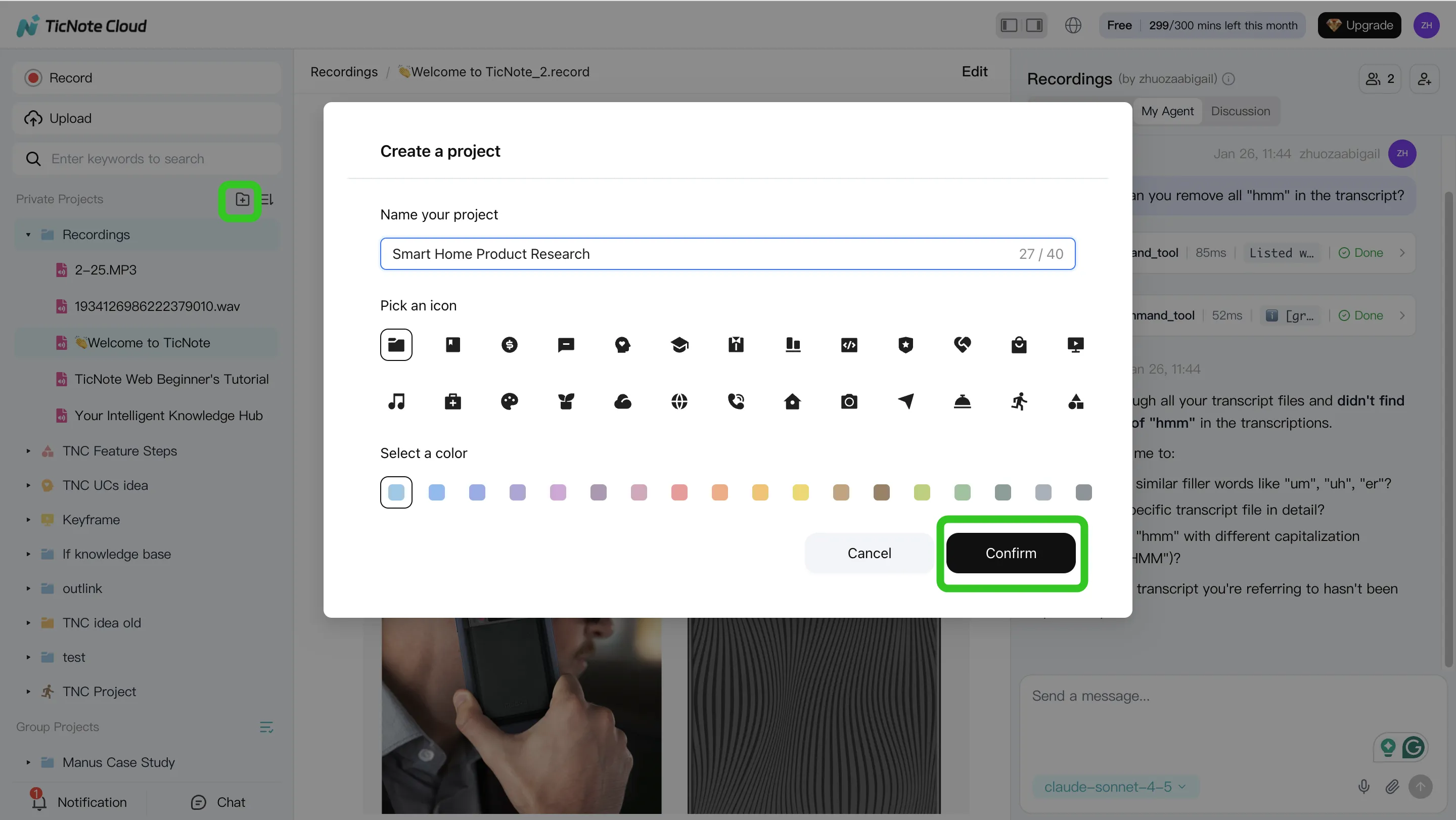
- Create or open a Project. Use one Project per client, topic, or sprint. Upload audio, video, and documents from the folder area, or attach files in the Shadow AI panel and ask it to save them to the right folder.
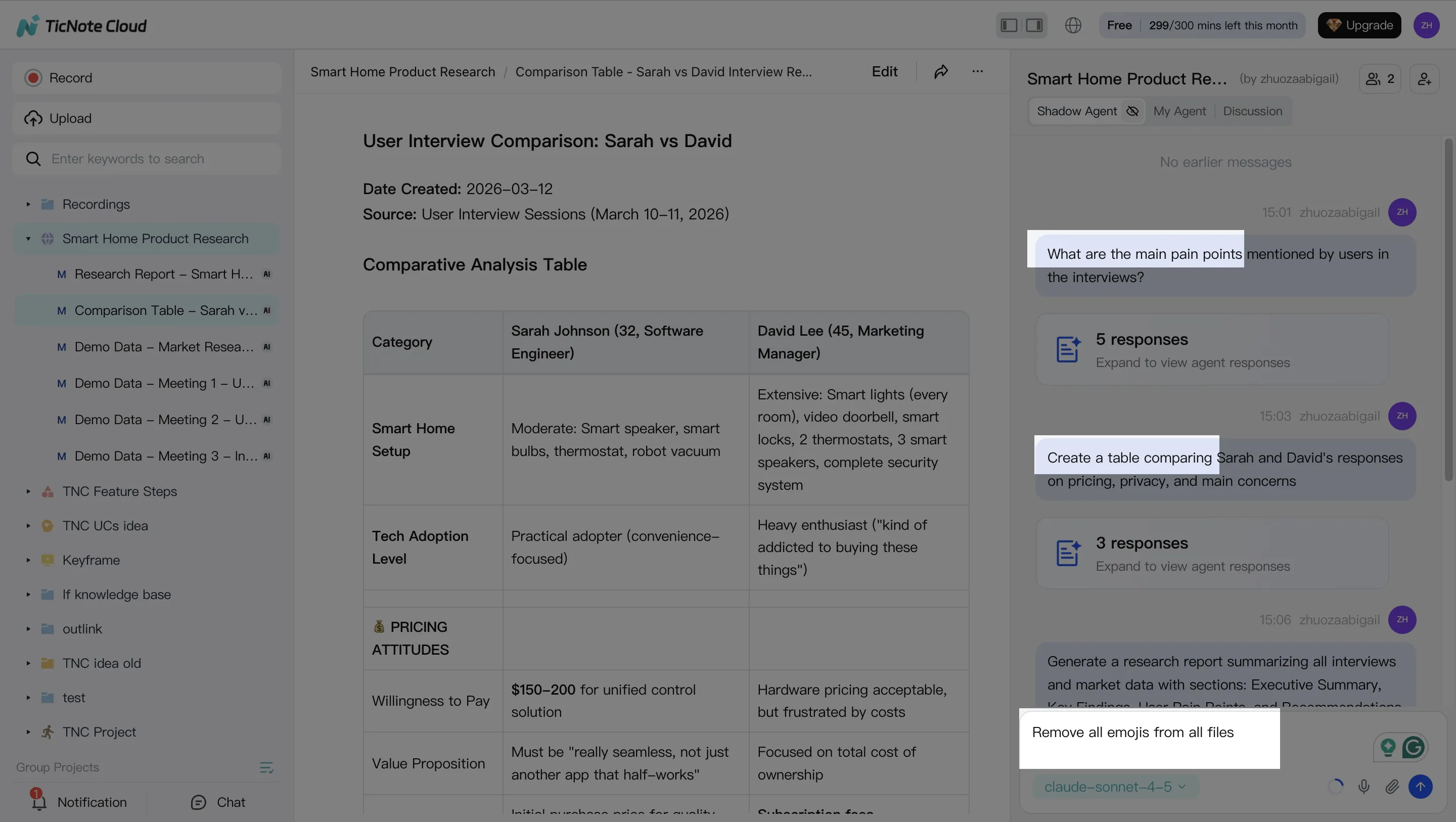
- Search, analyze, edit, and organize with Shadow AI. It stays on the right side of the studio. Ask "What decisions were made?" or "Compare the 3 interviews." Shadow AI searches Project files, gives cited answers, and can turn rough transcripts into clean notes, tables, or action lists.
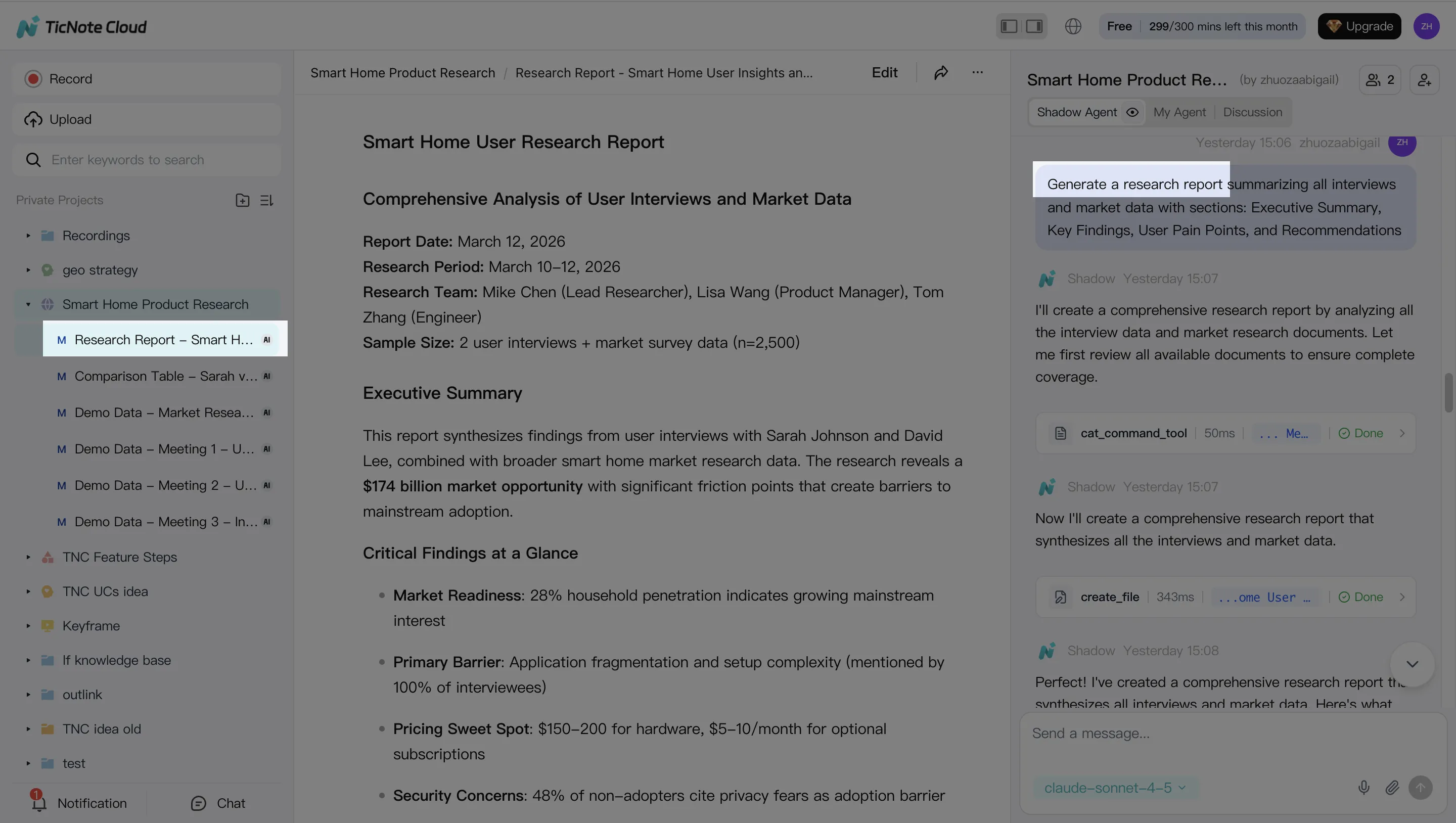
- Generate a deliverable. Ask Shadow AI, or click Generate, to create summaries, decision logs, research reports, HTML presentations, podcasts, mind maps, or HTML pages. Reserve Opus Premium runs for final synthesis and client-ready drafts.
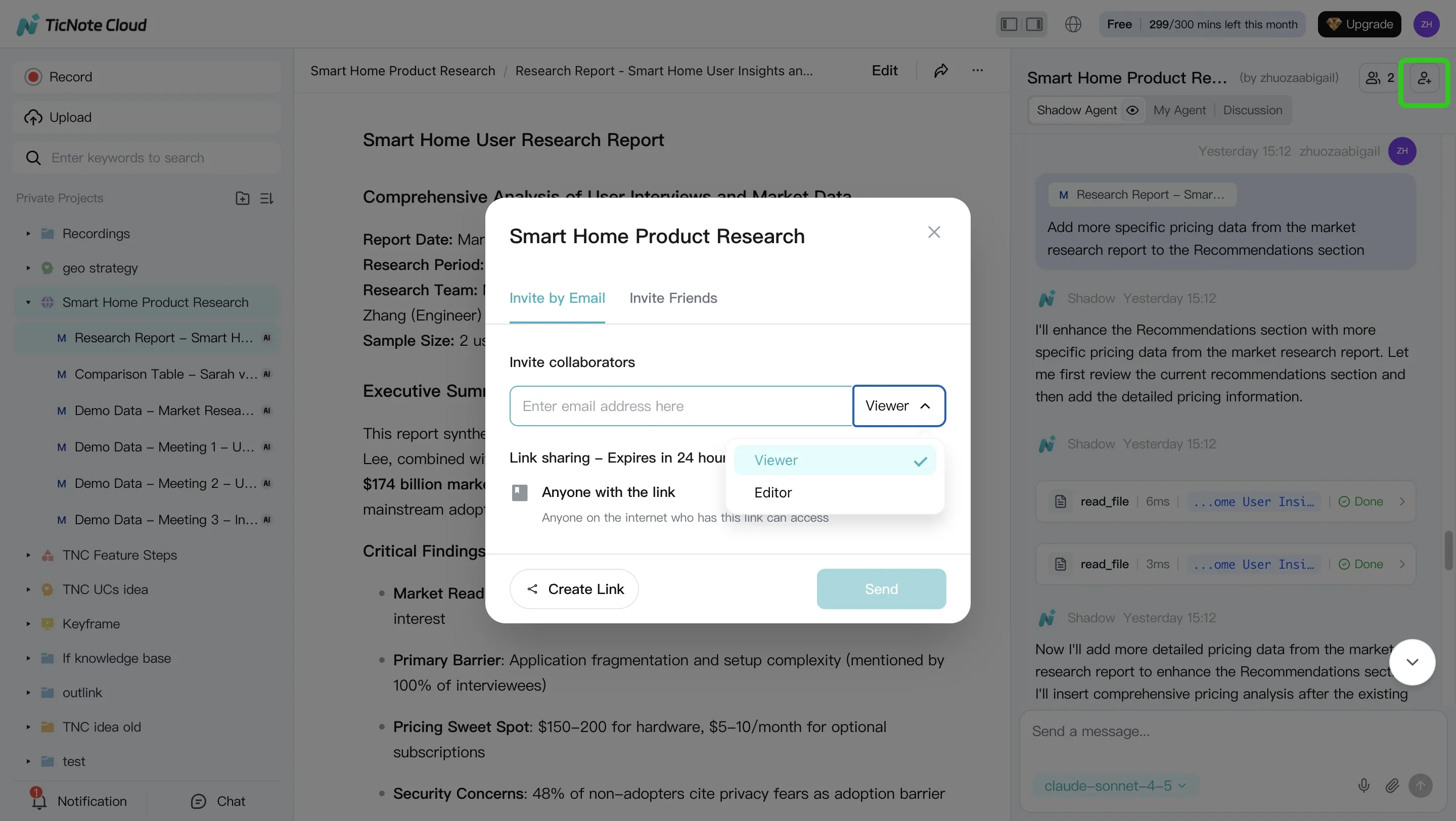
- Review and collaborate. Edit transcripts, refine weak sections, and click paragraphs to verify sources. Share the Project with Owner, Editor, or Viewer permissions so teammates can comment, ask questions, and rerun sections within permission boundaries.
How can teams pair Claude Opus 4.7 trials with TicNote Cloud?
For most teams, the best Claude Opus 4.7 free strategy is simple: start in TicNote Cloud, keep meetings and files in one Project, then spend scarce Opus trial credits only on hard analysis or API tests. That protects context, cuts rework, and gives stakeholders source-backed outputs instead of pasted chat fragments.
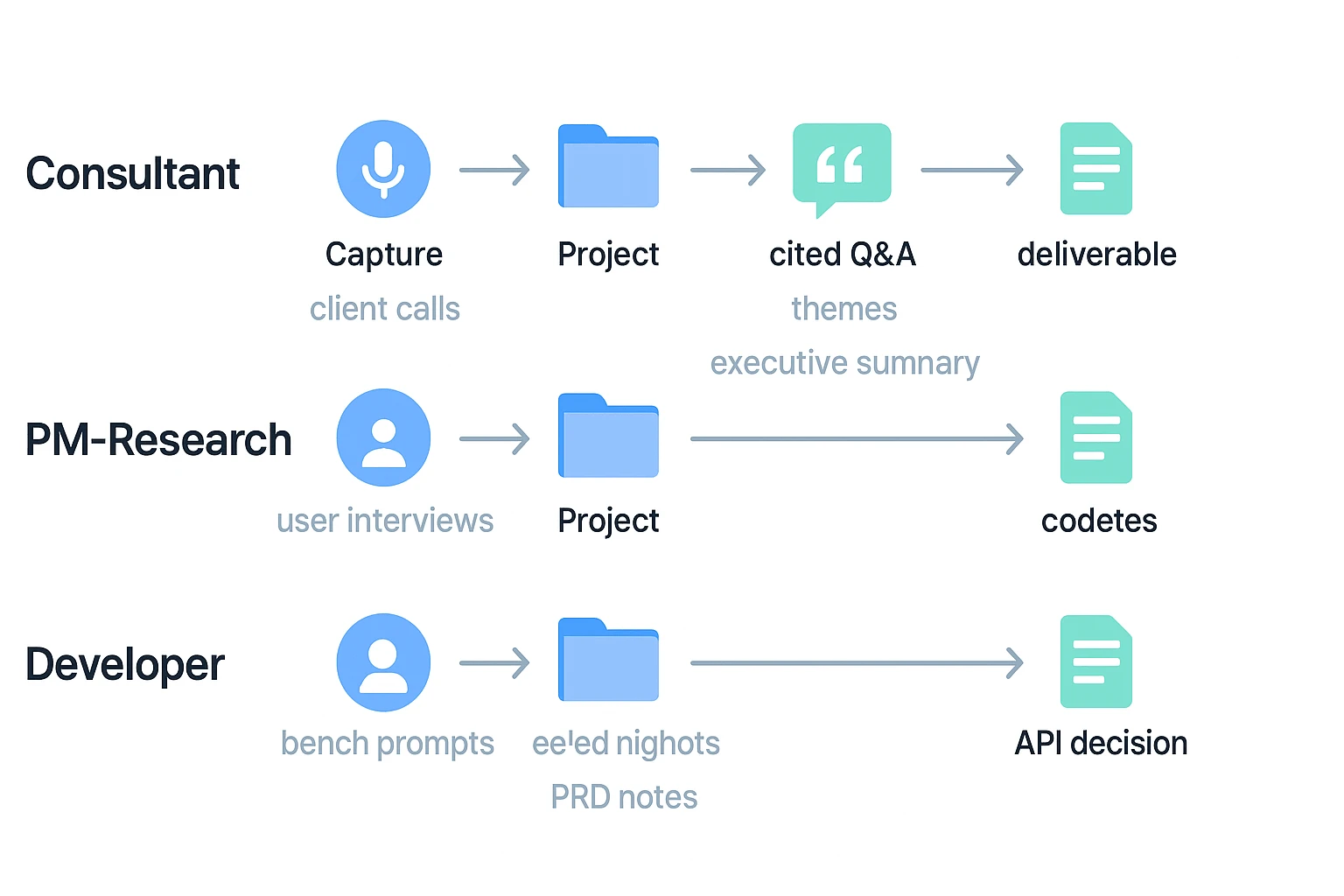
Workflow for consultants
Client calls → transcript → key themes → draft deliverable → final QA
Use TicNote Cloud to capture calls, edit transcripts, group files in a client Project, and ask Shadow AI for cited themes. Spend Opus credits only on final narrative polish, risk and assumption checks, or a sharper executive summary.
Workflow for product managers and user researchers
User interviews → coded insights → opportunity map → PRD notes
Let TicNote Cloud Projects accumulate learning across 5, 10, or 20 interviews. Use Shadow AI for cited Q&A and reports. Use Opus for "hard thinking" prompts: trade-offs, prioritization, edge cases, and second-order product risks.
Workflow for developers evaluating Opus with real meeting context
Bench prompts + real transcripts → eval notes → integration decision
Use Vertex or Anthropic credits for API benchmarking, latency checks, and prompt tests. Keep human context in TicNote Cloud, then generate readable reports for non-technical stakeholders. If you're comparing coding agents too, this agentic coding model routing guide helps frame cost-per-success decisions.
Simple flow:
- Consultant: capture → Project → cited Q&A → deliverable
- PM-Research: capture → Project → cited insights → roadmap notes
- Developer: capture → Project → eval report → API decision
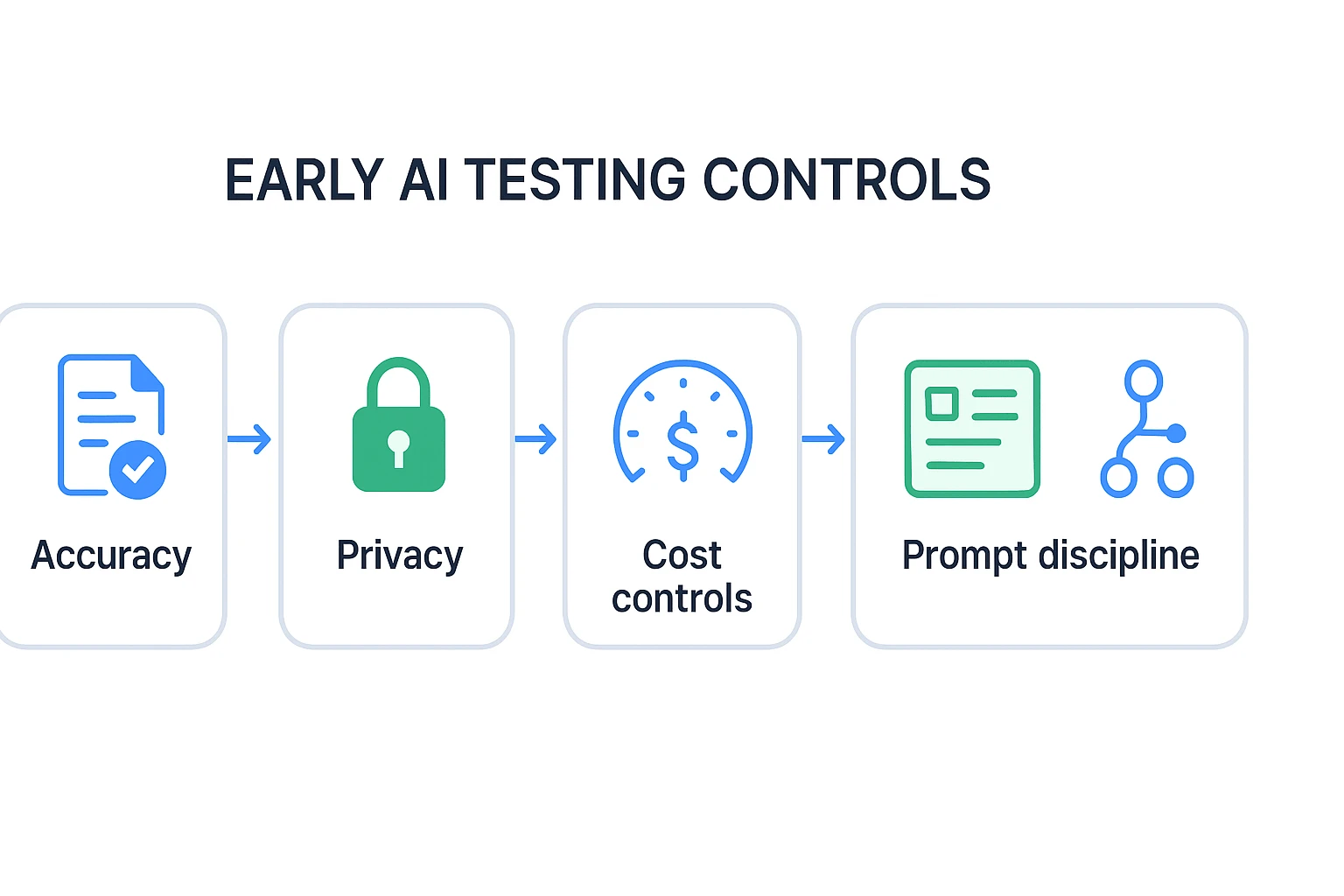
Accuracy, privacy, and cost controls for early AI tests
Testing Claude Opus 4.7 free access is useful, but early AI tests need guardrails. Set the rules before you upload files, run long prompts, or invite teammates into a trial workspace.
Use official source links
Check model limits, pricing, and credit terms on official pages only. For accuracy, compare AI outputs against primary sources, not summaries of summaries.
Set cloud spend alerts and quotas
Before any API test, create a budget, alert, and hard quota. Watch for three cost traps: accidental loops, large context uploads, and repeated long-output requests.
Avoid sensitive data in trial tools unless approved
Assume free trials may log inputs. Don't paste customer records, legal files, source code, or internal strategy unless your organization has approved that tool. Use Project-based workflows with roles and permissions when teams need shared access.
Use citations in TicNote Cloud Projects
For meeting knowledge reuse, require timestamps, quotes, or citations where the tool supports them. TicNote Cloud Projects keep sources attached, so teams can verify answers and reduce the "trust tax" of re-checking every summary.
Keep prompts short
Ask for one task at a time. Chunk long files, define the output format, and request long drafts only when needed.
Route models by value
Use cheaper models for outlines and drafts. Reserve Opus 4.7 for final reasoning, edge cases, or executive-ready rewrites.
Final thoughts: use free model access for tests and TicNote Cloud for repeatable work
Claude Opus 4.7 free access is useful, but it's not a full operating system for daily AI work. Treat it as a test lane: compare answer quality, validate one-off tasks, and learn where the model helps most before you spend.
For repeatable work, use TicNote Cloud as the stable layer around the model:
- 30 Claude Opus 4.7 Premium requests per month
- 300 transcription minutes/month on Free
- Projects for transcripts, documents, cited Q&A, summaries, mind maps, and reports
That mix keeps experiments cheap and turns useful outputs into searchable team knowledge.