Extension
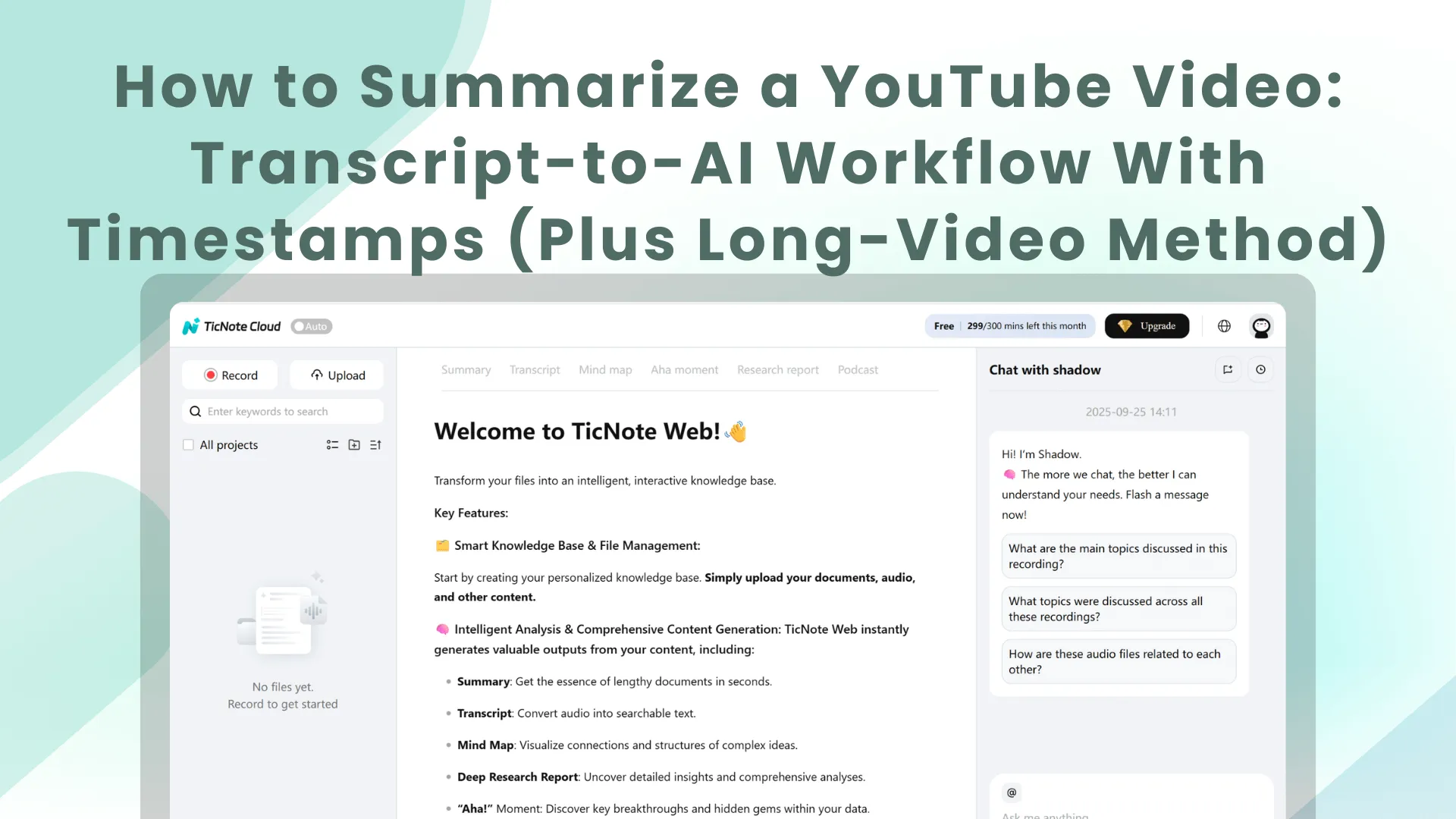
TL;DR: A reliable YouTube video summarizer workflow (transcript + AI + timestamps)
Try TicNote Cloud when you want to know how to summarize a youtube video fast, and still trust the result. Use this simple workflow: (1) get the transcript, (2) tell AI your goal, (3) require timestamps and a scan-friendly format.
Problem: Most "instant summaries" skip nuance and key proof. That wastes time and can lead to wrong takeaways. Solution: Save the transcript and summary in TicNote Cloud so you can keep sources, add timestamps, and come back later with search and Q&A.
Inputs you need:
- Video URL
- Clean transcript (timestamps help)
- Goal (study notes, recap, research, or an outline)
Fast 3-step method:
- Copy the transcript into your AI tool.
- Run one prompt: "TL;DR + 10 bullets + actions + 5 quotes with timestamps."
- Skim, then spot-check the quotes by jumping to timestamps.
Good output should include: one-paragraph TL;DR, 10 key bullets, a short action list, and 5 key quotes with timestamps you can click back to.
How to summarize a YouTube video without missing the point
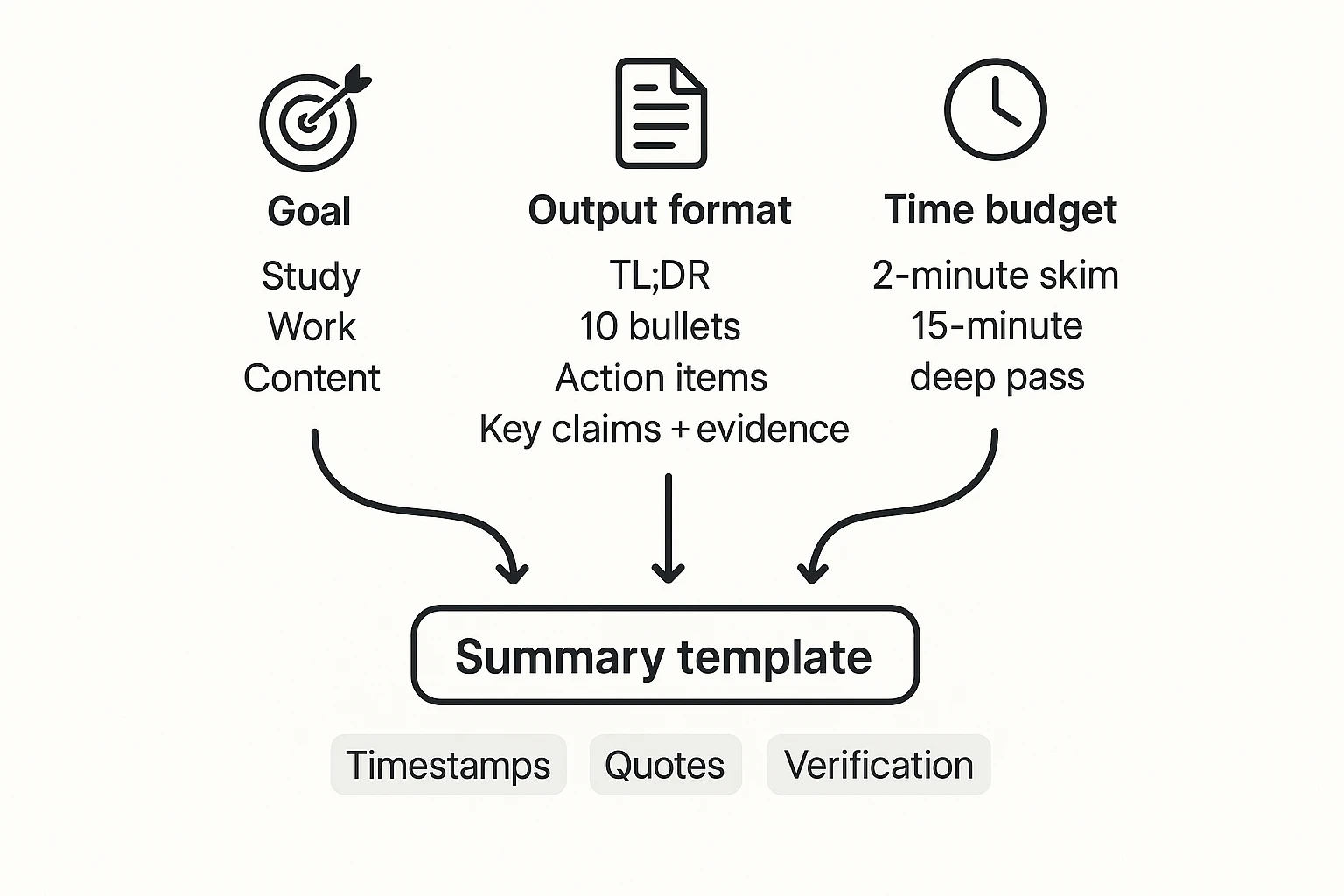
If you want to know how to summarize a YouTube video well, start by choosing your purpose. Are you trying to learn (study), decide (work), or repurpose (content)? That one choice tells you what "matters" in the video.
1) Pick your purpose, then define the "unit of value"
A summary fails when it collects facts but misses the payoff. Decide what the video is really for, then capture the unit of value:
- Study: concepts, definitions, examples, and "why it works"
- Work: decisions, constraints, risks, and next steps
- Content: hooks, structure, quotable lines, and proof points
Use a quick must-capture list so you don't skip the important parts:
- Key definitions (in plain language)
- Numbers (prices, dates, benchmarks, steps)
- Named tools and settings
- Clear recommendations (what to do, and for whom)
- Objections and limits (when the advice fails)
2) Decide your output format before you prompt AI
Don't ask for "a summary." Ask for deliverables. Common formats that hold the point:
- TL;DR paragraph (example: 120 words)
- 10 bullet takeaways (each with a timestamp)
- Action items (owner, deadline, next step)
- Glossary (terms + simple definitions)
- Key claims + evidence (claim, proof, timestamp)
If you need a reusable structure, start with a simple 5-step summarizing method and templates and keep the same outputs for every video.
3) Match the workflow to your time budget
2-minute skim (fast and good): grab the transcript, paste it into AI, and request timestamped bullets plus a 1-paragraph TL;DR.
15-minute deep pass (best for accuracy): clean the transcript, chunk if it's long, generate a draft summary, then verify the 3 to 5 biggest claims and add a few direct quotes with timestamps.
Checklist: goal → format → time → transcript quality → prompts → verify with timestamps.
How do you get a clean transcript from a YouTube video? (Plus YouTube transcript with timestamps)
A good summary starts with a clean transcript. If you skip this step, AI will often miss context, mix topics, or invent details. Here's a simple way to pull a transcript from YouTube, clean it up fast, and keep timestamps so your notes stay traceable.
Pull the transcript from YouTube (fast)
At a high level, your goal is to open the transcript panel, pick the right language, and copy the text into your notes tool.
- Open the video on YouTube.
- Open the transcript panel (usually under the description menu).
- Select the right caption language, if YouTube offers options.
- Copy the transcript text into a doc for cleanup.
Only videos with subtitles can show a transcript. As YouTube Help — Get a video transcript (2025) puts it, "If a video has subtitles, you can view the transcript. The transcript shows the full text of what is said in the video."
Clean up common transcript problems
You don't need perfect editing. You need "AI-ready" text that's easy to scan.
- Remove repeated filler and stutters (for example: "um", "you know", repeated phrases).
- Fix broken line breaks so sentences read normally.
- Standardize speaker labels, like
Speaker 1:andSpeaker 2:. - Keep paragraph breaks at topic shifts (new idea, new example, new section).
- Preserve on-screen headings and key terms (product names, frameworks, acronyms).
Keep timestamps so your summary is checkable
Timestamps are what make a YouTube summary trustworthy. They let you jump back, verify claims, and quote accurately.
Use one of these methods:
- Keep chapter headings if the video has them, and treat each chapter as a section.
- If there are no chapters, add a timestamp anchor every 1 to 2 minutes.
Simple format that works everywhere:
[12:34] Key point stated here.[18:05] Example or proof.[27:40] Action step or takeaway.
Accessibility and language tips (captions and translation)
If the transcript is missing, the creator may not provide captions, or auto-captions may be unavailable. In that case, you'll need a transcription tool.
If the language is wrong, switch the transcript language before you copy. And if you need translation, remember the tradeoff: translated transcripts are faster to read, but meaning can shift. When accuracy matters, keep original-language quotes for any key claims.
A "clean transcript" means readable blocks, consistent timestamps, minimal noise, and preserved proper nouns.
What prompt should you use to summarize a YouTube transcript summary with AI? (ChatGPT YouTube summary prompt templates)
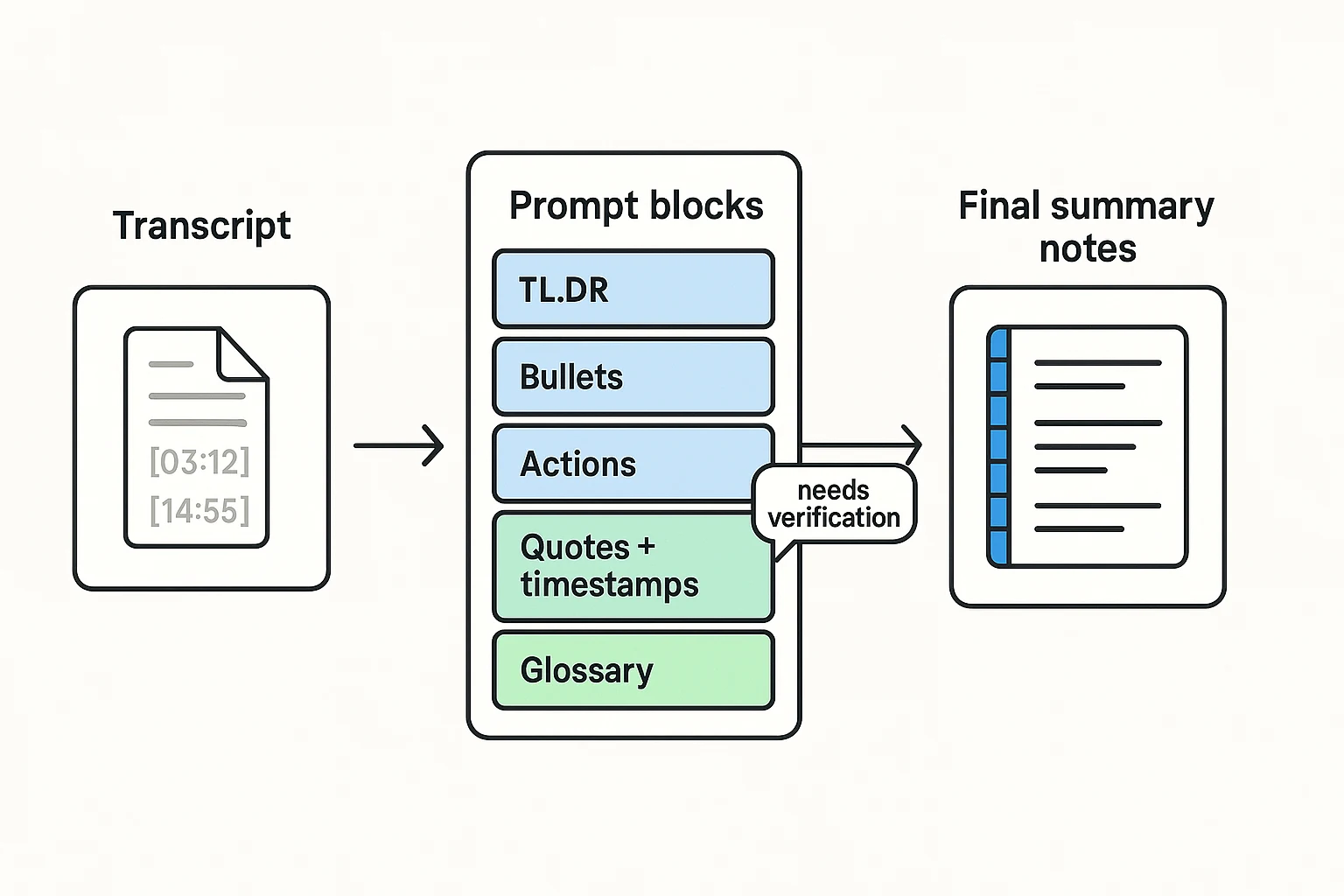
A good prompt is half the work. If you want to know how to summarize a YouTube video well, tell the model who it is, who you are, what format you need, and what it must not do. The key is "traceability": every point should link back to a timestamp, plus a few direct quotes.
Copy paste master prompt (tool agnostic)
Paste this into any AI tool. Replace the bracketed parts.
- Role and audience
- You are an expert note taker and researcher.
- Your audience is a busy learner who needs fast, accurate takeaways.
- Inputs
- Video title: [TITLE]
- Video URL (optional): [URL]
- Transcript (with timestamps if available): [PASTE TRANSCRIPT]
- Rules and constraints
- Use simple words. Short sentences.
- Don't invent facts. Don't add sources.
- If the transcript seems incomplete, say what's missing and ask up to 5 clarifying questions before you summarize.
- If you are unsure about a claim, label it: "needs verification".
- Output format (use these blocks, in this order) A) TL;DR (2 to 3 sentences) B) Key points (10 bullets)
- Include a timestamp like [mm:ss] at the start of each bullet.
- Each bullet should be one idea. C) Action items (5 to 10 bullets)
- Verb first. Only include actions stated or strongly implied.
- Add [mm:ss] for each action. D) Key quotes (3 to 5)
- Provide direct quotes from the transcript.
- Each quote must include a timestamp like [mm:ss].
- If unsure, mark the quote "needs verification". E) Glossary
- Define 5 to 10 key terms in one sentence each. F) Quick Q and A (5 pairs)
- Questions like: What is X? Why does it matter? What should I do next?
- Keep each answer under 40 words.
Why quotes plus timestamps cut hallucinations
Quotes force the model to point at exact words, not vibes. Timestamps make it easy to jump back to the original moment and check context fast. This is the same idea behind grounded AI outputs. If you want a quick primer on how summarizers work and how to trust them, read this guide on how AI summarizers work and how to verify outputs.
Add on: meeting style summary (if the video has decisions)
Append this if you're summarizing a team talk, webinar, or panel:
- Add a "Decisions" block with [mm:ss] and the exact decision.
- Add a "Risks" block with [mm:ss] and why it's a risk.
- Add an "Owners and deadlines" block only if named in the transcript.
- If owners are missing, write "owner not stated".
Mini prompt variants (when you need a different output)
- Ultra short TL;DR: "Summarize in 280 characters. Include one timestamp [mm:ss]. No hashtags."
- Study mode: "Turn the summary into 12 flashcards. Format as Q on one line, A on the next. Add [mm:ss] per card."
- Creator mode: "Create a content outline with 5 section headings, 8 hooks, and 5 pull quotes. Add [mm:ss] for each hook and quote."
Worked example: URL → transcript → prompts → final summary (with expected formats)
Here's a realistic, copy safe example you can reuse to learn how to summarize a YouTube video end to end. The goal is simple: keep the main idea, keep proof with timestamps, and produce notes you can act on.
Example input: what you paste (and what you don't)
Scenario: a 60 minute interview style lecture with chapters. You want a clean summary, action list, and key quotes you can cite later.
Paste these three parts into your AI tool:
- Video title + URL
- Title: "Deep Work Systems: How to Focus in a Distracted World (Full Interview)"
- URL: https://www.youtube.com/watch?v=EXAMPLE123
- Chapter list (optional but helpful)
- 00:00 Intro
- 06:10 Why focus is rare
- 18:40 The 3 part deep work routine
- 34:05 Common traps
- 47:30 Weekly review method
- 57:20 Wrap up
- Transcript (best) or Transcript Chunk 1 (if long)
- Keep timestamps like [18:40].
- Keep speaker tags simple.
- Remove junk like "like, um" where you can.
Copy sample you can paste (short excerpt):
Title: Deep Work Systems: How to Focus in a Distracted World (Full Interview) URL: https://www.youtube.com/watch?v=EXAMPLE123
Transcript excerpt: [00:12] Speaker A: Today we'll define deep work and why it matters. [06:22] Speaker B: Focus is now a competitive advantage because distractions are engineered. [18:55] Speaker A: The routine is: pick one goal, block time, then review what worked. [34:18] Speaker B: The trap is doing "busy work" that feels productive. [47:44] Speaker A: A weekly review closes loops and sets the next week.
Safety rules (use these every time):
- Don't paste private info (emails, client names, internal metrics).
- Use "Speaker A/B" unless names are public and needed.
- Keep timestamps. They are your audit trail.
- If the video includes medical, legal, or financial advice, label it as "not professional advice" in your notes.
If you also summarize articles, this same input discipline maps well to a repeatable article summary workflow, too.
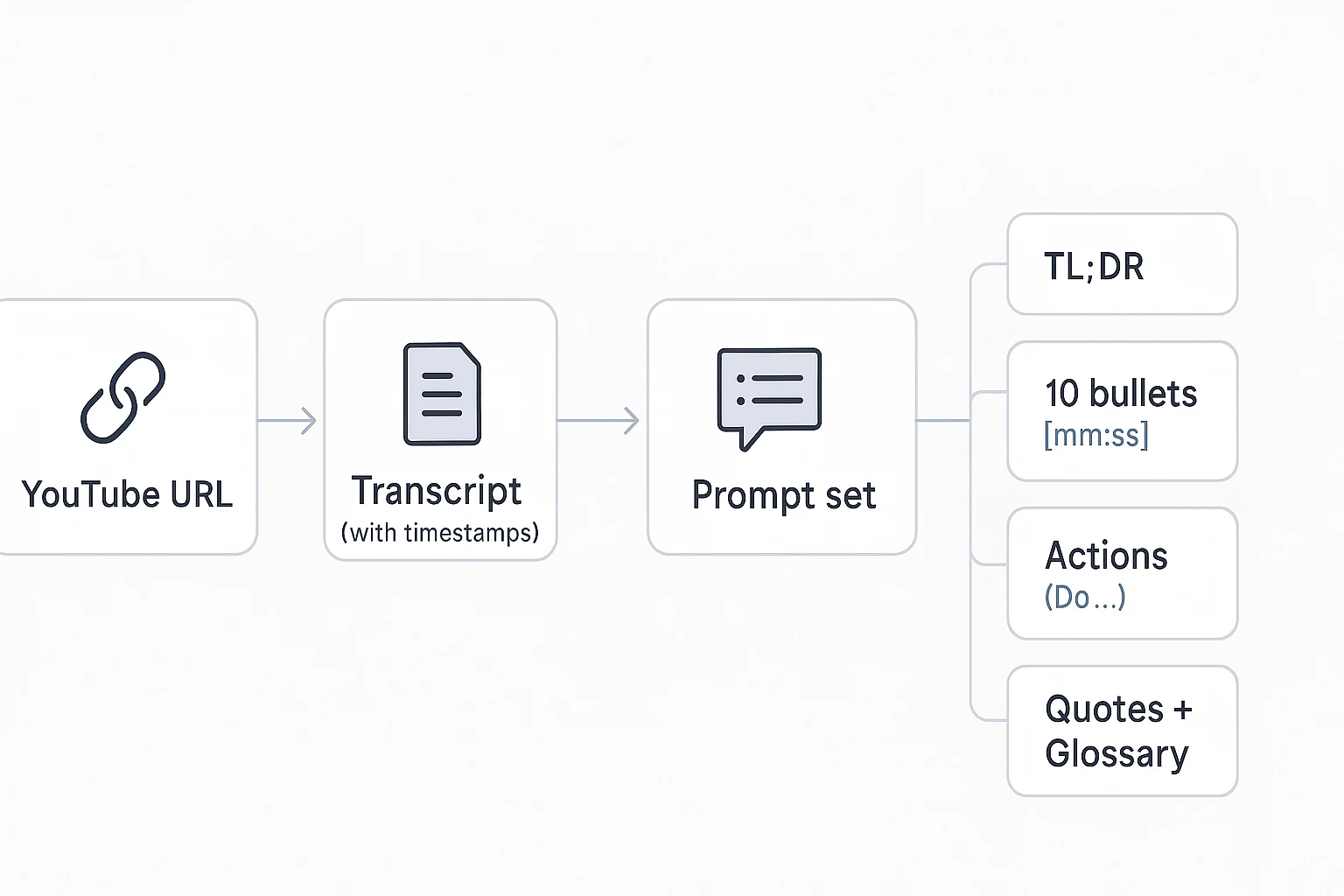
Prompt set: one request, four artifacts
Use one "prompt pack" so your outputs always match.
Prompt to paste:
- "Summarize this YouTube transcript. Keep the main point. Use only what is in the text. If a claim is unclear, mark it as 'uncertain'.
- Output format:
- TL;DR: 1 short paragraph.
- 10 bullets. Each bullet must start with a timestamp like [mm:ss].
- Actions: 5 items. Each must start with 'Do'. Include who and when if stated.
- Quotes: 5 direct quotes with [mm:ss]. After each, add 'Why it matters:' 1 sentence.
- Glossary: 6 to 10 terms with simple definitions."
Expected outputs (sample formats you can mirror)
TL;DR (1 paragraph) Deep work is focused time on one hard task, and it's valuable because distractions are designed to pull attention away. The speakers recommend a simple routine: choose one goal, block time for it, then review what worked so you can repeat it. They warn that busy work can feel productive but does not create real progress, and they close with a weekly review to plan the next week.
10 bullets with timestamps
- [00:12] Defines "deep work" as sustained focus on a hard task.
- [06:22] Says focus is a competitive advantage due to engineered distraction.
- [07:10] Notes that constant context switching has a cost.
- [18:55] Shares a 3 step routine: goal, time block, review.
- [20:05] Suggests starting with small blocks to build the habit.
- [26:40] Recommends removing easy distractions before you start.
- [34:18] Warns about "busy work" that feels like progress.
- [39:12] Mentions a simple rule to protect focus time.
- [47:44] Explains why a weekly review prevents loose ends.
- [57:20] Wraps up with a plan to test one change next week.
Actions (5 items, "Do X" wording)
- Do pick one priority for tomorrow before you end today.
- Do block one 30 to 60 minute focus session on your calendar.
- Do remove the top two distractions before you start (tabs, phone, alerts).
- Do track what worked after the session in two sentences.
- Do run a weekly review and choose next week's focus blocks.
5 quotes with timestamps plus "Why it matters"
- [06:22] "Focus is now a competitive advantage because distractions are engineered." Why it matters: It explains why attention is harder than it used to be.
- [18:55] "The routine is: pick one goal, block time, then review what worked." Why it matters: It gives a repeatable system, not vague motivation.
- [34:18] "The trap is doing 'busy work' that feels productive." Why it matters: It helps you spot false progress.
- [47:44] "A weekly review closes loops and sets the next week." Why it matters: It turns insights into a plan you can follow.
- [57:20] "Test one change next week and keep what works." Why it matters: It encourages small experiments instead of big resets.
Glossary (6 to 10 terms)
- Deep work: Focused time on a hard task.
- Distraction: Anything that pulls you away from the task.
- Context switching: Moving between tasks and losing focus.
- Time block: A set time on your calendar for one task.
- Busy work: Low value tasks that feel productive.
- Weekly review: A weekly check of tasks, goals, and next steps.
- Audit trail: Proof you can check later, like timestamps.
Notes you can reuse: a simple template
Save your output in a named format so every new video looks the same.
Template name: YouTube Summary with Timestamps
Header
- Video:
- URL:
- Date summarized:
Key points (10)
- [mm:ss]
Actions (5)
- Do
Key quotes (5)
- [mm:ss] " " Why it matters:
Open questions
- What should I test this week?
- What claim needs a fact check in the original video?
- What would change my mind?
How do you summarize long YouTube videos that exceed AI context limits?
When a transcript is too long to paste into an AI, don't fight the limit. Split it into clean chunks, summarize each chunk the same way, then merge those mini-summaries into one master doc. This keeps the storyline intact and makes every claim easy to trace back with timestamps.
Chunk the transcript (chapters first, time blocks second)
Best case: chunk by YouTube chapters, because they already match topic shifts. If the video has no chapters, use fixed time windows like 10 to 15 minutes.
Use these rules so you don't lose meaning:
- Add overlap: repeat the last 30 to 60 seconds in the next chunk.
- Label clearly: Chunk 1 [00:00 to 12:30], Chunk 2 [12:00 to 25:15].
- Keep chunks similar size so prompts behave consistently.
Summarize each chunk in a repeatable format
Ask for the same outputs every time. That makes the merge step much easier.
Per chunk, request:
- TL;DR: 2 to 3 sentences
- 5 bullets with timestamps (one timestamp per bullet)
- Open questions (what the speaker didn't answer, or what you need to verify)
Tip: If you only do one thing, require timestamps. It's the fastest way to re-check the source later.
Stitch chunk summaries into one "master" summary
Paste all chunk summaries into a single document in order. Keep the chunk labels and ranges. Now you have a short, AI-friendly input that still points back to exact places in the video.
Then run a merge prompt like this:
- Deduplicate repeated points across chunks.
- Keep strict chronological order.
- Preserve the strongest evidence and any key quotes.
- Output one unified TL;DR, a clean bullet list, and an action list.
After that, do a quick consistency pass:
- Unify terms (same names for the same ideas).
- Fix unclear pronouns (who is "they" or "this").
- Make sure each major claim has at least one timestamp.
Close the loop: save both the chunk summaries and the final master. When a detail matters, you can jump back to the right time range instead of re-watching the whole video.
How do you check accuracy and avoid AI hallucinations in a video summary?
AI can help you summarize a video fast, but it can also invent details. The fix is simple: treat every key point like a claim that must map back to a line in the transcript and a moment in the video.
Run a 5-minute verification checklist
Before you share anything, do a quick audit against the transcript:
- Proper nouns: names, brands, book titles, tools.
- Dates and timelines: years, "last week," "Q3," sequences.
- Numbers: prices, stats, steps, counts, "top 3," "10x."
- Strong claims: cause and effect, medical, legal, finance, policy.
- "Sounds right" lines: anything the model might guess.
Then spot-check accuracy by jumping to timestamps. Pick 3 to 5 bullets and rewatch those moments. If a point isn't clearly supported, flag it or remove it.
Rule of thumb: if the transcript is messy (auto-captions, lots of crosstalk, jargon), lower your confidence. Use more short quotes and fewer big paraphrases.
Quote vs paraphrase (and stay safe when sharing)
Use quotes when wording matters:
- Definitions
- Strong opinions or unique phrasing
- Claims that could be disputed
Paraphrase when the idea matters more than the exact words:
- Explanations
- Examples
- Step-by-step methods
If you plan to publish the summary, keep quotes short, attribute them to the speaker/video, and prefer a summary over long verbatim excerpts.
Add traceability with timestamps (and don't guess)
Require a timestamp for each key point in a format like [mm:ss]. Also keep a small "Source" block with:
- Video title
- Channel
- Publish date (if shown)
- Link
When you're unsure, don't fill gaps. Add uncertainty tags instead, like:
- "unclear in transcript"
- "needs rewatch"
- "not found in captions"
Ethics note: don't misrepresent the creator's view. And don't treat an AI summary as a primary source for high-stakes work.
Try TicNote Cloud for free to keep summaries tied to transcripts, timestamps, and source links.
Which tools work best for summarizing YouTube videos (and how do they compare)?
The best tool depends on what you can input (URL or transcript), how much you need timestamps, and where you'll store the output. If your goal is how to summarize a YouTube video fast, start by choosing a tool that matches your workflow, not the fanciest model.
Compare tools by workflow fit (not "best")
Here's a compact way to evaluate options.
| Tool type | Best input | Speed | Cost feel | Timestamp support | Exports | Privacy questions to ask |
| URL-in summarizers (paste a YouTube link) | URL | Fast setup | Often free/cheap | Sometimes "native" chapter-like links; often rough | Usually copy-paste | Do they fetch video data server-side? What do they store? |
| Transcript-in chatbots (ChatGPT-style) | Clean transcript | Medium (prep time) | Paywall common | Manual: you provide timestamps or ask it to add them | Copy-paste | Is your text used for training? Can you delete chats? |
| Transcription + summary suites | URL, audio, video | Medium to fast | Subscription | Often strongest (word-level timecodes or sections) | TXT + summary formats vary | Where is data hosted? Retention controls? |
| Notes workspaces with AI | Transcript + notes | Medium (one-time setup) | Subscription or freemium | Usually manual or semi-auto | Often strong: Markdown, DOCX, PDF, TXT | Can you keep a private workspace? Team permissions? |
Use these decision rules (manual vs AI vs hybrid)
- Go manual if the video is short, or you're learning deeply. You'll remember more.
- Use AI summarizers for long lectures, interviews, and how-to videos. They're great at structure.
- Go hybrid for high-stakes topics (health, legal, finance). Let AI draft, then verify claims in the transcript and add timestamps for anything important.
Choose a workspace when you summarize many videos
A single-use summarizer is fine for one video. But if you review videos weekly, a workspace pays off. You can store the transcript, summary, action items, and key quotes in one place, search later, and ask questions across many videos.
Try keeping each video as a repeatable "packet":
- Source link + cleaned transcript
- 1-paragraph summary
- 10 bullets
- Action list
- Key quotes with timestamps
Try TicNote Cloud for Free to save YouTube transcripts and summaries in a searchable workspace.
How to store and reuse YouTube summaries in a notes workspace (demo with screenshots)
If you want a repeatable way to how to summarize a YouTube video and still find the takeaways later, you need a place where the transcript, the AI summary, and your edits live together. Here's what that looks like in TicNote Cloud, using a simple "project" setup so related videos stay grouped, searchable, and easy to export.
Web Studio: upload once, summarize, then save a reusable note
1) Upload your file into a project
Start in TicNote Cloud Web Studio by creating a new project for a topic (like "Leadership talks" or "SQL tutorials"). Then click Upload at the top and add your file.
You can upload audio, video, PDFs, Word docs, or plain text. If you upload audio or video, you can also generate a transcript right there, so your summary stays tied to the source.
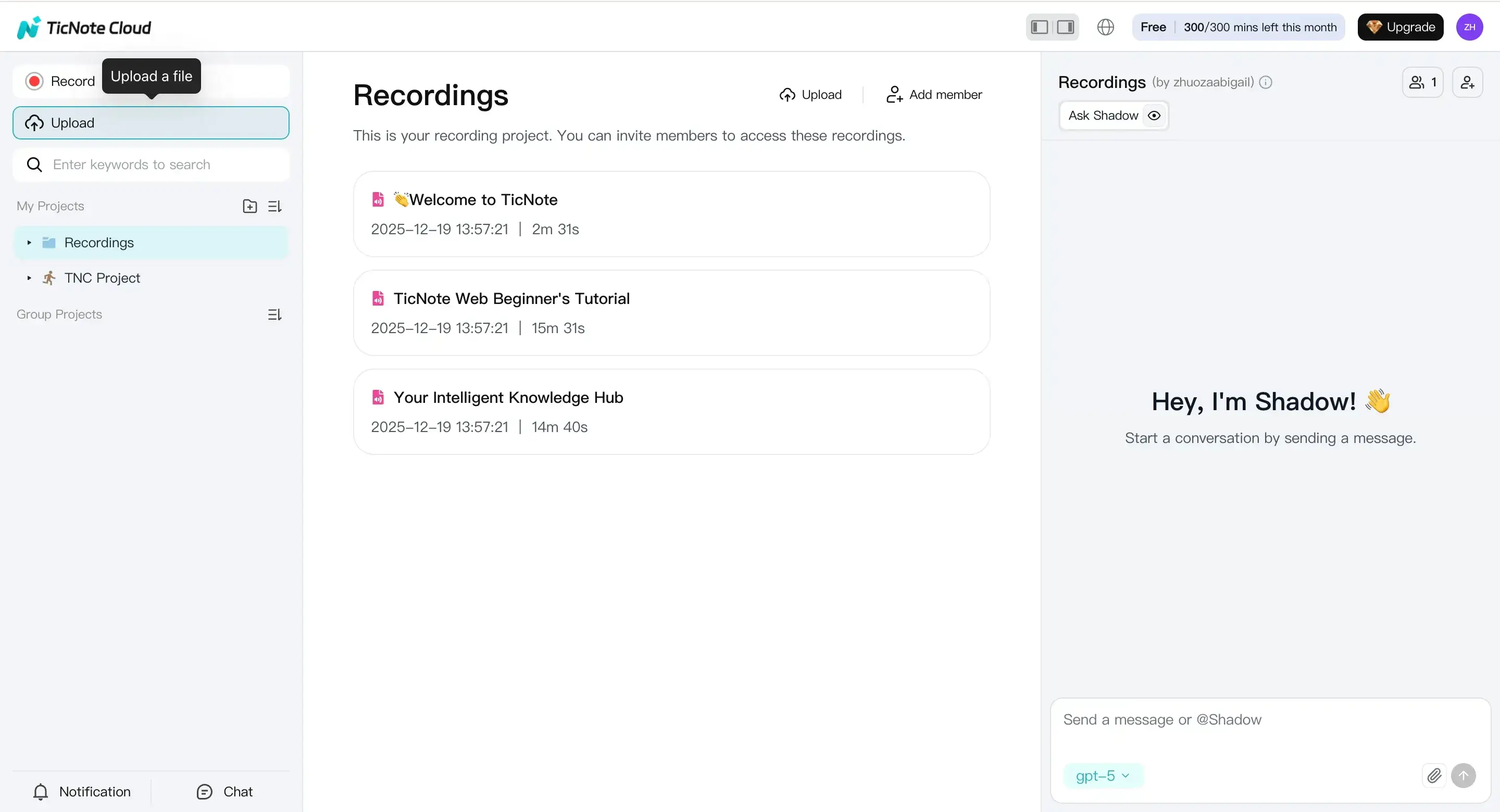
Tip: if you already pulled a clean YouTube transcript, save it as a TXT or Word file first. Uploading that text helps you keep speaker labels and timestamps in a consistent format.
2) Generate the summary, then normalize it into a template
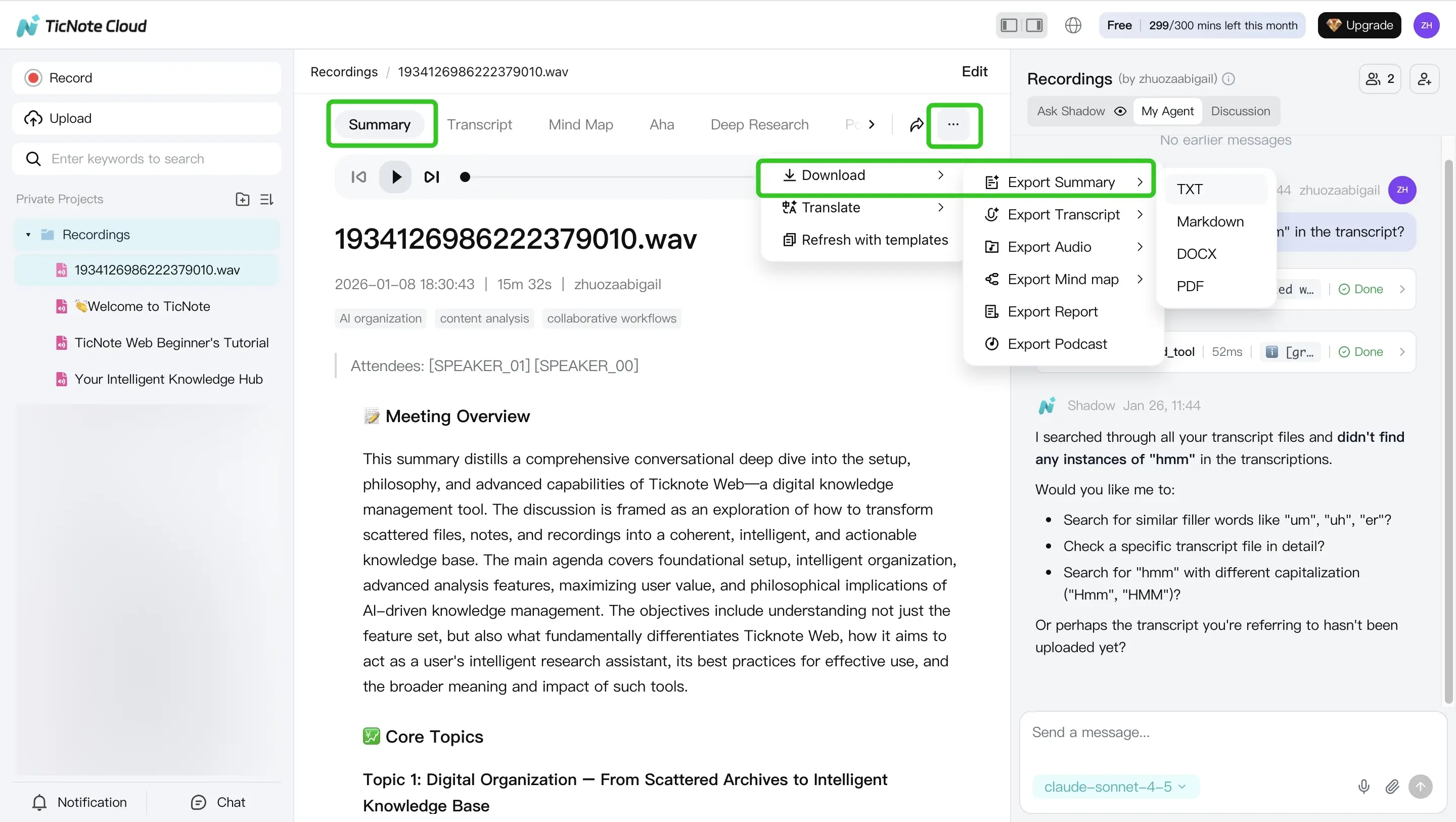
Open the file and click the Summary tab at the top. You'll see a draft summary you can edit.
Before you save it, rewrite it into one consistent structure so every video note looks the same. A simple template that works well:
- TL;DR (2 to 3 sentences)
- Key points (8 to 12 bullets)
- Bullets with timestamps (only where you have them)
- Action items (verbs first)
- Key quotes with timestamps (direct quotes only)
- Open questions (things to verify or research)
When it's ready, use the three-dots menu to export the summary in the format you need for sharing or publishing.
Reuse later: ask questions across multiple videos
Once you've saved a few video summaries in the same project, you can ask grounded questions across files to get faster synthesis, like:
- "What did these three talks agree on?"
- "List all action items mentioned across the project."
- "Where do the speakers disagree, and what timestamps support that?"
This turns one-off summaries into a small knowledge base you can search, compare, and export (Markdown, DOCX, or PDF) when you need to share notes with a team.
Mobile app: same flow when you're on the go
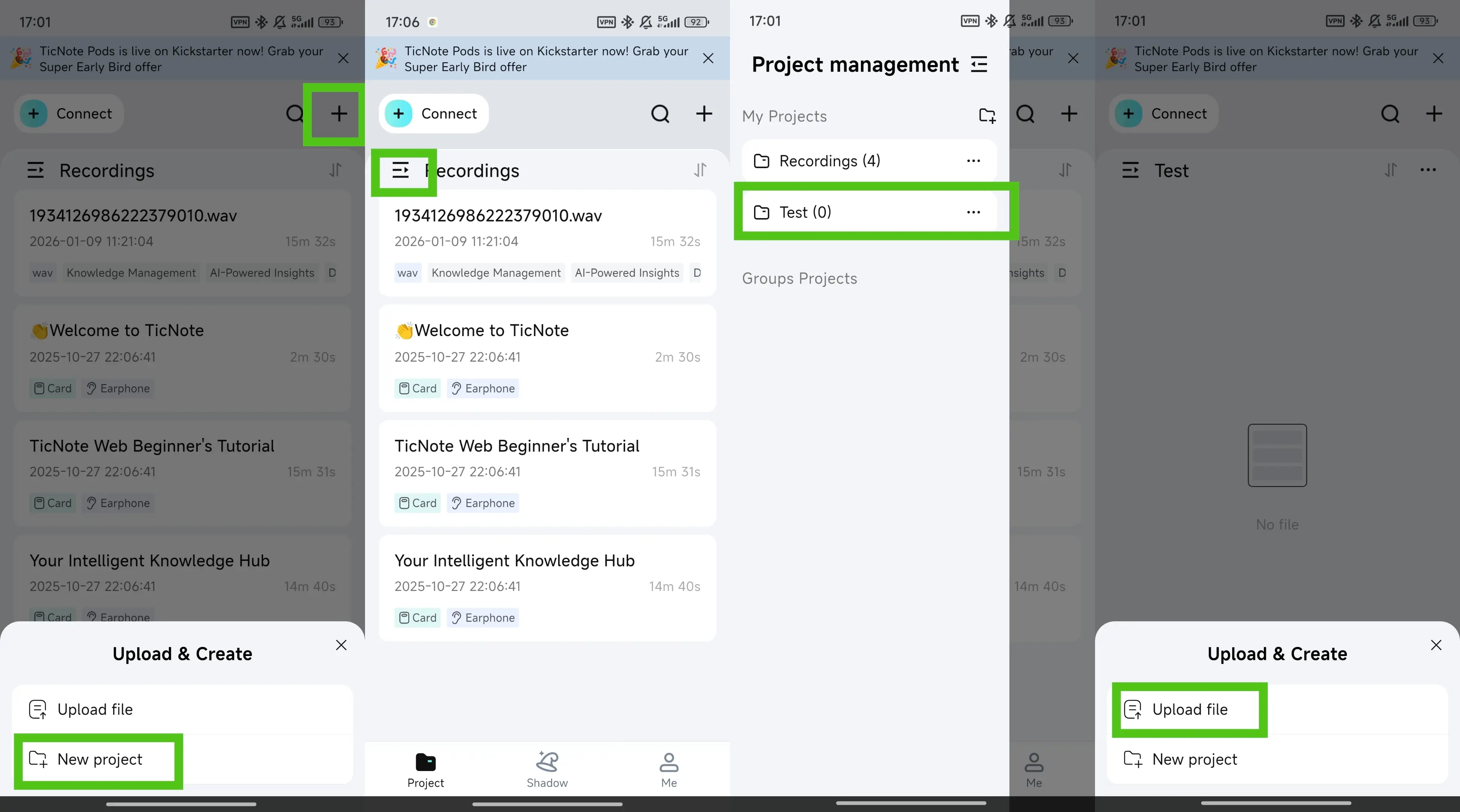
On the TicNote app, tap the add button to upload a file into a project, then open the Summary tab to generate your summary. When you want to share it, use the three-dots menu and export in your preferred format.