


 Extension
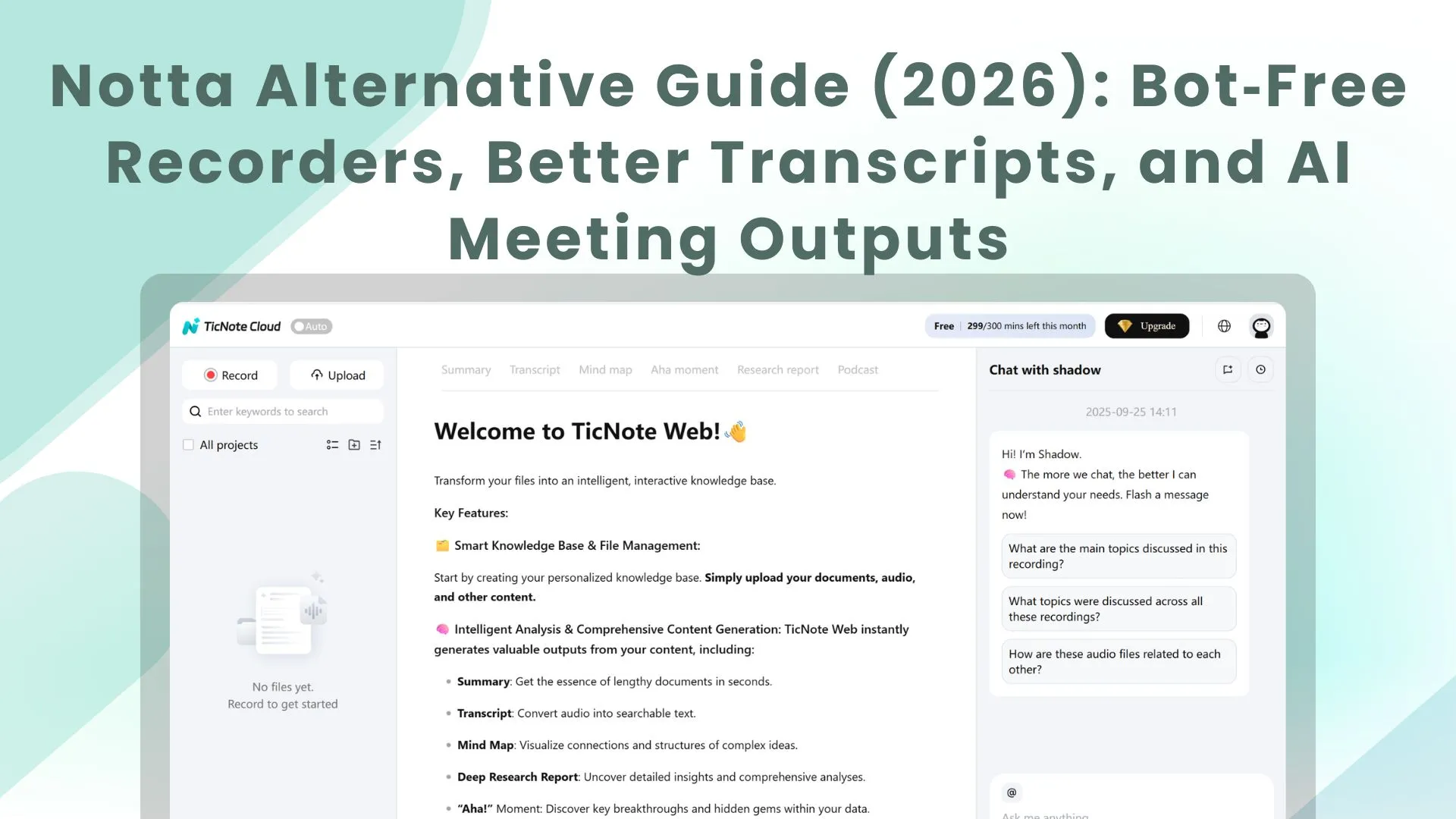
TL;DR: Best Notta alternative picks (and who each is for)
Start with Try TicNote Cloud for Free if you want the best Notta alternative for turning meetings into finished outputs (not just transcripts). It records bot-free, lets you edit the transcript, and then turns it into reports, slides, podcasts, and mind maps inside a Project—with cited answers.
You're not stuck because transcription is hard. You're stuck because the transcript doesn't become a reusable asset. If you want meetings to roll straight into a Project and come out as deliverables, TicNote Cloud is built for that workflow.
- Best overall for turning meetings into deliverables: TicNote Cloud (bot-free capture + Projects + cited Q&A + one-click outputs)
- Best for free-plan value for meeting recordings: tl;dv (fast library, easy sharing, often bot-based)
- Best for sales intelligence: Fireflies.ai (broad capture + search) or Avoma (coaching, playbooks, structured CRM fields)
- Best for simple live notes: Otter.ai (quick live transcription + team editing)
- Best for creators editing audio/video: Descript (transcription supports an editing workflow)
- Best for local/offline privacy: Whisper/MacWhisper (on-device audio, but more manual steps)
Top Notta alternative tools in 2026 (ranked)
Most "AI meeting note" tools look the same until you test three things: how they capture (bot vs bot-free), how well you can fix the transcript, and what the tool produces after the transcript. Below is a ranked, buyer-grade list built around real workflows: capture → transcript → share → reuse as a report, deck, or knowledge base.
1) TicNote Cloud
Best-for: Teams that need bot-free recording + editable transcripts + reusable outputs (reports, presentations, podcasts, mind maps) without copy-paste.
Ideal workflow: Record or upload meetings → group them into Projects → ask Shadow AI questions across files (with citations) → generate a deliverable.
Strengths
- Bot-free capture options: record without a meeting bot joining (lower friction for guests and stricter orgs).
- Editable transcripts: WYSIWYG editor so you can actually correct wording, labels, and structure.
- Project-based reuse: Projects hold meetings + docs together, so follow-up work stays connected.
- Shadow AI with citations: ask questions across your Project and verify sources fast.
- One-click deliverables: generate reports (PDF/Word), web presentations (HTML), podcasts + show notes, mind maps.
- Exports + connectors: transcript exports (TXT/DOCX/PDF), summary exports (Markdown/DOCX/PDF), mind map (PNG/Xmind), plus Notion/Slack connectors.
Deal-breakers / limits to test in your trial
- Monthly minutes and max recording length vary by plan.
- Document import limits by tier.
- Speaker labels can drift in heavy overlap—test with a 4-person cross-talk clip.
Pricing starting point (verified; check current at purchase)
- Free: 300 transcription mins/month; 30 mins max per web recording; 3 document imports/month; 10 AI chats/day.
- Professional: $$12.99/month (or$$79 billed annually); 1,500 mins/month; 3 hours max per web recording; 30 imports/month; unlimited AI chat.
- Business: $$29.99/month (or$$239 billed annually); 6,000 mins/month; 8 hours max per web recording; 100 imports/month.
- Enterprise: custom; includes SSO and an AI meeting agent.
Bot/no-bot: No-bot capture available.
Editing: Full transcript editing (not read-only).
Exports: WAV, TXT, DOCX, PDF, Markdown, HTML, PNG, Xmind.
Integrations: Notion, Slack.
Security/privacy signals: Private by default; "data not used to train AI models" (confirm in your security review); encryption; traceable AI operations. Also confirm retention and deletion controls for your org.
Tip for your own evaluation: Run one quiet 1:1, one noisy hybrid segment, and one overlapping 4-speaker clip. Time how long it takes to reach "share-ready" notes and one reusable output.
2) tl;dv
Best-for: A strong free plan, fast review, highlights/clips, and easy team sharing.
Ideal workflow: Record with a calendar/meeting-centered flow → skim key moments → share snippets.
Strengths
- Quick playback review and sharing.
- Clip/highlight workflows often feel lighter than "full knowledge base" tools.
Deal-breakers / limits to test
- Whether it requires a bot or join flow your org doesn't allow.
- Export formats and how well templates match your reporting style.
- Free vs paid limits (minutes, storage, AI queries) once you scale.
Pricing starting point: Normalize based on current plan page during procurement.
Bot/no-bot: Often bot or meeting-join dependent.
Editing: Check depth of transcript edits.
Exports: Verify what's included by plan.
Integrations: Typically strong; confirm what your team needs.
Security/privacy signals: Confirm bot consent behavior and admin controls.
3) Fireflies.ai
Best-for: Sales and customer success teams that want a searchable call library and meeting intelligence.
Ideal workflow: Bot joins meetings → auto-log insights → search across calls for coaching and follow-ups.
Strengths
- Built for org-wide call repositories.
- Many integrations in sales stacks.
Deal-breakers / limits to test
- Bot acceptance: some clients and regulated orgs push back.
- CRM sync mapping (fields, ownership, duplication).
- Accuracy in noise and cross-talk, especially in hybrid rooms.
Pricing starting point: Verify current tiers for storage, seats, and AI limits.
Bot/no-bot: Bot-based.
Editing: Confirm how editable transcripts are vs export-and-fix.
Exports: Confirm formats needed for your reporting chain.
Integrations: Common CRMs and collaboration tools; verify exact connectors.
Security/privacy signals: Confirm recording consent prompts, retention, and admin audit controls.
4) Otter.ai
Best-for: Simple live notes and quick collaboration for internal meetings.
Ideal workflow: Live transcription during meetings → lightweight sharing → action item capture.
Strengths
- Real-time feel for "notes now."
- Collaboration is straightforward for internal teams.
Deal-breakers / limits to test
- Language coverage if you're multilingual.
- Speaker diarization (who said what) during overlap.
- Export and editing constraints for client-ready outputs.
Bot/no-bot: Often meeting-join dependent.
Editing: Check edit depth and what is locked by tier.
Exports/Integrations/Security: Verify in your plan.
5) Fathom
Best-for: Fast summaries and shareable takeaways for small teams.
Ideal workflow: Capture meeting → auto-summary → share recap link.
Strengths
- Speed: good for "send the follow-up now."
- Simple sharing for small teams.
Deal-breakers / limits to test
- Whether a bot must join.
- Admin controls and permissioning as your team grows.
- Transcript editability and export depth.
Bot/no-bot: Often bot-based.
6) Avoma
Best-for: Sales coaching plus structured notes tied to revenue workflows.
Ideal workflow: Calls → scorecards/playbooks → coaching insights → CRM-linked notes.
Strengths
- Strong for sales process enforcement.
- More structure than general note tools.
Deal-breakers / limits to test
- Tier gating: which intelligence features require higher plans.
- If you only need transcription, it may be overkill.
Bot/no-bot: Commonly bot-based.
7) Sonix
Best-for: Upload-first transcription with a robust editor for heavy correction.
Ideal workflow: Record elsewhere → upload → correct aggressively → export clean text.
Strengths
- Editor-first workflow for accuracy and cleanup.
- Better fit when live meeting capture isn't required.
Deal-breakers / limits to test
- Live meeting coverage (often not the focus).
- Custom vocabulary and enterprise security options if needed.
Bot/no-bot: Typically upload-based (no meeting bot).
8) Descript
Best-for: Creators who want to edit audio/video by editing text.
Ideal workflow: Record → transcribe → cut/rearrange in the transcript → publish.
Strengths
- Production pipeline strength (editing and publishing).
- Great when the "output" is media, not a meeting report.
Deal-breakers / limits to test
- Multi-speaker meeting accuracy under overlap.
- Collaboration permissions and export formats for teams.
Bot/no-bot: Usually file-based.
9) Whisper / MacWhisper
Best-for: Local/offline transcription for sensitive audio (privacy-first).
Ideal workflow: You handle recording and storage → transcribe locally → build notes and outputs with your own stack.
Strengths
- Local processing can reduce cloud exposure.
- Flexible for power users.
Deal-breakers / limits to test
- Hardware and speed (long files can be slow).
- No built-in "meeting outputs" system; you assemble your own workflow.
Bot/no-bot: No bot; local processing.
Quick way to sanity-check bot policies: If your org is bot-restricted, start by shortlisting bot-free or upload-first tools. If you're bot-friendly, prioritize admin controls and consent flows. For a deeper bot-free comparison, see this bot-free meeting notes and deliverables comparison.
Comparison table: Notta vs alternatives (features, limits, and pricing)
If you're comparing a Notta alternative, this table helps you spot the real blockers fast: whether a tool needs a meeting bot, what "minutes" truly means, and what you'll actually pay once you scale to a team.
How to read this table (bots, minutes, and "starting price")
A meeting bot is a service account that joins your Zoom/Meet/Teams call as a participant to record and transcribe. A bot-free meeting recorder captures audio locally (app) or via an extension, so nothing "joins" the call—often a better fit for orgs that block unknown participants, require explicit consent flows, or have strict vendor access rules.
"Minutes" can mean three different limits:
- Transcription minutes (what you can transcribe per month)
- Recording time per meeting (max length of one live capture)
- Storage / file uploads (how many files or how much data you can keep)
Vendors label these differently because they price different cost drivers (compute for transcription vs storage vs real-time capture). When you trial tools, always test the limit you hit first: long meetings, many short calls, or lots of uploads.
"Starting price" is usually the lowest paid tier, but it may be per seat (per user) or per org, and it may assume annual billing. Treat it as a shortlist signal, then confirm the current price and what's included on each vendor's pricing page.
Normalized comparison table (features, limits, and pricing)
| Tool | Platforms | Bot/no-bot capture | Real-time vs upload | Speaker labels (overlap + relabel) | Languages | Translation | Summaries/templates | Editable transcript | Integrations (examples) | Exports + outputs | Security/admin signals | Free limits (typical checks) | Starting paid price (what it includes) |
| Notta | Web, iOS/Android (varies by plan) | Commonly bot-based and upload workflows | Live + upload (plan-dependent) | Diarization; overlap quality varies; relabel tools vary | Strong multi-language support | Often post-translation | Summary + action items | Limited vs full editor varies | Calendar + meeting apps + docs tools (varies) | Common transcript exports; fewer "deliverable" formats | Basic security features; enterprise controls vary | Check minutes, max meeting length, AI caps | Check lowest paid tier; often seat-based |
| TicNote Cloud | Web studio, iOS/Android, extension | Bot-free: extension capture (Meet/Teams) + app capture (Zoom/Lark) + uploads | Live + upload | Speaker recognition + timestamps; supports editing and collaboration | 120+ transcription languages | Translation supported (live or post varies by workflow) | Multi-level summaries; templates; action items | True editor (WYSIWYG), co-edit + comments | Notion, Slack (plus exports) | TXT/DOCX/PDF transcripts; Markdown/DOCX/PDF summaries; PNG/Xmind mind maps; HTML presentations; podcast output; report generation | Encryption, permissions (Owner/Member/Guest), traceable AI ops; "not used to train" claim; SSO on Enterprise | Free: 300 mins/month; 30 min max web recording; 10 AI chats/day; 3 doc imports/month | Pro $$12.99/mo $$79 annual): 1,500 mins; 3h max web recording; unlimited AI chat |
| Otter | Web, iOS/Android | Often bot-based for meetings + uploads | Live + upload | Good diarization; overlap can degrade; relabel tools available | Multi-language coverage varies | Limited vs competitors | Strong meeting summaries | Mostly edits/corrections | Calendar + Zoom/Meet + Slack (varies) | Common transcript exports | Team/admin features on business tiers | Free minutes and meeting-length caps | Entry paid tier typically seat-based |
| Fireflies.ai | Web | Bot-based joiner for calls + uploads | Post-call + live (bot) | Solid diarization; overlap depends on audio | Good language coverage | Post translation varies | Strong templates + action items | Mostly edits/corrections | CRM + Slack + Notion + calendars | Exports + highlights; some downstream workflows | Admin controls on higher tiers | Free limits vary by minutes/storage | Entry paid tier typically seat-based |
| Fathom | Web | Bot-based for Zoom/Meet (often) | Live capture + post summary | Decent diarization; overlap varies | Language support varies | Limited | Fast summaries + highlights | Limited transcript editing | Zoom/Meet + CRM (varies) | Clips + notes; fewer doc-style deliverables | Basic controls; enterprise varies | Free plan often generous but feature-limited | Paid tiers add team controls |
| Tactiq | Chrome extension | No bot: extension capture | Live captions + export | Basic diarization; overlap limits | Language support varies | Limited | Simple summary templates | Limited editing | Google Workspace, docs tools | Text exports; fewer deliverables | Lighter admin posture | Free caps on meetings/exports | Paid unlocks exports/templates |
| Sonix | Web | Upload-first (no meeting bot) | Post-processing | Strong editing tools; diarization depends on audio | Strong language list | Strong post translation | Summaries limited vs meeting-native tools | Strong editor | Fewer meeting-native integrations | Great subtitle + transcript exports | Security options available | Free trials vary | Paid is usage/subscription mix |
| Descript | Desktop + web components | Upload-first; local recording | Post-processing | Editing is strong; diarization depends on track quality | Language coverage varies | Limited | Some summaries | Strong editor (text-based editing) | Creative tool integrations vary | Audio/video outputs + text exports | Security varies | Free limits on projects/export | Paid focuses on editing workflows |
What this table reveals (the buyer takeaways)
Notta often looks best when your top priority is broad language support and quick transcription. Where many teams switch is policy and workflow: bot-free capture (no extra participant), true transcript editing, and reusable outputs (reports, presentations, podcasts, mind maps) that stay linked to sources.
In practice, most orgs should shortlist tools in two passes:
- Capture fit (bot vs bot-free, max meeting length, live vs upload)
- Output fit (editable transcript, templates, exports, and admin controls like SSO/permissions/retention)
How did we evaluate each Notta alternative? (method + criteria)
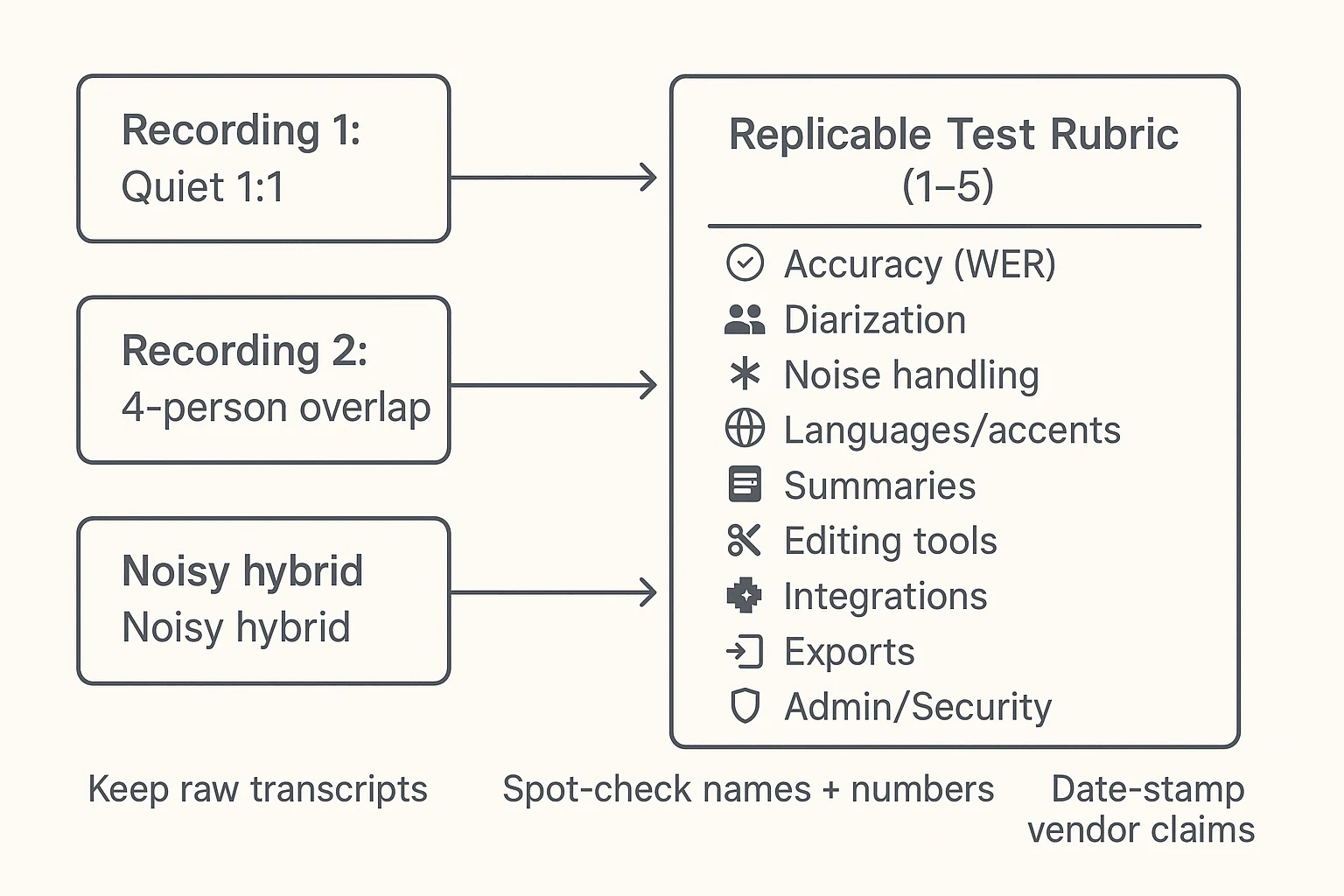
To make this a buyer-grade Notta alternative comparison, we scored every tool with the same test audio, the same rubric, and the same spot-check process. The goal wasn't to reward the best marketing page. It was to find which tool stays accurate in your meetings: real voices, overlap, noise, and messy action items.
The criteria we scored (9 buckets)
We used a 1–5 score per bucket, then kept notes on "why." Here's what mattered most in real work.
- Accuracy (transcript correctness): We spot-checked names, numbers, dates, and domain terms. A helpful way to think about accuracy is WER (word error rate): how many words are wrong, missing, or inserted compared to a reference transcript. Lower is better, but only if the errors aren't clustered on what you care about (like pricing, requirements, or medical terms).
- Diarization (who said what): Diarization is speaker separation. It breaks fast when people talk over each other. So we judged (1) correct speaker splits, (2) how it handles interruptions, and (3) how easy it is to fix speaker labels.
- Noise handling: We tested keyboard ticks, laptop fan noise, speakerphone echo, and a "hybrid room" feel (one mic far away). Many tools look great on clean audio and fall apart on echo.
- Languages + accents: We tested two languages and included at least one accented speaker. We scored both transcription quality and whether mixed-language phrases stayed readable.
- Summaries (usefulness + factualness): We checked if summaries were grounded in the transcript, whether action items had owners and dates, and if you can reuse the format via templates (so output stays consistent across meetings).
- Editing (speed to fix): We timed basic cleanup: speaker rename, find/replace, and quick corrections. We also noted whether the tool supports custom vocabulary or a glossary for recurring terms.
- Integrations (where work lands): We looked at where transcripts and notes can go (Slack, Notion, CRM, storage) and whether it's automatic or manual export.
- Exports (reuse without rework): We verified you can export into formats teams actually edit (DOCX, PDF, Markdown) and keep structure like headings, bullets, and timestamps.
- Admin + security controls: We checked for SSO, roles, audit logs, and retention/deletion settings. This matters when you record clients, candidates, or regulated calls.
The test setup you can replicate in an afternoon
We ran the same three recordings through each tool and scored them against the same rubric.
- Quiet 1:1 (10–15 minutes): Two speakers, clear audio, normal pace.
- 4-person overlap (15–20 minutes): Interruptions, people talking over each other, quick topic switches.
- Noisy hybrid (15–20 minutes): One far mic, light echo, keyboard noise, and variable volume.
To keep it fair, each recording included:
- Two languages across the set
- Names, numbers, and dates (the first things buyers notice when wrong)
- Domain terms (product names, technical phrases, or industry acronyms)
Scoring process (simple but strict):
- Rate each bucket 1–5 per recording.
- Keep the raw transcript output from each tool.
- Do two spot checks: (1) a "critical details" scan (names, numbers), and (2) a "meeting outcomes" scan (decisions, owners, deadlines).
What to verify on vendor pages (so claims are comparable)
Before you trust any comparison table (including this one), build a quick verification checklist and record the source.
Verification checklist:
- Plan limits: monthly minutes, file upload caps, and AI summary/chat limits
- Max meeting length: per recording and per import
- Bot behavior: does a bot join the call, or is capture bot-free?
- Retention + deletion: how long data is stored and how deletion works
- AI training policy: whether your data is used to train models
- Supported formats: audio/video inputs and export formats (DOCX/PDF/Markdown)
One habit that keeps this "buyer-grade": date-stamp each claim and save the link you used. Pricing and limits change often, and you'll want proof when you compare tools again in six months.
Which Notta alternative should you choose for your use case?
Picking a Notta alternative is easier when you start with your "next step after the transcript." Some teams only need searchable notes. Others need clean quotes, coaching fields, or a workflow that turns meetings into reports.
If you need bot-free recording for client calls
Pick: TicNote Cloud in most cases. Bot-free capture cuts consent friction because no "recorder bot" has to join the meeting. It also gives you editable transcripts and reusable outputs (reports, slides, podcasts, mind maps) inside a Project.
What to confirm in your trial:
- How it records in your setup (Google Meet vs Teams vs Zoom, plus web vs app capture).
- Participant notice (what's visible to attendees, and what your org policy requires).
- Where files land (one Project per client, per quarter, or per engagement).
If you need fast team collaboration on live notes
Pick: TicNote Cloud if you also need editable transcripts plus outputs later. Pick: Otter if your goal is quick live notes, basic sharing, and you don't need polished deliverables.
Here's the trade:
- "Collab now": speed, lightweight sharing, minimal structure.
- "Deliverables later": editing, reuse across meetings, and outputs you can ship.
If you're already sending follow-up emails, QBRs, or research summaries, the second path usually saves more time.
If you need multilingual transcription + translation
Pick: TicNote Cloud when you need translation and a Project knowledge base that keeps context across calls. If you're in a language-heavy workflow and you've had good results with Notta, keep it on your shortlist—but validate with your own audio before you switch.
What to test (these break accuracy fastest):
- Named entities (people, companies, product names).
- Acronyms (internal terms, team names, metrics).
- Code-switching (switching languages mid-sentence).
Run the same 10-minute clip across tools and compare what you'd actually reuse.
If you need sales coaching and CRM fields
Pick: Fireflies.ai or Avoma for coaching depth. They're built for deal workflows: talk ratios, playbooks, coaching cues, and CRM-friendly fields.
Pick: TicNote Cloud when your priority is turning calls into proposals, QBRs, and research-style outputs inside a Project. If your "win" is a finished client doc (not just a recap), Project-based deliverables tend to be the faster path.
If you need verbatim accuracy for quotes or legal work
Pick: Sonix when you're upload-first and accuracy plus correction tools matter most. It's a strong fit when you need to polish a transcript to quote level.
Pick: Whisper or MacWhisper when audio can't leave the device. Local processing is often the cleanest answer for strict data rules.
If you need the best free plan
Pick: tl;dv if your main goal is free recording and basic transcripts. It's a practical way to test if the habit sticks.
Pick: TicNote Cloud if you want free bot-free capture plus AI deliverables inside Projects (within the included limits). That matters when "free" still needs to produce something you can send.
One more useful angle: if your team already uses chat tools for work, compare how each product handles citations and context. This guide to work-focused ChatGPT alternatives with citations and privacy helps you spot the gaps fast.
End result to aim for: a Project that turns one meeting into a client-ready report with sources you can check.
What's missing from most Notta-alternative lists (privacy, consent, and admin controls)?
Most "Notta alternative" roundups focus on accuracy and price. But for teams, the deal-breakers are often privacy, consent, and admin controls. These decide if you can record at all, share outputs safely, and pass security review without weeks of back-and-forth.
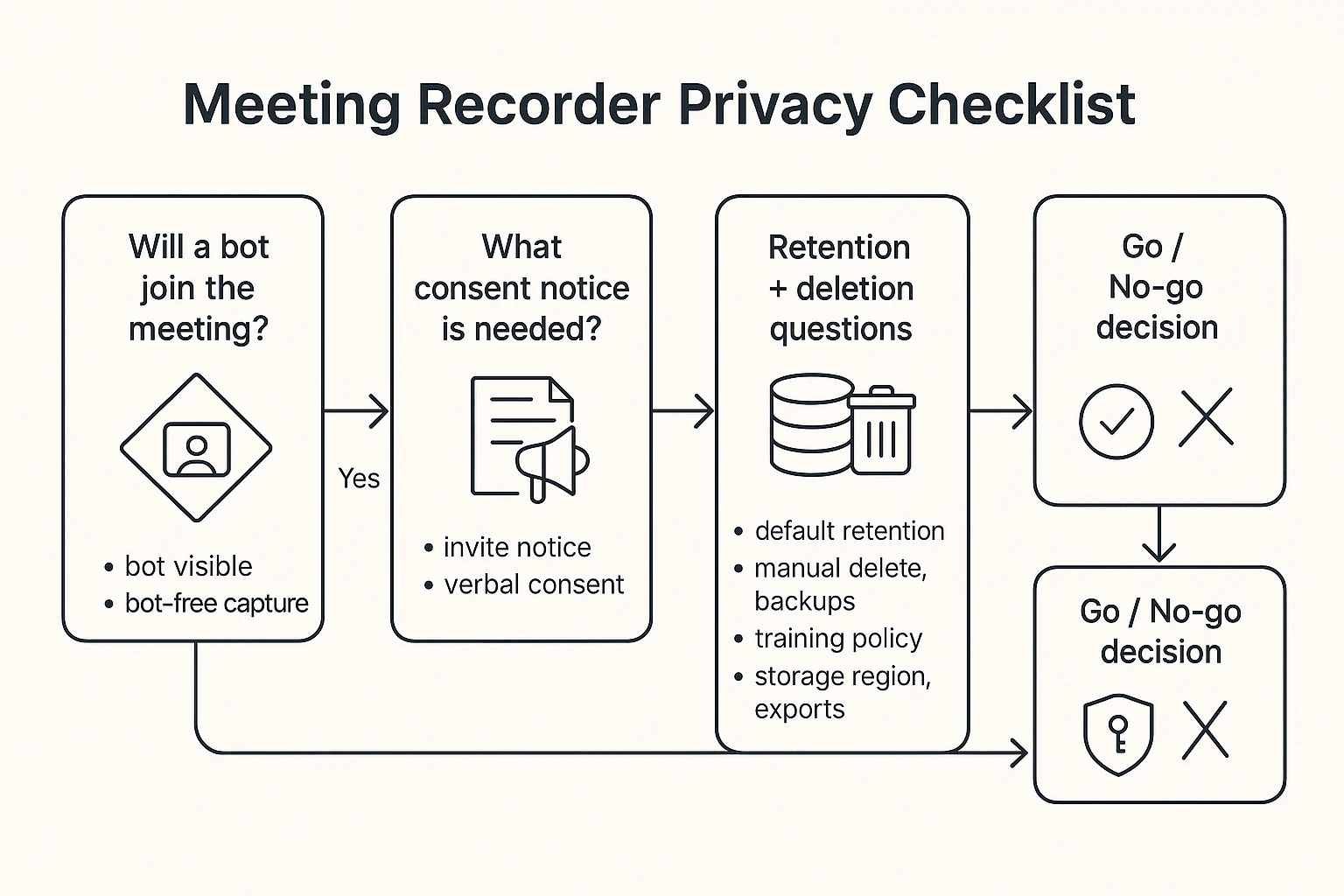
Bot vs bot-free: when it matters
A meeting bot shows up as a participant. That can change how people talk. It can also break client rules, especially in legal, healthcare, finance, and public-sector work.
Bot-free recorders work differently. They capture locally (device audio) or via an extension that records your meeting audio without "joining" as an attendee. In practice, that means fewer objections mid-call, fewer "please remove the bot" moments, and fewer policy conflicts when a client bans third-party attendees.
Use this quick test before any trial:
- Would a client notice a new attendee in the participant list?
- Does your company require consent before recording?
- Do you run interviews where trust and comfort affect answers?
Data retention + deletion: what to ask
Transcripts are personal data. So are audio files, speaker labels, and even "action items" that name people. If a vendor can't answer basic retention questions, don't treat it as a safe system of record.
Start with a simple checklist:
- Default retention: how long are audio, transcripts, and summaries stored?
- Deletion: can you delete a single file, a project, or a whole workspace?
- Backups: if you delete, is it removed from backups, and when?
- Model training: is your data used to train models, yes or no?
- Storage location: where is the data stored, and can you choose region?
- Exports: do exports include speaker names, timestamps, and hidden metadata?
Also plan "bring-your-own-consent." That means you own the process: a clear meeting notice, a verbal confirmation at the start, and a written note in the invite when needed. Deletion rights matter here too, because Regulation (EU) 2016/679 (General Data Protection Regulation), Article 17 sets a clear expectation: the controller "shall have the obligation to erase the personal data without undue delay" when grounds apply.
Team admin needs (roles, SSO, audit logs)
Solo users can "make do." Teams can't. Once you have 10+ people recording calls, you need control and proof.
Minimum admin features to look for:
- Roles and permissions (Owner/Admin/Member/Guest) to limit access
- Workspace separation for clients, departments, or regions
- Central offboarding (remove a user, keep the workspace data)
- Audit logs (who accessed, shared, exported, or deleted)
SSO (single sign-on) is login via your company identity provider. It matters because procurement teams want one place to enforce MFA, password rules, and user access. If a tool lacks SSO, enterprise rollout often stalls.
Compliance reality check (GDPR, SOC 2, HIPAA) and how to validate claims
Bad lists treat compliance badges like a feature. In reality, these are frameworks, not guarantees. "GDPR-aligned" doesn't tell you where data sits or how deletion works. "SOC 2" can vary by scope. And "HIPAA-ready" is meaningless without the right contract setup.
What to request in your vendor review:
- The SOC 2 report (ask for Type II and the scope)
- A DPA (data processing addendum)
- A current subprocessor list
- A clear data residency statement
- Retention and deletion policy, including backups
For many teams, the "best meeting transcription app" is the one that clears security review with the least friction. If it can't, the accuracy won't matter because it won't get approved.
Step-by-step: turn a meeting transcript into a report (bot-free)
If you're comparing a notta alternative, the real test is what happens after you get the transcript. Below is one end-to-end, bot-free workflow using TicNote Cloud: capture or upload a meeting, clean it up, ask cited questions, then generate a client-ready report (or slides, a podcast brief, or a mind map) from the same Project.
Step 1: Create a Project and add content (so context stays together)
Start by creating a Project for one clear "bucket," like a client account, recruiting role, or research theme. This matters because your transcript is more useful when it lives next to related files (past calls, specs, PDFs, interview notes).
In TicNote Cloud's web studio, open an existing Project or make a new one. Then add meeting material in whichever way matches your day:
- Upload audio/video files you already have
- Import existing transcripts or supporting docs (PDF/Word/Markdown)
- Record meetings in a bot-free way (where supported), so no notetaker bot needs to join the call
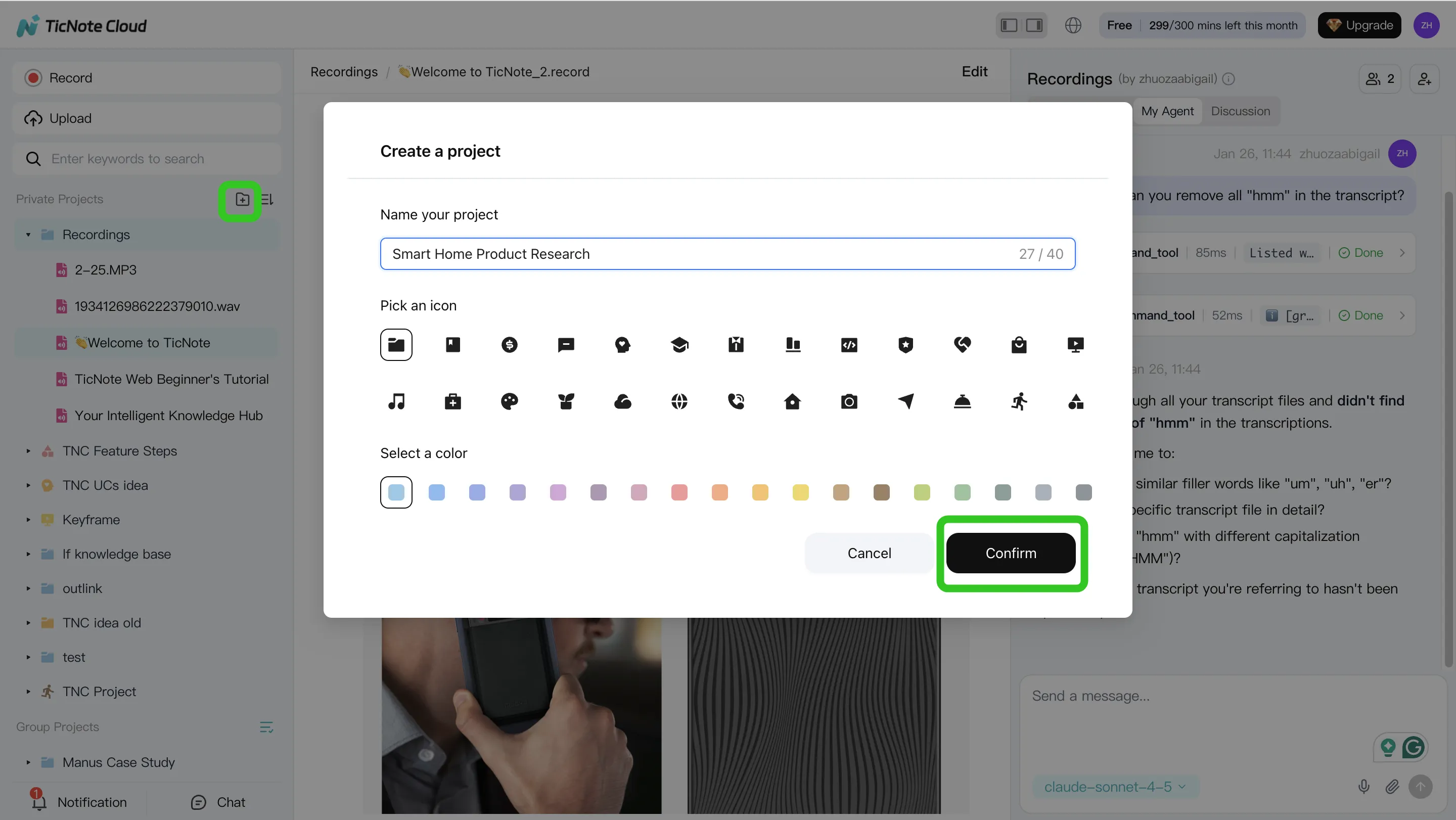
Practical tip: name Projects by "team + outcome," such as "ACME Q2 Expansion" or "User Interviews: Onboarding." It keeps outputs easy to find later.
Step 2: Use Shadow AI to search, analyze, edit, and organize (with receipts)
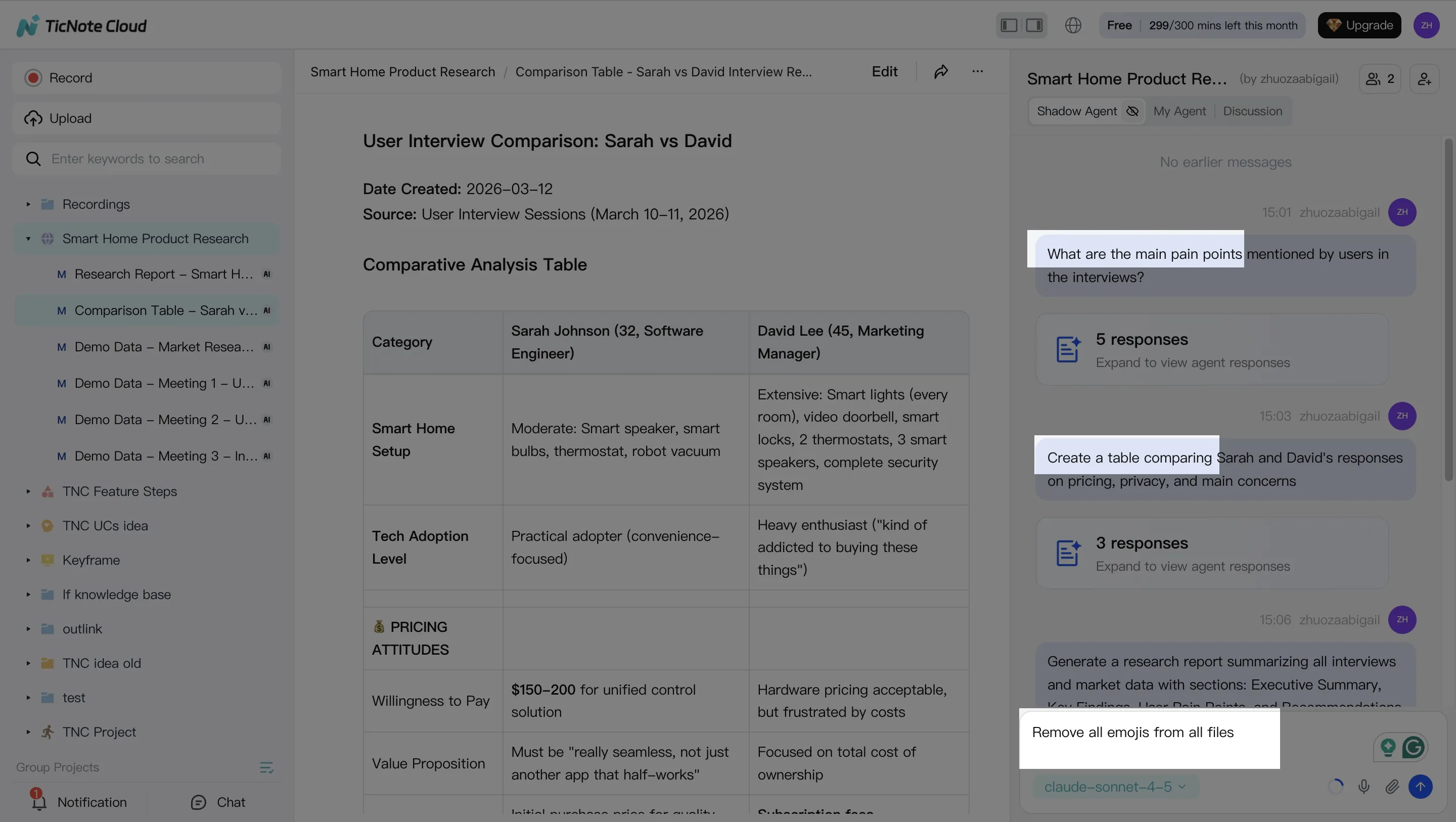
With your files in place, use Shadow AI on the right side of the screen to pull answers from your Project. The key move is to ask for citations back to specific transcript moments, so the report stays verifiable.
Here are prompts that map to real work:
- "What are the top 5 pain points customers mentioned? Include citations."
- "Compare the last 3 calls. What themes repeat?"
- "List decisions, risks, and next steps. Put owners if stated."
Then do a quick transcript cleanup in the built-in editor. Fix speaker names, product terms, and key acronyms. Even 3–5 minutes of edits can prevent repeated errors in every future summary and report.
To keep your output consistent across meetings, standardize an internal structure (you can reuse it every time):
- Agenda items
- Key findings
- Decisions
- Risks / open questions
- Action items (owner + due date if said)
Step 3: Generate deliverables (report first, then any format you need)
Now turn the transcript into a deliverable. In TicNote Cloud, you can ask Shadow AI directly or use the Generate button to produce structured outputs.
A simple "meeting report from transcript" request that works well is:
- "Create a client recap report with: context, what changed, decisions, next steps."
- "Use a neutral tone. Keep it under one page."
- "Add citations for every decision and metric."
From the same Project, you can also create alternate assets without reworking the content:
- Web presentation (HTML) for a fast shareable recap
- Podcast summary + show notes for internal enablement
- Mind map for planning and stakeholder alignment
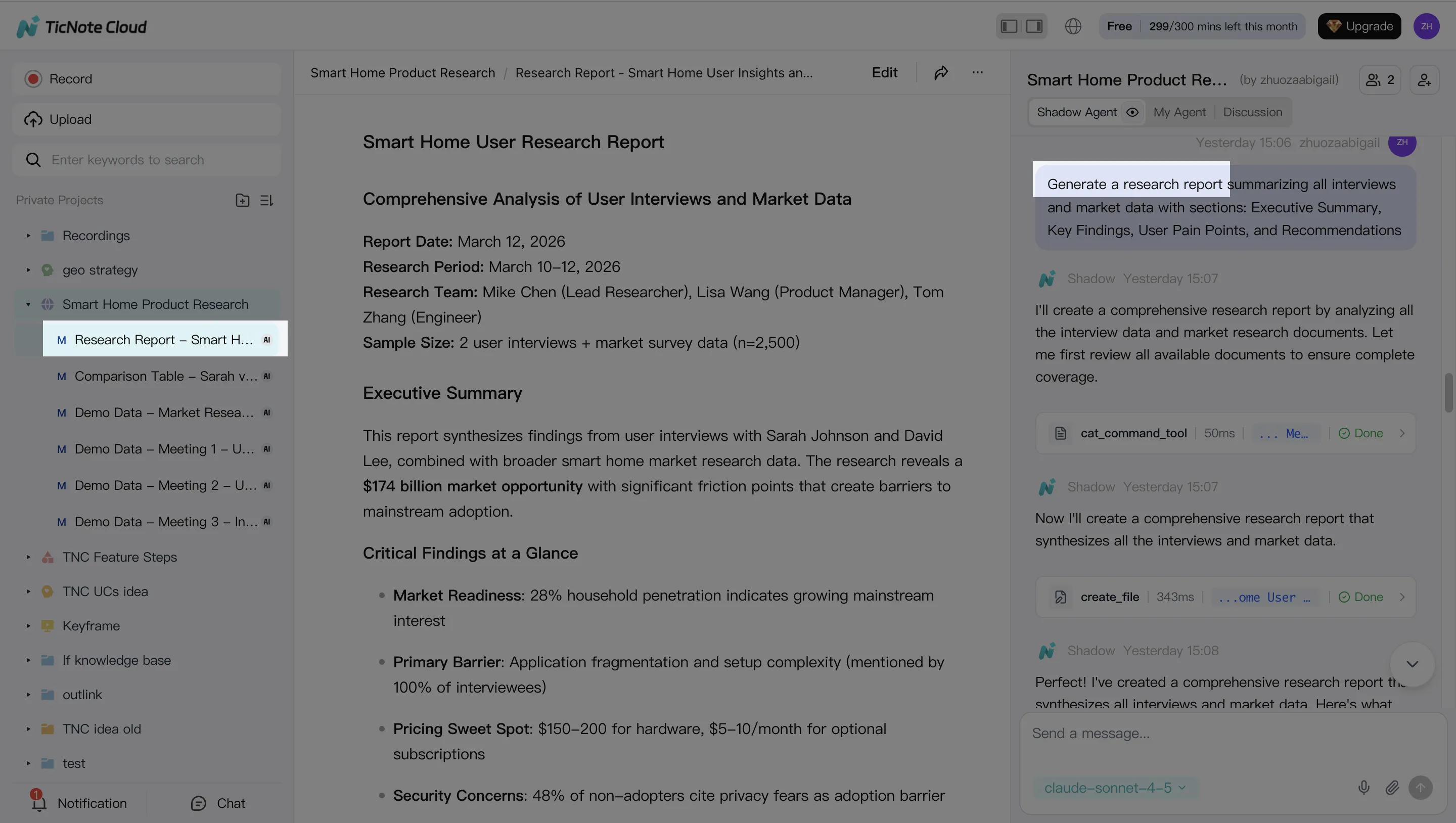
Once it's generated, export to what your team already uses—DOCX/PDF/Markdown/HTML—so you don't lose time reformatting before you share.
Step 4: Review, refine, and collaborate (then keep the Project as your memory)
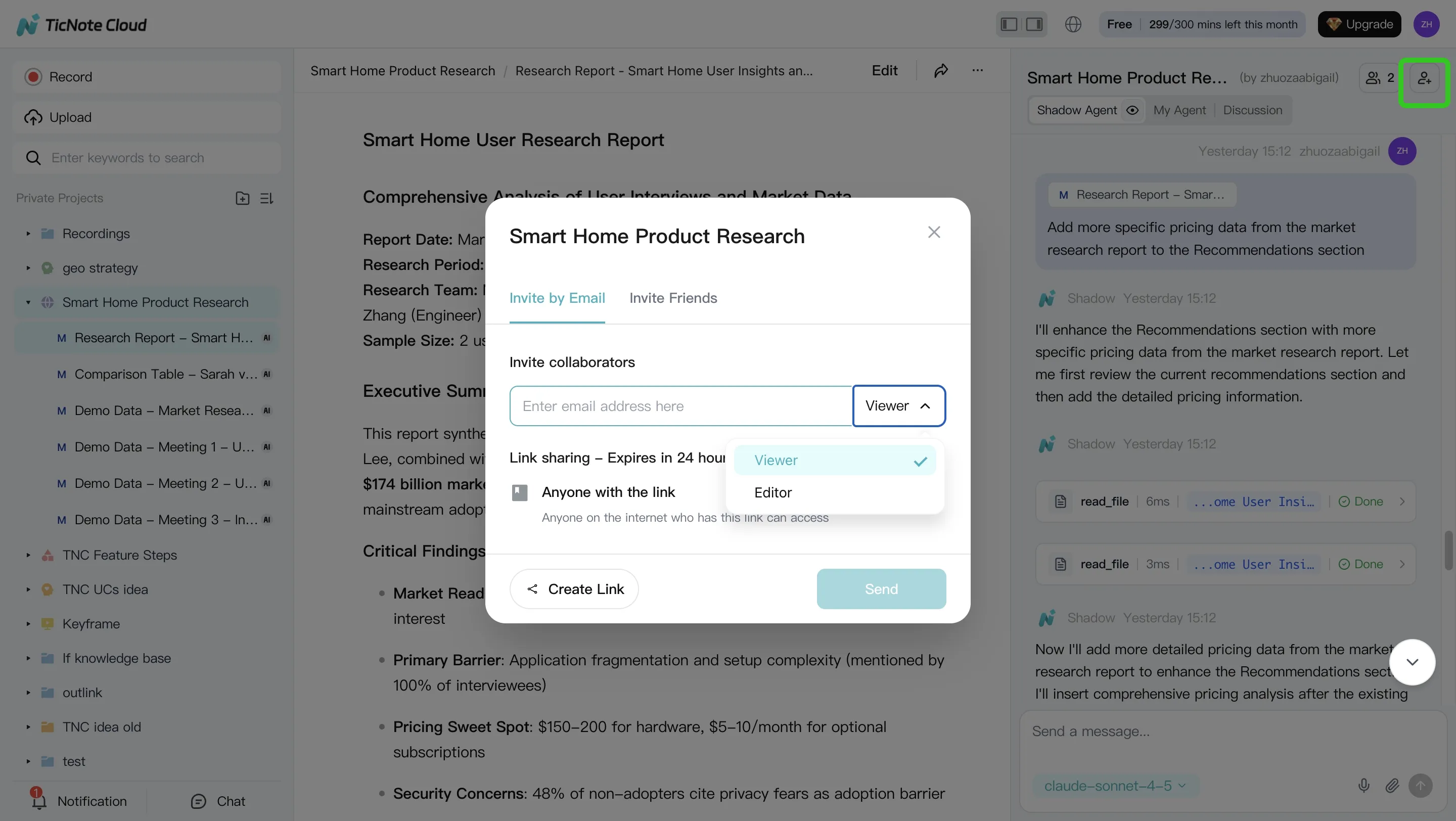
Treat the first draft as a working version. Review for tone, missing owners, and unclear next steps, then ask Shadow AI to revise only what needs revision (for example, "make this more executive," or "split next steps into Sales vs Product").
For team workflows, share the Project with the right access level (Owner/Member/Guest). Teammates can comment, resolve edits, and run their own questions and reports inside the same permission boundaries.
Finally, don't delete the Project after you send the report. Keeping it alive turns each meeting into compounding context. If you also evaluate NotebookLM-style workflows for meetings and PDFs, this "Project as a knowledge base" approach is the main unlock: the next meeting starts with history, not a blank page.
App workflow summary: Create a Project, capture or upload meeting audio, use Shadow AI for Q&A and summaries, then generate and share deliverables from the same Project.
Final thoughts: the best Notta alternative depends on what you need next after the transcript
Most Notta alternative tools can produce a decent transcript. The real gap shows up after that moment: can you edit the text fast, reuse it across work, share it cleanly, and control access as a team? If your follow-up still takes 30–60 minutes per meeting, the "best" pick is the one that turns raw words into ready-to-send outputs.
Pick by outcome (the shortest path to value)
- Bot-free capture + editable transcripts + reusable outputs: TicNote Cloud
- Free meeting library and quick sharing: tl;dv
- Coaching + CRM-style intelligence: Fireflies.ai or Avoma
- Production-grade audio/video editing: Descript
- Offline-first privacy: Whisper or MacWhisper
Here's the practical way to decide. Start with one real meeting (not a demo clip). Run the same test you used in this guide: a quiet 1:1, a multi-speaker overlap, and a noisy hybrid segment. Then judge the output that matters: fewer edits, clearer action items, and a shareable report your team will actually reuse.
Try TicNote Cloud for Free and turn one meeting into a reusable report.


