


 Extension
TL;DR
Most startup founders write their first PRD by Googling a template — and end up with a 10-section enterprise doc that nobody reads. Try TicNote Cloud for Free and generate a company-specific PRD from a conversation in minutes.
You don't have a PM. You don't have a product team. And the templates you find online were built for 50-person orgs with dedicated roadmap meetings. If you fill one in, half the sections won't apply to your situation. The result: a blank doc, a 20-page spec your engineer ignores, or no spec at all — and a feature that ships wrong.
This guide gives you a lean, startup-native PRD template you can fill in today — just 7 sections, no jargon, no wasted rows. You'll also learn the 3 mistakes first-time founders make when writing PRDs, and how to generate one automatically using an AI skill agent if you'd rather start from a conversation instead of a blank page.
What Is a Product Requirements Document Template (And Why Founders Get It Wrong)
Before you write a single line of code, your team needs to agree on what you're building and why. That's what a PRD is for — and it's also where most first-time founders run into trouble.
What a PRD actually is
A product requirements document is a short, written agreement between you and your team about what a feature does, who it's for, and how you'll know it worked. That's it. It's not a design spec, not a project plan, not a business case. It's the one document that keeps your engineer from building the wrong thing while you're in back-to-back sales calls.
The classic definition is functional and practical: a PRD answers what the product needs to do, not how to build it. Think of it as your team's shared source of truth before anyone opens a code editor.
Why most PRD templates don't work for startups
The product requirements document templates you find through a quick search — Confluence, Notion, Aha! — were designed for teams that have a PM, a QA lead, a design review process, and quarterly planning cycles. A typical enterprise PRD template has 10 or more sections: release criteria, risk assessment, legal review, localization requirements, dependency mapping.
If you're a three-person startup, half of those sections are irrelevant, and the other half will take you four hours to fill in. According to MDPI Systems research, approximately 50% of software projects fail to meet expectations — and unclear or missing requirements are consistently among the top causes. Founders often respond by either skipping the PRD entirely or over-engineering it. Neither works.
Early-stage startups benefit from a leaner approach. You don't need to understand how competitors structure their analysis to write a good PRD — you need to understand your own customer's problem well enough to describe it in one sentence.
What a startup PRD needs to do
A good startup PRD answers exactly four questions:
- What are we building? — A clear description of the feature or product, in plain language.
- Who is it for? — One specific user, not five personas.
- Why now? — The business or customer reason this is the next thing to build.
- How will we know it worked? — One or two measurable outcomes.
If your PRD answers those four questions in one page, it's done. Everything else is optional.
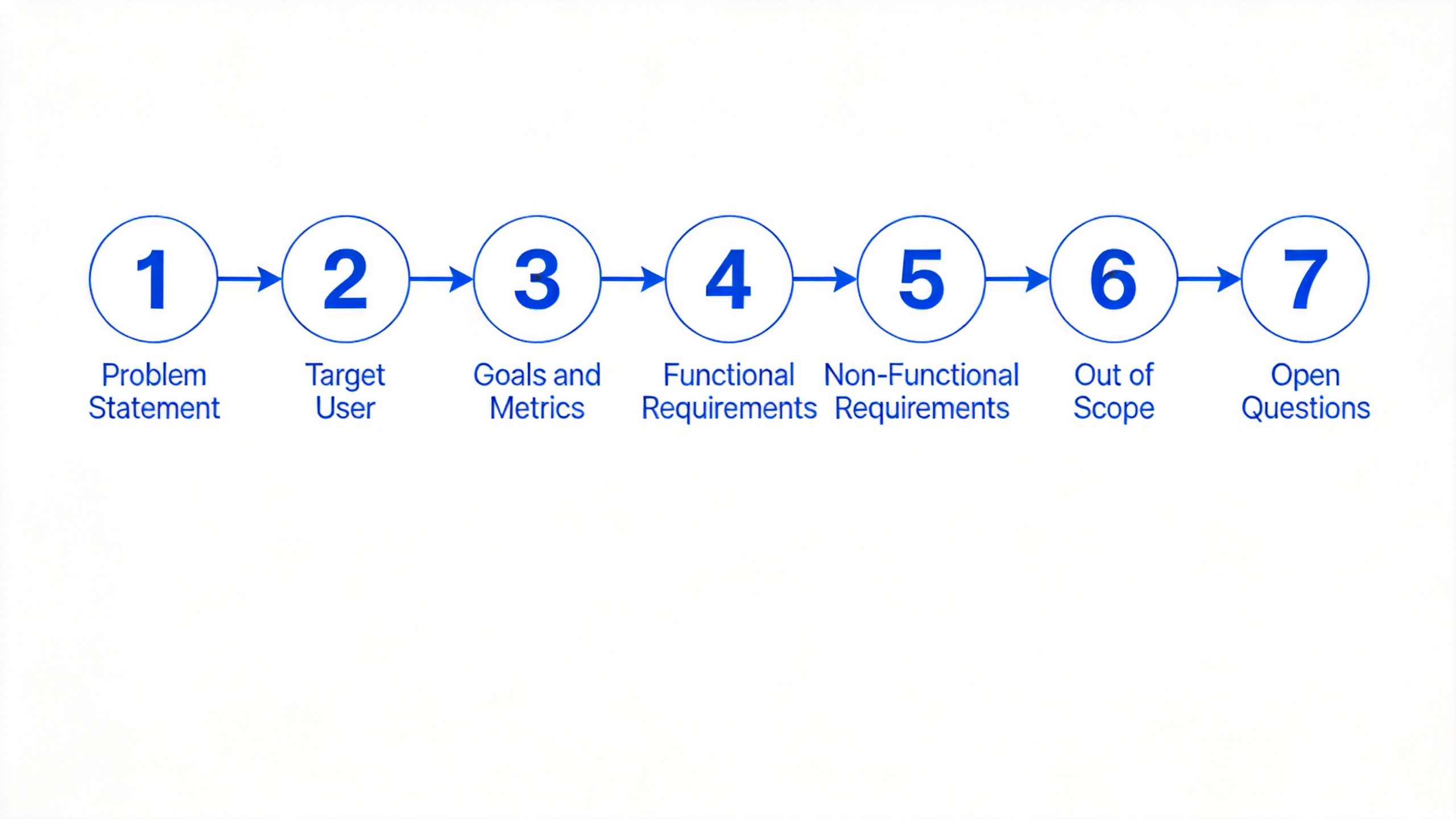
What to Include in a Startup PRD: The 7 Essential Sections
A lean startup PRD covers exactly what your team needs to know before building — nothing more. Here are the 7 sections that matter, with examples from a real early-stage context.
1. Problem statement
One sentence. What problem does this feature solve, for whom, and why does it matter now? Everything else in the PRD follows from this.
Example: "Freelance clients can't see the status of their project without emailing us — which creates 5+ support messages per client per week and makes us look unprofessional."
If you can't write the problem in one sentence, you're not ready to write requirements yet.
2. Target user
Pick one user. Not five personas — one. Who is feeling this problem most acutely right now, and what's their context?
Example: "A solo freelancer managing 3–5 active client projects, checking in from a mobile device between client calls."
The more specific you are, the easier it is for your engineer to make the right design decisions without asking you 20 questions.
3. Goals and success metrics
Write 1–2 outcomes that would tell you this feature worked. Keep them measurable.
Example:
- Goal: Reduce inbound client status questions
- Metric: Client support messages down 60% within 30 days of launch
Avoid vague goals like "improve client experience." If you can't measure it, you can't ship toward it.
4. Functional requirements
What must the product do? Write each requirement as a plain-language bullet. Use a checklist format.
Example:
- Client can log in with email and view a read-only project dashboard
- Dashboard shows current phase, last update, and next milestone
- Founder can update project status in under 2 minutes from any device
Keep each requirement atomic — one action per bullet. If it takes two verbs to describe, split it.
5. Non-functional requirements
Constraints on how the system must behave: performance, security, platform. Keep this section short.
- Performance: dashboard loads in under 2 seconds on a 4G connection
- Platform: web-first; mobile-responsive required
- Security: no client PII stored client-side; session expires after 24 hours
For a three-person startup, three to five bullets is enough. You can expand later.
6. Out of scope
Explicitly list what you're NOT building in this version. This is often the most useful section because it prevents scope creep before it starts.
Example:
- No in-app messaging between client and founder (v1)
- No file upload or document sharing
- No email notifications (will evaluate after v1 launch)
If your engineer asks "what about X?" and you haven't written it down, it'll get built anyway. Use this section as your pre-emptive "no."
7. Open questions
Unresolved decisions that could block or delay engineering. Don't leave these in your head. Write them down with an owner assigned.
Example:
- Do clients need to create an account, or can they access via a magic link? (Owner: @founder, due: Friday)
- Does the dashboard need to support multiple projects per client in v1? (Owner: @engineer, decision needed before sprint start)
This section turns blockers into tracked tasks. A team that knows about how to break down complex tasks before building starts avoids the most common mid-sprint derailments.
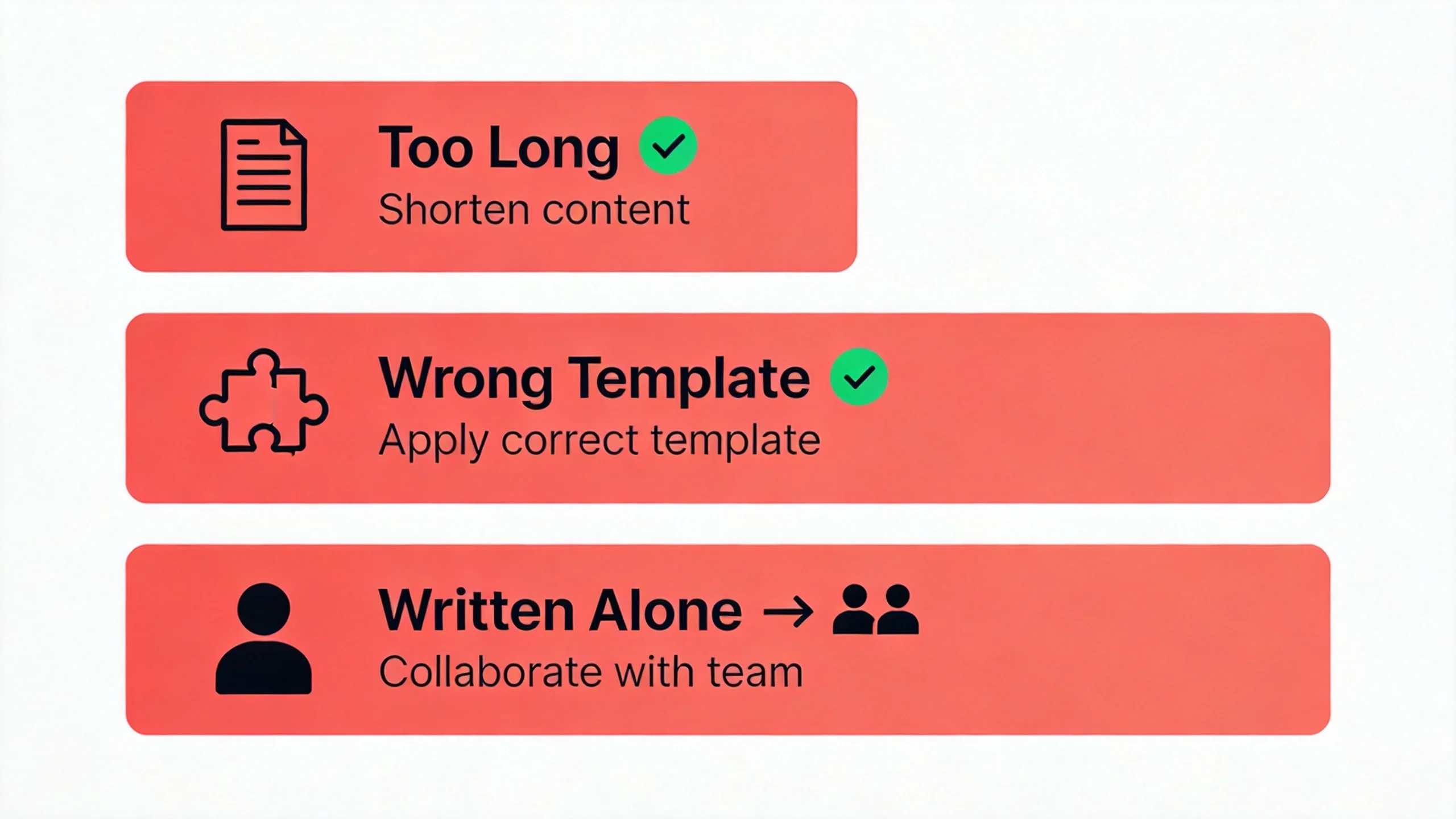
3 Mistakes Founders Make When Writing Their First PRD
Most first-time founders either skip the PRD or over-engineer it. Neither approach works. Here are the three patterns that come up most often, and how to fix them.
Mistake 1: Writing a PRD nobody reads
You sit down to write the PRD and, somewhere between the background section and the risk assessment table, it turns into a 15-page document. Your engineer gets it, skims the first two paragraphs, and builds from memory anyway.
This happens because founders conflate the PRD with every other document they think they should have. The PRD becomes a dumping ground for context, rationale, edge cases, and open questions — all valid content, none of it necessary in a first pass.
The fix: impose a one-page constraint before you start writing. Set a timer for 30 minutes. If you can't write the core requirements in that time, you don't have enough clarity yet — and that's a signal to talk to your users again, not to write more.
Mistake 2: Copying an enterprise template
A 10-section Confluence or Notion template looks authoritative. It has fields for legal review, localization requirements, and dependency mapping. It was built by a PM at a 200-person company who needs sign-off from six stakeholders.
You are not that company. Filling in those sections creates hours of busywork — and the result is a document that sounds formal but contains no useful information, because half the fields don't apply to your situation yet.
Project Management Institute research shows that ineffective communication is the primary contributor to project failure one third of the time. A PRD that buries the real requirements in a sea of boilerplate isn't communication — it's noise. Pair a lean structure with a solid competitor analysis process to make sure your requirements are grounded in real market gaps, not internal assumptions.
The fix: use the 7-section structure in this guide. Delete anything that doesn't apply. Ship a draft your engineer can act on today.
Mistake 3: Writing it alone
Founders often treat the PRD as a solo deliverable — something they hand to the engineering team after thinking it through alone. The problem is that requirements written without input from the person building them are full of unstated assumptions.
Your engineer knows things you don't: which database changes a "simple" feature actually requires, where the current architecture creates constraints, which edge cases are harder than they look. When you write requirements without that input, you guarantee at least one revision after the build starts.
The fix: draft the PRD with your engineer in the room — even async works. Share a half-finished draft and ask one question: "Is there anything in here that would take longer than I think?" That conversation will surface more useful information than an hour of solo writing.
Free Startup PRD Template (Fill in the Blanks)
Copy the template below directly into a shared doc. Fill in the brackets, delete the placeholders that don't apply, and share it with your engineer before your next sprint. That's all it takes.
Product: [Feature or product name]
Author: [Your name] | Date: [YYYY-MM-DD] | Version: [1.0]

## Problem Statement
[One sentence: what problem does this solve, for whom, and why now?]

## Target User
[Describe the specific user experiencing this problem.
Include context: role, situation, current pain point.]

## Goals & Success Metrics
- Goal: [What outcome are we driving?]
- Metric: [How will we measure success?
  e.g., X% of users complete checkout within 60 days of launch]

## Functional Requirements
- [ ] [What must the product do? One requirement per line.]
- [ ] [Each bullet = one action. Split anything with two verbs.]
- [ ] ...

## Non-Functional Requirements
- Performance: [e.g., page loads in under 2s on a 4G connection]
- Platform: [e.g., web-first; mobile-responsive required]
- Security: [e.g., no PII stored client-side; session expires after 24h]

## Out of Scope (v1)
- [What are we explicitly NOT building in this version?]
- [List each exclusion as a separate bullet.]

## Open Questions
- [ ] [Unresolved decision or dependency — who owns it, by when?]
- [ ] ...
How to use this template as a 3-person startup team:
Start with the Problem Statement — if you can't write it in one sentence, stop and talk to a user before continuing. Once that sentence is clear, the rest of the template follows naturally.
For the Functional Requirements section, write each bullet as if you're describing it to a new engineer who knows nothing about the feature. If you catch yourself using the word "obviously," that's usually a sign the requirement needs more detail.
For Out of Scope, think about the three things you're most tempted to include but know you shouldn't ship yet. Write them down explicitly. Saying "no" in writing is more effective than saying it in a Slack message that gets buried.
For Open Questions, assign an owner and a decision deadline to each item. An open question without an owner is just a risk.
The whole template should take 20–30 minutes to fill in for a well-understood feature. If it takes longer, the feature needs more discovery work first — that's useful information before a single line of code is written.
How to Generate a Startup PRD with an AI Skill Agent
If you'd rather not start from a blank template, TicNote Cloud's Startup COO skill agent can generate a company-specific PRD from a conversation. You describe your company and what you need to build — it asks follow-up questions and produces a structured PRD grounded in your actual context, not a generic form.
Here's how it works, step by step.
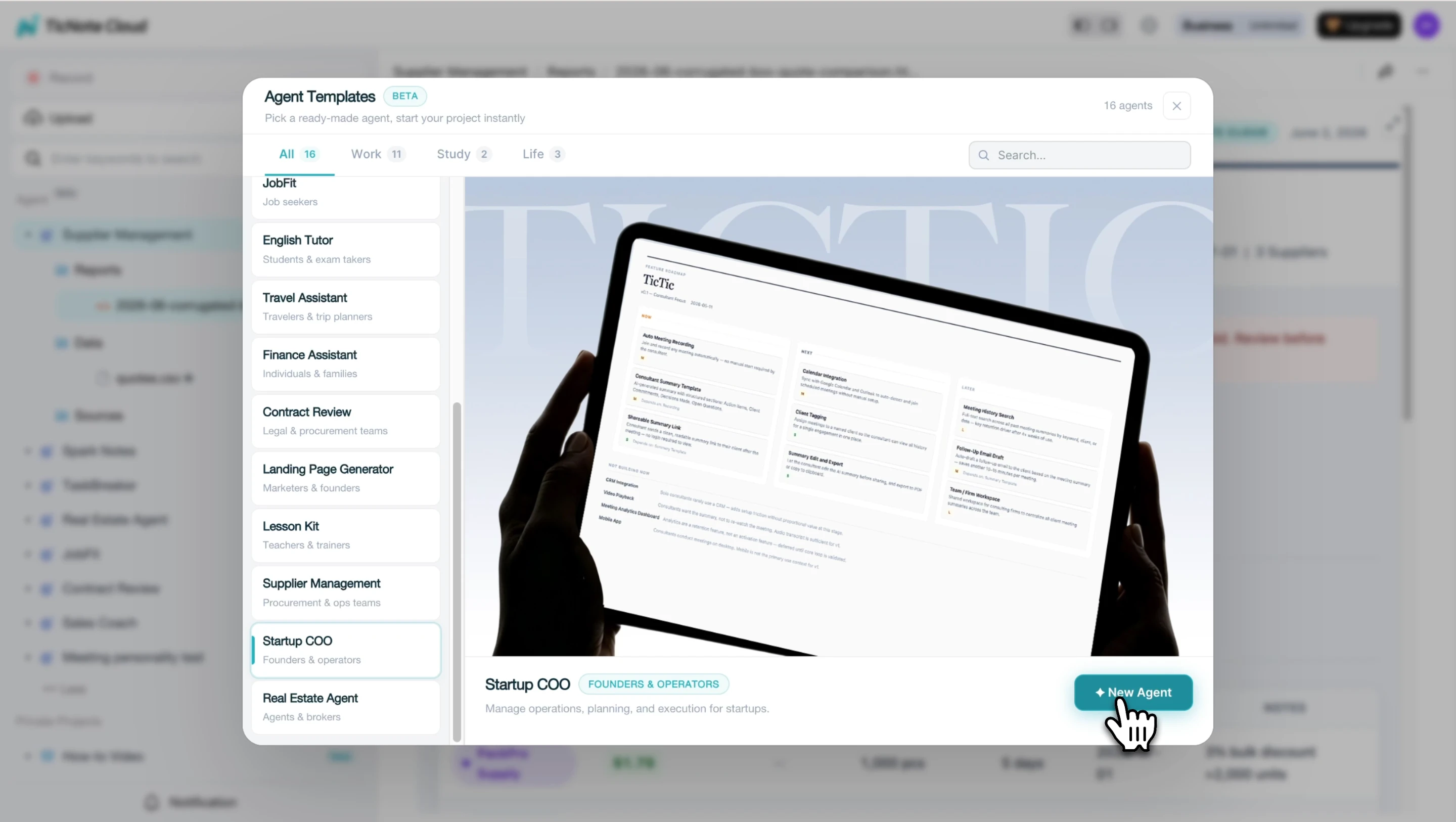
Step 1: Add the Startup COO skill agent
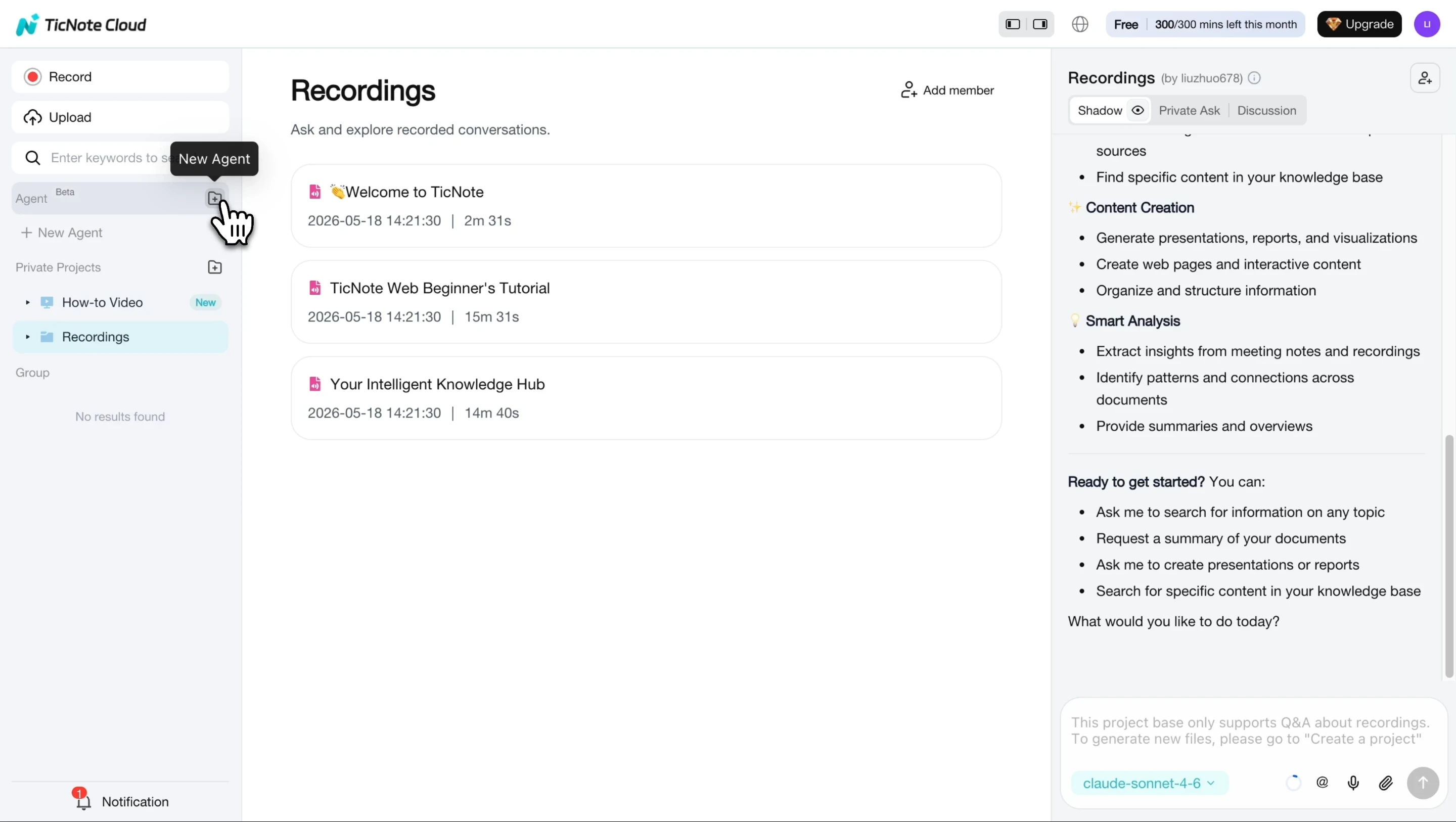
In TicNote Cloud, click Add Agent and open the Skill Agent library. Select the Startup COO skill to add it to your workspace. No configuration is needed — it's ready to use immediately once added.
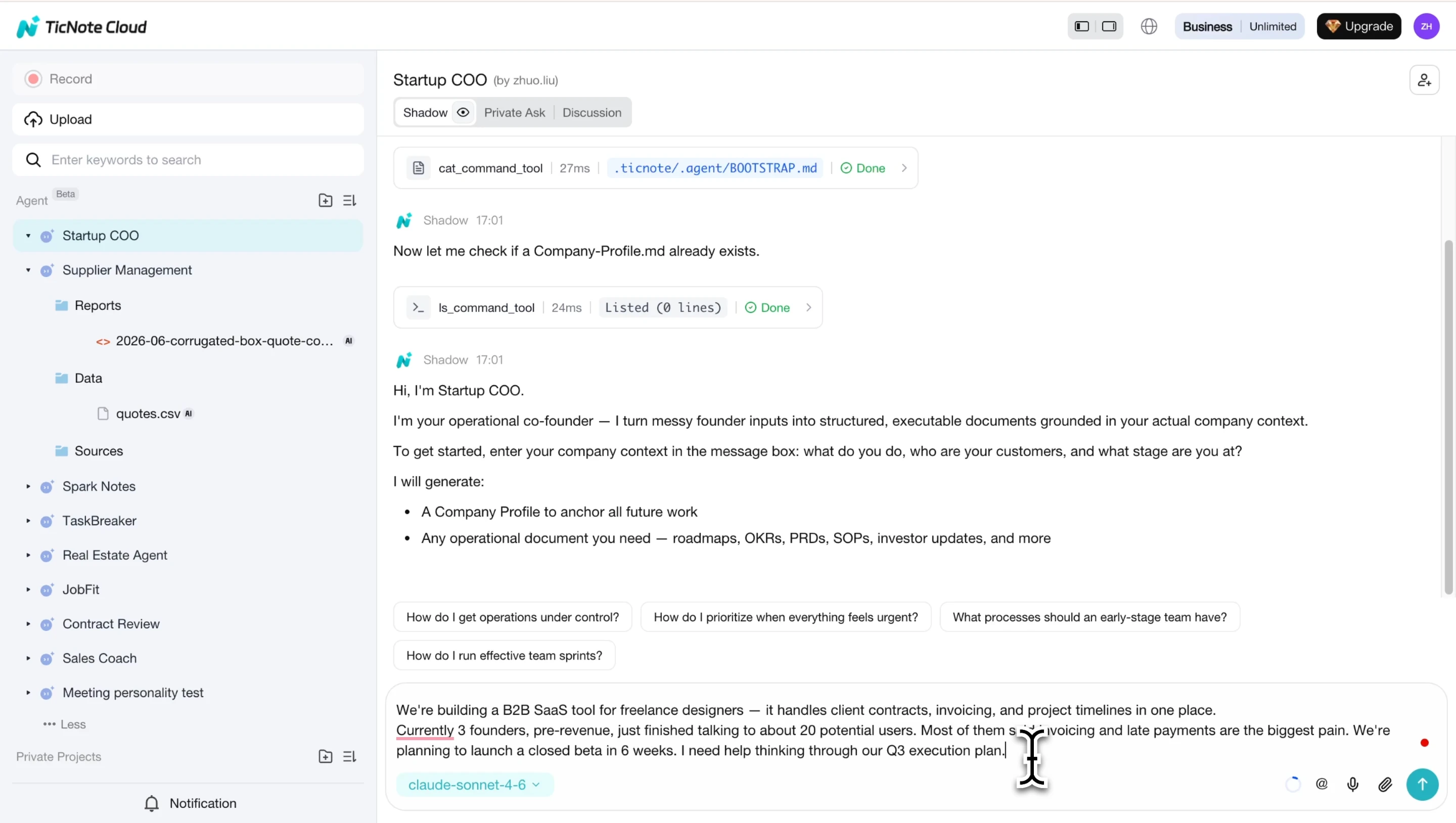
Step 2: Describe your company and what you need to build
Tell the agent about your company: what you do, who your customers are, and what stage you're at. The skill saves this as a Company Profile and uses it as the source of truth for everything it generates. Then ask for the document you need — in this case, a PRD for a specific feature.
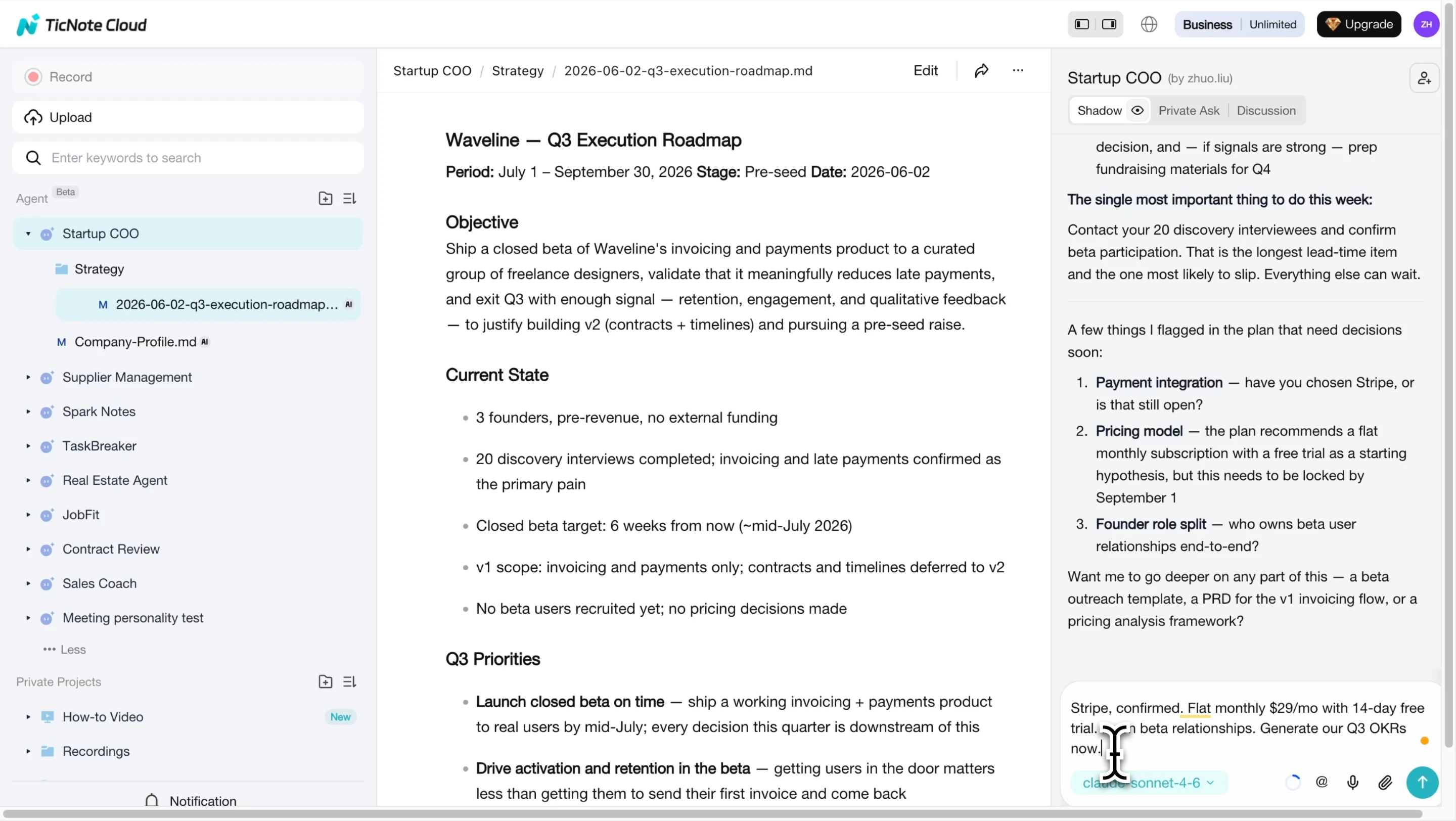
Step 3: Review and refine with follow-up context
The skill generates an initial draft and may ask clarifying questions — payment integration details, which users are in scope, technical constraints. Answer them to get a more accurate output. This is the step most templates skip: the agent is checking the same assumptions you'd normally discuss in a kickoff meeting
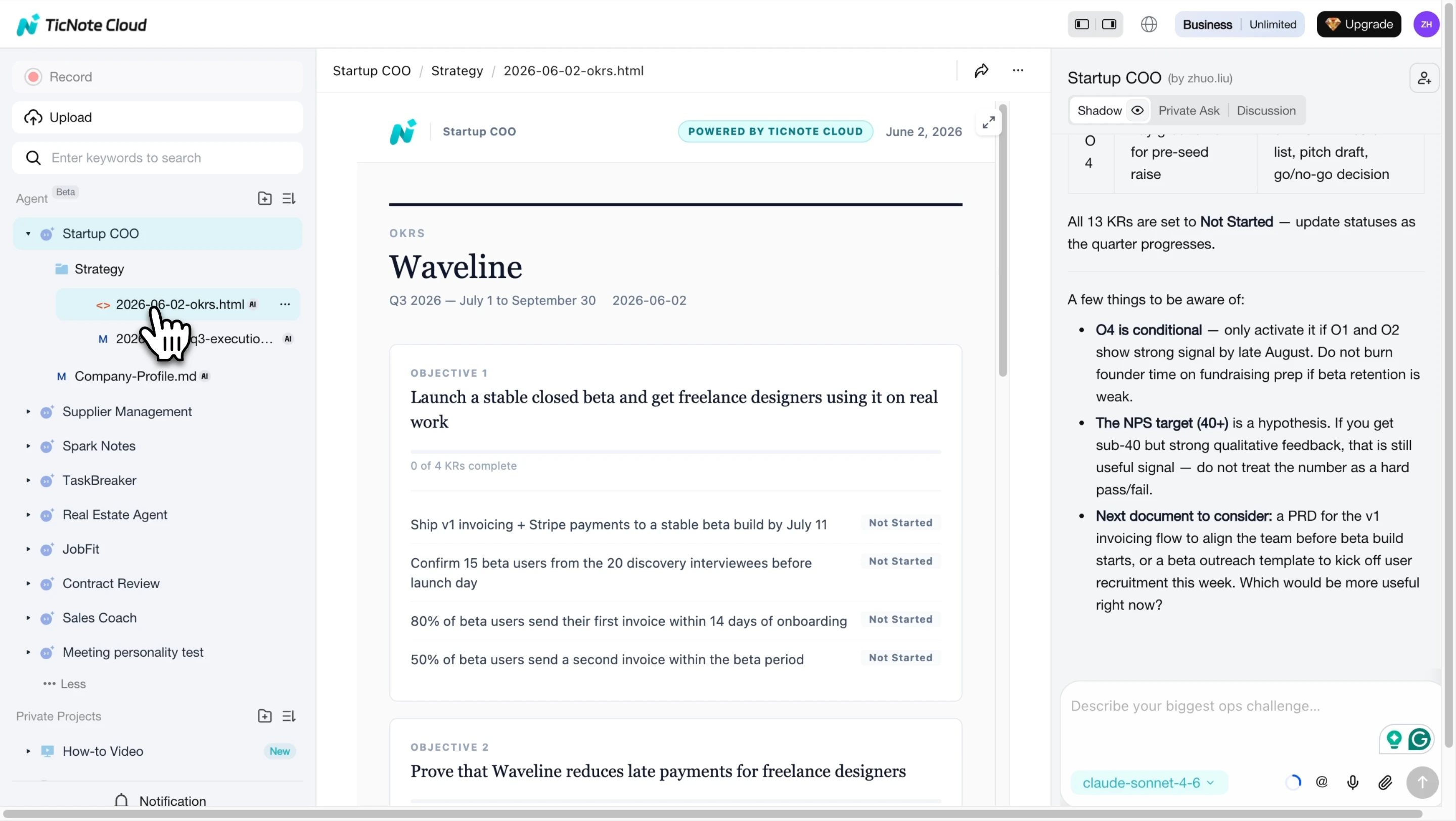
Step 4: View the final startup document
Once you've provided full context, the skill generates the final document. Roadmaps and OKR boards are rendered as visual HTML files, ready to share with your team or investors. Each document ends with a concrete next action — not just a summary.
Step 5: Open and review the generated PRD
Product requirements documents are saved as Markdown files inside the Product folder of your Startup COO workspace. Open the file to read the full PRD — with sections for Overview, Problem Statement, Target Users, and more — directly inside TicNote Cloud. If you also use TicNote Cloud to capture product discovery calls or user interviews, those recordings can feed directly into this workspace, so your PRD reflects real user language, not internal assumptions.
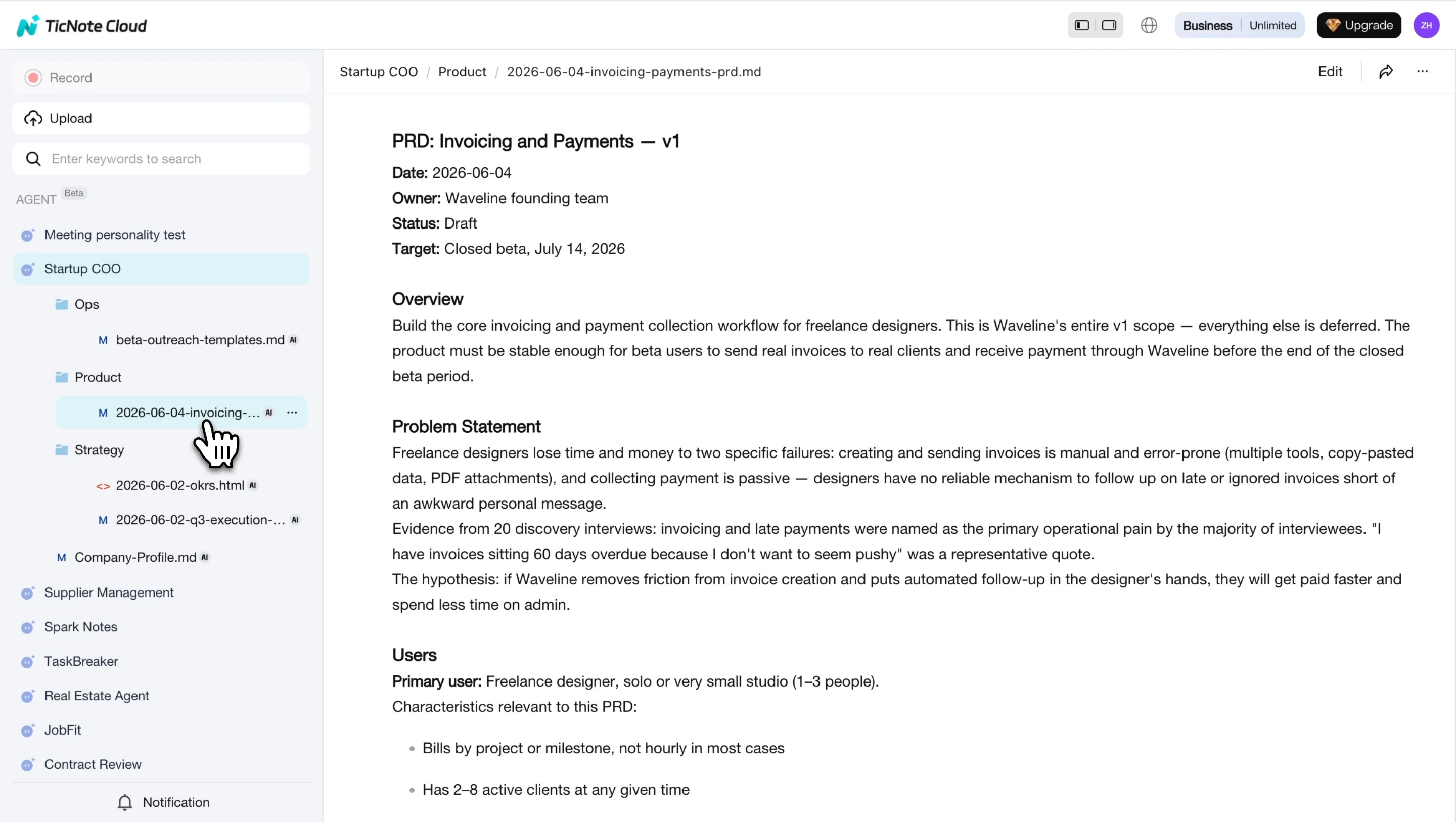
Founders who want both the template approach and the AI-generated approach can use them together: fill in the 7-section template for clarity, then run it through the Startup COO agent to expand and structure it. The result is a PRD that's both lean and complete. Teams that also want to understand the competitive landscape before finalizing requirements can explore free tools for competitor analysis to validate their problem statement against market reality.
Conclusion
A PRD doesn't need to be perfect. It needs to be shared. A one-page document your engineer can read in five minutes will do more for your next sprint than a polished 20-page spec that nobody opens.
Start with the 7 sections in this guide: problem statement, target user, goals and metrics, functional requirements, non-functional requirements, out of scope, and open questions. Fill in what you know. Flag what you don't. Share it before you build.
Try TicNote Cloud for Free — and use the Startup COO skill agent to generate your first company-specific PRD from a conversation.


