


 Extension
TL;DR: Best Sembly AI alternatives (fast picks by use case)
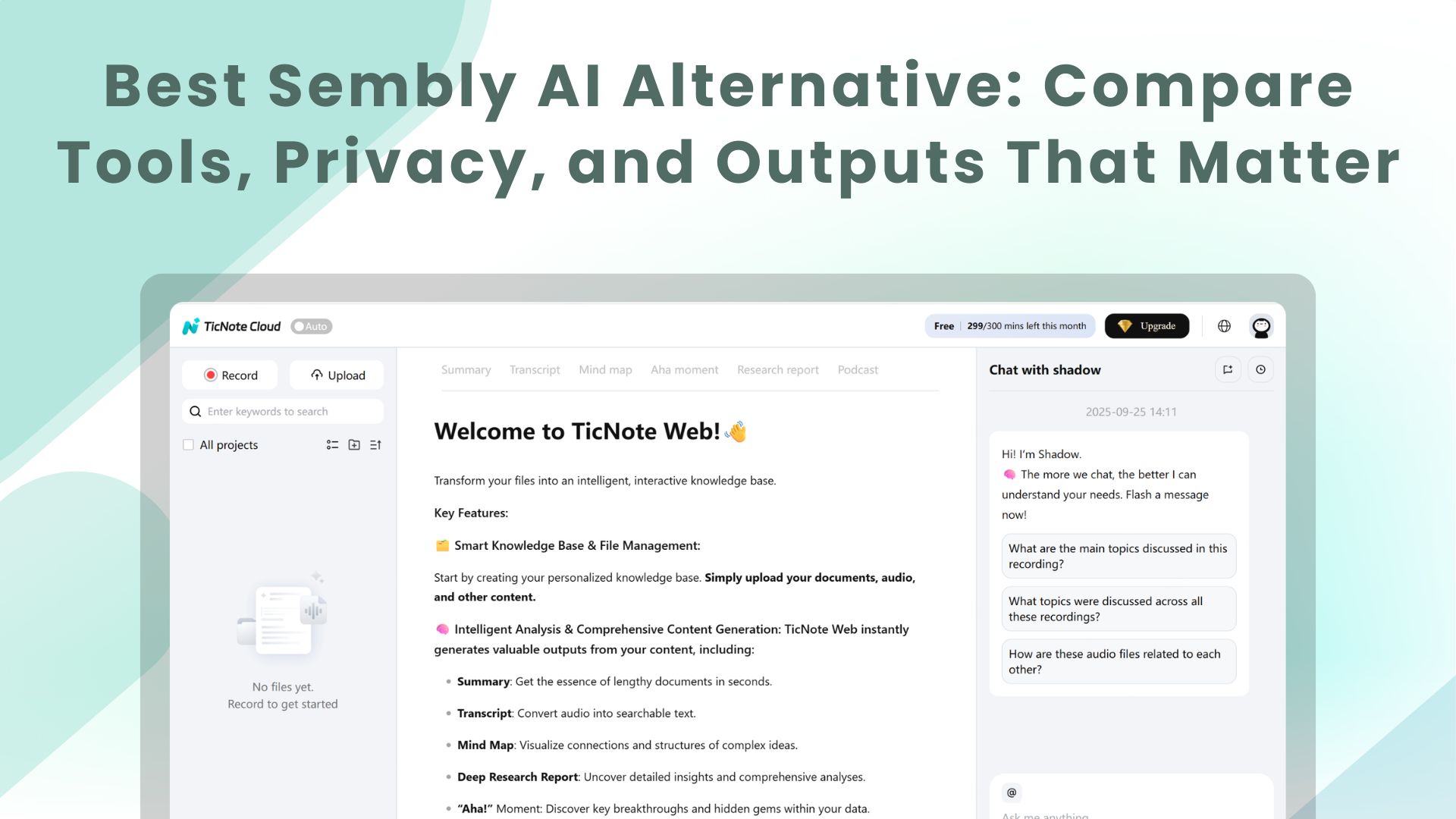
If you want the fastest Sembly AI alternative with the most usable outputs, try TicNote Cloud for free to turn meetings into reports, presentations, podcasts, and mind maps.
Problem: Most tools stop at a summary. That leaves you rewriting the same insights in docs and decks. Solution: TicNote Cloud keeps meetings inside Projects, so Shadow AI can generate publish-ready deliverables without copy-paste.
- Most "outputs" from meeting content: TicNote Cloud (deliverables like reports, presentations, podcasts, mind maps)
- Quick live notes for one person or a small team: Otter.ai
- Searchable meeting library + many integrations: Fireflies.ai
- Strong free option for individuals: Fathom
- Human-verified accuracy for legal/media/compliance: Rev
What makes a good Sembly AI alternative in 2026?
Most teams don't switch tools because they "want new AI." They switch because the basics break: missed audio, wrong speakers, and notes that no one trusts. Add weak admin controls, vague training terms, and exports that stop at a generic summary, and the tool becomes one more workflow you have to babysit.
When Sembly-style tools fall short (common pain points)
Here's what shows up in real evaluations:
- Inconsistent capture: dropped words, noisy rooms, or bad mic handling.
- Speaker mix-ups: the transcript is "accurate," but the attribution is wrong.
- Limited editing: you can export text, but you can't fix it fast in place.
- Admin gaps: few roles, no audit trail, weak permission controls.
- Unclear AI training terms: you can't tell what's used for model training.
- Output stops at "summary": you still write the report, deck, or recap email.
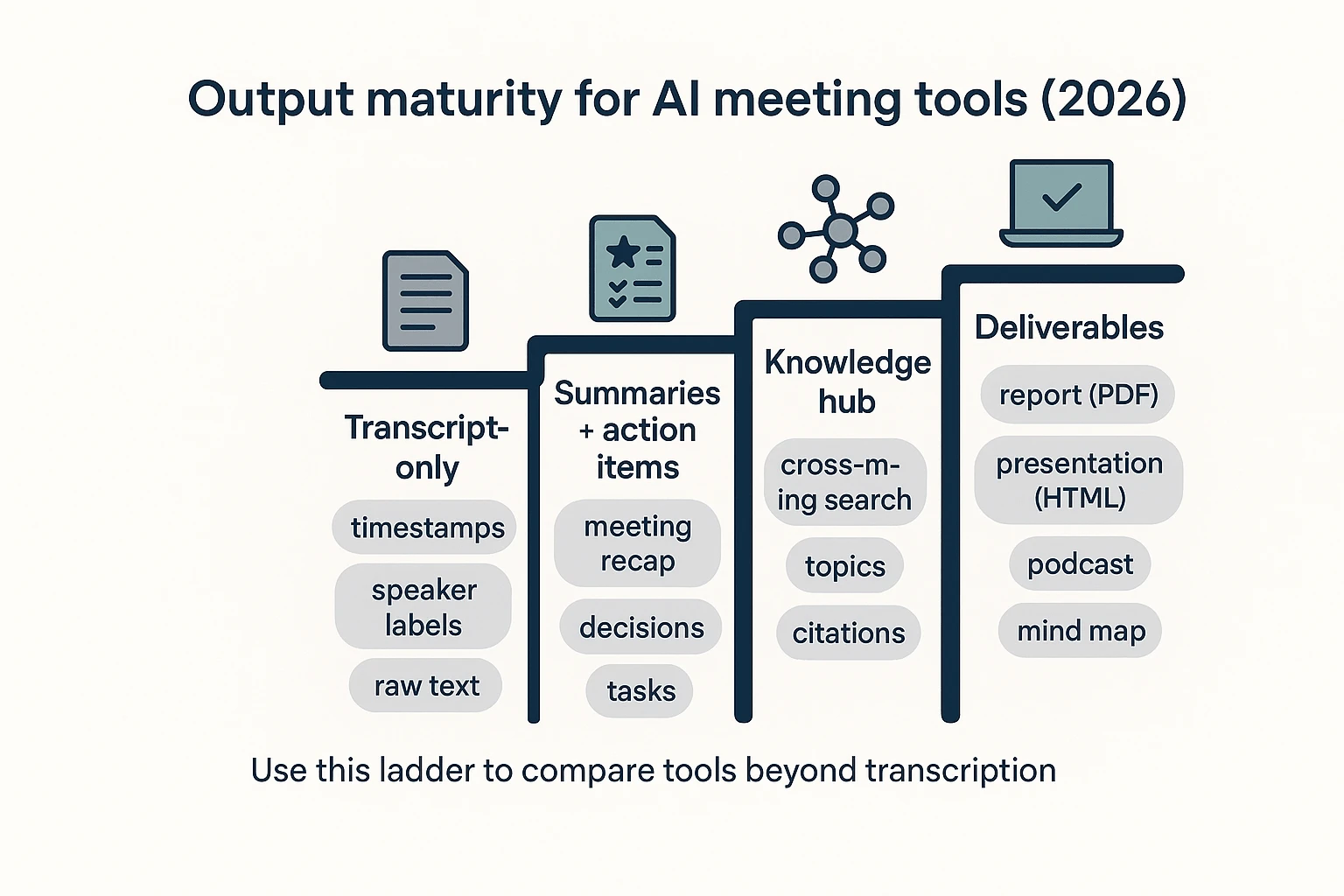
To make comparisons practical, use an "output maturity" frame:
- Transcript-only: raw text and timestamps.
- Summaries + action items: meeting recap plus tasks.
- Knowledge hub: searchable library across meetings and files.
- Deliverables: publish-ready assets like reports, presentations, podcasts, or mind maps.
The 8 criteria we'll use for every tool (so the list is fair)
Every alternative in this guide gets scored on the same rubric (100 points total). If a vendor claims "partial" support, treat it as "verify in demo/security review."
- Accuracy & speaker labeling (25): word accuracy plus diarization (who said what).
- Editing (10): editable transcript vs export-only fixes.
- Outputs (15): summaries, tasks, clips, and real deliverables.
- Search & knowledge reuse (10): cross-meeting search, topics, and citations.
- Integrations (10): calendar, Slack, CRM, and project tools.
- Admin controls (10): roles, permissions, logs, and controls at scale.
- Security & privacy (15): encryption, retention, and training opt-out.
- Enterprise readiness (5): SSO/SAML, data region options, and DPA support.
Bot vs bot-free: what it changes for consent and adoption
Bots can auto-join meetings and simplify setup. But they can also trigger consent friction, spook external guests, and get blocked by IT or client policies. Bot-free capture reduces disruption and often improves adoption in regulated teams.
Practical consent basics that work in most orgs:
- Put a short notice in the invite: "This meeting may be recorded for notes."
- Say it out loud at the start: "I'm recording for accuracy—OK to proceed?"
- Prefer local/on-device capture for sensitive calls; use cloud capture when you need team search, sharing, and centralized controls.
Comparison table: TicNote Cloud vs top Sembly AI competitors
If you're evaluating a Sembly AI alternative in 2026, don't compare tools by "summary quality" alone. Normalize the same inputs (platforms, capture model, languages, exports) and then score what matters: editable transcripts, admin controls, and whether outputs stop at notes—or ship real deliverables.
Normalized comparison matrix (2026)
| Tool | Capture model (bot vs bot-free) | Meeting platforms + upload support | Languages supported | Editable transcript | Core outputs | Output maturity (1–4) | Exports | Integrations | Admin controls | SSO/SAML | Compliance signals | Data retention controls | AI training opt-out / no-training | Audit logs | Data region options | Pricing snapshot (verify current limits) |
| TicNote Cloud | Bot-free (extension/app capture); uploads | Zoom/Teams/Meet (capture) + audio/video/doc uploads | 120+ (vendor-claimed) | Yes | Transcript, multi-level summaries, mind maps, translation, project Q&A with citations, reports/presentations/podcasts | 4 | TXT/DOCX/PDF, Markdown/DOCX/PDF, WAV, PNG/Xmind, HTML | Slack, Notion | Owner/Member/Guest; project permissions | Enterprise | GDPR-aligned (self-claimed) | Varies—verify | No-training policy (vendor-stated) | Yes (Shadow ops traceable) | US (vendor-stated) | Free: 300 mins/mo, 30-min cap/recording, 3 doc imports/mo, 10 AI chats/day; Pro $$12.99/mo; Biz$$29.99/mo; Ent: varies |
| Otter.ai | Bot-based (typical) + uploads | Zoom/Teams/Meet (varies) + uploads | Varies—verify | Partial (edits possible; limits by plan/workflow) | Transcript, summaries, action items, highlights | 2–3 | Varies—verify | Varies—verify | Partial | Enterprise | Varies—verify | Varies—verify | Varies—verify | Enterprise/varies | Varies—verify | Varies—verify |
| Fireflies.ai | Bot-based + uploads | Zoom/Teams/Meet + uploads | Varies—verify | Partial | Transcript, summaries, action items, search, some analytics | 2–3 | Varies—verify | Slack, CRM/Zapier (varies) | Partial | Enterprise | Varies—verify | Varies—verify | Varies—verify | Enterprise/varies | Varies—verify | Varies—verify |
| Fathom | Bot-based (typical) + uploads (varies) | Zoom/Meet (varies) + uploads (varies) | Varies—verify | Partial | Transcript, summaries, highlights, clips | 2 | Varies—verify | CRM (varies) | Partial | Enterprise/varies | Varies—verify | Varies—verify | Varies—verify | Varies—verify | Varies—verify | Varies—verify |
| tl;dv | Bot-based (typical) + uploads (varies) | Zoom/Teams/Meet (varies) + uploads (varies) | Varies—verify | Partial | Transcript, summaries, clips, some analytics | 2–3 | Varies—verify | Slack/Notion/Zapier (varies) | Partial | Enterprise/varies | Varies—verify | Varies—verify | Varies—verify | Enterprise/varies | EU/varies | Varies—verify |
| Avoma | Bot-based (typical) + uploads | Zoom/Teams/Meet (varies) + uploads (varies) | Varies—verify | Partial | Transcript, summaries, coaching, revenue/conversation analytics | 3 | Varies—verify | CRM (varies) | Yes (team/admin focus) | Enterprise/varies | Varies—verify | Varies—verify | Varies—verify | Enterprise/varies | Varies—verify | Varies—verify |
| Gong | Bot-based + uploads (varies) | Zoom/Teams/Meet (varies) + uploads (varies) | Varies—verify | Partial | Revenue intelligence, analytics, coaching, deal views | 3 | Varies—verify | CRM (strong) | Yes (enterprise) | Yes | Varies—verify | Varies—verify | Varies—verify | Yes (enterprise) | Varies—verify | Varies—verify |
| Rev (human + AI) | Upload-first; human transcription option | Uploads; meeting capture varies—verify | Varies—verify | Partial (depends on product) | Transcript with human accuracy option; captions | 1–2 | Varies—verify | Varies—verify | Partial | Varies—verify | Varies—verify | Varies—verify | Varies—verify | Varies—verify | Varies—verify | Varies—verify |
How to read the table (what "Partial" means)
"Partial" usually means one of four things:
- It's locked to an enterprise tier (SSO, audit logs, retention rules).
- It works on Zoom but not Meet/Teams (or needs a bot on some calls).
- You can edit only after export (not in-app collaboration).
- You need a connector (Zapier/CRM) to get the workflow you want.
Treat this table as a shortlist filter. Then confirm details in a demo plus a security questionnaire.
Quick takeaways (what most buyers learn fast)
- Bot-free capture is a real divider. It can reduce consent friction, but may limit "auto-join" convenience.
- Many tools stop at "notes + clips." That's Output maturity 2, sometimes 3.
- "Knowledge hub" tools (3) shine for search, not publishing.
- If your team needs editable transcripts plus project knowledge reuse plus publish-ready assets (reports, presentations, podcasts, mind maps), TicNote Cloud leads Output maturity level 4. Other tools can win for narrow needs, like human-verified transcripts (Rev) or deep sales analytics (Gong).
Top Sembly AI alternatives (standardized item cards)
If you're replacing Sembly, the real difference in 2026 isn't "can it transcribe?" It's what the tool outputs after the meeting: raw text, clean summaries, a searchable hub, or publish-ready deliverables. Use the cards below to compare options with the same lens: output maturity, capture model (bot vs bot-free), and the admin/security checks that matter.
TicNote Cloud
- Best for: Turning meetings into deliverables and building project knowledge over time
- Output maturity level: Level 4 (deliverables)
- Capture model: Bot-free options (extension/app capture) + uploads
- Strengths: Editable transcripts, Project workspaces, 120+ languages, and Shadow AI that generates reports (PDF/Word), web presentations (HTML), podcasts, and mind maps grounded in your sources
- Gaps/risks: Verify retention controls and data-region fit during security review; bot-free capture may require user-side setup (vs a bot that "just joins")
- Admin & security notes to verify: Roles (Owner/Member/Guest), traceable AI operations, encryption, "data not used to train models" (confirm in DPA), retention controls (confirm), SSO in Enterprise
- Pricing snapshot: Free includes 300 mins/month (30-min web recording cap) and clear usage limits; Professional ($$12.99/mo or$$79/yr) and Business ($$29.99/mo or$$239/yr) scale minutes and imports; Enterprise is custom with SSO and 7/24 support
- Who should pick it: Teams that want meeting notes to become reusable project knowledge—and assets you can ship (reports, decks, podcasts) without copy-paste
Otter.ai
- Best for: Fast live notes and personal/team transcripts
- Output maturity level: Level 2 (summaries + action items)
- Capture model: Often bot-assisted joins depending on setup; check calendar/meeting behavior
- Strengths: Live transcription, speaker ID, sharing/collab, and common exports; quick "what was decided?" retrieval
- Gaps/risks: Less "deliverable" depth; bot presence can raise consent issues in some orgs
- Admin & security notes to verify: SSO availability by plan, meeting-join controls, retention, and whether AI training opt-out exists
- Pricing snapshot: Varies—verify on vendor pricing; in trials, test export limits and team sharing controls
- Who should pick it: Individuals or small teams that mainly need reliable live notes
Fireflies.ai
- Best for: Searchable meeting library + workflow integrations
- Output maturity level: Level 3 (knowledge hub)
- Capture model: Commonly bot-based recorder joins meetings (consent tradeoffs)
- Strengths: Strong library search, topic tracking, and automation into tools like CRM/Slack/Notion-style flows; good for recurring meeting ops
- Gaps/risks: Bot compliance and participant comfort; library sprawl if naming/permissions aren't tight
- Admin & security notes to verify: SSO tier, retention policies, audit logs, and domain controls (confirm in admin docs)
- Pricing snapshot: Varies—verify; confirm how many integrations are gated by tier
- Who should pick it: Ops teams that want meeting intel to flow into existing systems; see this deeper breakdown of ranked Fireflies alternatives and scoring when comparing workflows.
Fathom
- Best for: Free/low-friction notes for individuals (often Zoom-forward)
- Output maturity level: Level 2 (summaries + action items)
- Capture model: Typically tied to video meeting platforms; confirm bot vs local capture
- Strengths: Quick summaries, shareable highlights, simple setup
- Gaps/risks: Lighter admin controls and team governance; may not scale for regulated orgs
- Admin & security notes to verify: Centralized controls, retention, and SSO support (if any)
- Pricing snapshot: Varies—verify; confirm free-plan limits and whether team features require paid
- Who should pick it: Individuals who want fast notes with minimal setup
Notta
- Best for: Multilingual transcription and editing
- Output maturity level: Level 2–3 (summaries + light hub)
- Capture model: Uploads + meeting capture options (confirm behavior)
- Strengths: Language coverage, editor workflow, solid exports
- Gaps/risks: Enterprise admin depth varies by plan; verify permissioning and auditability
- Admin & security notes to verify: SSO/SAML, data region, retention, and training opt-out terms
- Pricing snapshot: Varies—verify; test multilingual accuracy on your accents and jargon
- Who should pick it: Global teams that prioritize languages and editability
MeetGeek
- Best for: Structured summaries and a searchable meeting hub
- Output maturity level: Level 3 (knowledge hub)
- Capture model: Often bot-based meeting capture
- Strengths: Templates, follow-up automation, team library search
- Gaps/risks: Bot consent and external participant experience; template-heavy outputs can feel rigid
- Admin & security notes to verify: Tier-based admin controls, retention, audit logs, and SSO availability
- Pricing snapshot: Varies—verify; confirm what "team" features cost
- Who should pick it: Teams that want consistent meeting summaries and automated follow-ups
Tactiq
- Best for: Lightweight, bot-free capture via browser captions
- Output maturity level: Level 1–2 (transcript + basic summaries)
- Capture model: Bot-free; relies on captions/subtitles where available
- Strengths: Fast setup, simple exports, good for lightweight documentation
- Gaps/risks: Caption-based capture can miss audio nuance, cross-talk, or poor caption quality
- Admin & security notes to verify: Workspace controls, retention, and who can access shared transcripts
- Pricing snapshot: Varies—verify
- Who should pick it: Teams that need quick, low-friction transcripts without a meeting bot
Krisp
- Best for: Noise cancellation + privacy-leaning capture
- Output maturity level: Level 1–2 (capture quality improvements + notes depending on setup)
- Capture model: Often includes on-device components for audio processing
- Strengths: Better audio in noisy rooms and call-center settings; can improve downstream transcript accuracy
- Gaps/risks: Not a full meeting knowledge hub; limited "project memory" and deliverable workflows
- Admin & security notes to verify: What's processed on-device vs cloud, retention, and enterprise admin controls
- Pricing snapshot: Varies—verify
- Who should pick it: Teams that struggle with audio quality and need cleaner inputs first
tl;dv
- Best for: Async teams that need video highlights and shareable clips
- Output maturity level: Level 2–3 (summaries + hub with clips)
- Capture model: Platform-based recording; confirm bot vs native capture
- Strengths: Clips, timestamps, highlight reels, and recurring reports; strong for "watch later" culture
- Gaps/risks: Less focused on turning meetings into formal deliverables; clip sprawl without governance
- Admin & security notes to verify: Sharing permissions, retention, SSO, and external access controls
- Pricing snapshot: Varies—verify
- Who should pick it: Distributed teams that communicate through recordings and highlights
Rev
- Best for: Human-reviewed transcripts when accuracy must be verified
- Output maturity level: Level 1 (transcript) with high verification option
- Capture model: Upload-based; human + AI options
- Strengths: Human review path for audits, legal, and research-grade needs
- Gaps/risks: Turnaround time and cost vary; not built as a meeting knowledge workspace
- Admin & security notes to verify: Handling of sensitive data, reviewer model, compliance options, retention
- Pricing snapshot: Varies—verify; confirm human vs AI rates and delivery times
- Who should pick it: Regulated teams that must defend transcript accuracy
Microsoft Copilot for Teams
- Best for: Microsoft 365-first orgs that want meeting intelligence inside Teams
- Output maturity level: Level 2–3 (summaries + tenant-governed knowledge)
- Capture model: Native to Teams meetings
- Strengths: Tenant controls, identity and compliance alignment, reduced vendor sprawl
- Gaps/risks: Limited outside Teams; portability and cross-platform coverage can be uneven
- Admin & security notes to verify: Tenant policies, data residency (tenant-dependent), retention/eDiscovery alignment
- Pricing snapshot: Varies—verify via Microsoft licensing
- Who should pick it: Enterprises standardized on M365 and Teams-first workflows
Zoom AI Companion
- Best for: Zoom-native users who want "good enough" summaries
- Output maturity level: Level 2 (summaries + action items)
- Capture model: Native inside Zoom
- Strengths: Low friction for Zoom orgs; admin controls live in Zoom
- Gaps/risks: Portability limits if you also use Meet/Teams; outputs may be less customizable
- Admin & security notes to verify: Account-level controls, retention, and data handling settings
- Pricing snapshot: Varies—verify in Zoom plan details
- Who should pick it: Zoom-heavy teams that value simplicity over advanced outputs
Google Meet (Gemini features)
- Best for: Google Workspace orgs standardizing on Meet
- Output maturity level: Level 2 (summaries and notes)
- Capture model: Native to Meet/Workspace
- Strengths: Central Workspace admin controls; fewer extra tools to manage
- Gaps/risks: Portability limits; depth depends on Workspace plan and settings
- Admin & security notes to verify: Workspace data handling, retention rules, and AI feature controls
- Pricing snapshot: Varies—verify via Workspace plan
- Who should pick it: Teams that live in Google Workspace and want minimal tool sprawl
Scribie
- Best for: Pay-as-you-go + optional human verification
- Output maturity level: Level 1 (transcript)
- Capture model: Upload-based
- Strengths: Budget-friendly for periodic needs; straightforward exports
- Gaps/risks: Not a meeting system of record; limited collaboration and automation
- Admin & security notes to verify: Data handling, retention, and human review chain
- Pricing snapshot: Varies—verify
- Who should pick it: Teams that need occasional transcripts without adopting a full platform
How to choose the right tool for your team
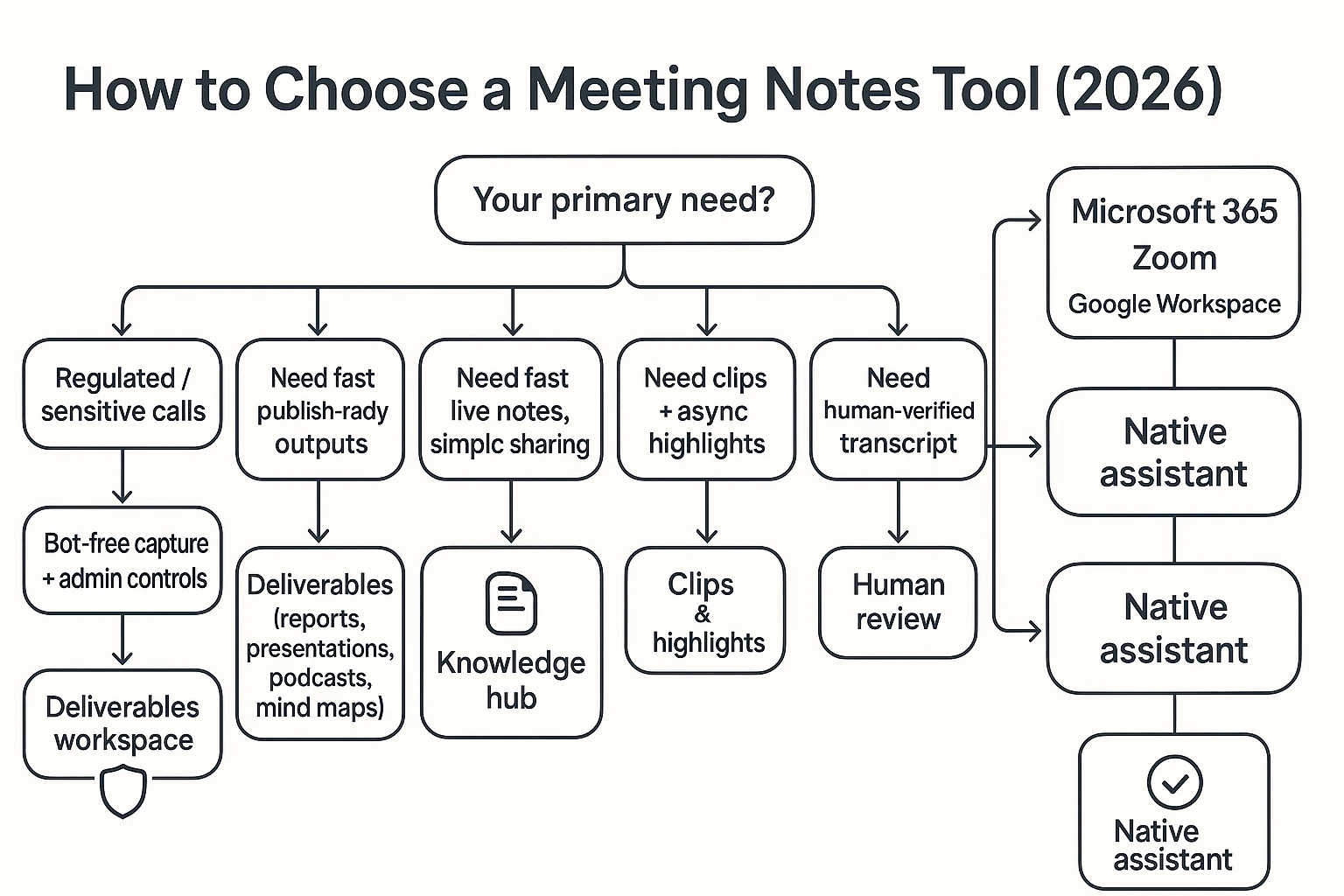
Picking a Sembly AI alternative in 2026 comes down to one thing: what you need as the "final output." Some teams only need quick notes. Others need a searchable knowledge hub. And some need publish-ready deliverables.
Match the tool to your output maturity
- Choose TicNote Cloud if you want bot-free capture options, editable transcripts, and one-click deliverables (reports, presentations, podcasts, mind maps). It's also the best fit when your team needs Project-based reuse across many meetings and files (so knowledge compounds instead of getting lost).
- Choose Otter.ai when you want fast live notes and simple sharing, and you don't need deep admin controls.
- Choose Fireflies.ai when you want a searchable meeting library tied to CRM/Slack workflows and you're fine with a meeting bot.
- Choose Fathom for individuals who want quick Zoom summaries at a low cost.
- Choose Notta for multilingual transcription and editing with light team workflows.
- Choose MeetGeek for structured summaries plus follow-up automation for client teams.
- Choose Tactiq if you want lightweight, bot-free, browser-based captions and notes.
- Choose Krisp if noise cancellation is the main requirement, and you don't need a knowledge hub.
- Choose tl;dv for async teams that care more about clips and highlights than full deliverables.
- Choose Rev when you need human verification for legal, media, or evidence workflows.
- Choose Microsoft Copilot for Teams if you live in Microsoft 365 and want governance through your tenant.
- Choose Zoom AI Companion if you're standardizing on Zoom and want the least tool sprawl.
- Choose Google Meet (Gemini features) if you're all-in on Google Workspace and want one admin surface.
- Choose Scribie for occasional transcription with optional human cleanup, not as your system of record.
Decision shortcut (common scenarios)
- Regulated client calls (consent + privacy controls) → TicNote Cloud: bot-free capture options and Project-level permissioned reuse.
- Research interviews across many sessions → TicNote Cloud: Projects + deliverables turn interviews into reports and presentations.
- Sales calls that must sync to CRM → Fireflies.ai: strong library + workflow tie-ins, if a bot is acceptable.
- Zoom-first individual contributor → Fathom: quick summaries and low friction.
- Need human-verified transcript for compliance → Rev: best when accuracy must be attested.
- All-in on Microsoft 365 → Microsoft Copilot for Teams: governance and controls stay in the tenant.
- Async team that shares highlights → tl;dv: clips and moments beat long summaries.
What security, privacy, and admin controls should you check before switching?
Switching from Sembly (or any meeting AI) isn't just about summary quality. It's about where your recordings live, who can access them, and what the vendor can do with your data. Use the checklist below to compare any sembly ai alternative in 2026 using the same rules.
Enterprise privacy mini-audit (paste into procurement)
Ask the vendor to answer these in writing:
- Encryption: Is data encrypted in transit (TLS) and at rest (AES-256 or equivalent)? Who manages keys (vendor-managed vs customer-managed keys)? Can you rotate keys and separate environments (prod vs test)?
- Retention + deletion: What's the default retention for audio, transcripts, and AI outputs? Can admins set auto-delete (for example, 30/90/180 days)? Is deletion permanent, including backups, and what's the timeline?
- "Do not train on our data": Is it no-train by default, or opt-out? What exact contract language confirms: (1) no model training, (2) no human review except support cases, (3) limited use for abuse prevention?
- Audit logs: Do you log recording access, transcript edits, exports, sharing changes, and AI actions (prompt + output)? Can logs be exported to a SIEM?
- Access controls: Do you support RBAC (role-based access control) with least privilege? Can you block public links, restrict guest access, and enforce domain-based sharing?
Compliance signals (what they really tell you)
Treat badges as starting points, not proof.
- SOC 2: Ask for the full report, not just "SOC 2 compliant." Check the period covered, carve-outs, and the Trust Services Criteria in scope.
- ISO/IEC 27001: Confirm the certificate is current and that the scope matches the product you'll use (not a parent company or a different service).
- HIPAA: If you handle PHI, ask if the vendor will sign a BAA (Business Associate Agreement) and what safeguards apply to audio and transcripts.
- GDPR: Confirm roles (controller vs processor), request a DPA template, and review sub-processors, breach notice windows, and cross-border transfer terms.
SSO/SAML and RBAC (admin must-haves)
For most IT teams, the basics are predictable:
- SSO/SAML for login enforcement and MFA consistency
- SCIM (if offered) for user provisioning and fast offboarding
- Role separation (billing admin ≠ content admin ≠ auditor)
- Central billing, domain controls, and policy-based sharing limits
- Support path for incidents (defined response times)
Also weigh bot vs bot-free capture. A meeting bot can trigger consent issues with external guests, and it can change what gets recorded. Bot-free tools reduce that friction, which can lower compliance risk.
Note: TicNote Cloud's Enterprise plan includes SSO and 7×24 support. During security review, confirm DPA terms and whether your data-region requirements can be met.
What's unique about TicNote Cloud compared with other meeting note tools?
Most meeting tools stop at a transcript and a summary. TicNote Cloud goes further: it's built to turn meeting content into reusable project knowledge and publish-ready assets. That difference matters when you're replacing a sembly ai alternative and you care about what happens after the call.
Build Project knowledge (not isolated notes)
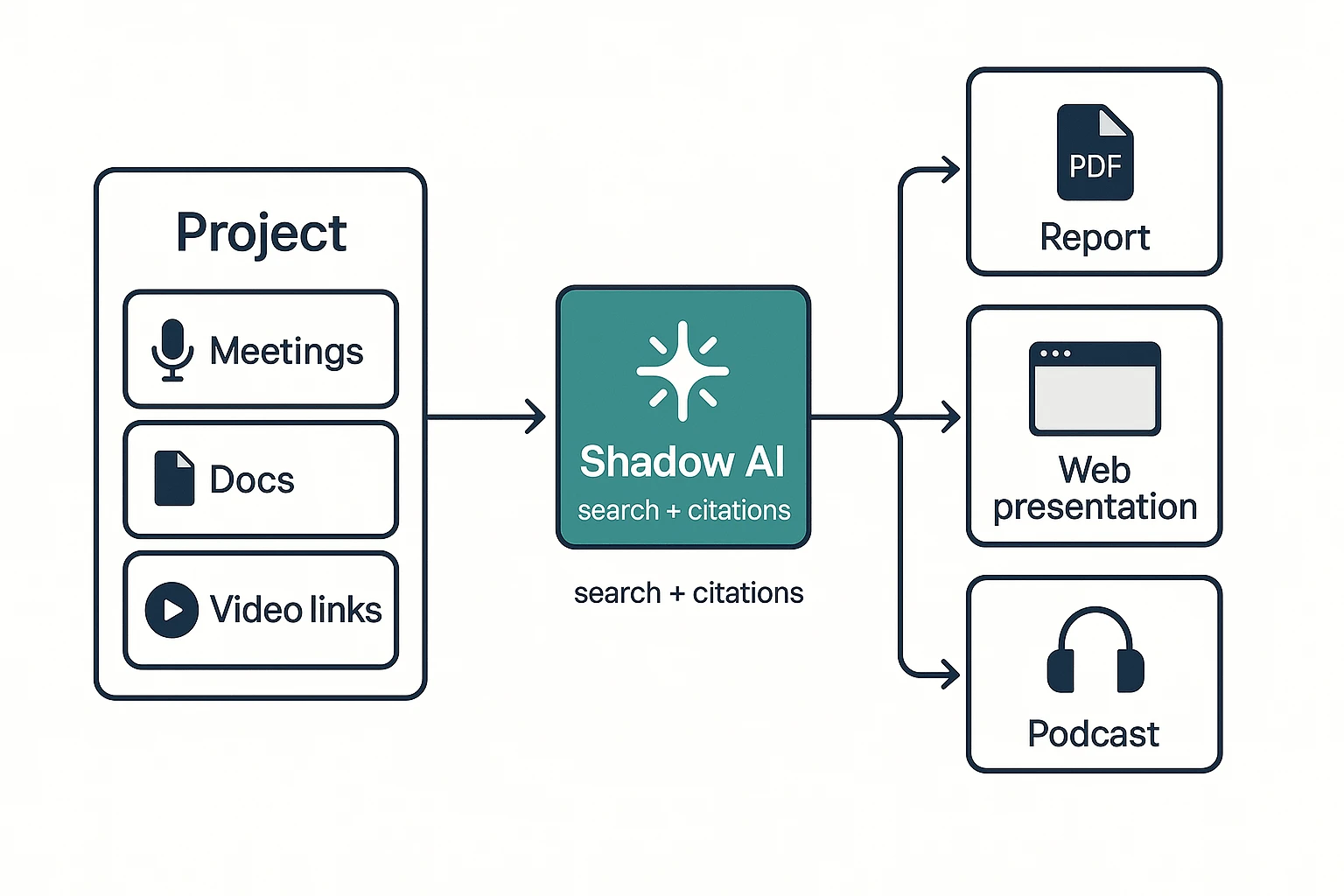
A Project is a shared space where meetings, documents, and video links live together. Instead of hunting across separate call notes, your context stays in one place and compounds over time.
That shifts "output maturity" up a level:
- Transcript-only tools: record → transcript (level 1)
- Summary tools: transcript → recap + tasks (level 2)
- TicNote Cloud Projects: many sources → searchable knowledge hub (level 3)
- Plus deliverables on demand: knowledge → reports, decks, podcasts, maps (level 4)
Use Shadow AI with citations (so answers stay grounded)
Shadow AI is designed to work inside your Project content, not generic web chat. When you ask a question or request a rewrite, it should point back to the exact meeting or file passages with clickable citations.
That reduces buyer risk in regulated or high-stakes work. Still, treat it like a review assistant: verify critical claims by opening the cited snippets before you share externally.
If you're comparing "chat-first" tools, this is the key difference between helpful text and accountable outputs. (Related: this guide to work-focused ChatGPT alternatives with citations and privacy explains the same tradeoff.)
Generate one-click deliverables (not just follow-up notes)
Instead of exporting text and rebuilding it elsewhere, you can generate assets directly from the Project:
- Research or client report (consultants, product, research)
- Web presentation (exec updates, stakeholder readouts)
- Podcast recap (enablement, internal comms)
- Mind map (workshops, planning, synthesis)
Mid-stream, this is where time savings show up: fewer copy-paste loops, fewer formatting passes, and fewer "what did we decide?" threads.
Edit transcripts in-app (so downstream outputs improve)
Editable transcripts change the workflow. When you fix names, terms, or key decisions, the corrections stay attached to speakers and timestamps. That makes summaries and deliverables more accurate.
It also supports team review: comments, shared loops, and role-based access (Owner/Member/Guest) so the right people can approve sensitive language before it ships.
How to turn meeting recordings into deliverables (example workflow)
If you're evaluating a sembly ai alternative, the real test is simple: can it turn messy meeting audio into clean, shareable work products? Here's a practical workflow using TicNote Cloud as the example—but the same "meeting → project knowledge → deliverables" flow applies in any tool that supports projects, searchable content, and exports.
Step 1: Create a Project and add content (so context isn't lost)
Start by creating a Project for one workstream: a client, a sprint, or a research study. Then add the meeting recording plus the "why" behind it—agenda, PRD, brief, interview guide—so the AI has context.
In TicNote Cloud Web Studio, you can upload in two ways: direct upload from the file area, or by attaching files inside the Shadow AI panel and asking it to file them correctly. Use a naming rule like YYYY-MM-DD + meeting type (for example, "2026-02-14 User Interview 03") to keep search results clean.
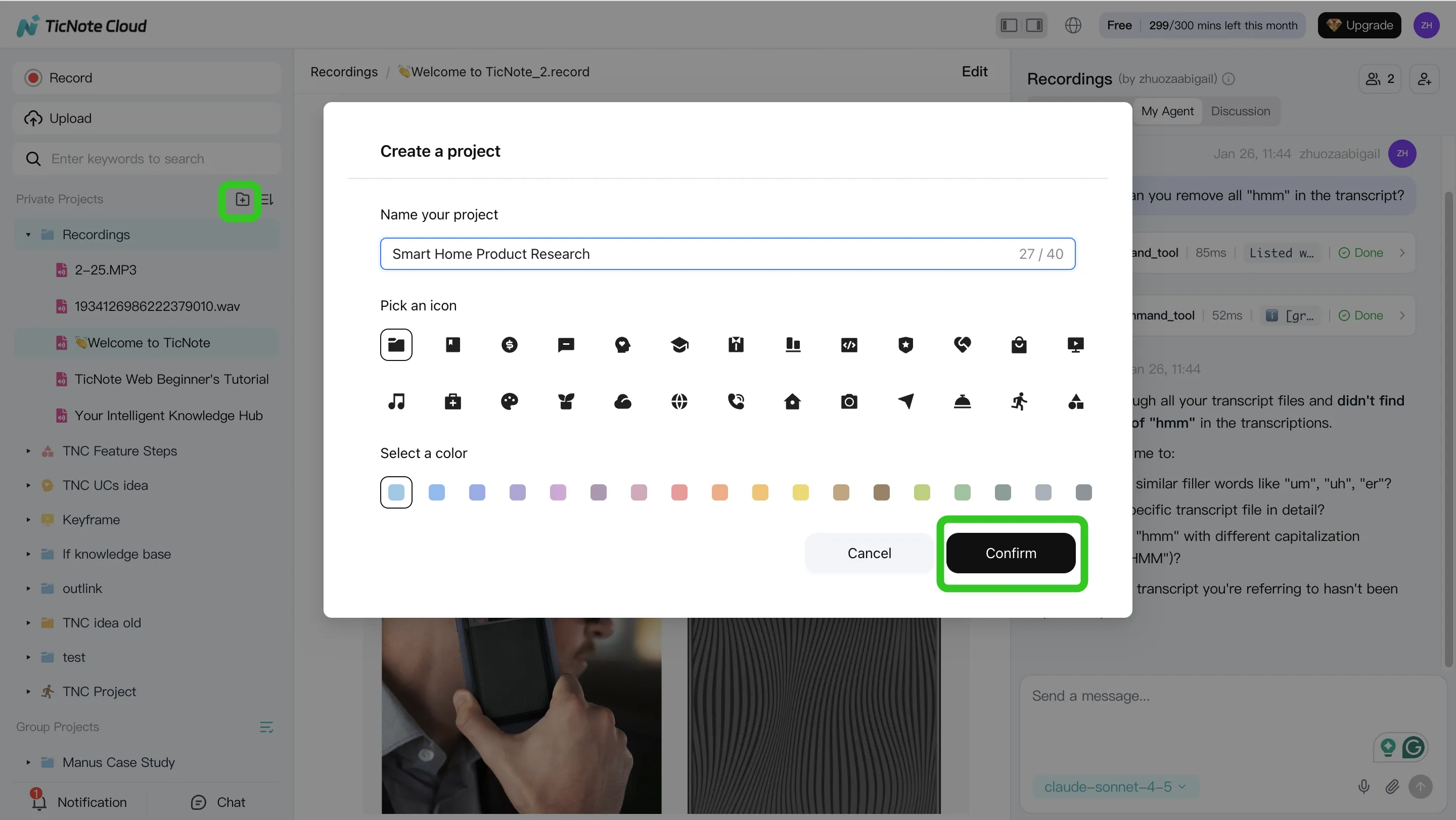
Step 2: Use Shadow AI to search, analyze, edit, and organize
Next, treat the Project like a living knowledge base. Ask targeted questions you'll reuse every week: decisions made, risks, open issues, blockers, and what changed since last meeting.
Then do the unglamorous part that makes outputs better: fix speaker labels, correct product terms, and edit key transcript lines. Small edits improve every summary, report, and slide later. Finally, group content into themes (topics, milestones, customer segments) so future searches return signal, not noise.
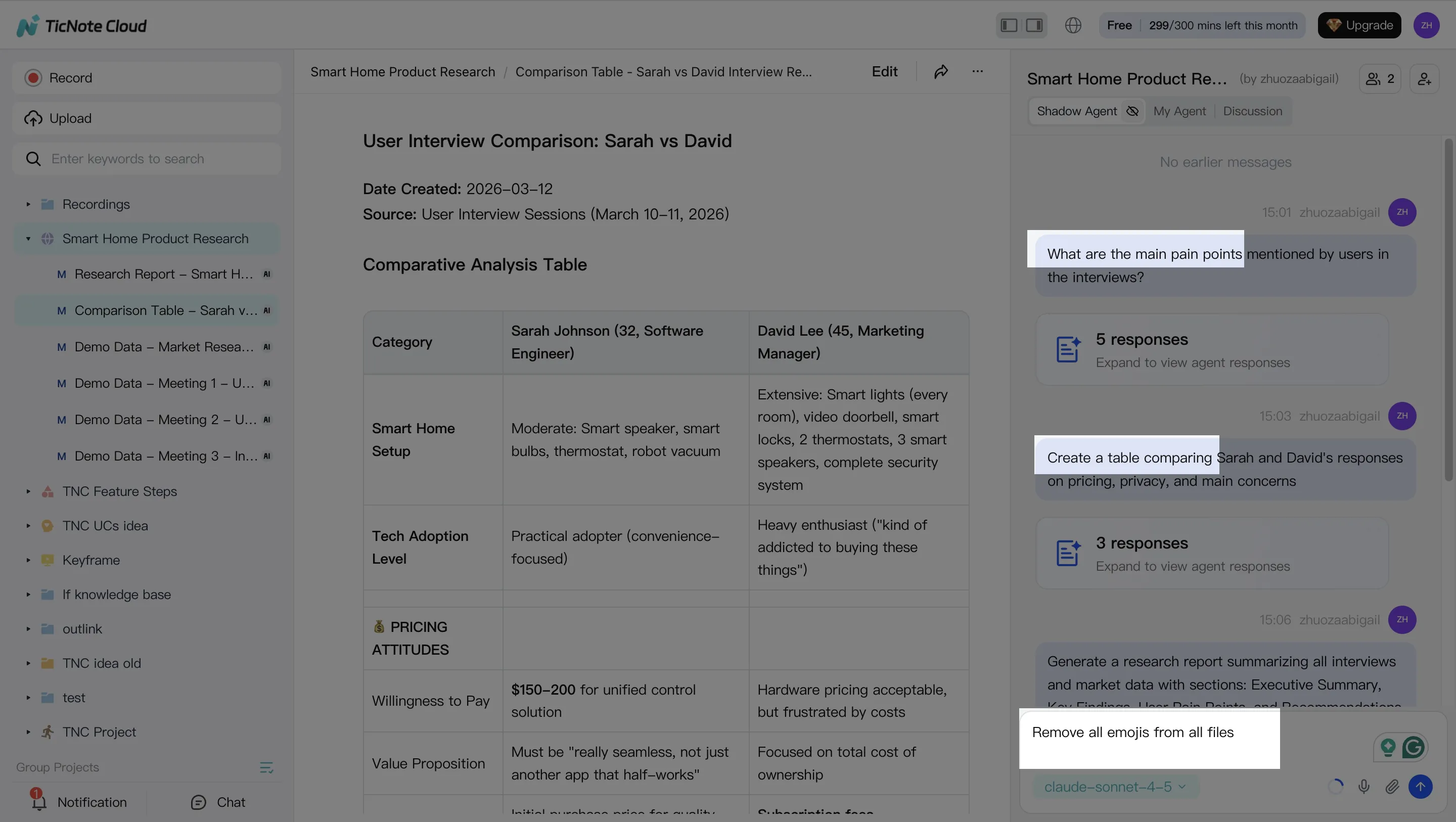
Step 3: Generate deliverables with Shadow AI (match the artifact to the audience)
Now generate the asset your audience actually wants:
- Internal recap (decisions + owners)
- Client-ready report
- Web presentation
- Podcast-style summary
- Mind map for fast review
In TicNote Cloud, you can ask Shadow AI directly or use the Generate flow to output formats like a research report (PDF) or web presentation (HTML).
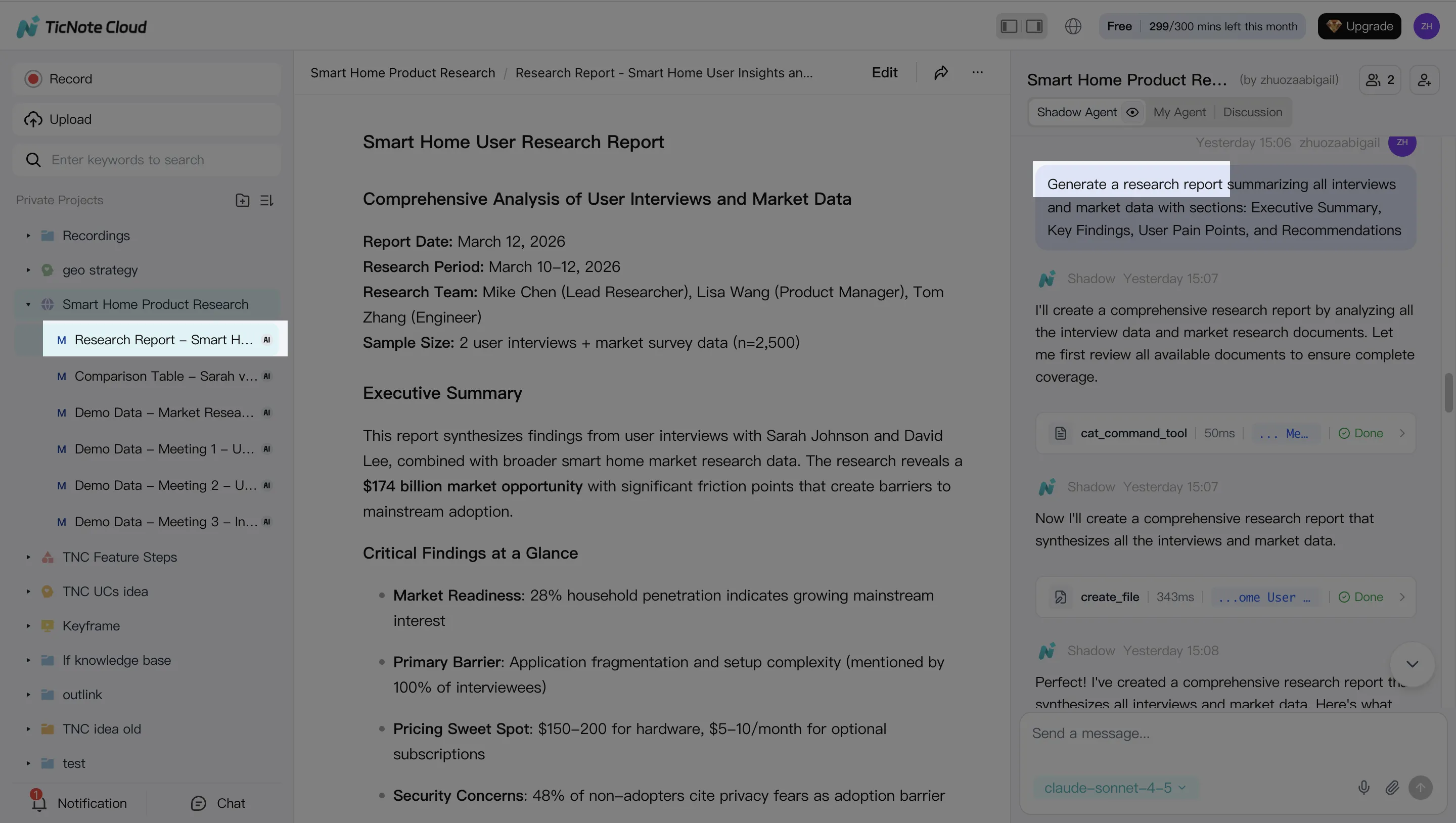
Grounded outputs rule: before you share, spot-check the citations/snippets behind key claims. It's the fastest way to avoid "AI confidence" errors.
Step 4: Review, refine, and collaborate (with lightweight governance)
Finally, refine the deliverable as a team. Assign owners for action items, add comments, and create a final version that's safe to share. Set simple governance too: who can export, who can share outside the org, and when sensitive recordings should be deleted.
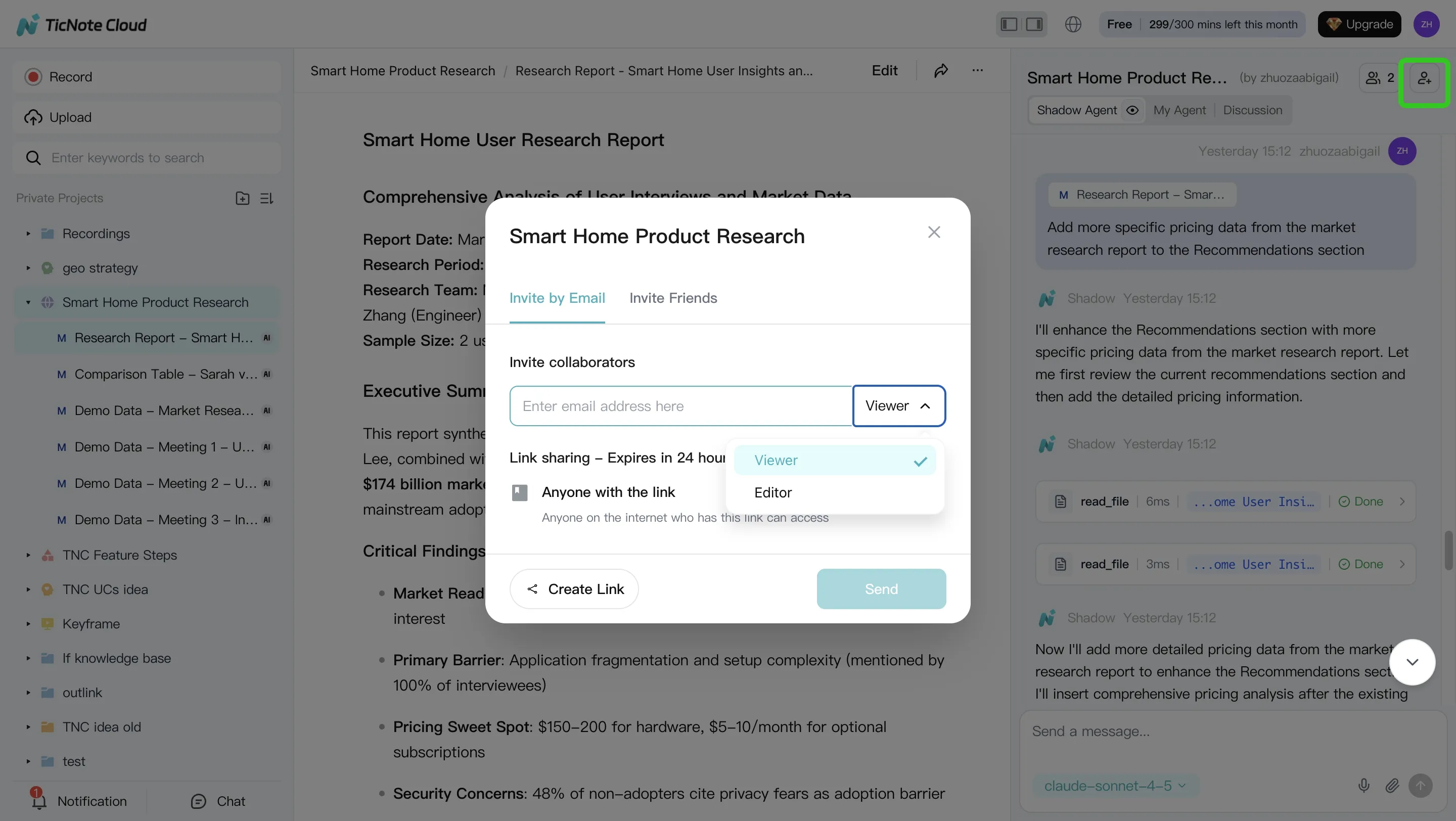
App workflow (quick version): open the same Project on mobile, add a recording or upload a file, run Shadow AI to summarize or generate a deliverable, then share or export from the Project.
Screenshot callout (for the published post): Project creation → adding content → Shadow AI analysis actions → deliverable generation → collaboration and review.
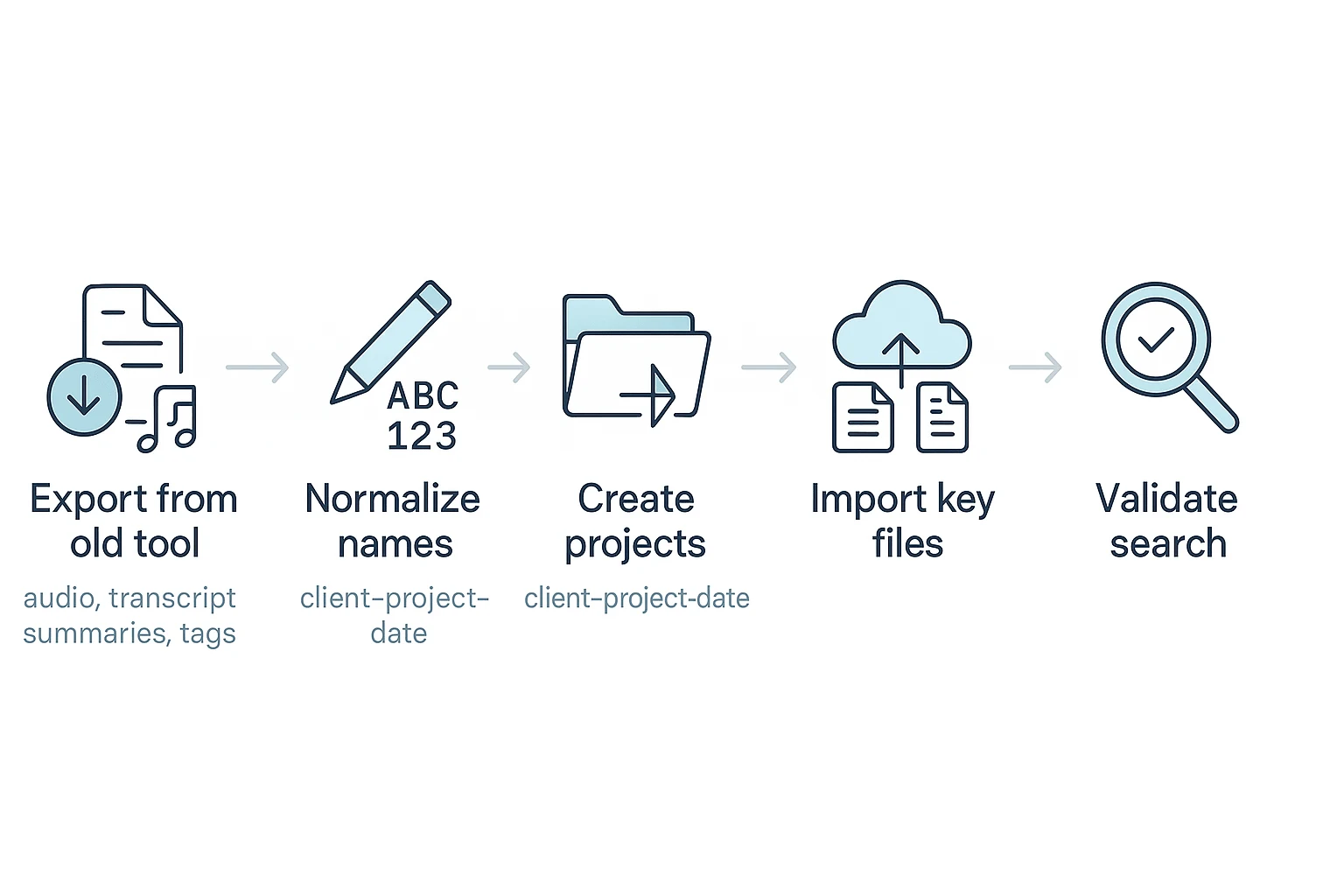
What should you migrate when you leave Sembly AI?
Switching tools is less about "moving notes" and more about preserving proof and context. Plan your export so your transcripts, decisions, and follow-ups stay searchable and defensible after you leave a sembly ai alternative short-list phase.
Export a complete migration inventory
Export these items for every meeting:
- Raw audio/video (your source of truth)
- Transcript text (with timestamps)
- Summaries, action items, and decisions
- Speaker labels and attendee list
- Meeting title, date, and time zone
- Tags, folders, and any project labels
- Shared links, access rules, and who had permission
What often gets lost: inline annotations, custom fields, and the old tool's search index. Assume you'll rebuild search from clean titles and tags.
Roll out with a "minimum package" (then scale)
Don't migrate chaos. Ship a simple rollout kit first:
- Naming rules (Client – Project – YYYY-MM-DD – Topic)
- A folder/Project structure that matches how work ships
- Default templates for summaries, action lists, and handoffs
- Role permissions (Owner/Editor/Viewer) and who can share
Pilot then scale: pick one team for 2 weeks, migrate 20–50 meetings, and measure retrieval time (seconds to find a decision). Then expand.
Avoid "search debt" in the new system
Search debt is when you can't find things because titles are vague, tags are missing, and Projects don't exist. Guardrails that work:
- Required fields: title, date, project/client, and 1–3 tags
- Monthly cleanup: merge duplicate tags, fix titles, archive noise
- Single source of truth: store final deliverables in one place (and link back to the source meeting)
If you're moving to a Project-based workflow, start by creating Projects that match real outputs—clients, products, or initiatives—and import only the meetings that support those outcomes. For related workflow switching costs, see this guide to Notion alternatives and migration trade-offs.
Conclusion: picking the right alternative without overbuying
If you're replacing Sembly, don't shop by feature count. Shop by outcomes and risk.
- Pick by output maturity: do you need transcripts, summaries, a knowledge hub, or real deliverables (reports, decks, podcasts, mind maps)?
- Decide bot vs bot-free early. Bot-free reduces meeting friction and consent issues.
- Match admin and security to your environment: SSO/SAML, audit logs, retention, and a clear "no training on your data" stance.
- Verify exports and editing: editable transcripts and clean exports prevent vendor lock-in.
For most teams, TicNote Cloud is the best fit when you want reliable capture plus editable transcripts and one-click deliverables—not just another transcript archive.
Two common exceptions: choose Rev when you need human-verified accuracy for legal or compliance work. Or use native platform tools (Microsoft Copilot, Zoom, Google Meet) when governance and vendor consolidation matter more than advanced outputs.
Contact sales for Enterprise (SSO and 7×24 support).



