


 Extension
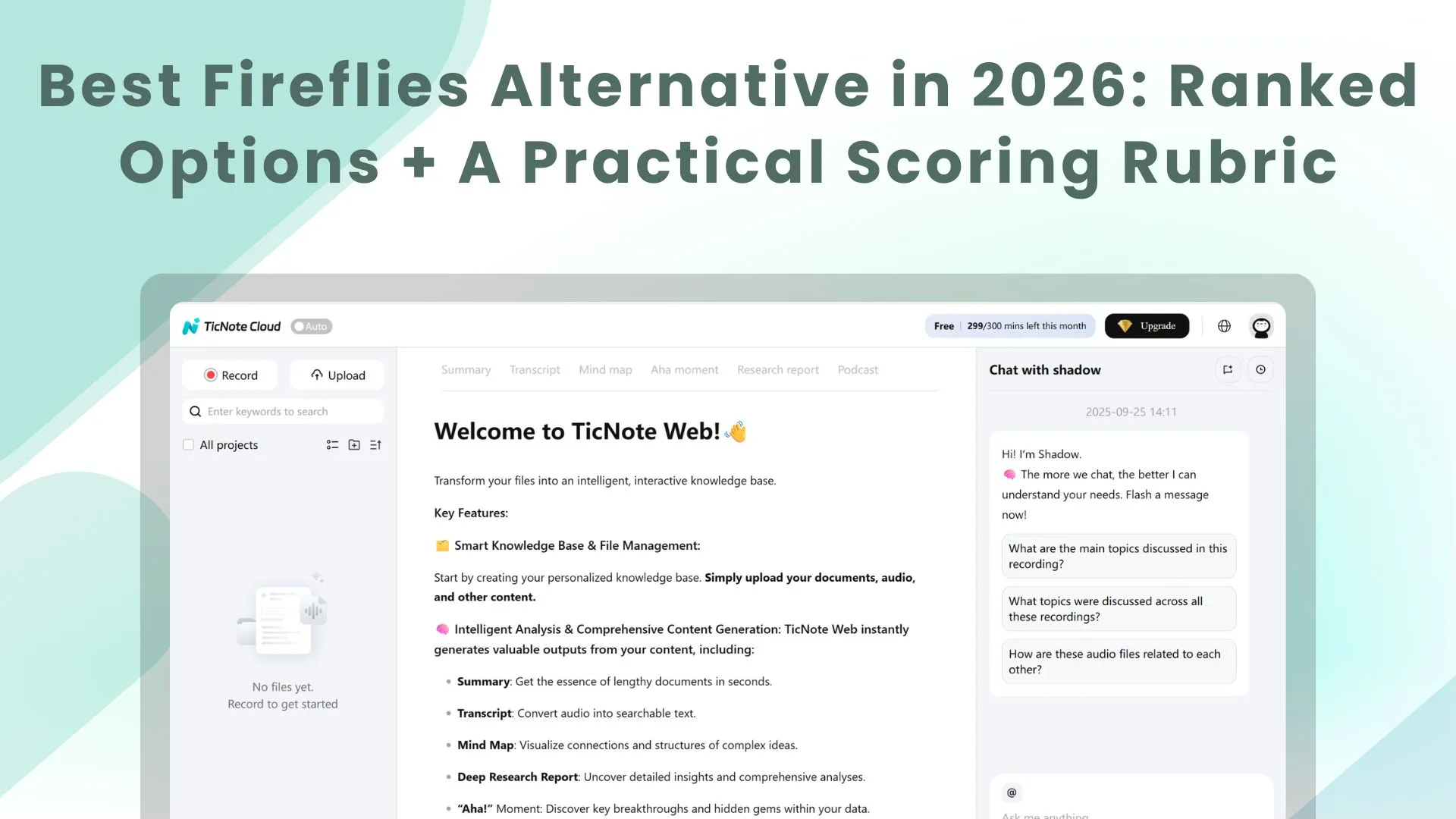
TL;DR: Best Fireflies alternatives for 2026 (ranked picks)
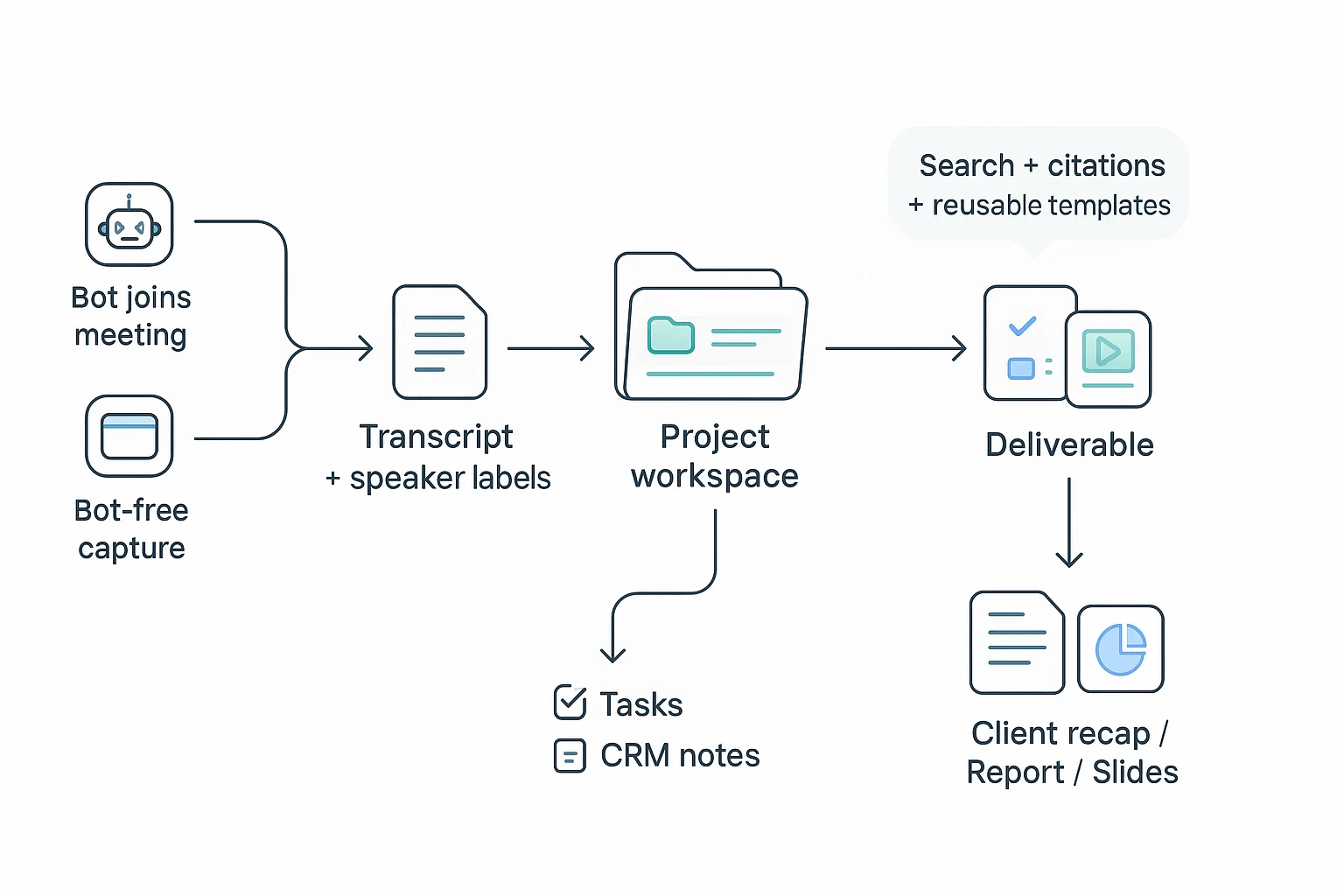
Try TicNote Cloud for Free if you want a fireflies alternative that avoids bot optics, lets you edit transcripts, and turns meetings into real outputs (reports, decks, mind maps) fast. It's the most "end-to-end" option: capture → clean transcript → project memory → one-click deliverables.
Notes feel done… until the follow-up work starts. Then you're stuck copying, fixing names, and rebuilding context in docs. A project-based workspace like TicNote Cloud keeps meetings and files together, so you can edit the transcript once and generate deliverables without rework.
Ranked picks (2026):
- TicNote Cloud — best for bot-free capture + editable transcripts + deliverables.
- Otter — best for live captions and quick meeting notes.
- Fathom — best for Zoom-friendly clips and fast recaps.
- Avoma — best for sales coaching + pipeline workflows.
- Gong — best for revenue teams needing CI/forecast.
- Zoom AI Companion — best for budget if you already pay for Zoom.
- Notta — best for multilingual transcription at low cost.
- Fireflies.ai — baseline: solid notes, but compare bots, caps, and editability.
Best picks by need:
- Live captions: Otter
- Clips/highlights: Fathom
- CI/forecast: Gong
- Budget: Zoom AI Companion
- Bot-free/offline-style capture (no bot joins): TicNote Cloud
- Research synthesis across many interviews: TicNote Cloud
Quick warnings checklist:
- Bot joiners can hurt client optics and meeting trust.
- Credit systems can hide real monthly cost.
- Admin gaps: SSO, retention, roles/permissions.
- "Read-only transcripts" slow down cleanup and reuse.
What should a Fireflies alternative replace (and improve) in real teams?
Most teams don't replace Fireflies because it's "bad." They replace it because their needs outgrow a simple meeting library. Fireflies is easy to like for two things: fast search across calls and a central place where recordings, transcripts, and summaries live.
The 3 reasons teams switch
1) Cost predictability breaks down. Many teams start fine, then usage spikes. More seats, longer calls, more uploads, more reprocessing. The result is budget drift. The friction is worst when plans mix limits (minutes) with add-on usage (credits) so finance can't forecast month to month.
2) Accuracy drops in real audio. Clean internal calls are one thing. Real teams deal with laptop mics, crosstalk, and accents. That's where speaker diarization (who said what) can slip. And when diarization slips, action items slip too.
3) Post-meeting follow-through is weak. A transcript isn't a workflow. Teams leave when notes don't turn into next steps: tasks, CRM updates, or a client-ready recap. The goal is simple: less "copy, paste, reformat" after every call.
Bot vs bot-free recording: when it matters
A bot joiner is a meeting assistant that joins your calendar invite as a participant to record. Bot-free capture records without adding a new attendee (often via a desktop app or browser capture).
Bot-free matters most when you have:
- External client or prospect calls (brand trust and fewer "who is this?" questions)
- Exec or board meetings (no extra participants)
- Regulated teams (health, finance, legal) with tighter retention and access rules
- Strict IT calendar policies (no third-party attendees allowed)
A bot can be acceptable for:
- Internal meetings in a permissive org
- Low-stakes team syncs where attendee optics don't matter
What "good" looks like in 2026
In 2026, a strong Fireflies alternative should work like a project system, not a call log:
- A searchable knowledge base across meetings and files
- Project-level organization (calls, docs, clips, and notes together)
- Notes you can edit and reuse (not "export-only")
- Automated minutes that feed tasks and CRM fields
- Share-safe outputs: an internal version (full context) and an external recap (clean, client-ready)
If your team also lives in docs, it helps to align your meeting tool with your workspace—this guide on switching from Notion for a better workflow fit is a useful companion when you're mapping what should live where.
The north star is straightforward: meeting → transcript → decision → deliverable, with minimal copy/paste.
Fireflies alternative comparison: how we scored tools (rubric + weights)
To rank each fireflies alternative in a way buyers can trust, we used one repeatable rubric. It focuses on what breaks in real teams: messy audio, fast speakers, follow-up work, and admin limits. Scores reflect day-to-day usefulness, not just "it transcribed."
Transcript + notes quality (40%)
We ran the same meeting mix across tools:
- 1:1 coaching-style call (clear audio, fewer overlaps)
- Team sync (interruptions, quick topic switches)
- Sales-style call (objections, names, numbers)
We also varied audio on purpose: laptop mics, mild background noise, and mixed accents. Each tool was scored on a checklist:
- Word accuracy on key phrases (names, dates, numbers)
- Speaker diarization (who said what) and how often it drifted
- Timestamps and jump-to-audio reliability
- Correction loop: how fast you can fix text and speakers
- Summary usefulness: does it capture decisions, risks, and next steps
Workflow checks: exports, tasks, and "client-ready" outputs (30%)
Most teams don't buy transcripts. They buy faster follow-ups. We scored how well each tool turns a meeting into usable artifacts:
- Summary formats (short recap, detailed notes, topic sections)
- Action items (auto-detected, assigned, and editable)
- Follow-up drafts (email, Slack update, meeting minutes)
- Export formats (DOCX/PDF/Markdown/CRM-friendly blocks)
- Automation depth (rules, templates, and consistent formatting)
- "Client-ready" output (clean doc) vs a raw app link
Admin + security fit (20%)
If a tool fails security review, nothing else matters. We scored for common enterprise checks:
- Bot policy fit (bot-free options or clear consent controls)
- Data retention and deletion controls
- Role-based access (Owner/Admin/Member/Guest or similar)
- SSO/SAML availability for larger teams
- Encryption notes (at rest/in transit when disclosed)
- "Data used for training" policy clarity
Pricing clarity + predictability (10%)
Meeting tools often hide cost in minutes, credits, or per-meeting caps. To normalize pricing, we scored:
- Seats vs org-level minute pools
- Per-meeting recording limits (30 min vs 3 hours matters)
- Overage rules (hard stop vs paid overages)
- Credit systems (how fast credits burn on summaries, chat, exports)
We'll reuse two simple scenarios later:
- Scenario A: 5-person team, ~20 meetings/week, ~45 min each (≈ 1,800 minutes/month)
- Scenario B: 20-person team, ~80 meetings/week, ~45 min each (≈ 14,400 minutes/month)
How to read the totals
A top total score means "best overall for most teams." A lower total usually comes from admin gaps (SSO/retention/training policy) or shallow workflows (raw notes with weak exports), not just transcript quality.
Fireflies.ai quick baseline: strengths, limits, and what to compare against
Before you pick a fireflies alternative, set a clear baseline. Fireflies.ai is popular because it covers the basics well: it captures calls, transcribes them, and turns them into a searchable team library. That baseline matters, because many "alternatives" win on one feature but miss the day-to-day workflow teams rely on.
What Fireflies does well (the baseline to match)
Most teams expect these as table stakes:
- Capture + transcription for common meeting platforms, plus uploads
- Searchable library so past calls are easy to find
- Share links for fast review and handoffs
- Integrations (CRM, docs, chat, calendar) so notes don't live in a silo
If a tool can't match these basics, it's not a real replacement.
Common friction points (what to watch for)
Where buyers often run into trouble is less about "can it transcribe?" and more about fit in real meetings:
- Meeting bot optics: A bot joining the call can feel intrusive, and some clients ask to remove it.
- Quality swings in messy audio: Crosstalk, accents, weak mics, and hybrid rooms can reduce accuracy and speaker labeling.
- Cost predictability: Some plans use layered limits (minutes + credits + add-ons). That can make spend hard to forecast when usage spikes.
Side-by-side baseline fields to scan in every tool below
Use these fields as your quick checklist:
| Field | What you're checking |
| Recording mode | Bot joins the call vs bot-free capture |
| Transcript editing | Read-only vs fully editable transcripts |
| Languages | Coverage for your team and customers |
| Exports | DOCX/PDF/Markdown/CSV, audio, timestamps |
| Integrations | CRM, Slack/Teams, Notion, calendars, webhooks |
| Automation | Follow-ups, tasks, summaries, routing |
| Projects/knowledge base | Cross-meeting memory and organization |
| Admin/security | SSO, retention, encryption, audit logs, permissions |
| Pricing model | Minute quotas vs credit systems and add-ons |
Two simple monthly cost scenarios to sanity-check pricing:
- Light internal month: A few weekly team meetings. Credit systems may look cheap, but check which features consume extra credits.
- Client-facing heavy weeks: Lots of sales, onboarding, or research calls. This is where credit-based models can swing cost fast, while minute-based quotas tend to be easier to budget.
At-a-glance table: top Fireflies alternatives compared
If you're shopping for a Fireflies alternative, this table gives you a fast, normalized view of what matters in real teams: capture method (bot-free or not), transcript quality, editability, post-meeting automation, and whether knowledge compounds across meetings.
Normalized comparison table (columns + legend)
Legend (simple, normalized scores): 5 = best-in-class, 4 = strong, 3 = solid, 2 = limited, 1 = weak/unclear, — = not a core feature or varies by plan.
| Tool | Bot‑free recorder option | Transcription + diarization | Editable transcript | AI notes depth | Integrations (CRM/docs/chat) | Exports | Automation depth | Projects / knowledge base | Security / admin | Pricing clarity |
| TicNote Cloud | 5 | 4 | 5 | 5 | 3 | 5 | 5 | 5 | 4 | 5 |
| Otter | 2 | 4 | 3 | 4 | 3 | 3 | 3 | 3 | 3 | 3 |
| Fathom | 3 | 4 | 2 | 4 | 4 | 3 | 4 | 2 | 3 | 4 |
| Avoma | 2 | 4 | 2 | 4 | 5 | 3 | 5 | 3 | 4 | 3 |
| Gong | 1 | 4 | 1 | 4 | 5 | 2 | 5 | 4 | 5 | 2 |
| Chorus.ai | 1 | 4 | 1 | 4 | 5 | 2 | 5 | 4 | 5 | 2 |
| tl;dv | 2 | 3 | 2 | 3 | 4 | 3 | 3 | 2 | 3 | 4 |
| Notta | 3 | 3 | 2 | 3 | 3 | 4 | 2 | 2 | 2 | 4 |
How to pick quickly (best overall + best niche picks)
If you want the best "all-in-one" replacement, pick TicNote Cloud: bot-free capture, editable transcripts, and strong deliverables inside Projects. Want the best for live captions and simple call notes? Otter is usually the cleanest. Want the best for quick clips and sharing highlights? Fathom and tl;dv are built for that.
Need revenue intelligence (coaching, pipeline, deal risk)? Gong or Chorus.ai win on CRM depth and sales ops controls, but pricing is often the biggest constraint. Want budget-friendly basics with clear exports? Notta can fit, but expect lighter automation and weaker "team memory." The key tradeoff pattern: clip-first tools tend to be fast but thin on knowledge base, while revenue-intel suites are powerful but costly and heavy to admin. If you also care about offline-style privacy and workflow ownership, compare tools that minimize meeting-bot presence and keep work inside a project space (see this guide on meeting tools that also handle PDFs and offline workflows).
Top Fireflies alternatives (item cards + who each is best for)
Below are buyer-ready "cards" for the tools teams most often shortlist when replacing Fireflies.ai. Each card uses the same fields so you can compare fast: who it's for, where it beats the Fireflies baseline, where it falls short, the bot model (critical for org policy), exports/integrations, and a score snapshot aligned to the rubric.
TicNote Cloud — Best overall for bot-free capture + editable transcripts + deliverables
- Best for: Teams that want meetings to turn into reusable work: consultants, PMs, researchers, ops, and cross-functional teams.
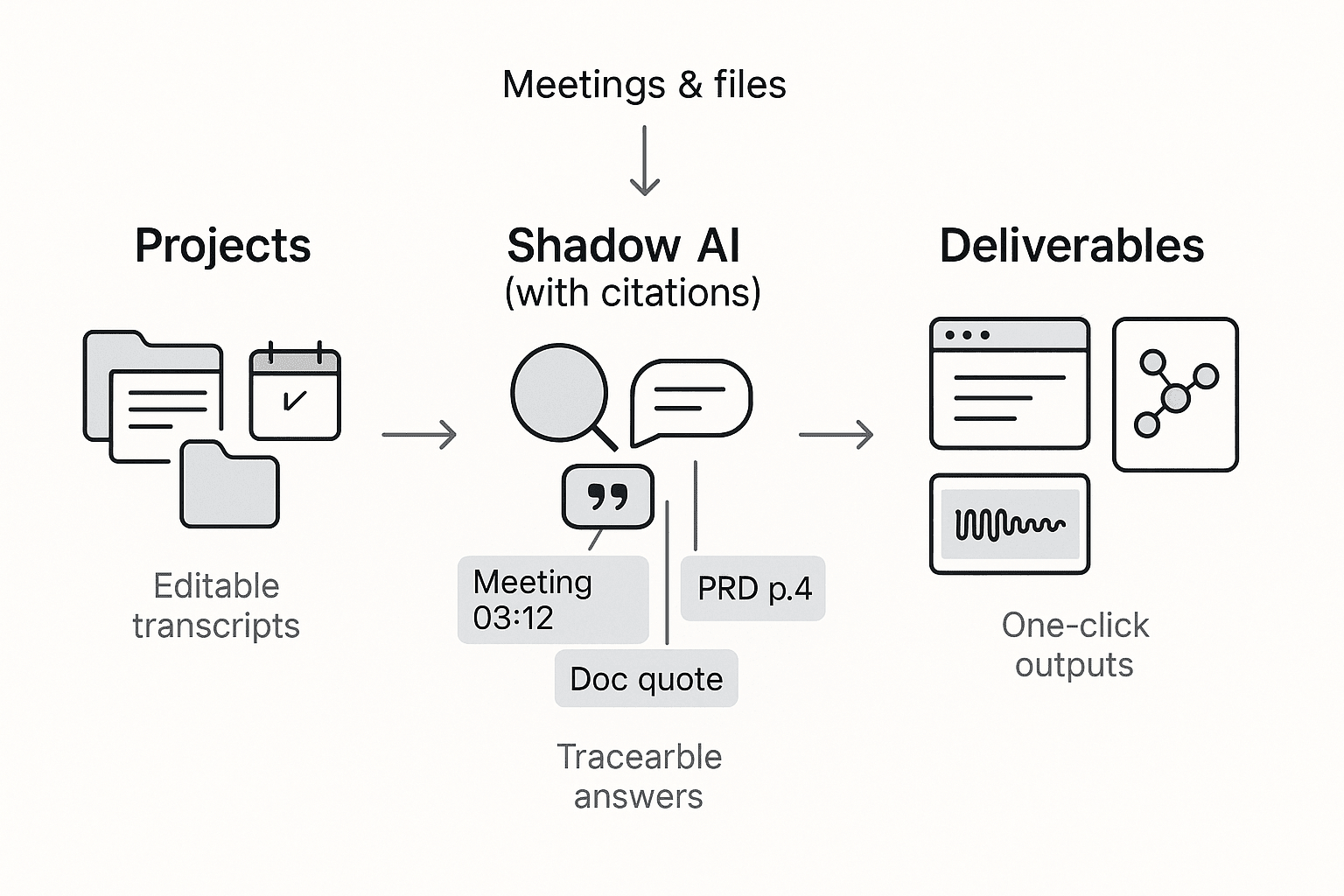
- Why it's a Fireflies.ai upgrade: It's more than notes. Meetings and files live inside Projects, so knowledge compounds across calls. Shadow AI searches your Project content with citations and can generate ready-to-send outputs (not just summaries). You also get editable transcripts (not read-only exports), so teams can correct speaker names, jargon, and key decisions in place.
- Where it's weaker: Fewer "revenue intelligence" features than dedicated sales platforms. If you need deep call scoring and rep coaching, a sales CI tool may fit better.
- Bot model: Bot-free capture options (no meeting bot needs to join).
- Notable exports/integrations: Exports include transcript TXT/DOCX/PDF, summaries Markdown/DOCX/PDF, HTML web presentations, mind maps PNG/Xmind, plus WAV audio. Integrates with Notion and Slack. Collaboration includes Owner/Member/Guest permissions and traceable AI operations.
- Score snapshot (rubric-aligned): Accuracy/diarization 9/10 • Bot-free options 10/10 • Integrations/exports 9/10 • Automation depth 9/10 • Project memory 10/10 • Deliverables 10/10 • Security/admin 8/10 • Pricing clarity 9/10
If you're also comparing Granola-style tools, this deep dive on bot-free meeting notes and editable transcripts can help you sanity-check the "no-bot" workflow.
Otter.ai — Best for live captions and straightforward notes
- Best for: Individuals and teams who value live captions, quick summaries, and simple sharing.
- Why it's a Fireflies.ai upgrade: Usually faster to adopt for basic note capture. Strong "open and go" experience for meetings and lectures.
- Where it's weaker: Bot attendance can be a policy blocker in some orgs. Plan limits can feel tight for heavy meeting weeks, so minute caps matter.
- Bot model: Commonly bot-joins meetings.
- Notable exports/integrations: Standard transcript exports and common calendar/meeting connections.
- Score snapshot: Accuracy/diarization 8/10 • Bot-free options 4/10 • Integrations/exports 7/10 • Automation depth 6/10 • Project memory 5/10 • Deliverables 4/10 • Security/admin 6/10 • Pricing clarity 6/10
tl;dv — Best for clips, highlights, and CRM-adjacent workflows
- Best for: Sales and CS teams that share short clips, build highlight reels, and want tidy handoffs.
- Why it's a Fireflies.ai upgrade: Excellent for turning long calls into skimmable moments. Strong "what matters" playback workflow.
- Where it's weaker: It's more video-centric than deliverable-centric. If you need one-click reports, presentations, or a project knowledge base, it can feel like extra steps.
- Bot model: Often bot-based recording.
- Notable exports/integrations: Common CRM and collaboration integrations; clip sharing.
- Score snapshot: Accuracy/diarization 7/10 • Bot-free options 4/10 • Integrations/exports 8/10 • Automation depth 7/10 • Project memory 5/10 • Deliverables 5/10 • Security/admin 6/10 • Pricing clarity 7/10
MeetGeek — Best for budget-friendly, predictable quotas
- Best for: Teams that want solid notes with less sticker shock, and clear usage boundaries.
- Why it's a Fireflies.ai upgrade: Often feels simpler to manage for small teams. Automations can reduce follow-up effort.
- Where it's weaker: Check how automation, overages, and caps work at your meeting volume. Some teams hit limits faster than expected.
- Bot model: Typically bot-joins meetings.
- Notable exports/integrations: Common exports and team sharing; automation features vary by plan.
- Score snapshot: Accuracy/diarization 7/10 • Bot-free options 3/10 • Integrations/exports 7/10 • Automation depth 7/10 • Project memory 4/10 • Deliverables 4/10 • Security/admin 6/10 • Pricing clarity 8/10
Avoma — Best for sales/CS teams that want CI-style insights
- Best for: Revenue teams that want conversation intelligence (CI), deal support, and structured coaching workflows.
- Why it's a Fireflies.ai upgrade: Stronger sales tooling: insights, scoring, and call libraries can support pipeline work.
- Where it's weaker: Heavier setup and typically higher cost. It's not the simplest "meeting notes replacement," and it can be overkill for ops or research.
- Bot model: Usually bot-based capture.
- Notable exports/integrations: CRM-first workflows; revenue analytics.
- Score snapshot: Accuracy/diarization 8/10 • Bot-free options 3/10 • Integrations/exports 9/10 • Automation depth 8/10 • Project memory 6/10 • Deliverables 5/10 • Security/admin 7/10 • Pricing clarity 5/10
Grain — Best for sharing highlight clips and async enablement
- Best for: Teams that win by sharing short, clear clips across Slack, docs, and wikis.
- Why it's a Fireflies.ai upgrade: Clipping and storytelling is the point. Great for async updates.
- Where it's weaker: Limited if you need a durable project knowledge base, cross-meeting synthesis, or structured deliverables.
- Bot model: Often bot-based recording.
- Notable exports/integrations: Clip links and sharing workflows.
- Score snapshot: Accuracy/diarization 7/10 • Bot-free options 4/10 • Integrations/exports 7/10 • Automation depth 6/10 • Project memory 4/10 • Deliverables 4/10 • Security/admin 6/10 • Pricing clarity 7/10
Sembly — Best for multilingual and "assistant" style features
- Best for: Teams that need multi-language support and an assistant-like workflow.
- Why it's a Fireflies.ai upgrade: Good option when language coverage and meeting assistance matter as much as raw transcription.
- Where it's weaker: Bot attendance can block adoption in regulated orgs or strict client calls.
- Bot model: Commonly bot-joins meetings.
- Notable exports/integrations: Typical exports and team sharing; assistant features.
- Score snapshot: Accuracy/diarization 7/10 • Bot-free options 3/10 • Integrations/exports 7/10 • Automation depth 7/10 • Project memory 5/10 • Deliverables 4/10 • Security/admin 6/10 • Pricing clarity 6/10
Jamie — Best for bot-free, privacy-first capture
- Best for: Individuals and small teams who can't use meeting bots and want a privacy-first feel.
- Why it's a Fireflies.ai upgrade: Bot-free angle reduces friction with client policies.
- Where it's weaker: Often lighter on real-time captions, team collaboration, and multi-meeting project workflows.
- Bot model: Bot-free (positioned as no-bot capture).
- Notable exports/integrations: Basic exports; fewer workspace-grade flows.
- Score snapshot: Accuracy/diarization 7/10 • Bot-free options 9/10 • Integrations/exports 5/10 • Automation depth 5/10 • Project memory 4/10 • Deliverables 3/10 • Security/admin 6/10 • Pricing clarity 7/10
Notta — Best for simple transcription with clearer pricing
- Best for: Teams that want straightforward transcription and predictable spending.
- Why it's a Fireflies.ai upgrade: Often feels simpler for "record → transcript → export." Good for light meeting workflows.
- Where it's weaker: Less depth in automation and post-meeting workflows. You may still do more manual organizing.
- Bot model: Mix of approaches, often bot-based for meetings.
- Notable exports/integrations: Common transcript exports; light workflows.
- Score snapshot: Accuracy/diarization 7/10 • Bot-free options 4/10 • Integrations/exports 6/10 • Automation depth 4/10 • Project memory 3/10 • Deliverables 3/10 • Security/admin 5/10 • Pricing clarity 8/10
Adjacent category (not 1:1 for most teams): Fathom or Gong
- Fathom: Best for individuals who live in Zoom and want fast notes and sharing. It's great for personal productivity, but it's not always built for a shared, long-term knowledge base.
- Gong: Best for enterprise revenue intelligence. It's powerful, but it's a different category: implementation effort, governance, and cost are closer to a full sales platform than a simple Fireflies replacement.
What can a project-based AI meeting assistant do that most Fireflies alternatives can't?
Most meeting tools stop at "record → transcript → summary." A project-based assistant goes further: it turns messy talk into editable source material, keeps context across weeks of meetings, and ships ready-to-send outputs. That's the gap many teams feel when they search for a fireflies alternative.
Edit the transcript where the truth lives (not in a detached doc)
Read-only transcripts create a quiet failure mode. People fix names, product terms, and numbers in Google Docs, then the system still holds the wrong version.
Editable transcripts solve that by letting you:
- Correct speaker names, acronyms, and domain terms (the stuff AI often misses)
- Add quick context ("this refers to the Q2 rollout") right on the relevant lines
- Keep meeting minutes accurate because edits stay tied to timestamps and speakers
- Reuse the corrected transcript later for briefs, training notes, or audits
For real teams, this cuts rework. It also prevents "two sources of truth."
Build Projects that remember: meetings + files + decisions
A "project" is a shared workspace that groups recurring meetings with the docs they reference (PRDs, decks, tickets, interview guides). The key benefit is long-context memory: the assistant can synthesize across many calls and attachments, not just one transcript.
That matters most when work spans weeks:
- Product and research: compare 8–12 interviews and pull themes
- Consulting: track decisions across steering calls and workshops
- Ops and managers: find when a policy changed and why
Instead of repeating the same conversation, teams search the project and move on.
Use a scoped agent that answers with citations to your own content
A project-scoped agent should answer questions using only your project sources, then show where each claim came from (citations to the exact meeting moment or file section). That traceability builds trust.
It also makes reviews faster for ops, legal, and regulated teams because you can verify before you share.
If you also evaluate broader AI tools, this overlaps with what people want from work-focused AI assistants with citations and privacy controls — but grounded in meeting reality.
Generate deliverables in one click (not copy/paste)
"Deliverables" means finished outputs you can send, not just a paragraph summary. From one meeting or a whole project, a strong system should generate:
- Client recap with decisions, risks, and next steps
- Internal plan or sprint brief mapped to owners
- Research report with themes and quotes
- Web presentation outline you can refine and share
- Podcast-style recap for async teams
- Mind map for fast alignment
This is where hours disappear today: reformatting notes into something shareable.
Capture without a bot — and share with real permissions
Many teams avoid meeting bots due to participant friction, vendor rules, or privacy expectations. Bot-free capture (extension, app, or local capture patterns) keeps meetings cleaner.
And once content is created, permissions must match team reality:
- Owner: controls sharing and settings
- Member: can collaborate and produce outputs
- Guest: can view or comment within clear boundaries
That mix is what turns "notes" into a reliable team system.
Which Fireflies alternative should you choose (by role and constraints)?
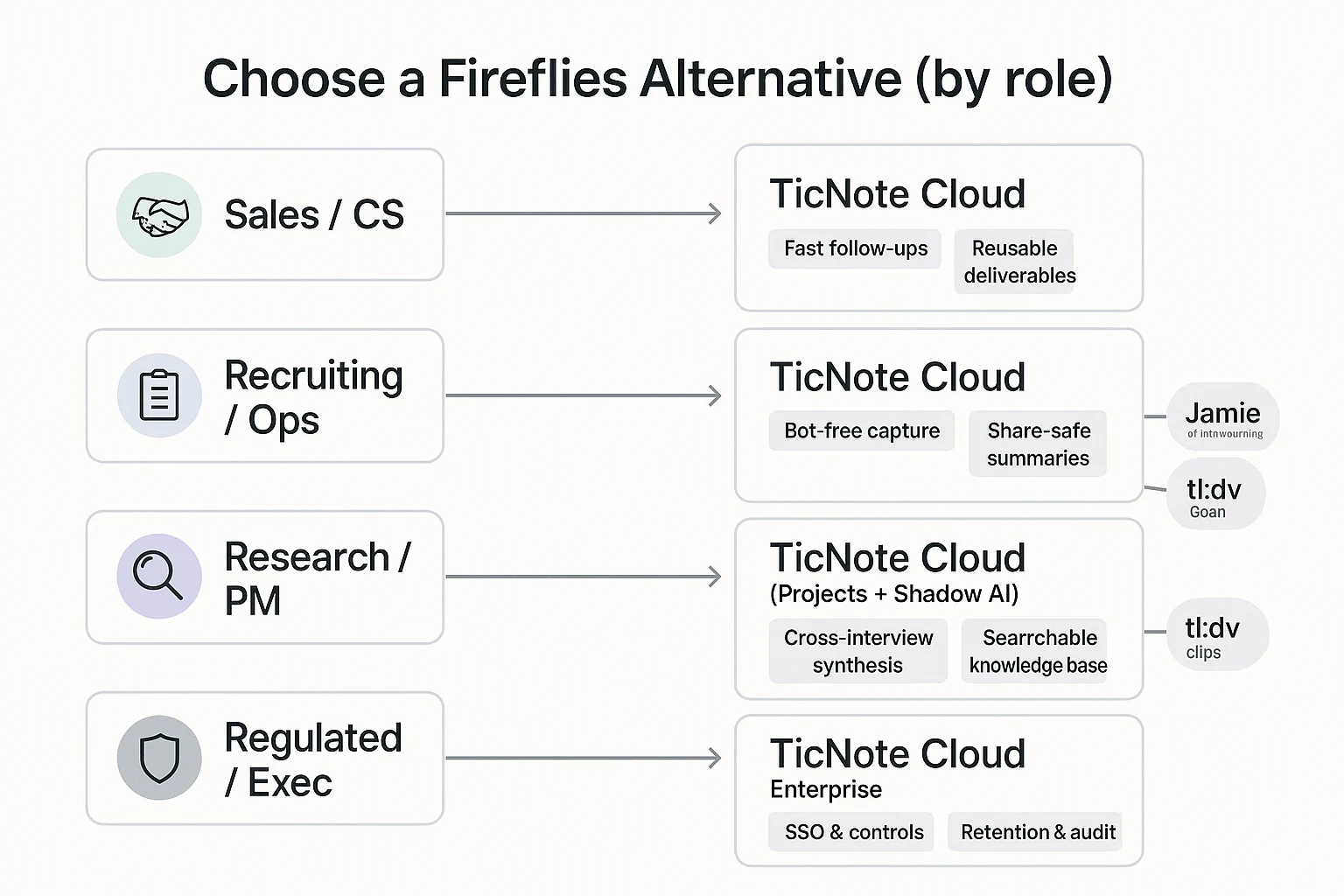
The "best" pick depends on your job and your risk limits. Use the role below to choose a Fireflies alternative that fits your workflow, not just your meetings.
Sales & CS teams: CRM notes + faster follow-ups
Direct pick: TicNote Cloud. It's the strongest option when you need clean transcripts, fast recaps, and repeatable assets. You can turn calls into editable notes, then generate QBR briefs, customer recap emails, and success plans from the same meeting source inside Projects (so your team stops re-writing the same context every week).
Pick a CI-heavy platform (Avoma or Gong) if you need deep pipeline analytics, coaching, and strict sales governance. The tradeoff is real: higher cost, more setup, and a heavier admin footprint than a meeting-first workspace.
Recruiting & internal ops: privacy, consent, and share-safe summaries
Direct pick: TicNote Cloud (bot-free capture). When candidate or client optics matter, a tool that doesn't "invite a bot" reduces friction and policy risk. It also helps you produce summaries you can safely share internally, while keeping the full transcript controlled.
If you want something more offline-leaning, Jamie is a common second choice. If you're comparing bot-free options, use this bot-free notes and privacy checklist to sanity-check policy fit.
What to verify before rollout:
- Consent flow (how you notify people)
- Retention and deletion controls
- Access permissions (who can view audio vs summary)
- "Share-safe" outputs (sanitized recap templates)
Research & product teams: multi-interview synthesis
Direct pick: TicNote Cloud Projects + Shadow AI. Research work breaks when every interview sits alone. A project-based setup lets you cluster calls by study, persona, or quarter, then query across everything with citations and generate synthesis outputs (themes, opportunity lists, research reports) without copy-paste.
If your deliverable is video snippets, clip-first tools like tl;dv or Grain can complement your stack. Use them for highlight reels, and keep TicNote Cloud as the searchable knowledge base.
Exec and regulated teams: bot-free, SSO, admin controls
Direct pick: TicNote Cloud Enterprise. It's the practical route when you need bot-free recording plus controls that scale. Treat procurement like a checklist, and don't approve anything until these are clear.
Procurement questions to ask:
- SSO/SAML support and role-based access
- Auditability (activity logs, traceable AI actions)
- Data training policy (is your data used to train models?)
- Retention, legal hold, deletion SLAs
- Encryption in transit/at rest, key management options
- Data region and subprocessors
Conclusion: the best Fireflies alternative for most teams
If you're replacing Fireflies, any serious Fireflies alternative has to nail the basics: solid transcription, speaker labels, fast search, and easy sharing. But most teams don't switch because the basics are missing. They switch because the tool doesn't fit how meetings really work: bot concerns, transcripts you can't truly edit, and follow-ups that still take an hour.
The best choice for most teams: bot-free capture + editable transcripts + project outputs
For most buyers, the "best" option is the one that reduces risk and reduces rework. That means three non-negotiables:
- Bot-free recording when needed (so you can join sensitive calls without a surprise attendee)
- Editable transcripts (so names, numbers, and commitments get fixed once, in the source)
- Project memory plus one-click deliverables (so actions and insights stay connected across calls)
TicNote Cloud is the cleanest fit for that bundle. It captures meetings without a bot when you need it, lets your team edit the transcript directly, and then turns that content into consistent outputs (reports, presentations, podcasts, mind maps) inside a Project—so follow-through doesn't depend on copy-paste.
Before you commit, run a simple 1-week pilot. Score 2–3 tools with the rubric from this guide, and sanity-check pricing using the two monthly cost scenarios. You'll see quickly which tool stays predictable and which one breaks once usage grows.


