


 Extension
TL;DR: The best Sonix alternatives (pick by workflow)
To pick a Sonix alternative fast, start with your output. If you want meeting-to-deliverables (notes → cited answers → reports/presentations) and a workspace feel, choose TicNote Cloud and try it free.
You don't just need a transcript—you need decisions, quotes, and share-ready docs. That work usually turns into copy-paste and reformatting across tools. A Projects-based workflow like TicNote Cloud keeps transcripts editable and turns recordings into cited answers and deliverables in one place.
- Meeting-to-deliverables: TicNote Cloud (Projects + editable transcripts + cited outputs).
- Live meeting notes: Otter.ai (real-time notes in common meeting flows).
- Subtitles-first exports: Happy Scribe (caption/localization-focused outputs).
- Human-verified accuracy: Rev (reviewed transcripts for high-stakes use).
- Newsroom-style collaboration: Trint (team review and editing workflows).
If you're comparing Sonix vs TicNote Cloud, the key difference is workflow: Sonix is transcription-first; TicNote Cloud is a meeting workspace that turns recordings into shareable deliverables (with citations) inside Projects.
Sonix alternative shortlist: quick comparison before you switch
Sonix is strong at the core job: turning audio into clean text fast. You get a solid browser editor, timestamps, speaker labels, and options for subtitles and translation. If your team mainly needs polished transcripts and dependable exports, Sonix often fits.
What Sonix gets right (baseline)
Sonix works best when your workflow is "record → transcribe → edit → export." It's built for speed and cleanup in one place. That's why it's common in podcasts, interviews, and content teams that ship captions, articles, or show notes.
Where Sonix can fall short (and why people switch)
Pricing can get hard to predict. Pay-as-you-go, add-ons, and per-seat costs can stack up as volume grows. It can also rise when you need more seats, more languages, or more admin features.
Workflow fit can break at the handoff. Transcription is not the same as "meeting → decisions → deliverables." Many teams don't just need text. They need artifacts like a decision log, a client-ready report, a draft deck outline, or a searchable knowledge base that keeps context across many calls.
Team and procurement needs may outgrow it. Once you involve multiple reviewers, shared workspaces, permissioning, or security review, the evaluation shifts from "best transcript editor" to "best controlled system." If you also compare general-purpose AI tools, this guide on work-safe AI alternatives with citations and privacy can help frame what "safe outputs" should look like.
The 8 criteria we use for every tool in this guide
To keep this decision consistent, every Sonix alternative is judged on the same eight checks:
- Accuracy conditions (not hype): results vary with mic quality, accents, crosstalk, and domain terms.
- Languages: multilingual coverage plus translation support (some vendors claim 120+ languages).
- Live vs upload: live meeting transcription vs file-based transcription.
- Speaker ID + timestamps: diarization (who spoke when) and how editable it is.
- Collaboration: shared spaces, comments, review flow, and version control.
- Exports: transcript, summary, and caption/subtitle formats that stay useful downstream.
- Integrations: meeting tools, storage, Slack/Notion, and API/Zapier where relevant.
- Security/admin: encryption, retention controls, training opt-out, roles, SSO, and audit trails.
How we normalize pricing (so you can compare fairly)
Vendors list pricing in different units, so we normalize to an estimated $/hour when we can: included minutes ÷ plan price. Then we flag the limits that change real cost (per-seat billing, "fair use," capped recording length, or separate charges for features).
One simple promise: this guide gives you one consistent comparison table plus a security checklist, so you can shortlist fast, validate with your real volume, and switch with fewer surprises.
Side-by-side comparison table (features, pricing, security, exports)
When you're evaluating a Sonix alternative, you'll get a cleaner shortlist if you compare the same fields across tools: workflow fit, price model, collaboration, exports, and admin controls. The table below standardizes TicNote Cloud, Otter.ai, Happy Scribe, Rev, and Trint, with Sonix as the baseline.
Comparison table (standard fields)
| Tool | Best for | Starting price model | Languages | Live transcription | Speaker ID | Collaboration | Subtitle formats | Human review | Integrations | Export formats | Security/admin (SSO, retention, encryption) |
| Sonix (baseline) | Fast AI transcripts + captions for media workflows | Subscription + usage (varies by plan) | Vendor-stated multilingual | Yes (plan-dependent) | Yes | Yes | Yes (common caption formats) | Add-on/service options (varies) | Common creative/team apps | Text + captions (varies) | SSO on enterprise; encryption; retention controls vary by tier |
| TicNote Cloud | Meeting → transcript → cited answers → reports/presentations inside one Project | Per-seat bundles (Free/Pro/Business) with monthly minute allotments | 120+ (vendor-stated) | Yes | Yes | Yes (real-time co-editing + permissions) | Not a caption-first tool (verify if you need SRT/VTT) | Not positioned as human review | Notion, Slack | WAV; TXT/DOCX/PDF; Markdown/DOCX/PDF; PNG/Xmind; HTML | SSO on Enterprise; encryption; private-by-default; retention/audit controls: validate by tier |
| Otter.ai | Live meeting notes for teams that live in Zoom/Meet | Per-seat subscription tiers | Vendor-stated multilingual (coverage varies) | Yes | Yes | Yes | Limited compared with caption-first tools | Not core (AI-first) | Calendar/meeting + team apps (varies) | Transcript exports (varies) | SSO on business/enterprise tiers; encryption; admin controls vary |
| Happy Scribe | Captions + transcripts with optional human polishing | Per-minute/per-hour + subscription options | Vendor-stated multilingual | Limited/varies | Yes (varies by workflow) | Yes | Yes (caption-first) | Yes (human services available) | Some workflow apps (varies) | Transcripts + subtitles (varies) | Team/admin features vary; encryption; SSO typically enterprise |
| Rev | High-stakes accuracy with human transcription/captions | Per-minute (human services) + some subscriptions | Vendor-stated multilingual (human/AI varies) | Limited/varies | Yes (varies) | Yes (project workflows) | Yes (caption-first) | Yes (core offering) | Integrations vary | Transcripts + captions (varies) | Enterprise controls vary; encryption; SSO may be available |
| Trint | Editorial transcription for newsrooms and content teams | Per-seat subscription tiers | Vendor-stated multilingual | Yes/varies | Yes | Yes (team editing) | Yes (common caption formats) | Not core (AI-first) | Publishing/content stack (varies) | Text + captions (varies) | SSO typically enterprise; encryption; admin controls vary |
Privacy & security signals to verify (quick checklist)
Use these as yes/no checks during review. Don't assume they're included on every plan.
- Training opt-out or "data not used to train models" (ask for the exact policy text).
- Retention controls (time-based deletion, legal hold, project-level deletion).
- Encryption in transit and at rest (confirm scope: files, transcripts, backups).
- Audit logs (who accessed what, when; exportable logs for compliance).
- DPA (Data Processing Addendum) availability for GDPR-style procurement.
Notes on "accuracy": what to expect in real audio
Transcription quality is conditional. In practice, you'll see the biggest swing from audio conditions, not the logo on the invoice.
- Clean mic + 1 speaker: highest accuracy and least cleanup.
- Crosstalk + echo: diarization (speaker labels) breaks first.
- Heavy jargon: expect term fixes unless custom vocabulary exists.
Run a fair, fast test (3 tips)
- Use the same 2–3 minute clip across every tool (include at least one interruption). 2) Keep language and speaker count identical, then compare the same export type (e.g., DOCX to DOCX). 3) Score with a simple rubric: (a) word errors, (b) speaker label swaps, (c) punctuation readability.
Use this section to narrow to 2–3 tools. Then use the next section to see tradeoffs and the "what you gain/lose vs Sonix" view.
Top Sonix alternatives (standardized item cards)
To make switching easier, every option below uses the same 8 criteria: accuracy + editing, languages, live vs upload, speaker labels + timestamps, collaboration, exports, integrations, and security/admin. Each card also includes "best for" and "watch-outs," so you can spot fit fast instead of reading feature pages.
TicNote Cloud
Best for: teams that want meetings to become usable assets (reports, presentations, podcasts, mind maps) without copy-paste.
Why it's a strong Sonix alternative: it's built around Projects, not single files. You can keep meetings, docs, and videos together, edit the transcript directly, then ask Shadow AI to work across the whole Project with citations back to sources.
8-criteria snapshot
- Accuracy + editing: strong accuracy expectations, with built-in editing so your final output is clean.
- Languages: transcription + translation in 120+ languages (vendor-stated).
- Live + upload: supports live transcription and file uploads.
- Speaker ID + timestamps: speaker recognition and timestamps, plus editable diarization when it's off.
- Collaboration: real-time co-editing, comments, and Owner/Member/Guest permissions.
- Exports: transcripts (TXT/DOCX/PDF); summaries (Markdown/DOCX/PDF); mind maps (PNG/Xmind); presentations (HTML).
- Integrations: Notion and Slack (as stated).
- Security/admin: private by default and encrypted; enterprise adds SSO (verify details in your security review).
Watch-outs / tradeoffs: if you only need quick transcripts, the "workspace" model can feel like extra surface area. Also, recording length and import limits vary by plan.
Otter.ai
Best for: live meeting notes that match common conferencing habits.
Why people pick it: it's designed for real-time capture, quick summaries, and sharing notes with a team. If your main pain is "we miss what was said," Otter's live flow is often enough.
8-criteria snapshot
- Accuracy + editing: solid for clear audio; plan to review key quotes.
- Languages: coverage varies; confirm for your target languages.
- Live + upload: strong live experience; uploads supported.
- Speaker ID + timestamps: speaker labels and timestamps; verify performance with crosstalk.
- Collaboration: sharing, comments, and team workspaces.
- Exports: confirm what you need (DOCX/PDF/SRT) before you switch.
- Integrations: built around meeting workflows; confirm your calendar and chat stack.
- Security/admin: confirm SSO, retention controls, and admin audit needs.
Watch-outs / tradeoffs: accuracy and speaker labeling can drift in noisy calls. Don't assume enterprise controls—verify.
Happy Scribe
Best for: subtitles/captions-first work where file formats matter.
Why people pick it: it's strong when your "deliverable" is captions and localized subtitle exports, not a knowledge base. Editors tend to like its review tools.
8-criteria snapshot
- Accuracy + editing: good with review; expect manual passes for proper nouns.
- Languages: broad support; confirm for your exact locales.
- Live + upload: typically upload-led; check live options if needed.
- Speaker ID + timestamps: timestamps are core; speaker labeling depends on content.
- Collaboration: review and handoff tools; verify team permission depth.
- Exports: subtitle formats are the key differentiator (confirm SRT/VTT and variants).
- Integrations: varies by plan; confirm your NLE (video editor) workflow.
- Security/admin: check data handling and any model-training controls.
Watch-outs / tradeoffs: pricing can differ for AI vs human services, and delivery rules can change by tier. If you're comparing subtitle tools, this deeper guide on Happy Scribe alternatives for subtitles and transcripts helps you normalize tradeoffs.
Rev
Best for: human-checked transcripts when errors are costly.
Why people pick it: it's the simple answer when you need high confidence for legal, academic, or media quotes. You're paying for verification, not just software.
8-criteria snapshot
- Accuracy + editing: human review is the point; editing time shifts from you to the service.
- Languages: confirm language and dialect availability.
- Live + upload: upload-led; check if live capture fits your workflow.
- Speaker ID + timestamps: request-based options may apply; verify deliverable specs.
- Collaboration: less of a shared workspace; more "order → receive → deliver."
- Exports: usually strong on common transcript outputs; confirm caption formats if needed.
- Integrations: fewer "knowledge workflow" integrations; check your handoff steps.
- Security/admin: verify retention, confidentiality terms, and enterprise features.
Watch-outs / tradeoffs: it can be much higher cost at scale. And the workflow often ends in downloads, not ongoing team knowledge.
Trint
Best for: collaborative editing and newsroom-style review.
Why people pick it: it leans into team review, transcript editing, and story-building. If multiple people shape the same transcript, Trint can fit well.
8-criteria snapshot
- Accuracy + editing: designed for editing and assembling narrative content.
- Languages: confirm supported languages for your markets.
- Live + upload: check both modes if you mix meetings and recorded media.
- Speaker ID + timestamps: available; verify diarization quality for panels.
- Collaboration: one of the stronger areas (shared editing workflows).
- Exports: confirm your downstream needs (DOCX, captions, etc.).
- Integrations: verify CMS, storage, and newsroom tools.
- Security/admin: confirm SSO, audit, and "fair use" limits that affect scale.
Watch-outs / tradeoffs: pricing can include fair-use caps that change your unit cost at high volume. Also confirm admin controls before procurement signs off.
Turn "best for" into "best fit"
Use the "best for" line to shortlist two tools. Then check three things: your monthly hours, your output type (captions, transcripts, or deliverables), and your constraints (SSO, retention, training opt-out). The decision guide next walks through that, persona by persona, so you can pick fast and defend the choice internally.
How to choose the right product (by persona, volume, and constraints)
Switching tools is easier when you start with the output, not the feature list. A "sonix alternative" is the right pick only if it matches your day-to-day: live notes in the meeting, subtitles after the fact, or a clean transcript that can stand up to scrutiny.
Choose TicNote Cloud if your job is to ship deliverables, not just transcripts
Pick TicNote Cloud when your work ends with a client-ready artifact: a report, a presentation, a podcast package, or a mind map. It's a meeting-centered workspace, so the recording and transcript are just the raw material.
Mini-scenario: user research → themes → cited answers → report. You run 6 interviews, add them to one Project, then ask Shadow AI for the top themes and supporting quotes with citations (so you can verify every claim). From there, you generate a structured report or an HTML presentation without moving content between tools.
Why it fits:
- Projects keep multiple calls, docs, and notes in one place.
- Editable transcripts let you fix names, terms, and key quotes fast.
- Shadow AI answers questions across the Project with citations.
- One-click deliverables (report, presentation, podcast outputs, mind map) reduce reformatting time.
If you're also comparing meeting bots and note tools, this rubric for evaluating Fireflies-style options helps you pressure-test "notes" versus "deliverables."
Choose Otter.ai if live notes and meeting integrations are the priority
Choose Otter when you need live capture during the call and quick shareable notes right after. This is the best fit for fast-moving internal meetings where speed beats polish.
Mini-scenario: weekly team meeting → action items → share notes. You want a running summary and tasks while people talk, then you send a recap link to the team.
Tradeoff versus Sonix and TicNote Cloud: Otter is less deliverables-first. If your end goal is a report or a deck, expect extra steps. Also confirm language coverage and export formats for your workflow.
Choose Happy Scribe if subtitles and localization exports are the job
Choose Happy Scribe when your main deliverable is captions and subtitles, across formats and languages. It's built for media workflows where "export-ready" matters.
Mini-scenario: podcast/video → transcript → subtitles → platform upload. You finish the transcript, then produce captions/subtitles for YouTube or social clips.
Tradeoff: if you need analysis (themes, findings, narrative) turning into a written report, you may still need a separate workspace to synthesize insights.
Choose Rev if you need human-checked transcripts for high-stakes content
Choose Rev when accuracy risk is high and you need a human pass. This is common for legal, compliance, executive comms, and publishable quotes.
Mini-scenario: legal interview → verified transcript → citations/quotes. You're optimizing for fewer errors, even if it costs more.
Tradeoff: higher cost and slower turnaround than AI-only tools, especially at scale.
Choose Trint if you need newsroom-style collaboration and editing
Choose Trint when multiple people must review, edit, and assemble stories from many interviews. It's a good fit for editorial teams that need shared editing workflows.
Mini-scenario: multi-interview package → shared editing → story assembly. Reporters and editors collaborate on the same transcript set.
Tradeoff: watch pricing caps at higher volumes and confirm language support for your regions.
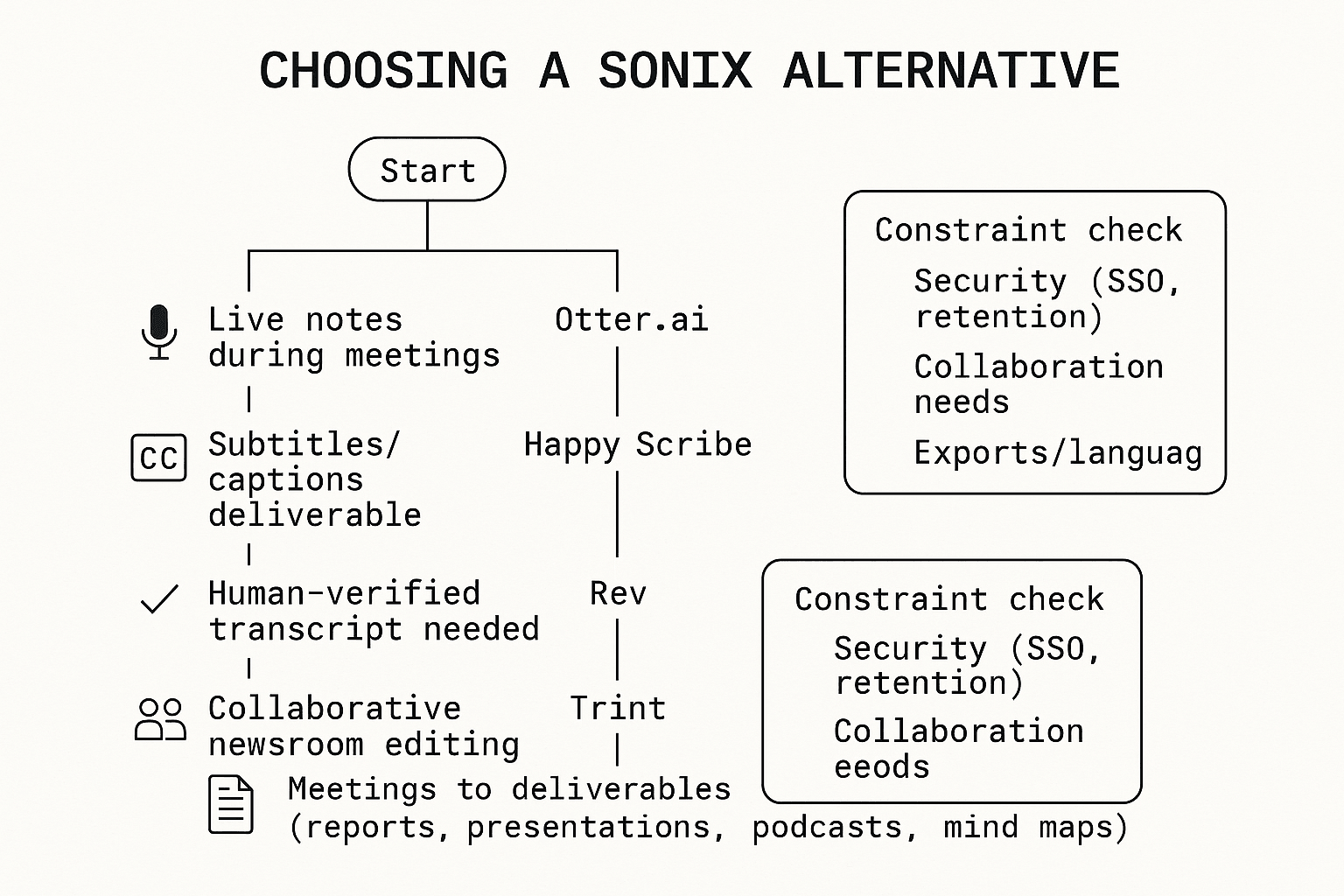
Decision tree: pick by output first, then constraints
Use this quick routing. Start at the top and follow your main output.
Final check: run a 30–60 minute pilot with your hardest real audio
Once you have a front-runner, validate it with one tough sample: cross-talk, accents, jargon, and real speaker names. In 30–60 minutes, you'll learn what matters most: edit time, export fit, collaboration friction, and whether the output is truly "ready to ship."
What's hard to replace in a meeting-to-deliverables workflow? (step-by-step example)
Most tools can turn audio into text. What's harder to replace is the chain after that: keeping every quote traceable, improving the transcript once, and reusing the same sources to ship multiple deliverables without rework. Below is an end-to-end example in TicNote Cloud (useful context when you're weighing a Sonix alternative for real team outputs).
Step 1 — Create a Project and add content (so the work stays organized)
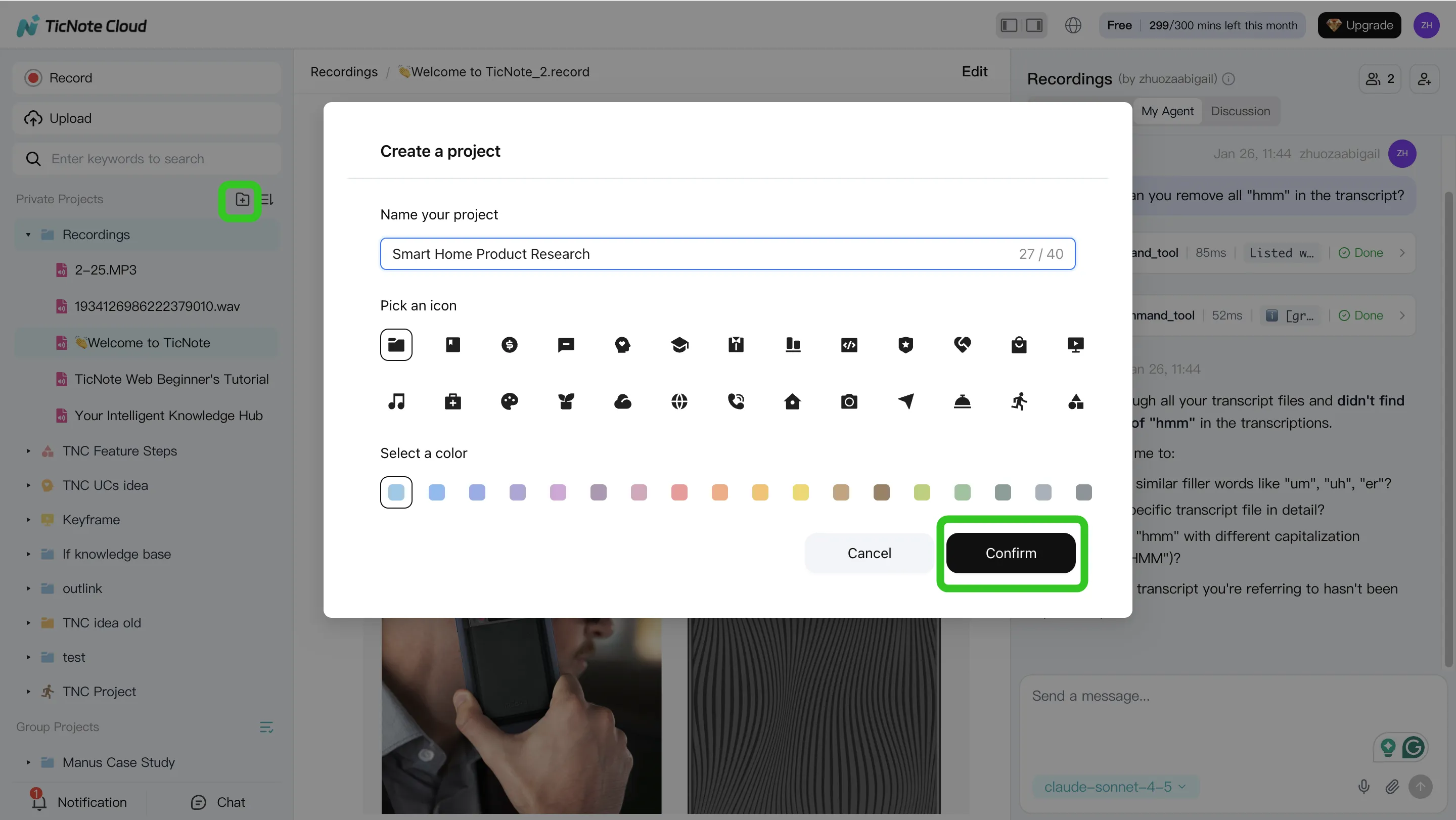
Start by creating a Project around one initiative, like "Q2 Customer Interviews." This matters because the Project becomes the container for every related meeting, upload, and output.
In the web studio, create a new Project (or open an existing one), then add your source files. You can upload audio, video, and documents so Shadow AI has the full set of sources.
- Direct upload: use the upload button in the file area to add files.
- Via Shadow AI: use the attachment icon in the chat panel and ask Shadow to save files into the right folder.
To keep things clean, use simple rules:
- one Project per initiative, 2) consistent meeting names (date + topic), 3) keep supporting docs (briefs, agendas, research notes) in the same Project.
Step 2 — Use Shadow AI to search, analyze, edit, and organize content (with citations)
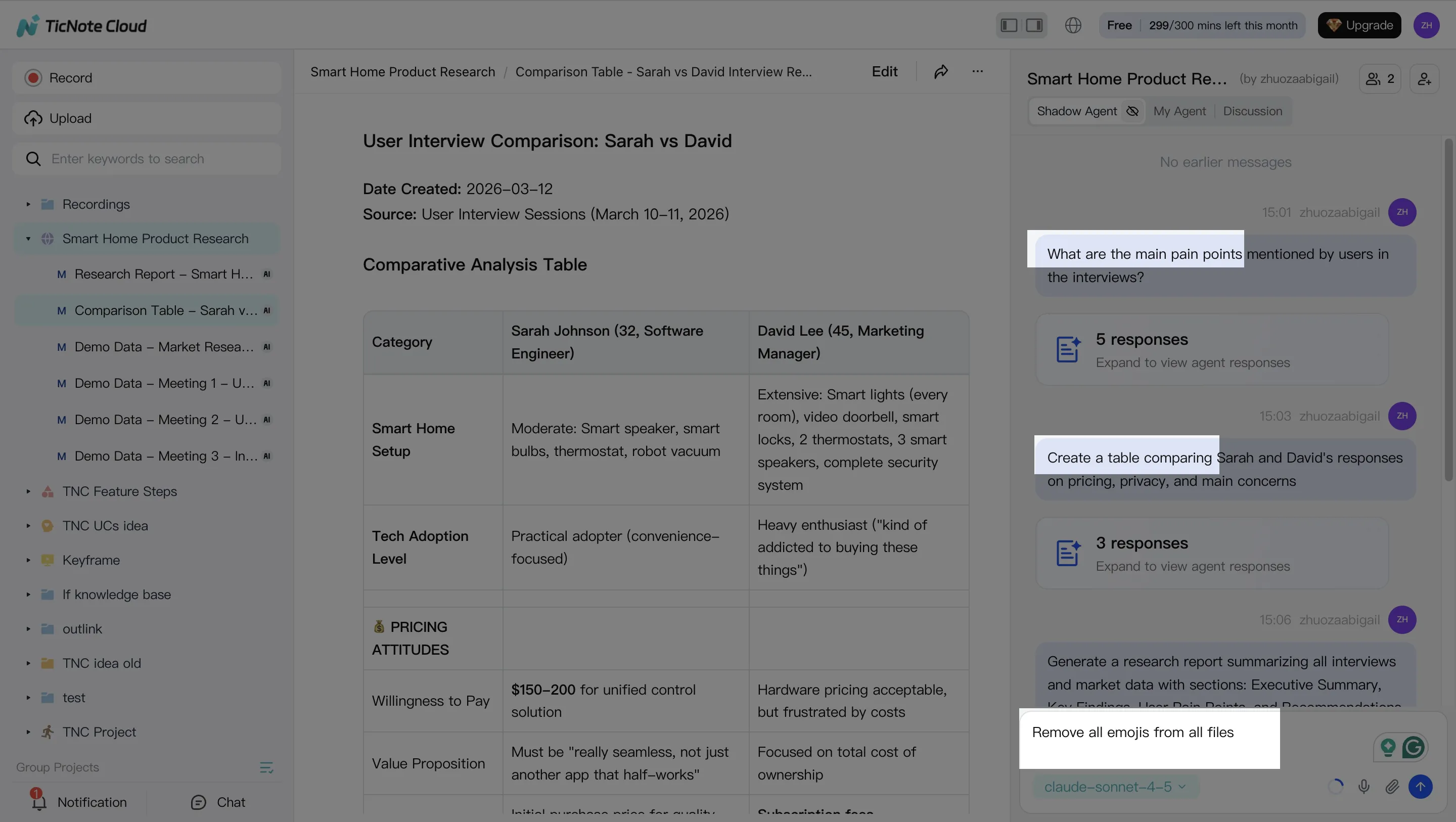
Next, you switch from "reading transcripts" to "working the material." Shadow AI sits on the right side of the screen, so you can ask Project-scoped questions that pull from all files.
Examples that match real workflows:
- Search & analyze: "What are the main pain points?" or "Compare the 3 interviews and extract common themes."
- Edit & organize: "Create a table comparing user responses" or "Organize action items from all meetings."
The part many teams miss: edit the transcript in place (fix names, product terms, and acronyms). That one pass improves every downstream summary, report, and presentation.
Step 3 — Generate deliverables from the same sources (no context switching)
Now you turn the Project into deliverables. Instead of exporting text and rebuilding in another tool, you ask Shadow AI to generate what you need in the format you'll ship.
Common outputs from the same Project sources:
- Research report (Word/PDF)
- Web presentation (HTML)
- Mind map
- Podcast-style output with show notes
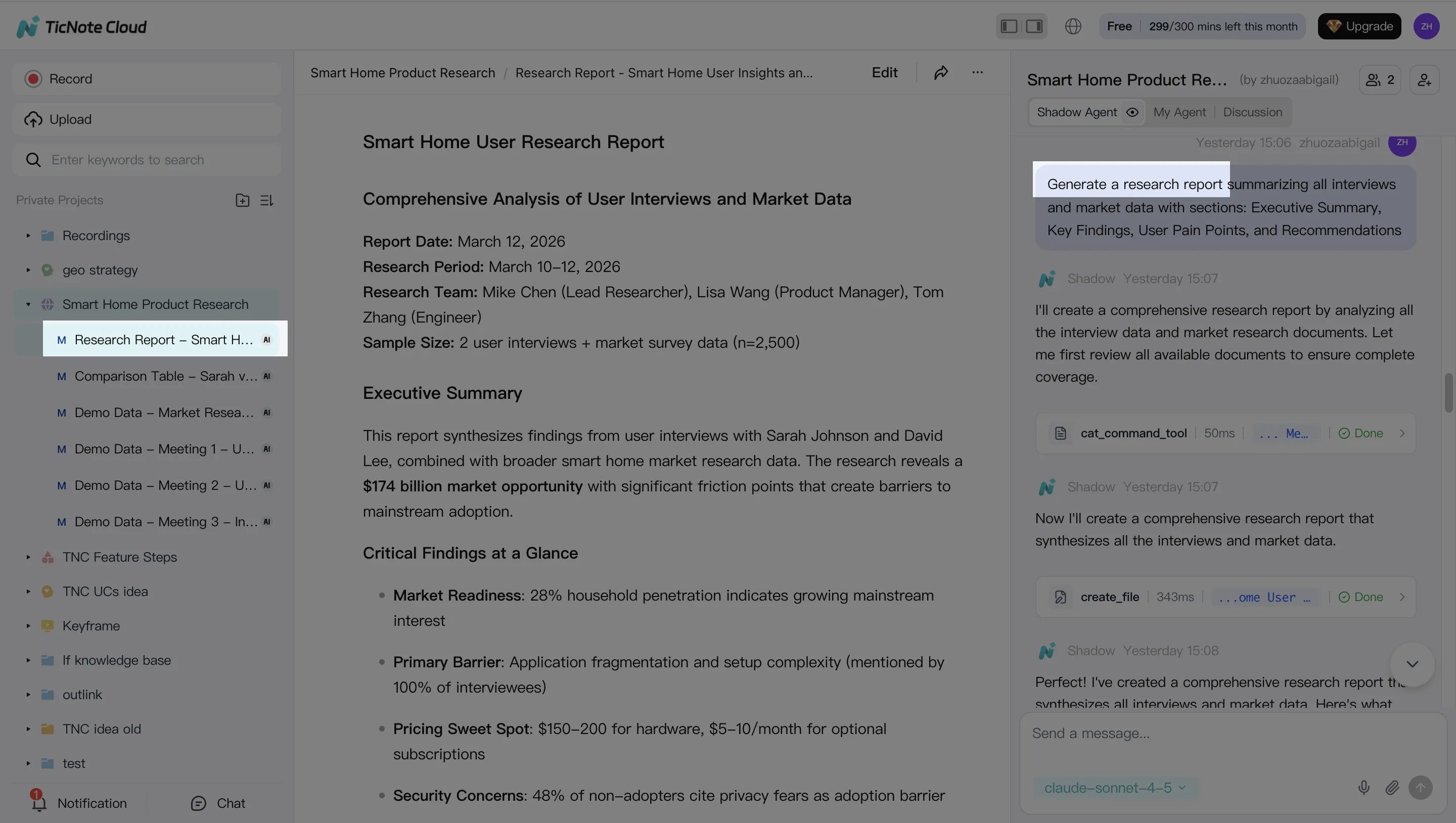
The key workflow win is "no context switching": the output stays connected to the Project sources, so you can verify claims and reuse the same material for a different audience (exec summary vs. detailed appendix) without starting over.
Step 4 — Review, refine, and collaborate (without breaking traceability)
After Shadow generates a deliverable, review it as a team. Invite teammates with Owner/Member/Guest permissions, then use comments and shared editing to validate quotes, decisions, and action items.
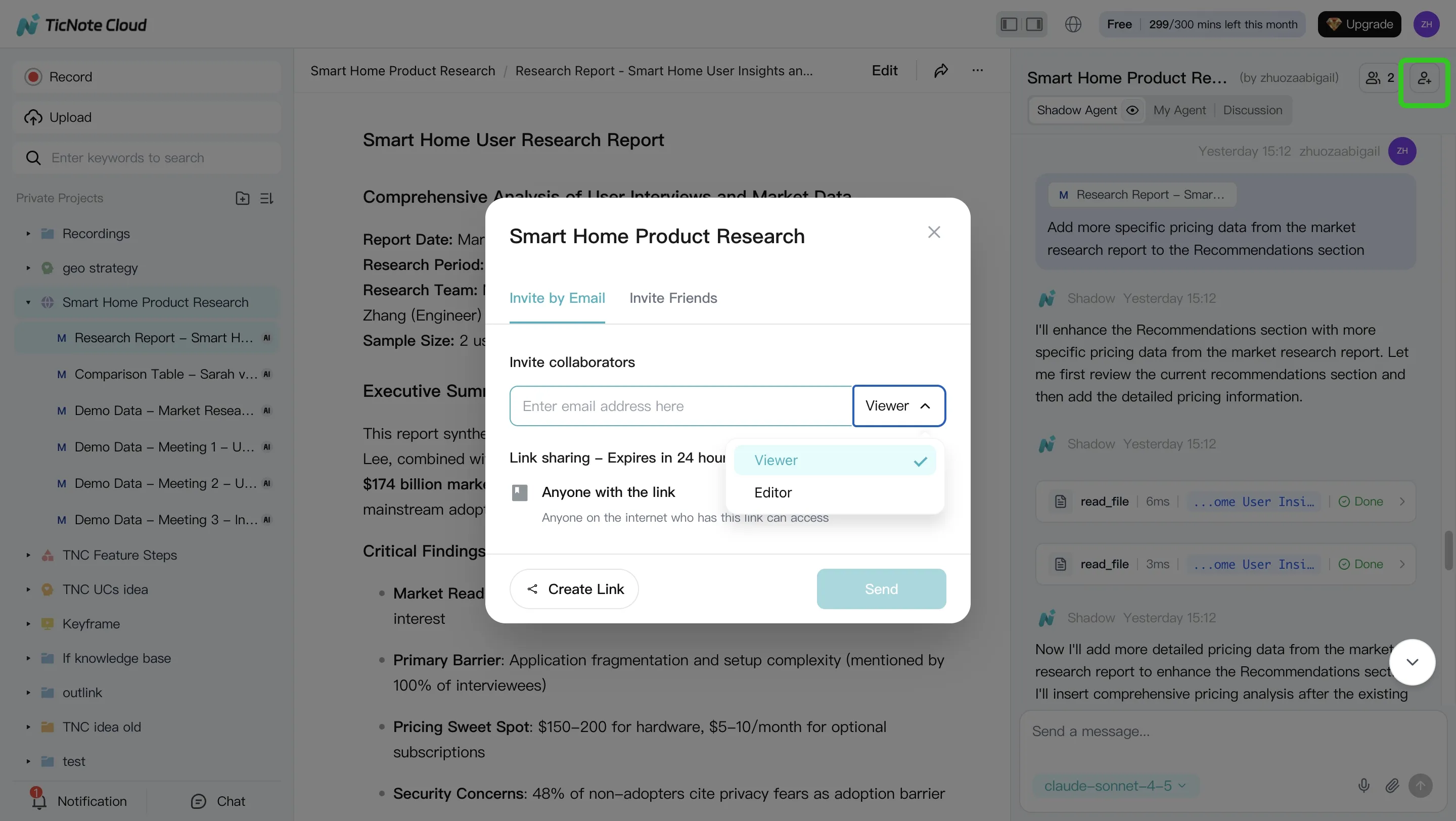
When feedback comes in, you don't rewrite from scratch. You re-run Shadow for revisions like:
- "Make this a 150-word exec summary."
- "Re-structure as risks, mitigations, and next steps."
Because the work stays in the Project, citations remain checkable while the structure changes.
Quick note on the App workflow (capture now, polish later)
On mobile, the flow is simple: create or pick a Project, capture/import a recording, then ask Shadow AI for a summary or a first-pass deliverable. Save heavier edits for the web studio when you need detailed transcript cleanup or multi-output formatting.
Neutral takeaway: if your process is mostly "upload → transcript → export," a Sonix-style tool can be simpler. This Project-based workflow matters when you need repeatable deliverables, team review, and a knowledge base that grows over time.
Privacy, security, and data handling: what to verify before migrating
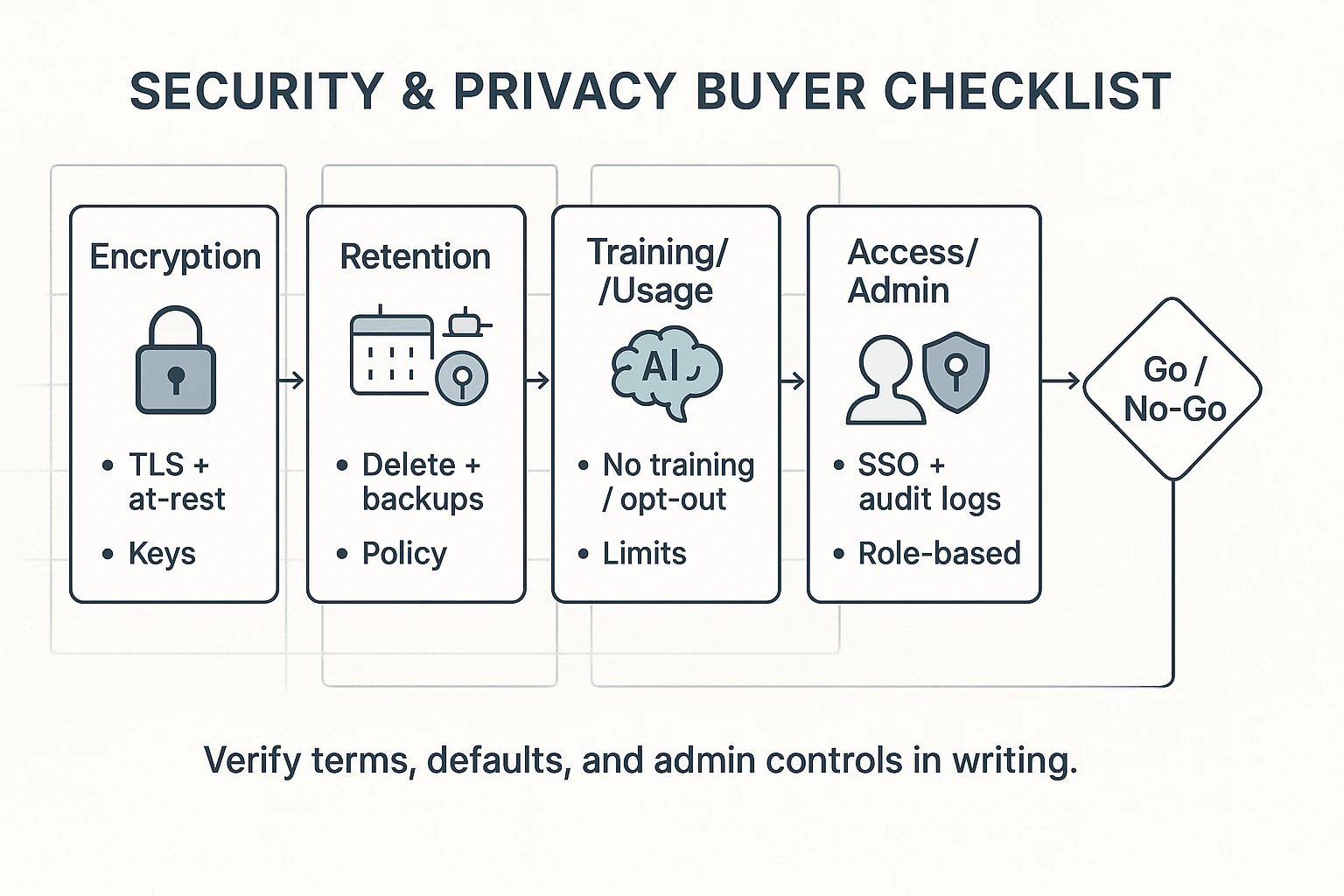
Switching tools means moving real personal data: names, voices, meeting notes, and sometimes health or HR details. So before you pick a Sonix alternative, treat security like a go/no-go gate, not a nice-to-have. The goal is simple: know what's stored, who can access it, how long it stays, and whether it's used to train models.
The buyer checklist (copy/paste for procurement)
Use this list in your vendor doc and get answers in writing:
- Encryption
- Encryption in transit (TLS) and at rest.
- Key management basics (who controls keys; rotation policy).
- Retention and deletion controls
- Default retention period for audio, transcripts, and AI outputs.
- Admin deletion tools (single file, project, and bulk delete).
- Backups: how long they persist after deletion.
- "Used for training" + opt-out
- Is customer content used to train any AI models?
- Is opt-out available by default, by workspace, and by user?
- Access controls (least privilege)
- Role-based access control (RBAC): Owner/Editor/Viewer/Guest.
- Sharing controls: link sharing, domain restrictions, expiry.
- Data residency
- Where data is stored by default; region options if needed.
- Cross-border transfer posture and documentation.
- Legal and vendor management
- DPA (data processing addendum) availability.
- Subprocessors list and update policy.
If you operate in the EU (or serve EU users), scope matters: Regulation (EU) 2016/679 (General Data Protection Regulation), Article 3(1) states the GDPR applies "in the context of the activities of an establishment" in the Union, even if processing happens elsewhere.
Team and enterprise needs: SSO, permissions, and auditability
Once more than one team touches transcripts, "who did what" becomes the real risk. Look for:
- SSO (SAML or OIDC) so access matches your identity provider.
- SCIM (if offered) to auto-provision and deprovision users.
- Granular roles and project-level permissions, not just "workspace admin."
- Audit logs for key events: login, exports, sharing changes, deletions.
- Traceability for edits and AI actions (what was generated, from which source).
- Guest access rules (guest-by-project, time-limited, or disabled).
Practical migration tips that reduce risk
You don't need a big-bang move. Keep it controlled:
- Start with 10–20 high-value projects (the ones people still reference).
- Set naming rules on day one: client + date + topic + sensitivity tag.
- Fix permission hygiene early: fewer Editors, more Viewers, and no public links.
- Minimize data: keep raw audio only if policy needs it; delete it when allowed.
- Keep a short "sensitive content" rule (e.g., no SSNs, no medical IDs).
Final caution: don't approve a tool off marketing checkboxes. Confirm the exact terms, admin controls, and defaults in writing before you migrate.
Sonix vs each alternative: what you gain and what you give up
Switching off Sonix is mostly a workflow decision, not an accuracy decision. Sonix is transcription-first. Some alternatives are meeting-first (live notes), and others are deliverables-first (reports, decks, and share links). Use the tradeoffs below to set expectations before you migrate.
Sonix vs TicNote Cloud
- You gain: A Project workspace that groups meetings and files in one place, editable transcripts (not read-only), and Shadow AI that can answer across Project content with citations. You also get one-click outputs like reports (PDF/Word), web presentations (HTML), podcasts, and mind maps.
- You give up: A pure transcription-only experience. If you only need simple exports, TicNote Cloud can feel like extra surface area.
Sonix vs Otter.ai
- You gain: A stronger live meeting notes focus, especially for teams that want notes fast right after calls.
- You give up: Some depth in exports and deliverables. Also confirm language coverage and any advanced transcript editing you rely on.
Sonix vs Happy Scribe
- You gain: Subtitles/captions-first tooling and localization-friendly exports for media workflows.
- You give up: A meeting-to-report workflow. For synthesis (themes, decisions, and client-ready docs), you may still need a second tool.
Sonix vs Rev
- You gain: A clear path to human-verified transcripts when accuracy must be checked.
- You give up: Speed and cost predictability at scale, plus less of a shared workspace for ongoing projects.
Sonix vs Trint
- You gain: Collaboration and editorial review patterns that fit newsroom-style workflows.
- You give up: Potential pricing transparency and admin simplicity. Confirm language support and governance needs early.
If you want transcripts and shareable outputs, TicNote Cloud is usually the most direct switch. It cuts the work after transcription by keeping files in Projects and turning them into usable deliverables. If you're mapping this to broader knowledge tools, see this guide on switching costs and workflow fit for Notion-style workspaces to sanity-check where "transcription" ends and "publishing" begins.
Final thoughts: the best Sonix alternative depends on your output
Don't pick a Sonix alternative by feature lists. Pick it by the output you must ship: clean notes, captions, a verified transcript, or a shared doc your team can edit.
For most evaluators leaving Sonix who want a clearer "meeting → usable asset" path, TicNote Cloud is the most direct fit. It's built around Projects, editable transcripts, and Shadow AI that can draft reports, presentations, and other deliverables while keeping citations back to the source.
Two caveats keep the choice honest:
- If you only need fast transcripts and basic exports, a transcription-only tool will feel simpler.
- If you need human verification (for broadcast, legal, or compliance), Rev is purpose-built for that workflow.
Try TicNote Cloud for Free and validate fit with one real project.


