


 Extension
TL;DR: The fastest way to pick an AI agent for accounting
For the fastest decision, use TicNote Cloud when your AI agent for accounting must turn close meetings into cited workpapers and searchable project memory; use ERP-native agents for reconciliations/AP, and tax tools for authority-backed research.
Close teams lose hours chasing decisions. That creates audit/SOX pressure when evidence lives in chats, calls, and spreadsheets. TicNote Cloud helps centralize those conversations, transcripts, and cited answers without replacing human review.
Non-negotiables: audit trail, permissions/SSO, approval gates, evidence links, exception queues, and exportable workpapers.
If you choose one, use TicNote Cloud for limited staff and multi-entity coordination; humans approve judgments and postings.
What is an AI agent for accounting (and how is it different from chatbots and RPA)?
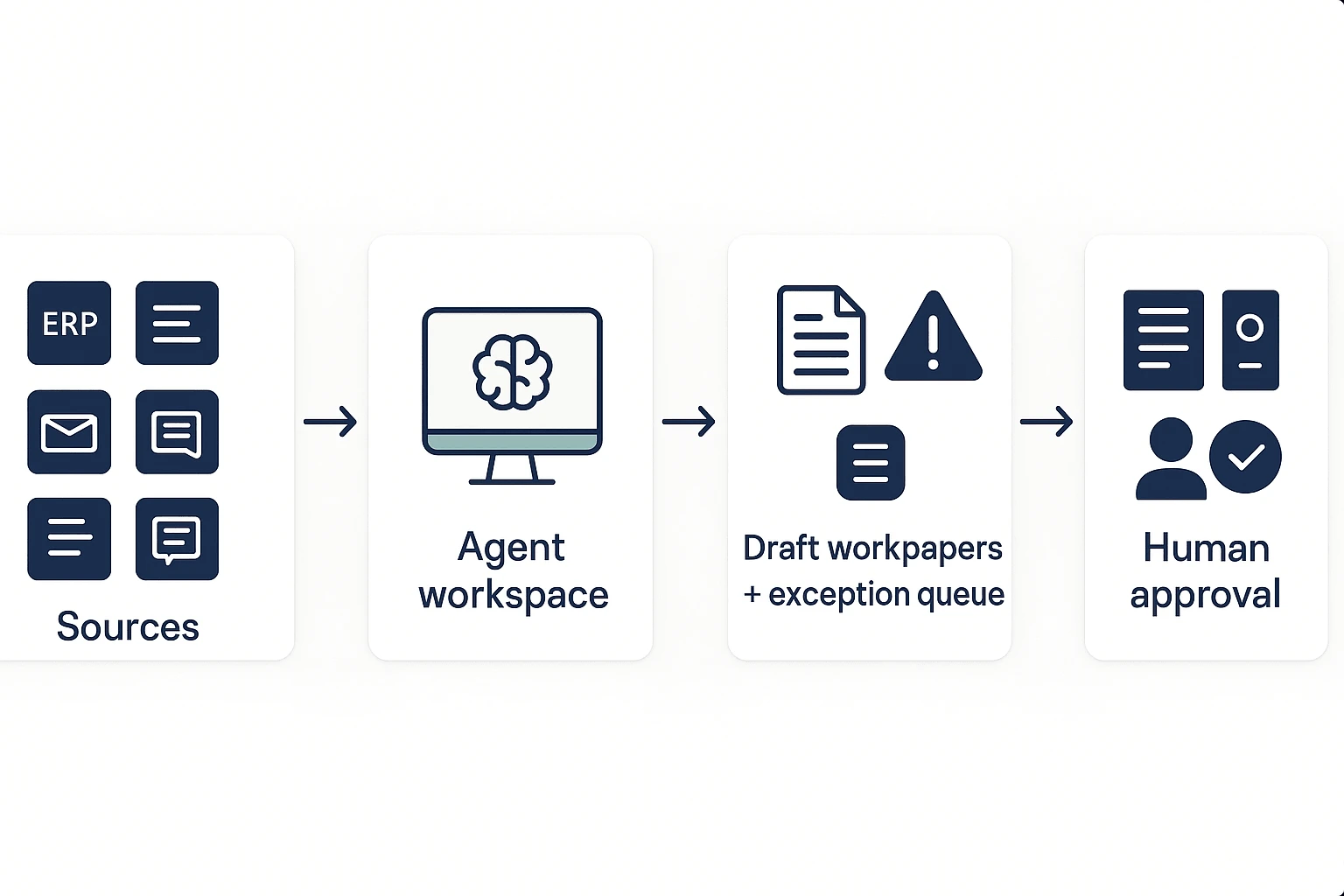
An AI agent for accounting is a goal-driven system that can plan and execute multi-step finance work inside guardrails. It can draft reconciliations, check support, assemble evidence, and route items for approval. That is different from software that only answers questions or clicks through fixed screens.
If you're comparing terms, this guide to AI agents versus AI assistants gives a useful baseline.
Compare the three automation layers
| Layer | What it does | Autonomy level | Control risk |
| RPA or rules automation | Follows fixed rules, such as copying invoice data | Low | Breaks when formats or exceptions change |
| GenAI assistant | Drafts text, explains variances, answers questions | Medium | Helpful, but doesn't reliably run the workflow |
| Agentic accounting AI | Plans steps, pulls files, creates checklists, drafts workpapers | Higher | Needs logs, review queues, and permissions |
Define "autonomous" safely
In accounting, autonomous should not mean "posts to the ledger without review." It should mean the system handles 60–80% of repeatable prep work, then stops at judgment points.
A safe agent can:
- Draft reconciliations, variance narratives, and close checklists.
- Suggest journal entries, but not post them.
- Flag exceptions using materiality thresholds.
- Route work to the right reviewer.
- Preserve source links, timestamps, and approval history.
That is the finance-first Agent Readiness lens: autonomy must always come with evidence, permissions, and sign-offs. Humans still own the accounting conclusion.
Top AI agent tools for accounting teams (ranked + best use cases)
The best AI agent for accounting depends on the job: evidence capture, close control, tax research, spreadsheet help, or system automation. For controllers and close owners, start with auditability. A useful tool should preserve sources, show who changed what, and export work that can live inside your close or audit binder. For a broader control lens, see this guide to finance AI agent use cases and SOX-safe controls.
1. TicNote Cloud: best agent workspace for meeting-to-workpaper capture
TicNote Cloud is the most practical first pick when your accounting work starts in meetings: close calls, audit walkthroughs, variance reviews, and multi-entity status updates.
It's Projects group-related meetings, documents, videos, and research into one workspace. Shadow AI can then answer questions across those files with citations, so teams can trace a summary back to the source. Editable transcripts help clean up names, account references, and control language before notes become audit evidence. Exports in DOCX, PDF, Markdown, and mind maps fit common workpaper flows.
Best-fit use cases:
- Close status calls → action list, owner list, and evidence pack
- Audit walkthrough notes → searchable process binder
- Multi-entity close projects → consistent narrative drafts
- Controller reviews → cited answers across prior meetings and docs
TicNote Cloud also supports Owner, Member, and Guest permissions, with traceable Shadow AI operations. That matters when different people can view, edit, or review accounting records.
2. Microsoft Copilot: best for M365-heavy finance teams
Microsoft Copilot works well when the team already lives in Outlook, Excel, Teams, Word, and SharePoint. It can summarize long email threads, draft documents, assist with spreadsheet analysis, and help turn meeting notes into follow-ups.
The limitation is evidence discipline. Copilot output still needs to be captured into approved workpapers, tied to source files, and reviewed by a human. Treat it as a productivity layer, not a complete accounting evidence system.
3. OpenAI ChatGPT Team/Enterprise: best for flexible analysis and templates
ChatGPT Team and Enterprise are strong for policy drafting, memo outlines, variance explanation templates, checklist design, and ad hoc analysis. They're especially useful when accounting teams need a flexible assistant across many task types.
For audit-safe use, create a repeatable workflow: approved prompts, uploaded sources, retention rules, reviewer sign-off, and final exports. Without that structure, good answers can become hard-to-defend workpapers.
4. Google Gemini for Workspace: best for Google-first finance orgs
Gemini fits teams that run finance work in Gmail, Docs, Sheets, Meet, and Drive. It helps summarize documents, draft comments, and support spreadsheet-based workflows.
The key governance checks are simple: confirm Drive permissions, retention settings, source visibility, and export formats. If accounting evidence must live outside Google Workspace, define the handoff before rollout.
5. Thomson Reuters CoCounsel / Ready to Review: best for tax and firm workflows
CoCounsel and Ready to Review fit tax-heavy teams, accounting firms, and professionals who need cited answers inside specialized research or review workflows. Their strength is domain depth, not broad close operations.
Use them for tax research, document review, and technical support. Pair them with a separate workspace if your team also needs meeting capture, close narratives, and cross-project memory.
6. UiPath: best for legacy-system automation
UiPath is strongest when the work is structured and repetitive: system clicks, data movement, invoice routing, report extraction, and reconciliations across older tools. It combines robotic process automation (RPA, software that mimics user actions) with AI features.
It's not a substitute for accounting judgment. Use exception queues, approvals, and review steps when tasks involve estimates, unusual variances, or policy interpretation.
7. BlackLine: best for close and reconciliation control at scale
BlackLine is built for standardized close management, account reconciliations, matching, task tracking, and certification workflows. Large accounting teams use it to enforce consistency across entities and periods.
An agent workspace still helps around the edges: meeting capture, narrative drafting, audit walkthrough notes, and searchable project memory. BlackLine can manage the close process; a workspace can preserve the context around it.
Tip: read "agent" claims with a control checklist
Some products call anything an agent. Don't accept the label without proof.
Ask five questions before buying:
- Does it show step logs or traceable activity?
- Can it cite the source behind an answer?
- Can admins constrain actions and permissions?
- Does it support exception queues and approvals?
- Can it export a workpaper package?
If the answer is no, it may be only chat, only automation, or only summarization. Useful, yes. But not enough for controlled accounting workflows.
Comparison table: which accounting AI agent is best for auditability, workflows, and team use?
Use this scorecard to compare any ai agent for accounting on controls, not demos. Citations means clickable source spans or file-level links. Approval workflow means review queues, sign-offs, and exception thresholds. Permissions means project or org scope, least privilege, and SSO. Governance logs should show who did what, when, with which sources, and each output version. For a wider control lens, use this AI knowledge management governance checklist alongside the table.
| Best for | Citations/evidence | Approval workflows | Permissions/SSO | Meeting capture | Integrations/exports | Governance logs | Typical limitations |
| TicNote Cloud | Cited Project answers, source verification | Human review before workpaper use | Owner/Member/Guest; Enterprise SSO | Strong: bot-free recording, editable transcripts | TXT, DOCX, PDF, Markdown, HTML, mind maps | Traceable Shadow AI operations | Not an ERP posting engine |
| ERP-native agents | Strong transaction links | Strong for posted entries | Strong org controls | Usually weak | Deep ERP links | Strong system logs | Limited cross-meeting memory |
| Close-management platforms | Good checklist evidence | Strong close sign-offs | Role-based access | Usually weak | ERP and spreadsheet exports | Good task history | Less flexible research capture |
| AP automation agents | Invoice-level evidence | Strong approval routing | Department/vendor controls | N/A | ERP and payment exports | Good exception trails | Narrow use case |
| General AI chat tools | Depends on uploads | Manual | Varies by plan | Weak | Copy/paste or file export | Often limited | Higher evidence risk |
Weight the rows by your risk profile. Public companies under SOX should give audit trails, approvals, and permissions 60% or more of the score. Multi-entity teams should weight exports and entity-level access higher. Shared services need queues and exception routing; local teams may value meeting capture and fast documentation more. Embed this table in your internal vendor file and refresh it quarterly because AI features, pricing, and controls change fast.
How to choose the right product for your accounting team
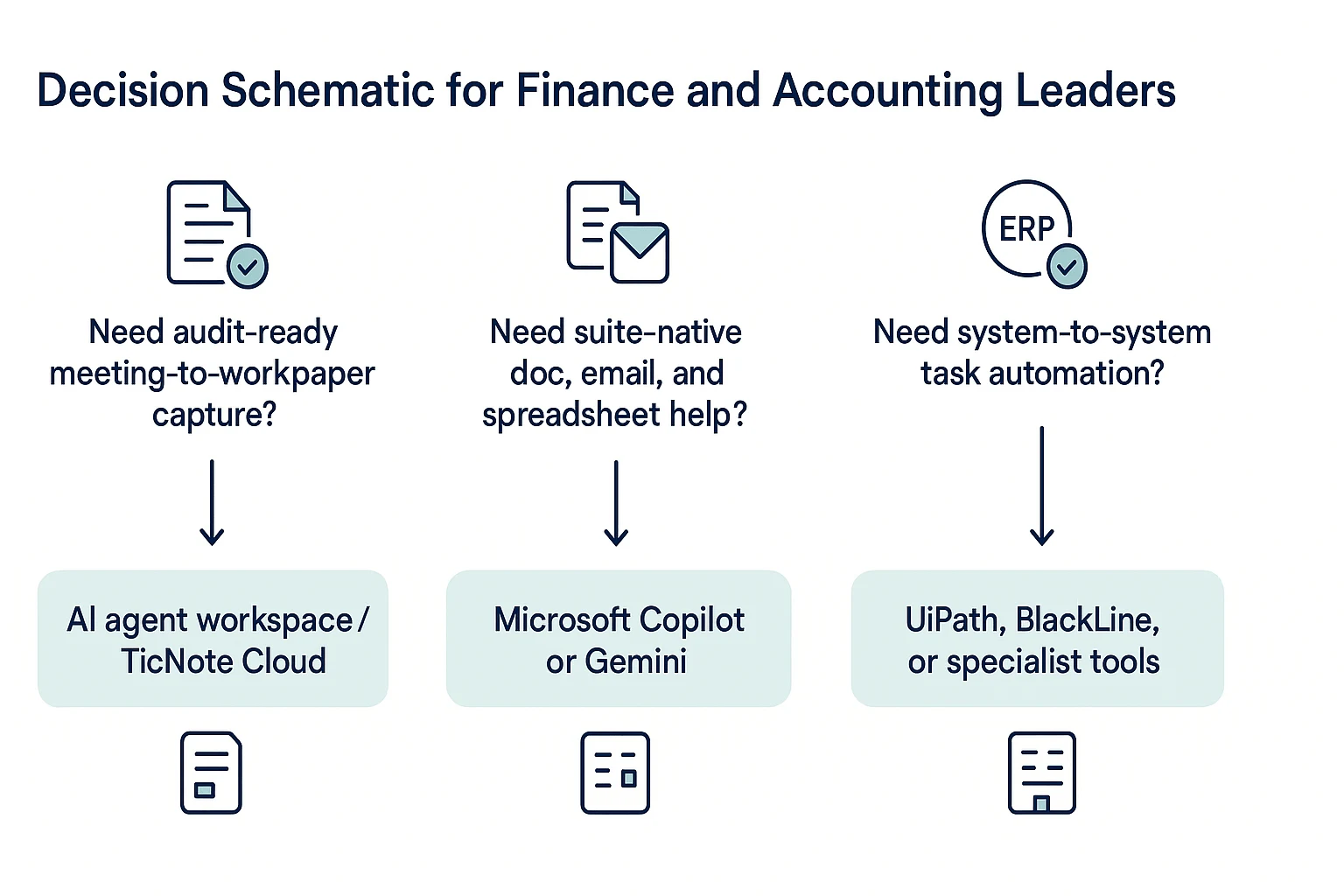
The right AI agent for accounting depends on where your evidence, approvals, and exceptions already live. Start with the work you need to control: meeting notes, close tasks, reconciliations, tax research, spreadsheets, or system-to-system processing. Then choose the tool that creates the strongest audit trail with the least process change.
Choose TicNote Cloud for meeting-to-workpaper capture
Choose TicNote Cloud first for most accounting teams that need clean documentation around close, audit, and review work. It records meetings bot-free, turns them into editable transcripts, stores decisions in Projects, and lets Shadow AI produce cited summaries, checklists, issue logs, and draft workpapers.
This fits recurring accounting routines: month-end close meetings, PBC status calls, flux review discussions, and audit follow-ups. The key benefit is simple: the conversation, source, summary, and export stay connected. That reduces the "who said what?" problem that often slows review.
In ambiguous cases, prioritize TicNote Cloud because it adds audit-ready documentation around existing work without forcing an ERP migration or a full process rebuild.
Choose a suite-native assistant for daily productivity
Pick Microsoft Copilot if your team lives in Outlook, Excel, Teams, and SharePoint. It's strongest for drafting emails, summarizing Teams threads, and helping with spreadsheet-based analysis. Standardize two rules before rollout: where approved outputs are stored and how supporting evidence is attached.
Choose Gemini for Workspace if your finance org is Google-first. It fits Drive, Docs, Sheets, and Gmail workflows. Your must-haves are clear access scopes, retention rules, export formats, and admin visibility into how finance files are used.
For broader selection criteria, use this AI agent security checklist before you approve any workspace-wide rollout.
Choose a general reasoning or specialist platform when the job demands it
Choose ChatGPT Enterprise or Team when you need flexible analysis, controlled admin settings, and reusable prompts. Use approved templates, require source attachments, and set review rules for journal entries, estimates, and board-ready narratives. It may not be enough alone if you need project memory, cited meeting evidence, and workpaper packaging in one place.
Choose Thomson Reuters if you're a tax or accounting firm focused on research and review workflows. It differs from a general agent workspace because it centers on authoritative tax and accounting content, not cross-project meeting memory.
Choose automation or close-control systems for structured operations
Choose UiPath when the priority is moving data across legacy systems. Pair it with human review queues, exception logs, and evidence capture so automation doesn't become a black box.
Choose BlackLine when standardized reconciliations and close controls are the main issue. It's built for scale. An AI workspace still adds value by capturing meeting narratives, review context, and cross-project decisions that sit outside the reconciliation tool.
How to implement an accounting AI agent safely (data, workflow, and change management)?
Implementing an ai agent for accounting is safe when you limit scope first, then add automation later. The rule is simple: the ERP stays the system of record; the agent workspace drafts, organizes evidence, and routes work for human review.
Start with an agent readiness checklist
Before the pilot, document these basics:
- System owners: Name owners for the ERP, subledgers, payroll, bank feeds, procurement tools, and close calendar.
- Data definitions: Lock the chart of accounts, entity codes, close task names, reconciliation status labels, and "prepared by / reviewed by" fields.
- Materiality thresholds: Define routing rules, such as "variance over $10,000 goes to the controller" or "unmatched cash items over 30 days need evidence."
- Allowed work: Let the agent draft recaps, action trackers, variance notes, and workpaper summaries.
- Prohibited work: Don't allow posting journals, approving payments, changing master data, or clearing exceptions without review.
In TicNote Cloud, this fits naturally into Projects. Teams can store close meetings, statements, exports, and review notes in one place, then use Shadow AI to search across files with citations.
Choose the least invasive integration
Start with the safest pattern that still solves the problem:
- Export-based: Upload CSVs, PDFs, bank statements, meeting transcripts, and close checklists into the workspace. This is best for pilots.
- Read-only API pull: Connect source data without letting the agent write back. Use this when volume grows.
- Controlled push: Use rarely. For accounting, posting entries or changing records should usually stay prohibited.
If your team is designing a broader automation model, use a clear agent architecture and governance plan before any system write-back.
Roll out in three phases
Use sample metrics to prove control, not just speed:
- Pilot: One close meeting series. Sample metric: cut recap and action tracker time from 60 minutes to 20 minutes.
- Expand: Reconciliation issue triage. Sample metric: reduce reviewer back-and-forth by 25% by attaching source evidence to each exception.
- Standardize: Templates, review queues, and permission groups. Sample metrics: 90% of exceptions include evidence; reviewer rework rate stays below 10%.
Train reviewers to challenge the agent
Set review norms early:
- Require citations for every key claim.
- Use a sign-off checklist for evidence, owner, amount, period, and conclusion.
- Ask reviewers to challenge unclear outputs, not polish them.
- Ban "the agent says so" as a decision reason.
Illustrative case 1: A multi-entity close standup is recorded, transcribed, and saved to a Project. Shadow AI creates an action tracker, flags open items by entity, and exports a recap for the close binder.
Illustrative case 2: A bank reconciliation team uploads statements and exception notes. The agent drafts root cause comments, links evidence, and routes high-value items to the reviewer.
What governance and security controls should an AI agent for accounting have?
An AI agent for accounting should work like a controlled preparer, not an unchecked approver. Route every draft journal entry, reconciliation note, close memo, or audit response to a review queue. Then require approvals by role, amount, entity, and risk level, with exception SLAs for close-critical items.
Build human review into the workflow
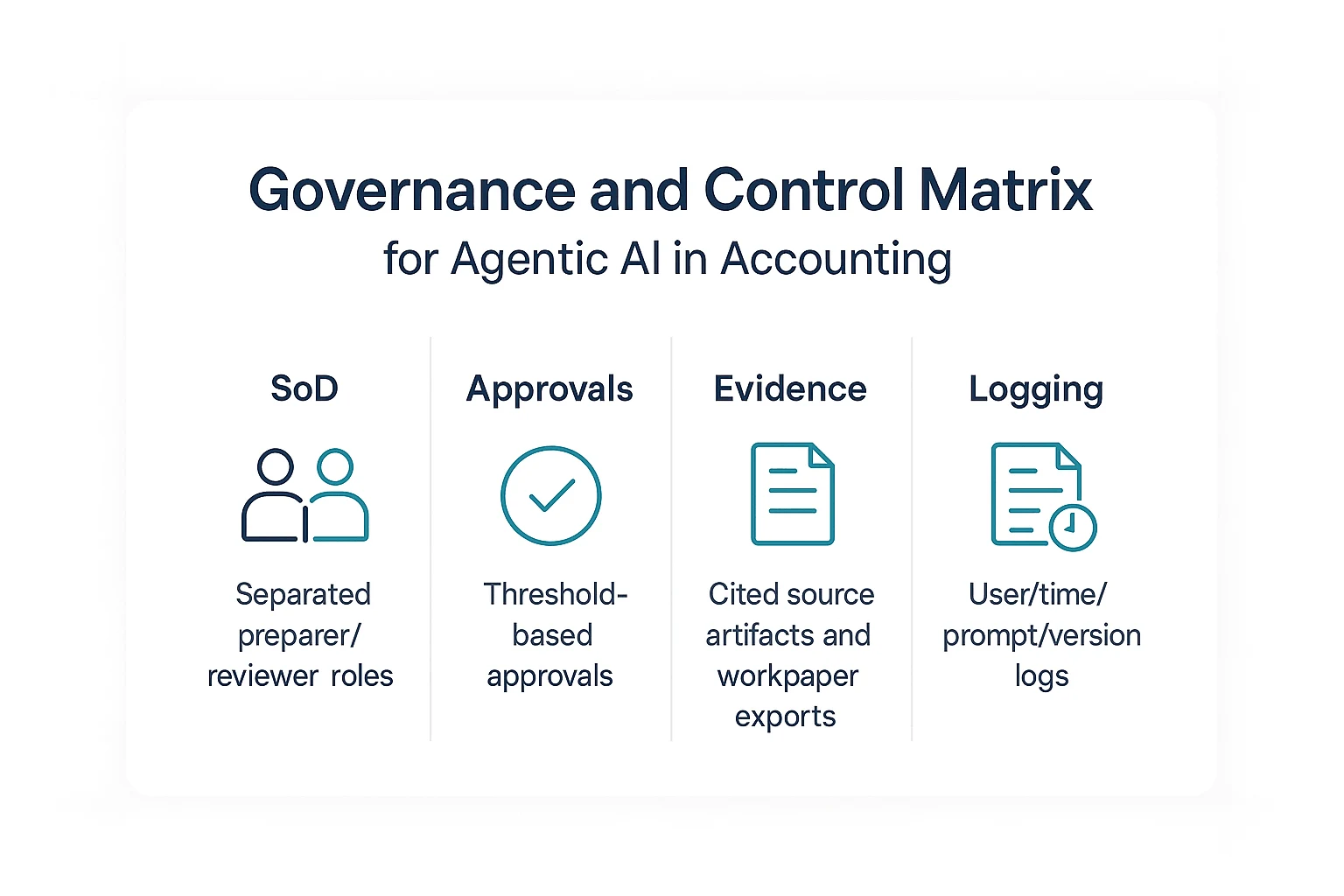
Silent failures happen when an agent acts without a clear stop point. Use a simple control matrix before production:
| Control area | Required control | Accounting example |
| SoD | Separate preparer, reviewer, and approver roles | The same user can't generate and approve a material accrual |
| Approvals | Apply thresholds by role and value | Controller approval for entries above the set materiality limit |
| Evidence | Store sources, citations, and workpaper exports | Reconciliation answer links back to the bank file and meeting note |
| Logging | Track user, time, prompt, source set, and action | Reviewer can see who asked, what changed, and when |
Capture audit evidence every time
Auditability beats "smartness." For SOX and external audit support, capture the prompt, source set, citations, timestamps, user identity, output version, and reviewer sign-off notes. The goal is reproducibility: another reviewer should be able to follow the same evidence trail and understand why the output was accepted or rejected.
Lock down access by entity and role
Least privilege means users only see what they need for their job. NIST Special Publication 800-53 Revision 5 (2020) — Security and Privacy Controls for Information Systems and Organizations defines the AC-6 (Least Privilege) control as: "Employ the principle of least privilege, allowing only authorized accesses for users (or processes acting on behalf of users) which are necessary to accomplish assigned organizational tasks."
In practice, use project-level permissions, restricted sharing, SSO for enterprise teams, fast offboarding, and separate workspaces for legal entities. TicNote Cloud fits this pattern with Projects, Owner/Member/Guest permissions, traceable Shadow AI operations, and enterprise SSO options.
Ask vendor-risk questions before uploading sensitive data
Use this checklist before payroll, bank, tax, or customer data enters the system:
- Is customer data used to train AI models?
- Is data encrypted in transit and at rest?
- What retention and deletion controls exist?
- Are regional hosting or DPA terms available?
- What is the incident response process?
- Can users redact PII, payroll details, and bank numbers before prompts or uploads?
How to run meeting-to-workpaper capture with an AI agent workspace (step-by-step)
A practical ai agent for accounting should turn close calls, audit discussions, and support files into evidence your team can review. TicNote Cloud fits this workflow because it keeps meetings, documents, cited answers, and exports inside one Project instead of spreading them across folders and chat threads.
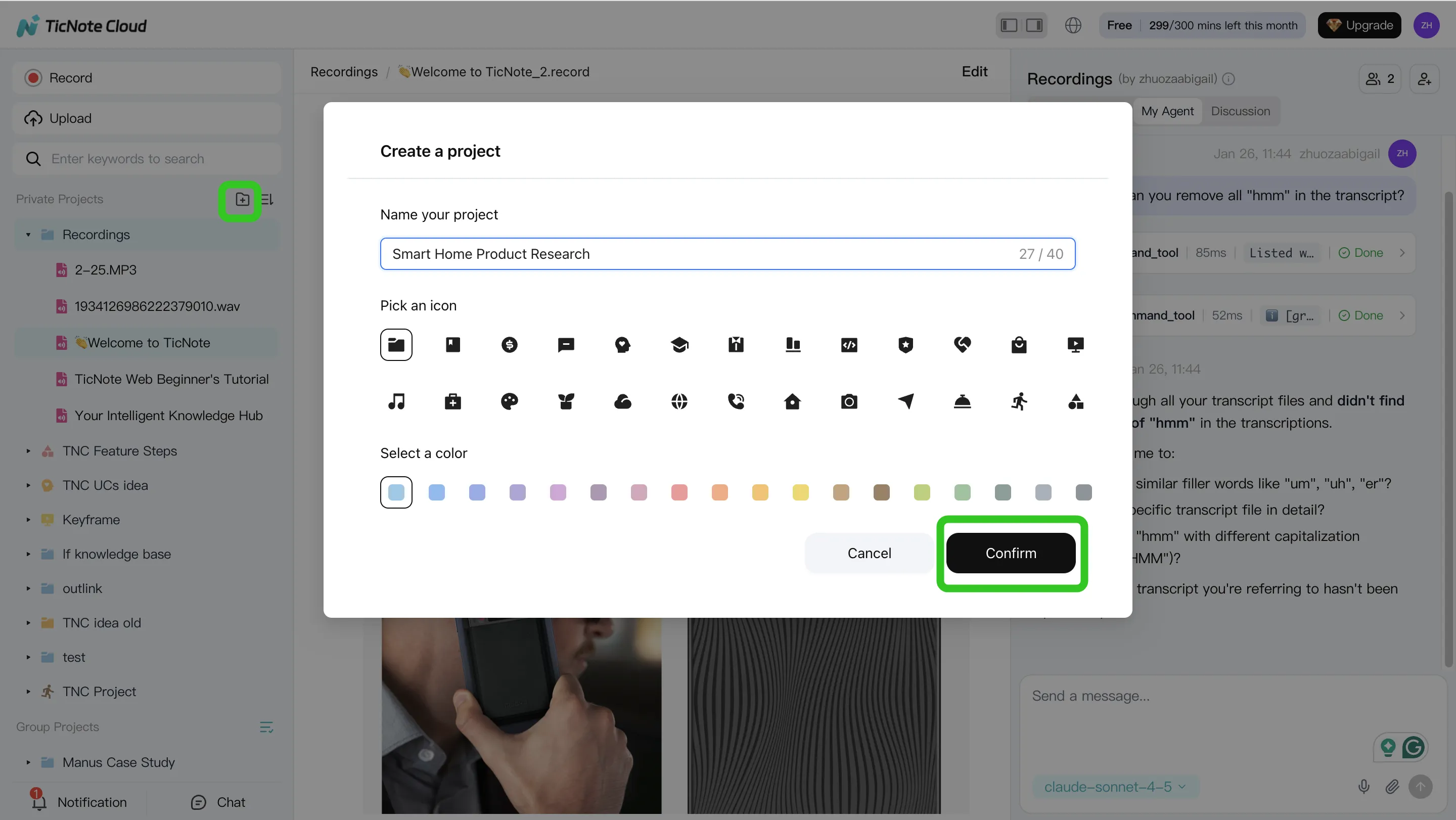
Step 1. Create or open a Project and add content
Start with a dedicated Project for one accounting stream, such as "March Close – Entity A" or "Q2 Audit PBC Requests." Add meeting recordings, policy PDFs, reconciliation exports, bank support, and schedules.
You can upload files directly from the Project file area. Or, use the attachment icon in the Shadow AI panel to add files and ask Shadow AI to save them to the right folder.
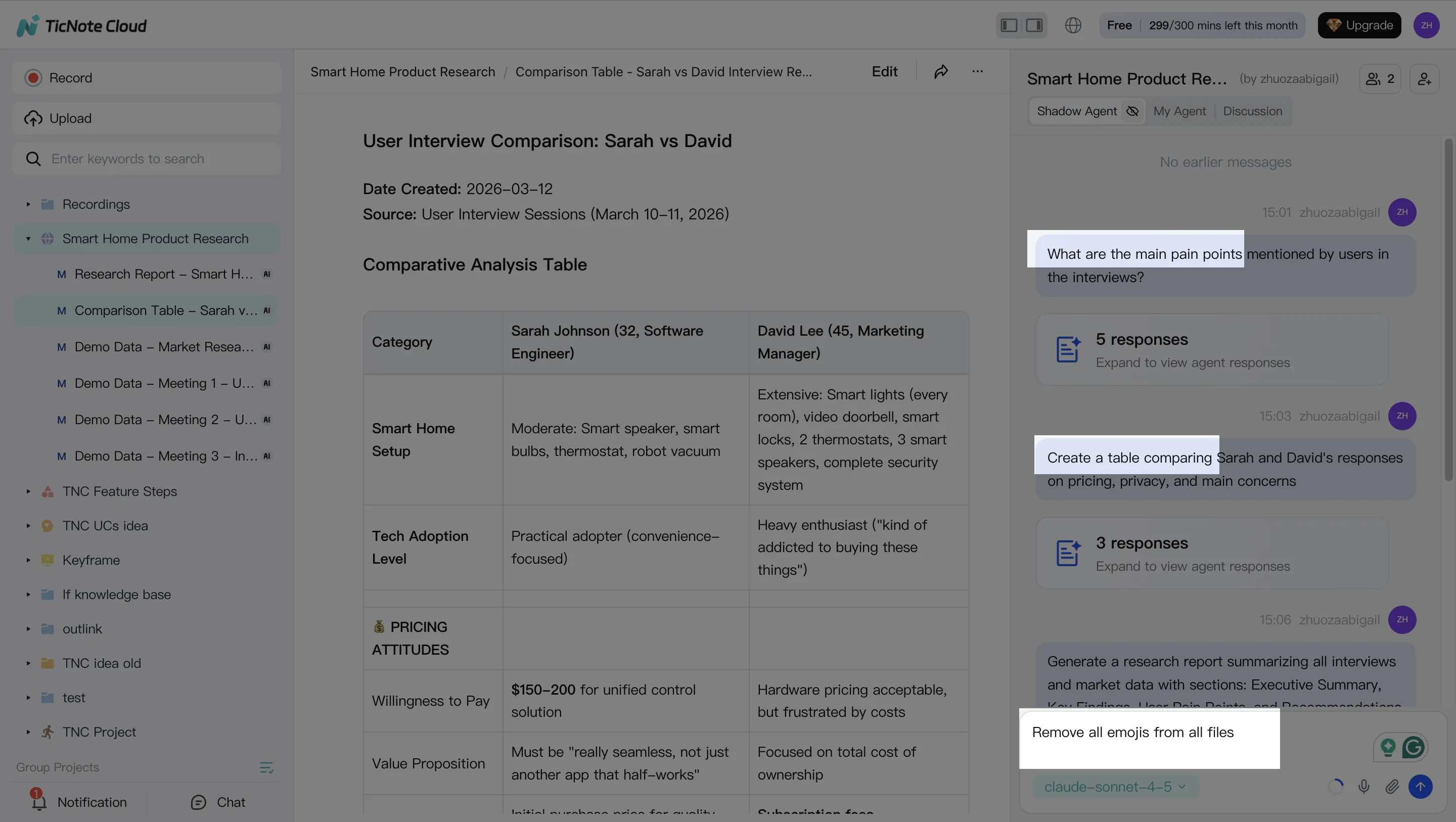
Step 2. Use Shadow AI to search, analyze, edit, and organize
Shadow AI sits on the right side of the workspace. Ask it to find decisions, open items, blockers, and evidence across all Project files. For audit-safe notes, require cited quotes or source links before using an answer in a workpaper.
You can also clean up important transcript passages so the notes read clearly while still matching what was said.
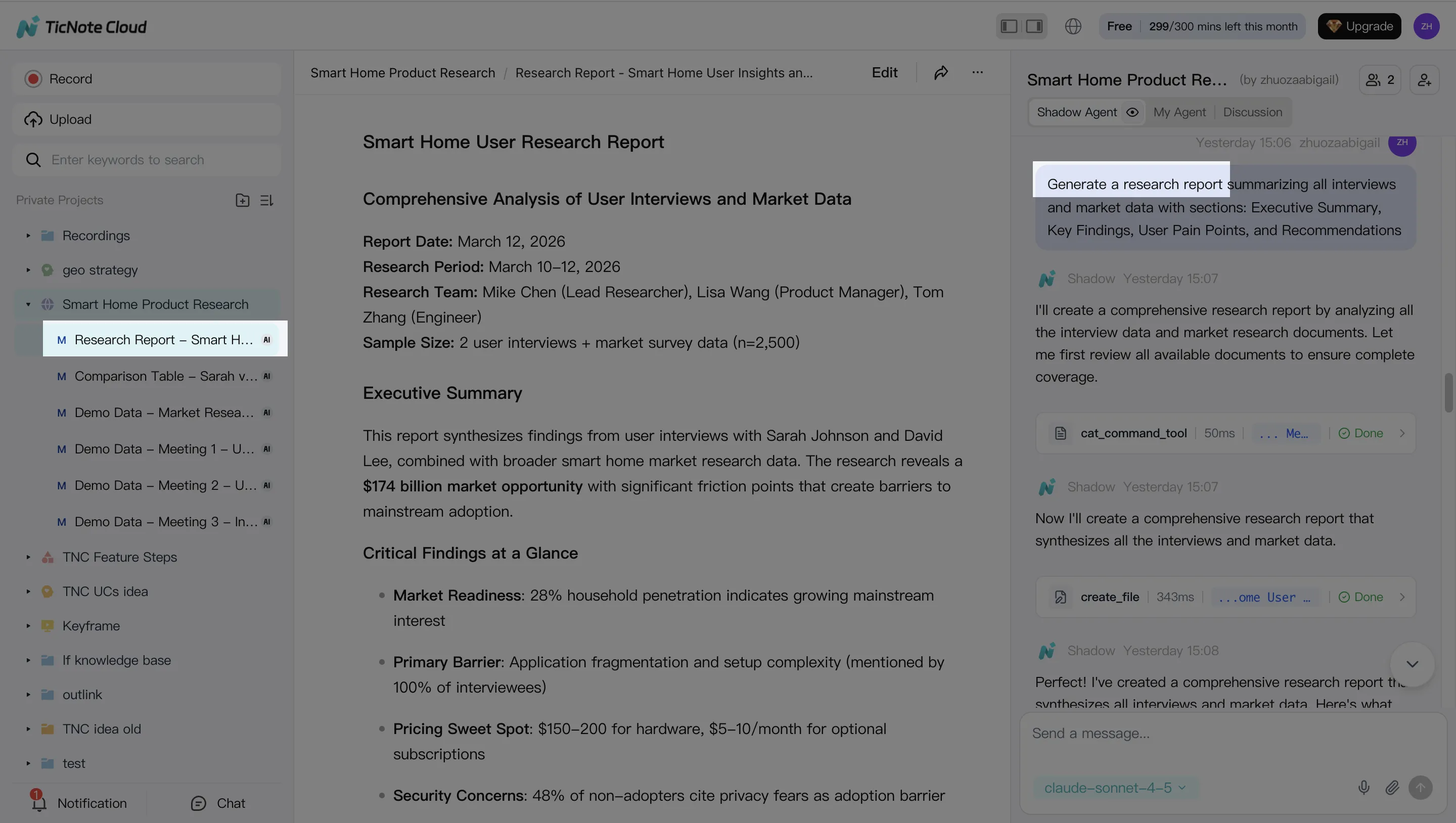
Step 3. Generate workpaper-ready deliverables
Next, generate structured outputs: close recaps, task lists, variance narrative drafts, issue trees, and audit memo drafts. Use DOCX, PDF, or Markdown when the team needs binder-ready files. Use mind maps when exceptions need fast triage.
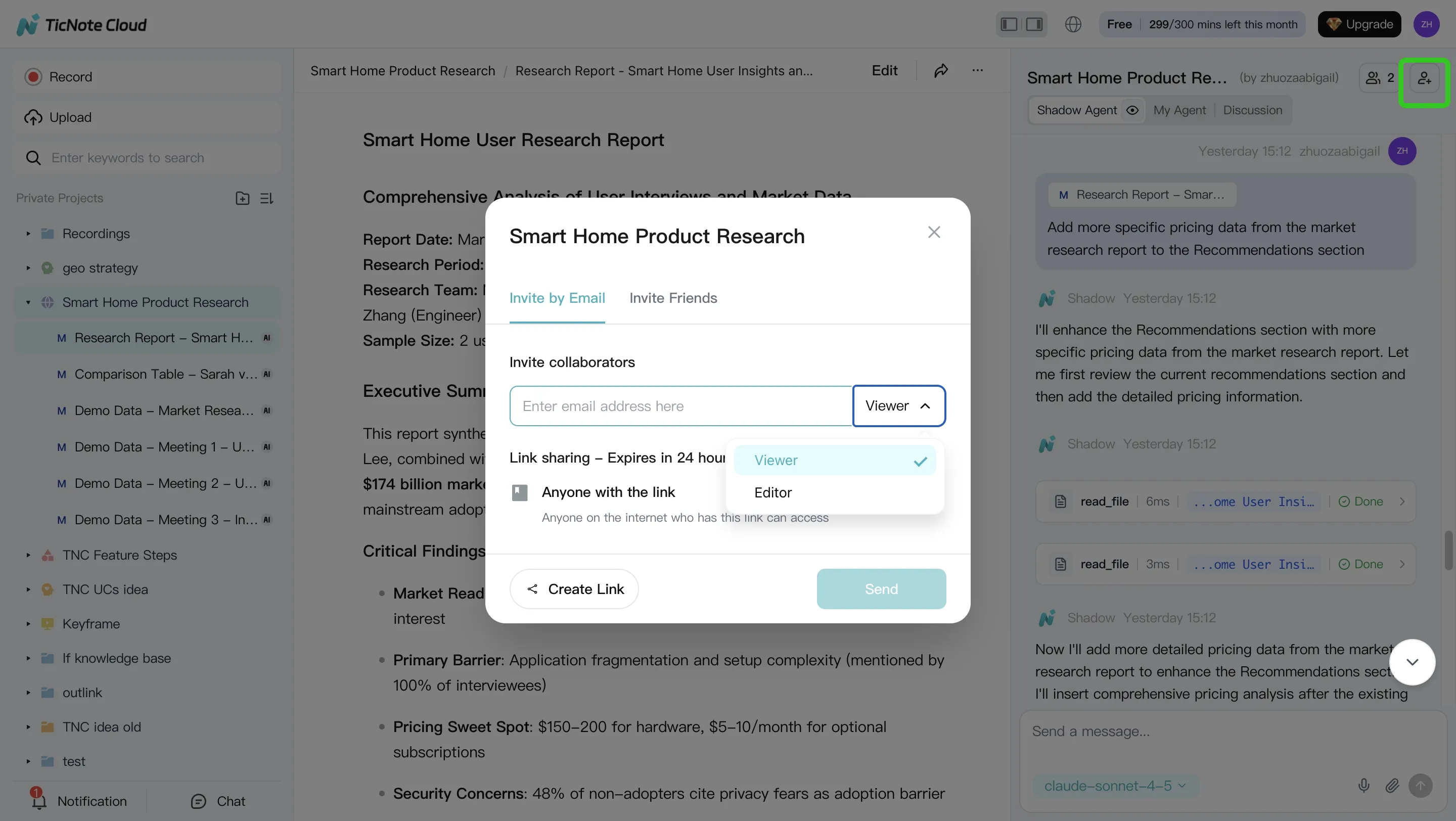
Step 4. Review, refine, and collaborate
Route each draft for human review. Reviewers can comment, ask follow-up questions, and click back to source material for validation. If something is unclear, rerun Shadow AI with tighter instructions.
Share Projects with role-based permissions so entity data stays separated. On mobile, teams can capture or upload recordings and materials on the go, then continue review and editing in the same Project from any device.
Conclusion: where AI agents help most in accounting this year
An AI agent for accounting creates reliable value when it handles evidence and coordination, not final judgment. The best uses this year are practical: faster close follow-ups, cleaner documentation, quicker reconciliation triage, and more consistent variance narratives. The rule is simple: choose auditability over autonomy.
Require every output to include:
- Cited source material
- Permission-based access
- Review before ERP posting
- Logs for requests, edits, approvals, and exports
TicNote Cloud fits this safer pattern for close meetings and project memory. Shadow AI turns discussions into cited summaries and exportable workpaper drafts, while accountants still own approvals and postings. For a wider view, compare AI workspace options before you shortlist tools.
Try TicNote Cloud for free and turn your next close meeting into a reviewable workpaper pack.


