


 Extension
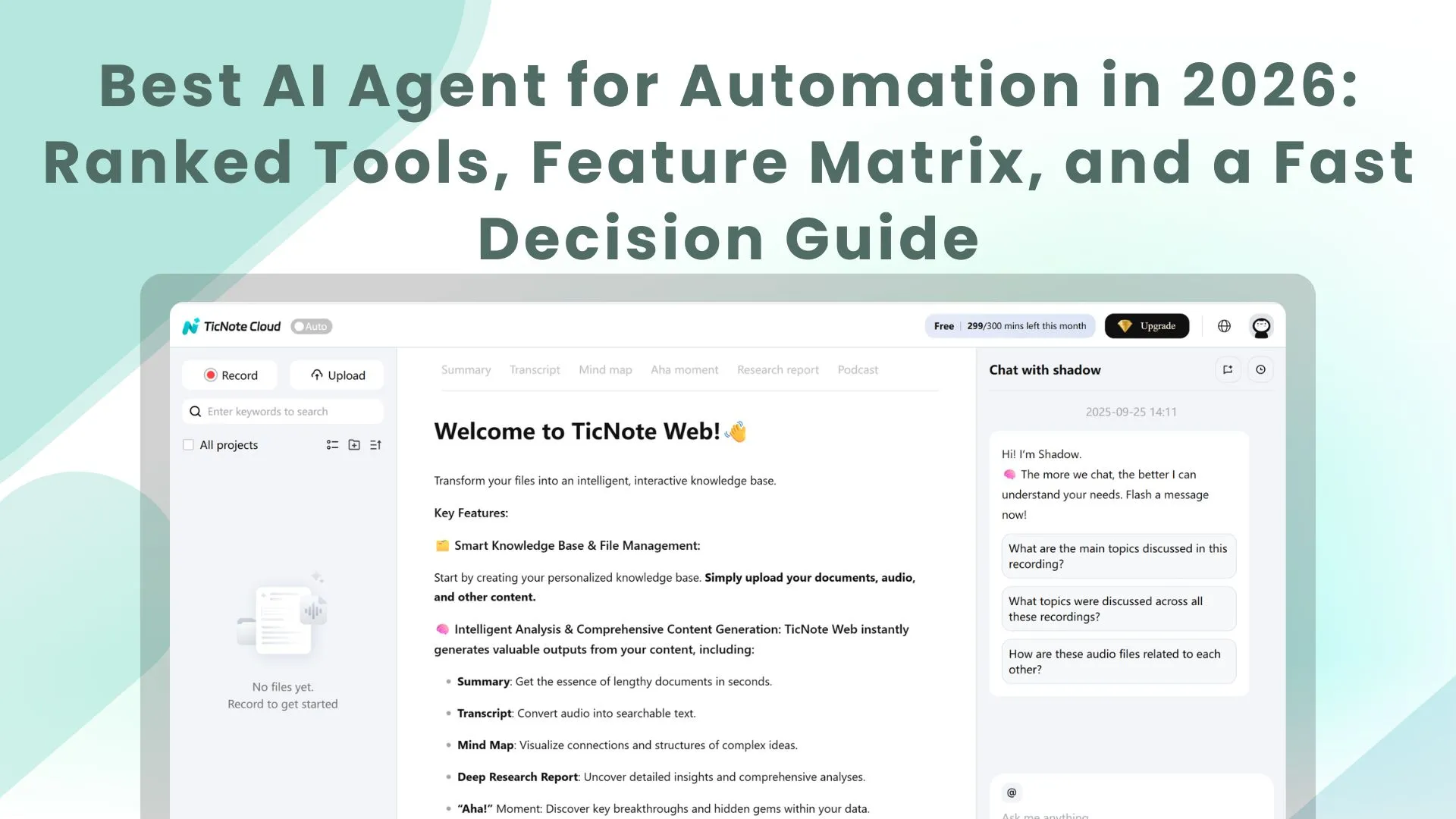
TL;DR: Best AI agent tools for automation (pick in 60 seconds)
Choose an AI agent for automation by work source: Try TicNote Cloud for Free if meetings drive follow-ups.
Calls bury decisions and evidence. Follow-ups drift. TicNote Cloud creates cited deliverables, so teams keep context.
- Meetings/interviews → TicNote Cloud: bot-free capture, editable transcripts, Project memory, citations, reports, presentations, podcasts, and mind maps. Test one meeting-to-report run.
- Dev orchestration → AutoGen / CrewAI: code agent teams. Test planning, delegation, execution, and evals.
- RPA-heavy enterprise → UiPath / Power Automate: stable UIs, approvals, compliance. Test exceptions.
- SaaS zaps → Zapier / n8n: fast event-triggered integrations. Test one 3-app workflow.
If you're unsure, start meeting-first: it's the highest-leverage source of unstructured work.
What is an AI agent for automation (and how is it different from chatbots and RPA)?
An AI agent for automation is software that uses an AI model to understand a goal, choose the next step, use tools, and verify the result. The key word is automation: the system must create a real state change, such as opening a ticket, updating a CRM field, shipping a document, or routing a task.
Follow the agent loop
A practical agent runs a 4-part loop:
- Sense: take in events, text, emails, transcripts, PDFs, or app data.
- Plan: break the goal into steps and pick the right tool.
- Act: call tools, write outputs, create records, or send updates.
- Learn: store useful context and improve the next run.
That loop is what separates agents from simple chat. If you need a sharper split, this agent-vs-chatbot decision matrix explains where each fits.
Put the LLM in the right role
The large language model, or LLM, should interpret intent, select tools, and draft clear outputs. It should not work alone. Retrieval-augmented generation, or RAG, grounds answers in your files. Short-term memory handles the current task. Long-term memory keeps project context over time. Tool calling connects the agent to tickets, docs, CRM, email, and databases.
LLM agent orchestration matters when a workflow has more than one step. It controls order, checks failures, and prevents a loop from running forever.
Use RPA for rules, agents for messy work
The AI agent vs RPA choice is simple. RPA wins when the interface is stable and the rules are fixed, like copying invoice values into a legacy screen. Agents win when inputs are messy, such as meeting notes, customer emails, or policy PDFs that require judgment.
Hybrid setups often work best: the agent decides what should happen, and RPA executes the fixed clicks.
Avoid confusion: chatbots answer; agents complete.
Now we'll evaluate tools using the same architecture and the same scorecard.
What should a real automation-ready AI agent include (architecture you can evaluate)?
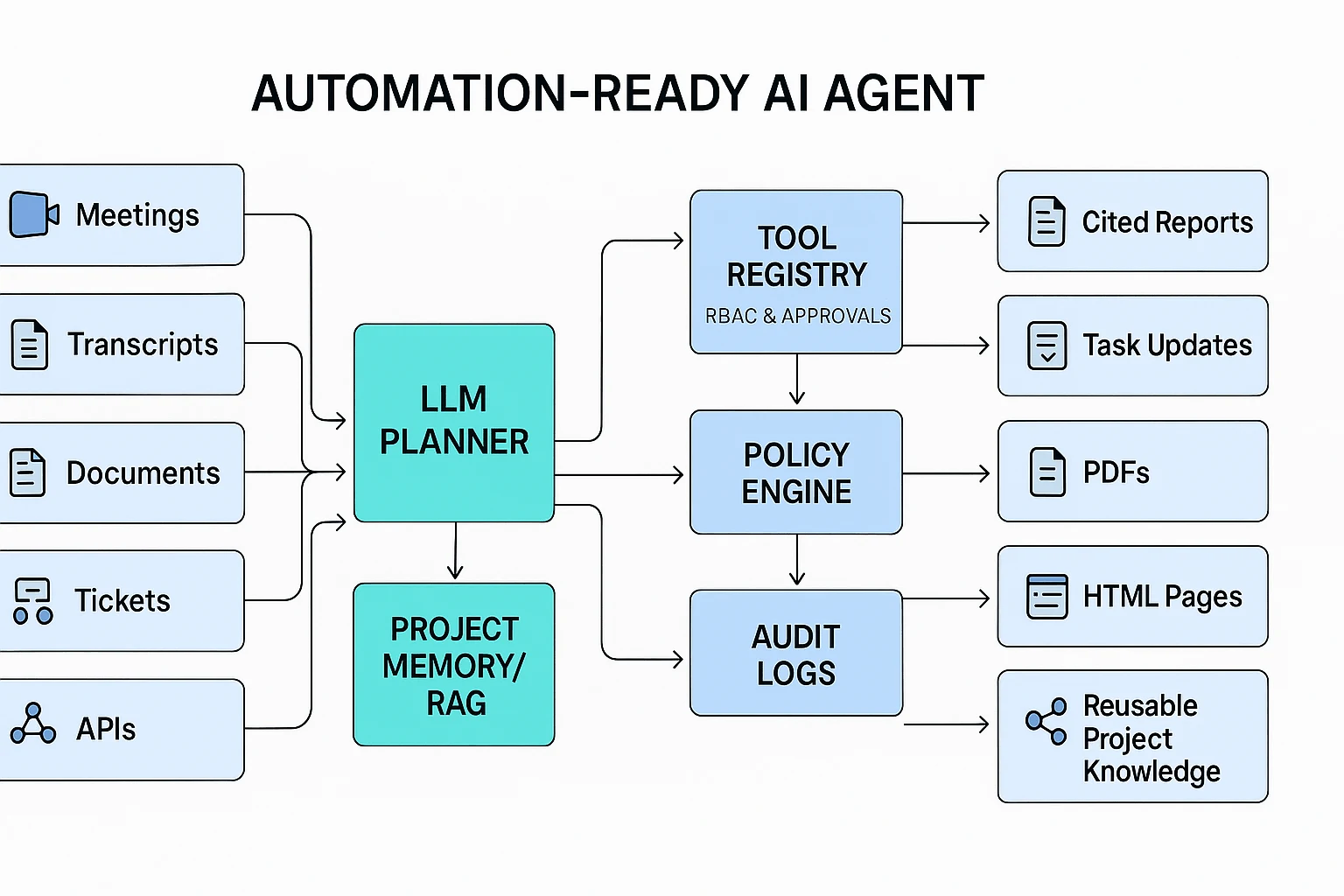
A real ai agent for automation is more than a chat window with tool access. It needs a visible architecture you can test: how it receives inputs, remembers context, plans work, calls systems, applies policy, and produces usable outputs.
Inspect the core modules
Before you compare vendors, look for these minimum parts:
- Input ingestion: meetings, documents, forms, tickets, emails, APIs, and uploaded files.
- Memory: session memory for one task, plus project memory for work that compounds over weeks or months.
- Planner: a ReAct-style planner (reasoning plus acting) or task graph that breaks goals into steps.
- Tool layer: connectors, APIs, browser actions, or RPA for legacy systems.
- Policy and permissions: role-based access, scopes, approvals, and blocked actions.
- Output formatter: reports, briefs, tickets, tables, presentations, PDFs, HTML pages, or other deliverables.
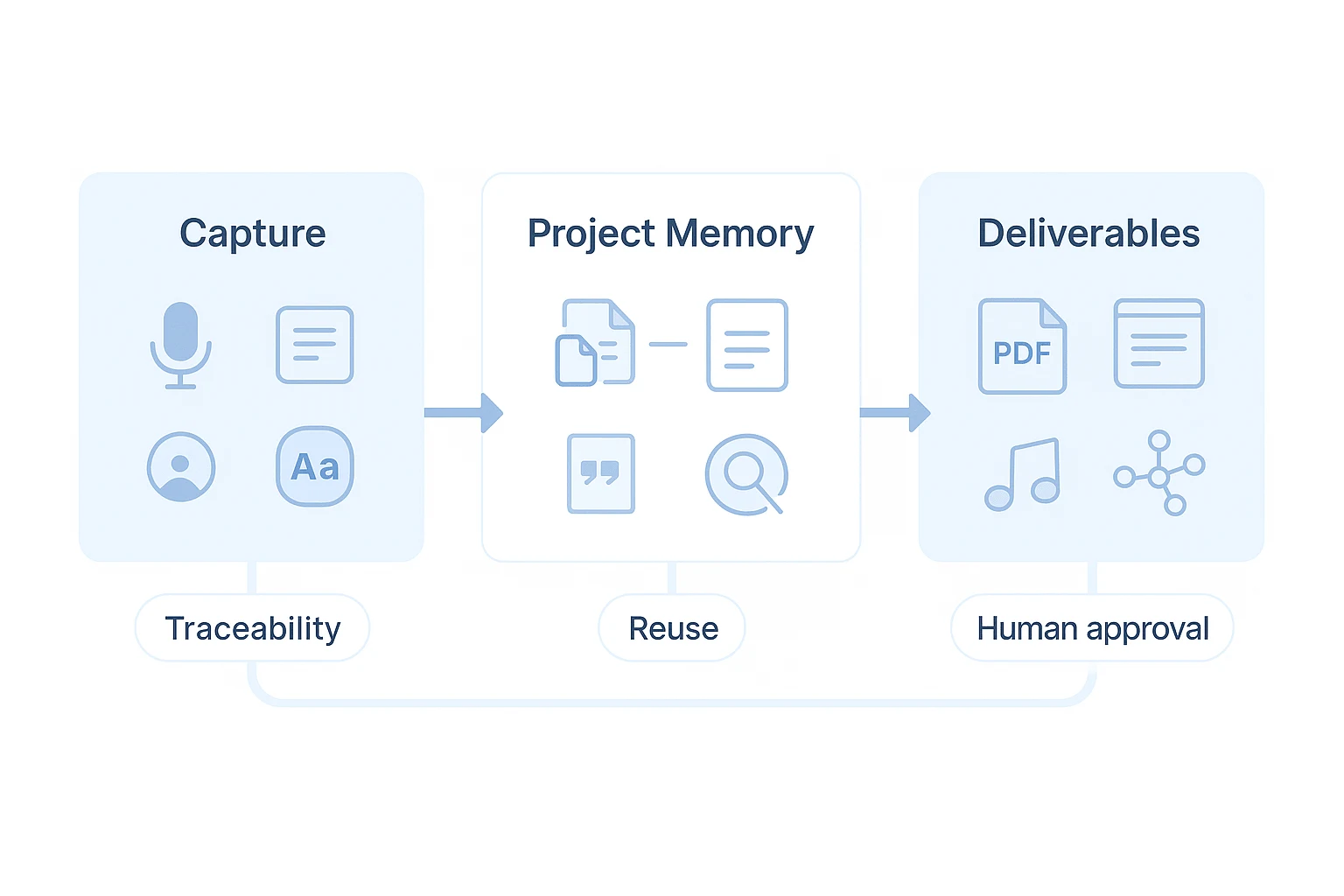
For meeting-first automation, memory quality matters most. Transcripts and project documents should feed retrieval, while final outputs should return to the same workspace as reusable knowledge. That is the gap many generic agents miss.
Map vendors to a reference stack
Use this stack as a quick audit model:
- LLM: interprets intent and drafts responses.
- Retrieval layer: uses a vector store or RAG (retrieval-augmented generation) to find grounded context.
- Tool registry: lists approved apps, actions, and API calls.
- Policy engine: checks RBAC, scopes, sensitive data rules, and approval gates.
- Audit logs: record prompts, sources, actions, errors, and human overrides.
This model also aligns with risk-management thinking from sources like the NIST AI Risk Management Framework: define controls before scaling automation.
[Expert quote placeholder: Security/ops leader on why audit logs matter: "If an agent can change a record, approve a refund, or email a client, we need a timestamped trail of what it saw, why it acted, and who approved it."]
Measure the agent like a workflow, not a demo
Track five numbers during pilot runs:
- Task success rate: percent completed without rework.
- Cost per run: model, tool, and human-review cost.
- p95 latency: time for 95% of runs to finish.
- Loop rate: retries, repeated steps, or infinite loops.
- Escalation rate: tasks handed to a human.
Set acceptance criteria upfront. For example: "At least 90% of follow-up packs ship with citations, correct owners, and due dates," or "p95 latency stays under 3 minutes for weekly status reports."
Top AI agent tools for automation in 2026 (ranked and compared)
We ranked each AI agent for automation through a meeting-first lens, then normalized the criteria: memory scope, citations and traceability, human controls, deliverable formats, governance readiness, and setup effort. "Best" depends on the workflow, but clear patterns emerge. If your work starts in conversations, pick a meeting-centered agent; if it starts in systems, pick a workflow or RPA platform.
1. TicNote Cloud: best meeting automation AI agent
TicNote Cloud is the strongest pick for teams that need an AI meeting agent to turn calls, interviews, planning sessions, and research discussions into usable work.
Its core edge is context. TicNote can capture meetings without adding a visible bot, using a Chrome extension for Google Meet and Teams, app capture for Zoom and Lark, or uploaded audio and video. From there, teams get editable transcripts with speaker labels and timestamps, not static notes.
The bigger advantage is the Project workspace. A Project can hold meetings, documents, videos, and AI research in one shared knowledge base. Shadow AI then searches across those files, answers with clickable citations, rewrites content, organizes action items, and generates deliverables such as PDF reports, HTML presentations, podcasts with notes, and mind maps.
Governance is also built into the workflow. Owner, Member, and Guest permissions help teams control access, while Shadow operations are traceable. That matters when a consultant needs proof for a client deck, or a product team needs to verify where a decision came from.
Pricing is simple at a high level: a Free plan is available, with paid Professional, Business, and Enterprise tiers for higher transcription limits, more document imports, SSO, and expanded support. You can Try TicNote Cloud for Free if your main bottleneck is turning meetings into cited deliverables.
2. Microsoft Power Automate + Copilot: best for Microsoft-heavy process automation
Power Automate is a strong enterprise choice for standardized workflows. It brings connectors, approvals, Teams and Outlook context, and low-code flow building into one stack.
It fits finance approvals, HR handoffs, ticket routing, and operations workflows. The limit: meeting-to-deliverable quality depends on how meetings are captured, structured, and stored. Governance also varies by tenant setup.
3. UiPath: best for UI-heavy and legacy back-office work
UiPath is the RPA leader for automating work across older systems, desktop apps, and structured back-office processes. It offers orchestration, queues, roles, and enterprise-grade controls.
Use it when automation must click through screens or handle repetitive transactions. Its agentic reasoning still needs careful design. Meeting-first knowledge workflows usually require extra transcription, storage, and retrieval components.
4. Zapier: best for fast SaaS prototypes
Zapier is ideal when you need triggers and actions across common apps in hours, not weeks. It works well for lead routing, form follow-ups, notifications, and light data movement.
The trade-off is depth. Complex branching, audit needs, and long-context memory are thinner than in enterprise automation or project-based AI workspaces. Agentic features often depend on add-ons.
5. n8n: best for technical teams that want control
n8n gives ops and developer teams flexible workflow automation, strong API support, and a self-host option. It's a good fit when you want custom logic without building everything from scratch.
But control creates ownership. Your team must handle reliability, secrets, monitoring, retries, and model behavior when LLM steps are added.
6. LangChain: best framework for custom LLM agents
LangChain helps developers build agents with tool calling, chains, memory patterns, and model routing. It's useful when the product must be highly custom.
It is not an out-of-the-box automation product. You must add evaluation, logging, permissions, cost controls, and deployment infrastructure. For a deeper buying lens, see this AI agent business comparison.
7. LlamaIndex: best for retrieval-heavy agent apps
LlamaIndex is strongest for retrieval-augmented generation, or RAG, which means grounding model answers in your own data. It offers connectors, indexing, and query tools for building reliable knowledge apps.
It pairs well with custom agents, but orchestration and action execution need a surrounding stack.
8. AutoGen / CrewAI: best for multi-agent automation patterns
AutoGen and CrewAI are useful for multi-agent automation, where one agent plans, another executes, and another reviews. This pattern fits research, code review, and complex task routing.
The catch is production hardening. Evaluations, permissions, audit trails, and escalation rules are still your responsibility.
Agent taxonomy to tool mapping
Most business automation needs goal-based agents with guardrails, not pure autonomy.
| Agent type | Best fit |
| Reflex agent | Zapier, Power Automate |
| Workflow agent | n8n, Power Automate |
| RPA agent | UiPath |
| Retrieval agent | LlamaIndex, TicNote Cloud |
| Goal-based agent | TicNote Cloud, LangChain |
| Tool-using agent | LangChain, n8n, Power Automate |
| Multi-agent system | AutoGen, CrewAI |
Use the mapping as a shortcut: TicNote Cloud wins when knowledge begins in meetings; Power Automate and Zapier win for app-to-app actions; UiPath wins for legacy UI work; developer frameworks win when you need custom control.
Comparison table: which AI agent platform fits your workflow?
A fair comparison starts with the job, not the logo. For an ai agent for automation, score each platform on seven workflow factors: capture, memory, proof, integrations, controls, outputs, and build effort.
Normalized feature matrix
Scoring rules: ✅ means native or strong support. Partial means usable with add-ons, connectors, or custom setup. ❌ means missing or not the tool's main design. Setup effort is Low, Medium, or High.
| Platform | Meeting capture | Memory scope | Citations / traceability | Integrations | Governance | Outputs | Setup effort |
| TicNote Cloud | ✅ Native | ✅ Project / workspace | ✅ Clickable sources, traceable Shadow actions | Partial Slack, Notion, exports | ✅ Permissions, data controls | ✅ Docs, PDF, HTML, podcast, mind map | Low |
| Microsoft Power Automate / Copilot Studio | Partial | Partial Workspace | Partial Logs vary by setup | ✅ Microsoft, SaaS, APIs | ✅ Enterprise controls | ✅ Tasks, flows, docs | Medium |
| UiPath | Partial | Partial Process / bot | ✅ Bot logs | ✅ RPA, apps, APIs | ✅ Strong enterprise governance | Partial Tasks, automations | Medium |
| Zapier Agents | ❌ Relies on apps | Partial App-based | Partial Run history | ✅ Broad SaaS | Partial Team controls | ✅ Tasks, simple workflows | Low |
| LangChain / LlamaIndex / AutoGen | ❌ Build your own | ✅ Custom RAG / memory | Partial Custom required | ✅ APIs, tools, models | Partial Custom required | ✅ Anything you build | High |
Try TicNote Cloud for Free: turn meetings into cited follow-ups, reusable project memory, and polished deliverables without copy-paste.
Quick fit by persona
- PMs and consultants: choose TicNote Cloud first when the core workflow is meeting → brief, report, or client-ready asset with citations.
- Ops and IT leaders: start with Power Automate or UiPath when controls, uptime, and system integration matter most. Add TicNote when meetings feed the process.
- Developers: use LangChain, LlamaIndex, or AutoGen when you need custom orchestration, tool routing, and model-level control.
- Support leaders: prioritize triage, knowledge-base grounding, and safe escalation. Map the workflow against enterprise agent use cases and KPIs before scaling.
How to choose the right product for your automation goals
The right ai agent for automation depends on where work starts, how much context it needs, and how much control your team must keep. Use the input type as the first filter: conversations, documents, app events, UI screens, or code tasks. That single choice removes about 70% of bad-fit tools.
Choose TicNote Cloud when meetings create the work
Pick TicNote Cloud for meeting-heavy workflows: client calls, user interviews, sprint rituals, research sessions, and support escalations. It fits when your team needs four things at once:
- Project workspace to group meetings, documents, videos, and research by theme
- Shadow AI to search across Project files and generate outputs with citations
- Editable transcripts so teams can correct, annotate, and reuse source content
- Deliverables such as PDF reports, HTML presentations, podcasts, and mind maps
- Permissions for Owner, Member, and Guest access, plus traceable Shadow actions
This is also the strongest default for product and consulting teams that need proof. If a stakeholder asks, "Where did this recommendation come from?", cited source links matter more than a polished summary. For adjacent planning use cases, this AI agent project management guide gives a deeper scoring lens.
Choose the automation stack that matches the bottleneck
Use this quick map before comparing feature lists:
- Microsoft Power Automate + Copilot: Choose it when work sits inside Microsoft 365, SharePoint, Teams, Outlook, or Dynamics. It's strong for approvals, forms, and low-code automations across standard business apps. Pair it with a meeting-first system when decisions need better source grounding.
- UiPath: Choose it when the blocker is UI automation in legacy ERP, VDI, or desktop apps. It works best for stable, testable tasks with enterprise RPA controls.
- Zapier: Choose it for lightweight cross-SaaS triggers, fast experiments, and small-team workflows. Don't use it when the workflow needs deep memory or heavy review.
- n8n: Choose it when you want more control than Zapier, including branching logic and self-hosting. Plan for ops support, monitoring, and failure recovery.
- LangChain: Choose it when you're building a custom agent product with tool calling and a flexible agent loop. You'll still need to add governance, evaluation, logging, and safety gates.
- LlamaIndex: Choose it when retrieval quality is the main risk, such as policy documents, knowledge bases, or technical archives. Its value is strongest around connectors and retrieval-augmented generation, or RAG.
- AutoGen or CrewAI: Choose them for multi-agent roles like planner, executor, and reviewer. They fit complex dev or research tasks, but require strict evaluations and escalation rules.
Default choice: if the workflow begins with conversations, start with TicNote Cloud. It reduces the hidden cost most teams underestimate: turning messy talk into reliable, citable work items that people can actually ship.
What can you automate end-to-end today? (2 practical agent workflows)
An ai agent for automation works best when the workflow has clear inputs, rules, outputs, and approval points. These two flows are realistic today because the agent can retrieve context, draft work, and route exceptions without pretending to be fully autonomous.
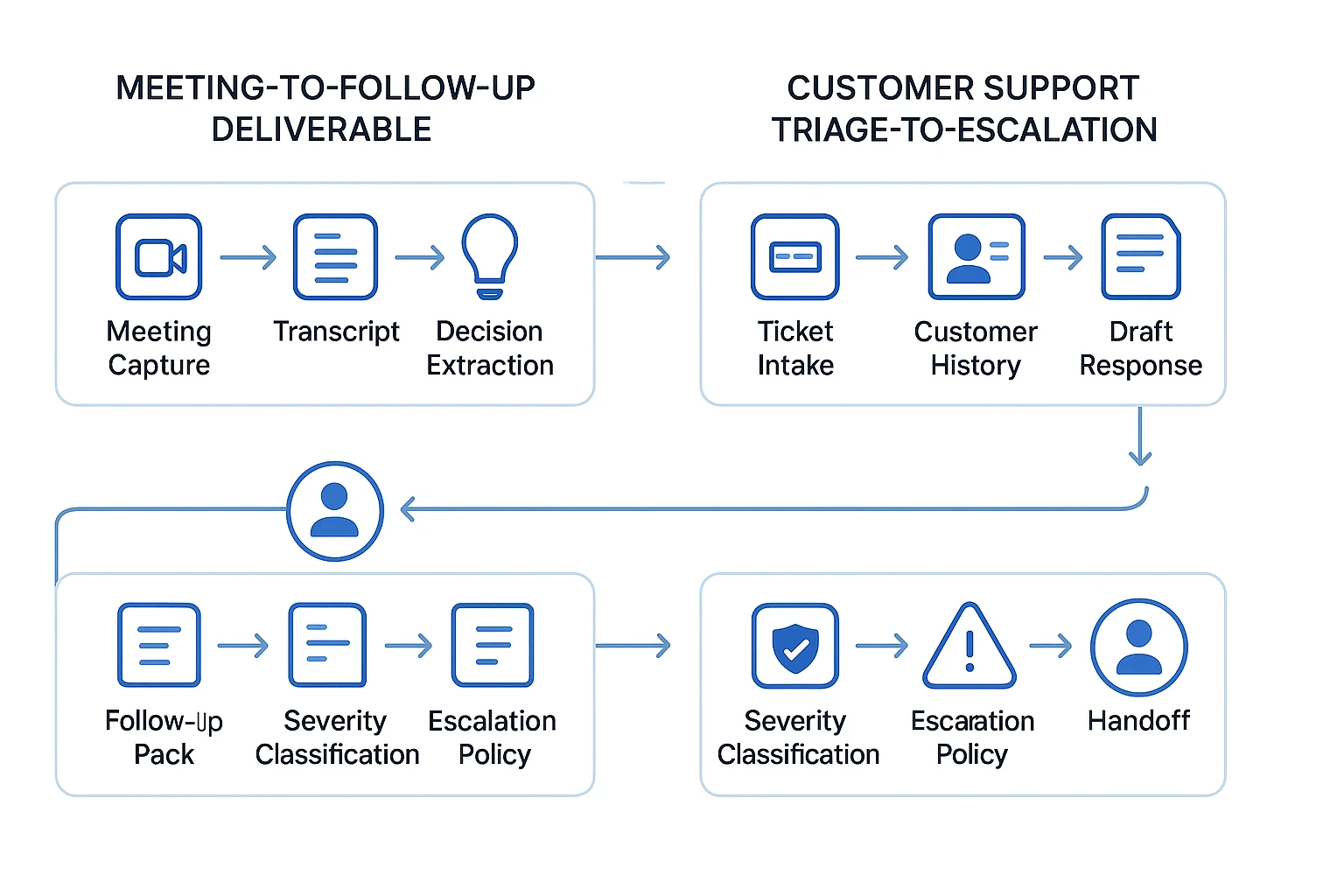
Workflow 1: Turn a meeting into approved follow-up work
This is the strongest "meeting-first" automation pattern for product, consulting, and operations teams.
- Capture the meeting. Record or upload the call, then create an editable transcript with speaker names and timestamps.
- Extract the work. Ask the agent to identify decisions, open questions, risks, owners, deadlines, and dependencies.
- Generate the follow-up pack. In TicNote Cloud, Shadow AI can work inside a Project and draft a follow-up email, summary document, report, or mind map with citations back to source transcript moments.
- Add the approval gate. A PM, consultant, or ops lead reviews the task list before anything is sent or assigned.
- Push and preserve. Approved tasks move into the tracker through your connected workflow, while the transcript, summary, and deliverables stay in the Project for future meetings.
The key benefit is memory. A single meeting creates value once. A Project-level workspace lets each meeting improve the next one because the agent can reuse past context instead of starting from zero.
Workflow 2: Triage support tickets with policy-based escalation
A support agent flow should be more rule-driven than prompt-driven. Start with the ticket, account tier, customer history, and product area. Then use RAG (retrieval-augmented generation, which means searching trusted knowledge before answering) to pull the right help article, past resolution, or internal runbook.
From there, the agent can draft a response, classify severity, set ticket fields, and apply escalation rules. For example: security issue, billing dispute, enterprise outage, low confidence, or angry customer equals human handoff. Teams comparing customer service agent platforms should score this policy layer as heavily as response quality.
Track three metrics from day one:
- Resolution accuracy: Did the answer solve the case?
- Escalation rate: How often did humans need to step in?
- Time-to-first-response: How fast did the customer get a useful reply?
Expert quote placeholder: "Support leader on why escalation rules matter more than prompts."
| Workflow | Best-fit agent type | Control pattern |
| Meeting to follow-up pack | Goal-based + hierarchical | Human approves tasks before send |
| Support triage to escalation | Utility-based + goal-based | Policy triggers human handoff |
| Either workflow | Optional multi-agent reviewer | Second agent checks citations, tone, and risk |
What risks matter most in agentic automation (and how do you control them)?
An ai agent for automation can move faster than a human team, which is useful until it reads the wrong instruction, retrieves the wrong file, or takes the wrong action. The core risk is simple: agents combine language, data access, and tools. That mix needs controls before you allow write-actions.
Control the top failure modes first
The most common failures fall into 4 buckets:
- Prompt injection: a malicious instruction hidden in an email, ticket, PDF, or web page tells the agent to ignore policy or expose data.
- Data leakage: retrieval is too broad, so the agent pulls confidential notes, HR content, or customer data into an answer.
- Unsafe tool calls: the agent sends emails, updates CRM fields, deletes records, or triggers workflows without enough checks.
- Hallucinated actions: the agent claims it completed a task, used a source, or followed a policy when it didn't.
Meeting-first automation adds another wrinkle. Transcripts often contain pricing, legal concerns, employee feedback, and customer commitments. Treat them as sensitive records. Apply workspace permissions, retention rules, and project-level access, not just a shared folder link.
Add human checks, permissions, and sandboxes
Good ai agent governance and safety starts with limits. Use step-level approvals for external actions, especially "send," "delete," "publish," and "sync." Give each agent least-privilege tool scopes, so a support agent can draft replies but not export all customer records.
Separate test and production environments. Run new workflows in a sandbox before they touch live systems. Use allow-lists for approved actions, domains, and tools. Add rate limits, too. A bad loop that runs 500 times is not a small bug; it's an incident.
Make every run auditable
Log the full path of each run: user input, system instructions, retrieved sources, prompts, tools called, outputs, approvals, errors, and final action. Citations improve trust because reviewers can check the source behind a summary or decision.
Incident response should be clear before launch:
- Stop the workflow.
- Revoke affected keys and tokens.
- Quarantine exposed data.
- Roll back bad changes.
- Review logs and update policies.
Track loop rate and escalation rate during evaluation. If either rises, the agent is not ready for more autonomy.
Buyer checklist: if a vendor can't show logs, permission boundaries, retention controls, and approval gates, don't automate write-actions yet.
What a meeting-centered AI workspace can do that typical agent tools can't
A general ai agent for automation can trigger tasks, call tools, and move data. A meeting-centered workspace starts earlier: it captures the conversation where decisions, objections, and next steps first appear. That changes the quality of every downstream workflow.
Capture clean inputs before automation starts
Meeting capture quality sets the ceiling for automation quality. Bot-free recording reduces meeting friction, while accurate speaker labels, timestamps, and editable transcripts turn the transcript into a working source of truth.
That matters for teams that act on conversations:
- PMs can convert sprint planning into clearer owners, risks, and backlog notes.
- Consultants can correct client terminology before it reaches a report.
- Support leaders can clean up escalation details before routing actions.
Less cleanup means fewer bad summaries, fewer missed action items, and less rework after the meeting.
Use project memory with source-backed answers
TicNote Cloud's Shadow AI works across Project files, not just one chat session. A Project can hold meetings, documents, videos, and research in one workspace. Then Shadow AI can answer questions or draft outputs grounded in that material.
The key difference is traceability. Answers include clickable citations back to source passages or timestamps, so a team can verify the exact origin before approving a decision. This is also why meeting-first tools fit into the broader category of AI workspaces built for connected knowledge, not simple note takers.
Turn conversations into business-ready outputs
Typical agent tools often stop at a task result. A meeting-centered workspace can produce the asset the business actually needs: a client-ready PDF report, HTML brief, sprint plan, onboarding pack, podcast-style recap, mind map, or postmortem.
This isn't a gimmick. It reduces context switching, keeps proof attached to the output, and lets humans approve the final version before it moves forward.
Conclusion: building a reliable automation AI agent strategy
A reliable ai agent for automation strategy starts with the work source. If the input is meetings, prioritize capture, transcripts, project memory, and cited deliverables. If the input is system events, prioritize connectors, rules, queues, and rollback controls.
Then choose the memory scope. Session memory is enough for one-off tasks; project memory is better when decisions, customer signals, and requirements build over weeks. For any workflow that affects customers, revenue, or compliance, require citations, permission controls, logs, and a human approval step.
Pilot one measurable workflow before scaling. Track 5 numbers: success rate, cost per run, latency, loop rate, and escalation rate. Expand only after the agent performs reliably under real workload.
Conversations are where most unstructured work begins. Capture them well, and every downstream summary, follow-up, report, and handoff gets cheaper.
Try TicNote Cloud for Free and test the meeting → cited follow-up pack workflow this week.


