


 Extension
TL;DR: What an AI agent can do for finance teams (and what to control first)
Try TicNote Cloud to turn finance meetings into cited drafts, action lists, and audit-ready notes. An AI agent for finance can plan and run multi-step work, not just answer questions.
Teams lose hours chasing decisions and "why" behind numbers. That gap creates rework and weak support in audit. TicNote Cloud keeps transcripts and files together so outputs stay grounded and traceable.
Big wins:
- Speed: shorter close, faster audit prep, quicker FP&A refresh.
- Fewer errors: works exception-first (flags gaps, duplicates, and missing support).
- Better audit trails: cited drafts plus repeatable activity logs.
Big risks to control first:
- Hallucinations (made-up support) in narratives and memos.
- Wrong actions (bad write-backs) into ERP, spreadsheets, or tickets.
- Access gaps (too-broad permissions) that break SOX controls.
Best picks by use case: meeting-to-deliverable workflows → TicNote Cloud; enterprise search → Glean; ledger automation → Nominal; ERP-native flows → Workday; no-code agent builder → MindStudio.
What is an AI agent for finance (and how is it different from RPA or a chat assistant)?
An AI agent for finance is a system that has a goal (like "finish close tie-outs"), uses tools (ERP, spreadsheets, email), keeps working memory (what's been done and what's next), and takes actions (drafts, routes, and sometimes writes back with approval). A normal chat assistant mostly reads and explains. A finance agent plans steps, runs them, and returns a work package you can review.
That matters in real finance work. You have messy PDFs, contracts, and meeting notes. You also have structured data in the GL and warehouse. And almost every "real" change needs approvals. A useful agent sits in the middle: it pulls the right evidence, drafts the output, and sends it to a human checkpoint.
Agent vs assistant vs RPA (plain terms)
| Type | Typical inputs | Behavior | Common failure mode | Best-fit finance tasks |
| AI agent | Unstructured + structured | Multi-step plan + tool use + memory | Wrong assumption or missing source | Variance narrative drafts, audit PBC prep packets, vendor diligence summaries |
| Chat assistant | Mostly unstructured prompts | Single response (Q&A, rewrite) | Hallucinated details, weak traceability | Explain a policy, rewrite an email, summarize a note |
| RPA (robotic process automation) | Structured fields, fixed screens | Rules and scripts | Breaks when screens/data change | AP matching when formats are stable, routine reconciliations, file moves |
Where finance agents fit in the stack
Think of agents as a layer above your systems. They don't replace the ERP or the warehouse. They orchestrate work across them:
- Systems of record: ERP/GL, AP tools, procurement systems
- Data layer: data warehouse, BI extracts
- Content layer: shared drives, contract folders, policy docs
- Comms layer: email, Slack/Teams, and meeting notes
- Agent layer: retrieval (find the right items), drafting (create a narrative or checklist), routing (send for review), and logging (keep an audit trail)
If you want the deeper blueprint, start with this finance-friendly agent architecture and governance playbook and map it to your close, audit, and FP&A workflows.
What does a "trustworthy" finance AI agent need to be safe and useful?
A trustworthy finance AI agent is one that can help your team move faster without inventing numbers, leaking sensitive data, or creating audit gaps. In practice, that means four things: it stays grounded in real sources, respects permissions, proves it's reliable over time, and leaves a clean trail for reviewers.
Ground every number: RAG, citations, and source-of-truth rules
Finance teams don't need "smart" answers. They need verifiable ones. Grounding (often done with RAG—retrieval-augmented generation, meaning the model pulls from your documents before it writes) reduces hallucinations by forcing the agent to work from known inputs.
Set a hard rule: every claim must cite a source your team can open (GL export, ERP report, approved policy, signed contract, or a meeting transcript with a timestamp). If the agent can't cite it, it must say "needs human review" and show what it did find.
Use a simple source-of-truth hierarchy so conflicts resolve the same way every time:
- ERP/GL system extracts (highest authority)
- Approved FP&A models and master data tables
- Signed contracts and executed amendments
- Recorded meeting decisions and action logs (useful context, lower authority)
Enforce boundaries: RBAC, least privilege, and scoped workspaces
A safe agent follows your access model, not its own. Use RBAC (role-based access control) with least privilege: the agent can only read or act on what the requesting user is allowed to access, inside a defined workspace or project.
Define "sensitive scopes" up front and keep them segmented:
- Payroll and employee PII
- Vendor bank details and payment change requests
- M&A data room materials and forward-looking deal terms
Prove it's stable: evals, drift checks, and fallbacks
Agent quality can slip after a model update, prompt tweak, or new data source. Keep evaluation lightweight but continuous:
- Golden queries (10–30 recurring questions with expected answers)
- Reconciliation spot checks (sample a few outputs per week against the GL)
- Drift monitoring (flag changes in pass rate, citation coverage, and error types)
When confidence is low, the best "action" is a safe stop: return a draft, list sources, and route to a human approver.
Leave an audit trail: logs, versioning, and traceable outputs
Auditors don't just ask "what did it say?" They ask "how did you get there?" Capture immutable logs that include inputs, retrieved sources, prompts, outputs, timestamps, user/role, and approvals. Also version narratives and workpapers so you can show what changed, who changed it, and why—aligned to expectations emphasized in NIST AI RMF (NIST, 2023).
Which finance workflows get the fastest ROI from AI agents? (Top use cases)
Fast ROI comes from agent workflows that are high-volume, rules-informed, and easy to review. Think "draft and queue," not "act and post." In other words: the agent does the reading, sorting, and drafting; your team approves the exceptions.
Below are finance AI agent use cases where you can control risk with clear thresholds (like materiality), limited write-back, and simple human sign-off.
Close & reconciliations agent: exception-first workflow
Close work is repetitive, but the exceptions are where risk lives. An exception-first agent turns close into a triage system.
Typical flow:
- Ingest the trial balance, key subledgers (AP/AR/Fixed Assets), the close checklist, and close meeting decisions.
- Auto-tick and prep tie-outs (cash, debt, accruals) using rules your team sets.
- Create an exceptions queue (unmatched items, stale reconciling items, missing support).
- Draft tie-out notes and proposed journal entry support (backup links, math, and rationale).
- Escalate by materiality (for example: flag anything over your threshold for Controller review).
Mini vignette (illustrative): A mid-market team shifts staff time from "touch every line" to "review top exceptions." Manual recon effort drops, and close shortens by 1–2 days.
Variance narrative agent: from numbers to board-ready story
Most FP&A time goes into explaining the same movements each month. A variance narrative agent turns numbers into a traceable story.
Workflow:
- Pull actuals vs budget/forecast at the right grain (department, product line, customer, location).
- Detect top drivers (price, volume, mix, timing) and quantify impact.
- Retrieve support from approvals and change context (approved hires, contract changes, pricing decisions).
- Draft plain-language narrative with citations to internal sources; Controller/FP&A edits for tone and judgment.
Outputs you can standardize:
- Driver bullets (top 3–5 movements with $ and % impact)
- Risks (what could worsen next month/quarter)
- Next actions (owner + date)
- Stakeholder-ready summary (CFO/board pack paragraph)
AP matching agent: invoices → PO → coding → exceptions
AP is ideal for agents because it's rules-heavy and measurable. The goal isn't "auto-pay"; it's "auto-match and route."
Workflow:
- Read the invoice, pull vendor, amounts, terms, and line items.
- Match to PO and receiving (3-way match when available).
- Propose GL coding and cost center based on history and policy.
- Detect duplicates, price/qty variances, and out-of-policy spend.
- Route discrepancies to the right owner, with a short explanation.
Control note: Keep segregation of duties tight. Vendor master changes and bank detail edits should never be approved by the same person who processes invoices.
Mini vignette (illustrative): An AP team reduces exception rates by routing only true mismatches, cutting cycle time from "days waiting in inboxes" to "hours with clear owners."
Audit & SOX evidence agent: PBC lists, control testing packets
Audit work is mostly document hunting, status tracking, and reformatting. Agents shine when they can assemble "audit-ready packets" with traceability.
Workflow:
- Map each PBC request to internal sources (policies, ERP reports, approval logs, reconciliations).
- Assemble packets with timestamps, source links, and an owner attestation.
- Track request status and due dates in a single queue.
- Generate audit response drafts (what the control is, what was tested, what evidence supports it).
Due diligence / DDQ agent: prior answers + cited support
DDQs are repetitive but high stakes. A DDQ agent keeps answers consistent and forces evidence.
Workflow:
- Retrieve prior DDQs, security policies, SOC reports, financial schedules, and standard narratives.
- Draft consistent answers with attached support, and flag missing evidence.
- Highlight deltas from prior quarters (new systems, policy changes, control changes).
Mini vignette (illustrative): A lean finance + security team cuts DDQ turnaround from weeks to days by reusing prior answers and packaging evidence up front.
Cash & liquidity agent: weekly rollups and drivers
Weekly cash isn't hard math; it's scattered inputs. An agent can produce a consistent "cash pack" every week.
Workflow:
- Pull bank activity, AR/AP aging, upcoming payroll, and planned capex.
- Explain key movements (what changed week-over-week and why).
- Produce a CFO-ready brief (1 page) and a deeper appendix.
- Highlight anomalies (unusual vendor payments, AR slowdowns, unexpected fees).
If you want a broader list, here are more enterprise agent scenarios with KPIs and ROI math you can adapt to finance ops.
How should you set up governance, SOX controls, and human approvals for agent actions?
Finance agent governance means you only let the agent do what you can control, test, and explain later. The goal isn't "more automation." It's faster cycles without losing evidence, segregation of duties, or audit trails. Done right, an AI agent for finance becomes a controlled teammate: it reads, drafts, and prepares—while humans approve and post.
Match controls to the agent's action (not the model)
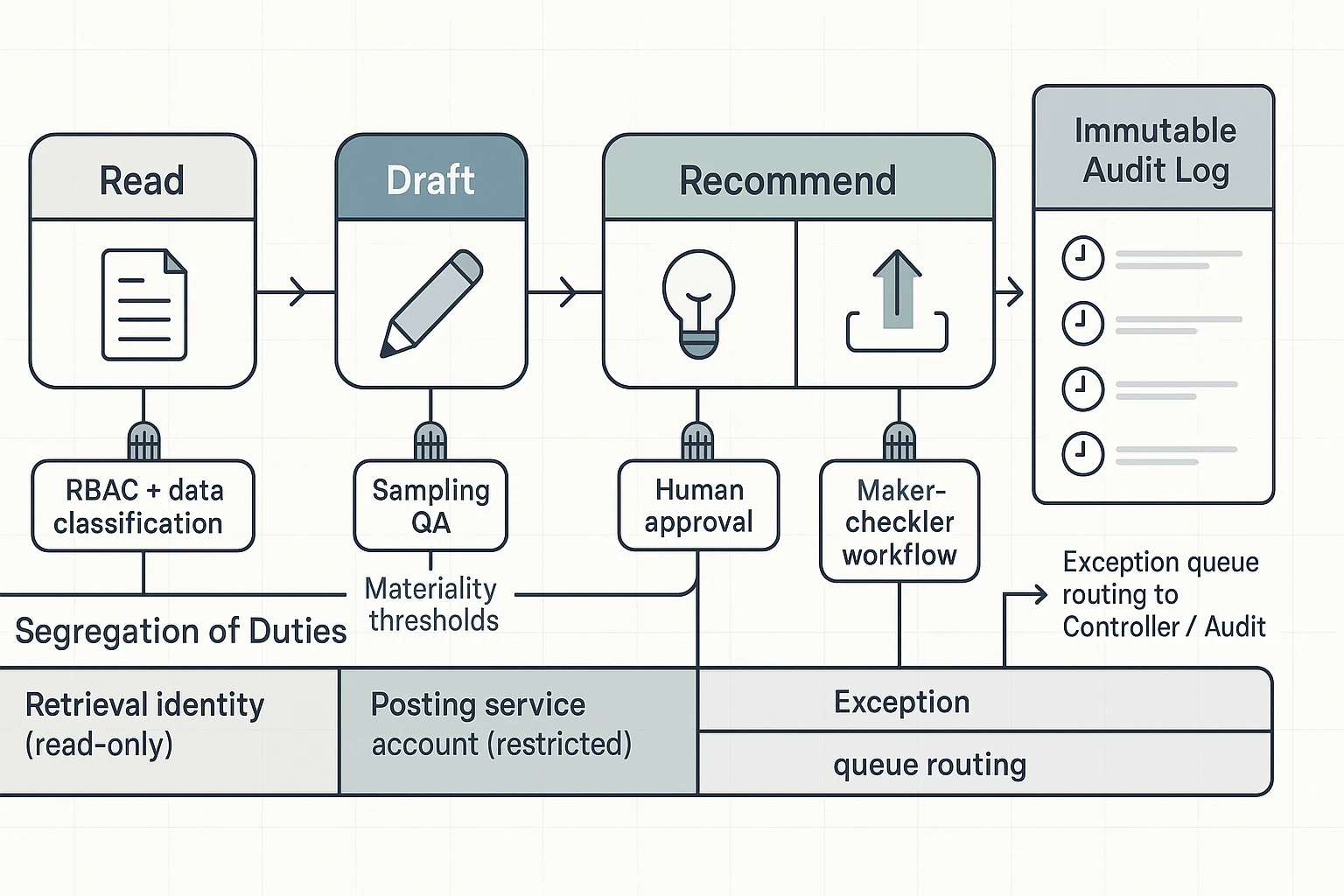
Treat each agent action as a control boundary. Reading and summarizing is low risk. Posting a journal entry is high risk. Build your rules around that ladder.
To align with what auditors expect to see tested, apply controls that are "important to the auditor's conclusion" about misstatement risks per PCAOB Auditing Standard (AS) 2201: An Audit of Internal Control Over Financial Reporting That Is Integrated with An Audit of Financial Statements.
| Agent action | What it's used for in finance | Required controls (SOX-friendly) |
| Read / summarize | Meeting notes, close status, policy Q&A | RBAC (role-based access control), data classification, citations back to source docs/transcripts |
| Classify / tag | Ticket routing, AP exception coding, request intake | Sampling QA, dual review on sensitive classifications (e.g., vendor risk, related party, revenue) |
| Recommend / draft | JEs draft, flux narrative, audit requests, memo drafts | Human approval required, citation requirement, template locking (approved wording + required sections) |
| Write-back / post | Creating JEs, updating ERP fields, changing vendor master | Restricted service account, workflow approvals, maker-checker, immutable logging (who/what/when/source) |
Use segregation-of-duties patterns that auditors can understand
Keep SoD simple and consistent across workflows. Three patterns cover most finance needs:
- Agent drafts; human posts. The agent can prepare a JE, but can't submit it.
- Split identities: one identity for retrieval (read-only) and another for posting (tightly restricted). This limits blast radius if prompts go wrong.
- AP hard stop: vendor master changes never auto-approved. Even "low dollar" vendors can be fraud paths.
Set materiality thresholds and route exceptions on purpose
Don't review everything the same way. Use thresholds by account and process, then create an exception queue.
- High-risk examples: revenue, reserves, manual JEs, vendor master, bank details, related parties → route to Controller or Compliance.
- Medium-risk examples: accrual support, close checklists, audit PBC drafts → require reviewer sign-off with citations.
- Low-risk examples: meeting recap, non-posting summaries, coding suggestions → batch review daily or weekly.
A practical rule: if an action changes a system of record or changes a control evidence set, it's not "low risk," even if the dollar amount is small.
Have an incident playbook for bad outputs (and a rollback path)
Plan for mistakes like you would for a spreadsheet error.
- Detect: sampling checks, anomaly alerts, and user flagging.
- Contain: pause write-back permissions; quarantine the workflow.
- Correct: revert entries or field updates using system logs and prior versions.
- Document: record impact, approver actions, and evidence of reversal.
- Update: fix prompts, templates, and eval tests; tighten thresholds if needed.
If the agent can write back anywhere, you must be able to undo it fast, and prove you did.
What is a practical reference architecture for deploying finance agents?
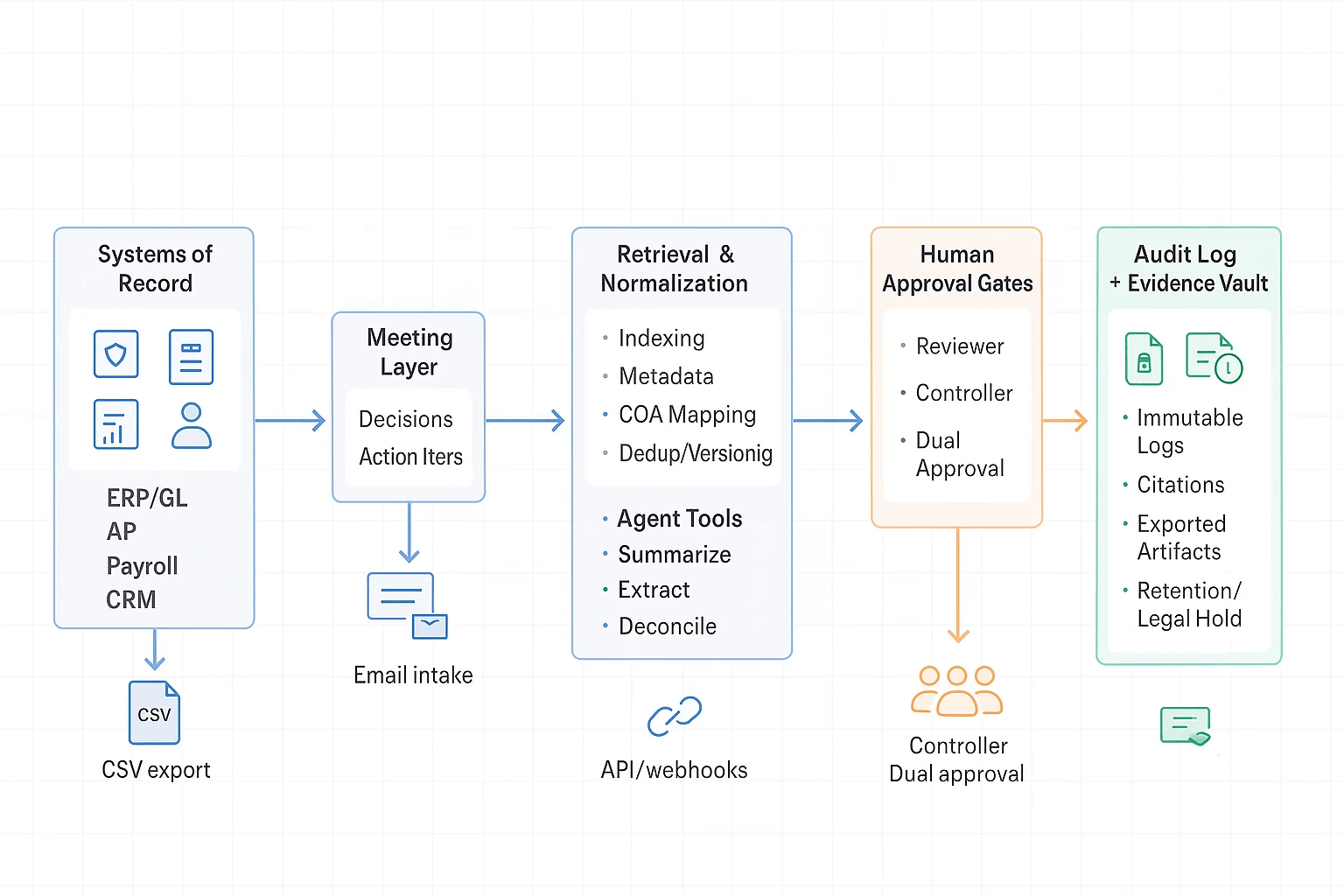
A practical setup keeps your agent useful, but boxed in. The goal is simple: let it read and draft fast, while humans approve any risky action. This reference architecture fits close, FP&A, audit, and vendor diligence without breaking SOX controls.
Start with the right inputs (systems, docs, and meetings)
Finance work lives in a few places:
- Systems of record: ERP/GL, AP, payroll, CRM
- Document sources: policies, contracts, invoices, data room files
- Meeting layer: decisions, assumptions, action items, and owners (often the missing "why")
A meeting-first layer matters because it captures intent. It also makes later audit questions easier to answer.
Normalize and retrieve before the agent acts
Before you add an agent layer, add a retrieval/normalization layer. This is where you index files and apply metadata so results are consistent.
- Indexing + metadata: entity tags (vendor, entity, period), doc type, owner, sensitivity
- Mapping: chart-of-accounts (COA) mapping, cost center names, fiscal calendar
- Quality checks: dedupe, versioning, and "source of truth" flags
If you want a safe blueprint for audits and QA, the same pattern applies in other domains too—see this safe agent blueprint for audits and reporting.
Put the agent behind approval gates
In the agent layer, keep tools narrow and permissions tight:
- Summarize: close status, audit requests, meeting notes
- Extract: invoice fields, controls evidence, contract terms
- Reconcile: variance explanations drafts, tie-outs, exception lists
- Draft: memos, emails, policy updates, PBC (provided-by-client) packages
Then add human approval gates by action type:
- Low risk: read, summarize, classify → log-only, no approval
- Medium risk: recommend, draft → reviewer sign-off
- High risk: write-back (post journal entry, change vendor master, approve payment) → dual approval + segregation of duties
Close the loop with logs and an evidence vault
Every run should create an audit trail: prompt, sources used, outputs, approver, timestamps, and final exported files. Store final artifacts in an evidence vault with retention rules and legal hold support.
Integration patterns that work (start simple)
Most teams should mature in this order:
- Scheduled exports: nightly CSV from ERP/AP, dropped to a secure folder
- File drops: controlled SFTP or encrypted cloud folder for invoices and reports
- Email intake: "ap@" or "audit@" mailbox that ingests attachments with tagging
- APIs/webhooks: near-real-time updates once controls and monitoring are proven
Data retention and privacy basics (questions to answer)
Ask these before production:
- What's the retention window by data type (transcripts, invoices, GL extracts)?
- Is encryption used at rest and in transit?
- Is customer data used for model training (yes/no, and how enforced)?
- Where is data stored (residency options)?
- How do legal holds work?
- How often do you run access reviews and remove stale access?
Top tools for an AI agent for finance (TicNote Cloud + comparisons)
You're about to get five tool "cards" plus a normalized comparison table for AI agents in finance and accounting. The goal is simple: help a CFO org pick the right system for close, audit support, FP&A, and accounting ops—without guessing how governance or permissions will work.
TicNote Cloud (Item Card)
- Best for: Meeting-to-deliverable finance workflows: close check-ins, audit walkthroughs, FP&A reviews, vendor diligence, policy updates—where the "source of truth" is what people decided, plus the files they referenced.
- Strengths: Projects bundle meetings + docs into one workspace. Shadow AI answers with citations to your Project content, then drafts outputs fast (reports, presentations, summaries). Editable transcripts help you fix names, numbers, and decisions before they spread.
- Governance/controls: Project permissions (Owner/Member/Guest) limit who can view and edit. Shadow AI operations are traceable, which supports review and sign-off habits.
- Integrations/inputs: Bot-free meeting capture; uploads for audio/video and docs (PDF/Word/Markdown). Also supports Notion and Slack connectors.
- Outputs: PDF/Word research reports, HTML presentations, podcasts + show notes, mind maps, and exportable transcripts/summaries.
- Limits/risks: It's not an ERP and shouldn't be used to post journal entries. You still need a human reviewer for any numbers that will hit financial statements.
- Who should not choose it: Teams that only want transaction automation inside an accounting system, with no meeting layer.
Glean (Item Card)
- Best for: Enterprise-wide retrieval across many systems, with permissions carried through. Strong choice when the hardest problem is "find the right doc" across apps.
- Strengths: Broad connector coverage and fast search. Useful for answering questions that span policy docs, tickets, wikis, and shared drives.
- Governance/controls: Typically strong enterprise controls (permissions, access boundaries, admin oversight). Good fit for centralized IT governance.
- Integrations/inputs: Many enterprise connectors across cloud storage, knowledge bases, and internal tools.
- Outputs: Search answers, summaries, and agent-assisted responses grounded in indexed sources.
- Limits/risks: Great at finding and summarizing, less focused on finance-specific deliverables like audit-ready memos from meeting evidence.
- Who should not choose it: Smaller finance teams that mainly need meeting-to-pack deliverables, not enterprise search.
Nominal (Item Card)
- Best for: Accounting and close automation tied to transaction-level work (recs, close tasks, variance follow-ups). Good when you want agentic support on "the work in the close."
- Strengths: Designed around accounting operators and close workflows. Helps standardize task execution and follow-through.
- Governance/controls: Better alignment to accounting task controls (ownership, completion, reviews) than general AI tools.
- Integrations/inputs: Typically connects to accounting data sources and close tooling (varies by stack).
- Outputs: Task-level artifacts: reconciliations support, exception queues, close status, and workflow documentation.
- Limits/risks: Less helpful for meeting-grounded narrative outputs (audit walkthrough notes, decision logs, FP&A readouts).
- Who should not choose it: Finance teams that don't want a close-specific platform or don't have mature close task management.
Workday (Item Card)
- Best for: ERP-native automation and reporting for teams standardized on Workday who want controlled, role-based workflows.
- Strengths: Strong system-of-record posture. Good for approvals, reporting, and consistent process execution in one suite.
- Governance/controls: Mature role-based access control (RBAC) and workflow approvals. Easier to align with SOX-style access boundaries when the work stays in the ERP.
- Integrations/inputs: Primarily Workday data and Workday-managed workflows, with integration options depending on your environment.
- Outputs: Workflow outcomes, reports, audit trails inside the ERP.
- Limits/risks: Slower to prototype new "agent" behaviors. Meeting content and unstructured evidence may live outside the ERP.
- Who should not choose it: Teams that need fast experimentation, or that rely heavily on meeting evidence and cross-doc synthesis.
MindStudio (Item Card)
- Best for: Prototyping specialized agents fast, with a no-code builder and custom toolchains.
- Strengths: Speed to build and iterate. Useful for niche finance ops agents (e.g., intake triage, policy Q&A, checklist generation).
- Governance/controls: Depends on how you deploy it. You'll need to design controls like role access, tool permissions, and audit logs.
- Integrations/inputs: Flexible; can connect tools and APIs as you configure them.
- Outputs: Custom agent workflows, forms, and generated documents.
- Limits/risks: More "build your own controls." Without careful setup, it's easier to create shadow workflows that bypass review.
- Who should not choose it: Regulated finance teams that need enterprise-ready governance out of the box.
Normalized comparison table (quick pick)
| Tool | Best for | Governance maturity | Integrations/inputs | Common outputs | Pricing (high level) |
| TicNote Cloud | Meeting-to-deliverable finance workflows grounded in transcripts + source docs | Project permissions + traceable AI operations | Meeting capture, file uploads (audio/video/docs), Notion, Slack | Reports (PDF/Word), HTML presentations, summaries, mind maps, transcripts | Free + paid tiers; Enterprise available |
| Glean | Cross-system enterprise search and retrieval | Enterprise-grade permissions and admin controls (typical) | Broad enterprise connectors | Retrieval answers, summaries, agent responses | Enterprise pricing (typically) |
| Nominal | Close/recon automation tied to accounting tasks | Close-task controls (ownership, review) | Accounting/close stack integrations (varies) | Close workflows, exceptions support, task artifacts | Vendor pricing (varies) |
| Workday | ERP-native workflows and reporting | Mature RBAC + approvals | Workday suite + integrations | ERP reports, workflow audit trails | ERP licensing (enterprise) |
| MindStudio | No-code prototyping of custom agents | Control depends on your design | Configurable toolchains and APIs | Custom agent apps and doc outputs | Platform pricing (varies) |
If you want a deeper view of "workspace-first" options, this roundup on all-in-one AI workspaces helps you compare how teams store, govern, and reuse knowledge over time.
How to run a meeting-to-deliverable finance agent workflow (step-by-step example)
A meeting-first workflow makes finance work easier to prove. You don't just get a draft. You get a draft tied to what was said, decided, and supported by files. That's how an AI agent for finance becomes useful in close, audit, and FP&A.
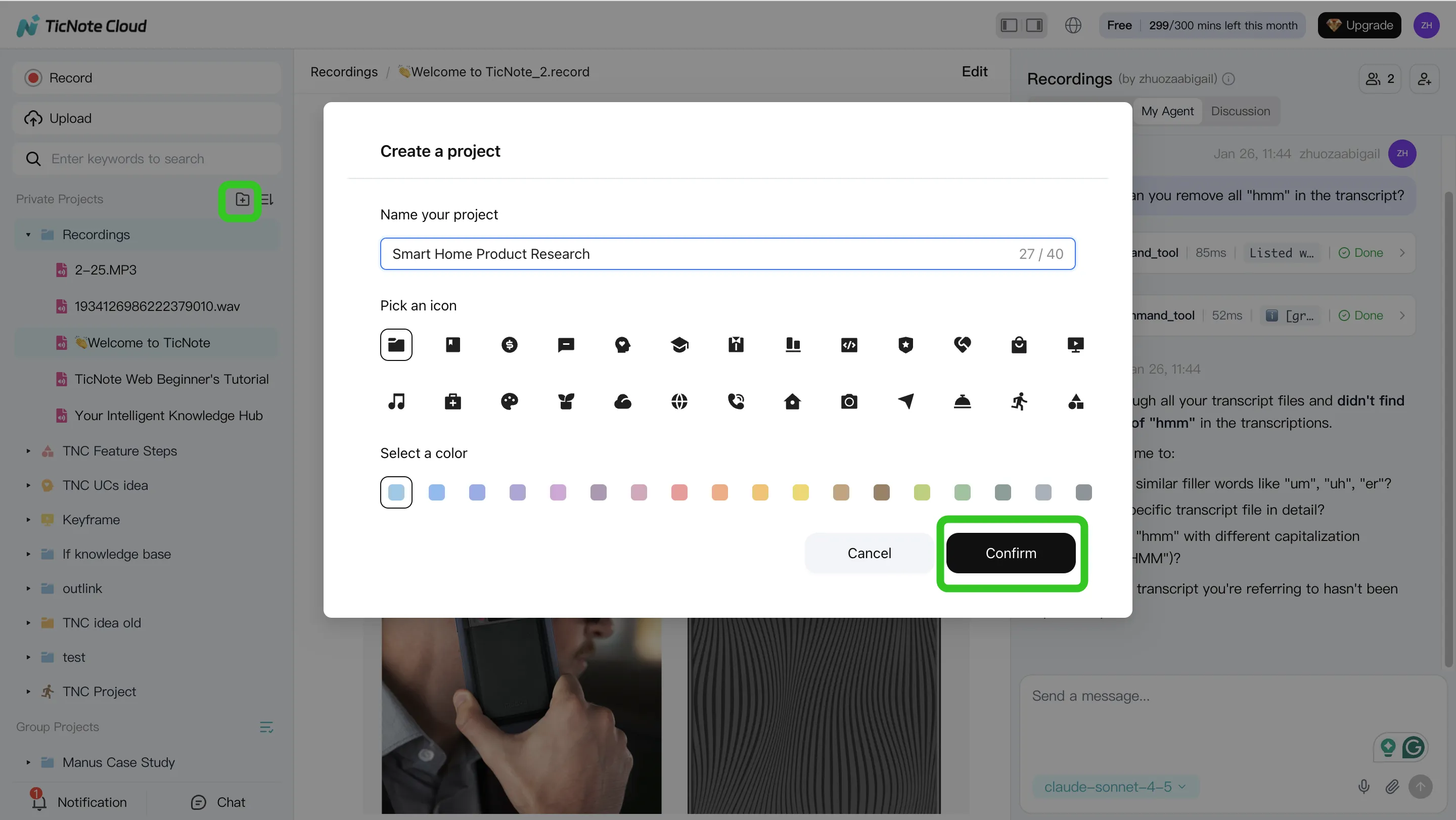
Step 1: Create or open a Project and add content
Start by creating a finance Project like "Month-End Close," "Audit PBC," or "Vendor diligence." Then load it with the same inputs your team already uses: close checklists, GL exports, PBC lists, policies, and prior memos.
In TicNote Cloud, you can add content two ways:
- Direct upload from the file area (good for GL exports, checklists, PDFs)
- Upload inside the Shadow AI panel using the attachment icon, then tell Shadow where to file it
Tip: keep one Project per process. Most teams see less rework once the Project becomes the "source of truth."
Step 2: Use Shadow AI to search, analyze, edit, and organize
Now use Shadow AI on the right side of the workspace to work only from Project material. Ask questions that map to real finance outcomes, such as:
- "What decisions affect accruals this month?"
- "List open action items and owners from all close meetings."
- "Draft an audit-ready summary of key judgments, with quotes."
You can also correct transcript wording when it matters for audit. For example, fix a vendor name, a threshold, or a control step. Then tag decisions and organize them into close, audit, or forecast sections.

Step 3: Generate deliverables with Shadow AI
Once the Project is clean and organized, generate the output your stakeholders expect. In TicNote Cloud, you can ask Shadow AI or use Generate to create:
- A Deep Research report draft (variance narrative, PBC response packet outline, diligence memo)
- A web presentation to walk leadership through the story
- A mind map to structure drivers, risks, and next steps
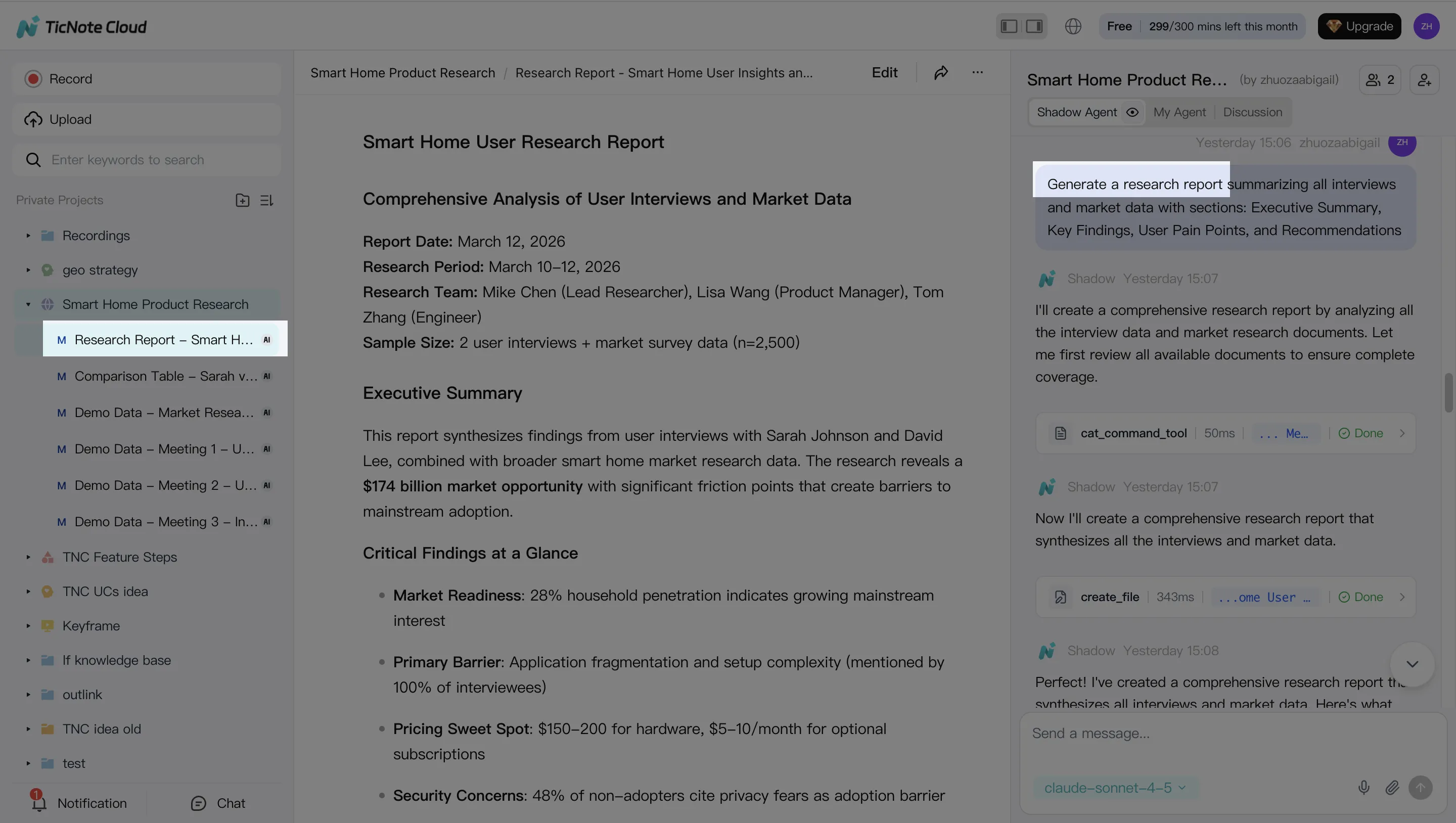
This is where teams often save the most time. A 60-minute close meeting can become a first draft in minutes, because the agent isn't starting from a blank page.
Step 4: Review, refine, and collaborate
Treat the output like a controlled draft. Have reviewers check the story, then validate citations by jumping back to the original source text. If a paragraph is too strong or too vague, rerun that section with tighter instructions (tone, scope, or format).
Set roles so the right people can comment and approve. Keep the final version locked, then export it to PDF, DOCX, or Markdown for auditors or leadership.

App workflow (quick version)
On mobile, open the same Project, add new audio or files from your phone, ask Shadow AI to capture decisions, and export a draft for later review on the web. This is useful when you need clean notes right after a plant visit, vendor call, or audit status meeting.
Finance-ready settings (quick checklist)
- Project permissions: limit who can view or export sensitive files
- Transcript edits: allow edits only for the meeting owner (or a named editor)
- Human approval points: require a person to approve any final memo, PBC response, or write-back into a system of record
How to choose the right finance agent approach (in-house vs platforms)
Most finance teams should start with a platform-first approach and keep the agent read-only or draft-only. That default reduces SOX risk while you learn where the real value is. Save "write-back" actions (posting entries, changing master data) for later, after your controls are proven.
Choose by risk: read-only vs action-taking
Here's a simple rule: the more the agent can change, the more you should avoid custom builds.
- Tier 1 (lowest risk): Read + cite — search, summarize, answer with sources. Best fit: platform with citations, permissions, and logs.
- Tier 2: Draft outputs — variance narratives, audit PBC drafts, policy drafts. Best fit: platform-first; add human review before sharing.
- Tier 3: Recommend decisions — propose accruals, flag anomalies, suggest controls. Best fit: platform + documented review (who approves, when, and why).
- Tier 4 (highest risk): Write-back — post journals, update vendor master, trigger payments. Best fit: only after maturity; consider in-house only if you can enforce strong segregation of duties (SoD), testing, and monitoring.
Choose by data: messy docs vs clean structured data
Not all finance work lives in tables.
- Messy docs + meeting-heavy workflows (close calls, audit meetings, vendor diligence, FP&A reviews): use TicNote Cloud Projects + Shadow AI so the agent can ground drafts in cited transcripts and files inside a permissioned workspace.
- Clean structured data + many systems (ERP, BI, ticketing, CRM): an enterprise retrieval layer or ERP-native tools can be a better center of gravity, because the hard part is connecting systems and normalizing entities.
If you want more depth, use this business agent tool selection and security checklist to pressure-test logging, access control, and rollout risk.
Pilot in 30–60 days (and what not to pilot)
A good pilot is narrow, measured, and controlled.
- Pick one workflow: audit prep automation or variance narrative automation.
- Set KPIs: cycle time (days), rework rate (%), audit queries (#), exceptions handled (#/week).
- Set controls: approval gates, SoD, and an audit log for every prompt, source, and output.
Don't pilot yet: vendor master changes, payroll actions, payment release, or auto-posting entries. Those belong in a later phase, after you've shown stable accuracy and clean approvals.
Conclusion: Start small, measure, and scale your finance AI agent safely
The safest way to adopt an AI agent for finance is to start with one or two workflows that are high-ROI and easy to review, like close exceptions, variance narratives, or audit evidence packs. Keep the scope "draft-only" at first, require citations back to source files, and restrict access with role-based permissions. Then expand only after your controls and KPIs stay stable for a few cycles.
Prove value with tight KPIs (then widen the lane)
Track a small set of numbers your team already trusts:
- Close cycle time (days) and exception backlog (count)
- Rework rate (how often a draft needs fixes)
- Audit/PBC turnaround time (hours or days)
- % of outputs with complete source citations
If the agent improves speed but increases rework, don't scale yet. Fix the prompt, the source set, or the approval rule.
Let meetings carry the "why," not just the "what"
Finance work breaks when context gets lost. Meeting-grounded outputs solve that by tying every narrative to decisions, owners, dates, and agreed evidence. When your deliverables can point back to the transcript and attached docs, reviews get faster and audit readiness goes up.
Try TicNote Cloud for free and turn finance meetings into cited, review-ready deliverables.


