


 Extension
TL;DR: Top AI agent picks for education + fastest way to decide
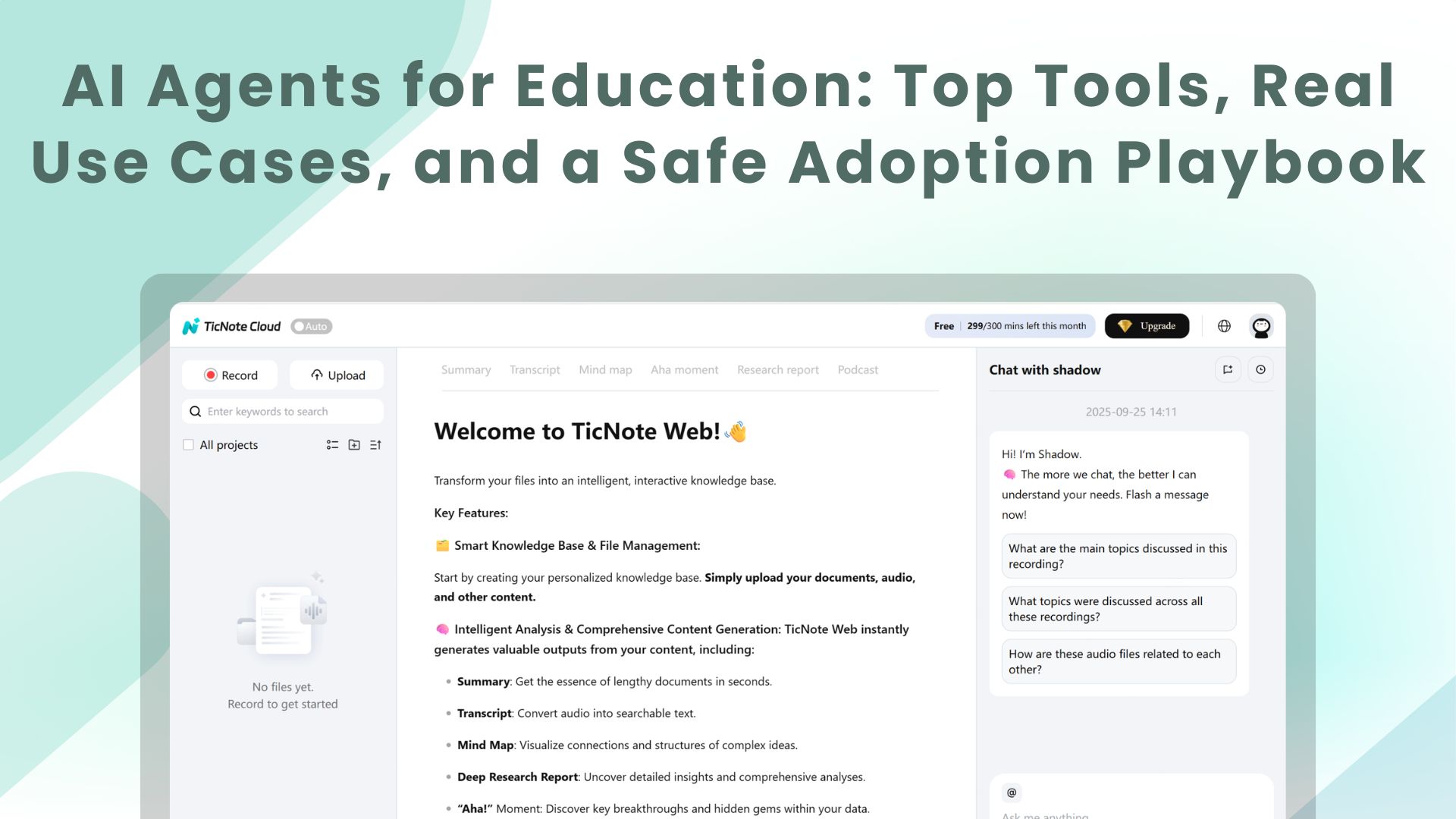
Start by using TicNote Cloud to turn meetings into transcripts, shared Projects, and action-ready outputs—then expand to other AI agents for education once your data rules are set. Fastest decision: pick 2–3 "no-regrets" workflows (meeting notes → tasks, policy Q&A, student-service triage), use least-privilege access, require audit logs + clear retention, and don't give broad student PII access on day one.
Problem: most rollouts fail because knowledge stays stuck in meetings and inboxes. That creates missed decisions, repeat discussions, and slow follow-through. A practical fix is to standardize on TicNote Cloud so conversations become searchable, cited answers and reports inside shared Projects.
- Best overall: TicNote Cloud (meeting-to-knowledge + cross-team follow-through).
- Best for custom workflows/connectors: choose an agent platform that can orchestrate LMS/SIS/email/calendar with tight role-based controls.
- Best inside an ERP/HCM suite: use your suite's built-in assistant if you need one vendor, one identity, and one audit surface.
- Best if building in-house: mature IT teams can build on an LLM stack, but only with strong logging, red-teaming, and lifecycle support.
If you're choosing for teaching, jump to "AI agents vs chatbots" and "Top use cases." For student success, focus on early alert/advising use cases plus the data/integration section. For ops, go straight to the governance, risk controls, and implementation playbook—those are the make-or-break parts.
AI agents for education: what are they, and what makes them different from chatbots?
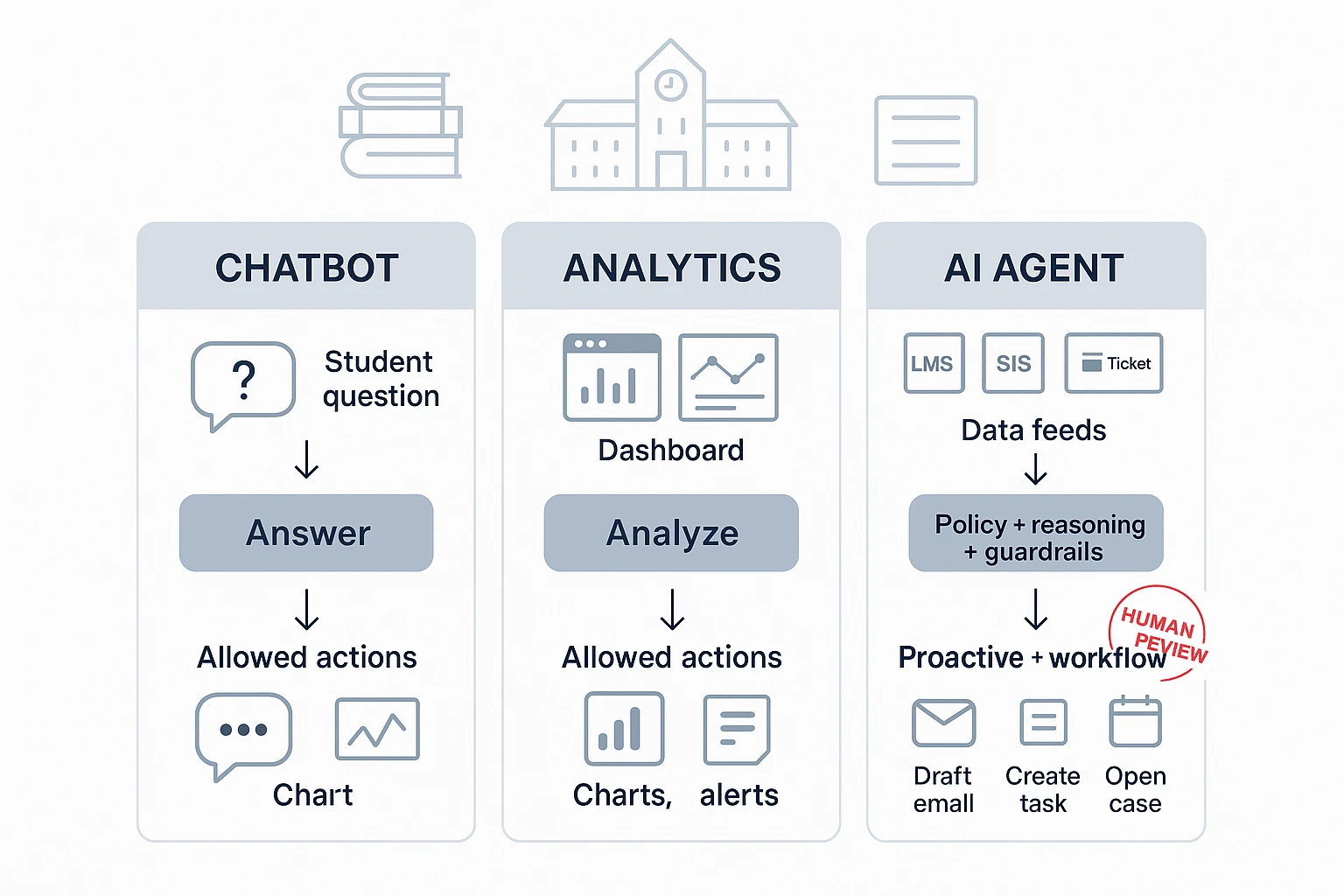
AI agents for education are AI systems that can sense → decide → act inside approved limits. They can watch signals like attendance trends, LMS logins, help-desk tickets, or advising notes. Then they follow policies to take safe actions, like drafting a parent email, opening a support case, or suggesting meeting times. When needed, a staff member reviews before anything is sent.
Chatbot vs analytics vs AI agent (in plain terms)
A chatbot mostly answers questions ("What's the late policy?"). An analytics tool mostly shows insights ("Attendance is down 12% this month"). An AI agent uses those insights to run a workflow: create tasks, route approvals, and follow up on a schedule. That's the key difference: agents can be proactive, not just reactive.
Where "agentic" systems help most in schools
Agents shine when work is multi-step and needs context over time. Think ongoing advising plans, recurring IEP/504 coordination, or committee meetings with rolling action items. "Memory" matters here: the agent needs prior notes, past decisions, and the current plan to act consistently. That said, agents shouldn't own high-stakes outcomes. Humans must stay responsible for final decisions.
Clarity box: don't use an agent for
- Discipline or suspension decisions
- Clinical mental health care or crisis triage
- Final grading or academic integrity calls without teacher review
- Any decision that changes services without documented approval
Top AI agent use cases in education (with practical examples and metrics)
AI agents can run real workflows in schools. They don't just "chat." They pull the right data, follow rules, and hand work to the right person. Below are campus and district use cases you can deploy, with owners, KPIs, and safeguards.
Here's a simple template you can reuse:
- Use case → Data needed → Owner → KPIs → Risks → Controls
Personalize learning support (tutoring, practice, differentiation)
An AI tutor agent can help after hours. It can explain the same concept 3 ways. It can also rewrite text to a lower reading level.
- Data needed: LMS course content, standards map, practice items, accommodations flags (at minimum)
- Owner: Teaching & learning (or CTL) with IT support
- KPIs: time-to-help (minutes), assignment completion rate (%), student satisfaction (CSAT)
- Risks: unsafe content, wrong level, inaccessible format
- Controls: age-appropriate mode, content filters, accessibility outputs (audio, large text, translation), teacher review for new content packs
Practical example: A middle school uses an agent to give "hint-first" help on math homework. It only uses teacher-approved problem sets, not the open web.
Build an early-alert student success loop (signals → outreach → escalation)
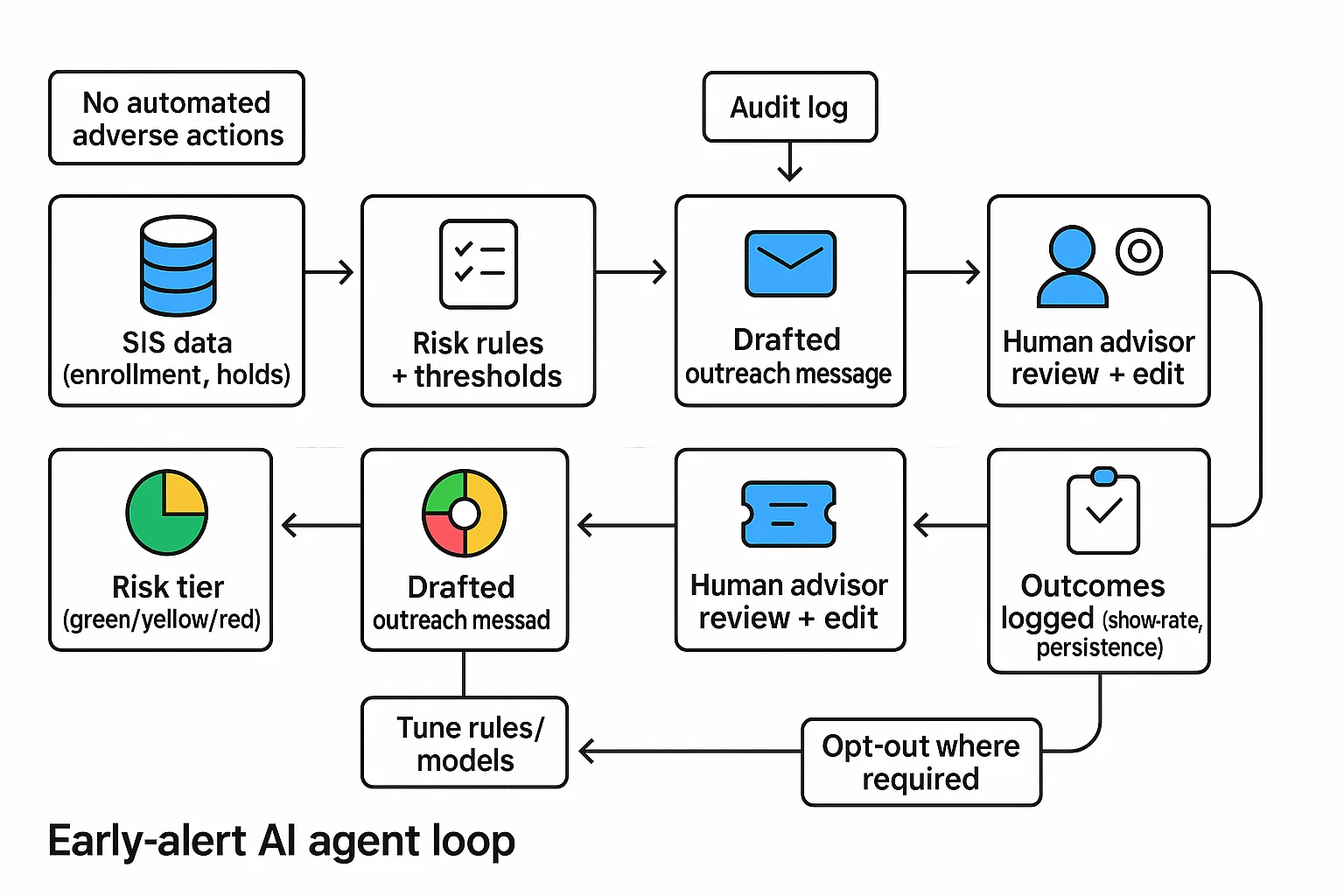
This pattern is simple and effective: SIS + LMS activity + advising notes → risk tier → drafted outreach → case created → advisor review → outcome logged. The agent speeds up the loop, but staff still decide.
- Data needed: SIS (enrollment, holds), LMS (logins, missing work), advising notes, basic comms history
- Owner: Student success/advising with IT + data governance
- KPIs: outreach speed (hours/days), appointment show-rate (%), persistence/retention (% term-to-term)
- Risks: false positives, unfair impact, overreach
- Controls: no fully automated adverse actions (no drops, no holds), explain "why flagged," opt-out where required, human approval before outreach templates go live
Practical example: If a student has 0 LMS logins for 7 days and 2 missing quizzes, the agent assigns a "watch" tier, drafts a short check-in message, and opens a case in the advising queue.
Speed up feedback and assessment (without "doing the work")
A grading support agent can draft feedback aligned to your rubric. It can also flag missing citations and suggest next steps.
- Data needed: rubrics, assignment brief, exemplar responses, policy on AI use
- Owner: Faculty/department chairs with academic integrity office
- KPIs: grading turnaround (days), rubric consistency (variance across sections), regrade requests (#)
- Risks: bias in tone, giving answers, inconsistent standards
- Controls: teacher final review required, "feedback on work" boundary (no new content added), bias checks on language, citation prompts ("show source or mark as opinion")
Practical example: For essays, the agent highlights claims without citations and suggests questions the student should answer in revision.
Automate staff and faculty workflows (scheduling, comms, forms)
Many "agent wins" are back office. Think intake triage, scheduling, and repeat questions.
- Data needed: email + calendar, ticketing, HR/IT knowledge base, shared drives
- Owner: Operations (registrar/HR/IT service desk)
- KPIs: tickets resolved per week (#), cycle time (hours), deflection rate (%)
- Risks: data leaks, wrong routing, over-permissioned tools
- Controls: role-based access, redaction of sensitive fields, approvals for any action (like sending bulk email)
Practical example: A registrar agent reads a form, extracts key fields, and routes it to the right queue.
Keep research and curriculum current (scan, synthesize, propose updates)
A curriculum agent can watch trusted sources and summarize changes. It can draft syllabus updates for committee review.
- Data needed: internal curriculum docs, program outcomes, library databases (if available)
- Owner: Curriculum committee + library + CTL
- KPIs: time saved (hours/term), freshness of syllabi (% updated on schedule)
- Risks: bad sources, outdated info, missing context
- Controls: citation requirements, "verification step" before adoption, limit sources to approved lists
If you want more cross-industry patterns and governance KPIs, use this enterprise AI agent use-case library to expand your shortlist.
Improve student services and advising (FAQs, course planning, multilingual)
A front-door agent can answer common questions and route complex ones. It can also draft multilingual replies.
- Data needed: policy docs, knowledge base, degree audit rules, office hours
- Owner: Student services + advising + communications
- KPIs: first-contact resolution (%), CSAT, time-to-answer (minutes)
- Risks: invented policy, wrong degree advice
- Controls: "don't invent policy" rule, always cite internal source text, route edge cases to humans
Practical example: The agent answers "How do I add/drop?" with steps and the exact policy excerpt.
Set wellness and safety boundaries (support vs clinical care)
Wellness agents must have a tight scope. They can guide resources and coping steps, not provide clinical care.
- Data needed: campus resource directory, escalation rules, hours and contacts
- Owner: Student affairs + counseling center + legal
- KPIs: handoff success (% connected), incident response time (minutes)
- Risks: crisis mishandling, liability, privacy
- Controls: crisis language detection, clear "not a clinician" messaging, emergency routing, minimal data retention
Practical example: If a student types self-harm language, the agent stops normal chat and shows crisis options and contacts.
What data and integrations do AI agents need in schools and universities?
AI agents only work well when they can pull the right context from your core systems. For schools, that usually means starting with a few high-value, low-risk integrations, then expanding once governance is solid. Scope the effort by system, by role, and by "read vs. write" access.
Connect the systems that hold the truth (then add collaboration tools)
Most deployments start with these system types (vendor-agnostic):
- SIS (Student Information System): student demographics, enrollment, holds, program, advising notes
- LMS (Learning Management System): course shells, assignments, grades, rubrics, submissions, announcements
- Email/chat: staff-student communications, escalation threads, outreach templates
- Calendar: office hours, advising appointments, meeting metadata
- Help desk/ITSM: tickets, categories, resolution steps, asset context
- Knowledge base/intranet: policies, playbooks, FAQs, student services info
Start read-only for the first 60–90 days. It lowers FERPA/GDPR risk and prevents accidental changes. Add write actions later (create a ticket, draft an email, schedule a meeting) with approval gates.
Plan for messy data. Expect duplicate student records, preferred-name mismatches, and course shell drift (old rubrics and copied modules that no longer match policy). Build in validation rules and "show the source" views.
Lock down identity, roles, and permissions (least privilege)
Least privilege means the agent gets only what it must have, per job.
- Advisor: read SIS + notes, read calendar; write outreach drafts with approval
- Instructor: read LMS course context; no access to unrelated student records
- Registrar/Student records: limited staff group; stronger logging; tighter retention
- Student experience: separate workspace from staff; no cross-student visibility
Use SSO where possible so access follows HR and enrollment changes. Document "break-glass" access (emergency override), who can use it, and how it's reviewed.
Log everything that matters (for trust, reviews, and requests)
Your audit trail should record:
- The prompt (what was asked)
- The sources used (which systems and records)
- The data accessed (fields and scope, not just "SIS")
- Any action taken (draft created, ticket opened, message queued)
- Approvals and human edits (who approved what, when)
This supports complaints, security reviews, FERPA requests, and ongoing tuning. Keep logs short by default (for example, 30–90 days), then extend only when policy requires it. For deeper control patterns, see this guide to AI agent governance and architecture.
How do you deploy AI agents responsibly (privacy, bias, integrity, security)?
Deploying AI agents in schools needs one shared rule: the agent can help people, but it can't quietly change decisions, grades, or records. The safest path is a guardrail framework that procurement, IT, and academic leaders all sign off on, before any pilot starts.
Set non-negotiables for privacy (FERPA/GDPR-aligned)
Start with purpose limitation: write down the exact tasks the agent may do (and may not). Then apply data minimization. GDPR is explicit that data must be "adequate, relevant and limited to what is necessary" under Regulation (EU) 2016/679 (General Data Protection Regulation), Article 5 (2016) for the stated purpose.
Use these procurement must-haves:
- Data ownership: the institution owns its data and outputs.
- No training on your data by default: opt-in only, in writing.
- Retention and deletion: define timelines (example: transcripts retained 180 days unless tagged for records).
- Subprocessor transparency: list vendors and notify on changes.
- Data residency questions: where data is stored and processed, and who can access it.
- Consent and notice: clear student/staff notice; consent where required.
Protect academic integrity with "allowed / limited / prohibited" defaults
Publish one simple matrix, then let instructors tighten it by assignment.
| Activity | Default | Guardrail |
| Brainstorming topics | Allowed | Must be student-selected final direction |
| Outlining | Allowed | Student edits required; keep outline history |
| Draft feedback (clarity, structure) | Allowed | No rewriting full paragraphs as final text |
| Citation help | Limited | Agent may suggest sources; student must verify and cite |
| Code debugging | Limited | Explain fixes; don't submit agent-written full solutions |
| Final answers for graded work | Prohibited | Treated as plagiarism unless explicitly permitted |
Also set two rules that cut disputes fast: (1) disclosure (a one-line "AI used for X" note), and (2) assignment-level instructions inside the LMS.
Run bias + equity checks (and don't break accommodations)
Test outputs across groups before scale. Use at least 3 slices: language level (ELL), disability needs (screen reader, captions), and a socioeconomic proxy (device type or connection quality).
Operational checks that work:
- Accuracy parity: compare error rates across groups; investigate any gap above 5–10%.
- Plain-language mode: require a grade-6 reading option.
- Multilingual support: consistent rubrics and tone across languages.
- Accommodations privacy: IEP/504 details must stay role-restricted, with audit logs.
Keep humans in the loop + prepare for incidents
Require human approval for high-impact actions: student risk flags, holds, accommodation changes, and any message sent "as the institution." Define escalation triggers: hallucinated policy, harmful content, suspected data leakage, or bias complaints.
A school-ready response timeline:
- 0–4 hours: disable the agent action, preserve logs. 2) 24 hours: notify IT/security lead and academic owner. 3) 72 hours: root cause, student/staff communications, and fix validation.
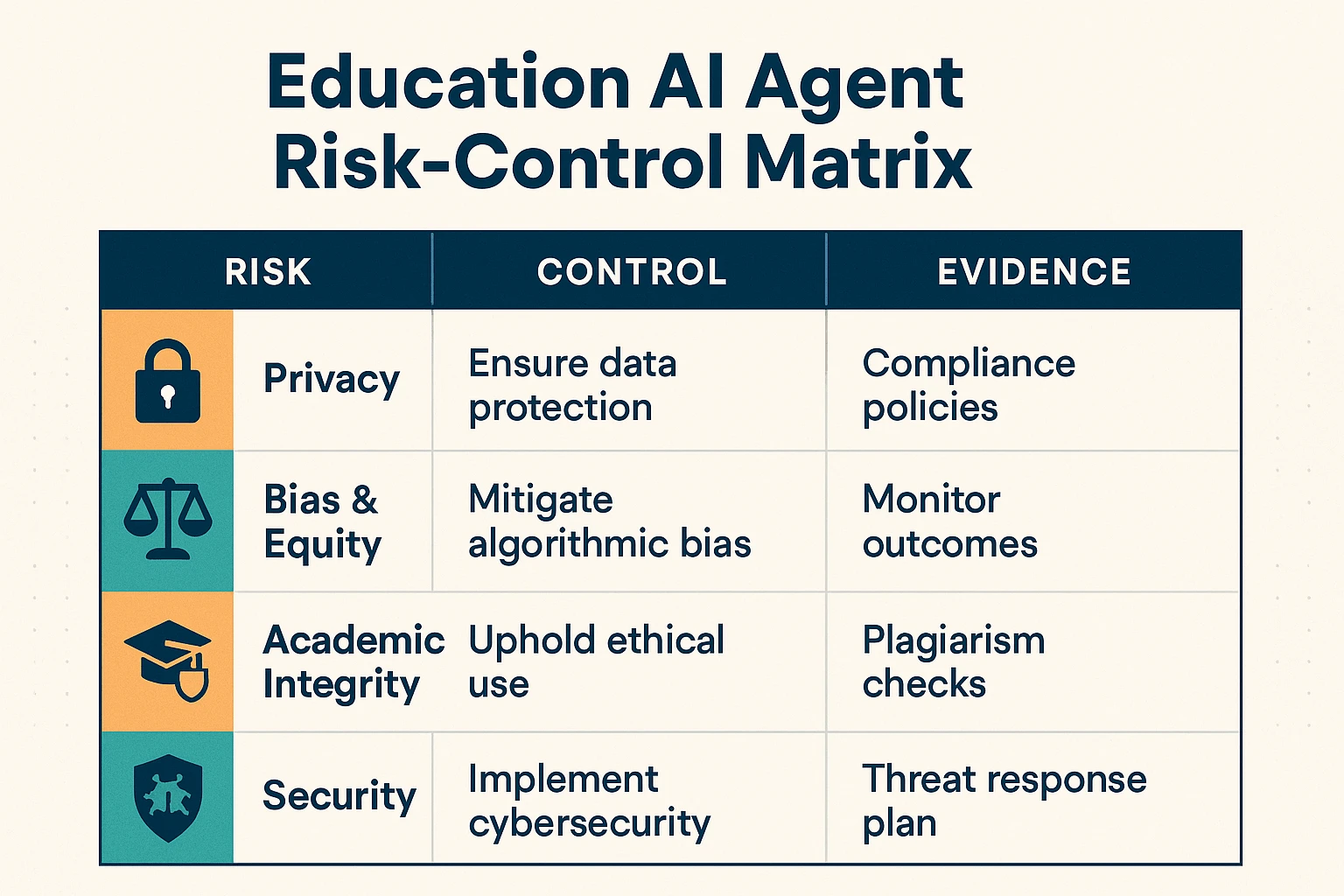
Risk-control matrix (outline)
- Privacy leak → Medium → High → least-privilege access + retention limits → IT/security → access logs, retention policy
- Biased recommendation → Medium → High → pre-launch fairness tests + monitoring → Student success lead → audit results, review notes
- Academic integrity misuse → High → Medium → allowed/limited/prohibited rules + disclosure → Teaching & learning → syllabus language, LMS prompts
- Prompt injection / jailbreak → Medium → High → content filters + scoped tools → IT → red-team report, filter settings
How to choose the right product for AI agents in education
Choosing an AI agent platform for education comes down to one question: where does work actually happen at your institution—meetings, apps, enterprise systems, or your own data stack? Pick the product that matches your "center of gravity," then verify privacy, auditability, accessibility, and cost controls before rollout.
If meetings drive outcomes, choose TicNote Cloud
Choose TicNote Cloud when your best work happens in live conversations and follow-ups: student success huddles, advising case reviews, IEP/MTSS meetings, committee decisions, operations standups, and faculty working groups. It's built to turn meeting content into reusable knowledge inside Projects, so you don't lose context when staff rotate or semesters change.
Why it fits:
- Persistent Project memory: keep transcripts, docs, and notes together by initiative.
- Cited answers: ask questions across Project files and verify sources fast.
- Faster follow-up: generate summaries, action items, and reports without copy-paste.
A practical rule: if your team spends 3–6 hours/week chasing notes, clarifying decisions, or rebuilding context, meeting-to-knowledge tooling usually beats a "generic agent" approach.
If you need many custom workflows and lots of connectors, choose MindStudio
Choose MindStudio when you plan to design many small agents across departments, each with a narrow job (for example: draft parent updates, route requests, summarize form responses, or prep course comms). It's a strong fit when "connect to everything" matters and you want controlled automations that follow a defined workflow.
Verify before you buy:
- Connector coverage for your real stack (LMS/SIS/email/help desk).
- Approval steps (human-in-the-loop) before sending messages or writing records.
- Versioning: can you track prompt/workflow changes over time?
If your work is ERP/HCM-centered, choose Workday's agentic features
Choose Workday when HR, finance, and student worker processes already live inside Workday and your main goal is automation inside approved enterprise flows. This is the safest choice when you need strict role-based access, standardized records, and "actions" that happen only in the system of record.
Best-fit examples:
- Hiring or onboarding student employees
- Time entry and approvals
- Finance requests, purchasing, and policy-guided workflows
If you have mature data engineering and governance, build in-house
Choose "build" only when you can sustain connectors, evaluations, and security evidence long term. In practice, that means strong identity and access management, logging, red-teaming (adversarial testing), and an MLOps pipeline for monitoring model quality and drift.
Use this as a hard gate:
- If you can't staff ongoing testing and audit evidence each term, don't build.
Procurement checklist (quick preview)
Before you sign, confirm these items in writing:
- Security & privacy: SSO/SAML, encryption, data retention controls, and "data not used to train models" terms.
- Auditability: admin logs for prompts, outputs, user actions, and content access.
- Accessibility: WCAG-aligned UX expectations (keyboard navigation, captions/transcripts, screen reader support).
- Cost predictability: usage caps, role-based limits, and clear overage rules.
For a deeper vendor evaluation lens, use this AI agent cost and security checklist to compare real trade-offs without guesswork.
Top tools for AI agents in education (Item Cards)
Education teams don't need "more AI." They need agent-style tools that can act on trusted school data, stay inside policy, and still save real time. The item cards below use the same fields, so you can compare options for advising, student success, IT, and admin ops without guessing.
TicNote Cloud (Item Card)
Category: AI workspace • meeting transcription • deliverable generation • knowledge management
Best for (education scenarios):
- Advising and student success: turn advising meetings into follow-ups, plans, and referrals
- Committees and governance: capture decisions, votes, and action items across recurring meetings
- Faculty/staff coordination: turn department meetings into searchable "what we decided" records
- Cross-functional ops: onboarding playbooks, case handoffs, and policy Q&A from meeting history
How it works (simple flow): Meetings + docs → Projects (one place per initiative) → Shadow AI searches across Project content and answers with citations → generate reports, web presentations, podcasts, and mind maps when needed.
Key differentiators (why it's agentic):
- Editable transcripts: fix names, terms, and context before it becomes shared knowledge
- Project memory: context compounds across meetings and files, not one chat thread
- Bot-free recording: capture in Meet/Teams via extension and Zoom via app, without a meeting bot joining
- One-click deliverables: go from transcript to a formatted report or mind map in minutes
Governance notes (what matters for schools):
- Operations are traceable (you can see what Shadow did)
- Private by default and described as not using your data to train AI models (confirm in your review)
Integrations / exports:
- Connectors: Notion, Slack
- Export: transcript (TXT/DOCX/PDF), summaries (Markdown/DOCX/PDF), mind maps (PNG/Xmind), audio (WAV)
Pricing summary (copy-ready):
- Free: 300 transcription mins/month, 10 AI chats/day, basic templates
- Professional: 12.99/month 79 billed annually)
- Business: 29.99/month 239 billed annually)
- Enterprise: custom usage + SSO + AI meeting agent + support
MindStudio (Item Card)
Category: Agent builder (create many custom agents with tools/connectors)
Best for (education scenarios):
- Teams that want many narrow agents (one per office or workflow)
- Rapid prototyping for "agent-in-a-box" tasks before deeper integration
Typical education agent examples:
- FAQ triage agent for common policy questions (housing, financial aid, registration)
- Early-alert outreach drafter that creates first-pass messages for advisors to review
Key differentiators:
- Flexibility to design custom agent logic and connect to multiple systems
- Faster iteration than a full in-house build for simple workflows
Governance notes (verify before production):
- Role-based access control (RBAC), audit logs, and environment controls (dev/test/prod)
- Clear data handling: retention, model training use, and connector permissions
Integrations / exports:
- Connector breadth is a core value; confirm your LMS/SIS/CRM fit in writing
Pricing summary:
- Varies by plan and usage; model and connector costs may apply
Workday (Education-focused agentic capabilities) (Item Card)
Category: Enterprise suite (ERP/HCM) with embedded automation and agent-like workflows
Best for (education scenarios):
- HR, finance, and operations workflows where Workday is already the system of record
- Institutions that need centralized identity, policy, and approvals
Typical education agent examples:
- Case routing for HR/benefits or finance requests
- Approval nudges and next-step recommendations inside existing processes
- Knowledge answers inside HR/finance portals, grounded in internal policy content
Key differentiators:
- Strong fit when the workflow already lives inside the suite
- Mature enterprise controls for identity, policy, and change management
Governance notes:
- Central identity and policy controls are the main advantage
- Confirm what is "agentic" vs rules-based automation, and what data is used for responses
Integrations / exports:
- Works best when your core ops stack is already in Workday; confirm connector scope
Pricing summary:
- Enterprise pricing; depends on modules and user counts
Custom / in-house agent stack (Item Card)
Category: Build (framework + LLM provider + vector database)
Best for (education scenarios):
- Strict data residency and bespoke security requirements
- Highly specialized workflows (unique advising models, custom analytics, niche research needs)
What you must own (ongoing):
- Evaluation: accuracy tests, hallucination checks, and bias monitoring
- Incident response: prompt injection, data leaks, and model failures
- Accessibility testing: screen reader flows, plain-language outputs, multilingual support
- Connector maintenance: LMS/SIS/CRM APIs change, and you'll carry that burden
Rough TCO drivers (what actually costs money):
- People time: product owner, engineer(s), security, privacy, and QA
- Monitoring: logs, alerting, model drift checks, and audits
- Security reviews: vendor risk, pen tests, and key management
What to verify before you buy (quick checklist)
- Data scope: exactly what the agent can read and write (and where)
- Identity: SSO, RBAC, and least-privilege controls
- Auditability: logs for prompts, actions, and source citations
- Student privacy: retention, deletion, and training-use terms
- Academic integrity controls: human review steps for high-stakes outputs
- Accessibility and equity: multilingual support and plain-language options
- Integration fit: LMS/SIS/email/calendar coverage and support SLAs
If you want a broader view of this category, this guide on all-in-one AI workspaces and how they compare helps frame what "workspace + agent" tools can replace in a typical education stack.
Comparison table: which education AI agent option fits your needs?
If you're comparing AI agents for education, normalize the options first. Most tools look similar in a demo. The differences show up in setup time, controls, and audit trails.
Use this normalized comparison table
| Option type | Implementation effort | Integration depth | Audit logs | RBAC/SSO | Data retention controls | Accessibility readiness | Exportability | Budget controls |
| Meeting-to-knowledge workspace (e.g., TicNote Cloud) | Low–Medium (days–2 weeks) | Medium (calendar, meeting capture, docs) | High (traceable actions) | Medium–High (Enterprise SSO) | Medium–High (policy-based) | Medium (check WCAG/VPAT) | High (DOCX/PDF/MD/HTML) | High (tiered minutes, caps) |
| AI builder platform (agent frameworks, automation) | Medium–High (weeks–months) | High (API-first, custom connectors) | Medium–High (depends on build) | Medium–High (depends on IdP) | Medium–High (you design it) | Medium (you design it) | Medium (you build exports) | Medium (usage-based sprawl risk) |
| Suite/ERP hub option (Microsoft/Google/CRM SIS ecosystem) | Medium (weeks) | High (best in-suite) | Medium–High | High | Medium–High | High (mature admin + standards) | Medium | High (org-wide licensing) |
| In-house (custom agent + data stack) | High (months+) | Highest | Highest (if built) | Highest | Highest | Medium (must test) | High (you control) | Medium (staff time dominates) |
Best fit by scenario (fast recap)
- Student success and advising: pick a meeting-to-knowledge tool when notes, plans, and follow-ups drive outcomes. TicNote Cloud fits well because it turns advising and case meetings into Projects, then answers questions with citations and generates reports.
- Faculty productivity: choose suite options when email, docs, and LMS live in one ecosystem. Use a meeting-to-knowledge tool when committees, office hours, or research meetings create lots of "lost" decisions.
- Operations (registrar, HR, facilities): choose a suite/ERP hub when the ERP is the system of record. Use a builder platform when you need many bespoke automations across systems.
- Strict data residency + strong engineering team: consider in-house, but budget for security reviews, monitoring, and ongoing model changes.
How to run a fair pilot comparison
Test one use case (for example, advising follow-ups) across vendors. Use the same data sources, the same success metrics (time-to-summary, action-item accuracy, staff hours saved, error rate), and the same red-team prompts (PII extraction, policy-bypass, hallucinated citations). Decide using evidence, not UI polish.
Implementation playbook: pilot → measure → scale (with roles and KPIs)
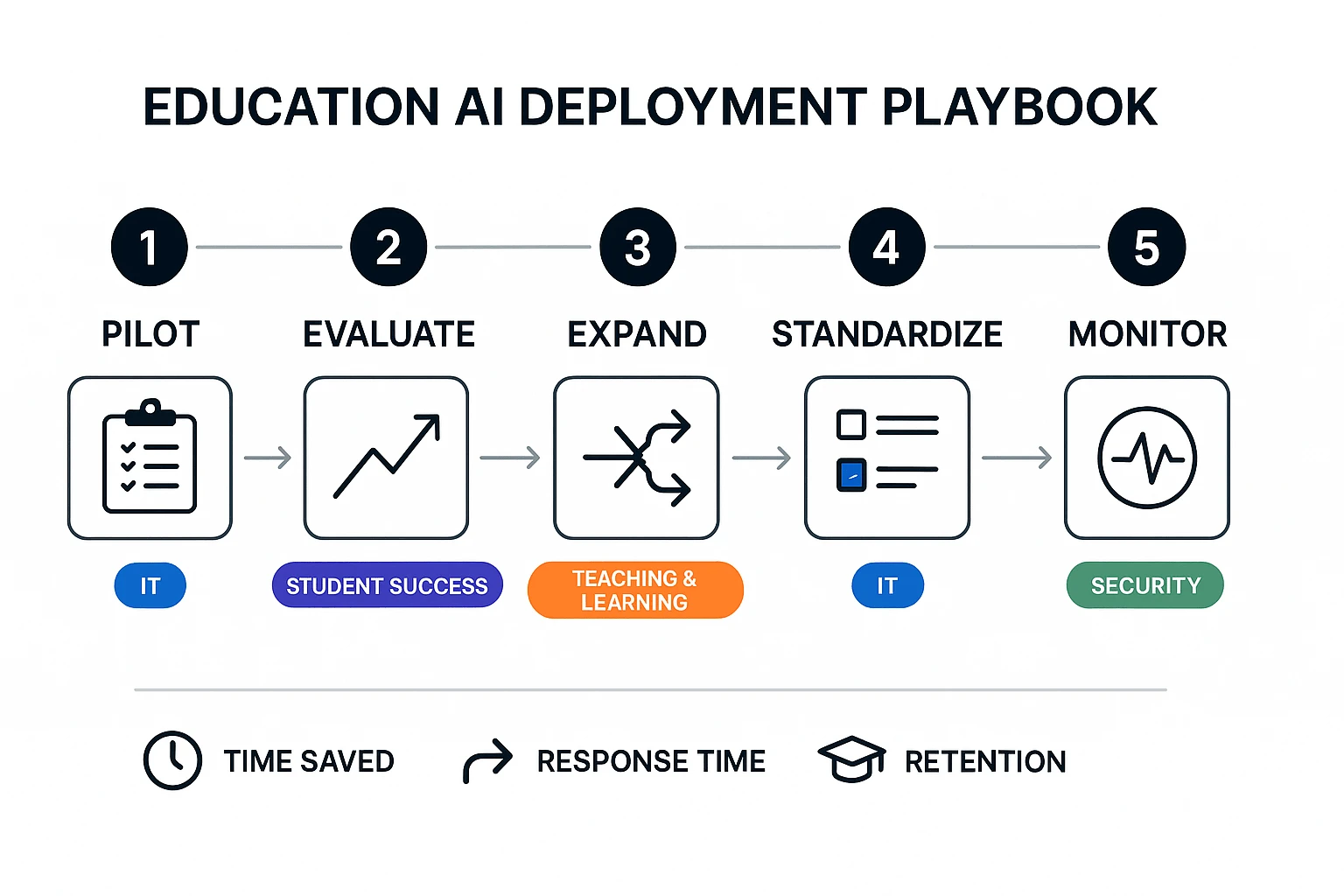
AI agents fail in education for one reason: unclear ownership. This rollout plan makes owners, data, and "no-go" lines clear before you automate anything. Use it for one workflow first (like advising follow-ups), then expand when your numbers hold.
Step-by-step rollout (pilot → evaluate → scale)
- Pick one workflow with a single "front door." Start where requests already flow (advising inbox, service desk, or case system). Good pilots cut a repeat task by 20–40% within 6–8 weeks.
- Name owners and boundaries (what the agent will not do). Write 5–10 rules in plain language. Examples: no grading decisions, no discipline actions, no sending messages without human review, no access to sensitive notes.
- Check data readiness (minimum viable access). Confirm what the agent can read and write.
- Read: knowledge base, policy docs, templates, past tickets
- Write: draft emails, case notes, task lists
- Log: prompt, sources used, and who approved
- Create a baseline before automation. Measure 2 weeks of current performance: handle time, backlog size, first-response time, and error rate.
- Design the pilot like an A/B test. Keep it small: 1 team, 1 workflow, 1 term, and a clear stop date. Add "human-in-the-loop" checks (staff must approve drafts).
- Train, communicate, and support. Run a 45-minute kickoff plus weekly office hours. Publish a short "how we use AI here" page for staff and students.
- Evaluate, then expand. If your KPIs improve and escalation is stable, broaden to the next workflow. For deeper rollout guidance, use this AI agent governance and adoption playbook for teams as your companion.
KPIs by workflow (leading + lagging)
- Instruction (faculty support, course ops)
- Leading: time to answer policy questions, % responses with cited sources
- Lagging: faculty satisfaction, fewer repeated issues
- Student success (advising, outreach, early alerts)
- Leading: first-response time, case resolution time, appointment no-show rate
- Lagging: term-to-term persistence, retention lift
- Student services (registrar, financial aid, housing)
- Leading: backlog size, deflection rate (self-serve resolved), QA error rate
- Lagging: complaint rate, CSAT
- Operations (HR, procurement, compliance requests)
- Leading: cycle time per request, rework rate, audit readiness time
- Lagging: cost per ticket, fewer exceptions
Governance model: steering group + RACI
Run a small steering group with a biweekly cadence in pilot and monthly after scale.
- Executive sponsor (A): sets goals, approves scope and risk posture
- IT/Security (R): identity, access, logging, vendor controls
- Data steward (R): data classification, retention, sharing rules
- Academic lead / CTL (C): instructional fit, faculty guidance
- Accessibility lead (R): WCAG/ADA checks, accommodations, equity impacts
- Student success lead (R): workflow design, escalation paths
Approval gates:
- Gate 1: use case + boundaries signed
- Gate 2: data access + retention approved
- Gate 3: pilot results + risk review
Ongoing monitoring (drift, hallucinations, escalation)
Treat quality as a process, not a launch task.
- Spot audits: review 20–30 agent outputs per week in pilot
- Hallucination log: track "uncited claims," wrong policy references, and missing steps
- Bias checks: test common names, languages, and disability-related requests for unequal responses
- Escalation rate: watch % of cases sent to humans; sudden drops can signal risky overconfidence
- Prompt + version control: lock prompts and templates; change only with a ticket and owner
- Feedback loop: monthly template updates and policy refreshes
Build-vs-buy + TCO mini-model (lightweight)
Use this quick total-cost view for a 12-month estimate:
- Software cost: licenses, seats, usage limits
- Integration labor: SSO, LMS/SIS, email/calendar, ticketing (hours × loaded rate)
- Governance overhead: steering meetings, privacy reviews, vendor risk checks
- Training time: kickoff + office hours (staff hours × loaded rate)
- Monitoring: audits, QA sampling, incident handling, prompt updates
A simple rule: if you can't fund monitoring, don't scale.
Meeting-to-knowledge workflow for education teams (example using TicNote Cloud)
When education teams treat meetings as "disposable," the same questions repeat and decisions get lost. A meeting-to-knowledge workflow fixes that by turning every discussion into a shared, searchable record—then turning that record into usable outputs (action lists, reports, mind maps) that stay tied to evidence. Below is what that looks like in practice using TicNote Cloud, from intake to review.
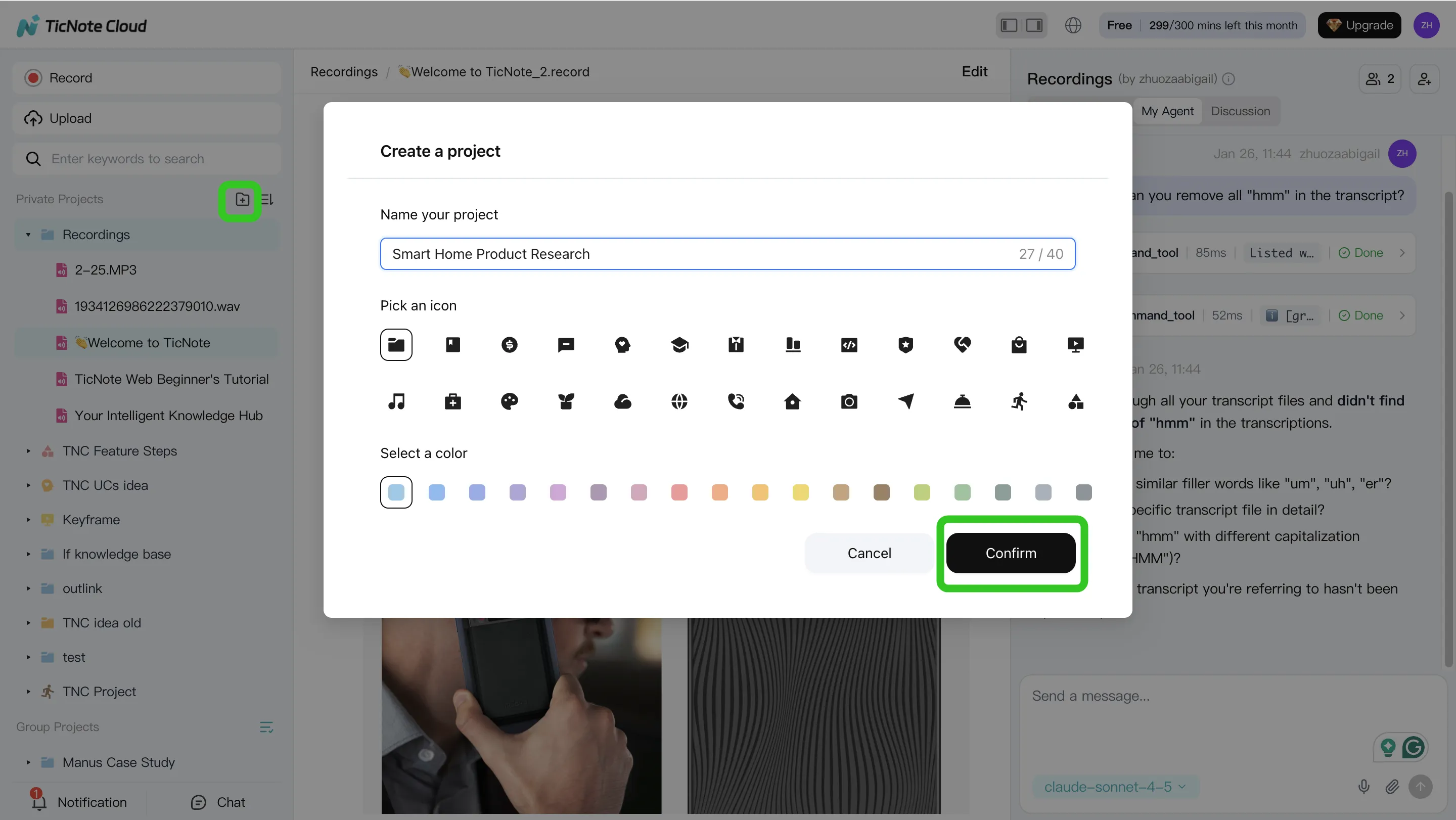
Step 1: Create or open a Project and add content (build one source of truth)
Start in the TicNote Cloud web studio by creating a Project for one initiative, like "Retention Taskforce" or "Tier 2 Attendance." Then load it with the materials you already use: meeting recordings, policy PDFs, advising scripts, rubrics, committee notes, and outreach templates. The goal is simple: keep the conversation and the documents in one place.
You can add files two ways:
- Direct upload from the Project file area
- Add files through Shadow AI by using the attachment icon, then asking it to file the content into the right folder
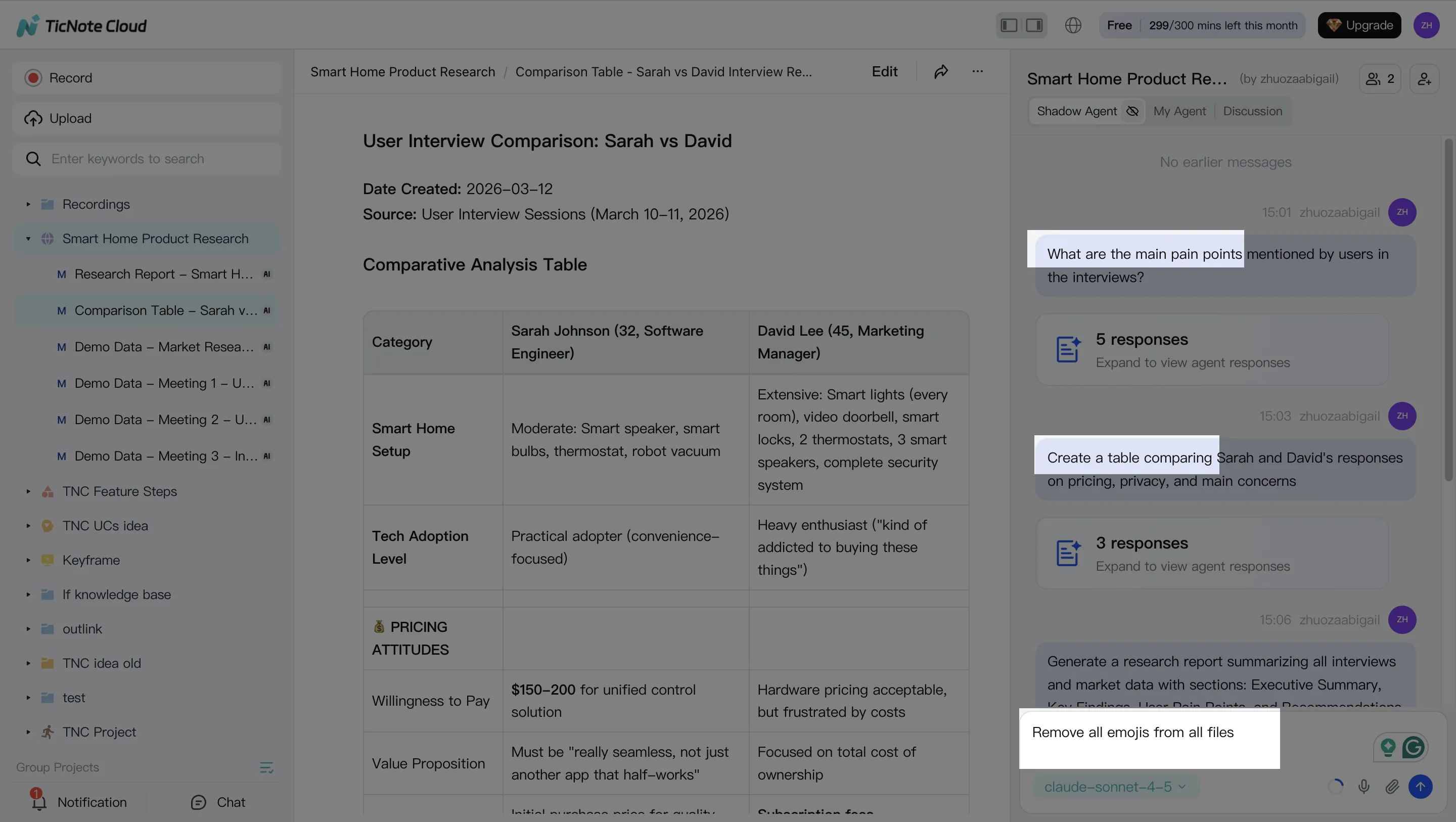
Step 2: Use Shadow AI to search, analyze, edit, and organize content (with citations)
Once your Project has meetings and docs, Shadow AI (on the right side of the screen) becomes your "doer," not just a chat box. Ask questions that education leaders actually need answered, like: "What decisions did we make about outreach criteria?" or "Which risk signals did advising staff mention most?" Require cited answers so you can click back to the source.
This is also where you clean up and structure messy notes:
- Edit transcripts for clarity (names, acronyms, unclear phrasing)
- Pull out action items and owners across multiple meetings
- Organize outputs by theme (risk signals, interventions, who owns what)
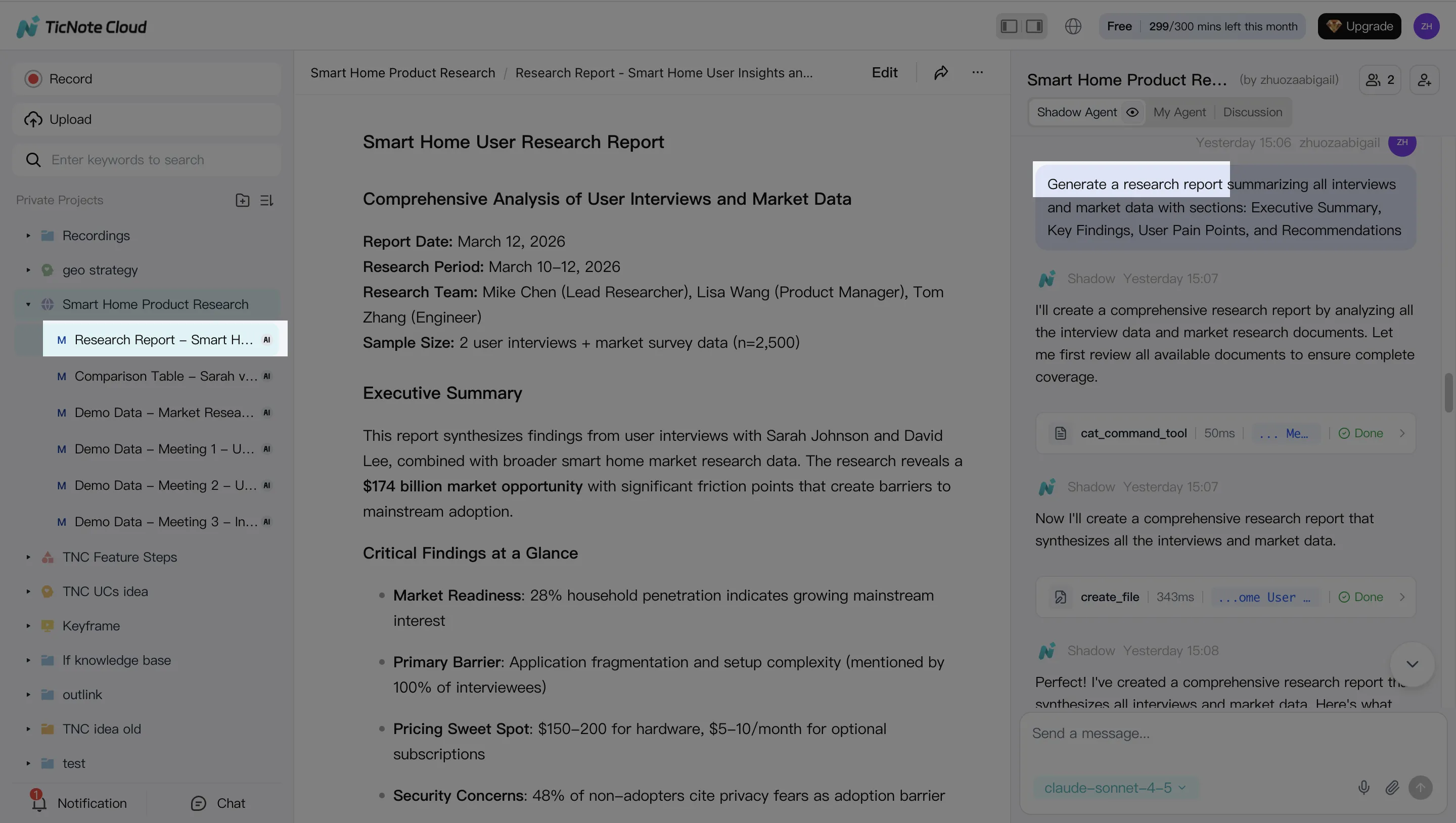
Step 3: Generate deliverables (so the meeting produces artifacts, not more meetings)
After analysis, turn the Project into shareable work products. In the web studio, ask Shadow AI to generate what different stakeholders need—without starting from a blank doc. Common education-ready outputs include an advising follow-up report, an operations action list, and a mind map for leadership alignment.
Step 4: Review, refine, and collaborate (keep humans accountable)
Before anything goes out, review the draft, check citations, and correct errors. If a paragraph looks off, you can ask Shadow AI to revise just that section, then verify it against the linked source. This is how you keep quality high while still moving fast.
Then share the Project with the right access level (Owner/Member/Guest). Team members can comment, ask Project-scoped questions, and request updated reports—while activity stays tracked and within permission boundaries.
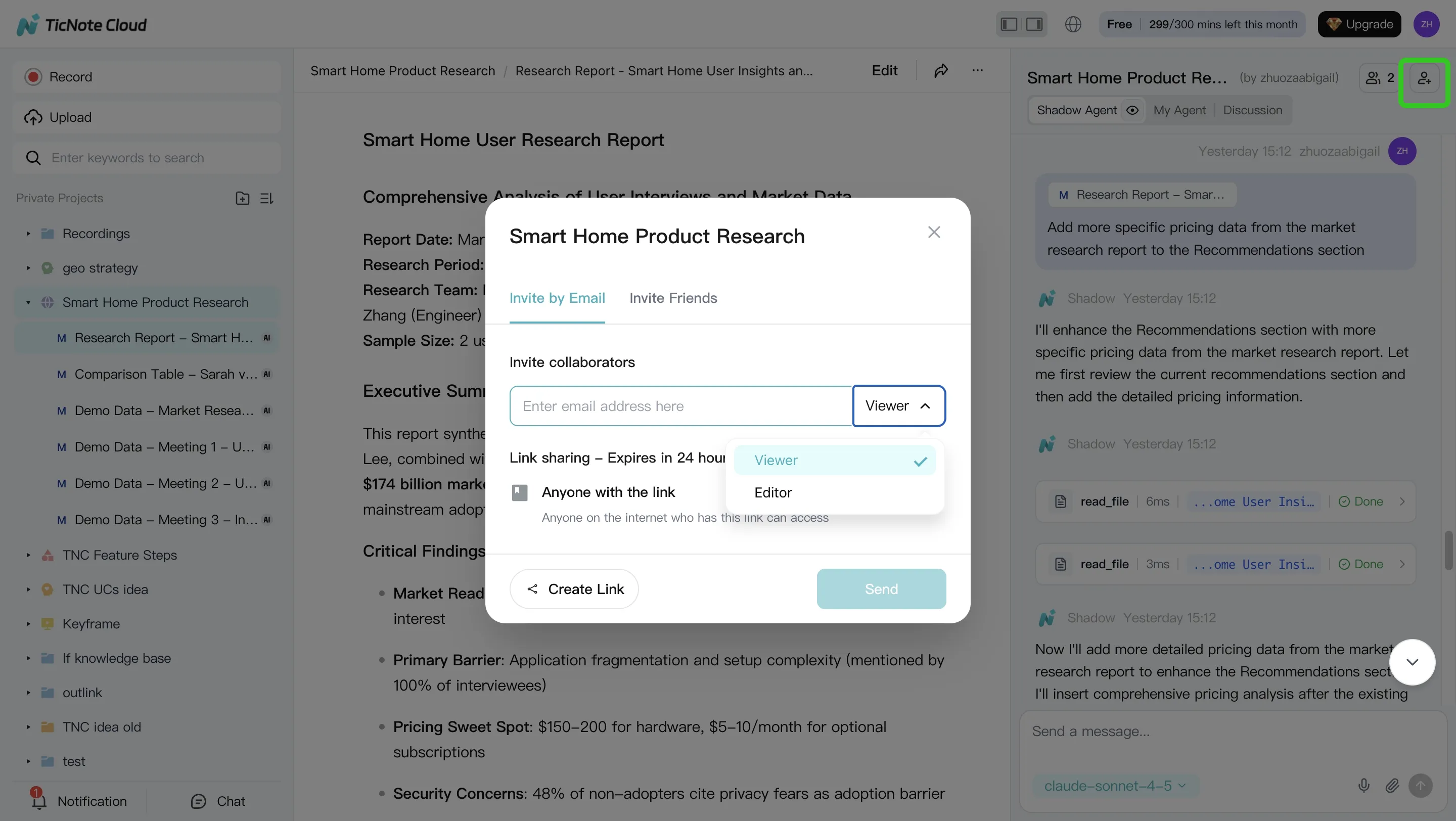
Try TicNote Cloud for Free if you want a low-friction pilot that turns meetings into searchable, cited, team-ready outputs.
Conclusion: what to do next to start using AI agents in education
To start using AI agents for education safely, keep it simple: choose one workflow, assign one owner, and measure one outcome. Use the comparison table to shortlist tools that match your data reality (LMS/SIS, email, calendar), then apply the guardrails in the responsible deployment section before anything touches student data.
For most K–12 districts and campuses, the best first pilot is a meeting-to-action workflow for student success, advising, or operations. It's low risk, because it works on staff conversations and process notes, and high leverage, because it turns decisions into tasks, summaries, and follow-ups in minutes. Set clear KPIs like time-to-follow-up (hours), missed-action rate (%), and staff time saved per week.



