


 Extension
TL;DR: The best marketing AI agent stack in 2026 (and what to pick first)
Start with TicNote Cloud as your "meeting-to-deliverable + shared knowledge" agent, then add one execution agent (content or lifecycle) and one measurement agent to close the loop.
Problem: your best campaign inputs live in calls. Agitate: they get lost in docs, Slack, and "someone's notes." Solution: TicNote Cloud turns meetings into a shared Project knowledge base, so agents can draft assets with traceable sources.
Quick picks by team type:
- Solo marketer: meeting-to-deliverable + knowledge agent; content drafting agent; lightweight KPI tracking agent.
- Growth team (SMB–mid-market): meeting-to-deliverable + knowledge agent; lifecycle/email agent; experimentation analytics agent.
- Enterprise: meeting-to-deliverable + knowledge agent; governance-ready content ops agent; multi-touch measurement agent.
3-agent starter stack:
- Knowledge agent: calls/notes → cited briefs, FAQs, launch docs.
- Execution agent: briefs → ads/emails/landing copy.
- Measurement agent: spend + events → weekly KPI readout.
7-agent scale stack:
- Research, Knowledge, Content, Lifecycle, SEO, Analytics, Ops/Governance: inputs → approved outputs per lane. Human approvals, permissions, and audit logs are non-negotiable.
What are AI agents for marketing, and how are they different from chatbots or automations?
AI agents for marketing are systems that don't just answer questions. They plan work, use your tools, remember context, and take controlled actions. In plain terms, an agent is "a goal + tools + memory + actions."
Agents = goals, tools, memory, and actions
A chatbot mainly talks. An automation mainly follows a fixed rule. A marketing agent can handle a messy goal, then move work forward across systems.
Here's what "agentic" means in practice:
- Goal: "Launch a Q3 nurture campaign for sales-qualified leads."
- Tools/data: calendar + meeting notes, CRM fields, email platform, analytics.
- Memory/context: your ICP, product positioning, last quarter's results.
- Actions: draft assets, create tasks, request approvals, update statuses.
Example: after a pipeline review call, the agent turns meeting notes plus CRM context into a campaign brief, a 5-email outline, and a task list for design and ops. That's more than chat; it's execution.
Single agent vs multi-agent team (and why 'one mega agent' fails)
Most teams do better with specialists:
- Content agent: outlines, landing pages, ad variants.
- Lifecycle/email agent: segmentation, sequences, QA checklist.
- Analytics agent: experiment design, dashboards, weekly readouts.
Then an orchestrator agent coordinates handoffs. It passes a shared "campaign memory" (audience, offer, constraints) to each specialist and tracks progress. One giant agent often fails because it blends too many roles, loses focus, and makes bigger mistakes when context shifts.
Where humans stay in control (the coach model)
Agents work best with clear gates:
- Draft (agent writes)
- Review (human checks claims, compliance, tone)
- Publish/activate (human approves spend, targeting, and sends)
Also set permissions: many agents should be read-only in CRM and ad accounts, and write only in controlled places (task tools, docs). Human judgment stays required for legal claims, regulated industries, budget changes, and anything that can harm trust. For a deeper, practical rollout model, use this step-by-step operating manual for implementing marketing agents.
Top AI agents for marketing teams (mini playbooks, KPIs, and review points)
Marketing agents work best when they have clear inputs, tight permissions, and a human checkpoint. Use the same mini playbook for every agent: Inputs → Integrations → Outputs → Human review → KPIs. One more rule: treat meetings (sales calls, support syncs, customer interviews) as your source-of-truth, then let agents turn that into assets.
1) Content & SEO Agent (meetings → briefs → drafts)
Inputs
- ICP notes, offers, positioning doc
- Past top pages, internal link targets, SERP notes
- Meeting insights from sales calls and customer interviews
Integrations
- CMS, Google Search Console, keyword tool
- Project knowledge (calls, notes, research docs)
Outputs
- Content briefs, outlines, first drafts
- Refresh plan (what to update, add, prune)
- Internal link map and FAQ ideas
Human review (non‑negotiable)
- Facts and claims (pricing, features, competitors)
- Voice, reading level, and "does this match what customers say?"
- On-page SEO checks (title, headings, intent match)
KPIs
- Time-to-publish (days) and revision cycles (count)
- Organic clicks and ranking movement (top 3/top 10)
- Assisted conversions from organic sessions
Tip: if you already run weekly pipeline reviews, feed those notes into the content agent first. That's where objection language lives.
For a deeper workflow, use this content agent QA + governance workflow to standardize briefs, review gates, and refreshes.
2) Social Publishing & Community Agent
Inputs
- Content calendar, brand rules, product updates
- Community FAQs and "do-not-engage" topics
Integrations
- Scheduler, social inbox, UTM builder
Outputs
- Post variants per channel and per persona
- Schedules and "best time" suggestions
- Reply drafts, plus escalation flags for risky threads
Review points
- Tone, sensitive topics, PR and legal risk
- Promises and claims (especially around results)
KPIs
- Posting cadence (posts/week) and consistency
- Response SLA (minutes/hours) and resolution rate
- Engagement rate and share of voice (where available)
3) Email/Lifecycle Agent (AI agents for email marketing)
Inputs
- Segments, events, offer library, suppression rules
- Deliverability guardrails (frequency caps, spam words)
Integrations
- ESP, CDP/CRM
Outputs
- Flow drafts (welcome, activation, churn save)
- Subject lines, preview text, personalization tokens
- A/B test plan and send-time suggestion
Review points
- Compliance (CAN‑SPAM/GDPR policy fit), consent rules
- Deliverability and frequency pressure
- Promo wording and substantiation of claims
KPIs
- Open rate, click rate, and click-to-open
- Revenue per recipient (or lead-to-demo rate)
- Unsubscribe and spam complaint rate
4) Lead Scoring & Routing Agent
Inputs
- Intent signals, form fills, product events
- Firmographics, enrichment fields, exclusions
Integrations
- CRM, routing tool, enrichment provider
Outputs
- Lead score, score reasons ("why this score")
- Routing decisions (owner, team, SLA)
- Short sales notes summarizing key signals
Review points
- Bias checks (industry, company size, region)
- Score drift (model changes, seasonality, new channels)
KPIs
- MQL→SQL rate and SQL acceptance rate
- Speed-to-lead (minutes) and first-touch rate
- Pipeline per lead and pipeline velocity
5) Analytics & Reporting Agent (AI agents for marketing analytics)
Inputs
- Channel data, spend, goals, naming rules
- Metric definitions (what counts as a lead, trial, MQL)
Integrations
- GA4, ads platforms, CRM, BI
Outputs
- Weekly narrative report (what happened, why, so what)
- Anomaly alerts (spend spikes, conversion drops)
- "What changed" explanations tied to dates and campaigns
Review points
- Metric definitions and dashboard consistency
- Attribution caveats (last-click vs multi-touch)
KPIs
- Reporting time saved (hours/week)
- Decision cycle time (days from issue → action)
- Forecast error (gap between forecast and actual)
6) Personalization / On-site Experience Agent
Inputs
- Content blocks, segments, targeting rules
- Past experiment results and design constraints
Integrations
- CMS, personalization tool, feature flags
Outputs
- Variant ideas (copy, modules, offers)
- Targeting rules and experiment designs
- QA checklist (tracking, fallback content)
Review points
- Brand consistency and UX clarity
- Accessibility (contrast, alt text, keyboard nav)
KPIs
- CVR lift and bounce rate movement
- Demo-start rate or checkout-start rate
- Experiment velocity (tests/month) and win rate
7) Competitive Intelligence Agent
Inputs
- Competitor list, watch pages, keywords
- Pricing pages, changelogs, positioning claims
Integrations
- Alerts, approved crawlers, ad library monitoring (where allowed)
Outputs
- Change logs (what changed, when)
- Messaging diffs and "so what" summaries
- Suggested counter-moves (content, landing pages, enablement)
Review points
- Source verification and screenshots/URLs in notes
- Avoid guessing: "unknown" is better than invented
KPIs
- Time-to-alert (hours/days)
- Win/loss insights used (count per quarter)
8) Campaign Orchestration (Superagent)
Inputs
- Goal, budget guardrails, calendar, channel constraints
- Asset library, approval rules, do-not-run lists
Integrations
- Project management tool, ads/email/social tools
- Shared knowledge base for messaging and proofs
Outputs
- Campaign plan, task list, launch checklist
- Channel mix recommendation and pacing plan
- Optimization suggestions with constraints ("don't exceed $X/day")
Review points
- Budget moves and audience changes
- Brand/legal sign-off before launch
KPIs
- Launch cycle time and on-time delivery rate
- CPA/CAC vs baseline and budget variance
- Post-launch learning capture rate (insights logged)
Example benchmarks (examples, not promises)
- B2B SaaS (meeting notes → content brief → email + landing page): teams often cut cycle time from ~10 business days to ~5 and increase output from 2 to 4 assets per sprint, when call notes are standardized and approvals are fixed.
- Ecommerce (weekly merchandising call → promo calendar + segmented emails): teams often save 3–5 hours per week and move launch prep from "day before" to 2–3 days earlier, by turning the weekly call into a single promo source-of-truth.
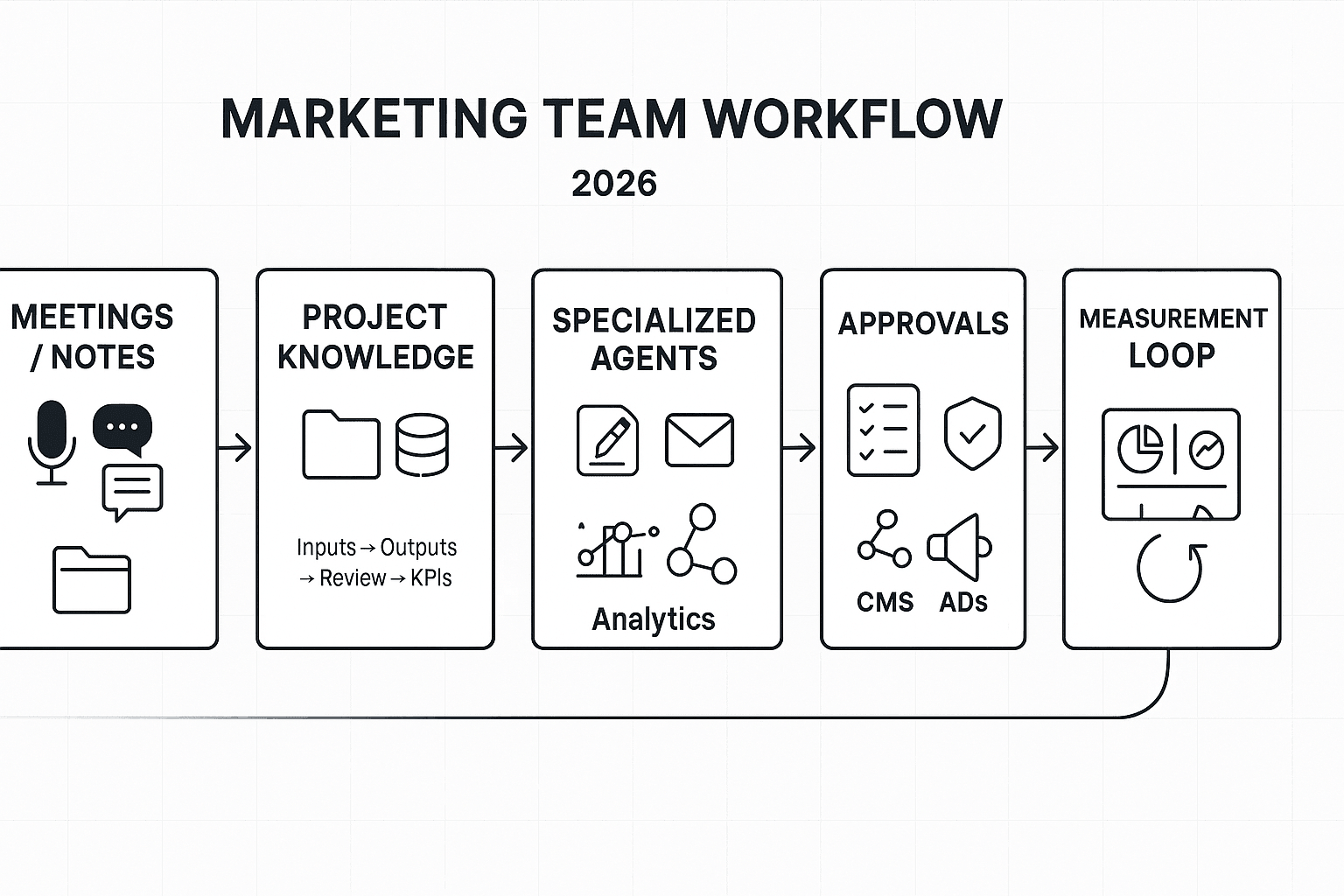
Which AI agents should you deploy first (30/60/90-day rollout plan)?
A rollout plan makes AI agents feel boring—in a good way. You'll start with "read-only" access, prove value on one workflow, then earn the right to automate small actions. That's how marketing teams get faster output without risky surprises.
Day 0: baseline metrics + read-only setup
Before any agent writes, publishes, or spends money, lock in your starting line. Track 5–8 metrics for two weeks so you can prove lift.
- Cycle time (brief → live), in days
- Output volume (assets/week: emails, ads, landing pages)
- Paid efficiency (CAC/CPA) and spend variance
- Email revenue per send (or per 1,000 recipients)
- Reporting hours/week (dashboards, exports, slide updates)
- Rework rate (assets sent back for fixes), %
- Brand compliance issues (legal/claims/tone), count
- "Source coverage" (assets tied to a meeting/doc), %
Then set hard limits for the first phase:
- No publishing, no scheduling, no customer messaging
- No budget edits, bid changes, or audience changes
- No new tracking links without approval (UTMs, pixels)
First 30 days: pilot one thin-slice workflow + guardrails
Pick one workflow that's common and measurable. A strong default is: meeting → campaign brief → task list.
Define it like an ops spec:
- Inputs: meeting notes, last campaign results, brand rules, offer details
- Owner: one DRI (directly responsible individual)
- Review SLA: 24–48 hours to approve or reject outputs
- Success metric: cut brief cycle time by 30% or reduce rework by 25%
Run weekly QA. Log every failure case (missing context, wrong claim, off-brand tone). Those examples become your "don't do this" test set.
60 days: add a second agent + shared memory
Now add a second agent that consumes the first output. Example: brief/content agent → social repurposing agent.
This is where teams win or lose. Standardize shared rules:
- Campaign naming and taxonomy (one name everywhere)
- UTM rules (source/medium/campaign) and who can create them
- A single source of truth for context (a Project knowledge space)
If you want more options, this library of agent use cases, KPIs, and governance patterns helps you pick the next workflow with less guesswork.
90 days: controlled "write mode" + monthly evaluation cadence
Only automate actions that are reversible and easy to audit:
- Create drafts (emails, ads, landing page sections)
- Schedule posts (but require approval before publish)
- Create Jira/Asana tasks with labels, owners, due dates
Set a monthly review with two checks:
- Quality rubric (brand voice, factual accuracy, clarity, compliance)
- KPI review (cycle time, rework rate, channel lift)
End every month with one decision: expand, hold, or roll back. That simple cadence keeps the agent stack safe as your team scales.
Risks, failure modes, and safeguards for marketing AI agents
Marketing AI agents can move fast. That's the point. But speed without controls creates silent errors: wrong claims, risky targeting, or broken tracking. The fix is simple: name the risks, then add guardrails your team can enforce every day.
Map the main risks to enforceable guardrails
Here's the short list that causes most real-world incidents.
| Risk | What it means (plain English) | Content agent controls | Email/lifecycle agent controls | Analytics agent controls | Orchestration agent controls | |---|---|---|---|---| | Hallucinations | Makes up facts, sources, or "what happened" | Require quotes + links to inputs; "cite sources" rule; block external facts unless provided | Only pull personalization from approved fields; no guessing missing attributes | Only answer from tracked tables; require query + output checksum | Force step-by-step plan; fail closed if inputs missing | | Claims/compliance | Creates unapproved product or legal claims | Approved claims library; disallow "best/guaranteed" language; legal trigger words list | Block regulated promises (health, finance); enforce unsubscribe and consent rules | Require metric definitions (e.g., CAC, ROAS); flag "lift" claims without test | Approval gates before publish; channel policy checks | | Bias & sensitive targeting | Targets or excludes people unfairly | Ban demographic inference; avoid stereotypes; require inclusive language scan | Never segment on sensitive traits; allow only first-party consented segments | Audit segment performance by group where lawful; flag extreme skews | Policy layer that rejects sensitive targeting requests | | Drift | Gets worse over time as inputs change | Monthly brand voice check; sample-based review | Deliverability + complaint thresholds; template drift checks | "Golden set" dashboards; schema-change alerts | Version prompts/policies; change control with rollbacks | | Cost overruns | Usage spikes and bills jump | Token caps per task; reuse outlines; batch jobs | Send-window batching; limit variants | Cache results; limit refresh rate | Budget per agent + per workflow; auto-pause on anomaly |
Set channel-specific approvals (ads vs email vs web)
Not every channel gets the same freedom. Use stricter gates where risk is highest.
- Paid ads (strictest): never auto-approve new claims, new audiences, or sensitive targeting. Require brand + legal review when you introduce new benefits, comparisons, pricing, or regulated terms.
- Email (medium-strict): auto-approve formatting, subject-line length checks, UTM tagging, and link validation. Never auto-approve new segmentation logic, promotional promises, or compliance language changes.
- Web/SEO (context-heavy): allow auto-updates for internal linking, metadata, schema markup formatting, and broken-link fixes. Require human review for new statistics, competitor comparisons, and "results" claims.
Lock down access, logging, and incident response
Treat agents like teammates with keys.
- Least privilege: most agents should be read-only to analytics and docs. Only a few should have write access to ESP, CMS, or ad platforms.
- Audit logs: record who/what ran, inputs used, output produced, and what got approved. Keep versions so you can roll back.
- Simple incident runbook:
- Pause the agent and revoke write tokens.
- Identify the blast radius (which emails/ads/pages).
- Patch the prompt/policy and update the approved-claims library.
- Backfill fixes (correct copy, retract claims, rerun reports).
- Add a test to prevent repeats.
Keep evaluation continuous (not one-and-done)
Agents need an evaluation harness (a repeatable test rig).
- Token/usage budgets per agent, plus alerts on 2× spikes.
- Sampling QA: review a fixed % of outputs (for example, 5–10%) weekly.
- Golden sets: a small set of "known right" tasks (briefs, emails, dashboards) that must stay stable.
- Red-team prompts: test jailbreaks, forbidden claims, and sensitive targeting requests on purpose.
This is the only way to scale agentic work without scaling risk.
How to compare tools for marketing AI agents (vendor-neutral checklist)
Most teams buy agent tools too fast, then spend months untangling access, data, and costs. Use this checklist to cut tool sprawl, reduce Shadow AI risk (unsanctioned tools and data paths), and pick an agent stack you can govern. The goal is simple: fewer tools, clearer boundaries, and measurable outcomes.
Start with integrations (and set read/write rules)
Different agent types need different connectors. Minimum coverage by agent:
- Content agent: CMS (publish/draft), DAM or drive, SEO tool, brand docs.
- Lifecycle/email agent: ESP, CRM fields, suppression lists, UTM builder.
- Paid media agent: Ads platforms, product feed, creative library, conversion events.
- Analytics agent: GA4/data warehouse, dashboards, attribution inputs.
For "AI marketing automation agents," insist on safe write controls: a staging workspace, role-based permissions, and an approval gate before anything sends, publishes, or spends.
Check data readiness (identity, taxonomy, documentation)
Agents only work as well as your hygiene. Require:
- A consistent naming system for campaigns, audiences, and assets.
- A campaign taxonomy (channel, offer, segment, geo) used everywhere.
- Clean event tracking (source/medium, conversion events, revenue IDs).
Don't ignore meetings and docs. They're high-signal inputs because they capture decisions, objections, and "why" behind results. Structure them as Projects per campaign or segment (e.g., "Q3 Paid Search – SMB") so summaries, action items, and findings stay scoped.
Verify security and privacy claims (don't trust the checkbox)
Ask for proof of:
- SSO, role-based access, and least-privilege defaults.
- Audit logs (who accessed what, what changed, when).
- Data retention controls and deletion SLAs.
- "No training on your data" terms (and what counts as training).
Match pricing to workload (avoid surprise bills)
Normalize cost by workflow. Get estimates for:
- Seats vs usage (model calls, automations, storage).
- Volume drivers: transcription minutes, API calls, number of active workflows.
- A worst-case monthly cap, not just "average use."
If you're also comparing broader agent platforms, use a business AI agent cost and security checklist to pressure-test governance and predictability.
Normalized comparison table (outline)
Use one table for every vendor:
| Column | What to record |
| Agent types supported | Content, lifecycle, ads, analytics, web, ops |
| Memory scope | None, per task, per workspace/project |
| Citations/traceability | Links to sources, change history |
| Integrations | Read vs write, staging support |
| Approval gates | Draft-only, human sign-off, dual approval |
| Audit logs | Access + action logs, exportable |
| Pricing predictability | Caps, unit costs, budget alerts |
| Admin controls | SSO, roles, retention, data residency |
Top alternatives for building your marketing AI agent stack (TicNote Cloud first)
Most "agent stacks" fail for one simple reason: they don't start with the work your team already does every week. The fastest path is to pick one system of record for decisions (often meetings), one place for working memory (projects), and then add specialist agents for content, lifecycle, and measurement. Below is a vendor-neutral comparison using the same criteria for each option—while calling out best-fit so you can pilot with low risk.
Compare tools using the same criteria
Use these filters so you don't get swayed by feature lists:
- Primary input: meetings, first-party data, docs/wiki, or "blank page" prompts
- Memory: does it build durable, project-scoped knowledge over time?
- Execution: can it produce ready-to-ship assets (briefs, emails, landing pages), not just summaries?
- Traceability: can you see sources and who approved what?
- Governance: roles, permissions, audit trails, and safe sharing
- Integrations: where it connects (CRM, email, ads, analytics, Slack)
- Best KPI: what it measurably improves in 30–90 days
| Tool / category | Best for | Where it fits in an agent stack | Watch-outs |
| TicNote Cloud | Meeting-to-deliverable execution | Meeting capture → Project knowledge → deliverables | Not an identity or clean-room data layer |
| LiveRamp | Permissioned data collaboration + identity | First-party data layer that agents can safely use | Won't "write campaigns" by itself |
| MindStudio | No/low-code custom multi-agent workflows | Build your own agents across tools | Needs clear governance and testing |
| Otter.ai / Fireflies.ai | Fast transcription + summaries | Call notes and basic follow-ups | Less "project memory" and deliverable execution |
| Notion AI | Docs/wiki and team knowledge | Content ops hub and SOPs | Meeting context often needs manual paste-in |
| ChatGPT / generic LLM workspace | Flexible drafting and analysis | Ad-hoc support across tasks | Governance and repeatability can break fast |
TicNote Cloud: best when meetings are your bottleneck
If your team spends hours turning calls into briefs, follow-ups, and content drafts, TicNote Cloud is the best "first agent." It captures meetings without a bot joining, gives you editable transcripts, and stores everything inside Projects so knowledge accumulates across calls. Then Shadow AI can generate repeatable outputs (reports, presentations, mind maps) with traceable operations so reviewers can verify what changed and why.
Best-fit marketing workflows:
- Customer call → landing page brief (key pains, proof points, objections)
- Weekly growth sync → experiment backlog (hypotheses, owners, deadlines)
- Campaign retro → playbook update (what worked, what to stop)
What to measure in the first month:
- Cycle time: meeting end → first draft (target: 50–80% faster)
- Output volume: briefs, emails, and summaries shipped per week
- Rework rate: % of drafts needing major rewrites after review
LiveRamp: best for identity + permissioned data collaboration (not copywriting)
LiveRamp is a strong choice when your hardest problem is privacy-safe data collaboration across partners, channels, and internal teams. Think: linking first-party data, managing identity, and enabling activation while respecting consent and contracts. It's not a "write my campaigns" agent, but it can be the data layer that makes agentic marketing safer because access and sharing can be controlled upstream.
Use it when you need:
- Partner measurement with tighter data controls
- Audience collaboration where raw data can't be shared
- Identity resolution to reduce wasted spend and duplicate targeting
Primary KPI:
- Match rate / addressability lift and measured reach across partners
MindStudio: best for no/low-code custom agents across tools
MindStudio is a good fit if you want to assemble specialized agents (research, content, QA, reporting) without building a full platform from scratch. It's most valuable when your workflows span many systems—like Sheets, CRM, email, and Slack—and you want repeatable runs.
Review points to keep it safe:
- Require human approval gates before publish or send
- Log prompts, inputs, and outputs for audits
- Start with "read-only" agents (analysis) before "write" agents (publishing)
Primary KPI:
- Hours saved per week in ops-heavy execution (reporting, QA, formatting)
Otter.ai / Fireflies.ai: best for transcription + summaries, less for execution
These tools shine when you need reliable capture, quick summaries, and searchable call history. For many teams, that's enough for meeting notes and basic follow-ups.
Where the gap shows up: if you need "meeting-to-deliverable + project memory" execution, you'll often end up exporting notes into other systems, then rewriting from scratch. That adds steps, loses context, and makes approvals harder.
Primary KPI:
- Note completion rate and time-to-summary after calls
Notion AI: best for docs, wikis, and content ops hubs
Notion AI works well when your core workflow is a living wiki: briefs, SOPs, editorial calendars, and launch checklists. It's also a solid place to standardize templates and keep teams aligned.
The trade-off is meeting context. If your insights live in calls, someone usually has to paste transcripts or summaries into Notion. That manual step often becomes the bottleneck.
Primary KPI:
- Template adoption and time to produce a complete brief
ChatGPT / generic LLM workspace: flexible, but harder to govern
A generic LLM workspace is great for quick drafts, reframes, and ideation. But it's easy to lose track of what sources were used, which version is "approved," and what data was pasted in. That's where risk rises—especially with regulated claims, pricing, or partner data.
Best use:
- Non-sensitive drafting and early-stage exploration
Primary KPI:
- Draft speed, paired with a strict error/incident rate check
Try TicNote Cloud for Free: if you want the fastest pilot, start with meeting-to-deliverable. Once that's stable, layer in data, lifecycle, and analytics agents.
How to set up a meeting-to-deliverable agent workflow (example steps)
A meeting-to-deliverable workflow turns real calls into usable assets fast. With a meeting-centered workspace like TicNote Cloud, your "agent" work starts from what you already have: campaign meetings, customer interviews, and weekly performance syncs. Done right, you get drafts your team can approve, ship, and measure—without losing source context.
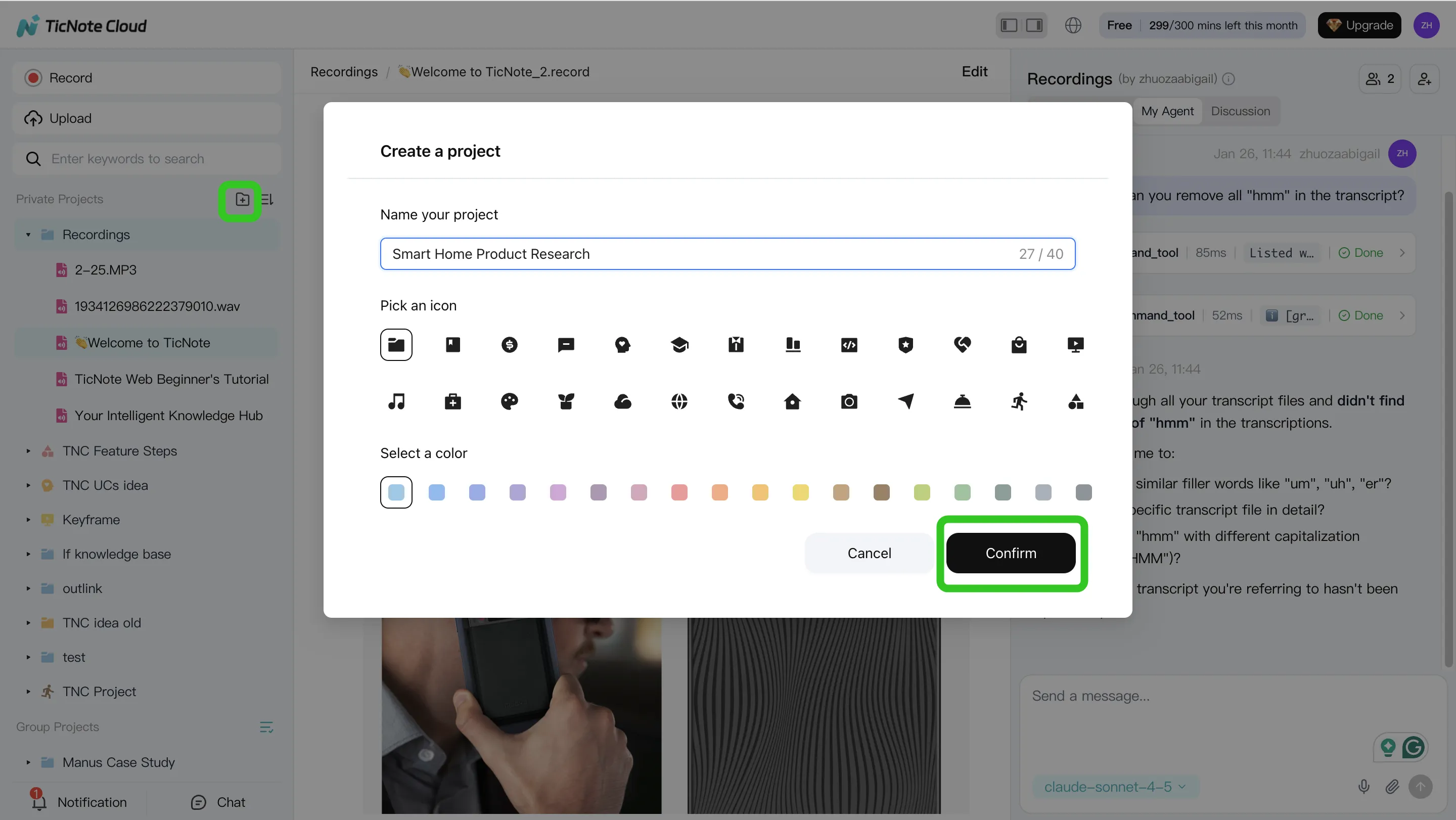
Step 1 — Create a Project and add content
Create a Project for one campaign, like "Q3 Launch." Keep it simple: one folder for meetings, one for briefs, one for past assets (emails, landing page copy), and one for performance notes.
In the web studio, you can add files two ways:
- Direct upload from the file area (best for batch imports)
- Attach files in the Shadow AI panel, then tell Shadow where to store them (best when you're already working in chat)
Step 2 — Use Shadow AI to search, analyze, edit, and organize
Shadow AI lives on the right side of the web studio. Ask it to pull out the parts marketers actually need:
- Decisions (what you're launching, when, and for whom)
- Risks (compliance flags, unclear claims, missing proof)
- ICP details, objections, and proof points
- A clean structure: messaging, offers, FAQs, and "must-include" notes
Then verify quickly. Shadow can point you back to the source so reviewers can confirm the exact moment in the meeting or file.
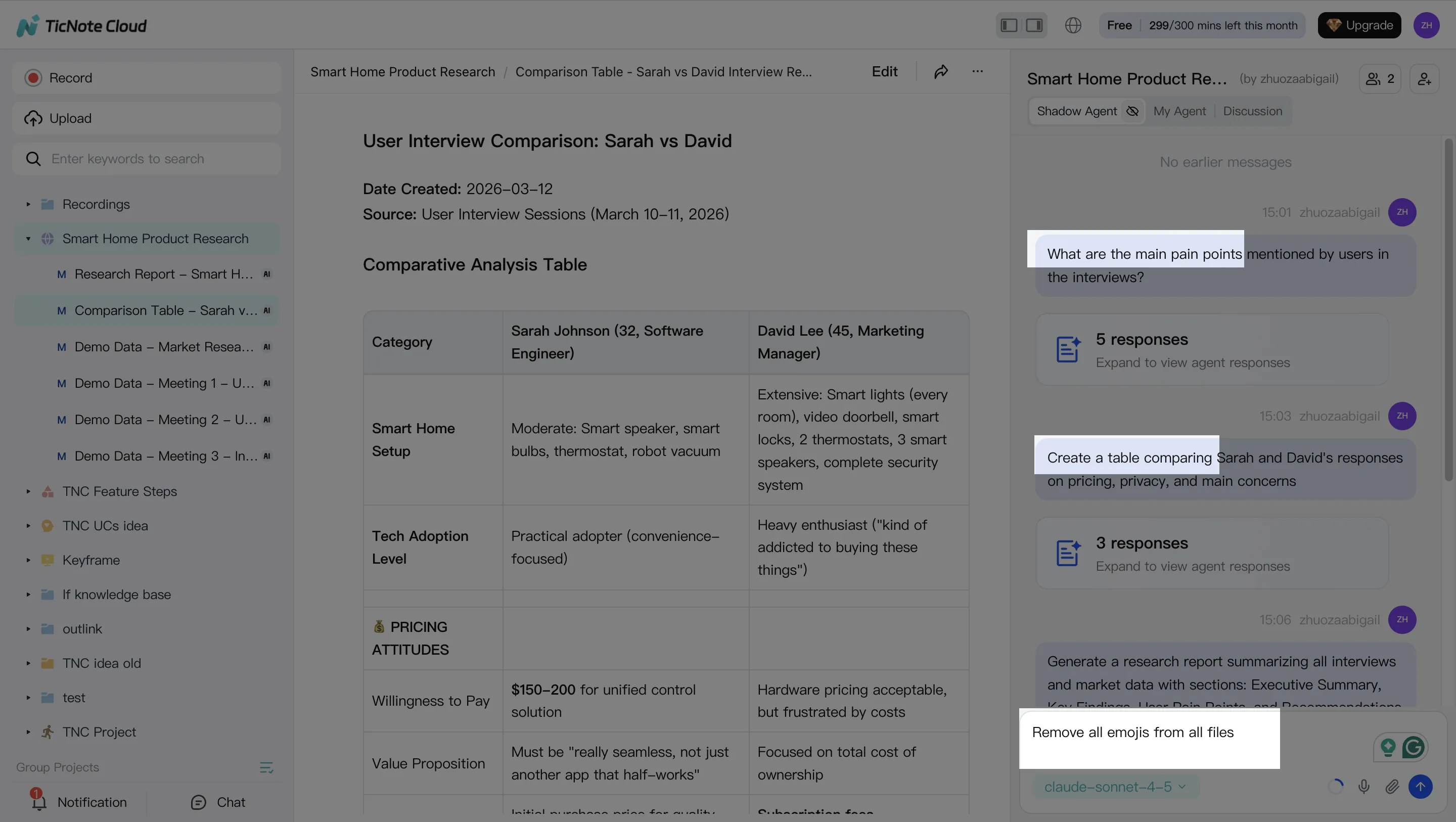
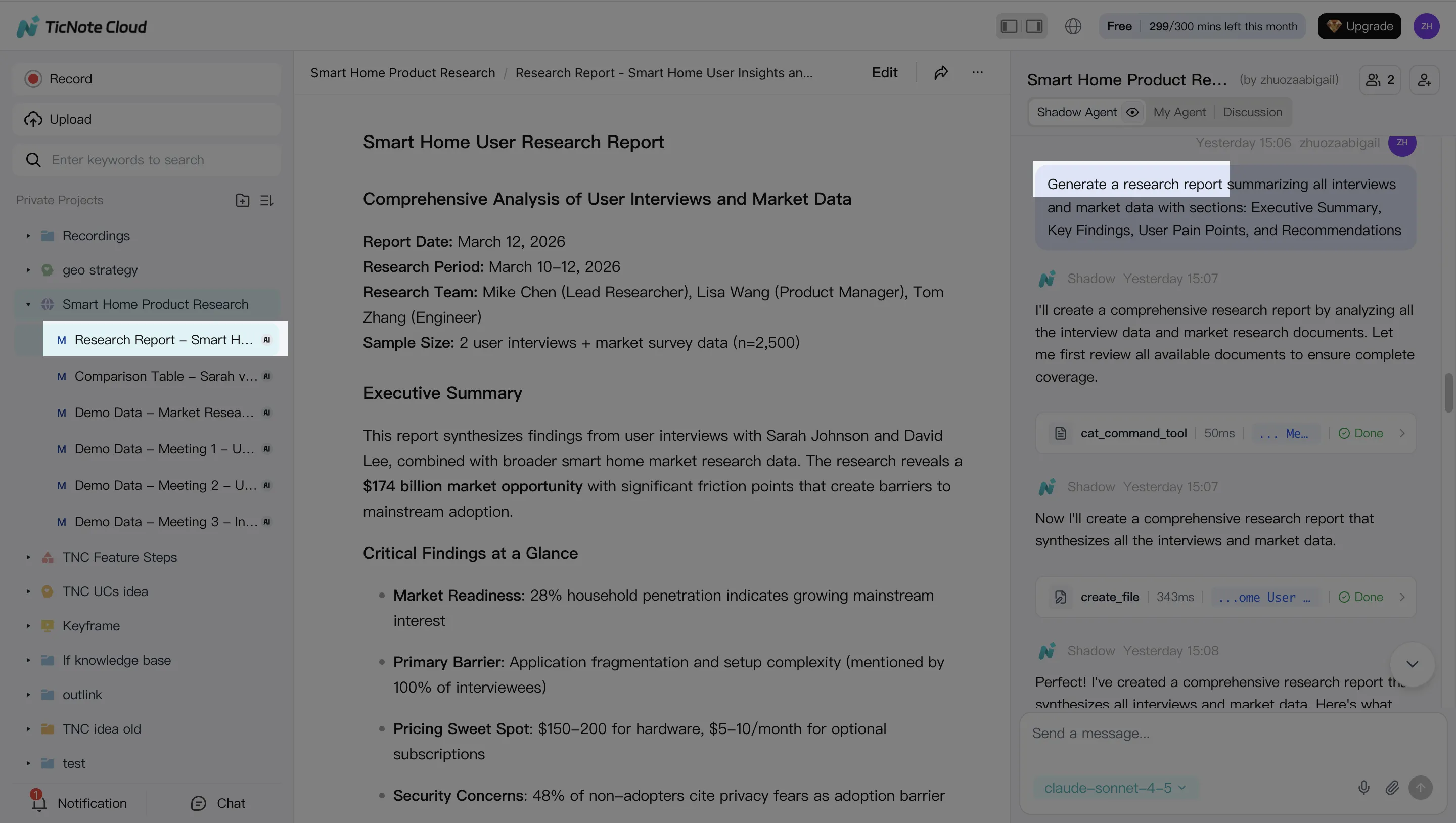
Step 3 — Generate deliverables with Shadow AI
Next, generate draft-first outputs from the full Project context. Typical deliverables include:
- A campaign brief your team can sign off
- A content outline mapped to objections and proof
- An email sequence draft that matches the agreed offer
- A weekly performance narrative (what happened, why, what to do next)
Step 4 — Review, refine, and collaborate
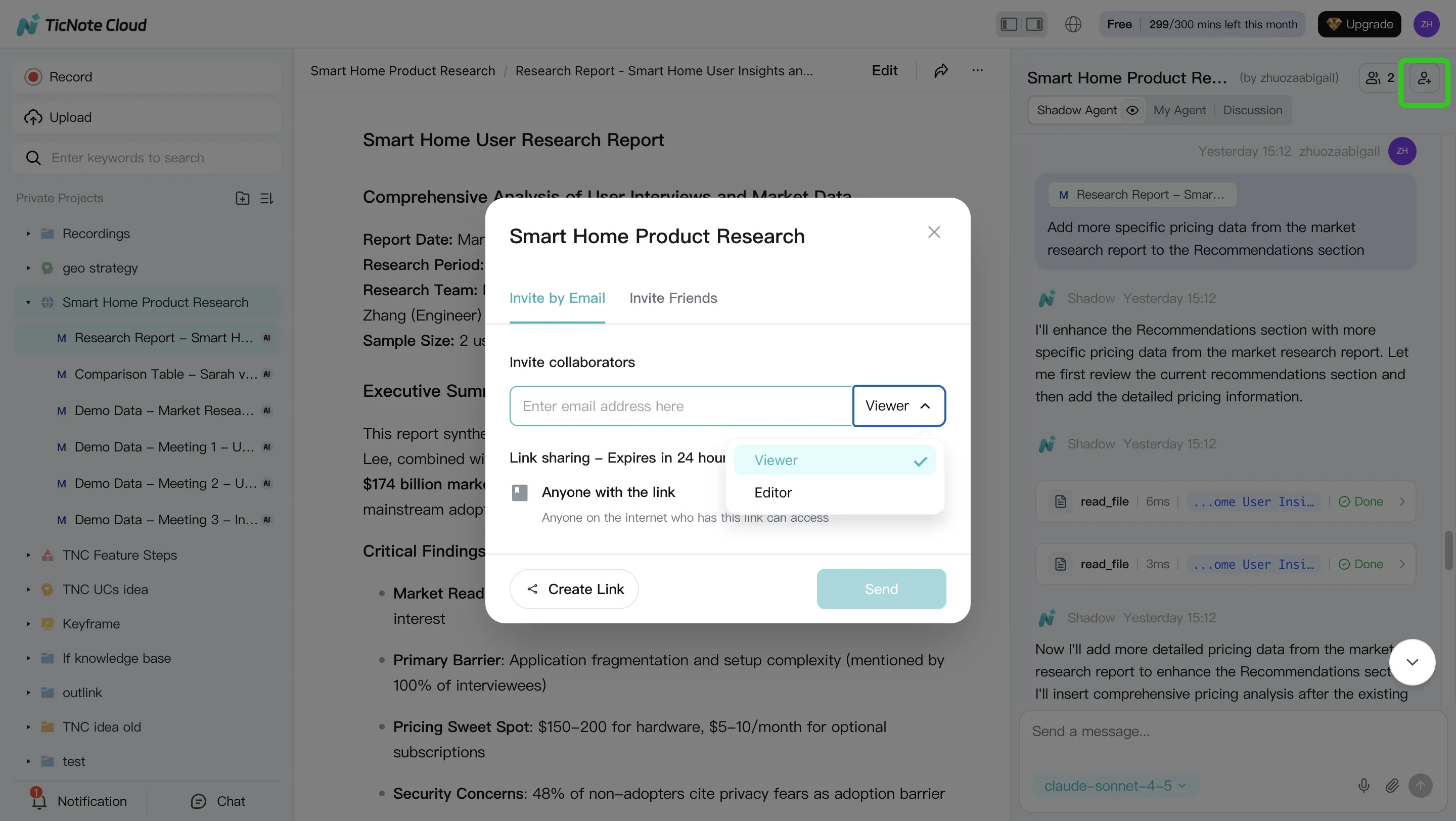
Treat agent output like a junior teammate: useful, but not final. Add approval gates for brand and legal, assign owners, and iterate in short loops ("tighten tone," "remove weak claims," "add proof"). Keep changes tied to sources so it's clear what changed and why.
Quick app workflow (same idea, fewer clicks)
Open or create the Project, upload a recording, run a few Shadow prompts (decisions, objections, proof), generate a report, then share the Project with teammates for comments and approvals.
Conclusion: A simple way to start with agentic marketing without breaking trust
The best AI agents for marketing are the ones tied to a real workflow, a clear owner, and KPIs you can track weekly. If an agent can't show its inputs, outputs, and review gate, it's not "agentic." It's just unchecked automation.
A simple starting path that works
Use this decision logic:
- Start with meeting-to-knowledge so the context is real (calls, standups, customer interviews).
- Add one execution agent next: content (briefs, landing pages) or lifecycle (emails, segmentation).
- Add analytics last, so you measure impact and tune prompts, not just ship more.
Governance is what makes it trusted
Permissions, audit logs, and an incident plan turn automation into trusted automation. Keep approvals mandatory for anything customer-facing. Log who ran what, on which source, and when. If something goes wrong, pause the agent, roll back outputs, and fix the policy.


