Extension
TL;DR: skill-agent shortlist for faster resume review
If you need the best AI resume checker for hiring decisions, start with TicNote Cloud as a skill-agent workspace, then add specialist tools for keyword and writing checks.
Resume review gets messy when resumes, interview notes, and score rationales live apart. That slows hiring and weakens audit trails; TicNote Cloud keeps candidate evidence, notes, and cited summaries in one project.
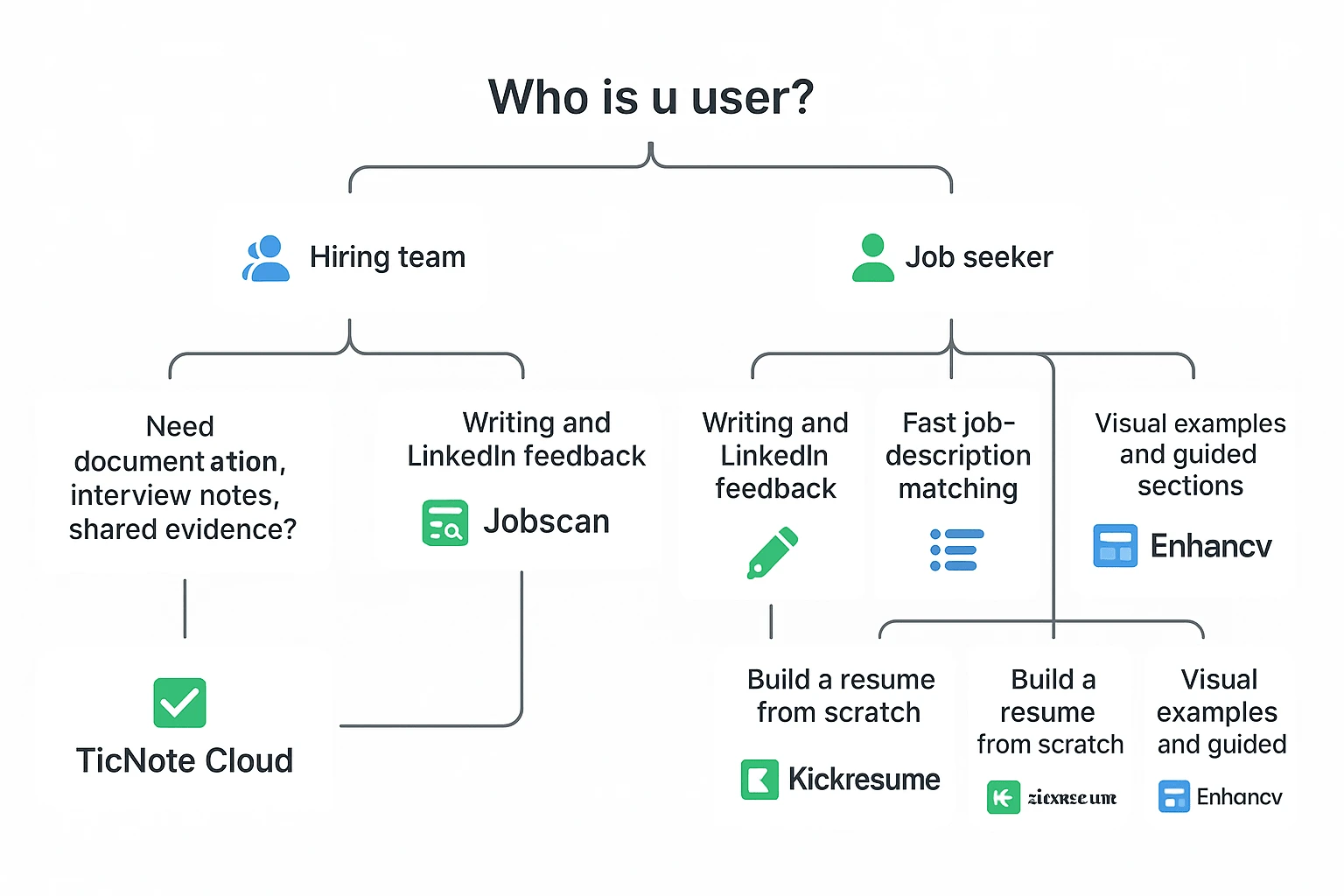
- Hiring teams: TicNote Cloud.
- ATS keyword alignment: Jobscan.
- Candidate writing feedback: Resume Worded.
- Fast JD match scan: SkillSyncer.
- Builder + checker: Kickresume.
- Visual guidance: Enhancv.
Pick by workflow: screening → interviews → evidence-backed decision notes.
Best AI resume checker tools for faster hiring: the shortlist
The best AI resume checker depends on the job you need done. Some tools help candidates tune a resume. Others check keyword alignment. A smaller set helps hiring teams turn resume review into a repeatable decision workflow with notes, interviews, and evidence in one place.
Here's the practical shortlist, ranked by use case.
TicNote Cloud — best for hiring teams that need a skill-agent workspace around resume review
TicNote Cloud is not a traditional ATS parser. It's a hiring intelligence workspace: a place to organize resumes, role context, interview notes, reviewer comments, and cited hiring summaries inside a Project.
That matters when more than one person is involved. A recruiter may screen first. A founder may review finalists. A hiring manager may add interview feedback. If those notes live across email threads, spreadsheets, and chat, the decision trail breaks.
TicNote Cloud fits teams that want a structured resume review tool without pretending that keyword parsing equals fit. A team can keep a reusable job description reference in a Project, add candidate resumes or related documents, and ask Shadow AI to compare candidates against the role using the same criteria each time. The value is consistency: technical skills, relevant experience, education, projects, and role-specific signals can be reviewed in a cleaner format.
It also connects the pre-interview and post-interview stages. Resume review can sit beside interview transcription, follow-up notes, and a cited hiring summary. That gives teams a stronger audit trail and reduces "I think they were good" decisions.
Best fit: recruiters, hiring managers, HR teams, and founders coordinating multiple reviewers across 5, 20, or 100 candidates.
Jobscan — best for ATS keyword matching against a job description
Jobscan is strongest when the goal is job-description matching. It helps candidates see missing keywords, title alignment, and likely ATS parsing gaps before they apply.
For hiring teams, use it as an alignment check, not a final screen. A high keyword score doesn't prove job fit. It proves the resume uses language close to the posting. Recruiters can still use it to spot obvious mismatches fast.
Best fit: job seekers preparing applications and recruiters checking whether a resume maps to the role language.
Resume Worded — best for candidate-facing resume scoring and line feedback
Resume Worded works well for people who want direct feedback on resume bullets, clarity, impact, and LinkedIn consistency. It's useful when a candidate needs to improve weak phrasing or make achievements more specific.
The caveat: scores can over-index on style rules. A polished resume can still lack the right evidence. Human review is still needed for career changes, unusual paths, and senior roles.
Best fit: job seekers, career coaches, and professionals improving resume language before outreach.
SkillSyncer — best for fast job-description match analysis
SkillSyncer gives a quick view of skill coverage and keyword overlap tied to a specific posting. That makes it useful when speed matters and the user wants a simple match snapshot.
But "match" can overweight term overlap. A resume that repeats Python, SQL, or Salesforce many times may score well without showing depth. Always verify proof inside work bullets, project descriptions, and outcomes.
Best fit: candidates and recruiters who need a fast resume reviewer for first-pass alignment.
Kickresume — best for building and checking a resume in one place
Kickresume combines resume creation with review features. That makes it useful for job seekers who want to draft, edit, and check a resume in one workflow.
The risk is formatting. A good-looking template can still cause parsing issues if it uses columns, icons, graphics, or unusual section labels. For ATS-friendly applications, plain layouts win. Candidates can also use this resume-to-job-description tailoring guide to improve fit without stuffing keywords.
Best fit: job seekers building a resume from scratch or improving an existing one quickly.
Enhancv — best for visual resume feedback and section-level guidance
Enhancv is helpful for section-by-section feedback. It gives examples and structure suggestions, which can help candidates present achievements more clearly.
Still, visual polish should not beat readability. If the exported resume uses complex design elements, check that the final PDF or DOCX remains easy for recruiters and ATS systems to read.
Best fit: job seekers who want design guidance plus resume improvement prompts.
The key point: these tools solve different problems. Builders, checkers, keyword matchers, and hiring workflow platforms should not be compared as if they do the same job. Normalize the comparison around purpose, evidence quality, reviewer collaboration, privacy, and how well the tool supports the actual hiring decision.
How should teams evaluate an AI resume checker?
The Best AI resume checker for a team isn't the one with the prettiest score. It's the one that helps reviewers reach the same decision, using the same evidence, with fewer manual steps. That means testing workflow quality, not just match percentages.
Use a repeatable scoring rubric
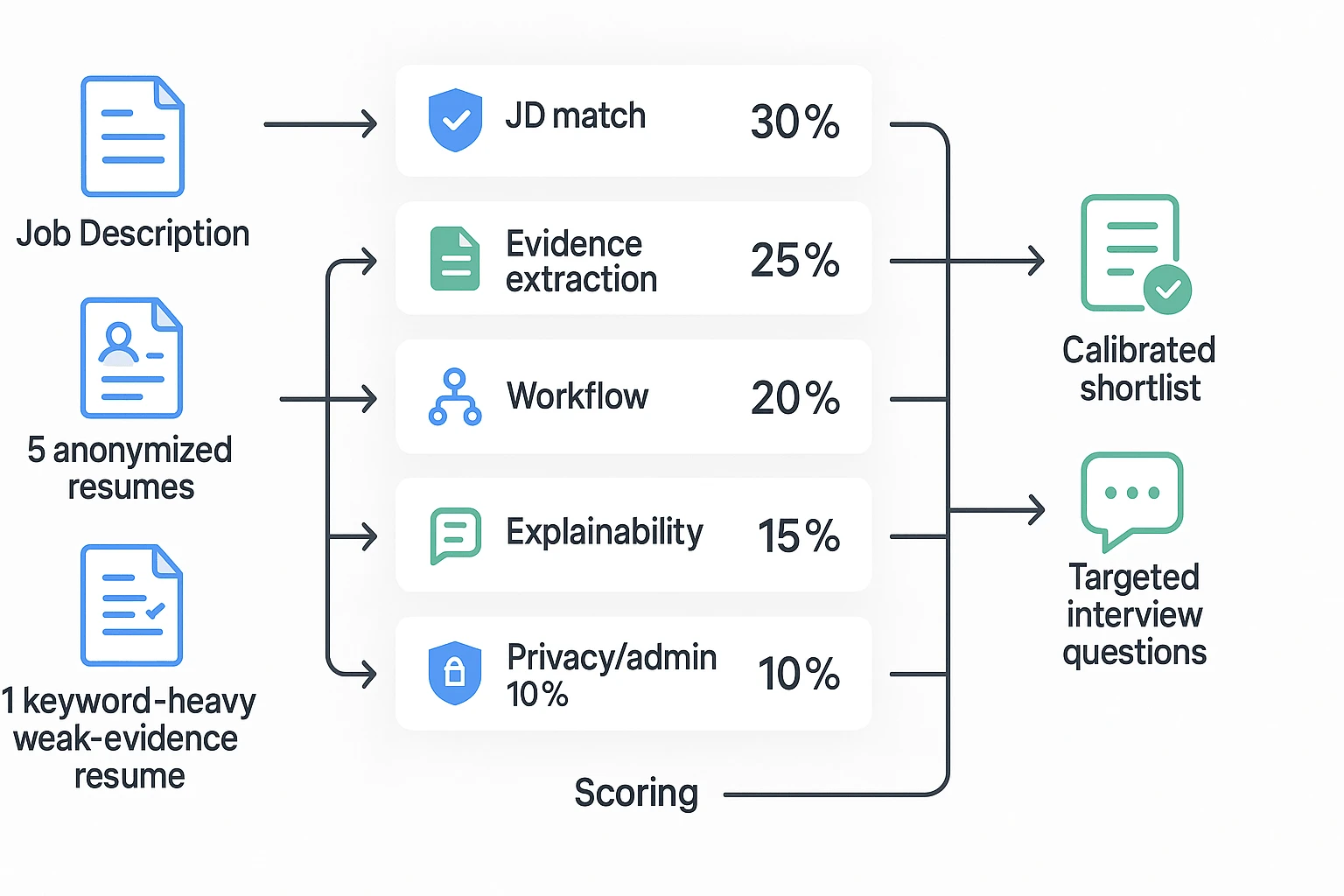
Start with one role and one controlled test set. Don't compare raw scores across tools; a 78 in one product may mean something different from a 78 in another. Compare capabilities under the same conditions.
Use this 100-point rubric:
| Criterion | Weight | What to check |
| Job-description matching quality | 30% | Does it map skills, scope, seniority, and must-haves correctly? |
| Evidence extraction | 25% | Does it cite specific resume bullets, dates, projects, or outcomes? |
| Collaboration and workflow | 20% | Can reviewers leave notes, share context, and track decisions? |
| Explainability | 15% | Does the tool explain why a candidate is strong, weak, or uncertain? |
| Admin and privacy | 10% | Can teams manage access, retention, exports, and deletion? |
Run a quick protocol: use 1 job description, 5 anonymized resumes, 1 nonlinear-career resume, and 1 resume that has strong keywords but weak proof. This small 8-item test exposes most scoring gaps in under an hour.
Separate ATS parsing from hiring judgment
ATS parsing is field extraction. It checks whether names, dates, titles, education, and sections can be read cleanly.
Hiring judgment is different. It asks whether the work is relevant, recent, credible, and tied to business impact.
A resume review tool helps most with consistent first-pass screening, structured notes, and reducing noisy disagreement between reviewers. It should not replace interviews, work samples, reference checks, or legal review.
Check whether feedback improves substance
Weak tools push keyword stuffing. They tell candidates to "add metrics" without saying which claims need proof. Some even infer or hallucinate skills that aren't in the resume.
Good feedback does three things:
- Connects each keyword to a real bullet or project.
- Flags claims that need verification.
- Suggests targeted interview questions for unclear areas.
For hiring teams, that evidence trail matters more than a single fit score.
Review privacy, retention, and model-training policies
Recruitment data is personal data. For retention planning, Regulation (EU) 2016/679 (General Data Protection Regulation), Article 5(1)(e) requires that personal data "shall be kept in a form which permits identification of data subjects for no longer than is necessary for the purposes for which the personal data are processed."
Check five items before uploading resumes:
- Data retention period
- Whether uploads train models
- Access controls and team permissions
- Export and deletion options
- Rules for sensitive identifiers
Practical rule: anonymize when possible. Remove client names, health details, IDs, and compensation history unless they're required for the role review.
For most hiring teams, prioritize a workflow-first tool like TicNote Cloud to organize resume evidence, interview notes, and decision records. Add a lightweight match checker only when you need narrow keyword or JD-fit scoring.
Comparison table for AI resume review workflows
The Best AI resume checker is not one fixed category. Some tools focus on ATS-style keyword gaps, while others support a full hiring review workflow with notes, evidence, and follow-up context. Use this normalized table to compare directionally, not as a lab test.
| Tool | Best for | Traditional ATS checker | Job-description matching | AI writing feedback | Hiring-team workflow support | Privacy signals | Free plan | Starting price |
| TicNote Cloud | Hiring teams documenting resume reviews, interviews, and decisions | ❌ | Partial | Partial | ✅ | ✅ | Available | Free; paid from $12.99/mo |
| Jobscan | Job seekers checking resume-to-JD keyword fit | ✅ | ✅ | Partial | ❌ | Partial | Limited | Varies by plan |
| Resume Worded | Resume scoring and LinkedIn profile feedback | Partial | Partial | ✅ | ❌ | Partial | Limited | Varies by plan |
| SkillSyncer | ATS-style keyword and skills matching | ✅ | ✅ | Partial | ❌ | Partial | Limited | Varies by plan |
| Kickresume | Resume building plus AI writing help | Partial | Partial | ✅ | ❌ | Partial | Limited | Varies by plan |
| Enhancv | Polished resume creation and content feedback | Partial | Partial | ✅ | ❌ | Partial | Limited | Varies by plan |
Scoring rules:
- ✅ means the capability is native and usable without major workarounds.
- Partial means the tool supports part of the job, but not the full workflow.
- — would mean public information is too limited to score cleanly.
Definitions matter here. "AI writing feedback" means suggestions that improve resume wording, bullets, structure, or tone. "Workflow support" means the team can connect resume review, interview transcription, hiring notes, citations, and decision evidence in one shared workspace.
Also, tool scores are not interchangeable. Each ai resume checker defines "ATS score" differently, so treat it as a directional diagnostic, not a hiring rule. For a fair test, run the same resume set and job description through each resume review tool, then compare gaps, false positives, and reviewer effort.
Buying takeaway: if you need cross-candidate consistency and clean documentation, weight workflow support higher than keyword match.
How to run a resume review workflow with a skill-agent (example: TicNote Cloud)
A skill-agent is an AI workspace agent built for a specific task. In this case, TicNote Cloud's HR Recruiting skill works less like a traditional ATS parser and more like a living resume review tool: it keeps the job description, resumes, scoring logic, and review evidence in one role-based context. That makes it a strong fit for teams comparing the Best AI resume checker options through a hiring workflow lens.
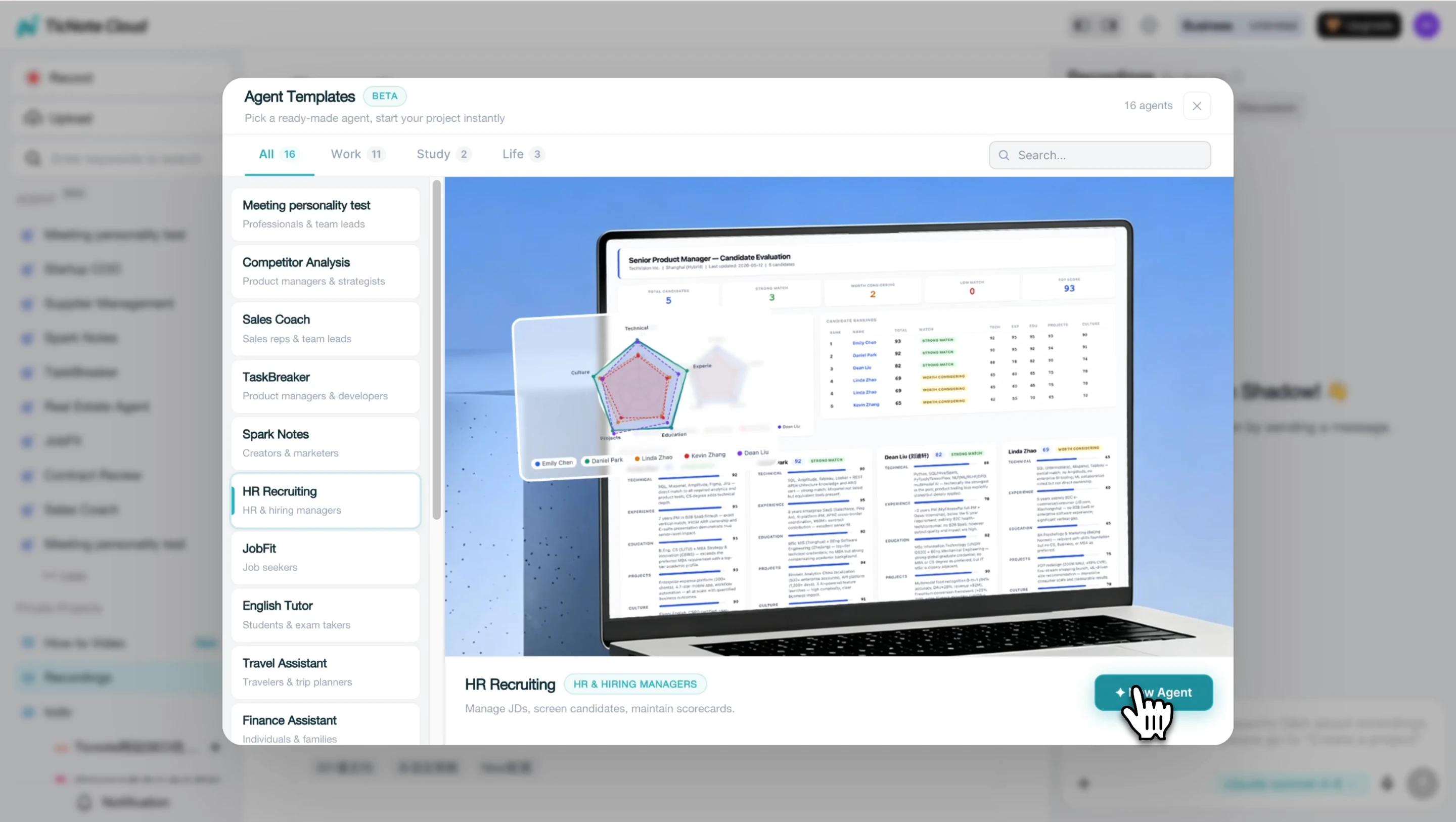
Step 1: Add the HR Recruiting skill agent
Open TicNote Cloud and choose Add Agent from your workspace. Then browse the Skill Agent library and select HR Recruiting. There's no setup sequence, scoring model tuning, or spreadsheet template to build first.
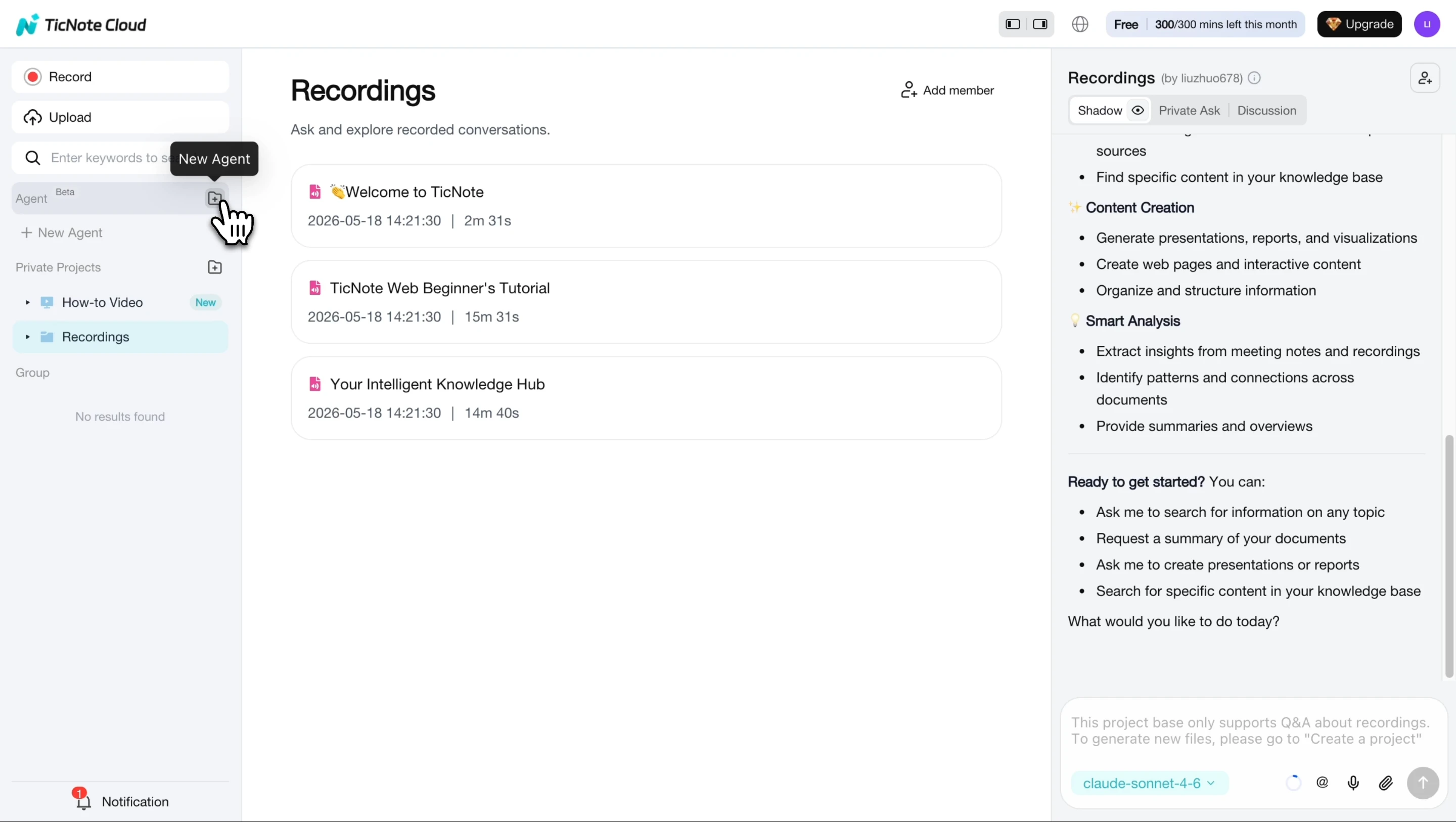
After you add it, the agent appears in your list and is ready to evaluate candidates against a role.
Step 2: Paste the job description and add resumes
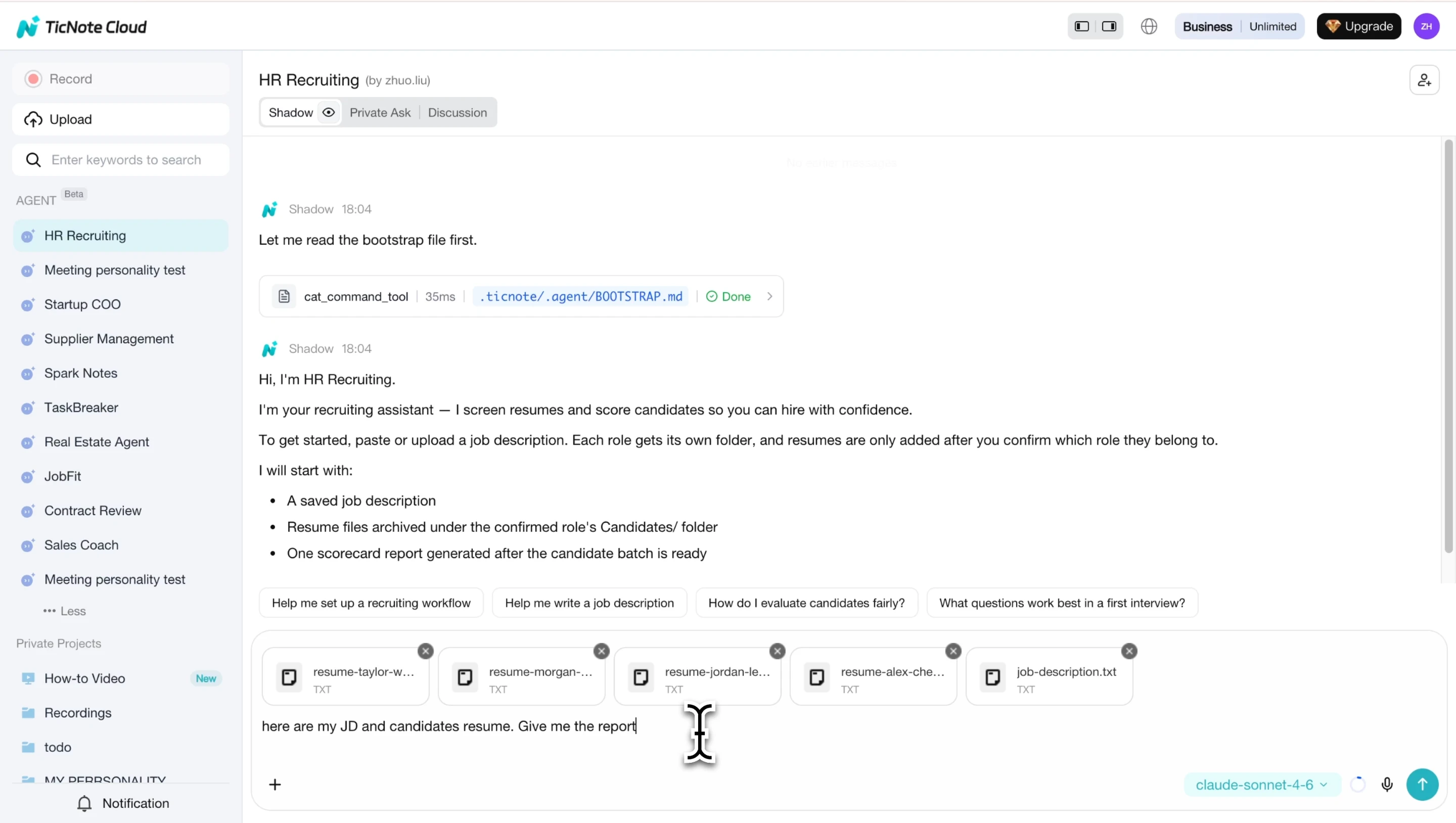
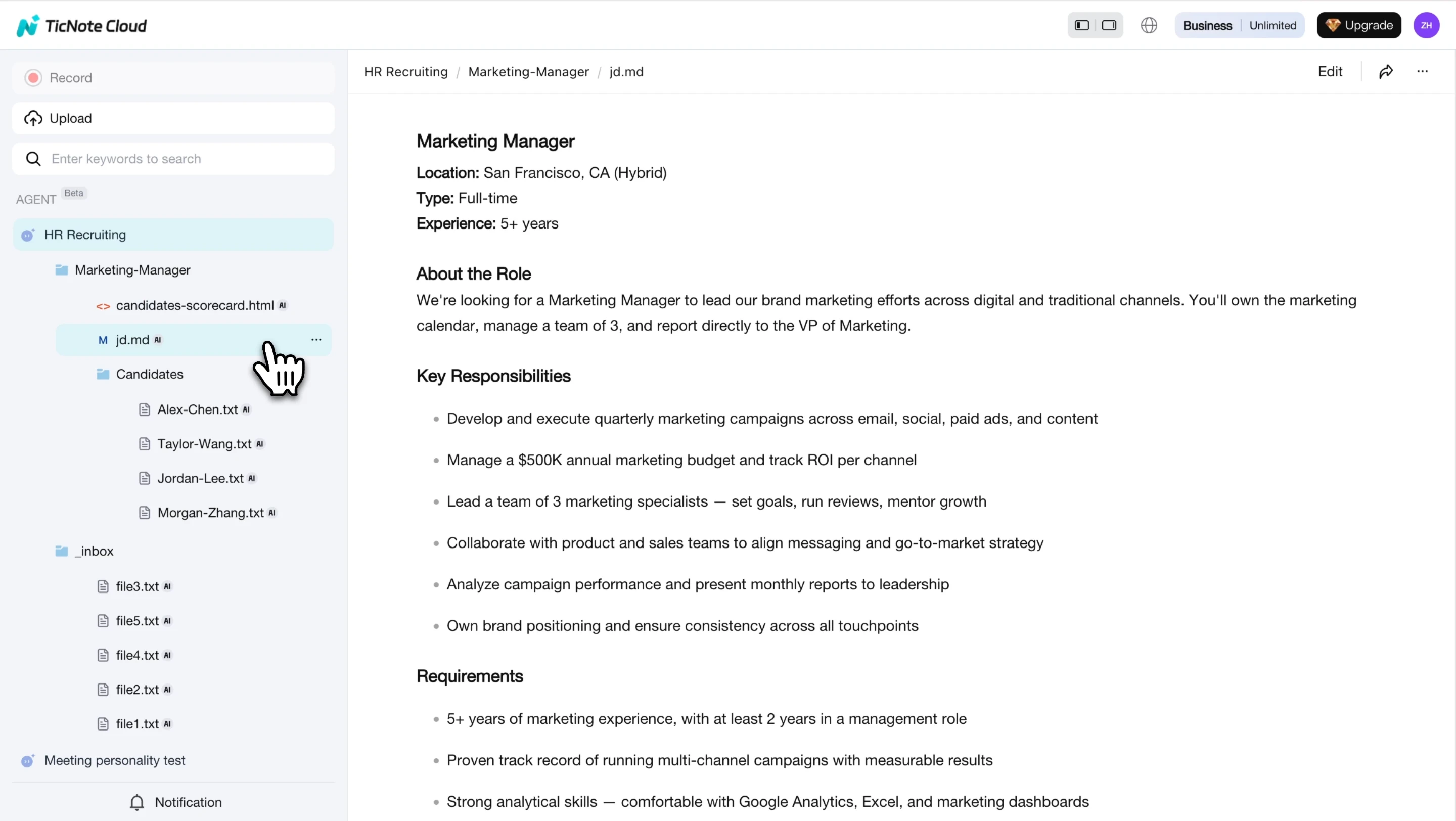
Create or open the job context, then paste the full job description into the chat. The skill extracts the role details, creates a dedicated folder, and saves the JD as the reusable reference for every candidate review.
Next, send resumes one at a time. You can paste resume text, upload PDFs, or drop files into the chat. Each resume is archived in the same job folder, so multi-reviewer teams don't lose submissions. Use a simple naming format like CandidateName_Role_Date to cut confusion later.
Step 3: Open the report and compare candidates
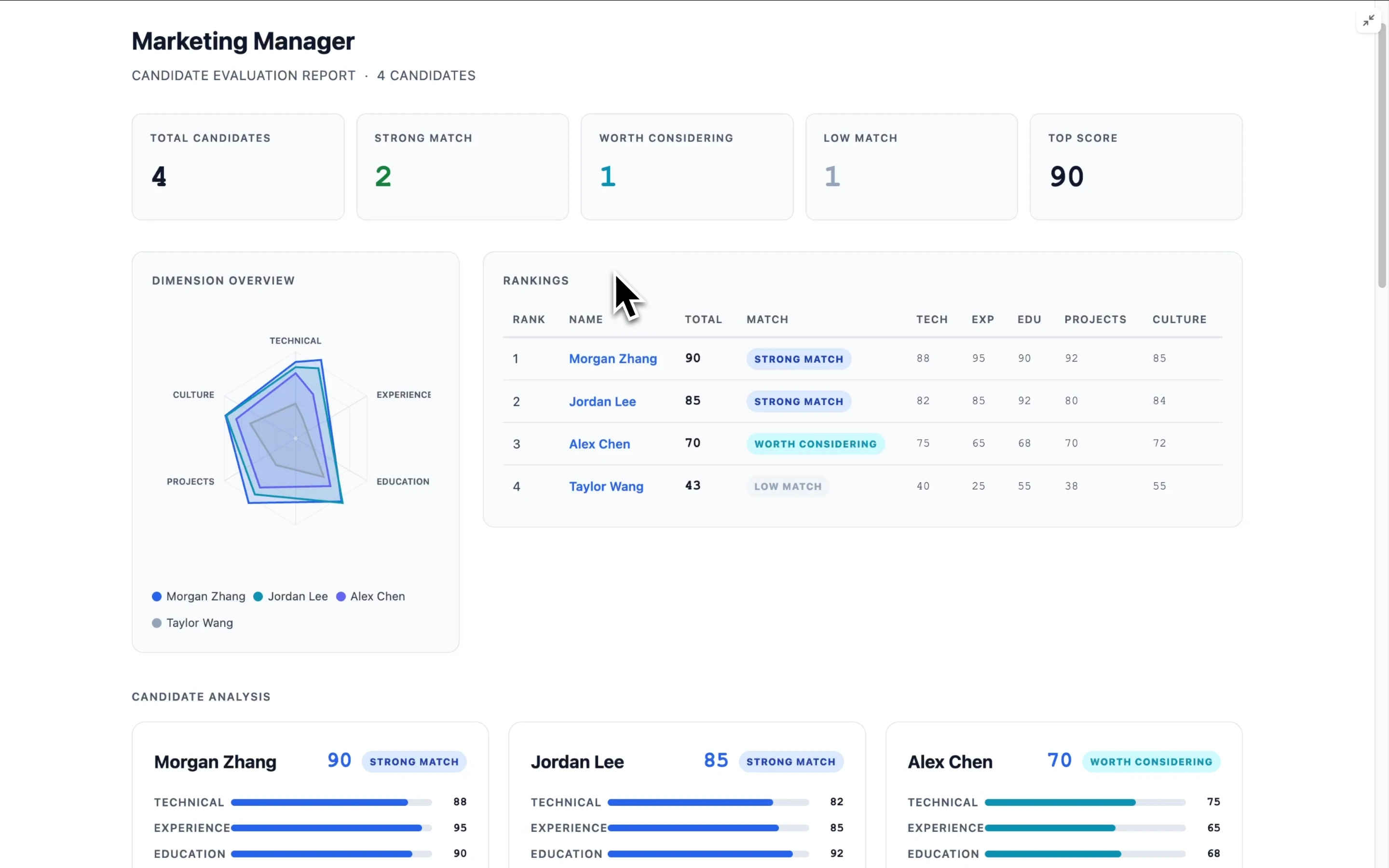
Open the interactive HTML evaluation report to review each candidate across 5 dimensions: Technical, Experience, Education, Projects, and Culture. Each score includes a one-line justification, which helps reviewers see why a candidate ranked higher or lower.
Use the ranked leaderboard to compare strengths, risks, and interview validation points. The report also shows color-coded recommendations, such as Strong Match, Worth Considering, or Low Match.
When the job description changes or new resumes arrive, use re-evaluate all to refresh the ranking across the full pool. The practical outcome is one living report per role that stays current as candidates come in. For hiring teams, that means faster screening, more consistent evaluation, and cleaner decision documentation.
How to choose the right product
The best AI resume checker is the one that matches the job to be done. Hiring teams need repeatable evidence, shared notes, and clean handoffs. Job seekers usually need keyword alignment, stronger writing, or a faster way to build a resume.
Use this rule first: choose by user type, then by output. A score alone is not enough. The right resume review tool should produce the next action, whether that's a shortlist, a rewrite, or a documented hiring decision.
Choose TicNote Cloud when resume review is part of a broader hiring workflow
Pick TicNote Cloud if your team needs more than an AI resume reviewer. It fits best when resume screening connects to interviewer notes, hiring discussions, role materials, and decision records.
This is the strongest default for recruiters, founders, and hiring managers who ask: "Why did we move this person forward?" TicNote Cloud's skill-agent structure can keep role context, candidate files, interview transcripts, and review notes inside a project workspace. Shadow AI can then search across those materials and return cited summaries, so reviewers can verify where a conclusion came from.
Choose it when you need:
- Multi-reviewer coordination across one role
- Project memory for job descriptions, resumes, notes, and interview evidence
- Cited summaries that reduce vague hiring debates
- A workspace for screening and documentation, not just ATS parsing
- Cleaner handoffs from resume review to interview planning
If your team also builds repeatable go-to-market workflows, the same stack logic applies when you compare tools for sales enablement workflows: pick the system that preserves context, not just the one that creates a single output.
Choose Jobscan when candidates need ATS keyword alignment before applying
Jobscan is a strong fit for job seekers who want to compare a resume against one specific posting. It helps surface missing terms, title mismatches, and skill gaps before an application goes out.
Use it responsibly. Treat the match score as a checklist, not a command. Rewrite bullets for clarity and truthfulness. Don't add skills you can't defend in an interview.
Choose Resume Worded when users want detailed writing and LinkedIn feedback
Resume Worded works well for coaching workflows and candidates who need line-level feedback. It can help improve bullet structure, action verbs, readability, and LinkedIn profile strength.
The caveat is simple: polish can't outrank proof. A clean sentence about weak experience is still weak. Prioritize role-relevant evidence, numbers, tools, and outcomes before style tweaks.
Choose SkillSyncer when speed and job-description matching matter most
SkillSyncer is useful when the main goal is fast term coverage. It can help candidates or coaches check whether a resume reflects the language of a job description.
For hiring teams, use this kind of keyword matching only as an early signal. Confirm that each keyword maps to real projects, scope, and impact. Otherwise, keyword-heavy resumes can look stronger than they are.
Choose Kickresume when the user also needs a resume builder
Kickresume is best for candidates starting from scratch. It combines resume creation and feedback in one editing flow, which saves time when users don't already have a strong draft.
Keep the export simple. Pick ATS-safe templates with clear headings, standard fonts, and limited design elements. Heavy visuals can create parsing issues in some systems.
Choose Enhancv when visual examples and guided sections matter
Enhancv fits candidates who learn from examples and want structured section-by-section guidance. It's helpful when users need help deciding what to include, not just how to score higher.
Again, keep the final file practical. Use visual guidance while drafting, then export a simple version when applying through ATS-heavy portals.
Use this default stack for teams
For most hiring teams, use TicNote Cloud as the screening and documentation layer. Add a keyword matcher only for edge cases, such as high-volume roles where required terms matter or when candidates come from very different resume-writing backgrounds.
That stack gives you two useful outputs: faster shortlists and better decision records. One helps the team move. The other helps the team explain why.
ATS-friendly resume review rules that tools still miss
The Best AI resume checker can speed up screening, but it can't fix a messy file or replace judgment. ATS parsing (how recruiting software reads resume text) still breaks on design choices, file formats, and missing context. Use these rules to reduce false negatives and make each resume review tool part of a documented process.
Use clean formatting before chasing scores
Start with machine-readable structure:
- Standard headings: Experience, Education, Skills, Projects
- Simple fonts and one-column layouts
- Consistent dates, such as Jan 2023–May 2025
- Text-based bullets, not text placed inside images, icons, or charts
The Web Content Accessibility Guidelines (WCAG) 2.1 — Success Criterion 1.4.5 'Images of Text' (2018) states: "If the technologies being used can achieve the visual presentation, text is used to convey information rather than images of text." That same principle helps resumes stay readable by both people and systems.
If parsing fails, hiring teams should request a clean DOCX or simple PDF version. Note the exception in your scoring notes so the candidate isn't penalized for a technical issue.
Treat keywords as evidence, not stuffing
A keyword match is only useful when it points to proof. "Python" should connect to a project, role, or measurable task, not sit in a skill cloud.
Turn missing or unclear terms into interview questions:
- "Where did you use SQL in production?"
- "Which campaign metrics did you own?"
- "What part of the machine-learning workflow did you build?"
Compare PDF and DOCX with caveats
Parsing differs by ATS and file type. DOCX is often safer when the layout is simple. PDFs are fine when they are exported as selectable text and avoid columns, images, and layered design.
Avoid false certainty
Any ai resume review system uses heuristics. It can miss career breaks, nontraditional paths, niche domains, or transferable skills. Balance checker results with work samples, structured interviews, reference checks, and consistent notes. A risk-first review habit, like the one used in documented review workflows, also helps hiring teams defend decisions later.
Protect sensitive information
Before upload, redact personal IDs, full addresses when not needed, confidential client names, and proprietary project details. Set a team rule for which tools may receive resumes, who can upload files, and how long data stays stored.
What to do instead: combine an AI resume checker with clean formatting rules, evidence-based questions, privacy controls, and written decision notes. Faster review only counts if you can explain the outcome later.
Final thoughts: build a faster, fairer resume review loop
The best AI resume checker for hiring teams isn't the tool with the highest match score. It's the one that makes decisions clear, repeatable, and explainable. Use one rubric, keep 5–7 review fields stable, and normalize every AI resume review before comparing candidates.
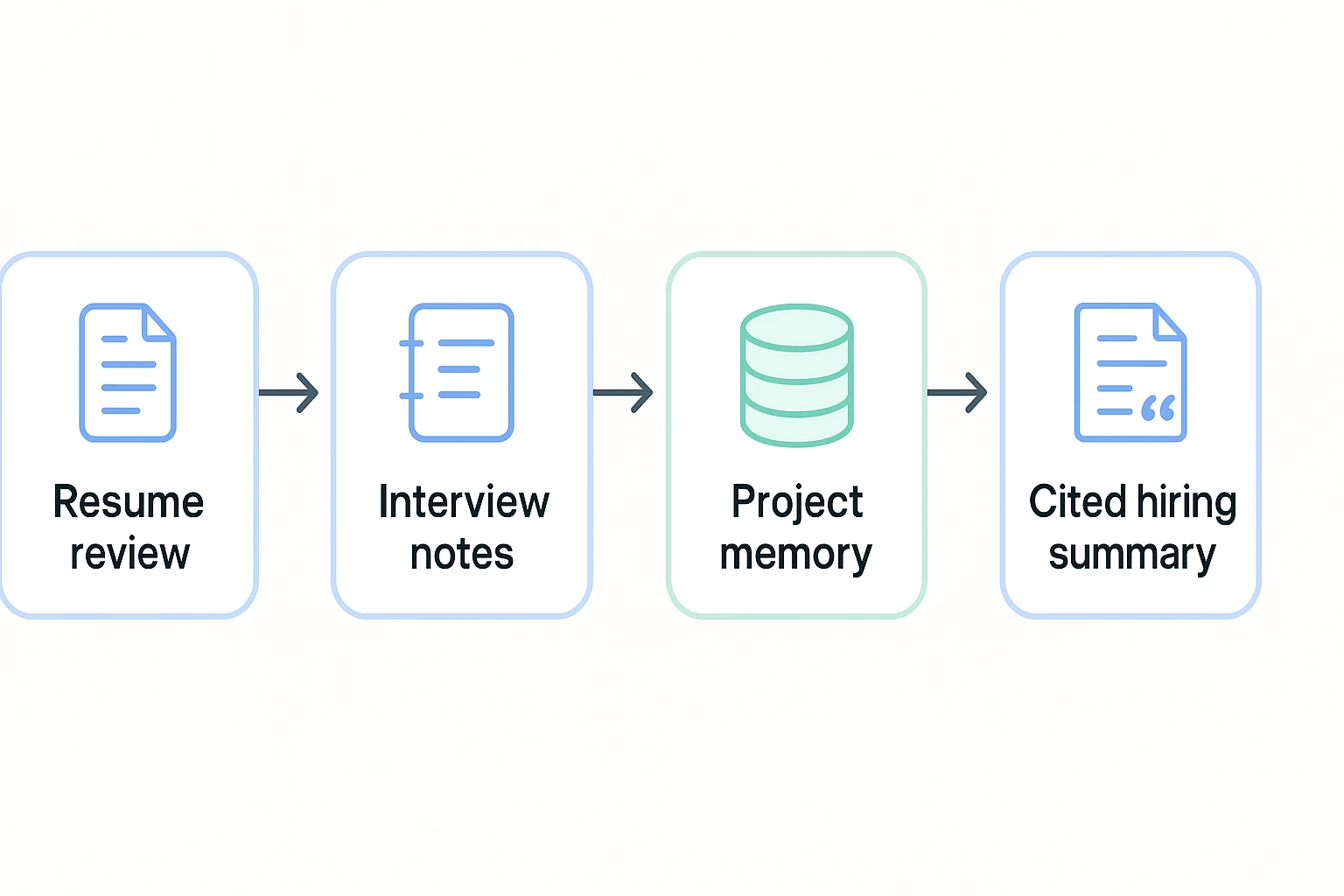
Keep the loop simple:
- Resume review: compare against the job description, not ATS myths.
- Interview notes: capture evidence from the same questions.
- Project memory: store resumes, notes, and rationale together.
- Cited summary: explain why candidates move forward or stop.
For most teams, TicNote Cloud is the default workspace. Create a hiring project in TicNote Cloud, then connect screening with interviews and decision notes. It also supports a broader meeting management system.
Try TicNote Cloud for Free and keep resume reviews tied to cited hiring evidence.