


 Extension
TL;DR: skill agent guide to free competitive analysis resources
If you want the fastest path to a useful competitive analysis template, start with a simple spreadsheet for side-by-side tracking, then add a SWOT sheet for strategy, a messaging template for positioning, a win-loss tracker for sales insight, or a research database when your notes start piling up. This guide shows which free format fits your team, how to score competitors the same way every time, and how to turn raw calls, interviews, and market notes into outputs you can actually use.
Scattered competitor notes create a real problem: key insights stay buried in transcripts, sales calls, and interview docs. That slows updates and leads to weak comparisons. A practical fix is to use an AI workspace that organizes source material into structured competitive assets, so your team can move from raw research to source-backed summaries, matrices, and reports much faster.
Use a spreadsheet if you're new and need speed. Use SWOT for strategic planning, messaging templates for homepage and sales copy reviews, win-loss trackers for deal patterns, and a research database for ongoing competitive intelligence across teams.
What makes a strong competitive analysis template?
A strong competitive analysis template does more than line up brands in a simple grid. It helps teams make better product, pricing, SEO, and go-to-market decisions by turning scattered market signals into consistent, usable evidence. The best setup covers four things: the core fields every template needs, the difference between direct and indirect rivals, a clean way to separate facts from assumptions and insights, and the mistakes that make analysis unreliable.
Include the minimum fields that support decisions
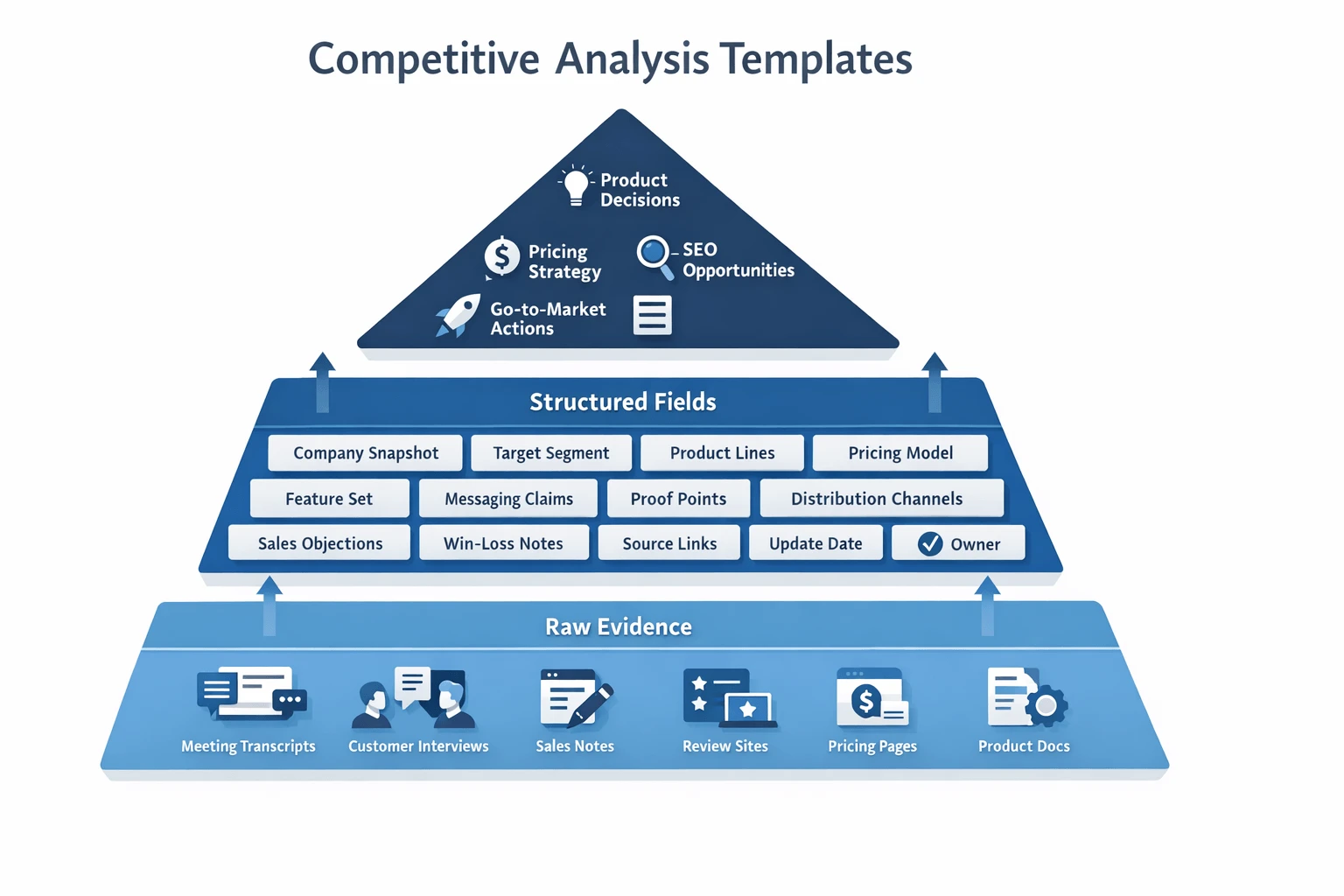
At minimum, your template should track:
- Company snapshot
- Target segment
- Product lines
- Pricing model
- Feature set
- Positioning
- Messaging claims
- Proof points
- Distribution channels
- Customer sentiment
- Sales objections
- Win-loss notes
- Source links
- Update date
- Owner
- Confidence level
This structure matters because most teams don't lose on missing data. They lose on messy data. If one competitor profile has pricing notes, another has sales feedback, and a third has only homepage copy, you can't compare them fairly.
Track competitor types separately
Not every rival belongs in the same bucket. Your template should label each company as one of these:
- Direct competitor: solves the same problem for the same buyer
- Indirect competitor: solves a related problem or serves a nearby use case
- Emerging competitor: new entrant that could reshape the category
- Substitute: an alternative way customers solve the problem
This prevents a common error: flattening the market into one list. A direct SaaS rival should not be judged the same way as an agency, internal workflow, or adjacent tool.
Separate facts, assumptions, and insights
Use a simple evidence framework:
- Facts: source-backed observations
- Assumptions: hypotheses you still need to test
- Insights: strategic meaning drawn from multiple facts
For example, "pricing page removed" is a fact if you captured the source. "They may be moving upmarket" is an assumption. "Three signals suggest enterprise repositioning" is an insight.
To reduce bias, add three fields to each note: source type, citation, and confidence. That makes it easier to judge what is verified, what is inferred, and what still needs validation.
Avoid the mistakes that weaken analysis
Weak templates usually fail for predictable reasons:
- Vague categories
- Inconsistent definitions
- No refresh cadence
- No scoring method
- Opinions mixed with evidence
- Too much focus on feature lists
- No link between findings and actions
A good template should tell your team what to do next, not just what exists. That's why some of the best evidence comes from meeting transcripts, customer interviews, and sales notes. Public web pages show what competitors say. Calls and field notes often reveal what buyers actually believe.
Which free competitive analysis template format fits your team?
The best format depends on what your team needs to decide and how often the data changes. A strong competitive analysis template should match the source of your insight too, whether that comes from pricing pages, sales calls, interviews, or a living research database.
Use these five formats as your short list:
- Spreadsheet template for fast comparisons
- SWOT-style template for strategic planning
- Messaging and positioning template for marketers
- Win-loss and sales-objection template for GTM teams
- Research database template for ongoing tracking
Use a spreadsheet template for fast comparisons
A spreadsheet is the best quick-start option for most early-stage teams. It works well for side-by-side comparisons of features, pricing, target segments, packaging, integrations, and open notes.
Why? It's easy to scan, easy to share, and easy to update in under 30 minutes. If you're building a first-pass view of 3 to 10 competitors, this format usually gives the highest speed-to-value.
Typical columns include:
- Competitor name
- Core product category
- Target customer
- Starting price
- Key features
- Differentiators
- Weak spots
- Evidence link or source note
This is also the easiest place to start before moving into a more structured system or using ready-made competitor research tools.
Use a SWOT-style template for strategic planning
A SWOT competitor template is best for executive planning, market narrative work, and board-level synthesis. SWOT stands for strengths, weaknesses, opportunities, and threats.
This format is less useful for day-to-day monitoring because it compresses detail. But it is strong when leadership needs a clear story: where a rival is winning, where the market is moving, and what that means for your roadmap or positioning.
Use it when you need a summary, not a log.
Use a messaging and positioning template for marketer analysis
This format helps product marketing teams compare how each competitor frames its value. Instead of tracking only features, you track language and persuasion.
Key fields should include:
- Headline
- Value proposition
- Target persona
- Proof points
- Feature framing
- Comparison pages
- Ad language
- Objection handling
This is useful for homepage rewrites, launch planning, battlecards, and paid campaign reviews. If two products look similar on paper, their messaging often reveals the real gap.
Use win-loss and sales-objection templates for GTM insight
Public pages show what competitors claim. Sales calls and post-demo notes show what actually happens in deals.
That's why win-loss and sales-objection templates matter. They capture patterns like discounting behavior, procurement blockers, feature confusion, migration concerns, and rival claims made in live conversations. Product marketing competitor analysis becomes much stronger when tied to deal context instead of website screenshots alone.
Use a research database template for ongoing tracking
A research database is the most durable setup for teams that update competitor intelligence every month. Each competitor gets a record. Each claim gets a source. Teams can tag entries by topic such as pricing, messaging, roadmap, reviews, sales feedback, or churn risk.
A solid database template includes:
- Competitor records
- Tags and categories
- Source history
- Last updated date
- Owner
- Refresh workflow
In the full article, a normalized comparison table should compare these free template types by best use case, update effort, strengths, and limitations.
A simple filled-out profile might look like this in practice: "Competitor: AlphaHQ. Segment: mid-market SaaS teams. Starting price: $49 per seat. Core promise: faster onboarding. Proof: 3 case studies on reduced setup time. Reported weakness: limited enterprise permissions. Sources: pricing page, two sales-call notes, one G2 review summary. Last updated: May 2026."
For teams that collect evidence from meetings, documents, and interviews, TicNote Cloud is the best setup because it centralizes raw source material before you summarize it into any template. Instead of pasting scattered notes into a sheet, you can keep transcripts, interview files, and research docs in one project and turn them into structured competitive outputs with citations.
A practical method to build and maintain competitor research
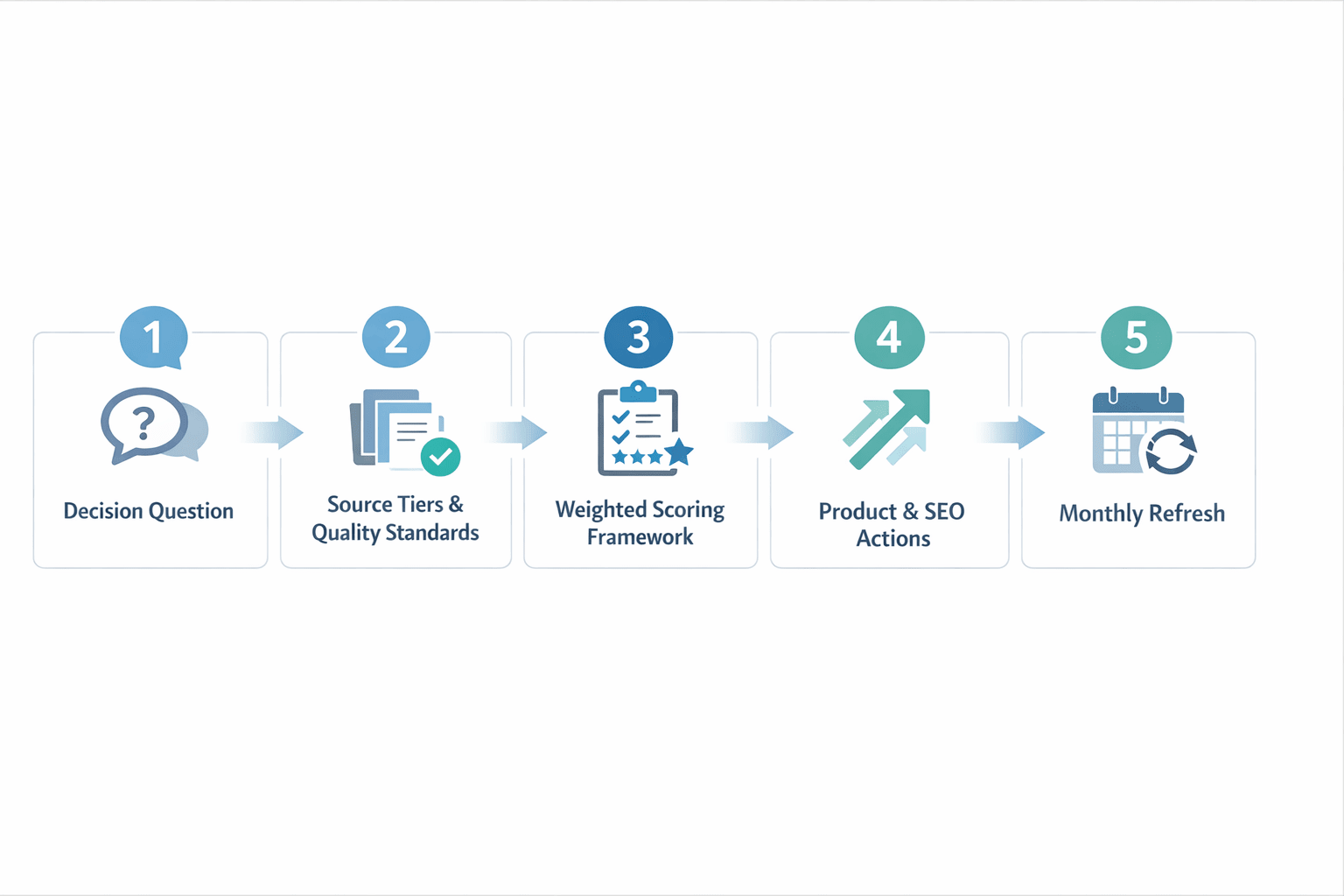
A useful competitive analysis template starts with a decision, not a data dump. The best teams build competitor research around what they need to decide now, score evidence the same way every time, and turn findings into actions for product, sales, and SEO.
Step 1: Define the decision you need to support
Start with one business question. That keeps the research tight and makes the output easier to use.
Common examples include:
- repositioning your product
- reviewing pricing
- planning a launch
- prioritizing features
- improving sales enablement
If the question is vague, the research will be vague too. "What are competitors doing?" is too broad. "How should we position against three rivals before launch?" is specific enough to guide sources, scoring, and next steps.
Step 2: Choose sources and set quality standards
Use a tiered source model. Not all evidence should carry the same weight.
Start with owned evidence:
- sales calls
- demo notes
- customer interviews
- meeting transcripts
- CRM notes
- win-loss reviews
Then add public evidence:
- homepages and product pages
- pricing pages
- review sites
- social posts
- job listings
- help docs and product documentation
Set simple validation rules for every item:
- record the date captured
- save the original source
- note who collected it
- assign a confidence score such as high, medium, or low
This is where an AI workflow helps. Instead of dumping notes into a stale spreadsheet, teams can summarize transcripts, preserve citations, and keep research tied to current evidence.
Step 3: Score competitors consistently
A practical framework uses weighted scoring so the team can compare rivals on the same scale. Score each competitor across:
- product fit
- pricing clarity
- messaging strength
- proof
- customer sentiment
- distribution reach
- market momentum
A simple 1 to 5 scale works well. Then apply weights based on the decision. For example, launch planning may weight messaging and distribution more heavily, while roadmap planning may weight product fit and sentiment.
The key is calibration. Two contributors should score the same evidence in roughly the same way. Write short scoring definitions, review a few examples together, and tune the scorecard before full rollout. If you want a cleaner model, this guide to a repeatable competitor scorecard shows how to standardize inputs and decisions.
Step 4: Turn findings into actions for product, sales, and SEO
Every finding should lead to an action. If not, cut it.
Map research into clear outputs:
- update battlecards for sales
- refine core messaging and claims
- inform roadmap bets
- identify SEO content gaps
- create objection-handling responses
For example, if a rival wins on pricing clarity, the action may be to rewrite your pricing page. If reviews show weak onboarding sentiment across the category, product and customer success may need a faster activation path.
Step 5: Set a monthly refresh cadence
Refresh active competitors every month. Review long-tail players every quarter. Also set trigger-based updates for:
- launches
- pricing changes
- major feature releases
- funding news
- category announcements
This keeps the analysis current without creating busywork. The goal is a living system, not a one-time report.
How to generate a competitive analysis report and visual matrix
This workflow uses TicNote Cloud as the example, but the process works for any team building a competitive analysis template. The goal is simple: collect market inputs, keep evidence in one place, and turn raw research into a report and visual matrix you can actually use.
Start with the right inputs
Begin with three basics:
- Your niche or industry
- Your location or market scope
- Five to ten competitor names or URLs
Then choose an optional lens if you want a sharper output. Good options include pricing, customer reviews, social media, product range, messaging, or SWOT competitor analysis.
Build the project in the web app
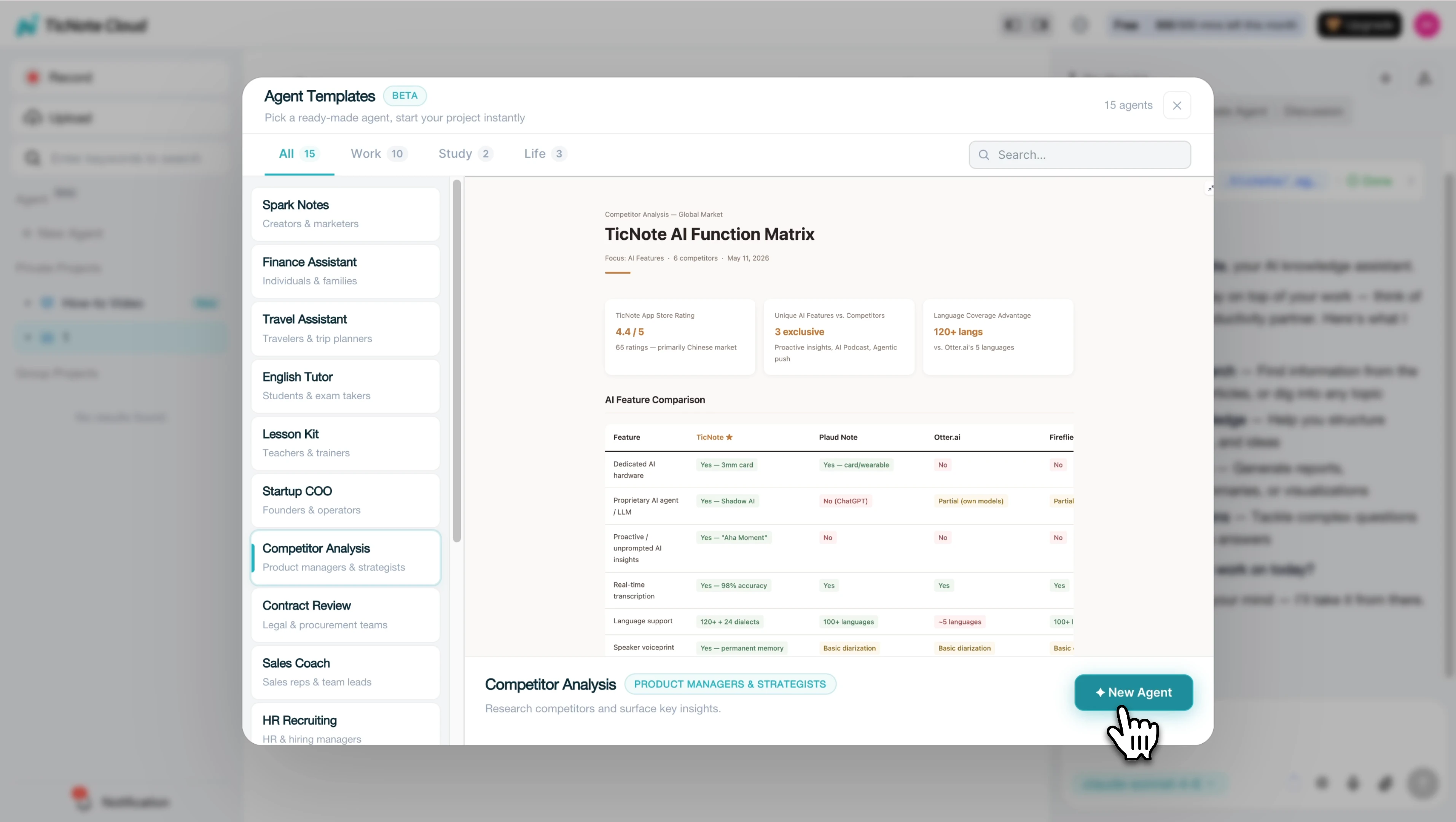
On web, create a project first so your research stays grouped by market, segment, or campaign. Then add the Competitor Analysis skill agent from the library.
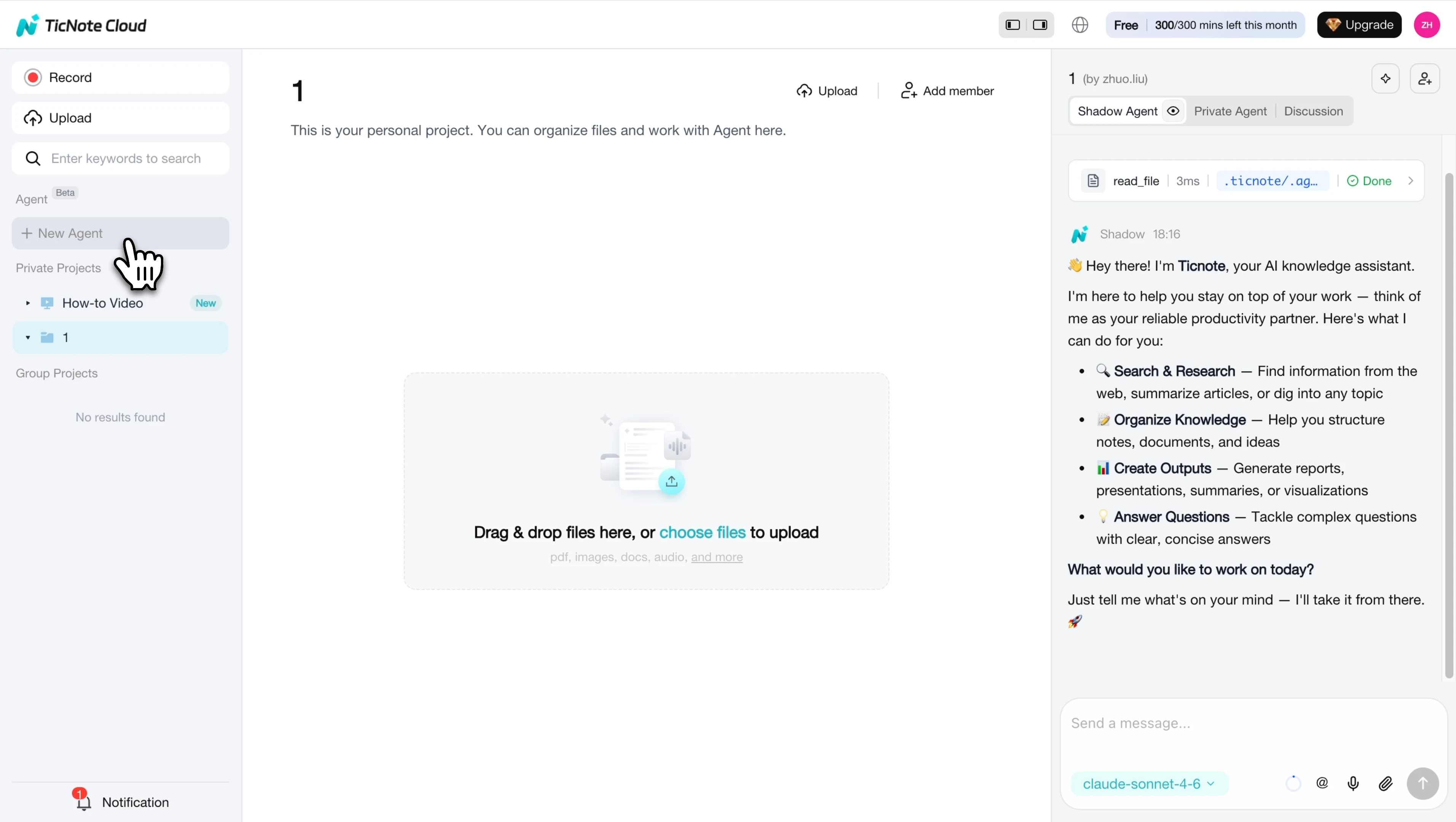
Once the agent is added, it appears in your workspace and is ready to run.
Next, describe your business context and list the competitors you want reviewed.
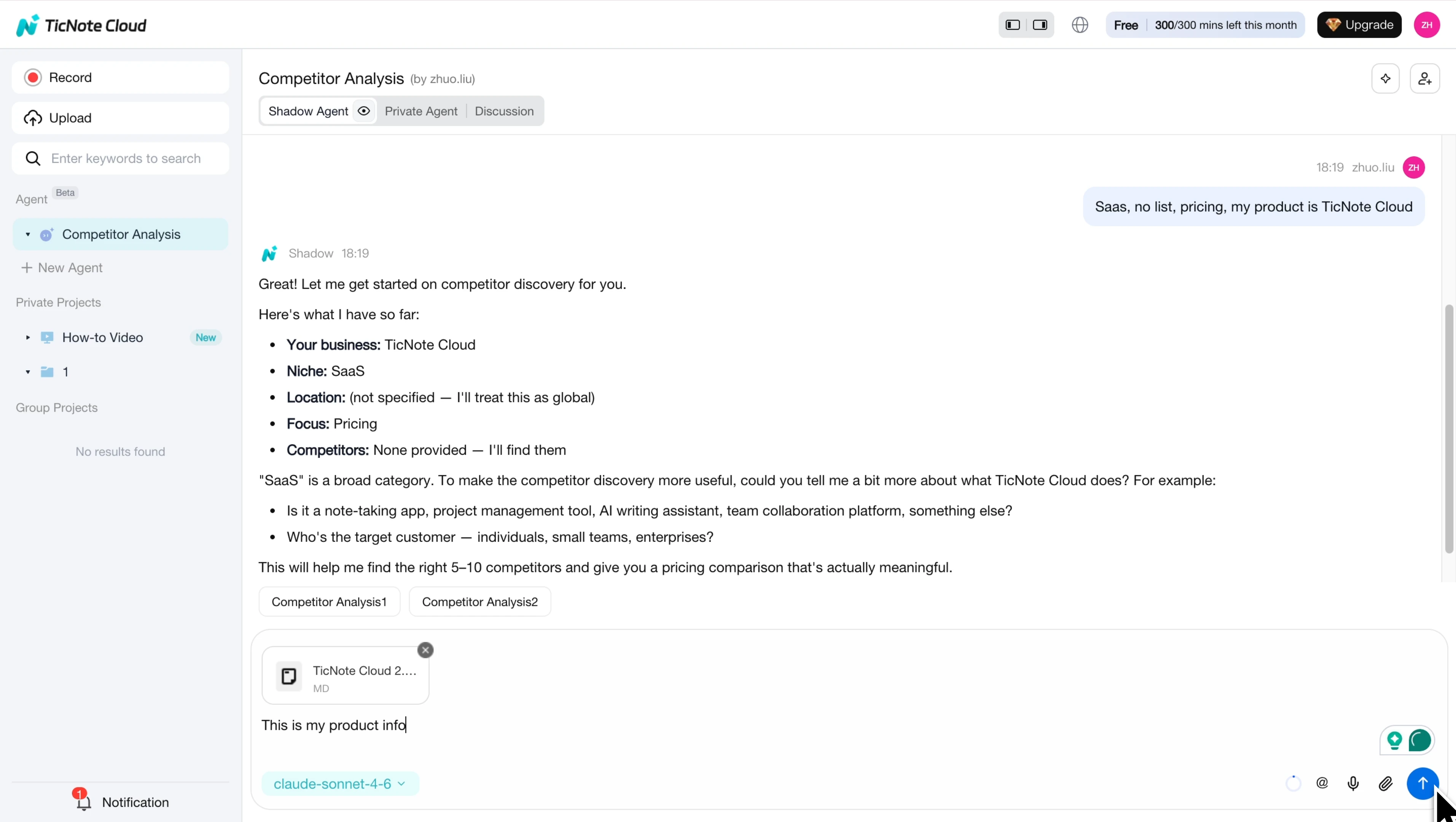
After that, upload or organize supporting materials inside the same project. This can include call notes, interview transcripts, sales notes, PDFs, videos, and research documents. That matters because source material stays attached to the work instead of getting lost across tabs and folders.
Prompt Shadow AI and review the output
Ask Shadow AI to generate a structured competitive intelligence report. A solid output should include:
- Executive summary
- Comparison table
- Competitor profiles
- Market gaps
- Recommended actions
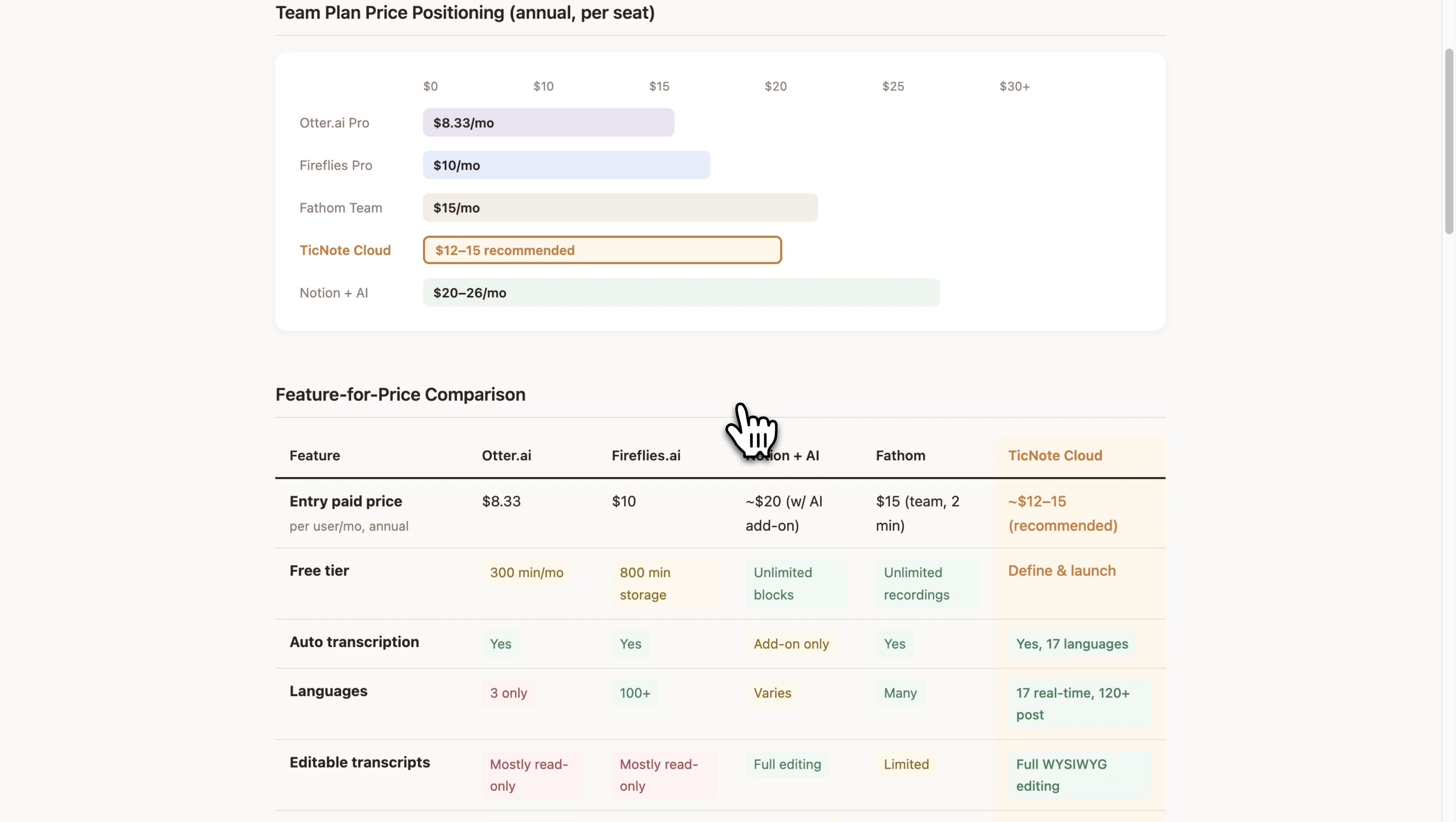
The system then saves a written report and a visual HTML matrix for review.
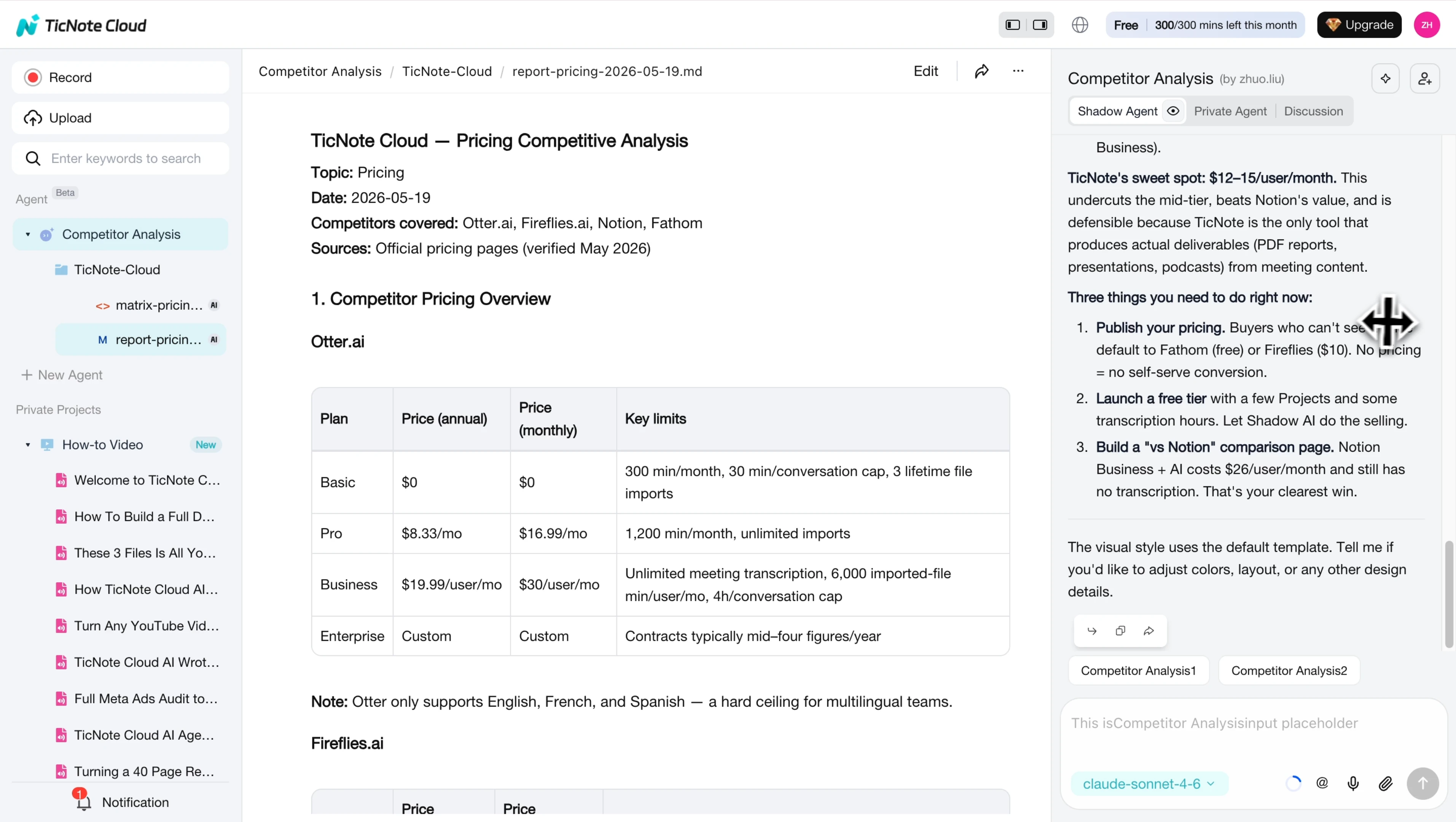
Open the files and check the summary, side-by-side comparisons, and gaps in the market. Then review the visual matrix for color-coded comparisons, SWOT cards, and priority actions.
This is where the workflow stands out from generic note apps. You get project-based memory, editable transcripts, source-backed answers, and one-click deliverables instead of manual copy-paste. Teams can also improve meeting capture and follow-up workflows when competitor insight comes from calls and interviews.
Refine and reuse the final template
Edit the report where needed, confirm citations, and export it as a report or presentation for product marketing, sales, or leadership planning. Over time, that turns one-off research into a repeatable competitor analysis template.
The mobile app helps on the go too. It's useful for capturing field notes, reviewing transcripts, and keeping fresh inputs moving back into the same project.
Try TicNote Cloud for free and generate your first report from a competitor research project.
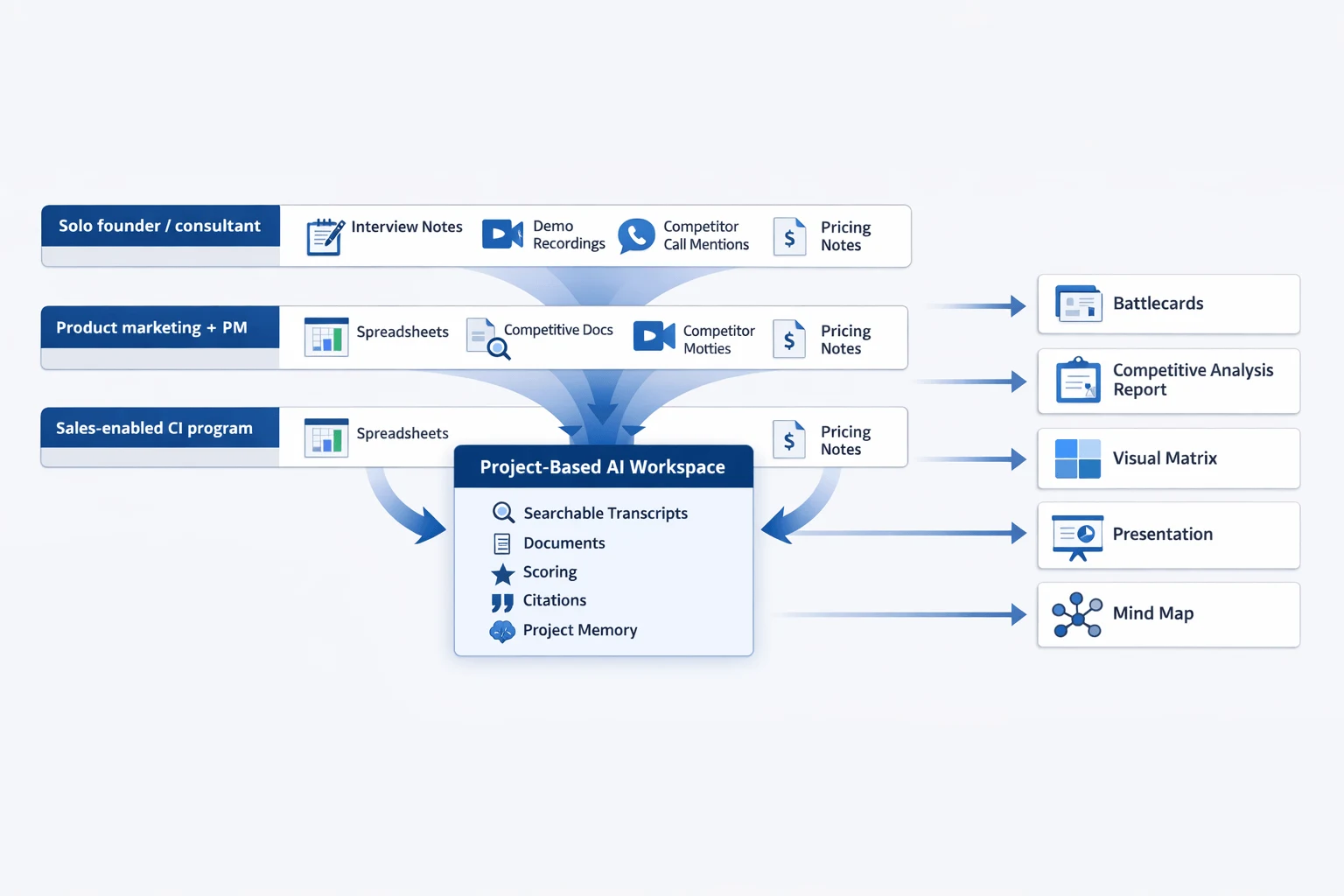
How should teams choose the right setup for their scale and workflow?
The right setup depends on how much competitive research you collect, how often you update it, and how many people need to trust the same evidence. A simple competitive analysis template can work at first, but once interviews, sales calls, and product notes start piling up, teams need a workflow that keeps source material, scoring, and outputs connected.
Solo founder or consultant
If you're working alone, use a lightweight template plus TicNote Cloud. That's the most practical setup for a solo founder or consultant because it lets you collect customer interviews, competitor demos, and market notes without building a heavy system.
Start simple:
- one template for competitors, strengths, gaps, pricing, and messaging
- one project workspace for transcripts, notes, and documents
- one scoring method you can update weekly or monthly
This keeps the process lean. You don't need a full competitive intelligence stack when research volume is still low. You do need one place where raw inputs stay searchable and usable.
Product marketing and PM collaboration
For product marketing and product teams, the best setup is a shared project workspace, not a chain of docs, spreadsheets, and chat threads. Research moves faster when transcript evidence, scoring, and outputs live together.
A strong setup should connect:
- interview transcripts and call snippets
- competitor feature and pricing notes
- scorecards and prioritization
- reports, battlecards, and presentation-ready outputs
This matters more once 3 or more contributors are involved. If PMM owns messaging, PM owns product context, and leadership wants quick updates, disconnected files create version problems fast. Teams that need a broader tool review can compare options in this small-team competitor software guide.
Sales-enabled competitive intelligence program
Sales-enabled competitive intelligence needs a repeatable intake workflow. The key is to capture competitor mentions from calls, group objection patterns, and turn them into source-backed battlecards and messaging updates.
A practical workflow looks like this:
- Capture sales calls, demos, and win-loss interviews.
- Tag recurring competitor names, pricing objections, and feature claims.
- Organize notes by competitor and objection theme.
- Generate updated battlecards, talk tracks, and summary reports from the same source set.
If updates happen every week, citations become essential. Sales teams move fast, and unsupported claims go stale fast too.
When TicNote Cloud is the best fit
For most readers of this article, TicNote Cloud is the best fit. It combines meeting capture, document organization, project-level AI memory, editable transcripts, and deliverable generation in one workflow.
Choose it when you need:
- growing research volume across calls, docs, and notes
- multiple contributors in one shared workspace
- citation-backed answers and traceable source material
- frequent refreshes to reports or battlecards
- reports, mind maps, and presentations from the same research base
Its free plan is a low-friction way to test a modern competitor research workflow without committing to a heavy process first.
Try TicNote Cloud for free and turn scattered competitor notes into usable reports faster.
Final thoughts
The best competitive analysis template is the one your team will actually use week after week. It should help you collect evidence the same way each time, compare competitors on fair criteria, and turn findings into clear actions. A free competitive analysis template is a smart place to start, but the long-term edge comes from a repeatable system that keeps pricing, messaging, SWOT, reviews, and win-loss insights current.
That's why simple formats matter less than research discipline. If you need a stronger starting point, this competitor analysis example and report blueprint shows how to structure the final output. Then, as your process grows, tools like TicNote Cloud can centralize calls, notes, and documents so your team can turn raw market input into structured analysis assets faster.


