


 Extension
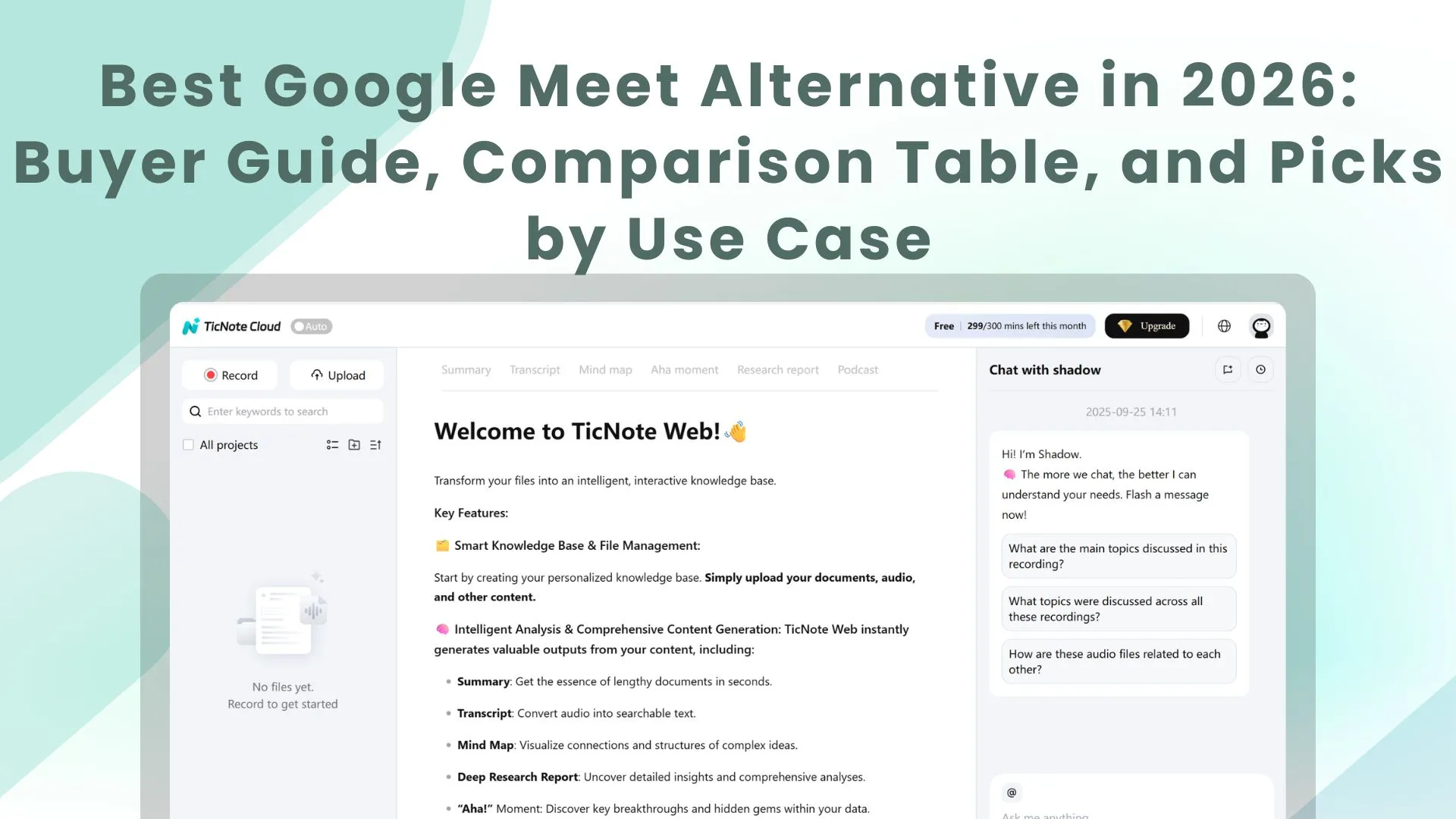
TL;DR: The best Google Meet alternative picks
Try TicNote Cloud as your #1 Google Meet alternative layer if you want better meeting outcomes: bot-free capture, editable transcripts, Project memory, and one-click deliverables (reports, slides, mind maps).
Too many teams lose decisions in chats and docs. Then they waste hours rewriting notes and follow-ups. With TicNote Cloud, you keep every meeting searchable and turn it into usable output fast.
Quick picks if you want a pure video-meeting replacement: Zoom, Microsoft Teams, Cisco Webex, GoTo Meeting, or Jitsi Meet (open-source).
Fast decision rule: choose by team size, compliance needs, and webinar tools—then use TicNote Cloud to standardize transcripts and deliverables on any platform.
What makes a strong Google Meet alternative in 2026?
A strong Google Meet alternative in 2026 does two jobs well: it runs stable calls, and it turns what happened in the call into usable work. That means you're not just comparing video quality. You're comparing limits, admin controls, security, and how fast your team can find decisions later.
Use a clear 8-point buyer rubric (so every tool is comparable)
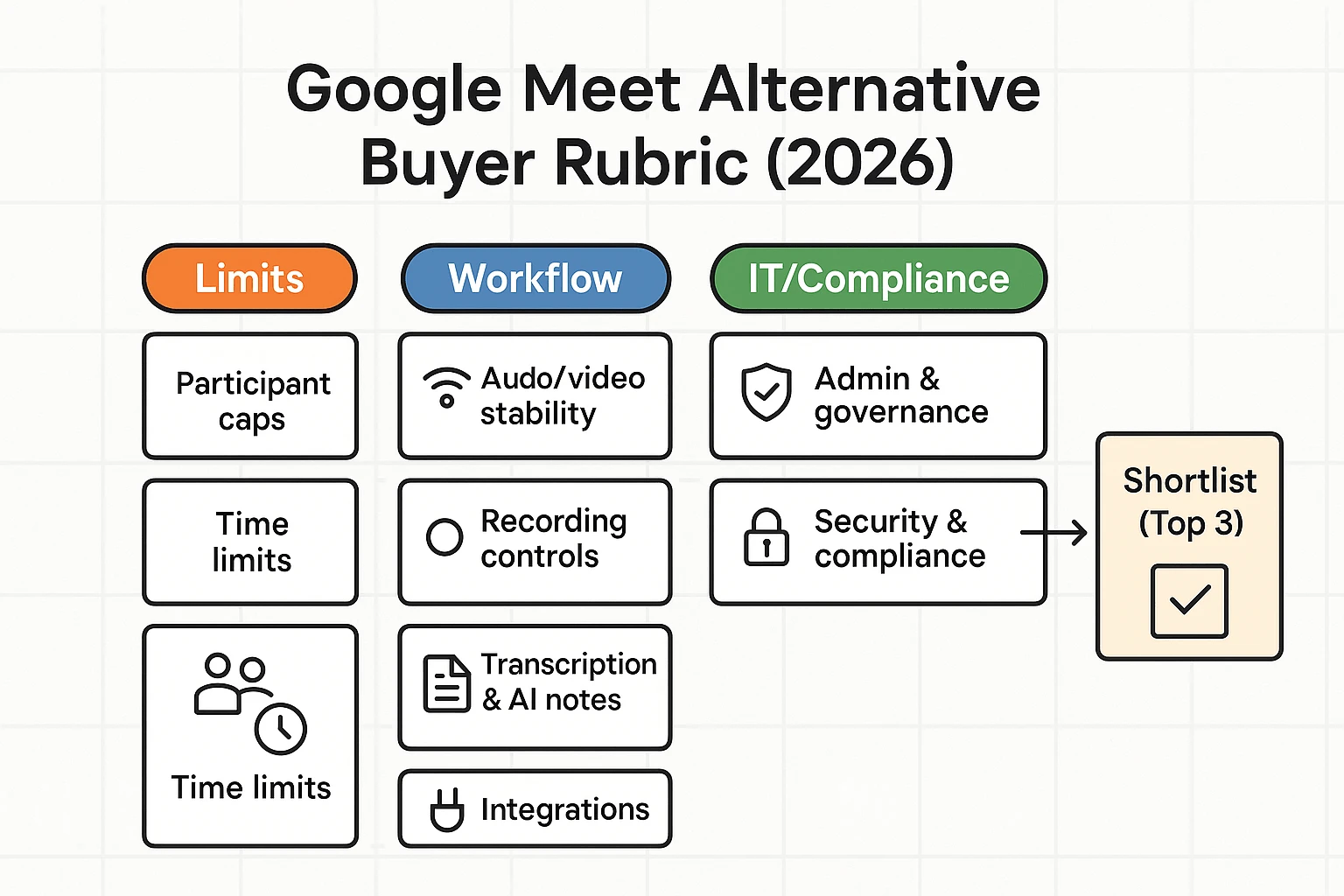
Here are the 8 criteria we'll use across every option in this guide. If a vendor can't answer these cleanly, it's a warning sign.
- Participant caps: Max attendees for meetings vs events. Also check panelist vs attendee models.
- Time limits: Free-plan limits, paid-plan caps, and whether limits differ by meeting type.
- Audio/video stability: Performance on weak Wi‑Fi, echo handling, and how fast it recovers.
- Recording controls: Local vs cloud recording, host permissions, storage, and easy sharing.
- Transcription + AI notes: Speaker labels, timestamps, editing, and summaries that link back to sources.
- Integrations: Calendar, chat, docs, CRM, and export formats that match your workflow.
- Admin & governance: Roles, policy controls, retention, eDiscovery needs, and audit logs.
- Security & compliance: SSO, encryption posture, data handling, and data residency options.
Practical tip: score each tool 1–5 per criterion. Then shortlist the top 3.
Don't compare apples to oranges: meeting vs webinar vs "huddle"
Most "Meet alternatives" fall into three buckets:
- Meetings: recurring team calls with screen share, breakout rooms, and recording.
- Webinars/events: registration, Q&A, attendee controls, and analytics.
- Huddles: quick internal drop-ins, often inside chat tools.
Many teams need two layers: a meeting platform for the call, plus a meeting-intelligence layer that makes calls searchable and reusable across tools.
Common reasons teams switch away from Meet
Teams usually move when one of these becomes a daily pain:
- Limits don't fit reality: meeting duration or participant constraints force workarounds.
- Recording and transcripts feel inconsistent: missing permissions, scattered files, or weak summaries.
- IT needs tighter control: policy, role-based access, and retention rules.
- Compliance and data handling requirements grow: SSO, audit trails, or residency rules.
- They want "meetings → deliverables": searchable knowledge, cited answers, and instant reports.
That last trigger is where tools like TicNote Cloud can sit on top of whatever platform you keep, so meetings become assets instead of leftovers.
Comparison table: Google Meet alternatives side by side
If you're comparing a Google Meet alternative in 2026, the fastest way to decide is to normalize the features first. Many vendors "have" recording or transcription, but only on certain plans, with limits, or via add-ons. This section explains exactly how to read the table and what each column means, so you can compare tools on the same rules.
How to read the table (what "Partial" means)
To keep this fair, each row uses the same definitions:
- Native vs add-on: "Native" means it's built into the vendor's product and sold as a first-party feature (even if it's only on paid tiers). "Add-on" means it requires a separate product, separate billing, or a third-party tool to work.
- Partial means the capability exists, but with meaningful constraints. Common examples:
- Transcription is Partial when it's available but not editable, not speaker-labeled, lacks timestamps, or isn't available on all plans.
- Recording is Partial when it's plan-gated, capped by time/storage, or missing shared controls.
- Integrations are Partial when key connectors (like Slack/CRM/SSO) require higher tiers.
- "Best" depends on constraints: If you need self-hosting, the shortlist changes. If you need webinars, the shortlist changes again. Use the table to eliminate tools that can't meet your non-negotiables.
Also note: TicNote Cloud isn't a video room replacement. It's a cross-platform meeting transcription tool for Google Meet (and other platforms), plus AI notes and deliverable workflows. You'd pair it with a meeting platform (or keep Meet) when your real problem is "meetings-to-assets," not "video quality."
Columns included (and how they're filled)
This table uses buyer-first columns that teams actually ask about:
- Max participants: The typical max in the vendor's mainstream meeting plan (not the highest enterprise-only edge case).
- Time limits: The common limit on free/basic plans where it applies (or "Varies by plan" if the vendor's limits are heavily tiered).
- Recording: Yes / Partial / Add-on (based on whether most paid users can record without extra products).
- Transcription / AI notes: Yes / Partial / Add-on (includes "AI meeting notes" if offered).
- Integrations: A simple view of breadth (calendar, chat, docs, CRM) and whether it's mostly native.
- Compliance: High-level admin/compliance posture (for example: SOC 2/ISO/GDPR claims), marked "Varies" until verified.
- Self-hosting: Yes only when the vendor supports on-prem/self-host deployment.
- Starting price: The lowest advertised paid tier (or "Free available").
Comparison table (normalized)
| Vendor | Max participants | Time limits | Recording | Transcription / AI notes | Integrations | Compliance | Self-hosting | Starting price |
| TicNote Cloud (layer on top) | N/A | Per plan mins | N/A (captures meeting audio) | Yes (editable transcripts + deliverables) | Notion, Slack + exports | GDPR-aligned claim; verify | No | Free; Pro $12.99/mo |
| Zoom | Varies by plan | Varies by plan | Yes | Partial | Broad | Varies; verify | No (typically) | Varies |
| Microsoft Teams | Varies by plan | Varies by plan | Yes | Partial | Broad (Microsoft stack) | Varies; verify | No (typically) | Varies |
| Webex | Varies by plan | Varies by plan | Yes | Partial | Broad | Varies; verify | Varies (enterprise) | Varies |
| GoTo Meeting | Varies by plan | Varies by plan | Yes | Partial | Moderate | Varies; verify | No | Varies |
| Whereby | Lower (SMB) | Varies by plan | Partial | Add-on / Partial | Light–moderate | Varies; verify | No | Varies |
| Jitsi (Meet) | Varies (server) | No fixed limit | Partial (depends) | Add-on | DIY | Varies (you host) | Yes | Free (self-host) |
Notes on pricing dates + source placeholders
Before buying, confirm limits and security statements in each vendor's official docs. Use these placeholders to keep your comparison current as of March 2026:
- Vendor pricing pages: [SOURCE: Vendor pricing page URL, as of March 2026]
- Plan limits (participants, duration, recording): [SOURCE: Vendor plan limits doc URL, as of March 2026]
- Transcription/AI notes availability: [SOURCE: Vendor feature doc URL, as of March 2026]
- Security/compliance statements (SOC 2/ISO/GDPR/SSO): [SOURCE: Vendor security/compliance page URL, as of March 2026]
Pricing and limits change often. Treat this table as a shortlist tool, then verify details in the buyer review.
Top recommendations (item cards): the best alternatives to Google Meet
If you're evaluating a Google Meet alternative in 2026, don't just compare video quality. Compare what happens after the call: notes, decisions, and deliverables. Below are buyer-style item cards for the top options, with a consistent "best for / watchouts / fit" view.
TicNote Cloud
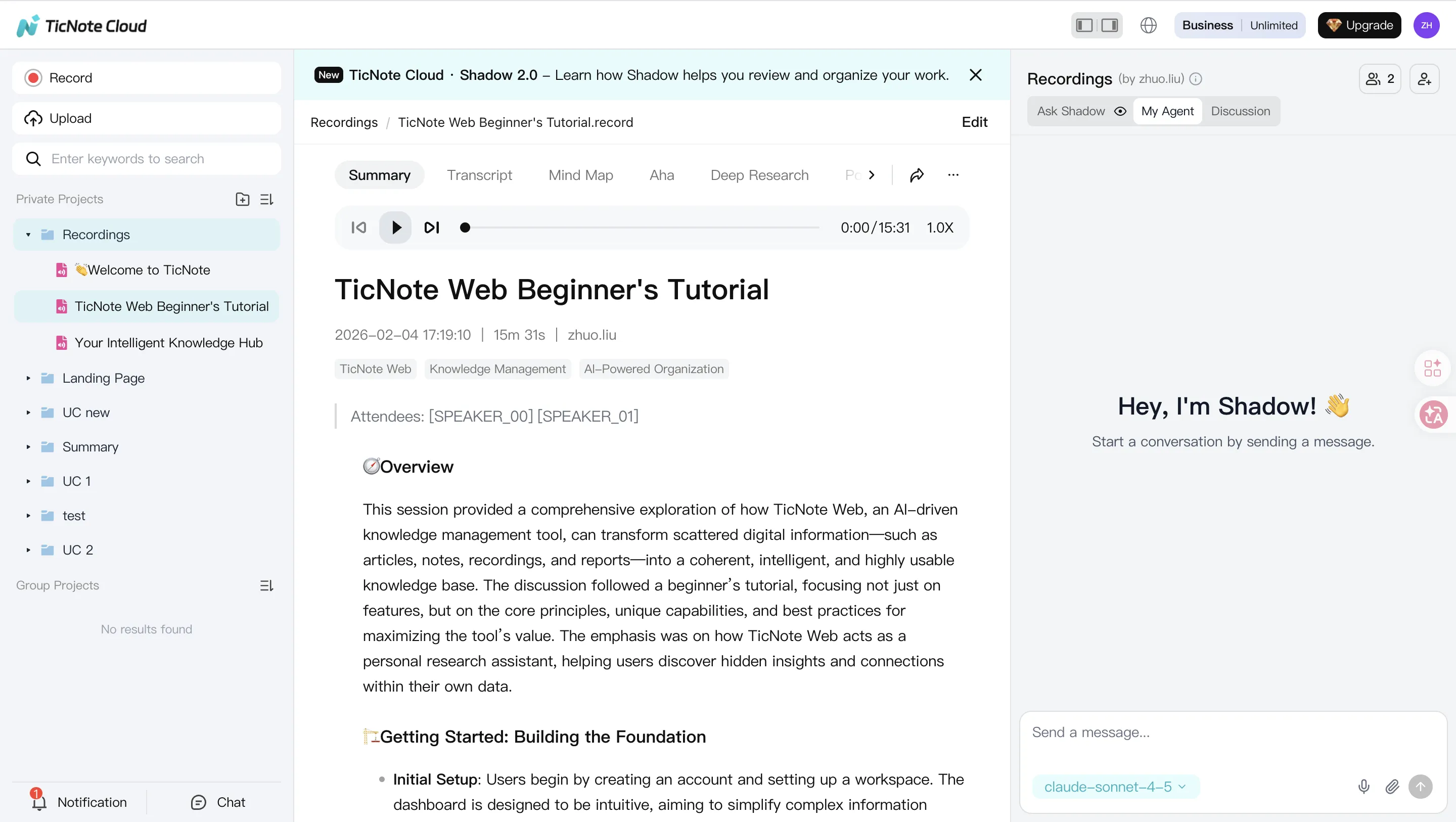
Best for: Teams that want meetings to become reusable assets—searchable notes, cited answers, and ready-to-share deliverables.
Why it's a top pick: TicNote Cloud is a meeting-centered AI workspace. It captures and transcribes meetings without a meeting bot joining, then organizes everything inside Projects. From there, Shadow AI can answer questions with citations and generate outputs like reports, web presentations, podcasts, and mind maps.
Key strengths:
- Bot-free meeting recorder: No bot joins the call; capture stays lightweight.
- Editable transcripts: Fix wording, add context, and collaborate in the transcript.
- Project memory + cited Q&A: Ask questions across meetings and files, then verify sources.
- One-click deliverables: Turn calls into reports, presentations, and more without reformatting.
- Cross-platform workflow: Standardize outputs even if some teams use Meet, others use Zoom or Teams.
Watchouts:
- It's not trying to replace your video platform. It's the layer that makes meetings searchable and reusable.
- Usage limits depend on plan (minutes per month and max recording length).
How it fits (layer across Meet/Zoom/Teams/Webex): Keep your current meeting tool for scheduling and calls. Use TicNote Cloud to capture, transcribe, and build a Project knowledge base that compounds over time.
In-card CTA: Try TicNote Cloud for Free
Zoom
Best for: Webinars, external events, and large meetings that need proven reliability.
Why it's a top pick: Zoom's ecosystem is hard to beat for hosting at scale. It's a common choice when "it must work for everyone" matters.
Key strengths:
- Strong webinar and large-meeting support
- Mature admin controls and broad integrations
- Familiar guest experience across industries
Watchouts:
- Plan limits and add-ons can raise total cost fast.
- Admin and policy settings can get complex at scale.
How it pairs with TicNote Cloud: Run the session in Zoom, then use TicNote Cloud to create standardized notes, editable transcripts, and consistent deliverables across every webinar series. If you're comparing platforms, see this guide on Zoom alternatives and switch criteria.
Microsoft Teams
Best for: Microsoft 365 organizations that want chat, files, and meetings in one place.
Why it's a top pick: Teams works best when your docs, identity, and governance already live in Microsoft.
Key strengths:
- Tight Microsoft 365 integration (calendar, files, identity)
- Persistent chat + channel-based work
- Enterprise management options
Watchouts:
- Complexity grows fast with tenants, guests, and policies.
- Performance can vary by device and network.
How it pairs with TicNote Cloud: Use Teams for internal meetings and collaboration, then add TicNote Cloud for bot-free capture, editable transcripts, and project-based outputs that are easier to reuse across teams.
Cisco Webex
Best for: Regulated and enterprise environments that prioritize security posture and admin governance.
Why it's a top pick: Webex is often selected when compliance reviews and centralized controls drive the decision.
Key strengths:
- Strong enterprise admin and security features
- Suitable for formal governance and policy needs
- Stable option for large organizations
Watchouts:
- Heavier UX and rollout overhead for smaller teams.
- Can feel less "lightweight" for quick external calls.
How it pairs with TicNote Cloud: Keep Webex as the meeting system of record, and use TicNote Cloud as a consistent knowledge layer for transcription, searchable Projects, and deliverables.
GoTo Meeting
Best for: Straightforward hosted meetings where simplicity matters more than a big ecosystem.
Why it's a top pick: GoTo Meeting is built for predictable meeting operations and standard business calls.
Key strengths:
- Simple meeting flow for hosts and guests
- Reliable basics for recurring meetings
Watchouts:
- Value can be weaker versus platforms that bundle more features.
- Fewer modern "meetings-to-work" workflows out of the box.
How it pairs with TicNote Cloud: Use GoTo for calls, then generate AI notes and deliverables in TicNote Cloud so outcomes don't get lost in chat logs.
Jitsi Meet (open-source)
Best for: Open-source and self-hosting teams that need deployment control.
Why it's a top pick: Jitsi is a practical option when you want to run your own stack.
Key strengths:
- Self-hosting flexibility and control
- No vendor lock-in for the meeting layer
Watchouts:
- Recording, storage, and transcription often require extra setup.
- Quality depends on your hosting and ops maturity.
How it pairs with TicNote Cloud: If policy allows, use TicNote Cloud for transcription and deliverable generation so self-hosted meetings still turn into searchable outcomes.
RingCentral
Best for: Buyers who want phone + video + messaging (UCaaS) in one contract.
Why it's a top pick: It consolidates communications for teams that live on calling.
Key strengths:
- Unified comms bundle (voice, video, messaging)
- Centralized vendor and admin model
Watchouts:
- Easy to overbuy features you won't use.
- Meeting features may be "good enough," not best-in-class.
How it pairs with TicNote Cloud: Keep RingCentral for day-to-day comms, then standardize meeting transcripts, decisions, and client-ready deliverables in TicNote Cloud Projects.
Whereby
Best for: Frictionless guest calls in the browser.
Why it's a top pick: Whereby shines when you want the fastest join experience for clients or interviewees.
Key strengths:
- Simple, low-friction guest access
- Great for interviews and quick external chats
Watchouts:
- Fewer advanced admin and meeting controls.
- Not ideal for complex enterprise governance.
How it pairs with TicNote Cloud: Use TicNote Cloud to capture and transcribe calls so every interview becomes searchable, quotable, and reusable.
Slack Huddles
Best for: Quick internal syncs that start as "two minutes."
Why it's a top pick: It's fast and lives where your team already chats.
Key strengths:
- Low effort for spontaneous voice chats
- Works well for lightweight internal alignment
Watchouts:
- Not a full meeting platform for external guests or formal sessions.
- Easy for decisions to vanish without a meeting record.
How it pairs with TicNote Cloud: When a huddle becomes a real meeting (decisions, tasks, commitments), capture and turn it into clear outputs in TicNote Cloud.
Discord
Best for: Communities and persistent voice/video spaces.
Why it's a top pick: Channels and always-on rooms can outperform traditional meetings for community-style work.
Key strengths:
- Persistent channels and role-based spaces
- Great for community support and ongoing discussion
Watchouts:
- Enterprise governance and compliance needs can be a mismatch.
- A poor Meet replacement for formal business workflows.
How it fits: Use Discord when you need community rooms. For business meetings that must become documents, add a dedicated meeting workflow (often with TicNote Cloud for transcripts and deliverables).
Quick note on BlueJeans and Amazon Chime
Both tools have discontinuation or deprecation history. Don't spend evaluation time on platforms that aren't being actively developed. Focus on tools with clear roadmaps, current support, and a strong admin story.
How to capture, transcribe, and turn meetings into deliverables (step-by-step)
A video call is only useful if the output is usable. The goal is simple: capture the meeting cleanly, make it searchable, then turn it into deliverables you can ship. Below is the same workflow you can use whether you keep Google Meet or switch to another google meet alternative—shown with TicNote Cloud as the example.
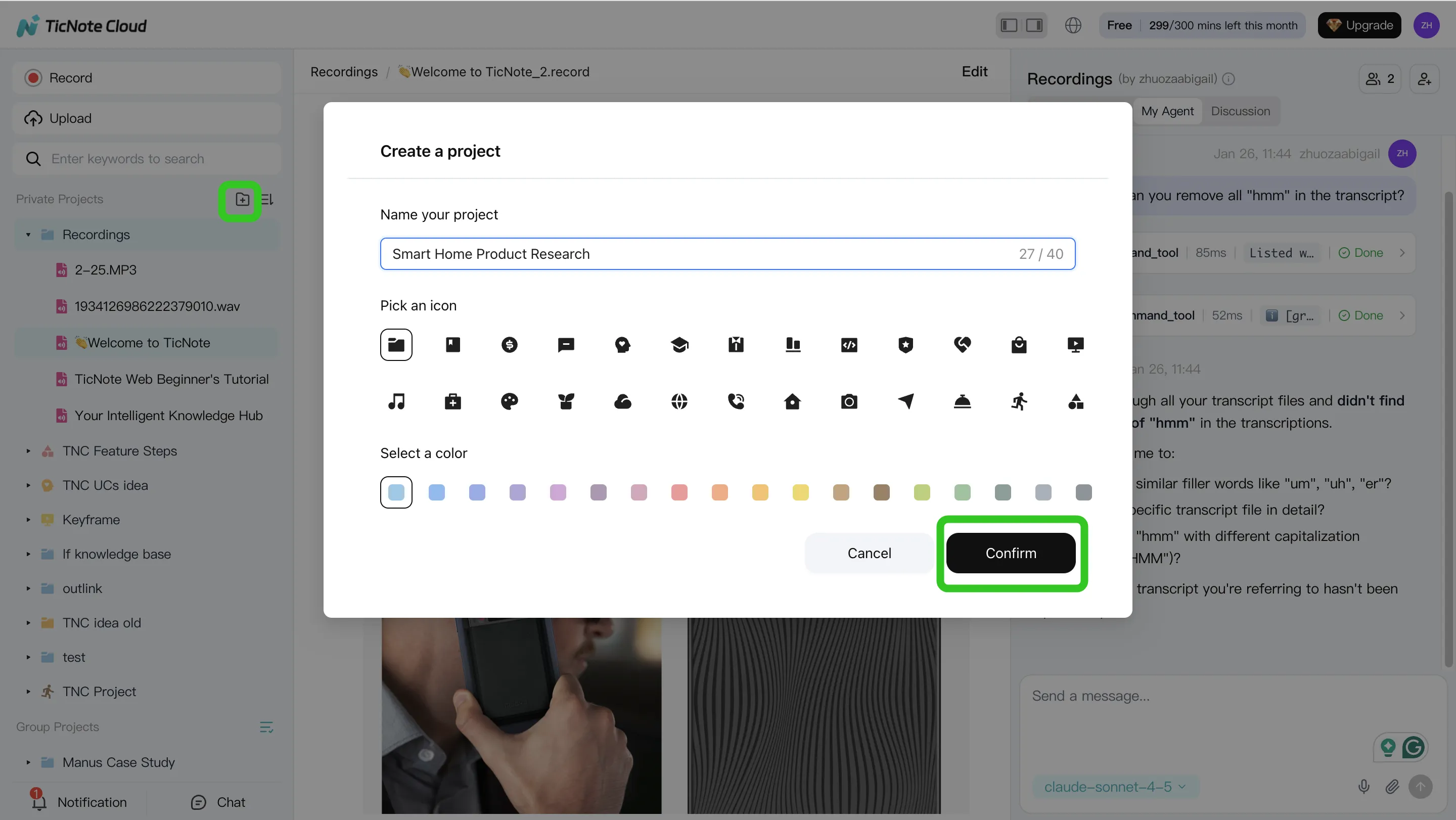
Step 1: Create a Project and add content (keep everything together)
Start by creating one Project per outcome: a client account, a sprint, a hiring loop, or a research theme. This is the difference between "we recorded it" and "we can find it later."
In TicNote Cloud Web Studio, create a new Project (or open one you already use). Then add meeting content so it stays grouped with the rest of the work.
- Direct upload: add audio, video, or documents straight into the Project.
- Via Shadow AI: attach files in chat and ask Shadow to store them in the right folder.
If you're coming from Google Meet, aim for bot-free capture when you can. It keeps the call clean (no extra "participant"), which matters for client calls and interviews.
Step 2: Use Shadow AI to search, analyze, edit, and organize (make it reliable)
Once meetings live in a Project, Shadow AI can work across all of them at once. That's how you move from one-off notes to a growing knowledge base.
Use it for two jobs:
- Search & analysis across meetings
- "What are the main user pain points?"
- "Compare the 3 interviews and list shared themes."
- Editing & organization inside the same workspace
- Fix names, product terms, and action items.
- Ask for structure like decisions, risks, and next steps—without copy-paste.
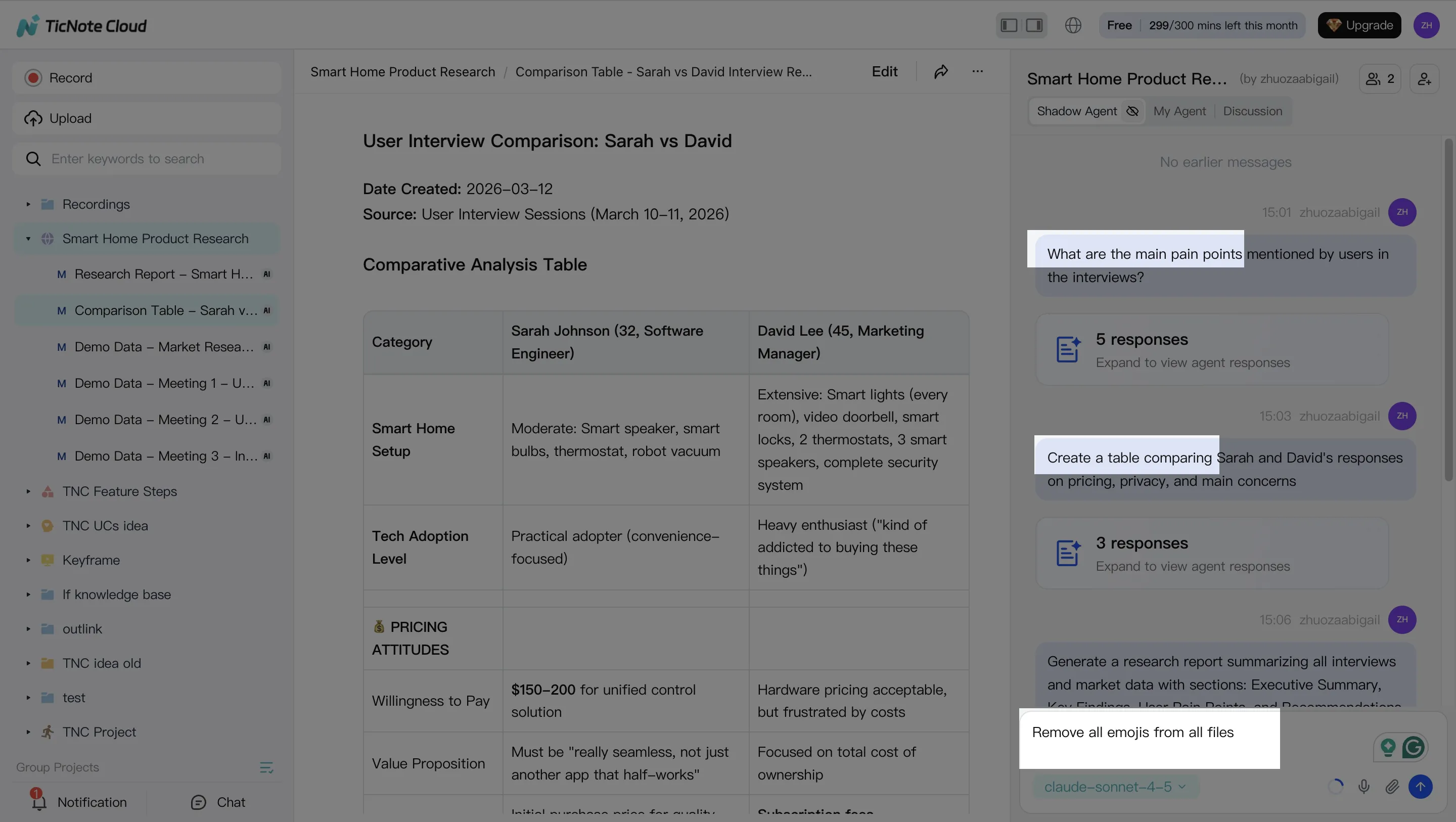
A practical rule: spend 2–5 minutes cleaning key terms (names, metrics, owners). That small edit makes every summary and report more accurate.
Step 3: Generate deliverables (turn talk into something you can send)
Now convert the Project into an artifact. In TicNote Cloud, you can ask Shadow AI directly or use the Generate button to create outputs in the format your audience expects.
Common deliverables that map well to real teams:
- Client-ready report (DOCX/PDF) for research, audits, or weekly updates
- Internal brief (Markdown) for product, ops, or leadership notes
- Shareable web presentation (HTML) for stakeholders who won't open a doc
- Mind map for planning and synthesis when you need the "shape" of the work
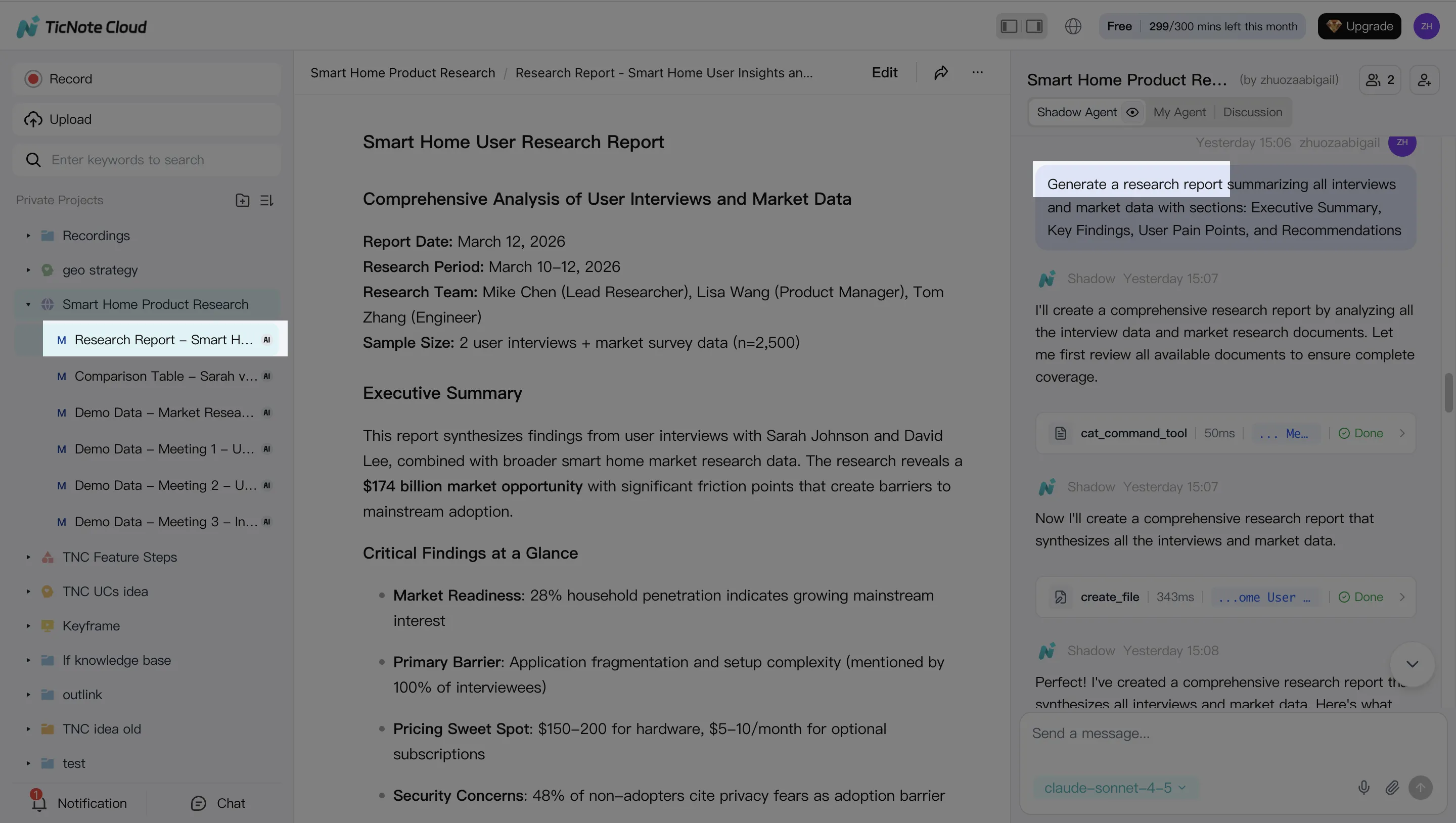
Instead of "summarize this call," use prompts that name the outcome: "Generate a strategic analysis report based on all interviews," or "Create a decision log with owners and due dates."
Step 4: Review, refine, and collaborate (ship with confidence)
Treat AI output like a first draft. Review it, then refine sections by asking for targeted changes (tone, structure, missing items). Keep it grounded by jumping from a paragraph back to the original source when you need to verify.
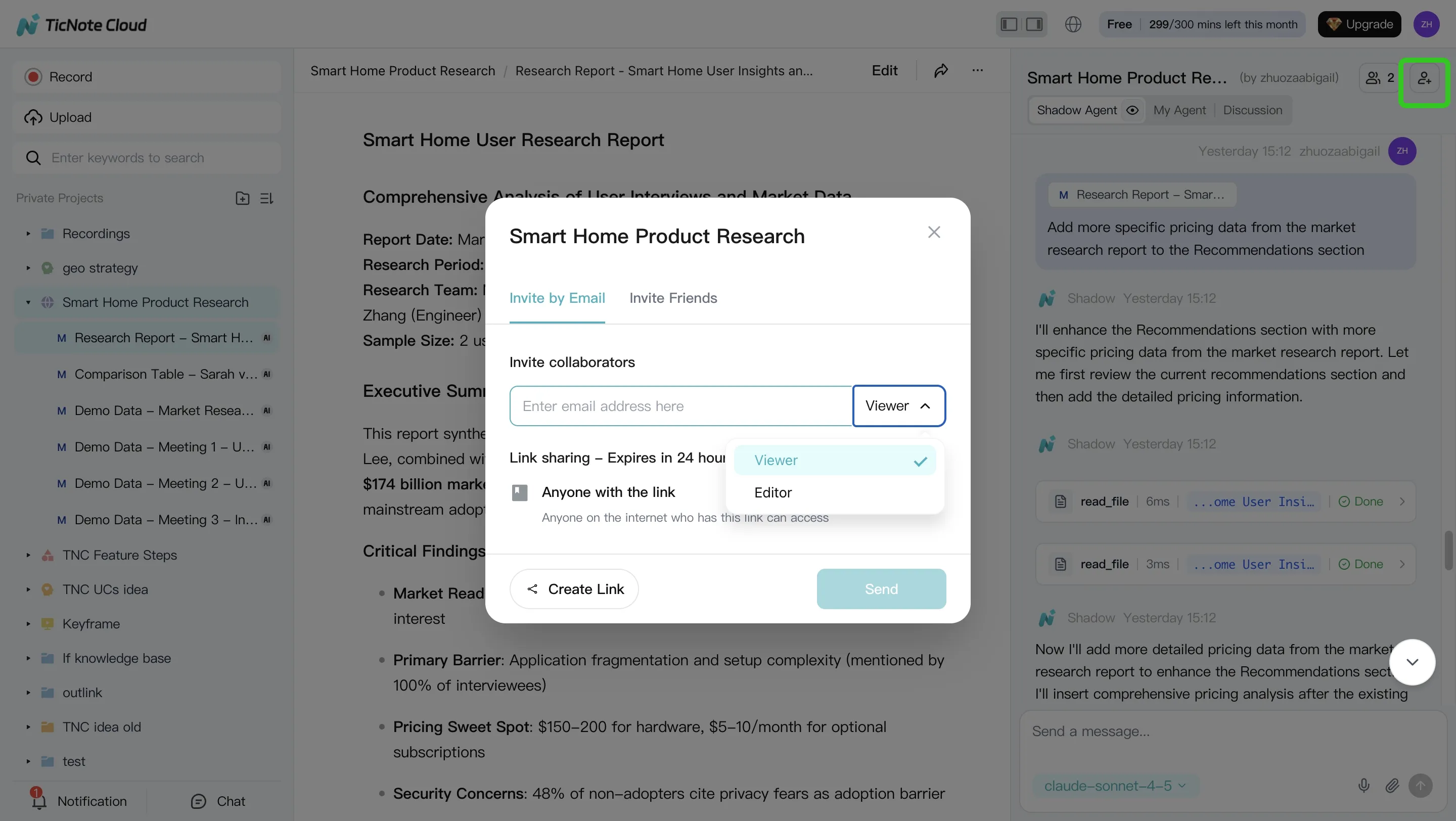
Share the Project with the right permissions (Owner/Member/Guest). Teammates can comment, ask questions, and request new deliverables—while actions stay traceable and access stays bounded.
On mobile (app) workflow: the quick version
On your phone, the flow stays the same: open a Project, add recordings from your device, then use Shadow AI to generate a clean summary or a deliverable. It's a solid fit for field research, sales calls on the go, or quick stakeholder syncs.
Try TicNote Cloud for free and turn one meeting into a report today.
Which alternative should you pick by use case?
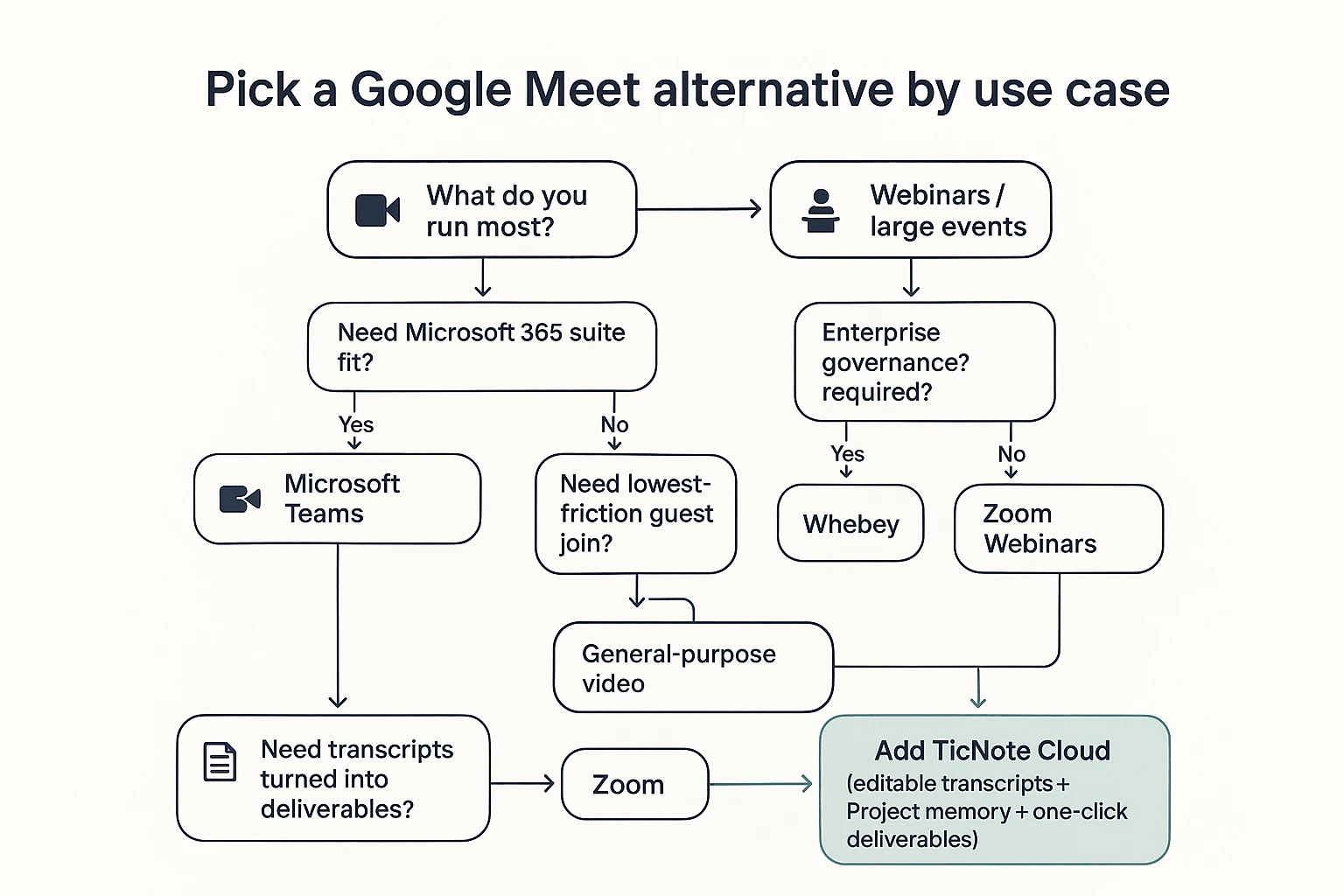
Most teams don't need a single "best" app. They need the right fit for calls, plus a way to reuse what was said. Use this quick map to pick a video platform, then add a meeting-to-assets layer when you need transcripts, searchable decisions, and clean deliverables.
Small teams that just need reliable video
Pick Whereby if you want low-friction calls. It's fast to join, easy for guests, and good for simple weekly syncs.
Then add TicNote Cloud to make outcomes repeatable. Record and transcribe, keep notes in a Project, and generate follow-ups (recaps, action lists, client-ready summaries) without forcing a platform switch.
Microsoft 365 orgs that want chat + files + meetings
Pick Microsoft Teams when your identity, files, and admin live in Microsoft 365. You'll get one place for meetings, chat, and shared docs, with policy controls your IT team can manage.
Use TicNote Cloud as the normalized output layer. It gives you editable transcripts and Project memory that works across teams and recurring workstreams, even when meeting notes are spread across channels. If you're comparing options, this Teams replacement guide and migration checklist helps you pressure-test the switch.
Webinars and large events
Pick Zoom for webinars when you need strong host controls, audience modes, and post-event operations. If you're running large enterprise events and want a heavier governance posture, Webex is the safer default.
Add TicNote Cloud when the event isn't "done" after it ends. Turn the transcript into assets like attendee FAQs, session recaps, internal enablement notes, and a structured report your team can reuse next quarter.
Regulated teams (security/compliance first)
Pick Webex or Microsoft Teams based on your identity stack and compliance review. In regulated teams, the best choice is often the one that fits your existing admin controls, audit needs, and approved vendor list.
Where policy permits, standardize meeting outputs with TicNote Cloud. It supports bot-free capture and controlled sharing, so you can keep sensitive calls from turning into uncontrolled paste-and-forward notes.
Open-source/self-hosting needs
Pick Jitsi Meet if you must self-host. It's the clear choice when "we control the server" is a requirement.
Plan for the tradeoffs. You'll own uptime, scaling, user support, and add-ons for recording and transcription. Budget real time for admin work, not just license cost.
Teams that need transcripts turned into deliverables
Pick TicNote Cloud first, even if you keep Google Meet. Video apps help you meet. TicNote Cloud helps you ship.
It closes the loop from transcript → cited answers → deliverables inside a Project. That means fewer missed decisions, less rework, and faster outputs like reports, briefs, and presentations—without copying notes across tools.
Quick picks at a glance
- Simple calls: Whereby + TicNote Cloud
- Microsoft-first orgs: Teams + TicNote Cloud
- Webinars/events: Zoom (or Webex) + TicNote Cloud for post-event assets
- Regulated teams: Webex or Teams + TicNote Cloud where approved
- Self-hosting: Jitsi Meet (expect admin overhead)
- Deliverables from meetings: TicNote Cloud (platform-agnostic layer)
What does it cost, and what's the ROI?
Swapping video rooms can trim license spend, but the bigger cost is what happens after the call: notes, follow-ups, and rework. In 2026, the best ROI often comes from adding a "meeting intelligence" layer on top of whatever meeting tool you keep, so decisions and evidence don't disappear into recordings.
Simple ROI formula you can use
Use this plain model:
ROI (monthly) = (hours saved on notes + search + follow-ups + rework) × loaded hourly cost − (tool costs)
Where "loaded cost" means pay plus overhead (benefits, tools, management time). For many teams, saving even 2–4 hours per person per month beats a small price difference between meeting platforms.
Example: turn 5 weekly meetings into a report (without rework)
Imagine you run five recurring meetings each week: planning, customer calls, stakeholder syncs, and a retro. Instead of scattered docs, you put each meeting into one Project. You edit the transcript once, in place, so names, decisions, and action items are correct.
Then Shadow AI generates a consistent report and a presentation from that same Project. When questions come up later ("Why did we choose option B?"), the team pulls a cited answer from the Project instead of re-watching recordings or re-litigating the decision. The result is fewer follow-up threads, faster handoffs, and less redo work.
Try it on one week of meetings: Try TicNote Cloud for Free. If you need a quick budget check, use the "compare plans" callout in the TicNote Cloud recommendation card.
Cost notes: meeting platform fees vs outcomes fees
Most buyers end up with two budget lines:
- Video rooms (Zoom/Teams/Webex/Jitsi hosting): pays for uptime, participant limits, webinars, and admin controls.
- Meeting intelligence (TicNote Cloud): pays for transcripts you can actually edit, Project memory, and turning meetings into deliverables you can reuse.
If your main pain is "we meet a lot, but nothing becomes an asset," this layer usually drives the ROI more than switching the room.
If you're also comparing AI tools beyond meetings, this overview of work-ready ChatGPT alternatives for citations, privacy, and workflows helps frame what "reusable outputs" should look like.
Final thoughts: choose a Meet replacement, then make meetings searchable and reusable
Picking a google meet alternative is only step one. Choose the video tool that fits your constraints: webinar controls, admin policies, compliance needs, or suite fit. But the real cost shows up after the call, when notes scatter and decisions get lost.
Don't just switch platforms—fix the meeting "afterlife"
Most teams lose 30–60 minutes per meeting on recap, follow-ups, and hunting context. That's where TicNote Cloud earns its ROI. It captures calls without a bot, turns them into an editable transcript, and lets you ask Project-wide questions with cited answers. Then you can generate deliverables like reports, web presentations, mind maps, and shareable summaries—without copy-paste.
Over time, this becomes a Project memory: each meeting adds usable context, so repeat questions get faster, and onboarding gets simpler. If your team already lives in docs, it also helps to compare your knowledge workflow against a workspace tool—see this guide to choosing the right Notion alternative for your workflow as a practical reference point.


