


 Extension
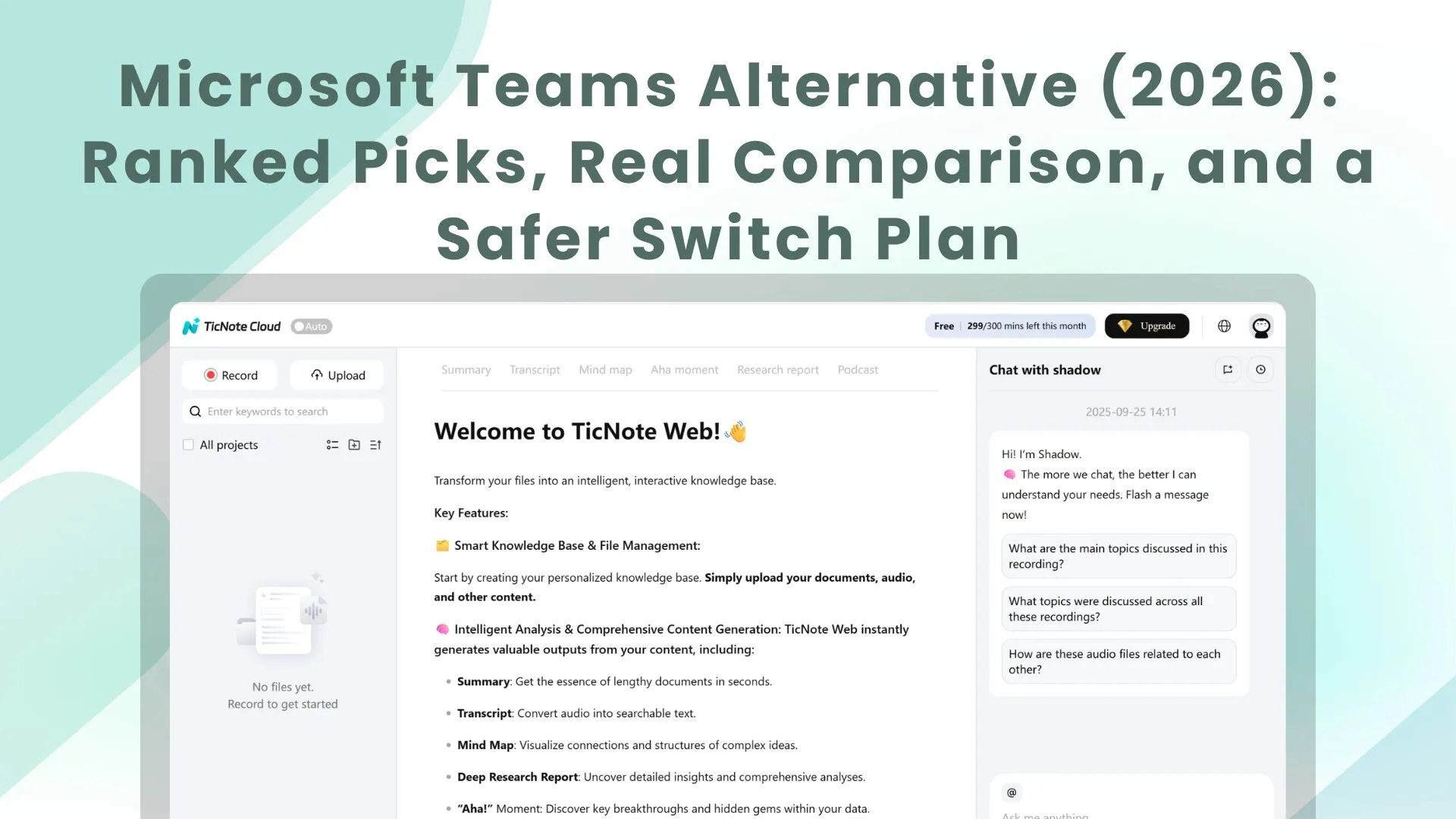
TL;DR: The best Microsoft Teams alternatives for meeting-heavy teams (2026)
If you want a Microsoft Teams alternative built for meeting outcomes, start with Try TicNote Cloud for Free: it records and transcribes Teams meetings, then turns them into searchable project knowledge and fast deliverables (recaps, reports, and presentations) with citations to the source.
Meetings often end with scattered notes, missed decisions, and slow follow-ups. That mess compounds every week and keeps teams repeating the same debates. Use TicNote Cloud to capture calls once, keep the knowledge searchable, and ship clean outputs without copy-paste.
Quick picks by scenario:
- Best meeting-centered substitute: TicNote Cloud
- Best for integration-heavy chat workflows: Slack
- Best if you live in Google Workspace: Google Chat
- Best video-first stack: Zoom Team Chat
- Best enterprise video/security posture: Webex
- Best self-hosted/compliance control: Rocket.Chat or Mattermost
- Best project-first execution hub: ClickUp
- Best lightweight budget chat: Chanty
What makes a strong Microsoft Teams alternative (and how we scored tools)
"Better than Teams" usually means fewer clicks, faster work, and cleaner knowledge. For Ops and IT, it also means safer governance: clear identity controls, predictable retention, and fewer places where files and decisions can disappear. For meeting-heavy teams, the goal is simple: every call should turn into searchable decisions, owners, and next steps—without digging through chats, channels, and SharePoint folders.
The Teams pain points we're solving
Teams breaks down in three common ways:
- Speed and stability: slow startup, heavy RAM use, and lag during busy days.
- Clutter: chat + teams + channels + apps + notifications creates "too many surfaces."
- SharePoint/OneDrive file sprawl: meeting notes, decks, and recordings live in different places, so teams can't tell what's current.
Then there's the meeting gap: recaps can be inconsistent, transcripts and summaries often don't connect to the final outcomes, and action items get retyped into other tools. Two weeks later, people ask the same question again because the answer isn't easy to retrieve.
The evaluation rubric (what we scored, and why)
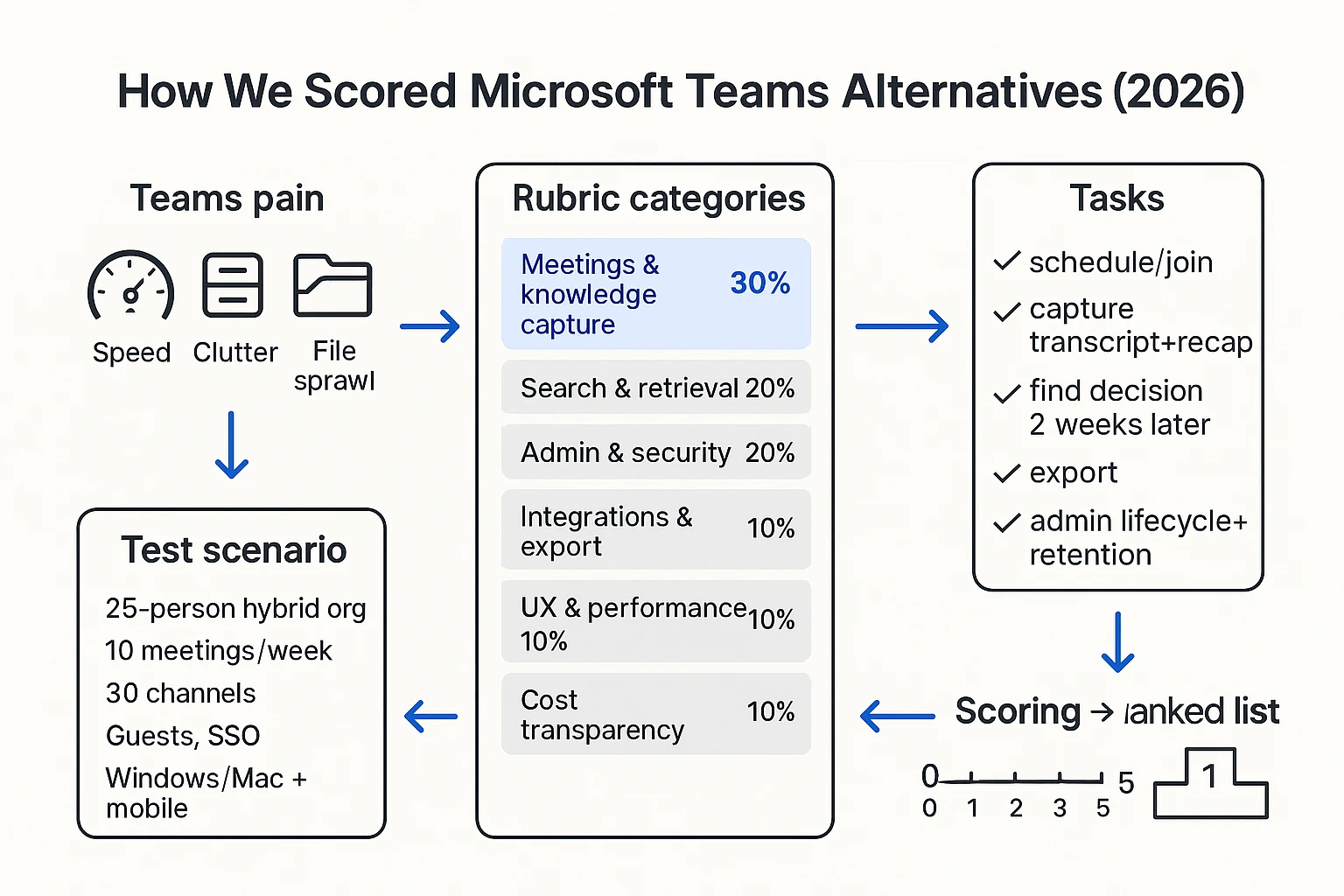
We scored each tool on a 0–5 scale per category, then applied weights so meeting-heavy use cases don't get drowned out by "nice-to-have" features.
- Meetings & knowledge capture (30%): recording options, transcription, summary quality, action items, and whether outcomes stay linked to the source.
- Search & retrieval (20%): can you find a decision fast, across meetings and files, with clear context?
- Admin & security (20%): SSO (single sign-on), SCIM (automated user provisioning), retention, audit logs, and eDiscovery (legal search/export).
- Integrations & export (10%): calendar, storage, CRM/project tools, and export formats that won't trap you.
- UX & performance (10%): speed, navigation, mobile reliability, and notification control.
- Cost transparency (10%): clear tiers, predictable add-ons, and what's included vs gated.
One standards note: SCIM is not marketing fluff—it's a defined protocol for identity lifecycle automation in RFC 7644 — System for Cross-domain Identity Management: Protocol (SCIM) (2015-09) and it matters when contractors and roles change often.
Teams replacement vs "Teams layer" (which problem are you solving?)
Not every buyer needs a full rip-and-replace.
- A Teams replacement covers chat/meetings (and often files) with admin controls.
- A Teams layer keeps Teams for chat, but adds a dedicated meeting knowledge system for capture, search, and deliverables.
If your biggest pain is "we lose decisions and repeat discussions," a layer can fix outcomes without a risky comms migration.
The test scenario we used (so scores stay fair)
Every tool below was judged on the same scenario: a 25-person hybrid org, 10 meetings/week, about 30 channels, frequent guests/contractors, SSO required, mixed Windows/Mac plus mobile.
Tasks we ran end-to-end:
- Schedule and join a call.
- Capture notes/transcripts and produce a recap.
- Search for a decision two weeks later and verify the source.
- Export the outcome to a doc or project system.
- Do basic admin: add/remove a user, set expectations for retention, and check auditability.
Why trust this review
We tested core workflows hands-on where trials were available (join, capture, search, export, day-to-day UX). For security, admin controls, and pricing edge cases, we verified claims against vendor documentation, then scored only what was clearly supported.
Top picks: Microsoft Teams alternatives ranked (meeting-first picks)
You're here with commercial intent. You need a real, buyable replacement (or add-on) that fixes daily pain fast. So this list compares tools using the same rubric across meeting capture, knowledge reuse, admin control, and rollout risk—and TicNote Cloud ranks #1 for meeting-heavy teams because it turns calls into reusable project knowledge.
Try TicNote Cloud for Free
1) TicNote Cloud
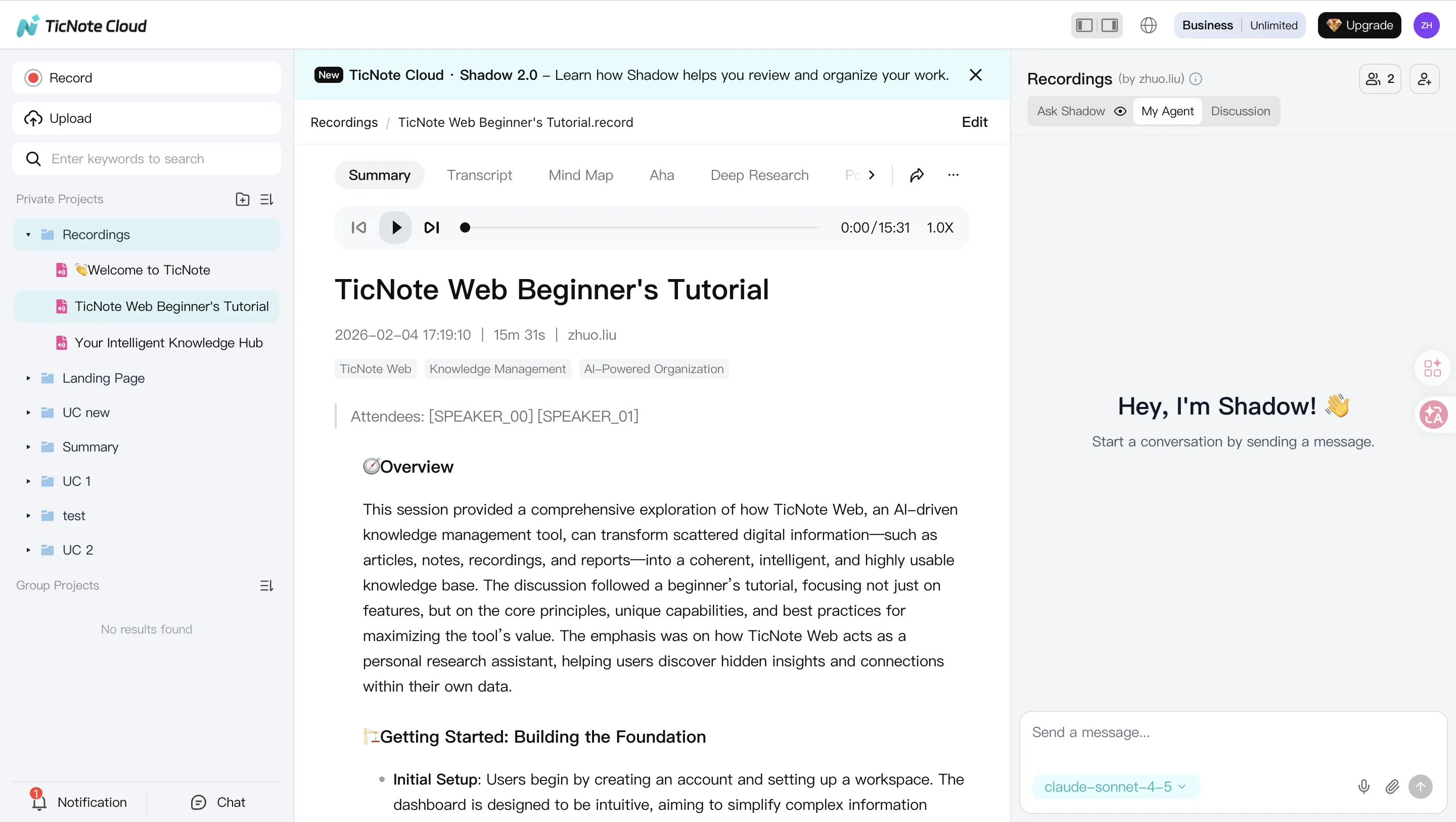
- Best for: Meeting-heavy teams that need searchable meeting knowledge, fast follow-ups, and reusable outputs (PMs, consultants, research, cross-functional squads).
- What it replaces (chat/meetings/knowledge): Replaces the "meeting outcomes" layer first (notes, summaries, action items, and knowledge). It can complement or substitute parts of Teams meetings depending on how you record.
- Strengths:
- Bot-free capture option (less meeting friction in many orgs).
- Editable transcripts (so notes become a shared artifact, not a locked export).
- Project-level AI memory that compounds across meetings and files.
- Cited answers (click back to sources to verify).
- One-click deliverables: reports, web presentations, podcasts, mind maps.
- Tradeoffs: Not a 1:1 drop-in for Teams chat and channels. Some orgs will keep Teams or Slack for chat.
- Admin/compliance notes: Enterprise tier supports SSO; data is private by default and not used to train models (validate in security review). Permission roles help control access inside Projects.
- Integrations: Notion and Slack connectors; exports include DOCX/PDF/Markdown plus mind map formats.
- Typical price positioning: Generally lower than "full-suite" UCaaS bundles; strong value if you measure time saved on follow-ups.
- Switch from Microsoft Teams: Keep Teams accounts as-is, then start by routing your highest-cost recurring meetings into TicNote Cloud Projects. You'll reduce repeat discussions by making decisions searchable.
2) Slack
- Best for: Integration-heavy chat, strong async habits, and teams that live in apps (tickets, alerts, approvals).
- What it replaces (chat/meetings/knowledge): Replaces chat and lightweight team coordination; meetings and meeting knowledge usually need add-ons.
- Strengths:
- Best-in-class chat workflows and automations.
- Huge integration ecosystem.
- Clean UX for channels, threads, and quick collaboration.
- Tradeoffs: Cost can scale fast as seats grow; plan limits can constrain history and features; meeting capture is rarely "native" and often relies on extra tools.
- Admin/compliance notes: Strong enterprise controls on higher tiers (SSO, governance features) but complexity rises with scale.
- Integrations: Broad marketplace; best choice if your toolchain is already Slack-first.
- Typical price positioning: Mid to high, depending on tiers and required governance.
- Switch from Microsoft Teams: Plan channel mapping carefully. Teams-to-Slack migrations often fail when you copy structure instead of redesigning what deserves a channel.
3) Google Chat
- Best for: Google Workspace-first orgs that want a simpler interface and fewer moving parts.
- What it replaces (chat/meetings/knowledge): Covers basic chat and spaces; meetings run through Google Meet; long-term meeting knowledge often stays scattered unless you add a layer.
- Strengths:
- Simple for end users.
- Fits naturally with Gmail/Calendar/Drive behaviors.
- Tradeoffs: Fewer advanced controls and workflow depth than specialized chat platforms; meeting notes and decisions can remain fragmented across Docs, Chat, and Drive.
- Admin/compliance notes: Works best when Workspace governance is already mature.
- Integrations: Strong within Google ecosystem; outside integrations vary.
- Typical price positioning: Often bundled with Workspace plans.
- Switch from Microsoft Teams: Move identity and calendars first. Then pilot a few Spaces instead of recreating every Team and channel.
4) Zoom Team Chat
- Best for: Video-first teams already standardized on Zoom Meetings.
- What it replaces (chat/meetings/knowledge): Complements Zoom meetings with chat; knowledge capture is not its core strength.
- Strengths:
- Smooth if Zoom is already the meeting standard.
- Lower friction for meeting-centric orgs.
- Tradeoffs: Chat depth and long-term knowledge retention lag dedicated chat and knowledge tools.
- Admin/compliance notes: Enterprise policies exist, but governance can feel split if chat + knowledge live elsewhere.
- Integrations: Strong around Zoom's ecosystem; broader coverage depends on your stack.
- Typical price positioning: Usually efficient if Zoom is already a committed line item.
- Switch from Microsoft Teams: Treat it as a meeting-and-chat pair, then add a meeting knowledge system if decisions are still getting lost.
5) Webex
- Best for: Enterprise video plus governance-minded IT teams.
- What it replaces (chat/meetings/knowledge): Can replace meetings and some messaging; knowledge capture still needs clear process.
- Strengths:
- Enterprise-grade meetings and admin controls.
- Strong fit in regulated industries.
- Tradeoffs: Chat UX can feel heavy; product complexity can slow adoption.
- Admin/compliance notes: Designed for policy, retention, and centralized management.
- Integrations: Good enterprise integrations; check fit for your line-of-business tools.
- Typical price positioning: Typically enterprise-priced.
- Switch from Microsoft Teams: Plan training time. Adoption is the risk, not the feature list.
6) Rocket.Chat
- Best for: Self-hosting, data control, and regulated environments with in-house IT.
- What it replaces (chat/meetings/knowledge): Replaces chat; meetings and knowledge typically require separate tools.
- Strengths:
- Control over deployment and data.
- Flexible for custom workflows.
- Tradeoffs: Setup and maintenance burden; UX polish can vary by deployment choices.
- Admin/compliance notes: Strong option when you must control infrastructure; you'll own patching and uptime.
- Integrations: Extensible; depends on how much you want to build.
- Typical price positioning: Often attractive on licensing, but factor IT time.
- Switch from Microsoft Teams: Pilot with a single department first. Don't migrate everyone until support is proven.
7) Mattermost
- Best for: Technical teams and dev workflows, with self-hosting options.
- What it replaces (chat/meetings/knowledge): Replaces chat for engineering-heavy orgs; not a full meeting knowledge system.
- Strengths:
- Strong for incident response and dev integrations.
- Works well where chat is tied to operational runbooks.
- Tradeoffs: Less friendly for non-technical teams; change management is harder outside engineering.
- Admin/compliance notes: Good for controlled environments; administration depends on deployment model.
- Integrations: Strong with dev toolchains.
- Typical price positioning: Varies by self-hosted vs enterprise needs.
- Switch from Microsoft Teams: Start with engineering and ops. Expand only if other teams like the workflow.
8) ClickUp
- Best for: A project execution hub where chat and updates connect directly to tasks.
- What it replaces (chat/meetings/knowledge): Replaces parts of coordination and lightweight messaging inside work; it's not a clean chat drop-in.
- Strengths:
- Tasks, docs, goals, and status in one place.
- Great for turning discussions into assigned work.
- Tradeoffs: Learning curve; chat can feel secondary; meeting capture still needs a dedicated layer.
- Admin/compliance notes: Governance is manageable, but workspace sprawl can happen without standards.
- Integrations: Broad project tool integrations.
- Typical price positioning: Mid-range; value rises when it replaces multiple project tools.
- Switch from Microsoft Teams: Don't migrate chats "as is." Migrate projects and workflows first, then decide what messaging you still need.
9) Chanty
- Best for: Lightweight, budget-friendly chat with basic tasks.
- What it replaces (chat/meetings/knowledge): Replaces simple chat; doesn't replace meeting capture or deep knowledge reuse.
- Strengths:
- Simple UI.
- Works for small teams that want less complexity.
- Tradeoffs: Smaller ecosystem depth; fewer enterprise controls.
- Admin/compliance notes: Best for SMBs with straightforward governance needs.
- Integrations: More limited than Slack/Teams.
- Typical price positioning: Budget-friendly.
- Switch from Microsoft Teams: Good for teams that mainly need chat and fewer features. If meetings drive work, add a meeting knowledge tool.
Replacement vs layer: the fastest win for most teams
If Teams is slowing you down, a full rip-and-replace isn't always the best first move. In many orgs, the safer path is to keep Teams for chat for a few weeks, then add a meeting knowledge layer to fix outcomes first.
That's where TicNote Cloud fits best: it makes decisions, actions, and source context searchable across meetings and files. If you also care about bot-free notes and privacy checks, see this guide on bot-free meeting notes alternatives before you finalize your stack.
Comparison table: which Teams substitute fits your requirements?
Use this table in three passes. First, filter by governance (SSO/SCIM, retention, eDiscovery). Next, check meeting capture (transcripts, recaps, cited answers, and whether knowledge stacks up over time). Last, match integrations and cost to your stack. This keeps your "Microsoft Teams alternative" shortlist realistic.
Normalized comparison (✅ / Partial / ❌)
| Tool | SSO | SCIM | Retention controls | Audit logs | Exportability | eDiscovery / legal hold | Cloud vs self-hosting | Channels / threads | Guests | Transcription | Recap quality | Cited answers | Project knowledge base | Ecosystem fit | Webhook / API |
| TicNote Cloud | ✅ | Partial | Partial | Partial | ✅ | Partial | Cloud | ❌ | Partial | ✅ | ✅ | ✅ | ✅ | Google+M365 (meetings), Slack/Notion | Partial |
| Slack | ✅ | ✅ | ✅ | ✅ | ✅ | ✅ | Cloud | ✅ | ✅ | Partial | Partial | ❌ | Partial | Dev tools + broad app directory | ✅ |
| Google Chat + Meet | ✅ | ✅ | ✅ | ✅ | ✅ | ✅ | Cloud | ✅ | ✅ | ✅ | ✅ | ❌ | Partial | Google Workspace-first | Partial |
| Zoom Workplace | ✅ | ✅ | ✅ | ✅ | ✅ | ✅ | Cloud | Partial | ✅ | ✅ | ✅ | Partial | Partial | Video-first + calendar/email | ✅ |
| Cisco Webex | ✅ | ✅ | ✅ | ✅ | ✅ | ✅ | Cloud | ✅ | ✅ | ✅ | ✅ | Partial | Partial | Enterprise comms + security | ✅ |
| RingCentral | ✅ | ✅ | ✅ | ✅ | ✅ | ✅ | Cloud | Partial | ✅ | ✅ | ✅ | ❌ | Partial | UCaaS + telephony-first | ✅ |
| Mattermost | ✅ | ✅ | ✅ | ✅ | ✅ | ✅ | Cloud + Self-host | ✅ | ✅ | Partial | ❌ | ❌ | Partial | DevOps + regulated teams | ✅ |
| Rocket.Chat | ✅ | ✅ | ✅ | ✅ | ✅ | ✅ | Cloud + Self-host | ✅ | ✅ | ❌ | ❌ | ❌ | Partial | IT/service desk + chat ops | ✅ |
Footnotes: "Partial" usually means one of these: (1) needs an enterprise tier, (2) needs a paid add-on, or (3) is handled through a third-party tool. Validate before you sign.
Notes on pricing and plan limits (what trips up Teams migrations)
Most tools hide limits in four places:
- Message and file history windows (for example, limits by days, or only on certain plans). If history is capped, users lose search trust fast.
- Storage caps and per-file upload limits. This hits recorded meetings and shared decks first.
- Meeting caps (duration, participants, cloud recording minutes, transcription minutes). In meeting-heavy teams, this becomes a surprise bill in month one.
- Admin controls sold as "enterprise" (SSO/SCIM, retention, audit logs, export APIs). If you need governance, price the right tier from day zero.
Buyer warning checklist (verify in writing):
- Guests: max guest count, guest permissions, and whether guests can access recordings.
- Exports: bulk export for chat and files, plus transcript export formats.
- Retention: can you set retention by team/channel/project, and can you enforce holds?
- Admin APIs: do you get SCIM provisioning and audit log access, or only UI reports?
If meeting knowledge is the top need, TicNote Cloud fits best because it turns calls into reusable project assets with cited answers. If self-hosting is mandatory, shortlist Rocket.Chat or Mattermost. If you're Workspace-first, Google Chat is the cleanest fit. If you're video-first, Zoom or Webex usually wins on meeting experience.
What can go wrong when switching from Teams (and how to avoid it)?
The real cost of switching off Teams isn't the new license. It's rework from missing context, broken file links, and weak governance. For Ops/IT, a "Microsoft Teams alternative" project succeeds when users can still find decisions, access the right files, and pass audits on day one.
Migration checklist: chat, files, channels, and link rot
Teams data is spread across chat, channels, and files that often live in SharePoint or OneDrive. If you move only "messages," you'll lose the artifacts that made them useful.
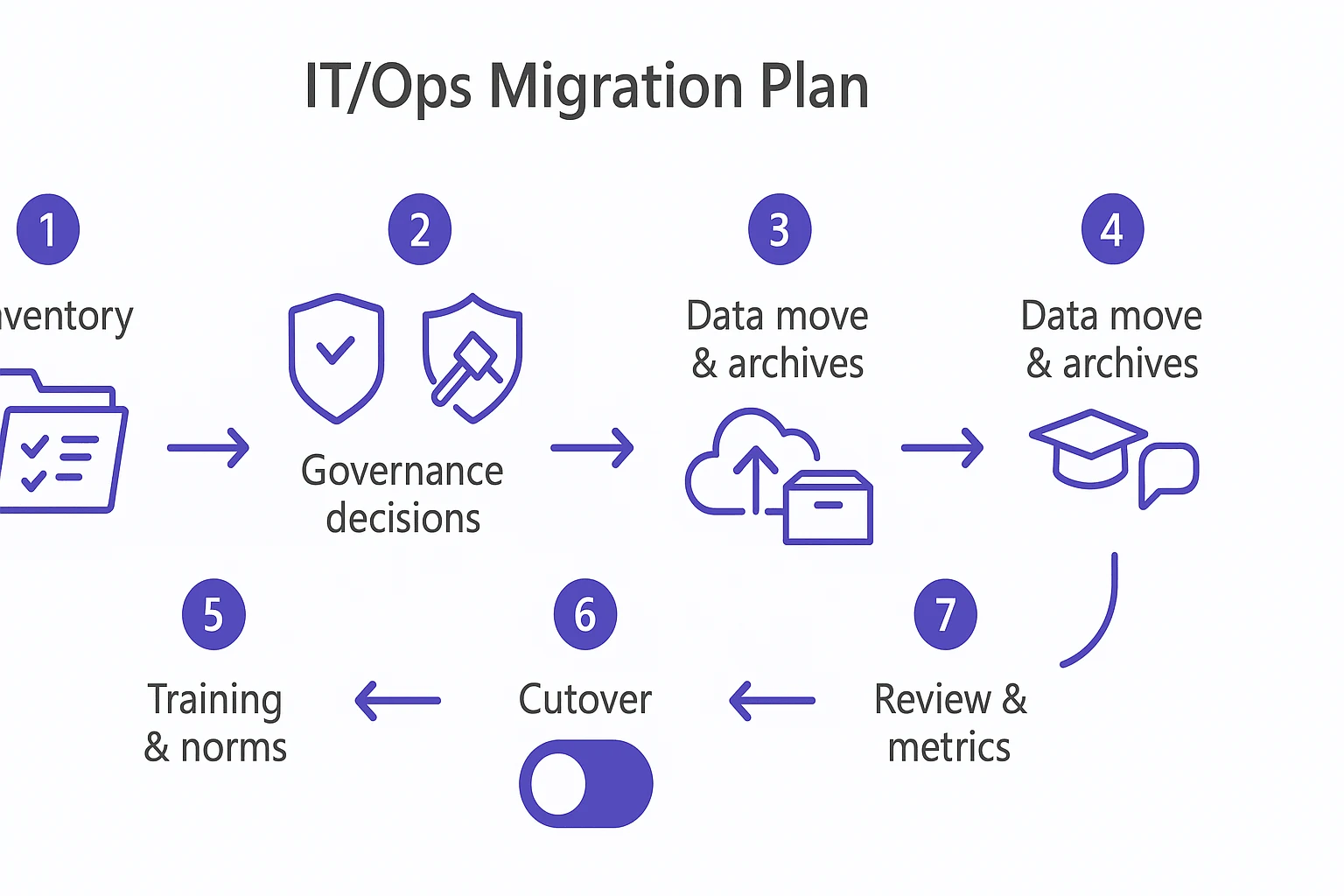
- Inventory what exists:
- Teams and channels (count them, don't guess)
- Which chat history is business-critical vs noise
- File locations (SharePoint sites, OneDrive folders, shared links)
- Meeting recordings and notes
- Tabs/apps and automations people rely on
- Decide what must migrate vs archive:
- Migrate: active projects, current SOPs, key client threads
- Archive: closed projects, old chatter, stale channels
- Define how archives will be accessed (and by whom)
- Plan for "link rot":
- Channel links and @mentions won't map cleanly
- File permalinks often change when storage changes
- Build a redirect plan: an "Old link → New home" index for top folders
Identity & access: SSO, SCIM, guest access, roles
Identity issues break rollouts fast. SSO (single sign-on) keeps logins simple and enforces central security. SCIM (System for Cross-domain Identity Management) is how you automate joiners/movers/leavers, so offboarding is fast and least privilege is real.
Map access before you migrate data:
- Roles: admin/owner, member, guest (write down what each can do)
- External collaboration: contractors, clients, vendors
- Group mapping: who needs which projects and channels on day one
- Offboarding: confirm SCIM deprovisioning removes access everywhere
Governance: retention, legal hold/eDiscovery, exports, audit logs
Governance is where "good enough" becomes expensive. Many tools gate key controls behind enterprise tiers, so confirm requirements early.
Start with clear records language. ISO 15489-1:2016 Information and documentation — Records management — Part 1: Concepts and principles defines "records" as "information created, received, and maintained as evidence and as an asset by an organization or person, in pursuance of legal obligations or in the transaction of business." Use that definition to decide what must be retained.
Must-check items (especially for finance, healthcare, legal, public sector):
- Retention policies (by workspace/project and by content type)
- Legal hold and eDiscovery (search, preserve, produce)
- Export formats (so you can leave later without data lock-in)
- Audit logs (who accessed what, and when)
- Encryption basics (in transit and at rest)
Change management: training, norms, rollout plan
Most failures are social, not technical. Plan a rollout that reduces churn and gives teams time to learn.
Recommended pattern:
- Pilot (2–4 weeks) with one meeting-heavy team
- Dual-run (2–6 weeks): Teams stays read-only for reference
- Cutover: new work happens in the new tool only
- Review: fix gaps, then expand to more teams
Set new operating norms:
- Channel naming rules (so search works)
- What belongs in chat vs docs vs project knowledge
- Meeting recap standard: decisions, owners, due dates, and links
- "Single source of truth" rule for files to stop duplicates
Track success with three simple metrics:
- Time to find a decision (target: under 2 minutes)
- Time spent on meeting follow-ups per week (target: down 20–30%)
- Repeat discussions (target: fewer reruns of the same debates)
Printable migration checklist:
- Export an inventory of teams, channels, members, and guests
- Map where files live (SharePoint/OneDrive) and who owns them
- List critical chats and channels to migrate; archive the rest
- Identify top 50 "must-not-break" links (notes, plans, permalinks)
- Choose an archive approach and document how to access it
- Confirm SSO requirements and test sign-in with a pilot group
- Confirm SCIM support and test automated offboarding
- Define roles (admin/owner/member/guest) and permissions
- Validate retention, legal hold/eDiscovery, and audit logs
- Validate export formats and your exit plan
- Run a pilot, then dual-run with Teams set to read-only
- Train users on new norms and publish a one-page "how we work"
- Cut over and review metrics after 30 days
If meetings are a major input to your work, also evaluate a meeting platform switch in parallel. The Zoom security and switch checklist is a good reference for the same governance-first approach across tools.
Step-by-step: turn meetings into reusable project knowledge (example workflow)
If you're replacing Teams (or adding a meeting knowledge layer beside it), the goal isn't "better notes." It's a repeatable flow where every call becomes searchable, reusable project knowledge. Below is one practical example workflow using TicNote Cloud, because it models the exact loop meeting-heavy teams need: capture → organize → generate deliverables → collaborate.
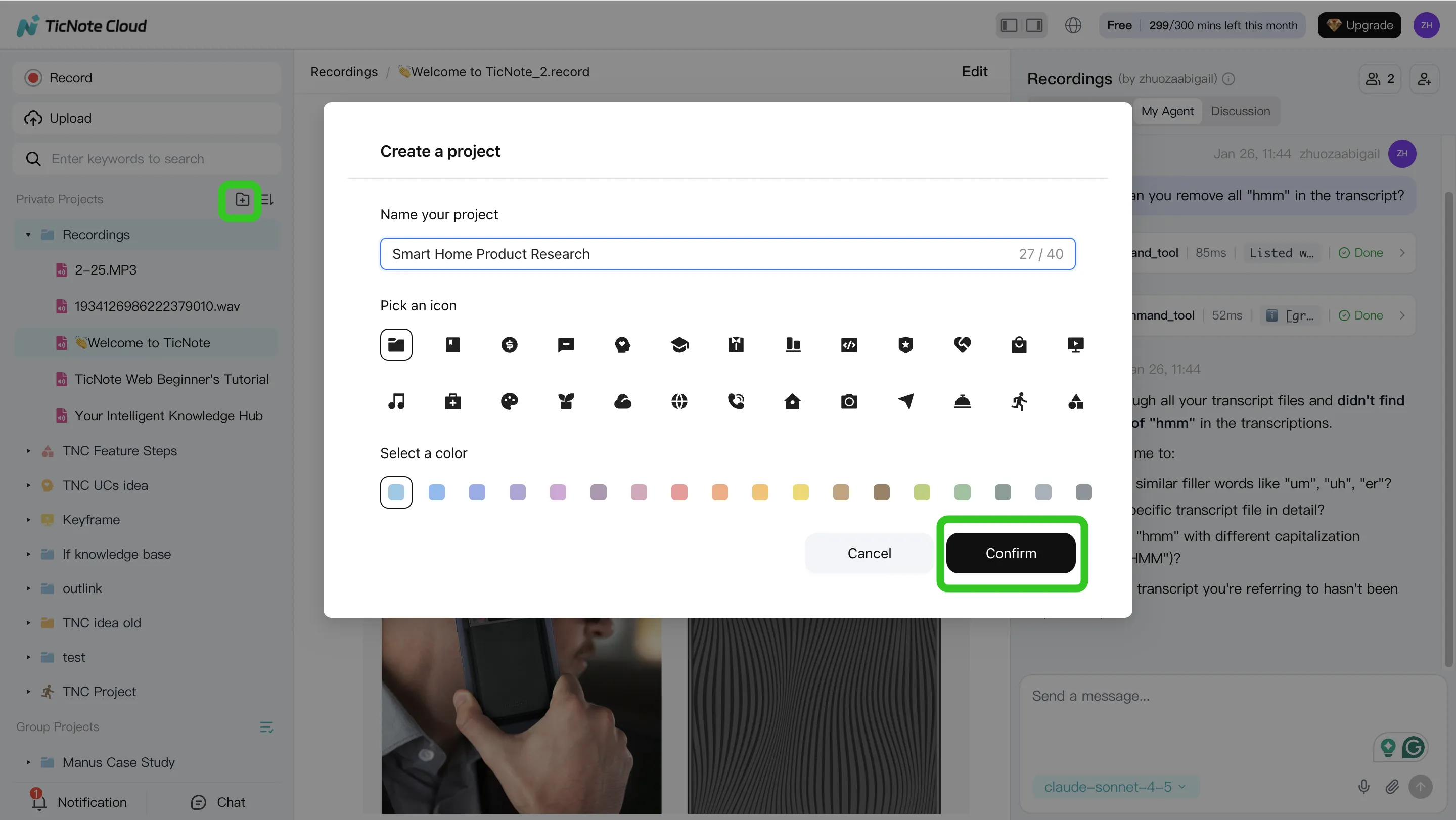
Step 1: Create or open a Project and add content (so nothing gets lost)
Start by creating a Project for a client, workstream, or squad. Treat it like the single home for the work—not a new folder maze.
Add content that affects decisions:
- Meeting audio/video (uploaded files)
- Supporting docs (briefs, specs, decks, research)
- Recordings captured from your normal meeting routine
This reduces SharePoint-style sprawl because the "source of truth" is the Project itself. Instead of hunting across chat threads, channel files, and personal drives, you keep meetings and the documents they reference in one place.
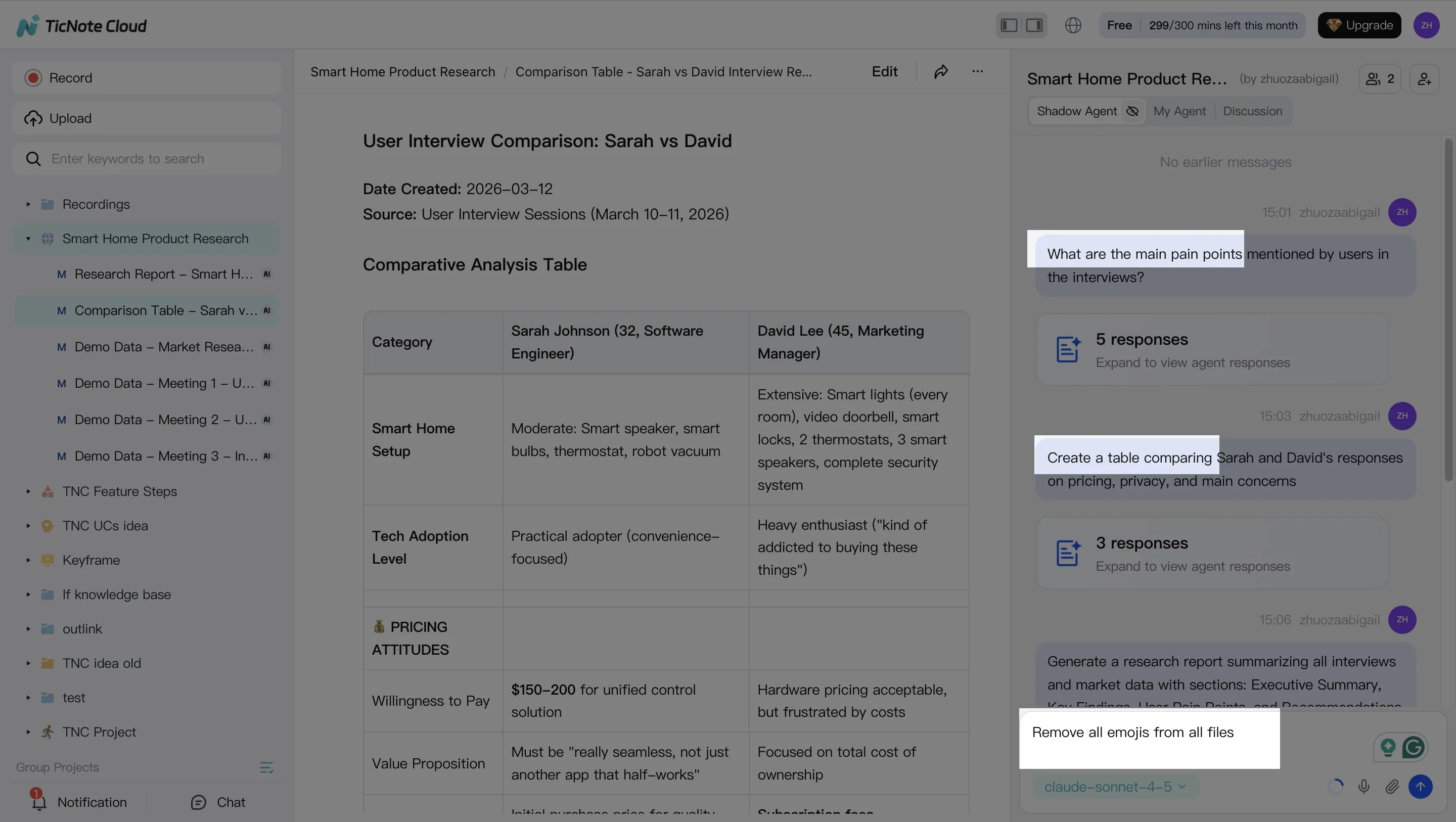
Step 2: Use Shadow AI to search, analyze, edit, and organize (across every file)
With Teams, the hard part isn't joining meetings—it's finding the one decision from three calls ago. Shadow AI stays on the right side of the screen, so you can ask questions and get answers pulled from your Project content.
Use it for fast "decision retrieval" and structured outputs:
- Search and analyze across meetings and docs (themes, disagreements, risks)
- Generate structured notes (decisions, owners, due dates, open questions)
- Clean up transcripts (fix names, product terms, acronyms)
A simple standard that works well: after each meeting, run one "decisions + actions" prompt, then one "risks + unknowns" prompt. In a 10-meetings/week org, that consistency is what makes knowledge compound.
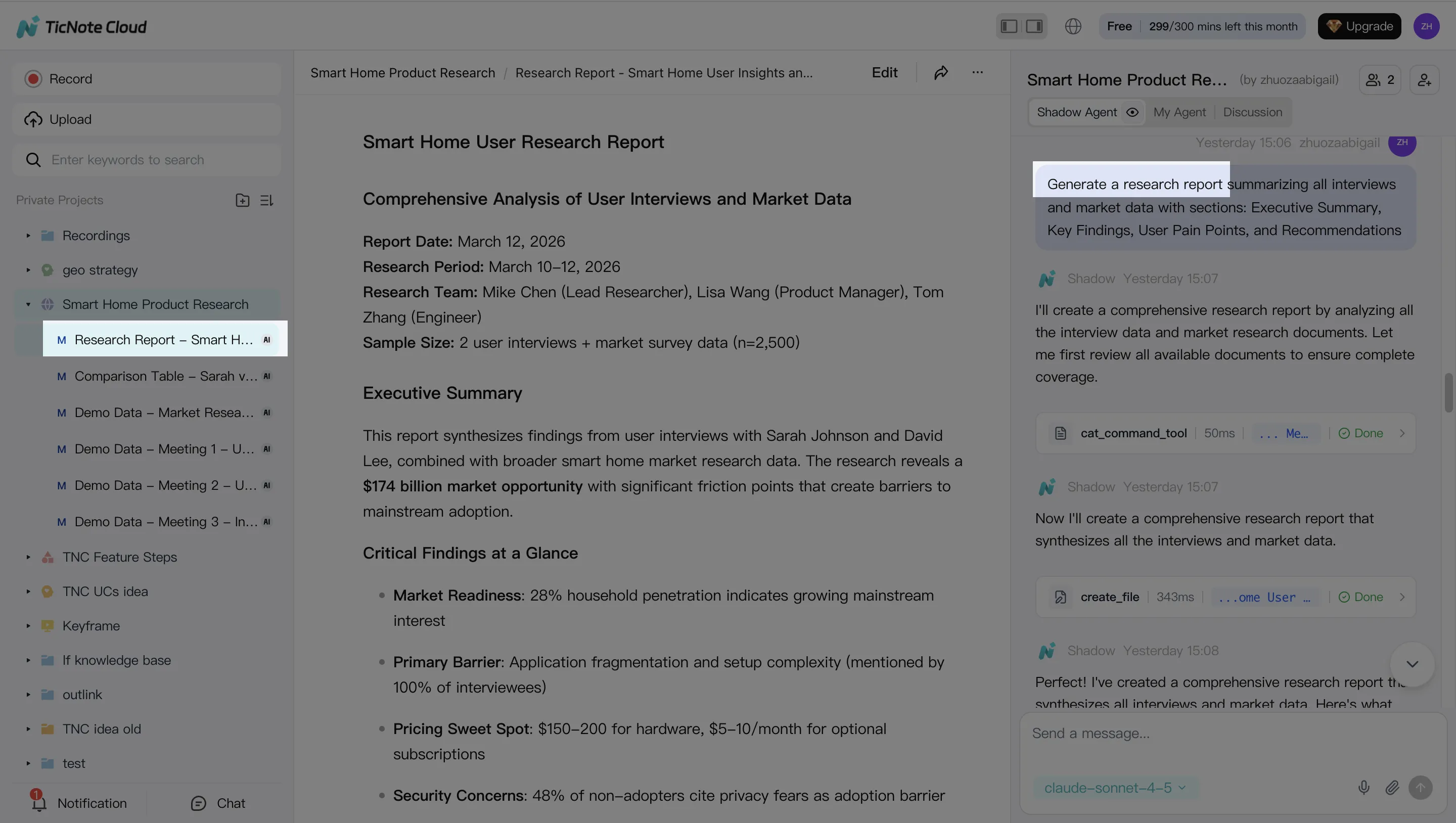
Step 3: Generate deliverables with Shadow AI (recaps, reports, and client-ready outputs)
Next, turn raw conversation into something you can ship. Create a short meeting recap (what happened + what's next), then generate a fuller deliverable when needed.
Common outputs teams generate from the same Project:
- A short recap + action list for internal follow-up
- A client-ready report or internal web presentation
- A podcast-style briefing or a mind map for fast alignment
The key detail: deliverables link back to sources, so reviewers can verify claims without re-listening to full recordings.
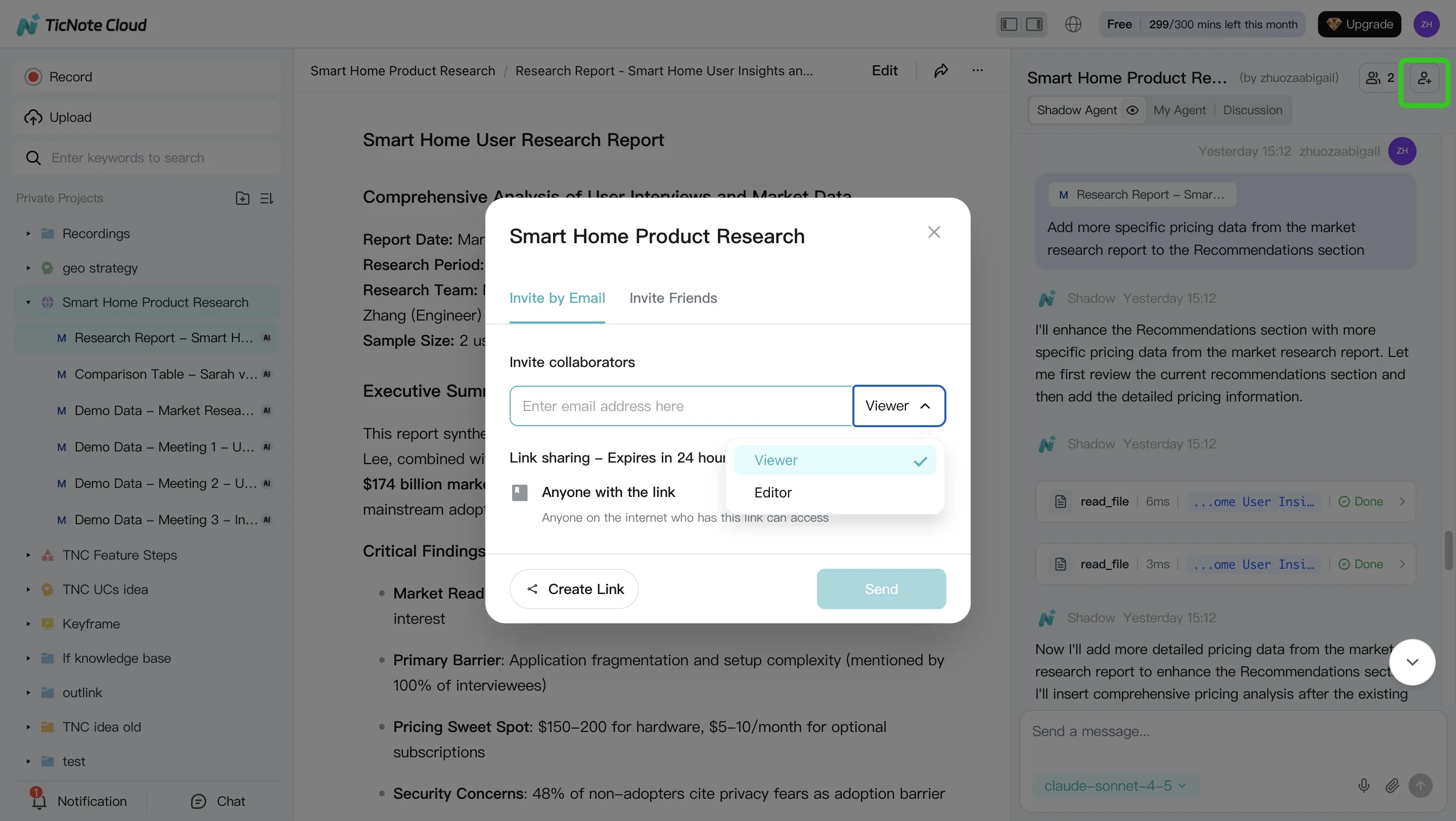
Step 4: Review, refine, and collaborate (without losing traceability)
Now do the part Teams struggles with: clean review cycles. Assign reviewers, capture comments, and ask Shadow AI to revise specific sections—while keeping a clear trail from output back to the underlying meeting moments.
Set basic permissions for real-world work:
- Owner for the Project lead
- Member for internal contributors
- Guest for external partners who need limited access
This is also where you prevent "summary drift" (when recaps slowly stop matching what was actually decided). Your team can jump from a paragraph to its source and confirm it fast.
Quick mobile app workflow (capture now, finish later)
On mobile, the workflow stays simple: enter or create a Project, add a recording or upload a file, then run a quick summary and action extraction. Later, open the same Project on the web to generate the final report or presentation and share it with the team.
Try TicNote Cloud for free and turn one meeting into a reusable Project asset.
What's the ROI of replacing Teams?
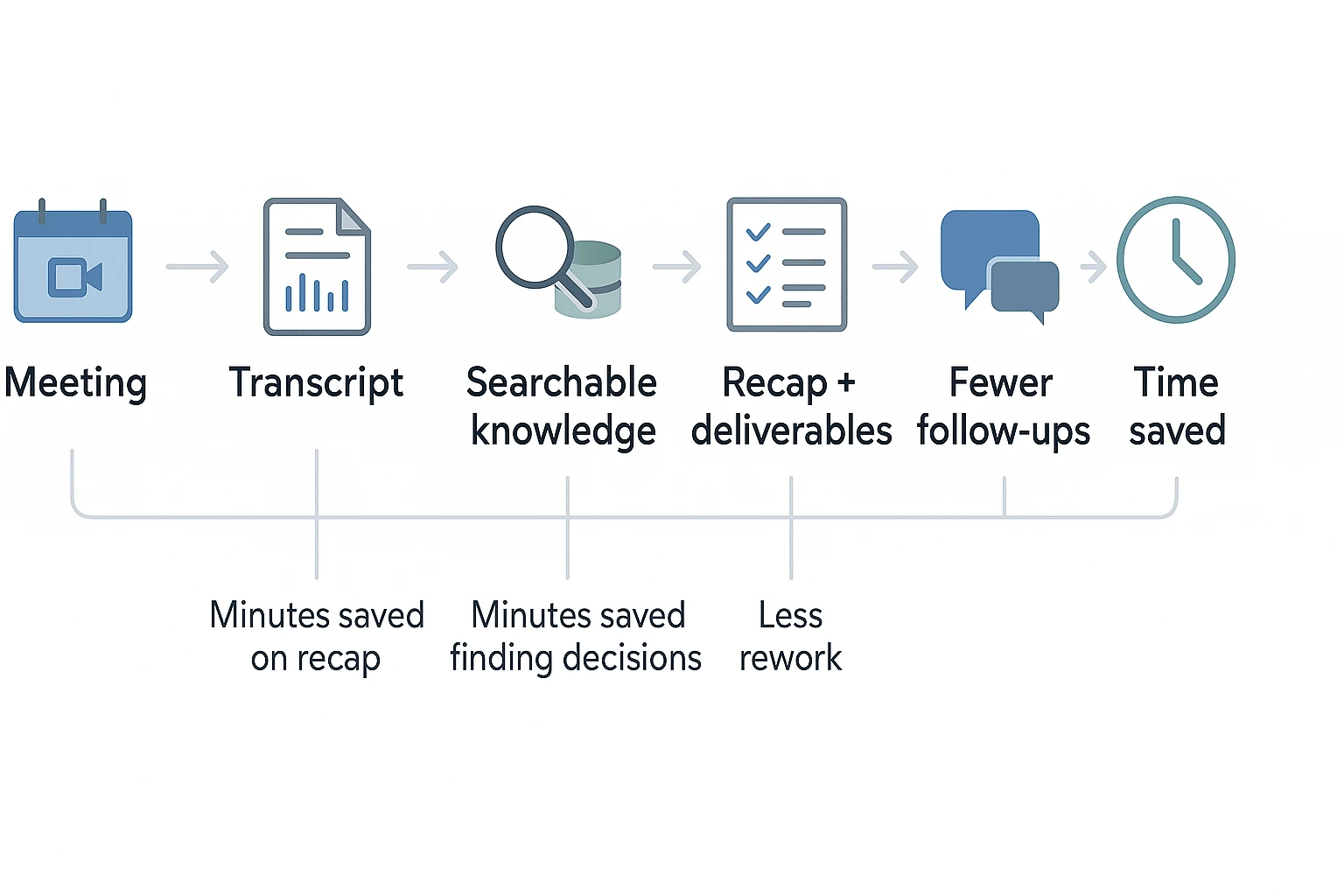
ROI is simplest when you treat meetings like a process: capture → find → act. If you're evaluating a Microsoft Teams alternative, the fastest payback usually comes from cutting recap time and stopping "lost decision" loops.
A plug-in formula you can drop into a spreadsheet
Use this basic model:
- Weekly savings ($) = Hours saved/week × Loaded hourly cost
- Hours saved/week =
- (Meetings/week × Avg attendees/meeting × Minutes saved per attendee) / 60
- (Minutes saved searching decisions/week) / 60
- (Minutes saved from rework/week) / 60
Define your inputs like this:
- Meetings/week: recurring team + cross-team calls you actually act on.
- Avg attendees/meeting: don't count "FYI" listeners if they never do follow-ups.
- Minutes saved per attendee: less recap, less action tracking, fewer copy/paste notes.
- Minutes saved searching decisions/week: less scrolling, fewer "what did we decide?" threads.
- Minutes saved from rework/week: fewer missed handoffs and repeated discussions.
A meeting knowledge layer (like TicNote Cloud) usually improves all three: faster recap from summaries, faster retrieval from searchable transcripts, and less rework because context stays attached to the source.
Example: weekly follow-up savings for a 20-person team
Assume a 20-person team runs 10 meetings/week. Average attendance is 8.
- Recap + action tracking savings: 5–8 minutes per attendee
- Time saved = 10 × 8 × (5–8) = 400–640 minutes/week (that's 6.7–10.7 hours)
- Decision search savings: 15 minutes/week per person who needs it (say 6 people)
- Time saved = 6 × 15 = 90 minutes/week (that's 1.5 hours)
Total time saved = 8.2–12.2 hours/week.
To convert to dollars, multiply by your loaded hourly cost (hourly pay + benefits + overhead). For example, at 60/hour, that's about 490–$730/week saved. Your range will move based on meeting load and how often decisions get revisited.
Where the savings really come from
Most teams see gains in a few repeatable buckets:
- Fewer "what did we decide?" messages and re-explaining context
- Faster handoffs (new owners can read the decision trail)
- Less copy/paste into docs, tickets, and status updates
- Fewer repeat conversations because the source is searchable
- Faster onboarding to an active project (new joiners can query past calls)
If meetings are already your bottleneck, start by fixing capture and reuse first. You can add TicNote Cloud alongside Teams to create searchable, cited meeting knowledge before you fully switch platforms. If you also use AI assistants for work, pair this with a privacy-first, citation-based AI tool stack so outputs stay grounded in your actual project sources.
Final thoughts: choosing the right alternative without regrets
The "best Microsoft Teams alternative" depends on what you're really replacing: chat, video calls, admin controls, or the outcomes of meetings (decisions, action items, and follow-ups). Most SMB–mid-market teams win by keeping risk low: change one surface at a time, measure impact, then expand.
Pick based on your real bottleneck
- If meetings drive your work and you need reusable knowledge plus fast deliverables, choose TicNote Cloud first. It's built to turn calls into searchable project memory, then into reports, decks, and clean follow-ups.
- If self-hosting is non-negotiable, choose Rocket.Chat or Mattermost.
- If you're Workspace-first and just want simple team chat, choose Google Chat.
If you're also rethinking docs and internal knowledge, pair this decision with a Notion alternative comparison so your notes, files, and meeting outputs don't fragment again.
To validate your choice, run the same test scenario for 7–14 days: track follow-up time per meeting and how fast people can retrieve a past decision. If those two numbers improve, you picked the right path.
Try TicNote Cloud for Free. If you need Enterprise basics like SSO and 24/7 support, choose "Contact sales."


