


 Extension
TL;DR: Voice Recorders buyers deciding between Pocket and better alternatives
If you're deciding after reading Hey Pocket reviews, the better pick for most work-heavy users is TicNote. It does more than capture audio: it gives real-time transcription, faster summaries, stronger cross-recording search, and more flexible hardware for meetings, calls, and field use.
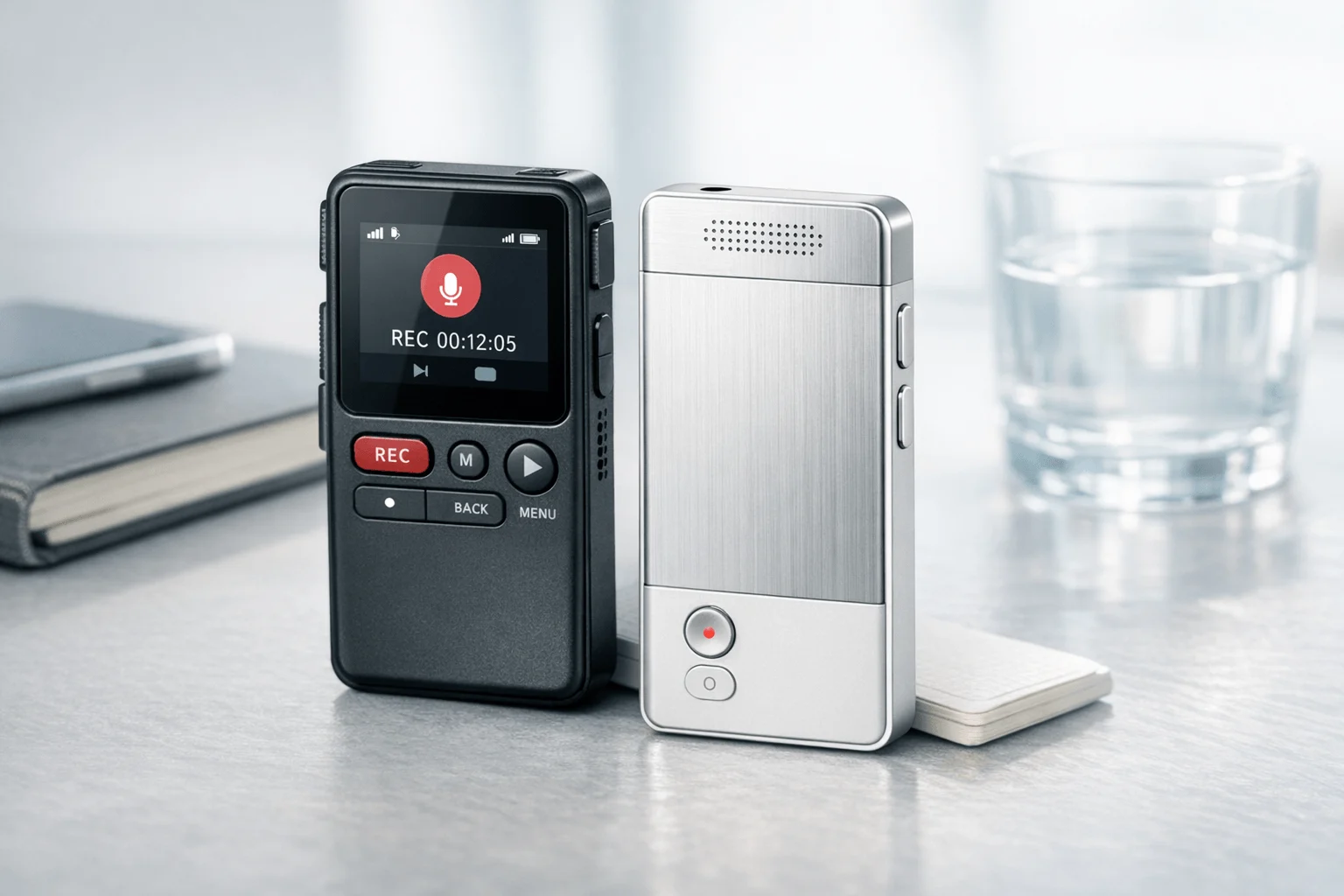
Pocket fits buyers who want a small dedicated recorder with simple controls, a 64GB device, and quick capture for one-on-one conversations. But its value is less clear when you need reliable multi-speaker labeling, smoother task follow-up, and deeper workflow features beyond basic notes.
Choose based on workload:
- Pick Pocket for simple, fast recording.
- Pick TicNote for a fuller AI note-taking system.
- Pick TicNote especially if you need live transcription, project-level search, and better post-meeting outputs.
What do Hey Pocket reviews reveal about real user experience?
Across forum threads, early buyer posts, and casual hands-on takes, the clearest pattern in Hey Pocket reviews is simple: people often like the hardware more than the workflow. Pocket makes a strong first impression with compact design, clean packaging, USB-C charging, and the ease of pressing one button instead of opening a phone app. Even some users who stop paying for premium features still seem happy using it as a basic recorder.
Buyers often praise the device itself
The positive feedback usually clusters around setup and daily carry:
- slim, dedicated hardware that feels more premium than a phone app
- secure phone attachment and easy portability
- quick first-time setup with little learning curve
- simple charging and familiar controls
- useful as a grab-and-go recorder for fast conversations
That matters because dedicated hardware removes friction. In busy workdays, saving even 20 to 30 seconds per meeting adds up fast.
The app experience gets more mixed
Where reviews turn negative is usually after the recording ends. The most common complaints include:
- speaker labels that feel unreliable or confusing
- weak search across older recordings
- awkward task and follow-up export steps
- calendar sync issues
- firmware update confusion
- transcription quality that can feel uneven from one recording to the next
For professionals, these aren't small annoyances. If action items are wrong, speaker names shift, or search can't find a past decision, the tool stops being a memory system and becomes another inbox to clean up. That is where buyer remorse tends to show up.
The biggest review gap is structured testing
Many public reviews still stop at first impressions. They rarely score Pocket across the situations that actually matter: phone calls, multi-speaker meetings, noisy rooms, long recordings, and long-term software value. That's why buyers often struggle to compare it fairly with alternatives. If you also want a broader Pocket vs Plaud comparison, that side-by-side view helps frame the hardware and software trade-offs before moving to stronger options like TicNote.
To make the decision clearer, the rest of this article uses a buyer-first scorecard covering five areas:
- hardware and portability
- recording performance in real scenarios
- transcription and search workflow
- pricing and long-term cost
- practical alternatives for heavier professional use
That framework matters because a recorder is only as good as the follow-up it saves.
How does Pocket perform in actual use cases for calls, meetings, and noisy rooms?
Based on scattered Hey Pocket reviews, Pocket looks most useful in simple recording situations: one-on-one chats, short client calls, and quick meetings where fast capture matters more than perfect output. That makes sense. A small recorder with one-button start can beat a phone app when you need a basic record fast, but real buyer value depends on what happens after the recording—accuracy, speaker separation, and whether the summary is still usable when the room gets messy.
Handle simple conversations first
In hallway chats, desk-side talks, and short calls, Pocket's hardware format is a real advantage. You press once and record. For many buyers, that's enough to reduce missed details.
Mixed user feedback points to a practical pattern:
- Pocket can work fine for recall, follow-ups, and rough transcripts
- Failed call capture may come from setup error, placement, or user misunderstanding
- Transcript quality seems more acceptable in quiet rooms than in echo-heavy spaces
- The device is more convincing for note recovery than for polished client-ready output
If your main goal is, "What did we decide?" Pocket may be good enough. If your goal is clean documentation you can reuse across projects, the bar is higher.
Test group meetings the way buyers actually work
For multi-speaker meetings, don't just ask whether audio was captured. Ask whether the result stays useful.
Use this quick test grid during the return window:
| Scenario | What to check | Pass signal |
| 1:1 conversation | Transcript clarity | Few missed key points |
| Phone or video call | Call capture reliability | Full conversation recorded |
| 4-8 person meeting | Speaker labels | Low confusion between speakers |
| Large room | Distance pickup | Action items still accurate |
| Noisy café or hallway | Noise handling | Summary remains readable |
| 60-120 min session | Battery and sync | No upload failure or app crash |
In real buying terms, three outputs matter most:
- Can it separate speakers well enough?
- Can it pull out tasks and decisions?
- Can you trust the summary when the raw transcript is imperfect?
This is where stronger AI recorder standards matter. Devices with real-time transcription, better workflow tools, and richer post-meeting search tend to create more practical value. If you want a broader benchmark, this guide to AI recorders for meetings and calls gives a more useful comparison lens than single-scenario anecdotes.
Check long-session reliability before you keep it
Pocket claims a 4-day battery, but buyers should validate real endurance in their own workflow. Test at least one long session, one noisy session, and one call scenario.
Use this mini-checklist:
- Record a full 90-minute meeting
- Confirm the file uploads without manual fixes
- Check whether the app syncs quickly and consistently
- Review whether firmware feels stable over several days
- See what remains useful without paying for premium AI tools
- Verify if transcripts alone justify the purchase
That last point matters. If you skip the Pro plan, Pocket may still be useful as a capture-first device. But buyers who want stronger live transcription, project-wide search, and more complete meeting outputs may find dedicated alternatives like TicNote more practical over time.
Pocket vs TicNote: which AI voice recorder gives more practical value?
For buyers reading Hey Pocket reviews, the real question isn't which device can record audio. It's which one turns recordings into useful work fastest. Pocket has a clean dedicated-device pitch, but TicNote offers more hardware choices, stronger live workflow options, and a broader system for people who handle meetings, calls, interviews, and ongoing projects every week.
Match the hardware to the job
Pocket keeps things simple: one compact device, 64GB storage, a claimed 15m range, and no required subscription for basic use. That works well for buyers who want one screen-free recorder they can carry all day.
TicNote gives you more ways to fit recording into real life:
- TicNote Card: wallet-sized, 3mm thin, 64GB, built for in-room meetings and daily carry
- TicNote Card Lite: lower-cost, one-button option for quick capture without mode switching
- TicNote Pods 4G: best for calls, commuting, and travel because the case can upload without a phone nearby
- TicNote Pods Wi-Fi: good for users who want earbud-based capture without 4G limits
That lineup matters. A manager in conference rooms needs different convenience than a consultant taking calls between sites. A journalist may want a slim recorder for interviews, while a traveler may prefer earbuds that capture calls and room audio in one system.
Judge workflow, not just recording
Pocket covers the core promise well: record, transcribe, summarize, and search later. For light users, that may be enough.
TicNote is stronger when speed after the meeting matters. Its workflow includes:
- real-time transcription on supported setups
- automatic summaries when recording stops
- to-do and action-item extraction
- highlights, annotations, and synced photos during live capture
- translation and bilingual subtitles in relevant use cases
For professionals, that difference is practical. If you leave a meeting with transcript, recap, and next steps already organized, you save time twice: once on note-taking, and again on follow-up.
Compare memory across recordings
This is where value starts to widen.
Pocket is useful if you mainly search within past conversations and want AI help on individual recordings. TicNote is better for ongoing knowledge work because it treats meetings as connected assets, not isolated files.
| Feature | TicNote | |
| Device formats | Single device | Card, Card Lite, Pods 4G, Pods Wi-Fi |
| Core transcripts and summaries | Yes | Yes |
| Real-time transcription | Limited public positioning | Yes on supported workflows |
| Post-meeting action items | Yes | Yes |
| Search across recordings | Yes | Yes |
| Project knowledge base | Not a core public differentiator | Yes |
| Generate reports and docs | Limited public positioning | Yes |
| Cross-project AI chat | Not a core public differentiator | Yes |
TicNote's stronger value comes after week 1. You can ask AI questions across recordings, group content by project, and turn conversations into reports or formatted documents. If you want a broader benchmark on recurring plan costs, this Plaud pricing breakdown is useful for comparing device-plus-software value across the category.
Look at total cost, not sticker price
Pocket's listed device price of about $129 is attractive, especially since basic use doesn't require a paid plan. But buyers should still ask three things:
- How many monthly transcription minutes are included?
- Which useful AI features sit behind Pro?
- What happens to workflow quality if you never upgrade?
TicNote starts at 129.99 for Card Lite and 159.99 for Card, with a hardware-included Plus plan that adds 600 minutes per month and 1,500 monthly credits. For recurring professional use, that's a fuller bundle. Pocket may deliver better value if you mainly want hardware convenience and simple capture. TicNote delivers more practical value for heavy meeting volume, repeat follow-ups, and teams that need searchable project memory, faster summaries, and usable outputs right away.
Which TicNote features are exclusive or hard to match elsewhere?
The biggest gap in many Hey Pocket reviews is not basic recording. It's what happens during and after the conversation. TicNote stands out when buyers need live capture, searchable project memory, and faster post-meeting output instead of waiting for a file to finish processing.
Use live transcription when the meeting can't wait
Some features matter only after a meeting. Others change the meeting itself.
TicNote's stronger edge is real-time help on supported languages, including:
- real-time transcription
- real-time translation with bilingual subtitles
- live highlighting and annotation
- photo-to-transcript syncing
That matters for managers, consultants, and students who need to mark decisions while people are still talking. A highlighted line is easier to find than a 60-minute transcript later. Photo syncing is also practical: you can attach a whiteboard shot or slide image to the exact moment it was discussed.
Search across recordings, not just inside one file
This is where the workflow becomes more useful over time.
TicNote lets users ask AI questions across recordings and projects, not only within a single session. That means you can trace who promised what, find when a decision changed, or pull every mention of a client issue across weeks of meetings. In plain terms, it turns separate recordings into a project knowledge base.
That's a meaningful difference for buyers frustrated by tools that summarize one meeting well but don't build long-term memory. If you want a broader view of connected AI workflows, this guide to linking voice recordings with AI assistants is a useful next read.
Match the feature tier to the job
Not every buyer needs the same level of speed.
| User need | Best-fit TicNote feature |
| Follow a meeting live | Real-time transcription and annotation |
| Support bilingual conversations | Real-time translation with subtitles |
| Review decisions across weeks | Ask-AI search across projects |
| Get output fast after meetings | Auto summary and to-do list |
| Need insight before the meeting ends | Pods 4G Live Summary |
| Need finished output right away | Pods 4G Quick Summary and document generation |
The clearest model-specific advantage is on TicNote Pods 4G. Live Summary works during recording, and Quick Summary appears right after recording stops. Add document generation for notes, reports, and formatted outputs, and the value is obvious for field teams, sales reps, and project leads who move from one meeting to the next with no admin time left.
How should buyers judge privacy, consent, and cloud security in voice recorders?
Privacy should be a buying filter, not a footnote. Many Hey Pocket reviews focus on features and convenience, but serious buyers should first check whether a recorder fits their legal, workplace, and security requirements. For regulated teams, one weak privacy policy can matter more than a better summary feature.
Verify consent rules before you record
Start with consent. In the U.S., recording rules can vary by state, workplace policy, and meeting context. Under 18 U.S. Code § 2511 - Interception and disclosure of wire, oral, or electronic communications prohibited, one party to the communication may give prior consent in some cases, but that is not a universal green light for every state or employer policy.
Use this quick check before buying:
- Confirm whether your state or country requires one-party or all-party consent
- Check employer, client, and school disclosure rules
- Look for visible recording indicators or clear verbal disclosure options
- Avoid hidden or ambiguous recording in sensitive settings
Check cloud and AI-data terms line by line
Ask five direct questions:
- Is audio encrypted in transit and at rest?
- Does the vendor use your recordings to train AI models?
- Where is the cloud hosted?
- Can the device record offline or locally?
- Are deletion, export, and access controls documented clearly?
TicNote, for example, says recordings and transcripts are encrypted, data is not used to train AI models, and offline recording is available. Those are strong claims, but buyers should verify them in policies, admin controls, and retention settings before trusting any vendor.
Use a practical privacy checklist
For healthcare, legal, education, and consulting, use this framework:
- Consent compliance
- Encryption details
- Retention and deletion controls
- Admin and user access visibility
- Optional sync, local capture, or offline workflows
If a vendor cannot answer those five areas clearly, skip it.
Who should buy Pocket, and who should choose TicNote instead?
If you've read a range of Hey Pocket reviews, the pattern is clear: Pocket fits buyers who want compact hardware first and a simple transcript record second. It's a good match for quick capture, one-button use, and lightweight follow-up when you don't need a deeper AI workspace for search, document generation, or project-level knowledge.
Choose Pocket if simplicity matters most
Pocket makes the most sense for buyers who value:
- small dedicated hardware
- fast one-press recording
- basic notes and action items
- simple conversations over complex workflows
That tradeoff is real. You may get the convenience of easy capture, but accept a lighter software layer after the recording ends.
Choose the right TicNote model by work style
TicNote is the stronger fit when recording is only step one. It works better for buyers who also need searchable transcripts, summaries, action items, and a system that keeps knowledge useful across meetings.
- TicNote Card: best for professionals who want a premium, wallet-friendly recorder with 64GB storage and real-time transcription support
- TicNote Card Lite: best for budget-conscious buyers who still want core AI note taker features at $129.99
- TicNote Pods Wi-Fi: best for users who usually keep a phone nearby and want earbuds plus sync-based workflows
- TicNote Pods 4G: best for field-heavy professionals who want phone-free recording, live upload, and live summary during meetings
Match the device to the job
| Use case | Better fit |
| In-person meetings | TicNote Card |
| Frequent calls | TicNote Pods 4G |
| Cross-meeting AI search | TicNote |
| Privacy-sensitive work | TicNote |
| Travel with phone nearby | TicNote Pods Wi-Fi |
| Lowest upfront cost | Pocket or TicNote Card Lite |
For most commercial buyers, TicNote is the better all-around choice because it solves more of the post-recording workflow. If you also want ideas for portable form factors, this guide to wearable note-taking devices is a useful next read.
Final thoughts
Based on the themes that appear across Hey Pocket reviews, Pocket does have clear strengths. It looks easy to carry, fast to start, and practical for buyers who want a dedicated recorder before they care about deeper workflow features.
Still, the stronger buying decision comes from looking at the full system, not just the hardware.
- Recording quality in mixed environments matters
- Search across past conversations matters
- Summary and action-item depth matter
- Free versus paid value matters
- Privacy and cloud controls matter
When you judge all of those together, TicNote stands out as the more complete option for meetings, calls, and long-term knowledge capture. It does more than save audio. It helps turn conversations into searchable, reusable work.



