


 Extension
TL;DR: A skill agent can turn project conversations into an execution-ready plan
To try TicNote Cloud for free while learning how to create a project plan, use AI to turn kickoff calls, briefs, research, decisions, and constraints into a draft. The plan is the operating blueprint for scope, goals, deliverables, owners, timeline, budget, risks, decisions, and approval.
Context gets scattered across transcripts, docs, and chat. That creates rework when teams start building. TicNote Cloud keeps meeting context connected, so accountable owners can validate assumptions, then convert the draft into WBS, milestones, dependencies, risk registers, change control, and status rhythms.
How to create a project plan with AI without losing control
Learning how to create a project plan with AI starts with one rule: AI can draft the plan, but people own the decisions. Use it to turn messy inputs into structure, then apply judgment before the plan becomes the baseline for work.
What a project plan must decide
A project plan is a living reference point, not just a schedule. It tells the team what matters, what is excluded, who owns each part, and how changes will be handled.
At minimum, your plan should decide:
- Purpose and business reason
- SMART goals and success metrics
- Scope, exclusions, and assumptions
- Deliverables and acceptance criteria
- Milestones and key dependencies
- Owners, roles, and approval paths
- Budget, resource plan, and timeline
- Risks, issues, and mitigation actions
- Communication rhythm and quality standards
- Final sponsor approval
A lightweight plan may be enough for a small campaign or internal workflow. A full project management plan template adds more control: quality, procurement, governance, RAID (risks, assumptions, issues, dependencies), and change control.
Where AI speeds up planning
AI is strongest when the inputs are scattered. It can summarize kickoff calls, extract decisions, compare stakeholder needs, draft scope statements, turn notes into WBS (work breakdown structure) items, create first-pass risk lists, and format reports.
In TicNote Cloud, for example, a Project can hold meeting transcripts, uploaded docs, and research files. Shadow AI can then search across those files with citations, so the draft plan is tied back to the source material instead of a generic chat answer.
Text workflow:
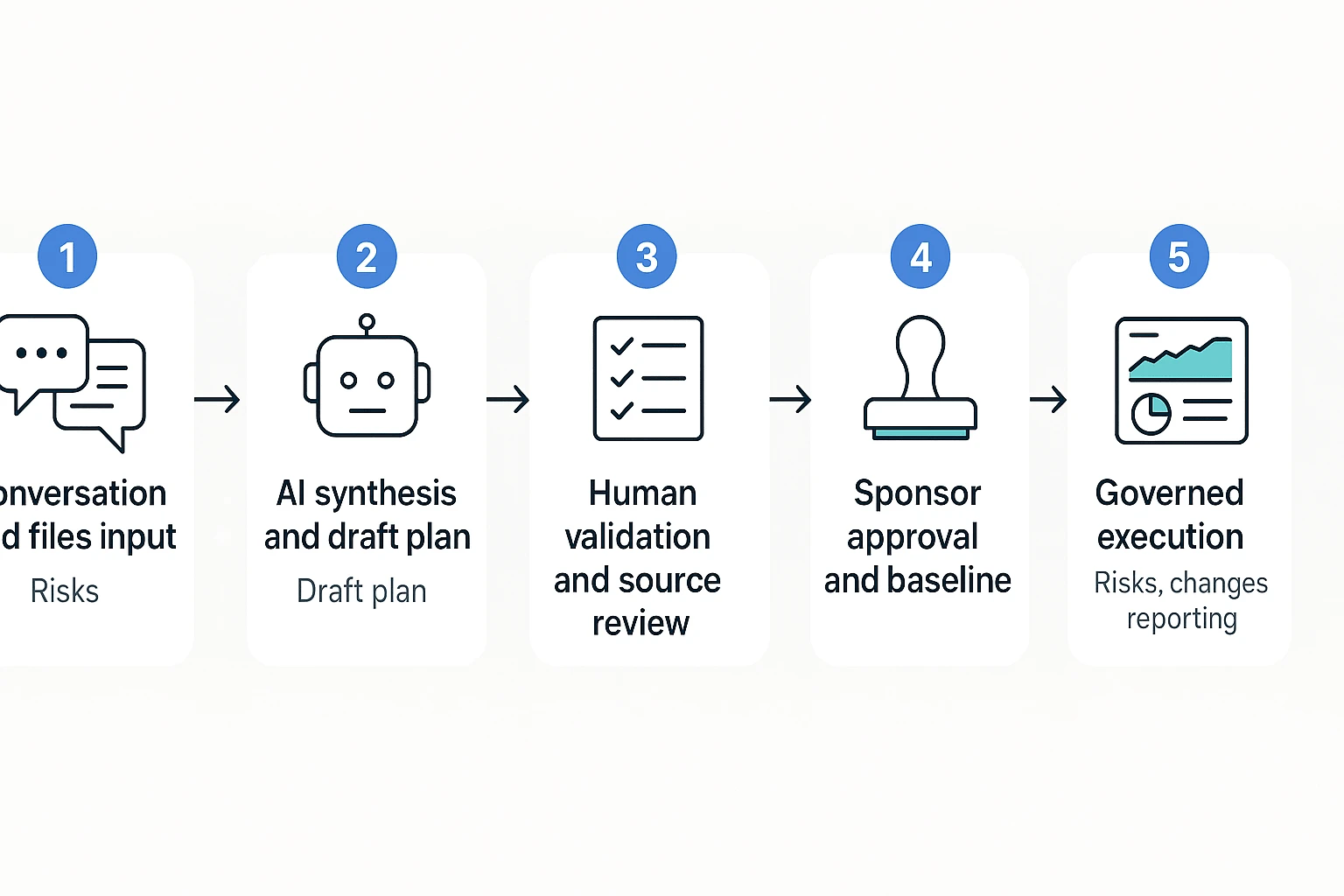
Conversation + files → AI synthesis → draft plan → owner review → approved baseline → governed execution
That sequence keeps speed and control separate. AI creates the first draft. The project manager tests it.
What humans still need to approve
AI should not decide business priority, budget tradeoffs, acceptance criteria, risk appetite, or sign-off authority. Those choices need context, accountability, and sometimes politics.
Before you approve the baseline, run this PM review checklist:
- Verify every major claim against source notes or documents.
- Challenge estimates, especially dates and effort.
- Confirm each owner has capacity and authority.
- Document assumptions before work starts.
- Get sponsor approval in writing.
This is the control point. Once approved, the plan becomes the shared baseline for execution, reporting, and change decisions.
Start with the planning inputs: goals, scope, stakeholders, and constraints
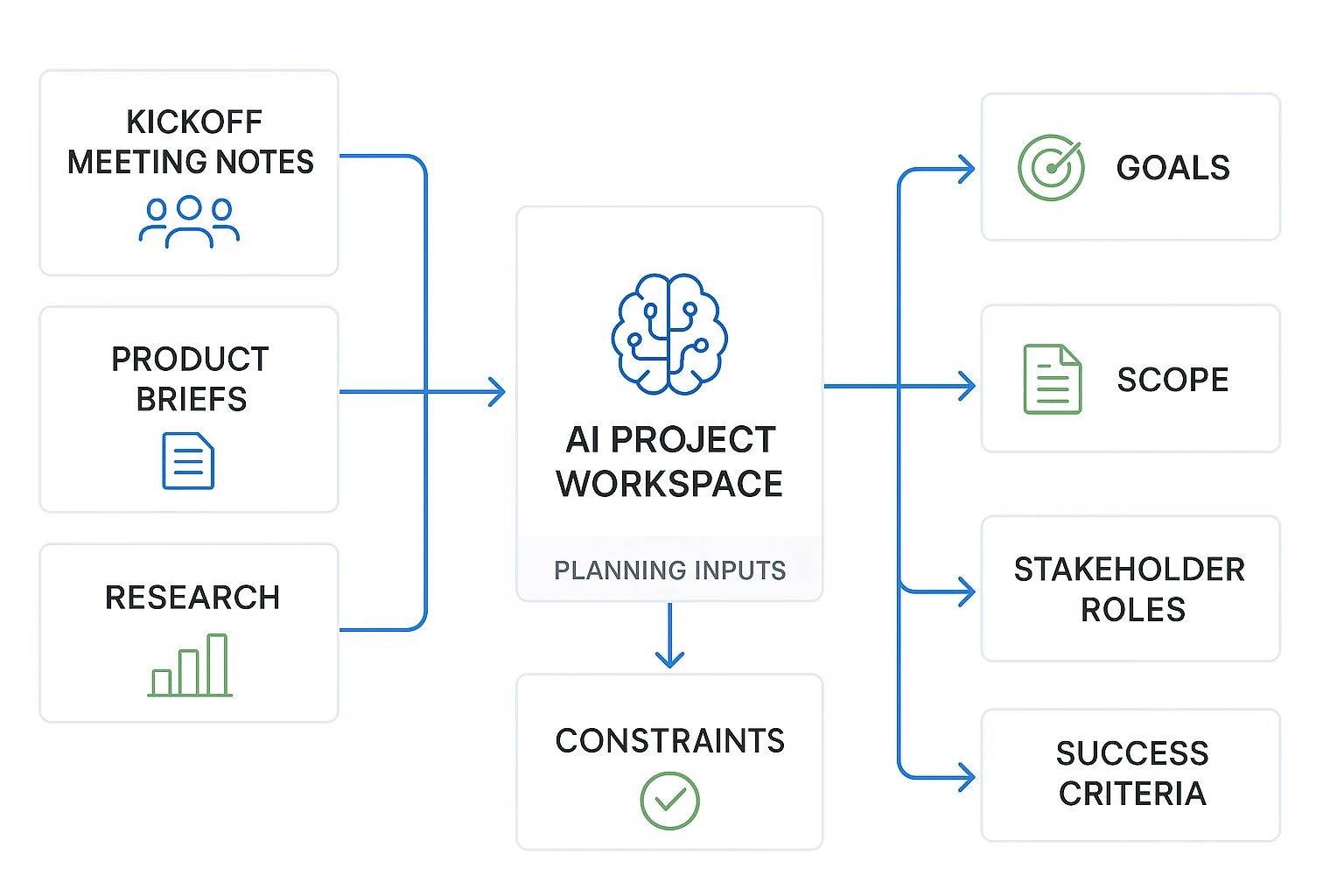
Before you decide how to create a project plan, collect the raw inputs that explain why the work exists. A strong plan starts with facts: the goal, the limits, the people, and the decisions already made.
Capture the kickoff conversation
Start by gathering every planning source in one place:
- Kickoff meeting notes and recordings
- Stakeholder interviews
- Product briefs or strategy docs
- Prior decisions and approval notes
- Customer research and support themes
- Budget limits, legal constraints, and compliance needs
- Existing timelines, roadmaps, and contracts
TicNote Cloud helps here because it can transcribe planning meetings, create AI summaries, and preserve editable transcripts inside Projects. That matters later. When someone asks, "Why did we choose this scope?", Shadow AI can search the project files and point back to the source conversation with citations.
If the project depends on market timing or positioning, connect external inputs too. For example, add notes from competitor research tools before locking the launch goal or feature priority.
Define what is in scope and out of scope
Use this copy-ready scope block before you build tasks:
- Problem statement: What problem are we solving?
- Goal: What outcome should the project create?
- Success metrics: How will we measure done?
- Included work: What tasks, deliverables, or teams are covered?
- Excluded work: What will not be handled in this project?
- Assumptions: What must be true for the plan to work?
- Constraints: What limits budget, timing, staffing, tools, or approvals?
- Open questions: What still needs a decision?
Make goals SMART: specific, measurable, achievable, relevant, and time-bound. Use practical KPIs such as budget variance, cycle time, launch readiness, adoption target, or quality threshold. Keep every metric realistic and approved by stakeholders before it becomes part of the baseline.
Map stakeholders with RACI or DACI
Stakeholder mapping defines who decides, who contributes, and who only needs updates. Use RACI (responsible, accountable, consulted, informed) or DACI (driver, approver, contributors, informed) for fast alignment.
| Role | Planning responsibility |
| Sponsor | Funds the project and approves business value |
| Project manager | Builds the plan and manages execution rhythm |
| Accountable owner | Owns final delivery outcome |
| Responsible contributors | Complete assigned work packages |
| Consulted experts | Provide legal, technical, customer, or market input |
| Informed stakeholders | Receive updates but do not steer scope |
| Decision maker | Resolves trade-offs and approves changes |
Set feedback boundaries early. Influential stakeholders should be heard, but not every comment should become new work. Require scope changes to include impact on timeline, budget, and success metrics.
Turn ideas into work: deliverables, WBS, milestones, and dependencies
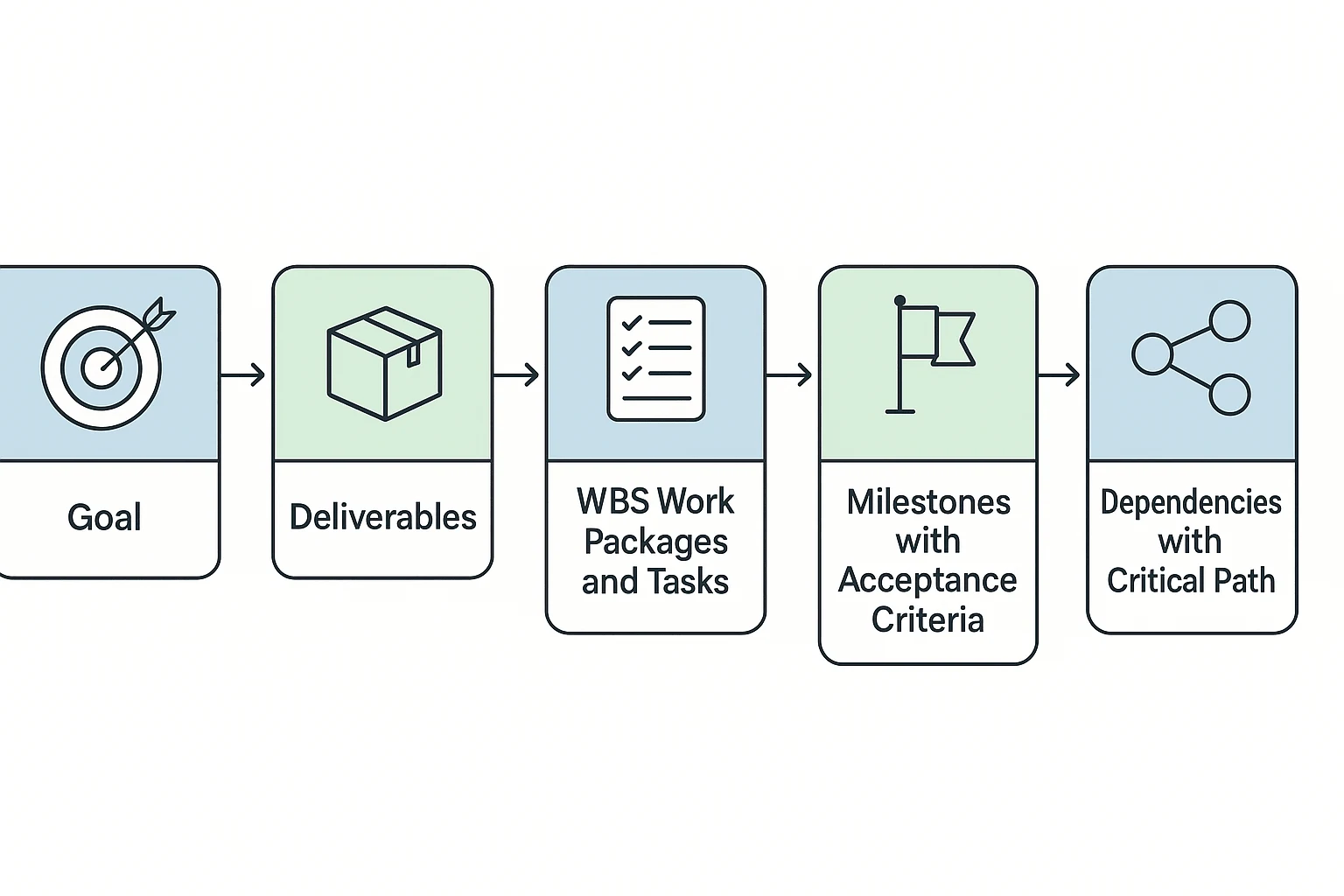
Once the goal is clear, the next move in how to create a project plan is to turn intent into work. AI can help sort messy kickoff notes into deliverables, tasks, risks, and dates, but the project manager still owns the logic: what must be delivered, what "done" means, and what depends on what.
Break outcomes into a work breakdown structure
A work breakdown structure (WBS) is a delivery map that breaks project scope into smaller pieces. Use the 100% rule: include all work needed to deliver the approved scope, but don't add extra work just because it might be useful.
A practical flow looks like this:
- Outcome: Launch a customer onboarding portal.
- Deliverables: UX design, login workflow, help content, analytics setup.
- Work packages: Create wireframes, build authentication, write FAQ pages.
- Tasks: Draft copy, review design, configure tracking, run QA.
For a deeper walkthrough, use this WBS 100% rule guide before you finalize the task list.
Agile teams can convert work packages into epics, stories, and sprint tasks. Waterfall teams can group them by phase. Hybrid teams often plan milestones up front, then manage detailed tasks in short cycles.
Identify milestones and acceptance criteria
Milestones are decision or delivery checkpoints, not ordinary tasks. They mark progress that stakeholders can verify.
Pair each milestone with acceptance criteria so "done" is clear:
- Scope approved: Sponsor signs off on objectives, exclusions, budget range, and success metrics.
- Creative approved: Final design assets meet brand rules and legal review is complete.
- Prototype tested: Five target users complete the core flow with no blocker issues.
- Launch checklist complete: QA, analytics, support docs, and rollback plan are approved.
- Customer handoff done: Training, documentation, and ownership transfer are complete.
Map dependencies and the likely critical path
Dependencies show what must happen before other work can move. Common types include finish-to-start, shared resource, vendor approval, technical integration, and stakeholder decision.
The critical path is the longest chain of dependent work that controls the finish date. Use a Gantt chart when deadlines are fixed and sequencing matters. Use a Kanban board when work is flow-based and priorities change often.
Decide between a lightweight plan and a full project management plan template
Choose the plan depth based on risk, team size, and governance needs.
| Planning format | Best fit | What to include |
| One-page plan | Small work with 1–5 people | Goal, scope, owner, milestones, risks |
| Project planning template Excel | Simple task, budget, and dependency tracking | Task list, dates, costs, status, dependencies |
| Full project management plan template | Regulated, cross-functional, or high-risk projects | Scope, schedule, budget baseline, risk plan, change control, communications |
Build a realistic timeline, resource plan, and budget baseline
A plan only works when time, people, and money line up. When you learn how to create a project plan, treat schedule, resourcing, and budget as one connected baseline, not three separate guesses. AI can speed the setup, but owners must validate the numbers.
Estimate effort from historical context and team input
Use bottom-up estimating: ask each task owner to estimate their work, then roll those estimates into the schedule. This is slower than guessing, but it exposes overload early.
Use analogous estimating when speed matters. Compare the work to a similar past project, then adjust for team size, scope, risk, and complexity.
In TicNote Cloud, Shadow AI can organize estimates from kickoff calls, older plans, imported docs, and owner comments inside one Project. That gives you a cited draft. Final effort estimates still belong to the people doing the work.
Separate fixed costs, variable costs, and contingency
Split budget fields into labor, software, vendors, materials, travel, review cycles, and reserve. The GAO Cost Estimating and Assessment Guide (2009) states that "A high-quality cost estimate is comprehensive, well-documented, accurate, and credible." Keep assumptions visible, especially in a project planning template Excel file.
| task | owner | duration | cost | dependency | confidence level | assumption |
| Finalize launch brief | PM | 3 days | $1,200 | Kickoff notes | High | Stakeholders respond in 24 hours |
| Build landing page | Web lead | 8 days | $4,800 | Approved copy | Medium | No new design system work |
| QA and legal review | Ops | 5 days | $2,000 | Page complete | Low | One review cycle only |
Set the baseline and reforecast rules
A schedule baseline is the approved timeline. A budget baseline is the approved cost plan. A scope baseline is the agreed work, deliverables, and exclusions.
Reforecast when there is an approved change request, missed milestone, major dependency shift, budget variance threshold, or new compliance requirement. The plan should stay alive. But every change needs an owner, reason, approval date, and visible impact on time, cost, or scope.
Project-level skill agent workflow for creating a governed plan
A project-level skill agent is an AI assistant that works inside a defined project space, using your files and meeting context to produce structured work. In TicNote Cloud, this gives teams a practical way to learn how to create a project plan from real planning inputs, not a blank template.
Add a project planning skill agent
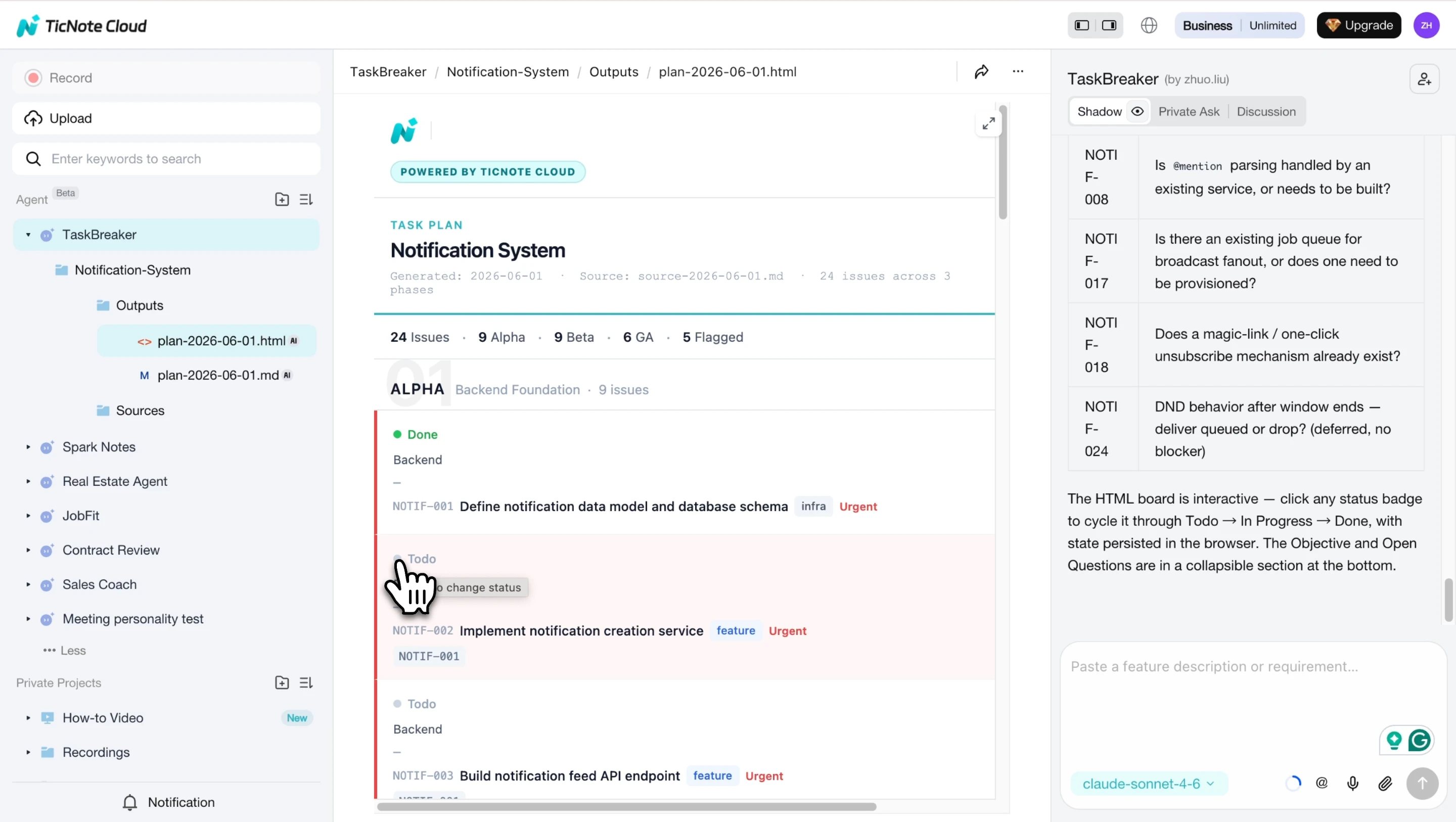
Start in TicNote Cloud on the Web. Open your workspace, choose Add Agent, then browse the Skill Agent library and select TaskBreaker.
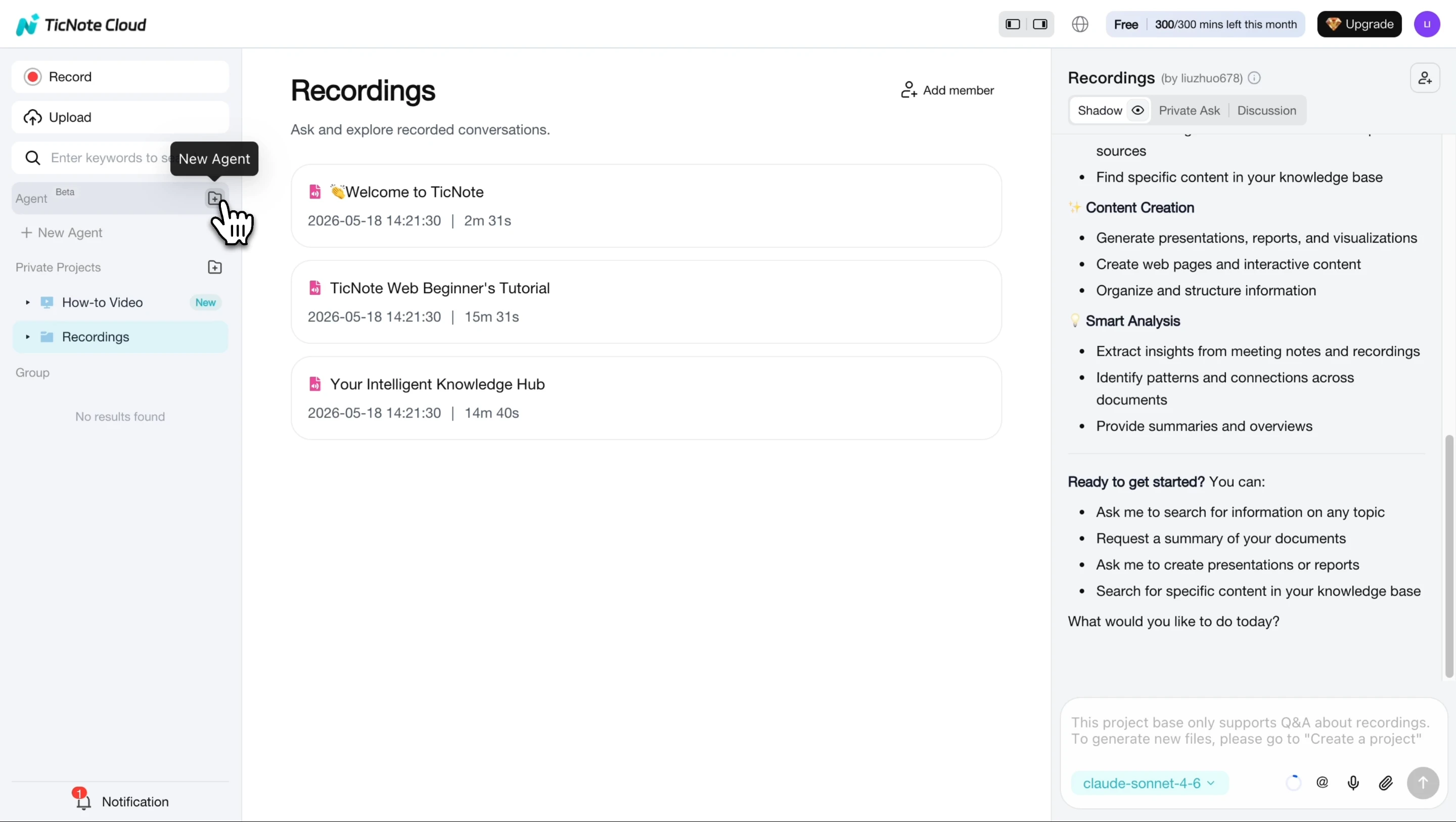
TaskBreaker is built for product managers, engineering leads, and founders who need sprint-ready issues from PRDs, feature specs, meeting recordings, or transcripts. Once added, it appears in your agent list, so you can use it without setup.
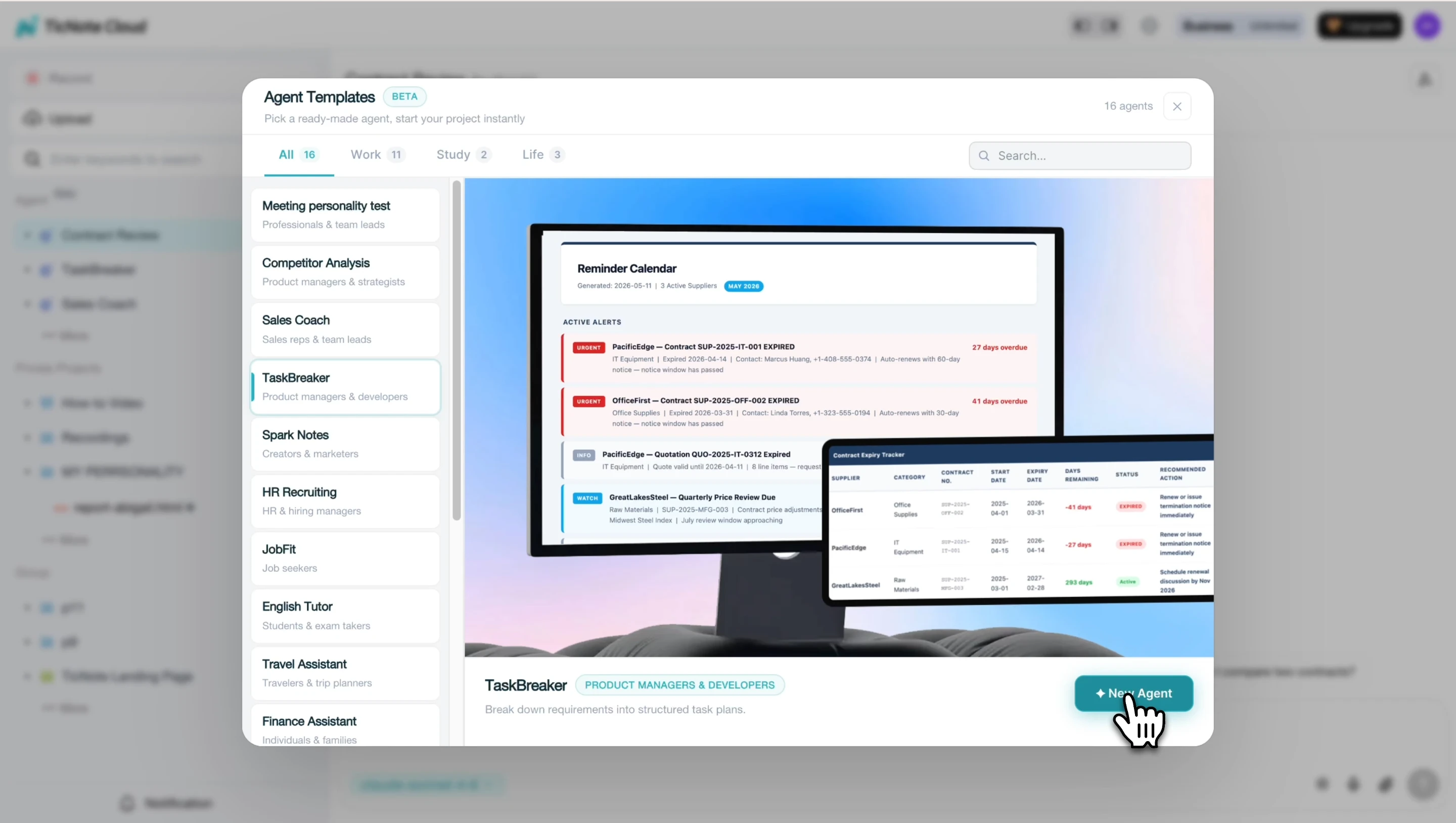
This is different from pasting notes into a generic chatbot. The agent works from your project material and turns requirements into execution units: title, description, priority, label, phase, dependencies, and testable acceptance criteria.
Paste or upload your product document
Next, provide the source material. You can paste or upload a PRD, product spec, strategy doc, meeting transcript, or recording. The input doesn't need rigid formatting.
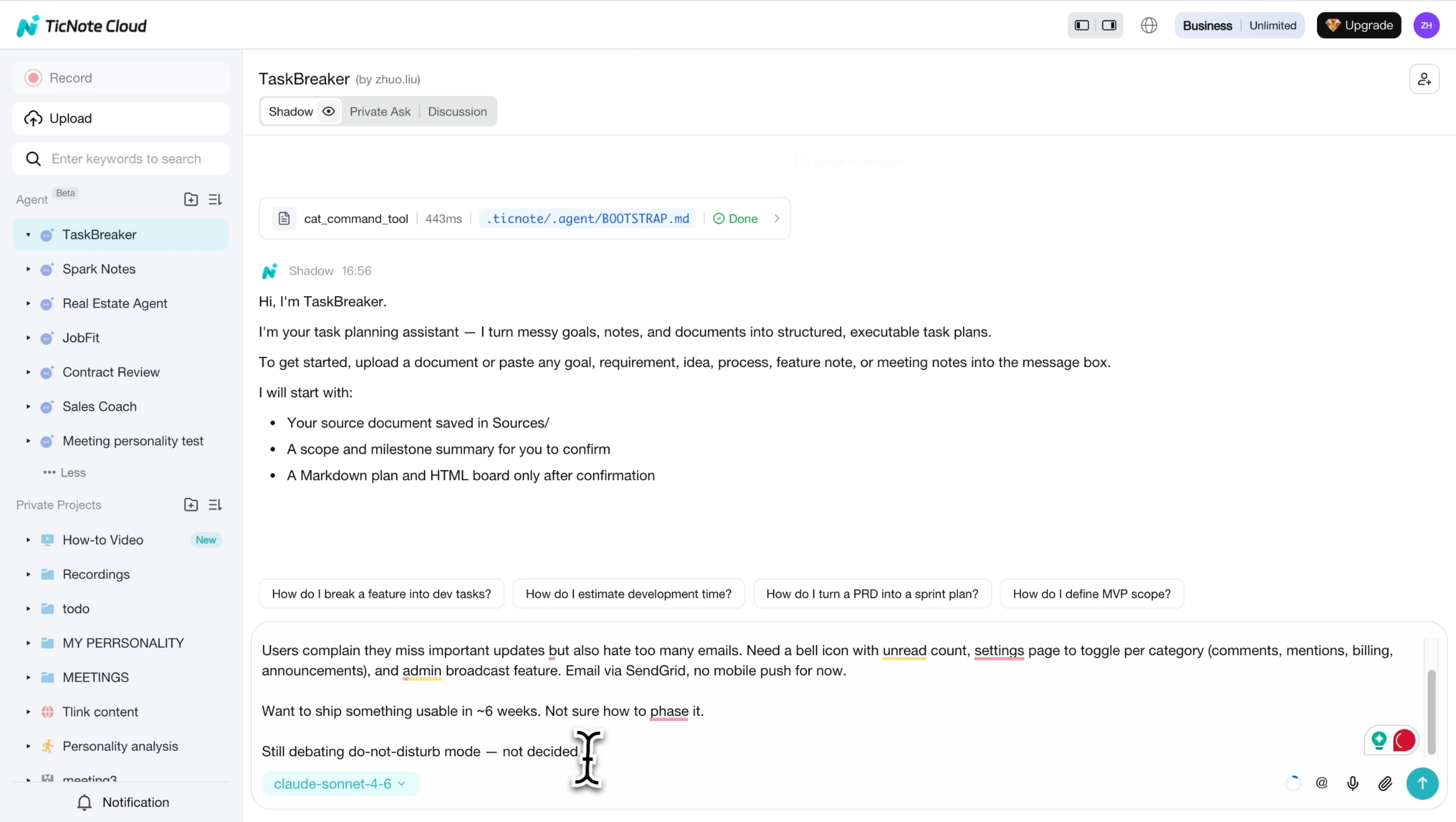
Before generating work items, the agent should confirm the planning frame: objective, scope in, scope out, team roles, milestones, and open questions. This matters because unclear requirements create rework. If a feature, owner, or deadline is vague, the agent can flag it with [NEEDS CLARIFICATION] before it becomes engineering debt.
For teams improving their broader meeting system, this step pairs well with a before-during-after meeting workflow, because better meeting capture produces cleaner project plans.
Review, refine, and import the project plan
Now review the generated summary before approving the plan. Confirm:
- Scope, goals, and proposed milestones
- Labels, priorities, phases, and dependencies
- Acceptance criteria for each issue
- Whether each issue is small enough for a sprint
- Any open questions raised by the agent
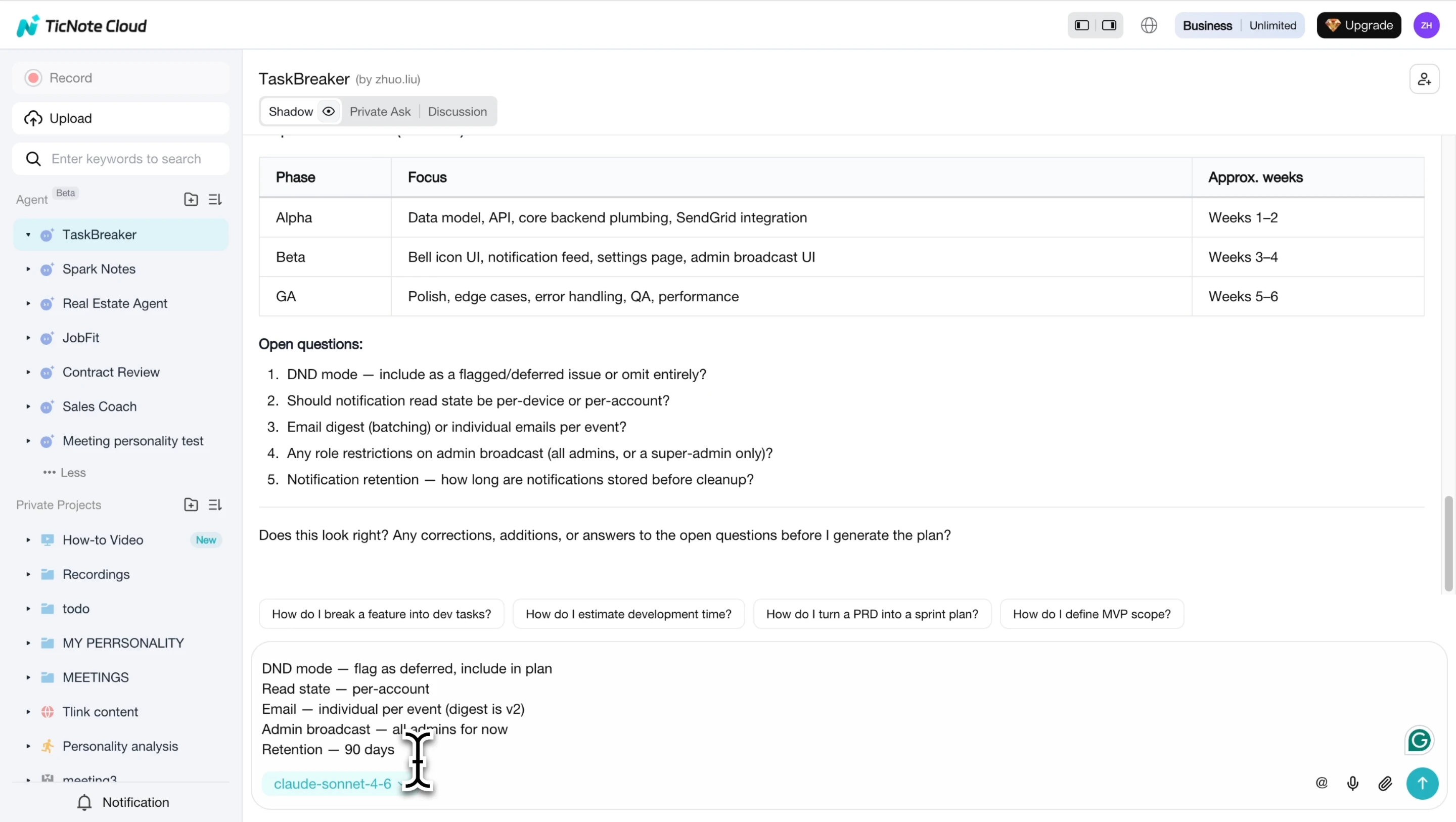
After you answer clarifying questions, export the Markdown project plan and CSV. The CSV is ready to import into Jira, Linear, GitHub Issues, or another issue tracker. You also get an interactive HTML board for tracking work across phases.
Use the app workflow to capture planning context on the go
Planning doesn't only happen in formal kickoff calls. Mobile users can record quick discussions, add notes, or save new planning context in the TicNote Cloud app, then attach it to the relevant Project. Later, that material can feed the Web workflow, where TaskBreaker turns it into structured issues for review and import.
Govern execution with risks, change control, and communication rhythms
Governance is where how to create a project plan becomes day-to-day control. It gives the team a clear way to handle uncertainty, approve changes, and keep stakeholders aligned without turning every update into a crisis.
Create a risk register with probability, impact, owner, mitigation, and contingency
ISO 31000:2018 — Risk management — Guidelines defines 'risk' as 'the effect of uncertainty on objectives'. Use a RAID-style register to review risks weekly and assign one accountable owner per item.
| Risk | Cause | Probability | Impact | Score | Owner | Mitigation | Contingency | Status | Review date |
| Reduced resources | Team reassignment | 3 | 5 | 15 | PM | Confirm capacity weekly | Re-sequence lower-priority work | Open | Weekly |
| Approval delays | Sponsor unavailable | 4 | 4 | 16 | Sponsor | Pre-book decision windows | Escalate after SLA | Open | Weekly |
| Operational changes | Process shift | 3 | 4 | 12 | Ops lead | Track policy updates | Revise rollout plan | Watching | Biweekly |
| Technical dependencies | API or platform gap | 3 | 5 | 15 | Tech lead | Validate early | Use workaround path | Open | Weekly |
| Vendor delays | Supplier backlog | 3 | 4 | 12 | Procurement | Confirm dates in writing | Switch vendor or reduce scope | Watching | Weekly |
| Budget pressure | Cost increase | 2 | 5 | 10 | Finance | Monitor burn rate | Request trade-off decision | Watching | Monthly |
| Scope creep | New requests | 4 | 4 | 16 | PM | Use change control | Defer to later phase | Open | Weekly |
Use a simple change request workflow
Change control is what keeps a living plan from becoming uncontrolled work. Every request should capture: request title, requester, business reason, scope impact, timeline impact, budget impact, quality impact, risks, options, recommendation, approver, decision SLA, communication note, and baseline update.
Set status reporting and meeting cadence
Use weekly team syncs for blockers, sponsor updates for decisions, milestone reviews for acceptance, decision logs for traceability, and exception reports when cost, scope, or dates move outside tolerance. TicNote Cloud can turn recurring status meetings into summaries, one-click reports, and traceable decision notes tied to the source transcript.
Run the kickoff with clear approval points
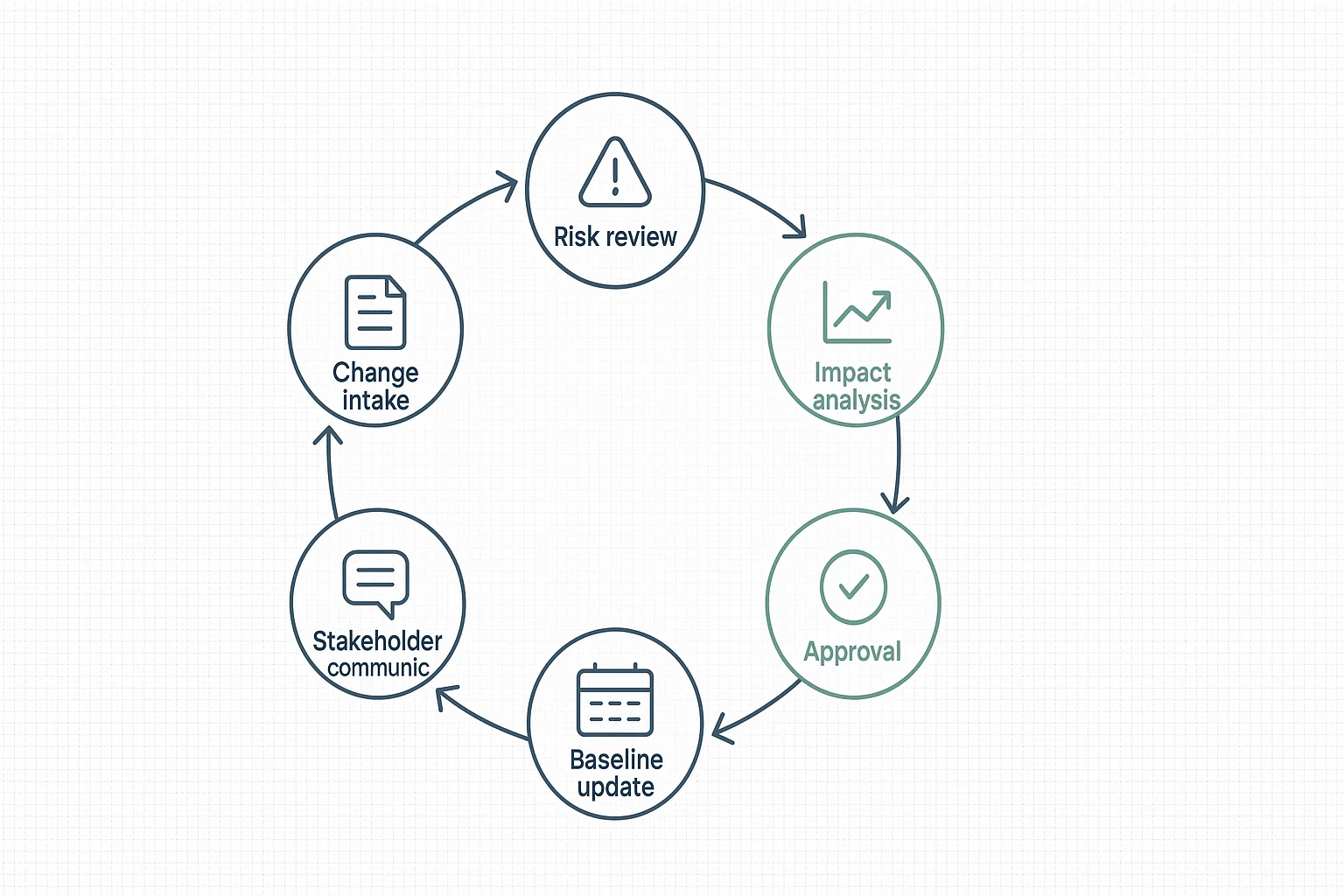
The kickoff should cover the executive summary, plan walkthrough, owner confirmation, decision rights, feedback window, and sign-off. End with one visible governance path:
Risk review → Change intake → Impact analysis → Approval → Baseline update → Stakeholder update
Project plan example: product launch from idea to approved plan
A compact project plan example makes the method easier to apply. Use this as a working snapshot, then turn approved items into an action-focused work plan for execution.
Filled-in project plan snapshot
| Field | Example |
| Goal | Launch beta analytics add-on. |
| Success criteria | 500 signups, 20% activation, CPA under $30. |
| Scope | Landing page, onboarding, email, sales enablement. |
| Exclusions | Paid ads expansion, mobile redesign. |
| Deliverables | PRD, launch page, demo deck, FAQ, release notes. |
| Milestones | Scope approved, beta ready, launch, review. |
| Dependencies | Data API, pricing approval, legal copy review. |
| Owners | PM, design, engineering, marketing, sales. |
| Timeline / budget | 8 weeks; $18,000 baseline. |
| Risks | API delay, unclear pricing, low activation. |
| Stakeholders / cadence / status | Weekly launch sync; approved by VP Product. |
Example AI prompts for refining the plan
Use prompts like: "Turn this transcript into a scope statement with exclusions," "Convert these deliverables into a WBS," "Find unresolved decisions with citations," "Identify dependency risks," and "Rewrite this plan as an executive summary." Cited cross-file Q&A in TicNote Cloud is stronger than generic chat because the PM can verify the source before changing the plan.
Final thoughts: Plan faster, then manage deliberately
AI changes how to create a project plan by turning kickoff calls, documents, risks, and decisions into structured sections faster. TicNote Cloud helps by keeping those inputs in one Project, so Shadow AI can draft summaries, reports, mind maps, and cited answers from real source material.
But speed doesn't replace judgment. Your team still needs to validate estimates, assign real owners, approve scope, review constraints, and communicate often. Use AI to reduce drafting time. Use governance to protect delivery.


