


 Extension
TL;DR: A skill agent can make resume review faster and fairer
To keep screening criteria, resumes, and review notes in one workspace, define the criteria before you open a resume, then score evidence against the same rubric. That's the fastest fair answer to how to review resumes.
Resume review gets messy when every reviewer uses a different standard. Small gaps become big disputes when candidates look similar. A skill agent workspace helps by keeping the job criteria, notes, summaries, and decision evidence together.
Use AI to organize evidence, not to make the hire/no-hire call. Humans should validate fit, check bias, and explain each decision.
How to review resumes without rushing or bias
The fastest way to learn how to review resumes fairly is to stop starting with the resume. Start with the job outcomes. Define what success looks like in the first 30, 60, and 90 days, then look for evidence that the candidate has done similar work at the right scope.
Start from outcomes, not formatting
A polished layout can hide weak evidence. A plain resume can contain strong proof. Before screening, write 3–5 outcome statements such as "ship two onboarding experiments in 90 days" or "reduce monthly close delays by 20%." This keeps reviewers from overvaluing school names, keyword density, or design.
Use these outcome-first questions:
- What problems did this person solve?
- What was the scope: team, budget, users, revenue, systems, or locations?
- What constraints did they work under?
- What changed because of their work?
- Is the evidence recent enough for this role?
Run a quick qualification pass first
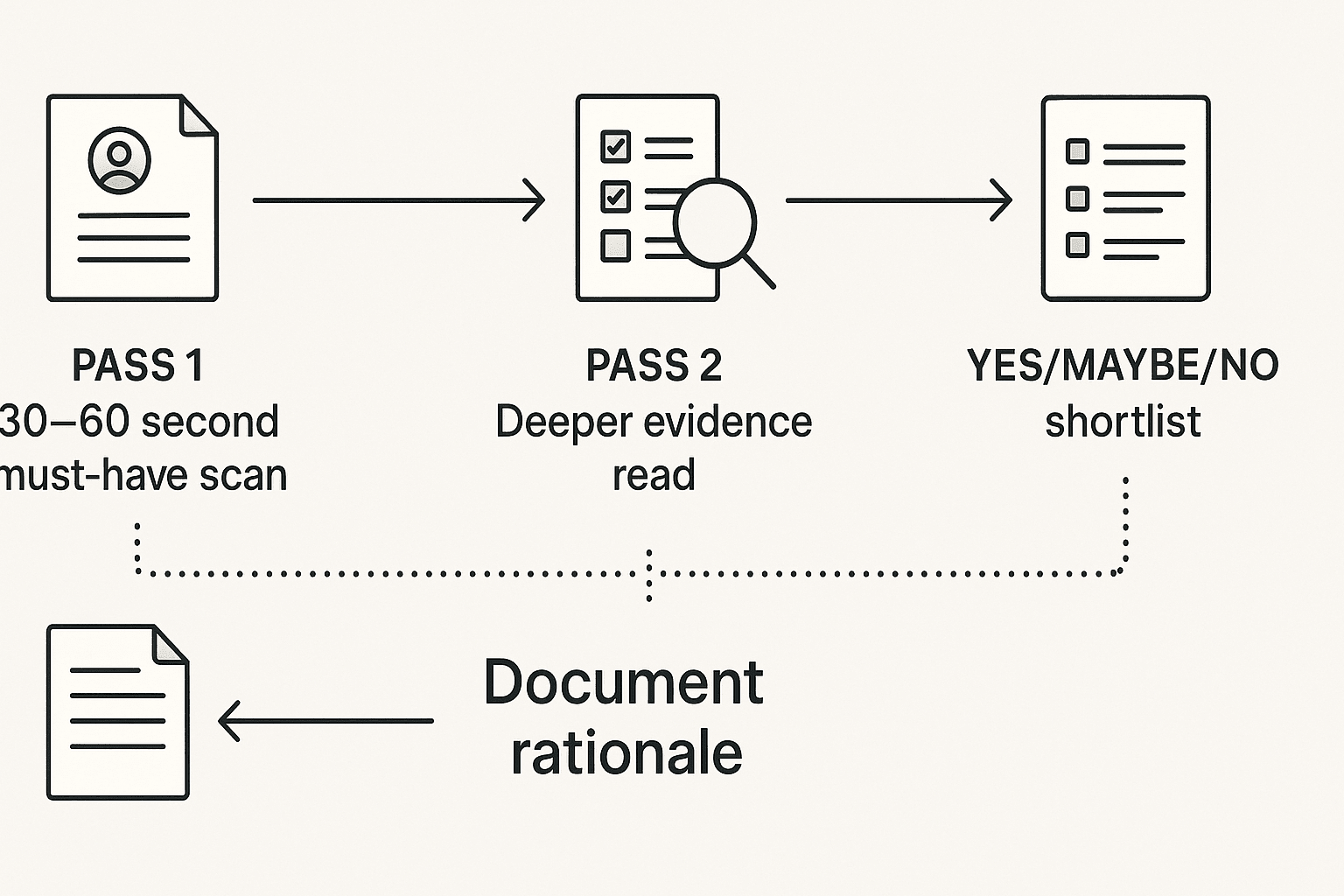
Use a two-pass resume screening process:
- Pass 1: Scan for must-haves only. Spend 30–60 seconds checking required work authorization, location, certification, core skill, or minimum experience.
- Pass 2: Read for evidence. Only review passing resumes in depth, scoring examples against the role outcomes.
For high volume, review in batches of 10–20, timebox each batch, and use the same screen, rubric, and note format. For low volume, read more contextually, especially when candidates have non-linear careers or transferable skills.
Separate must-haves from nice-to-haves
Must-haves are requirements without which the person cannot perform the role. Nice-to-haves are useful signals, but they should never override a missing must-have.
| Role type | Must-have evidence | Nice-to-have signal |
| Entry-level | Relevant coursework, internship, project, or trainable skill | Preferred tool exposure |
| Specialist | Proven skill in the core function | Industry familiarity |
| Manager | Team leadership and measurable delivery | Experience at a famous company |
Lock these definitions before applications arrive. Moving the goalposts creates inconsistent decisions.
Document each decision clearly
Use one simple note template: evidence → criterion → score → next step. For example: "Managed 8-person support team → people leadership → 4/5 → phone screen on coaching style." Keep candidates in consistent yes, maybe, and no buckets.
Avoid harsh labels like "job hopper" or "not serious." Write observable facts instead. Good notes make phone screens sharper and help teams align faster, much like a clear meeting management system turns scattered discussion into shared decisions.
Build resume screening criteria before applications arrive
If you want to know how to review resumes fairly, set the rules before the first application arrives. A scorecard is only useful when it reflects the actual job, not the loudest resume. For legal and practical discipline, the Uniform Guidelines on Employee Selection Procedures (1978) require that selection procedures "be job-related and consistent with business necessity," so each screen should map to work the person will do.
Turn the job post into evidence
Convert the job description into 5–8 measurable resume screening criteria. Use verbs and proof, not traits:
- "Shipped a React feature used by paying customers" instead of "strong frontend skills."
- "Managed a $500k pipeline across 40 accounts" instead of "sales driven."
- "Wrote specs, release notes, or client updates" instead of "strong communicator."
- "Worked in HIPAA, SOC 2, or audit-heavy settings" instead of "detail oriented."
Weight criteria by role type
Weights keep one impressive item, like a famous employer, from creating a halo effect.
| Role type | Skills | Experience scope | Credentials | Work samples |
| Junior IC | 40% | 20% | 15% | 25% |
| Senior IC | 35% | 35% | 5% | 25% |
| Manager | 20% | 45% | 5% | 30% |
| Regulated role | 25% | 30% | 30% | 15% |
For bootcamp, self-taught, freelance, or career-change candidates, score proven outputs the same way you score traditional jobs. A GitHub project, client case study, certification, portfolio, or contract outcome can show the same skill.
Set pass, maybe, and reject rules
Use three buckets:
- Pass: meets all must-haves and reaches the target score, such as 70/100.
- Maybe: misses evidence in 1–2 areas, but has adjacent proof worth checking.
- Reject: lacks a must-have or falls below a minimum score, such as 50/100.
"Maybe" should not mean "I'm unsure." It should mean: what evidence is missing, where to verify it, and which interview question will test it.
Apply fairness safeguards
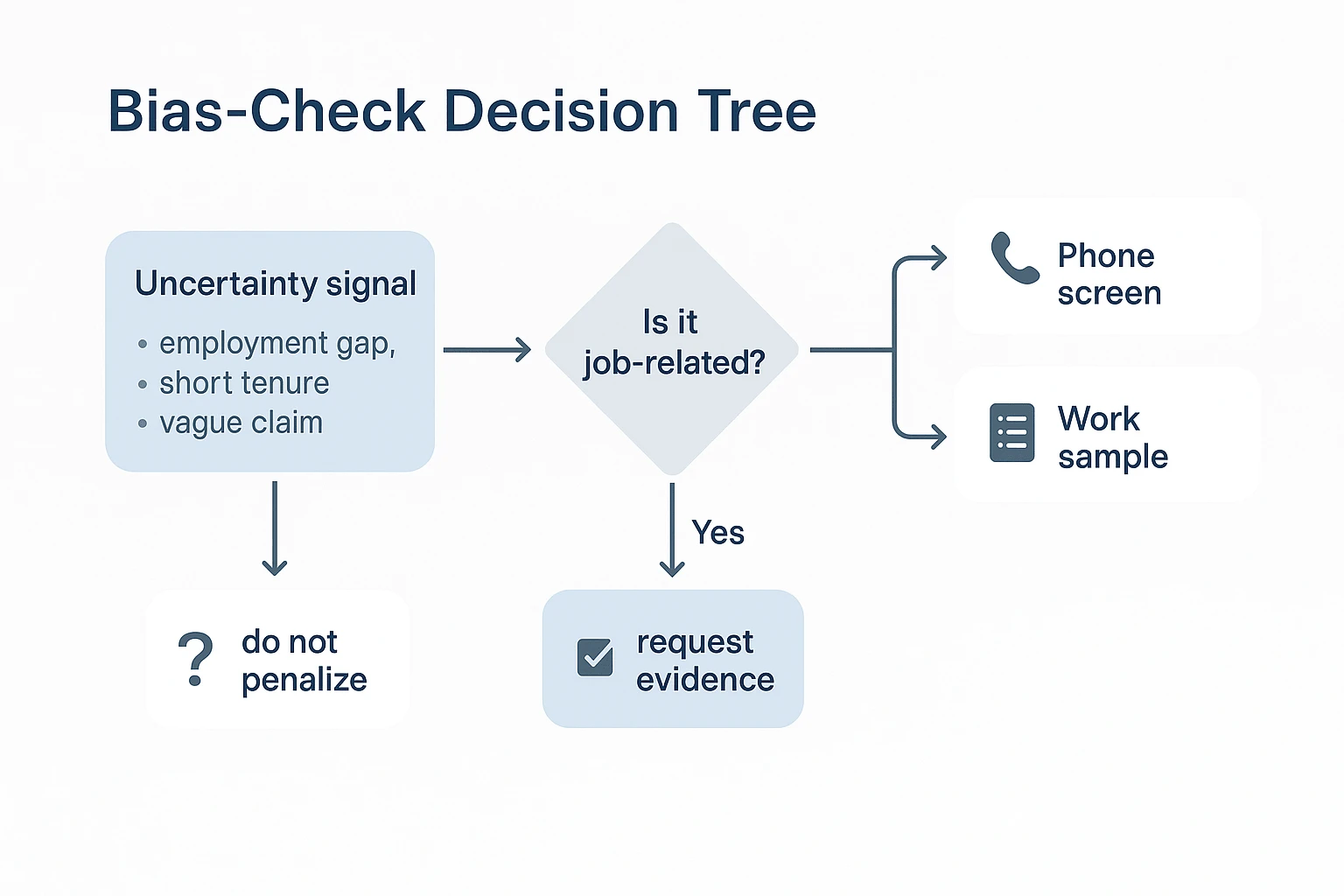
Ignore photos, age clues, addresses, family details, and unrelated hobbies. Review gaps, short tenures, caregiving returns, and freelance periods in context. Credit transferable skills when the task matches the job: leading volunteers can show project coordination; retail management can show hiring, coaching, and revenue ownership. Apply the same notes and thresholds to every candidate.
Use a scorecard to compare candidates consistently
When deciding how to review resumes, don't start with the resume. Start with a scorecard. A resume scorecard is a shared rubric that turns job needs into visible evidence, so reviewers compare the same signals instead of reacting to polish, schools, or familiar company names.
Build a simple resume screening scorecard
A practical scorecard needs six fields: criteria, weight, evidence snippets, score, reviewer confidence, and follow-up questions. Use it after must-have checks and before interview selection. For a deeper rubric model, see this guide to weighted resume scoring.
| Criterion | Weight | Resume evidence snippet | Score | Reviewer confidence | Follow-up question |
| B2B content strategy | 30% | Led SEO content calendar; grew organic demo requests 18% | 3 | High | Which pages drove the increase? |
| Analytics and reporting | 20% | Used GA4 and Looker Studio monthly | 2 | Medium | What metrics guided topic choices? |
| SaaS experience | 20% | 2 years at HR software startup | 2 | High | Which buyer personas did you support? |
| Project ownership | 20% | Owned blog relaunch with design and product | 3 | Medium | What trade-offs did you make? |
| Tool match | 10% | No Ahrefs listed; used Semrush | 2 | High | How fast can you adapt tools? |
Use a 0–3 evidence scale
Keep the scale tight:
- 0 = no evidence.
- 1 = weak or indirect evidence.
- 2 = clear evidence that matches the criterion.
- 3 = strong evidence with outcomes, context, or scope.
Good evidence includes projects, metrics, artifacts, promotions, ownership scope, certifications tied to work, and career progression. "Managed campaigns" may score 1. "Managed 12 campaigns that increased qualified leads 22%" scores 3.
Weight must-haves and potential differently
Must-haves gate the resume screening process. If a nursing role requires a license, no score can replace it. Growth potential differentiates qualified candidates after the gate. Don't penalize someone for missing a non-essential tool when they show fast-learning signals, such as adjacent tools, short ramp periods, or repeated role expansion.
Calibrate before the full batch
Before screening 100 resumes, review 3–5 sample resumes together. Compare scores, define what a 2 versus a 3 means, then lock the resume screening criteria. Recalibrate when the candidate pool changes or reviewers drift.
A skill agent workspace such as TicNote Cloud can store the template, keep reviewer notes in a consistent format, and preserve evidence across resume review, interviews, and reference calls. AI can summarize evidence, but people should make the hiring decision.
What resume evidence deserves a deeper look?
When deciding how to review resumes, look for evidence that predicts job performance, not polish alone. Strong resumes show impact, relevant skills, progression, and claims you can verify later. Weak evidence is not always a reject; often it's a prompt for a sharper phone-screen question.
Separate impact from activity
Impact-based bullets include four signals: scope, outcome, constraints, and stakeholders. Responsibility-only bullets list tasks without showing judgment or results.
| Resume line | Evidence quality | What to note |
| Managed support tickets | Low | Task only; ask about volume and standards. |
| Cut first-response time by 28% during a hiring freeze | High | Outcome, constraint, and scope are clear. |
| Supported launch with sales and legal | Medium | Stakeholders are named; impact needs follow-up. |
For roles where metrics are scarce, accept proxy evidence: reduced rework, smoother handoffs, fewer escalations, audit readiness, or customer praise. Early-stage and operations candidates may have real impact without clean dashboards.
Check skills without keyword tunnel vision
Match skills to your resume screening criteria, but don't treat keywords as proof. Separate core skills from tools. For example, SQL analysis may be core; Looker may be a tool a strong analyst can learn. Also watch for ATS-parsing issues. Columns, icons, or unusual PDFs can hide qualified experience, so manual review should not punish formatting unless document quality is job-related.
Read progression in context
Promotions, larger budgets, broader stakeholders, and ownership of harder problems all signal growth. Lateral moves can also show growth when they add domain depth or stretch skills. Certifications matter most when required for regulated roles, such as nursing, accounting, safety, or security. Otherwise, treat them as supporting evidence and note what to verify later.
Use the same risk-first mindset you'd use in a structured review checklist: flag the claim, tie it to job need, and choose the next evidence step.
Treat red flags as verification triggers
Use neutral labels for uncertainty:
- Employment gap: ask what context is relevant, if any.
- Short tenure: check whether it reflects contracts, layoffs, or performance.
- Errors: weigh them heavily for writing-heavy roles; lightly for unrelated jobs.
- Vague claims: ask for examples, artifacts, or references.
- Overqualification: confirm motivation and role expectations.
Follow-up question bank:
- "What constraints shaped the X project?"
- "Which stakeholders disagreed, and how did you resolve it?"
- "What metric or proxy showed the work improved?"
- "Which tool skill was hardest to learn?"
- "What should we verify in a reference call?"
How a skill agent can improve the resume screening process (with an AI resume review workflow)
When you decide how to review resumes, the hardest part isn't reading faster. It's keeping every reviewer tied to the same criteria. A skill agent is an AI assistant built for a specific task; in this case, TicNote Cloud's HR Recruiting agent helps organize job criteria, candidate files, scoring notes, and evidence in one workspace while humans make the final call.
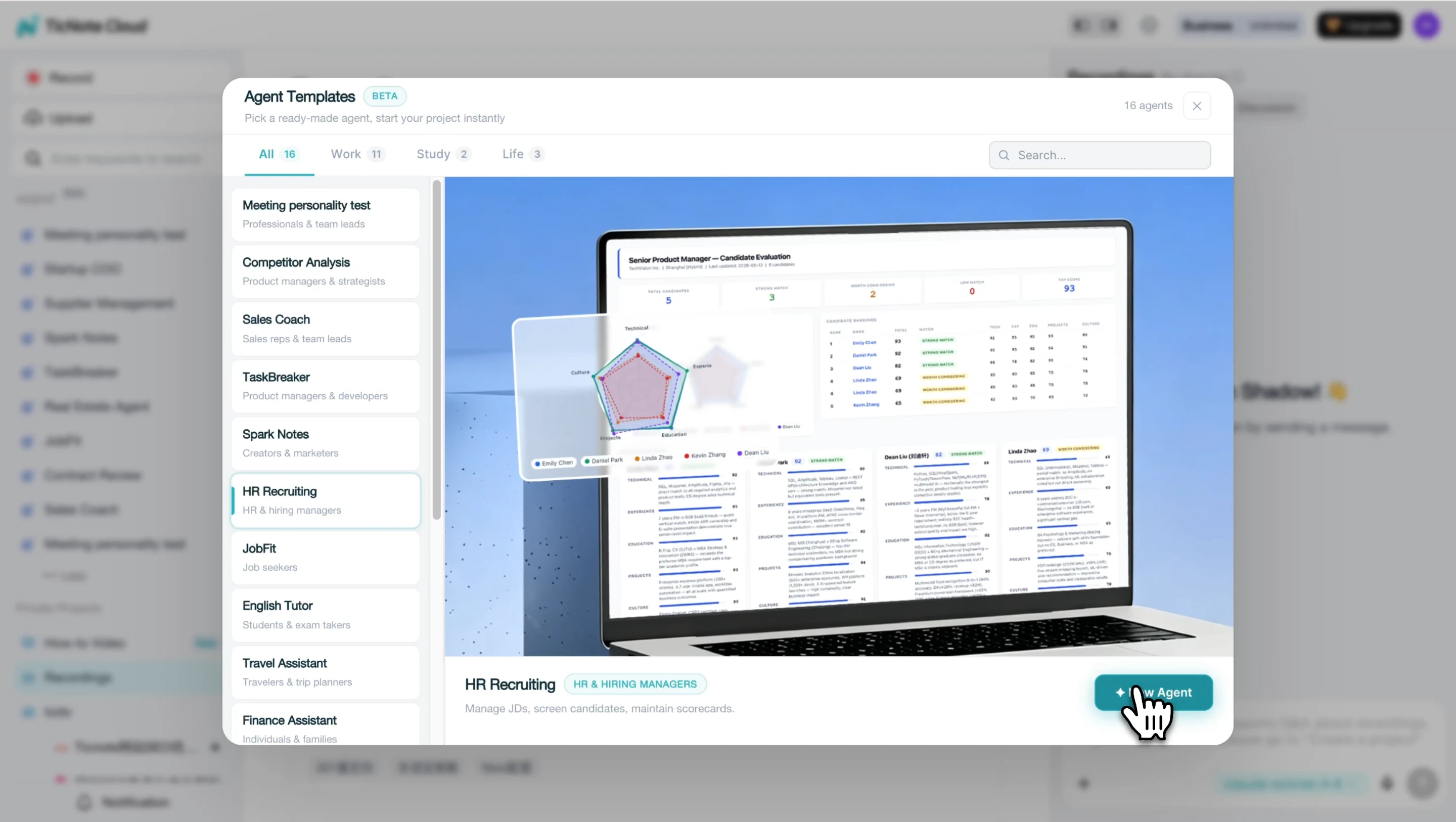
Step 1: Add the HR Recruiting skill agent
Create or open a hiring Project for the role in TicNote Cloud. Then click Add Agent, browse the Skill Agent library, and select HR Recruiting. There's no complex setup, so the team can start from the same place before resumes arrive.
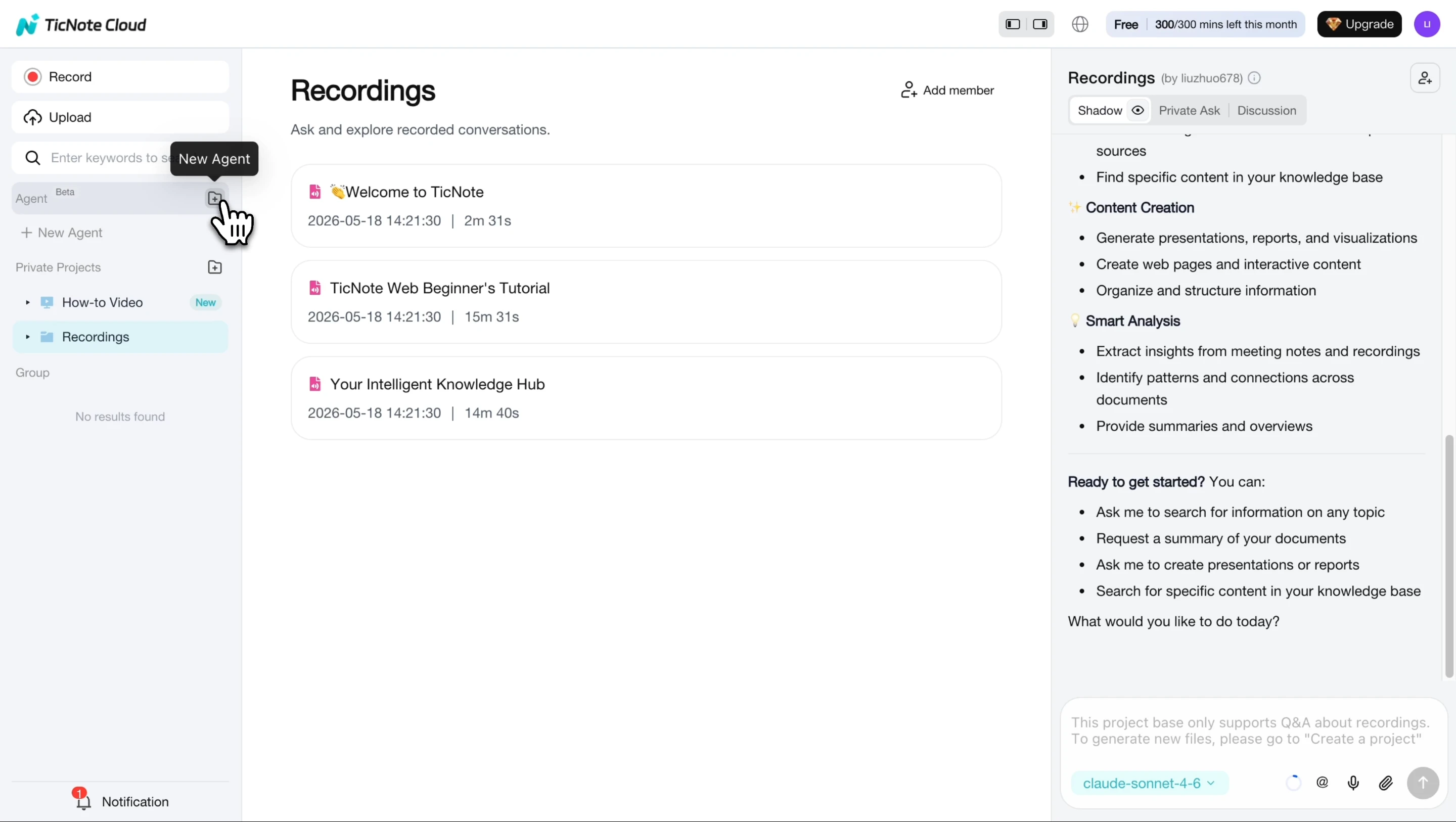
Once added, the agent appears in your workspace and is ready to support the resume screening process.
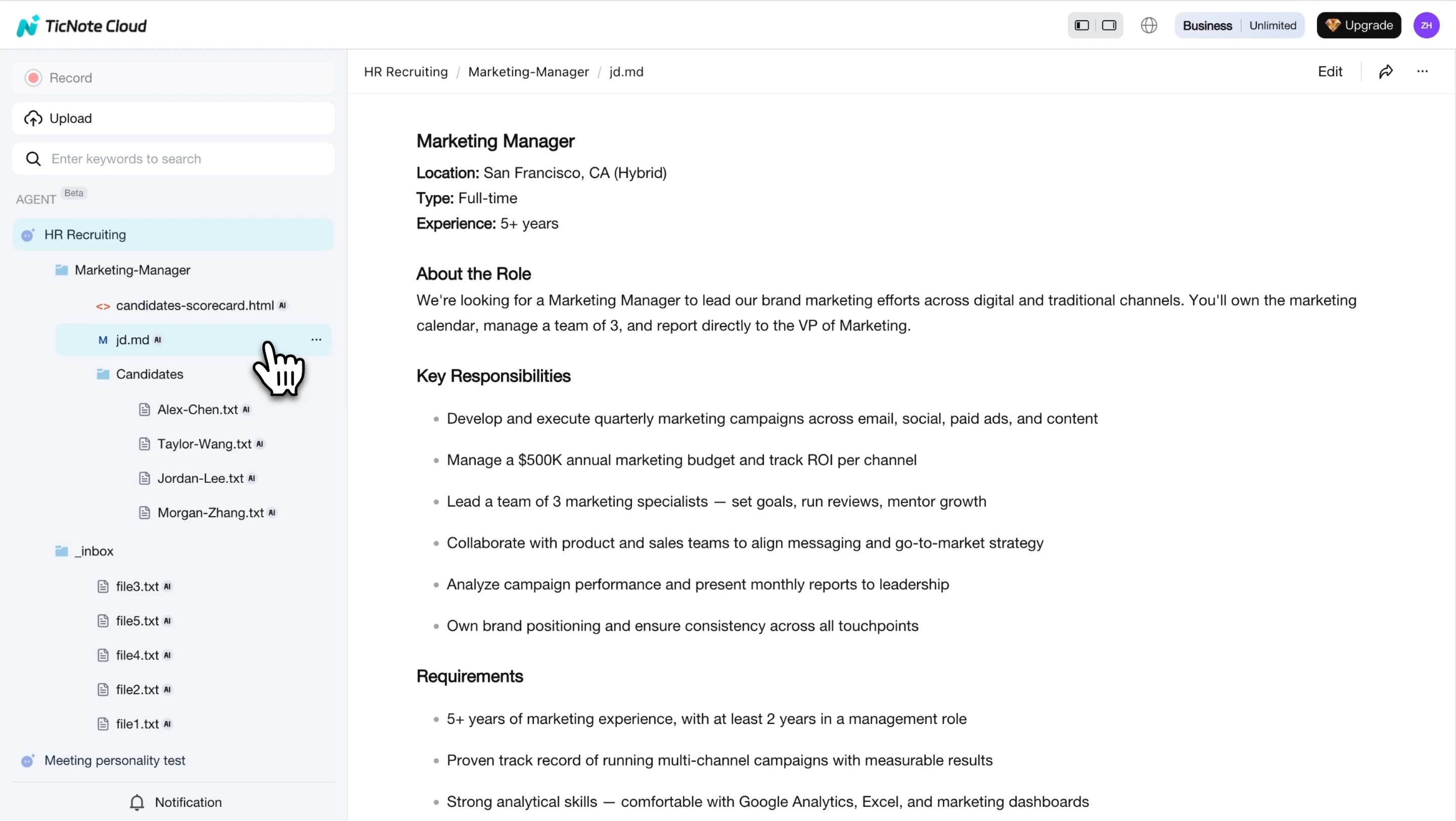
Step 2: Paste the job description and add resumes
Paste the job description into the agent. It parses the role, creates a dedicated job folder, and saves the JD as the structured reference. Then add resumes by pasting text, uploading PDFs, or dropping files into the chat.
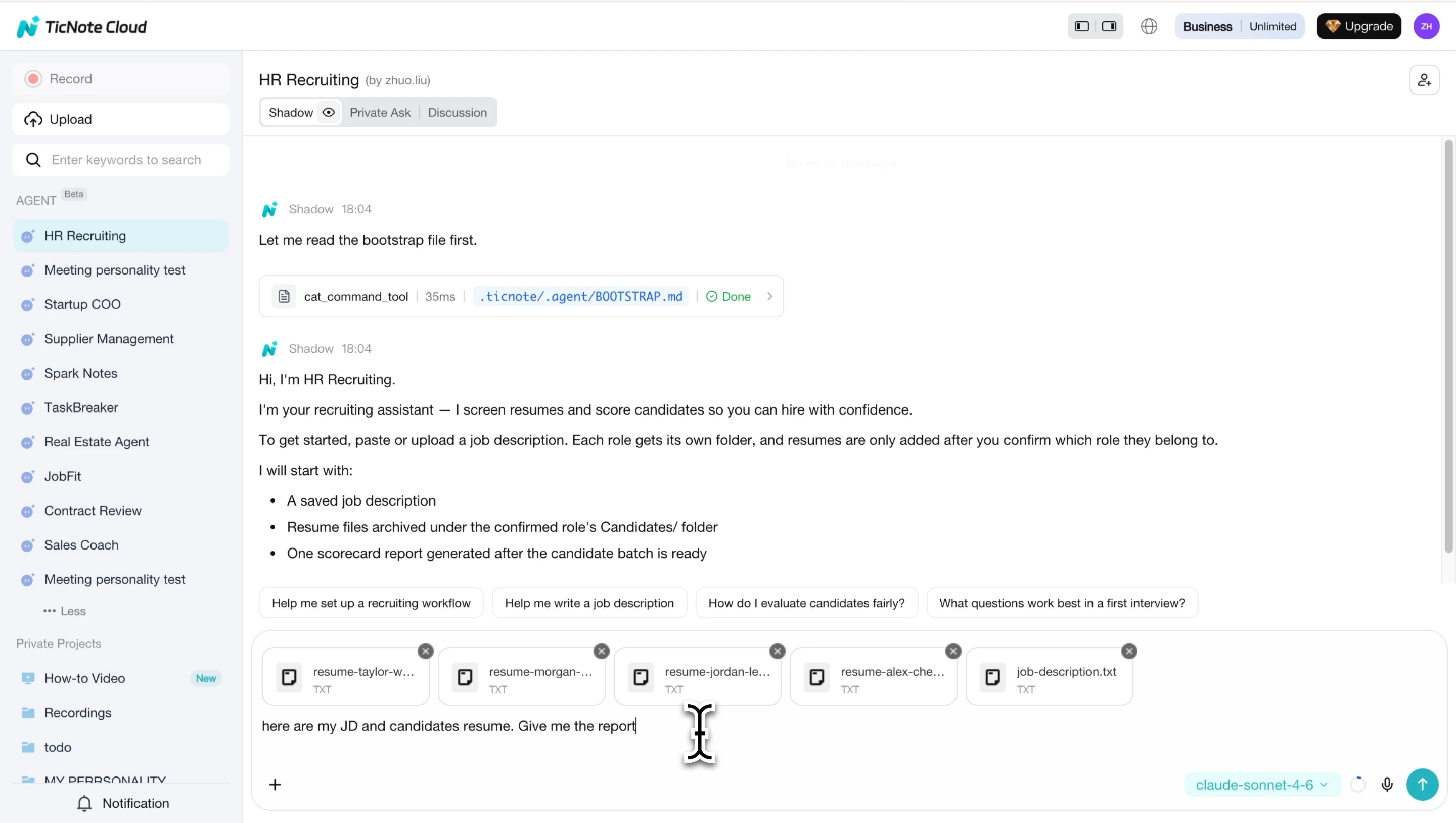
Keep your resume screening criteria and scorecard in the same Project. That way, any ai resume review output maps back to agreed requirements instead of vague "good fit" impressions.
Step 3: Review the evaluation report
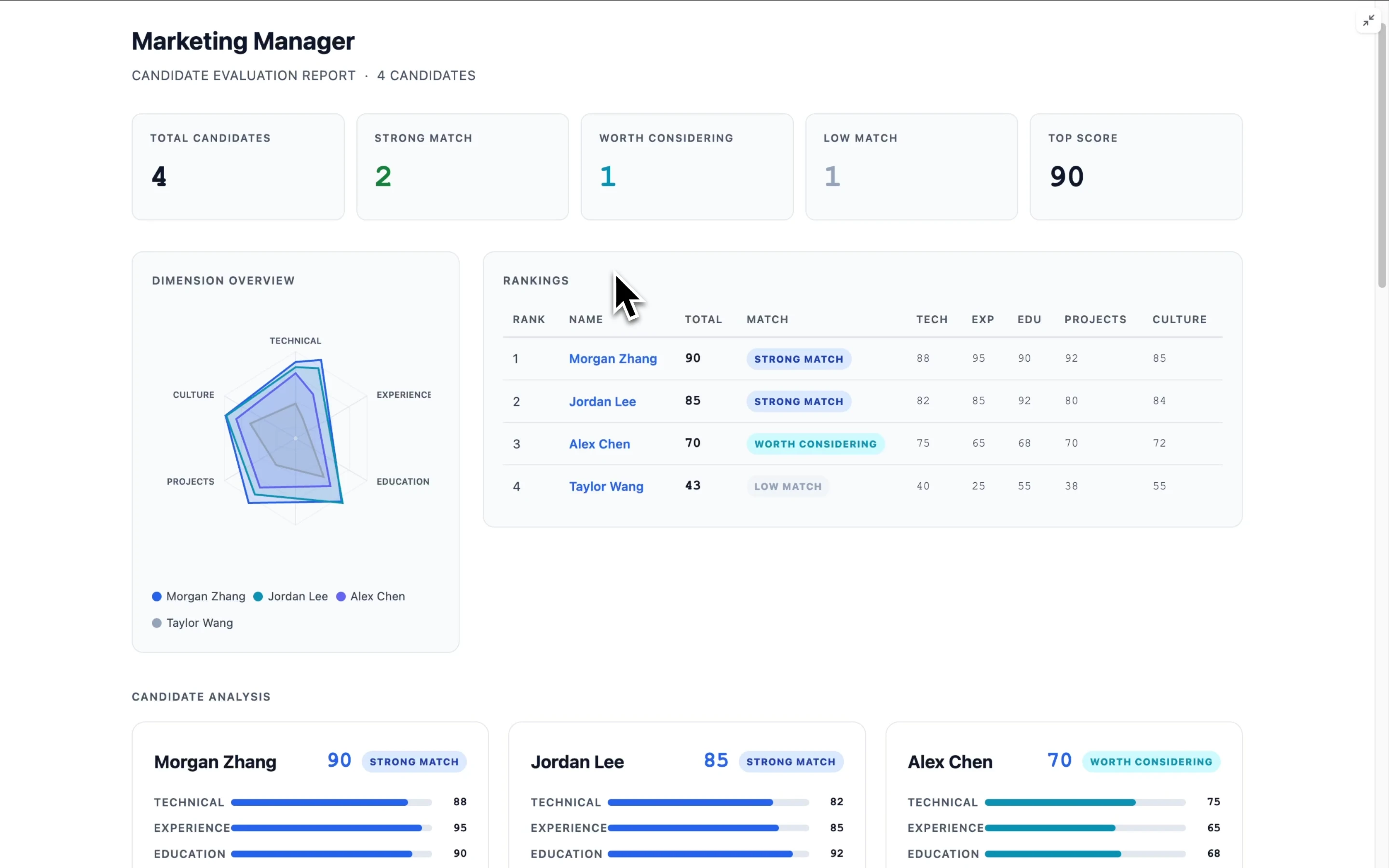
Open the interactive HTML report to compare candidates across 5 dimensions: Technical, Experience, Education, Projects, and Culture. Each score includes a one-line justification, so reviewers can see the evidence behind the ranking.
Use missing evidence as phone-screen material. For example, if project impact is unclear, ask for scope, metrics, and ownership.
When new resumes arrive, add them to the same job folder and refresh the report. If you change the criteria or candidate pool, use re-evaluate all to rescore the full set consistently.
Where it fits in your hiring stack
| Tool type | Best use | Limitation |
| ATS | Pipeline stages and compliance workflows | Often light on evidence review |
| Resume review tool | Fast scoring | May separate scores from notes |
| TicNote Cloud workspace | Criteria, resumes, notes, reports, and round-by-round evidence | Complements, not replaces, ATS controls |
On mobile, you can add the same HR Recruiting agent, paste the JD, upload or forward resumes, open the report, and leave quick notes. Use web for deeper calibration and final shortlists.
Fair hiring, validation, and next steps after resume review
Learning how to review resumes doesn't end when the first score is saved. The next step is to protect fairness, validate claims, and leave a clear record that explains why each candidate moved forward or didn't.
Keep compliance guardrails visible
Set simple rules before anyone screens applicants:
- Don't consider protected traits, including age, race, disability, religion, gender, family status, or national origin.
- Minimize sensitive data handling. Store only what supports the hiring decision.
- Keep resume screening criteria job-related and consistent for every applicant.
- Document reasons in neutral terms, such as "missing required certification," not "not a fit."
- Make AI outputs reviewable, cited, and checked by a person.
For EU hiring teams, Regulation (EU) 2016/679 (General Data Protection Regulation), Article 22 states that "the data subject shall have the right not to be subject to a decision based solely on automated processing, including profiling, which produces legal effects concerning him or her or similarly significantly affects him or her." In plain terms: AI resume review can support screening, but it shouldn't make final decisions alone.
Run a bias check before shortlisting
Before the shortlist is locked, confirm that:
- Criteria and weights were set before review started.
- Weights weren't changed midstream to favor one profile.
- "Halo" bias didn't overvalue one strong brand, school, or employer.
- Pedigree bias didn't push aside self-taught or non-traditional candidates.
- Borderline candidates received a second review when scores were close.
Partial anonymization can help where feasible, especially for early resume passes.
Validate evidence after the scorecard
Use the scorecard to guide verification:
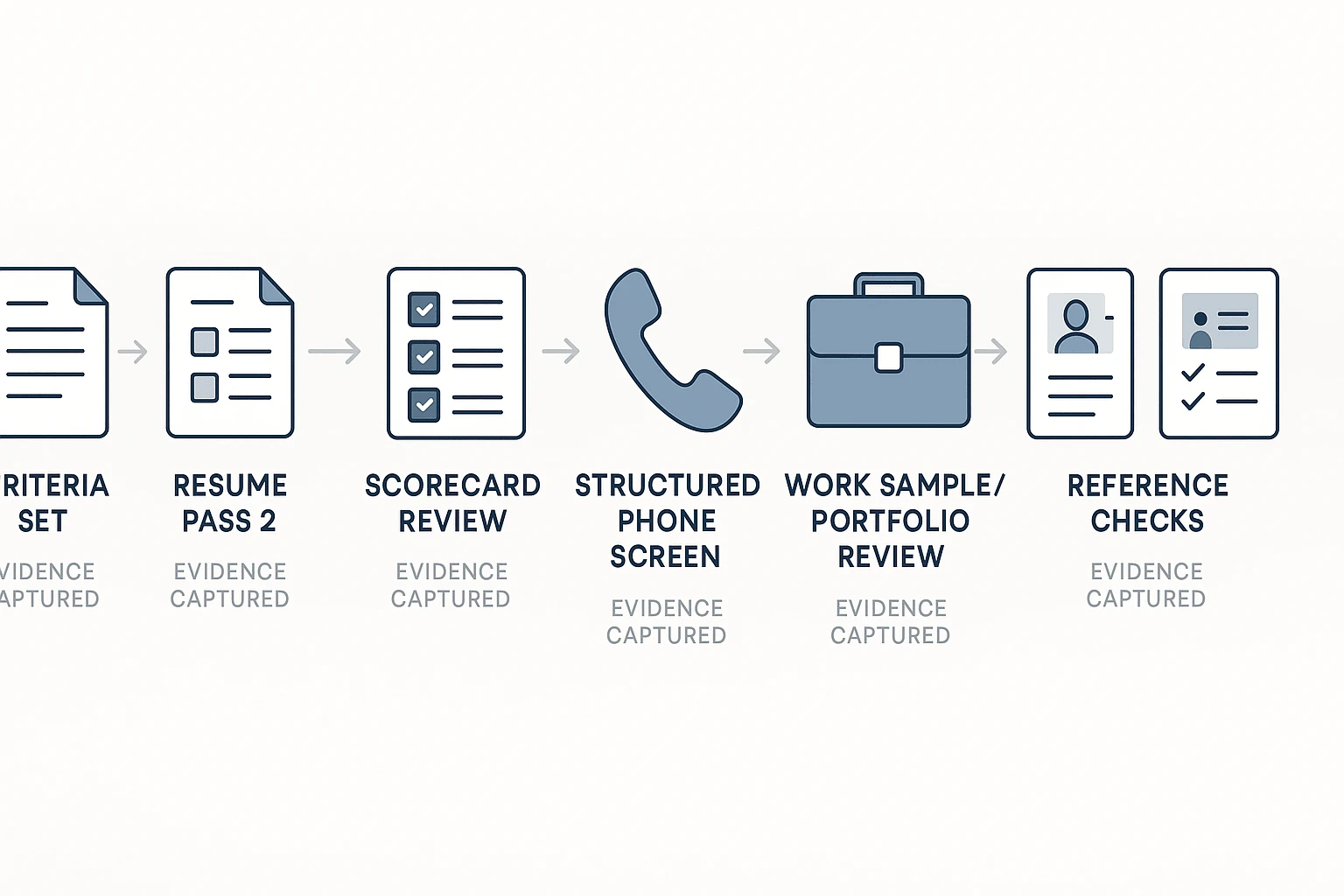
- Ask structured phone-screen questions tied to weak or missing evidence.
- Review work samples or portfolios with a role-specific rubric.
- Run reference checks focused on job outcomes, not personality judgments.
Use clear statuses and handoffs
Keep candidates moving through simple statuses: new → pass 1 → pass 2 → phone screen → interview → offer, hold, or decline. Use the same status labels in an ATS or shared workspace.
TicNote Cloud can help teams keep phone-screen transcripts, reviewer notes, reference summaries, and decision evidence organized in one project. The system supports better handoffs, while the final hiring decision stays human-led.
Final thoughts: efficient resume review is a repeatable system
Efficient hiring starts with a system, not speed. The best way to learn how to review resumes is to define role criteria before applicants arrive, run a quick eligibility pass, then complete an evidence-based scorecard for the smaller group.
Use a simple operating rhythm:
- Set must-have and nice-to-have criteria.
- Review every resume against the same rubric.
- Score only visible evidence, not assumptions.
- Move shortlisted candidates into structured interviews, work samples, or reference checks.
- Keep notes that explain each decision.
That last point matters. Don't turn gaps, career changes, or unusual paths into automatic red flags. Don't let AI resume review make the final call. Let it organize evidence, summarize notes, and reduce admin work while humans decide. TicNote Cloud fits here because Projects can hold resume notes, interview transcripts, and decision records in one searchable workspace. If you're also building repeatable research habits, these ready-to-use competitive research tools show the same principle: clear inputs create better decisions.


