


 Extension
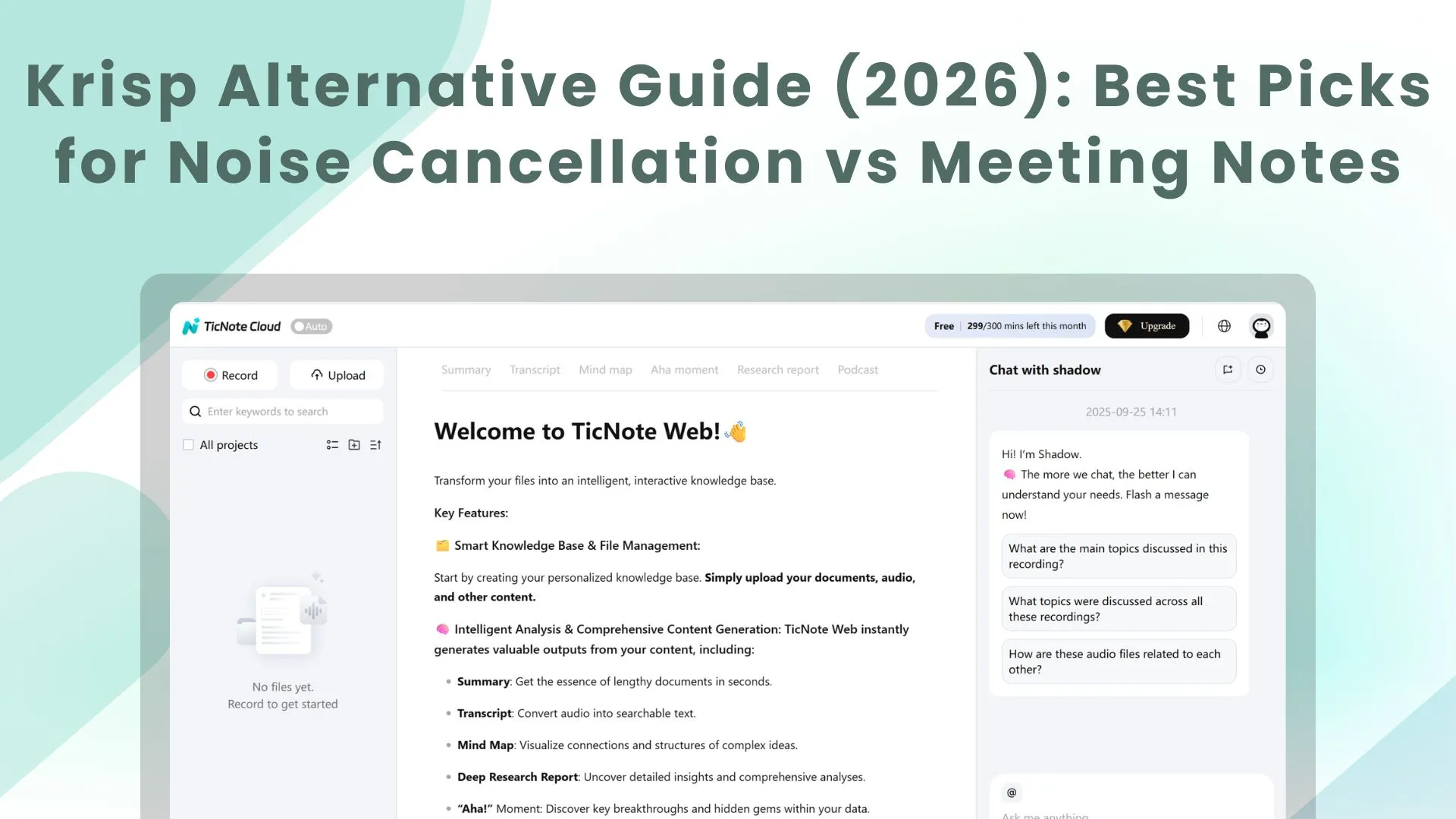
TL;DR: Best Krisp alternatives by use case (noise vs meeting notes)
Try TicNote Cloud if your "Krisp alternative" search is really about capturing meetings and turning them into clean notes and outputs. Think of the market in two lanes: live noise suppression vs post-meeting transcripts, summaries, and workflow.
Noisy calls waste time and cause rework. Missed notes cost decisions and follow-ups. TicNote Cloud fixes the second problem with bot-free capture, editable transcripts, and Project memory so teams don't lose context.
- Lane A — Real-time noise suppression (live calls):
- Best overall if you already live in Teams/Zoom: built-in noise suppression; for remote pros.
- Best if you have an NVIDIA GPU: NVIDIA Broadcast for stronger local AI noise removal; for creators.
- Best "no install" option: browser-based noise filtering or device DSP (mic/interface); for IT buyers.
- Lane B — Meeting capture → transcription → notes → action items:
- Best for bot-free meeting transcription: TicNote Cloud; for teams and IT.
- Best for turning meetings into client-ready outputs: TicNote Cloud (reports, web pages, podcasts, mind maps); for consultants/PMs/researchers.
- Best if you mainly need simple personal summaries: lightweight note-takers; for solo remote pros.
Pricing and limits change fast—verify recording caps, export formats, retention, and model-training policy before procurement.
What kind of krisp alternative do you actually need?
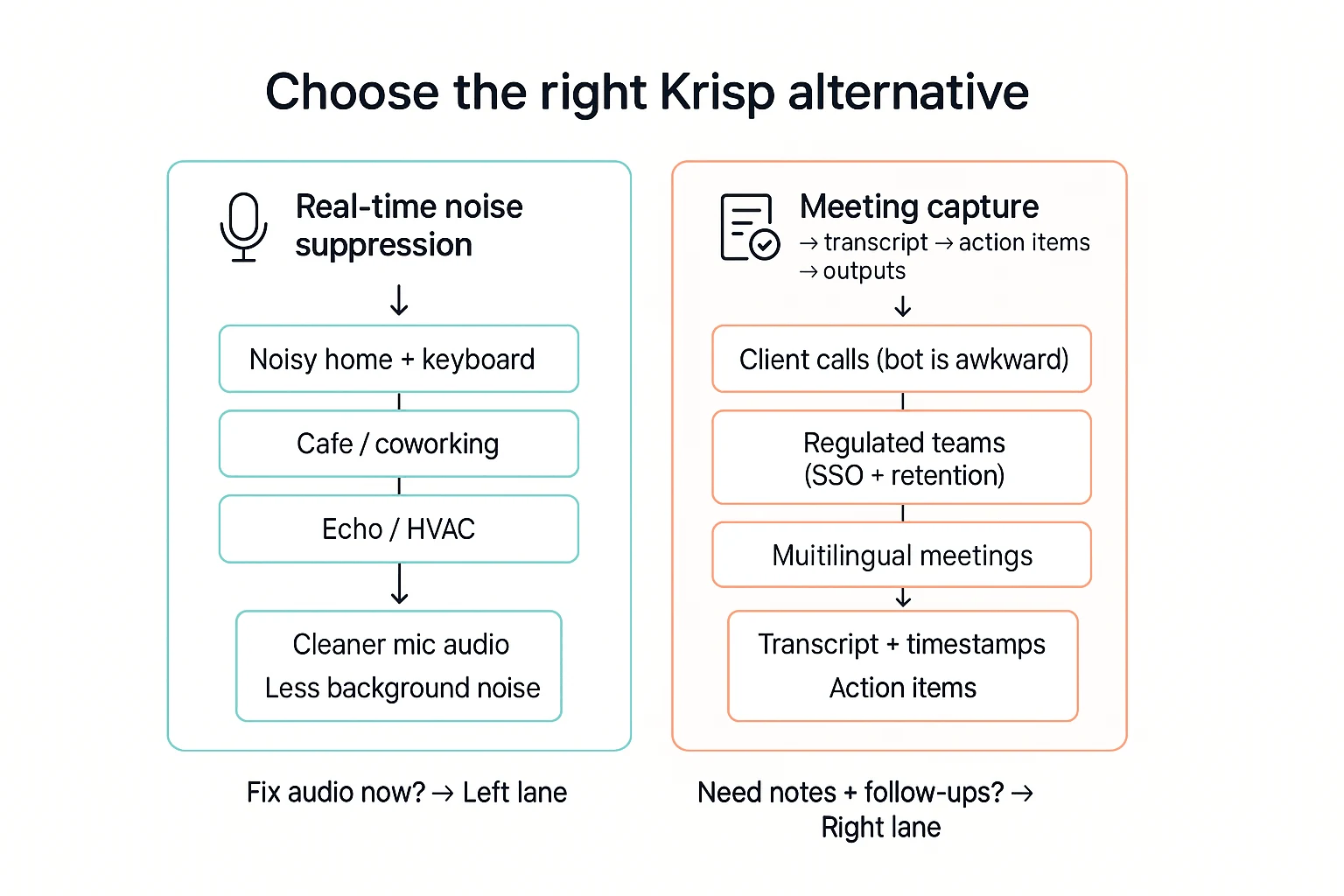
Most people looking for a krisp alternative are really choosing between two lanes: live audio cleanup or meeting capture and outputs. Pick the lane first. It saves time and money.
Lane 1: Real-time noise suppression (cleaner audio, right now)
Noise suppression tools work during calls. They reduce keyboard clacks, HVAC hum, street noise, and echo. The goal is simple: people hear you clearly on Zoom, Teams, Meet, and other apps.
Choose this lane if your main pain is sound quality:
- You work from a noisy home, café, or coworking space
- Your mic picks up typing, pets, or background voices
- You need both input (your mic) and sometimes output (other people) noise control
Lane 2: Meeting assistant (capture → transcript → action items → deliverables)
Meeting assistant tools focus on what happens after people talk: recording, transcription, summaries, action items, and exports you can actually use. This lane matters when the problem isn't "they can't hear me," but "we lose decisions and can't find them later."
A key term you'll see here is bot-free meeting transcription. It means the tool captures and transcribes without an extra "note-taker bot" joining the call as a participant. That's useful when a visible bot feels awkward on client calls, or when company policy blocks bots.
Common scenarios → the lane that fits:
- Noisy home/keyboard/café: choose noise suppression first
- Client calls where a bot is awkward: choose bot-free capture
- Regulated teams (legal/finance/health): choose tools with SSO, retention controls, and clear model-training policies
- Multilingual meetings: choose multilingual transcription plus translation workflows
- "We need follow-ups fast": choose transcription with action items and strong exports (DOCX/PDF/Markdown)
When Krisp is still a fit
Krisp can still be the best choice if you only need system-level noise removal across apps, and you don't need transcripts, summaries, or a project workspace.
Switch only if one of these pains is real:
- Notes are slow and inconsistent
- You need searchable transcripts across many meetings
- You need bot-free capture for clients
- You need deliverables (reports, slides, briefs) from meeting content
If you're in the noise-only lane, pick a suppression-first tool. If you're in the capture-to-outputs lane, default to TicNote Cloud for bot-free recording, editable transcripts, and one-click deliverables inside a Project workspace.
How we evaluated each alternative (transparent methodology)
To make this Krisp alternative guide fair, we used the same test calls, the same noise, and the same scoring. We also separate what we tested hands-on from what we only verified from vendor docs. That keeps the results useful for buyers, not just readers.
Test setup (devices, mics, and meeting apps)
We ran tests on two common setups:
- Laptops: 1 Windows 11 laptop and 1 macOS laptop
- Mics: built-in laptop mic and a basic USB headset mic
- Apps: Zoom, Microsoft Teams, and Google Meet
For each tool, we tried the default settings first. Then we repeated with "best quality" options if offered. Anything we couldn't test (like enterprise admin controls) is marked as vendor-stated.
Noise scenes we replayed every time
We used repeatable sound clips at two levels: "annoying but real" and "hard mode." Each scene ran for 60–90 seconds while a speaker read the same script.
- Steady noise: fan hum and café murmur
- Sudden spikes: dog bark and door slam
- Mechanical noise: fast typing on a laptop keyboard
- Harsh background: light construction sounds
We also tracked the trade-off between naturalness and aggressiveness. Strong filtering can remove noise, but it can also thin out the voice.
Scoring rubric (what "good" looks like)
We scored each tool in three buckets on a 1–5 scale.
- Audio quality
- Voice stays natural (no "robot" tone)
- Few cut-outs (no missing words)
- Low perceived delay (talking feels in sync)
- Notes quality (if the tool does notes)
- Transcript matches the spoken words
- Speaker labels are mostly right
- Summary is usable without heavy edits
- Action items are clear and assigned when possible
- Team fit
- Clear roles and permissions
- Easy exports (TXT/DOCX/PDF/Markdown) and data portability
- Reasonable onboarding time (can a new user ship value in 30 minutes?)
- Security basics available or documented (SSO, retention, audit logs)
Pricing check date
Pricing and plan limits were checked in 03/2026. Vendors change plans often, so confirm the current details on each pricing page before you buy.
Top krisp alternative picks (standardized item cards)
Not every Krisp alternative solves the same problem. Some tools only clean audio in real time. Others capture meetings, turn them into transcripts, and push work forward. To make this easy to skim, every pick below uses the same card.
Quick card template (how to read each pick)
- Best for: the clearest use case
- What it replaces: what you can stop using
- Strengths: 2–4 practical wins
- Trade-offs: what you give up
- Bot vs bot-free: whether a meeting bot joins
- Noise cancellation (in/out): cleans mic input, speaker output, or both
- Platforms: where it runs
- Languages: transcription language support (if any)
- Exports/integrations: where your data can go
- Security notes (vendor-stated): what the vendor claims; validate in review
- Starting price: entry plan and key limits
TicNote Cloud (best meeting-notes alternative for teams; bot-free capture)
- Best for: teams that want bot-free meeting capture, editable transcripts, and project-based follow-through
- What it replaces: "record → transcribe → paste into docs → rewrite" workflows, plus scattered notes across tools
- Strengths:
- Bot-free capture options (no bot joining the call)
- Editable transcripts (not locked read-only)
- Action items and multi-level summaries
- Projects to group meetings + docs + videos in one workspace
- Shadow AI Q&A with citations across project files (faster answers, less hunting)
- One-click outputs: reports, web presentations, podcasts, mind maps
- Trade-offs: not a dedicated real-time noise suppressor; pair with your platform's noise controls if needed
- Bot vs bot-free: bot-free
- Noise cancellation (in/out): not the focus; use Zoom/Teams/driver-level suppression for live noise
- Platforms: Web Studio; extension; iOS/Android app
- Languages: 120+ languages (vendor-stated)
- Exports/integrations: exports to WAV, TXT/DOCX/PDF, Markdown/DOCX/PDF, PNG/Xmind, HTML; connectors include Notion and Slack
- Security notes (vendor-stated): U.S.-based cloud; private by default; data not used to train AI models; industry-standard encryption; buyer should validate SSO/retention needs per plan
- Starting price:
- Free ($0/mo): 300 transcription mins/month; max 30 mins per web recording; 3 document imports/month; 10 AI chats/day
- Professional ($$12.99/mo or$$79/year): 1,500 transcription mins/month; max 3 hours per web recording; 30 document imports/month; unlimited AI chat
- Business ($$29.99/mo or$$239/year): 6,000 transcription mins/month; max 8 hours per web recording; 100 document imports/month
- Enterprise: custom usage; SSO; 24/7 support (contact sales)
Internal CTA: Try TicNote Cloud for Free to capture one real meeting and see the full workflow end to end. Prefer to evaluate limits first? Jump to Compare plans inside the pricing page before you roll it out.
If you're also comparing transcript-first tools for interviews and subtitles, this Happy Scribe alternative breakdown helps map exports and note workflows.
NVIDIA RTX Voice / NVIDIA Broadcast
- Best for: Windows users with NVIDIA RTX hardware who want strong input/output noise suppression across apps
- What it replaces: separate noise filter apps for your mic and speakers
- Strengths:
- Good real-time suppression for mic input and often speaker output
- Works across many apps once set as the audio device
- Trade-offs: requires compatible NVIDIA GPU; no transcripts, summaries, or meeting notes
- Bot vs bot-free: not a meeting bot (device-level)
- Noise cancellation (in/out): both (device-level)
- Platforms: Windows
- Languages: N/A
- Exports/integrations: N/A
- Security notes (vendor-stated): local processing is typical for device filters; confirm how your setup routes audio
- Starting price: free (with supported hardware)
Microsoft Teams built-in noise suppression
- Best for: Teams-first orgs that want "good enough" cleanup with no new vendor
- What it replaces: basic noise suppression add-ons for day-to-day calls
- Strengths:
- Easy: just enable Microsoft Teams noise suppression in settings
- Works well for steady background sounds (fans, typing)
- Trade-offs: not designed for full meeting capture workflows; harder edge cases (multiple speakers in one room, very loud environments) may still leak through
- Bot vs bot-free: N/A
- Noise cancellation (in/out): mainly input
- Platforms: Teams desktop/mobile
- Languages: N/A
- Exports/integrations: N/A
- Security notes (vendor-stated): covered by Microsoft's tenant controls; confirm retention and policy needs with IT
- Starting price: included with Teams plan
Zoom built-in noise suppression
- Best for: Zoom users who want a simple switch, no extra tools
- What it replaces: light noise suppression utilities for Zoom-only calls
- Strengths:
- Quick setup: enable Zoom noise suppression
- Good baseline improvement for home-office noise
- Trade-offs: can clash with music/high-fidelity audio needs; creators may prefer dedicated recording tools
- Bot vs bot-free: N/A
- Noise cancellation (in/out): mainly input
- Platforms: Zoom desktop/mobile
- Languages: N/A
- Exports/integrations: N/A
- Security notes (vendor-stated): within Zoom account controls; validate settings for recording/storage if used
- Starting price: included with Zoom plan
Otter.ai
- Best for: fast transcripts and simple summaries for individuals and small teams
- What it replaces: manual notes and basic transcript tools
- Strengths:
- Quick transcription workflow
- Simple summaries and search
- Trade-offs: capture mode and admin controls vary by plan; language coverage depends on vendor support
- Bot vs bot-free: often bot-based for meetings (expect a bot experience in many setups)
- Noise cancellation (in/out): not the focus
- Platforms: web/mobile (and integrations)
- Languages: vendor-stated coverage varies
- Exports/integrations: common exports and app connections (plan-dependent)
- Security notes (vendor-stated): review workspace controls and data policy during procurement
- Starting price: vendor pricing (plan-dependent)
Fireflies.ai
- Best for: searchable meeting archives with lots of integrations
- What it replaces: scattered recordings and "where did we decide that?" searches
- Strengths:
- Strong indexing/search across meetings
- Integrations for CRMs and team tools
- Trade-offs: bot-based capture can be a blocker in some orgs or client calls
- Bot vs bot-free: typically bot-based
- Noise cancellation (in/out): not the focus
- Platforms: web + integrations
- Languages: vendor-stated coverage varies
- Exports/integrations: strong integration library (plan-dependent)
- Security notes (vendor-stated): confirm data retention, training policy, and admin controls
- Starting price: vendor pricing (plan-dependent)
Fathom
- Best for: individuals who want quick recaps and easy sharing after calls
- What it replaces: personal note-taking and basic follow-up emails
- Strengths:
- Fast summaries and shareable notes
- Low friction for solo users
- Trade-offs: team governance, permissions, and standardization can be limited versus workspace tools
- Bot vs bot-free: typically bot/assistant-style capture
- Noise cancellation (in/out): not the focus
- Platforms: web + meeting platform support
- Languages: vendor-stated coverage varies
- Exports/integrations: common sharing options (plan-dependent)
- Security notes (vendor-stated): check workspace controls if deploying to a team
- Starting price: vendor pricing (plan-dependent)
MeetGeek
- Best for: SMB teams that want structured notes and action items
- What it replaces: manual follow-ups and inconsistent meeting minutes
- Strengths:
- Structured outputs (agendas, action items)
- Helpful for recurring team meetings
- Trade-offs: admin/security depth may vary by tier; validate what's included before rollout
- Bot vs bot-free: commonly bot-based
- Noise cancellation (in/out): not the focus
- Platforms: web + integrations
- Languages: vendor-stated coverage varies
- Exports/integrations: common exports/integrations (plan-dependent)
- Security notes (vendor-stated): confirm SSO, retention, and audit needs by plan
- Starting price: vendor pricing (plan-dependent)
Riverside
- Best for: creators who need high-quality recording, plus post cleanup and show notes
- What it replaces: basic meeting recordings when you need production-grade tracks
- Strengths:
- High-quality capture for podcasts/interviews
- Useful creator workflows and assets
- Trade-offs: it's not a pure meeting assistant; project knowledge workflows may require other tools
- Bot vs bot-free: N/A (recording workflow)
- Noise cancellation (in/out): more about recording quality than live suppression
- Platforms: web/desktop tools (varies)
- Languages: transcription features vary by plan
- Exports/integrations: media exports (varies)
- Security notes (vendor-stated): validate storage location and sharing controls
- Starting price: vendor pricing (plan-dependent)
Audacity (post-production)
- Best for: manual cleanup of recorded audio when you can spend time editing
- What it replaces: paying for simple cleanup if you can do it yourself
- Strengths:
- Free, flexible editing
- Works for noise reduction on recorded tracks
- Trade-offs: not real-time; results depend on skill and time
- Bot vs bot-free: N/A
- Noise cancellation (in/out): post-production only
- Platforms: Windows/macOS/Linux
- Languages: N/A
- Exports/integrations: common audio exports
- Security notes (vendor-stated): local editing by default; confirm any plug-ins you add
- Starting price: free
Final check before you pick
Choose your lane first: live noise suppression (RTX Voice/Teams/Zoom) or capture → transcript → actions → outputs (TicNote Cloud and meeting assistants). Then run a 1–2 meeting pilot and score: audio clarity, transcript accuracy, edit time saved, and how easy it is to export and share.
Comparison table: Krisp vs top alternatives (features, privacy, and price)
Most "krisp alternative" searches mix two different needs: (1) cleaner audio in real time, or (2) meeting capture that turns calls into notes, tasks, and outputs. The table below is normalized so you can compare apples-to-apples across both lanes, even when products do very different jobs.
What each column means (plain-English)
- Category: noise (real-time suppression), assistant (capture → transcript → notes), or creator (post-production audio tools).
- Bot-free capture: records without a meeting bot joining (yes/no/optional).
- Noise cancellation (in/out): cleans your mic (input), what you hear (output), both, or none.
- Platforms: desktop/web/mobile availability.
- Languages: transcription languages where the tool transcribes (vendor-stated).
- Exports / Integrations: how you hand off work (files, docs, apps).
- Security notes: only vendor-stated claims unless you verify.
- Starting price: entry tier; real cost can change by seat, minutes, or tier.
- Best for: the fastest "fit" signal.
| Tool | Category | Bot-free capture | Noise cancellation (in/out) | Platforms | Languages | Exports | Integrations | Security notes (vendor-stated) | Starting price | Best for |
| Krisp | noise | N/A | both | desktop | N/A | N/A | works with most meeting apps | varies by plan/site | paid plans (varies) | Pure noise suppression across apps |
| TicNote Cloud | assistant | yes | none | web + extension + iOS/Android | 120+ (vendor-stated) | WAV, TXT, DOCX, PDF, Markdown, HTML, PNG/Xmind | Notion, Slack | U.S.-based cloud; "not used to train AI"; encryption (vendor-stated) | Free; Pro $12.99/mo | Bot-free capture + editable transcript + project outputs |
| Otter.ai | assistant | optional | none | web + mobile | vendor-stated | text/doc exports (varies) | Zoom/Meet/Teams + apps (varies) | vendor-stated | paid plans (varies) | Fast notes for recurring meetings |
| Fireflies.ai | assistant | optional | none | web | vendor-stated | exports (varies) | many apps (varies) | vendor-stated | paid plans (varies) | Team-wide call library + search |
| Zoom built-in | noise/assistant | no | input + output (varies) | desktop + mobile | vendor-stated | cloud/local recordings (varies) | Zoom ecosystem | vendor-stated | included with plans | Zoom-first teams wanting fewer tools |
| Microsoft Teams built-in | noise/assistant | no | input (and some output options) | desktop + mobile + web | vendor-stated | meeting recap/exports (varies) | Microsoft 365 | vendor-stated | included with M365 | M365 orgs that prefer native controls |
| NVIDIA RTX Voice/Broadcast | noise | N/A | input (and some effects) | Windows | N/A | N/A | works with most meeting apps | local processing (GPU) | free | Best-value noise cleanup on Windows |
| Adobe Audition | creator | N/A | none (post) | desktop | N/A | pro audio formats | Adobe ecosystem | vendor-stated | paid plans (varies) | Editors doing post-production cleanup |
What this table does not show
- Real accuracy: transcription quality changes by mic, room, accents, and crosstalk.
- Admin depth: SSO/SCIM, retention, and roles often vary by tier.
- True cost: "starting price" may exclude minutes, storage, or add-ons.
How to read this table (and pick fast)
If your goal is "make audio cleaner," start with Teams/Zoom built-ins (lowest friction) or RTX Voice (strong noise-only value on Windows). If your goal includes transcripts, action items, and project-ready outputs, choose an assistant tool. In that lane, TicNote Cloud is the most workflow-complete option here because it captures bot-free and keeps meetings, files, and deliverables together inside Projects—so the work doesn't die in a single recap.
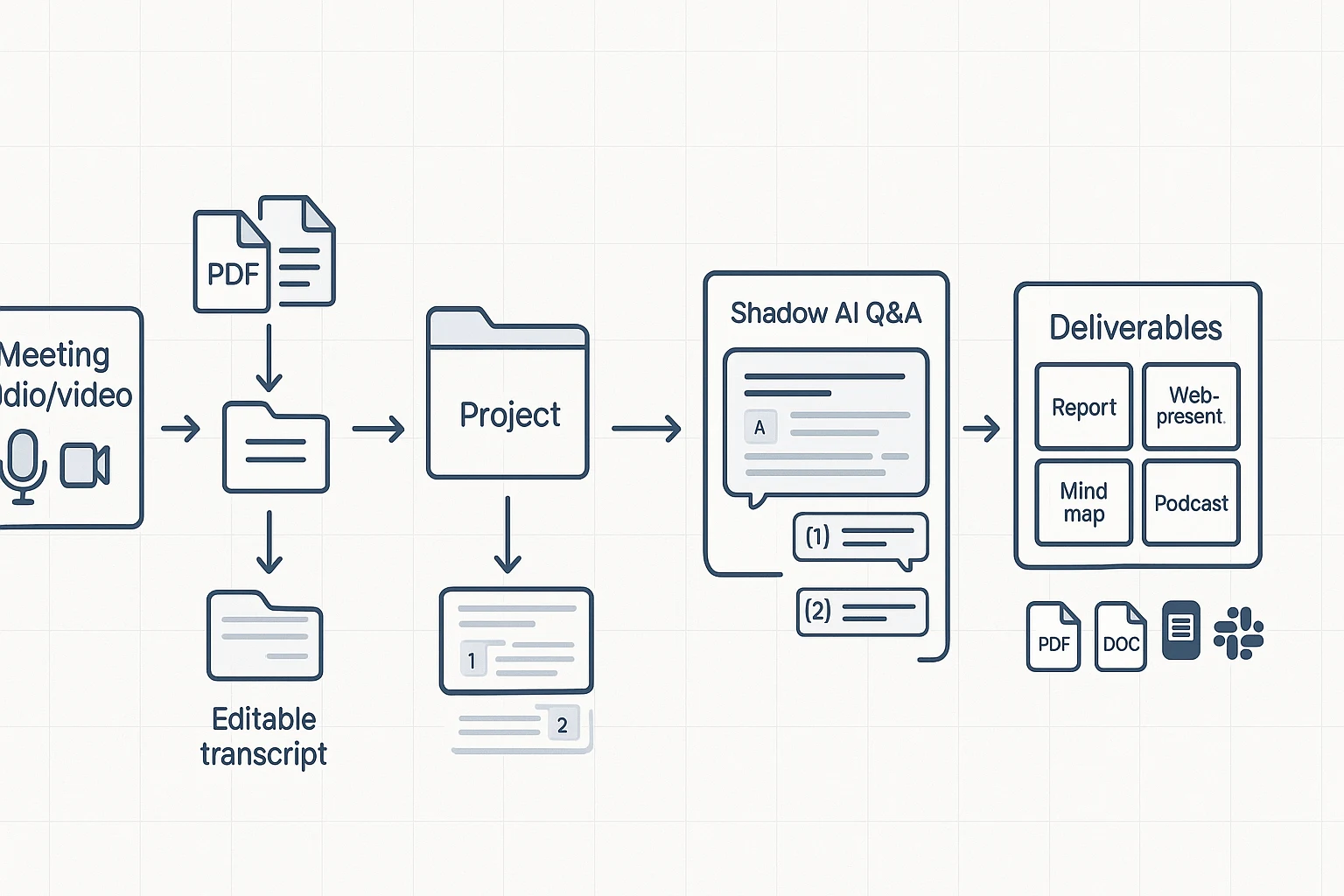
What a Project-based meeting workspace does that most Krisp alternatives don't
Most Krisp alternative lists mix two very different needs: live noise cleanup vs meeting capture and follow-through. A project-based meeting workspace focuses on the second lane. It keeps every meeting artifact in one place, so teams can find decisions later, reuse research, and ship outputs without copy-paste.
Projects that keep meetings + files together
The common failure mode isn't "bad audio." It's scattered context. The recording sits in a calendar link, notes live in a doc, action items are in chat, and the final summary is in email.
A Project workspace fixes that by grouping your core inputs and outputs together:
- Meeting recordings and transcripts (plus speaker labels and timestamps)
- Uploaded docs (PRDs, briefs, research PDFs, decks)
- The meeting summary, decisions, and tasks
- Follow-up assets (reports, slides, client updates)
That structure matters after the third meeting on the same topic. Instead of searching across tools, you open one Project and see the whole story.
Editable transcripts (collab + comments)
Many meeting tools treat transcripts as read-only logs. Teams don't work that way. They need a transcript they can clean up and trust.
Editable transcripts help you:
- Fix names, acronyms, and product terms fast
- Add missing context ("this refers to the Q2 rollout") right where it belongs
- Leave comments for reviewers and stakeholders
- Keep a single source of truth without rewriting the same notes elsewhere
For PMs and consultants, this also reduces rework. You don't want a client-ready doc based on an unedited transcript.
Shadow AI Q&A with citations across project files
A stronger pattern than "one meeting summary" is asking questions across all meetings and documents in a Project. For example: "What objections came up in every customer call?" or "Which decision owner changed between meetings?"
With Shadow AI-style Q&A, the key is citations back to the source snippet. That lets people verify quickly and reduces arguments about what was said.
This is also how secure meeting notes software should behave at scale: when Projects have clear permissions, answers stay bounded by what the user is allowed to access.
If you're comparing tools beyond noise suppression, it's also worth looking at work-focused AI tools that prioritize citations and privacy so teams can reuse meeting knowledge safely.
One-click deliverables (report, web presentation, podcast, mind map)
Noise cancellation improves the call. Deliverables improve the work that comes after.
In a Project workspace, you can turn the same set of meetings into consistent outputs, such as:
- A client-ready report (structured findings, risks, recommendations)
- A web presentation (shareable link format for stakeholders)
- A podcast-style recap (useful for async teams)
- A mind map (fast way to review themes and dependencies)
The advantage is speed and consistency. You're not reformatting the same content for every audience.
Export formats and handoff to Notion/Slack
Teams still need clean handoffs. Look for exports that match how work is delivered:
- Transcript exports: TXT, DOCX, PDF
- Summary exports: Markdown, DOCX, PDF
- Mind map exports: PNG or XMind
- Simple connectors to where teams ship updates (like Notion and Slack)
That way, meeting knowledge stays usable even if your team's "system of record" is somewhere else.
Try TicNote Cloud for Free for bot-free capture, editable transcripts, and deliverables inside a shared Project workspace.
Decision guide: pick the right alternative in 60 seconds
You don't need a "better Krisp" in every case—you need the right tool for your lane: live noise cleanup or meeting capture and follow-through. Use the picks below to match your workflow in under a minute.
If you only need cleaner audio live
Pick based on where you meet most:
- Microsoft Teams noise suppression: best if you live in Teams and want a simple toggle.
- Zoom noise suppression: best if you're Zoom-first and want built-in cleanup.
- NVIDIA RTX Voice: best if you have compatible NVIDIA hardware and want cross-app suppression.
If you need notes + action items
Pick TicNote Cloud. It's the most complete "meeting notes alternative" lane because it covers the whole chain: bot-free capture, transcripts, editable notes, and action items—organized inside a project workspace so the context stays connected over time.
If you're also evaluating other meeting knowledge tools, this helps to compare the "workspace" approach vs chat-style tools; see this guide to NotebookLM-style meeting and PDF alternatives for that angle.
If you need client-ready outputs
Pick TicNote Cloud. It can turn meeting content into structured deliverables—reports, web presentations, podcasts, and mind maps—without exporting to three other apps. That's the fastest path from "call finished" to "sendable output."
If you have strict security/procurement needs
Pick TicNote Cloud Enterprise as your default starting point. It's the cleanest path to evaluating SSO, roles/permissions, and auditable operations in one place. Your legal and IT teams should still validate every vendor claim in a formal security review (retention, access controls, and AI training policy).
If you're a creator editing recordings
Pick Riverside when you want high-quality recording workflows. Pick Audacity when you want free, manual cleanup and don't mind hands-on editing.
Internal CTA: Try TicNote Cloud for Free. If you're deciding between Free, Professional, and Business, jump to "Compare plans" in the TicNote Cloud pricing subsection.
What should buyers check for security, privacy, and rollout?
Meeting tools touch names, voices, and business plans. So when you compare a krisp alternative, treat it like any other data processor. The goal is simple: clear admin controls, written policies, and an exit path.
Confirm data retention and deletion
Start with retention. Ask for the default window (for audio, transcripts, and AI notes). Then ask if admins can set a shorter window by workspace or team.
Also ask how deletion works:
- Can admins delete a single meeting, a whole project, or a user's data?
- Is deletion "hard delete," or a soft-delete with recovery?
- How long until backups are purged?
Procurement tip: map this to your legal hold and offboarding process.
Get "no training on your data" in writing
Vendors often say "we don't train on your data." In review terms, separate two things:
- Model training: improving future models using your content
- Processing: using your content to produce transcripts, summaries, or action items
You want the training restriction stated in the DPA (data processing addendum) or terms, not only in a marketing page. Request a written confirmation that your content isn't used to train models, and ask if the policy also covers subcontractors.
Check encryption basics (in transit + at rest)
Ask if data is encrypted in transit (during upload and streaming) and at rest (stored files and databases). Then ask who controls keys, and whether encryption covers exports stored inside the app.
Plan rollout: SSO, SCIM, roles, and logs
For team use, rollout controls matter as much as features. Confirm:
- SSO (single sign-on) for login control
- SCIM for automated provisioning and deprovisioning
- Role-based access (admin, member, guest)
- Guest access rules for clients
- Audit logs for access and key actions
If a tool can't support least-privilege access, it's harder to approve.
Demand exports and data portability
Exports are your safety valve. They support exit planning, eDiscovery workflows, and a local archive. Ask what you can export (audio, transcript, notes, speaker labels) and in which formats, plus whether exports keep timestamps.
Regulated industry caveats (bring to security review)
If you're in healthcare, finance, government, or legal, don't assume fit. Bring this checklist to review and pilot with non-sensitive meetings first:
- DPA and processor/controller roles
- Retention controls and proof of deletion
- Subprocessors list and data residency options
- Access controls, SSO/SCIM, and audit logs
- Model-training policy in writing
One reminder: under Regulation (EU) 2016/679 (General Data Protection Regulation), Article 17 (2016) a data subject can request erasure "without undue delay" under listed grounds, so your vendor's deletion process can't be vague.
Conclusion: the best Krisp alternative depends on your workflow
A Krisp alternative falls into two lanes: live noise suppression and meeting outcomes. Noise tools help you sound clear in real time. Meeting assistants help you ship work after the call: transcripts, editable notes, action items, and shareable outputs.
If your main need is meeting capture plus transcripts, editable notes, and deliverables, choose TicNote Cloud and run a 1-week pilot with your real meetings. It's also a strong fit if you want your notes to build into a project knowledge base over time (see this guide on switching from Notion and picking the right workspace). If your main need is cleaner audio live, start with built-in Teams or Zoom noise suppression, or use RTX Voice if you have compatible NVIDIA hardware.
Try TicNote Cloud for free if your goal is to turn meetings into searchable, reusable work.


