


 Extension
TL;DR: Skill agent-assisted screening in one page
Try a skill-agent workspace for free to keep resume screening fair: define must-haves first, then use AI to extract evidence, summarize skills, and standardize notes—not decide who gets hired.
Manual screening gets messy fast. Notes live in emails, intake calls, and spreadsheets; small inconsistencies can turn into unfair shortlists. A skill-agent workspace keeps rubrics, pre-screening questions, summaries, and source-linked decisions in one place.
Treat ATS keyword matches as signals, not proof. The control is a documented role rubric reviewed before any resume.
How does resume screening work when AI supports the process?
Resume screening is the early hiring step that checks each application against basic, job-related requirements. The goal is simple: create a shortlist and document why each person is moved forward, marked needs review, or not moved forward.
Set the boundary before scoring
Screening is not the same as full candidate evaluation. Screening looks for evidence of minimum requirements and relevant signals, such as required licenses, years of related work, tools used, or portfolio match. Evaluation comes later through interviews, work samples, reference checks, and deeper skill reviews.
Use this boundary rule: don't use screening to predict vague "culture fit." If a behavior matters, tie it to the job, such as collaboration in cross-functional projects. Also remove protected-class proxies, including age-coded assumptions, school prestige shortcuts, graduation dates, or address-based judgments.
Use AI for structure, not final decisions
A strong AI-supported workflow has 3 layers:
- Manual review: Recruiters and hiring managers catch nuance, transferable skills, career changers, and unusual career paths.
- Automated resume screening: An ATS can parse resumes, de-duplicate applicants, apply basic eligibility filters, and surface keyword hints.
- AI resume screening: AI can extract structured facts, summarize experience, map evidence to rubric criteria, and draft consistent notes. Humans still decide.
This human-control point matters. In Europe, Regulation (EU) 2016/679 — Article 22 (Right not to be subject to automated individual decision‑making, including profiling) states: "The data subject shall have the right not to be subject to a decision based solely on automated processing, including profiling, which produces legal effects concerning him or her or similarly significantly affects him or her."
Put bias checks at 3 points
Before screening, calibrate the rubric with the hiring manager and define must-have criteria. During review, use the same scorecard for every applicant and route borderline cases to a human. Afterward, spot-check outcomes, compare pass-through rates, and confirm notes explain each decision.
Golden rule: if you can't explain it, don't use it to reject.
Build the role rubric before reviewing resumes
A fair resume screening process starts before the first resume lands. Convert the job description into observable evidence, lock the weights, and document the rules so AI can support consistency without becoming the decision-maker.
Translate the job description into must-have and nice-to-have criteria
Rewrite each requirement as something a reviewer can verify from a resume, application answer, or work sample. "Strong SQL" is vague. "Has used SQL to join tables, clean data, or build recurring reports" is observable.
| Criteria type | Definition | Screening rule |
| Must-have | Legal, job-related minimums needed to perform the role | Missing evidence triggers rejection or human review |
| Nice-to-have | Differentiators that may improve fit | Adds points, but never becomes a hidden blocker |
| Not relevant | Signals unrelated to job tasks | Exclude from scoring |
Create a weighted screening scorecard
Use a 100-point rubric and keep it stable through the full batch. If you change weights halfway through, restart or re-score everyone. For a deeper setup, use a weighted resume scoring workflow before you launch the search.
| Category | Points |
| Core skills tied to job tasks | 35 |
| Relevant experience scope | 25 |
| Domain or tool knowledge | 15 |
| Evidence quality: projects, outcomes, impact | 15 |
| Communication basics: clarity, structure, completeness | 10 |
Guardrails matter. Cap pedigree signals at 0–5 points, or remove them entirely. Don't use proxies like school ranking, home address, graduation year, photo, or employer prestige unless they directly prove a job-related requirement.
Write neutral pre screening questions
Pre screening questions should validate must-haves, not screen for protected traits. Use plain, task-based prompts:
- "Are you legally authorized to work in this location?" where lawful.
- "Can you work the required schedule or hybrid pattern?"
- "Which tools have you used to complete this task?"
- "Tell me about a project where you solved this type of problem."
Avoid salary history where restricted, medical questions, family status, age cues, citizenship wording when work authorization is enough, and "culture fit" questions that lack job relevance.
Calibrate before applications arrive
Run a 30–45 minute calibration with the recruiter and hiring manager. Review two example profiles, agree on what counts as evidence, define borderline review rules, and write standard decision notes. In TicNote Cloud, teams can save the intake call, rubric, notes, and policy documents in one Project so later screening summaries cite the same source material.
Run an AI-assisted screening workflow without losing human judgment
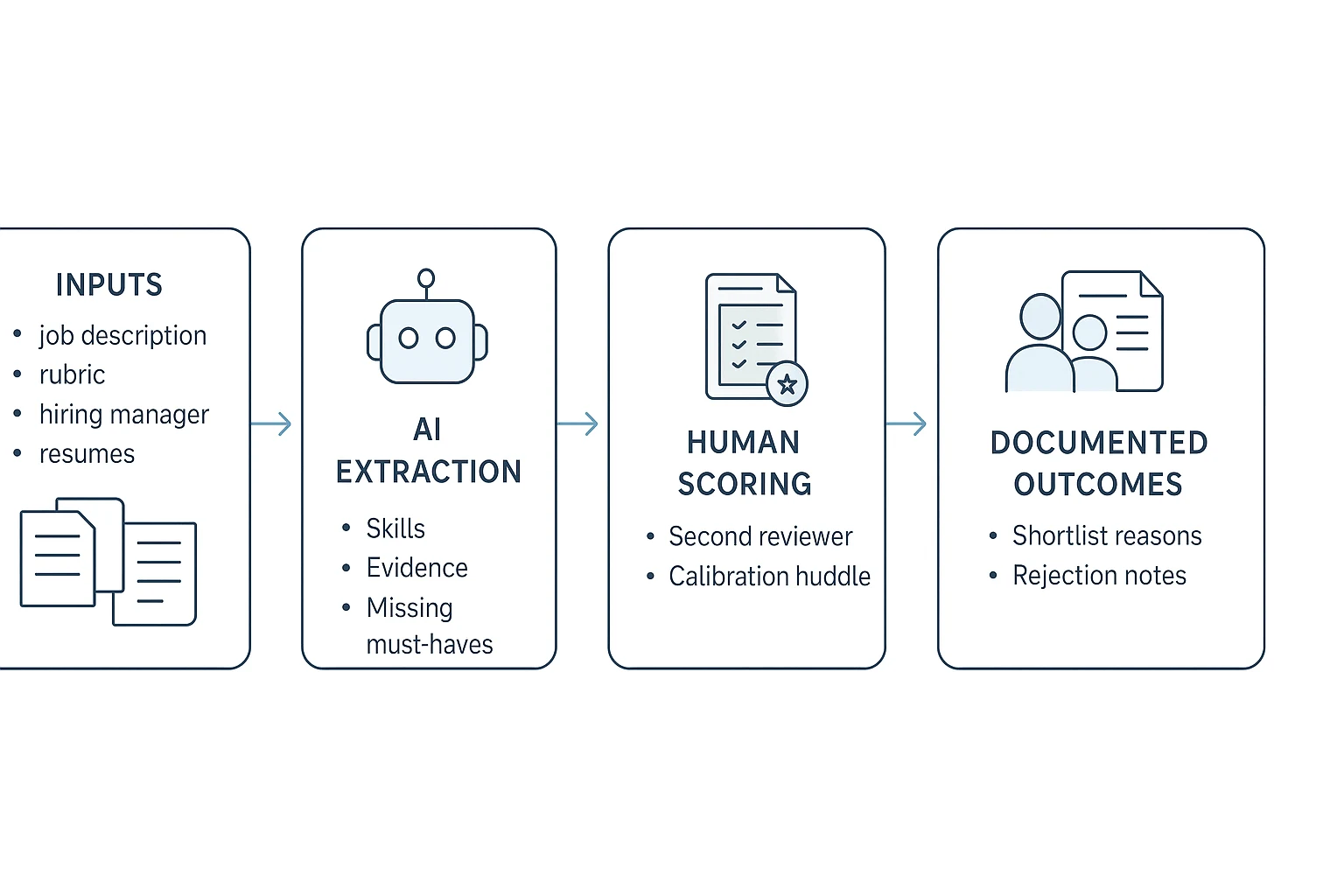
AI can make resume screening faster, but it should not replace accountable hiring judgment. The safer model is simple: use AI to organize evidence, then use people to score, question, and decide. That keeps speed in the workflow without turning the tool into an invisible gatekeeper.
Step 1: collect role context in one place
Start with a single source of truth for each open role. This can be a dedicated Project, folder, or hiring workspace that holds the job description, intake notes, competency framework, policy limits, prior debriefs, and all candidate materials.
Include these inputs before reviewing resumes:
- Final job description and approved pay/location rules
- Hiring manager intake notes and success profile
- Must-have and nice-to-have criteria
- Company competency framework
- Prior interview debriefs for similar roles
- Candidate resumes, portfolios, referrals, and pre screening questions
This prevents criteria drift, where reviewers slowly change the bar as new resumes arrive. In TicNote Cloud, teams can store intake calls, recruiter notes, and documents in one Project, then use Shadow AI to retrieve answers with cited source context.
Step 2: use AI to extract evidence, not make decisions
Automated resume screening works best as an evidence assistant. Ask AI to parse resumes, normalize skill names, summarize relevant projects, flag missing must-haves, and draft structured notes. For example, "React.js" and "React" should map to the same skill, while "managed CRM migration" can be summarized as project evidence.
Set clear limits. AI should not auto-reject candidates without human review. It should not infer protected traits, guess reasons for employment gaps, or score "culture fit" from personal details. If the resume lacks evidence, the note should say "not found," not speculate.
Step 3: apply the same scorecard to every applicant
Use one rubric version for the full applicant pool. A repeatable loop works well:
- Review the resume against role criteria, not personal background.
- Score each category using the same weights and definitions.
- Record short evidence snippets for every score.
- Tag the status: advance, hold, borderline, or reject.
- Save the scorecard and reviewer initials.
For a deeper setup, use a consistent resume scorecard before the first pass. It makes reviewer calibration easier and keeps hiring managers from comparing candidates on memory alone.
Step 4: route borderline candidates to human review
Create a second-look rule before screening starts. Route candidates to another reviewer when they fall within 10% of the shortlist threshold, have an unconventional background, show strong portfolio evidence, miss a common keyword, list international credentials, or have a career break.
A 10-minute huddle can reduce single-reviewer variance. The goal is not to advance everyone. It is to make sure unusual paths get a fair read.
Step 5: record outcomes in consistent language
Use short, factual decision notes. Keep the language tied to the rubric:
- "Did not meet must-have X based on submitted materials."
- "Insufficient evidence of Y for this role level."
- "Meets must-haves; strongest evidence is in Z."
- "Borderline: second review requested for portfolio evidence."
Consistent notes help with audits, candidate inquiries, and internal alignment. A workspace like TicNote Cloud can help teams generate structured summaries from meetings and documents, then store the final decision trail next to the role materials.
How should automated resume screening handle ATS keywords and edge cases?
Automated resume screening should treat ATS data as a signal, not a verdict. An applicant tracking system (ATS) usually parses resumes into fields like name, employer, dates, education, skills, and job titles. Then it matches words or phrases against the job description. That sounds simple. But false negatives happen when a resume uses tables, nonstandard headings, synonyms, acronyms, or "skills buried in projects."
Control the vocabulary before you filter
Tie keyword logic to the role rubric. For each skill, keep a controlled vocabulary: the preferred term, common synonyms, acronyms, tools, and proof examples. For example, "customer discovery" may also appear as "user interviews," "VOC," or "research calls." If candidates need help aligning language without faking experience, point them to ethical ATS-friendly resume tailoring.
Avoid hard reject rules for one keyword unless the requirement is legal, licensed, or truly non-negotiable. Use must-have evidence instead: "Has led SQL analysis on business data" is stronger than "mentions SQL." To catch over-filtering, review a random 5–10% slice of resumes the system excluded each week. If qualified candidates appear there, update the synonym list and the rubric.
Apply edge-case rules consistently
Use the same decision rules for every candidate:
| Edge case | What to check | Screening note standard |
| Career changer | Adjacent tasks, recent projects, learning velocity | Name the transferable task and evidence |
| International qualification | Equivalent level, institution type, regulated license fit | Note the mapping source or uncertainty |
| Employment gap | Job-related evidence before and after the gap | Use neutral language; don't infer cause |
| Non-traditional education | Outcomes, projects, certifications, work samples | Record proof, not prestige assumptions |
Score proof, not polish
For GitHub, portfolios, certifications, writing samples, and transferable skills, apply five evidence tests:
- Recency: Was the proof created or used in the last 12–24 months?
- Relevance: Does it match a task in the rubric?
- Complexity: Is the work simple, moderate, or advanced?
- Ownership clarity: Did the candidate build, lead, review, or support it?
- Impact: Did it ship, improve a metric, serve users, or reduce risk?
Acceptable proof can include portfolio links, shipped projects, certification IDs, public code, case studies, writing samples, or manager-verified project notes. Document each item in the same format: "Evidence found, source, rubric criterion, confidence level, reviewer initials." That keeps ai resume screening useful, explainable, and reviewable.
Use a hiring skill agent workspace to screen resumes and document decisions
The workflow steps below are demonstrated using TicNote Cloud as an example workspace for organizing role context, screening outputs, and audit-ready notes. In this resume screening setup, the goal is simple: turn job requirements, resumes, and calibration notes into structured evidence without making AI the final decision-maker.
Step 1: Add the HR Recruiting skill agent
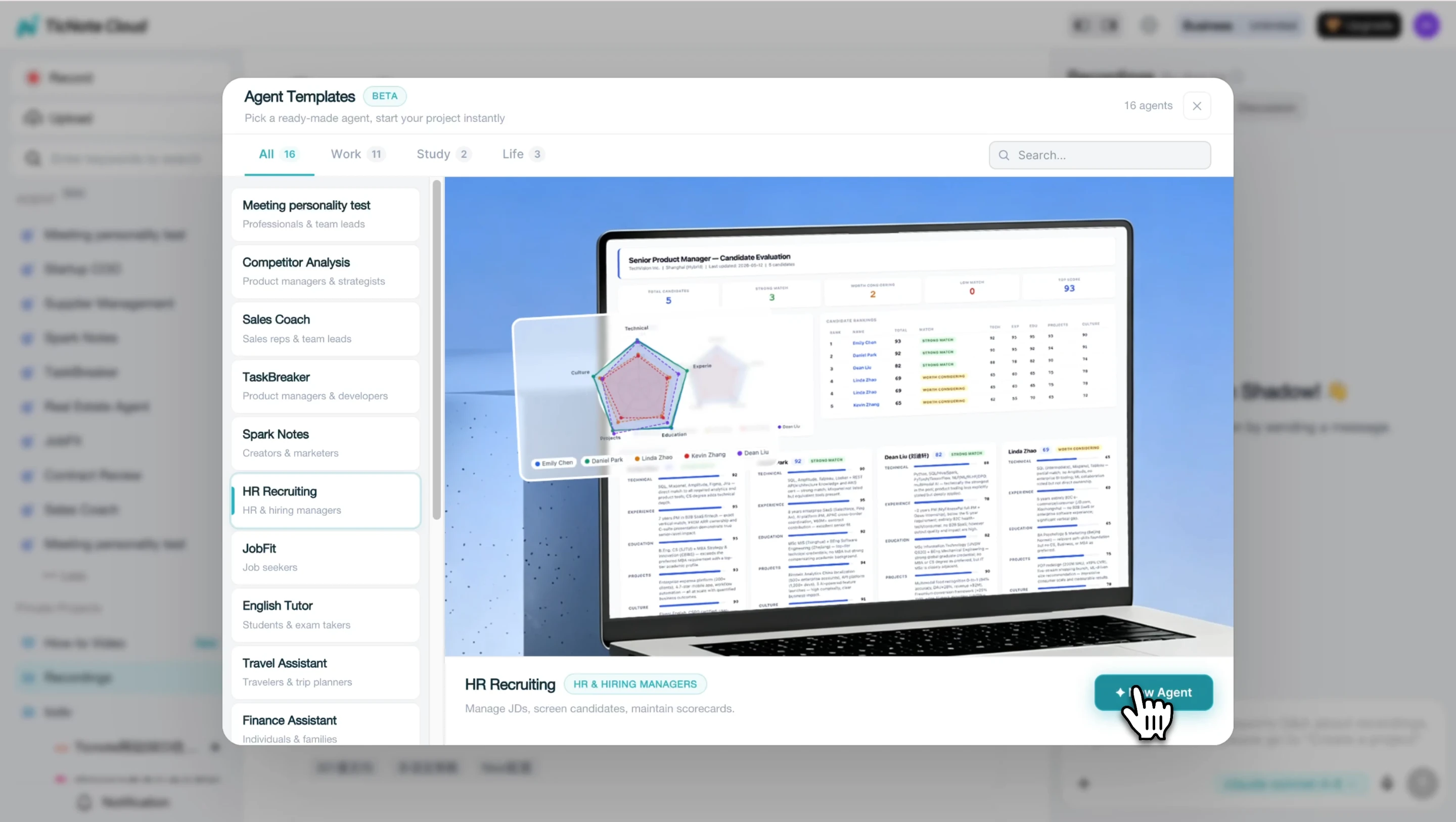
In TicNote Cloud, click Add Agent, open the Skill Agent library, and choose HR Recruiting. This creates a repeatable screening assistant that produces structured evaluations instead of scattered notes, Slack comments, or one-off spreadsheets.
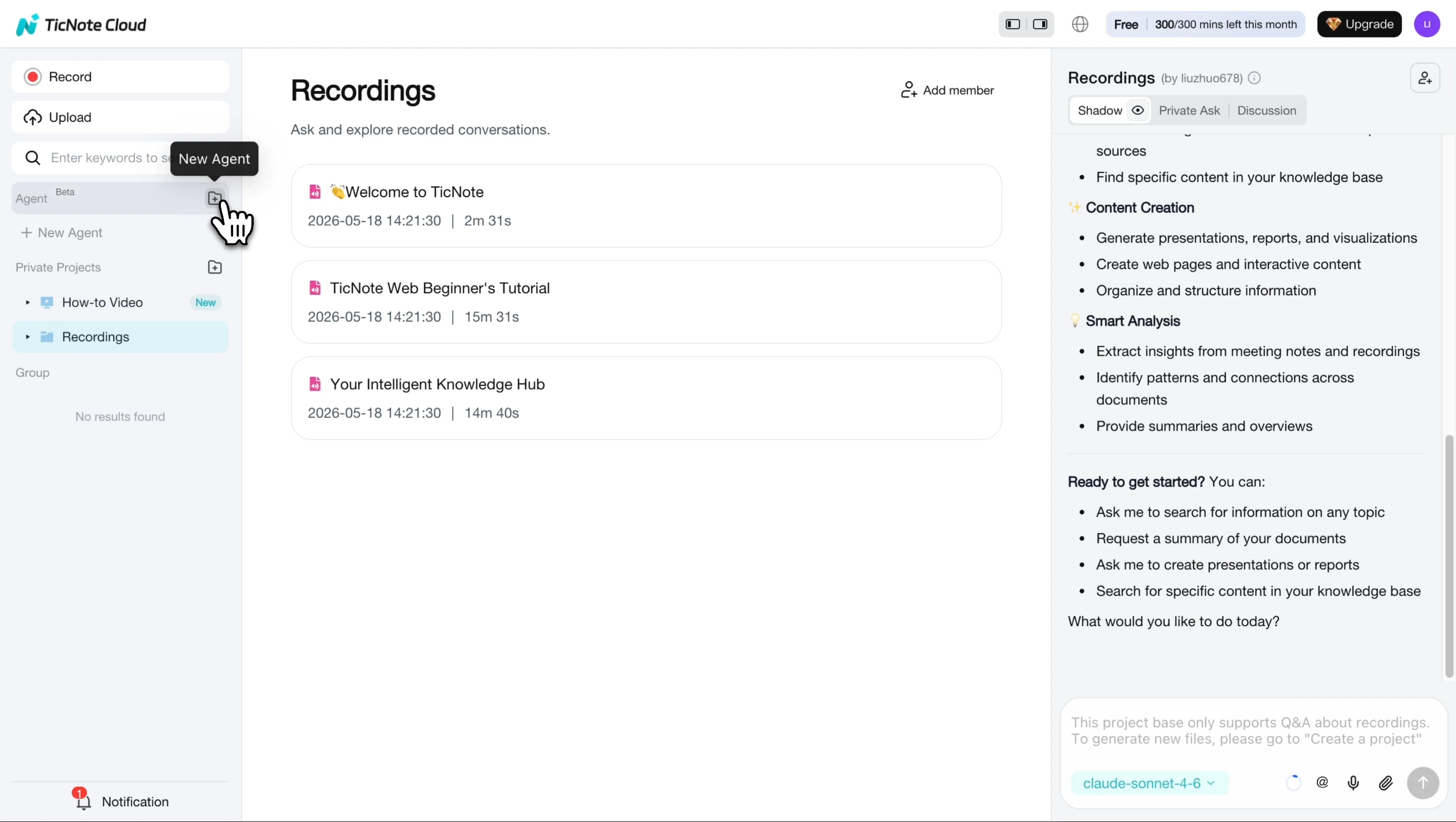
After it's added, the HR Recruiting agent appears in your workspace and is ready to evaluate candidates against a role.
Step 2: Paste the job description and send resumes
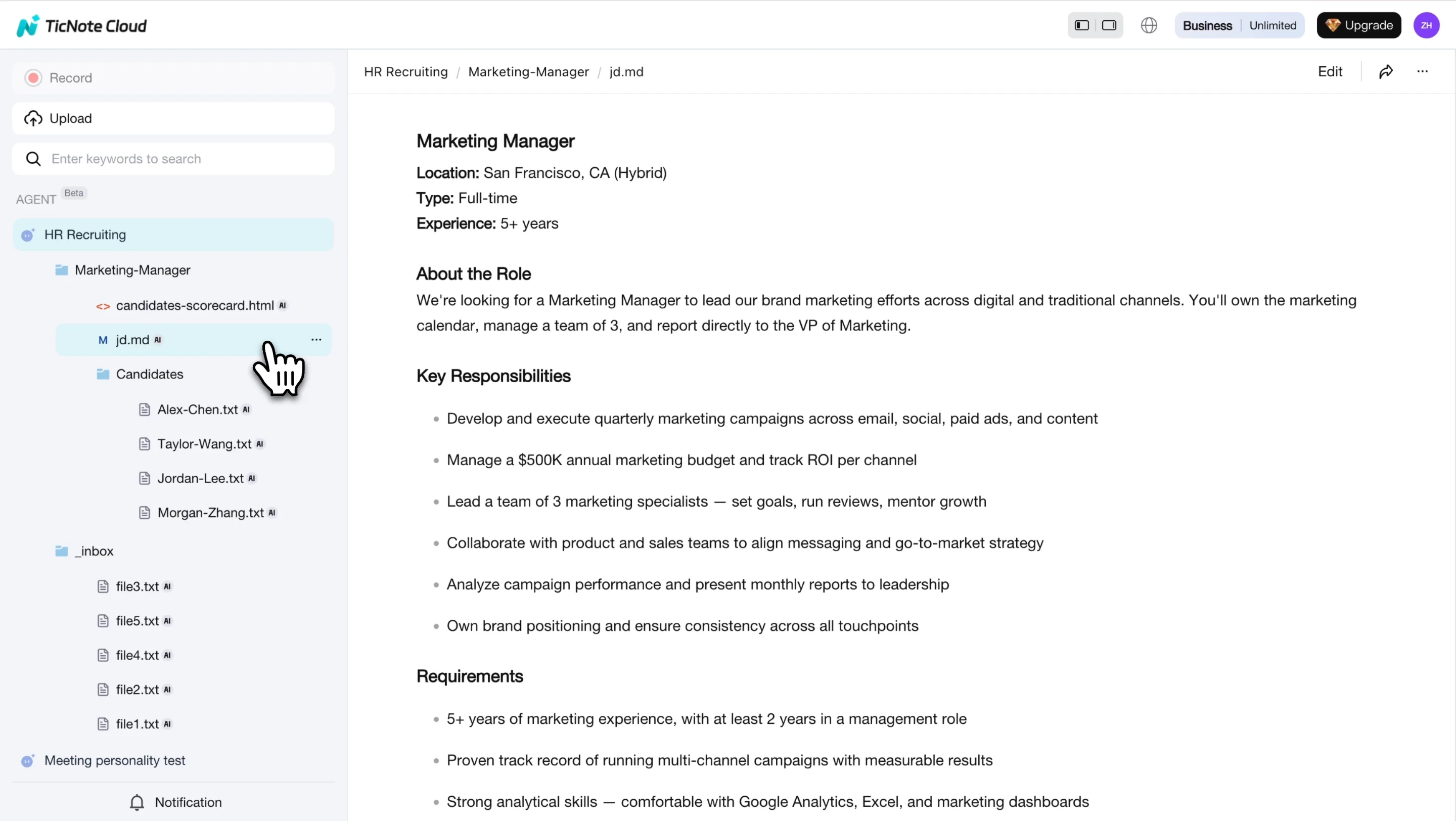
Start by pasting the job description into the chat. The agent parses it into a structured role reference, creates a dedicated job folder, and saves the JD for reuse. Then add resumes by uploading files, dropping PDFs into the chat, or pasting resume text.
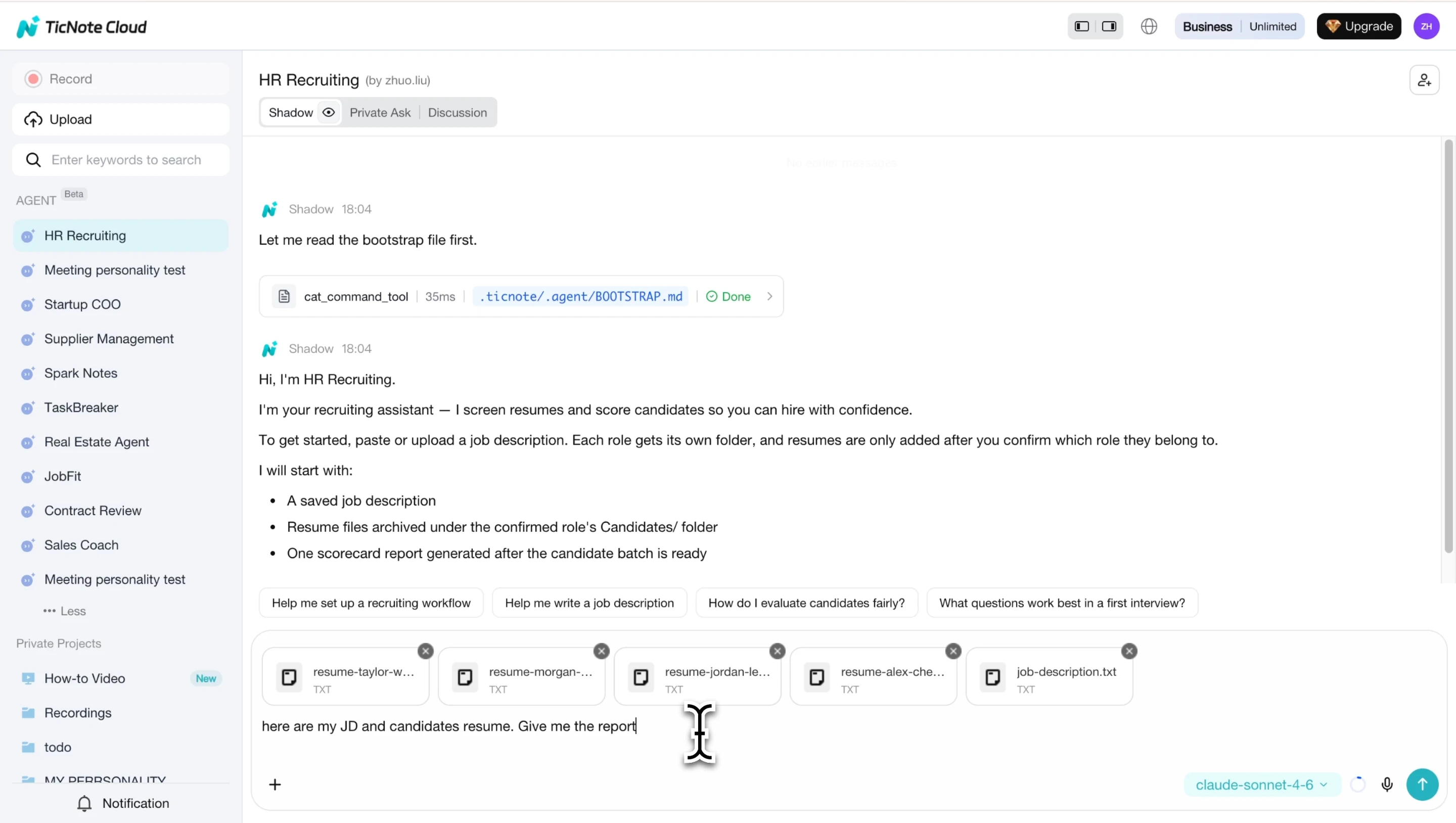
Each evaluated resume is archived into the role folder automatically. That matters for traceability: your team can see what was reviewed, when it was reviewed, and which source supported the summary.
Step 3: Open the evaluation report and review candidates
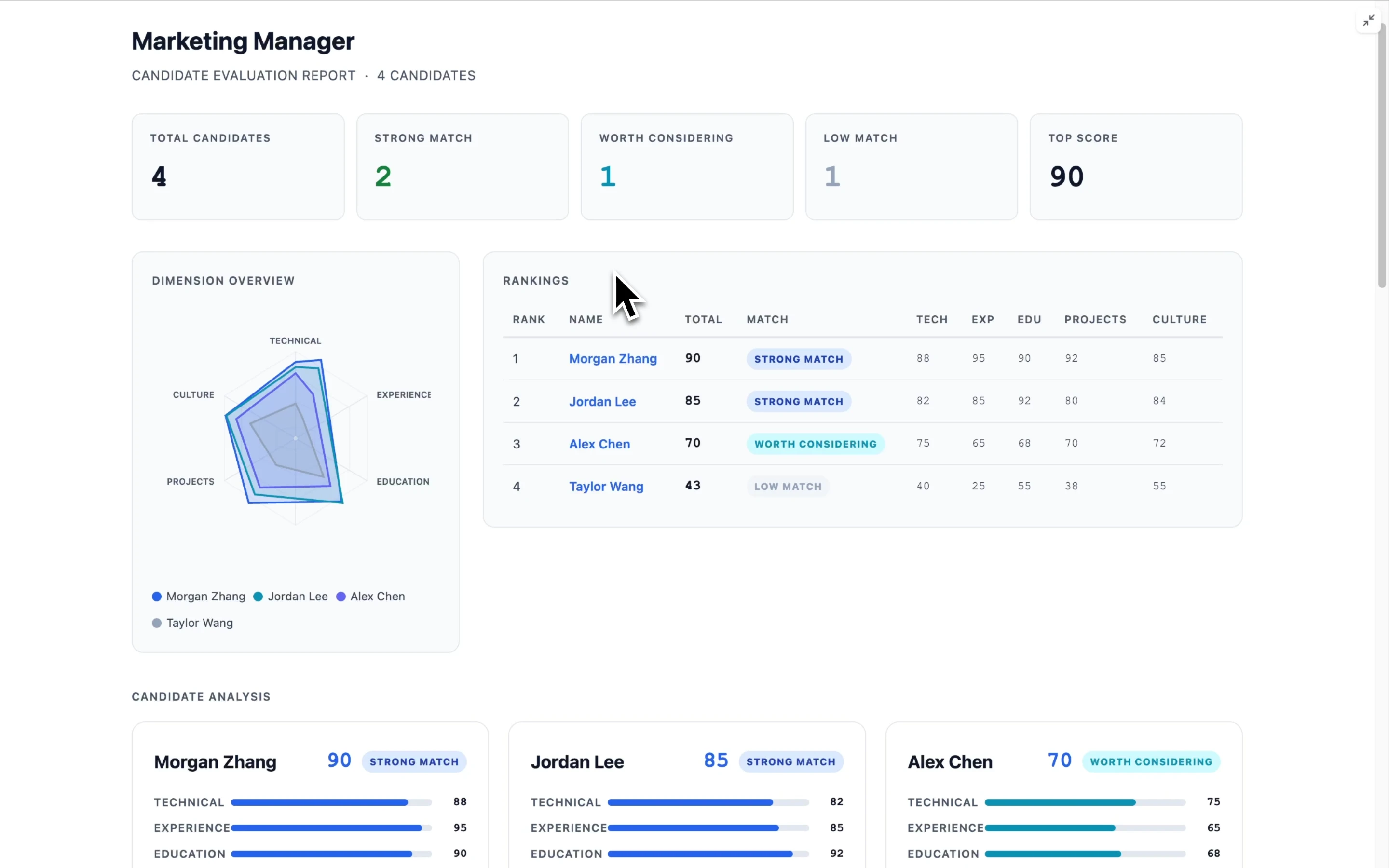
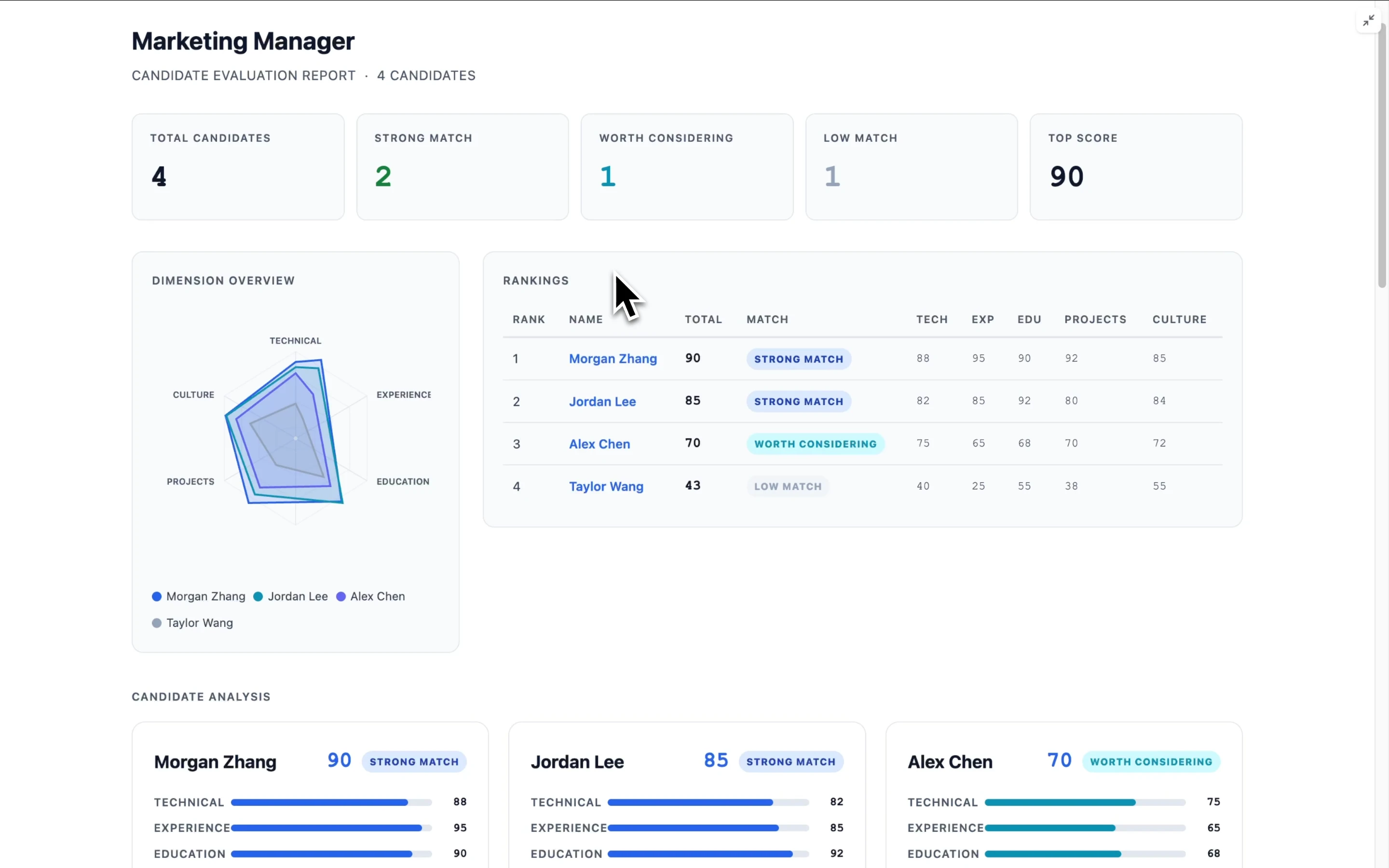
For each job opening, open the interactive HTML evaluation report. It shows candidate rankings, radar charts, and 5-dimension scoring across Technical, Experience, Education, Projects, and Culture, with short justifications for each score.
Use the report during recruiter review or hiring manager calibration. As new resumes arrive, refresh the report. If you update the candidate pool, job description, or rubric, use re-evaluate all so every candidate is scored against the same reference.
Signup block placement: Insert a compact product embed here with the primary CTA: Try TicNote Cloud for Free.
You can also use the mobile app to access Projects, upload files, and review generated outputs for quick triage or approvals. Keep final shortlist decisions and report refreshes on the web, where the full comparison view is easier to audit.
If you're comparing tools, this AI resume checker workflow guide explains where resume checkers fit in a broader hiring process. TicNote Cloud is not an ATS replacement. It supports rubric building, consistent screening summaries, meeting-based calibration notes, and source-linked reasoning for audits and collaboration.
Measure fairness, quality, and compliance before the shortlist
A fast resume screening process is only useful if it stays consistent, explainable, and checked before the shortlist goes out. Treat metrics as guardrails, not proof that every choice was perfect. The goal is to spot drift early, fix weak criteria, and keep a record of why candidates moved forward.
Track a small screening dashboard
Use three numbers per role, updated weekly:
| Metric | Formula | How to read it |
| Pass-through rate | Shortlisted ÷ screened | Sudden drops may mean criteria are too narrow. |
| Time-to-shortlist | Shortlist date − posting date | Long cycles signal intake or review bottlenecks. |
| Source quality | Interview pass rate by source | Compare only when each source has enough volume. |
Don't overreact to 5 or 10 resumes. For small cohorts, add notes such as "sample under 30" and review trends across several openings.
Define quality signals you can influence
Quality-of-hire is multi-factor. Screening affects it, but so do interviews, offers, onboarding, manager support, and market timing. Use leading indicators instead:
- Hiring manager satisfaction at 30, 60, and 90 days
- Interview-to-offer conversion
- Ramp milestone completion
- Early retention and performance feedback
- Rejection reason consistency
In TicNote Cloud, teams can store calibration notes, rubric changes, and debrief summaries in one Project so later reviews have source-backed context.
Review fairness and audit the workflow
Adverse impact review means comparing selection rates across groups where data use is lawful and available. The EEOC states in Selection Procedures and Adverse Impact (FAQ) — U.S. Equal Employment Opportunity Commission that "A selection rate for any race, sex, or ethnic group which is less than four‑fifths (4/5) (or 80 percent) of the rate for the group with the highest rate will generally be regarded as evidence of adverse impact." Escalate unusual patterns to HR, legal, or compliance before changing automated resume screening rules. Protect privacy and limit access.
Run a monthly audit:
- Confirm the rubric version used.
- Review a random sample of rejected resumes.
- Check that rejection reasons match evidence.
- Compare human reviewers for consistency.
- Hold a calibration session and document changes.
Candidate disclosure template: "We may use automation to help organize, summarize, and sort application materials. A human reviews hiring decisions. If you need an accommodation or want to provide additional information, contact [email/contact]."
Final thoughts: faster screening needs documented judgment
Resume screening should not mean rejecting people faster. It should mean 5 clear things: role criteria set before review, evidence pulled from each resume, consistent scorecards, human review for nuance, and metrics that expose drift.
AI can help summarize qualifications and keep notes complete, but people must own the decision. That matters most for career gaps, nontraditional backgrounds, internal referrals, and close calls.
Use TicNote Cloud as the documentation layer for a hiring Project: store rubrics, pre-screening questions, recruiter notes, calibration meetings, and shortlist rationale in one traceable workspace.


