


 Extension
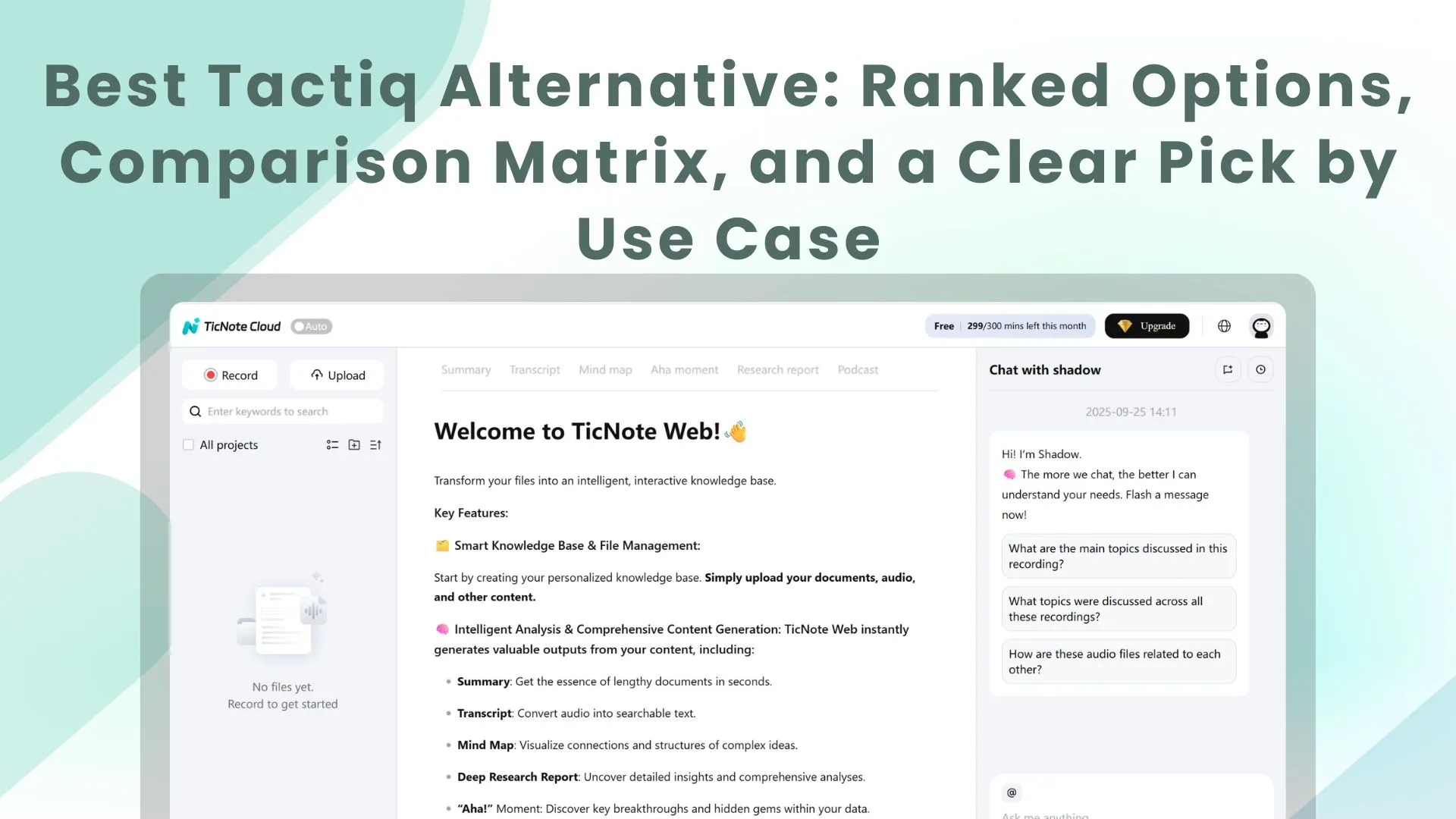
TL;DR: The best Tactiq alternatives (ranked)
Try TicNote Cloud for Free if you want the best overall tactiq alternative for accuracy, editable transcripts, and turning meetings into reusable deliverables; see pricing for the plan that fits your minutes. Ranked: 1) TicNote Cloud, 2) Otter.ai, 3) Fireflies.ai, 4) Fathom, 5) Avoma.
You're stuck with notes that don't travel (and no clean way to reuse them). That turns every follow-up into copy‑paste work, and decisions still get lost. Use TicNote Cloud to keep meetings inside Projects so you can edit transcripts and generate reports, slides, or briefs without context switching.
Bot-free vs full recordings: pick bot-free capture when you want cleaner consent optics and fewer join issues; pick bot-joins-and-records when replay is non‑negotiable for verification.
Quick picks by role: Sales → pick TicNote Cloud for structured follow-ups and assets; pick Avoma if you live in CRM coaching. PM/Research → pick TicNote Cloud for multi-interview synthesis; pick Otter if you only need fast playback. Ops → pick TicNote Cloud for searchable project knowledge; pick Fireflies for broad integrations.
Pricing snapshot (checked on March 2026) + avoid if: TicNote Cloud (free tier + low-cost monthly/annual) — avoid if you need a bot to join every call. Otter (seat-based tiers) — avoid if you need strong deliverable workflows. Fireflies (seat-based + add-ons) — avoid if you want bot-free capture. Fathom (freemium, team plans) — avoid if you need heavy admin controls. Avoma (higher seat pricing) — avoid if you don't need CRM coaching and revenue features.
What is the best Tactiq alternative for your workflow?
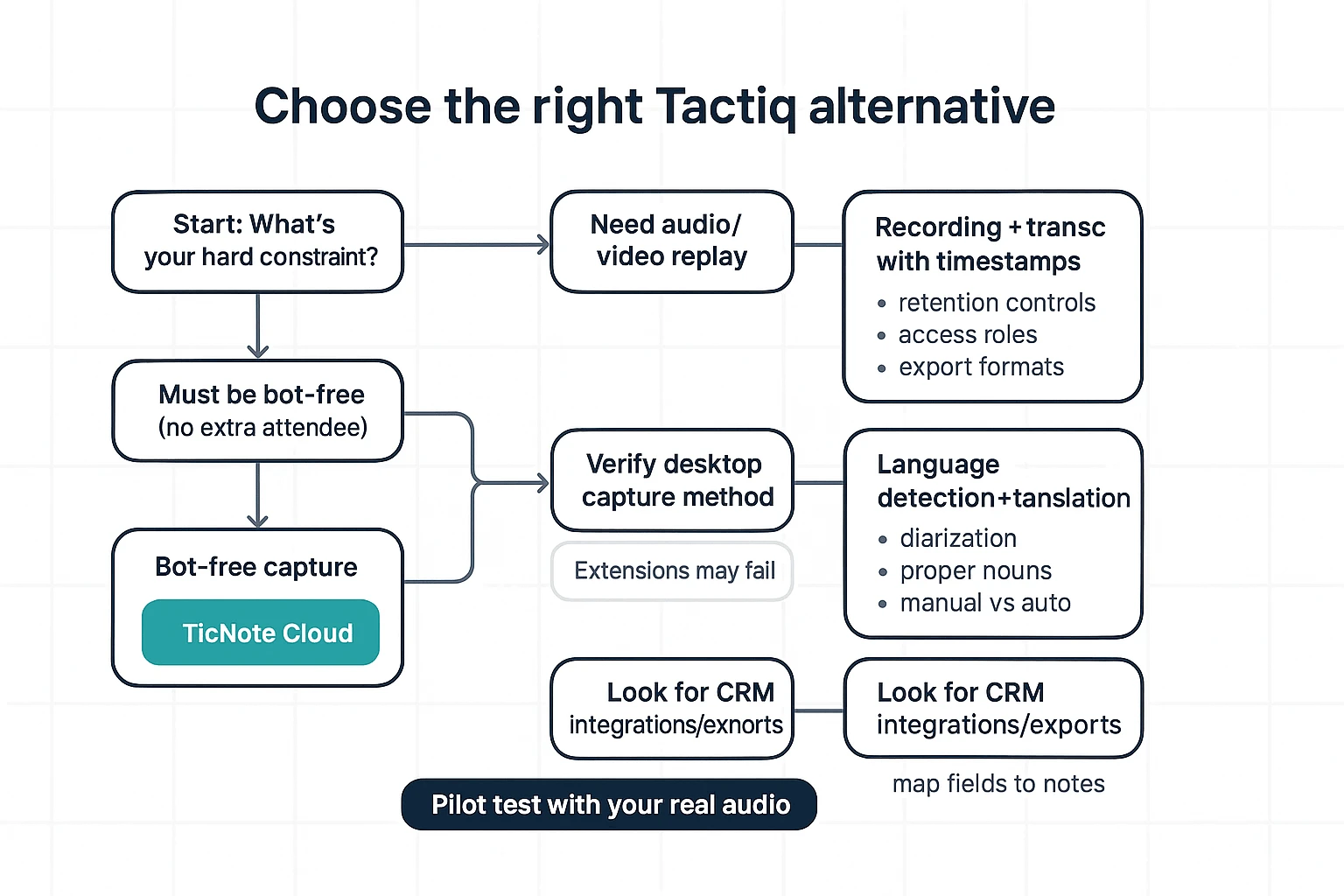
If you're comparing a tactiq alternative, start with your constraints: do you need replay, must you stay bot-free, do you work in Teams desktop, do you switch languages mid-call, or do you need CRM-ready outputs. Pick the tool that matches the hard constraint first, then optimize for accuracy and workflow.
If you need video/audio replay to verify quotes
Pick a tool that records audio/video and keeps the transcript linked with timestamps. Replay is what lets you confirm exact phrasing, fix names and numbers, and defend notes later (especially in regulated work).
Before you decide, verify these three items:
- Retention and deletion controls: Can you set auto-delete by days, project, or workspace?
- Access rules: Who can replay recordings (admins only, owners, all members, guests)?
- Exports: Look for WAV/MP4 and transcript exports (DOCX/PDF/TXT) with timestamps preserved.
If you must stay bot-free (no extra attendee)
Pick a bot-free capture tool—TicNote Cloud is the cleanest fit when your org blocks "meeting bots." Bot-free means nothing joins the call as a visible participant. Instead, capture happens through a browser extension or device/system audio capture.
Trade-offs to plan for:
- Browser vs desktop gaps: Teams desktop can block or limit browser capture.
- IT policies: Some companies block extensions, or require admin approval.
- Audio source quality: Device capture can vary if your mic setup is inconsistent.
If you need multilingual meetings with mid-call switching
Pick a tool that's proven for language detection/switching and gives translation outputs you can reuse. Don't trust a spec sheet here—test with your real language pairs and accents.
What to verify in a quick pilot:
- Speaker diarization across languages (keeps the right person matched to the right text)
- Proper nouns and acronyms (names, product terms, city names)
- Manual vs automatic language: Some tools require you to set one language per meeting.
If you live in Zoom/Meet/Teams (and where extensions break)
Match the tool to the platform you actually use:
- Zoom-heavy: Prefer Zoom-native recording if you need guaranteed replay and admin controls.
- Google Meet / Workspace: Extension-based capture is usually reliable and simple.
- Teams-first: Decide early if you're mostly on Teams desktop or Teams web. Desktop plus strict IT controls is the #1 failure mode.
If Teams is your hub, read this Teams replacement and migration comparison before you commit to a capture approach.
Fast decision box (common combos):
- Need replay + quote verification: Choose a recorder-first tool with timestamped playback.
- Bot-free + Meet/Teams web OK: Choose TicNote Cloud (extension/device capture).
- Teams desktop + bot-free + EU/regulatory: Shortlist only tools that (1) work on Teams desktop in your environment and (2) let you confirm hosting region, DPA terms, and retention controls in writing.
- Multilingual switching + translation deliverables: Choose a tool you've tested with real calls and exports, not just single-language demos.
How we tested and compared these tools (so the ranking is repeatable)
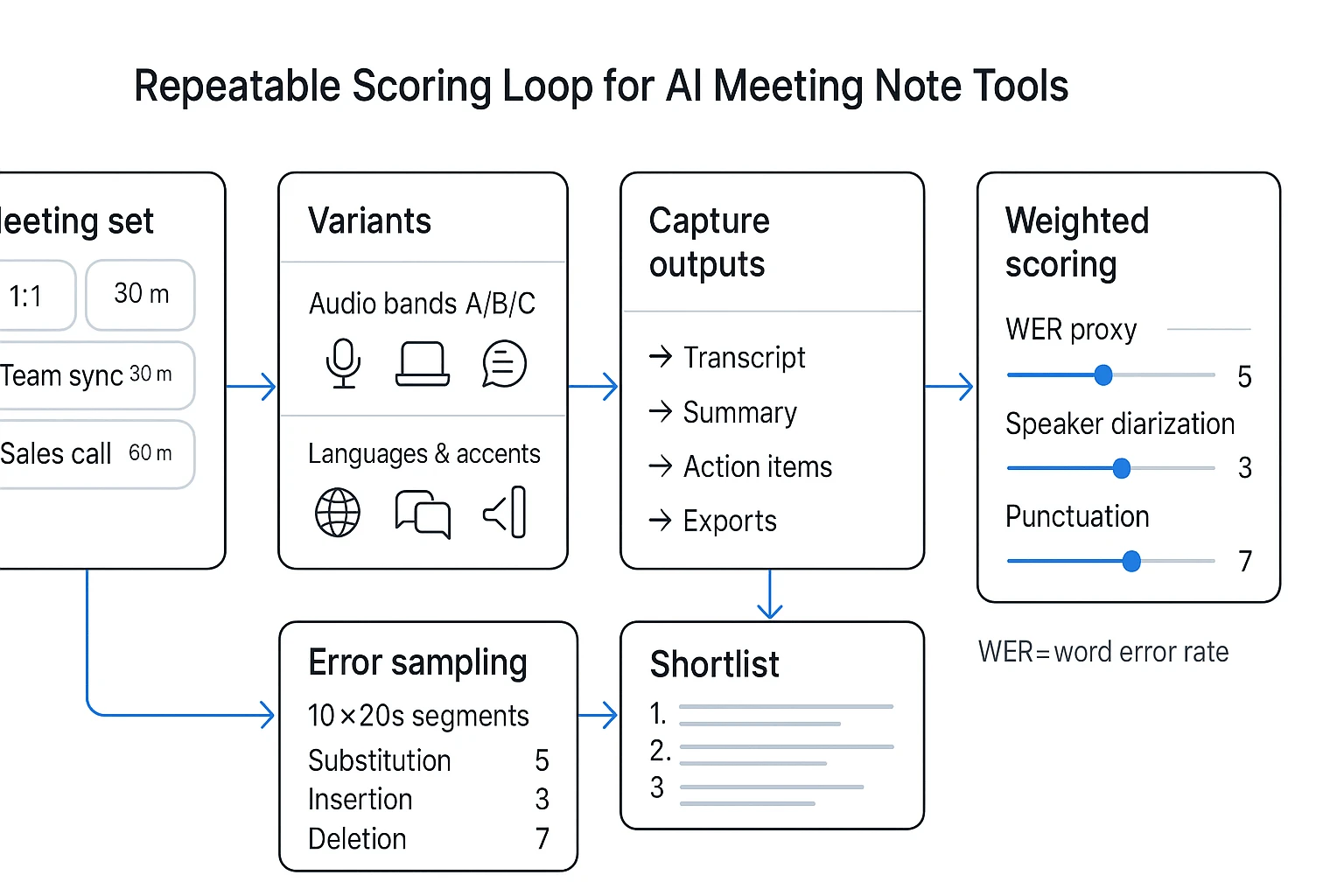
This ranking is based on a repeatable rubric, not vibes. We used the same meeting set, the same audio and language variants, and the same scoring sheet for every tool. The goal is simple: if you're comparing any tactiq alternative, you should be able to rerun this test with your own calls and get similar results.
Use a fixed test set (3 meeting archetypes)
We tested three meeting types because they break tools in different ways:
- 1:1 discovery (20–30 min): Dense Q&A, lots of proper nouns. This exposes missed terms and weak punctuation.
- Team sync (30–45 min): 4–6 speakers, overlap, interruptions. This stresses speaker diarization (who said what).
- Sales call / demo (30–60 min): Fast turns, objections, and next steps. This is the best place to judge action-item extraction.
For each meeting, we captured the same artifacts:
- Full transcript (with timestamps if available)
- Auto summary (short + detailed when offered)
- Action items / next steps list
- Exports (DOCX/PDF/Markdown/TXT or whatever the tool supports)
Stress-test audio (3 bands)
We ran each meeting through three audio bands to keep results comparable:
- Band A: clean audio (clear mic, steady volume)
- Band B: laptop-grade audio (more echo, weaker consonants)
- Band C: noise + interruptions (light background noise, cross-talk, occasional dropouts)
What we looked for was consistent across tools:
- Missed words (drops that change meaning)
- Hallucinated words (words that were never said)
- Speaker mix-ups (wrong speaker labels, merged speakers, or "Speaker 1/2" overload)
Include languages, accents, and proper nouns
We included English plus two additional languages (so at least 3 total), with a mix of accents in each. We also seeded each test with proper nouns (company names, product names, locations) because that's where transcripts often fail.
We treated mid-call language switching as a separate test. Switching languages inside one meeting is harder than single-language calls because the model has to detect the switch, keep speaker labels stable, and avoid "translating" when it should transcribe.
Score accuracy with a WER proxy (plus diarization and punctuation)
WER (word error rate) is a standard way to measure speech recognition errors. It counts three error types: substitutions (wrong word), insertions (extra word), and deletions (missing word). Our lightweight method was a proxy so teams can run it fast:
- Sample 10 segments × 20 seconds per meeting (200 seconds total)
- Create a short "reference" by replaying the audio and writing what was said
- For each segment, count:
- substitutions
- insertions
- deletions
- Compute a simple proxy score:
- WER% ≈ (S + I + D) / reference words × 100
Then we added two separate quality scores:
- Speaker diarization score (1–5): correct speaker splits, stable labels, few merges
- Punctuation/readability score (1–5): sentences end correctly, questions look like questions, fewer run-ons
Verification rule: if a tool didn't offer reliable replay, we validated disputed quotes by checking the original recording outside the tool (when available) or by re-running the same segment through another playback source.
What we didn't test (and how to validate for your org)
To keep this test repeatable, we excluded:
- Deep admin features (SSO setup, SCIM, advanced RBAC)
- Full security evidence (pen-test reports, audit letters)
- Every integration edge case (CRM field mapping, custom webhook logic)
If you're buying for a team, validate with a short pilot:
- Run 10–20 of your real calls across your main meeting types
- Test export + restore (can you move data out cleanly?)
- Review retention controls and deletion flows
- Request and review the DPA and security docs your org needs
How this rubric maps to our comparison matrix
Everything we scored here shows up later in the matrix as standardized fields: accuracy method, languages, recording options, integrations, compliance posture, and pricing/free limits. That way, the shortlist stays fair, and your internal rerun stays apples-to-apples.
Top alternatives to Tactiq (standardized tool cards)
If you're comparing tools, the fastest way to stay objective is to normalize the fields. So every card below uses the same bullets (capture method, replay, accuracy failure modes, languages, integrations, privacy, and pricing shape). That keeps this "tactiq alternative" list scannable, and it makes your shortlist test repeatable.
Ranking logic (quick): TicNote Cloud wins overall because it's not just "notes." It combines bot-free capture, editable transcripts, and Project-based knowledge reuse—then turns that into deliverables with citations. Several tools below still win narrow cases (Zoom-only stacks, ultra-fast highlight clips, or integration-heavy automation).
1) TicNote Cloud (best overall)
- Best for: Teams and solo pros who need meetings to become reusable assets (reports, decks, podcasts), not just summaries.
- How it captures: Bot-free recording via extension/app plus uploads (audio/video/docs) into Projects.
- Replay/recording: Yes—recordings and transcripts stay linked inside the same Project context.
- Accuracy notes: Strong results on clear audio; errors rise with crosstalk and far-field mics. Speaker turns are easier to fix because the transcript is editable.
- Languages & multilingual switching: 120+ languages; handles multilingual meetings well when speakers switch mid-call.
- Integrations & exports: Connectors for Notion and Slack; exports include TXT/DOCX/PDF transcripts, Markdown/DOCX/PDF summaries, plus mind maps (PNG/Xmind) and presentations (HTML).
- Privacy/compliance quick check: "Private by default," encryption in transit/at rest, and "not used to train AI" are stated; GDPR alignment is self-claimed—verify DPA, region hosting, retention controls, and SSO needs in procurement.
- Pricing shape: Free plan available; paid tiers scale by minutes and features (checked on March 2026).
- Bottom line: The best pick when you care about post-meeting workflow: edit the source transcript, store it in Projects with other files, and use Shadow AI to generate deliverables with citations. Try TicNote Cloud for Free.
2) Fathom
- Best for: Client-facing teams that want fast post-call notes plus easy replay and shareable highlights.
- How it captures: Typically a meeting bot joins the call (environment-dependent).
- Replay/recording: Yes—recording with highlight/clip workflows.
- Accuracy notes: Good on clean calls; tends to miss meaning when people talk over each other or when audio compression is heavy.
- Languages & multilingual switching: Solid for common languages; multilingual switching may need manual handling depending on setup.
- Integrations & exports: Common CRM and doc destinations are a core strength; check your exact stack (Salesforce/HubSpot/Notion) before committing.
- Privacy/compliance quick check: Bot presence can trigger approval needs; verify retention controls, SOC2 claims, and how recordings are stored.
- Pricing shape: Per-seat SaaS plans; free tier may exist with limits (checked on March 2026).
- Bottom line: Great for "instant follow-up" teams, less ideal if bots are banned.
3) Otter.ai
- Best for: Transcript-first users who want real-time notes and a searchable archive.
- How it captures: App/meeting integrations; can join meetings depending on plan and platform.
- Replay/recording: Yes—replay tied to transcript in its workspace.
- Accuracy notes: Strong on clear, single-speaker turns; can struggle with accents, rapid back-and-forth, and jargon-heavy meetings.
- Languages & multilingual switching: More limited language coverage than multilingual-first tools; switching languages mid-meeting is a known friction point.
- Integrations & exports: Exports to text/doc formats; integrations vary by plan.
- Privacy/compliance quick check: Verify enterprise controls (SSO, retention, admin logs) if you're deploying broadly.
- Pricing shape: Freemium to per-seat tiers (checked on March 2026).
- Bottom line: Best when "live transcript + archive search" is the job.
4) Fireflies.ai
- Best for: Ops-heavy teams that want a meeting library plus broad automation.
- How it captures: Bot joins calls; also supports uploads.
- Replay/recording: Yes—recordings, transcript, and speaker timeline.
- Accuracy notes: Good baseline; tends to degrade on noisy rooms and overlapping speakers.
- Languages & multilingual switching: Supports multiple languages; auto-detect quality varies—test on your accent mix.
- Integrations & exports: One of the widest integration sets (CRMs, Slack, Zapier/webhooks-style workflows depending on plan).
- Privacy/compliance quick check: If you're EU or regulated, verify region options, DPA terms, and retention controls.
- Pricing shape: Per-seat plans; free tier may be limited (checked on March 2026).
- Bottom line: Strong "connect everything" choice, with bot and compliance trade-offs to validate.
5) Notta
- Best for: Cross-platform transcription across uploads, web meetings, and mobile recording.
- How it captures: Uploads + app-based recording; meeting capture varies by platform.
- Replay/recording: Yes—supports playback for recorded/imported audio.
- Accuracy notes: Performs well on close-mic audio; errors increase with echo and distant speakers.
- Languages & multilingual switching: Generally strong multilingual support; switching can be smoother than transcript-first tools.
- Integrations & exports: Standard exports plus productivity integrations depending on plan.
- Privacy/compliance quick check: Verify storage region and enterprise controls if needed.
- Pricing shape: Freemium to per-seat tiers (checked on March 2026).
- Bottom line: A practical pick when you mix meetings, field recordings, and uploads.
6) Zoom AI Companion
- Best for: Zoom-first orgs that want native summaries without adding another vendor.
- How it captures: Native inside Zoom.
- Replay/recording: Yes—tied to Zoom recordings and meeting artifacts.
- Accuracy notes: Usually solid on Zoom's clean audio; can still miss nuance with heavy overlap.
- Languages & multilingual switching: Depends on Zoom's supported languages and meeting settings; mixed-language calls may be limited.
- Integrations & exports: Works best inside Zoom; exports and downstream workflows can feel constrained.
- Privacy/compliance quick check: Use your existing Zoom admin controls; verify how AI features are enabled and what's stored.
- Pricing shape: Often bundled with eligible Zoom plans rather than per-seat add-ons (checked on March 2026).
- Bottom line: Best "least change" option if you live in Zoom.
7) Google Meet "Take notes for me" (Gemini)
- Best for: Google Workspace teams that want Meet-native notes with minimal setup.
- How it captures: Native inside Google Meet.
- Replay/recording: Depends—notes are separate from replay unless you also record the meeting.
- Accuracy notes: Good for capturing major points; can miss ownership details and action item nuance.
- Languages & multilingual switching: Best aligned to Workspace language support; switching mid-meeting may reduce quality.
- Integrations & exports: Strong inside Google (Docs/Drive); less flexible outside that ecosystem.
- Privacy/compliance quick check: Verify Workspace admin controls, data handling, and retention policies.
- Pricing shape: Typically part of Workspace/Gemini licensing (checked on March 2026).
- Bottom line: Useful for "quick notes," not a full transcript + knowledge system.
8) Sembly
- Best for: Teams that want deeper insight extraction plus structured meeting outputs.
- How it captures: Usually via meeting bot and/or integrations; uploads may be supported.
- Replay/recording: Yes—paired with transcript and insights.
- Accuracy notes: Similar to peers on clean audio; insight quality depends on consistent agendas and speaker clarity.
- Languages & multilingual switching: Multi-language support varies; test multilingual switching if that's your norm.
- Integrations & exports: Often strong, but setup can take time (fields, rules, destinations).
- Privacy/compliance quick check: Verify SOC2/DPA positioning and admin controls; confirm retention and region options.
- Pricing shape: Per-seat tiers; enterprise options (checked on March 2026).
- Bottom line: Powerful when you'll invest in setup and governance.
9) ChatGPT Record
- Best for: Individuals who already work inside ChatGPT and want quick capture-to-summary.
- How it captures: Local recording into ChatGPT workflow (no "meeting library" by default).
- Replay/recording: Limited—replay and long-term organization depend on how you save and structure artifacts.
- Accuracy notes: Fine for clean voice notes; struggles with multi-speaker diarization (who said what) in complex calls.
- Languages & multilingual switching: Good general multilingual ability; switching is usually okay for summaries, less reliable for speaker attribution.
- Integrations & exports: Light; you often end up copy-pasting into Docs, Notion, or a CRM.
- Privacy/compliance quick check: Team governance, retention, and audit needs may not fit regulated orgs—verify.
- Pricing shape: Usually tied to an AI subscription rather than seats in a meeting tool (checked on March 2026).
- Bottom line: Great for personal notes; weak for shared meeting systems.
How to short-list in 30 minutes
Pick 2–3 tools and run the same test set: a clean 1:1, a noisy group call, and a multilingual segment. Then compare (1) how fast you can fix errors, (2) whether replay stays linked to the right text, and (3) how well you can retrieve decisions two weeks later. If you're also comparing bot-free options, this bot-free meeting notes comparison helps you filter quickly by capture method and workflow fit.
Comparison table: Tactiq vs alternatives (features, privacy, and cost)
This matrix is built for fast elimination, not to crown one "best" tool for everyone. If you're doing a tactiq alternative short list, use it to spot dealbreakers fast (bot vs no-bot, replay needs, Teams desktop limits, admin controls), then go deeper in the tool cards.
Normalized matrix (so every tool is comparable)
Columns are kept consistent across every option:
- Capture method (bot / extension / native app / upload)
- Replay (audio/video/none)
- Live vs post-call (live notes, post summaries, or both)
- Speaker labels (yes/no)
- Language handling (auto detect, manual set, mid-call switching)
- Integrations (calendar, CRM, Slack/Notion)
- Exports (DOCX/PDF/MD)
- Admin controls (SSO/SAML, retention, audit logs)
- Notes (common dealbreakers)
See pricing
| Tool | Capture method | Replay | Live vs post-call | Speaker labels | Language handling | Key integrations | Exports | Admin controls | Notes (dealbreakers) |
| Tactiq | Extension (Meet/Zoom/Teams web) | None / limited (varies) | Live captions + post | Yes | Auto + manual | Docs/Notion/Slack (varies) | TXT/Doc (varies) | Basic team controls | Can be blocked by extension policies; Teams desktop constraints |
| TicNote Cloud | Bot-free recording + upload | Audio (plus source files in Projects) | Live + post | Yes | 120+ languages; transcript + translation | Notion, Slack | DOCX/PDF/MD + HTML deliverables | Roles/permissions; Enterprise SSO (claimed) | Best for turning meetings into deliverables; verify region needs in security review |
| Otter | Bot + upload | Audio | Live + post | Yes | Good for English; others vary by plan | Calendar, Zoom/Meet (varies) | TXT/DOCX/PDF (varies) | Team admin (plan-based) | Bot may be a no-go for some clients |
| Fireflies.ai | Bot + upload | Audio | Post-call (some live) | Yes | Multi-language (varies) | Strong CRM + Slack/Notion (varies) | DOCX/PDF/MD (varies) | SSO/SCIM on higher tiers | Great for CRM logging; bot acceptance required |
| Fathom | Bot (Zoom/Meet) + app | Video/audio | Live highlights + post | Yes | Multi-language (varies) | CRM + docs (varies) | Docs (varies) | Basic–mid (plan-based) | Excellent replay; may not fit "no bot" policies |
| Avoma | Bot + dialer/import | Audio | Post-call | Yes | Multi-language (varies) | Sales stack + CRM (varies) | Docs/CSV (varies) | Admin + coaching controls | Best for sales coaching; heavier setup |
| Gong | Native recorder + integrations | Audio | Post-call | Yes | Language support varies | Deep CRM + sales tools | Exports vary | Enterprise-grade admin | High cost; sales org fit |
| Microsoft Teams (Copilot/recap) | Native (Teams) | Audio/video | Live + post | Yes | Language support varies | Microsoft 365 | M365 formats (varies) | M365 admin/retention | Best if you live in Teams; limited cross-platform capture |
Privacy & compliance checklist (plain language)
Here's what the terms mean in practice:
- DPA (Data Processing Addendum): the contract that sets who's the data controller vs processor, and how processing works.
- SOC 2: an independent audit report for controls around security, availability, and related trust criteria.
- Data retention: how long recordings and transcripts are kept by default.
- "Training on your data": whether your content is used to improve vendor models. Vendors often say "no by default" or "opt-out." Treat this as "vendor-claimed; verify."
Use this checklist when security is a gating factor:
- Data region options (US/EU/other)
- Encryption in transit and at rest
- Retention controls (set time limits)
- Deletion workflows (self-serve delete + backups policy)
- Admin audit logs (who accessed what)
- SSO/SAML (enterprise login)
- Model training stance (opt-in/opt-out)
Simple cost examples (solo, 5-person team) + what "minutes" mean
Costs usually move with three levers: seats, transcription minutes/credits, and add-ons (SSO, CRM sync, long storage).
- Solo: If you do ~12 meetings/month at 45 minutes, that's about 540 minutes. Any plan under 600 minutes will feel tight once you add interviews or uploads.
- 5-person team: If each person averages 8 meetings/month at 30 minutes, that's 1,200 minutes total. Team plans can be cheaper than five solo plans, but only if minutes pool across the team.
"Minutes" (or credits) are your monthly transcription budget. Estimate it fast: meetings per month × average length × number of attendees whose calls you record. Then add 20% buffer for imports and reruns.
How to use the matrix: pick your top 3 constraints (for example: no bot, needs replay, EU region) and eliminate anything that can't meet them. Then read the matching tool cards.
How to turn meeting transcripts into reusable deliverables (step-by-step)
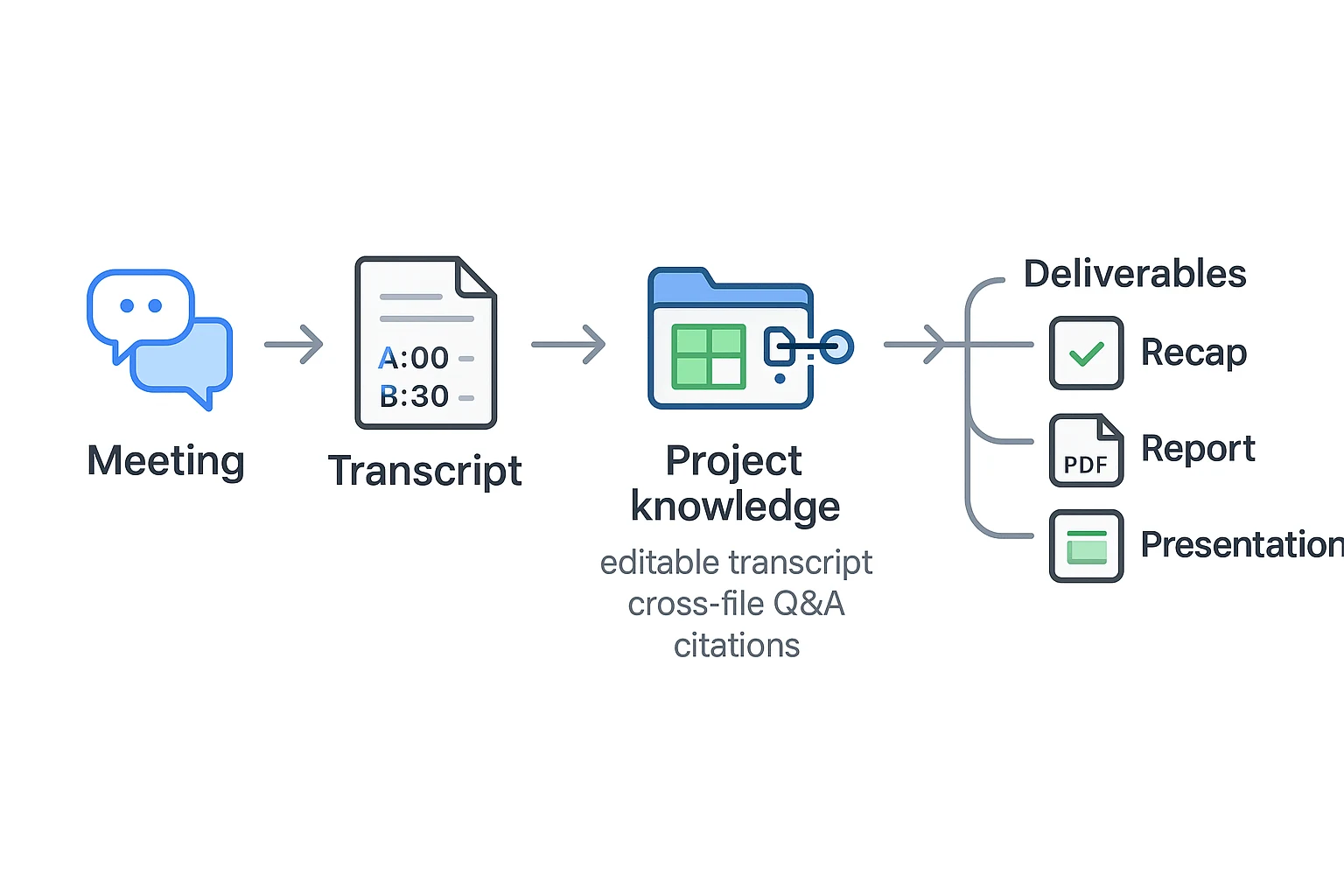
Most tools stop at "here's your transcript." The real win is turning that text into assets your team can reuse: action lists, client recaps, research reports, and slide-ready summaries. Below is one end-to-end workflow using TicNote Cloud, so you can see how a transcript becomes Project knowledge, then clean deliverables.
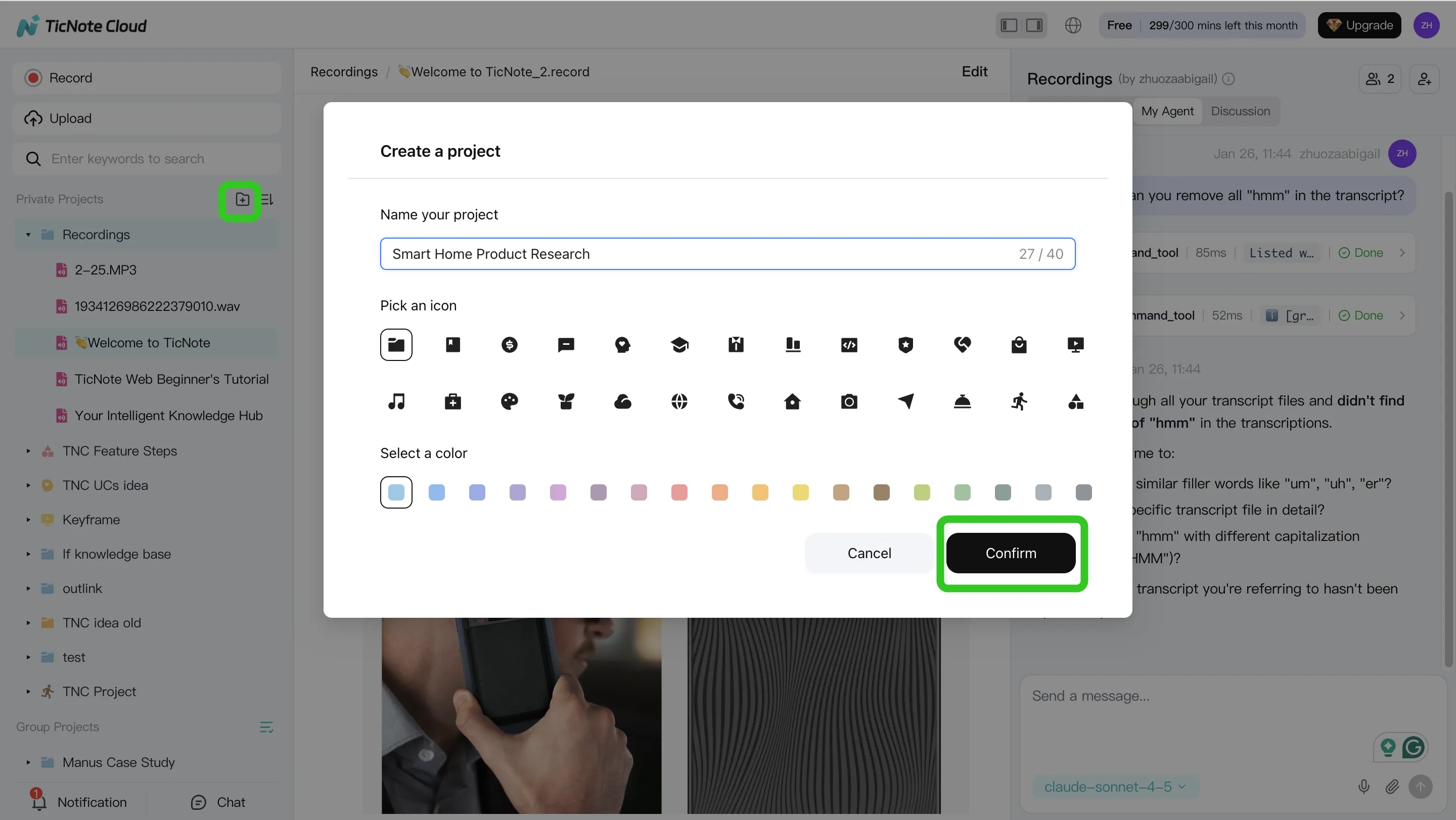
Step 1) Create a Project and add content (so context stays together)
Start by creating a Project named after the outcome, not the meeting. For example: "Q2 Customer Interviews" or "Sales Discovery — ACME." This makes it easier to reuse patterns and build a knowledge base over time.
In the web studio, open an existing Project or create a new one. Then add meeting content plus supporting files (agenda, deck, PRD, quotes doc) into the same Project.
You can upload two ways:
- Direct upload: use the upload control in the file area.
- Via Shadow AI: use the attachment icon in the Shadow chat panel and ask it to save the file into the right folder.
Once the meeting is in, confirm the transcript shows speakers and timestamps. Do a quick cleanup: rename speakers and fix obvious terms (product names, acronyms). Fixing these once improves every downstream output.
Step 2) Use Shadow AI to search, analyze, edit, and organize (with citations)
Now switch from "reading" to "querying." Shadow AI sits on the right side of your screen and can search across the whole Project. Ask it for key moments like decisions, objections, risks, and requirements—and have it point back to the exact transcript segments.
Prompts that work well:
- "What are the main pain points mentioned by users?"
- "Compare the 3 interviews and extract common themes."
- "Organize action items from all meetings with owners."
- "Rewrite this section in a formal tone."
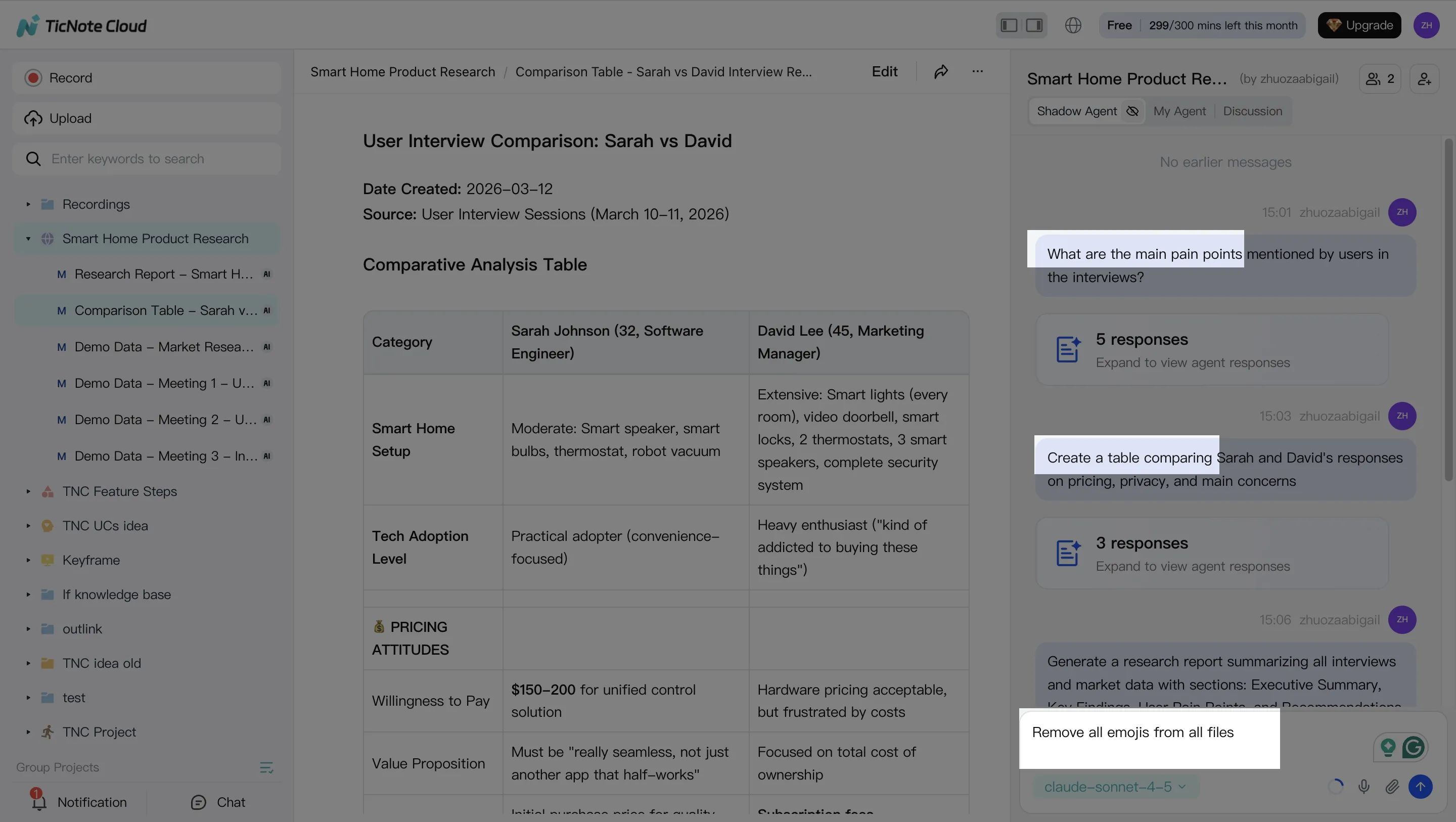
As you go, build reusable structures inside the Project:
- A decisions log (date, decision, rationale)
- Action items (owner, due date, dependency)
- A glossary (terms, definitions, who said it)
Step 3) Generate deliverables (reuse the same Project twice)
With the Project organized, generate a first deliverable like a research report or client recap. Then generate a second format from the same source—like a web presentation or a mind map—to prove reuse without rework.
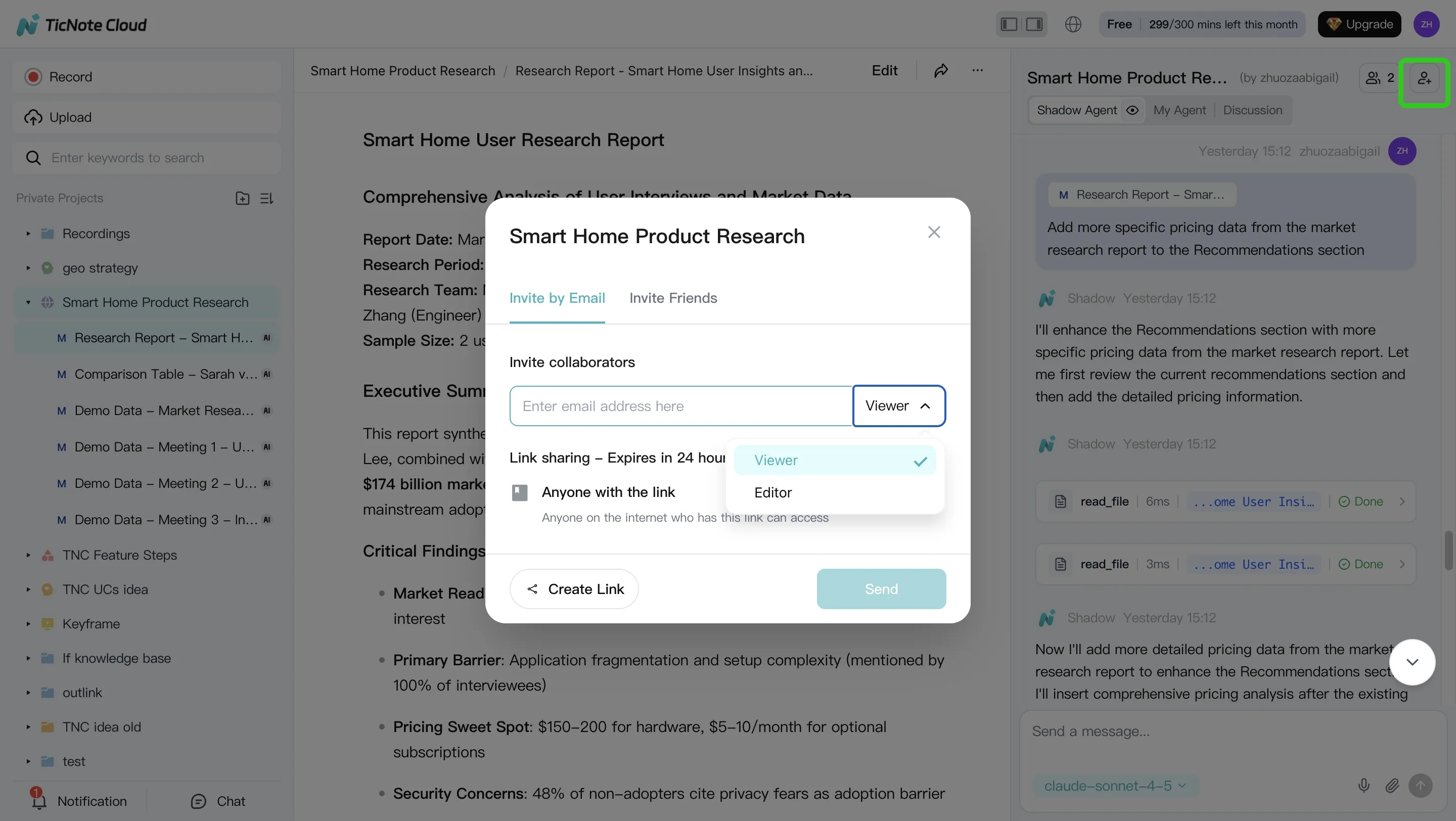
You can do this by asking Shadow directly or using the Generate button. Example prompt: "Generate a strategic analysis report based on all interviews."
[[IMG:web27 alt="Generate multi-format deliverables with Shadow AI"]]
Export in the format your workflow needs (PDF/DOCX/HTML/PNG). When you share externally, keep links back to sources where possible so reviews and audits are faster.
Step 4) Review, refine, and collaborate (make it safe to share)
Treat the first output as a draft. Ask Shadow AI to tighten language, add missing context, and produce a final "next steps" section your team can paste into email or a ticket.
Invite teammates and set roles (Owner/Member/Guest). Teammates can comment, ask Shadow questions, and request new reports—without losing traceability.
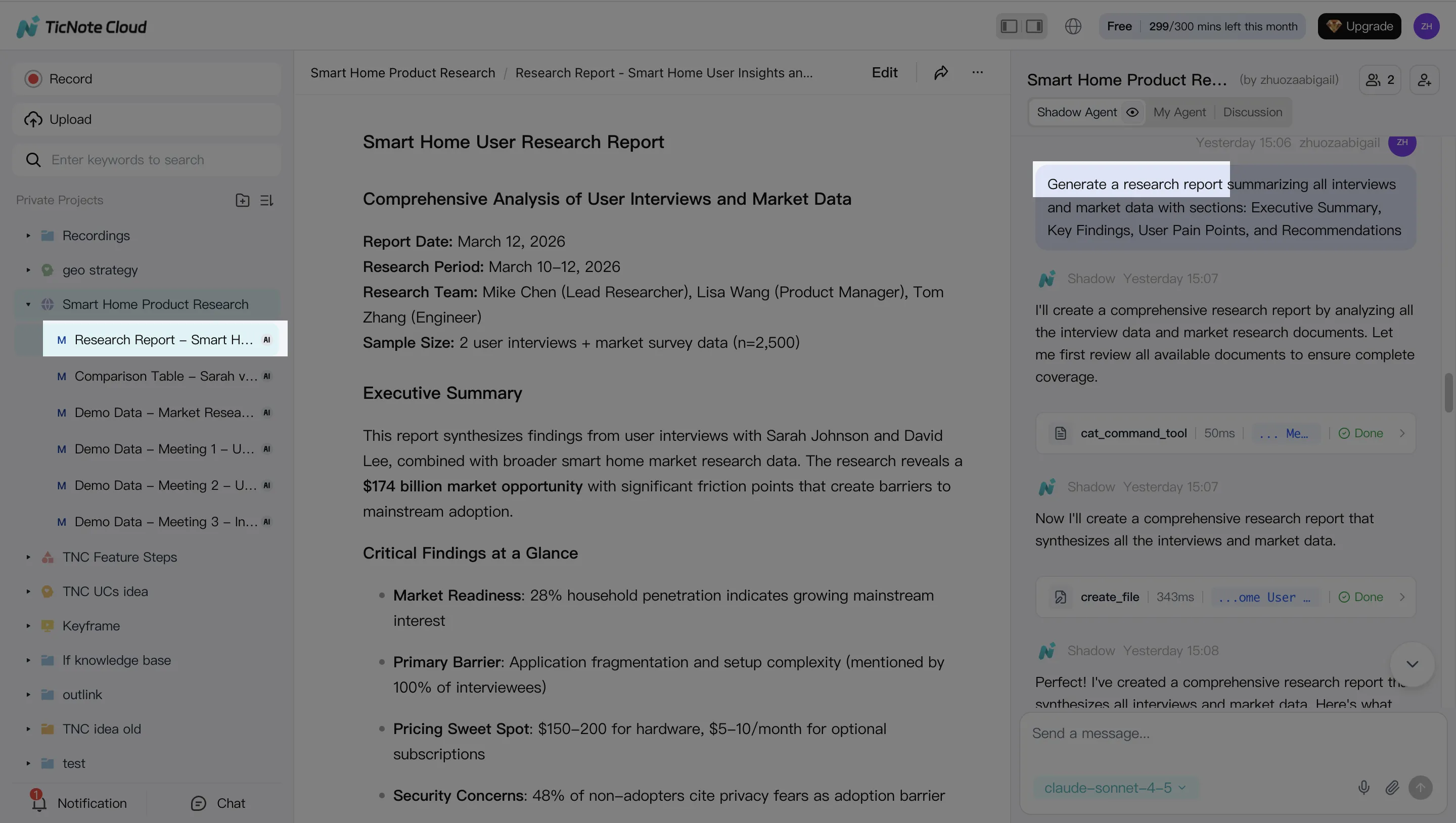
Before you send anything out, confirm basic governance:
- What's OK to share externally (recap, sanitized insights)
- What stays internal (raw transcript, sensitive names, pricing)
App workflow (same idea, faster capture)
On mobile, the flow is the same: create or open a Project, capture or import audio, review the transcript, run a few Shadow prompts, then generate and export a deliverable. Mobile is best when you're doing in-person interviews, hallway chats, or quick field notes where a laptop capture isn't practical.
Which alternative should you choose? (quick decision guide)
If you're comparing a tactiq alternative, don't start with features. Start with your workflow constraint: solo speed, team memory, governance, CRM handoff, or multilingual research. Here are the best picks by use case, with the "why" in plain terms.
Best for solo users who just need fast notes
Best pick: Tactiq if you want a lightweight, low-setup way to grab highlights.
It's enough when your goal is quick summaries, simple search, and easy exports to docs. Look for three basics: (1) a 1–3 bullet recap, (2) clean copy/export to Markdown or DOCX, and (3) keyword search that finds decisions fast.
If you're doing more than 5–10 meetings a week, you'll likely outgrow "notes only." That's when a Project-based system pays off.
Best for teams that need shared memory across many meetings
Best pick: TicNote Cloud.
Teams win when knowledge compounds. TicNote Cloud's Projects keep related meetings, files, and outputs in one place, so the content stays connected. Shadow AI can run cross-file Q&A with citations, so people can ask "what did we decide last sprint?" and get a verifiable answer.
It also matters that transcripts are editable. You can fix names, terms, and action items once, and every downstream summary or report improves.
Best for strict privacy/regulatory needs (what to confirm)
Best pick: whichever vendor can prove governance in writing (often an enterprise plan).
Don't rely on marketing pages. Have your security team verify these items before rollout:
- Data region options (EU/US) and where backups live
- Retention controls (how long audio/transcripts are stored)
- DPA (Data Processing Addendum) availability
- SSO (SAML/OIDC) and role-based access
- Audit logs (who accessed what, and when)
- Model training policy (whether your data trains models)
- Encryption in transit and at rest
Best for CRM-heavy sales teams
Best pick: Fireflies.ai for structured call summaries and CRM handoff.
"Good CRM integration" means field-level updates (next step, stage, close date, objections), not just dumping a long note into an activity log. Practical move: run a 2-week pilot on one pipeline stage and measure admin time saved per rep (minutes per call).
Best for multilingual research interviews
Best pick: TicNote Cloud for multilingual transcription plus translation in one workspace.
For research, accuracy isn't just words. Test these three things on real clips: proper nouns (company and product names), speaker labels, and mixed-language segments (mid-sentence switches). Then check whether you can keep the transcript, translation, and insights together for later synthesis.
If you only try one: TicNote Cloud. It covers capture, editing, Project knowledge, and deliverables in one flow. If you want more context on "AI + knowledge base" tools, this guide to NotebookLM-style alternatives for PDFs and meetings is a helpful next read.
Optional: if you're tracking pricing and plan limits, add an email reminder for monthly tool updates.
Conclusion: picking a better alternative than Tactiq
If you're comparing a tactiq alternative, start with your real constraints: do you need bot-free capture, full replay, Teams desktop support, strong multilingual handling, CRM-ready outputs, or stricter privacy controls?
Across those needs, TicNote Cloud is the best overall pick because it covers the full path from meeting to reusable assets: record and transcribe, edit the transcript (not just export it), store everything in Projects, then use Shadow AI to search with citations and generate deliverables like reports, presentations, mind maps, or podcasts.
Next step: shortlist two tools that match your "must-haves," then run the same repeatable test set (same meeting types, audio quality, and languages) so your choice is based on results, not demos. If you also want a broader AI stack that supports citations and team workflows, pair this shortlist with our guide to work-ready ChatGPT alternatives and keep your toolset consistent.


