


 Extension
TL;DR: A skill agent approach to task priorities
Try a free skill-agent workspace to make task prioritization repeatable: capture commitments, score work with a lightweight matrix, schedule against real capacity, and record trade-offs.
The problem isn't task volume; it's scattered meeting context. That creates rework, missed promises, and "urgent" requests with no owner. A skill-agent workspace keeps decisions, transcripts, and project files together so each priority has a source.
Use the workflow:
- Capture commitments.
- Score impact, urgency, effort, and risk.
- Plan what capacity allows.
- Share what moves and why.
What is task prioritization, and why does it break down at work?
Task prioritization is the repeatable process of deciding what should happen first, later, never, or only if capacity exists. At work, it breaks down when teams treat every new request as equal, urgent, and ready to start.
Define priority by value, not just due date
A priority is not just a deadline. A real priority combines several signals into one decision:
- Urgency: What happens if we wait?
- Importance: Does it support a strategic goal?
- Impact: Who benefits, and how much?
- Effort: How much time or skill does it need?
- Dependencies: Does this unblock other work?
- Confidence and risk: How sure are we, and what could fail?
This is why strong task prioritization methods look beyond the calendar. They rank work by the outcome it creates.
Separate being busy from being prioritized
High-volume activity can feel productive. Answering every message within five minutes looks responsive. But finishing the blocker that lets three teammates move forward is often the better priority.
Use this decision rule: if a task does not change an outcome, unblock someone, reduce risk, or meet a real commitment, it may be work, but it is not priority work.
Stop priority drift before ranking work
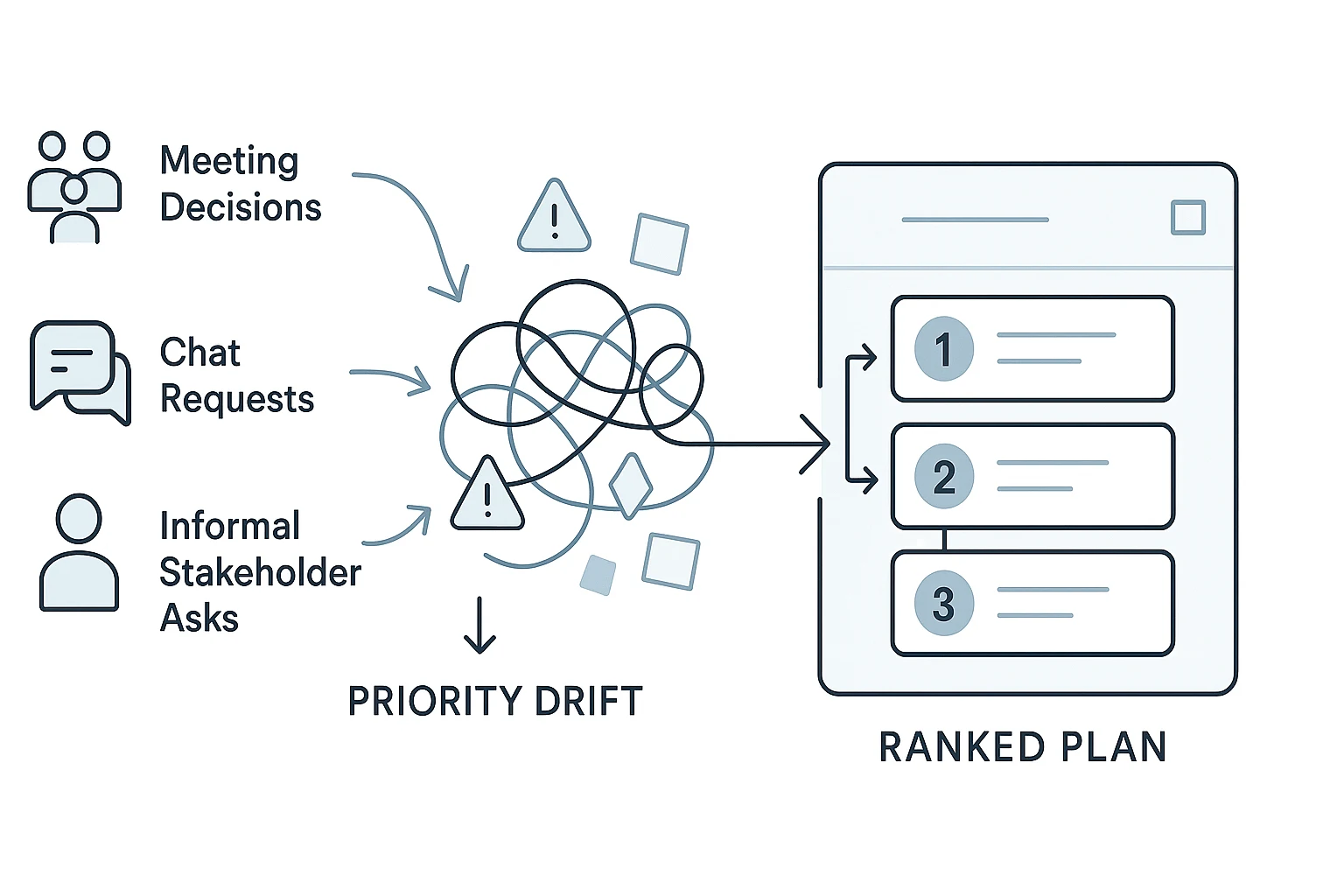
Priority drift happens when decisions spread across meetings, Slack threads, emails, docs, and verbal promises. The team then inherits urgency from the loudest channel instead of the best evidence.
That is the meeting-to-priority problem. Before using any scoring model, convert scattered decisions into one shared task inventory. Only then can the team rank work against the same facts, constraints, and commitments.
Create one trusted task inventory before you rank anything
Task prioritization breaks when the list is incomplete. Before you score urgency or impact, collect every request in one place. A partial backlog rewards whatever is easiest to find, not what matters most.
Capture every request in one place
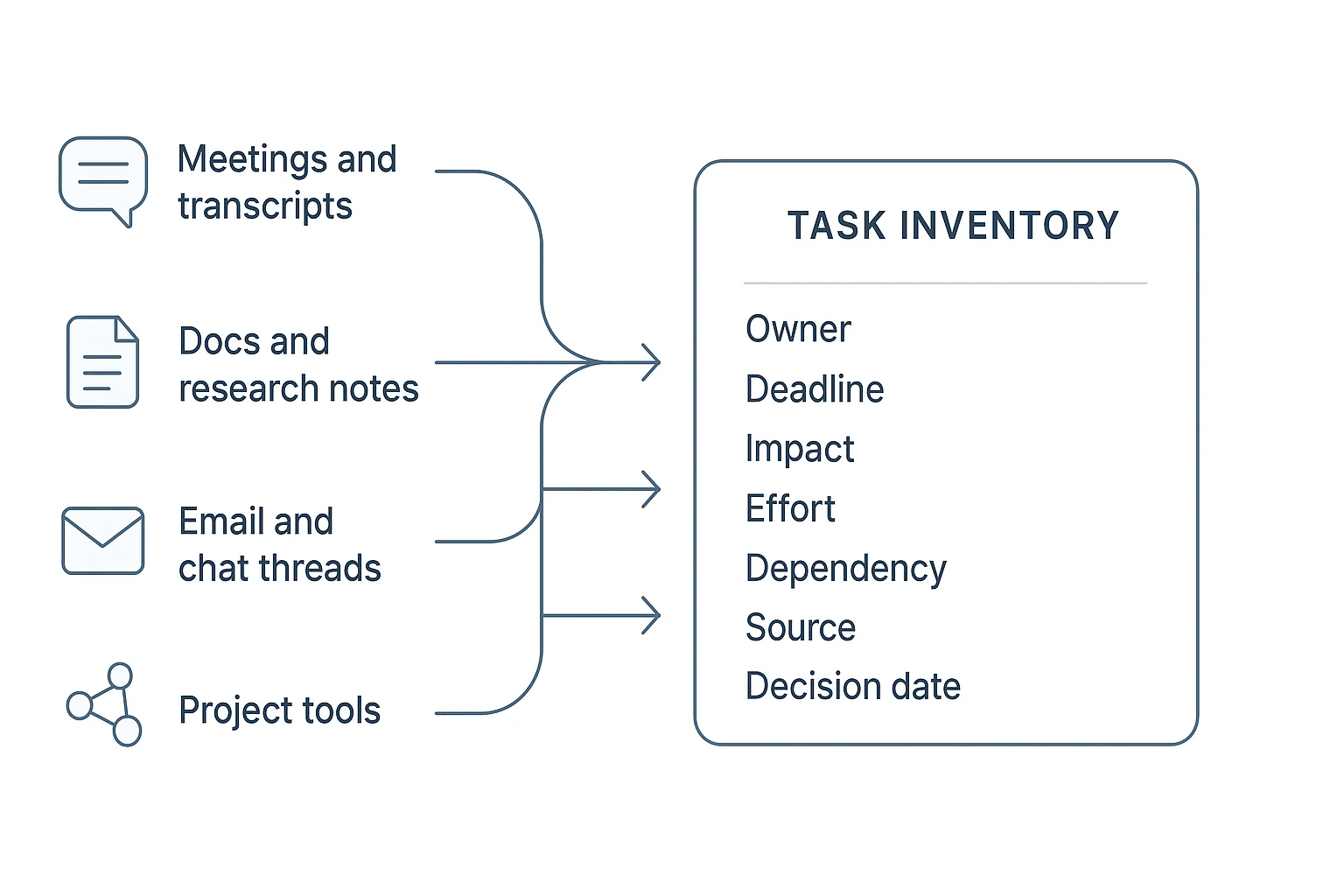
Create a single task inventory before using any priority matrix template. Pull work from meeting notes, transcripts, email, Slack or Teams threads, project boards, planning docs, research notes, and verbal promises.
Use one rule: if someone expects action, it goes into the inventory.
This is where meeting-heavy teams often lose context. TicNote Cloud can help by keeping meeting transcripts, documents, summaries, and project files connected inside one Project workspace, so decisions don't sit apart from the tasks they created.
Break vague work into action-sized tasks
Large requests are hard to estimate, so split them into tasks someone can complete in one work session or hand off clearly.
For example, don't keep "Improve onboarding" as one task. Break it into:
- Review last five onboarding complaints
- Draft revised onboarding checklist
- Confirm engineering dependency for account setup
- Share new checklist with customer success
This is the same habit behind breaking work into smaller deliverables, without turning your backlog into a heavy project management system.
Add the fields that make ranking fair
Each task needs enough context to compare it with other work. Use these minimum fields: task, owner, source, decision date, deadline, impact, effort, dependencies, confidence, status, and next review date.
Copy this task-intake checklist into your task tool:
What is the task? Who owns it? Where did it come from? When was the decision made? What happens if it is late? What does it unblock? What evidence supports the priority? What dependency or risk could delay it?
Use a practical priority matrix template to score the work
A task prioritization matrix gives your team a shared way to rank work when opinions collide. It doesn't remove judgment. It makes the trade-offs visible, so people can challenge assumptions instead of arguing from memory.
Score each task with a simple 1–5 rubric
Use this copyable priority matrix template:
| Task | Impact | Urgency | Effort | Confidence | Dependency value | Notes |
| 1–5 | 1–5 | 1–5 | 1–5 | 1–5 |
Simple rule: priority score = impact + urgency + dependency value + confidence adjustment - effort.
Score each field in plain terms:
- Impact: 1 = minor cleanup; 3 = useful team or customer value; 5 = major revenue, risk, customer, or strategy value.
- Urgency: 1 = can wait; 3 = needed this month; 5 = deadline, blocker, or time-sensitive risk.
- Effort: 1 = under 1 hour; 3 = 1–2 days; 5 = multi-person or multi-week work.
- Confidence: 1 = mostly unknown; 3 = some evidence; 5 = clear evidence from meetings, data, or stakeholder approval.
- Dependency value: 1 = standalone; 3 = helps another task; 5 = unblocks several people or decisions.
For confidence adjustment, use +1 for confidence 5, 0 for 3–4, and -1 for 1–2. The NASA Systems Engineering Handbook (2016, Rev. 2) states that a weighted scoring model computes an overall score by multiplying each criterion's weight by the option's rating and summing the products (weighted-sum) to compare alternatives.
Combine this with other task prioritization techniques
| Method | Best use | Limitation |
| Eisenhower matrix | Separates urgent from important | Doesn't rank a full backlog |
| Impact-effort grid | Finds quick wins fast | Can underweight deadlines and blockers |
| Priority matrix template | Creates a defensible ranked backlog | Needs honest scoring and review |
These methods work together. Use Eisenhower to remove noise, impact-effort to spot quick wins, then score the remaining backlog.
Work through a sample ranked backlog
| Task | Impact | Urgency | Effort | Confidence | Dep. value | Score |
| Security review | 5 | 5 | 3 | 4 | 5 | 12 |
| Support escalation | 4 | 5 | 2 | 5 | 4 | 12 |
| Bug triage | 4 | 4 | 2 | 4 | 5 | 11 |
| User interview synthesis | 5 | 3 | 3 | 4 | 4 | 9 |
| Client report | 5 | 4 | 4 | 4 | 3 | 8 |
| Roadmap update | 4 | 3 | 2 | 3 | 3 | 8 |
| Stakeholder deck | 3 | 4 | 3 | 3 | 3 | 7 |
| Experiment setup | 3 | 3 | 3 | 3 | 4 | 7 |
| Research summary | 3 | 2 | 2 | 4 | 3 | 6 |
| Documentation fix | 2 | 2 | 1 | 5 | 2 | 6 |
Final ranked list: 1) security review, 2) support escalation, 3) bug triage, 4) user interview synthesis, 5) client report, 6) roadmap update, 7) stakeholder deck, 8) experiment setup, 9) research summary, 10) documentation fix.
Notice the pattern: the security review outranks the client report because it unlocks approvals and reduces risk. Dependency-heavy work often deserves an earlier slot, even when the deliverable looks smaller.
Avoid false precision in scoring
Scores are decision aids, not truth. Don't debate whether a task is a 3.6 or 3.8.
Use three rules instead:
- Low confidence triggers discovery before commitment.
- High risk triggers escalation, even if the score is moderate.
- Close scores, within 1–2 points, should be resolved through discussion, owner judgment, and capacity limits.
How do you choose the right task prioritization methods?
The best task prioritization method depends on the size of the list, the planning window, and who owns the decision. Use light methods for daily focus, shared methods for team trade-offs, and scored methods when scarce capacity is at stake.
Plan your day with Ivy Lee, 1-3-5, or timeboxing
Use Ivy Lee when you need a short, ordered day: write six tasks, rank them, and work from the top. Use 1-3-5 when you overplan: choose 1 big task, 3 medium tasks, and 5 small tasks. Use timeboxing when meetings and reactive work keep taking over your calendar.
Eat That Frog is a simple add-on: put the high-stakes task you keep avoiding first, then protect it with a calendar block.
Clean up an individual backlog with Eisenhower and ABCDE
Use the Eisenhower matrix to separate urgency from importance. It works well when everything "feels" urgent but not everything creates value. Use ABCDE when you have a large mixed list and need to grade consequences: A tasks matter most; E tasks should be eliminated.
Before ranking, apply the 4 Ds: Do, Delegate, Defer, Delete. This removes noise before you compare real work.
Align a team with MoSCoW and impact-effort
Use MoSCoW for scope alignment: Must, Should, Could, Won't. It helps stakeholders agree what is in and out of scope. Use impact-effort for fast team trade-off conversations, especially when a task prioritization matrix would be too detailed.
These methods are best when the team needs shared language, not just a private ranking.
Score roadmap decisions with RICE or WSJF-style methods
Use RICE (Reach, Impact, Confidence, Effort) or WSJF-style scoring when initiatives compete for scarce product, engineering, or research capacity. They make assumptions visible and reduce opinion-only debates.
For a competitive research backlog, gather evidence before scoring. A competitor analysis toolset can help teams compare market signals, feature gaps, and urgency before they rank initiatives.
Know when not to use a method
| Don't use this | For this situation | Why |
| RICE | A six-item personal to-do list | It adds scoring overhead without better decisions. |
| Ivy Lee | Portfolio trade-offs across teams | It ranks tasks, but doesn't show capacity or strategy impact. |
| MoSCoW | No decision owner can say what is out of scope | "Won't" requires authority, or the list becomes wishful thinking. |
Turn ranked priorities into a realistic weekly plan
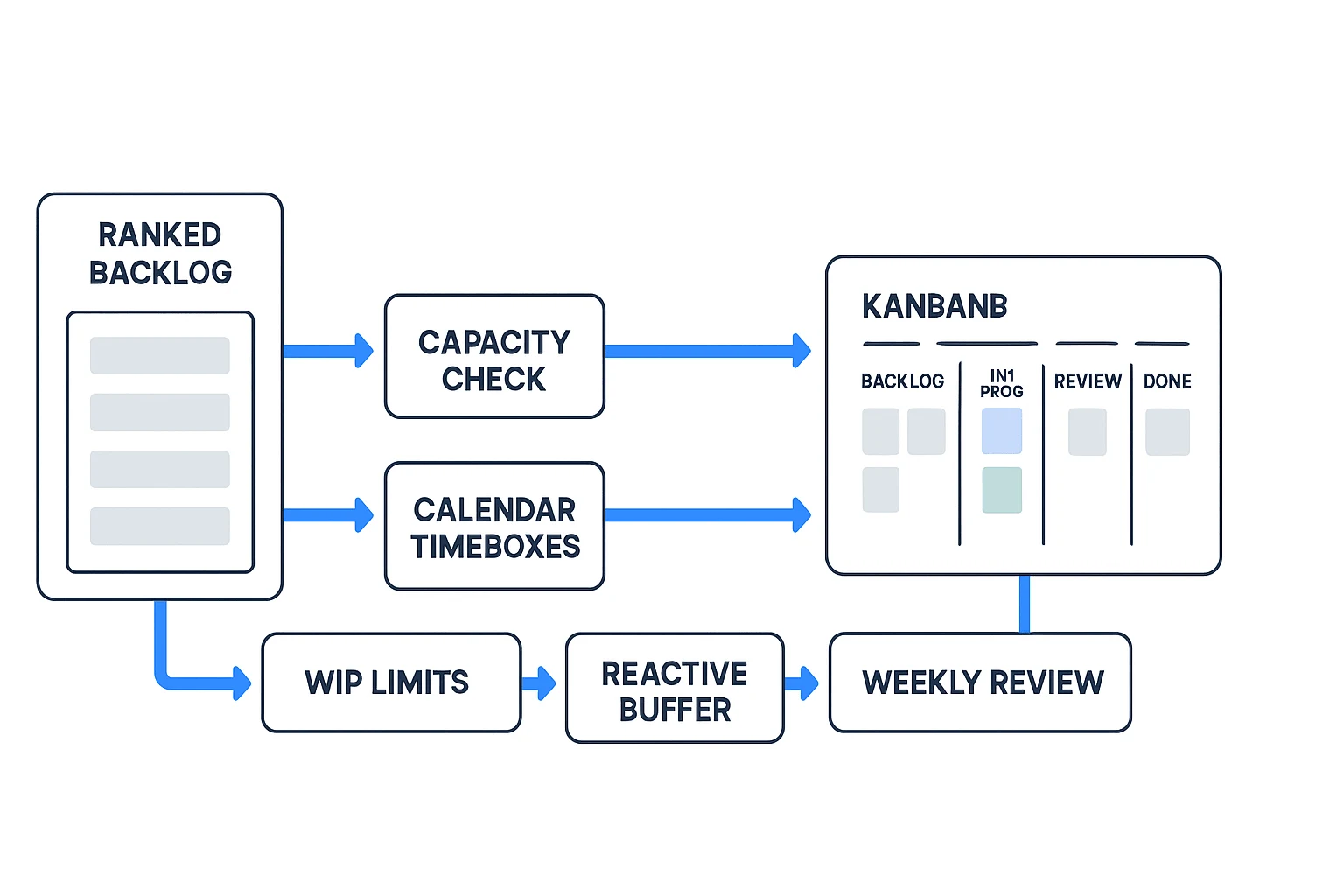
A ranked list is not a plan. Strong task prioritization only becomes useful when the team turns the list into calendar space, owners, limits, and trade-offs. If ten items are ranked but only four fit, plan four. Keep the rest visible, not secretly promised.
Estimate available capacity before committing
Start weekly planning by subtracting fixed commitments before assigning priority work:
- Meetings and recurring rituals
- PTO, holidays, and part-time schedules
- Support rotation or on-call duty
- Known handoffs, reviews, and approvals
- Admin work that cannot move
Then assign priority tasks to the remaining capacity. Use this rule: when the calendar is already full, the ranked list must shrink. Do not solve a capacity problem with optimism.
Timebox high-impact work and protect deep work
Move the top-ranked tasks into calendar blocks. Put high-impact work in protected blocks when energy is highest. Batch low-impact admin into one or two short windows.
This reduces task switching. In The cost of interrupted work: More speed or more error? (CHI 2008), "On average, it takes 23 minutes and 15 seconds for a knowledge worker to resume a task after an interruption (Mark, Gudith & Klocke, 2008)."
At the end of each day, review carried-over work. Ask: does this still deserve its rank, or did new information change the plan?
Set WIP limits for in-progress tasks
WIP means work in progress. A WIP limit caps how many tasks can be active at once. This is a planning rule, not a productivity slogan. It cuts context switching and makes blockers visible.
Example board:
- Backlog: all ranked tasks
- This Week: 5 selected tasks
- In Progress: limit 2
- Review: limit 2
- Done: accepted by the owner
Add buffer, define done, and name deferrals
Reserve room for reactive work before the week starts. For every selected task, define done in one sentence. Also list what gets deferred if a new urgent task enters.
Mini weekly plan:
- Mon: Priya drafts customer-risk memo; review at 4 p.m.
- Tue: Alex fixes billing bug; QA handoff by 3 p.m.
- Wed: Mei runs roadmap analysis; stakeholder check at 2 p.m.
- Thu: Sam updates sales deck; review limit applies.
- Fri: Team clears review queue, confirms done items, and re-ranks carryovers.
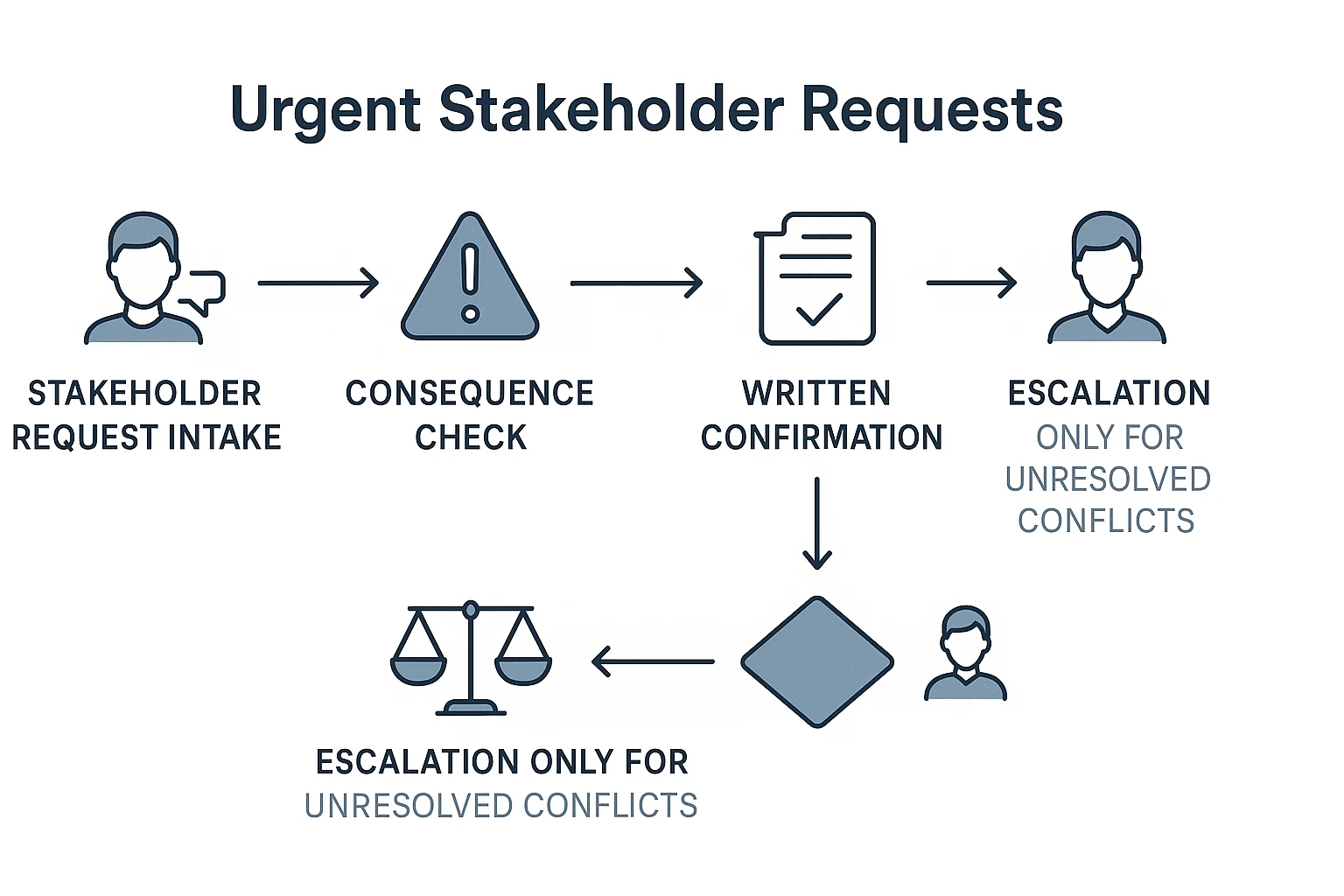
What should teams do when every stakeholder says their task is urgent?
When every request is "urgent," treat urgency as evidence to test, not a ranking. Strong task prioritization needs a shared rule: urgent work only jumps the queue when the consequence is clear, time-bound, and owned.
Test the consequence
Ask four questions before changing the plan:
- What happens if this is late?
- Which customer, team, or revenue path is affected?
- Where did the deadline come from?
- What dependency is blocked?
If there's no clear consequence, the task may still matter. It just shouldn't automatically outrank committed work.
Name the decision owner
Teams need one accountable person or forum for final trade-offs. Document each change in writing:
- What moved up
- What moved down
- Who approved it
- Which evidence, transcript, or meeting decision supports it
This is where meeting context matters. TicNote Cloud can keep transcripts, decisions, and project files together, while Shadow AI answers priority questions with cited sources. Better facilitation also helps; use clear meeting follow-up practices so vague urgency doesn't leave the room as ambiguous work.
Propose swaps before escalating
Use this workflow:
- Compare the request against current top priorities.
- Propose a swap.
- Confirm the cost.
- Escalate only if two decision owners conflict.
Copy these scripts:
- "We can take this on this week if we move X to next week."
- "The fastest safe path is to defer Y."
- "I need a decision between A and B because the same capacity is required."
Step-by-step skill agent workflow for meeting-driven task prioritization
A skill agent workflow turns product docs, specs, and meeting records into structured issues. Here, TicNote Cloud is the example workspace. It supports task prioritization because the team can rank work against the decision trail, not memory. For stronger upstream habits, connect this workflow with a meeting system for fewer follow-ups.
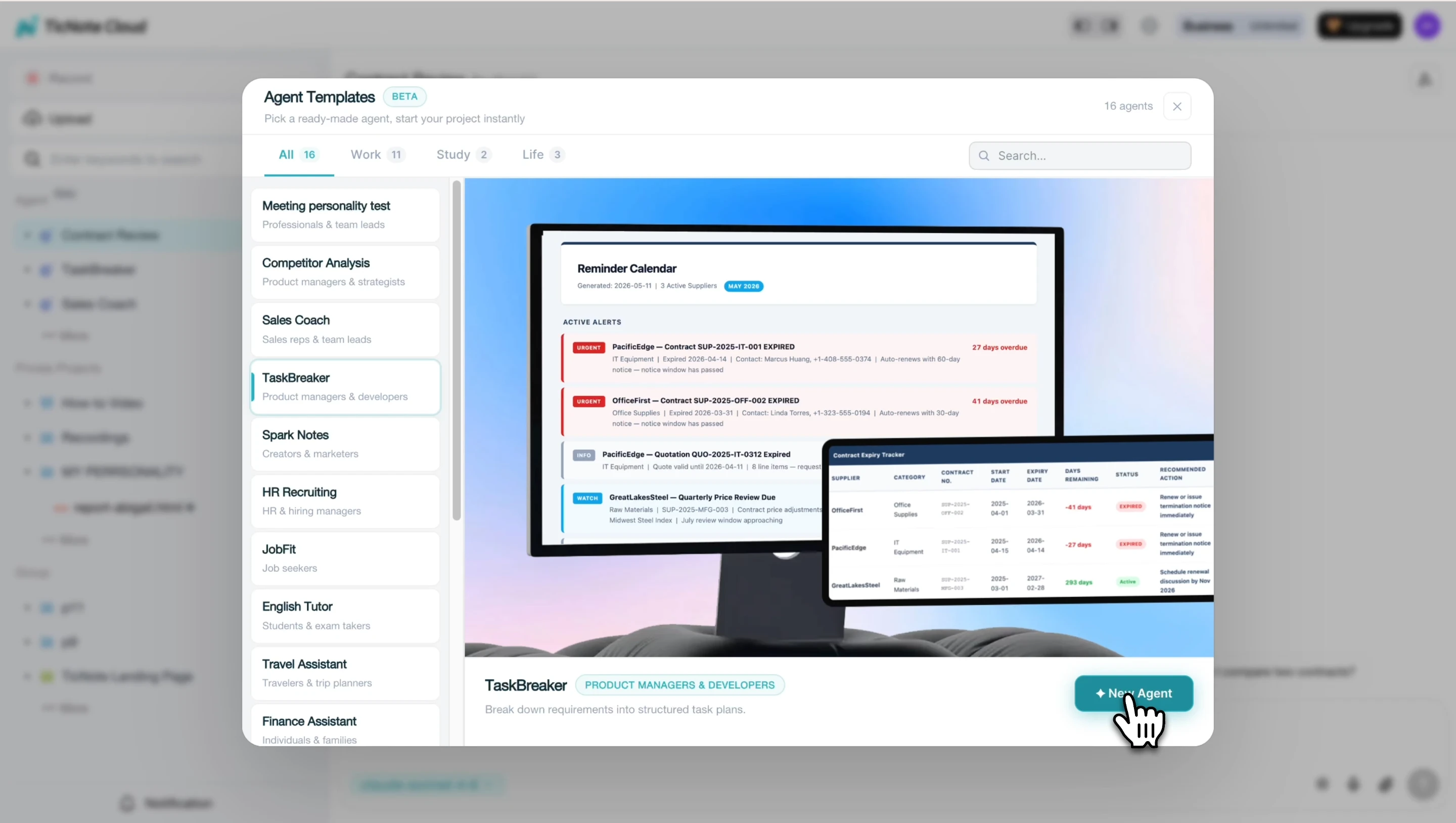
Add the TaskBreaker skill agent
Open TicNote Cloud, choose Add Agent, then browse the Skill Agent library. Select TaskBreaker and add it to your workspace. It needs no setup before you start.
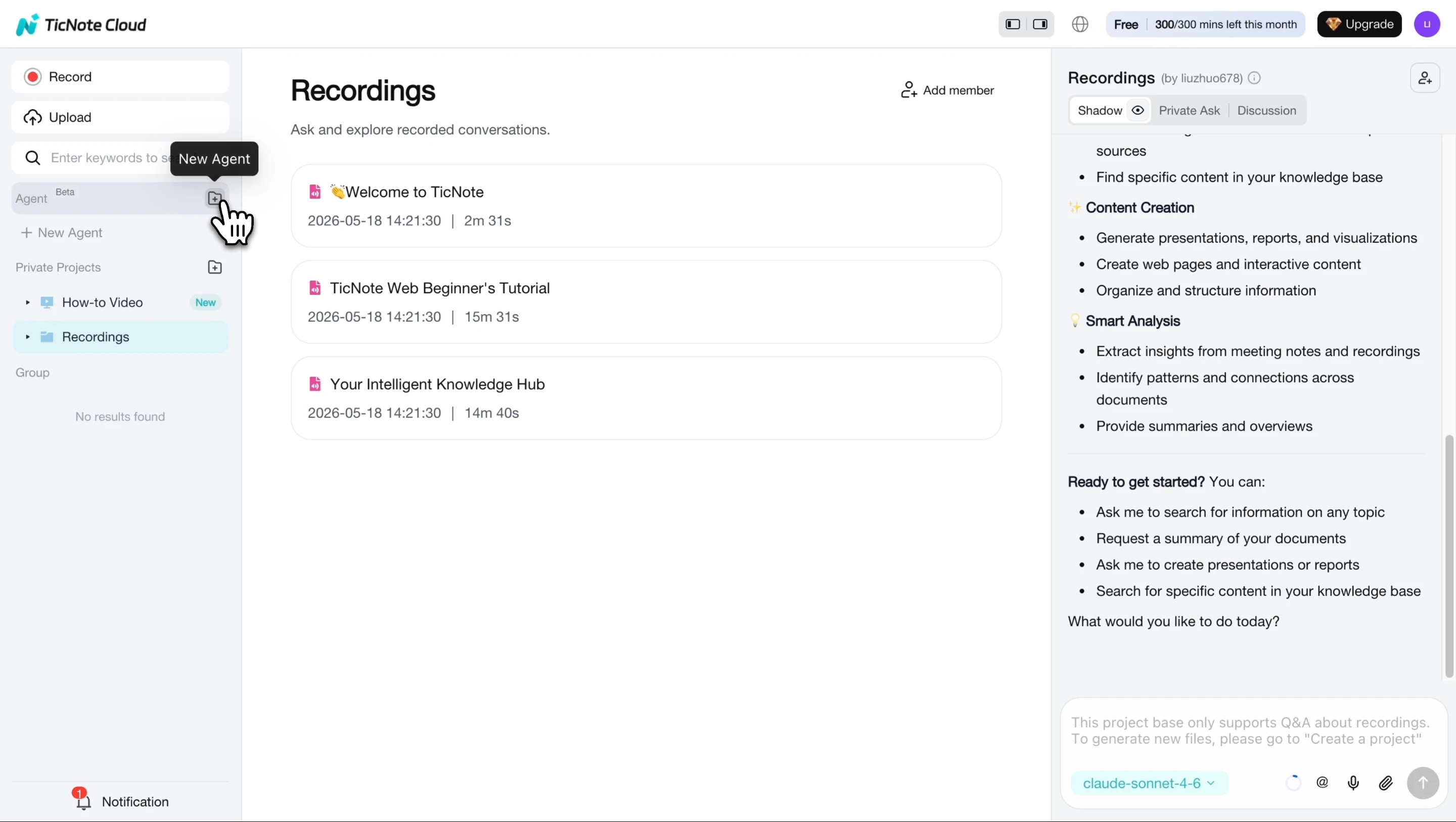
Once it appears in your agent list, open it as the planning assistant for the project.
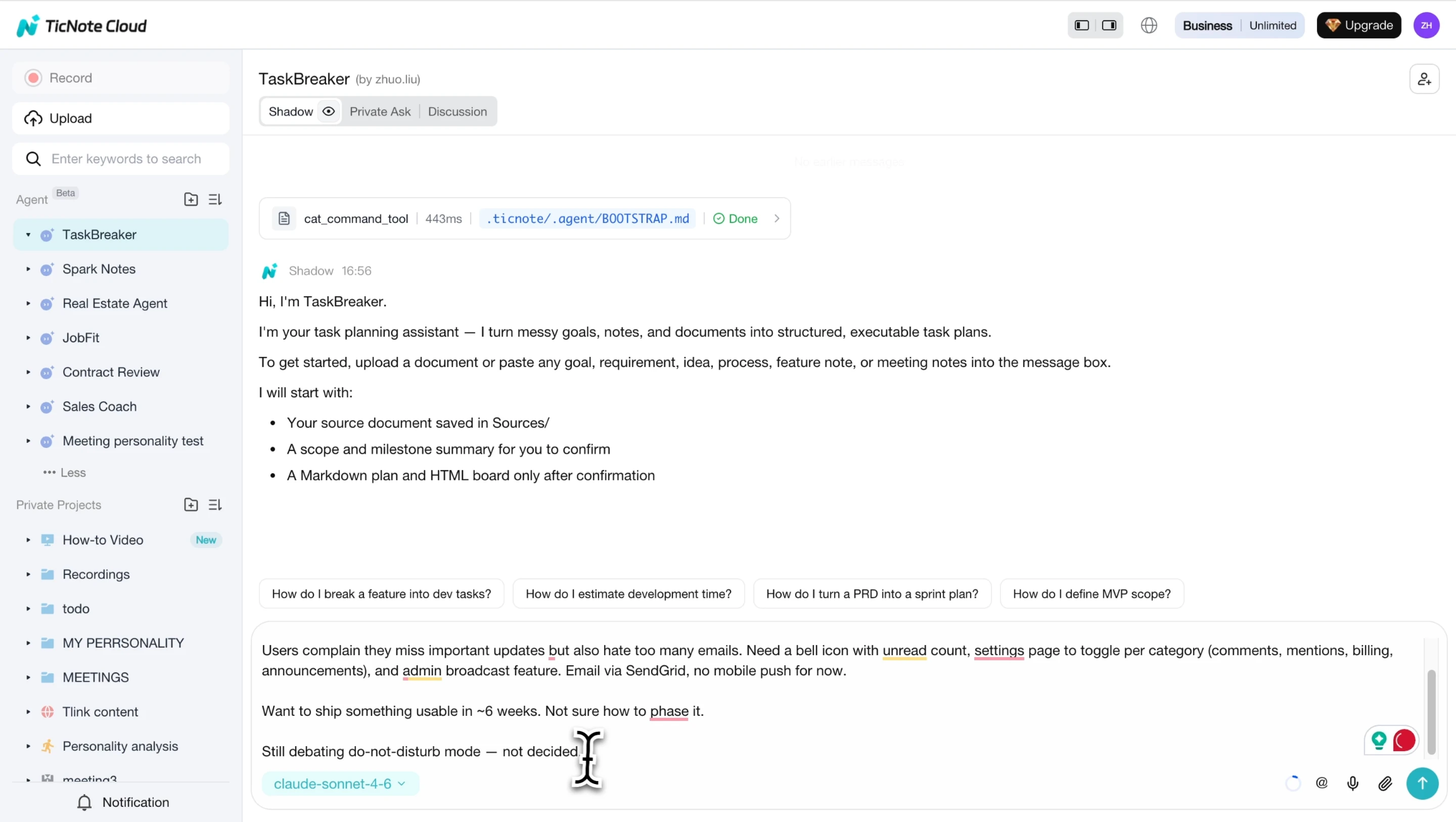
Paste or upload the source context
Add a PRD, feature spec, strategy doc, meeting transcript, or recording. TaskBreaker reads the source and first returns a project summary: objective, scope in and out, team roles, milestones, and open questions. Confirm this before it creates sprint-sized issues.
Review and import the structured plan
Next, resolve anything marked [NEEDS CLARIFICATION]. Answer the agent's questions so unclear requirements don't become engineering debt.
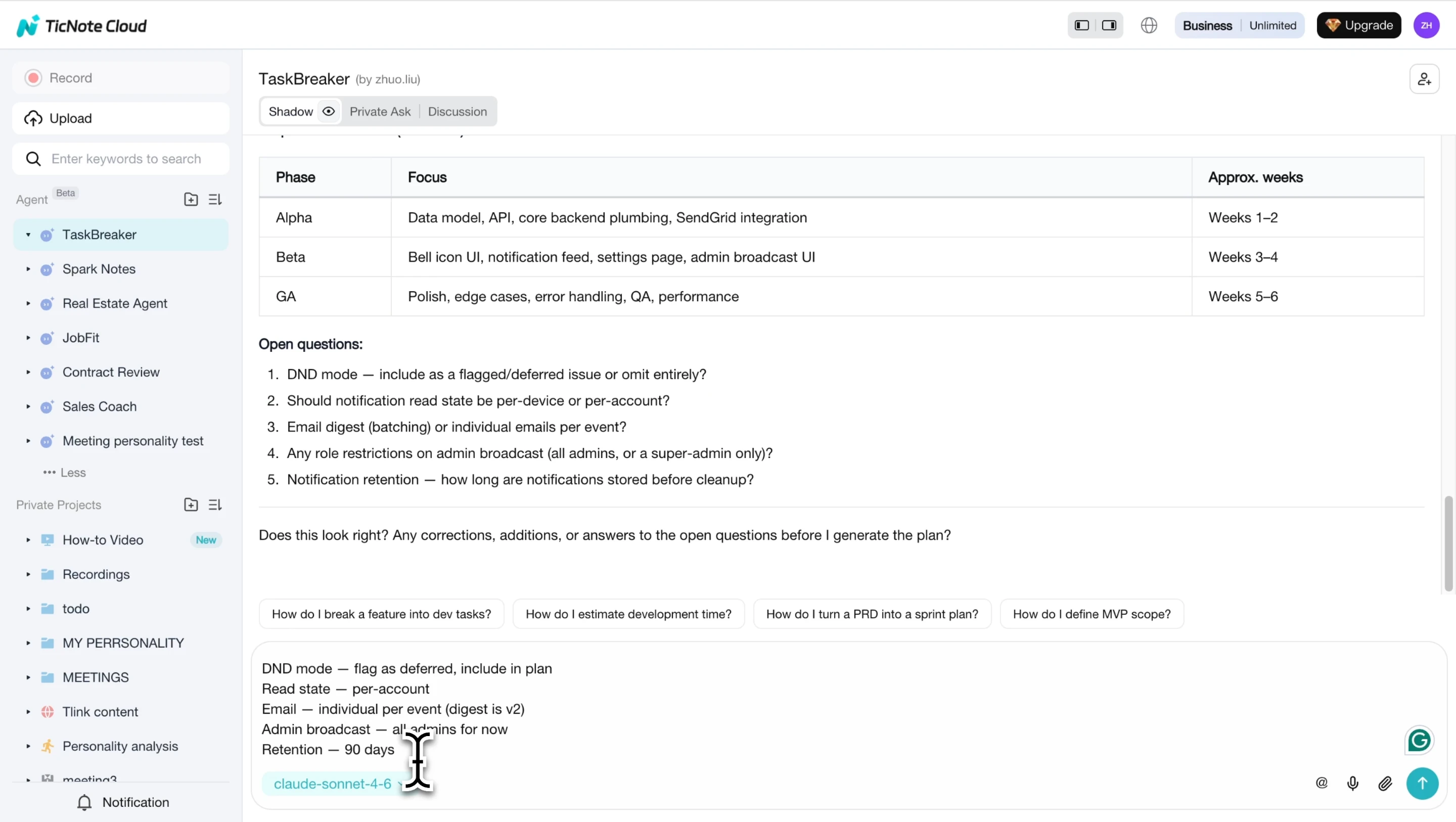
After confirmation, TaskBreaker generates issues with titles, descriptions, acceptance criteria, labels, priority, phase, and dependencies. Export the Markdown plan and CSV for Jira, Linear, GitHub Issues, or another tracker. You can also review the HTML board by phase and status.
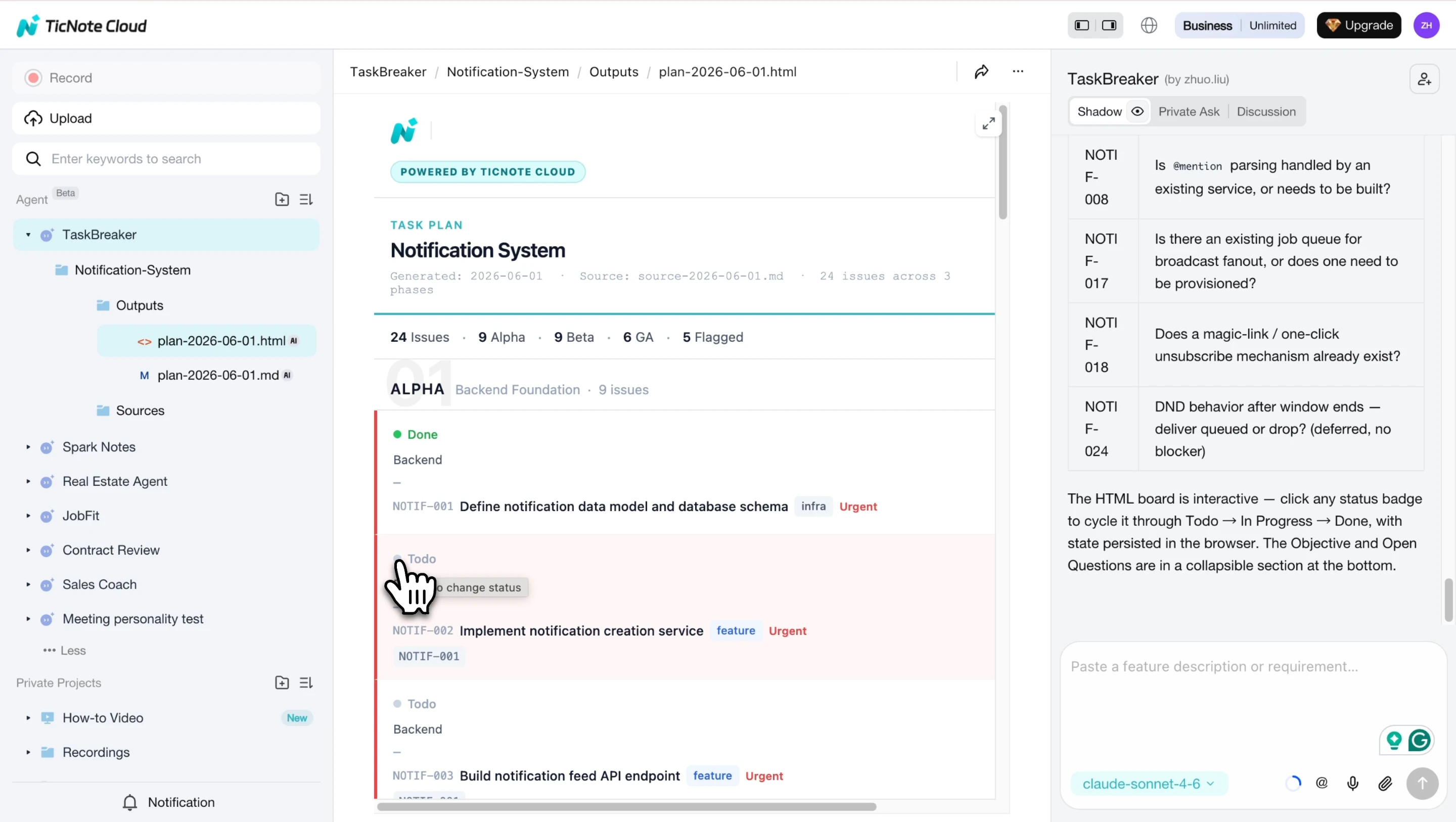
Use the App for lighter capture
Away from the desk, add a document or transcript to the project, review the generated structure, then move to the Web workspace for deeper import and team review.
This workflow preserves why a task became important, reuses context across planning meetings, and turns decisions into defined work instead of vague follow-ups.
Final thoughts: prioritize decisions, not just tasks
Task prioritization is not about keeping a prettier list. It's about making clear trade-offs when time, energy, and stakeholder attention are limited. A strong system makes each decision visible: what changed, who owns it, and which evidence supports the shift.
Use the same loop every week:
- Capture commitments from meetings and messages.
- Score work against impact, urgency, effort, and risk.
- Check real capacity before promising dates.
- Communicate swaps when new work enters.
- Review priorities when new information arrives.
Teams improve fastest when priority changes trace back to evidence, meeting decisions, and named owners. Try a meeting-to-priority workflow in your next planning cycle, then subscribe for practical productivity updates.



