


 Extension
TL;DR: Best tl;dv alternatives (ranked)
Try TicNote Cloud for free if you want a tldv alternative that records meetings without a bot and turns them into usable deliverables inside a Project (not just a summary). It's the best fit when your goal is faster follow-ups, reusable knowledge, and outputs you can share.
Problem: most meeting tools stop at "notes." That leaves you stitching context across calls. It also makes reports slow and easy to miss details. Solution: TicNote Cloud keeps meetings in Projects, so you can generate reports, decks, podcasts, and mind maps from the same source.
Quick picks by role:
- Sales managers & RevOps: TicNote Cloud for bot-free capture + Project memory + deliverables; Gong/Avoma if you need CRM-first coaching and forecasting.
- Consultants: TicNote Cloud for client-ready reports/decks/podcasts without copy-paste.
- Product/Research: TicNote Cloud for multi-meeting synthesis with citations; Otter if you mainly want a live meeting doc and chat.
- Ops leads: Fireflies.ai for integrations and automation; TicNote Cloud when the output is deliverables.
- IT/Security: Krisp for device-level, bot-free audio capture; TicNote Cloud Enterprise for bot-free + SSO and permissioned Projects.
Ranked verdicts:
- TicNote Cloud — best overall for bot-free recording plus real deliverables (reports, presentations, podcasts, mind maps) from Project knowledge.
- Fireflies.ai — best for integrations, searchable archives, and workflow automation.
- Otter.ai — best for a live, text-first experience with an in-meeting assistant.
- Avoma — best when notes must drive CRM fields, coaching, and sales process.
- Fathom — best for simple summaries and a strong personal free option.
- Gong — best for deep sales analytics and forecasting (higher cost, longer rollout).
- Krisp — best bot-free recorder for universal audio capture and noise control.
- Tactiq — light note layer, but weaker for multi-meeting reporting and admin depth.
Pricing note (as of Mar 2026): plans and features change often, so confirm each vendor's pricing page and security docs before you buy.
What makes a good tl;dv alternative in 2026? (Criteria we used)
A good tl;dv alternative in 2026 does more than record and summarize. It captures reliably, stays accurate in real-world audio, and turns meetings into work products your team can reuse. That's what buyers mean by "decision-ready": fewer gaps, fewer manual fixes, and clearer control for IT.
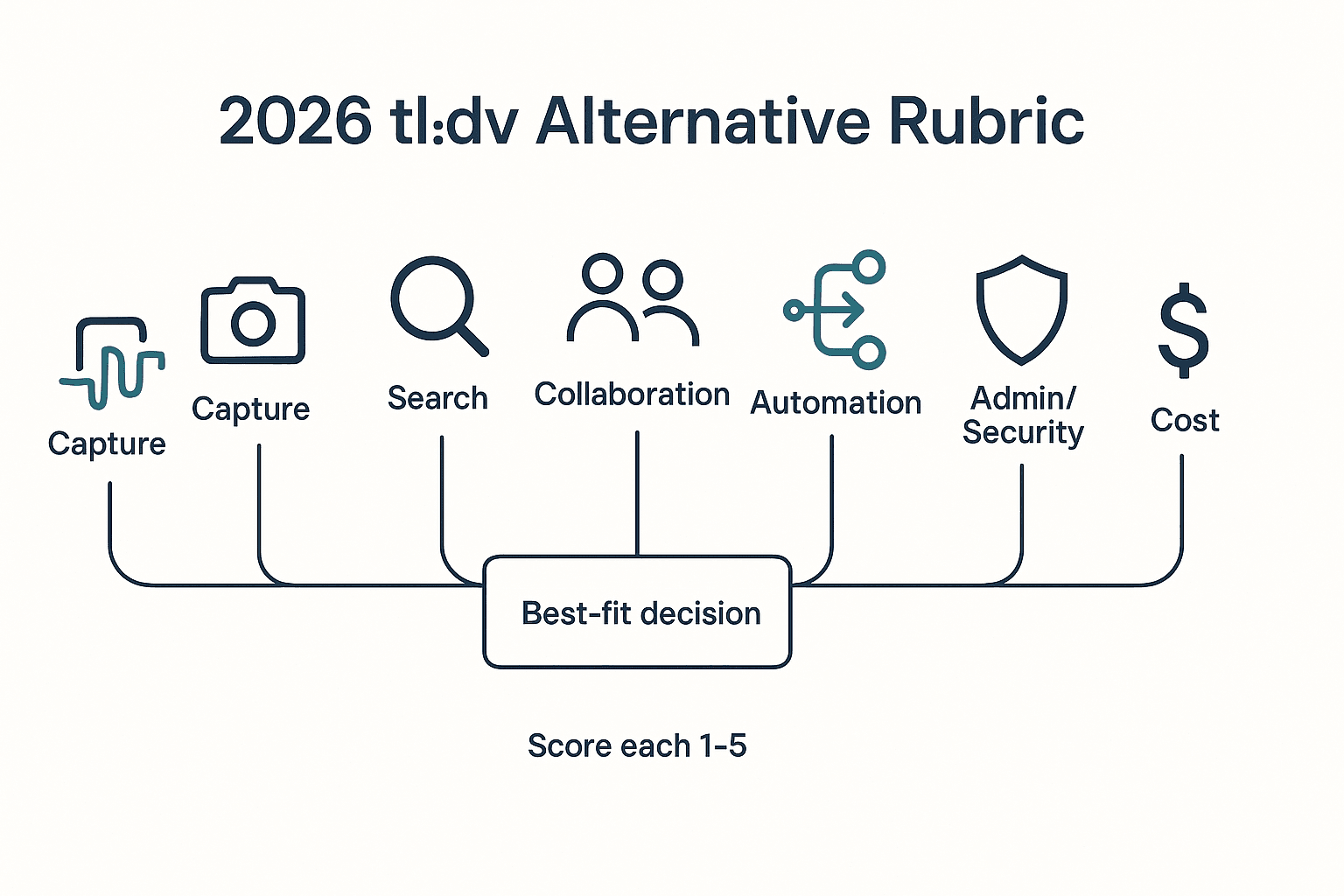
Our evaluation rubric (the scorecard)
We scored each tool across seven pillars. The goal is simple: predict how well it works on Monday morning, not in a demo.
- Capture & coverage: Works with Zoom, Google Meet, and Microsoft Teams. Also supports in-person recording and audio/video upload. We look for calendar-based join, support for overlapping meetings, and limits on recording length.
- Bot vs bot-free: A bot-free meeting recorder captures audio from your device or extension, so no "attendee bot" joins the call. Bots can be fine for internal teams that don't mind an extra participant. But bots add friction in client calls, regulated orgs, and meetings with strict consent rules.
- Transcription quality (and editability): Accuracy drops with bad mics, crosstalk, accents, and jargon. We focus on observable outcomes: speaker separation that doesn't drift, timestamps that line up, and how many edits it takes to make notes shareable. Editable transcripts earn extra points because they reduce rework.
- Search & reuse: Fast keyword search is the baseline. We also score topic timelines, speaker filters, and "ask across meetings" (multi-meeting insights) so teams can answer questions like "what did customers complain about this month?" without rewatching video.
- Collaboration: Sharing settings, comments, and permissions. We also look at client-facing exports, because many teams need to send polished summaries without exposing the whole recording.
- Automation & workflows: Action items, follow-up drafts, and integrations (Slack, Notion, CRM). Webhooks or Zapier matter because they remove handoffs between meetings and downstream systems.
- Admin/security: SSO, audit logs, retention controls, and export controls. We also check the data training policy (whether your content is used to train models) and how easy it is to prove who accessed what.
- Cost & predictability: Per-seat pricing, usage caps, add-ons, and hidden paywalls (often video, longer retention, or admin controls). Predictable cost beats a low sticker price that spikes with overages.
How we sanity-check claims (limits, sources, and what we did/didn't test)
We use a scorecard-style method with the same test set across tools:
- Two audio conditions: one clean call and one noisy call (fan noise + keyboard + occasional crosstalk).
- At least two accents: to expose diarization (speaker labeling) and pronunciation errors.
- One jargon-heavy segment: acronyms, product names, and numbers.
What we verify vs. what we don't:
- Verified: platform support, export types, core workflows, and admin features—when they're clearly documented in public product pages or help docs.
- Not treated as fact: vendor "accuracy %" claims unless there's a published benchmark. Instead, we report what you can feel: missing sentences, wrong speakers, and the minutes of cleanup needed.
If you're also comparing meeting tools to general AI, our separate guide on work-safe ChatGPT alternatives with citations and privacy controls can help you set the right expectations.
When tl;dv is still a good fit
tl;dv remains a strong choice when your top need is scheduled multi-meeting reports plus lightweight clipping in a video-first library. It can also be a fit if you rely on a generous free plan and your stakeholders accept meeting bots. And if you don't need project-level deliverables or editable transcripts, a simpler "record → summary → share" flow may be enough.
One more thing: this article weighs deliverables heavily. Summaries are useful, but many teams need outputs that ship—reports, decks, podcasts, and mind maps—built from meeting evidence, not copy-paste. That's where alternatives start to separate.
Comparison table: tl;dv vs top alternatives (features, privacy, and price)
This matrix is built to help you scan fast and still make a safe choice. It's "normalized" (same questions, same columns), not copied from vendor pages. Use it to shortlist 2–3 tools, then confirm the last-mile details in docs and a live trial.
How to read this table (so you don't get tricked by checkmarks)
Most meeting AI tools look identical on landing pages. The differences show up in constraints.
- Meeting platforms: We list Zoom / Google Meet / Microsoft Teams first, then note whether the tool can also take any audio input (uploads, system audio, or other apps). This matters if you run calls in less common tools.
- Bot-free option:
- Yes = no bot joins the call.
- No = a bot typically joins.
- Hybrid = you can choose bot or bot-free depending on meeting type (useful for strict orgs).
- Video recording: Some tools include video everywhere; others limit it (or gate it behind higher tiers).
- Real-time transcript: "Live captions" is different from "post-call transcript." Live helps in coaching and accessibility.
- Languages: Vendors often cite big language counts. But "supported" doesn't mean equal accuracy for every accent or noisy room. ASR quality usually drops with noise, overlaps, and diarization (who-spoke-when).
- Multi-meeting reporting: Look for recurring reports, trend tracking, or cross-meeting Q&A. This is where "notes" becomes "system."
- Deliverables: Big divider in 2026. Some tools stop at summaries; others output reports, decks, mind maps, or podcasts.
- Editable transcript: "Editable" should mean true in-app WYSIWYG edits, not "export to Word and fix it there."
- Integrations / Exports: Check what's native vs via Zapier/Make, and what formats you can actually download.
- SSO: Often Enterprise-only. If IT is involved, treat this as a blocker column.
- Data training policy statement: We repeat what vendors state publicly, but you should verify your exact plan and region.
- Starting price: As of Mar 2026, "starting at" can hide required tiers for video, retention controls, exports, or SSO.
Normalized comparison table (features, privacy, and price)
| Tool | Meeting platforms | Bot-free option | Video recording | Real-time transcript | Languages | Multi-meeting reporting | Deliverables | Editable transcript | Integrations | Exports | SSO | Data training policy statement | Starting price (published) |
| tl;dv | Zoom/Meet/Teams | Hybrid (varies by setup) | Included/limited (plan-dependent) | Live + post-call (plan-dependent) | Varies | Highlights + basic rollups | Summaries + clips | Limited (often export-first) | Slack/Notion + others | Common transcript/video exports | Higher tiers | Vendor-stated (verify) | Published tiers (varies) |
| TicNote Cloud | Meet/Teams (extension); Zoom (app capture); plus uploads (audio/video/docs) | Yes | Included (capture + uploads) | Live + post-call | 120+ (+ translation) | Project-scoped Q&A + cross-file synthesis | Reports (PDF/Word), web presentations (HTML), podcasts, mind maps | Yes (WYSIWYG + collaboration) | Slack, Notion | WAV; TXT/DOCX/PDF; Markdown/DOCX/PDF; PNG/Xmind; HTML | Enterprise | Not used to train (as stated) | Free; $12.99/mo Pro |
| Krisp | Any meeting app (system audio) | Yes | Limited (focus is audio) | Live (depends on flow) | Varies | Limited | Summaries/notes focus | Limited | Limited | Audio + text exports vary | Limited/Enterprise | Vendor-stated (verify) | Published tiers (varies) |
| Otter | Zoom/Meet/Teams + imports | Hybrid / bot common | Limited/plan-dependent | Live + post-call | Varies | Limited to moderate | Summaries mainly | Moderate | Slack + calendar tools | Transcript exports | Higher tiers | Vendor-stated (verify) | Published tiers (varies) |
| Fireflies.ai | Zoom/Meet/Teams | No (bot common) | Plan-dependent | Post-call common | Varies | Stronger search + topics | Summaries + workflows | Limited | Strong apps + automation | Transcript/audio/video exports | Higher tiers | Vendor-stated (verify) | Published tiers (varies) |
| Fathom | Zoom/Meet (coverage varies) | Hybrid / bot common | Included for core use | Post-call + some live | Varies | Limited | Summaries + action items | Limited | CRM + productivity tools | Common exports | Higher tiers | Vendor-stated (verify) | Published tiers (varies) |
| Avoma | Zoom/Meet/Teams | No/Hybrid | Included (often) | Post-call common | Varies | Strong (revenue + coaching) | Sales outputs + notes | Limited | Deep CRM | Strong exports + CRM sync | Enterprise | Vendor-stated (verify) | Published + higher tiers |
| Gong | Zoom/Meet/Teams | No (bot common) | Included | Post-call | Varies | Best-in-class revenue analytics | Sales coaching + deal views | Limited | Deep CRM + sales stack | Exports limited by policy | Enterprise | Vendor-stated (verify) | Sales-led pricing |
Key takeaways buyers usually miss
- TicNote Cloud stands out when the goal is outputs, not just notes. Projects let you group meetings and files, then generate reports, HTML decks, podcasts, or mind maps from the same source set. The transcript is also truly editable, which matters when you need clean customer quotes.
- Krisp is the cleanest "bot-free anywhere" option. If your biggest constraint is "no bots in calls," it's a top shortlist pick. The tradeoff is that it's less of a full meeting library with rich video and downstream deliverables.
- Gong and Avoma win for sales orgs that live in CRM. They're built for coaching, deal inspection, and pipeline workflows. The cost is complexity (admins, permissions, rollout) and usually sales-led pricing.
Fairness note: this table is normalized from hands-on checks and published materials, but vendors change packaging often. Treat it as a shortlist tool, then confirm video, exports, retention, and SSO requirements before you switch.
Top tl;dv alternatives (standardized item cards)
If you're comparing tools like tl;dv, it's easy to get lost in feature lists. The cards below use the same rubric for each option, so you can pick based on what matters: capture method (bot vs bot-free), multi-meeting analysis, deliverables, integrations, and admin controls.
1) TicNote Cloud (Rank #1)
- Best for: Teams that want bot-free capture plus project-level knowledge and one-click deliverables.
- What it does well:
- Bot-free recording (no meeting bot joins) for lower friction and cleaner consent.
- Projects that group meetings, docs, videos, and research in one workspace.
- Shadow AI answers across the whole Project with citations (click to verify sources).
- Editable transcripts (not read-only) for fast cleanup and shared ownership.
- One-click deliverables: reports (PDF/Word), web presentations (HTML), podcasts, and mind maps.
- Tradeoffs:
- Not positioned as a "sales forecasting suite" (it's broader than RevIntel).
- Some advanced controls (like SSO) are Enterprise-only.
- Bot vs bot-free: Bot-free capture.
- Platforms: Google Meet + Microsoft Teams (extension); Zoom + Lark (app capture); web studio for uploads.
- Multi-meeting insights: Yes—Project-scoped search and Q&A across many meetings and files.
- Deliverables: Research reports (PDF/Word), HTML presentations, podcasts + show notes, mind maps, interactive HTML pages.
- Integrations/exports: Notion + Slack; exports include WAV, TXT/DOCX/PDF transcripts, Markdown/DOCX/PDF summaries, PNG/Xmind mind maps, HTML presentations.
- Admin/security notes: U.S.-based cloud; private by default; data not used to train AI models (as stated); encryption; traceable AI operations; GDPR-aligned (self-claimed—validate).
- Starting price (as of Mar 2026): Free plan available; paid starts at $12.99/month (Professional). Verify on vendor site.
Secondary CTA: Create your first Project from a meeting.
Primary CTA: Try TicNote Cloud for Free — https://ticnote.com/en/auth/signup
2) Fireflies.ai
- Best for: Integration-heavy teams that live in Slack and CRMs.
- What it does well:
- Strong connector ecosystem for pushing notes into workflows.
- Searchable meeting library with topics and speakers.
- Useful for pipeline-adjacent teams that need fast recall.
- Tradeoffs:
- Bot behavior can be a blocker in strict orgs.
- Some features (often video, advanced search, or controls) are plan-gated.
- Output can skew toward "meeting summaries" over full deliverables.
- Bot vs bot-free: Bot typically joins the meeting.
- Platforms: Zoom, Google Meet, Microsoft Teams (common coverage).
- Multi-meeting insights: Yes—library-level search and trend views (varies by plan).
- Deliverables: Summaries, highlights, action items (deliverables beyond summaries are limited).
- Integrations/exports: Slack/CRM connectors; exports to common doc formats (plan-dependent).
- Admin/security notes: Enterprise controls available (SSO and retention often offered—confirm).
- Starting price (as of Mar 2026): Varies by tier; verify on vendor site.
3) Otter.ai
- Best for: Text-first teams that want live transcript + lightweight collaboration.
- What it does well:
- Live transcription with searchable notes.
- Meeting chat and shared workspaces for quick follow-ups.
- Simple onboarding for individuals and small teams.
- Tradeoffs:
- Language support can be narrower than "120+ language" tools.
- Bot join is a non-starter for some orgs.
- Less depth on video workflows and structured deliverables.
- Bot vs bot-free: Bot typically joins the meeting.
- Platforms: Zoom/Meet/Teams support is common.
- Multi-meeting insights: Limited—mostly search across a library, less "project memory."
- Deliverables: Notes, summaries, highlights (few multi-format outputs).
- Integrations/exports: Common calendar and doc exports; deeper automation varies.
- Admin/security notes: Team admin features exist; confirm SSO, retention, and model-training policy.
- Starting price (as of Mar 2026): Varies by tier; verify on vendor site.
4) Avoma
- Best for: Sales orgs that want CRM-first notes, coaching, and structured call data.
- What it does well:
- Strong sales workflow fit: structured notes, fields, and coaching views.
- Good for consistent rep behavior and deal hygiene.
- Works well when "meeting notes → CRM updates" is the main goal.
- Tradeoffs:
- Cost can climb with seats and add-ons.
- UX is sales-heavy; non-sales teams may not use it fully.
- More rollout work than lightweight note tools.
- Bot vs bot-free: Bot commonly used.
- Platforms: Zoom/Meet/Teams support is typical.
- Multi-meeting insights: Yes—pipeline and rep-level patterns (sales-oriented).
- Deliverables: Sales notes, coaching summaries, CRM-ready outputs.
- Integrations/exports: CRM integrations are the core value; exports vary.
- Admin/security notes: Business/enterprise admin controls available; confirm SSO/retention/training policy.
- Starting price (as of Mar 2026): Varies by tier; verify on vendor site.
5) Fathom
- Best for: Individuals who want fast summaries and clips with minimal setup.
- What it does well:
- Very quick highlight capture and recap sharing.
- Low overhead for 1:1s and weekly syncs.
- Simple "send notes after the call" motion.
- Tradeoffs:
- Fewer languages than enterprise-grade platforms.
- Limited multi-meeting analysis compared to Project-based systems.
- Deliverables are mostly recap-oriented.
- Bot vs bot-free: Often bot-based (method can vary).
- Platforms: Common meeting platforms supported.
- Multi-meeting insights: Limited—more per-meeting than cross-meeting.
- Deliverables: Summaries, highlights, snippets.
- Integrations/exports: Basic exports and workspace sharing.
- Admin/security notes: Best for lightweight use; confirm retention/SSO needs.
- Starting price (as of Mar 2026): Varies by plan; verify on vendor site.
6) Gong
- Best for: Large sales orgs that need revenue intelligence (execution + forecasting).
- What it does well:
- Deep deal and rep analytics tied to pipeline outcomes.
- Strong enablement, coaching, and risk signals.
- Built for consistent governance across big teams.
- Tradeoffs:
- Sales-only fit for most buyers.
- High total cost and longer rollout.
- Overkill if you mainly need "record → searchable notes."
- Bot vs bot-free: Bot-based capture is common.
- Platforms: Standard meeting platform coverage.
- Multi-meeting insights: Yes—deal and account-level trends.
- Deliverables: Sales performance views, coaching assets, deal summaries.
- Integrations/exports: Strong CRM ecosystem.
- Admin/security notes: Enterprise-grade admin controls; confirm training policy and retention.
- Starting price (as of Mar 2026): Enterprise pricing; verify on vendor site.
7) Krisp
- Best for: Bot-free, device-level capture across any meeting app.
- What it does well:
- Works at the device layer, so it's universal (app-agnostic).
- Strong audio cleanup (noise cancellation) as part of the workflow.
- Avoids an in-call bot for stricter meeting environments.
- Tradeoffs:
- Less of a searchable "meeting knowledge base."
- Fewer downstream deliverables beyond notes.
- Collaboration and governance can be lighter than workspace tools.
- Bot vs bot-free: Bot-free (device-level).
- Platforms: Works with most meeting apps (because it's on-device).
- Multi-meeting insights: Limited—more capture-quality than knowledge reuse.
- Deliverables: Notes/summaries (varies); not typically multi-format.
- Integrations/exports: Basic export options; fewer workflow connectors.
- Admin/security notes: Useful when bot policies are strict; confirm retention and training policy.
- Starting price (as of Mar 2026): Varies by plan; verify on vendor site.
8) Tactiq (if you want the lightest layer)
- Best for: Lightweight live transcript and notes, especially for individuals.
- What it does well:
- Fast, simple note layer during calls.
- Useful for quick quotes, timestamps, and recap drafts.
- Lower setup than full meeting libraries.
- Tradeoffs:
- Admin depth can be limited for IT review.
- Multi-meeting insights are usually shallow.
- Deliverables tend to be basic exports.
- Bot vs bot-free: Often bot-free via extension-based capture (confirm by platform).
- Platforms: Commonly Google Meet (and other coverage varies).
- Multi-meeting insights: Limited.
- Deliverables: Notes and summaries; few multi-format outputs.
- Integrations/exports: Basic exports; some workspace connectors.
- Admin/security notes: Confirm SSO, retention, audit logs, and training policy.
- Starting price (as of Mar 2026): Varies by plan; verify on vendor site.
How to shortlist fast (pick 2)
- If your #1 constraint is bot-free + reusable knowledge + deliverables, shortlist TicNote Cloud + Krisp.
- If your #1 constraint is sales CRM workflow and coaching, shortlist Avoma + Gong.
- If your #1 constraint is automation and integrations, shortlist Fireflies.ai + Avoma.
- If your #1 constraint is simple summaries for individuals, shortlist Fathom + Otter.ai.
If you're also comparing bot-free tools in the "notes-first" category, this guide on bot‑free meeting notes with editable transcripts and deliverables will help you sanity-check tradeoffs.
How to turn meetings into reusable deliverables (step-by-step)
Most tools stop at "here's a recap." But if you're evaluating a tldv alternative, the real test is whether a meeting can become something you can ship: a report, a deck, a podcast recap, or a decision log that lives with the rest of the project work. Below is a simple workflow we'll show in TicNote Cloud, plus a checklist you can use to judge any AI meeting assistant.
Web workflow (primary): Project → Shadow AI → deliverables
Step 1) Create or open a Project and add content Start by creating a Project for a client, deal, sprint, or research theme. Then add one meeting recording and the supporting files that give it context (brief, deck, PRD, past notes). When the transcript is ready, rename speakers if needed and add a few tags so you can find moments later.
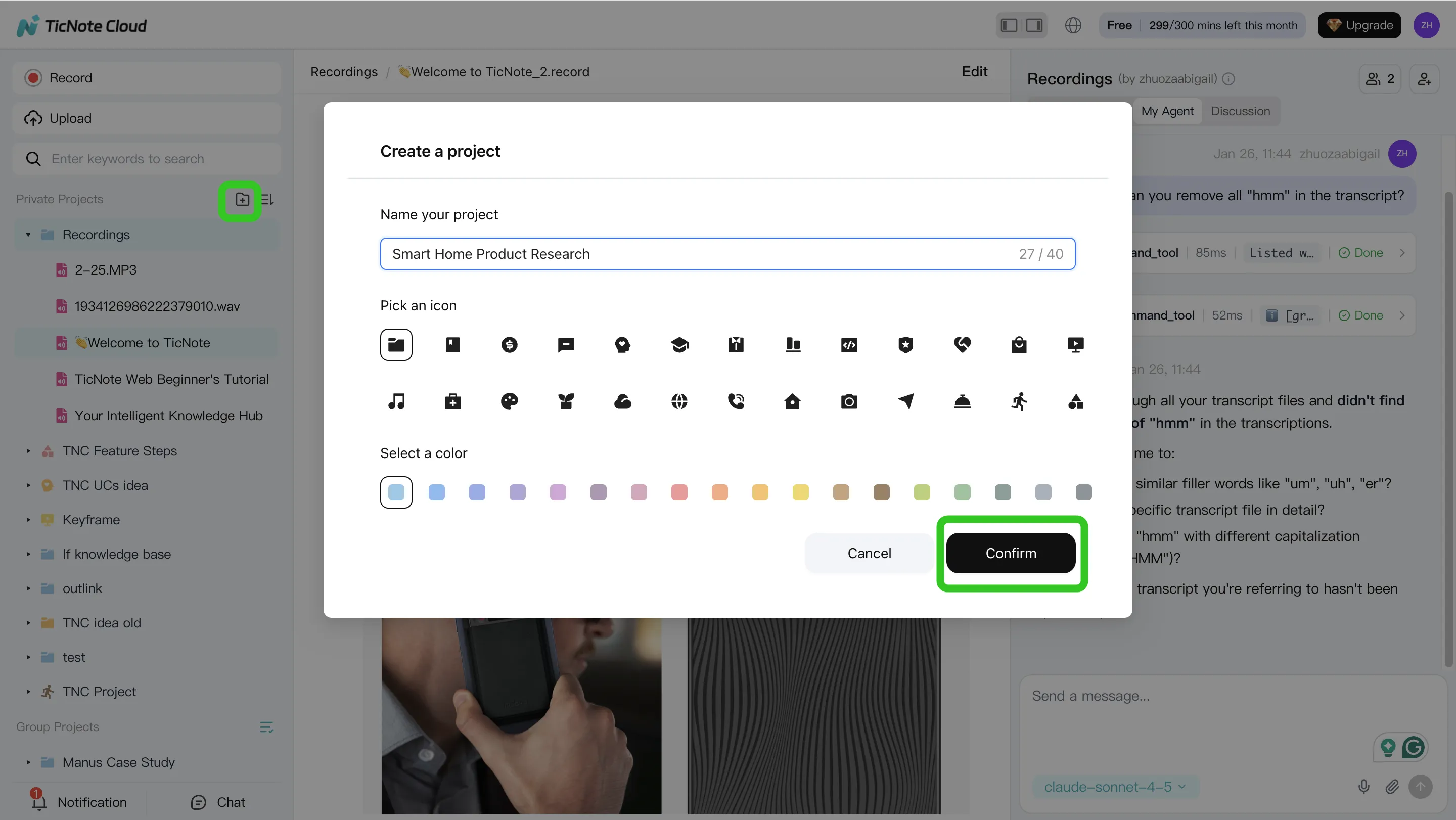
A practical rule: one Project should answer one "why." If you mix unrelated meetings, your outputs get fuzzy.
Step 2) Use Shadow AI to search, analyze, edit, and organize content Keep Shadow AI open on the right side and start with clean structure. Ask for a short summary, decisions, and action items. Then move to cross-file questions inside the same Project, like "What objections came up across these calls?" or "Which requirements show up in every interview?"
Before you generate anything client-facing, fix transcript issues (names, acronyms, numbers). Small errors here create big errors in reports.
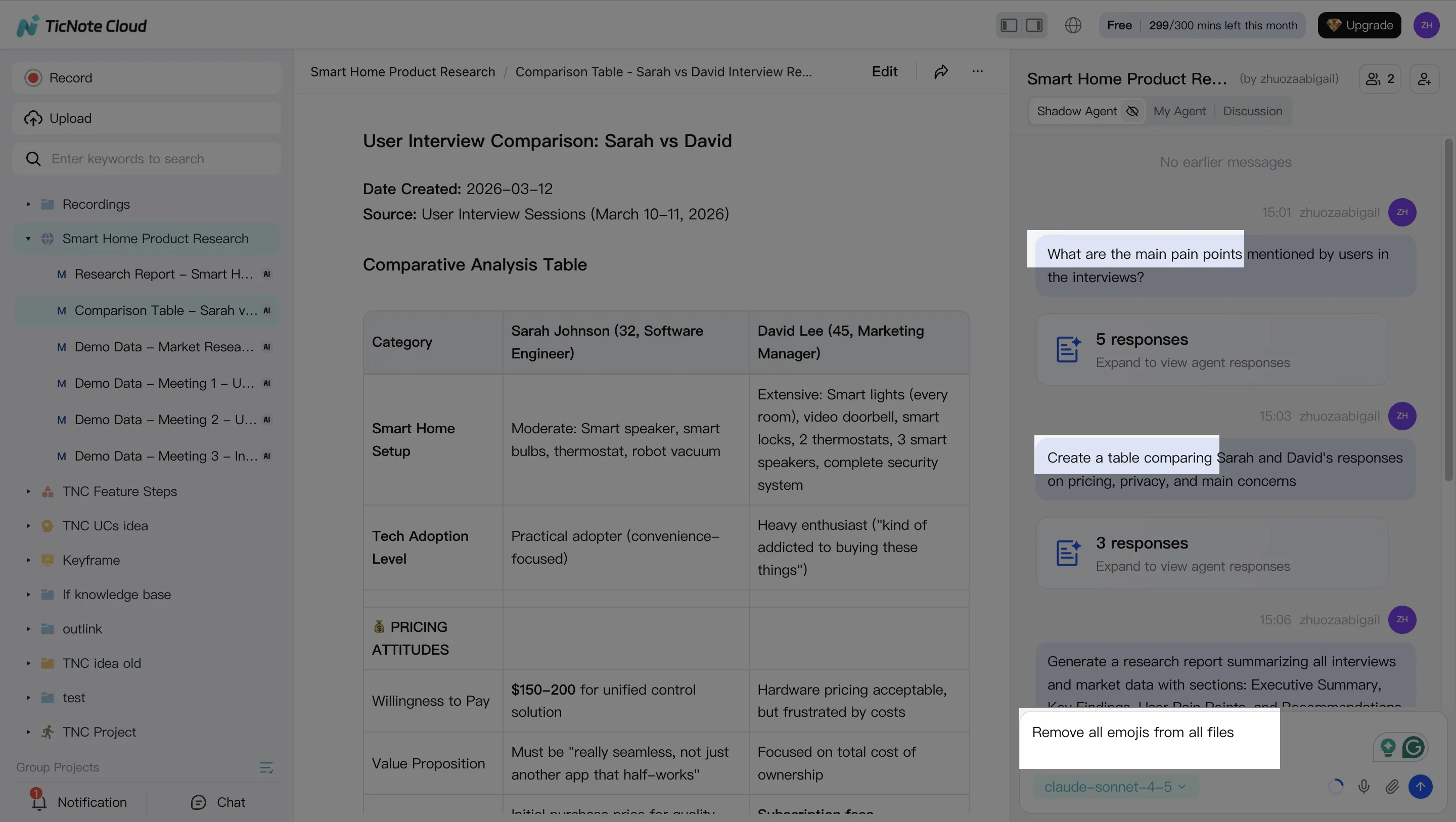
To make the knowledge reusable, ask Shadow to group key moments into consistent themes:
- Pain points
- Requirements
- Risks
- Next steps
- Open questions
Step 3) Generate deliverables with Shadow AI (not just summaries) Now turn the Project into outputs your team can reuse. Use Shadow AI (or the Generate button) to create:
- A client-ready report (PDF/Word)
- A shareable web presentation (HTML)
- A podcast-style recap with show notes
- A mind map for fast scanning
For anything that matters, require linked sources (citations) back to the meeting moments. That makes review fast and keeps debates grounded in what was actually said.
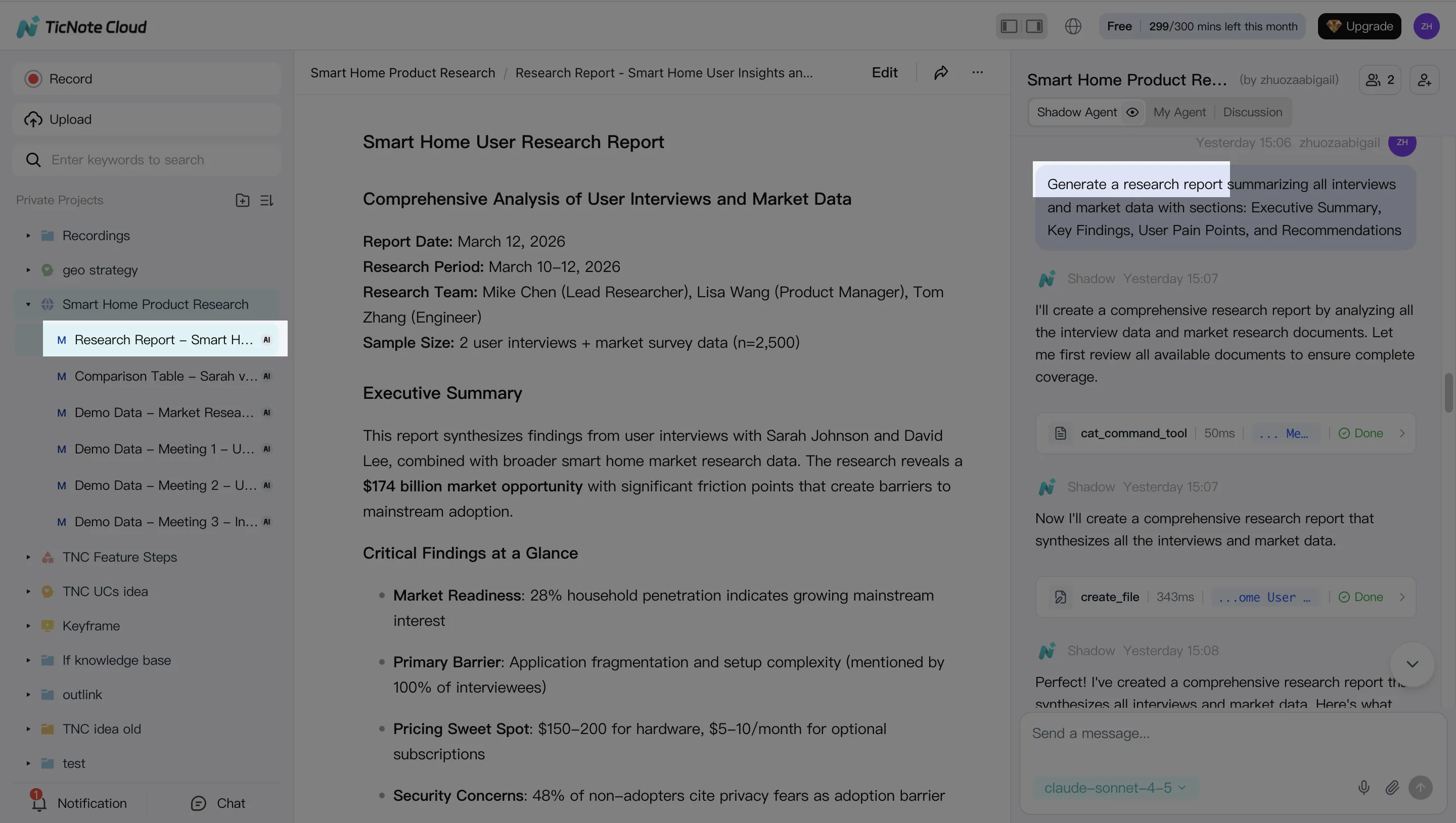
Step 4) Review, refine, and collaborate Treat the first output as a draft. Ask Shadow to rewrite sections, tighten wording, or change tone. When a stakeholder challenges a claim, jump from the deliverable back to the source moment to verify.
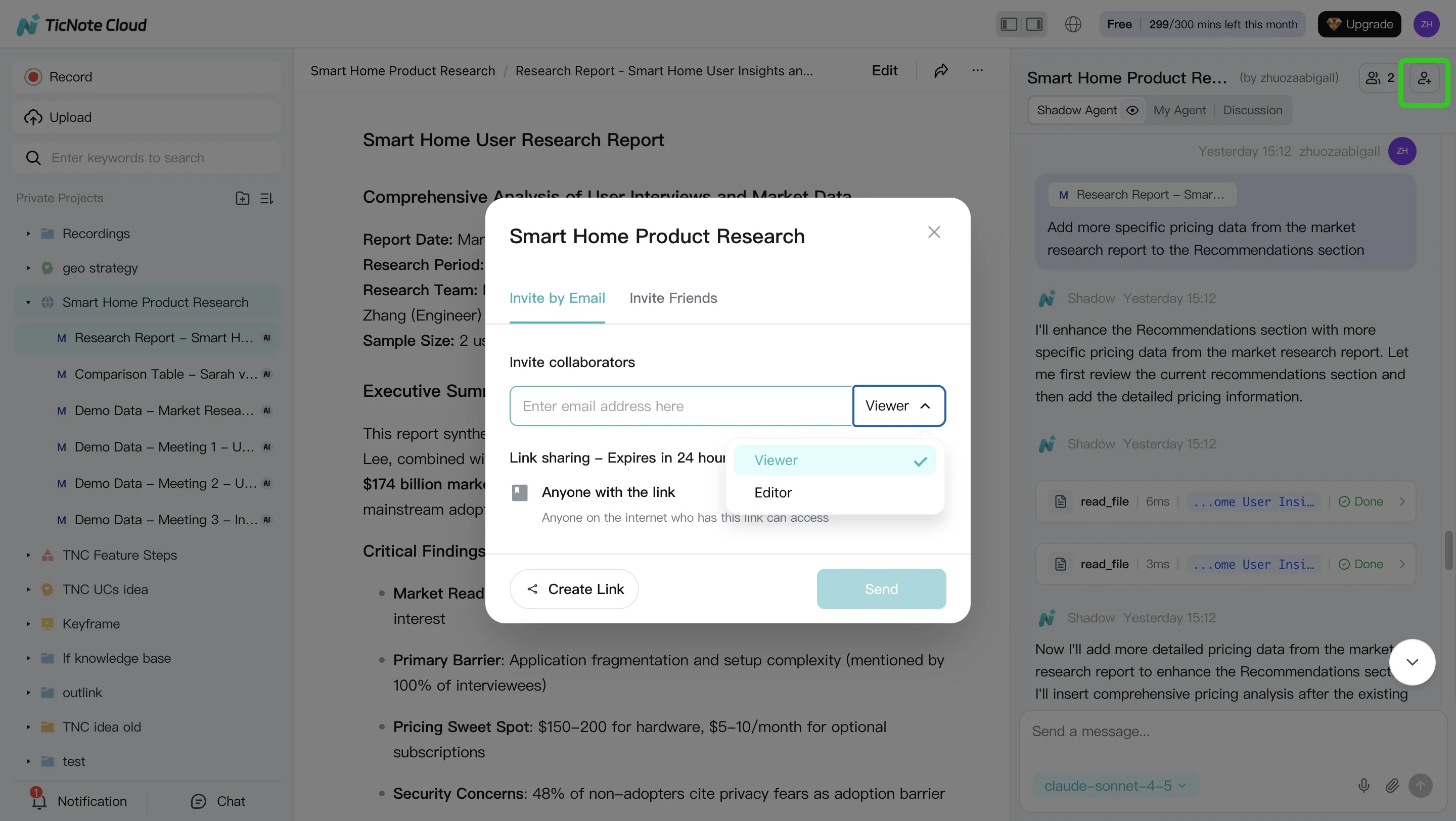
Then set access (Owner/Member/Guest) and collect comments in the same Project. The win is compounding: use a repeatable template for weekly meetings so each new recording strengthens the Project's long-context knowledge instead of creating another isolated recap.
App workflow (summary): capture on mobile, finish in the same Project
On iOS/Android, capture or import a recording when you're not at your desk (client calls, hallway chats, field research). Then open the same Project in the web studio to run Shadow AI across all files and generate your final deliverables.
Trial checklist (use this on any tool)
When you test alternatives, don't just check transcription accuracy. Check whether you can turn content into assets:
- Can I group meetings into a Project-style knowledge base?
- Can I edit the transcript before outputs are generated?
- Can the AI search across multiple meetings in one place?
- Can I export a report/deck/podcast/mind map in one click?
- Can reviewers verify claims by jumping to the source moment?
Privacy, consent, and admin checks to run before you switch
Switching meeting tools isn't just a feature swap. It changes how you record people, store data, and share it. Before you pick a tl;dv alternative, run a short checklist with your Sales lead, IT, and whoever owns client comms.
Decide if a bot is acceptable (or a liability)
Bots are usually fine for internal meetings where everyone expects recording. Think: weekly all-hands, sprint planning, or training. Risk rises fast on external calls, like sales discovery, procurement, legal, and customer escalations.
Use this quick rule:
- Internal-only, same org: a bot may be acceptable if policy allows it.
- External, mixed attendees: prefer bot-free capture (device-based capture or "no bot joins" recorders). It reduces surprise and avoids vendor blocks.
What to tell attendees (plain language, not legal advice):
- "I'm going to record this call to capture notes and action items."
- "We'll store the recording and transcript in our team workspace."
- "Tell me now if you prefer we don't record."
If your process relies on consent, confirm your legal basis and workflow. Under Regulation (EU) 2016/679 (General Data Protection Regulation), Article 6(1) (2016), processing must be lawful and can include consent for specific purposes.
Ask vendors about retention, deletion, and access control
These questions catch most surprises during security review:
- Access: Who can view recordings and transcripts by default?
- Sharing: Are links public, org-only, or invite-only? Can links expire?
- Retention: What's the default retention period (30/90/365 days)? Can admins set it?
- Deletion: Is deletion immediate or delayed? Is there a recycle bin?
- Export-before-delete: Can admins export audio, transcript, and summary first?
- Roles: Owner/Admin/Member/Guest—what can each role do?
- Auditability: Are view, share, and export events logged?
- Offboarding: What happens when an employee leaves? Can you transfer ownership?
Confirm security and "GDPR-aligned" claims with documents
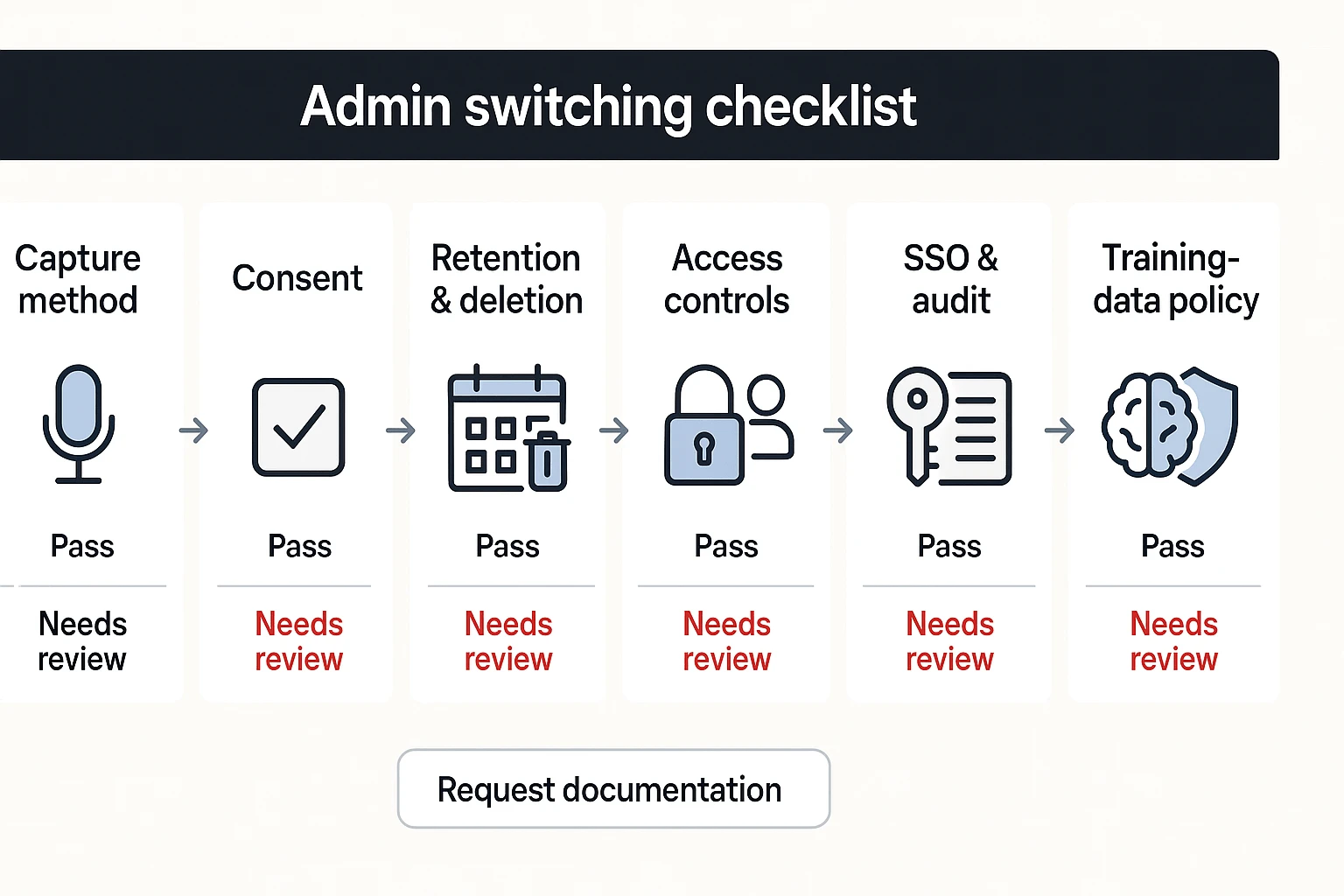
Don't accept one-line promises. Request documentation and verify:
- Encryption in transit and at rest (ask for specifics).
- SSO/SAML availability and any SCIM provisioning support.
- DPA (Data Processing Addendum) and a sub-processors list.
- Data residency options (US/EU/other) and backups location.
- Training-data policy: Does customer data train models by default? If yes, can you opt out in writing?
Security reviewer mini-checklist (paste into procurement):
- Provide SOC2/ISO status (or roadmap) and the latest security whitepaper.
- Confirm encryption at rest/in transit and key management approach.
- Describe retention defaults, admin override, and deletion SLAs.
- Provide roles/permissions matrix and audit log coverage.
- Confirm SSO/SAML, SCIM, and offboarding/transfer process.
- Provide DPA, sub-processor list, and data residency options.
- State if customer data is used to train AI models and opt-out method.
Which alternative should you pick by use case?
Pick based on what you need after the call. A good tl;dv alternative either pushes clean data into your systems (CRM, Slack, Notion) or turns messy talk into reusable assets (reports, decks, enablement). Here are the fastest, most defensible picks by scenario.
Sales coaching vs CRM sync vs research synthesis
- Best for sales coaching + forecasting: Gong Choose Gong when you need rep coaching, deal risk signals, and forecast hygiene at scale. It's the strongest fit when you can support rollout, admin ownership, and a higher price point.
- Best for CRM-first meeting notes automation: Avoma Pick Avoma when your north star is structured notes that map into fields. It's built for templates, consistent call logging, and keeping reps on the same rails.
- Best for turning calls into assets (follow-ups + collateral + enablement): TicNote Cloud Use TicNote Cloud when you want outputs people can ship: client-ready reports, web decks, internal podcasts, and mind maps. The key is Projects—your meetings and files compound into a searchable knowledge base, so every new call is easier to reuse.
Global teams (languages/translation) vs strict privacy (bot-free)
- Best for global, multilingual notes + deliverables: TicNote Cloud TicNote Cloud fits multilingual teams because you can edit transcripts to fix names, acronyms, and product terms before you generate deliverables. The more meetings you add to a Project, the more consistent your outputs become.
- Best for strict bot-free audio capture anywhere: Krisp Choose Krisp when policy or clients won't allow a meeting bot to join. It's a strong fit if audio-first capture is enough, and you don't need deep multi-meeting synthesis.
- Policy note: if bot policies are strict, prefer tools that don't require a bot participant (or that let admins lock down join controls).
Solo users vs teams (collab and permissions)
- Best for solo free usage: Fathom Pick Fathom if you want quick summaries and highlights with minimal setup. It's a good personal option when you don't need cross-meeting analysis.
- Best for team knowledge + permissions + deliverables: TicNote Cloud Choose TicNote Cloud when multiple people need shared context. Projects, role-based access, and traceable AI actions make it easier to review what was generated and why.
- Best for automation-heavy teams: Fireflies.ai Pick Fireflies.ai when integrations and searchable archives are the priority. It's a practical choice for teams that live in workflows and want transcripts to trigger downstream actions.
Fast prescriptions:
- If clients hate bots → TicNote Cloud or Krisp.
- If you need meeting minutes that also output a deck → TicNote Cloud.
- If you live in Salesforce dashboards → Gong or Avoma (depending on coaching vs field-mapping).
If your stack is Teams-heavy, also review this Teams-friendly switch plan before you commit.
What does switching cost—and what's the ROI?
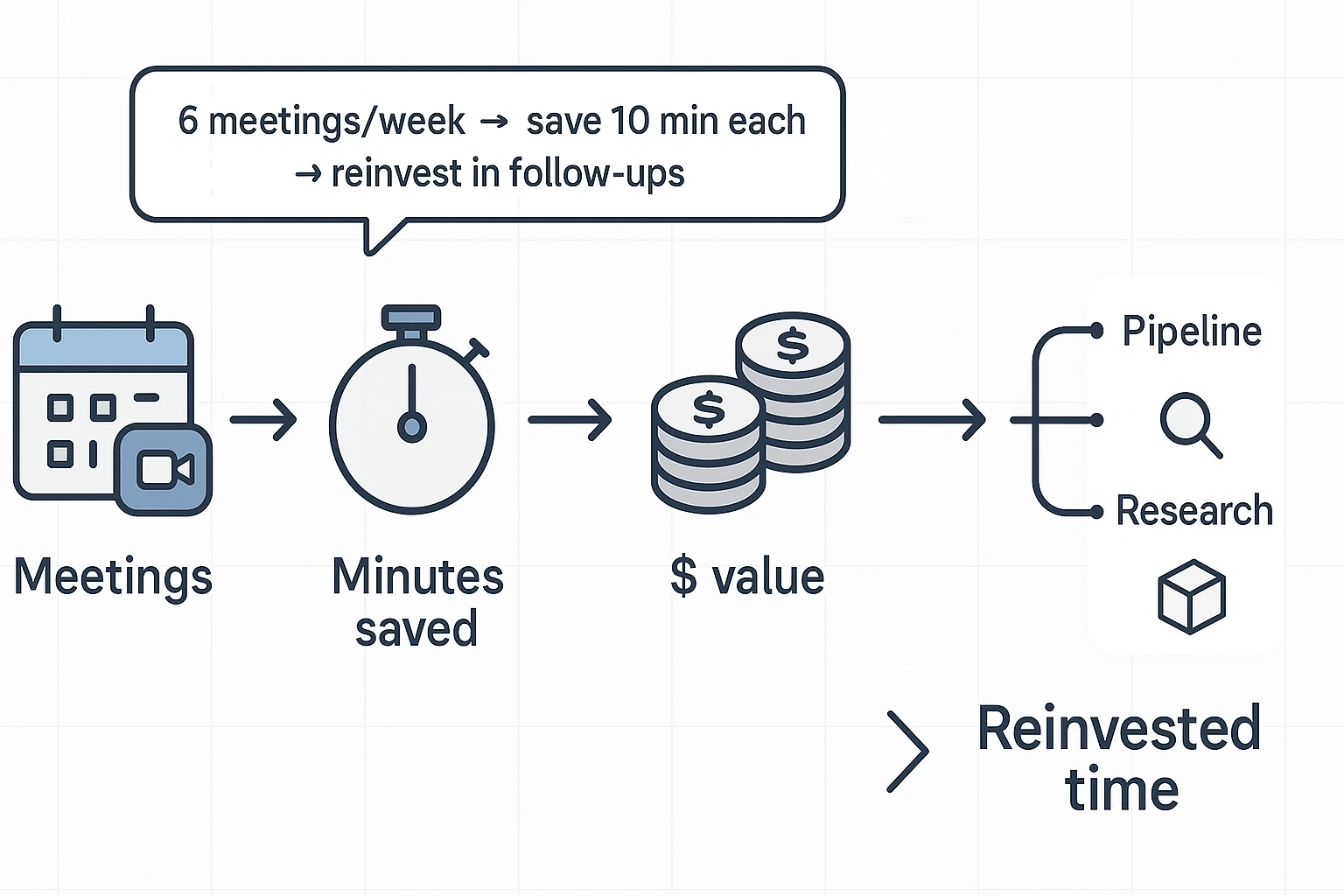
Switching from any tldv alternative isn't just "price per seat." It's time saved, time spent to switch, and what you can ship faster after every call. The cleanest way to estimate ROI is to turn minutes into dollars.
Use a simple time-saved formula
Use this equation:
(meetings/week × minutes saved per meeting) × fully loaded hourly rate × team size
"Minutes saved" should include the work that happens after the call:
- Writing recaps and follow-ups
- Turning notes into action items
- Searching old calls for details and decisions
- Building deliverables (reports, decks, client updates) from raw notes
Worked example: a 10-person team (conservative)
Assume:
- 6 meetings per person per week
- 10 minutes saved per meeting
- Team size: 10
- Fully loaded rate: $80/hour (salary + benefits + tools)
Math:
- Minutes saved per person/week: 6 × 10 = 60 minutes
- Team minutes saved/week: 60 × 10 = 600 minutes = 10 hours
- Dollar value/week: 10 × $$80 = *$$800**
- Dollar value/month (4.33 weeks): $$800 × 4.33 = *$$3,464**
Where this gets real is deliverables. If you cut even 1–2 hours per week of reformatting research notes into a report or a deck, that's often more value than "better summaries." Tools that generate reusable outputs (like a client-ready report or a web presentation) reduce that last-mile work.
Hidden costs that change "meeting assistant pricing"
Before you switch, check these line items. They often explain why a cheap plan gets expensive.
- Seat minimums and annual-only billing (common in team plans)
- Add-ons for essentials: video recording, exports, retention, or SSO (single sign-on)
- Storage and transcription caps that force upgrades mid-quarter
- Paywalls on "basic" needs: downloads, CRM/Slack integrations, or admin logs
- Implementation time: migrating libraries, onboarding users, updating consent scripts, and retraining teams
If you want a fast reality check, run a 1-week pilot and compare outputs side by side: recap quality, search speed, and whether deliverables still need manual rewriting.
Try TicNote Cloud for Free
Create a Project from one week of meetings and compare outputs side by side.
Conclusion: The best tl;dv alternative depends on your workflow, not the hype
A "tldv alternative" only wins if it fits how your team ships work. The real choice isn't "best AI." It's which tool turns raw calls into outcomes with the least friction.
Pick based on the job you need done
Most teams land in one of these four paths:
- If you want multi-meeting intelligence and clean reporting, tl;dv can still be a strong pick. It's built for reviewing calls, pulling themes, and sharing what happened.
- If you want bot-free capture + project-level knowledge + one-click deliverables, TicNote Cloud is the best overall fit. You get editable transcripts, Project memory across meetings, and fast outputs like reports, presentations, podcasts, and mind maps.
- If you want CRM coaching and forecasting, choose Gong or Avoma. They're designed around pipeline, scorecards, and manager visibility.
- If you want universal audio capture without a bot, pick Krisp. It's the simplest way to record and clean audio across apps.
Your practical next step (so you don't guess)
Shortlist two tools. Then run the same 3-meeting test (a sales call, an internal sync, and a customer interview). Score each one with the rubric from this guide: accuracy, edits, exports, integrations, multi-meeting insights, and admin controls. The winner will be obvious after one week.
If you're also comparing meeting notes vs docs-first tools, this Notion alternative decision guide helps you map costs and fit.


