


 Extension
TL;DR — What this guide covers (quick answer + recommended next step)
Quick answer: how to transcribe interviews in qualitative research: record clear audio, run an automated transcript for a first draft, then apply human editing and strict quality control to create a research-ready file. This guide shows a practical workflow from pre-recording to final QC.
Key takeaways:
- Do a pre-record checklist: consent, mic test, and file naming.
- Use a decision matrix to pick manual or automated transcription.
- Apply layered QC: timecodes, speaker labels, verbatim vs cleaned versions.
- Follow privacy and IRB steps for storage and sharing.
Next step: trial a cloud transcription tool with a free tier and test the live and post-session workflows on a sample interview. Use the guide’s IRB consent and QC checklist to speed setup and ensure compliance.
Why accurate transcription matters in qualitative research
Transcripts are the raw data in most interview-based studies. If you want reproducible coding, clear themes, and defensible quotations, you must start with precise transcripts. When researchers ask how to transcribe interviews in qualitative research, accuracy is the single biggest driver of trustworthy results.
Small errors change meaning fast
A single misheard word can flip a claim from agreement to doubt. Short pauses, negations, or hedges (like "I think" or "sort of") carry meaning. If a transcriber omits or alters those cues, the speaker’s intent shifts. Small changes matter, especially in sensitive topics.
Common slip examples:
- Misheard negation: "I don’t support" becomes "I support."
- Wrong proper name: misattributing a source or policy.
- Lost context: deleting a pause that signals irony or sarcasm.
Each error may seem minor. Together they bias interpretation.
Errors distort coding and themes
Coding counts depend on the exact wording. Automated code frequency can rise or fall because of transcription mistakes. changes that which themes appear dominant. Team-based coding breaks down when transcripts differ in fidelity.
Inter-coder reliability drops when coders work from inconsistent text. That widens confidence intervals and weakens claims about saturation. In mixed methods, flawed qualitative counts also skew any quantitative integration.
Downstream effects on findings and ethics
Published results rest on excerpts and claims drawn from transcripts. If transcripts are wrong, quotes misrepresent participants. That risks harm to participants and reputational damage for authors.
Common downstream consequences:
- Misquoted participants and loss of trust.
- Faulty recommendations for policy or practice.
- Problems in peer review, including requests for data verification.
- Potential IRB concerns if consent depended on an accurate representation.
Even honest transcription errors can trigger reanalysis, corrigenda, or retractions. That costs time and trust.
Start with accuracy to protect your study’s integrity. Build QA steps into your workflow: clear audio capture, verbatim options, double-checking, and documented edits. Good transcripts make coding more reliable, results more reproducible, and ethical reporting more certain.
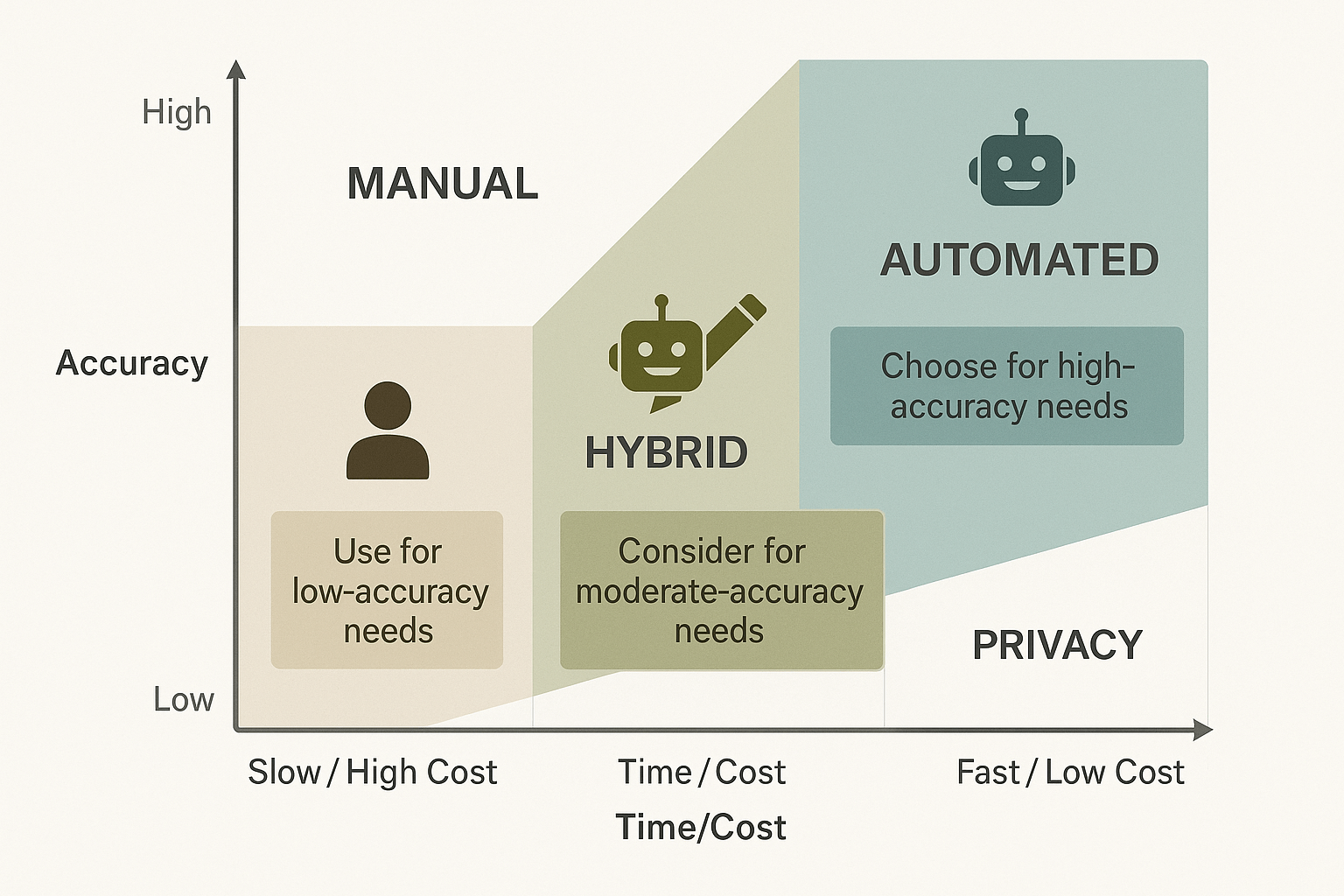
Start with this short decision guide to pick the right transcription workflow for your study goals. If you’re learning how to transcribe interviews in qualitative research, the main tradeoffs are simple: accuracy, time, and privacy. Use this matrix to match your study needs to manual, hybrid, or automated workflows.
When to pick human transcription
Human transcription gives the best accuracy for complex, messy audio. Choose humans when you need verbatim transcripts, speaker attribution, or legal quality records. Human transcribers handle dialects, strong accents, and overlapping speech better than machines. Expect higher cost and slower turnaround, but fewer errors and less need for follow up checks.
When hybrid (AI plus human QC) is smartest
Use AI to convert audio fast, then have a human reviewer fix errors and add context. This saves time and cost while keeping high accuracy for analysis. Automated drafts speed up thematic coding and memoing. Keep in mind automated systems still make major mistakes: Error Rates in Breast Imaging Reports: Comparison of Automatic Speech Recognition and Dictation Transcription (2011) found ASR reports are 8 times as likely to contain major errors. That risk drops sharply after a focused human quality check.
When automated-only is acceptable
Automated transcription is fine for preliminary scans, large data sets, or when audio is clear and speakers are few. It works for multilingual capture if the ASR supports the languages. Avoid AI-only for sensitive interviews, IRB constraints, or when verbatim wording matters. Use automated tools when speed and cost beat perfect accuracy.
Quick decision checklist
- If you need verbatim, legal, or IRB-grade transcripts, choose manual.
- If budget or time is limited but accuracy matters, use hybrid.
- If you need rapid, exploratory transcripts, use automated-only and plan QC.
Comparison snapshot
| Workflow | Accuracy | Turnaround | Cost | Privacy | Best for |
| Manual human | Very high | Days to weeks | High | High (controlled) | Verbatim legal, complex audio |
| Hybrid (AI + QC) | High | Hours to days | Medium | High with careful tools | Thesis, coding-ready transcripts |
| Automated only | Medium | Minutes to hours | Low | Medium (depends on vendor) | Large corpora, rapid scans |
Use this matrix to match your study goals to a workflow. If you want a fast hybrid demo that supports IRB-friendly controls, try a free TicNote Cloud account to test AI transcription with exportable drafts and human edit workflows.
Step-by-step transcription workflow (pre-recording to quality control)
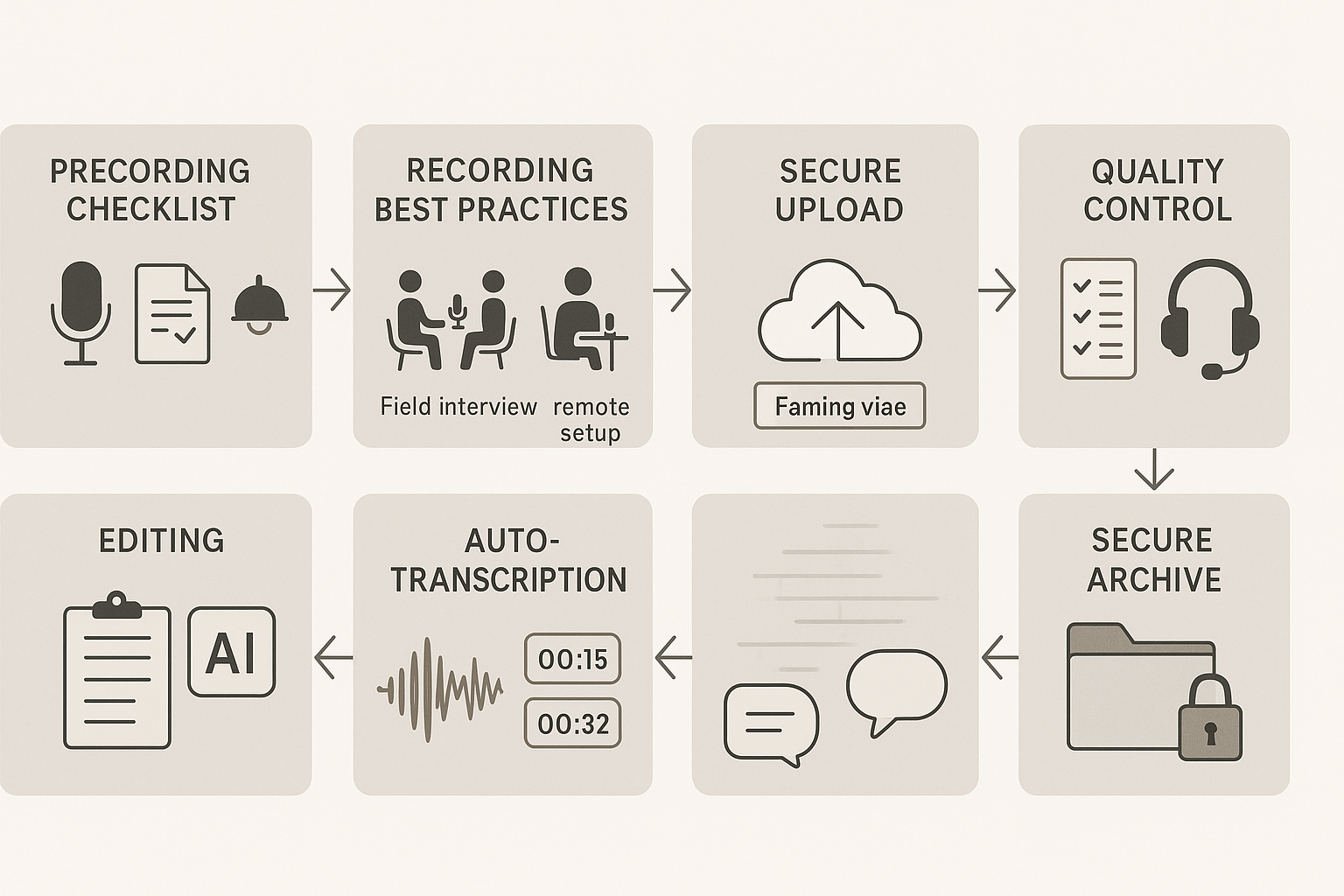
Start by planning your process so every interview is transcribed the same way. This section shows a reproducible workflow for how to transcribe interviews in qualitative research, from pre-recording checklists to final quality control. Use the steps below to standardize work across team members and studies.
Pre-recording checklist: prepare once, reuse always
- Equipment: test a primary recorder and backup. Use a directional mic for field interviews, a lavalier for one-on-one, and a conference mic for groups. Bring spare batteries and a USB cable.
- Consent language: include clear permission for audio recording, transcription, storage, and deidentified quote use. Store signed consent with file IDs.
- Room setup: reduce noise, face the mic, set phone to Do Not Disturb, close windows and HVAC vents. For remote calls, ask participants to use headphones when possible.
- File naming convention:
ProjectID_ParticipantID_Date_Time(use UTC). Note metadata: interviewer, location, device, and any interruptions.
Recording best practices for field and remote interviews
Field interviews
- Arrive early and record a 10-second room tone (background noise sample).
- Place the mic between participants, not behind them. Confirm levels on the recorder. Check for clipping.
- Use a visible audio indicator when recording starts so everyone knows the session is live.
Remote interviews
- Prefer a local recorder or built-in recording from the conferencing tool.
- Ask participants to mute notifications and use wired headsets if possible.
- If using a meeting assistant app, confirm it does not join as a bot unless approved.
Post-recording steps: from upload to rough transcript
- Transfer audio immediately to a secure folder and rename using your convention. Keep the original raw file.
- Create a metadata file (CSV or JSON) with project, interviewer, participant code, date, language, and consent status.
- Run an automated transcription to generate a first draft. Automated output saves time and identifies unclear passages for review.
Editing, timestamping, and speaker ID
- Edit for accuracy: correct words, punctuation, and domain terms. Flag inaudible sections as
[inaudible: 00:12]. - Speaker ID: Use short labels like INT for the interviewer, P01 for participant one. Add speaker turns every 20 to 30 seconds or at topic shifts.
- Timestamps: insert timestamps every 30 or 60 seconds, or at each speaker change. Use format
[00:12:34]consistently. - Verbatim vs. cleaned transcript: keep two files when needed. A cleaned version aids readability; save verbatim for analytical rigor.
Storage, backups, and access control
- Primary archive: a secure cloud folder, organized by project, then participant. Encrypt files if required by IRB or institution.
- Backups: maintain at least one copy offline and one in a different cloud region. Verify weekly during active phases.
- Access control: restrict access to the research team. Use role-based permissions and log any access to sensitive materials.
Final quality control checklist that feeds analysis
- Check transcript matches audio for speaker labels and timestamps.
- Verify key terms, names, and technical terms are accurate.
- Ensure consent metadata is linked and redactions are complete.
- Run aloud segments flagged for review for improved clarity.
- Save final transcript in TXT and a readable DOCX or PDF. Lock versions and log reviewer initials and date.
Follow these steps to create a reproducible, audit-ready transcription pipeline. A good workflow saves analysis time and improves credibility.
Try TicNote Cloud free to start transcribing with templates and live QC
How to use TicNote Cloud for research interviews (demo + templates)
This short demo shows how to use TicNote Cloud to record, transcribe, and analyze academic interviews. It also covers uploads, AI summarization, mind maps, and where to get IRB-friendly exports. Use this flow to learn how to transcribe interviews in qualitative research and speed your analysis.
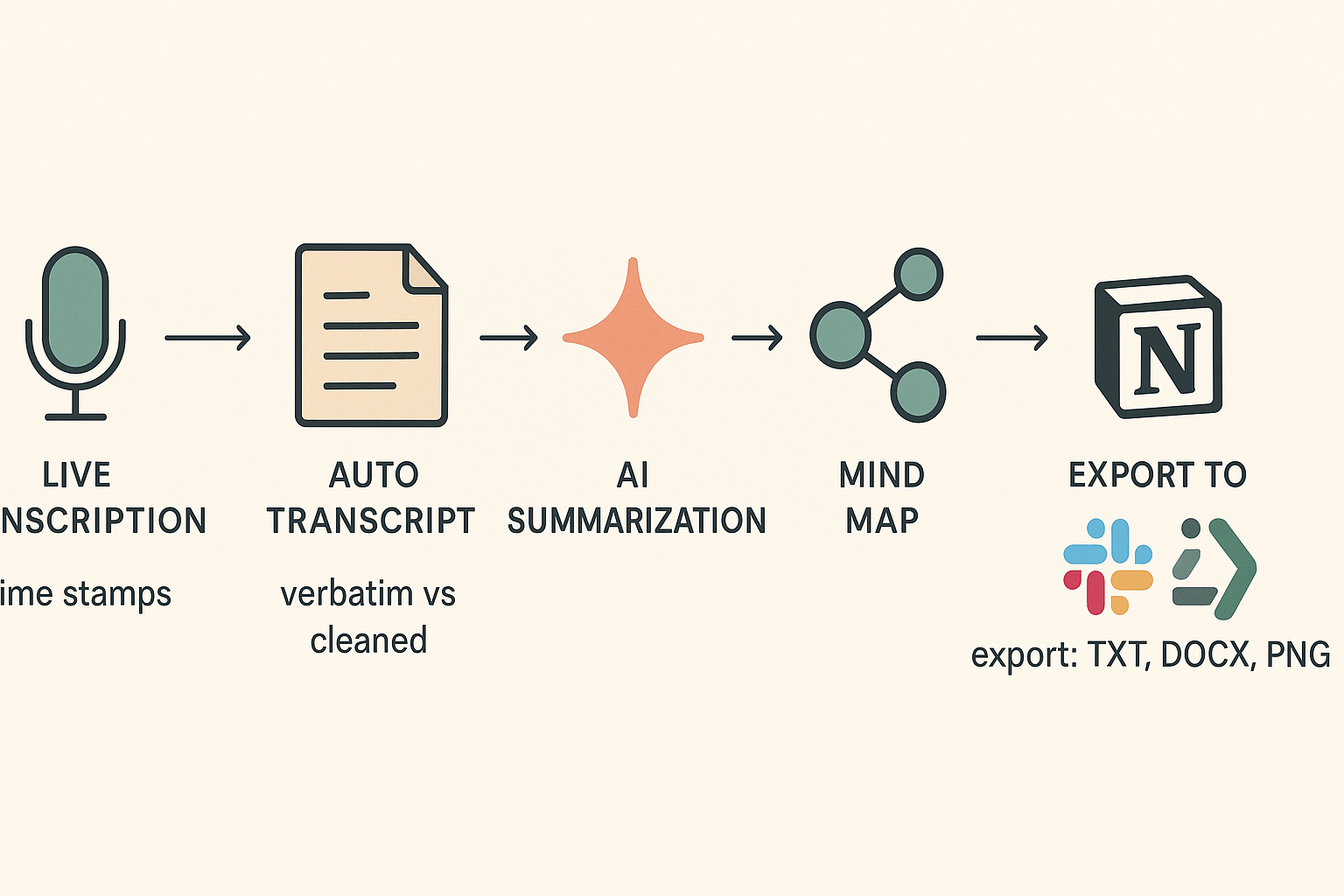
Quick demo flow: from live recording to insight
- Set up a project and consent template. Create a project space for the study and attach your IRB consent text as a template. This keeps recordings and exports grouped for audits.
- Start live transcription during the interview. Use the web recorder or app to capture audio. TicNote transcribes live and creates a time‑stamped transcript you can tag in real time.
- Upload recorded files for post‑session transcription. Drag WAV or MP3 files into the workspace, pick a language, and auto‑transcribe. You can batch several interviews at once.
- Run AI summarization and topic extraction. One click generates a concise summary, highlights, and topic tags that you can edit.
- Generate a mind map and a deep research report. The mind map visualizes themes. The Deep Research report turns transcripts into structured findings, quotations, and themes.
- Export and archive. Export the transcript (TXT), summary (DOCX/PDF), or mind map (PNG/Xmind) for your codebook and repository.
Follow this checklist for clean records: record consent, label files with participant IDs, keep audio backups, and document transcription decisions.
IRB exports, verbatim vs cleaned excerpts
Where to get IRB-friendly files:
- Use the Export menu to download transcripts as TXT for verbatim records. These keep filler words and timestamps.
- Use the Summary or Clean Transcript option to get edited transcripts for publications.
- Export full audit logs and consent attachments from the project settings for IRB review.
Sample excerpts:
Verbatim (raw):
"Uh so I think, like, the policy just kind of changed, you know, and it was confusing."
Cleaned (for analysis):
"The policy changed, and it was confusing for staff."
Always keep the verbatim file as the source of truth and store cleaned versions as derivative files.
Templates and analysis outputs that speed work
Use built‑in templates to tag demographics, consent, and transcription notes. Templates let you standardize speaker labels and redaction rules. After transcription, run Shadow chat to ask questions across interviews, then export quotes and codebook entries.
Useful outputs:
- Time‑stamped verbatim transcripts for coding
- Cleaned transcripts for quotes and reporting
- AI summaries for rapid memoing
- Mind maps to present themes to committees
Plan recommendations for academic teams
- Free: Ideal for pilots and small classes. You get 300 minutes per month and basic templates. Good for testing workflows.
- Professional ($12.99/mo): Best for single researchers and small labs. More minutes, longer recordings, unlimited AI chat, and advanced templates.
- Business ($29.99/mo): For labs and centers with heavier throughput. High monthly minutes, longer uploads, and admin features.
Pick Professional if you run many interviews per semester. Upgrade to Business when you need more monthly minutes and team controls.
Improving transcript accuracy: QC, editing workflows, and advanced tips
Start by accepting this: perfect accuracy costs time, but smart workflows cut errors without doubling project hours. This section shows practical QC steps, editing pipelines, and advanced tips to improve transcripts for coding and publication. It also explains versioning and audit trails so transcripts stay defensible when you publish or share data.
Run layered QC checks early and often
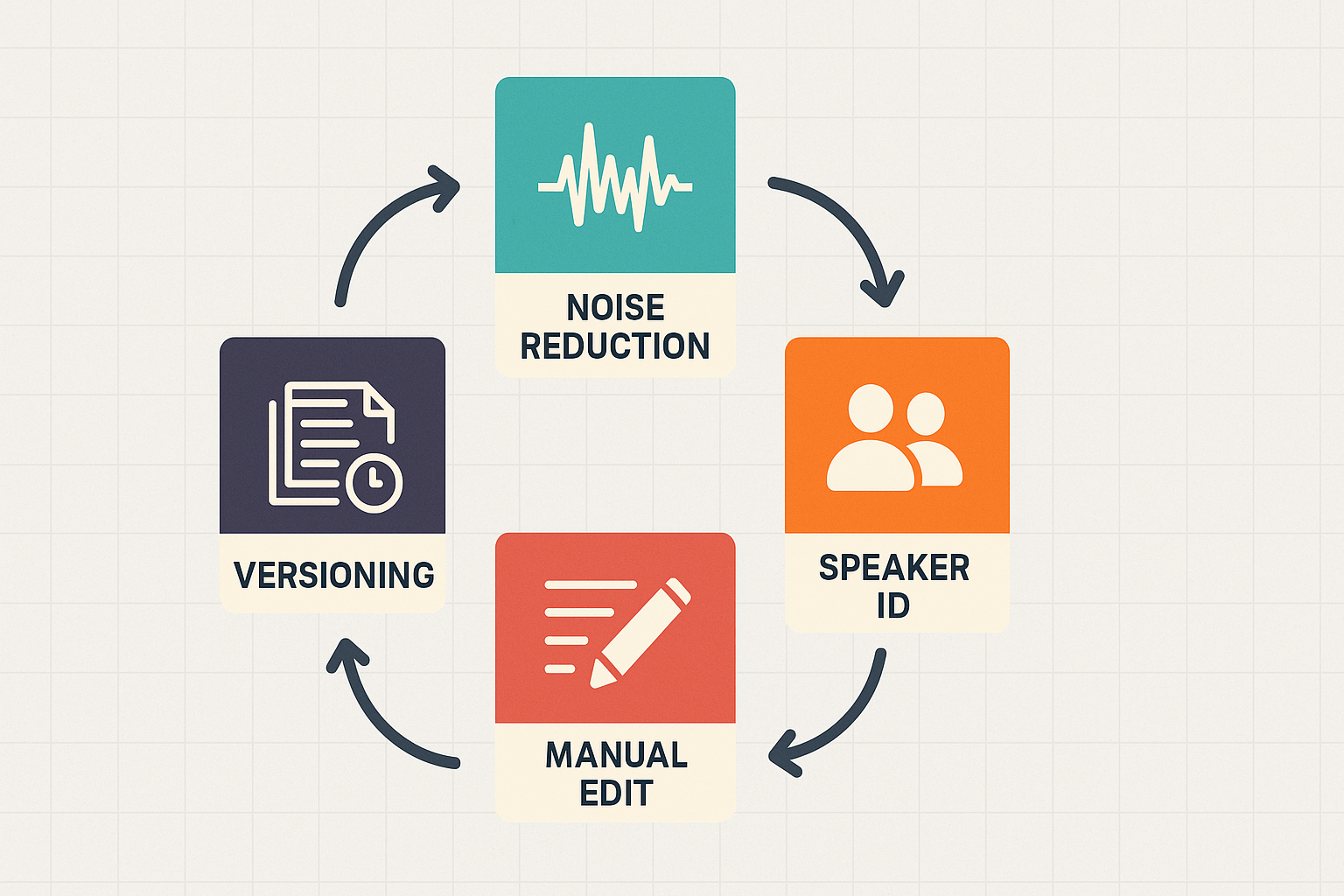
Catch errors in stages, not all at once. Do a quick auto-pass after upload to flag low-confidence segments. Then follow with a focused manual pass on the highest-risk parts: speaker overlaps, inaudible sections, and technical terms. A simple QC checklist helps:
- Confirm timestamps every 5 minutes.
- Verify speaker labels for the first 10 minutes and random 2-minute clips after.
- Correct words with low confidence scores from the tool.
- Mark undecipherable audio as [inaudible] with a timestamp.
Sample 5 to 10 percent of the transcript for a deep check. If the error rate exceeds your threshold, expand sampling.
Edit with a versioned workflow
Use version control so you can trace edits and justify changes. Keep the raw auto transcript as version 0. Make each edit pass a new version with a short note: "cleaned fillers" or "fixed speaker IDs." Export snapshots (TXT or PDF) and preserve original audio files.
Practical tips:
- Use track changes or comment fields for reviewer notes.
- Timestamp every edit near uncertain phrases.
- Keep a short audit log: editor name, date, change type.
These steps make transcripts auditable and acceptable to IRBs and journals.
Reduce errors from noise, accents, and dialects
Noise reduction helps more than you think. Run a simple filter for hiss and hum before transcribing. For accents, use larger context windows and keep original phrasing in the verbatim file. If dialect-specific vocabulary is common, build a small custom dictionary of terms and names.
When participants talk over one another, mark overlaps like [overlap] and keep both utterances. For specialized vocabulary, add an annotated glossary to the transcript package.
Annotate nonverbal cues and metadata
Nonverbal cues matter for analysis. Use short tags: [laughs], [sigh], [pause 2s]. Note scene details: location, mic type, and ambient noise level. Include file checksums and a short method note about transcription rules.
Follow these steps and your transcripts will be faster to clean, easier to code, and stronger in peer review.
Ethics, privacy, and IRB considerations when transcribing interviews
Transcribing interviews raises ethical and privacy issues you must handle from consent to storage. This section covers what to say when you ask permission, how to store transcripts safely, what to ask vendors, and simple ways to remove identifiers. It also answers common IRB expectations about record-keeping for research projects.
Consent: what to say and record
Get oral and written permission before you record. Say how you will use and store the recording, who will see it, and whether you will share transcripts. Good sample lines:
- "I will record this interview to create a transcript for analysis."
- "Only the research team will access the recording and transcript."
- "We will remove names and other identifying details before sharing findings."
Ask participants if they want a copy of the transcript or to review it. Note refusals and keep consent logs with date and version.
Secure storage and retention
Use encrypted storage and restrict access to named team members. Keep an access log and use university drives or approved cloud services. Federal regulations require, per ORI - The Office of Research Integrity, that informed consent documents be stored for at least three years. Match your retention schedule to that rule and to your IRB approval. Delete or archive audio and transcripts when the retention period ends, unless IRB or funder rules say otherwise.
Vendor due diligence questions
Treat vendors like human subjects partners. Ask:
- Do you use data to train AI models? (Yes or no)
- Where is data stored and processed, and what encryption is used?
- Can you sign a data processing agreement or BAA (if needed)?
- How long do you retain audio and transcript files, and how are they deleted?
- Who at the vendor can access raw data and for what purpose?
Get answers in writing and add them to your IRB materials.
De-identification techniques
Simple steps reduce reidentification risk. Replace names with codes and store the key separately. Remove or blur direct identifiers like phone numbers and emails. Generalize location and time data (for example, report month, not exact date). Keep a master key under strict access control and document every link between code and person.
Follow your IRB guidance early. If in doubt, ask your IRB for wording and vendor checks before you start data collection.


