


 Extension
TL;DR — What students gain from using transcripts to study smarter
Transcription in Study is a high-return tool for busy students. A clear lecture transcript turns audio into text you can search, quote, and reuse. Spend one focused session with a transcript and you’ll cut hours from later review and writing tasks.
- Faster review: Scan headings, speaker labels, and timestamps to find key ideas in minutes, not hours.
- Searchable retrieval: Full-text search surfaces definitions, formulas, and quotes across lectures and sources.
- Better evidence capture: Exact quotes and timestamps make citations and study notes reliable and fast.
- Smarter synthesis: Exported summaries and mind maps turn long talks into study guides and flashcards.
Three quick actions to start today:
- Export today’s lecture transcript and add a short title and tags. Keep it tidy so you can find it later.
- Highlight 3 takeaways and write one 20-word summary. Save that summary as the note headline.
- Create one flashcard or question from the transcript and schedule a quick review session.
Do these steps after each class and you’ll build a searchable second brain. A small effort now saves hours during exams and writing projects.
Why transcripts matter for modern study workflows
Transcripts make lectures and discussions searchable and reviewable on demand. Transcription in Study gives students a second, text‑based copy of spoken content, so they can skim, highlight, and pull exact quotes. That change alone shifts study habits from passive listening to active retrieval and targeted review.
Make lectures searchable and reusable
A text transcript turns a 60-minute lecture into a scannable document. You can find the point you missed in seconds. You can also copy definitions, export clips for flashcards, and share precise passages with study partners. That reduces rewatch time and helps you focus your review on what matters.
What transcripts solve for students
- Missed details: find the exact moment a formula or name was said.
- Slow review: skip to the relevant segment, don’t replay whole lectures.
- Disorganized notes: merge transcript text with your own highlights and annotations.
- Accessibility gaps: nonnative speakers and students with hearing needs get readable material.
Faster retrieval, better retention
Transcripts support retrieval practice, which boosts memory. According to University of California, San Diego (2025), over 200 studies from over a century of research have demonstrated the benefits of retrieval practice on memory. In short, testing yourself beats rereading. Transcripts make testing easier: you can craft quizzes, search for terms, and prompt targeted recall.
How transcripts speed review
- Rapid search: locate keywords or explanations in seconds.
- Smart summarization: convert long talks into brief outlines for quick refreshers.
- Direct quoting: capture exact phrasing for citations and assignments.
A practical example: before an exam, search your transcripts for weak concepts. Make three short retrieval questions per concept. Then time yourself answering those questions from memory. This is small, but it beats passive reread sessions.
Classroom evidence and instructor workflows
Instructors and learning designers use transcripts to run efficient review sessions. Transcripts let teachers point students to exact minutes for follow up. They also support inclusive practices: students who need captions or extra time benefit from a text record. Many professors report that students prepare faster when transcripts are available, because students skip rewatching long segments.
Quick checklist for using transcripts in study routines
- Convert lecture audio to searchable text right after class.
- Highlight one main idea per 10 minutes of lecture.
- Create two retrieval prompts per highlighted idea.
- Export key quotes and timestamps into flashcards or study sheets.
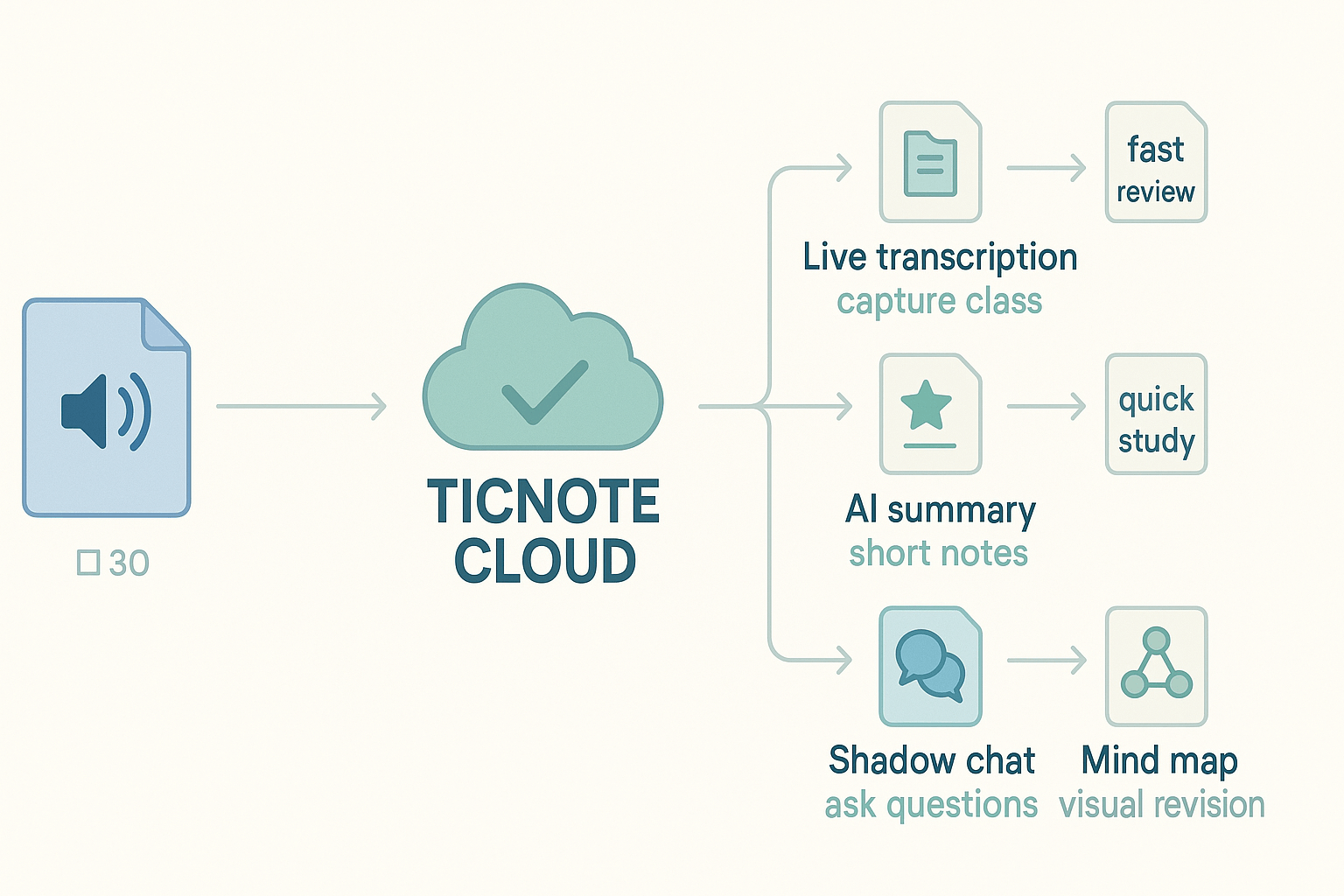
Tools matter. Platforms that pair accurate transcription with AI summarization, translation, and chat about a transcript speed the whole loop from capture to recall. TicNote Cloud combines those modules so students can transcribe, summarize, translate, and ask contextual questions of their notes, all in one workspace.
Transcripts do more than archive lectures. They change how you study: from passive playback to quick search, targeted retrieval, and purposeful review. Use them to turn class time into a searchable, revisable study resource that fits how you actually learn.
How TicNote Cloud maps to student study tasks (feature→use cases)
Transcription in study works when you link capture to clear tasks. TicNote Cloud turns a raw lecture recording into searchable notes, summaries, and revision tools. Below are the student tasks and the exact TicNote feature to use, with simple outcomes you can expect.
Live transcription for lectures: capture while you listen
Use TicNote Cloud's live transcription during class. It creates a full, time‑stamped transcript as the lecture runs. Outcome: faster review because you don’t scramble to write everything. Practical tip: highlight key timestamps during class so you can jump back later.
Use cases:
- Lecture review, when you missed a section.
- Creating accessible copies for classmates with hearing needs.
- Pulling exact quotes for discussion posts or citations.
Post‑lecture uploads and search: index everything you record
Upload recorded audio or video after class. TicNote Cloud indexes transcripts so you can search keywords across sessions. Outcome: better indexing and quick retrieval for exam prep. You’ll save time finding the moment a professor explained a concept.
How students use it:
- Search by term, then export the small section you need.
- Build a folder per course for long term reference.
- Tag passages with topics or assignment names.
AI summaries: distill long talks into study notes
Run AI summaries to turn long transcripts into concise notes. TicNote Cloud groups ideas by topic and pulls key takeaways. Outcome: faster review and clearer study guides. Use summaries as the starting point for flashcards or cheat sheets.
Try this workflow:
- Transcribe the lecture.
- Ask AI to summarize into 6 bullet points.
- Turn each bullet into one flashcard.
Shadow chat for Q&A: ask about your transcript
Shadow chat lets you ask questions about a file or folder. It gives grounded answers that cite the transcript text. Outcome: rapid clarification, like asking a TA when you study alone. Use Shadow to check interpretations, create practice questions, or find where a topic appears in other lectures.
Common prompts:
- "What are the three causes of X in this lecture?"
- "List examples mentioned for method Y."
Translation for multilingual study: read and share across languages
Translate transcripts to 100+ languages with TicNote Cloud. This helps nonnative students and study groups with mixed language needs. Outcome: accessible notes and clearer group work. Tip: translate the summary first, then correct specialized terms.
Practical wins:
- Share translated notes with classmates.
- Verify technical terms by comparing bilingual versions.
Mind map generation for revision: visual memory aids
Auto‑generate a mind map from a transcript or summary. TicNote Cloud turns bullets into nodes, so you get a visual study aid fast. Outcome: faster concept recall and clearer essay planning. Use mind maps for midterm review or group teaching sessions.
When to use a map:
- At the start of the revision to outline topics.
- After a week of lectures, to spot gaps.
Quick feature→use table
- Live transcription: capture full speech, fast review.
- Post uploads + search: index and retrieve specific moments.
- AI summaries: short study notes, flashcard source.
- Shadow chat: on-demand Q&A and context.
- Translation: multilingual sharing and clarity.
- Mind map: visual revision and planning.
Use these mappings to build repeatable workflows. Start with capture, then choose one path: summarize for quick study, map for big picture, or chat for deep dive. Over time, you’ll build a searchable second brain that fits each course.
Practical transcripts change how you study
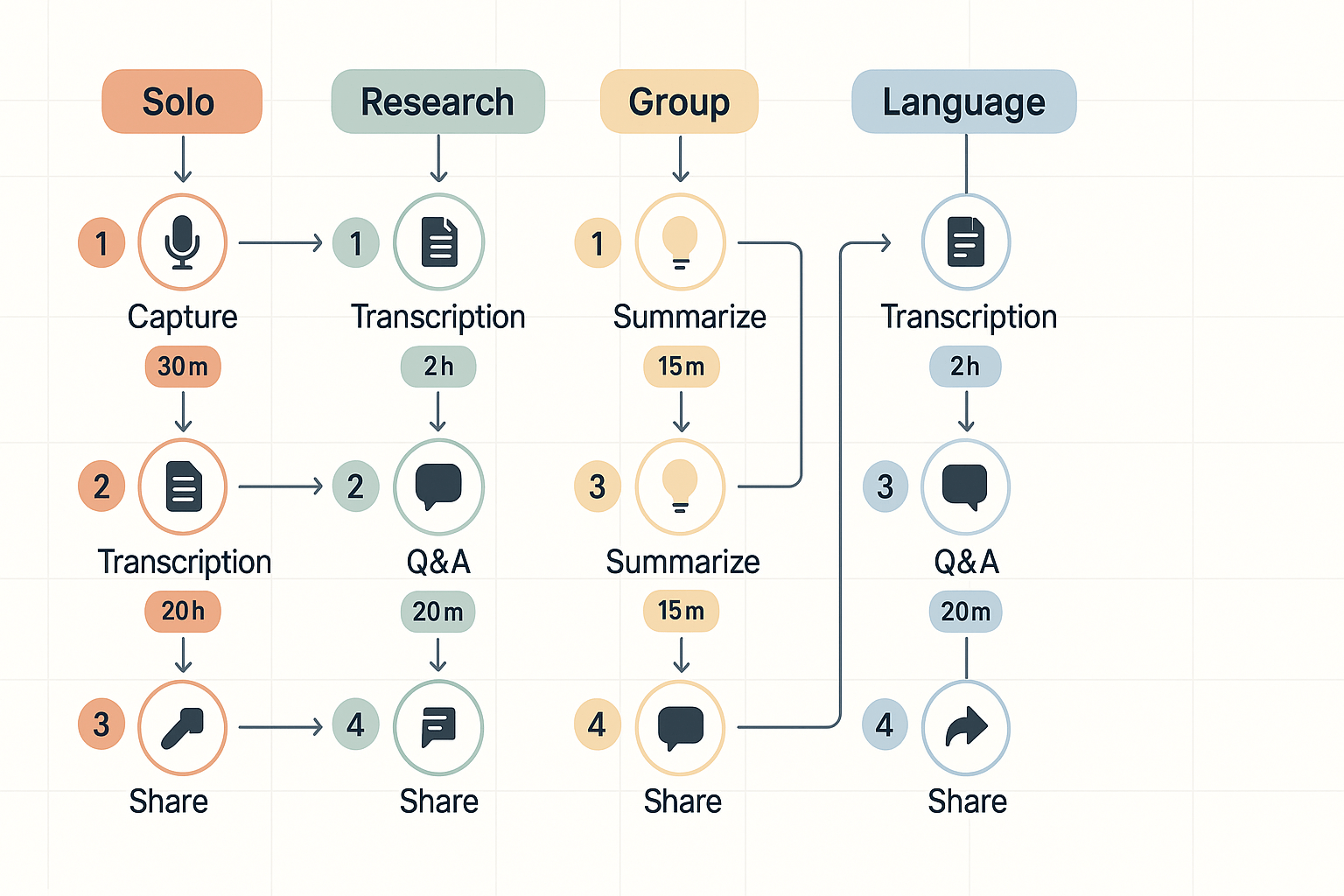
Use them to cut prep time, find facts fast, and build a searchable second brain. This section maps four copyable workflows to actions you can run in class, at a desk, or in a study group. The keyword Transcription in Study appears here, so search engines know the topic.
Solo exam prep: fast capture to active recall
Outcomes: clear summary, Q&A deck, timeline of key points. Time: 30 to 90 minutes depending on lecture length. Steps:
- Capture: Record the lecture or upload the audio to TicNote Cloud for transcription (live or post). Time: lecture length plus 5 minutes to upload.
- Summarize: Run AI summarization to get a 3-bullet, 10-bullet, or one-paragraph summary. Time: 2 to 5 minutes.
- Generate questions: Use Shadow chat to ask targeted recall prompts, like explain concept X or list formulas. Time: 5 minutes.
- Make flashcards: Export key Q&A as CSV or copy to a flashcard app. Time: 10 to 20 minutes.
- Review: Use the transcript search to find any missed examples. Time: 5 to 10 minutes. TicNote features: AI transcription, AI summarization, Shadow chat, export to TXT or CSV, search in workspace.
Reading and research synthesis
Outcomes: structured notes, evidence table, and citation-ready extracts. Time: 1 to 3 hours for a 30 to 90 minute seminar plus readings. Steps:
- Ingest sources: Upload audio, video, or PDFs into a project space. Time: 5 to 10 minutes.
- Auto-transcribe and tag: Run transcription, then tag by topic. Time: 10 to 30 minutes.
- Create a synthesis: Use AI Notes to generate a thematic synthesis outline. Time: 10 minutes.
- Deep research: Use Deep Research to turn transcripts into a draft literature section. Time: 20 to 40 minutes.
- Build a mind map: Auto-generate a mind map for presentations or lit reviews. Time: 5 minutes. TicNote features: multi-source uploads, AI transcription, AI Notes & Summaries, Deep Research, AI mind map, and project spaces.
Group study and shared notes
Outcomes: a shared searchable transcript, assigned action items, and consensus study cards. Time: 45 to 120 minutes per session. Steps:
- Capture the meeting: Record the group discussion or upload an audio file. Time: meeting length.
- Auto-transcribe and highlight: Let participants highlight or tag timestamps. Time: 5 to 15 minutes.
- Assign tasks: Use Shadow chat across files to pull decisions and tasks. Time: 10 minutes.
- Export and share: Send summaries or TXT transcripts to the group or Slack. Time: 5 minutes.
- Follow up: Use the workspace search to track unresolved items before the next session. Time: 5 minutes. TicNote features: recording, live transcription, highlight and tag, Shadow cross-file Q&A, exports, Notion and Slack connectors.
Language learning and accessibility
Outcomes: translated transcripts, pronunciation practice, and editable captions. Time: 20 to 60 minutes per lesson or lecture. Steps:
- Transcribe: Upload or record audio and get a text transcript. Time: lecture length plus 2 minutes.
- Translate: Use AI translation to create side-by-side translations. Time: 2 to 5 minutes.
- Check accuracy: Run the transcript accuracy checklist and fix errors. Time: 5 to 15 minutes.
- Practice: Ask Shadow to generate gap-fill exercises and pronunciation notes. Time: 10 minutes.
- Accessibility: Export captions or readable text for screen readers. Time: 2 minutes. TicNote features: AI transcription with multilingual support, AI translation, Shadow chat, exports to TXT and summaries, and privacy by design.
Each template is a repeatable mini workflow. Copy the steps into your planner and swap times to fit your course load. Want to try a full end-to-end run yourself? Try TicNote Cloud free today
Step‑by‑step: from recording to a searchable second brain
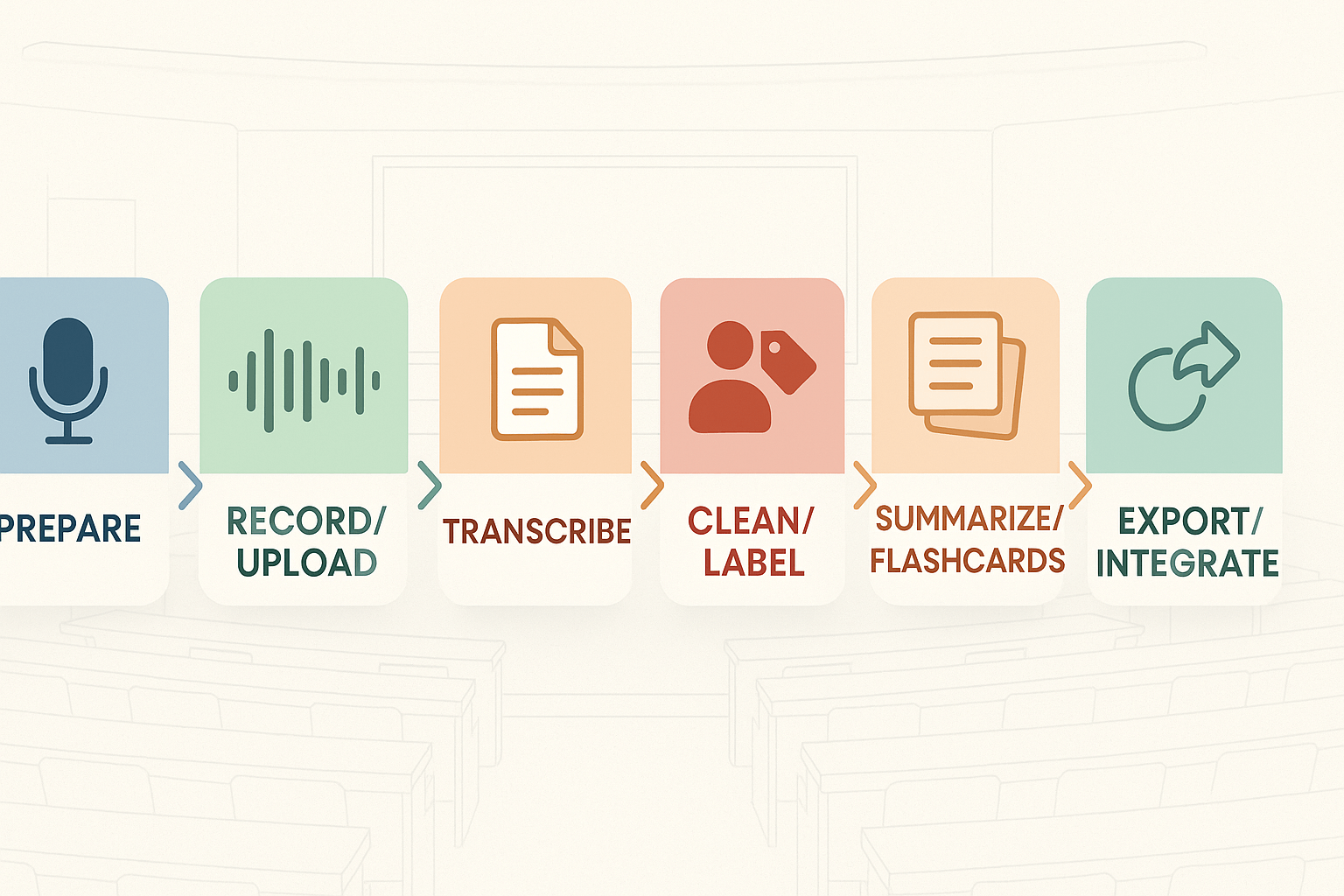
Start simple: record clean audio, transcribe, tidy speaker labels, then turn that transcript into study tools. This pipeline shows how to use transcripts in study workflows, and it maps each step to a clear action you can repeat for any lecture or seminar.
1) Prepare and record
Before you hit record, do three things. First, check mic placement: a close, stable mic reduces room noise and improves transcription. Second, get consent from the instructor and classmates where required. Third, pick a file format: WAV or high‑bitrate MP3 gives the best post processing results.
Recording tips:
- Place the mic 6 to 12 inches from the speaker, slightly off-axis.
- Use a quiet room and silence all device notifications.
- For online classes, use a system that can separate speaker tracks.
2) Import or record into TicNote Cloud
Upload pre-recorded audio or record live directly into TicNote Cloud. Live transcription gives you real-time captions and searchable notes. When uploading, prefer uncompressed formats like WAV.
Quick checklist:
- Choose live vs. manual upload.
- Tag with course name and date.
- Set language and speaker count for better transcript accuracy.
3) Transcribe and clean speaker labels
Let the AI auto-transcribe the audio, then manually correct speaker names, and split content by discussion topic. Accurate labeling improves how easily you can locate specific insights later.
Pro cleanup tips:
- Replace “Speaker 1” with actual names or roles.
- Group transcript into logical topic sections.
- Clean up filler words, or flag them for detailed review.
4) Create topic summaries and flashcards
Summarize each topical section with AI to create bullet-point overviews. Convert these into study materials such as flashcards, quiz questions, and visual maps.
How to do this:
- Run AI summarization per topic chunk.
- Use key points to generate flashcards.
- Compile a full-session cheat sheet from summaries.
5) Link, tag, and organize in your second brain
Tag your notes with keywords: topic, date, and course code. Add links to readings or related sessions. Use integrations like Shadow Chat for cross-file search and contextual answers.
Organizing ideas:
- Add the transcript to your study app.
- Create visual mind maps from bullet points.
- Export in Markdown or plain text as needed.
Workflow summary checklist
- Mic check, consent, file format.
- Record or upload to TicNote Cloud.
- Auto-transcribe and polish speaker names.
- Segment topics and clean filler.
- Summarize per section.
- Generate flashcards and summaries.
- Tag, link and store in your note app.
- Export for review.
Keep this process handy—repeat for each academic session. Over time, your second brain becomes more useful, organized, and easy to review.
Accuracy, ethics, privacy & quality‑control (what students must know)
Transcription in Study can save hours, but you must know the limits. Auto transcription runs fast and cheap, human transcripts are accurate but slow, and hybrid workflows balance speed and quality. This section explains those tradeoffs, gives a short 5 to 10 minute quality checklist you can run before study sessions, covers consent and recording etiquette, flags multilingual bias risks, and outlines basic privacy protections students should expect.
Accuracy tradeoffs: auto, human, and hybrid
Automatic systems like ASR (automatic speech recognition) give instant transcripts. They work well for clear audio and common words, but they struggle with technical terms, overlapping talk, accents, and noisy rooms. Human transcriptionists catch nuance and speaker IDs, and they fix jargon, but they take time and can cost money. Hybrid workflows use ASR first, then a human reviews the parts that matter, giving most of the speed of auto with much of the accuracy of human review.
Quick comparison:
- Auto: fastest, lowest cost, error rates rise with noise, accents, or technical terms.
- Human: highest accuracy, slowest, best for citations or quoted language.
- Hybrid: fast turnaround, targeted accuracy, good for study notes and quotes.
5 to 10 minute quality control checklist (run before study time)
- Listen to the first two minutes while reading the transcript, and note obvious errors. This shows systemic issues with the audio or model.
- Search the transcript for three course terms you expect. If they appear, the model handled jargon okay.
- Check speaker labels for correctness, or add simple tags like "Prof" and "Student".
- Fix timestamps at 5 to 10 minute marks if you use clips for review.
- Flag and correct any misheard numbers, names, or formulas before you annotate.
- Save a short note of known errors in the document, so future reviewers know what to trust.
Run these steps once, then focus review work on the segments you plan to study.
Consent, recording etiquette, and accessibility
Always ask permission before recording. Class rules, university policies, and local laws may require consent. If someone requests not to be recorded, stop and take notes instead. For disability accommodations, check with your campus disability services before relying on transcripts for access; many schools require documentation and offer official captioning services.
Record etiquette quick rules:
- Announce recording at the start, state the purpose and how the file will be used.
- Mute unrelated devices and reduce background noise when possible.
- Share the transcript only with classmates who gave consent or under instructor's rules.
Multilingual bias and accuracy risks
Speech models often perform worse on less-represented accents, dialects, and languages. If your class uses multiple languages, expect higher error rates in code‑switching or mixed-language sections. When accuracy matters, use human review or upload a bilingual speaker file for model fine-tuning if available. For translation, check key terms and proper nouns against the source audio before trusting the translated text.
Privacy basics students should expect
Look for these protections in any service you use: local or campus data controls, end-to-end encryption for uploads, private-by-default storage, and clear policies that user data is not used to train public models. Also check export controls and retention settings so you can delete recordings after the term.
For institutions, many campus IT teams follow privacy frameworks such as ISO/IEC 27701:2019 for privacy information management, which helps guide the handling of personal data.
TicNote privacy defaults and security notes that matter
TicNote Cloud stores user data privately by default and does not use recordings to train external AI models. Expect industry-standard encryption for data in transit and at rest, and options to export transcripts as TXT or summaries as Markdown or PDF for secure backups. For campus or institutional deployments, TicNote offers enterprise features like single sign-on and admin controls to meet policy needs.
If you plan to rely on transcripts for exams or disability access, confirm institutional acceptance of third-party transcripts before use. When in doubt, pair quick auto transcripts with a short human review, and store a verified copy in your course folder.
Transcription in Study becomes a choice between speed, cost, and accuracy. This quick reference compares manual DIY transcription, pure AI transcription, and human-assisted hybrid options so you can pick the right path by deadline, budget, and required precision.
Manual DIY: cheap and controlled
Manual DIY means you pause audio and type the transcript yourself or with a student assistant. Cost is low, speed is slow, and accuracy is high when a trained reader checks speaker labels and jargon. It works well for short lectures, sensitive research, or when your lab needs full control over wording and redaction. Expect hours per hour of audio unless you use playback tools that speed up review.
Pure AI: fastest and lowest friction
Pure AI transcription uses automatic speech recognition (ASR) to turn audio into text instantly. It is fast and cost-effective, often free or low cost, but accuracy falls on noisy recordings, overlapping speech, or heavy accents. Use it when you need quick skimmable transcripts or to power searchable notes, then run a light human pass for critical quotes.
Human-assisted hybrid: best balance for accuracy and speed
Human-assisted hybrid pairs an AI draft with human cleanup, or human transcribers who correct machine output. This approach cuts turnaround time compared with pure human work while keeping accuracy close to human levels. It’s the go-to for recorded interviews, qualitative research, and thesis citations where errors hurt outcomes. Costs sit between AI and full human rates, and you can scale time by setting edit depth.
A study comparing automatic speech recognition (ASR) and human transcription errors for non-native spontaneous speech, A comparison of ASR and human errors for transcription of non-native spontaneous speech (2016), found that ASR systems had a higher error rate than human transcribers.
| Method | Typical cost | Turnaround speed | Typical accuracy | Best when | Quick buying signal |
| Manual DIY | Very low (time cost) | Slow (1+ hour per audio hour) | High if proofed | Short lectures, redaction, sensitive data | Deadlines far out, strict privacy rules |
| Pure AI | Low to free (per minute) | Immediate to minutes | Medium, lower on noisy or accented audio | Rapid review, searchable index, review prep | Need rough transcript fast, tight budget |
| Human-assisted hybrid | Medium | Hours to day | High (near human) | Interviews, theses, published quotes | Need reliable accuracy but faster than full human |
Quick buying signals for students and labs
- Deadline under 24 hours, rough notes okay: choose pure AI. Use it to capture key ideas and keywords.
- Grade-sensitive quotes, IRB or legal use: pick human-assisted hybrid or manual DIY for verifiable accuracy.
- Large volume across classes or labs: start with AI batch transcription, then allocate human passes for priority recordings.
- Multilingual or non-native speakers: prefer a hybrid with a native-language reviewer, or a system with strong language models.
Cost, speed, and accuracy tradeoffs in one line
If you want speed and low cost, AI wins. If you need near-perfect accuracy, humans win. A hybrid gives the most value for academic work where time and correctness both matter.
Actionable checklist before you buy or commit
- Test a 5–10 minute sample: check error types and vocabulary handling.
- Note accents, overlap, and audio quality: noisy data favors human review.
- Confirm privacy and export options: can you download raw transcripts and remove data later?
- Plan the edit pass: who will proofread, and how will you track corrections?
Use this reference to match the method to your task, then pick the lightest option that still meets your accuracy needs.
Start here: Students and instructors often tell the same story: lectures are rich in ideas but hard to reuse. Transcription in Study turns spoken content into searchable text, so you can find facts, facts, and examples fast. Below are 3 short mini cases that show real student and instructor workflows, the exact transcript steps they used, and a concrete outcome from each.
- Undergrad exam prep
- Grad research and data coding
- Instructor grading and accessibility
Undergrad exam study: stop rewatching hours
Problem: Maria missed key examples during three fast lectures and felt lost before finals.
Workflow: she recorded lectures, used TicNote Cloud live transcription and AI summarization, then exported a two-page study sheet and a mind map for active recall.
Outcome: Maria cut her revision time nearly in half and reported clearer recall on practice tests.
Grad research workflow: speed up qualitative coding
Problem: A grad student had 40 interviews and weeks of manual coding ahead.
Workflow: they uploaded batch audio to TicNote Cloud, ran post-meeting transcription, used Shadow to ask cross-file questions, and exported topic-tagged transcripts for NVivo.
Outcome: the team trimmed initial coding time from days to hours and found recurring themes sooner.
Instructor perspective: fair grading and quick access
Problem: Large lecture courses had inconsistent notes and slow accommodation for students with hearing loss.
Workflow: the instructor recorded lectures, shared searchable transcripts, used AI summaries to standardize rubrics, and offered translated transcripts for multilingual students.
Quote: "Transcripts cut my grading ambiguity and made accommodations simple," the instructor said. Outcome: grading aligned better across TAs, and accommodation requests were handled faster.
Key lessons learned
Short takeaways: keep raw transcripts searchable; pair AI summaries with a quick human pass; tag excerpts for exams or papers; use Shadow chat for cross-file Q&A. These steps reduced rewatching, sped up research, and improved classroom access in all four cases.
Explore TicNote Cloud for AI transcription and study tools


