


 Extension
TL;DR: A fast workflow to turn a webpage into a podcast episode
Start here: Try TicNote Cloud for Free to turn your source notes into a clean draft you can voice fast. In one sitting, you can do How to Turn Any Webpage into a Podcast by moving from text cleanup to a real script, then to publish-ready audio.
Problem: Web articles don't sound like episodes. Agitate: If you read them as-is, it's stiff, long, and hard to follow. Solution: Use a tool like TicNote Cloud to summarize, restructure, and export a script outline you can polish in minutes.
1) Clean webpage text (remove nav, ads, links, repeats). 2) Reshape it into a podcast script (hook, beats, transitions). 3) Record or generate a voice track. 4) QC the audio (noise, pacing, breath, clicks). 5) Package metadata (title, description, cover, chapters). 6) Publish via a host and RSS.
Timing: ~30 minutes for a short article, AI voice, and light QC. ~2 hours for deeper rewrites, a pronunciation pass, loudness targeting, chapters, and full show notes.
How to Turn Any Webpage into a Podcast (from URL to publish-ready audio)
Turning a URL into audio is easy. Turning it into a podcast episode is different. In this guide, "podcast-ready" means you reshape the page into something people enjoy listening to, with a clear hook, clean pacing, and a real ending.
Define "podcast-ready" (not just read-aloud)
Podcast-ready audio has a simple spine:
- Opening hook (why this matters right now)
- 1-sentence promise (what the listener will get)
- Clear sections with quick transitions
- Closing wrap-up with a call to action (subscribe, read the sources, or check a related episode)
That's also how you separate three common outputs:
- Accessibility audio: a straight read of the page
- Hosted episode: a narrator voice that explains and connects ideas
- Narrated summary: a shorter episode that compresses the article
Gather your inputs before you start
Before you record anything, prep these basics:
- The URL, author, and original source name
- Your goal: verbatim reading or a summary with your angle
- A music and SFX rule (none, intro only, or light transitions)
- A podcast host (the platform that stores audio and generates your RSS feed)
Do a rights-first preflight too. Confirm you can legally use the text, and decide how you'll attribute it in the audio and show notes.
Last, set up your assets so you don't lose time later: pick an episode naming pattern, create cover art that works at square podcast sizes, and use a simple folder structure (script, audio, exports, show notes).
Workflow map (URL to publish)
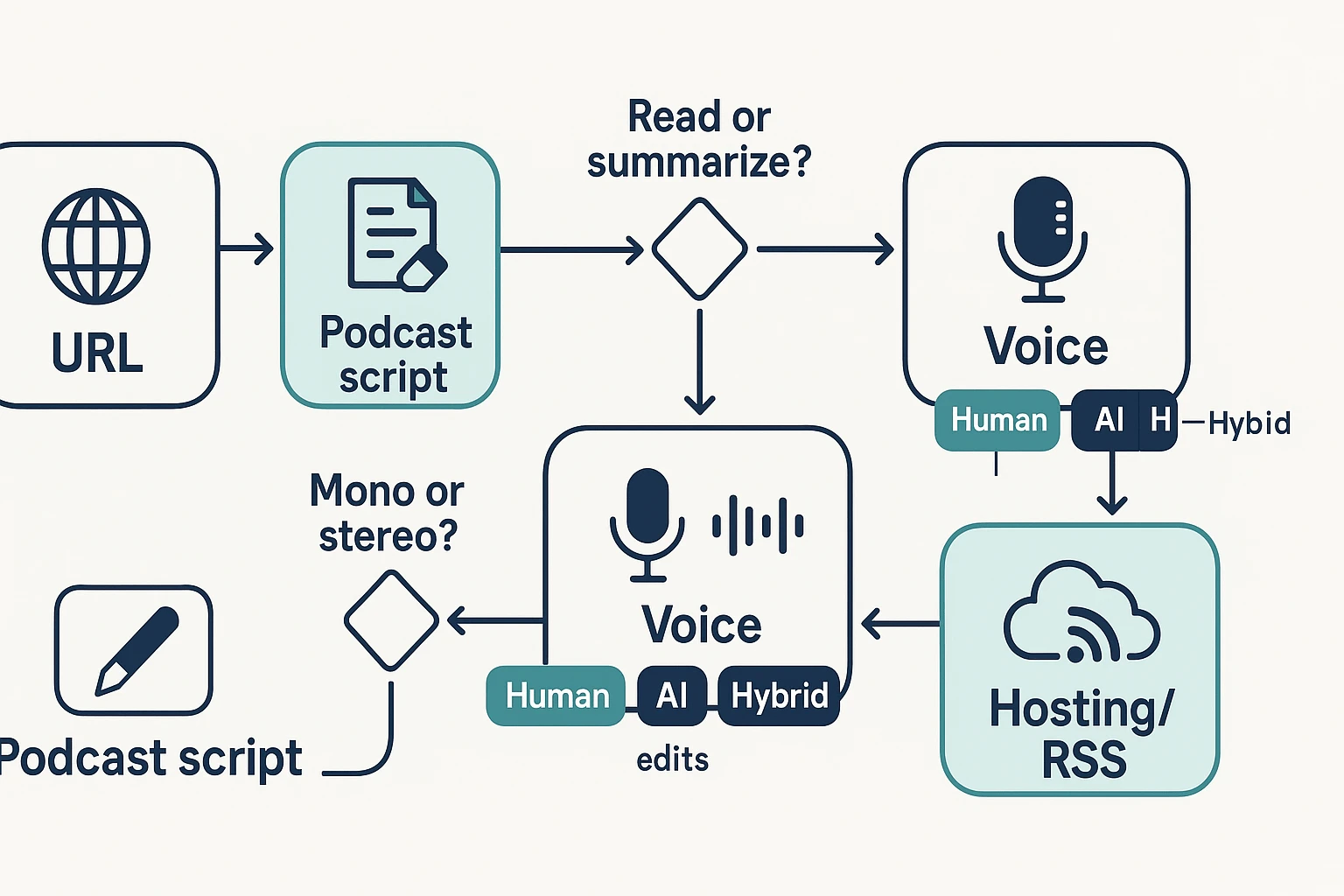
Here's the end-to-end path you'll follow in the rest of the article:
- Choose the URL and define your episode type (read, hosted, or summary)
- Extract the text and clean it for speaking
- Rewrite into a script with sections, transitions, and a closing CTA
- Pick a voice path: human, AI, or hybrid
- Record or generate audio, then edit for clarity
- QC the sound (loudness, peaks, pacing) and fix issues
- Export a master and an MP3 release file
- Prepare show notes, transcript, cover art, and RSS-ready title and description
- Upload to your host and distribute to directories
If you want a broader repurposing workflow, this companion guide on turning any content into a podcast with AI can help you plan formats and quality checks across sources.
How do you extract and clean webpage text so it reads well out loud?
If you want to know How to Turn Any Webpage into a Podcast, start with clean text. It's the biggest quality lever in the whole workflow. A messy page forces your script and AI voice to read junk.
Remove clutter fast (extraction + cleanup checklist)
First, extract the main article text using one of these quick options:
- Reader view in your browser (best for blogs)
- Print view, then copy text (often strips sidebars)
- Copy and paste into a doc, then delete noise
- Export the article text from your CMS (if it's yours)
Then do a cleanup pass. Cut anything that sounds like a website, not a story:
- Nav menus, "related posts," and tag lists
- Cookie banners and popups
- Repeated headings and table of contents blocks
- Image captions that add no meaning
- Footers, author bio, and newsletter promos
- "As seen on" logos and social proof strips
Keep paragraphs short (2 to 3 sentences). If you see a long list, turn it into spoken bullets with simple lead-ins like "First," "Next," and "Finally."
Keep what helps listeners understand and trust you
Don't over-strip the text. Keep:
- Key definitions (the one sentence version)
- The 2 to 5 most important stats
- Short quotes that add voice or proof
- Source names (save the links for show notes)
Add spoken citations for clarity: "According to the company's report…" or "The study found…" Then point listeners to the show notes for the full link.
Also flag hard-to-say items for a later pass: names, acronyms, product codes, and URLs.
Example: raw paragraph to clean narration
Raw webpage style:
"We leverage a cutting-edge, end-to-end solution to optimize workflows across stakeholders. Click here to learn more. In today's fast-moving landscape, organizations must implement best practices to drive outcomes at scale."
Clean narration style:
"Here's the simple idea: use one system to reduce busywork. It matters because small delays add up fast. The key point is to remove extra steps between people and decisions. Next, list the one workflow you'll simplify this week."
Micro-template you can reuse: What this is → why it matters → the key point → what to do next. If you're adapting other formats too, this same cleanup logic applies when you prep a PDF for podcast-style audio.
Try TicNote Cloud for Free to turn cleaned text, notes, and transcripts into reusable script drafts.
How do you turn a webpage into a podcast script (not just a read-aloud)?
A good episode script is not a webpage readout. It's a guided listen with a hook, clear chapters, and lines that sound natural. Your goal is simple: keep attention, make the ideas easy to follow, and still respect the source.
Nail the first 20 seconds (hook → learnings → why now → credit)
Use a tight opening so listeners know they're in the right place.
- Hook (pain or curiosity): "Ever hit play and quit in 30 seconds?"
- What they'll learn: "In this episode, you'll learn how to turn an article into a real script."
- Why now: "Repurposing is faster than writing from scratch."
- Quick credit: Name the author or site and what you used.
Keep it spoken. One idea per sentence. Cut lines like "as you can see."
Restructure the page into chapters with transitions
Most pages become 3 to 6 segments. Each segment gets a plain heading you can reuse as podcast chapters.
Here's a simple pattern:
- Problem and promise
- Key ideas (3 points max)
- Steps or examples
- Common mistakes
- Quick recap and next step
Between chapters, add listener signposts:
- "Quick recap."
- "Here's the big takeaway."
- "Next, we'll cover…"
Now, pick the workflow that fits your time and budget:
| Approach | Time to produce | Cost | Best for | Tradeoffs |
| Manual narration | Slowest | Low tool cost | Creators who want a personal voice | More retakes and editing |
| AI voice | Fastest | Low to medium | Teams repurposing lots of posts | Needs extra QC for tone and names |
| Hybrid (you + AI) | Medium | Medium | Thought leaders and educators | Still needs planning and light editing |
Write for voice (short lines, cues, and listenable numbers)
Audio is not scanning. Make it easy to hear.
- Use short paragraphs and simple words.
- Define jargon once (API means…).
- Use contractions: "you'll," "it's," "don't."
- Make numbers listenable: round them, compare them, or explain them.
Add cues right in the script:
- "pause here" (after a key point)
- "repeat this" (for a definition)
- "imagine…" (before an example)
- "breath" (before a long sentence)
Build show notes while you edit
Don't wait until the end. While you script, collect:
- 5 to 8 bullets that summarize the episode
- Key links you mention
- Clear attribution to the original page
- A "related reading" block, like this guide on turning videos into podcast audio
Also add transcript notes for clean delivery:
- Spell names the way you want them said
- Expand acronyms once
- Mark any non-verbal cues to remove (like "uh")
Optional: use a note tool to speed up outlines (without skipping craft)
If you already work from meeting notes or docs, a note-taking tool can speed up outlining and summaries before you write the final script. TicNote Cloud is one example, especially when you want quick structure, reusable templates, and exports you can keep editing.
Try TicNote Cloud for Free to outline and draft scripts faster from your notes.
What legal and ethical checks should you do before you publish?
Before you turn a URL into audio, do a quick rights check. Most web text is protected by copyright, even if it's free to read. "Found online" doesn't mean you can republish it as a full episode. A safer default is to make a summary-plus-commentary episode, and put the source title, author, and link in your show notes.
Copyright basics: permission beats guessing
If you plan to read the article word for word, ask for permission first. That's the cleanest path.
If you can't get a clear yes, switch formats:
- Summarize the key points in your own words
- Quote short excerpts only when needed
- Add your own analysis, examples, or teaching points
- Credit the original source in audio and in show notes
This isn't legal advice. Laws vary by country and context, so check local rules if you're unsure.
Decide: summarize or read verbatim
Use this quick checklist before you publish:
- Purpose: Are you educating and adding commentary, or just re-distributing?
- Amount: Will you read a few lines, or most of the page?
- Terms: Does the site grant an audio license or reuse terms?
- Access: Is it paywalled or member-only content? Don't convert it into full audio.
When in doubt, discuss ideas and quote lightly. Don't "audio-mirror" the whole piece.
Voice consent rules (don't clone without consent)
AI narration still needs ethics.
- Don't clone a real person's voice without clear, written consent
- Don't make it sound like the author endorses you
- Disclose AI narration where it helps trust (for example, "narrated by AI" in show notes)
- If you use multiple voices, label who is who
Editor's note: what to review
Before publishing, review official copyright basics and the policies of your podcast host, Apple Podcasts, Spotify, and YouTube (if you also distribute there). If you're building episodes from other creators' work, also read a reputable creator-rights guide on read-aloud use and derivative works.
How do you create natural-sounding audio with AI voices (quality-first settings)?
Natural AI audio comes from three things: the right voice for the genre, tight pronunciation control, and a quick listen test loop. If you treat this as a "performance" (not a read-aloud), your episode will sound like a real host. That's the difference between passable audio and audio people finish.
Pick a voice style that fits the content
Match the voice to the job.
- News or updates: slightly faster pace, clear consonants, calm tone.
- Tutorials and explainers: medium pace, friendly but not "hyped."
- Stories and narratives: warmer tone, more pauses, wider emotion range.
Then lock in consistency:
- Use one main narrator for 90 to 100% of the episode.
- Add a second voice only for short quotes or segment intros.
- Keep intro and outro in the same voice to build trust.
Control pronunciation for names, acronyms, and numbers
Mispronunciations break credibility fast. Before you render, scan your script for:
- Names: check the source, a company "About" video, or a quick interview clip.
- Brands and product terms: keep them consistent across episodes.
- Acronyms: spell it once, then say it normally (example: "C R M, CRM").
- Numbers and units: decide how you'll read them (12.5 as "twelve point five").
- URLs: don't read full links. Say "search for…" or "check the show notes."
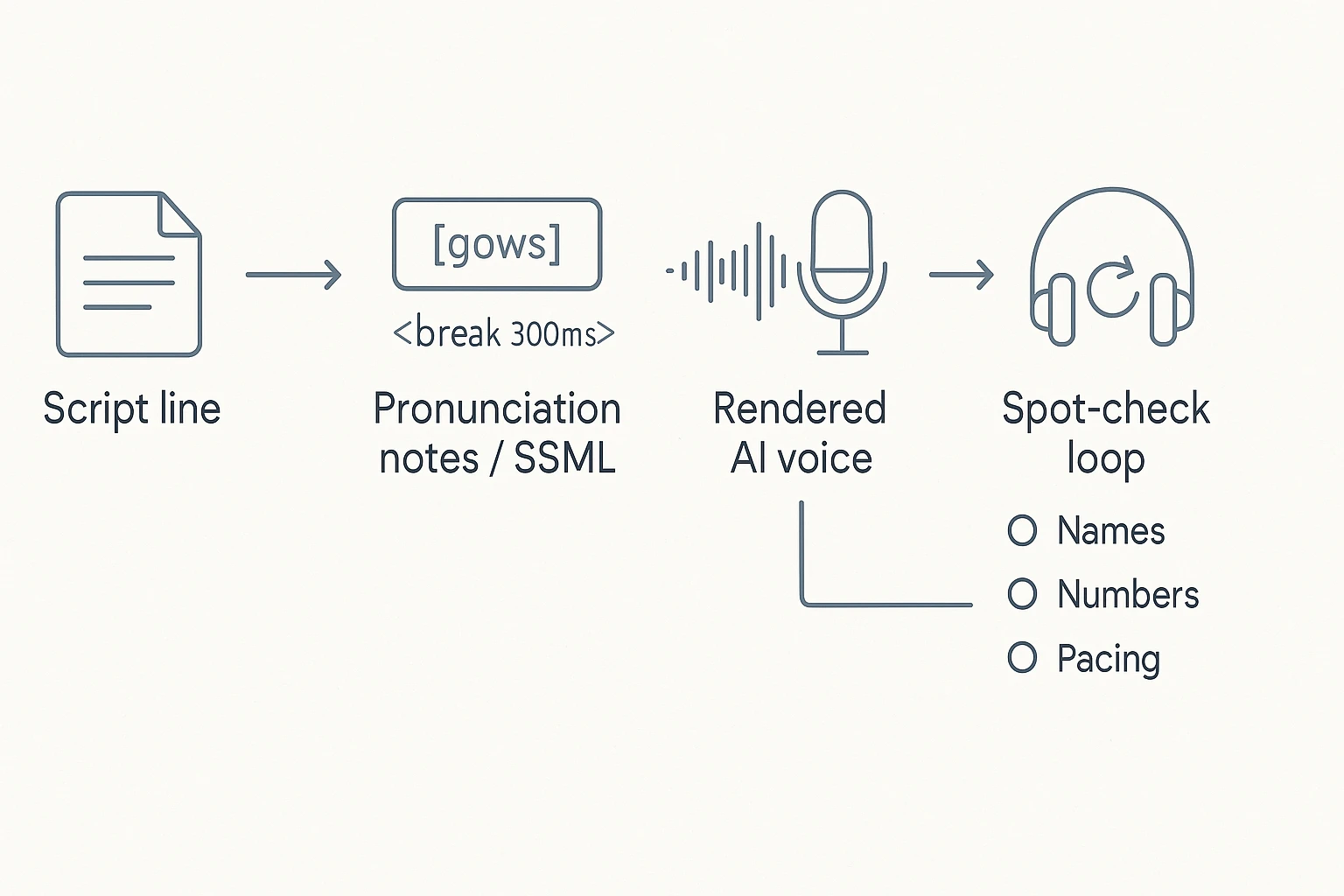
Simple trick: add a phonetic note convention, like brackets.
- "Nguyễn [nwin]"
- "Gauss [gows]"
- "SQL [sequel]"
Use SSML sparingly (mini-library)
SSML (Speech Synthesis Markup Language) is a set of tags some AI voices support. Use it like seasoning: a little fixes pacing, too much sounds robotic.
- Short pause:
<break time="300ms"/> - Longer pause:
<break time="800ms"/> - Emphasis:
<emphasis level="moderate">key point</emphasis> - Spell characters:
<say-as interpret-as="characters">API</say-as> - Dates:
<say-as interpret-as="date" format="ymd">2026-02-13</say-as> - Spelling (alternate):
<say-as interpret-as="spell-out">SaaS</say-as>
Rule of thumb: add SSML only where a human would pause or stress a word.
Do a fast QC pass before the full render
Don't wait until the end to find problems. Spot-check three points:
- First 60 seconds: does the hook sound alive and paced well?
- A middle section: any misreads, odd breaths, or run-on sentences?
- The ending: does it slow down and land cleanly?
Keep a quick fix loop: edit the script first, then re-render only the changed paragraph(s) when your tool allows it. That saves time and prevents new errors elsewhere.
Try TicNote Cloud for Free to turn clean scripts into editable audio outputs.
What export specs make your episode sound "podcast level"?
If you want a webpage-to-audio episode to sound "podcast level," your export specs need to match how podcast apps play audio. That means: keep a clean master for edits, export a distribution-friendly MP3, and hit sane loudness targets so listeners don't ride the volume button.
Choose the right file format: WAV vs MP3
Use two versions of your episode:
- WAV master (lossless): Best for editing, noise cleanup, and archiving. Export this before you do your final MP3.
- MP3 (compressed): Best for publishing. It's small, fast to download, and widely supported.
Mono vs stereo, in plain terms:
- Mono is usually best for speech-only episodes. It's smaller and still sounds great.
- Stereo helps when you have music beds, ambient sound, or wide panning.
Use these recommended export settings
Here are safe defaults that work across most podcast hosts and players.
| Setting | Recommended | Why it matters |
| Sample rate | 44.1 kHz | Common standard; keeps compatibility high |
| WAV bit depth (master) | 24-bit | More headroom for editing and processing |
| MP3 bitrate | 128 to 192 kbps | Better quality at larger size; 192 kbps is a safe "clean voice" pick |
| Channels | Mono for voice; stereo for music-heavy | Mono saves size; stereo preserves width |
| ID3 metadata | Title, show, episode, year, artwork | Helps apps display your episode correctly |
Tradeoff to remember: higher bitrate can't fix a rushed script, bad pacing, or harsh audio. It only preserves what's already there.
Hit loudness targets listeners expect (LUFS)
LUFS (loudness units relative to full scale) is a measure of perceived loudness. It matters because podcast apps don't all level your audio the same way.
Normalization checklist:
- Normalize integrated loudness to -16 LUFS (stereo) or -19 LUFS (mono).
- Set a true peak limit around -1.0 dBTP to avoid clipping after encoding.
- Do a quick phone speaker listen pass for harsh "S" sounds and boomy bass.
"Publish-ready" audio QC checklist
Before you upload, confirm:
- No clipped peaks or crunchy distortion
- Clean start and end (no long silence, no cut-off words)
- Steady volume from intro to outro
- No accidental read-outs (URLs, menu text, footers, cookie banners)
- Any quotes, sources, and credits are correct and consistent
How do you publish and distribute the audio as a real podcast?
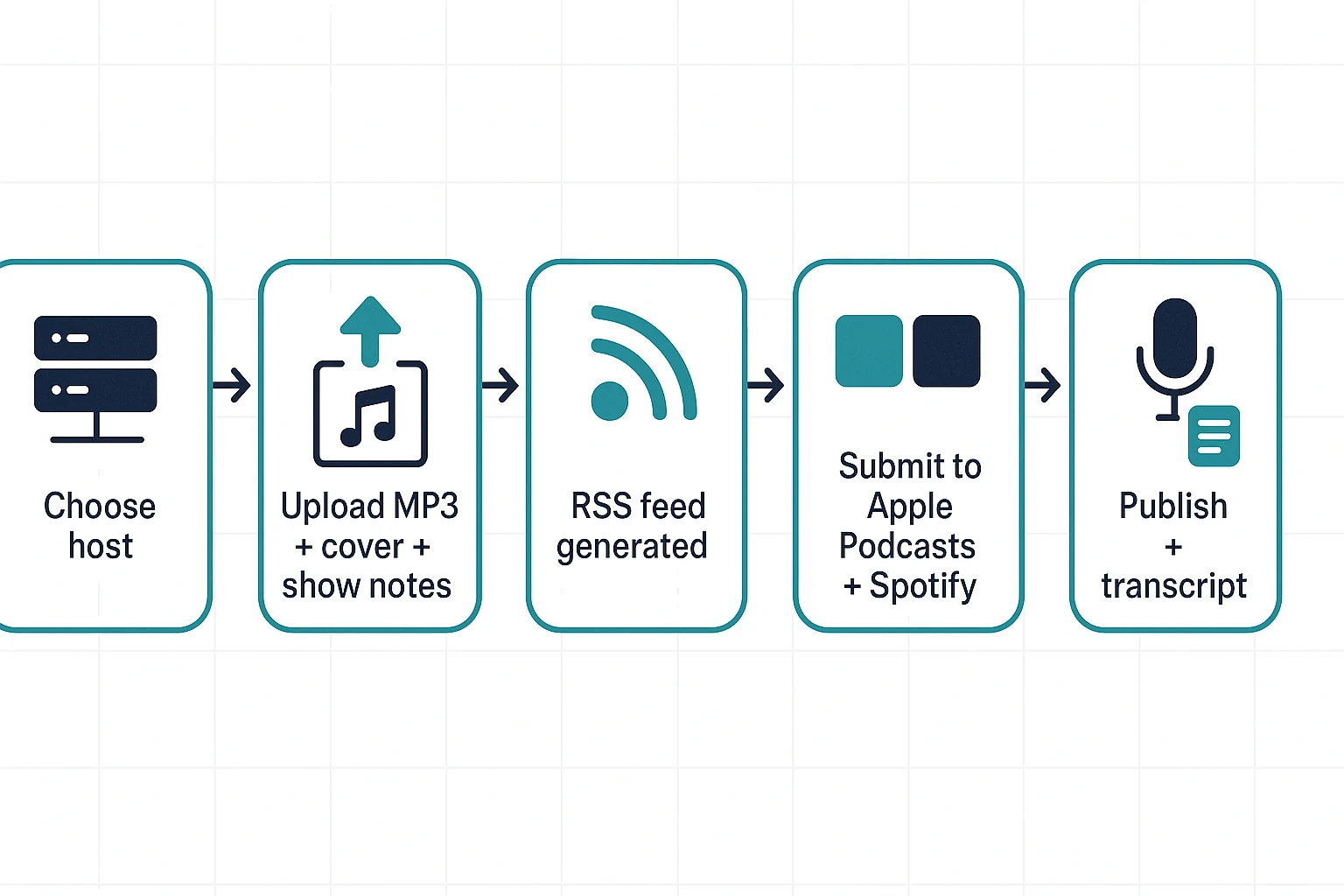
To publish audio as a real podcast, you need a podcast host that creates an RSS feed, plus a cover image and your final episode file. That last piece matters because directories like Apple Podcasts and Spotify don't "crawl your site for MP3s." They read your RSS feed, then pull the audio from your host.
Set up hosting and RSS (the minimum stack)
Here's the smallest setup that works:
- Podcast hosting account (it stores audio and generates your RSS feed)
- 1 cover image (your show artwork)
- 1 episode audio file (usually MP3)
RSS (Really Simple Syndication) is the file that lists your show, episodes, titles, descriptions, and audio URLs. When you publish a new episode in your host, the RSS updates. Podcast apps check that feed and refresh your show.
Package the episode so apps can display it right
Before you hit publish, fill in the metadata. This is what people see in every podcast app.
Metadata checklist:
- Episode title: clear topic + benefit (keep it short)
- Short description: 1 to 2 sentences for the app preview
- Full show notes: key takeaways, links, and sources
- Season and episode numbers (optional, but be consistent)
- Category and tags (pick the closest match)
Disclosure line template (paste into show notes):
Repurposed from: {Page Title} ({URL}). Edited for clarity and listening.
Submit once, then new episodes auto propagate
Directory submission is usually a one-time setup:
- Copy your show's RSS feed URL from your host
- Submit it to Apple Podcasts and Spotify
- Verify ownership if prompted
- Wait for approval and indexing
After that, every new episode you publish in your host appears in apps after normal refresh and review cycles. Timing varies, so plan buffer time.
Add transcripts for accessibility and search
Transcripts help listeners skim, support accessibility, and capture long-tail search queries. You can publish them in your show notes, on your site, or both.
Transcript QA checklist:
- Correct names, brands, and acronyms
- Add speaker labels (if it's a dialogue)
- Remove filler words if you want a cleaner read
If you want a broader launch checklist, use this podcast launch plan and publishing checklist as your baseline.
When is an AI note-taker a good alternative or companion for this workflow? (Step-by-step example)
An AI note-taker helps most when you already have source material in files, not just a URL. Think PDFs, docs, transcripts, or recordings from classes and meetings. In those cases, it can speed up the "clean text to script" part of How to Turn Any Webpage into a Podcast without turning your process into a full production project.
It's a strong fit for:
- Educators turning lesson notes into short audio recaps
- Marketing teams repurposing shared research docs into episodes
- Meeting heavy creators who want fast summaries and outlines
TicNote Cloud is an AI note-taking workspace, not a podcast host. Use it to generate a draft script and audio assets, then finish your episode in your audio editor.
Web Studio workflow: from file to podcast draft
- Start with a clean source file. Save the webpage text into a doc or PDF, or upload a related audio recording you want to reference.
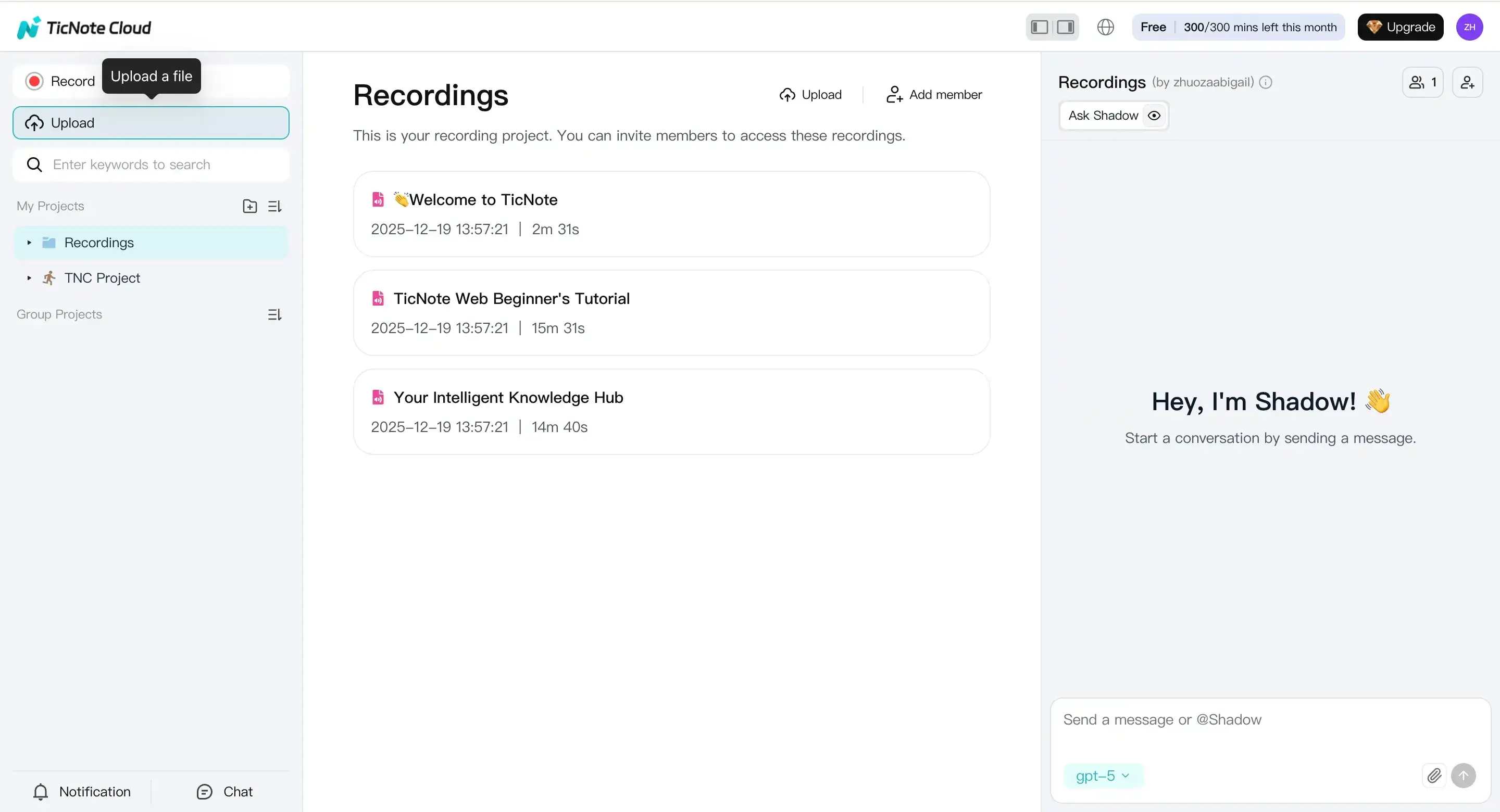
- In TicNote Cloud Web Studio, create a project and use the Upload button to add your file.
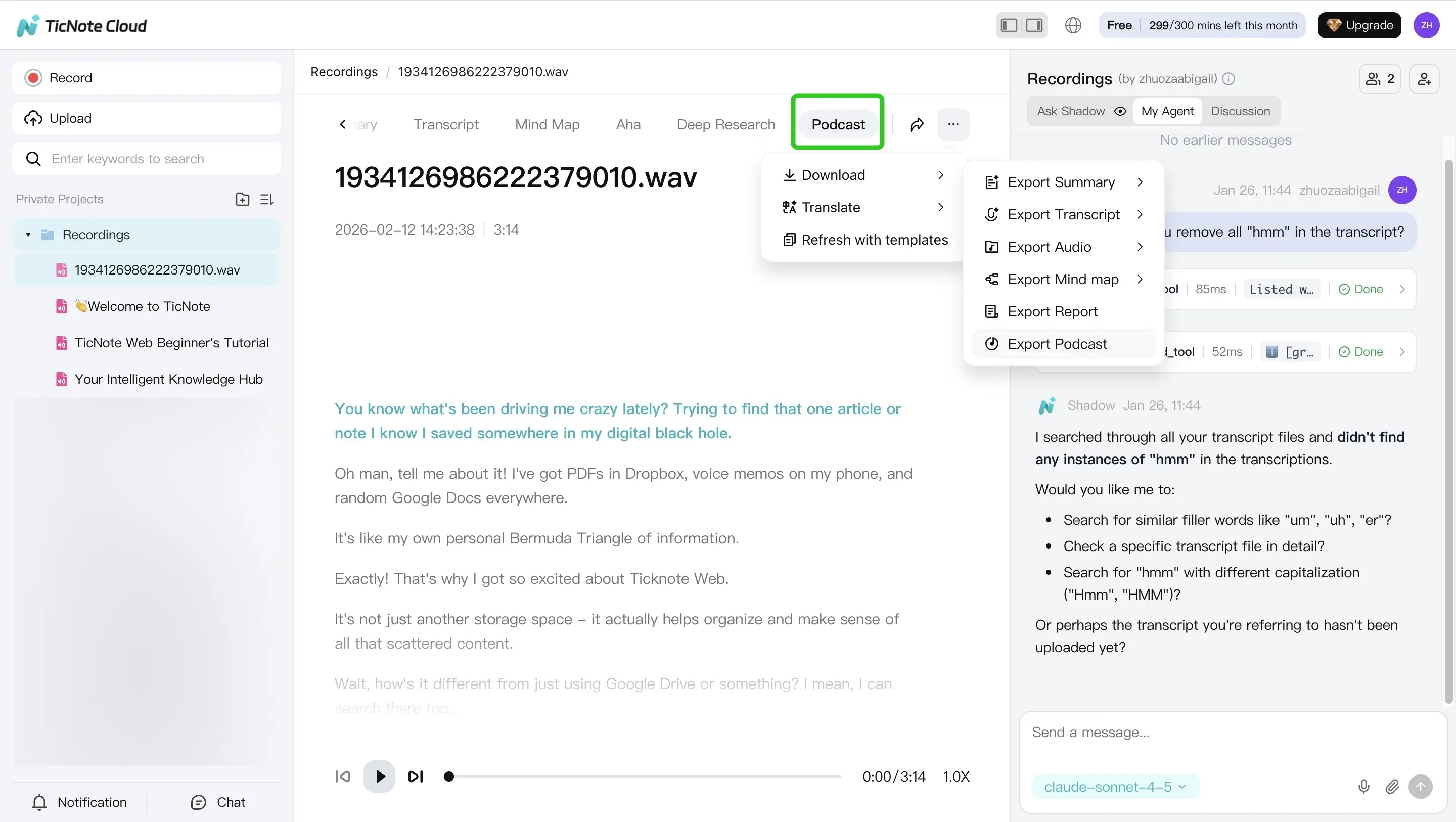
- Open the Podcast tab to generate a podcast style output from that file. Then export the audio and transcript from the three-dots menu.
- Edit like a producer. Use the transcript as your starter script, then do your pronunciation pass (names, acronyms), add SSML (text-to-speech markup) if your voice tool supports it, and run loudness and QC checks in your editor.
Mobile app workflow (quick summary)
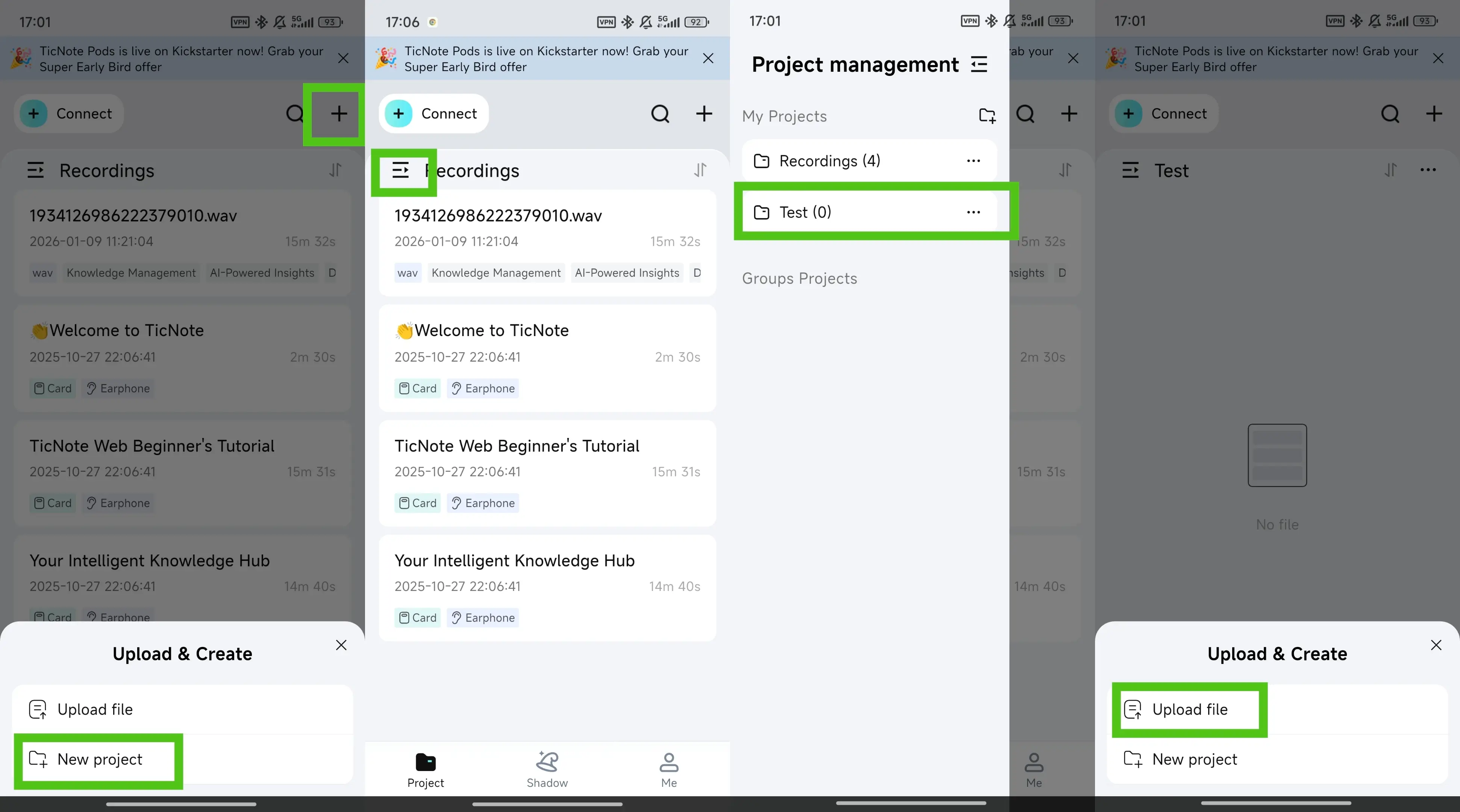
On mobile, the flow is similar. Tap the add button to upload a file into a project.
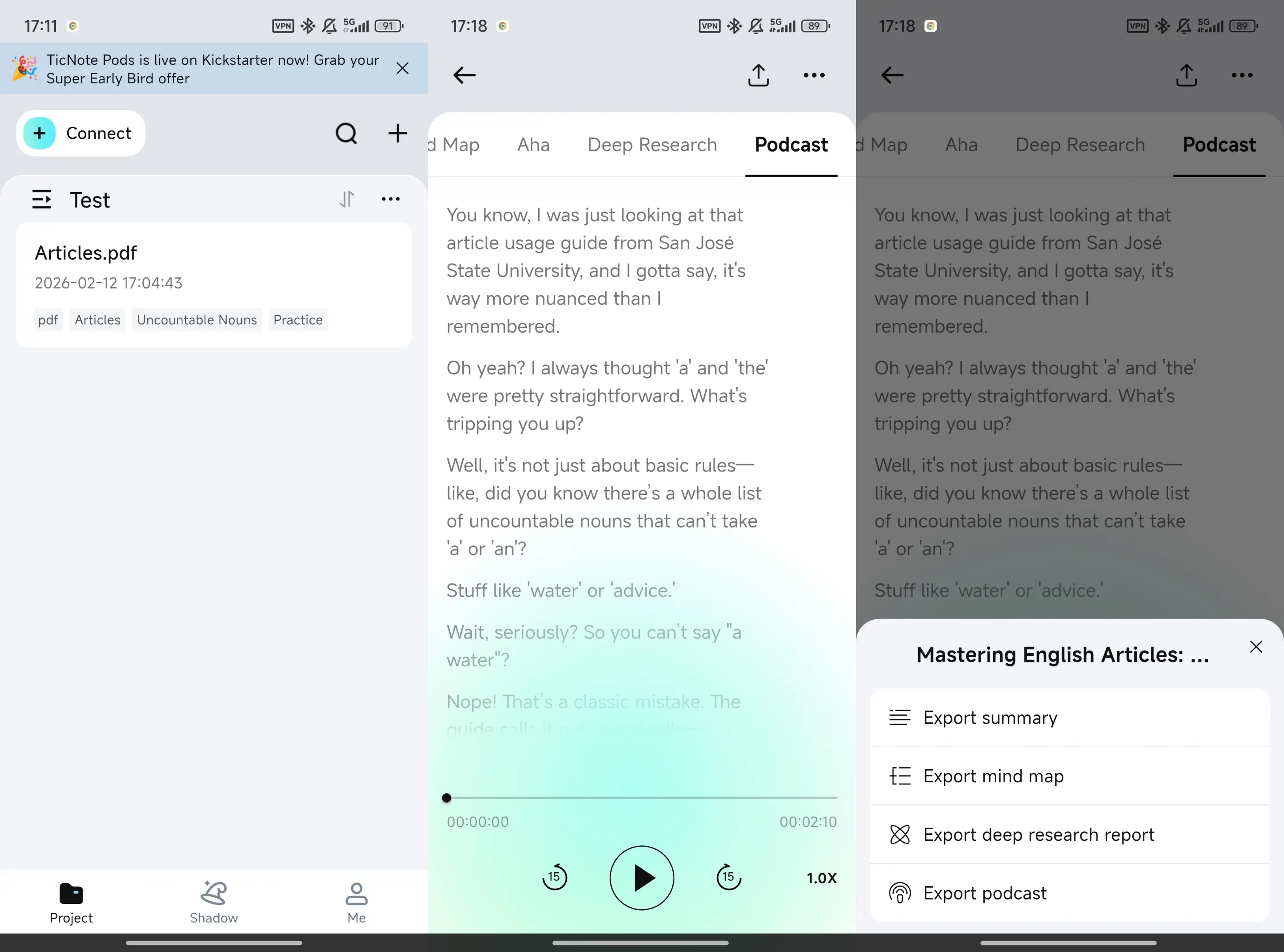
Then use the Podcast tab and export from the three-dots menu when you're ready.
Plan limits to know (so you don't get stuck)
Before you commit to a workflow, note a few limits. The Free plan includes 300 transcription minutes per month, up to 30 minutes per web recording, and 3 document imports per month. Paid tiers raise those caps, and some features may be limited-time free.
Optional: Get workflow updates
Form fields: Email address + a "Send me updates" button.



