


 Extension
TL;DR
The best AI task breakdown tools in 2026 are TicNote Cloud, Goblin Tools, ClickUp AI, Notion AI, ChatGPT, and Taskade. TicNote Cloud tops the list because its Skill Agent converts a single prompt, or a full meeting transcript, into a structured, ordered task plan. Try TicNote Cloud free and break down your first task in seconds.
Big tasks feel paralyzing. You know what the end goal is, but you don't know where to start, so you don't. That stall costs hours, sometimes days. AI task breakdown tools solve this by generating the full step sequence for you instantly, with no manual thinking required.
The tools in this guide range from zero-setup options for personal use to context-aware agents built for teams. Pick the one that fits your workflow, and you'll never stare at a blank to-do list again.
What Is AI Task Breakdown (and Why Does It Matter)?
The difference between a to-do list and AI task breakdown
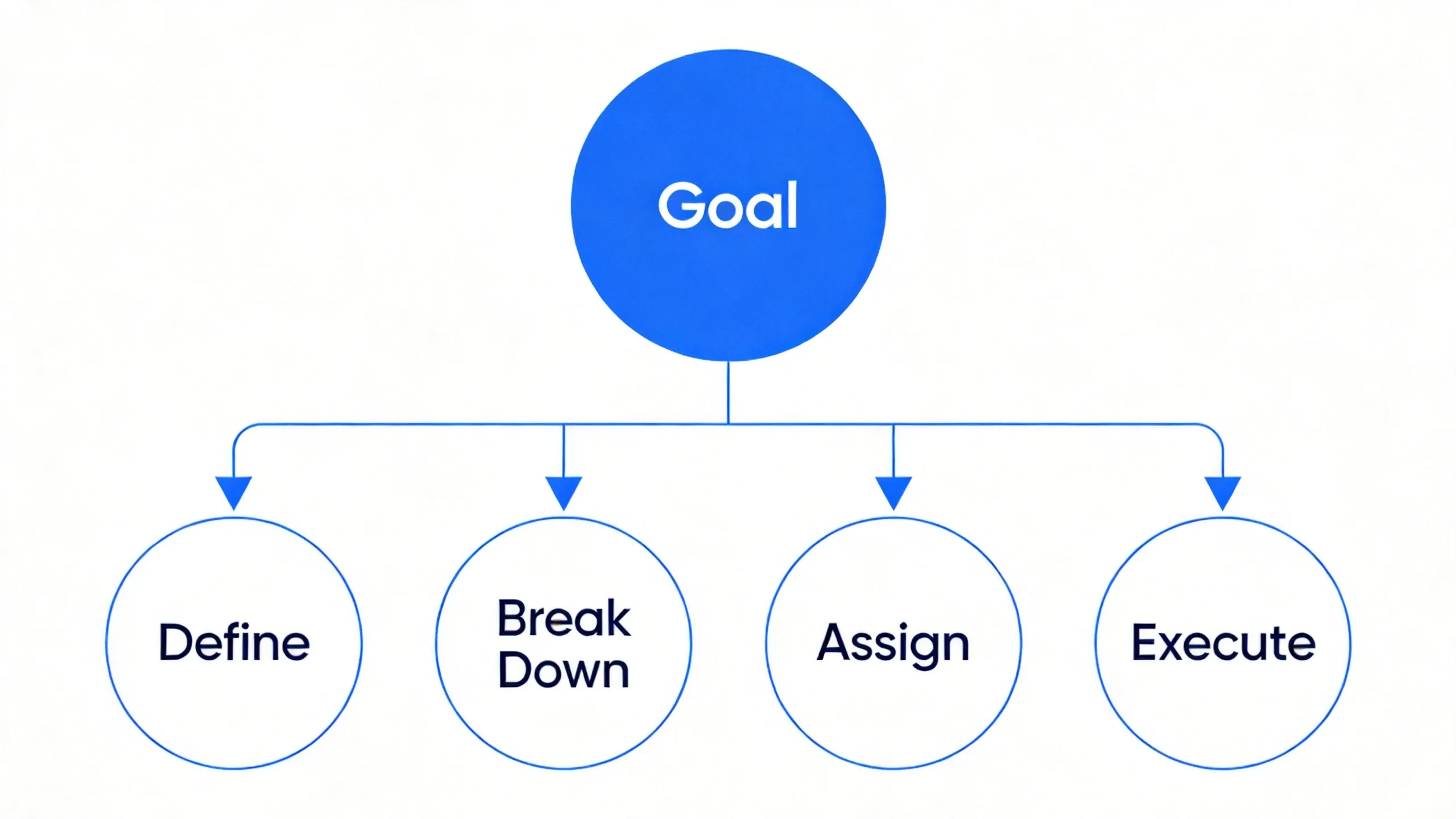
A to-do list requires you to define every step yourself. You start with a goal, "launch the new feature", and then sit there figuring out what that actually means in practice. AI task breakdown flips this. You describe the goal, and the AI generates the ordered steps for you, with context about what comes first and why.
That distinction matters more than it sounds. CHADD: Executive Function Skills notes that executive function impairments, including task initiation (the ability to get started on something), have an adverse effect on an individual's ability to begin, work on, and complete tasks. In other words, the hardest part of any task is often just starting it, and that's exactly what AI task breakdown removes.
Who benefits most
AI task breakdown isn't just for people with ADHD. It's useful for anyone who deals with complex, multi-step work:
- Knowledge workers managing projects with unclear scope
- ADHD individuals who struggle with task initiation and sequential planning
- Students breaking down research papers or multi-week assignments
- Project managers delegating work that needs clear, discrete steps
Best overall: TicNote Cloud, its Skill Agent takes a single prompt or meeting document and returns a structured, ordered task breakdown with context pulled from your actual work.
The 6 Best AI Task Breakdown Tools
This section walks through each tool using a consistent format so you can compare them at a glance. For each one: who it's best for, pricing, key features, limitations, and what makes it stand out.
The steps below use TicNote Cloud as the example to show how AI task breakdown works in practice.
1. TicNote Cloud
Best For: Professionals who want AI task breakdown connected to meeting notes, documents, and project context
Website: ticnote.com | Pricing: Free forever / Pro $12.99/mo (or $119/yr)
Key Features:
- Skill Agent generates a structured, ordered task plan from a single text prompt or uploaded document
- Integrates with meeting transcripts, turn a recorded action item into a full subtask plan automatically
- Supports custom templates for repeatable project types
- Deep Research capability for tasks that need external information gathering
- Multi-format document import: PDF, DOCX, TXT, and more
- AI chat available on any uploaded file or transcript
- Task output exportable as Markdown or CSV, ready for Jira, Linear, or GitHub Issues
Limitations:
- Mobile app is still maturing; full feature set is primarily on web
- Not a standalone project management tool (no Gantt charts or Kanban boards built in)
Why it stands out: TicNote Cloud is the only tool here that connects AI task breakdown to your actual work context. Most tools start from a blank prompt, TicNote Cloud can pull directly from a meeting transcript and generate the task plan from what was actually discussed.
How to use TicNote Cloud's TaskBreaker skill agent:
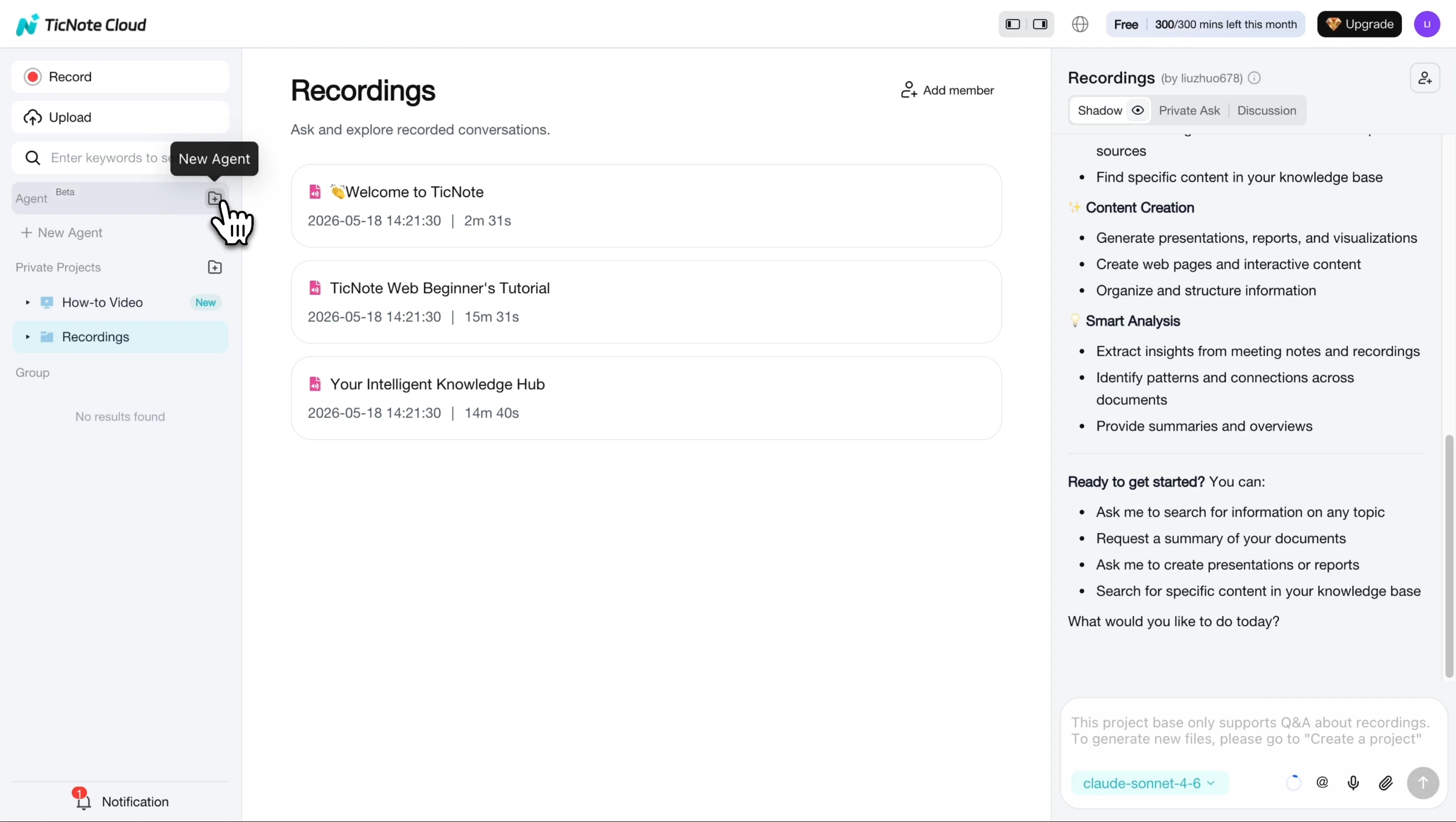
Step 1. Add the TaskBreaker skill agent
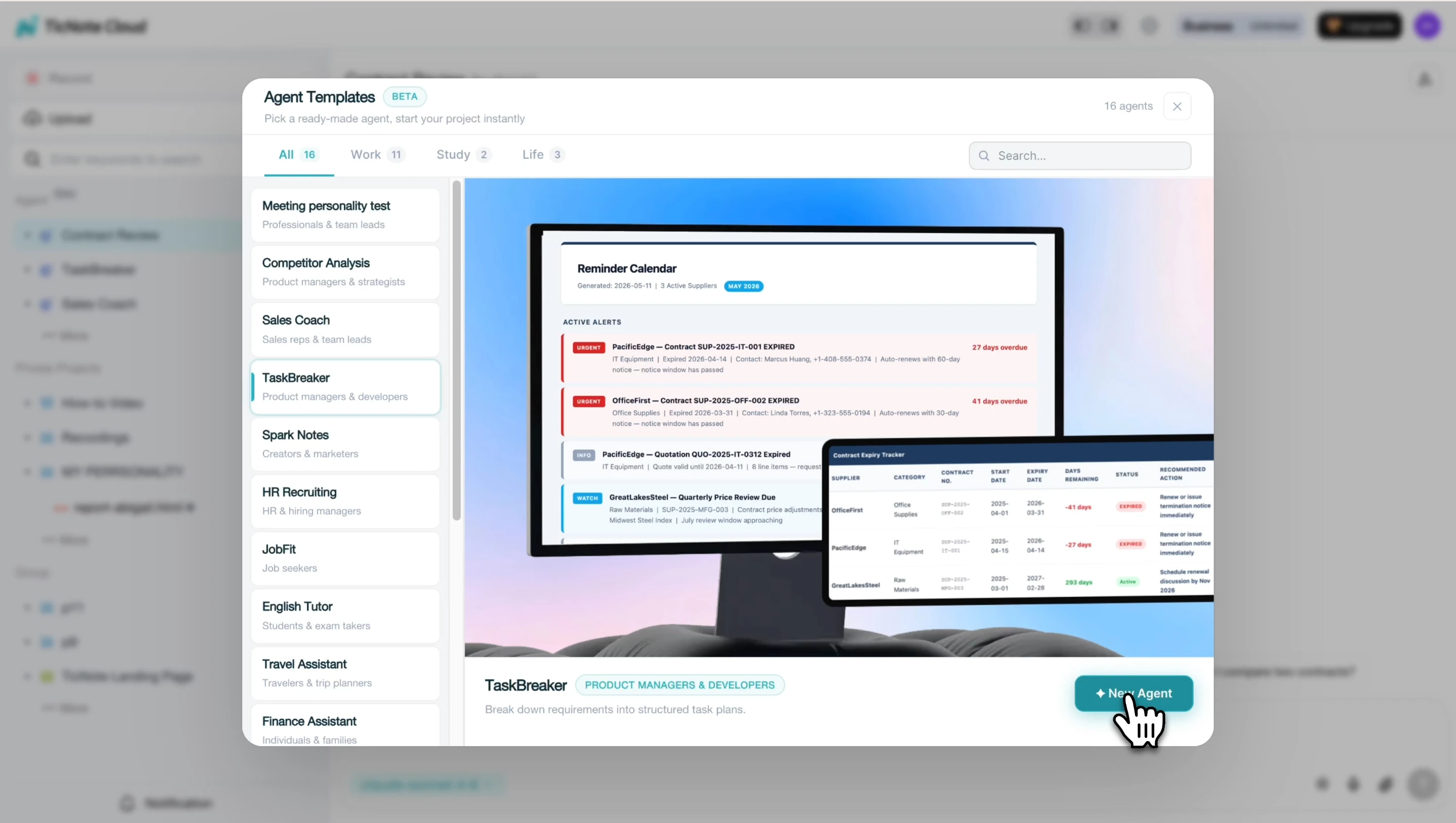
In TicNote Cloud, click Add Agent and browse the Skill Agent library. Select the TaskBreaker skill to add it to your workspace, no configuration required.
Once added, the skill agent appears in your agent list and is ready to use immediately.
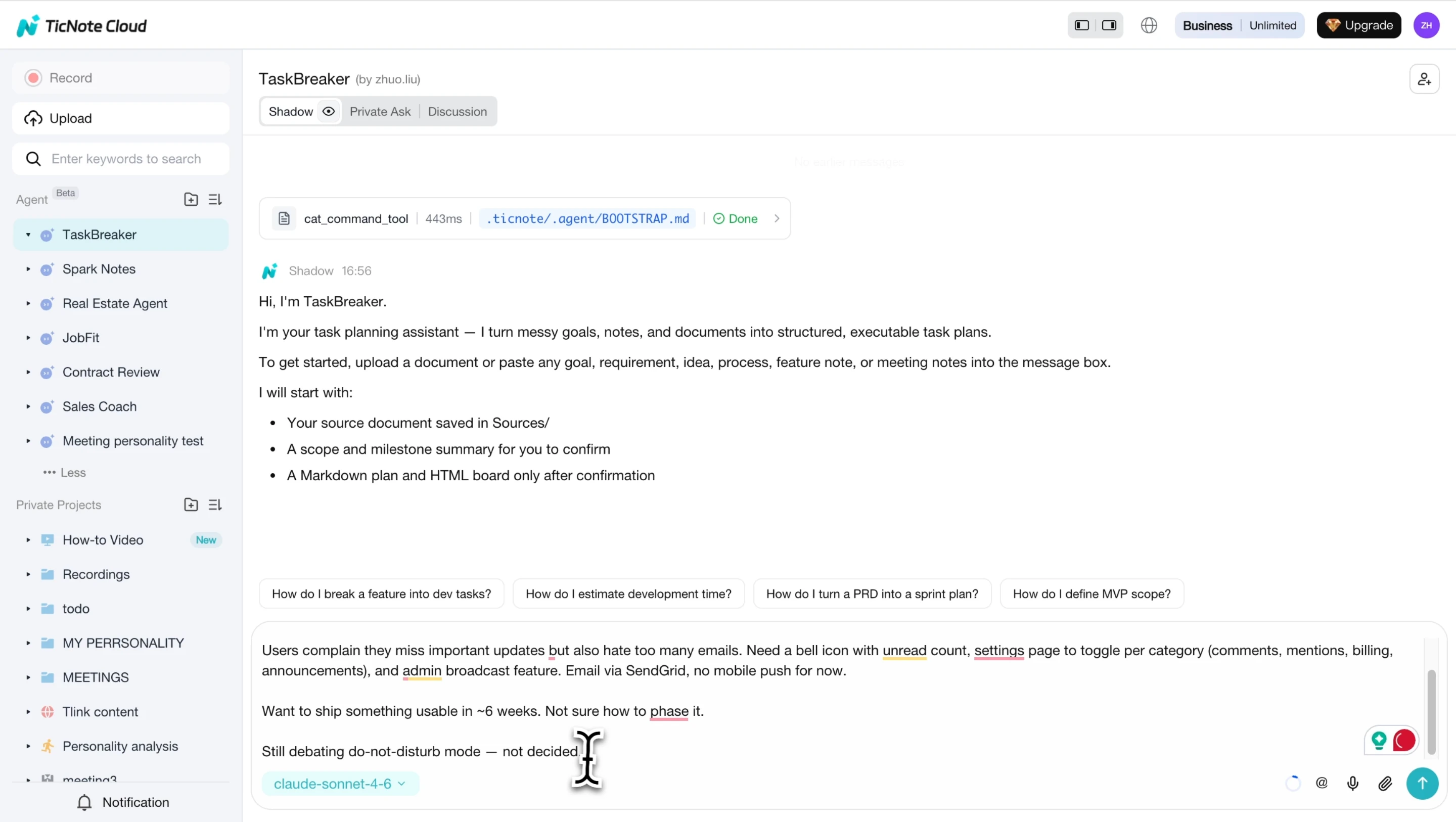
Step 2. Paste or upload your document
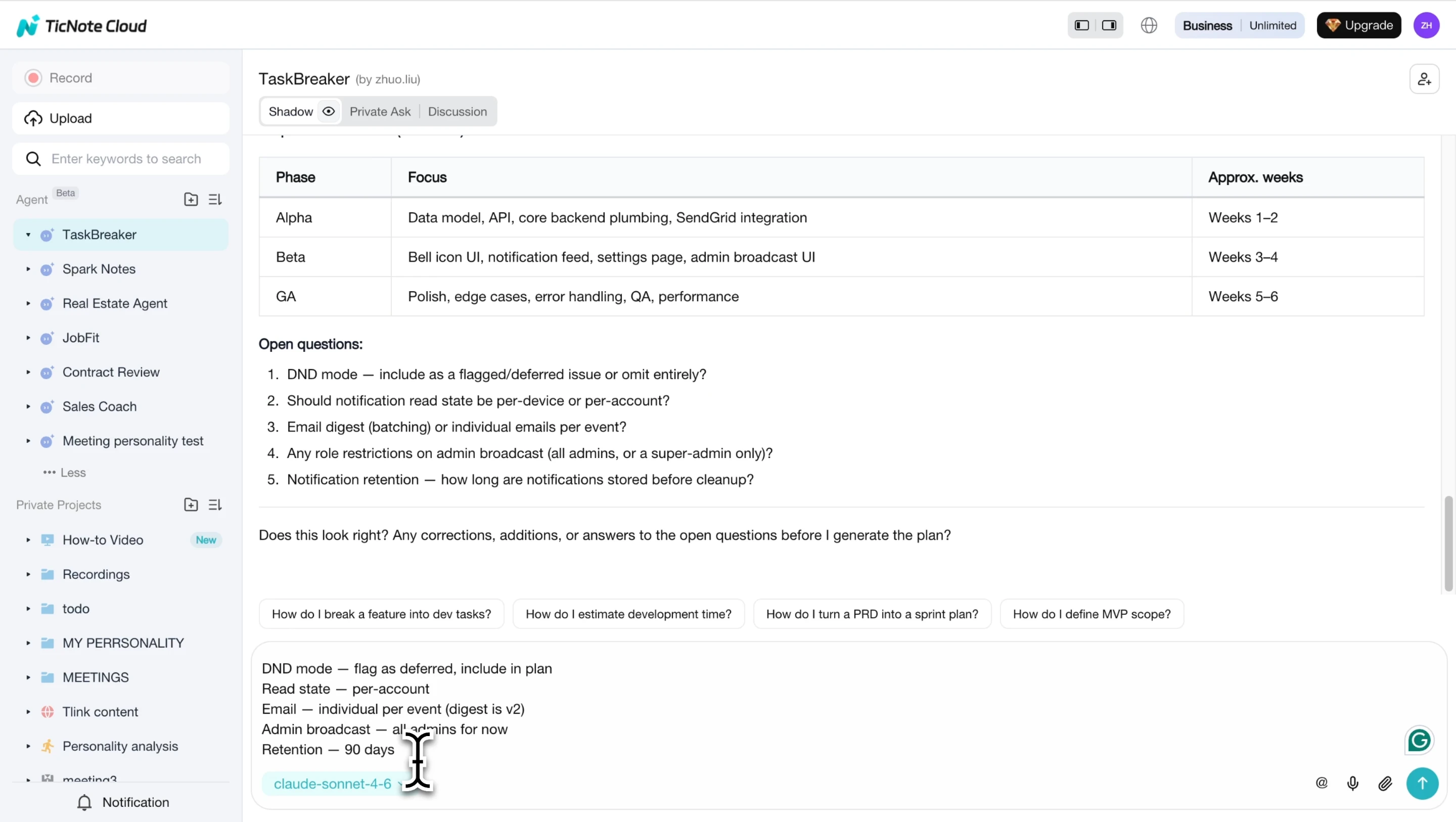
Provide a PRD, feature spec, meeting transcript, or recording. The agent reads the full document and returns a structured project summary, objective, scope, proposed milestones, and any open questions, for your confirmation before generating anything.
Step 3. Review and export your project plan
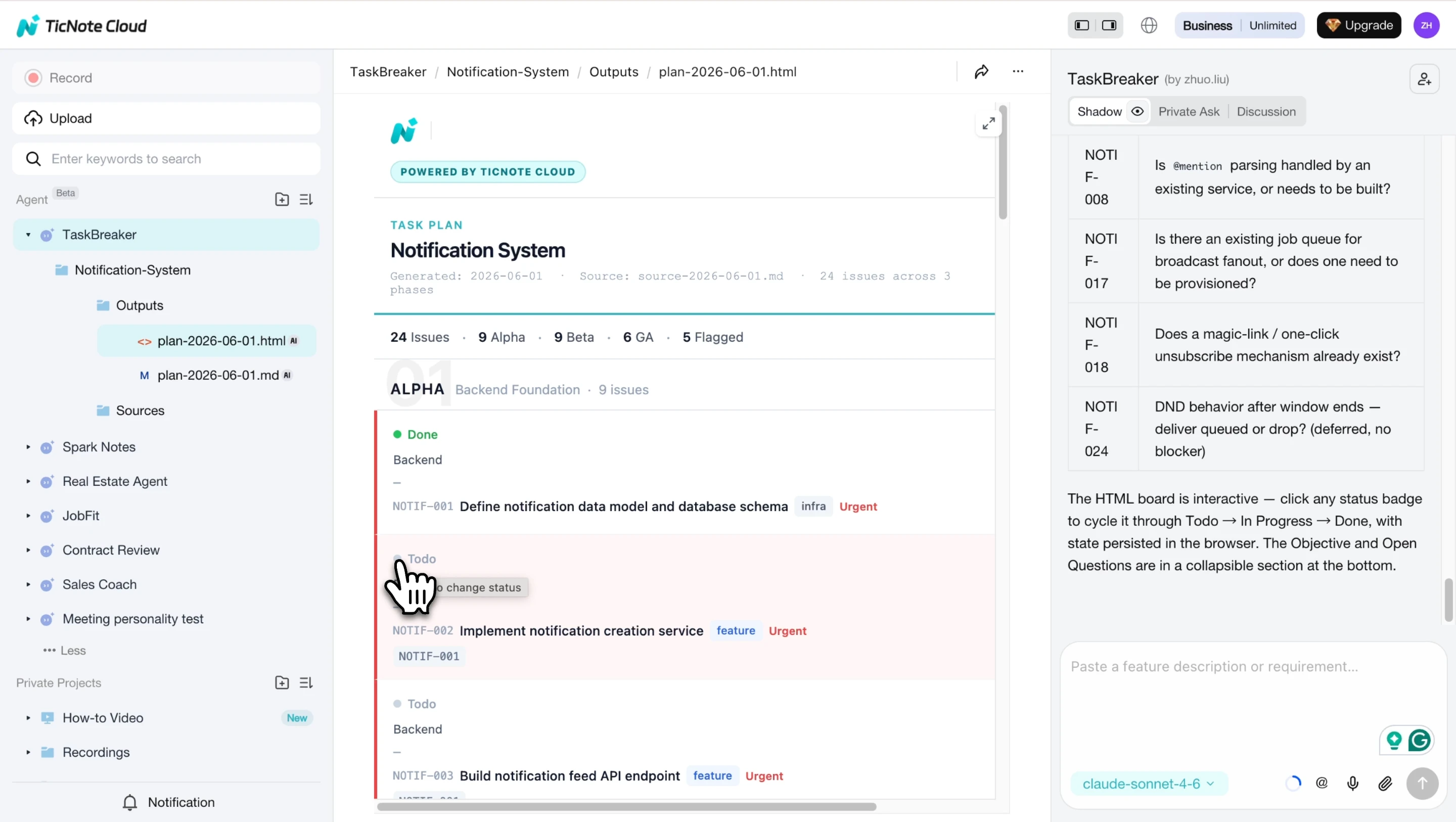
After you confirm the summary, the agent decomposes every requirement into sprint-sized issues. Each issue includes a title, description, testable acceptance criteria, label, priority, and phase. Ambiguous requirements are flagged before they become engineering debt. If you want a deeper look at how traditional task breakdown fits alongside AI, this guide to task breakdown in project management covers the WBS methodology in detail.
The plan also includes an interactive HTML board where you can track progress across phases.
2. Goblin Tools (Magic ToDo)
Best For: ADHD users and individuals who need micro-task granularity with zero setup
Website: goblin.tools | Pricing: Free
Key Features:
- "Spoon" granularity slider controls how fine-grained the subtasks are
- Auto-generates subtasks from a single sentence description
- Extremely simple UI, no account needed to start
- Works instantly in a browser, no installation required
Limitations:
- No project context or memory between sessions
- No integrations with any other tools
- Designed for personal use only; no team features
Why it stands out: The lowest friction of any tool on this list. Paste a task, adjust the spoon level, and get subtasks in under five seconds.
3. ClickUp AI
Best For: Teams already using ClickUp for project management
Website: clickup.com | Pricing: From $7/user/mo (AI requires Business plan)
Key Features:
- AI subtask generator available directly inside any task
- Workflow automation for routing and status updates
- Custom AI prompts for different project types
- Integrates with ClickUp docs, goals, and dashboards
Limitations:
- Steep learning curve for new users
- AI features locked behind higher-tier plans
Why it stands out: Best for teams that want task breakdown embedded in their existing PM workflow.
4. Notion AI
Best For: Knowledge workers who already manage projects and notes in Notion
Website: notion.so | Pricing: AI add-on at $8/user/mo
Key Features:
- Generate task lists directly from notes or documents
- AI writing and summarization built into any Notion page
- Database integration for task tracking
Limitations:
- No dedicated task breakdown flow, you have to prompt it yourself
- Not context-aware about task sequence or dependencies
Why it stands out: Good choice if your knowledge base already lives in Notion.
5. ChatGPT
Best For: Users who want fully flexible, custom task breakdown prompts
Website: chat.openai.com | Pricing: Free / Plus at $20/mo
Key Features:
- Broad reasoning capability handles complex multi-step breakdowns
- Works across any task type or domain
- Wide domain coverage, from code to marketing to legal
Limitations:
- No persistent memory across sessions
- Requires prompt skill to get consistent results
Why it stands out: The most flexible option. If your tasks are highly varied and you're comfortable writing prompts, ChatGPT can break down almost anything.
6. Taskade
Best For: Teams that want AI-assisted project templates with collaboration
Website: taskade.com | Pricing: Free / Pro at $8/mo
Key Features:
- AI agent workflows for generating task trees from a description
- Structured project templates with built-in AI customization
- Real-time team collaboration with task assignments
Limitations:
- Less context-aware than TicNote Cloud
- AI output quality varies by template
Why it stands out: Best for teams that want a project template combined with AI task generation in one workspace.
How to Choose the Right AI Task Breakdown Tool
The right tool depends on your context. Here's a quick way to decide:
For ADHD or personal use: Goblin Tools or TicNote Cloud
If you need something fast and simple with no setup, Goblin Tools is the easiest entry point. If you also manage documents, take meeting notes, or want your task breakdown connected to real work context, TicNote Cloud is the stronger choice.
For team projects: ClickUp AI or Taskade
Both tools embed AI task breakdown into collaborative project management workflows. ClickUp AI is better if your team already uses ClickUp; Taskade is a good fit if you want a lightweight alternative with template-driven project planning.
For meeting-driven tasks: TicNote Cloud
If your tasks come from meetings, action items, project discussions, recorded calls, TicNote Cloud is the only tool here that connects AI task breakdown directly to your transcript. It's the same reason it's useful across other AI-driven workflows, like how professionals use AI tools for complex client work.
For maximum flexibility: ChatGPT
If your tasks are highly varied and you're comfortable writing prompts, ChatGPT handles almost any breakdown type. Just don't expect memory or integrations.
Comparison table:
| ToolFree PlanAI Subtask GenContext-AwareIntegrationsBest For | |||||
| TicNote Cloud | ✅ | ✅ | ✅ | ✅ | Meeting-driven + professional |
| Goblin Tools | ✅ | ✅ | ❌ | ❌ | ADHD / personal |
| ClickUp AI | ❌ | ✅ | Partial | ✅ | Teams in ClickUp |
| Notion AI | ❌ | Partial | ❌ | Partial | Notion users |
| ChatGPT | ✅ | ✅ | ❌ | ❌ | Flexible prompting |
| Taskade | ✅ | ✅ | ❌ | Partial | Template-based teams |
Conclusion
AI task breakdown tools remove the hardest part of any project: figuring out where to start. The right one depends on your context, personal, team, or meeting-driven. If you want a tool that connects task breakdown to the actual work you do every day, TicNote Cloud is the one to try first.
Try TicNote Cloud free and break down your first task in seconds.


