


 Extension

TL;DR: skill agent guide to competitor profiles that drive action
Want faster competitor profiling? Try TicNote Cloud for Free to collect research in one place and turn it into decisions. In simple terms, a competitor profile is the record, a competitor assessment is the scoring method, and a competitor evaluation is the decision you make from both. This guide shows you how to pick the right rivals, build a practical template, use a weighted scoring model, and turn findings into action across positioning, pricing, product, and sales.
Scattered notes make patterns hard to see. That usually leads to weak comparisons, repeated research, and slower decisions. A searchable workspace can fix that by keeping interviews, transcripts, and documents together, and TicNote Cloud makes that workflow easier to manage without extra copy-paste.
How competitor profiling fits into a skill agent research workflow
Competitor profiling works best as a repeatable research system, not a one-time spreadsheet. In practice, competitor profiling is the ongoing process of collecting, organizing, and updating evidence about rivals so your team can track changes over time and make faster decisions. That matters because buyers compare real alternatives, and teams need current context, not old snapshots. If you need a broader planning model, this pairs well with a competitive analysis framework.
Define the work before you compare it
A few terms often get mixed together:
- A competitor profile is the structured record for one rival.
- A competitor assessment is the scored comparison across selected criteria.
- A competitor evaluation is the judgment that turns the evidence into a recommendation.
That distinction keeps teams from jumping from raw notes straight to strategy. A profile stores facts and patterns. An assessment helps compare options side by side. An evaluation answers the business question: what should we do next?
Separate profiling from analysis and market research
Competitor profiling focuses on named alternatives a buyer may choose instead of you. Competitor analysis is the wider interpretation layer that explains what those moves mean. Market research is broader still: it studies customer demand, segments, trends, and category dynamics.
In simple terms, market research looks wide. Profiling looks specific. Analysis connects the dots.
Use the right output for the right decision
Use each format for a different job:
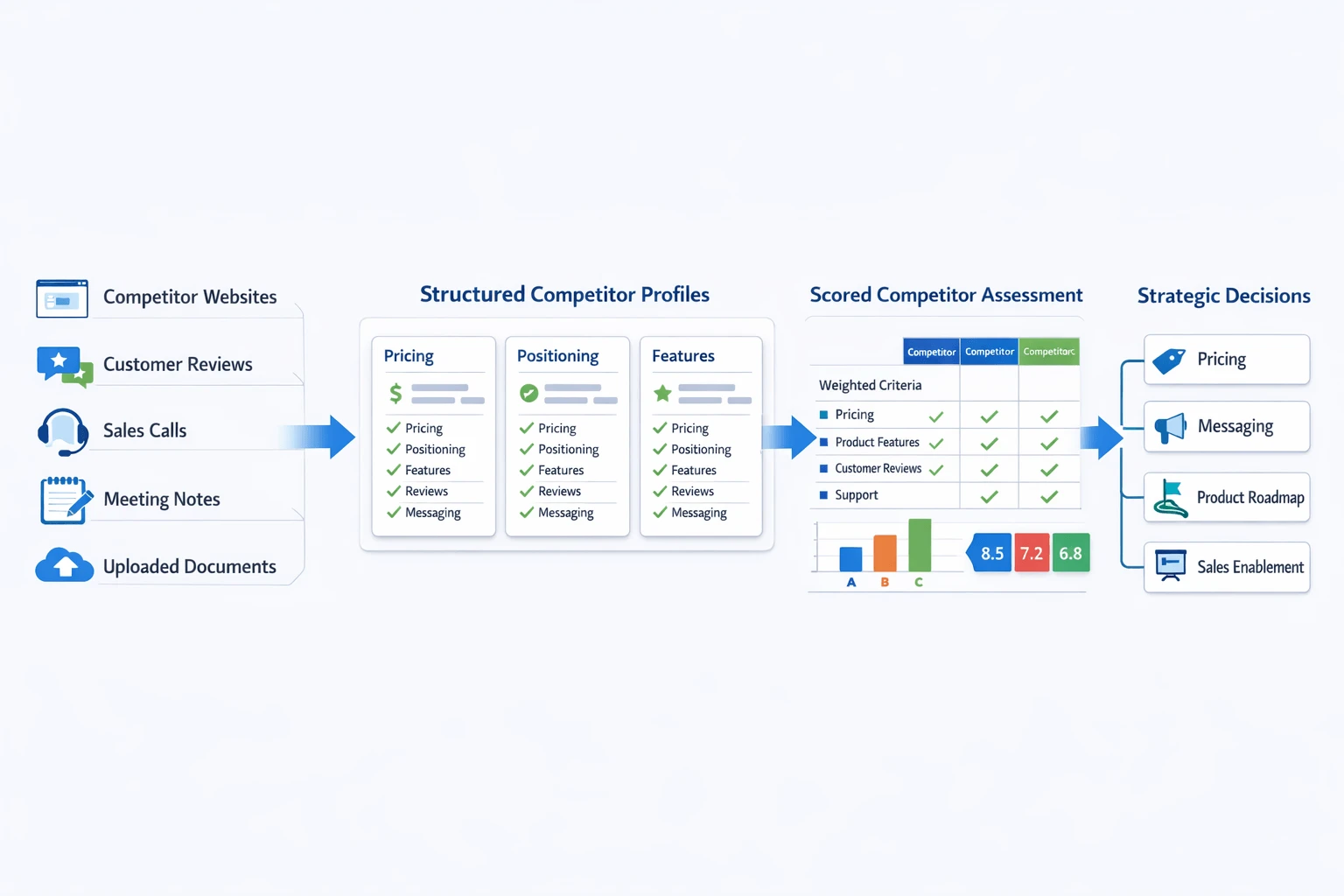
- Profiles: maintain current intelligence on pricing, positioning, features, reviews, and sales motion.
- Assessments: support side-by-side choices with weighted criteria.
- Evaluations: guide pricing, messaging, roadmap, and sales enablement decisions.
A skill-agent workflow makes this practical. Teams collect inputs from websites, reviews, call notes, interviews, and documents, then standardize them inside one system. In TicNote Cloud, that can mean storing meeting transcripts, uploaded files, and research notes in a single project so Shadow can generate cited summaries and action-ready outputs without losing source context.
Which competitors should you profile first?
Start with the rivals that shape real buying decisions. In competitor profiling, that usually means three to five direct competitors first, then a smaller set of indirect and emerging players. This approach keeps your research focused and gives you a shortlist you can actually use.
Separate direct, indirect, and emerging competitors
There are three groups to track:
- Direct competitors: sell a similar offer to the same audience. Example: two project management SaaS tools for startup teams.
- Indirect competitors: solve the same problem in a different way. Example: an agency competing with a software tool.
- Emerging competitors: new entrants or adjacent brands that may shift buyer expectations fast.
Most teams should begin with direct rivals because they affect win rates, pricing pressure, and feature comparisons most. Then add indirect and emerging players when they start changing what buyers expect.
Rank competitors before you build a full profile
Don't profile every company in your market. Score each one from 1 to 5 on:
- audience overlap
- problem solved
- pricing proximity
- geographic overlap
- deal loss frequency
- feature similarity
- growth signals
- strategic threat
A simple weighted competitor assessment template helps here. If a rival shares your audience, shows up in sales calls, and keeps appearing in lost deals, move it to the top. If not, leave it lower.
Match the metrics to your business model
Different models need different inputs:
- SaaS: pricing tiers, onboarding friction, integrations, review sentiment, feature depth
- Services: positioning, proof, regional presence, sales process, proposal style
- Ecommerce: assortment, shipping speed, bundles, return policy, promotion cadence
To find the right names, use customer interviews, CRM notes, search results, and sales call feedback. Those sources reveal who buyers actually compare, not just who ranks in a category page. If you need a scoring framework, this KPI comparison process can help standardize it. The output from this stage is a ranked shortlist for competitor assessment.
What should a strong competitor profile include?
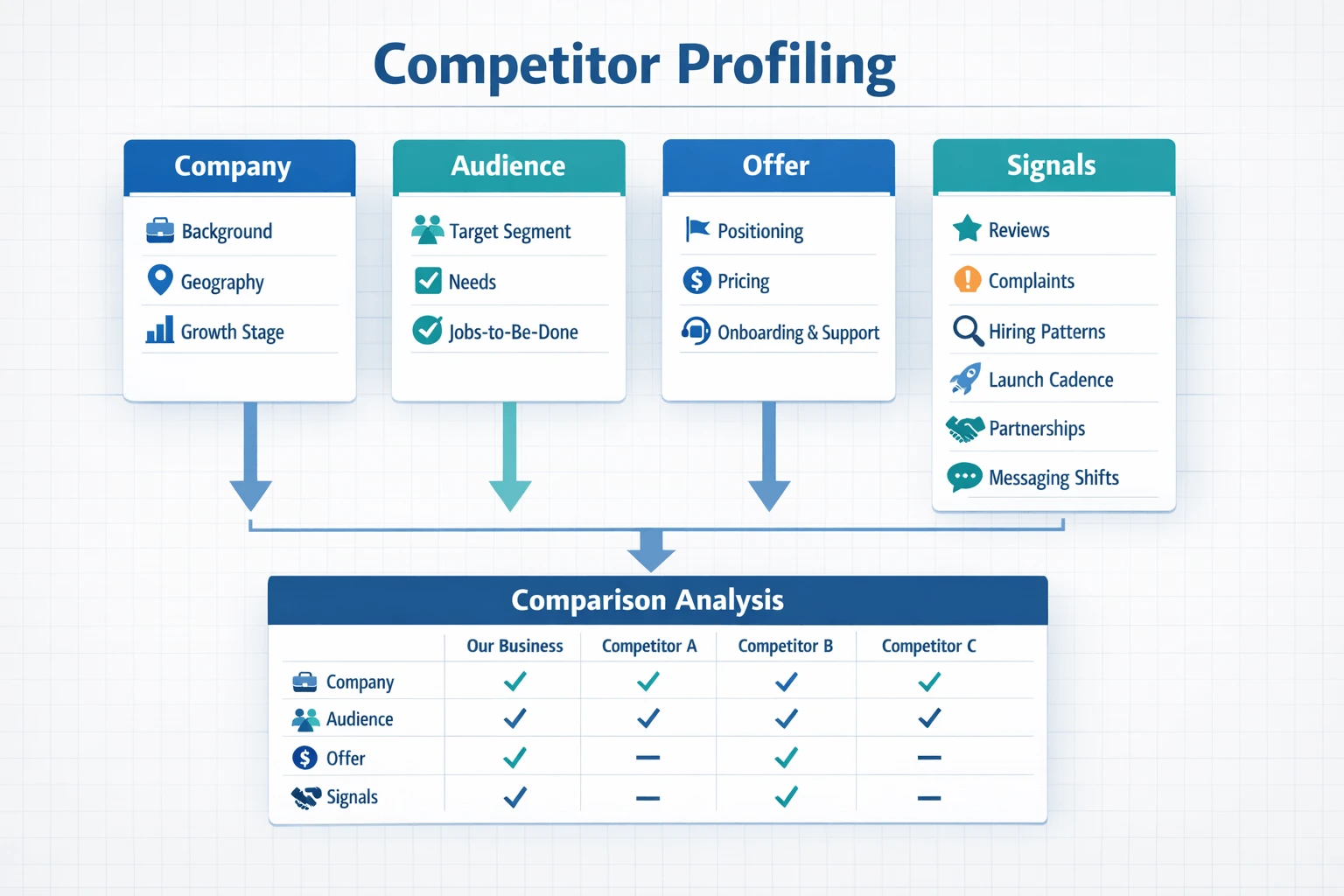
A strong competitor profile turns scattered research into a repeatable record you can compare, update, and trust. In practice, competitor profiling works best when every company is documented with the same fields, the same evidence rules, and links back to the original source. A summary table helps you scan fast, but the full profile should keep the notes, quotes, and source links that support each conclusion.
If you also need a format for scoring rivals side by side, this competitive analysis template and scoring workflow pairs well with a profile-first approach.
Company and market snapshot
Start with the basics. This section should give a clean view of who the competitor is and where they play.
Include these fields in your competitor profile template:
- Company background
- Headquarters and geography served
- Growth stage
- Ownership or funding status, when public
- Primary target segment
- Category or market served
- Notable recent moves, such as launches, acquisitions, hiring, or expansion
This snapshot gives context before you judge performance. For example, a bootstrapped local firm and a venture-backed global player should not be evaluated the same way.
Audience, positioning, and channels
Next, capture how the company presents itself to the market.
Document:
- Who they serve
- Their core promise or positioning statement
- The main jobs-to-be-done they emphasize (the task or outcome customers hire the product to do)
- Key proof points, claims, and differentiators
- Main acquisition channels: search, social, partnerships, outbound, communities, marketplaces, or retail
This part explains why a rival is winning attention, not just what they sell.
Product, pricing, and customer perception
This is the operational core of the profile. Use consistent fields so every competitor assessment is easy to compare.
Track:
- Core offers and add-ons
- Standout features
- Packaging and plan structure
- Pricing model
- Free trial, freemium, or demo pattern
- Onboarding flow
- Support experience
- Review themes customers praise
- Recurring complaints or friction points
These details make competitor evaluation more useful because they connect offer design to customer reaction.
SWOT inputs and strategic signals
Finally, capture evidence that can feed a mini-SWOT later. Focus on signals, not guesses.
Log items such as:
- Hiring patterns
- Launch cadence
- Messaging shifts
- Review trend changes
- New partnerships
- Content emphasis by topic or format
Used together, these signals show direction of travel. That's what makes a competitor profile actionable instead of descriptive.
How to build a competitor assessment template step by step
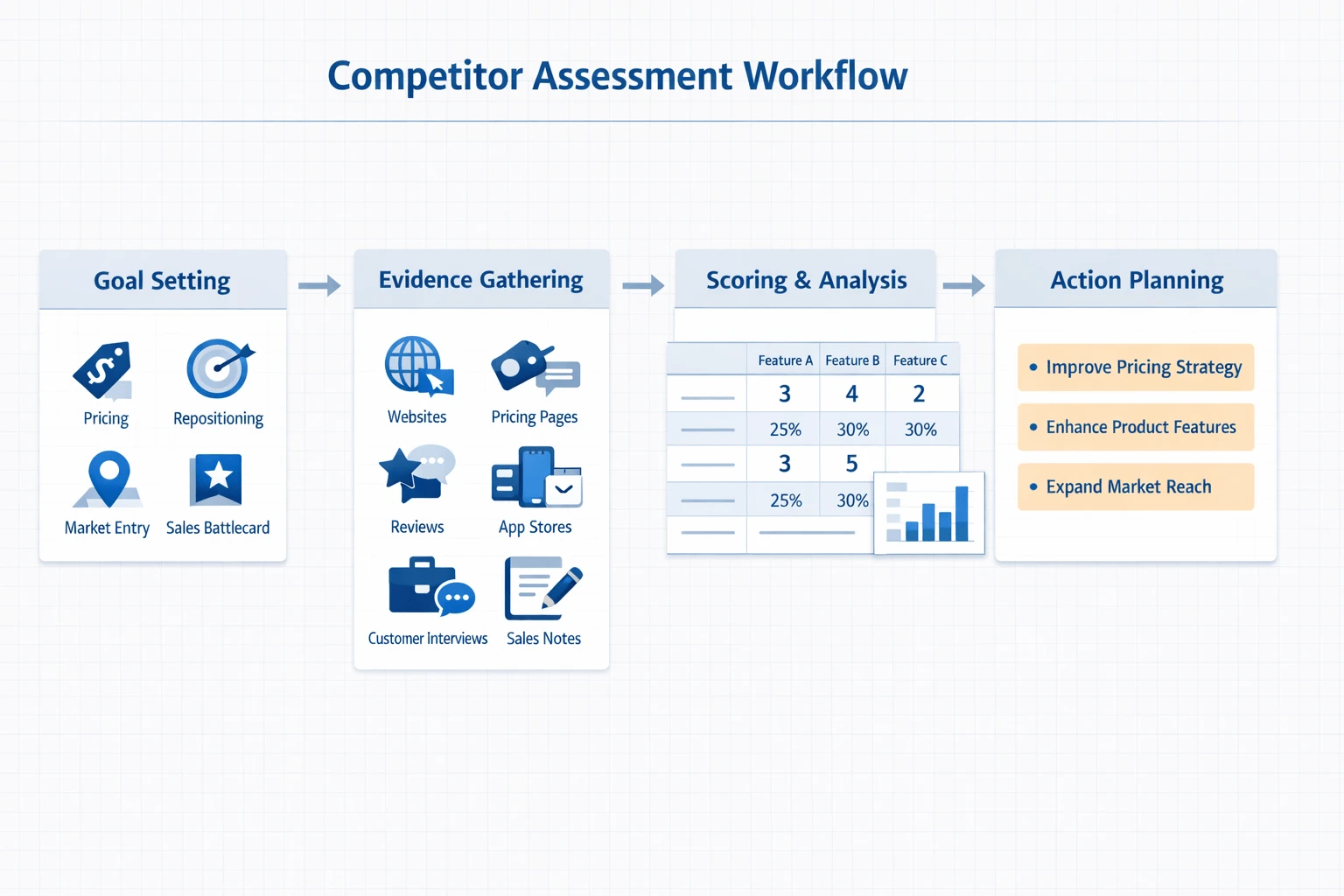
A good assessment template helps you make a decision, not just collect facts. That's the point of competitor profiling: turn messy research into a clear next move. Start by defining the decision this template needs to support, then gather evidence, score it in a repeatable way, and turn the result into a short action plan.
Set the decision first
Before you score anything, name the business choice in plain language. For example:
- Should we reposition for mid-market buyers?
- Should we change pricing or packaging?
- Should we enter a new region or segment?
- Should sales get a new battlecard for one fast-growing rival?
This keeps the template focused. If your goal is pricing, don't overweight social reach. If your goal is market entry, channel strength and audience match matter more.
A practical competitor assessment template usually includes 6 to 10 criteria. That's enough to show tradeoffs without turning the model into noise. Common criteria include:
- Feature fit
- Price-value fit
- Review sentiment
- Audience match
- Channel strength
- Proof points
- Switching friction
- Strategic momentum
Give each criterion a weight that totals 100%. A simple setup is 10% to 20% per factor, with higher weights on the few variables that most affect the decision.
Gather evidence from reliable sources
Next, collect data from sources you can verify. Use a mix of public and first-party inputs:
- Competitor homepages and product pages
- Help docs and knowledge bases
- Public pricing pages
- App stores and review platforms
- Job posts
- Earnings materials, if available
- Win/loss notes
- Sales call notes
- Customer interviews
For each input, record three things: the evidence itself, the date captured, and your confidence level. A dated pricing page with screenshots is high confidence. A secondhand comment from one prospect is lower confidence. That distinction matters.
If you use a shared workspace like TicNote Cloud, keep interviews, sales transcripts, uploaded documents, and market notes in one project. That makes it easier to trace each score back to source material and update the template when the market changes.
Score with a weighted model
Use a 1 to 5 scale for each criterion:
1 = weak 2 = below average 3 = competitive 4 = strong 5 = market-leading
Then multiply each score by the criterion weight. Keep a separate note for evidence under every score. Also split fact from interpretation. For example, "Competitor offers annual billing at $99/month" is fact. "This makes them easier to justify for finance teams" is interpretation.
A simple table like this works well:
| Criterion | Weight | Competitor A | Competitor B | Evidence note |
| Feature fit | 20% | 4 | 3 | Product pages, demo notes |
| Price-value fit | 15% | 3 | 5 | Public pricing pages |
| Review sentiment | 15% | 4 | 2 | App store and review sites |
| Audience match | 20% | 5 | 3 | Case studies, messaging |
| Channel strength | 15% | 3 | 4 | SEO, partner pages, social |
| Strategic momentum | 15% | 4 | 5 | Hiring posts, launches |
Add a visual comparison matrix beside the scoring table. It helps leaders see where one rival wins on price while another wins on proof or reach.
Set legal and ethical boundaries
Only use public, permissioned, and lawfully collected information. Don't misrepresent yourself, use scraping that breaks platform terms, or rely on leaked confidential material. The Federal Trade Commission, Commercial Surveillance and Data Security Rulemaking (2022) notes that the FTC Act's prohibition on unfair methods of competition and unfair or deceptive acts or practices generally covers commercial surveillance involving the collection of consumers' data.
Turn scores into actions
The final score is a tool, not the decision itself. Once totals are in, convert the findings into 2 to 3 actions. For example:
- Adjust packaging for the segment where your audience match is strongest.
- Build proof assets where a rival clearly leads on trust.
- Create a sales response for the competitor with the highest weighted score.
That's when the template becomes useful: it shows what to do next, and why.
How to run a competitor profiling and assessment workflow
To make this practical, we'll use TicNote Cloud as the example throughout this section. The goal is simple: turn raw inputs into a usable competitor profiling workflow that ends with clear findings, a competitor assessment, and next-step decisions across both Web and App.
Start on Web with a market-specific project
Begin in the Web workspace by creating a project for the market, category, or segment you want to study. This keeps every source, output, and update in one searchable place.
In TicNote Cloud, add the Competitor Analysis skill agent from the agent library.
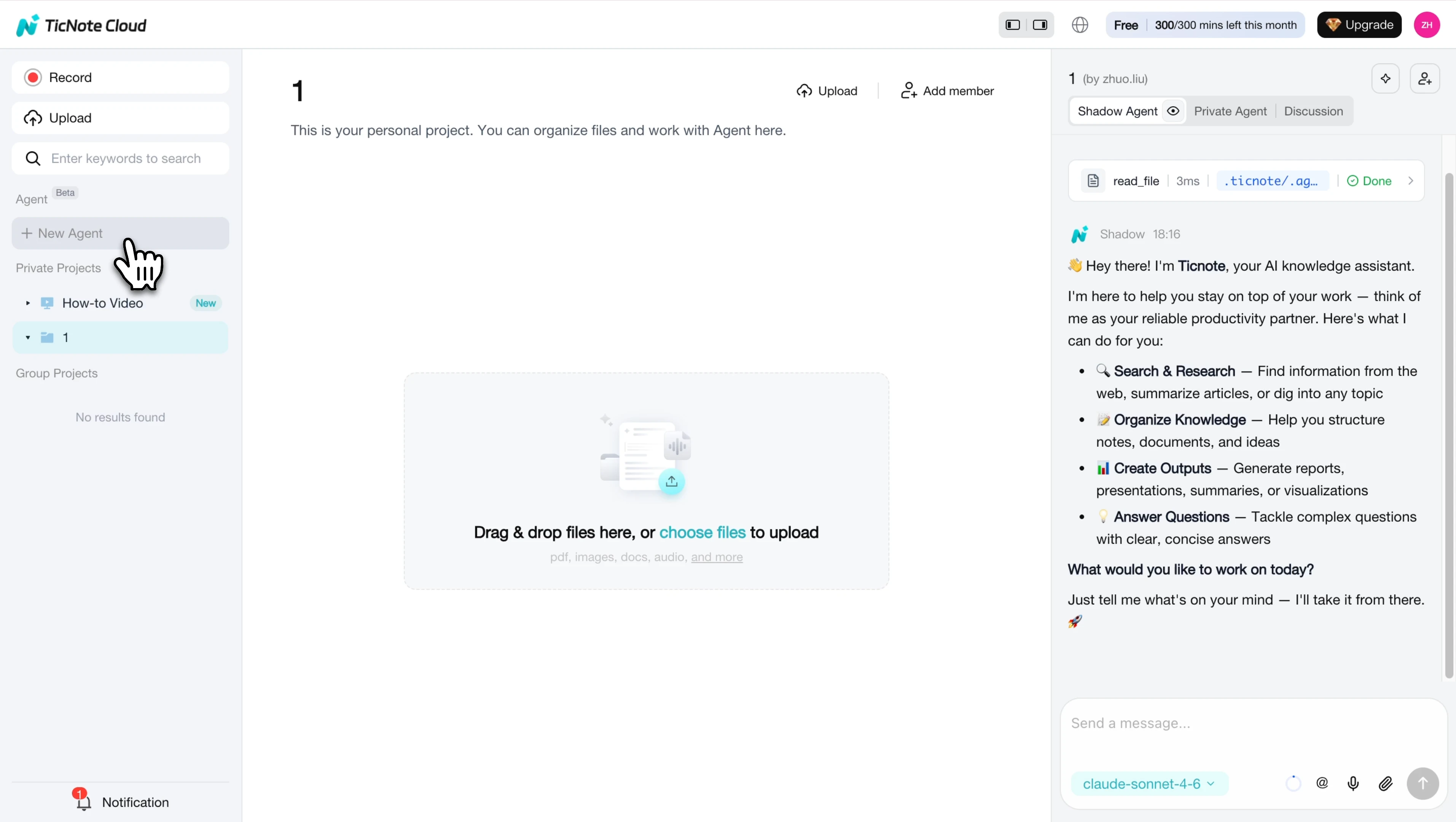
Once it's in your workspace, open the skill and start the setup.
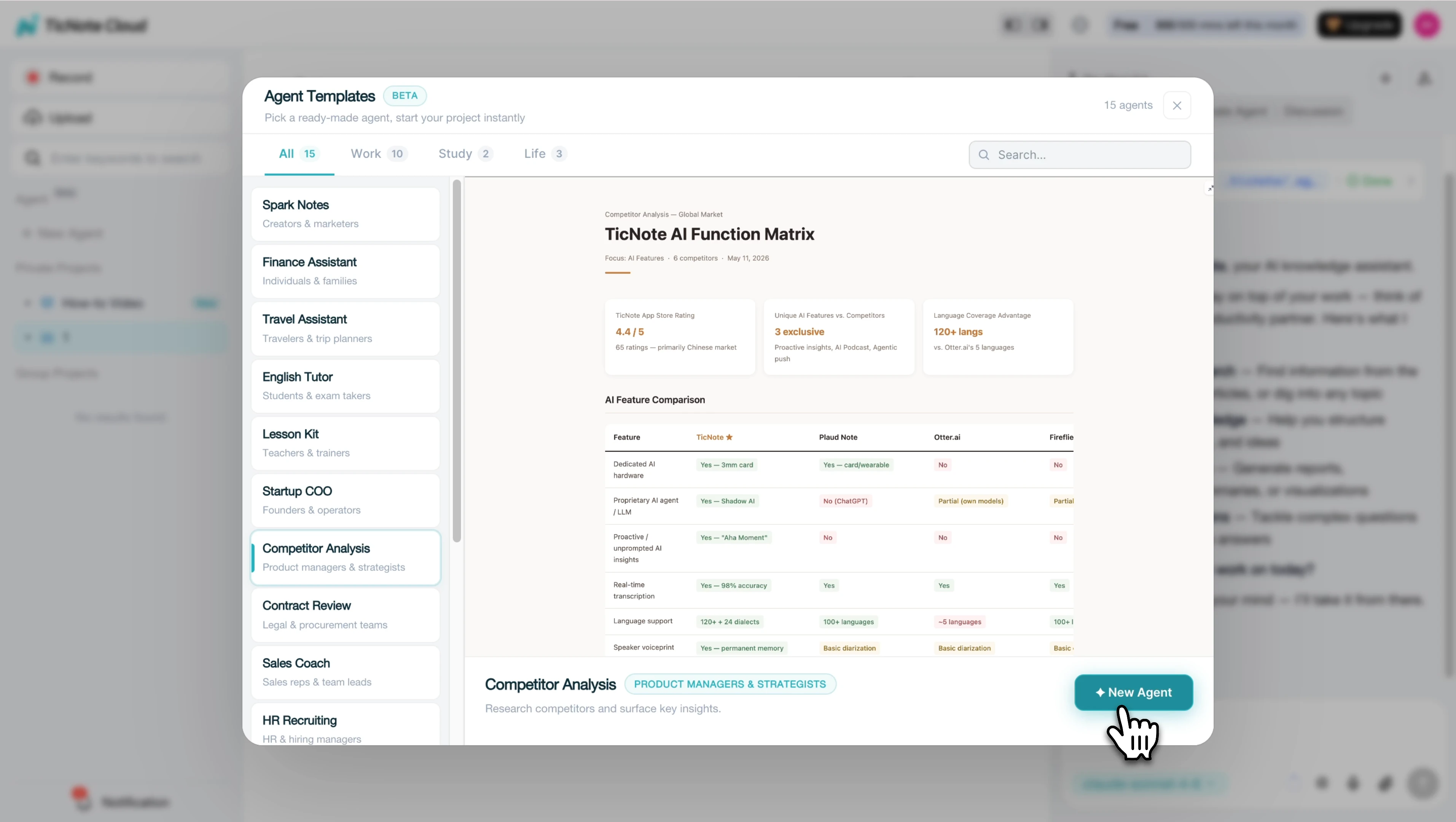
Enter your niche or industry, your target location, and five to ten competitor names or URLs. If you want sharper output, add a focus such as pricing, reviews, social media presence, or product range.
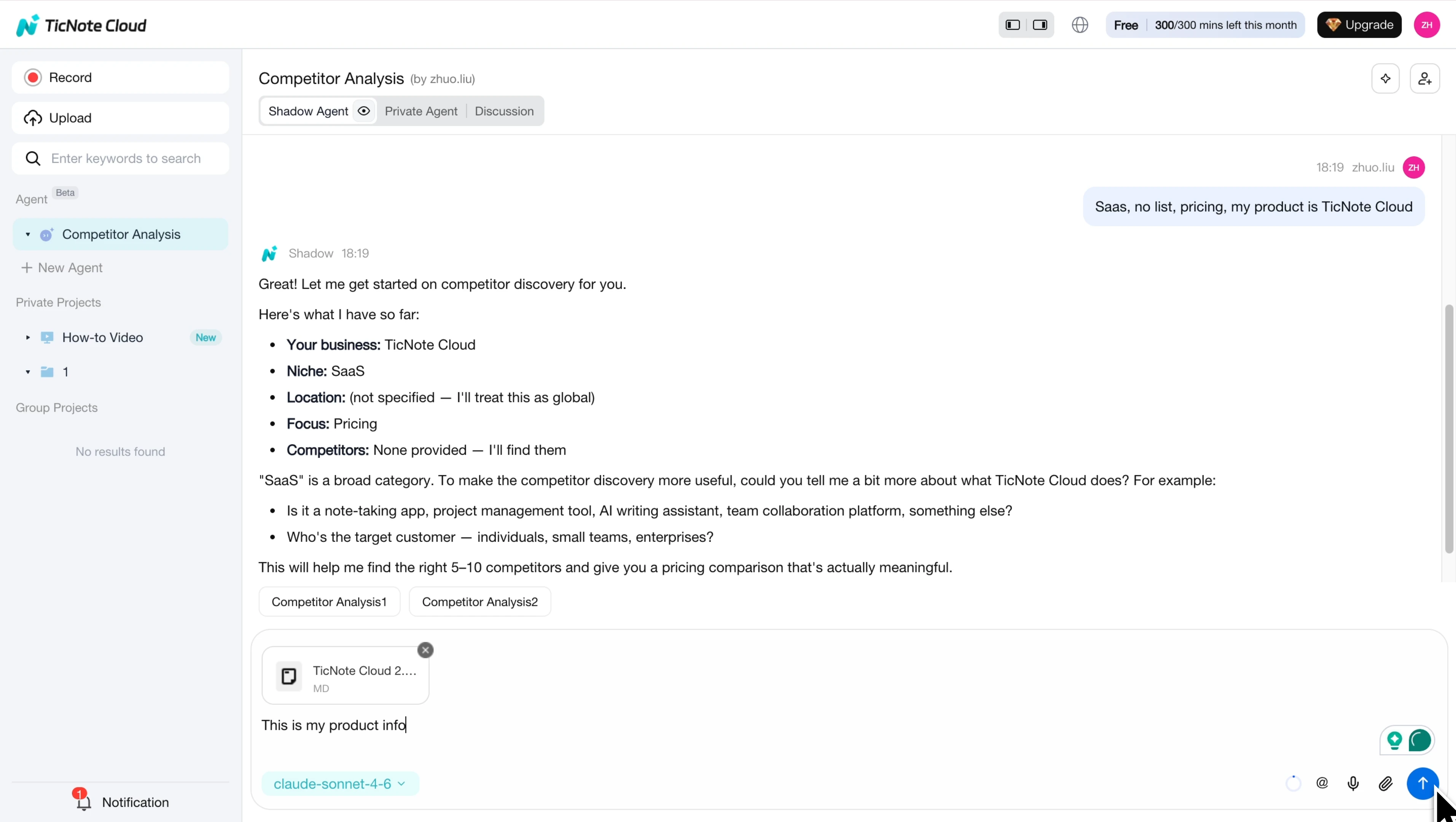
Review the structured output, not just raw notes
After that, the tool gathers public inputs and turns them into a structured report. That output can include:
- a short executive summary
- individual competitor profiles
- a head-to-head comparison table
- market gaps
- recommended actions
- a visual comparison matrix
Open the saved files and review the findings carefully.
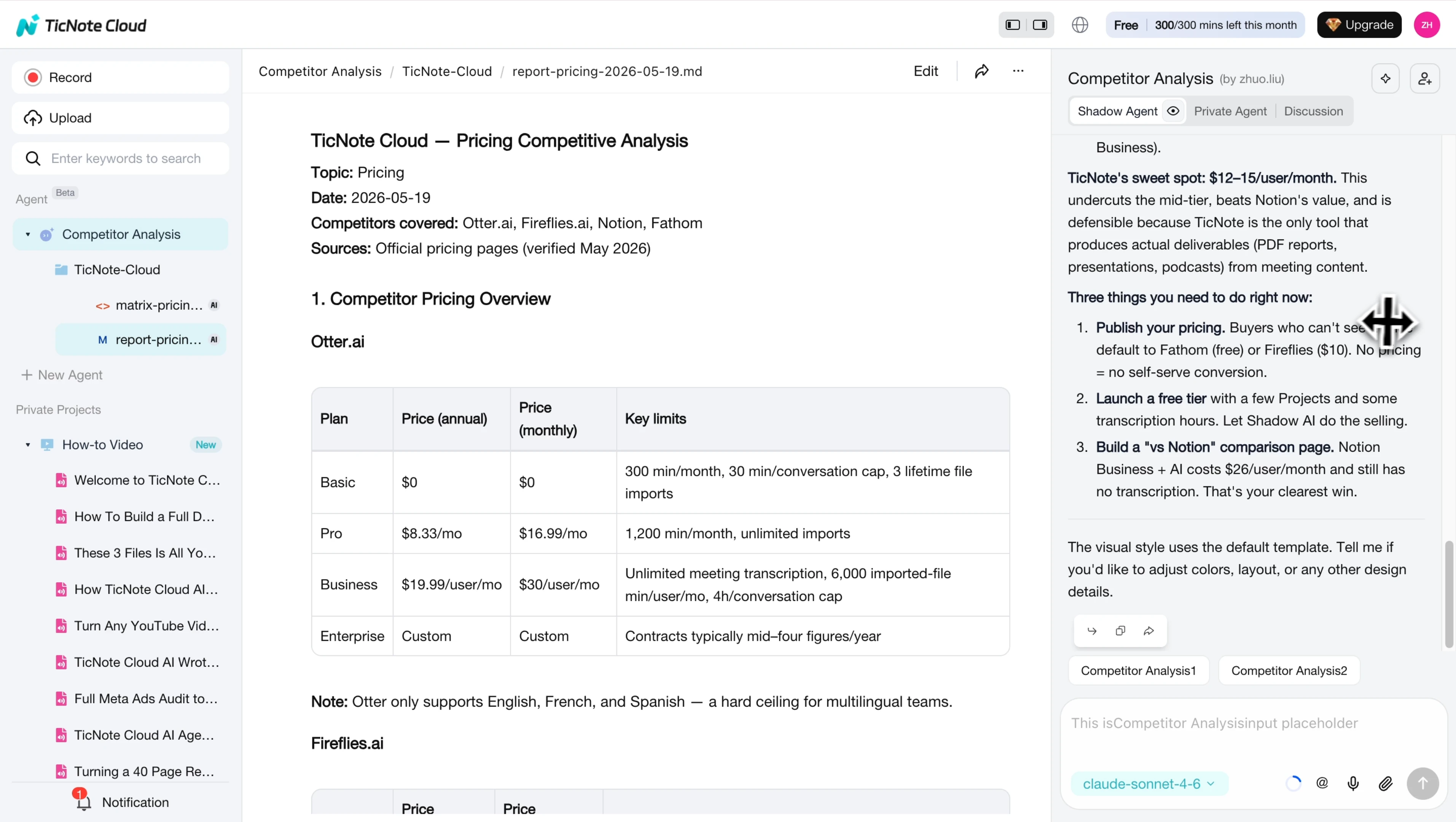
Then scan the matrix to spot patterns faster, including strengths, weak points, and the most useful actions to prioritize.
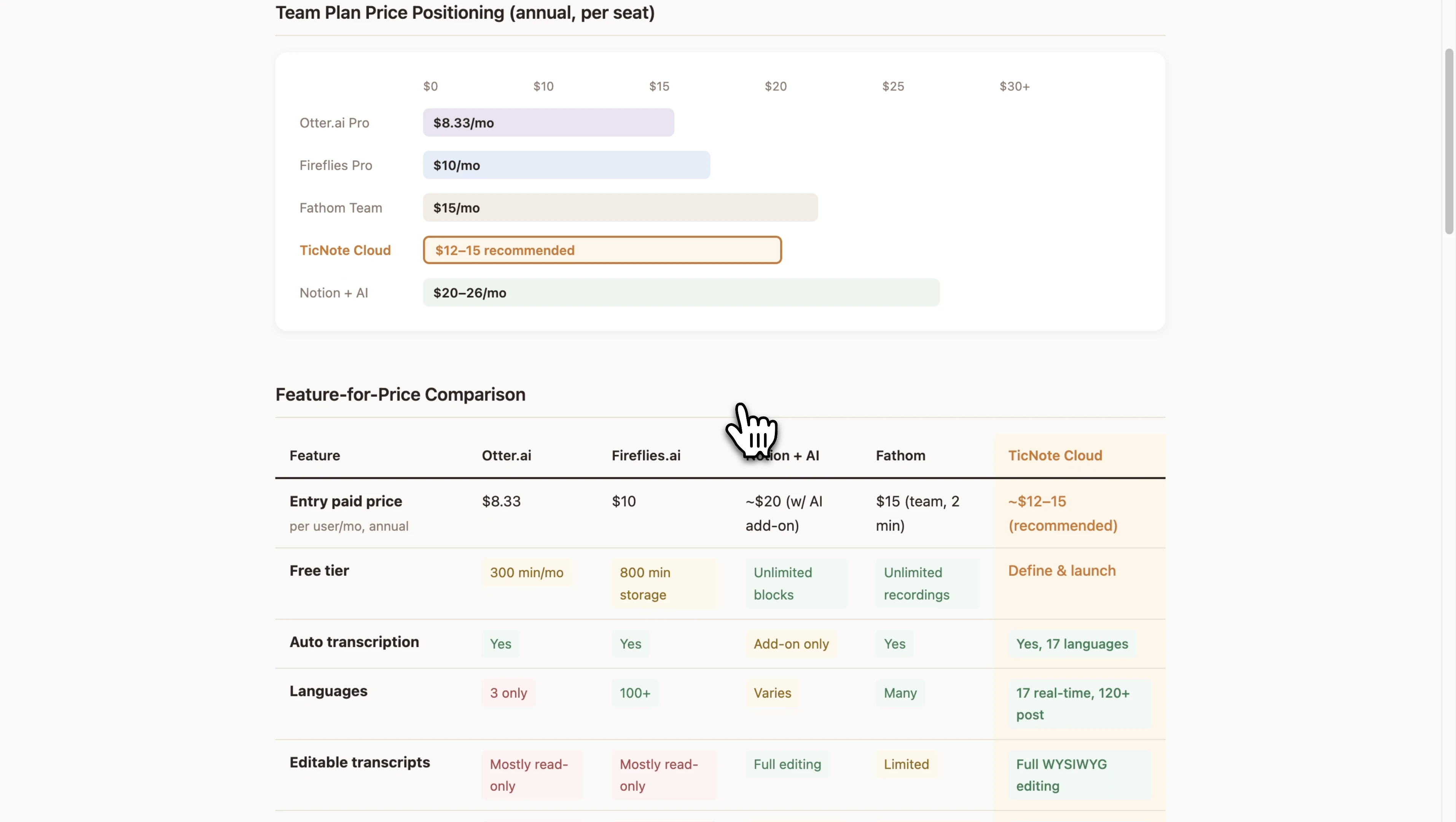
Refine, verify, and save the best insights
Good competitor evaluation doesn't stop at the first draft. Review citations, inspect the source context, and refine your prompt if a section needs more depth. You can also upload supporting files, such as pricing sheets, sales notes, product brochures, or review exports, to improve the assessment.
A useful next step is to save the strongest insights back into the same project. That way, your research stays searchable and easy to update later. If you want more ideas on tooling, this guide to free competitor analysis tools is a helpful next read.
One advantage here is project memory. Meeting transcripts, interview notes, and uploaded files can live in the same workspace, so Shadow AI can compare evidence across files, cite its sources, and generate briefs or decision-ready outputs without copy-paste.
Use the App for lighter capture on the go
The App path is simpler. Use it to capture notes, record conversations, and review project outputs when you're away from your desk. Then sync everything back to the main workspace so the full research record stays connected.
Try TicNote Cloud for free and build a repeatable competitor research workflow your team can reuse.
A practical example: from competitor evaluation to strategic decision
Here's what this looks like in practice. A small B2B software team is preparing a new campaign and possible packaging update, so they run a competitor profiling exercise on four rivals. First, they map the scenario and sample findings. Then they use those findings to adjust positioning, pricing, and sales messaging instead of making a reactive move.
Review the scenario and sample findings
The team sells workflow software for agencies. They compare four competitors using weighted criteria: pricing (25%), feature fit (25%), ease of use (20%), proof and trust (15%), onboarding and support (10%), and niche relevance (5%).
Their summary looks like this:
- Competitor A scores highest on low entry price.
- Competitor B leads on enterprise proof, with well-known logos and case studies.
- Competitor C stands out for ease of use and shorter setup time.
- Competitor D wins in niche specialization for agencies.
At first glance, the totals suggest Competitor A is the biggest threat. But the team doesn't stop there. They compare score patterns, not just rank order. They also pull in customer reviews, demo notes, and win/loss feedback from recent deals.
Use the assessment to guide positioning, pricing, and sales messaging
That extra context changes the conclusion. Reviews show Competitor A is cheap, but support complaints appear often. Sales notes show buyers rarely switch for price alone. In lost deals, prospects mention slow onboarding and unclear implementation help more than budget.
So the team avoids a price war. Instead, they sharpen messaging around faster setup, hands-on support, and easier adoption. They add comparison-page content to answer buyer questions early, and they give sales evidence-backed talk tracks for objections. In other words, the competitor evaluation becomes a decision tool, not a scoreboard.
A simple action plan keeps it useful:
- Marketing updates comparison pages by Friday.
- Product reviews onboarding friction within two weeks.
- Sales enables new battlecards before the campaign launch.
- Strategy resets scores in 90 days.
If you need a stronger format for documenting those decisions, this guide on turning research into an action-focused report can help. It's even better when interview transcripts, sales call notes, and summary outputs live in one project workspace. With TicNote Cloud, teams can store those files together, trace the reasoning behind each conclusion, and revisit the evidence when it's time to reassess.
Final thoughts
Competitor profiling only creates value when it leads to a clear decision. The best workflow is simple: identify the rivals that matter, build a consistent profile for each one, score them with a weighted competitor assessment, and turn the findings into actions for positioning, pricing, product, and sales.
To keep that process useful, standardize your inputs and document your evidence. That makes each competitor evaluation easier to compare, update, and share across the team. And once your research is organized, it's much easier to turn it into an action plan your team can execute instead of another forgotten file.
If you want one place to capture meetings, organize research, and generate cited outputs from competitor work, TicNote Cloud can help.


