


 Extension
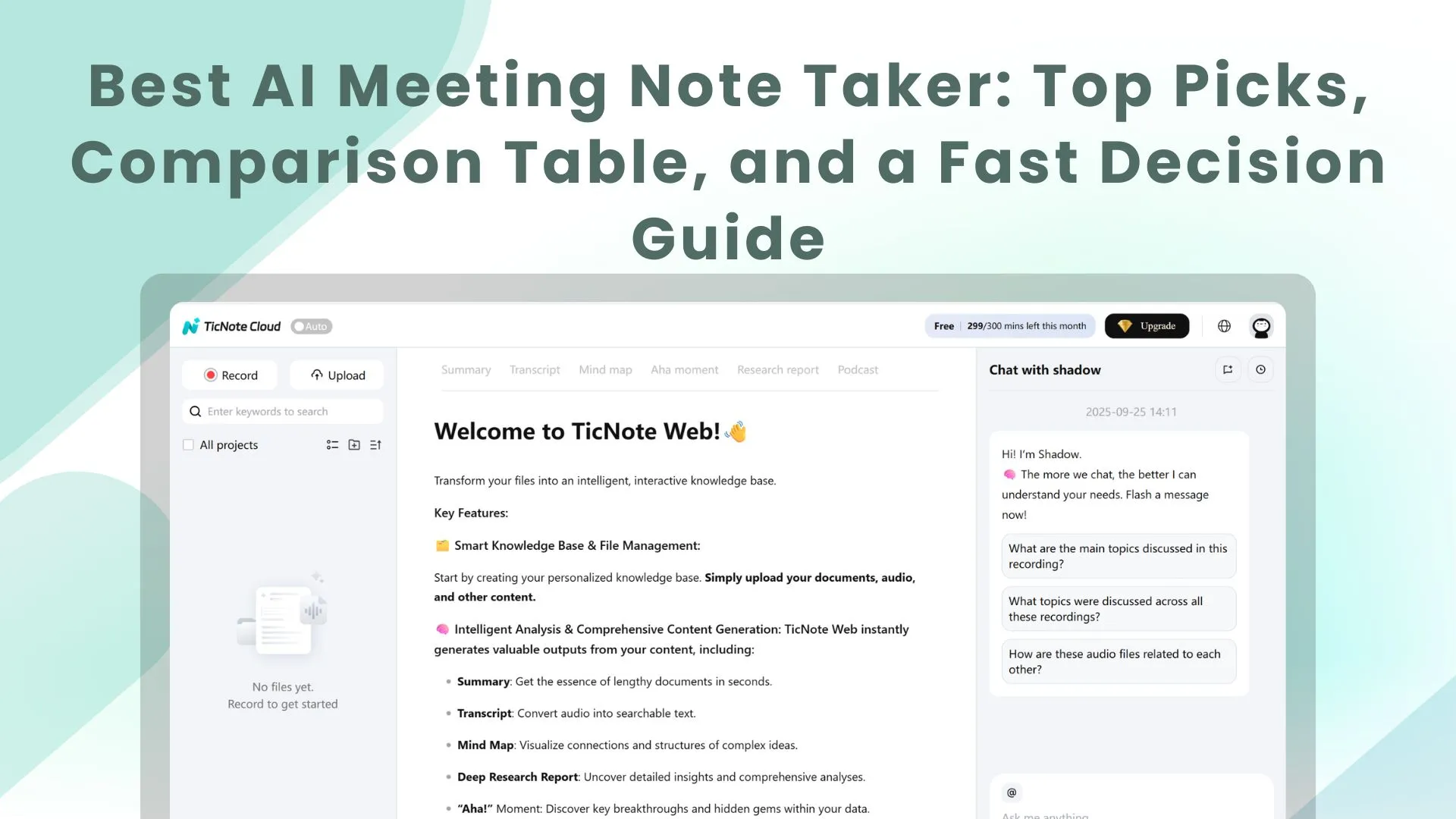
TL;DR: the AI agent shortcut for meeting notes
For the best AI meeting note taker, start with a meeting workspace that turns calls into cited deliverables, not a transcript-only app.
Meeting notes often become scattered files, missed action items, and repeated questions. That gets worse when every follow-up needs copy-paste, reformatting, or manual source checks. A practical AI meeting agent keeps notes editable, searches across project context, and turns conversations into reports, presentations, mind maps, or other reusable outputs.
Quick rule: use lightweight tools for simple capture. Choose a project-based workspace when meetings must become a searchable knowledge base.
Best AI meeting note taker: quick picks for common workflows
The best AI meeting note taker depends on the job after the call. If you only need a transcript, several tools work. If you need editable notes, project memory, cited answers, AI action items, and reusable outputs, start with TicNote Cloud.
Choose by workflow
- TicNote Cloud — best overall for AI agent meeting notes and deliverables. It's built for teams that want the meeting to become usable work. You can record bot-free through extension or app capture, edit transcripts, summarize decisions, extract action items, ask cited questions across a Project, and export notes, reports, mind maps, or presentations. It's a strong fit for consultants, PMs, researchers, and cross-functional teams. The free plan includes 300 transcription minutes per month, which is enough to test real workflows.
- Fireflies.ai — best for collaboration and topic tracking. Pick it when your team tags, searches, comments on, and shares a large volume of meeting recaps. The tradeoff: workspaces can get complex, and advanced features are often plan-gated.
- tl;dv — best for searchable video meeting history. It fits teams that review recorded calls, find moments fast, and share clips. Watch AI insight credits, free-plan history limits, and bot-join requirements.
- Otter.ai — best for live transcription. Choose it for real-time notes and fast summaries. Accuracy can drop with jargon, accents, or speaker overlap, and free tiers usually include meeting caps or minute limits.
- Fathom — best free option for solo users. It's simple for individual capture and summaries, but less useful for team controls, project knowledge, and multi-meeting memory.
- Granola — best for manual note takers. It works well when you type notes first and want AI cleanup after. Video workflows and sharing depth are less central.
Fast pick-by-job guide
For client interviews, research calls, sprint planning, multilingual meetings, and bot-free requirements, choose TicNote Cloud when outputs and knowledge reuse matter. For sales call libraries, compare Fireflies.ai and tl;dv. For live captions, test Otter.ai. If you're comparing execution-focused tools, this AI agent vs assistant guide helps explain why project memory changes the outcome.
Side-by-side comparison of the top AI meeting note takers
A normalized comparison helps you find the best AI meeting note taker by matching the full workflow: capture → edit → search → reuse → deliver. Most tools can summarize a call. Fewer can turn 10 calls into cited answers, reports, decks, podcasts, or mind maps. For a broader category view, see this guide to AI workspace tools.
| Tool | Best use case | Bot-free recording | Editable transcript | AI summaries/action items | Cross-meeting search | Deliverable generation | Integrations | Languages | Free plan | Starting paid price |
| TicNote Cloud | Meeting-to-deliverable pipeline | Yes: extension/app capture; Enterprise AI agent optional | Yes, WYSIWYG edits | Yes | Yes: Project memory, cited answers | PDF/Word reports, HTML presentations, podcasts, mind maps | Notion, Slack; exports TXT/DOCX/PDF/Markdown/PNG/Xmind/HTML/WAV | 120+ | Yes, 300 mins/month | $12.99/mo |
| Fireflies.ai | Sales and team call library | Mostly meeting bot | Limited | Yes | Yes | Summaries, clips, notes | Broad CRM/work apps | 100+ | Yes | About $10/user/mo annually |
| tl;dv | Recorded meetings and CRM handoff | Mostly meeting bot | Limited | Yes | Yes | Clips, summaries, reports | CRM and collaboration tools | 30+ | Yes | About $18/user/mo |
| Otter.ai | Live notes and basic recaps | Meeting bot/assistant | Limited | Yes | Yes | Notes and exports | Calendar, Zoom, Teams, Meet | English-focused | Yes | About $16.99/mo |
| Fathom | Simple sales recaps | Meeting bot | Limited | Yes | Searchable calls | Summaries, clips, CRM sync | CRM tools | Multiple | Yes | About $19/user/mo |
| Granola | Personal, low-friction notes | Yes: local note capture | Yes, note-style | Yes | Limited/team-dependent | Notes, summaries | Calendar/work tools | Multiple | Limited/free option varies | About $18/user/mo |
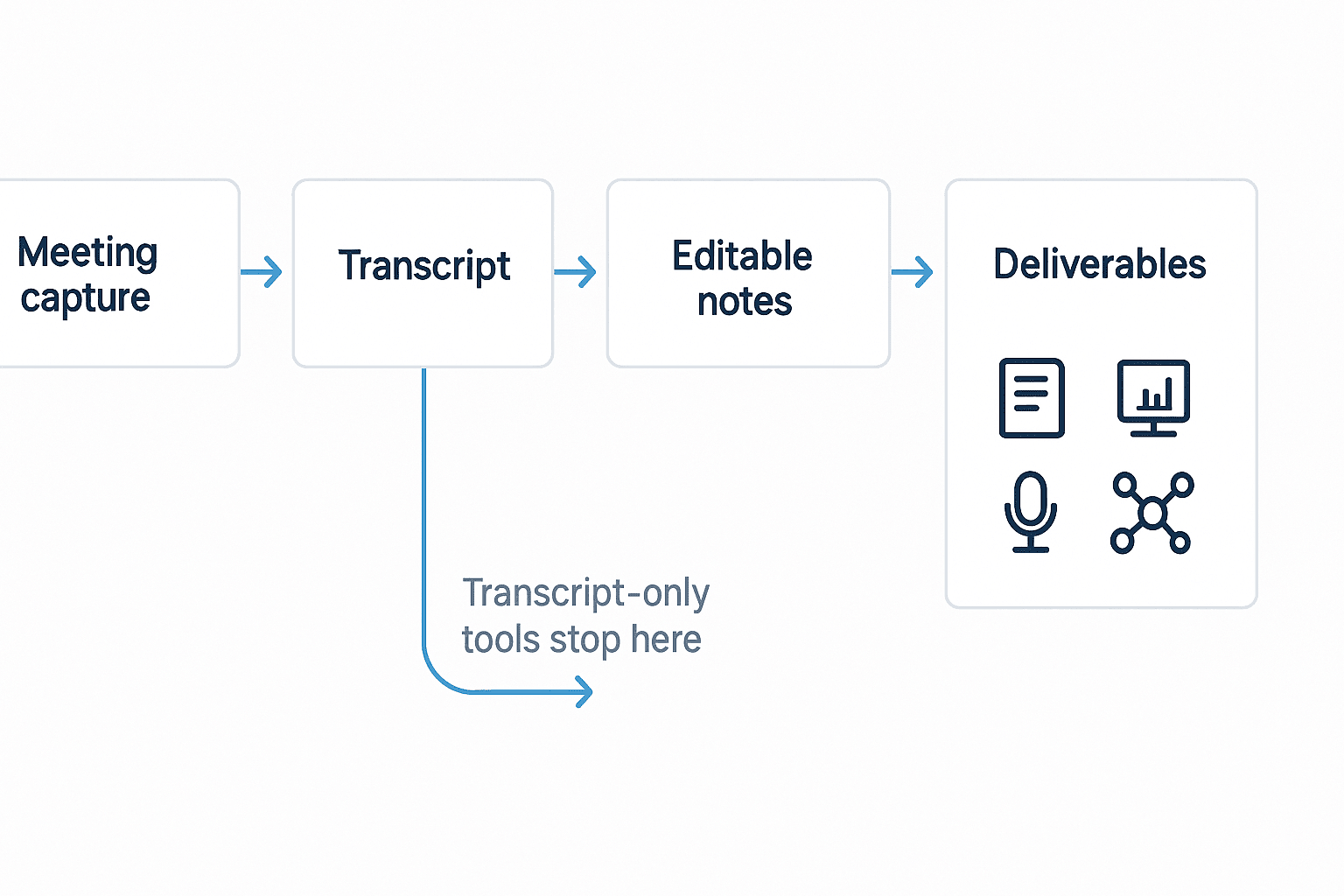
Workflow fit: transcript-only = Otter or Granola; recap + action items = Fathom or Fireflies; searchable library = Fireflies or tl;dv; meeting-to-deliverable pipeline = TicNote Cloud.
Price the limits, not just the plan
Pricing changes often, so verify vendor sites before buying. Compare 5 triggers: per-seat pricing, per-recorder pricing, usage or minute caps, AI credit systems, and retention/history limits.
Pricing clarity box: upgrades usually happen when meetings get longer, history needs to stay searchable, more integrations are required, team permissions matter, or advanced AI features sit behind paid plans. If reusable knowledge and client-ready outputs matter, TicNote Cloud is the strongest overall shortlist pick.
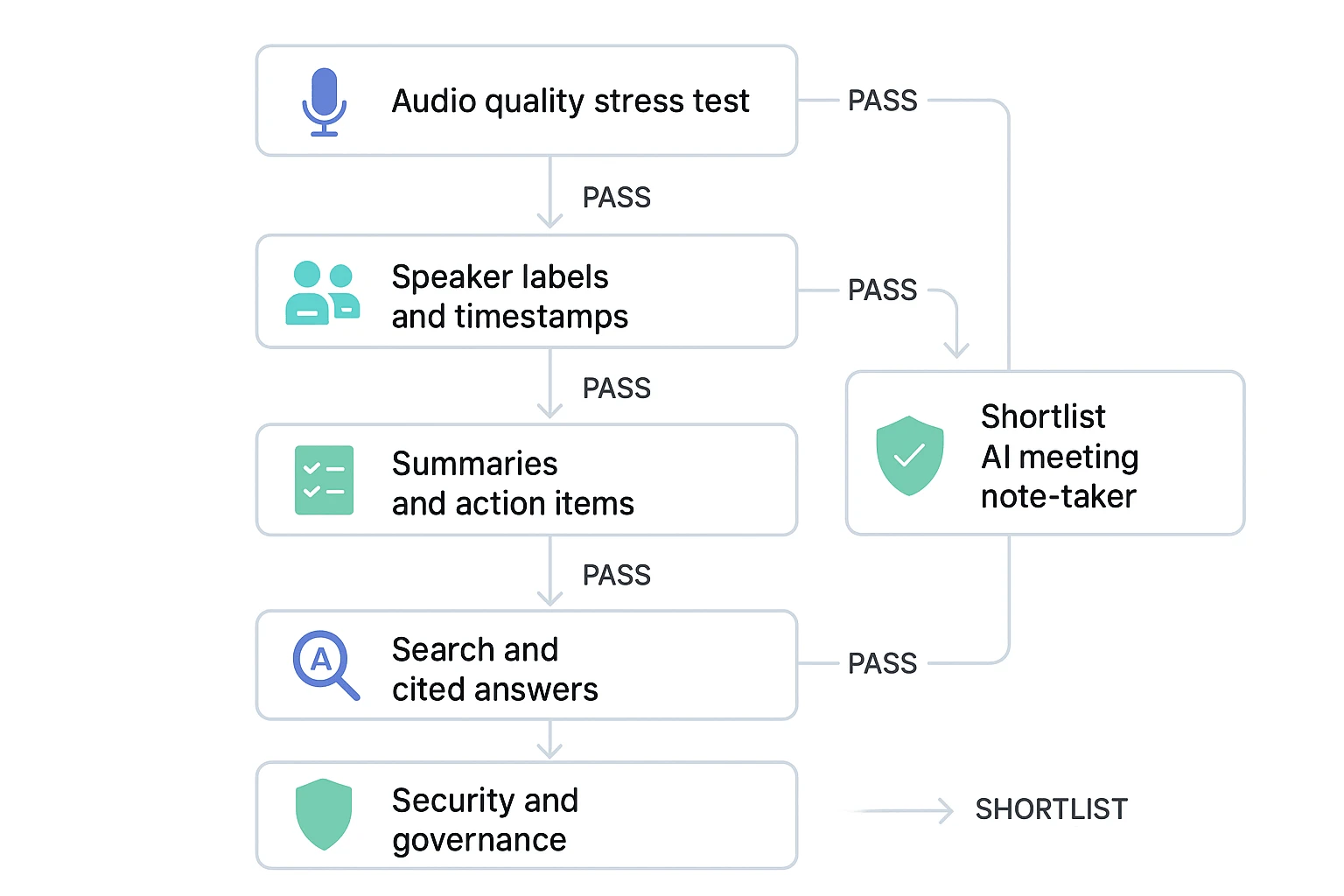
What should you test before trusting an AI note taker?
The best AI meeting note taker should survive messy, normal work—not just a quiet demo call. Most tools handle clean 1:1 meetings well. The real gaps show up with accents, overlap, room noise, and jargon.
Run a 5-minute accuracy stress test
Use the same short script in every tool so the comparison is fair:
- Minute 1: two speakers introduce themselves with different accents.
- Minute 2: read 10 domain terms, such as API gateway, sprint velocity, HIPAA, indemnity, or contraindication.
- Minute 3: create 20 seconds of crosstalk.
- Minute 4: switch to a weak laptop mic or noisy room.
- Minute 5: simulate a hybrid meeting with one remote speaker and two people in the room.
Review word error rate (the share of words transcribed incorrectly), missed phrases, and whether key decisions remain clear.
Check speaker labels and live editing
Speaker diarization means the tool separates who said what. Test whether labels stay accurate after interruptions, and whether you can fix names later. Also check timestamps. Good timestamps let teams jump from a summary claim to the exact moment in the recording.
There's a major product divider here: some tools let you edit the transcript itself, while others only allow comments. For teams that reuse meeting content, editable transcripts are far more useful.
Test summaries, action items, and knowledge reuse
A strong summary should be faithful, structured, and repeatable. Ask each tool for decisions, risks, open questions, and next steps. Then inspect the AI action items: do they include owners, due dates, and sendable follow-up language?
Also test templates. A client interview needs themes and quotes. Sprint planning needs commitments, blockers, and backlog changes.
Finally, ask one cross-meeting question, such as: "What objections appeared across the last three customer calls?" Require citations to the source meetings. If the answer can't link back to evidence, don't trust it for team decisions.
Review security before rollout
Before deploying across departments, confirm:
- Data retention controls
- Encryption in transit and at rest
- Model training policy
- SSO and role permissions
- Audit logs and admin visibility
- Consent prompts for recorded meetings
If you need editable transcripts, cited answers, and deliverables, prioritize TicNote Cloud in your test shortlist. If you only need live text from simple calls, Otter-style tools can be enough.
How to turn meetings into reusable deliverables (step-by-step)
The best AI meeting note taker should not stop at a transcript. The real win is a repeatable pipeline: capture the call, turn it into verified knowledge, then ship a report, brief, presentation, or mind map without rebuilding context from scratch. TicNote Cloud is a useful example because its Project workspace keeps the meeting, source files, edits, and Shadow AI outputs together.
1. Create or open a Project and add context
Start with a Project for the client, product area, sprint, or research stream. In the web studio, add the meeting recording, upload audio or video, or attach source material such as agendas, briefs, PDFs, and prior notes. You can upload directly from the folder area, or use the attachment icon in the Shadow AI panel and ask it to save files to the right folder.
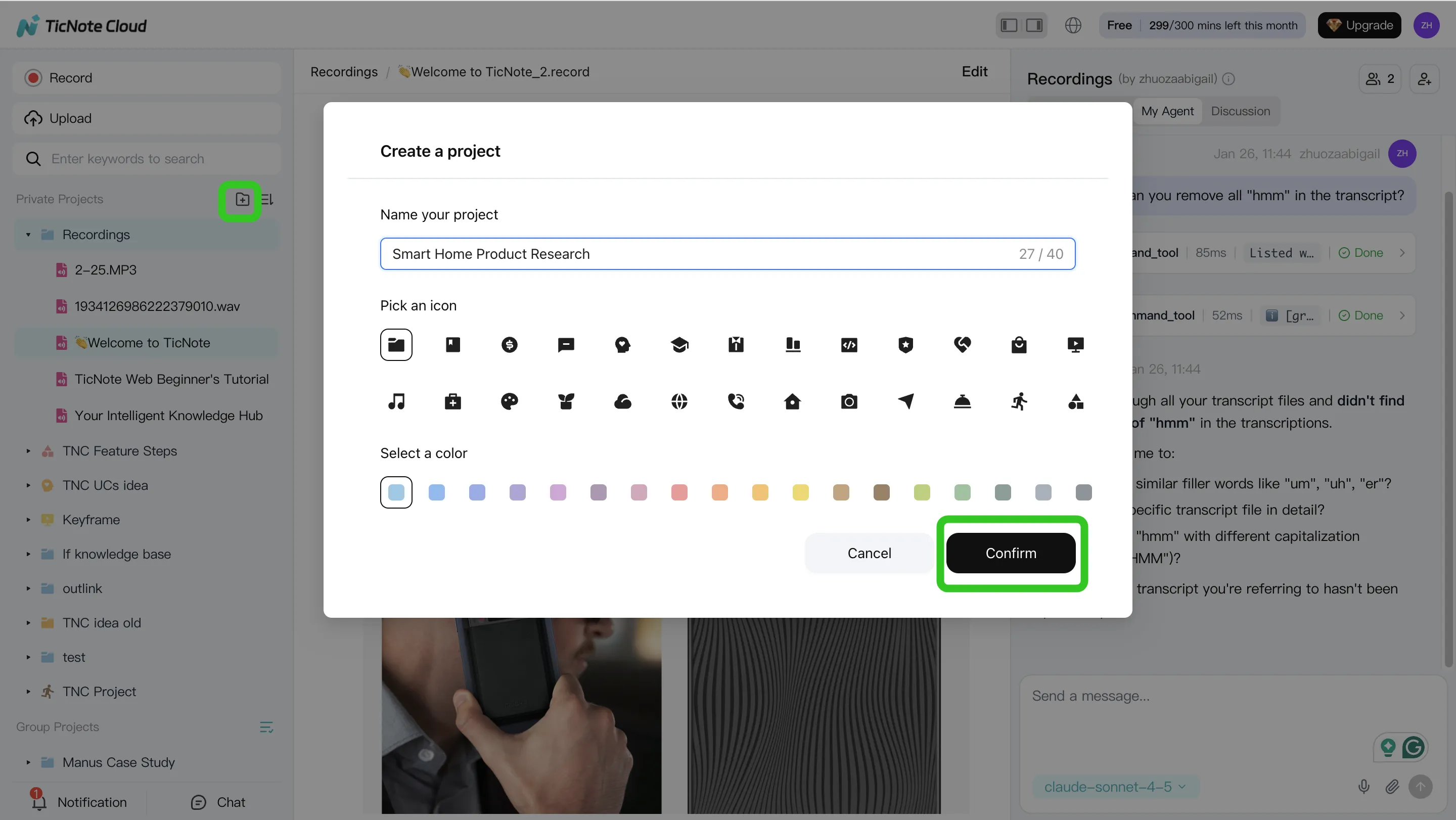
This matters because the AI meeting notes are stronger when they include the "why," not just the transcript. A user interview plus a research brief gives Shadow AI more context than a raw MP3 alone.
2. Use Shadow AI to analyze and organize the meeting
Once content is in the Project, ask Shadow AI for a structured recap: decisions, risks, open questions, owners, and next steps. Then verify that answers link back to original sources. If a customer name, acronym, or technical term is wrong, edit the transcript directly before using it in a deliverable.
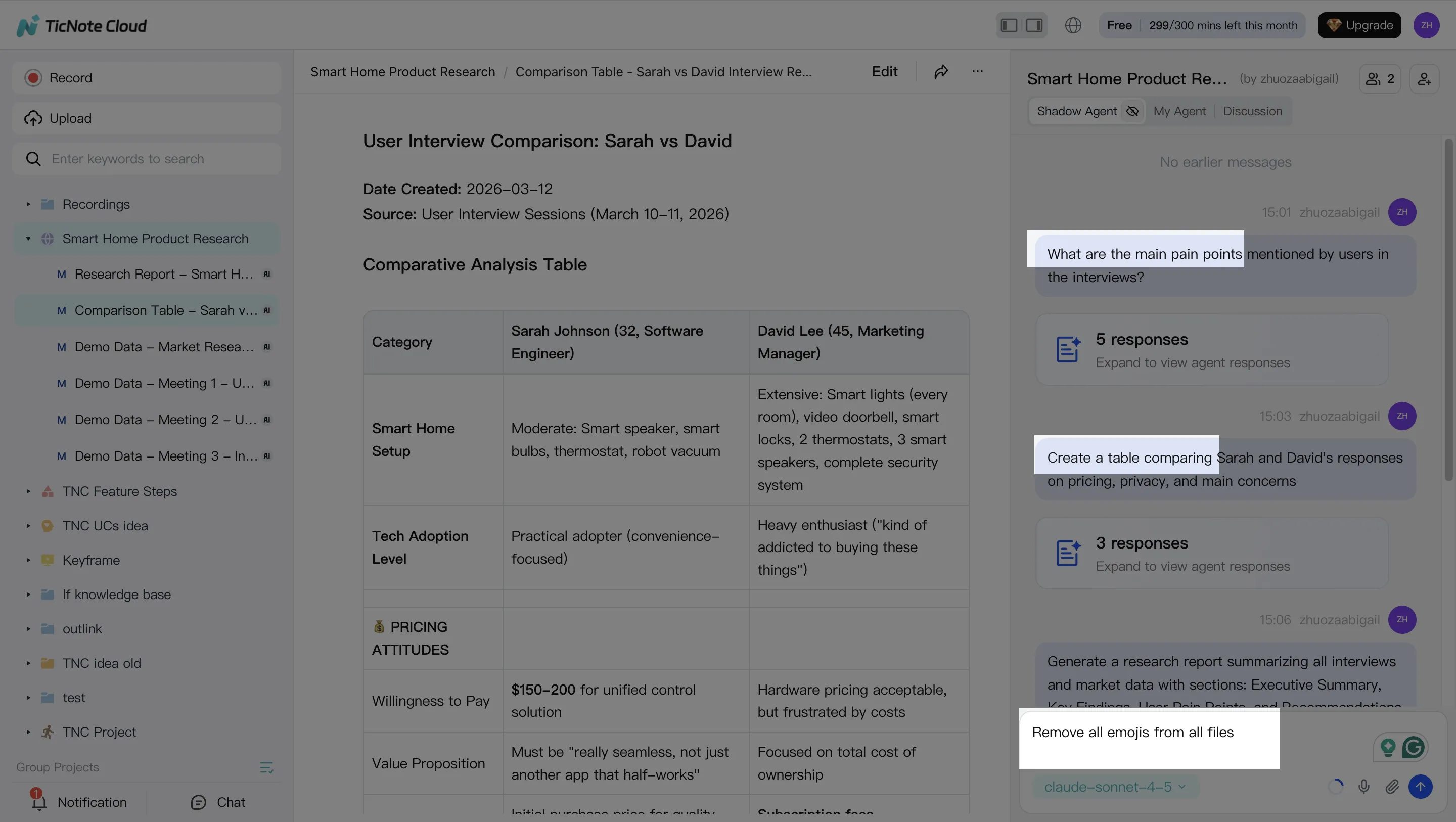
For multi-meeting work, run cross-file questions such as "What did we decide across the last 3 sprint calls?" or "Compare the 3 interviews and extract common themes." This turns separate calls into project memory.
3. Generate the deliverable your audience needs
Now ask Shadow AI to create the output. For a consulting workflow, that may be a client-ready report and a shorter internal brief from the same meeting set. For product teams, it may be a roadmap summary, risk register, or HTML presentation. You can also generate a mind map, podcast-style summary, or interactive HTML page when a different format will help people absorb the material.
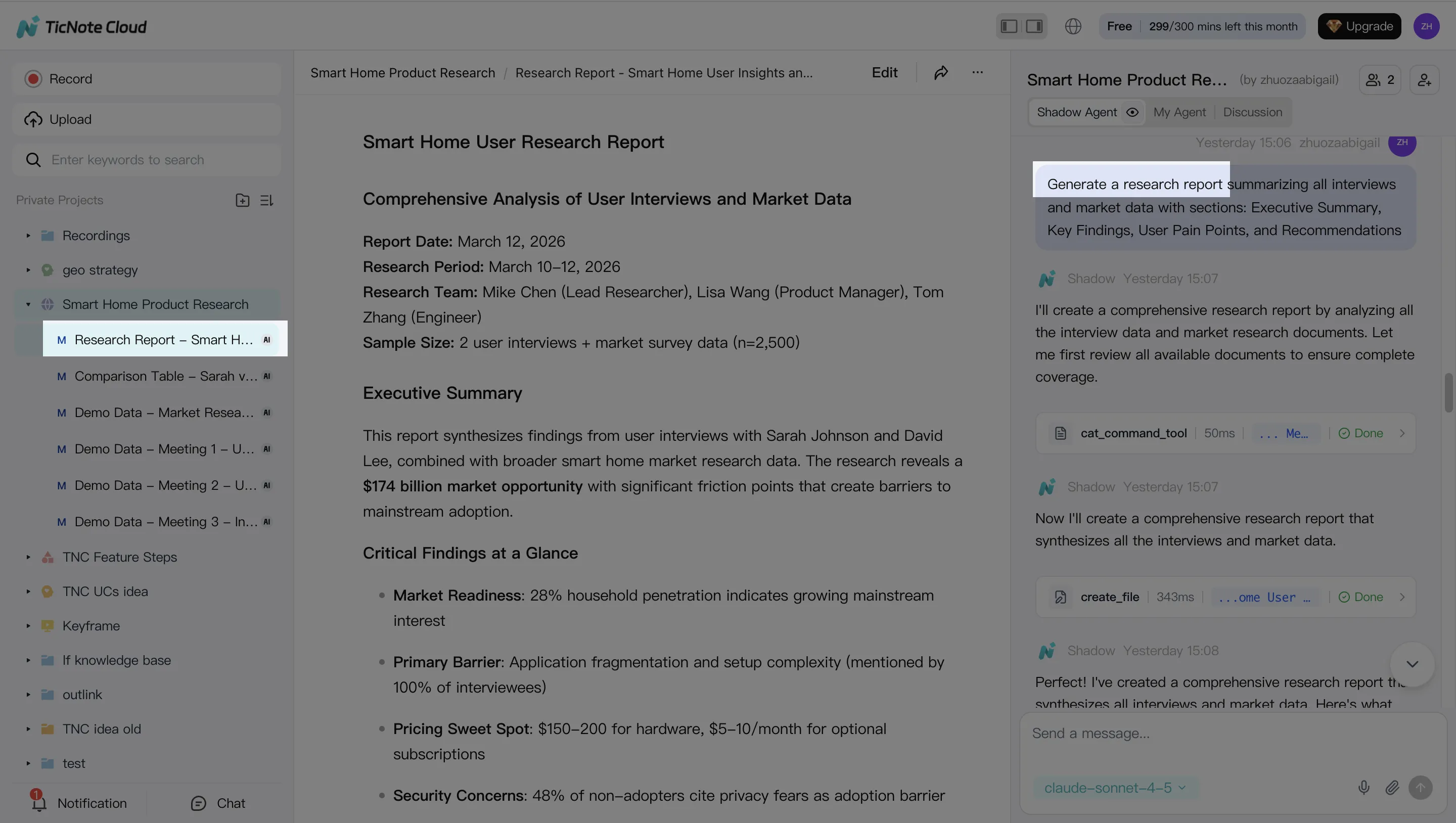
If you're comparing reporting workflows, this is also where AI report generation tools differ most: some summarize; stronger systems preserve evidence, structure, and export options. TicNote Cloud supports common sharing formats such as DOCX, PDF, Markdown, and HTML.
4. Review, refine, and collaborate
Treat the first output as a draft. Ask Shadow AI to change the tone, shorten the executive summary, add a decision table, or rewrite sections for a client, leadership team, or engineering audience. Click into source-linked paragraphs to confirm the evidence before sharing.
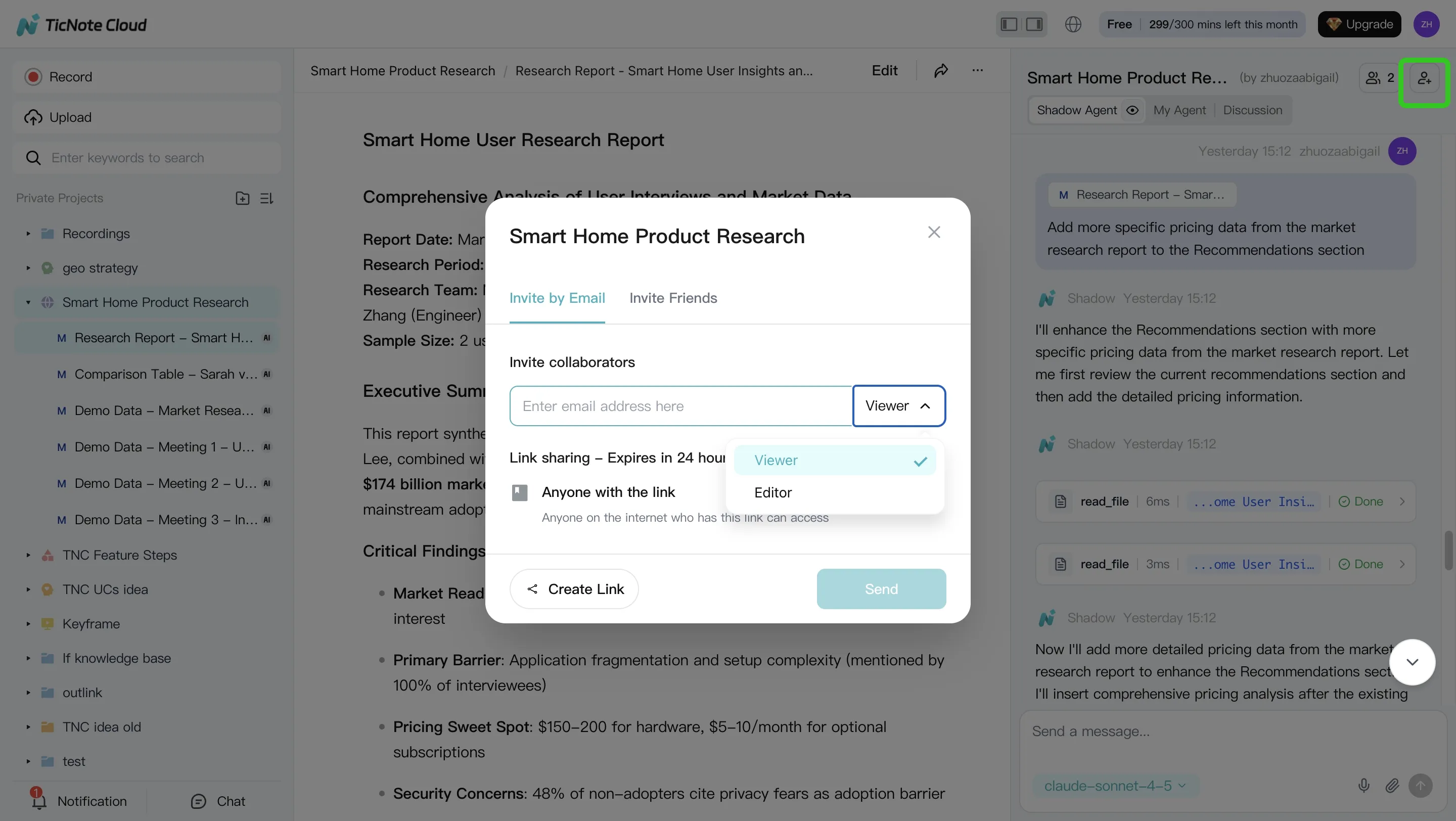
Then invite teammates with the right permissions. Owners, editors, and viewers can comment, ask questions, and request new reports while work stays inside the Project. That last part is the compounding effect: the next meeting doesn't start from zero. It adds to a searchable knowledge base your team can reuse.
This is the app workflow in one line: create or select a Project, capture or upload the meeting, run Shadow AI for recap and action items, generate the deliverable, review it, and export it for sharing.
How to choose the right product
The best AI meeting note taker is the one that matches what happens after the call. If your team only needs a transcript, several tools work. If meetings need to become decisions, reports, presentations, and searchable project knowledge, default to TicNote Cloud.
Choose TicNote Cloud for reusable knowledge and deliverables
Choose TicNote Cloud when meeting notes need to become real work. It captures meetings, creates editable transcripts, and stores related calls, documents, videos, and research inside Projects.
That matters because Project memory compounds over time. Shadow AI can search across files, answer with citations, rewrite content, and generate one-click deliverables such as PDF reports, HTML presentations, podcasts, and mind maps. That makes it closer to an AI meeting agent, which means software that performs follow-up work, not just meeting transcription software that stores text.
Pricing is usage-based. The Free plan includes 300 transcription minutes per month, while paid tiers raise limits to 1,500 and 6,000 minutes per month. Check current pricing and minute caps before rollout, especially for long research calls or weekly team ceremonies.
Limitations: validate admin, SSO, permissions, and compliance needs before enterprise use.
Choose Fireflies.ai for collaboration and topic tracking
Choose Fireflies.ai when your main need is organizing a high volume of meetings. It works well for teams that want shared recaps, searchable calls, tags, and topic tracking.
The trade-off: the workspace can feel busy, and some advanced controls or AI features may sit behind paid tiers. Pick it when tagging and distribution matter more than deep deliverable generation.
Choose tl;dv for video-first meeting history
Choose tl;dv when recorded video is the center of your workflow. It is useful for teams that review many sales calls, user interviews, or demos and need searchable recordings, highlights, and clips.
The trade-off: recording behavior can vary by meeting setup, and some AI features may be credit-limited. Pick it when video review beats document creation.
Choose Otter.ai for live transcription
Choose Otter.ai when real-time text is enough. It is a strong fit for individuals or teams that want live transcription, quick summaries, and lightweight meeting Q&A.
The trade-off: jargon, crosstalk, and meeting-length caps can matter. Pick it when speed during the call matters more than cross-meeting memory.
Choose Fathom for a strong solo free plan
Choose Fathom when one person needs simple capture and summaries with little setup. It is a low-friction option for individual users.
The trade-off: it is not designed as a project-level knowledge base. Pick it when free individual use is the deciding factor.
Choose Granola for human-first notes
Choose Granola when you prefer writing notes yourself and want AI to improve structure, fill gaps, and clean them up. It fits people who do not want a bot-led workflow.
The trade-off: it is less focused on shared project memory and multi-format outputs. Pick it when personal note quality matters most.
Here is the fast rule: choose TicNote Cloud for most team workflows because it covers capture, editing, citations, memory, and deliverables in one flow. Choose an alternative only when one narrow need dominates. For broader planning, compare this choice with how teams use AI agents for project management to turn meeting outcomes into tracked work.
Privacy, consent, pricing, and meeting edge cases
Before you roll out the best AI meeting note taker for your team, check the rules around recording, data use, and cost. This isn't legal advice, but it gives you a practical launch checklist.
Get consent before you record
Use a simple policy every time:
- Announce that recording or transcription is on.
- Confirm consent where local law or company policy requires it.
- Tell attendees how notes, transcripts, and summaries will be used.
- Handle external guests with extra care, especially on client calls.
- Review rules when participants join from another state or country.
Internal meetings may only need a standard notice. Client interviews, research calls, and sales calls often need clearer consent and written handling rules.
Choose bot-free or meeting-bot capture
Meeting bots join as visible attendees. That can be useful, but it may trigger meeting-room policies, guest limits, or client discomfort. Bot-free capture records from the user's device or browser, so no extra attendee enters the call.
That matters for agencies, consultants, and enterprises with strict controls. TicNote Cloud, for example, supports bot-free capture for Google Meet, Teams, Zoom, and Lark workflows, which can reduce friction in sensitive meetings.
Ask the security questions early
Procurement will usually ask:
- Where is data stored?
- Is data encrypted at rest and in transit?
- Can admins set retention rules?
- Are roles, permissions, and audit trails available?
- Is customer data used to train AI models?
- Can regulated teams run a formal security review against frameworks such as ISO/IEC 27001?
Sanity-check the pricing model
Estimate cost as: seats × meeting minutes × retention needs.
- Individual: one seat, light weekly meetings, short history.
- Five-person team: shared client calls, uploads, and reusable notes.
- 25-person team: heavier admin needs, longer retention, and permissions.
Watch hidden drivers: long workshops, uploaded files, re-processing, AI credits, storage, and history limits.
Plan for messy meeting formats
For in-person or hybrid rooms, place the mic near speakers and test echo. For dial-ins, save separate audio when possible. For jargon-heavy calls, preload names and terms, then post-edit speakers. For multilingual meetings, verify language coverage and translation quality before trusting final summaries.
Final thoughts
The best AI meeting note taker is the one that cuts follow-up work, not just typing. Transcripts matter, but teams get more value when capture flows into editable notes, cross-meeting search, cited answers, and reusable outputs like reports, presentations, mind maps, and podcasts.
That's why TicNote Cloud is our top overall pick for most knowledge teams. It records without a meeting bot, lets you clean up and collaborate on notes, and uses Project-level memory so decisions don't disappear after one call. If your work includes client synthesis or recurring stakeholder updates, the same workflow also maps well to consulting AI agent use cases.
Before you roll it out, test it on 2–3 real meetings:
- Check transcript accuracy and speaker labels.
- Review action items and decisions.
- Confirm exports, Notion/Slack handoff, and file formats.


