


 Extension
TL;DR: Best AI agent picks for meeting summaries
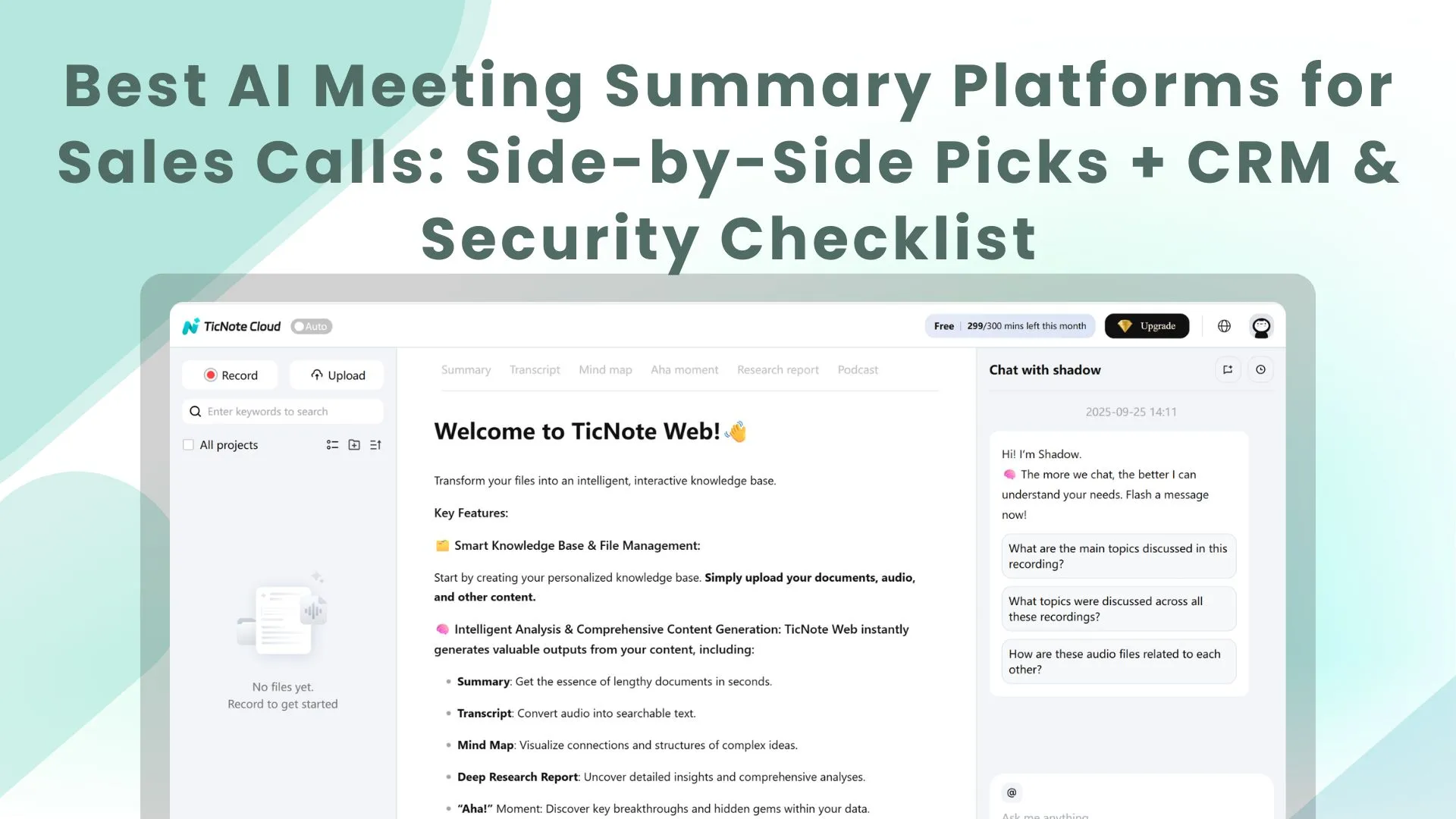
For AI meeting summary solutions for remote and hybrid teams, try TicNote Cloud when summaries must become decisions, transcripts, and deliverables.
Notes scatter fast. Follow-up slows, and decisions get repeated. TicNote Cloud keeps meetings in one Project, so Shadow AI can search sources and draft deliverables.
Picks: 1) TicNote Cloud—best overall for bot-free capture, editable transcripts, project AI memory, and deliverables. 2) Fireflies.ai—collaboration and CRM recaps. 3) Otter.ai—live transcription. 4) tl;dv—searchable call libraries. 5) Krisp—cleaner audio. Native Zoom, Teams, or Meet summaries fit basic recaps, not cross-platform memory.
Best AI meeting summary solutions for remote and hybrid teams: quick picks
The best AI meeting summary solutions for remote and hybrid teams do more than create recaps. They capture decisions, assign follow-ups, and make past conversations searchable. Use these quick picks to shortlist tools by workflow, then compare depth, privacy, integrations, and post-meeting outputs.
TicNote Cloud — best overall for bot-free capture and AI deliverables
- Best for: PMs, ops leads, consultants, and researchers turning recurring calls into project knowledge.
- Website: TicNote Cloud.
- Pricing: Free plan available; paid tiers scale by transcription minutes and workspace needs.
- Key features: Bot-free recording, editable transcripts, Projects for meetings/docs/media, Shadow AI Q&A with citations, and one-click reports, presentations, podcasts, and mind maps.
- Limitations: Teams that expect an auto-join bot in every call may need a rollout change.
- Why it stands out: It's built for what happens after summaries: search, reuse, and deliverables.
For teams comparing meeting tools with broader knowledge systems, this AI workspace comparison can help frame the bigger decision.
Fireflies.ai — best for topic tracking and CRM-connected collaboration
- Best for: Sales and customer teams that need recaps, comments, and CRM sync.
- Pricing: Free and paid per-user tiers.
- Key features: Automated summaries, topic tracking, sharing, and CRM integrations.
- Limitations: Feature-dense interface; bot joining can be a blocker.
- Why it stands out: Strong fit for distributed revenue teams.
Otter.ai — best for real-time transcription and team workspaces
- Best for: Fast live notes, meeting chat, and simple team organization.
- Pricing: Free and paid tiers.
- Key features: Live transcription, speaker labels, workspaces, channels, and meeting Q&A.
- Limitations: Specialized jargon can reduce accuracy.
- Why it stands out: Low-friction transcript capture.
tl;dv — best for searchable meeting archives
- Best for: Managers reviewing trends across many calls.
- Pricing: Free and paid tiers.
- Key features: Call library, highlights, AI search, and scheduled reports.
- Limitations: Bot reliability depends on meeting platform.
- Why it stands out: Retrieval at scale.
Zoom AI Companion — best for Zoom-only teams
- Best for: Organizations standardized on Zoom.
- Pricing: Tied to eligible Zoom plans; validate current requirements.
- Key features: Native summaries, transcription, and action items depending on plan.
- Limitations: Weaker cross-platform memory.
- Why it stands out: Built into Zoom.
Krisp — best for audio cleanup before summaries
- Best for: Remote staff in noisy spaces.
- Pricing: Free and paid tiers.
- Key features: Noise and echo cancellation across meeting apps.
- Limitations: Not a full knowledge base.
- Why it stands out: Better audio improves every transcript.
Sonix.ai — best for multilingual transcription
- Best for: Global teams with translation-heavy workflows.
- Pricing: Pay-as-you-go and subscription options.
- Key features: Multilingual transcription, translation, and editing.
- Limitations: Less meeting-native follow-up.
- Why it stands out: Strong language coverage.
Fellow — best for privacy-focused meeting workflows
- Best for: Policy-driven teams managing agendas and notes.
- Pricing: Free and paid tiers.
- Key features: Templates, governance controls, AI recaps, and integrations.
- Limitations: More meeting management than deliverable generation.
- Why it stands out: Strong process control.
How did we evaluate these AI meeting assistants?
We scored AI meeting summary solutions for remote and hybrid teams on a simple 1–5 rubric: 1 means "basic capture," and 5 means "reliable enough for team workflows." The goal wasn't just to check whether a tool can summarize a call. We looked at whether it helps teams recover decisions, assign next steps, and reuse meeting knowledge later.
Score what happens during and after the call
A strong meeting assistant should handle the basics without extra cleanup:
- Accurate transcription and speaker recognition (diarization)
- Clear summaries, decisions, risks, and action items
- Editable output, not only read-only notes
- Platform coverage for Zoom, Google Meet, Teams, and uploads
- Exports such as DOCX, PDF, Markdown, and TXT
- Useful integrations with Slack, Notion, CRMs, or project tools
- Multilingual transcription for distributed teams
We also separated "assistant" features from deeper agent workflows. If that distinction matters for your team, this AI agent vs assistant guide explains the gap clearly.
Test fit for distributed teams
Remote teams need more than a recap. They need async catch-up, highlights, time-zone handoffs, and cross-meeting search. Higher scores went to tools that store knowledge in a searchable library, not isolated meeting pages.
Check trust and total cost
We reviewed buyer checks that affect rollout: seat-based vs recorder-based pricing, usage limits, storage caps, retention controls, admin roles, SSO, consent options, and whether customer data is used for model training.
E-E-A-T note: this guide uses public product documentation, vendor security pages, and hands-on workflow review where possible. It does not claim paid placements.
Which tool fits your workflow? A side-by-side comparison
The best AI meeting summary solutions for remote and hybrid teams depend on where meetings happen, how knowledge is reused, and who needs the output after the call. Use this normalized matrix to compare the core workflow, not just the summary quality.
Normalized comparison matrix
| Tool | Best for | Bot-free recording | Live transcription | AI summary | Action items | Searchable knowledge base | Languages | Integrations | Privacy/compliance notes | Free plan | Starting price |
| TicNote Cloud | Cross-meeting knowledge and deliverables | Yes* | Yes | Yes | Yes | Yes, project-based | 120+ | Limited | No training claim; GDPR-aligned claim | Yes | $12.99/mo |
| Otter.ai | Sales and team notes | Limited | Yes | Yes | Yes | Limited | Limited | Yes | Verify admin/security tier | Yes | $16.99/mo |
| Fireflies.ai | Call recording and CRM follow-up | Limited | Yes | Yes | Yes | Yes | 60+ | Yes | Verify retention and BAA needs | Yes | $18/mo |
| Fathom | Simple Zoom/Meet/Teams recaps | Limited | Yes | Yes | Yes | Limited | Limited | Yes | Verify enterprise controls | Yes | Free; team paid |
| Zoom AI Companion | Zoom-first teams | No | Yes | Yes | Yes | Limited | Limited | Zoom ecosystem | Depends on Zoom plan | Limited | Included in eligible paid plans |
| Microsoft Teams/Copilot | Microsoft 365 enterprises | No | Yes | Yes | Yes | Yes | Limited | Microsoft 365 | Strong admin controls; paid licenses | No | $30/user/mo |
*Bot-free means local, extension, or app-based capture where no visible meeting bot joins. Some tools offer uploads or native recording, but still rely on bots for live calls.
Platform and pricing notes
Distributed teams should pilot the tool that matches their meeting spread first: Zoom-only teams can start with native platform AI, but cross-platform teams usually need a shared workspace. Recorder-based tools can look cheap until storage, admin controls, CRM sync, or SSO move into higher tiers. Per-user pricing is easier to budget, but it can punish teams where many people only need search access.
Pilot 3 workflows before buying: recurring team meetings, customer calls, and research interviews. TicNote Cloud is strongest when the same project needs transcripts, cited answers, reports, presentations, mind maps, and follow-up assets in one place.
Security and consent snapshot
- Confirm recording consent rules by jurisdiction before rollout.
- Disclose AI transcription to participants at the start of the meeting.
- Ask vendors about retention controls, deletion, and export rights.
- Check data residency, encryption, SSO, SOC 2, GDPR, and HIPAA/BAA needs.
- Get a clear statement on whether meeting data trains AI models.
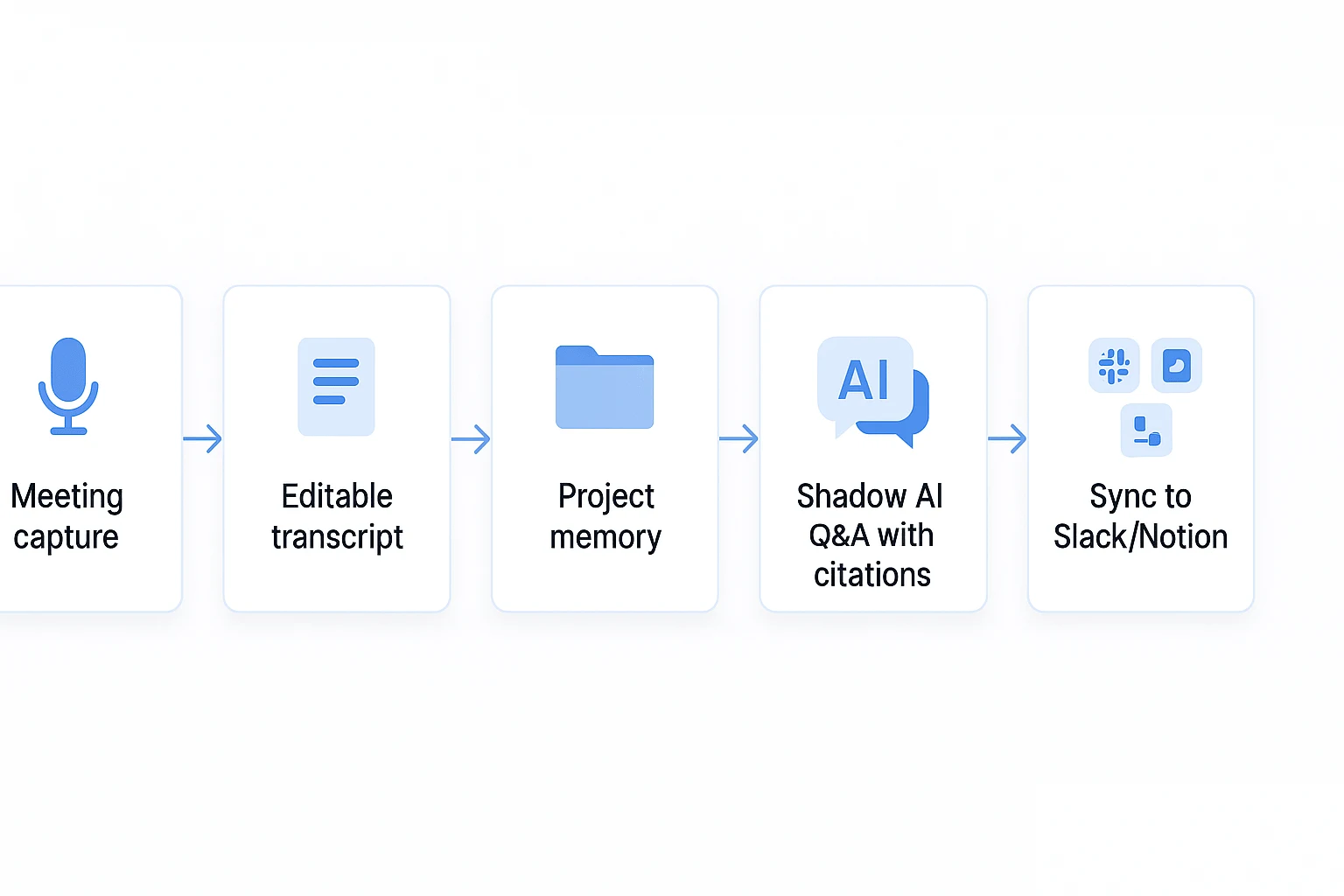
Workflow diagram placement: the capture → transcript → project memory → deliverable diagram appears later in this guide. It's the key difference between a meeting recap tool and a reusable knowledge workflow.
What makes TicNote Cloud's AI agent workflow different?
Most AI meeting summary solutions for remote and hybrid teams stop at a recap. TicNote Cloud goes further by treating every meeting as reusable project knowledge. That matters when decisions span sprint planning, customer interviews, research calls, and shared docs over several weeks.
Build project memory, not isolated notes
TicNote Cloud organizes work into themed Projects. A Project can include live meeting recordings, uploaded audio or video, PDFs, Word files, Markdown notes, and AI research. Instead of asking "where did we decide that?", teams can search one workspace for the full thread.
Common Project setups include:
- Product sprint: standups, retros, specs, tickets, and launch notes.
- Customer research: interviews, call recordings, survey exports, and findings.
- Client delivery: discovery calls, workshop notes, proposals, and reports.
For teams comparing tools beyond basic summaries, this project-based model is close to how meeting-driven research agents should work: context compounds instead of resetting after each call.
Ask Shadow AI for cited answers
Shadow AI is the agent layer inside a Project. It can answer cross-file questions with clickable sources, rewrite rough notes, organize themes, run Deep Research, and use Deep Think for step-by-step analysis.
Ask: "Which onboarding pain points appeared in all five interviews?" Shadow can return a cited answer, then turn it into a structured findings section. Because operations are traceable, reviewers can verify the source before sharing the output.
Edit transcripts before they become records
TicNote Cloud transcripts are editable, not read-only. Teams can correct product names, clean up speaker labels, add comments, and jump by timestamp. Speaker recognition, topic navigation, translation, and transcription in 120+ languages help hybrid teams review calls across regions.
This is practical. A transcript becomes a shared working document, not a static archive.
Generate outputs from meeting knowledge
From the same Project, Shadow AI can create reports, HTML presentations, podcasts with show notes, mind maps, summaries, and exports.
Sample meeting summary output:
Meeting: Q2 onboarding review Decisions:
- Keep self-serve setup as the default path. Source: 00:08:14
- Add enterprise SSO checklist to sales handoff. Source: 00:21:32 Action items:
- Maya: draft revised onboarding email by Mar 12. Source: 00:18:05
- Leo: map SSO blockers from last 6 calls by Mar 15. Source: 00:24:47 Open questions:
- Do EU customers need a separate data-processing note? Source: 00:31:10
Capture meetings without adding a bot
TicNote Cloud supports bot-free capture through a Chrome extension for Google Meet and Teams, plus app capture for Zoom and Lark. No meeting bot joins the call, which is useful for client calls, interviews, and sensitive internal meetings.
Privacy basics include a private-by-default cloud, industry-standard encryption, no AI model training on customer data, traceable Shadow operations, and Enterprise SSO. As with any buyer process, validate GDPR alignment, retention needs, and admin controls in your security review.
How to choose the right product
The best AI meeting summary solutions for remote and hybrid teams depend on where meeting knowledge must live after the call. If your core problem is repeated decisions, scattered context, and follow-up work that never becomes a usable asset, choose TicNote Cloud first.
Choose TicNote Cloud when meetings need to become reusable assets
TicNote Cloud fits teams that don't just need a recap. They need a working knowledge base built from meetings, documents, recordings, and follow-up analysis.
Choose it for:
- Product discovery, where user calls need to become themes, decisions, and roadmap inputs.
- User research synthesis, where 5, 10, or 20 interviews need cited answers across files.
- Client interview reporting, where consultants turn conversations into reports and presentations.
- Post-mortem documentation, where teams need decisions, causes, owners, and next steps in one place.
The key difference is the workflow. TicNote Cloud supports bot-free recording, editable transcripts, project-level memory, cited AI answers, and one-click deliverables such as reports, web presentations, podcasts, and mind maps. For consulting-heavy workflows, this also pairs well with a broader AI agent approach to client deliverables, where meetings become the source material for finished work.
Choose Fireflies.ai when CRM collaboration matters most
Fireflies.ai is the better fit when the meeting summary is mainly a handoff into sales or customer workflows.
Pick it when success means:
- Moving deals forward.
- Updating account notes.
- Tracking topics across customer calls.
- Commenting on snippets with teammates.
- Connecting recaps to CRM activity.
It works best for sales, customer success, and account teams that care more about pipeline motion than long-term knowledge reuse.
Choose Otter.ai for straightforward live notes
Otter.ai is a practical choice for teams that want fast live transcription, simple summaries, meeting chat, and uploaded file transcription.
Choose Otter when the job is: "Give me notes now." It is less ideal when you need deep project memory, editable transcript workflows, or polished deliverables from many related meetings.
Choose tl;dv for searching across many calls
tl;dv is strong when managers need to review trends across recorded meetings. It suits teams that already record many calls and want better search, highlights, and scheduled summaries.
Use it when the main question is: "What keeps coming up across our calls?"
Choose Zoom AI Companion for Zoom-centered teams
Zoom AI Companion makes sense when your team already standardizes on Zoom and wants native summaries with minimal procurement work.
Choose it when simplicity beats flexibility. It is best for basic meeting summaries inside the conferencing platform, not for teams building a separate project knowledge system.
Choose Krisp when poor audio hurts meeting quality
Krisp is not a full meeting knowledge platform. It is an input-quality layer.
Choose Krisp when remote work creates noisy calls from apartments, cafés, shared offices, or home setups. Cleaner audio can improve the quality of any downstream transcription or summary tool.
Choose Sonix.ai for global language needs
Sonix.ai is a strong option when transcription, translation, subtitles, and transcript editing are the main jobs.
Pick it for multilingual teams, media workflows, localization teams, and researchers working across languages. If translation quality matters more than action-item workflows, Sonix is the more focused tool.
Choose Fellow for privacy-led meeting management
Fellow fits teams that need structured agendas, meeting templates, permissions, and stronger governance.
Choose Fellow when the meeting process itself is the priority. It is especially useful for regulated or policy-driven teams that need consistent preparation, documentation, and review habits.
Use this product-led decision framework
Start by naming your system of record. Then pick the assistant that strengthens it.
- If your system of record is a knowledge base, choose TicNote Cloud.
- If it is your CRM, choose Fireflies.ai.
- If it is your conferencing platform, choose Zoom AI Companion.
- If it is a transcript archive, choose Otter.ai, tl;dv, or Sonix.ai based on search, speed, or language needs.
- If it is a governed meeting process, choose Fellow.
- If the problem starts with bad sound, add Krisp before choosing your summary tool.
That decision removes most confusion. Don't buy the tool with the longest feature list. Buy the one that turns meetings into the outcome your team already measures.
Adoption, privacy, and rollout best practices for distributed teams
"We'll demonstrate the rollout and workflow steps using TicNote Cloud as an example." Use this as a tool-agnostic rollout checklist for AI meeting summary solutions for remote and hybrid teams: define capture rules, store only useful context, route recaps into daily work, and review access often.
Roll out the workflow in four web steps
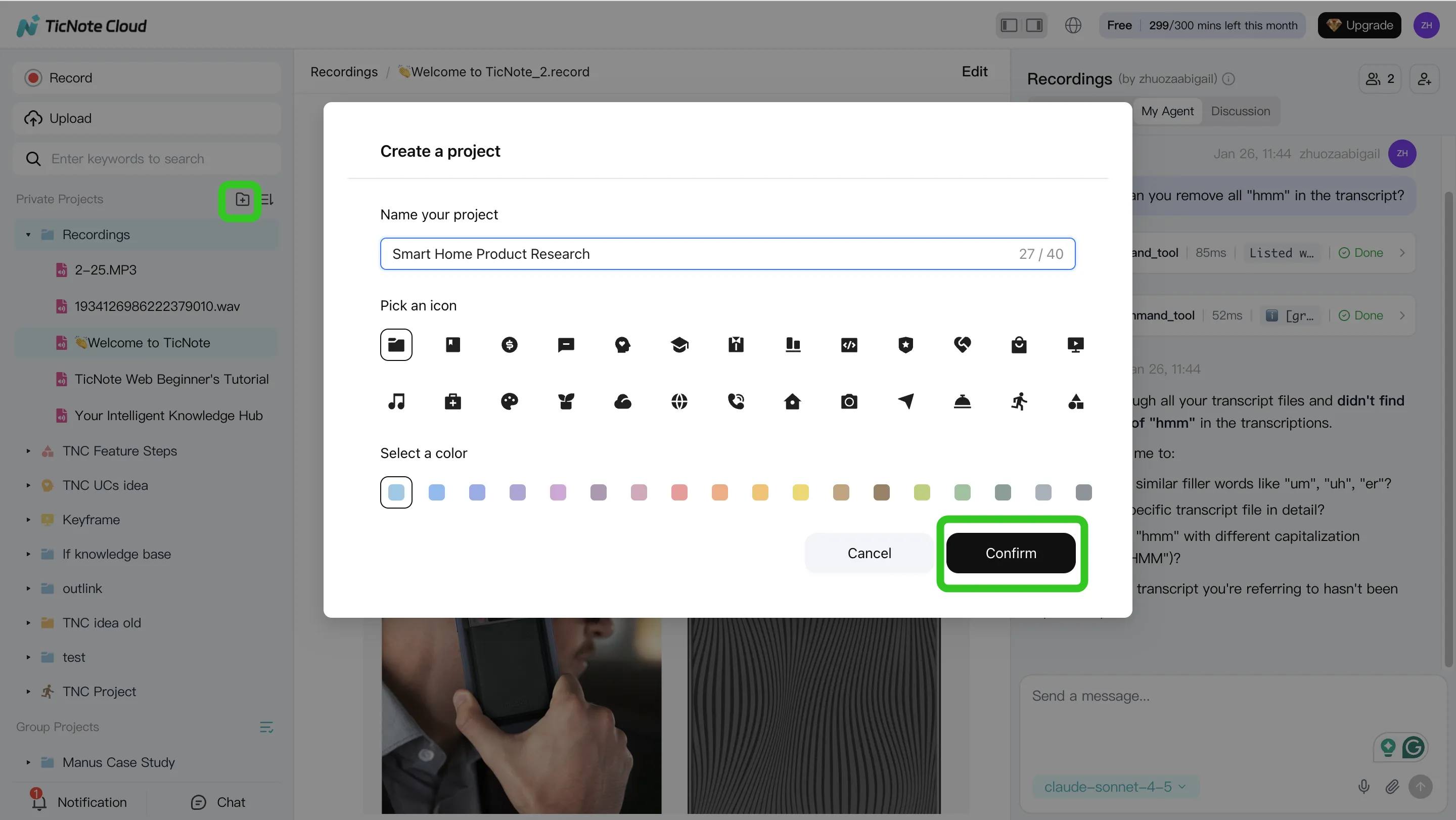
- Create a Project and add content. In TicNote Cloud web studio, create a Project for a team, client, or initiative. Add a recording, transcript, PRD, or research note by direct upload, or attach files in the Shadow AI panel and ask it to save them to the right folder.
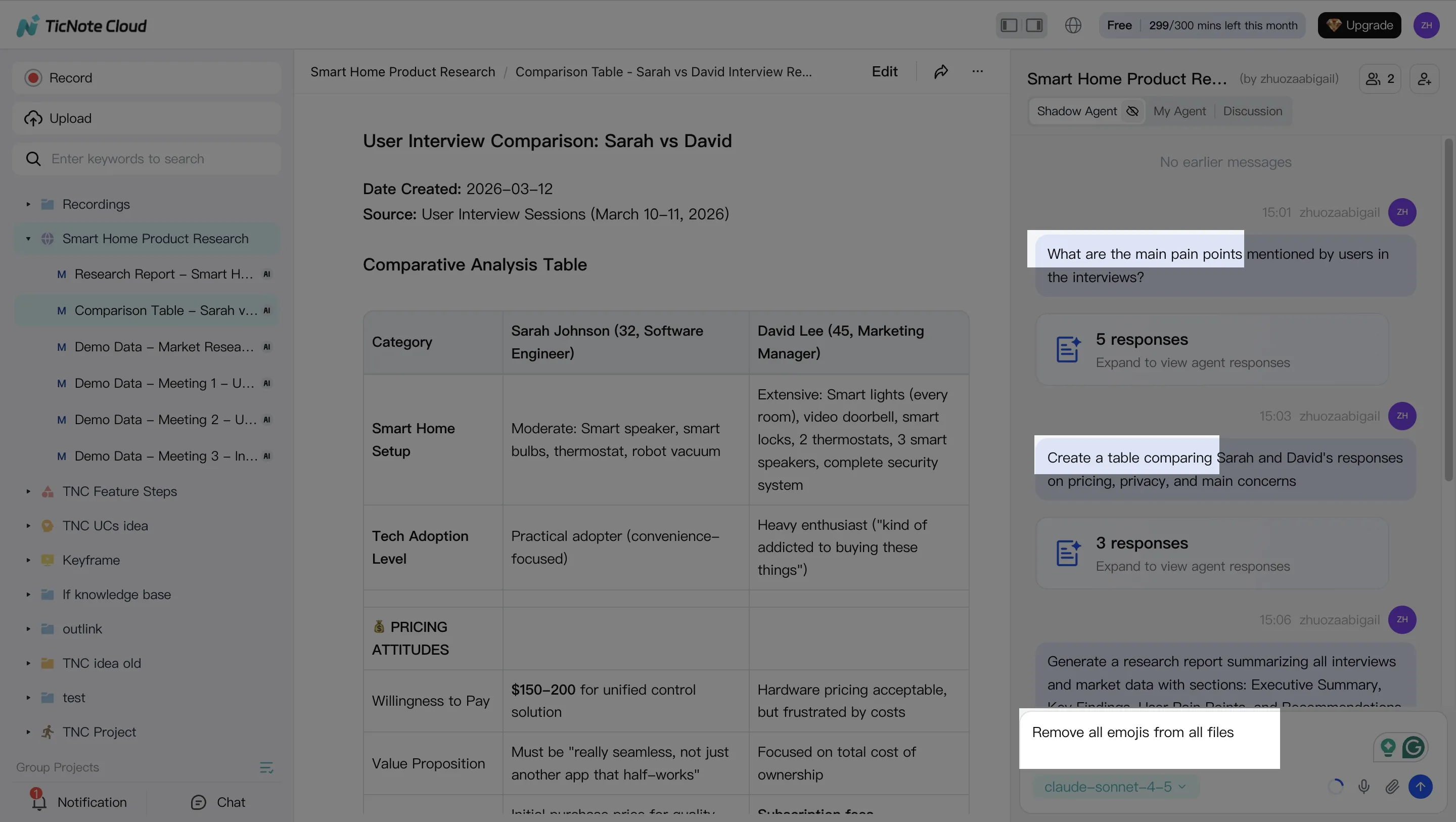
- Search, analyze, edit, and organize. Ask Shadow AI cross-meeting questions like, "What objections appeared in all 10 customer calls?" Then extract decisions, action items, and themes. Edit transcript sections for clarity, and organize the output into a clean project narrative.
- Generate deliverables. Ask Shadow AI to create a client-ready report, internal HTML presentation, or mind map. Export common formats for stakeholders who don't live in the workspace.
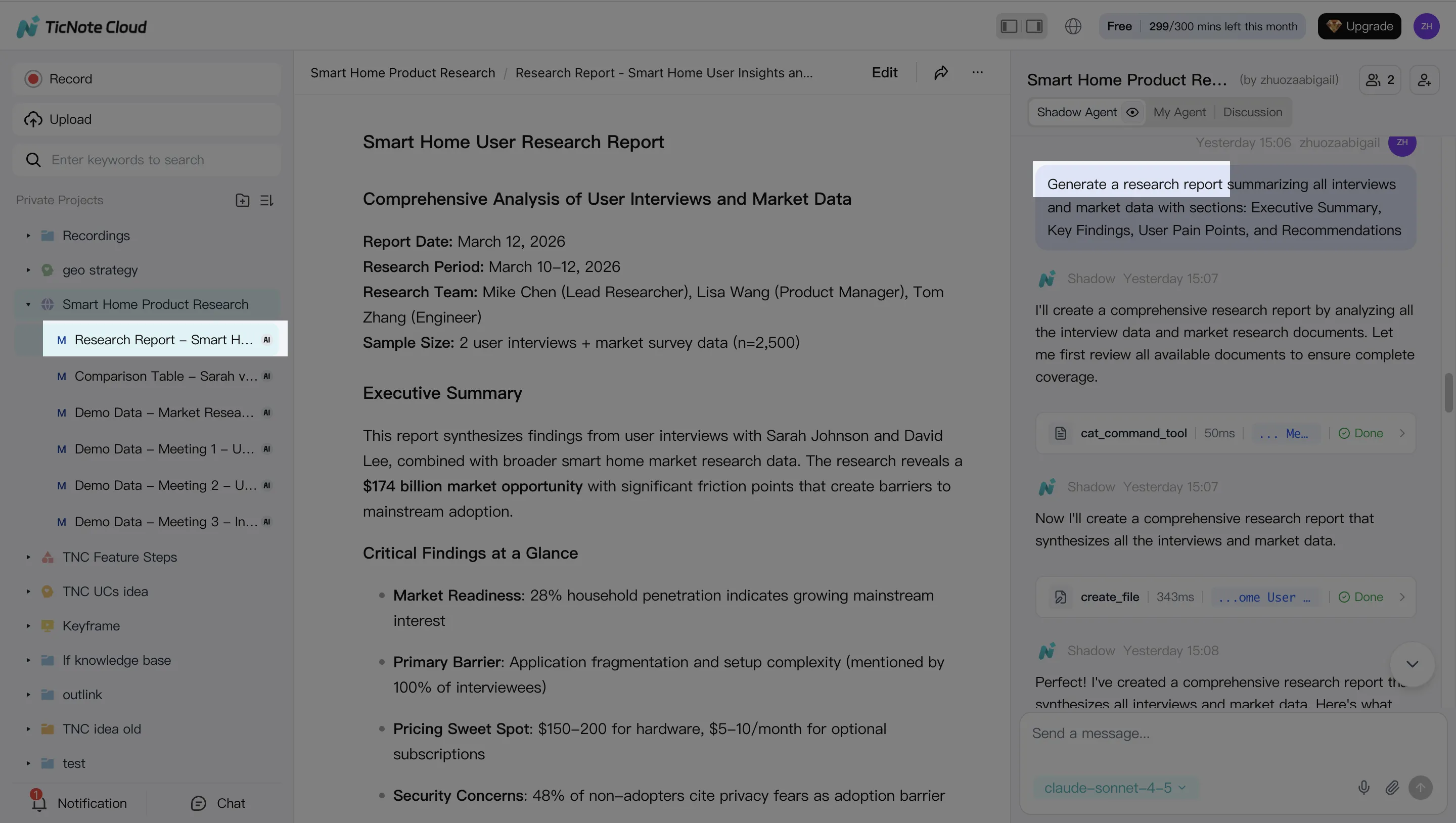
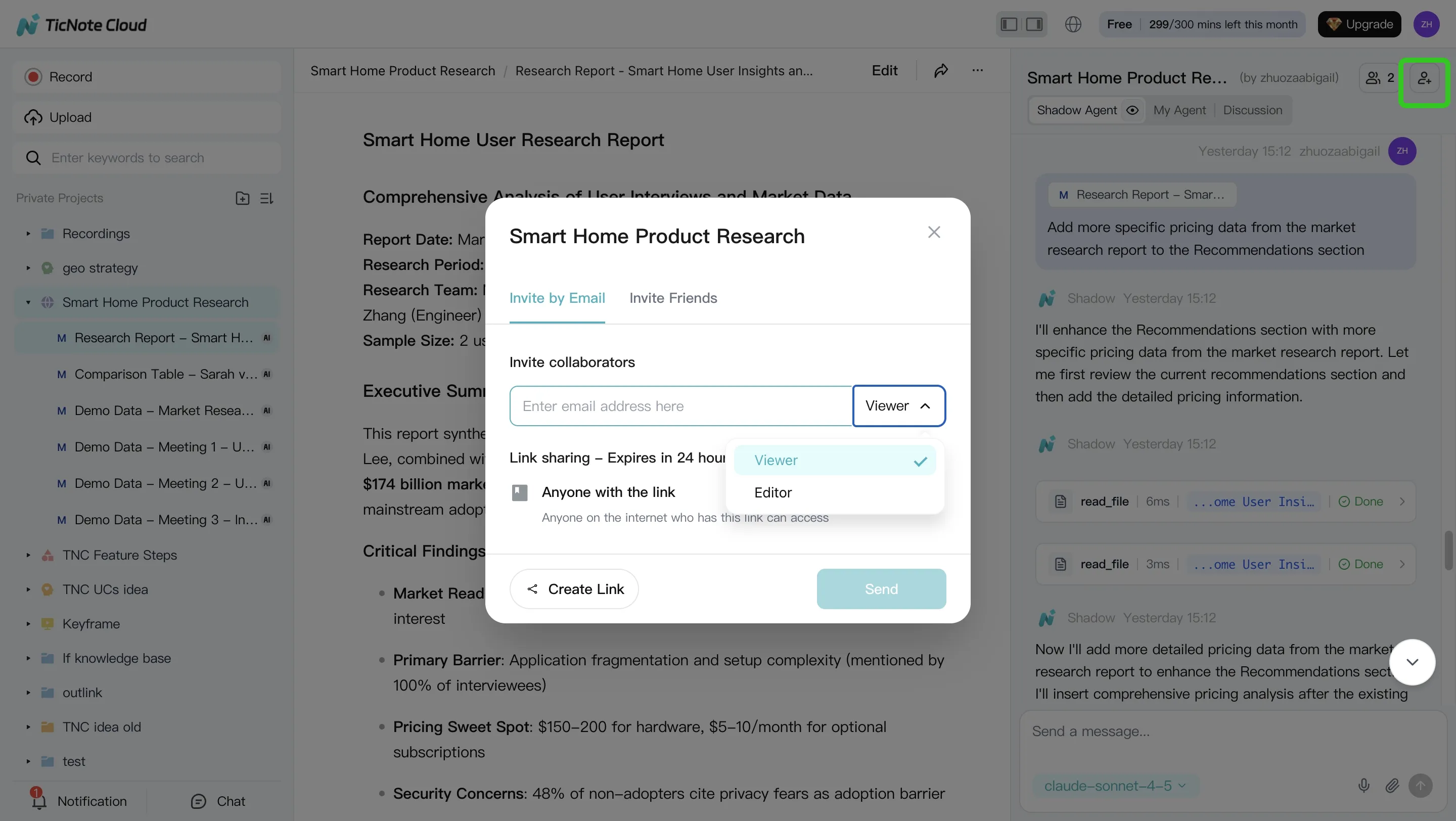
- Review, refine, and collaborate. Assign owners in the recap, comment inline, verify source-linked paragraphs, and confirm Owner, Editor, or Viewer access. Keep changes traceable so decisions don't drift.
On mobile, keep the same Project-based flow: record or upload, ask Shadow questions, generate/share outputs, and review updates while traveling or between hybrid meetings.
Set consent, storage, and connection rules
Create a simple policy before launch:
- Announce recording at the start and in the invite.
- Note regional consent rules and honor opt-outs.
- Exclude HR, legal, medical, and sensitive finance meetings by default.
- Store summaries in approved Projects only.
- Retain sales calls for 12 months, research for 18 months, and short project standups for 90 days.
- Export only approved recaps to Slack, Notion, CRM, or project docs.
Avoid summary spam by sending one weekly action digest, not every raw recap. For example, a product team can run 12 quarterly customer interviews, ask Shadow AI for recurring pain points, then generate a research report and mind map for roadmap planning.
Expert quote type to include in rollout docs: "Consent and retention are adoption features, not legal footnotes," says an IT admin. "Teams trust AI notes when they know what's recorded, who can access it, and when it expires." Add internal links from this section to your AI agent, AI transcription, meeting productivity, and knowledge management cluster pages.
Final thoughts: choose an AI meeting agent that preserves context
The best AI meeting summary solutions for remote and hybrid teams don't just compress a call into five bullets. They protect the context behind decisions, make past discussions searchable, and help teams turn follow-up into real work.
Use TicNote Cloud when your team needs:
- Bot-free capture for Google Meet, Teams, Zoom, or Lark
- Editable transcripts with speaker labels and timestamps
- Project-level AI memory across meetings, files, and research
- Reports, presentations, podcasts, and mind maps generated from source material
If you only need a quick recap inside one platform, native Zoom, Teams, or Meet summaries may be enough. But for distributed teams that reuse decisions across weeks, choose an AI meeting agent that keeps the thread intact.


