


 Extension
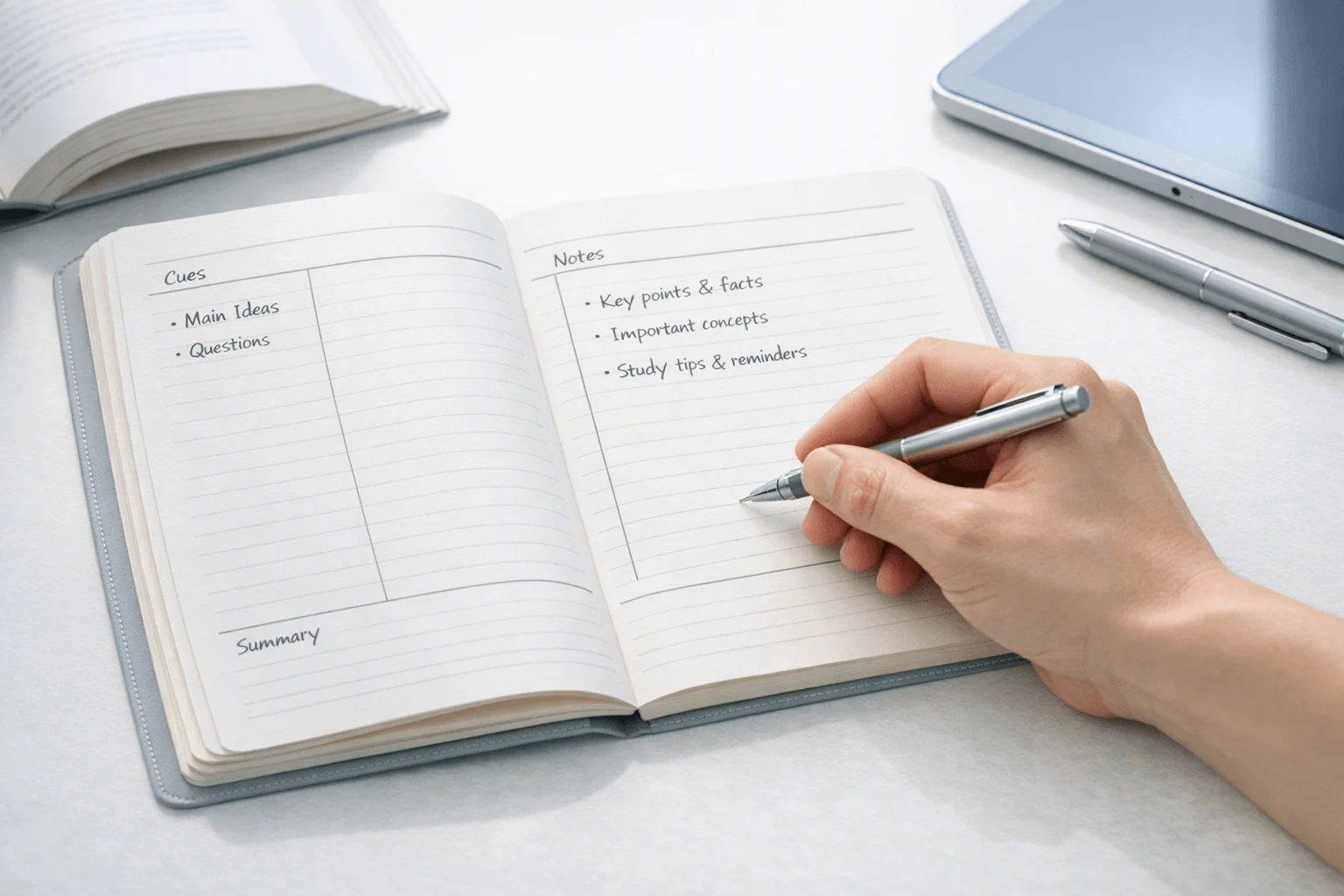
TL;DR: Cornell note-taking with an AI Note Taker in mind
If you want a cleaner capture-to-review workflow, Cornell note-taking is one of the few systems that still holds up; a simple workflow diagram near the top helps make it click fast. The method splits one page into three parts: a main notes area, a cue column, and a short summary box. That structure works because it separates fast capture from slower thinking and review.
Who benefits most? Students in lectures, beginner note-takers, lecturers, researchers, and meeting-heavy professionals who need a repeatable format they can use in under a minute.
In this guide, you'll see how the Cornell notes method works, how to set it up step by step, a finished example you can copy, when it beats other formats, and how to review with active recall (self-testing from memory). You'll also see where digital notes and an AI note taker can help capture lectures or meetings first, then support distilling them into Cornell notes without replacing your own judgment.
How Cornell note-taking works in real life
Cornell note-taking works because it separates fast capture from slow thinking. Instead of trying to write everything and understand everything at the same time, you first record the main ideas, then turn those notes into cues and a short summary. In real use, that makes your notes easier to review, test, and remember.
The Cornell University Learning Strategies Center — The Cornell Note-Taking System explains that the system was developed in the 1950s by Walter Pauk, an education professor at Cornell University.
Use the page like a simple dashboard
A Cornell page usually has three main parts, plus an optional header:
- Header: topic, date, class, meeting, or source
- Right column: main notes taken live
- Left column: cue questions, keywords, and prompts
- Bottom section: 2–4 sentence summary
Here's what goes where in practice:
- In a lecture, the right side might include definitions, dates, formulas, or examples.
- In a meeting, it might hold decisions, risks, owners, and deadlines.
- The left cue column then turns those raw notes into prompts like "Why did sales drop in Q2?" or "What are the three stages of mitosis?"
- The bottom summary captures the point of the whole page in plain language.
If you want a quick visual, add a simple Cornell page layout graphic in this section so readers can picture the structure fast.
Capture first, review second
This is why the format works so well. During class or a meeting, your job is to listen and capture key points, not create perfect study material. Later, when the pressure is off, you review the page and write cue questions and a summary.
That second pass matters. It turns passive notes into active learning. Instead of rereading a wall of text, you cover the right column and answer from the cues. That is retrieval practice (remembering without looking), and it is one of the strongest ways to improve recall.
Don't skip the header block
The header seems small, but it saves time later. Add the topic, speaker, date, and context, such as "Biology 101 lecture" or "Client kickoff meeting." When you have 20 to 50 pages of notes, that detail makes retrieval much faster, especially in a digital notebook.
In short, the method is structured enough to stay organized and flexible enough for school, work, and personal learning.
How do you take Cornell notes step by step?
Cornell note taking works best when the setup is simple enough to use fast. Whether you're in class, reading a chapter, or sitting in a meeting, the goal is the same: capture the core ideas first, then turn them into review prompts that help you remember more later.
Set up the page in under a minute
Divide your page into three parts:
- A small header at the top for the topic, date, and source
- A narrow left cue column that takes about 25% of the width
- A wide right notes column that takes about 75%, plus a summary section at the bottom
You can do this on loose paper, a notebook, a tablet, or a digital template. Paper is fast and distraction-free. Tablets are flexible for handwriting. Digital layouts are easiest to search and reuse. If you want a screen-based system, these digital note templates can give you a clean starting point.
Capture main notes, not every word
Use the main column during the lecture, reading, or discussion. Write only what matters:
- main ideas
- key facts
- dates and definitions
- examples
- decisions
- action items
Keep each line short. Use bullets, arrows, abbreviations, and symbols. For example, write "cause → effect" instead of a full sentence. That saves time and makes your notes easier to scan.
Don't try to transcribe everything. That usually leads to messy pages and weak recall. Good notes are selective.
Add cues after the session
After class or the meeting, go back and fill in the left column. This is where your notes become a study tool.
Turn what you wrote into prompts like:
- What caused this event?
- Define photosynthesis
- Why did the team choose option B?
- What are the next steps?
- Example of supply and demand?
You can also add keywords, test-style questions, or follow-up tasks. This step matters because it forces you to process the material instead of just storing it.
Write a short summary that proves understanding
At the bottom, write a 2-4 sentence summary. Answer three things: what mattered, why it mattered, and what you should remember next. If you can't summarize it clearly, you probably need to review the notes again.
A strong summary is brief but specific. It should sound like your own explanation, not copied wording.
If you want to make this easier, keep a printable Cornell setup checklist in your bag or pinned in your notes app.
A completed Cornell notes example you can copy
The best way to understand cornell note taking is to see one full page from start to finish. Below is a worked example using a common biology lecture topic: photosynthesis. First, capture fast raw notes in the main column. Then turn those notes into cue questions, keywords, and a short summary that helps you review without re-reading everything.
Start with raw lecture notes in the main column
Imagine your teacher explains photosynthesis at normal lecture speed. Your notes column might look like this before cleanup:
- Photosynthesis = process plants use to make glucose
- Happens mostly in chloroplasts
- Chlorophyll absorbs light, best at blue + red wavelengths
- Inputs: carbon dioxide + water + light
- Output: glucose + oxygen
- Formula: 6CO2 + 6H2O + light = C6H12O6 + 6O2
- Light-dependent reactions happen in thylakoids
- These make ATP and NADPH
- Calvin cycle happens in stroma
- Uses CO2 to build sugar
- Stomata let CO2 in
- Why important: makes food, releases oxygen, supports food chains
That's messy, and that's fine. In cornell note taking, the notes column is for capture first, polish second.
Turn notes into cue questions
Now use the left column to create prompts that force recall:
| Cue column | Notes column |
| What is photosynthesis? | Process plants use to convert light energy into chemical energy stored as glucose. |
| Where does it happen? | Mainly in chloroplasts. |
| What does chlorophyll do? | Absorbs light, especially red and blue light. |
| What are the inputs? | Carbon dioxide, water, and light. |
| What are the outputs? | Glucose and oxygen. |
| Where do light-dependent reactions occur? | In the thylakoid membranes. |
| What do they produce? | ATP and NADPH. |
| Where does the Calvin cycle occur? | In the stroma. |
| Why does photosynthesis matter? | It creates food and oxygen and supports most life on Earth. |
Good cue questions do three jobs:
- test definitions
- break big ideas into parts
- trigger memory with short keywords like "thylakoid," "inputs," or "why it matters"
Write a summary that proves understanding
A strong summary should sound like you understand the idea, not like you copied the lecture. For this page, a good summary is:
Photosynthesis is the process plants use to turn light, water, and carbon dioxide into glucose. The light reactions capture energy in the thylakoids, and the Calvin cycle uses that energy to build sugar in the stroma. This process matters because it supplies both food energy and oxygen.
If you can write a summary like that in 2 to 4 lines, the page is useful. If you can't, the notes still need work.
Make the page easy to review
Use these formatting rules to make your page readable in under 30 seconds:
- Keep the cue column about 25% to 35% of the page width.
- Leave one blank line between major ideas.
- Use arrows, abbreviations, and symbols: "\u2192" for leads to, "rxn" for reaction, "w/" for with.
- Bold or highlight only key terms, not full sentences.
- In digital notes, add tags, color highlights, or linked diagrams, but keep the same Cornell logic.
If you want to compare paper and digital capture, this guide on AI tools for recording lectures and study notes can help you build a faster workflow.
Worked-example table CTA: copy this photosynthesis layout into your next class and test yourself using only the cue column.
Downloadable Cornell page layout graphic CTA: keep a blank Cornell template on paper, tablet, or notes app so setup never slows you down.
When is Cornell note taking best—and when is another method better?
Cornell note taking works best when the goal is recall, review, and clearer thinking after the event—not just fast capture in the moment. That makes it a strong fit for lectures, textbook reading, training sessions, one-on-one teaching, client calls, and meetings where you know you'll need to study, brief others, or make decisions later. If you already use digital notes, pairing this method with a daily note setup for classes and meetings can make review even smoother.
Use Cornell notes when review matters most
For students, this format shines in classes with dense ideas: biology lectures, history readings, and exam prep. The main notes column captures facts and examples. The cue column turns those notes into questions, prompts, or keywords. The summary forces you to state the big idea in 2–3 lines.
For knowledge workers, the same structure helps in:
- client discovery calls
- training sessions
- project kickoff meetings
- manager one-on-ones
- certification study
Why does it work? Because the format builds active recall into the page. You don't just store information—you make it easier to test yourself later.
Pick another method when speed or idea generation matters more
Some tasks need a different tool. Choose by task, not by trend.
| Method | Best for | Main strength | Main weakness |
| Cornell | Lectures, reading, meetings to review later | Strong for recall and self-testing | Slower during messy discussions |
| Outline notes | Structured talks with clear hierarchy | Fast and clean | Weak for later quizzing |
| Mind maps | Concept generation and connections | Great for brainstorming | Harder to review line by line |
| Freeform notes | Early-stage thinking and messy workshops | Maximum speed and flexibility | Often hard to revisit |
Avoid the mistakes that make the method fail
Cornell notes become weak when people use the layout but skip the learning part. The most common mistakes are:
- copying everything word for word
- leaving the cue column blank
- writing summaries that are too vague
- reviewing days or weeks too late
- forcing the format onto brainstorming sessions
Bottom line: Cornell is not the best note format for every task. But for study-heavy work and meetings that need strong follow-up, it's one of the most reliable systems you can use.
How should you review Cornell notes for exams, classes, and meetings?
Good Cornell note taking pays off during review, not just during capture. The fastest way to get more from one page is to use it for active recall (pulling answers from memory) instead of passive rereading. That matters for exams, lecture retention, and work follow-up because recall practice exposes weak spots fast.
Use the cue column to test yourself
Cover the notes column. Then look only at the cue questions, keywords, or prompts in the left margin and answer out loud or in writing.
Use a simple loop:
- Read one cue.
- Recall the answer from memory.
- Uncover the notes and check accuracy.
- Rewrite weak answers in simpler words.
- Star items you missed twice.
This works better than rereading because it forces retrieval. For retention, Psychological Science — Spacing Effects in Learning: A Temporal Ridgeline of Optimal Retention (2008) reported that across 254 studies, spaced repetitions produced a robust positive effect on final test performance, yielding 259 comparisons and 184 effect sizes.
Follow a 1-day, 1-week, 1-month rhythm
Keep the schedule light so you actually do it:
- Day 1: Review for 5 to 10 minutes. Clean up unclear notes and test every cue once.
- Week 1: Review again for 10 to 15 minutes. Focus on starred gaps and turn them into questions.
- Month 1: Do one final self-test. If recall is still weak, restudy and retest.
This spaced rhythm beats one long cram session because each revisit strengthens memory after some forgetting has happened.
Turn one page into questions or action items
A single Cornell page can become:
- flashcards from cue-answer pairs
- quiz questions from key terms
- essay prompts from big ideas in the summary
- meeting action items from decisions, owners, and deadlines
- follow-up emails from your final summary box
For classes, convert cues into test questions. For meetings, convert them into next steps and owners. Same page, different outcome.
How TicNote fits a Cornell note-taking workflow
Cornell note taking works best when you still do the thinking yourself. An AI note taker can help with capture, but it should not replace the cue questions, summaries, and review steps that make this method stick. In practice, TicNote fits best as a support layer before, during, and after a lecture or meeting.
Use AI to capture first, then distill
Before a session, set up your Cornell page with a topic, date, and a few goal questions. During the session, use TicNote if the speaker moves too fast, uses exact phrasing you may want later, or jumps between ideas. Afterward, check the transcript, confirm what you missed, and then turn the material into your own notes.
That matters because the learning value comes from processing, not collecting. A transcript is a record. Cornell notes are a study tool.
- Before: prepare headings, key questions, and learning goals
- During: capture audio, timestamps, and key moments
- After: verify details, fill gaps, and write cue questions and summary
Features that support review and follow-up
Useful tools here include real-time transcription, searchable transcripts, speaker identification, highlights, summaries, to-do lists, ask-AI search, photo sync, and cross-device access. For example, TicNote Pods 4G supports "real-time transcription and summary" and works "without a phone nearby." That is helpful in long lectures, fieldwork, and meeting-heavy days.
Device fit is fairly clear:
- Card-style recorders fit lectures, seminars, and desk meetings
- Pods 4G fit phone-free recording or live-summary workflows
- Pods Wi-Fi fit global, sync-based use across devices
Keep the reflection step
Here is the trade-off: AI can improve accuracy and save time, but it can also tempt you to skip active recall. Don't. The strongest workflow is simple: capture with AI, then rewrite and review with the Cornell format.
If privacy matters, review TicNote's security and compliance claims yourself before using it in sensitive settings. The company describes encrypted recordings, private-by-default controls, and GDPR-aligned practices, but serious buyers should still verify those claims against current documentation and internal policy needs.
Final thoughts
Cornell note taking still works because it turns messy information into something you can actually review. Instead of collecting random facts, you end up with cues, key notes, and a short summary that make recall faster and clearer. That's the real payoff: better notes, stronger memory, and an easy bridge between learning and review.
If you want to test it, keep it simple:
- Use it for one lecture, class, or meeting topic
- Review the page within 24 hours
- Turn the cue column into self-test questions
- Stick with the method for one week before changing tools
Once the habit feels natural, you can add a digital layer. For example, an AI note taker can help capture the raw material first, then you distill it into Cornell format. If you want more context, see this guide to AI note takers for meetings and lectures, and check the newsletter or worked-example resources for your next practice round.


