Extension
TL;DR: Best AI Agent Document Generators for Fast Business Deliverables
For fast business deliverables, start with TicNote Cloud when your AI document generator needs to turn meetings, interviews, and project files into cited reports, presentations, mind maps, and editable transcripts.
Teams lose time when decisions live in recordings, chat, and scattered notes. That creates copy-paste work and weak source control. TicNote Cloud solves this with Project-level memory and Shadow AI, so files become traceable outputs without context switching.
If your content is already structured fields, choose Docupilot, Formstack Documents, Docubee, Checkbox, Docusumo, or QuillBot for template automation, CRM merges, contracts, legal intake, extraction, or polishing.
What Makes an AI Document Generator Useful in 2026?
A useful AI document generator doesn't just fill a page. It turns business inputs into usable deliverables: reports, proposals, briefs, statements of work, QBRs, post-mortems, and research summaries. The outcome is simple: fewer hours spent formatting, fewer missed decisions, faster approvals, and clearer next steps.
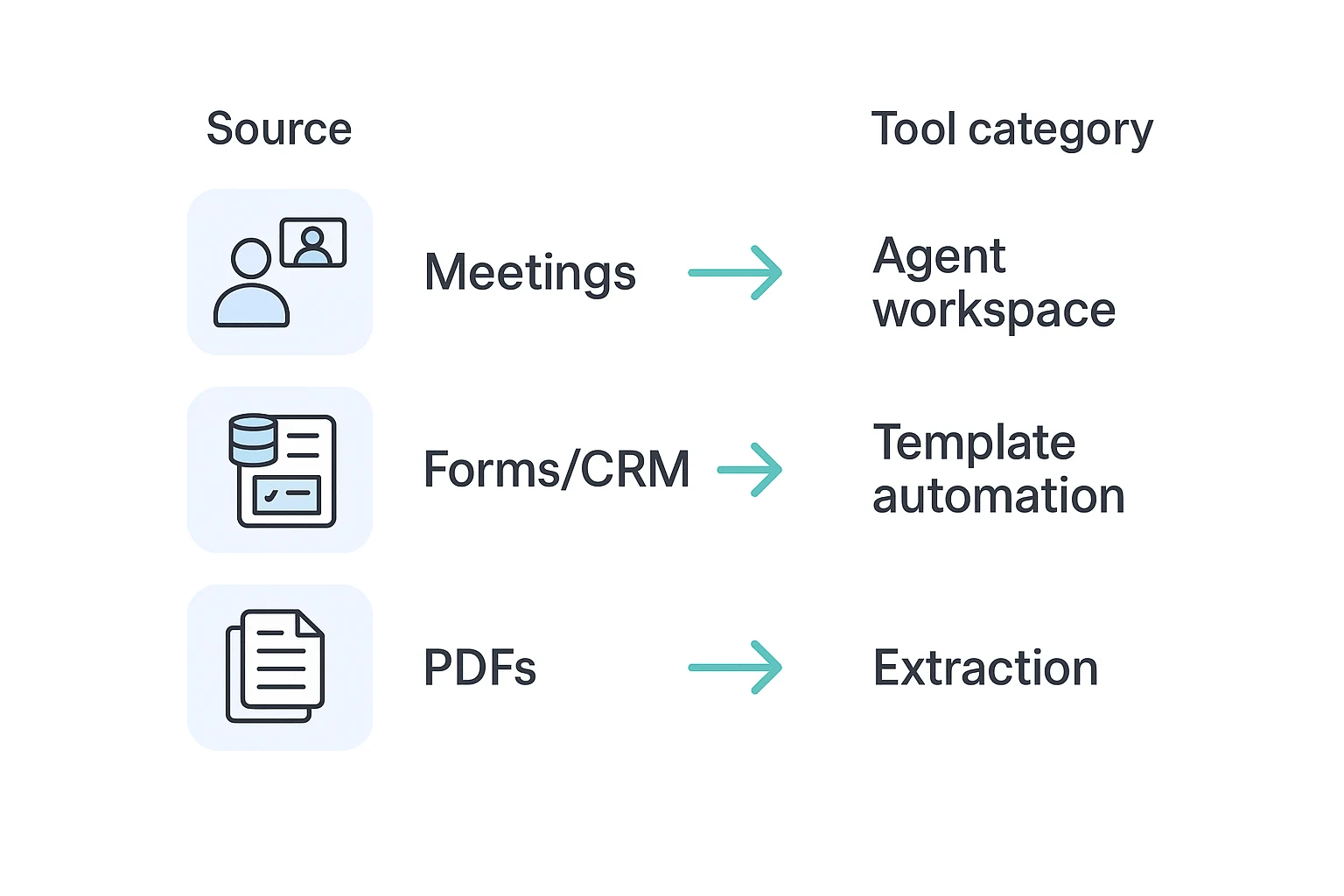
Match the tool to the source
AI document automation means template plus data merge. It works best when the inputs are clean fields, such as client name, dates, prices, clauses, and approval rules.
AI agent document generation is different. An agent can read transcripts, documents, recordings, and project context; answer questions with citations; then create a structured draft. If you're comparing agent-based automation choices, this distinction matters.
Use this quick filter:
- If documents start with meetings or interviews, use TicNote Cloud.
- If documents start with structured fields and approvals, use Docupilot or Formstack Documents.
- If documents start with PDFs, invoices, or forms you must extract from, use Docusumo.
- If you only need to rewrite or polish text, use QuillBot.
Good software also gives you a repeatable 4-step workflow: input, draft, review, publish. Look for cited answers, DOCX/PDF/HTML exports, Slack or Notion integrations, role-based permissions, and a clean path from raw source to final asset.
Top AI Document Generator Tools Compared
The best AI document generator depends on where your source material starts. If your team works from meetings and project files, choose a meeting-centered agent. If your work starts with forms, CRM fields, or legal intake, a template or workflow automation tool may fit better.
Comparison table: pricing, inputs, exports, and security signals
| Tool | Best for | Typical inputs | Outputs/exports | Integrations | Security signals | Pricing signal |
| TicNote Cloud | Meeting notes to cited reports and decks | Meeting audio, video, PDFs, Word, Markdown | DOCX, PDF, HTML, Markdown, PNG, Xmind, WAV | Notion, Slack | Encryption, private by default, no model training, traceable Shadow operations, Enterprise SSO | Free, paid, enterprise |
| Docupilot | Template-heavy document generation | Forms, CRM data, spreadsheets, free text | DOCX, PDF, email-ready docs | Zapier, CRM and workflow apps | Business workflow controls; verify SSO/training terms | Paid |
| Formstack Documents | Form-to-document workflows | Forms, CRM records, spreadsheets | DOCX, PDF, presentations | Formstack, Salesforce, Zapier | Enterprise controls; verify plan-level security | Paid, enterprise |
| Docubee | Contract workflow collaboration | Contracts, forms, approvals | PDFs, signed documents, workflow packets | Business apps and e-sign workflows | Lifecycle controls and permissions | Paid, enterprise |
| Checkbox | Legal intake and automation | Intake forms, policies, risk questions | Legal docs, approval packets, dashboards | Legal and business systems | Governance and audit-oriented controls | Enterprise contact |
| Docusumo | Field extraction from existing docs | Invoices, statements, PDFs, scanned docs | Structured data, tables, CSV/API outputs | Accounting, ERP, workflow tools | Document processing controls; verify retention terms | Paid, enterprise |
| QuillBot | Rewriting and polishing drafts | Free text, pasted drafts | Edited text, paraphrases, summaries | Browser and writing surfaces | User-level writing tool controls | Free, paid |
What to do next
Generate your first report from a meeting in minutes: Try TicNote Cloud for Free. If you want to verify export formats, recording options, and security language first, review the TicNote Cloud product page.
For a wider view of workflow platforms, this document automation feature matrix compares tools beyond meeting-led use cases.
TicNote Cloud
- Best for: Consultants, PMs, researchers, ops, sales, and CS teams turning meetings into documents.
- Inputs: Live or uploaded meetings, audio, video, PDFs, Word, Markdown.
- Outputs: PDF/Word reports, HTML presentations, podcasts, mind maps, summaries.
- Strengths: Editable transcripts, Projects, Shadow AI with citations, cross-file Q&A, one-click deliverables.
- Watch-outs: Best when meetings and project files are the source of truth.
- Pricing signal: Free plan; paid plans; Enterprise for SSO and AI meeting agent.
- Fit score note: Highest fit for meeting notes to documents; time-to-value can be one recorded meeting.
Docupilot
- Best for: Template-heavy generation with conditional logic.
- Inputs: Forms, CRM fields, spreadsheets, structured data.
- Outputs: Contracts, proposals, letters, PDFs.
- Strengths: Strong templates, rules, and workflow automation.
- Watch-outs: Less suited to cross-meeting knowledge reuse.
- Pricing signal: Paid plans.
- Fit score note: Strong when data is structured before generation.
Formstack Documents
- Best for: Form-to-document workflows.
- Inputs: Forms, CRM records, spreadsheet rows.
- Outputs: Common business docs, PDFs, routed files.
- Strengths: Data merge, delivery routing, repeatable business paperwork.
- Watch-outs: Not built around transcripts or accumulated project memory.
- Pricing signal: Paid and enterprise options.
- Fit score note: Best for standardized document packets.
Docubee
- Best for: Contract workflow collaboration.
- Inputs: Contracts, approvals, form data.
- Outputs: Approved documents and agreement packets.
- Strengths: Collaboration, approvals, lifecycle-oriented workflows.
- Watch-outs: More contract-centric than research-report centric.
- Pricing signal: Paid and enterprise.
- Fit score note: Strong for legal or procurement cycles.
Checkbox
- Best for: Legal intake and automation.
- Inputs: Intake questions, policies, risk data.
- Outputs: Legal documents, review flows, decision records.
- Strengths: Policy checks, risk review, governance support.
- Watch-outs: Usually needs setup by legal ops or admins.
- Pricing signal: Enterprise contact.
- Fit score note: Strong for controlled legal self-service.
Docusumo
- Best for: Extracting fields from existing documents.
- Inputs: Invoices, statements, PDFs, scanned files.
- Outputs: Structured fields, tables, workflow-ready data.
- Strengths: Document ingestion and extraction; useful beside an AI transcription-to-report workflow.
- Watch-outs: It extracts data more than it writes polished narratives.
- Pricing signal: Paid and enterprise.
- Fit score note: Best when the problem is data capture.
QuillBot
- Best for: Rewriting and polishing drafts.
- Inputs: Free text and pasted drafts.
- Outputs: Rewritten text, summaries, grammar edits.
- Strengths: Fast editing, tone changes, paraphrasing.
- Watch-outs: Not a full document workflow automation platform.
- Pricing signal: Free and paid.
- Fit score note: Useful after drafting, not as the system of record.
How to Choose the Right Product
The right AI document generator depends on where your source material begins. If your content starts in meetings, interviews, recordings, and scattered project files, choose a tool that preserves context. If it starts in forms or fixed templates, choose automation software built for repeatable fields.
Choose TicNote Cloud for meeting-led reports
Pick TicNote Cloud when your "document" starts as a call: client discovery, user research, sprint planning, sales handoffs, or operations reviews. It captures conversations, brings related files into Projects, and lets Shadow AI search across that Project with cited answers.
That matters when you need an AI report generator workflow, not just a blank-page writer. TicNote Cloud can turn accumulated meeting knowledge into reports, HTML presentations, mind maps, podcasts, and editable transcripts. The key advantage is reuse: each Project becomes a growing source of verified context instead of another folder of exports.
Use it when you need:
- Cross-file Q&A with clickable sources
- Editable transcripts that reduce cleanup work
- Multi-format deliverables from the same source material
- Project-level memory for teams that revisit the same topic over weeks
If you're comparing broader agent software, this business AI agent buying guide can help you separate document tools from task-executing agents.
Choose template tools when structure matters more than synthesis
Some teams don't need meeting intelligence. They need fast, consistent documents from known inputs.
- Choose Docupilot for template-heavy automation such as NDAs, quotes, proposals, and onboarding packs. It fits stable templates, conditional logic, and integrations that create documents at scale.
- Choose Formstack Documents when forms, CRM fields, or structured intake data are the source of truth. It's best for branded documents that must look the same every time.
- Choose Docubee for contract workflows where approvals, collaboration, routing, and lifecycle tracking matter as much as the generated file.
- Choose Checkbox when legal intake is the main job. It's strong for guided requests, workflow routing, and legal operations automation.
- Choose Docusumo when the hard work is extracting fields from PDFs, scans, invoices, or legacy documents before sending that data into another system.
- Choose QuillBot when you already have a draft and need rewriting, grammar fixes, tone changes, or paraphrasing.
Make the default pick simple
For most cross-functional business teams, start with the source of the knowledge. If the source is conversations, choose TicNote Cloud first. Template and form tools can come later as add-ons once your reports, decisions, and project knowledge are already captured and traceable.
Why Meeting-Centered AI Agents Are Different: Shadow AI and Project-Level Memory
The workflow below uses TicNote Cloud as the example because a meeting-first AI document generator starts with the source: calls, interviews, files, and decisions. Instead of pasting notes into a blank template, Shadow AI works inside a Project, where context builds over time.
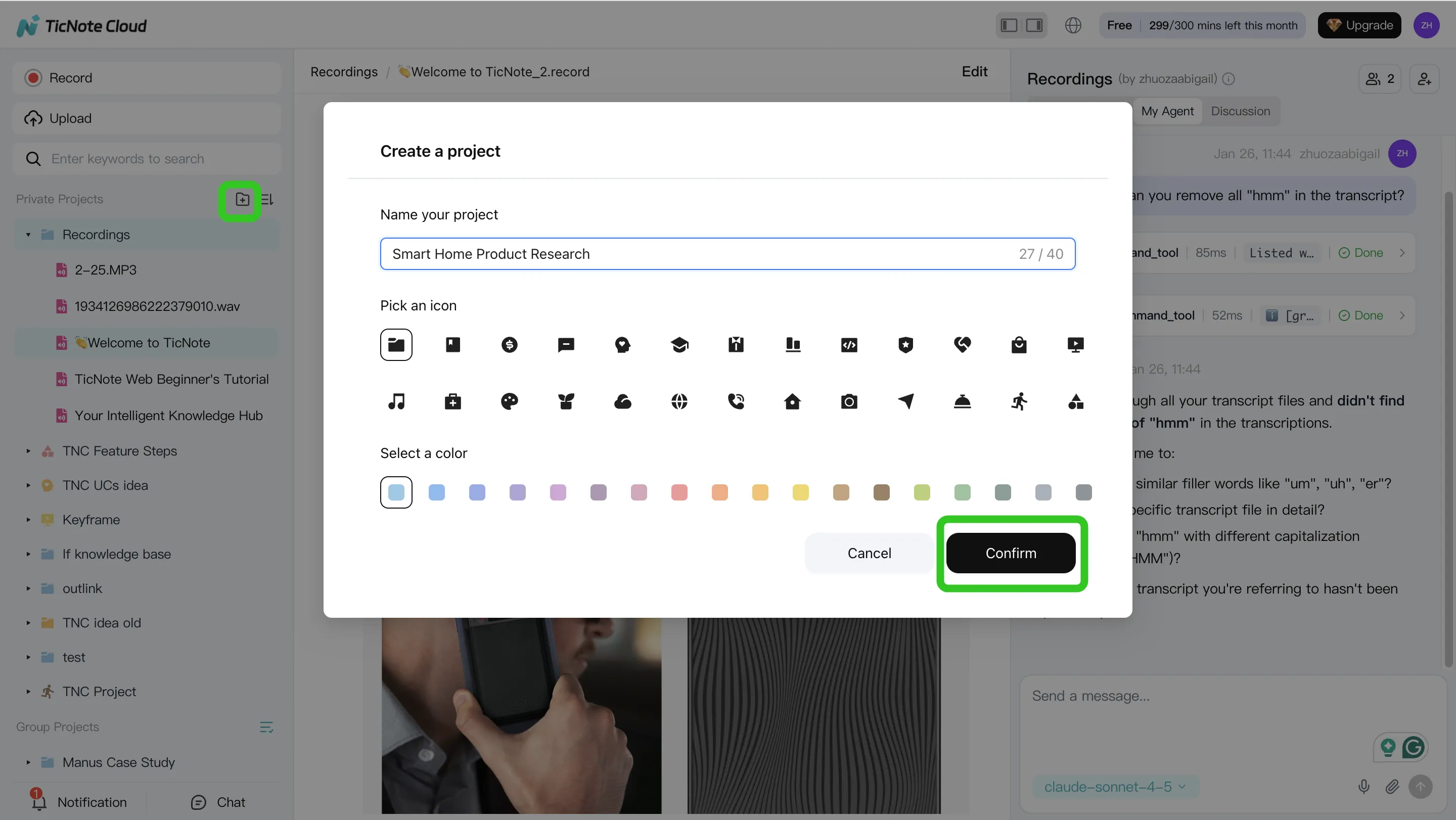
Step 1. Create a Project and add content
Open TicNote Cloud web studio, create a new Project, or choose an existing workspace. Add meeting recordings, audio, video, PDFs, Word files, or Markdown notes. You can upload directly from the Project folder area, or attach files in the Shadow AI chat panel and ask Shadow to save them into the right folder.
Step 2. Search, analyze, edit, and organize
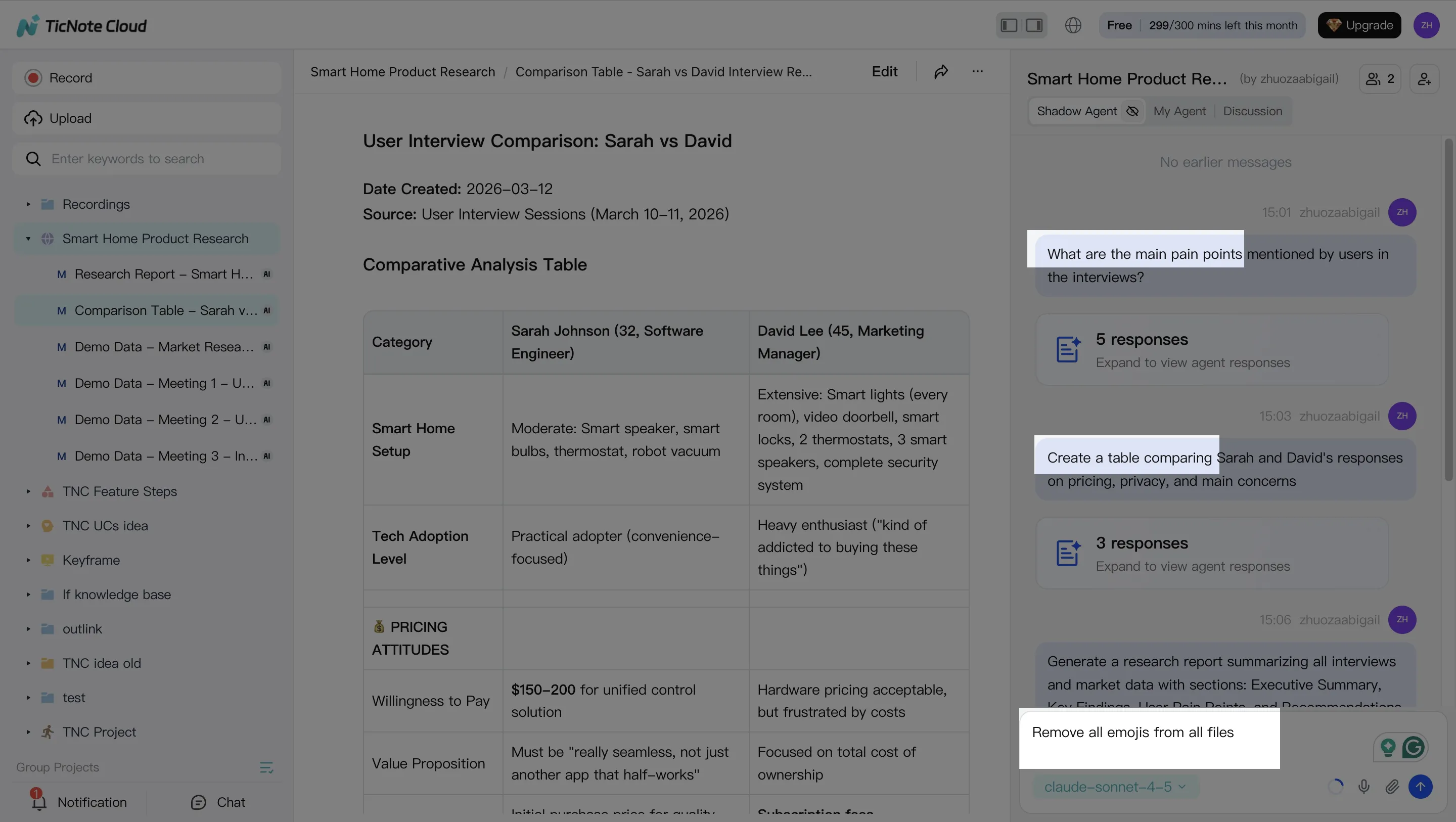
Shadow AI stays on the right side of the screen. Ask questions like, "What are the main user pain points?" or "Compare the 3 interviews and extract common themes." It can search across Project files, return cited answers, create tables, organize action items, and rewrite sections. Because transcripts are editable, teams can annotate and improve the source record instead of treating it as a static export.
Step 3. Generate cited deliverables
Next, use Shadow as an AI report generator. Ask for a strategic analysis report, or click Generate and choose a format such as Research Report, Web Presentation, Podcast, Mind Map, or HTML Page. Citations connect output paragraphs back to transcript segments, so reviewers can verify claims quickly.
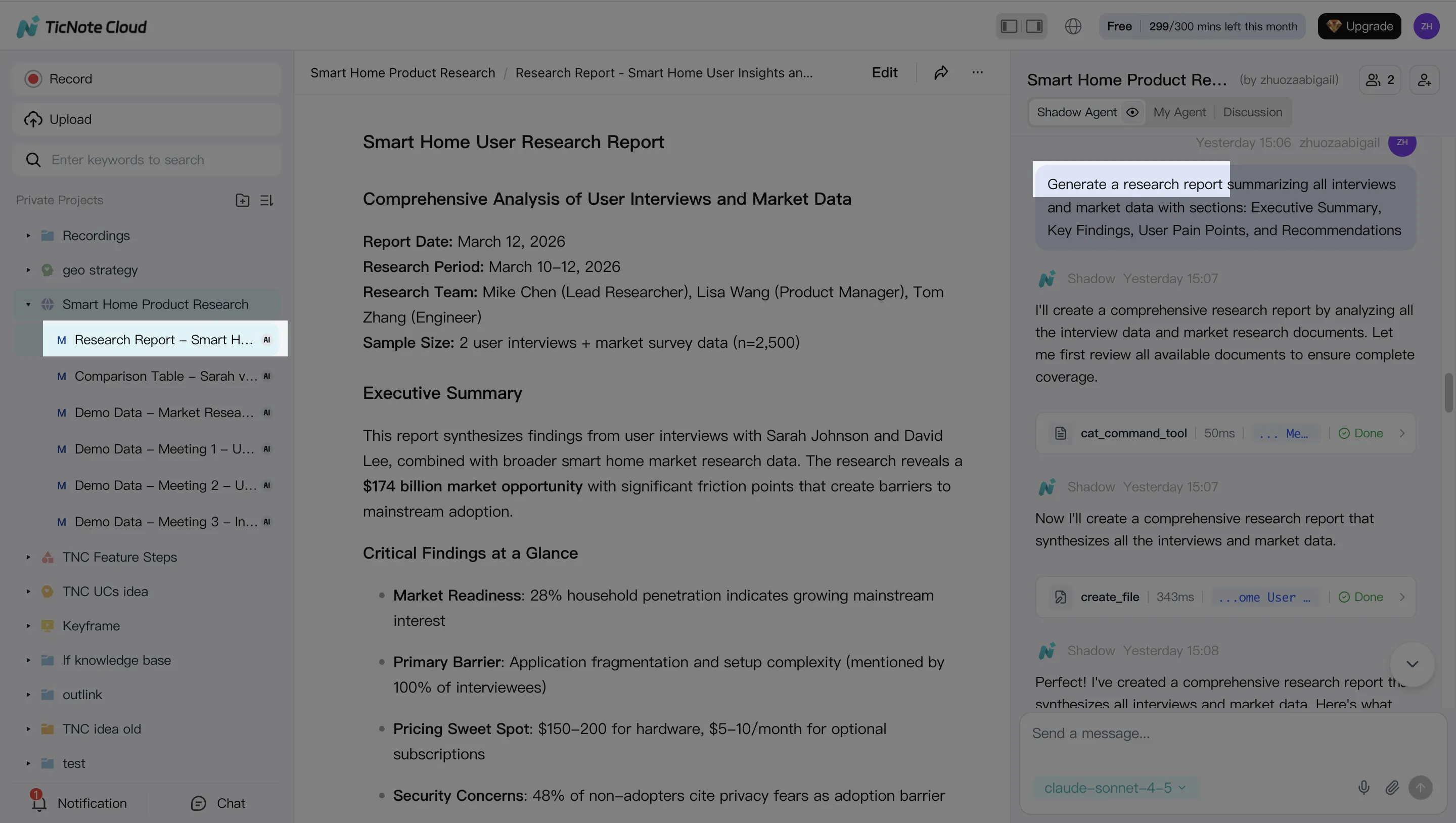
Step 4. Review, refine, and collaborate
After generation, click source-linked paragraphs, request edits from Shadow, and share the Project with Owner, Editor, or Viewer roles. Before sending externally, check: source accuracy, missing stakeholders, sensitive data, citation coverage, and final formatting. Comments and tracked Shadow actions support a simple approval loop.
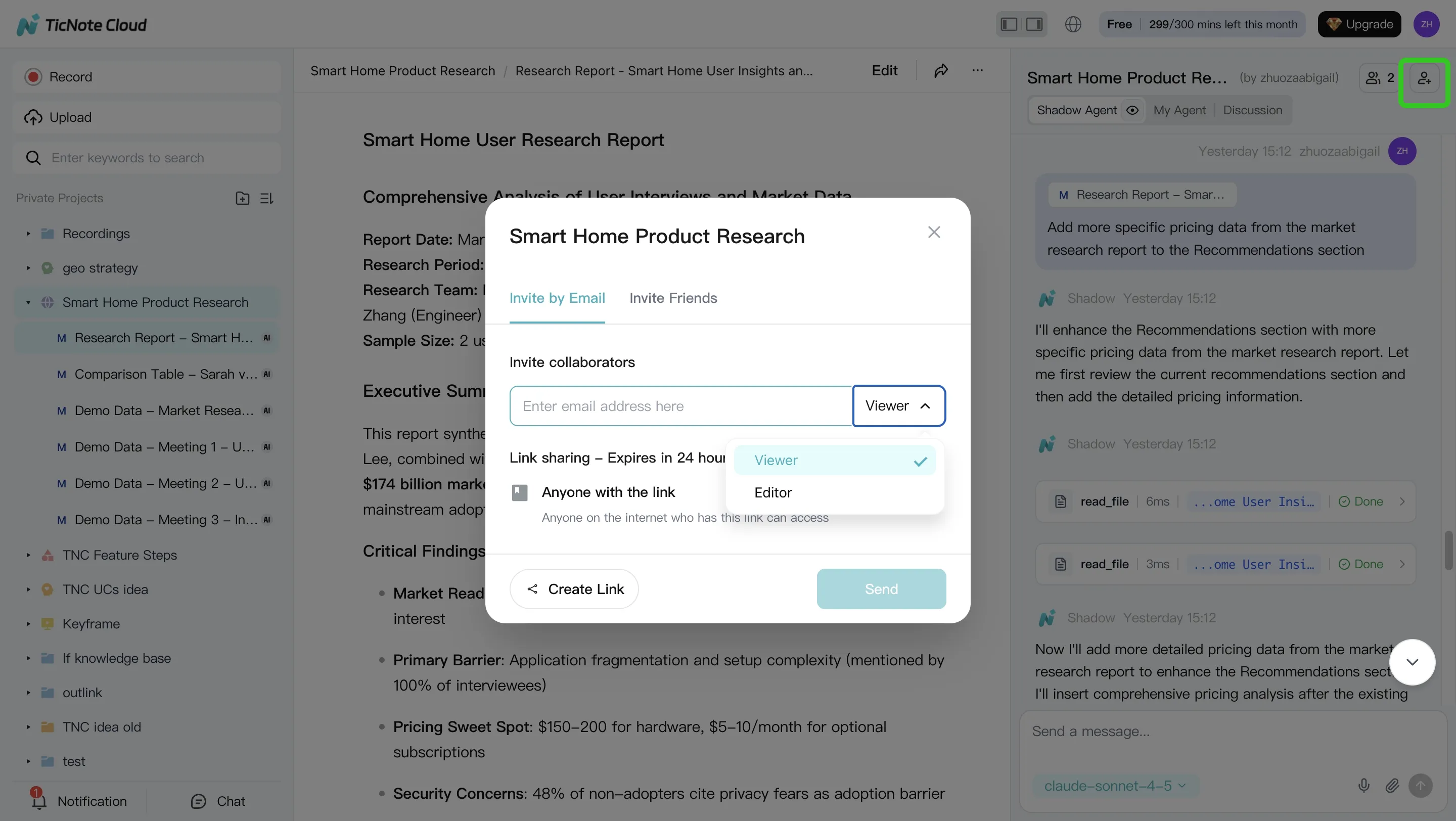
App flow: capture and generate on mobile
On the app, create or select a Project, upload or import content, run Shadow tasks, generate the needed deliverable, then review and share it from mobile. It's the same meeting-centered flow, shortened for field work and quick follow-up.
Try TicNote Cloud for Free. Generate your first report from a meeting in minutes.
Where Do AI Document Generators Fit in Real Workflows?
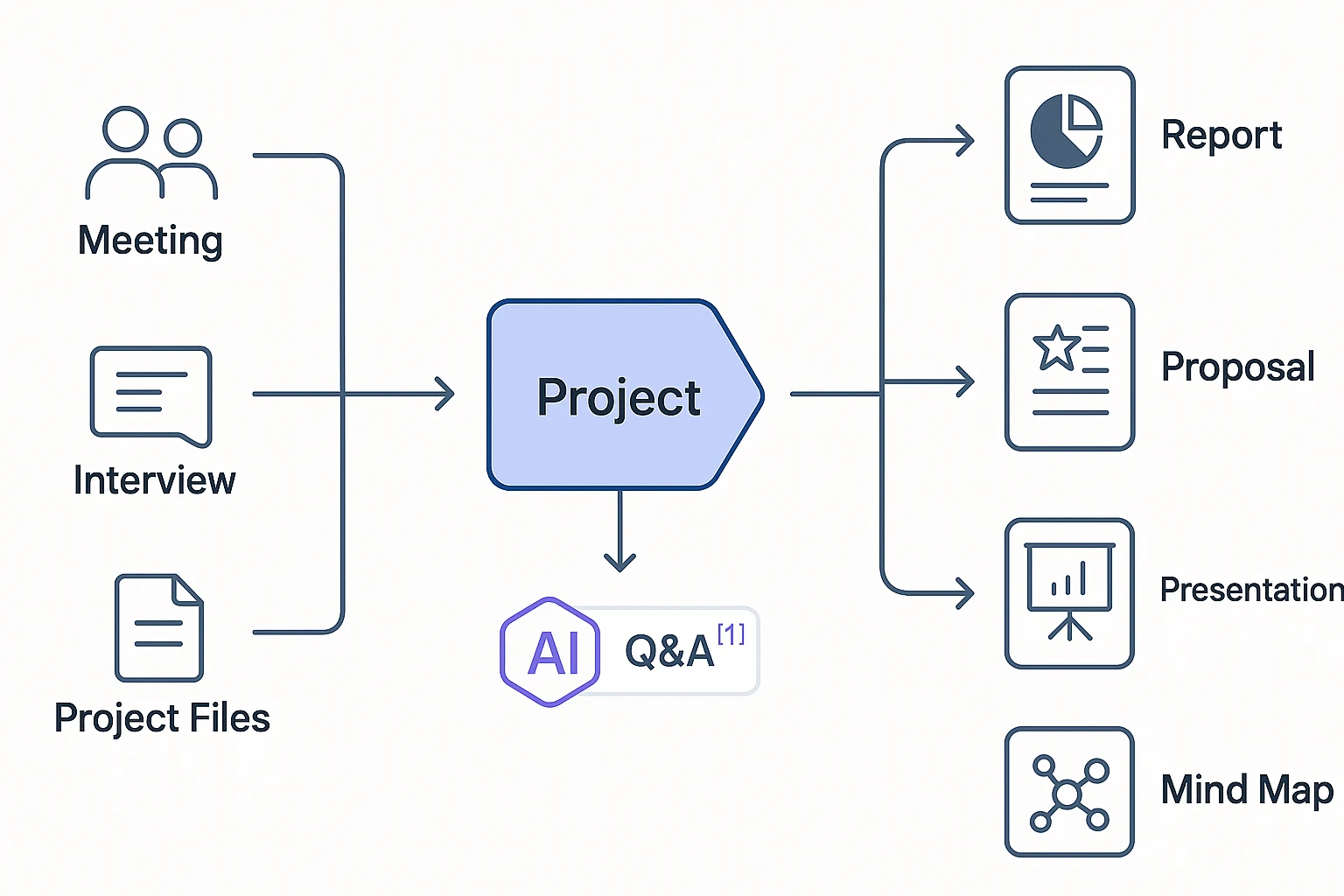
An AI document generator fits best where real work starts: calls, interviews, files, and decisions. The strongest workflow is not "prompt to blank page." It is source capture, clean knowledge, cited answers, and reviewed deliverables.
High-value workflow examples
- Consulting: discovery calls become cleaned transcripts, cited findings, a client-ready report, and a presentation. Projects preserve client context, so follow-ups need less copy/paste.
- Product: user interviews and sprint meetings turn into PRDs, decision logs, release notes, and stakeholder updates. Cross-meeting Q&A answers, "What did we decide, and why?"
- Sales: call notes feed AI proposal generator workflows: pain points, requirements, proposal sections, next-step emails, and QBR summaries.
- HR: interviews become structured scorecards, role requirement summaries, and onboarding notes with traceable source links.
- Research: recordings, PDFs, and notes form a living repository for memos, literature-style summaries, and briefings. For deeper synthesis, use a human-in-the-loop AI research workflow.
In TicNote Cloud, the path is simple: source capture → normalize → ask and cite → generate → review → publish. That turns project history into reusable assets, not one-off files.
What Security, Accuracy, and Governance Checks Matter?
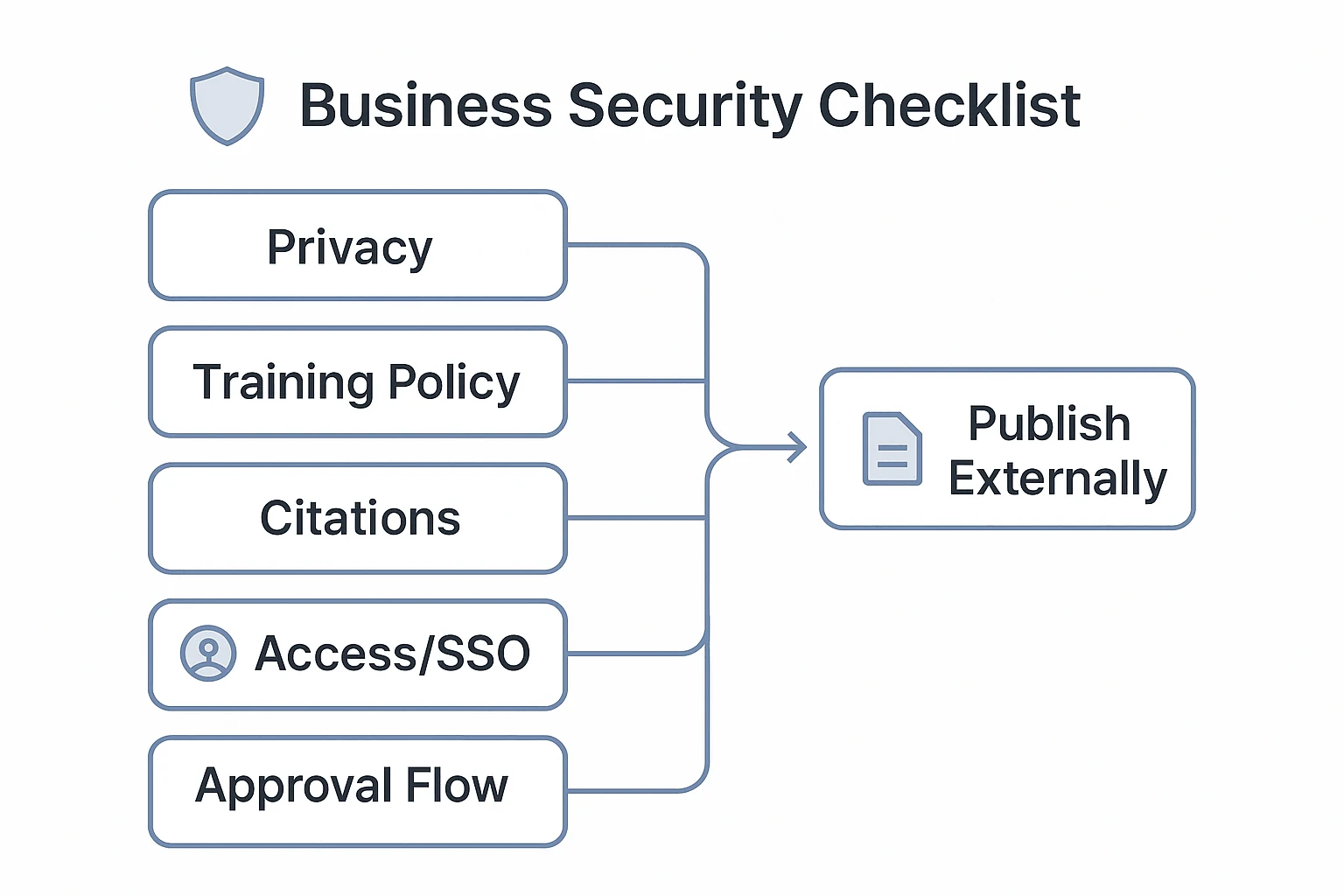
An AI document generator can create customer-facing work fast, but security decides whether it can enter your workflow. Before purchase, verify data residency options, model-training policy, retention and deletion controls, and vendor subprocessors. For meeting-led tools such as TicNote Cloud, also confirm that source links remain clickable and Shadow AI actions are traceable.
Review before publishing
Citations reduce hallucinations because reviewers can check each claim against the transcript, file, or recording. Set a minimum review rule: verify quotes, numbers, commitments, legal claims, and regulated language before export.
Governance should cover:
- Role-based access and external sharing limits
- SSO for enterprise identity control
- Audit logs showing who generated or edited each document
- Approved templates, locked sections, and sign-off steps
Procurement checklist: Is data used for training? Can we delete it? Who can access Projects? Are templates approved? What risks remain: sensitive-data leakage, transcription errors, missing context, overconfident summaries, or required compliance review?
Final Thoughts: Start With the Source of Your Documents
The best AI document generator is the one that starts where your truth lives. If your inputs are Forms or CRM fields, use template automation. If the source is existing PDFs, use extraction. But if your week is mostly calls, interviews, and project reviews, start with a meeting-centered agent.
TicNote Cloud is the default pick for teams that need fast, cited deliverables from real conversations. Shadow AI works inside Projects, so reports, presentations, mind maps, and summaries stay tied to source files. For broader planning, compare all-in-one AI workspace options before standardizing your stack.
Try TicNote Cloud for Free and generate your first report from a meeting in minutes.