Extension
Apple's new Apple Watch Series 12 and Ultra 4 went on sale two days ago, and they bring something Apple has never shipped before: always-available, microphone-driven AI features on the wrist. The company calls this new category Audio Intelligence — a set of Apple Intelligence features built specifically around the microphones in Apple Watch.
The announcement immediately split the tech press. Some outlets framed it as surveillance hardware. Others praised Apple's privacy engineering. Both were reading the same materials, because the tension is real and sits inside the product itself.
This guide covers everything you need to know: what each of the four features actually does, the hardware and regional requirements that decide whether you can use them at all, how Apple's privacy architecture works under the hood, and — just as important — the questions Apple has pointedly not answered.
The news in brief
- Announced September 9, on sale September 18. Both new watches are now in stores.
- Apple Watch Series 12 starts at $399. Apple Watch Ultra 4 starts at $799.
- Four Audio Intelligence features: Sound Recognition, Shazam music recognition, Live Rewind, and Siri Recap.
- Hardware requirement: the new S11 chip — Series 12 and Ultra 4 only.
- Live Rewind and Siri Recap are still in beta, rolling out later in 2026, in English first. They require an iPhone 16 or later (iPhone 16e excluded). Neither is available in the EU.
What Is Apple Watch Audio Intelligence?
Audio Intelligence is Apple's umbrella term for four microphone-driven features that run on the S11 chip, with support from Apple Intelligence models on your iPhone and Apple's Private Cloud Compute infrastructure. It is the first time Apple has shipped features designed to continuously listen to your environment.
The technical architecture operates in three layers:
- On the watch: Raw audio flows into a hardware-isolated buffer inside the S11 chip's Secure Exclave, where it is processed and immediately discarded. No conventional audio file is ever created.
- On your iPhone: Apple Intelligence models handle more complex processing, such as understanding speech context.
- In the cloud: Apple's Private Cloud Compute generates summaries with end-to-end encryption, meaning Apple itself cannot read the content.
Here's the full lineup at a glance:
| Feature | What it does | Availability | Relevance to conversations |
| Sound Recognition | Alerts you to sirens, alarms, doorbells, baby crying | Available now | None — accessibility feature |
| Music Recognition (Shazam) | Identifies songs playing nearby | Available now | None — convenience feature |
| Live Rewind | Shows the last 15 seconds of speech as text | Beta, later in 2026 | Direct — but only 15 seconds |
| Siri Recap | Summarizes your day's conversations | Beta, later in 2026 | Direct — but summary only |
Audio Intelligence's Four Features Explained
Sound Recognition
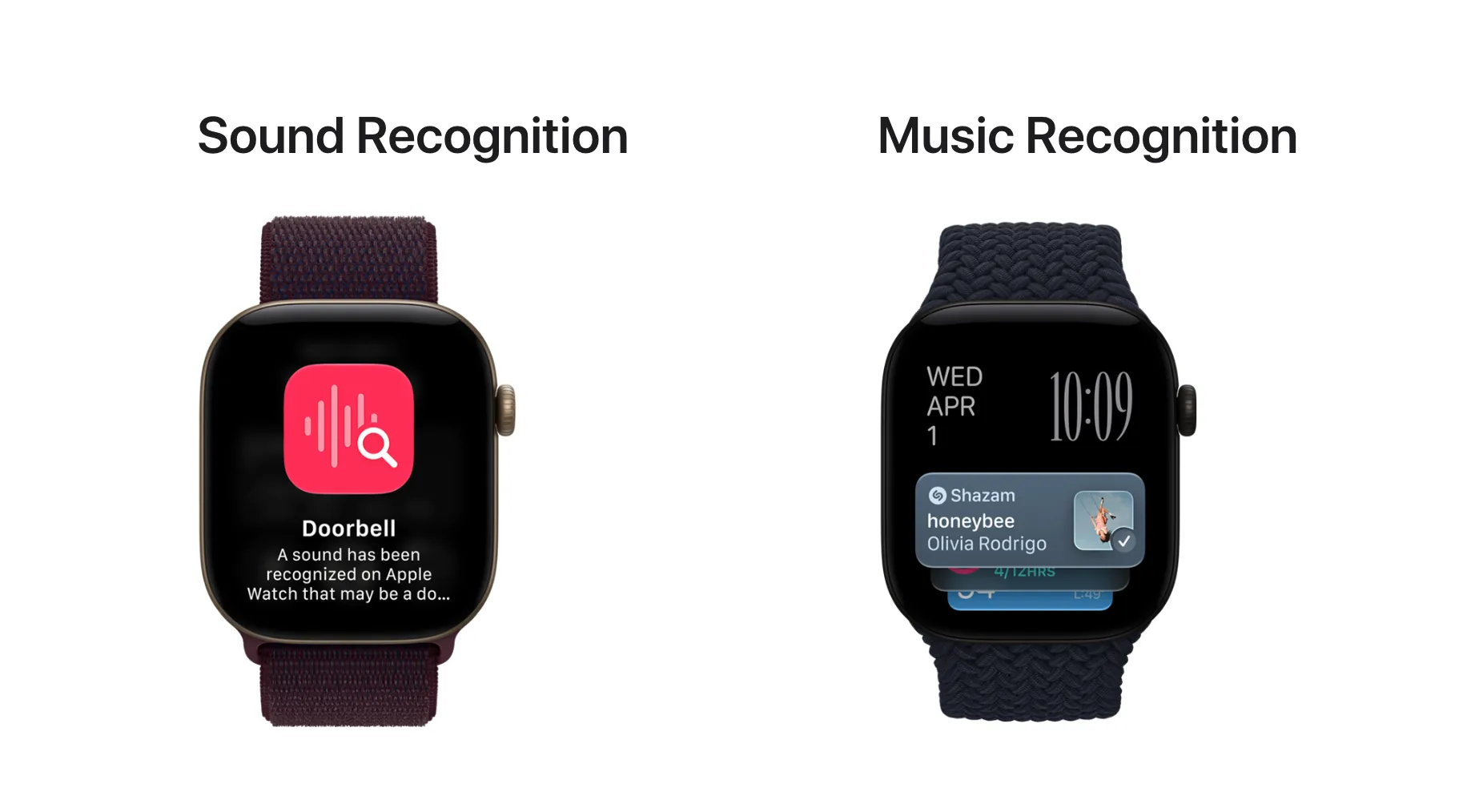
Sound Recognition alerts you to specific environmental sounds — sirens, smoke alarms, doorbells, a baby crying. It works even when your iPhone isn't nearby, making it a genuine accessibility win for people who are deaf or hard of hearing.
This feature is an accessibility tool. It has nothing to do with recording conversations.
Music Recognition with Shazam
Music Recognition automatically identifies songs playing near you, displaying the title and artist in a Smart Stack widget. It is a convenience feature, unrelated to conversation capture.
Live Rewind: A 15-Second Memory Window
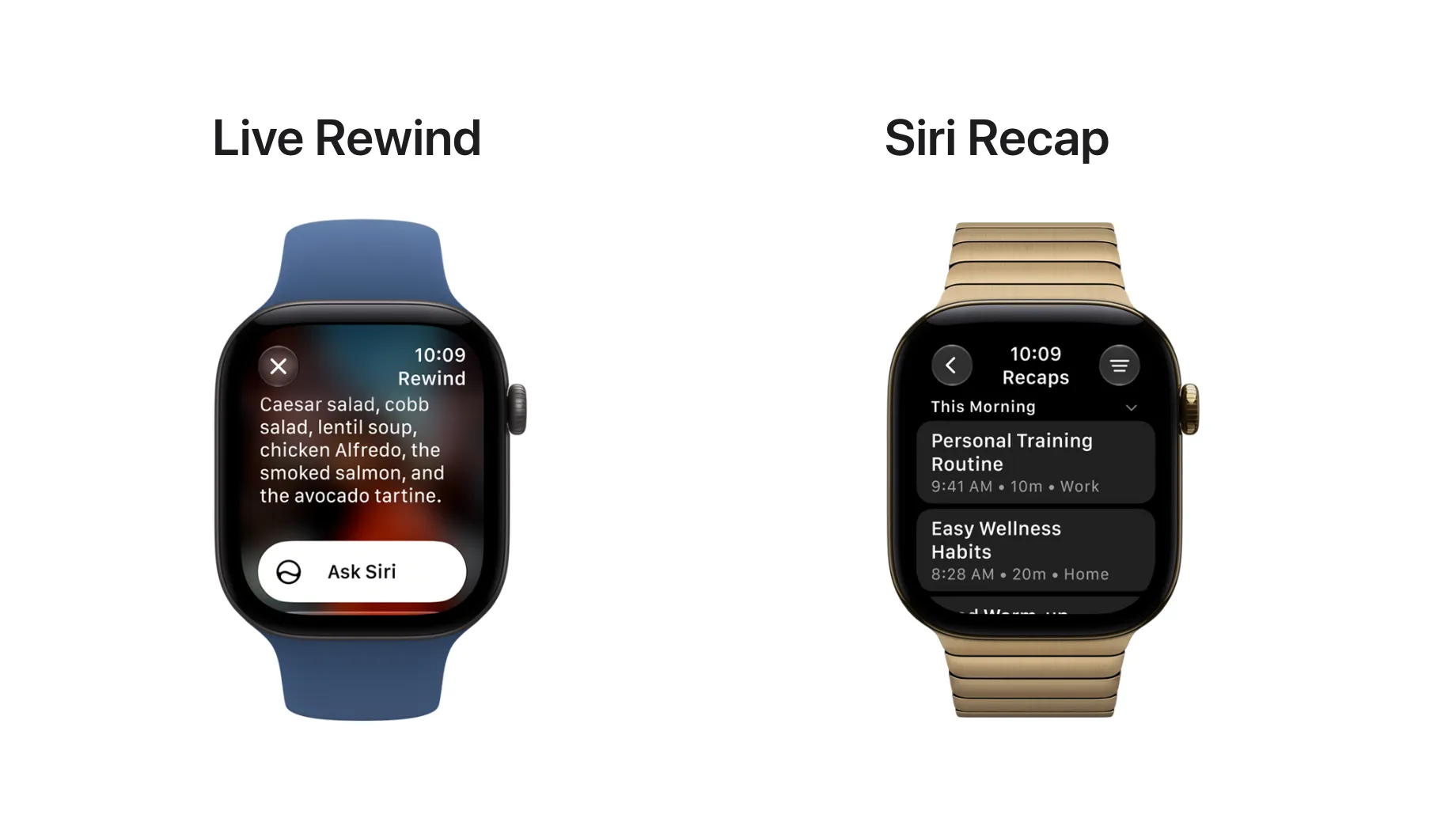
Live Rewind shows the last 15 seconds of speech as a text snippet on your wrist. Double-press the Digital Crown to trigger it. You can ask Siri a question about the snippet, or save it to the Siri app for later.
When you trigger Live Rewind, the watch plays an audible chime and displays a microphone indicator — even in silent mode. This is a deliberate design choice: the people around you are meant to know.
The 15-second window creates three hard limits:
- No background transcription. If you didn't catch something 30 seconds ago, it's gone. Live Rewind only captures what's said after you realize you missed something — and only if you realize it fast enough.
- Nothing persists unless you act. If you don't ask Siri about the snippet or manually save it, it disappears.
- It demands divided attention. You need a free hand and a moment of distraction, at the exact moment you were trying to pay attention to the conversation.
Live Rewind is a well-designed memory aid. It is not a recording tool.
Siri Recap: Summaries Without a Record
Siri Recap listens to your environment throughout the day and produces an Apple Intelligence-generated summary with a title, key points, and action items, which you review in the new Siri app. It is the more ambitious — and more controversial — of the two conversation features.
Apple is explicit about what Siri Recap does not do:
- No transcript. You get a summary, not a word-for-word record.
- No speaker attribution. The summary cannot tell you who said what.
- Sensitive details are filtered out. Financial data, personal identification numbers, and similar specifics are deliberately omitted from summaries.
- Auto-deletion. Unsaved summaries are permanently deleted after seven days.
Each of these design choices has a consequence that most early reviews haven't fully worked through:
Without speaker attribution, no commitment has an owner. A meeting summary that says "someone agreed to send the revised scope by Friday" is not a follow-up you can act on. You still need to figure out who said it, whether they meant it, and whether the context changes the meaning.
The details Siri Recap filters out are often the ones you most need. The quoted price, the medication dosage, the account number, the contract date — these are exactly the fragments a privacy-conscious summary is designed to skip. If you need those details later, the summary won't have them.
Seven-day auto-deletion with no export is not a record. For a passing hallway chat, that's sensible hygiene. For a clinical visit, a legal consultation, or a business negotiation, a summary that erases itself in a week — with no underlying audio and no way to export — is functionally useless as documentation.
Requirements: Who Can Actually Use Audio Intelligence?
Audio Intelligence has the longest requirements list of any Apple Watch feature to date. Most existing Apple Watch owners cannot use the two conversation features.
Watch requirements
Live Rewind and Siri Recap require an Apple Watch Series 12 (from $399 or Apple Watch Ultra 4 (from $799). Both depend on the S11 chip and its Secure Exclave architecture, which earlier watches don't have.
If you own a Series 11 or earlier: Live Rewind and Siri Recap are not available on your watch. Apple has not said whether Sound Recognition or Shazam will come to older hardware through watchOS 27.
iPhone requirements
Live Rewind and Siri Recap require an iPhone 16 or later, with Apple Intelligence enabled. The iPhone 16e is explicitly excluded.
Sound Recognition is the exception — it works on the watch even when your iPhone isn't nearby.
Software and rollout timeline
- Sound Recognition and Shazam: Available now, shipping with the new watches.
- Live Rewind and Siri Recap: Still in beta, rolling out later in 2026. No specific date announced.
- watchOS 27: Available since September 14.
Language and region
- Language: English only at launch. Apple has not published a timeline for additional languages.
- Region: Live Rewind and Siri Recap are not available in the EU at launch, due to regulatory constraints on Siri AI features. No EU timeline has been given.
Who gets access — and who doesn't
| User profile | Live Rewind & Siri Recap | Sound Recognition & Shazam |
| iPhone 16+ user with Series 12/Ultra 4, English speaker, outside EU | ✅ Yes (when beta ships) | ✅ Yes |
| iPhone 15 or earlier user | ❌ Blocked by phone requirement | ✅ Yes (with paired watch) |
| iPhone 16e user | ❌ Explicitly excluded | ✅ Yes (with paired watch) |
| Series 11 or earlier watch owner | ❌ Requires S11 chip — new watch only | ❓ Unknown — Apple hasn't said |
| Android user | ❌ Entirely excluded | ❌ Entirely excluded |
| EU resident | ❌ Not available | ✅ Yes |
| Non-English speaker | ⏳ Wait — no timeline | ✅ Yes |
That's a significant portion of Apple's own user base locked out at launch — and the entire Android ecosystem permanently excluded.
Audio Intelligence Privacy: What Happens to Your Conversations?
Apple's privacy architecture for Audio Intelligence is strong for the person wearing the watch. It does not address the people around them.
What Apple got right
The privacy engineering behind Audio Intelligence is genuinely impressive:
Secure Exclave isolation. Raw microphone audio flows into a buffer inside a hardware-isolated Secure Exclave on the S11 chip. New audio continuously overwrites old audio. The operating system and apps cannot access this buffer. No conventional recording file is ever created or stored.
Opt-in by default. Every Audio Intelligence feature is off until you explicitly turn it on.
Audible disclosure. Live Rewind plays a chime and shows a microphone indicator when triggered — even in silent mode. The people around you are meant to know.
Private Cloud Compute. Siri Recap summaries are generated on Apple's own cloud infrastructure with end-to-end encryption. Apple published an 11-page privacy white paper alongside the announcement, which tells you they anticipated the scrutiny.
On the narrow question of "does Apple handle your voice data responsibly," the answer is yes. No cloud service can match a design that throws the audio away.
The other side of the conversation
Here's what the privacy architecture doesn't address: the people sitting across from you.
When you use Live Rewind, the person you're talking to gets a chime and a visual indicator. They know something just happened.
When Siri Recap is running, the people around you get nothing. No chime, no indicator, no opt-in. They never made a choice — you made it for them by wearing the watch.
WIRED captured this tension directly: "In spite of all these data protections, anyone wearing a new Apple Watch could be siccing audio intelligence on your intimate vent session."
Apple's protections are strong for the person wearing the watch. The people in the room are a different matter.
The legal gray zone
Recording laws vary by jurisdiction. In the US, most states require only one party's consent to record a conversation — and since you're a participant, your consent counts. But a significant minority of states require all parties to consent.
Siri Recap creates a written record of conversations without producing audio evidence. If a dispute arises — "that's not what I said" — there's no recording to verify against. The summary exists, but its accuracy can't be independently confirmed.
For casual use, this doesn't matter. For any conversation with legal, medical, or financial implications, it's a real problem.
Two philosophies of privacy
Apple's approach can be summarized as: "Your data doesn't exist." Audio is processed and discarded. Even you can't access it afterward.
There's an alternative approach: "Your data is yours." Unlike Apple Watch, which continuously listens but gives you only 15-second snippets and no access to the underlying audio, this model puts you in control. You choose when to record. Every recording is saved to your own account. You decide what to keep, what to delete, and what to export. The record exists because you chose to create it, and it persists because you chose to keep it.
If you want a watch that works this way, see the recommendation at the end of this article.
Neither is inherently more "private." They answer different questions. Apple's design protects you from surveillance. The alternative protects your ability to verify, reference, and own your own information.
Three Things Apple Hasn't Told Us
Apple's announcement left three significant questions unanswered. Each one affects a different group of users.
1. Will older Apple Watches get Sound Recognition or Shazam?
Live Rewind and Siri Recap are confirmed to require the S11 chip — Series 12 and Ultra 4 only. But Apple has not said whether Sound Recognition or Shazam will come to Series 11 or earlier models through watchOS 27. If you own a recent Apple Watch and are wondering whether you need to upgrade for those two features: Apple hasn't given you enough information to decide.
2. How much conversation does Siri Recap actually cover?
Apple hasn't published a length limit for Siri Recap's daily summaries. Where are summaries stored? Do they sync to your iPhone? Can you search across multiple days? Without answers, it's impossible to judge whether Siri Recap works for anything beyond casual personal recall.
3. When will the EU get access?
Apple says only that Live Rewind and Siri Recap are "not available in the EU at launch." No timeline, no explanation of which regulatory requirements need to be met, no indication of whether a resolution is weeks or years away.
Other open questions
- Battery impact. Always-on environmental listening has a power cost. Apple didn't mention battery life implications for Siri Recap.
- Beta scope. Will the beta features change before general release? Apple hasn't committed to a feature set.
- Future capabilities. Will Apple ever add full transcription, speaker identification, or audio export? This is the biggest long-term question for the entire category — and Apple is silent.
- Enterprise and regulated industries. Can Audio Intelligence be used in healthcare, legal, or financial contexts where recordkeeping is mandated? Apple hasn't positioned it for compliance use.
How the World Reacted
The announcement drew immediate and divided coverage, with reviewers split between privacy praise and surveillance concern:
CNET called it "wearing an AI pendant on my wrist" — essentially an AI recorder on your wrist, but with far less capability than a dedicated device.
WIRED focused on the surveillance implications, while acknowledging that Apple's privacy architecture is stronger than competitors like Meta's smart glasses.
ZDNET framed Audio Intelligence as Apple "priming us for its real AI wearable future" — a stepping stone, not a destination.
Hacker News users dug into the Secure Exclave design with technical appreciation, but flagged the fundamental problem: without audio or a full transcript, there's no way to verify whether a Siri Recap summary is accurate.
Legal analysts raised questions about consent laws and the evidentiary value of AI-generated summaries that can't be verified against original audio.
Is Audio Intelligence Enough for You?
Audio Intelligence is enough for quick, casual recall. It is not enough for conversations that produce commitments, details, or records you need later.
Where Apple Watch excels
- You missed one sentence in a hallway chat. Live Rewind catches it. Nothing else is faster or more convenient.
- You want to know what song is playing. Shazam is right there.
- You need alerts for sounds you can't hear. Sound Recognition is genuinely life-improving for deaf and hard-of-hearing users.
- You want a vague memory of today's conversations. Siri Recap gives you that.
The watch's killer advantage is that it's already on your wrist. You don't have to remember to bring anything, charge anything extra, or wear anything new.
Where it falls short
- You need a complete record of a meeting. Siri Recap gives you a summary, not a transcript. You can't quote from it, verify it, or share it with confidence.
- You need to know who committed to what. Without speaker attribution, action items are anonymous. "Someone will send the proposal" is not a task you can assign or follow up on.
- You need the specific numbers. Pricing, dosages, dates, account numbers — Siri Recap is designed to filter these out.
- You need the record next month. Unsaved summaries vanish in seven days. There's no export, no archive, no search.
- You need to record a phone call or video meeting. Audio Intelligence only handles the room you're physically in. Calls and online meetings are entirely outside its scope.
- You're on Android, in the EU, or using an older iPhone. You can't use any of it.
The bottom line
Apple designed Audio Intelligence to help you recall — not to give you a record. That's a deliberate product philosophy, and for many everyday moments, it's exactly right.
But if your conversations have consequences — client commitments, medical instructions, legal details, research interviews — you need something that produces a record you can quote, verify, and keep. That's a different tool for a different job. Dedicated AI note-taking devices like TicNote Watch exist precisely for those moments: full recording, complete transcripts with speaker labels, and data that stays yours.