


 Extension
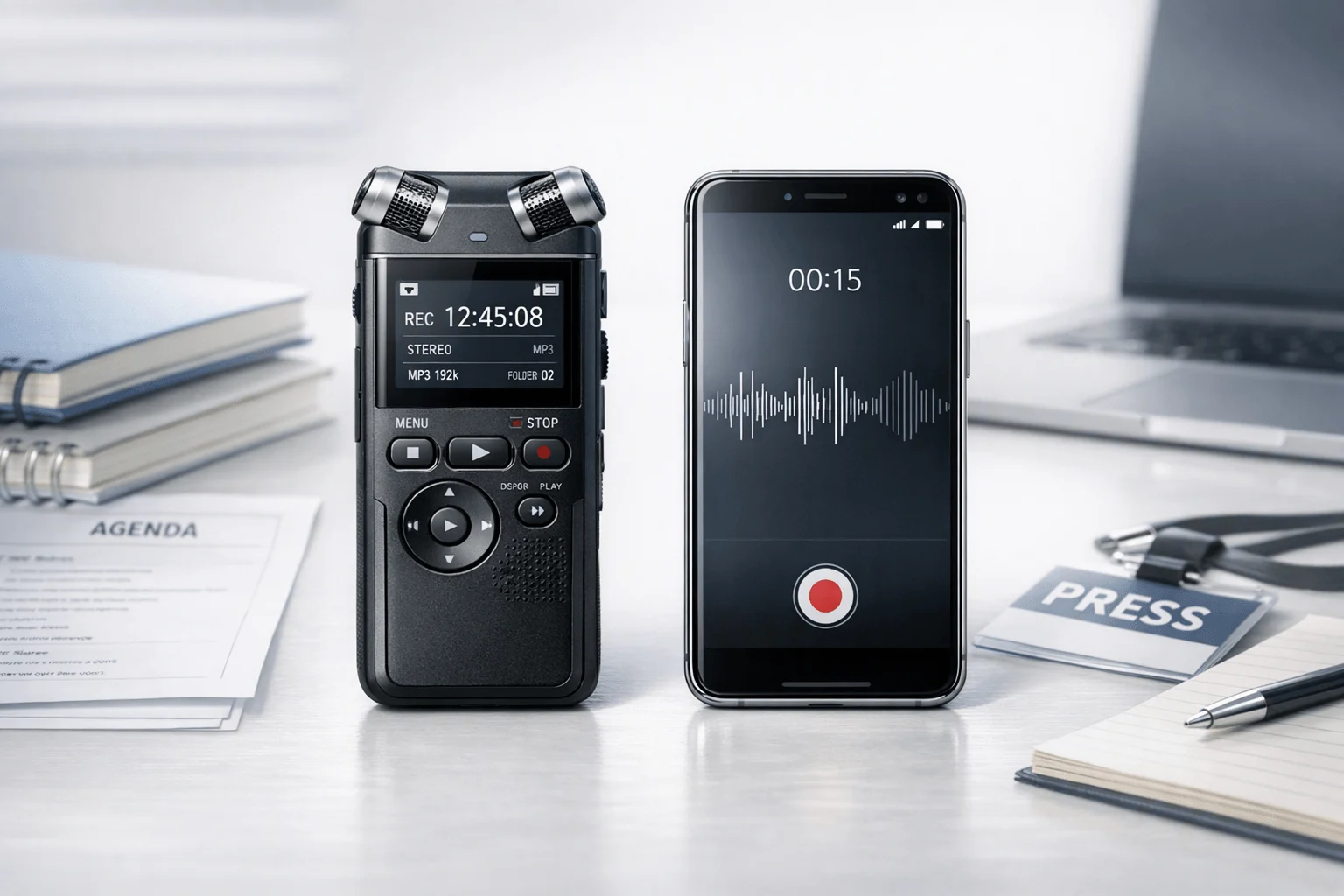
TL;DR: Voice Recorders vs phones in everyday recording
If you need a fast verdict, buying a dedicated recorder usually makes more sense for long lectures, busy meetings, and interviews where missed words matter. In real Voice Recorder VS Smartphone use, phones are still fine for quick voice notes, one-on-one memos, and casual backup recording at close range.
The gap comes down to four things:
- Audio capture: dedicated recorders usually pick up distant speakers more clearly.
- Battery and storage: they're more reliable in long sessions with fewer interruptions.
- Post-recording workflow: phones can record, but AI recorders can turn audio into transcripts, summaries, and searchable notes faster.
- Privacy and control: dedicated tools often give clearer recording workflows and fewer app-level distractions.
A smartphone with a good external mic can narrow the gap, especially for desk setups. But if you record often, AI voice recorders like TicNote add a smoother path from audio to usable notes. The table later in this guide shows where each option wins.
Voice Recorder VS Smartphone: what actually changes in daily use?
In daily use, the biggest gap in Voice Recorder VS Smartphone setups isn't convenience at the start. It's what happens 20 minutes later, when the speaker moves farther away, the room gets louder, your battery drops, or you need usable notes fast. Phones are fine for quick memos. But for lectures, meetings, and interviews, dedicated recorders usually win on clarity, reliability, and post-recording workflow.
Capture clearer audio when the speaker is far away
Distance changes everything. A phone's built-in mic is designed first for close speech, calls, and casual video. Put it at the edge of a lecture hall or the far end of a conference table, and voices lose detail fast. Consonants blur, room echo rises, and sudden loud moments can clip (distort when audio is too loud).
That's also why external mics matter. Even a good smartphone recorder app can't fix weak input from a tiny built-in microphone. And some phones still have hardware limits: Apple iPhone User Guide — Record sounds (iOS 18) states that while recording video, "Stereo recording is available on iPhone XR, iPhone XS models, and later, except iPhone SE (2nd generation), iPhone SE (3rd generation), and iPhone 16e," meaning some iPhones still record with non-stereo built-in microphones.
Dedicated recorders are built for this problem. They usually offer better mic placement, more consistent pickup, and less dependence on how you hold the device. In real life, students, journalists, and consultants often don't notice the difference during the event. They hear it later in playback, when one file is clear enough to transcribe and the other is work.
- Best for close voice notes: smartphone
- Best for long-range lecture capture: dedicated recorder
- Best for noisy cafés or interviews: recorder or phone with external mic
Avoid missed moments from battery and interruptions
A phone shares power and storage with everything else. Calls interrupt. Notifications vibrate. Low Power Mode can throttle apps. Recording apps can crash in heat, and long sessions compete with photos, videos, and downloads.
A dedicated lecture recording device is simpler. It records and keeps recording. That's a big advantage in 90-minute seminars, all-day workshops, and back-to-back client calls. If reliability matters more than carrying one less device, a recorder is the safer choice.
Turn audio into notes instead of another file
This is where the gap gets wider. On a phone, recordings often stay trapped inside one app until you rename, export, upload, and organize them yourself. That's slow.
A recorder ecosystem can do more:
- label sessions by class, client, or project
- create transcripts
- generate summaries and action items
- keep recordings searchable later
An AI voice recorder is useful because it shortens the distance between capture and follow-up. TicNote is a good example: it records first, then turns that session into transcripts, summaries, and next steps without the usual manual cleanup. That workflow matters more than specs if you review recordings every day.
What should you compare before choosing a recorder?
The right choice usually comes down to one question: will your recordings still be clear when the room, speaker, and workflow get messy? In the Voice Recorder VS Smartphone debate, specs matter less than repeatable results in your real setting. For most buyers, the best way to compare options is to score them on capture quality, noise control, file flexibility, battery, and privacy instead of trusting brand claims.
Check the recording chain first
Start with the basics:
- Microphone array: More mics can help with direction and noise pickup, but placement matters just as much.
- Gain handling: Gain is how strongly the recorder boosts sound. Poor gain control can make voices pump, distort, or disappear.
- Mono vs stereo: Mono is often enough for lectures and dictation. Stereo helps when speaker position matters, such as interviews or panel discussions.
- File format: WAV keeps more detail; MP3 and AAC save space with compression.
- Compression tradeoff: Smaller files are easier to store and share, but heavy compression can blur quiet speech and consonants.
A simple weighted matrix works well:
| Criterion | Weight | What to judge |
| Speech clarity | 35% | Can you hear every word without strain? |
| Noise handling | 25% | Does HVAC hum, typing, or reverb bury speech? |
| Battery and storage | 15% | Will it last a full day or class block? |
| Workflow | 15% | Are files easy to search, transcribe, and export? |
| Privacy and control | 10% | Can you limit sync, retention, and sharing? |
Test devices in the same room
Real rooms are the problem. HVAC adds low hum. Keyboards create sharp bursts. Reverberation smears speech. Moving speakers change volume and direction every few seconds. That is why a normalized comparison table should test every device in the same room, at the same distance, with the same speaker.
A phone can be good enough for a quiet lecture, a one-on-one interview at close range, or meetings where you can place it near the speaker. Add an external mic, and results often improve a lot. But a dedicated recorder still wins more often in longer sessions, bigger rooms, and situations where placement is not ideal.
Review privacy before you hit record
AI note takers improve workflow, but they also add storage and transcription risk. Use this checklist:
- Confirm local consent laws for recording.
- Check workplace or school recording rules.
- Verify where files and transcripts are stored.
- Decide whether cloud sync is optional or automatic.
- Set a retention period for deletion.
- Confirm who can access transcripts and summaries.
- Review whether uploads are used to train models.
In education, Family Educational Rights and Privacy Act (FERPA) and the Disclosure of Student Information Related to Emergencies and Disasters (U.S. Department of Education) states that education records are records that are directly related to a student and maintained by an educational agency or institution or by a party acting for the agency or institution. That makes storage and sharing rules more than a box-ticking exercise.
A side-by-side review of your main options
In real use, Voice Recorder VS Smartphone is less about raw convenience and more about what happens after you hit record. A phone is often good enough for quick memos, but lectures, interviews, and long meetings expose the gaps: battery drain, notification interruptions, weaker distance pickup, and more cleanup later.
Smartphone only: best when cost matters most
Your phone wins on price because you already own it. It is always with you, starts fast, and makes sharing easy. For close-range voice notes, short reminders, or a quiet one-on-one chat, it can sound perfectly fine.
The trade-off is consistency. Phones are busy devices. Calls, alerts, app crashes, and low battery all compete with recording. Far-field audio also suffers, which means a speaker across the room may sound thin or buried. If you need searchable notes, summaries, or action items, the phone-only path usually depends on extra apps and manual file handling.
Smartphone plus external mic: better sound, more friction
Add a lavalier, shotgun, or USB mic, and your phone becomes much better for interviews and desk recording. This setup can improve clarity, reduce room noise, and make transcripts more accurate.
But there is a cost beyond the mic price. You now manage cables, adapters, input settings, battery levels, and bag space. For people who record once in a while, that is fine. For people who record three or more times a week, setup friction adds up fast.
Dedicated digital voice recorder: reliable capture first
A classic recorder still makes sense when your priority is long, dependable recording. One-button start, physical controls, strong battery life, and fewer distractions are real advantages. For example, Olympus WS-853 Specifications lists approximately 110 hours in MP3 recording mode (8 kbps, mono), which is far beyond most phones in practical all-day use.
Before buying one, check four things:
- battery life for full sessions
- storage and file transfer method
- folder organization and naming
- size, weight, and pocketability
AI voice recorder: capture plus usable output
This is where devices like TicNote change the workflow. They do not just record audio. They turn meetings, lectures, and interviews into transcripts, summaries, speaker labels, and exportable notes. That matters if your real job starts after the conversation ends.
If you want a deeper device breakdown, see this guide to AI recorders for meetings and calls.
| Option | Upfront cost | Audio quality | Long-session reliability | Setup friction | Notes after recording | Best for |
| Smartphone only | $0 extra | Fair at close range | Fair | Low | Basic | quick memos |
| Phone + external mic | $30-$200+ | Good to very good | Fair | Medium to high | App-dependent | interviews at a desk |
| Classic recorder | $50-$150+ | Good, often better at distance | Very good | Low | Basic file output | lectures, long meetings |
| AI recorder like TicNote | $129.99-$299.99 | Good to very good | Very good | Low to medium | transcript, summary, action items, search | heavy note-takers |
For occasional recording, a phone is enough. For frequent recording, a dedicated device usually wins. And if you need both dependable capture and useful written output, an AI recorder is the strongest all-around option.
Where does TicNote stand out over a smartphone?
In day-to-day use, the biggest gap in the Voice Recorder VS Smartphone debate isn't just audio quality. It's what happens after you stop recording. A phone usually gives you a raw file that you still need to name, replay, trim, and turn into notes yourself. TicNote is different because it turns a lecture, meeting, or interview into a transcript, summary, and action list, which cuts down the hours spent relistening.
Turn recordings into usable notes fast
For most people, a smartphone records first and organizes later. That usually means a messy chain of steps:
- rename the file
- replay key sections
- copy points into a notes app
- write follow-ups by hand
TicNote compresses that workflow. Its devices can create real-time transcription, then generate summaries and to-dos after the session. On TicNote Pods 4G, live summaries can appear while the meeting is still happening. That's a meaningful upgrade for long classes, client meetings, and research interviews where speed matters.
Handle multilingual conversations with less friction
This is where a basic phone recorder often runs out of road. In international classes, cross-border team calls, and bilingual interviews, raw audio alone is not enough. TicNote supports transcription and translation in 120+ languages, with real-time transcription available in 16 languages. That makes it more useful as a meeting recorder with transcription, and as a voice recorder for students who need lecture capture plus readable notes.
If you work across languages, that changes the job from "save audio" to "understand the conversation now."
Build a searchable knowledge base, not a pile of files
A smartphone memo app usually stores recordings as isolated clips. TicNote pushes further by making sessions searchable across phone, desktop, and browser. That matters when you need to:
- find an exact quote from an interview
- trace a decision from last month's meeting
- generate a report from spoken updates
- turn recurring meetings into reusable documentation
If that workflow matters to you, this guide on connecting recordings to AI workflows is a useful next read.
Privacy controls matter more than most buyers think
Privacy is also a real differentiator. Buyers should still verify every vendor claim in their own security review. But the controls TicNote describes, including encrypted recordings and transcripts, optional sync, and private-by-default handling, are stronger signals than the generic permissions model of many phone apps. For regulated teams, Regulation (EU) 2016/679, Article 32 requires controllers and processors to implement appropriate technical and organisational measures to ensure a level of security appropriate to the risk, including as appropriate "the pseudonymisation and encryption of personal data."
So when does TicNote clearly beat a smartphone? When you need more than capture: searchable transcripts, fast summaries, translation help, and structured outputs you can use immediately.
See the TicNote device lineup to match your lecture, meeting, or interview workflow.
Which TicNote device fits your workflow best?
In the Voice Recorder VS Smartphone debate, the right TicNote model depends less on raw specs and more on how you work each day. Some people need a wallet-sized recorder for lectures and meetings. Others need phone-free capture, live summaries, and call recording. If you want a broader device-by-device breakdown, here's the quick fit guide.
Pick TicNote Card for premium everyday carry
TicNote Card is the best fit for professionals, educators, and frequent note-takers who want a recorder that disappears into a wallet but still handles long days well. It gives you 25-hour battery life, 64GB storage, a 3-mic array, and simple press-once recording. The Earphone and Speaker mode switch also adds flexibility when you move between one-on-one capture and room audio.
- Best for: consultants, professors, managers
- Price: $159.99
- Why it stands out: slim 3mm body, 64GB, 25-hour battery
- Trade-off: costs more than Lite
Choose Card Lite for the lowest-friction buy
Card Lite is the value pick. It keeps the same 3-mic array, 25-hour battery, and one-button simplicity, but lowers the price to $129.99. That makes it a strong match for students and budget-conscious users who want the core TicNote experience without paying for extras.
- Best for: students, basic lecture capture, first-time buyers
- Price: $129.99
- Why it stands out: simpler package, lower upfront cost
- Trade-off: much lower storage at 4GB
Go with Pods 4G for travel, calls, and field work
Pods 4G is the most distinct option here. It suits road warriors, consultants, field teams, and call-heavy users because it can record without your phone nearby, upload live, generate live summaries, and capture calls while worn. That makes it meaningfully different from both smartphones and standard digital recorders.
- Best for: travel, client calls, mobile work
- Price: $299.99
- Why it stands out: 4G eSIM, no-phone workflow, live summary
- Trade-off: highest price
Buy Pods Wi-Fi if you keep your phone nearby
Pods Wi-Fi is the better pick for globally mobile users who like the earbuds form factor but do not need 4G. It keeps the same general Pods workflow, costs $249.99, and avoids the 4G premium while offering global use with no region lock.
| Device | Best fit | Price | Key edge |
| Card | Meetings, lectures, daily carry | $159.99 | 64GB + premium slim design |
| Card Lite | Students, budget buyers | $129.99 | Lowest-cost entry |
| Pods 4G | Calls, travel, field work | $299.99 | Phone-free recording + live summary |
| Pods Wi-Fi | Global users with phone nearby | $249.99 | Pods design without 4G premium |
If you want the safest recommendation: choose Card for mixed work, Card Lite for value, Pods 4G for mobile professionals, and Pods Wi-Fi for travel-friendly sync workflows.
See the device that matches your workflow.
Best choice by use case and budget
If you're weighing Voice Recorder VS Smartphone in real life, the right answer depends on how often you record, how far you sit, and what you need after the session ends. For occasional capture, a phone can still be enough. But once reliability, searchable transcripts, and faster follow-up matter, a dedicated recorder starts to make more sense.
Pick by student budget
- Occasional lectures, front row, lowest cost: use your smartphone.
- Weekly classes, mid budget: use a smartphone plus an external mic.
- Frequent lectures, best value: choose TicNote Card Lite at $129.99.
- Heavy class load, best overall: choose TicNote Card at $159.99.
For students, the real upgrade isn't just cleaner audio. It's getting usable notes, summaries, and action points after class. That's why a voice recorder for students becomes worth it once you're recording multiple classes each week.
Choose faster follow-up for meetings and calls
For office meetings, client reviews, and hybrid work, TicNote Card is the best device for lectures and meetings if you want a simple press-to-record workflow. If your day includes calls, travel, and back-to-back meetings, TicNote Pods 4G is the strongest fit because it can record calls, upload without a phone nearby, and deliver live summaries while the conversation is still happening.
Phone-only setups often capture audio well enough, but they create friction later. You still need to rename files, upload them, and turn raw recordings into usable notes.
Match the tool to interviews and travel
- Journalist in quiet sit-down interviews: smartphone plus mic
- Researcher doing long field interviews: TicNote Card
- Consultant traveling across languages: TicNote Pods Wi‑Fi
- Mobile pro needing phone-free call capture: TicNote Pods 4G
If you want more ideas on wearables and mobile capture, see this guide to note-taking devices for meetings and calls.
Final thoughts
For light, low-stakes use, your phone is still fine. But in the real Voice Recorder VS Smartphone decision, a dedicated recorder starts to pay off when sessions run long, battery anxiety gets in the way, audio needs to stay clear across a room, and you want notes you can actually use after the recording ends.
A simple way to decide:
- Use a phone if you record occasionally and can clean up notes yourself.
- Add accessories if you mostly need better sound, not a new workflow.
- Upgrade to a dedicated recorder if you record weekly, depend on transcripts, or lose time turning audio into action items.
That last point matters most. The best upgrade is not the device with the longest spec sheet. It is the one that saves the most time in your real workflow. If you want a broader comparison first, this guide to smart recording alternatives is a useful next read.
For readers who want reliable capture plus transcription, summaries, and searchable outputs in one system, TicNote is the strongest all-in-one option to explore.


