


 Extension
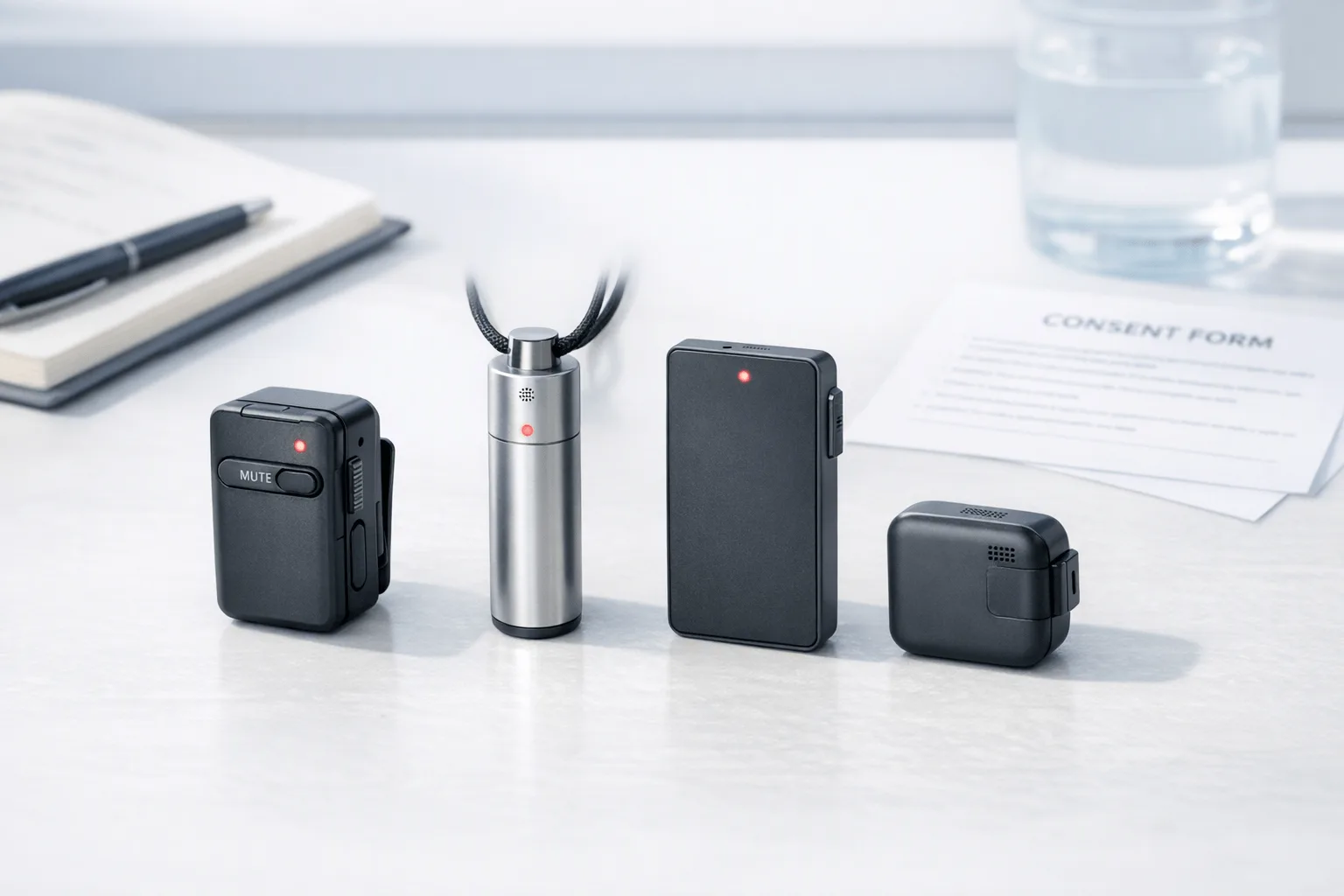
TL;DR: Which AI note taker wearable fits user research best?
I've walked into a 45-minute café interview, a 30-minute prototype test, and three conference chats in one day, and the fastest way to lose detail is to keep looking down at a laptop instead of at the participant. For researchers who want the shortest path from capture to synthesis, TicNote Watch is the best fit because it records discreetly, marks key moments with One-Tap Highlight, transcribes live in 17 languages, and exports cleanly to Notion and Obsidian.
Generic meeting note tools usually break in real research conditions: consent has to be explicit, cafés are noisy, multilingual sessions are common, and raw transcripts need timestamps you can actually code against.
From what I found using these wearables across interviews, usability sessions, and hallway conversations, TicNote Pods 4G is the strongest pick for fieldwork and multilingual studies thanks to built-in 4G eSIM, live summaries, 10 m pickup, and translation without relying on a phone. PLAUD NotePin works best for meeting-style sessions with deliberate start-stop capture. Bee is the budget pick. Limitless Pendant is useful for passive memory capture, but it's weaker when you need explicit consent handling and research-ready exports. I'm using a weighted matrix across capture quality, privacy, workflow fit, and total cost, plus a practical consent checklist.
Quick Picks: Best wearable AI note takers for UX research
When I'm choosing a wearable for research, I don't start with features. I start with the session: a noisy field interview, a 60-minute lab test, or five conference chats I won't remember by dinner. If you want a broader look at AI note-taking hardware across meetings and lectures, these are the quickest picks for research-specific workflows.
| Product | Best for | Why it works for research | Main tradeoff | Starting price | Ongoing cost signal |
| TicNote Watch | Interviewers who need a smartwatch note taker for interviews | Fast highlighting during live sessions plus Plus includes 600 transcription minutes per month | Watch form factor won't suit every field setup | $249 | Included minutes reduce monthly spend early |
| TicNote Pods 4G | Hands-free field research and multilingual interviews | 4G eSIM, Live Summary, dual modes, and 10 m pickup fit mobile sessions | Higher upfront cost than entry options | $299.99 | Likely moderate if you use live AI features often |
| PLAUD NotePin | Intentional session-based recording | Best when I want polished summaries from clearly defined interviews | Less flexible for all-day passive capture | Varies | Usually tied to subscription use |
| Bee | Lower-cost everyday capture | Good for solo researchers who want simple capture without premium pricing | Fewer research-specific workflow advantages | Varies | Lower-cost framing |
| Limitless Pendant | Passive recall across the day | Strong fit for ambient memory across meetings and conversations | Subscription framing is pricey for many teams | Varies | High recurring-cost signal |
Here's the short version.
- Best for field interviews: TicNote Pods 4G. The deciding feature is 4G eSIM, so I can capture interviews away from Wi-Fi without changing my setup mid-visit.
- Best for lab usability testing: TicNote Watch. Fast highlighting matters when I need to mark a failed task or quote in the moment without breaking rapport.
- Best for conference conversations: Limitless Pendant. Passive recall is the reason to buy it if your day is a blur of short chats.
- Best for multilingual research: TicNote Pods 4G. Live Summary plus its mobile-first design make it the strongest fit when language switching happens on the fly.
- Best for cost-sensitive solo researchers: Bee. It's the easiest starting point if price matters more than advanced workflow controls.
The full reviews below go deeper on tradeoffs, privacy checks, and total cost of ownership.
5 best wearable note takers for user researchers
Hold a phone in a 50-minute user interview and you change the interview. Type notes during a prototype walk-through and you break eye contact right when the participant is showing you where they got stuck. For most research sessions, the best wearable note taker is the one that fades into the background, captures clean audio, and gives you artifacts you can actually use in synthesis.
Here's how I'd break it down by research scenario: discreet moderation, phone-free fieldwork, deliberate scheduled interviews, lower-cost solo research, and passive recall across dense conference days.
TicNote Watch: Best for researchers who run in-person interviews and usability tests and need discreet capture without breaking rapport
This is the one I'd hand to a moderator running one-on-one interviews in a lab, coffee shop, or small meeting room. A wrist-worn recorder fits the job because I can start recording from a dedicated top button instead of pulling out a phone, then drop a One-Tap Highlight the moment I hear a key quote or usability failure.
If that's your workflow, it's worth checking the TicNote Watch product page. The practical win is simple: I stay present with the participant, glance at live transcription on my wrist in 17 languages when I need confirmation, and later search time-stamped transcripts with automatic speaker identification instead of hunting through a 50-minute recording.
The proof points line up with research use. Dual omnidirectional digital silicon mics and intelligent noise reduction are built for conversational capture, with a 3 to 5 meter pickup range that fits interviews and moderated tests better than big group sessions. It records for more than 24 hours continuously, works offline and syncs once it reconnects, and even lets me attach photos to transcript timestamps, which is useful when I'm documenting prototypes, store shelves, or field context.
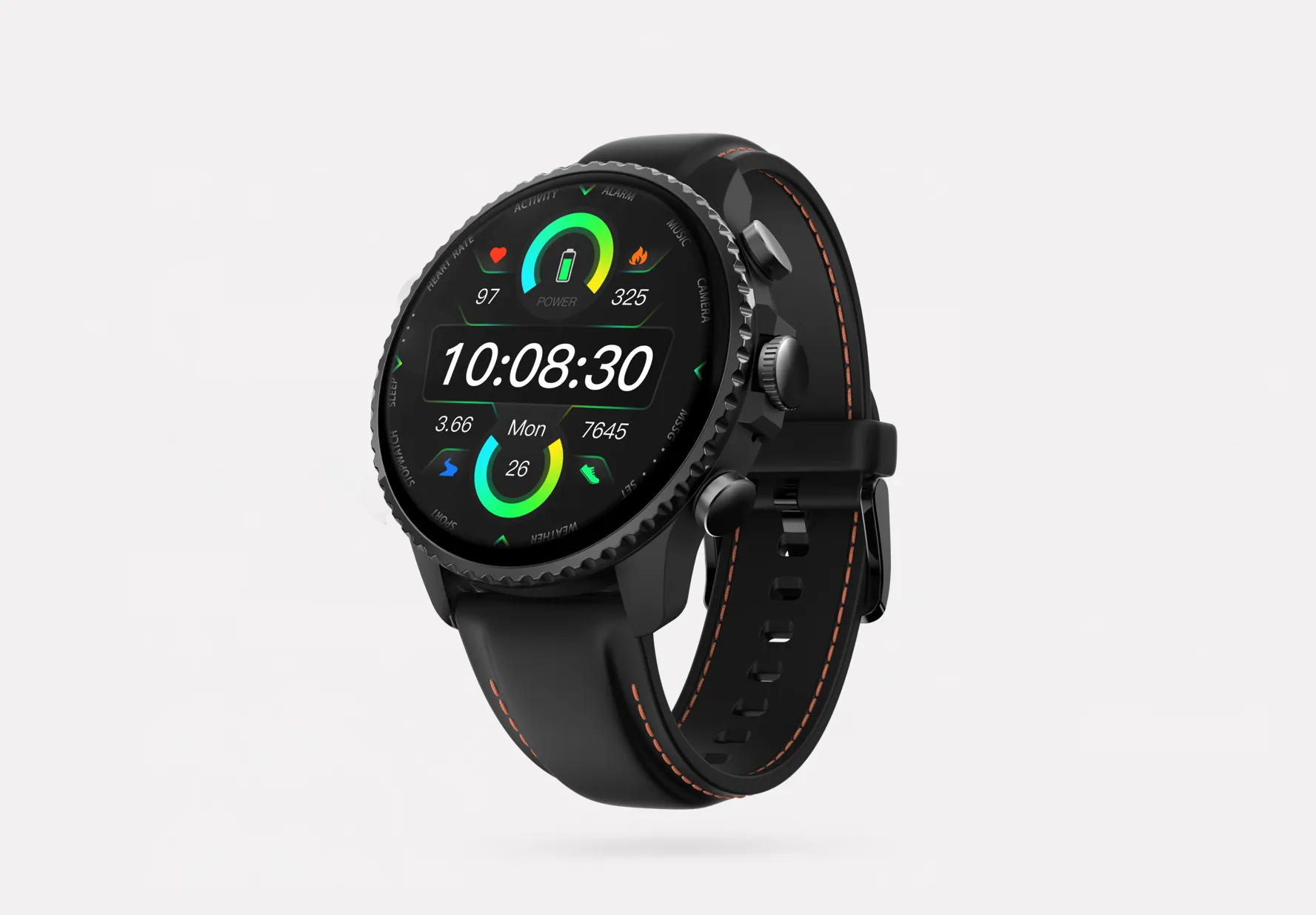
Key features
- Dedicated top recording button so I can start a session fast without fumbling with a phone.
- One-Tap Highlight to flag quotes, pain points, and moments to revisit in synthesis.
- Live transcription and live translated subtitles for multilingual interviews and faster moderator confirmation.
- Transcript with speaker identification so debriefing is less manual.
- Summary templates, including more than 100 options, plus mind map outputs for quick pattern review.
- Project Knowledge Base, which helps turn single interviews into a searchable research repository.
- Export to Notion and Obsidian for teams that already synthesize inside docs or PKM tools.
- Privacy controls including end-to-end encryption and a policy that customer data is not used to train AI models.
Pros
- Entry price starts at $249.
- Plus plan includes 600 transcription minutes per month.
- Offline recording is useful in field sites with poor signal.
- Up to 14-day standby and a full charge in under 2 hours.
- Cross-platform access makes handoff easier across research and product teams.
Cons
- The 3 to 5 meter pickup is better for one-on-one research and small rooms than large roundtables.
- A smartwatch form won't fit every participant-consent style.
- If you're buying at team level, validate GDPR and internal policy requirements in procurement.
TicNote Pods 4G: Best for researchers who do field interviews, multilingual studies, or conference conversations and need summaries before they get back to a laptop
I think of this one for the researcher who walks out of a retail visit, transit stop interview, or conference conversation block with three more sessions ahead and no time to write notes. In that setting, phone-free capture matters because the research is moving while your memory is already filling up.
The earbuds-plus-case setup fits that pace well. Built-in 4G eSIM means uploads don't depend on keeping your phone nearby, Live Summary gives you rolling takeaways while the session is still running, and Quick Summary fires when you stop. If phone-free field capture matters, see the TicNote Pods 4G details. The system also switches automatically between earbuds for calls and the case for room capture, which is the kind of small workflow detail that actually matters during fieldwork.
For proof, it combines dual mics with ENC noise cancellation, up to 10 meters of pickup, 32GB of case storage, and roughly 2,150 hours of local capacity. Real-time transcription and translation cover 120+ languages, and transcript outputs with speaker identification can move into broader knowledge workflows after the session.
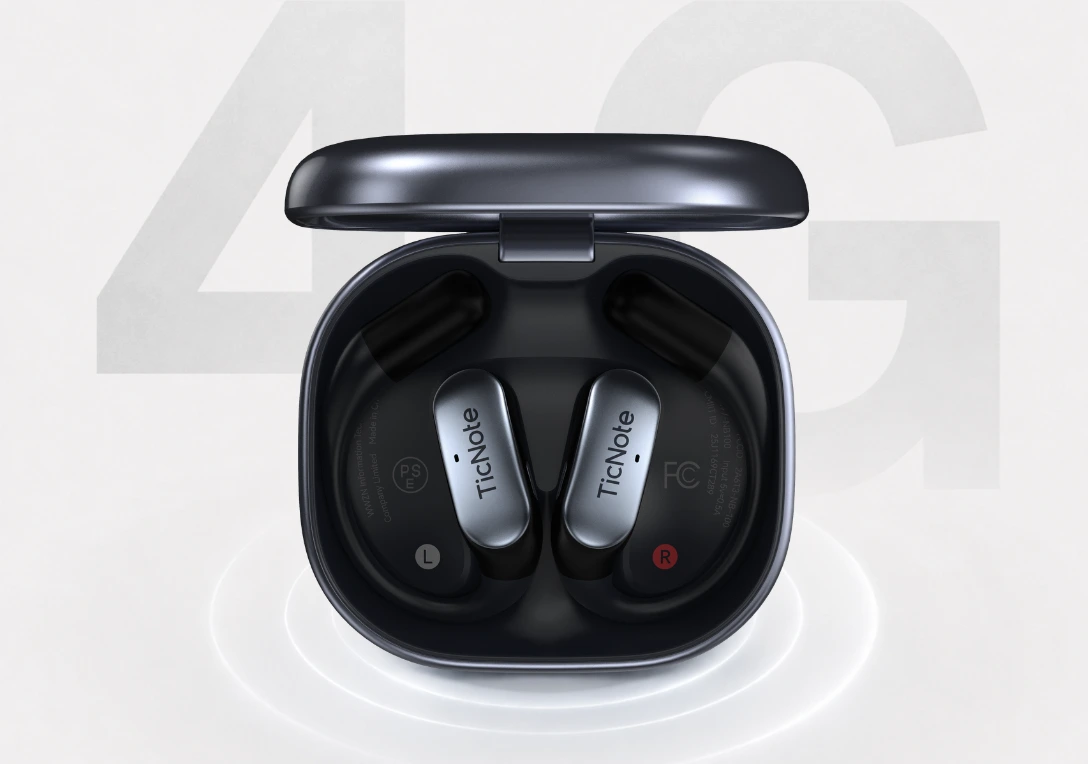
Key features
- Built-in 4G eSIM for upload without a nearby phone.
- Live Summary for in-session takeaways and Quick Summary at stop for instant debrief material.
- Conversation Translation and Listen Translation for multilingual research.
- Automatic call recording when interviews happen by phone.
- Dual modes with auto switching between earbuds and case capture.
- 10 meter pickup for noisier or more flexible field settings.
- Transcript with speaker identification and Project Knowledge Base for later synthesis.
Pros
- Hardware price is $299.99.
- No phone required nearby for upload.
- Strong fit for multilingual research.
- About 13 hours of battery life with 4G on.
- Summary-ready outputs are available before formal debrief.
Cons
- Earbuds are less subtle than a watch in some participant settings.
- Battery life changes with 4G use.
- You still need a clear consent process before recording.
PLAUD NotePin: Best for researchers who want an intentional wearable meeting recorder with transcription for scheduled interviews
Some researchers prefer recording to feel explicit and bounded. I get that. If I'm running scheduled interviews, especially remote or formal stakeholder sessions, a manual start-stop model can make disclosure easier and keep capture clearly tied to the interview itself.
That's where NotePin makes sense. Its category position is less about passive memory and more about deliberate recording with transcripts, summaries, templates, and mind-map style organization. For teams comparing device price against recurring fees, this breakdown of PLAUD pricing and subscription math is useful before rollout.
Key features
- Intentional recording workflow that supports clearer session boundaries.
- Transcript access for review after interviews.
- Structured summaries that are easier to share with teammates.
- Templates and visual organization for faster interview recap.
Pros
- Strong meeting-focused outputs.
- Deliberate-capture behavior is easier to explain to participants.
Cons
- Not a great fit for spontaneous hallway conversations.
- Value gets tighter if you want broader, always-ready capture.
- Check recurring subscription costs before standardizing it across a team.
Bee: Best for solo researchers who need a lower-cost wearable voice recorder for user interviews and can accept simpler workflows
If you're a founder, PM, or solo researcher doing occasional discovery interviews, you may not need a full research repository. You may just want affordable capture and searchable recall so you don't lose the two quotes that matter after a 30-minute customer call.
That's where Bee can work. Its appeal is the affordable hardware angle and everyday note generation, especially when budget matters more than advanced highlighting, repository workflows, or deeper privacy controls.
Key features
- Affordable hardware entry point.
- Note generation for quick recall.
- Everyday capture orientation for lighter research needs.
Pros
- Lower upfront price.
- Easy entry into wearable capture.
Cons
- Less support for research-specific workflows.
- Weaker fit when you need explicit session control.
- Privacy review still matters before any participant recording.
Limitless Pendant: Best for researchers who want passive day recall across conferences and stakeholder conversations
This one is better for broad memory support than formal moderation. I'd use it to remember a packed conference day, back-to-back stakeholder chats, or a dozen short conversations where the problem is recall, not structured research evidence.
That passive approach can help after the fact, but it also creates friction in participant-facing research because recording boundaries need to be obvious. In practice, concise summaries and a recall-oriented app are more useful for informal conversation memory than for research-ready artifacts.
Key features
- Passive daily logging.
- Summary hierarchy for scanning the day.
- Recall-first app experience.
Pros
- Useful for remembering many short conversations across a day.
Cons
- Subscription framing can get expensive.
- Less suitable where participant consent must be crystal clear.
- You may need extra work to turn recall logs into research-ready outputs.
How I evaluated wearable AI note takers for user research
I evaluated these devices the way I'd evaluate any research tool: by what happens in the room, not on the spec sheet. A wearable can look great for meetings and still fail in moderated testing if it misses a participant's quiet comment, makes consent awkward, or turns a 60-minute session into a messy transcript you still have to clean by hand.
Why most AI note taker lists do not help researchers
Most roundups use generic meeting criteria like battery life, app polish, and summary templates. That's too shallow for research. In user interviews, rapport matters. In fieldwork, background noise matters. In prototype walkthroughs, people point, pause, overlap, switch languages, and say the most useful thing while turning away from the mic.
That's why I didn't assume a strong consumer wearable would also be a strong fit for usability testing. I looked for devices that let you capture evidence without becoming the center of attention. I also checked how quickly notes became usable after the session, including whether you could compare AI note takers with standard recorders for in-person sessions where context and discretion both matter.
The 4 decision variables for wearable note takers for user researchers
I scored every product on four weighted variables.
- Capture quality: 35%. This includes mic pickup distance, noise handling, speaker separation, and whether the transcript is usable without heavy correction.
- Privacy and consent workflow: 30%. I checked visible recording behavior, storage controls, encryption claims, vendor posture on model training, and how practical it is to get consent in the moment.
- Workflow fit: 20%. I looked at live highlights, project organization, exports to Notion or Obsidian, and how fast summaries become useful after a session.
- Total cost of ownership: 15%. I counted hardware price, included monthly minutes, subscription tiers, and paid transcription add-ons.
That weighting is deliberate. For research, a cheap device with weak transcripts costs more in rework. And a smart summary is useless if your consent process breaks trust.
Quick comparison
| Tool | Works well when | Falls short when | Best for |
| TicNote Watch | You need low-friction capture during short interviews or conference conversations | Sessions are long and battery margin is tight | Fast, discreet note capture |
| TicNote Pods 4G | You run field interviews and need independent connectivity away from your laptop | You want the lightest possible setup | Field research and mobile teams |
| PLAUD NotePin | You want simple wearable capture for one-on-one conversations | Audio gets messy in noisy public spaces | Solo interviewers in quieter settings |
| Bee | You want passive capture across daily conversations | You need tighter research workflow controls | Ambient capture for broad recall |
| Limitless Pendant | You need strong post-meeting memory support across many conversations | You need clear participant-facing consent signals | Internal conversations and synthesis support |
This same rubric drives the picks and scenario recommendations later in the article.
How to choose the right AI note taker wearable for interviews, usability tests, and fieldwork
I choose these devices by starting with the moment that usually breaks my flow: walking between field sites, moderating a lab session while watching body language, or trying to catch quotes in two languages at a busy event. For user research, the right wearable isn't the one with the longest feature list. It's the one that captures clean audio, respects consent, and gets usable notes back fast enough for the same-day debrief.
Pick phone-free capture for field interviews
If I spend the day moving between stores, clinics, or job sites, TicNote Pods 4G is the clearest fit. The reason is simple: it works well when I don't want my phone in my hand or my pocket dictating the workflow. Phone-free upload, Live Summary before debrief, 10-meter pickup, and multilingual support match the reality of on-site research where interviews happen in hallways, parking lots, and noisy counters.
Bee makes more sense only when price is the main filter and the workflow is lighter. I'd use it for simpler capture, not for research days where I need reliable uploads between stops. If you're comparing options, it's worth checking whether phone-free AI capture for field research matches how your team actually works.
Use wrist-based capture for moderated sessions
In moderated usability tests or in-person interviews, I want something discreet that doesn't pull attention away from the participant. TicNote Watch fits that job best because the capture happens from the wrist, and One-Tap Highlight lets me mark confusion, task failure, or a strong quote in the moment. Photos synced to timestamps also help when I need to connect a participant's comment to a whiteboard sketch, device screen, or artifact on the table.
Direct export to Notion or Obsidian matters more than it sounds. If synthesis starts the same afternoon, fewer handoff steps means fewer lost details. PLAUD NotePin is still a fair pick when an intentional on-off recording pattern matters more than all-day readiness. If that lab workflow sounds familiar, I'd review wrist-based note capture for interview sessions before buying.
Prioritize translation for multilingual research and events
For multilingual interviews or conference conversations, TicNote Pods 4G wins again because conversation translation and live translated subtitles across 120+ languages solve the main problem directly. I don't need passive memory support first. I need shared understanding now.
Limitless Pendant is better framed as passive recall for events, not rigorous interview capture. I'd use it to remember hallway conversations, not as my primary tool for formal research sessions where consent, transcript quality, and structured notes matter.
Run a total-cost check before you buy
Start with monthly interview load. If your team runs 20 interviews a month at 45 minutes each, that's 900 minutes before internal debriefs. TicNote Watch costs $249 and includes 600 monthly transcription minutes on Plus, so you'd need either minute packs from $6.99 for 1,000 minutes or a higher plan.
TicNote Pods 4G costs $299.99. TicNote Pro with device is $79 per year for 2,100 minutes per month, and Business with device is $239 per year for 6,800 minutes per month. Compare that against your real interview volume, not your average week, and decide whether summaries must be ready the same day. That's usually where the cheapest-looking option stops being the cheapest. For a related framework, this guide on choosing AI note takers for client-facing work uses a similar decision process.
See whether TicNote fits your research workflow before your next round of interviews.
Conclusion: the best AI note taker is the one that protects rapport and speeds synthesis
After enough interviews, I stop asking which device has the most AI features and start asking which one lets me stay present, capture evidence I can trust, and get from a 45-minute session to synthesis with less drag. If you want a quick way to frame that tradeoff, this comparison of device vs app note taking is useful, but for research work the practical winner depends on the scenario.
For moderated interviews and usability sessions, TicNote Watch is the strongest fit because it keeps note capture discreet while preserving eye contact and flow. For fieldwork and multilingual research, TicNote Pods 4G stands out on mobility and language coverage. PLAUD NotePin makes the most sense for deliberate, session-based recording, Bee is the clear budget pick for solo researchers, and Limitless Pendant is best for passive recall across packed event days.
No wearable solves consent on its own. Every team still needs a participant disclosure script, an approval process for recording, and a storage review before any transcript touches research data.
My advice is simple: list your top two research scenarios, estimate your monthly recording minutes, then compare both against the scoring matrix and total cost section. That exercise takes under 10 minutes and will tell you faster than any feature list, including whether seeing how TicNote fits your research workflow is the right next step.


