


 Extension
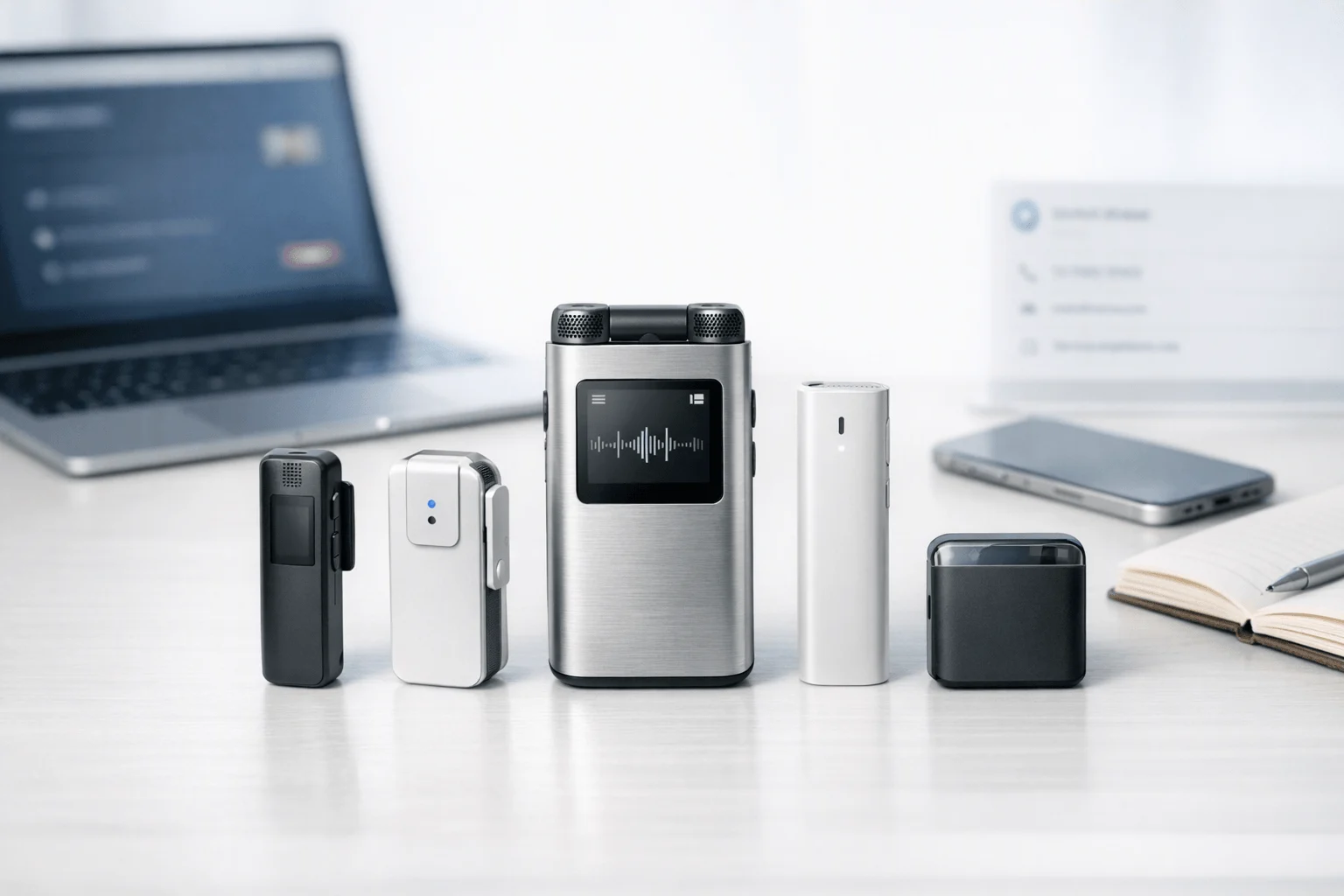
TL;DR: Which AI note taker works best for sales calls?
After five 40-minute discovery calls, one mobile follow-up, and a trade-show chat, I still need clean notes, next steps, and something I can trust before I update the CRM, so I'd start with a recorder that covers calls and in-person sales. That admin time adds up fast, and the missed detail that slips between a Zoom recap and a hallway conversation can cost a deal.
I tested hardware recorders, bot-based meeting tools, and full conversation intelligence platforms, and the short answer is this: TicNote AI Voice Recorder is best for reps who need one device for phone calls and in-person conversations, TicNote Watch is best for field reps and event selling, Gong is best for managers who need deeper coaching analytics, Fireflies.ai is best for low-friction CRM follow-up on virtual calls, Otter.ai is best for budget-conscious solo users, and Chorus fits larger revenue teams already invested in enterprise sales intelligence. My buying lens is simple: pick for capture environment first, then analysis depth, then CRM fit, then compliance and rollout effort. No single tool wins every sales scenario. Software-only tools often miss in-person selling, while enterprise platforms can be too much for a small team.
Quick picks: best AI note takers for sales calls by scenario
If you're scanning before you commit to a full comparison, this is the shortlist I'd start with. I'm framing these picks around the places sales calls actually happen: Zoom demos, mobile phone calls, conference rooms, ride-along visits, and trade show floors. If you want a broader side-by-side before the full reviews, this comparison of AI note takers for sales calls covers the bigger workflow picture.
Best quick picks table
| Tool | Capture type | Works best when | Sales analysis depth | CRM workflow fit | Setup effort | Compliance considerations | Total cost signal |
| TicNote AI Voice Recorder | Dedicated recorder for phone, in-person, and room capture | You need one tool for mobile calls, client meetings, and shared spaces | Medium | Medium | Low | Consent rules matter for call recording; local handling matters by team policy | Mid |
| TicNote Watch | Wrist-worn recorder for field conversations | You sell on-site, at events, or between meetings without opening a laptop | Low to medium | Low | Low | Strong need for visible consent habits in live settings | Mid |
| Gong | Meeting integrations and revenue intelligence platform | You run structured virtual sales and want manager coaching at scale | High | High | High | Enterprise governance is strong, but rollout usually needs admin oversight | High |
| Fireflies.ai | Meeting bot for video calls | You want affordable virtual-call notes and action items fast | Medium | Medium | Low | Bot presence and meeting consent should be clear | Low to mid |
| Chorus by ZoomInfo | Conversation intelligence for revenue teams | You need call review, coaching, and account-level visibility across teams | High | High | High | Best fit for formal enterprise controls | High |
| Otter.ai | Meeting bot and transcription app | You mainly want searchable transcripts and summaries on a budget | Low | Low to medium | Low | Privacy depends on meeting and recording permissions | Low |
One-line recommendations
- Best for phone and room capture: TicNote AI Voice Recorder
- Best for field and event selling: TicNote Watch
- Best for manager coaching: Gong
- Best for affordable virtual-call workflows: Fireflies.ai
- Best for enterprise revenue intelligence: Chorus by ZoomInfo
- Best for simple transcription on a budget: Otter.ai
What this quick picks section does not tell you yet
These are practical first picks, not final verdicts. Transcript quality changes fast when there's HVAC noise, two reps talking over a buyer, or a weak speakerphone. It also depends on how audio gets captured: a meeting bot usually hears virtual calls more cleanly, while a phone recorder or wrist-worn device wins when the conversation happens away from Zoom.
6 best AI note takers for sales calls
I compare every tool here on the same seven points: capture type, transcript quality expectations, sales analysis outputs, CRM workflow fit, setup effort, compliance considerations, and total cost signal. That matters because a rep who bounces between mobile calls, Zoom demos, and in-person meetings doesn't need the same thing as a manager reviewing 40 calls a week for coaching patterns.
TicNote AI Voice Recorder: Best for sales reps who need one pocket device for phone calls and in-person meetings
I kept coming back to the rep who finishes a 30-minute customer call in the car, walks into a conference-room demo, then does a five-minute debrief in the hallway. Most software note takers break in that workflow because they expect the call to happen inside Zoom, Meet, or a desktop app. TicNote fits better when your day happens across a phone, a room, and everywhere in between.
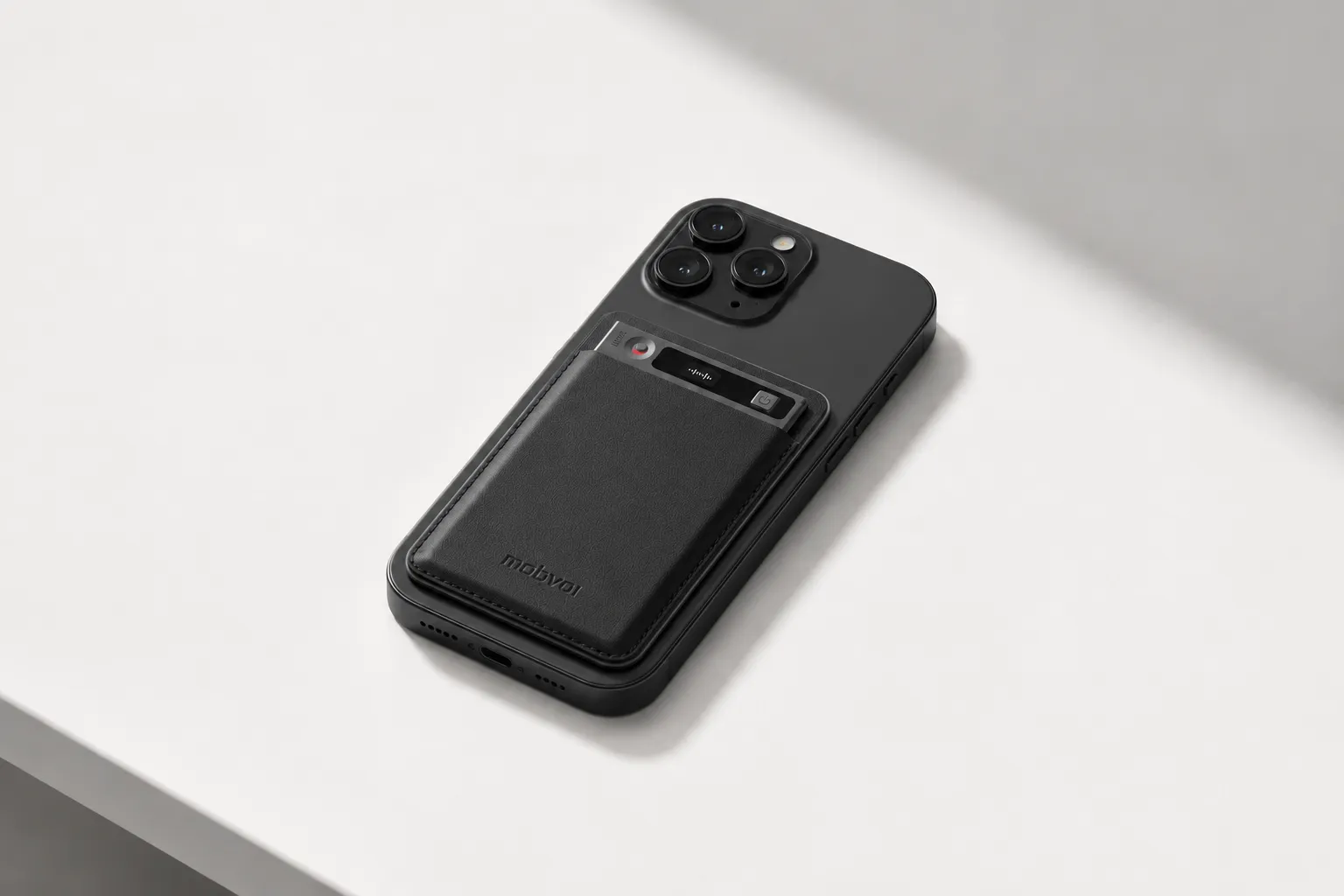
Its hardware is the reason. Earphone mode magnetically attaches to a phone so you can record calls without changing how you already sell, while Speaker mode records room conversations when you're sitting across from buyers. If you want the full hardware picture before comparing the rest of the list, it's worth checking TicNote AI Voice Recorder details.
The proof points are unusually practical for sales. You get a 3-mic array with pickup up to 10m, 25-hour battery life, and 64GB of storage, which works out to about 434 hours of recordings. On the software side, it adds real-time transcription, automatic speaker identification, 100+ summary templates, Ask AI, a Project Knowledge Base, and a Sales Coach skill that turns recordings into coaching reports, follow-up emails, and talk tracks. If you're also comparing dedicated devices, this AI note-taking device comparison helps frame where hardware beats software-only tools.
Key features
- Earphone and Speaker modes: one rep can cover phone and in-person sales conversations with the same device.
- 3-mic array up to 10m: a better fit for conference tables and multi-speaker client meetings.
- Sales Coach skill: turns call recordings into scored coaching outputs and follow-up drafts.
- Project Knowledge Base and Ask AI: lets reps and managers search past calls by account or project.
- Notion and Obsidian export plus TicNote API: supports downstream workflows when notes need to move elsewhere.
Pros
- $159.99 hardware price
- Includes Plus plan with 600 transcription minutes per month
- Supports 120+ languages for transcription and translation
- Offline recording with sync after reconnecting
- Can generate visual reports and slides from recordings
Cons
- CRM-native sync isn't listed
- Buyers should validate call-recording consent rules and security review before rollout
- Heavy teams may need Pro or Business plans for more minutes and credits
TicNote Watch: Best for field sales teams and event sellers who need in-person capture on the move
Picture a rep at a trade show booth, on a dealership lot, or walking a prospect around a job site. Pulling out a phone changes the feel of the conversation. A laptop is out of the question. In that setting, a wrist-based recorder makes more sense than a meeting bot.
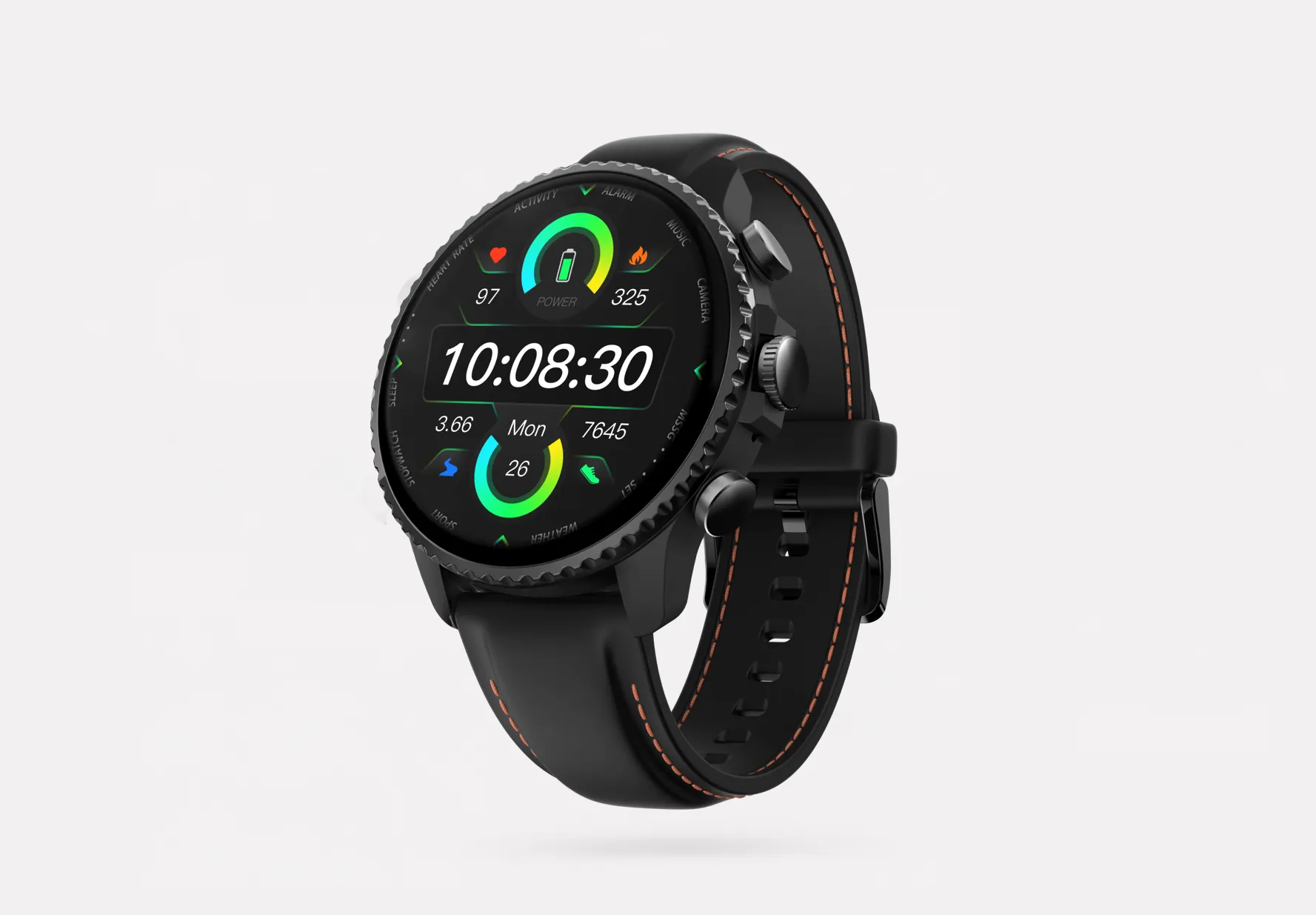
TicNote Watch is built for that style of selling. The dedicated recording button starts capture fast, discreet recording mode keeps the interaction natural, Bluetooth call recording covers two-sided calls answered on the watch, and One-Tap Highlight lets you mark an objection or pricing moment before it slips away. If that sounds like your day, you can explore TicNote Watch for on-the-go sales notes.
The proof is mobility-first: over 24 hours of continuous recording, 3-5m pickup with intelligent noise reduction, live transcription on the wrist in 17 languages, AI summaries pushed to the watch face, and offline capture with later sync. In TicNote Cloud, you still get Sales Coach, Ask AI, and Project Knowledge Base, so the field workflow doesn't lose the analysis layer.
Key features
- Dedicated top recording button: starts capture fast during spontaneous conversations.
- One-Tap Highlight: marks a key objection or pricing moment mid-conversation.
- Bluetooth call recording: covers two-sided calls answered on the watch.
- AI summary on watch face: lets reps review before the next stop.
- Random Thought capture: saves short follow-up ideas between meetings.
Pros
- $249 hardware price
- Includes Plus plan with 600 transcription minutes per month
- Supports 120+ languages for transcription and translation
- Works offline and syncs later
- More discreet for live field interactions than a phone or laptop
Cons
- Shorter pickup range than the card recorder at 3-5m
- CRM-native sync isn't listed
- The wrist-worn form factor is unnecessary for many inside sales teams
Gong: Best for sales managers who need deep coaching and deal-risk review across virtual calls
I think of Gong for the manager who has ten rep calls to review before pipeline inspection and wants to know two things fast: are objections being handled well, and are forecast commitments real? That's not a note-taking problem first. It's a conversation intelligence problem.
Gong fits when post-call analysis matters more than flexible capture. Its value is in enterprise conversation intelligence, coaching workflows, deal review, and the management visibility that simpler note apps don't try to provide. In the 2024 Gartner Magic Quadrant for Revenue Intelligence Platforms, Gong was again cited as a leading vendor, which matches how most enterprise buyers treat it.
Key features
- Conversation intelligence dashboards: helps managers review themes beyond one transcript.
- Coaching and objection analysis: stronger for rep development than basic note apps.
- Deal review workflows: aligns with pipeline and forecast discussions.
- Enterprise orientation: suits larger revenue organizations with management layers.
Pros
- Strong fit for coaching-heavy teams
- Built for manager and revenue-leadership analysis
- Better than simple transcription tools for trend spotting
Cons
- Usually a higher-cost enterprise deployment
- Doesn't solve in-person capture for field meetings
- Setup and rollout are heavier than lightweight note takers
Fireflies.ai: Best for SDRs and small sales teams who want lighter setup for virtual calls
An SDR running six demos in a day usually doesn't need a full revenue intelligence rollout. They need notes shared quickly, searchable transcripts, and less time spent copying action items into follow-up messages. That's where Fireflies.ai makes sense.
It's strongest in virtual-call workflows and cross-team handoff. Fireflies has built its reputation on recording, search, collaboration, and workflow support at a more accessible price point than enterprise platforms. For small and mid-market teams, that's often enough.
Key features
- Meeting recording and searchable transcripts: good for reviewing discovery calls quickly.
- Collaboration and sharing: helps pass notes to managers or customer success.
- CRM workflow support: better fit when post-call admin is a bigger pain than deep coaching.
- Accessible pricing orientation: easier entry point than enterprise intelligence tools.
Pros
- Lower-friction rollout for virtual teams
- Useful balance of notes and workflow automation
- Commonly shortlisted by mid-market buyers
Cons
- Less advanced sales analysis than Gong or Chorus
- Software-first capture is weak for hallway or parking-lot conversations
- Bot presence won't fit every customer-facing scenario
Chorus by ZoomInfo: Best for rev-ops teams standardizing call analysis across the org
When a revenue operations team wants one review standard across managers, enablement, and leadership, Chorus is usually being considered for analytics depth, not simple note capture. The use case is broader organizational visibility.
Chorus is less about replacing a rep's notebook and more about benchmarking, deal health, and leadership reporting. That's why it tends to show up in enterprise comparisons where multiple stakeholders consume call insights, not just the rep who had the meeting.
Key features
- Manager and team benchmarking: helps standardize review at scale.
- Deal health and analytics orientation: supports leadership reporting.
- Enterprise sales intelligence fit: stronger for cross-team analysis than simple note capture.
- Broader rev-ops relevance: useful when multiple stakeholders consume call insights.
Pros
- Good fit for larger orgs with rev-ops ownership
- Stronger analytics orientation than basic note takers
- Suitable for formal coaching and inspection workflows
Cons
- Usually too heavy and expensive for small teams
- Less practical for in-person capture than hardware devices
- Rollout complexity is higher than simpler note takers
Otter.ai: Best for individual reps who want simple transcription and recaps at a lower cost
A solo rep or founder-led seller coming off a 25-minute Zoom demo often just wants a clean transcript and a short recap. No manager scorecard. No complex rollout. No enterprise admin work. That's where Otter.ai fits.
Otter is best when budget and simplicity matter more than sales-specific analysis depth. It's known for live transcription and straightforward collaboration, and that makes it easy to test without changing the rest of your stack.
Key features
- Live transcription: useful for basic call documentation.
- Simple summaries and collaboration: helps share notes without a large rollout.
- Low-complexity setup: easier to test for small teams.
- Broad general meeting use: fine when sales coaching isn't the main goal.
Pros
- More budget-friendly than enterprise platforms
- Simple for individuals to adopt
- Good for basic call recap workflows
Cons
- Weaker sales-specific coaching outputs
- Limited fit for in-person field selling unless paired with another capture method
- CRM fit and analysis depth are less specialized than sales-focused tools
How I evaluated AI sales call analysis tools
Most comparison lists fail the moment your sales day leaves a clean Zoom grid. I evaluated these tools around the real choice reps make: what captures a 38-minute discovery call, a phone follow-up from the car, or a hallway conversation at a trade show, and what actually turns that conversation into next steps, coaching, and CRM updates.
Why most AI note taker lists do not help sales teams
A generic meeting app review usually compares transcripts, summaries, and price tiers. That misses what sales teams care about: whether the tool can catch objection handling, pull action items into Salesforce, and work when the conversation happens outside a scheduled video meeting. If you're comparing AI note takers and voice recorders for in-person meetings, this gap matters fast.
Focus on the four variables that decide fit
I scored each product on four decision points.
Capture environment: Does it work for virtual meetings, phone calls, or in-person conversations?
Analysis depth: Does it stop at transcript plus summary, or add coaching signals, talk ratios, keywords, and deal insights?
CRM workflow fit: Can a rep move notes into follow-up without copy-pasting for 15 minutes?
Rollout risk: How much friction comes from setup, admin work, consent rules, privacy review, and seat-based cost growth?
Compare the tools side by side
| Tool | Works well when | Falls short when | Best for |
| TicNote AI Voice Recorder | You sell in person, by phone, or in mixed environments and need hardware capture | You want enterprise coaching dashboards first | Field rep working trade shows, site visits, and ad hoc meetings |
| TicNote Watch | You need discreet capture for quick conversations away from a laptop | You need deep team analytics and manager scorecards | Solo rep or mobile seller logging conversations on the move |
| Gong | You manage a large remote sales org and need coaching plus pipeline visibility | You need simple low-cost capture for in-person or personal phone use | Manager coaching a distributed SDR team |
| Fireflies.ai | You want easy meeting bots and affordable virtual call notes | You rely on real-world capture outside scheduled meetings | Solo rep needing cheaper transcripts |
| Chorus | You need enterprise conversation intelligence tied to revenue workflows | You want lightweight setup or offline capture | Rev-ops-led sales teams inside a mature stack |
| Otter.ai | You mostly need searchable notes and summaries for meetings | You want advanced sales coaching or strong CRM execution | Small team focused on basic documentation |
Check consent and privacy before rollout
Before deployment, I verify recording consent rules in every region that matters. In the U.S., call recording laws vary by state, while the FTC and state guidance make disclosure a practical requirement for many teams; for broader privacy controls, IBM notes that consent, retention, and access policy should be defined before rollout. I also check vendor security docs, then decide whether bot-based meeting recording or offline hardware capture is the safer fit for the environment.
If your workflow includes calls, meetings, and in-person conversations, start with the capture method first and map the tool to the selling environment before you compare summaries.
How to choose the right AI note taker for your sales workflow
I'd make this decision less about brand names and more about three things: where your conversations actually happen, what needs to happen right after the call, and how much rollout friction your team can absorb this quarter. A tool that looks great on a demo can still fail if half your reps sell from a car, a trade-show floor, or a phone that never touches a calendar invite. That's why it helps to think in terms of device versus app capture first, especially if you're comparing dedicated note taker hardware vs software-only tools.
If your sales calls happen in rooms, on phones, and off calendar, I'd point you to TicNote AI Voice Recorder first. Earphone mode covers phone calls, Speaker mode handles room capture, and the Sales Coach skill turns raw recordings into coaching reports and follow-up drafts. That combination fits real sales motion better than a meeting bot that only works when the invite is clean. If that sounds close to your workflow, you can Check TicNote AI Voice Recorder details.
If your reps sell in the field, at events, or between stops, TicNote Watch makes more sense. The dedicated recording button, discreet recording mode, One-Tap Highlight, and watch-face summaries are built for mobile selling, where opening a laptop is awkward and inviting a bot is impossible. In that case, I'd Explore TicNote Watch for on-the-go sales notes before looking at desktop-first tools.
When your main goal is manager coaching and pipeline inspection on virtual calls, Gong or Chorus is the better fit. Gong wins when you care more about team-level analytics and revenue visibility across dozens of reps. Chorus is strong when you want conversation intelligence inside a broader revenue workflow, but neither is flexible for cell-phone calls or in-person meetings.
For a lighter virtual-call setup, I'd keep Fireflies.ai and Otter.ai in a different bucket. Fireflies.ai works well for small to mid-size teams that want searchable notes and easy sharing without an enterprise rollout. Otter.ai is the cheaper pick for individual reps who mainly want transcripts and simple recaps, not deep sales analysis.
Before you buy, estimate four numbers: conversations per rep per month, the split between virtual and in-person calls, whether CRM sync is mandatory on day one, and whether legal review will slow a bot-based deployment or change your recording policy. Those four answers will narrow your shortlist faster than any feature grid.
See which TicNote setup fits your sales workflow best
Conclusion: the best AI note taker is the one your team will actually use
After a week of back-to-back demos, I don't think the winning question is which tool has the smartest AI. It's which one will reliably capture the calls your team actually has, then turn them into follow-up tasks, coaching notes, and CRM updates without adding risk or a painful rollout. In practice, hardware-first options solve a coverage gap that software-only tools still leave open, especially for phone and in-person selling, while conversation intelligence platforms earn their cost only if managers will review the analysis and coach from it.
Here's the fastest next step: list your last 10 sales conversations, tag each one as virtual, phone, or in-person, and cut every tool that doesn't fit that mix. If you want a broader baseline before deciding, compare a few AI note takers for meetings, then See which TicNote setup fits your sales workflow.


