


 Extension

TL;DR: Best Mini Voice Recorders and AI Note Taker Picks
Mini voice recorders aren't just pocket gadgets anymore. The best ones now record, transcribe, summarize, and help you find one sentence from a 45-minute meeting without replaying the whole file.
Quick picks: TicNote AI Voice Recorder for meetings and calls, TicNote Watch for wearable capture and on-the-go conversations, Sony ICD-TX660 for a slim traditional recorder, PLAUD Note for AI-first call and meeting capture, and Zoom H1essential for lectures or simple room recording where size still matters more than AI workflow. In the sections below, I'll compare recorder types, best-fit scenarios, trade-offs, privacy and legal checks, and which AI note-taking features are actually worth paying for. If you want the shortest answer, the best mini voice recorder for most people is TicNote AI Voice Recorder because it covers meetings, calls, and searchable notes in one small device.
Quick Picks: Which Mini Voice Recorder Fits Your Scenario?
If you want the shortlist before the deep dive, start here. I'd pick based on the job you need done, not a vague "best overall" label: room recording, phone calls, walking conversations, lecture capture, and post-recording AI work all reward different devices.
| Product | Best for | Why it fits | Main trade-off | Price |
| TicNote AI Voice Recorder | Professionals switching between meetings and phone calls | Earphone mode magnetically attaches to a phone for call recording, Speaker mode handles in-room capture, and the app turns recordings into transcripts and summaries | Cloud-heavy workflows depend on monthly transcription minutes if you record a lot | $159.99 |
| TicNote Watch | Consultants, journalists, and networkers on the move | The top button starts recording fast, Bluetooth calls capture both sides, and live transcription runs on your wrist in 17 languages | Single recordings auto-segment after 5 hours | $249 |
| Sony ICD-TX660 | Buyers who want a classic slim pocket recorder | Very small, simple, and low-friction if you only care about recording audio | Follow-up work is manual compared with AI-first models | $149.99 |
| PLAUD Note | Users who want a card-style recorder with AI summaries | Strong fit for phone-call capture and recap workflows in a slim form factor | Long-term value depends heavily on subscription costs | $159 |
| Zoom H1essential | Students recording lectures in quieter rooms | Better suited to straightforward audio capture than compact call workflows | Less discreet and less convenient for calls or pocket carry | $99.99 |
For a broader look at AI note-taking hardware for meetings and calls, this same pattern shows up again: capture mode usually matters more than raw size.
| Scenario | Best pick | Why it wins |
| 60-minute client review with action items | TicNote AI Voice Recorder | It records the room, then gives you searchable transcripts and summaries fast. |
| 90-minute lecture with later study review | Zoom H1essential | It's the cleanest fit for long, straightforward lecture audio in quieter rooms. |
| Recorded phone call | TicNote AI Voice Recorder | Earphone mode is built for phone-call capture, not just room audio. |
| Walking between trade-show booths | TicNote Watch | A wrist recorder is faster and less awkward than pulling out a card or phone. |
| One-on-one interview in a café | TicNote Watch | Dual mics, noise reduction, and discreet wearability suit moving, noisy conversations. |
| Discreet note capture during commute | Sony ICD-TX660 | It stays tiny, simple, and low-profile when you just need audio fast. |
The takeaway is simple: the right mini recorder depends on recording mode, what happens after you hit stop, and how comfortable you are with cloud transcription and privacy trade-offs.
How I evaluated mini voice recorders and AI note taker features
Most lists of the best mini voice recorders still grade the wrong things. They reward tiny size and big storage, but they don't tell you what happens after a 45-minute client meeting when you need one quote, one action item, or both sides of a phone call. That gap matters more than ever because many buyers now need capture plus review, not just a file saved to a device.
Why workflow mattered more than specs
I looked at these tools the way a consultant, student, journalist, or frequent meeting attendee actually uses them. A recorder isn't just a microphone. It's part of a workflow: capture clearly, find the right moment later, and turn that recording into something usable. That's also why the line between a recorder and an AI note-taking workflow for in-person meetings now matters.
The 4 variables that changed the ranking
First was capture mode fit: could it handle room audio, lectures, wearable use, or both sides of a call without awkward setup? Second was pickup and noise performance: a claimed 10m pickup range is useful; so is knowing whether café chatter ruins it. Third was review workflow: raw audio is baseline, while transcripts, speaker ID, summaries, highlights, search, and exports save real time. Fourth was ownership cost and privacy: device price, included minutes, likely subscription spend, cloud handling, encryption, and consent-law exposure.
| Tool | Works well when | Falls short when | Best for |
| TicNote AI Voice Recorder | You need one slim device for meetings and phone-call capture; 3-mic array, up to 10m pickup, 25h battery, 64GB storage | You want a screen-on-wrist wearable | Professionals switching between rooms and calls |
| TicNote Watch | You record on the move, need discreet wrist capture, Bluetooth call recording, highlights, and 24h+ recording | You prefer a card-style recorder with longer reach | Consultants, sales teams, trade shows |
| Sony ICD-TX660 | You want a proven slim recorder for lectures and interviews | You need AI summaries, search, or call recording modes | Buyers who only want dependable offline audio |
| PLAUD Note | You want a compact AI recorder attached to a phone for notes and calls | You need stronger long-range room pickup or broader workflow tools | Solo professionals who value simple AI transcription |
| Zoom H1essential | You want manual control and strong raw audio for interviews or lectures | You want discreet carry, call capture, or AI-first review | Journalists and creators prioritizing audio quality |
AI note-taker features didn't all count equally in my scoring. Transcription, speaker separation, battery life, and language support are now table stakes. The real differentiators were phone-call mode, wearable capture, highlight buttons, project search, exports to tools like Notion or Obsidian, and whether the app could turn a recording into a usable summary, timeline, or follow-up asset.
TicNote AI Voice Recorder Learn More
5 best mini voice recorders for meetings, lectures, interviews, and calls
There isn't one best mini voice recorder for everyone. I found the right pick changes fast depending on whether you need discreet room pickup, phone-call recording, wearable capture while walking, lecture review, or AI notes you can search an hour later.
TicNote AI Voice Recorder: best for professionals who need one pocket recorder for meetings and phone calls
I picture the person who finishes a 50-minute team meeting, jumps into a 30-minute client call, then heads into an interview after lunch. That's where this card-style recorder makes the most sense: it stays with your phone, switches between Speaker mode for in-room conversations and Earphone mode for calls, and keeps the workflow simple enough that you actually use it all day.
What sold me is that the feature set matches the schedule. The 3-mic array is rated for up to 10m pickup, so it works across a conference table better than tiny wearable mics. Earphone mode magnetically attaches to the phone to record and transcribe calls, while Speaker mode handles meetings, interviews, and ad hoc notes. If that sounds like your day, you can check TicNote AI Voice Recorder details and see how it fits a mixed call-and-meeting workflow.
The proof is in the follow-up. You get 25 hours of battery, 64GB of local storage for about 434 hours, time-stamped transcripts, automatic speaker identification, AI summaries, highlights, annotations, a Project Knowledge Base, Ask AI, and export to Notion and Obsidian. The extra layer is useful too: Sales Coach can turn recorded calls into coaching notes, while Lesson Kit can turn captured sessions into study materials. If you want a fuller look at AI note takers for meetings and calls, that's the closest adjacent workflow.
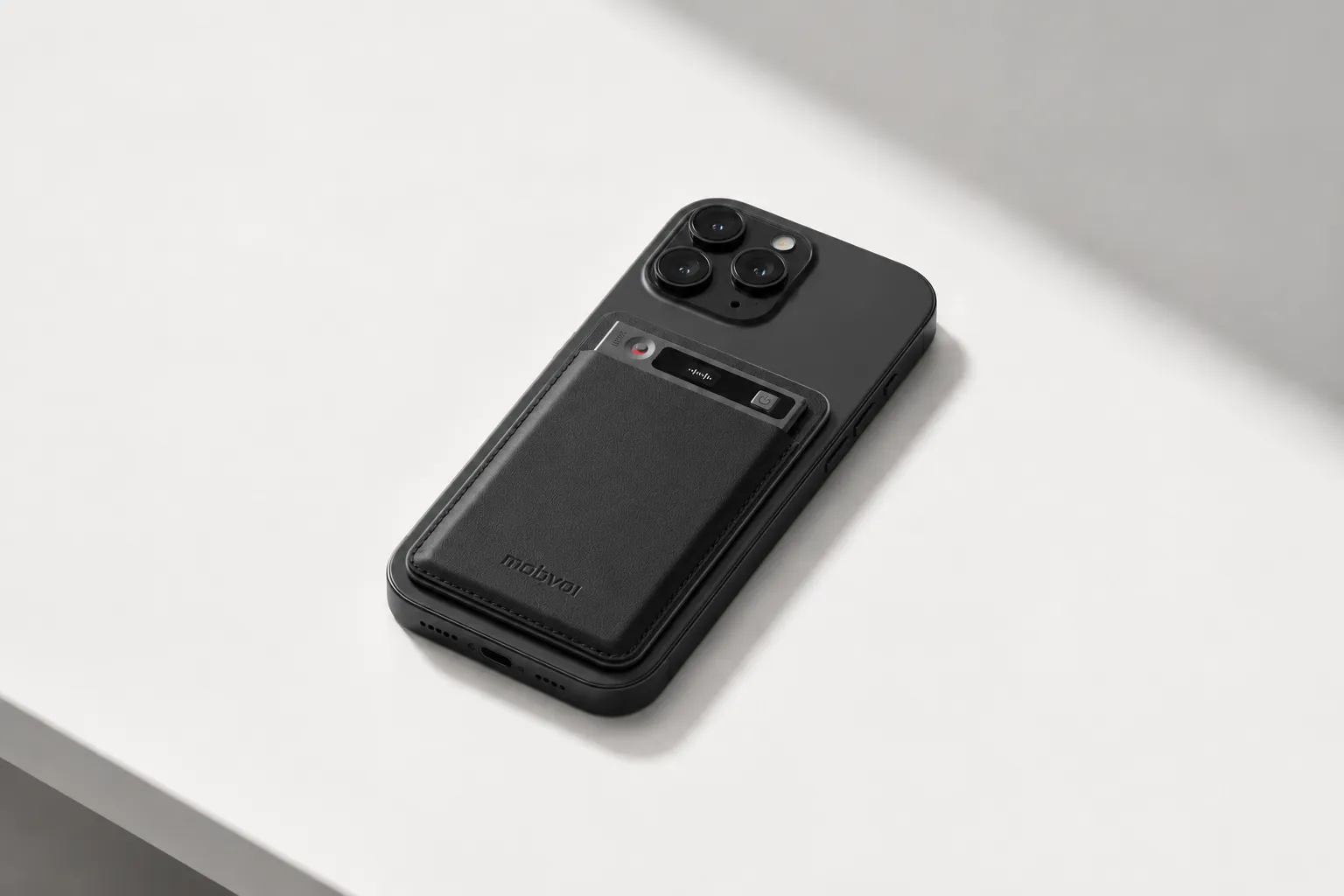
Key features: Earphone and Speaker modes for calls and rooms; 3-mic array up to 10m; 64GB local storage; 25-hour battery; AI summaries with 100+ templates; speaker identification and search; Sales Coach and Lesson Kit skills.
Pros
- Records both phone-call and room scenarios with one device
- Up to 10m pickup is strong for conference tables and interviews
- 64GB storage reduces file anxiety on travel-heavy weeks
- Time-stamped transcripts and search save real review time
Cons
- Best AI outputs depend on cloud transcription minutes
- Some buyers will still prefer a screenless, fully traditional recorder
TicNote Watch: best for moving conversations and wearable capture
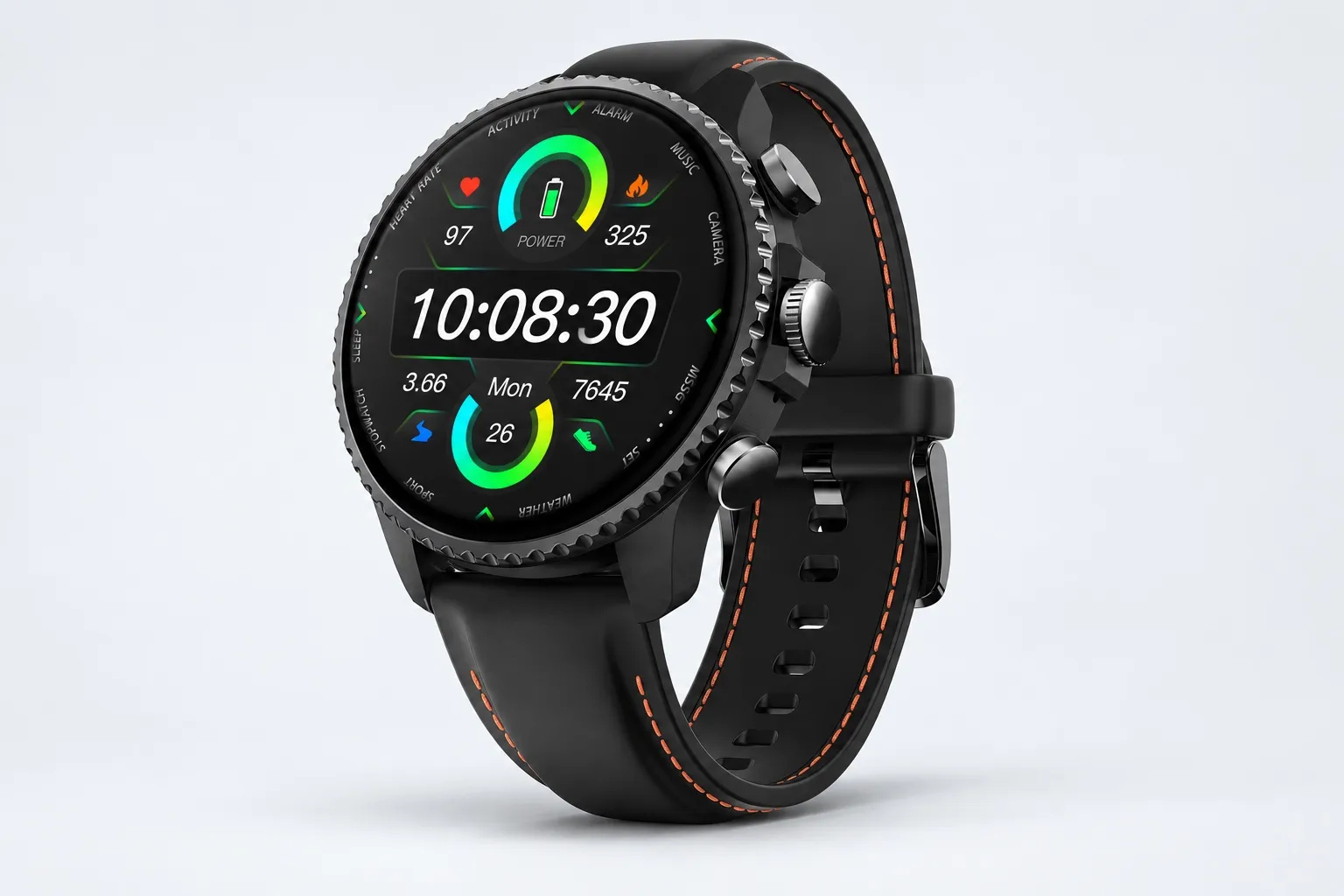
This one fits the consultant, journalist, or conference operator who's walking between booths, hallway chats, and Bluetooth calls where pulling out a phone would kill the moment. A watch is simply faster when the conversation starts in motion, not at a table.
The workflow is the point. There's a dedicated top recording button, a double-tap Random Thought shortcut for up to 60 seconds, and a Discreet Recording Mode with the screen off and a red-dot indicator. If you want a wearable-first option, explore TicNote Watch for wearable note capture.
It backs that up with over 24 hours of continuous recording, auto-segmentation after 5 hours, dual omnidirectional digital silicon mics with 3 to 5m pickup, Bluetooth call recording for both sides with transcription, live wrist transcription in 17 languages, One-Tap Highlight, AI summaries on the watch face, and AI Journal linkage. Shadow Recap is the differentiator here: it connects recorded meetings with stress, sleep, and heart-rate trends.
Pros
- Fastest one-handed recorder here
- Records Bluetooth calls from the watch itself
- One-Tap Highlight is genuinely useful mid-conversation
- Over 24 hours continuous recording is strong for a wearable
Cons
- 3 to 5m pickup is shorter than a card recorder in larger rooms
- Watch format won't suit buyers who want a pure recorder only
Sony ICD-TX660: best for a slim traditional mini digital voice recorder
If I just wanted a familiar slim recorder for lectures, dictated notes, or one-on-one interviews, this is still the safe pick. It's a classic mini digital voice recorder choice for buyers who care more about local recording and less about transcripts, AI summaries, or app-driven workflows.
That simplicity is its advantage and its limit. You avoid an app-heavy system, but review, quote retrieval, and organizing recordings stay manual. For personal capture, that's fine. For meeting-heavy knowledge work, it gets slower.
Key features: ultra-slim body, built-in USB charging, OLED display, one-push recording, stereo microphones, 16GB internal memory.
Pros
- Very slim and easy to pocket
- Local recording workflow is straightforward
- Good fit for lectures and personal dictation
Cons
- No built-in AI summaries, search, or speaker identification
- Not designed for phone-call recording workflows
PLAUD Note: best for buyers who want a discreet card recorder with AI summaries
PLAUD Note makes sense if you want a thin card-style recorder for meetings and calls and you care about AI outputs after the conversation. The appeal is obvious: compact body, discreet carry, and a modern transcription workflow.
The trade-off is the math around feature access. Compared with TicNote AI Voice Recorder, the comparison usually comes down to how many transcription minutes you need, what features are included in the base experience, and how much ongoing subscription cost you're comfortable carrying.
Key features: card-style design, call and meeting recording modes, AI transcription and summaries, app-based review workflow.
Pros
- Compact and discreet for daily carry
- Better post-meeting workflow than a basic recorder
- Strong fit for people who want AI notes in a card format
Cons
- Subscription and usage-limit trade-offs matter more here
- Value depends heavily on how often you transcribe recordings
Zoom H1essential: best for lectures and solo voice capture in quieter spaces
If your main job is recording lectures, spoken ideas, or simple room audio, the H1essential is the practical audio-first choice. I'd pick it over a call-focused device when capture quality matters more than wearability, discreet use, or instant summaries.
That said, it's less convenient once the recording ends. You don't get the same search, AI notes, or call workflows you'd get from an AI note taker.
Key features: 32-bit float recording, built-in stereo microphones, USB microphone mode, compact handheld body, microSD storage.
Pros
- Strong audio capture for lectures and spoken notes
- 32-bit float helps prevent ruined takes from level mistakes
- Simple choice for students and solo creators
Cons
- Less discreet than card or watch-style options
- No native AI summary or call-recording workflow
How to choose the right mini voice recorder for your workflow
The right recorder usually comes down to three things: where conversations happen, what you need after the recording ends, and how much friction you'll tolerate while capturing it. I'd buy for the messiest part of my week, not the easiest one.
If I record meetings, interviews, and phone calls in the same week, I'd go with TicNote AI Voice Recorder. It fits that mixed workflow better than a single-purpose recorder because Speaker mode handles room audio, Earphone mode handles call capture, the 3-mic array reaches up to 10m, and the 25-hour battery usually covers several workdays. The bigger win is what happens after: searchable transcripts, speaker labels, summaries, and exports instead of a folder full of isolated audio files. If that's your pattern, Check TicNote AI Voice Recorder details.
If your best notes happen while walking between booths, networking, or working live events, a wearable is easier to live with. I'd choose TicNote Watch because the top button starts recording fast, Random Thought capture is built for sub-60-second ideas, Bluetooth call support helps on the move, and One-Tap Highlight makes later review faster. That's why I'd point event-heavy users to Explore TicNote Watch for wearable note capture, and this is also where wearable note takers for field reporting make more sense than card-style devices.
If you mostly record lectures or solo voice notes and you're fine reviewing audio yourself, Sony ICD-TX660 and Zoom H1essential are simpler bets. Sony wins if you care about a slimmer pocket carry. Zoom H1essential wins if you want straightforward room capture without paying for AI layers you won't use.
If you want transcription but need to watch long-term cost, compare ownership, not just hardware price. TicNote AI Voice Recorder starts at $159.99 and includes a hardware plan with 600 transcription minutes per month, while higher-use tiers can add 2,100 or 6,800 minutes depending on plan. Against PLAUD Note, I'd compare included minutes, when paid plans start, whether exports to tools like Notion or Obsidian matter, and how often you truly need summaries versus raw transcripts.
Wearables beat card-style recorders at trade shows, property walk-throughs, field interviews, and commutes between meetings. Card-style devices win in boardrooms, recorded calls, and longer seated interviews where battery life, phone attachment, and steadier placement matter more.
My checklist is simple: upfront price, likely subscription, local storage, real battery life, and whether I need live transcription or just post-call review. Buy for your actual week, and the choice gets much clearer.
Privacy, consent laws, and security checks before you buy a discreet voice recorder
Privacy isn't a side issue here. If you're buying a discreet recorder for meetings, interviews, classes, or phone calls, legality and data handling are part of product fit just as much as battery life or mic range.
Recording consent laws: check this first
Start with consent law in your region. At a high level, one-party consent means one person in the conversation can approve the recording, while all-party consent means everyone involved must agree. That matters most for calls, interviews, workplace conversations, and any discussion where people expect privacy.
Law is only step one. Company policy, client contracts, HR rules, or school rules can still ban recording even when local law allows it. The U.S. Department of Justice and the Digital Media Law Project both note that state and context matter, so verify the rule before you press record.
Security checks for an AI voice recorder
If the recorder syncs to the cloud, verify five things: encryption in transit, encryption at rest, private-by-default storage, whether your data trains models, and where the cloud data is stored. Also check whether offline recording is possible and whether you can delete or export transcripts later.
TicNote is a good example of claims buyers should verify, not blindly trust. It says recordings and transcripts are encrypted, data is private by default, not used to train AI models, stored in a U.S.-based cloud, and recorded offline with sync when you reconnect. If AI notes are part of your shortlist, this guide to meeting note takers with privacy and pricing trade-offs is worth comparing alongside the hardware.
Set realistic expectations in noisy rooms
A 10m pickup claim does not mean perfect transcripts in a noisy café or echo-heavy classroom. In practice, accuracy improves when the mic is closer, the room is quieter, and the group is smaller. Choose long-range hardware only if you truly need table coverage.
Match the privacy level to the job
I'd choose a traditional local recorder for sensitive interviews, legal discussions, or anything confidential enough that cloud sync feels risky. I'd choose AI transcription when speed matters more than maximum isolation. Wearables need extra judgment because they're easier to forget you're using, and that can cross a social line fast.
Final pre-purchase checklist
- Legal in my region?
- Acceptable to participants?
- Secure enough for my data?
- Capable enough for my room size?
- Affordable beyond the sticker price?
Conclusion: what actually makes the best mini voice recorder worth buying?
After comparing the field, I don't think the best mini voice recorder is the one with the longest spec sheet. It's the one that fits the way you actually capture information, then saves you time after the recording ends.
For most buyers, the real return comes down to three questions. Does it record clearly in your real environment, whether that's a noisy meeting room, lecture hall, or phone call? Does it match your recording style without making the moment awkward, whether you need a card-style device, a wearable option, or a recorder built for lectures? And can it turn raw audio into usable notes fast, with searchable transcripts, summaries, and organized files instead of one more folder you'll never revisit?
That's the gap many compact recorders still haven't closed. They can capture decent audio, but they don't always help you search, summarize, organize, and reuse what was said.
My advice is simple: spend 10 minutes listing your top two recording scenarios, decide whether call recording, wearable capture, or lecture recording matters most, then compare those needs against your privacy checklist and budget. That's what makes a mini recorder worth buying.


