

 Extension
![[Free Credits] How to Access Claude Opus 4.7: Official Options, Setup Steps, and How to Confirm You’re Using It](https://cdn-digitalhuman-pb.weta365.com/voice-recorder-prd/static/backend/2026/05/08/2052695763522727937.webp)
TL;DR: Claude Opus 4.7 Access and the TicNote Cloud Workflow
Try TicNote Cloud for free if you want to know how to access Claude Opus 4.7 without juggling multiple AI subscriptions: use Claude Opus 4.7 Premium in TicNote Cloud free for 30 requests per month, or start with Claude.ai and official cloud catalogs when your plan, region, or company stack supports them.
Access is only half the work. Teams often lose test prompts, meeting notes, and source files across tools, which makes results hard to repeat. With TicNote Cloud, you can keep meetings and documents in Projects, then compare outputs with shared context.
How to Access Claude Opus 4.7 Without Guesswork
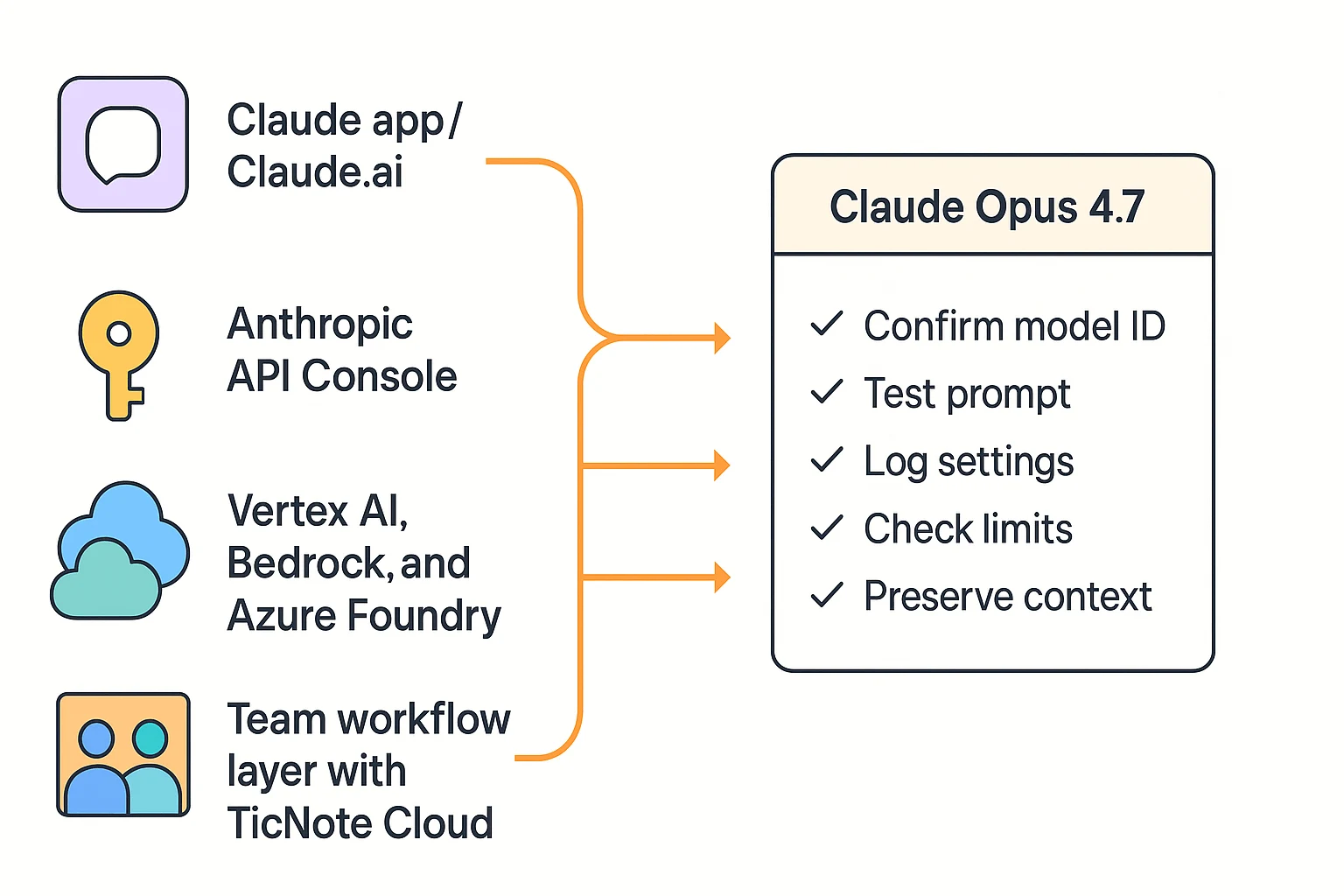
If you're asking how to access Claude Opus 4.7, start with the official Claude app or Claude.ai when the model is available there. It's the lowest-friction path for non-technical users, but the model picker can vary by plan, region, and rollout timing. First-party surfaces also give you clearer privacy settings, billing controls, and policy guidance.
Start with the access path that matches your job
Use the Anthropic Console when you need repeatable tests, logs, or an integration path. The high-level flow is simple: create an account, complete verification, create an API key, then run one minimal request before adding real data.
For platform teams, check the catalog you already use:
- Claude Code Opus 4.7: best for coding workflows inside developer tools.
- Claude Opus 4.7 on Vertex AI: best for Google Cloud teams.
- Claude Opus 4.7 on Bedrock: best for AWS buyers and governed deployments.
- Claude Opus 4.7 on Azure Foundry: best for Microsoft-stack teams.
Catalog names, region support, and model IDs can differ. Always verify availability inside the platform before you plan a rollout.
Confirm the exact model before serious work
Avoid the common "I thought I was using Opus 4.7" mistake with a 3-step check:
- Confirm the exact model label or API identifier.
- Log the model name in your test notes.
- Run a tiny sanity prompt to confirm settings, including reasoning or effort level if shown.
Hot model access changes fast. Re-check official docs, pricing, regions, and rate limits weekly during evaluation. For most teams, the best choice is to keep meeting notes, transcripts, documents, and test outputs in TicNote Cloud, then use Claude Opus 4.7 as an evaluation layer. That gives you one shared context base without buying extra workflow tools first.
What Does "Free Access" Mean for a Hot Claude Opus 4.7 Model?
If you're searching for How to access claude Opus 4.7 for free, treat "free" as evaluation access, not unlimited use. Opus-class models are premium, so no-cost access usually comes with caps, queues, or feature limits.
Know the main free-access types
Rate-limited chat access means you may send a fixed number of messages per day or month. When you hit the cap, you'll usually see an upgrade prompt, a wait window, or temporary throttling.
New-account API or cloud credits work like a temporary budget. They can help you test prompts, documents, or code, but they're not free forever. Common checks include a payment card, phone verification, or organization verification.
Startup and platform grants can be larger, but they require eligibility. If your company already uses AWS, Google Cloud, or Microsoft Azure, start with that provider's official model catalog and credit terms.
Avoid surprise spend
Long documents plus long back-and-forth can raise usage fast because models often bill by tokens, meaning chunks of text processed in and out. Before testing, check:
- Trial duration and renewal rules
- Eligible services and model exclusions
- Token billing for input, output, tools, and files
- Credit expiry and whether unused credits disappear
Users can also sample Claude Opus 4.7 Premium in TicNote Cloud for free with 30 requests/month, which is often the cleanest way to try real meeting, research, and document tasks without managing several plans.
Claude Opus 4.7 Access Paths Compared
If you're asking how to access Claude Opus 4.7, the safest answer is to use the official surface that matches your job: chat, API, or an approved cloud platform. The right path depends on whether you need quick testing, repeatable prompts, or enterprise governance.
| Access path | Setup time | Needs card | Where you run prompts | Best for | Typical limits | Notes to verify |
| Claude.ai Opus 4.7, when available | 5–10 min | Often yes | Claude web app | Simple testing, small files | Message caps, plan limits | Model availability by plan and region |
| Anthropic API Console | 15–30 min | Yes | Your app or scripts | Developers, repeatable workflows | Rate limits, spend caps | Key security and model access |
| Claude Opus 4.7 on Vertex AI | 30–60 min | Billing account | Google Cloud | GCP teams, longer trials | Quotas, regions | Access request and IAM setup |
| Claude Opus 4.7 on Bedrock | 30–90 min | AWS billing | AWS | AWS-standard enterprises | Model access, service quotas | Procurement, audit logs, regions |
| Claude Opus 4.7 on Azure Foundry | 30–90 min | Azure billing | Azure AI stack | Azure-standard enterprises | Quotas, deployment rules | Tenant policy and region support |
| TicNote Cloud Claude workflow | 5–10 min | No for free plan | TicNote Project workspace | Trying Opus 4.7 with meeting and document context | 30 Claude Opus 4.7 Premium requests/month | Not a general-purpose reseller API |
Start with Claude.ai for simple testing
Claude.ai is the lowest-friction path for quick prompts, small file tests, and basic document analysis. The tradeoff is control. Caps, model picker access, and regional availability can change by plan, so verify the model name before judging quality.
Use the API when prompts must repeat
The Anthropic API is best for developers who need logging, prompt templates, parameters, and app integration. You also own the risk: protect keys, set budgets, monitor rate limits, and avoid pasting sensitive data into test scripts.
Choose cloud platforms for governed trials
Vertex AI fits teams already on GCP because billing, IAM (identity and access management), and quota tracking stay in one place. Bedrock and Azure Foundry are better when your company already standardizes on AWS or Azure. In many enterprises, governance, audit logs, and procurement flow matter more than setup speed.
Check third-party front ends before uploading files
Before using any wrapper, ask four questions:
- Who stores your prompts and files?
- Can you delete exports and transcripts?
- Is the exact model name transparent?
- Are enterprise controls available?
For most teams that want to try Opus 4.7 without juggling multiple subscriptions, TicNote Cloud is the practical choice. It lets you test Claude Opus 4.7 Premium inside a Project while keeping meeting notes, documents, transcripts, and evaluation context organized in one workspace.
Setup Steps for Non-Developers Who Just Want to Try It
If you're searching for how to access Claude Opus 4.7 without developer setup, start with the official Claude.ai route. Your goal is simple: confirm access, run small tests, and avoid risky third-party tools.
Create or check your Claude.ai account
Use this quick check before you upload anything:
- Sign in to your Claude.ai account.
- Confirm your region is supported.
- Check your current plan status.
- Open a new chat and look for the model selector.
If Opus 4.7 isn't listed, don't force it through unofficial mirrors. It may be in staged rollout, tied to a paid plan, or available through another official path such as an API or approved cloud platform.
Confirm the model before testing
Look near the conversation settings or model label area. The exact layout can change, so focus on the displayed model name. If the label doesn't say Opus 4.7, assume you're testing a different model.
Upload a small evaluation pack
Start with three low-risk files:
- One short PDF, about 2–5 pages
- One meeting note excerpt with no sensitive details
- One code snippet, if relevant
Small tests reduce cap pressure and make results easier to compare.
Track caps and protect private data
Keep a simple log: date, time, model name, prompt, file size, result quality, and any cap message. Use the same prompts each time.
Don't paste client PII, payroll data, or internal financials into unknown front ends. Prefer first-party tools or company-approved clouds. If meeting content matters, consider a project workspace like TicNote Cloud, where transcripts stay editable and project-scoped before you reuse them with advanced models.
Setup Steps for Developers Using API and Cloud Platforms
If you're searching for how to access Claude Opus 4.7 as a developer, treat setup as a controlled evaluation, not a casual test. Your first goal is simple: prove access, confirm the model ID, and cap spend before anyone sends real project data.
Create a safe API evaluation space
Start in the Anthropic Console. Create an account, complete verification, generate an API key, and store it in a secret manager, not a spreadsheet or repo. Create a separate "eval" project with limited permissions so tests stay isolated from production apps.
Send one minimal request first
Keep the first request tiny:
POST /v1/messages headers: x-api-key, anthropic-version, content-type body: { "model": "confirmed-current-model-id", "max_tokens": 200, "messages": [{ "role": "user", "content": "Summarize this test note in 3 bullets." }] }
Confirm model ID before scaling:
- Copy the model identifier from the current official console or platform page.
- Log the model value returned in each response.
- Pin SDK and prompt versions for repeatable tests.
- Save sample outputs for regression checks; this pairs well with a fast Claude validation workflow.
Enable access through cloud platforms
For Google Cloud Vertex AI, enable the Vertex AI API, open Model Garden, find Claude, request or enable access, select a supported region, attach a service account, and run a small test. IAM roles are just permission bundles; give each service account only the access it needs.
For AWS Bedrock or Azure AI Foundry, open the model catalog, request model access and quotas, choose a region, configure credentials, and test with a low-token prompt. Common blockers include org-level approvals, procurement review, and regional quota limits.
Set controls before real testing
Don't get surprised:
- Add hard budget caps or billing alerts.
- Handle 429 rate-limit errors with retries and backoff.
- Redact sensitive data from logs.
- Version prompts, datasets, and evaluation notes.
For teams evaluating meetings and documents, run the model tests, but keep transcripts, source files, prompts, and results in one workspace. TicNote Cloud fits that layer: Projects preserve context, Shadow AI answers with citations, and evaluation artifacts don't disappear into chat history.
Why a Project Workspace Adds a Unique Workflow Layer Around Claude Opus 4.7
When people ask How to access claude Opus 4.7, they often focus on the login, plan, or API key. That matters, but access alone doesn't create a workflow. Teams still lose context across calls, PDFs, user interviews, product specs, and test prompts.
Build one project memory before you prompt
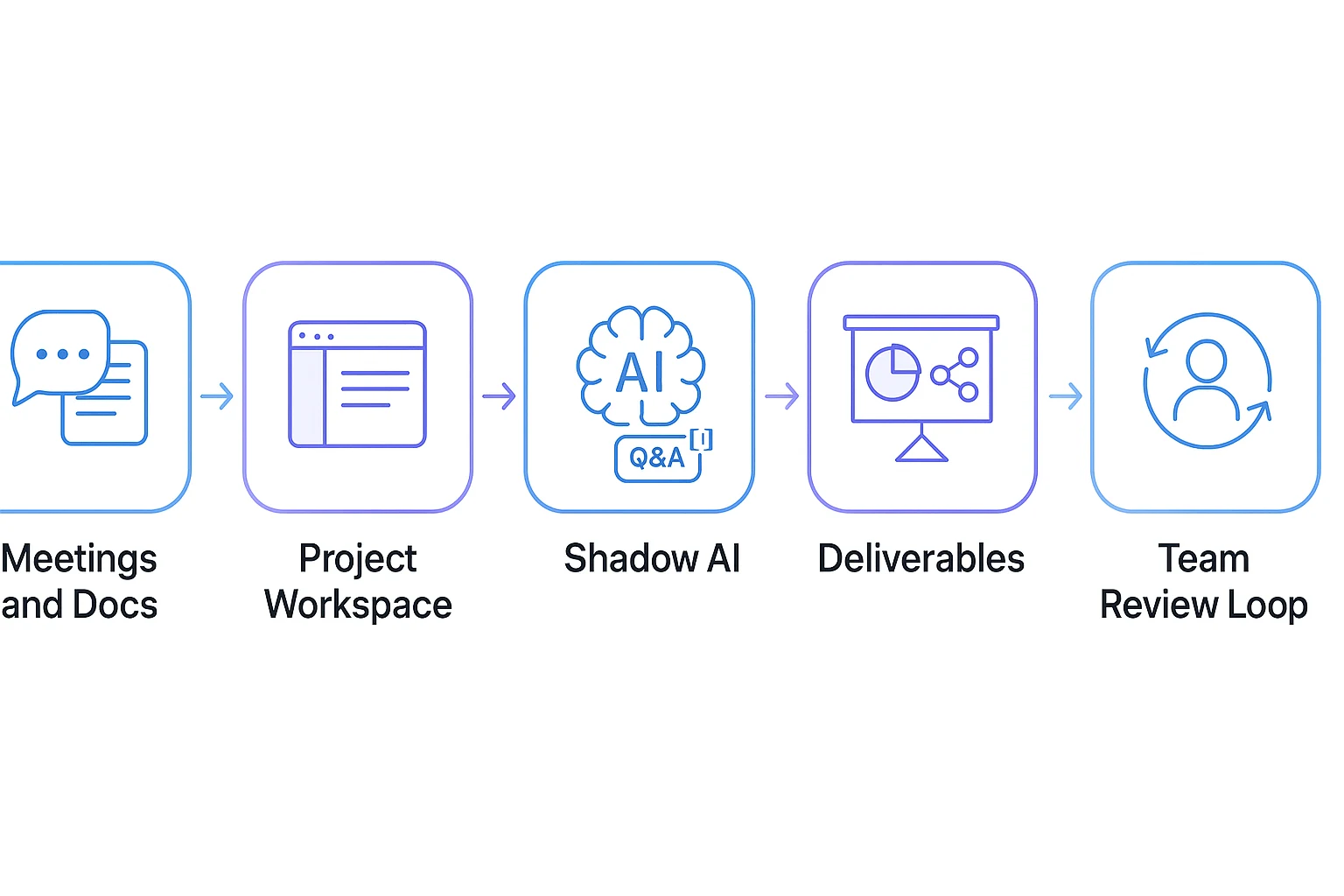
TicNote Cloud's Project workspace gives teams one place to collect meeting transcripts, documents, videos, and research notes. Instead of pasting scattered notes into a model each time, the team builds a reusable knowledge base around the work.
That matters for evaluation. If you test Claude Opus 4.7 on meeting notes, research synthesis, coding decisions, or client discovery, your inputs need to stay clean and traceable.
Ask cited questions, then turn answers into outputs
Shadow AI provides cited Q&A, which means an answer links back to the exact source segment it used. That makes review faster because a teammate can verify the quote, timestamp, or document section before sharing the result.
It can also turn project context into structured assets, including:
- Briefs for leadership
- Task lists for execution
- Decision logs for product and engineering
- Stakeholder updates after research calls
TicNote Cloud also lets users use Claude Opus 4.7 Premium in-product for free, with 30 requests per month. This is for usage inside TicNote Cloud, not a general Claude Opus 4.7 entitlement across other apps, APIs, or platforms.
Capture meetings without adding a bot
Bot-free recording supports Google Meet, Teams, Zoom, and Lark workflows without a meeting bot joining the call. This lowers adoption friction, especially in client calls or research interviews where extra attendees can feel intrusive.
After recording, transcripts become searchable context. Teams can fix names, add headings, tag decisions, and mark action items instead of treating notes as read-only files.
Ship review-ready deliverables
From the same Project, teams can generate a "What we tested" report, a pros/cons and risks memo, a shareable HTML stakeholder summary, or a mind map showing themes across interviews. Private-by-default handling, permissions, and traceable Shadow operations help teams share outputs with more confidence.
How Can Teams Use TicNote Cloud Before and After Trying Claude Opus 4.7?
A safe plan for How to access claude Opus 4.7 starts before login. Teams get better results when their meeting notes, interviews, files, and decisions are already clean, grouped, and easy to verify.
Before access: build a clean Project memory
In TicNote Cloud, create a Project for the evaluation. Add meeting recordings, transcripts, research notes, PDFs, and planning docs. Capture:
- Goals, limits, owners, and stakeholders
- Decision history and open questions
- Key excerpts, terms, and definitions
This reduces re-explaining. It also prevents model outputs from mixing old assumptions with current decisions.
During evaluation: test against cited sources
Use the same 5–7 questions across models. Keep the prompt, file set, and scoring method stable. Score each answer from 1–5 for accuracy, completeness, and usefulness. Require citations back to your Project sources, so reviewers can check claims instead of trusting polished text. For technical teams, pair this with a broader model routing checklist when coding cost and success rate matter.
After testing: ship the useful parts
Use Shadow AI to turn findings into an exec summary, risk list, mitigations, next steps, and budget guardrails.
Examples:
- A consultant turns 12 client interviews into a deliverable pack.
- A PM converts sprint planning and user research into a decision log.
- A researcher groups interviews by theme, quote, and evidence.
Limits, Privacy, and Troubleshooting Before You Start
Before you search How to access claude Opus 4.7, treat availability, policy, and cost as setup variables. Most "not visible" issues come from plan limits, region rollout, or org controls, not a broken model.
Fix access blockers in order
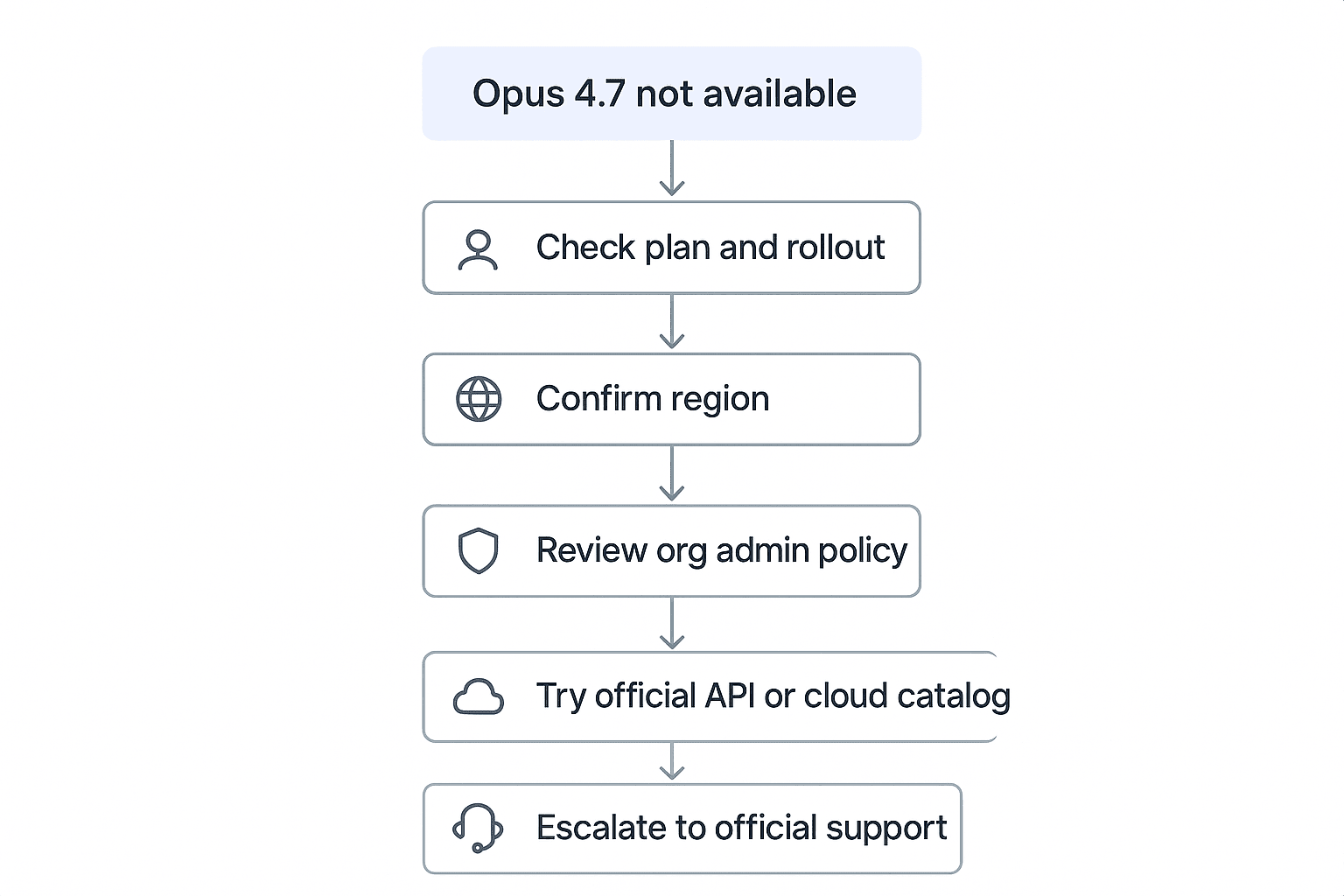
If Opus 4.7 doesn't appear:
- Confirm your plan, region, and rollout timing.
- Check org admin settings for work accounts.
- Try an official alternative surface, such as an API console or approved cloud catalog.
- Escalate through official support.
For phone verification or account approval issues, common blockers include SMS failures, duplicate accounts, and fraud checks. Use official support channels only. Avoid "account sellers," shared logins, or unofficial invites.
Check region, policy, and spend risk
Cloud catalogs can be region-scoped. Document the exact region, project, provider, and evaluation date. Enterprise blocks often include outbound network restrictions, data-handling rules, and prohibited-tool lists. Start with non-sensitive sample data.
Spend can spike when you use:
- Long documents
- Long chat history
- Agentic loops
- High-effort reasoning settings
Mitigate by summarizing first, chunking files, and setting budgets, alerts, and per-user limits.
Review privacy before uploading data
Compare first-party and third-party tools on four controls: data retention, training use, export/delete controls, and access logs. TicNote Cloud is private-by-default and keeps Shadow AI operations traceable, which helps audits. Still run your own security review before using sensitive customer, health, legal, or financial data.
Final Thoughts: Start Small, Keep Context, Then Scale
The safest way to learn how to access Claude Opus 4.7 is simple: verify the model name, test small non-sensitive tasks, then watch caps and spend before moving real work into it.
Use this 3-step rule:
- Test with sample notes, public docs, or draft code.
- Confirm you're using Claude Opus 4.7, not a fallback model.
- Track request limits, billing, and shared team access.
Users now can use Claude Opus 4.7 Premium in TicNote Cloud for free (30 requests per month). If you want to access Claude Opus 4.7 without paying for multiple AI subscriptions, try TicNote Cloud.