Extension
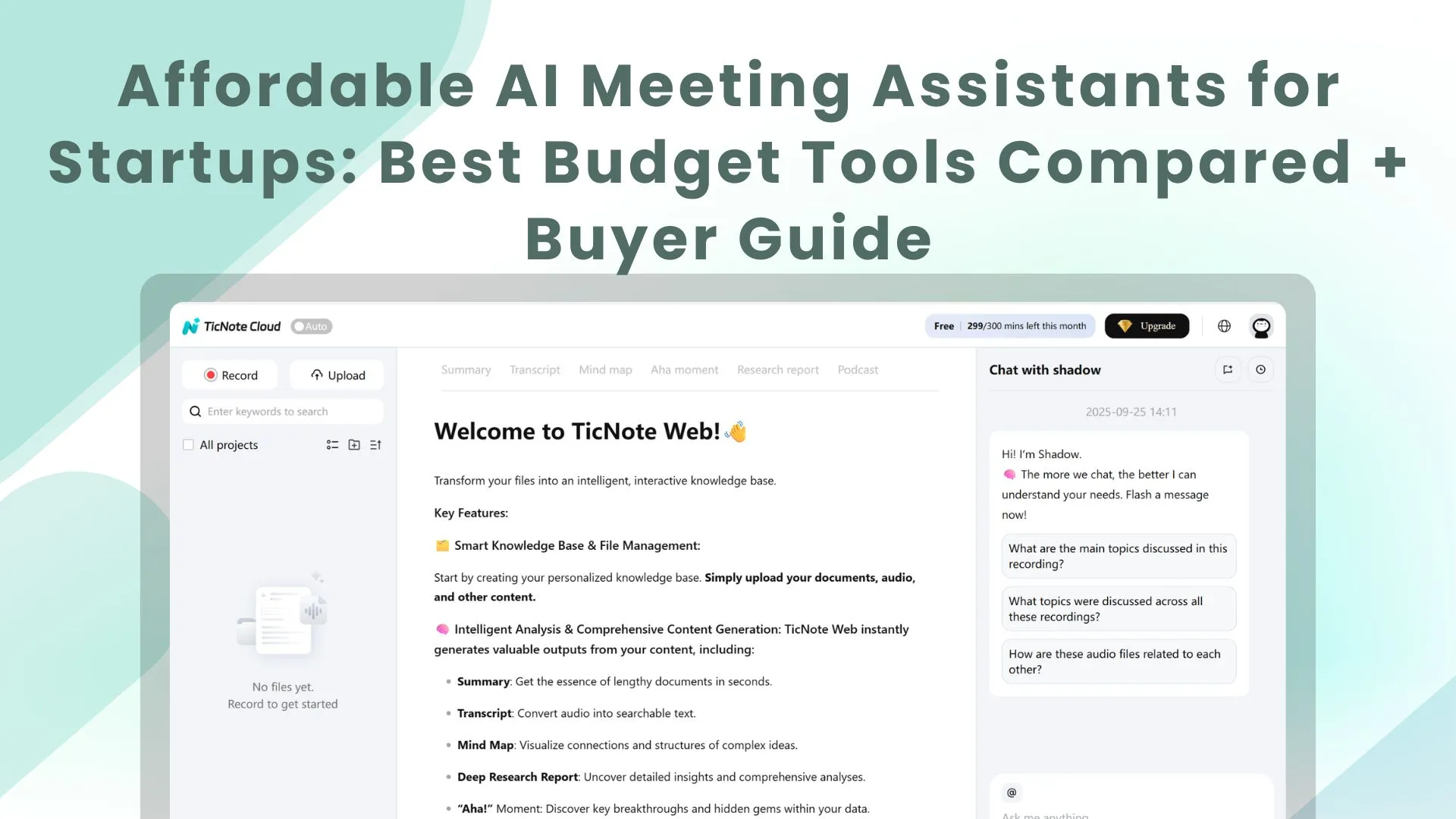
TL;DR: the best affordable AI agent tools for startup meetings
For affordable AI meeting assistant tools for startups, TicNote Cloud is the best overall value when meetings must become editable transcripts, searchable project memory, and real deliverables.
Notes-only tools create a second job: cleaning transcripts, copying action items, and rebuilding context. If that slows follow-up, TicNote Cloud gives lean teams bot-free capture, editable notes, and Project-based AI that can generate reports, presentations, and mind maps.
Quick picks:
- Best free individual option: simple summary-first notetaker.
- Best sales calls: CRM-friendly recorder.
- Best transcript-only need: basic searchable transcription.
Affordable AI meeting assistant tools for startups: quick picks
The best affordable AI meeting assistant tools for startups are not all built for the same job. Some capture notes and action items. Others turn calls into editable transcripts, searchable project knowledge, and client-ready outputs. If you're comparing broader systems, this guide to AI workspace platforms adds useful context.
| Tool / Category | Best for | Free plan reality | Starting paid price | Bot-free meeting transcription | Editable transcripts | Project memory | Integrations | Security notes |
| TicNote Cloud / AI workspace | Product research, consulting, founder ops | 300 mins/month; 30-min web recordings; 3 doc imports | $12.99/mo | Yes; extension, app, upload | Yes; edit, annotate, collaborate | Strong | Slack, Notion; TXT, DOCX, PDF, Markdown, PNG, Xmind, HTML | Private by default; encryption; no model training; SSO on Enterprise |
| Otter / AI notetaker | Internal meetings, quick summaries | Free tier; verify caps | Verify | No typical bot-free flow | Basic editing | Basic | Zoom, Meet, Teams, Slack | Verify admin and training settings |
| Fireflies / AI notetaker | Sales calls, searchable recordings | Free tier; verify storage limits | Verify | Limited; upload-based | Basic editing | Basic | CRM, Slack, Zapier | Verify retention, SSO, and AI settings |
| Fathom / AI notetaker | Fast sales follow-up | Free tier; verify team limits | Verify | No typical bot-free flow | Limited | Basic | CRM, Slack, Google Docs | Verify admin controls |
Fast decision guide
- Need summaries and action items only? Pick a free or low-cost notetaker.
- Need bot-free capture plus reports, memos, sprint docs, or research assets? Choose TicNote Cloud.
- Need sales follow-up speed? Prioritize CRM sync and sales templates.
- Need knowledge to compound across teams? Prioritize project memory and a searchable repository.
Signup form placement note: add the form directly below this matrix, where intent is highest and the tradeoffs are fresh.
What should startups compare before paying?
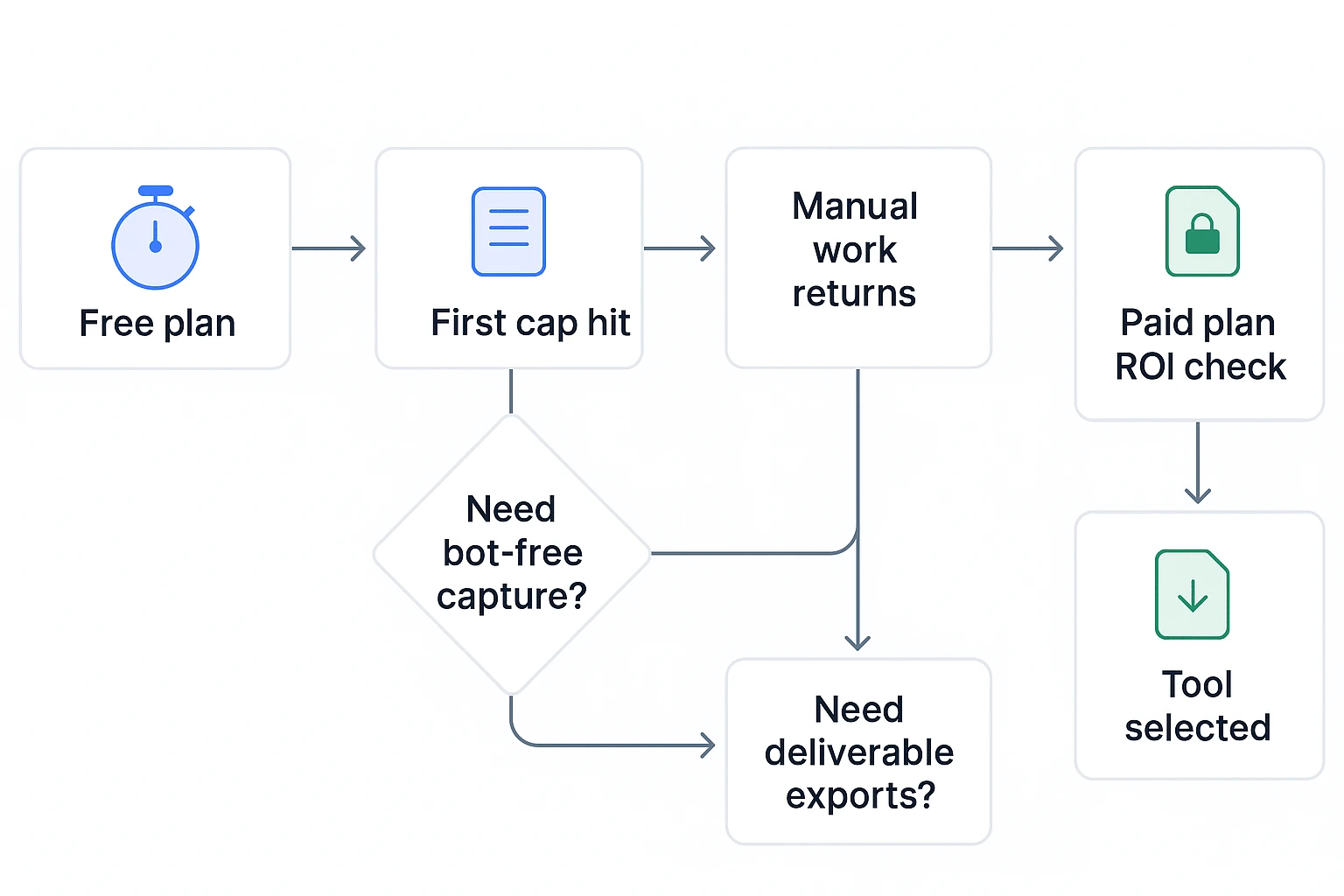
When comparing affordable AI meeting assistant tools for startups, price is only the first filter. The practical question is where the tool stops helping: at the free cap, at transcription, or after it creates usable follow-up work.
Compare free-plan limits first
Check the limits that change ROI: minutes per month, max meeting length, history retention, exports, team features, and whether "free" is a real tier or only a trial. The hidden cost starts when founders hit caps and return to copy/paste notes, reformatting docs, and chasing action items manually.
Decide if bot-based or bot-free capture fits
Bot-based assistants join as meeting participants. They are easy to auto-join and usually capture calls consistently. The tradeoff: they can feel awkward in customer, legal, HR, or fundraising calls. Bot-free meeting transcription captures through an extension, app, local recording, or upload. It is less intrusive, but users must set it up correctly.
Test transcript quality with real audio
Run the same 10-minute clip through 2–3 tools. Score speaker labels, timestamps, technical vocabulary, multi-language handling, and how many corrections you make. Editing matters because a transcript you can't clean quickly becomes shelfware.
Check what happens after the meeting
Startups need more than one meeting page. Look for editable transcripts, project-level search, multi-meeting synthesis, source links, follow-up templates, and exports like PDF, Doc, or HTML. TicNote Cloud is strong here because meetings can become reusable project knowledge and deliverables.
Verify governance before rollout
Use this checklist before client, HR, or investor calls:
- Recording consent rules for each call type
- Retention and deletion controls
- Access roles and sharing links
- Model-training policy
- Audit trails for AI actions
Verify vendor claims and re-check plan pages at purchase time. Limits, included features, and admin controls can change without much notice.
Top affordable AI meeting assistant tools for startup teams
The best affordable AI meeting assistant tools for startups should do more than record calls. Early teams need notes, search, follow-up tasks, and usable outputs without adding admin work. The real test is what happens after the meeting: can the tool turn scattered discussion into project knowledge, client assets, research summaries, or sales follow-up?
Methodology: we prioritize startup budget, bot-free options, editability, and what the tool enables after the meeting. Pricing and plan limits change often, so verify each vendor's official plan page before buying.
TicNote Cloud
Best for: teams that need an affordable AI workspace where meetings become editable assets and deliverables. It fits research, product, consulting, and cross-functional teams that reuse meeting context across projects.
Pricing: Free includes 300 transcription minutes/month, 30 minutes per web recording, 3 document imports/month, 10 AI chats/day, basic templates, live transcription, AI summaries, mind maps, translation, and AI deep research reports. Professional is $$12.99/month or$$79 billed annually, with 1,500 minutes/month, 3-hour web recordings, 30 document imports/month, unlimited AI chat, and advanced templates. Business is $$29.99/month or$$239 billed annually, with 6,000 minutes/month, 8-hour recordings, and 100 document imports/month. Enterprise adds custom usage, AI meeting agent, SSO, and 24/7 support.
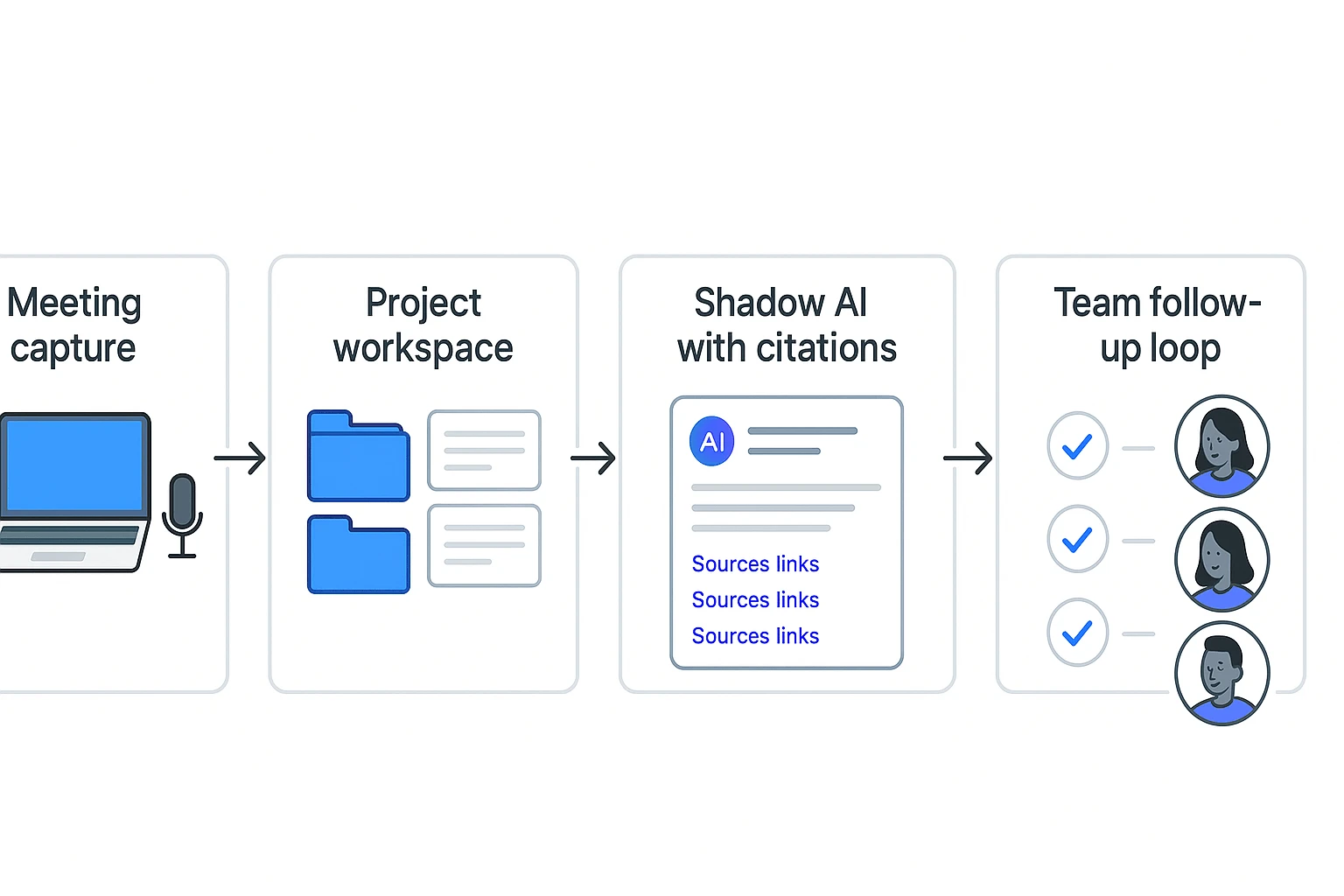
Key features: bot-free recording for Google Meet and Teams through Chrome extension, plus app capture for Zoom and Lark; editable transcripts; Projects for grouping meetings, files, videos, and documents; Shadow AI for project-level Q&A with citations; and one-click reports, web presentations, podcasts, and mind maps. It also supports Slack and Notion connectors, plus transcript, summary, audio, and mind map exports.
Limitations: Free has short recording caps and limited document imports. Its integration depth may not replace a full enterprise suite.
Why it stands out: it has the strongest "after the meeting" value. Conversations become working outputs without copy-paste or context switching.
Fireflies.ai
Best for: meeting-heavy teams that need searchable archives, shared notes, and basic automation.
Pricing: Fireflies offers a free starting tier and paid team plans. Check current plan pages for transcription limits, storage, and integration access.
Key features: AI summaries, action items, meeting search, shared workspaces, Slack, and CRM options.
Limitations: knowledge often stays meeting-scoped. Reports or polished assets usually need extra steps.
Why it stands out: strong meeting organization and collaboration for the price.
Fathom
Best for: individuals and small sales teams that want fast recaps and follow-up help.
Pricing: Fathom is known for free individual use, with team plans for shared workflows and admin features.
Key features: sales-friendly summaries, highlights, clips, sharing, and CRM-oriented follow-up.
Limitations: a visible meeting bot can feel awkward on sensitive calls. It also has less project memory than workspace-first tools.
Why it stands out: quick admin reduction for sales calls.
Otter.ai
Best for: simple searchable transcription and lightweight AI chat over meetings.
Pricing: Otter has a free tier with monthly minute limits and paid plans for higher usage. Verify the latest caps before rollout.
Key features: live transcription, meeting search, speaker notes, collaboration, and basic summaries.
Limitations: it is more transcript-centric. Deliverable-style outputs are limited.
Why it stands out: familiar, simple, and easy for founders to adopt.
tl;dv
Best for: teams that rely on clips, call libraries, and video-first sharing.
Pricing: tl;dv promotes generous free meeting capture, but storage, automation, and advanced features vary by plan.
Key features: highlights, clips, meeting summaries, search, and scheduled reports where available.
Limitations: it is less focused on editable project knowledge and long-context deliverables.
Why it stands out: useful for stakeholder alignment across many recorded calls.
Granola
Best for: human-plus-AI notes without a visible bot. It fits sensitive calls where a natural note flow matters.
Pricing: Granola commonly uses trial-like free caps before paid access. Check current usage limits and platform support.
Key features: device-audio capture, structured notes, templates, and clean note refinement.
Limitations: free use is constrained, and platform coverage can vary.
Why it stands out: low-friction, high-quality note cleanup.
MeetGeek
Best for: recurring meetings, lightweight analytics, and structured team routines.
Pricing: MeetGeek has entry-level plans, with automation and agent features changing by tier.
Key features: meeting templates, summaries, workflows, follow-ups, and basic meeting metrics.
Limitations: advanced insights can be thinner than dedicated analytics or workspace tools.
Why it stands out: practical structure for small operations teams.
Notta.ai
Best for: multilingual notes and budget transcription.
Pricing: Notta uses minute-based plans, so global teams should compare monthly usage carefully.
Key features: transcription, translation, summaries, and export options.
Limitations: it has fewer deep follow-up, project memory, and deliverable-generation features.
Why it stands out: low-cost language coverage for distributed startups.
How to choose the right product
The fastest way to compare affordable AI meeting assistant tools for startups is to start with the job after the call. If the tool only creates notes, you still need to turn those notes into decisions, documents, updates, and follow-ups.
Pick based on the work after the meeting
Choose TicNote Cloud when meetings need to become reports, presentations, mind maps, or project knowledge. It's the default fit for most startup teams because it solves the second half of the workflow: turning meeting content into usable assets. That matters for product discovery, investor or customer interview write-ups, weekly operating reviews, and consulting readouts.
With TicNote Cloud, a founder or PM can move from conversation to outputs such as:
- A PRD section draft from user interviews
- A research report with themes and evidence
- A client update deck outline
- A cross-functional action plan
- A mind map for sprint planning or strategy review
This is also where the difference between a note-taking assistant and a task-executing workspace matters. If that distinction is unclear, this guide to AI agents versus AI assistants gives a useful decision frame.
Match simpler tools to narrower needs
Choose Fireflies.ai when your main pain is meeting volume plus retrieval. It works well for teams that need consistent summaries, topic tracking, shared visibility, Slack recaps, and CRM note pushes, depending on the plan.
Choose Fathom when your budget is close to zero and you mainly need fast individual sales call summaries, next steps, and follow-up notes.
Choose Otter.ai when you want simple searchable transcription and basic Q&A. It's a practical choice when you don't need editable project knowledge or polished deliverables.
Choose tl;dv when the main goal is sharing clips and key moments with teammates, advisors, or investors asynchronously.
Choose Granola when a visible meeting bot creates friction, but you still want strong human-plus-AI structured notes.
Choose MeetGeek when you run many recurring meetings and want templates, light analytics, and consistent meeting formats.
Choose Notta.ai when your team needs affordable multilingual transcription and translation for basic notes.
The 30-second rule: if you need bot-free capture, editable transcripts, and project memory, pick TicNote Cloud. If not, choose the simplest tool that fits your meeting volume, language needs, and monthly minute limits.
What exclusive features are unavailable in basic AI meeting notetakers?
We'll demonstrate the workflow using TicNote Cloud as an example, because it combines bot-free capture, an AI agent for meeting notes, and deliverable generation in one workspace. When you compare affordable AI meeting assistant tools for startups, this "after the meeting" layer is where basic notetakers usually fall short.
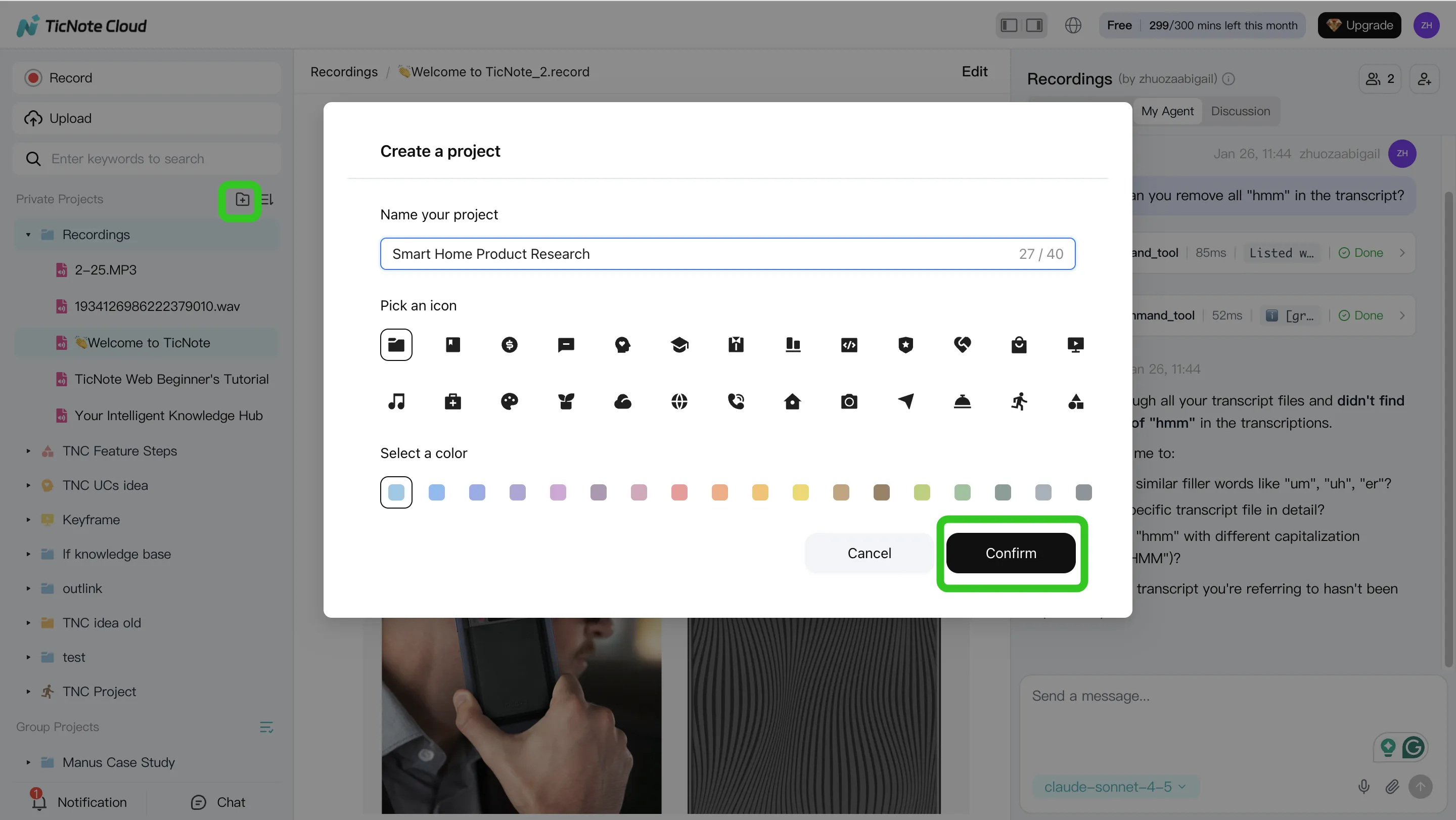
Step 1. Create a Project and add content
In TicNote Cloud Web Studio, start by creating a Project such as "Customer discovery – May." A Project is a shared workspace that groups meetings, files, and AI outputs around one topic, so context builds over time instead of staying trapped in single-call notes.
Add content in two ways:
- Direct upload: upload audio, video, or documents into the Project folder.
- Shadow AI attachment: use the attachment icon in the Shadow AI panel, upload files, and ask Shadow to save them to the right folder.
For startup work, add the meeting recording plus related docs like a PRD, interview guide, or research plan. Capture can stay bot-free: use the extension for Google Meet and Teams, app capture for Zoom and Lark, or upload recordings later.
Step 2. Search, analyze, edit, and organize with Shadow AI
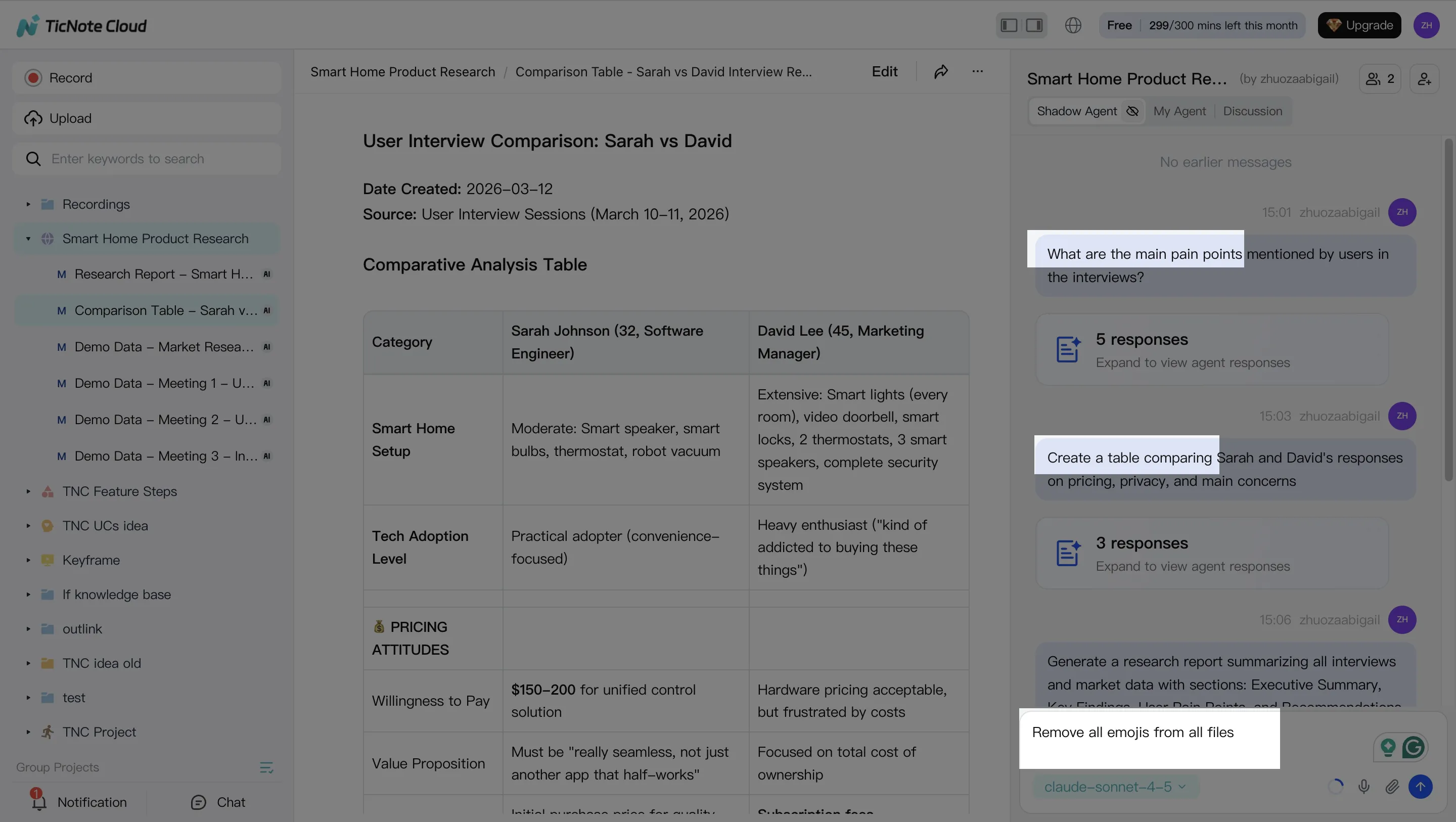
Basic tools can summarize one call. Shadow AI works across the whole Project. Ask questions like "What risks appeared in all customer interviews?" or "List objections with citations." Citations matter because founders can jump back to transcript segments before making roadmap or sales decisions.
You can also clean up the transcript, rename speakers, annotate key moments, and turn notes into structured assets:
- Problem statements
- User hypotheses
- Action items
- Decision logs
- Project outlines
Step 3. Generate startup-ready deliverables
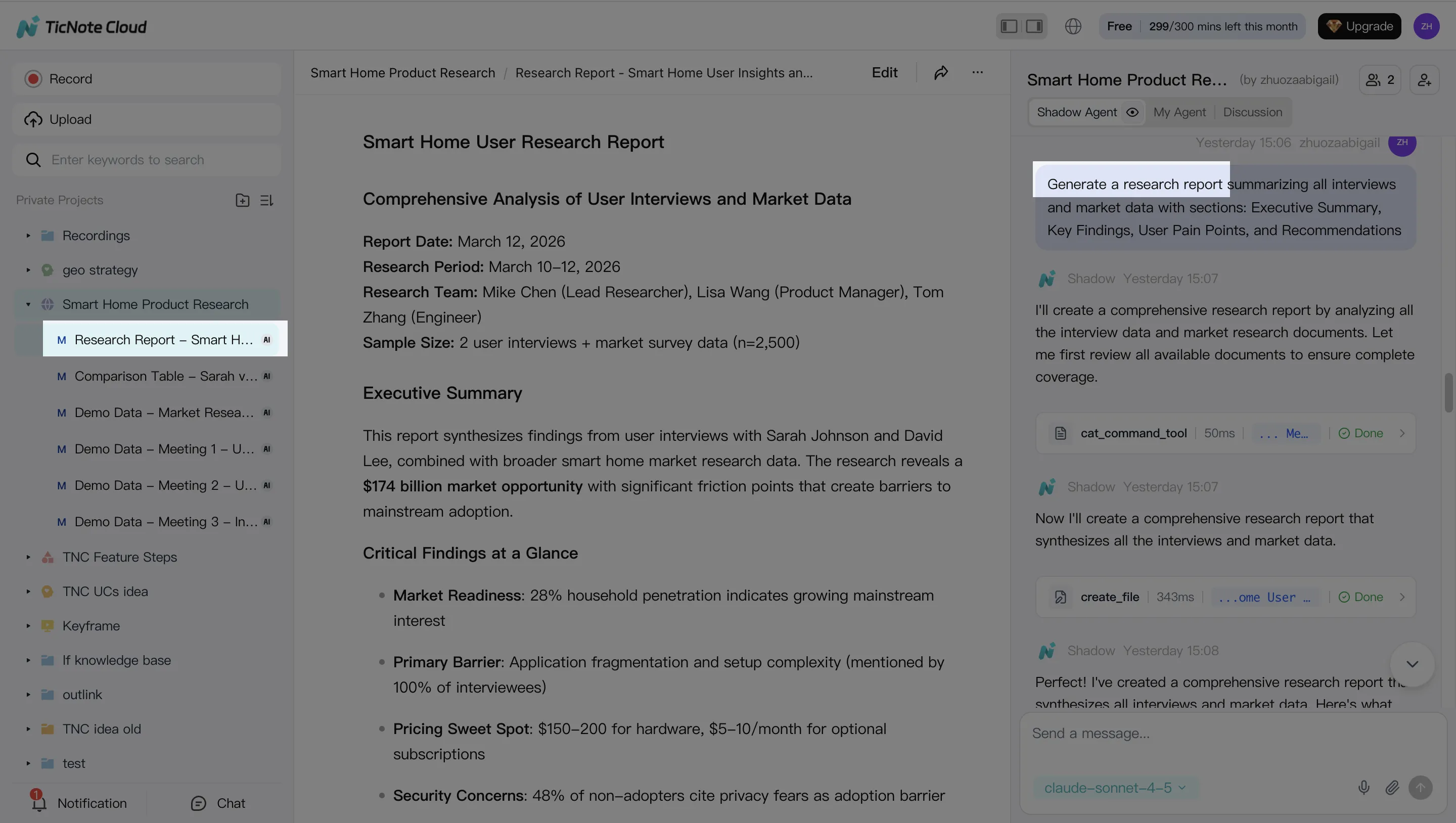
Next, ask Shadow AI or use Generate to create outputs from the same source material. This is the main feature gap versus basic notetakers.
- PDF or Word report: useful for clients, investors, and leadership updates.
- HTML presentation: fast internal readout after research or sprint planning.
- Mind map: helpful for brainstorming, prioritization, and roadmap review.
- Podcast-style recap: good for async updates when teammates missed the call.
Step 4. Review, refine, and collaborate
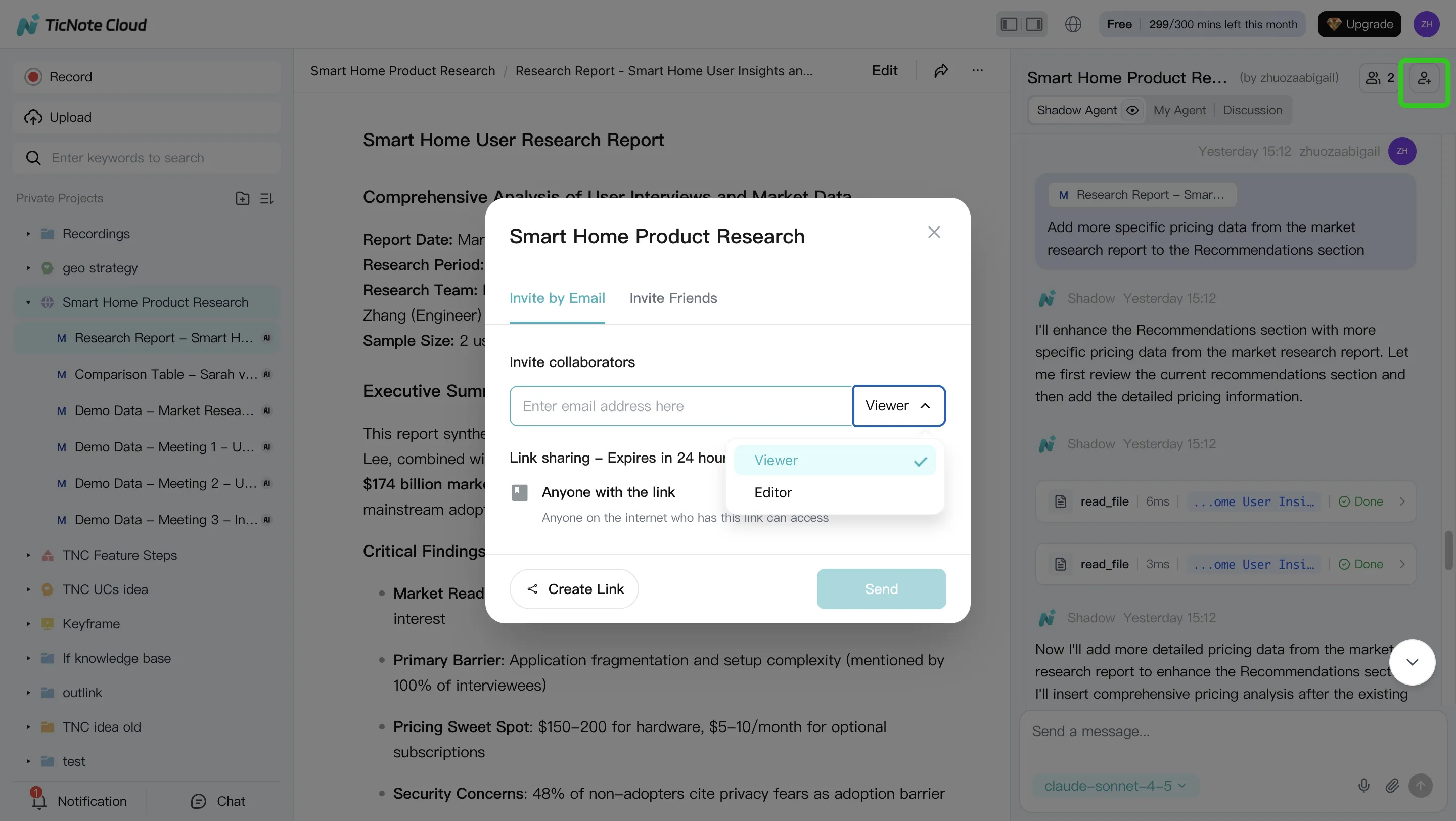
After generation, review the output, ask Shadow to rewrite weak sections, and verify paragraphs against the original source. Teams can share Projects with roles such as Owner, Member, and Guest, then comment, assign owners, and keep AI actions traceable.
On iOS or Android, the flow is shorter: create or select a Project, capture or import audio and video, run Shadow AI, then export or share the deliverable. Start with one recurring meeting series first. That builds project memory quickly and makes each follow-up more useful.
Privacy, governance, and rollout notes for lean teams
For affordable AI meeting assistant tools for startups, governance is part of the buying decision, not a later cleanup task. Before the first rollout, set a simple consent script: "We're recording this call to create notes and action items. It will be stored in our workspace, and only the project team can access it." Use a no-surprises rule for client calls, hiring interviews, and investor conversations.
Check the security controls
Compare each vendor on outcomes, not labels:
- Encryption in transit and at rest
- A clear "not used to train models" policy or opt-out
- Retention settings, deletion rights, and export options
- Workspace roles, guest access, and sharing links
- Audit logs or traceable AI actions
- SSO (single sign-on) and admin controls as you scale
Bot-free capture can reduce participant friction because no meeting bot joins the room. It does not remove consent duties.
Roll out with guardrails
Start with 1–2 recurring meeting types. Define names, storage rules, and default sharing. Set red lines: don't record legal advice, HR performance reviews, or regulated conversations without an explicit policy. Treat this as a starting point; involve counsel or security when sensitive data is involved.
Final thoughts: the best value for startups
Transcription is now the cheap part of affordable AI meeting assistant tools for startups. The real cost starts after the call: cleaning notes, finding decisions, writing follow-ups, and turning conversations into work.
For most startups, TicNote Cloud is the best value because it combines bot-free capture, editable transcripts, and Project memory that compounds across meetings. Shadow AI answers with citations and generates reports, presentations, podcasts, or mind maps instead of static notes. If you're building an AI rollout plan, pair this choice with a focused operations AI pilot before expanding.
Start small: run one weekly ops review or 5 customer interviews through it, then measure time saved and follow-up quality.